
La guía empresarial de SCEP: Implementación de Simple Certificate Enrollment Protocol para la seguridad automatizada de WiFi en campus
Esta guía de referencia técnica proporciona un diseño arquitectónico definitivo y una estrategia de implementación paso a paso para la distribución de certificados de WiFi empresarial mediante SCEP. Cubre las diferencias críticas entre SCEP y PKCS, la secuencia exacta de implementación necesaria para el éxito y las estrategias de mitigación de riesgos del mundo real para los líderes de TI.
Escucha esta guía
Ver transcripción del podcast
Parte de nuestra serie principal: Guía de seguridad de WiFi empresarial →

Resumen Ejecutivo
Para los espacios corporativos, ya sea un entorno hotelero concurrido, una operación minorista con múltiples sucursales o un campus corporativo moderno, depender de claves previamente compartidas o de un Captive Portal básico para el WiFi del personal representa una vulnerabilidad de seguridad y un cuello de botella operativo. Las arquitecturas de red modernas requieren autenticación 802.1X mediante EAP-TLS, lo que garantiza que cada dispositivo se verifique criptográficamente antes de obtener acceso a la red.
El desafío radica en la distribución: ¿cómo se despliegan certificados de cliente únicos en miles de dispositivos Windows, iOS y Android sin saturar a su mesa de ayuda con tickets de soporte? Microsoft Intune y otras plataformas de MDM resuelven esto mediante la gestión automatizada del ciclo de vida de los certificados. Al desplegar perfiles del Simple Certificate Enrolment Protocol (SCEP), los equipos de TI envían de forma silenciosa certificados raíz y de cliente de confianza a los puntos finales gestionados.
Esta guía proporciona un modelo arquitectónico definitivo y una estrategia de implementación paso a paso para desplegar certificados WiFi corporativos. Exploraremos las diferencias críticas entre SCEP y PKCS, detallaremos la secuencia de despliegue correcta requerida para el éxito y describiremos estrategias de mitigación de riesgos del mundo real para garantizar que su Guest WiFi y sus redes corporativas sigan siendo seguras y operativas.
Escuche la Sesión Informativa
Análisis técnico profundo: Arquitectura SCEP
Al diseñar su estrategia de implementación de certificados para WiFi empresarial, la primera decisión arquitectónica es seleccionar el mecanismo de entrega de certificados. Las plataformas de Mobile Device Management (MDM) admiten tanto SCEP como PKCS, pero funcionan de manera fundamentalmente diferente.
Simple Certificate Enrolment Protocol (SCEP)
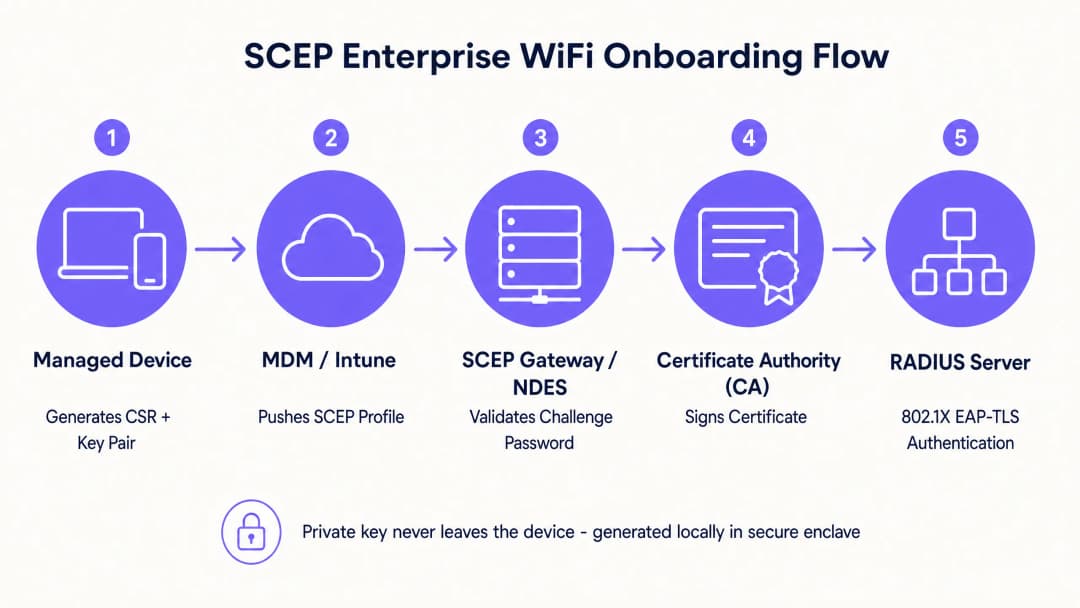
SCEP es el estándar de la industria para el registro de dispositivos empresariales. En un flujo de trabajo de SCEP, el servicio de administración indica al endpoint que genere su propio par de claves privada y pública. El dispositivo genera una Solicitud de Firma de Certificado (CSR) y la envía a su Autoridad de Certificación (CA) a través de un servidor de Network Device Enrollment Service (NDES). La CA firma la solicitud y devuelve el certificado público al dispositivo.
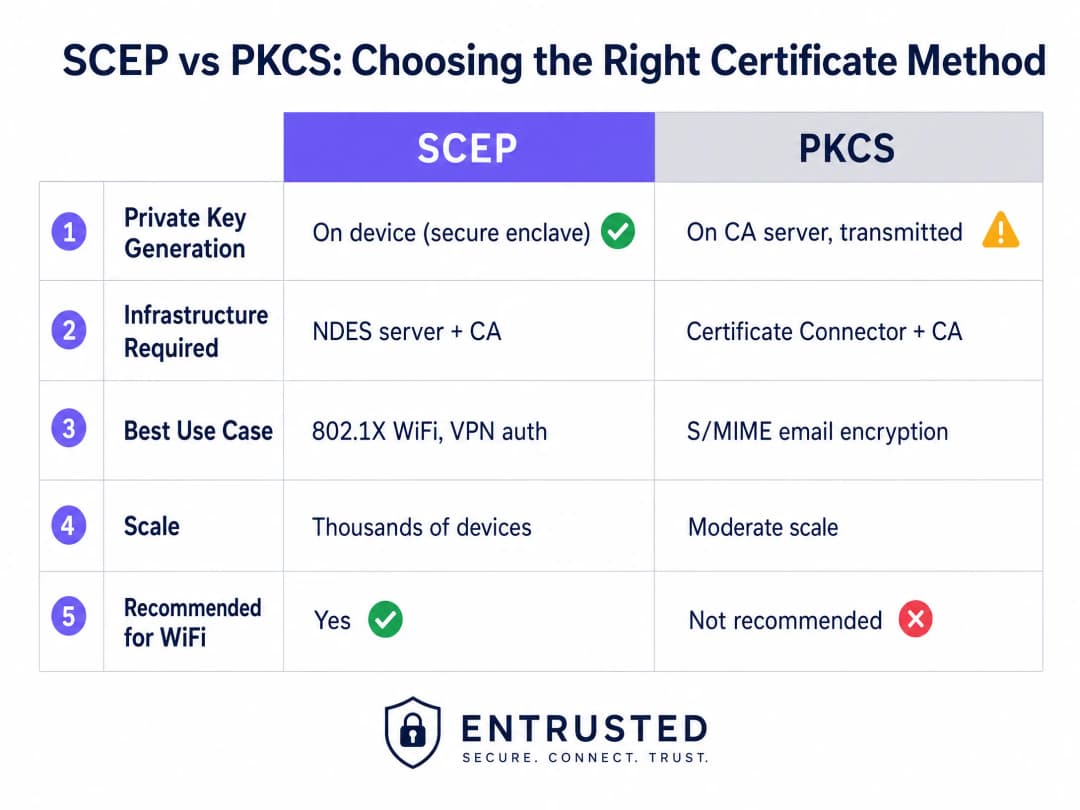
El beneficio de seguridad más crítico de SCEP es que la clave privada nunca sale del dispositivo. Se genera localmente, se almacena en el enclave seguro del dispositivo (como TPM para Windows o Secure Enclave para iOS) y nunca se transmite a través de la red. Por esta razón, SCEP se recomienda ampliamente para la autenticación 802.1X.
Public Key Cryptography Standards (PKCS)
Por el contrario, con PKCS, la Autoridad de Certificación genera tanto la clave pública como la privada de manera centralizada. Un conector de certificados exporta de forma segura este par de claves y lo envía al dispositivo de destino.
Aunque PKCS reduce la complejidad de la infraestructura al eliminar la necesidad de implementar y mantener un servidor NDES, introduce un riesgo de seguridad teórico debido a que la clave privada se transmite a través de la red. En lugar de la autenticación de red, PKCS suele ser más adecuado para casos de uso donde se requiere el depósito de claves, como el cifrado de correo electrónico S/MIME.
¿Tiene preguntas sobre su configuración específica?
Nuestro equipo trabaja con gestores de espacios, responsables de TI e ingenieros de redes en 80 000 establecimientos. Reserve una llamada de 20 minutos y le mostraremos cómo lo resolvieron otros profesionales como usted.
Guía de implementación: Secuencia de despliegue
Configurar con éxito un perfil de WiFi administrado para 802.1X requiere cumplir estrictamente con una secuencia de despliegue específica. Debido a las reglas de dependencia de perfiles, se debe establecer la confianza antes de poder configurar la autenticación.
Paso 1: Desplegar el perfil de certificado raíz de confianza
Antes de que cualquier dispositivo pueda solicitar un certificado de cliente o confiar en su servidor RADIUS, debe confiar en la Autoridad de Certificación emisora.
- Exporte su certificado de CA raíz y cualquier certificado de CA intermedia como archivos .cer.
- Cree un nuevo perfil de configuración en su consola de MDM.
- Seleccione la plataforma de destino y elija el tipo de perfil de Certificado de confianza.
- Suba el archivo .cer y despliegue este perfil en sus grupos de dispositivos de destino.
Paso 2: Configuración del perfil de certificado SCEP
Una vez establecida la confianza, configure el perfil SCEP para definir cómo recuperan los dispositivos sus certificados de cliente.
- Cree un nuevo perfil de configuración y seleccione Certificado SCEP.
- Configure el formato del nombre del sujeto. Para la autenticación basada en el usuario, lo estándar es
CN={{UserPrincipalName}}. Para la autenticación de dispositivos, useCN={{AAD_Device_ID}}. - Establezca el uso de la clave (Key Usage) en firma digital y cifrado de clave (Digital Signature and Key Encipherment).
- En el uso de clave extendido (Extended Key Usage), especifique la autenticación de cliente (Client Authentication) (OID: 1.3.6.1.5.5.7.3.2).
- Vincule este perfil al perfil de certificado raíz de confianza creado en el Paso 1.
- Proporcione la URL externa de su gateway SCEP o servidor NDES.
Paso 3: Implementación del perfil WiFi 802.1X
El paso final consiste en enviar la configuración de WiFi que asocia los certificados con el SSID de la red.
- Cree un perfil de configuración WiFi.
- Ingrese el nombre de la red exactamente como lo transmiten sus puntos de acceso inalámbrico.
- Seleccione WPA2 o WPA3 como el tipo de seguridad.
- Establezca el tipo de EAP en EAP-TLS.
- En la configuración de autenticación, seleccione el perfil de certificado SCEP creado en el Paso 2 como el certificado de autenticación de cliente.
- Especifique el certificado raíz de confianza para la validación del servidor con el fin de garantizar que el dispositivo solo se conecte a su servidor RADIUS legítimo.
Mejores prácticas y estándares de la industria
Al implementar implementaciones de certificados SCEP, siga estas mejores prácticas independientes del proveedor para garantizar la conformidad y la confiabilidad.
Ubicación y seguridad de la gateway SCEP
Para permitir que los dispositivos remotos aprovisionen certificados antes de llegar a las instalaciones, la gateway SCEP debe estar accesible desde internet. Exponer un servidor interno directamente a internet es un riesgo de seguridad importante. Publique la URL de SCEP mediante un proxy de aplicación o un proxy inverso. Esto proporciona un acceso remoto seguro sin abrir puertos de firewall entrantes y le permite aplicar políticas de acceso condicional en el flujo de inscripción.
Comprobación de RADIUS y CRL
La implementación de certificados es solo la mitad de la ecuación de seguridad; la revocación es igual de crítica. Si un empleado deja la organización, es posible que la desactivación de su cuenta de directorio no revoque de inmediato su acceso a la WiFi si su certificado de cliente sigue siendo válido y el servidor RADIUS no comprueba estrictamente la lista de revocación de certificados (CRL).
Configure su servidor RADIUS para exigir una comprobación estricta de la CRL. Asegúrese de que sus puntos de distribución de CRL tengan una alta disponibilidad; si el servidor RADIUS no puede comunicarse con la CRL, la autenticación fallará, lo que provocará interrupciones generalizadas.
Para un análisis más detallado de la conectividad moderna, revise nuestra guía de Gestión del ancho de banda: una guía práctica para 2026.
Resolución de problemas y mitigación de riesgos
Incluso con una planeación minuciosa, las implementaciones de certificados pueden presentar problemas. A continuación se presentan los modos de fallo comunes y sus estrategias de mitigación.
Error al aplicar el perfil WiFi
El dispositivo recibe los certificados Trusted Root y SCEP, pero el perfil de WiFi se muestra como fallido o no aplicable en la consola MDM. Esto casi siempre es causado por una discrepancia en la asignación de grupos. Si el perfil SCEP está asignado a un grupo de usuarios, pero el perfil de WiFi está asignado a un grupo de dispositivos, el MDM no puede resolver la dependencia. Audite sus asignaciones. Asegúrese de que los perfiles Trusted Root, SCEP y WiFi estén desplegados exactamente en los mismos grupos.
Error Gateway 403 Forbidden
Los dispositivos no logran recuperar los certificados SCEP y los registros de la puerta de enlace muestran errores HTTP 403. La cuenta de servicio del conector carece de los permisos necesarios en la plantilla de certificado, o el filtrado de URL de su firewall está bloqueando parámetros específicos de la cadena de consulta utilizados por SCEP. Verifique que la cuenta del conector tenga permisos de lectura e inscripción (Read y Enrol) en la plantilla de la CA. Revise los registros del firewall para asegurarse de que no se estén bloqueando las URL que contienen ?operation=GetCACaps.
ROI e impacto empresarial
La transición al despliegue de certificados 802.1X impulsado por SCEP ofrece retornos medibles en seguridad y operaciones.
- Reducción de tickets de soporte: El WiFi basado en contraseñas genera un alto volumen de tickets de soporte debido a contraseñas caducadas, bloqueos y errores de dedo. La autenticación basada en certificados es invisible para el usuario, lo que normalmente reduce la carga de trabajo de soporte relacionada con WiFi en un 70%.
- Postura de seguridad mejorada: EAP-TLS elimina el riesgo de robo de credenciales y ataques de intermediario (Man-in-the-Middle). Esto es fundamental para el cumplimiento de marcos de trabajo como PCI-DSS y GDPR, especialmente en entornos de Retail y Healthcare.
- Incorporación simplificada: Integrar el despliegue de certificados con los flujos de trabajo de MDM existentes garantiza una experiencia de aprovisionamiento unificada y sin intervención del usuario desde el primer día.
Aunque SCEP protege sus dispositivos corporativos administrados, las redes de invitados y visitantes requieren un enfoque diferente. Para dispositivos no administrados, un Captive Portal con inicio de sesión de redes sociales o verificación por SMS alimenta una capa de datos propios, lo que le brinda información valiosa. Explore nuestra plataforma de WiFi Analytics para ver cómo estos datos impulsan los ingresos.
Definiciones clave
SCEP (Simple Certificate Enrollment Protocol)
Un protocolo que permite a los dispositivos solicitar certificados digitales a una Autoridad de Certificación, donde la clave privada se genera y almacena de forma segura en el propio dispositivo.
El método recomendado para implementar certificados de autenticación de WiFi debido a su alta seguridad y escalabilidad en flotas empresariales.
PKCS (Public Key Cryptography Standards)
Un conjunto de estándares donde tanto la clave pública como la privada son generadas por la Autoridad de Certificación y luego se entregan de forma segura al endpoint.
A menudo se utiliza para el cifrado de correo electrónico S/MIME, pero es menos ideal para la autenticación de WiFi debido a la transmisión de la clave privada a través de la red.
NDES (Network Device Enrollment Service)
Un rol de Microsoft Windows Server que actúa como puente, permitiendo que los dispositivos sin credenciales de dominio obtengan certificados a través de SCEP.
Un componente de infraestructura requerido al implementar la distribución de certificados SCEP con Microsoft PKI local.
EAP-TLS (Extensible Authentication Protocol - Transport Layer Security)
El método de autenticación 802.1X más seguro, que requiere que tanto el servidor como el cliente presenten certificados digitales válidos.
El protocolo de autenticación de destino que los perfiles de WiFi de MDM y de certificados están diseñados para habilitar, eliminando el acceso basado en contraseñas.
CRL (Certificate Revocation List)
Una lista publicada por la Autoridad de Certificación que contiene los números de serie de los certificados que han sido revocados antes de su fecha de vencimiento programada.
Los servidores RADIUS deben verificar la CRL durante la autenticación para garantizar que los empleados que ya no pertenecen a la empresa no puedan acceder a la red utilizando un certificado previamente válido.
CSR (Certificate Signing Request)
Un bloque de texto codificado que se entrega a una Autoridad de Certificación al solicitar un certificado SSL/TLS, el cual contiene la clave pública y la información de identidad.
Generada localmente por el dispositivo administrado durante el flujo de SCEP para solicitar su credencial de identidad única.
802.1X
Un estándar IEEE para el control de acceso a la red basado en puertos que proporciona un mecanismo de autenticación a los dispositivos que desean conectarse a una LAN o WLAN.
El marco de trabajo fundamental que exige la validación del certificado EAP-TLS antes de otorgar acceso a la red.
RADIUS (Remote Authentication Dial-In User Service)
Un protocolo de red que proporciona una administración centralizada de autenticación, autorización y contabilidad para los usuarios que se conectan y utilizan un servicio de red.
El servidor que evalúa el certificado del cliente frente a la CA y la CRL para tomar la decisión final de permitir o denegar el acceso a la WiFi.
Ejemplos resueltos
Un grupo hotelero con 150 propiedades necesita proteger la red de su personal en una combinación de laptops Windows para recepción, dispositivos iOS para limpieza y tabletas Android para el punto de venta del restaurante. Actualmente utilizan WPA2-Personal con una contraseña compartida que se rota trimestralmente, lo que genera un volumen enorme de tickets de soporte técnico.
El grupo hotelero implementa tres perfiles de Intune en secuencia para un grupo de dispositivos unificado. Primero, un perfil de Certificado de Raíz de Confianza establece la confianza con la CA corporativa. Segundo, un perfil de certificado SCEP indica a los dispositivos que soliciten un certificado de cliente único. Tercero, un perfil de WiFi configura el SSID corporativo con WPA3-Enterprise y EAP-TLS, apuntando al certificado SCEP para la autenticación. El servidor RADIUS aplica una verificación estricta de CRL para revocar el acceso de forma instantánea al momento de la rescisión de un empleado.
Un minorista de moda con 200 tiendas requiere el cumplimiento de PCI DSS para sus sistemas de punto de venta basados en Windows administrados a través de Intune. Deben garantizar una autenticación sólida y una segmentación de red estricta para cualquier dispositivo que maneje datos de titulares de tarjetas.
El minorista implementa EAP-TLS basado en SCEP para la autenticación a nivel de dispositivo en el SSID del personal. La política de RADIUS impulsa la asignación de VLAN, colocando automáticamente las terminales de POS autenticadas en una VLAN estrictamente aislada y dentro del alcance de PCI. El WiFi de invitados se maneja en un SSID completamente independiente con su propio flujo de autenticación de Captive Portal, lo que garantiza que las dos redes nunca se crucen.
Preguntas de práctica
Q1. Su implementación de Intune muestra que los perfiles de Trusted Root y SCEP se aplicaron correctamente a la laptop de un usuario, pero el perfil de WiFi muestra un estado de 'Error'. El usuario no puede conectarse al SSID corporativo. ¿Cuál es la causa arquitectónica más probable?
Sugerencia: Considere cómo las plataformas de MDM resuelven las dependencias entre los perfiles de configuración relacionados.
Ver respuesta modelo
Una discordancia en la asignación de grupos. Es probable que el perfil SCEP esté asignado a un grupo de Usuarios, mientras que el perfil de WiFi está asignado a un grupo de Dispositivos (o viceversa). Intune no puede resolver la dependencia entre diferentes tipos de grupos, lo que provoca que falle la implementación del perfil de WiFi. Audite las asignaciones y asegúrese de que los tres perfiles se dirijan exactamente al mismo grupo de Azure AD.
Q2. Una subsidiaria recién adquirida requiere autenticación 802.1X para los dispositivos de su personal. Su equipo de seguridad exige que las claves privadas nunca viajen por la red y que se generen dentro del TPM de hardware del endpoint. ¿Qué método de implementación de certificados debe utilizar?
Sugerencia: Compare dónde se genera la clave privada en el flujo de trabajo de SCEP en comparación con el flujo de trabajo de PKCS.
Ver respuesta modelo
Debe utilizar SCEP (Simple Certificate Enrollment Protocol). En un flujo de trabajo de SCEP, el dispositivo genera su propio par de claves pública y privada localmente dentro de su enclave seguro (TPM) y solo envía una Solicitud de Firma de Certificado (CSR) a través de la red. PKCS genera la clave privada de forma centralizada en la CA y la transmite a través de la red, lo que infringe la exigencia del equipo de seguridad.
Q3. Un empleado es despedido y su cuenta de Active Directory se deshabilita. Sin embargo, su laptop permanece conectada a la red WiFi corporativa durante varias horas antes de perder el acceso. ¿Cómo se resuelve esta brecha de seguridad?
Sugerencia: Deshabilitar una cuenta no invalida un certificado existente. ¿Qué mecanismo utiliza el servidor RADIUS para verificar la validez del certificado?
Ver respuesta modelo
Debe configurar el servidor RADIUS para exigir una verificación estricta de la Lista de Revocación de Certificados (CRL). Cuando se despide a un empleado, su certificado debe revocarse explícitamente en la Autoridad de Certificación. El servidor RADIUS verificará la CRL durante el próximo ciclo de autenticación y denegará el acceso de inmediato, independientemente del estado de la cuenta de Active Directory.
Continúe leyendo esta serie
Cumplimiento de CIPA: lista de verificación de cumplimiento para operadores de establecimientos
Podrá decidir si CIPA vincula su WiFi, luego segmentar redes, enrutar el DNS a través de Purple Shield y cerrar rutas de bypass. También sabrá qué evidencia conservar para la certificación del Form 486 o Form 479. La lista de verificación asigna un responsable a cada requisito, para que no falte nada en la certificación de su próximo año de financiamiento.
Fallas de conexión en el modo de transición WPA3: una lista de verificación de implementación para Cisco Meraki, HPE Aruba y Ruckus
Utilice esta lista de verificación para diagnosticar por qué los dispositivos fallan en un SSID en modo de transición WPA3 SAE y soluciónelo en Cisco Meraki, HPE Aruba o Ruckus. Podrá asociar códigos de estado de 802.11 con sus causas, aislar problemas de PMF, 802.11r y 6GHz, y decidir cuándo migrar a un SSID exclusivo de WPA3.
El mejor filtrado de DNS: una guía completa para empresas
Esta guía de referencia técnica explica cómo el filtrado de DNS empresarial protege las redes públicas al bloquear dominios maliciosos en la capa de resolución, antes de que se establezca una conexión. Proporciona a los directores de TI, arquitectos de red y equipos de operaciones de establecimientos la arquitectura de implementación, la configuración del firewall y el contexto de cumplimiento que necesitan para proteger el WiFi de invitados en entornos de hotelería, retail y sector público. Purple Shield bloquea malware, redes de bots y contenido inapropiado a nivel de DNS en más de 80,000 establecimientos activos.
¿Tiene preguntas sobre su configuración específica?
Nuestro equipo trabaja con gestores de espacios, responsables de TI e ingenieros de redes en 80 000 establecimientos. Reserve una llamada de 20 minutos y le mostraremos cómo lo resolvieron otros profesionales como usted.