

Multi-Language Captive Portals: Mejores Prácticas para Sedes Internacionales
Esta guía de referencia técnica autorizada proporciona a los profesionales de TI de alto nivel estrategias accionables para diseñar e implementar multi-language Captive Portals. Cubre la arquitectura avanzada de detección de idiomas, consideraciones de diseño RTL y la localización de textos legales conformes con GDPR para garantizar un acceso WiFi sin interrupciones para los huéspedes en sedes internacionales.
🎧 Escucha esta guía
Ver transcripción
Resumen Ejecutivo
Para sedes internacionales —ya sean grandes centros aeroportuarios, cadenas hoteleras globales o entornos minoristas a gran escala— el Captive Portal es a menudo el primer punto de contacto digital que experimenta un visitante. Un Captive Portal mal localizado no solo degrada la experiencia del huésped, sino que también puede introducir riesgos significativos de cumplimiento y reducir la eficacia de sus análisis de WiFi. Esta guía proporciona un marco técnico integral para la implementación de multi-language Captive Portals. Vamos más allá de la traducción básica para abordar la arquitectura subyacente de la detección de idiomas, las complejidades de la representación de la interfaz de usuario de derecha a izquierda (RTL) y los estrictos requisitos para el consentimiento informado bajo GDPR. Al implementar las estrategias detalladas aquí, los gerentes de TI y los arquitectos de red pueden asegurar que su Guest WiFi infraestructura ofrezca una experiencia de autenticación segura, accesible y legalmente compatible para visitantes de todo el mundo, apoyando en última instancia objetivos comerciales más amplios como los observados en Retail y Hospitality .
Análisis Técnico Detallado
La Pila de Prioridad de Detección de Idiomas
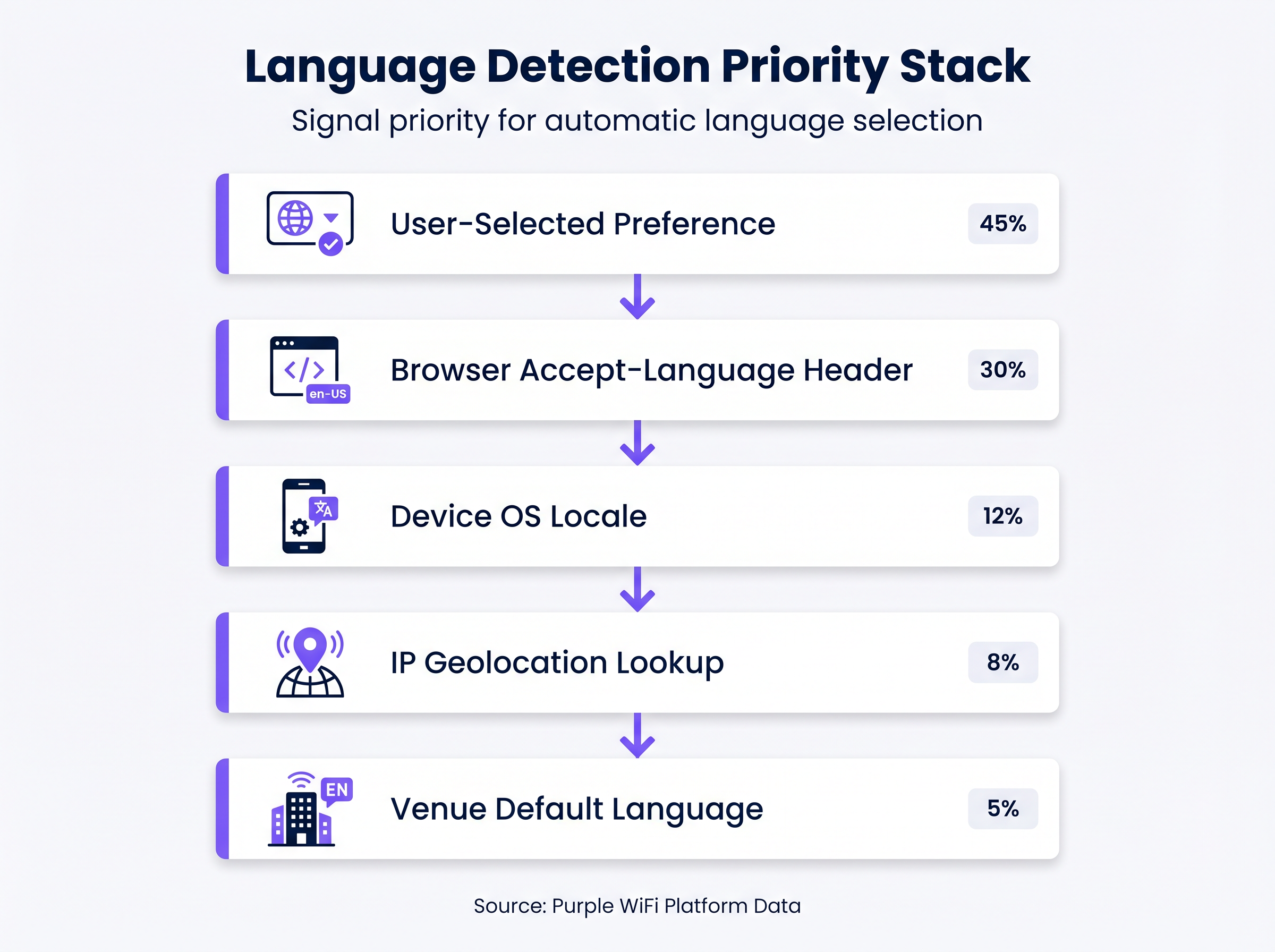
Confiar únicamente en la geolocalización por IP para determinar el idioma de un usuario es un fallo arquitectónico común. En entornos como aeropuertos o conferencias internacionales, los usuarios se conectan con frecuencia a través de VPNs corporativas o perfiles de datos en roaming, lo que hace que la geolocalización basada en IP sea inexacta en hasta el 30% de los casos. En su lugar, un robust Captive Portal debe implementar una pila de prioridad de varios niveles para la detección de idiomas:
- Preferencia Seleccionada por el Usuario (Máxima Prioridad): Si un usuario recurrente ha seleccionado previamente un idioma, esta preferencia debe almacenarse (por ejemplo, a través de una cookie persistente o una asociación de dirección MAC en el backend) y aplicarse automáticamente al reconectarse.
- Encabezado
Accept-Languagedel Navegador: Este encabezado HTTP proporciona un reflejo altamente preciso de la configuración explícita del dispositivo o navegador del usuario (por ejemplo,en-US,en;q=0.9,fr;q=0.8). Debe ser el mecanismo de detección automatizado principal. - Configuración Regional del SO del Dispositivo: Cuando sea accesible, consultar la configuración regional del sistema operativo subyacente proporciona una alternativa si el encabezado del navegador no es concluyente.
- Búsqueda de Geolocalización por IP: Utilizado solo como una alternativa secundaria, esto mapea la IP de origen a una región geográfica, aunque sus limitaciones deben ser reconocidas.
- Idioma Predeterminado de la Sede (Menor Prioridad): La alternativa final, típicamente el idioma principal del país donde se encuentra la sede.
Manejo de Scripts de Derecha a Izquierda (RTL)
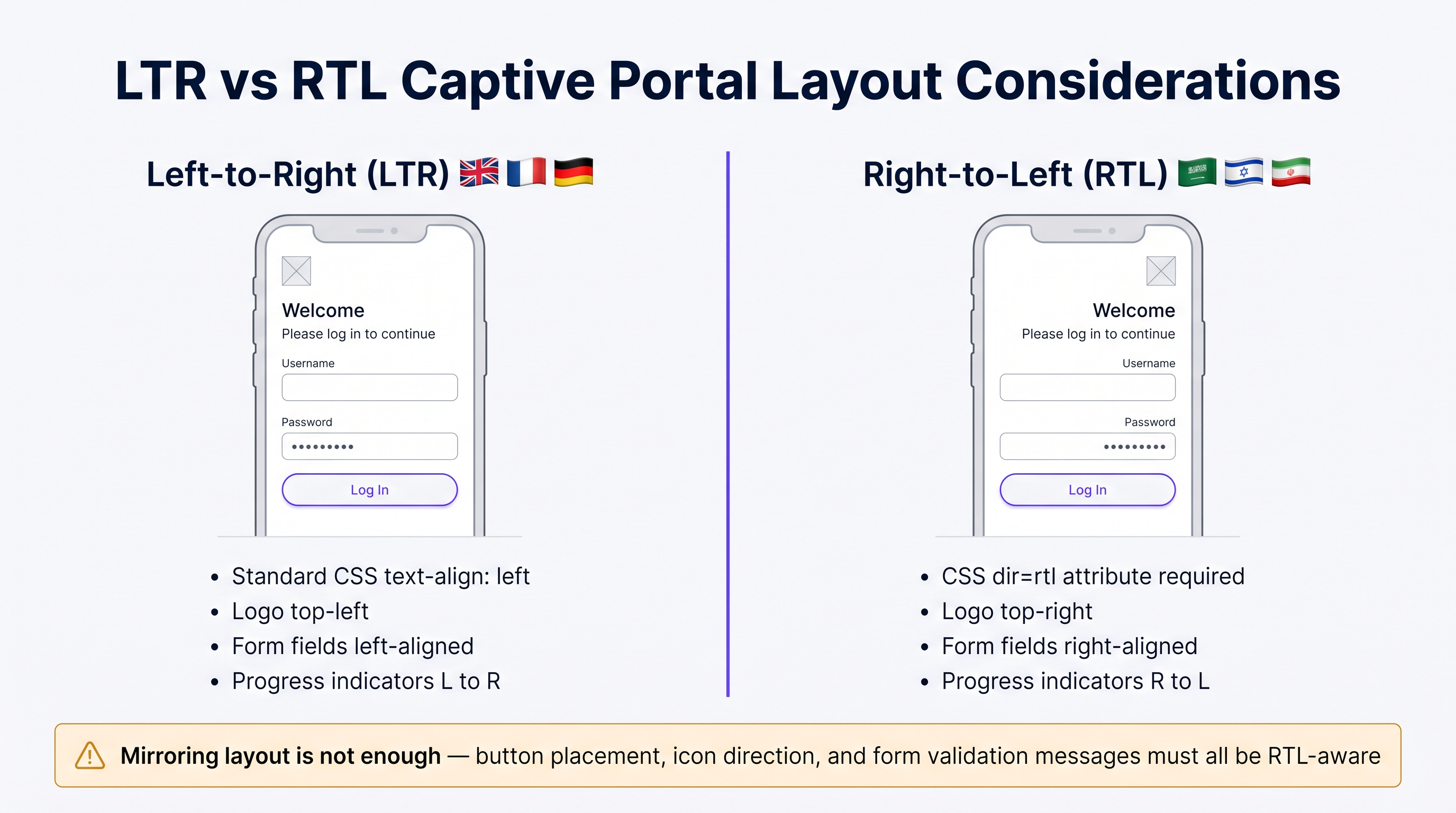
Implementar idiomas como el árabe, el hebreo o el persa requiere más que simplemente traducir el texto; exige un cambio fundamental en la arquitectura de la interfaz de usuario. Un portal diseñado exclusivamente para idiomas de izquierda a derecha (LTR) fallará al renderizar contenido RTL, lo que provocará texto superpuesto, campos de formulario desalineados y una interfaz inutilizable.
Las consideraciones técnicas clave para la implementación de RTL incluyen:
- Direccionalidad del Documento: El atributo HTML
dirdebe establecerse dinámicamente artl(<html dir="rtl">) al servir estos idiomas. Esto indica al navegador que refleje el flujo del documento. - Reflejo de Elementos de la UI: Todos los elementos de diseño deben invertirse. Los logotipos, típicamente ubicados en la parte superior izquierda, deben moverse a la parte superior derecha. Las etiquetas de formulario, los campos de entrada y los botones de envío deben alinearse a la derecha.
- Soporte de Frameworks CSS: Los frameworks CSS modernos (como Tailwind o Bootstrap) ofrecen variantes RTL. Asegúrese de que el pipeline de compilación de su portal compile estas variantes y las sirva condicionalmente según el idioma detectado.
- Selección de Fuentes: Las fuentes latinas estándar a menudo no renderizan correctamente las ligaduras árabes. Utilice fuentes Unicode robustas (por ejemplo, Google Noto) para asegurar una correcta formación y conectividad de caracteres.
Guía de Implementación
Estrategia de Despliegue Paso a Paso
- Selección de Idiomas Basada en Datos: No intente lanzar con 20 idiomas simultáneamente. Analice sus WiFi Analytics existentes para identificar los 5 a 7 idiomas principales hablados por sus visitantes. Centre su implementación inicial en este subconjunto para asegurar una alta calidad.
- Entrega Dinámica de Contenido: Diseñe su portal para obtener cadenas traducidas dinámicamente de una Red de Entrega de Contenido (CDN) o un servicio de localización dedicado, en lugar de codificarlas directamente en la aplicación del portal. Esto desacopla las actualizaciones de contenido de los despliegues de código.
- Contenedores de UI Flexibles: El texto en alemán puede ser hasta un 30% más largo que en inglés, mientras que los idiomas asiáticos pueden requerir más altura vertical. Diseñe contenedores de UI (botones, cuadros de alerta, campos de formulario) para que sean flexibles. Evite anchos fijos e implemente un manejo robusto del desbordamiento de texto (por ejemplo,
text-overflow: ellipsisde CSS combinado con tooltips). - Formato Estandarizado de Fecha y Hora: Evite formatos de fecha ambiguos (como
04/05/2025). Utilice siempre el formato ISO 8601 (YYYY-MM-DD) o escriba explícitamente el mes en el idioma localizado para evitar confusiones con respecto a la caducidad de la sesión o la aceptación de los términos.
Mejores Prácticas
Textos Legales y Cumplimiento con GDPR
Traducir los Términos de Servicio (ToS) y las Políticas de Privacidad no es meramente un ejercicio lingüístico; es un requisito legal estricto bajo regulaciones como GDPR. Como se destaca en las discusiones sobre CCPA vs GDPR: Cumplimiento Global de Privacidad para Datos de Guest WiFi , presentar textos legales complejos en un idioma que el usuario no comprende invalida el consentimiento informado.
- ProfesiTraducción Legal Profesional: Nunca utilice traducción automática para documentos legales. Contrate a traductores legales calificados que comprendan los matices jurisdiccionales específicos (p. ej., los requisitos de la CNIL francesa frente a la Datenschutzbehörde alemana).
- Control de Versiones y Pistas de Auditoría: Su backend de autenticación debe registrar no solo que un usuario aceptó los términos, sino qué versión de los términos aceptó y en qué idioma. Esta pista de auditoría es fundamental para demostrar el cumplimiento durante las investigaciones regulatorias.
Solución de Problemas y Mitigación de Riesgos
La "Trampa de la Localización Parcial"
Un modo de fallo común es traducir la pantalla de inicio de sesión principal dejando los mensajes de error, las advertencias de validación o las páginas de bienvenida posteriores a la autenticación en el idioma predeterminado. Esto crea una experiencia de usuario discordante y socava la confianza. Asegúrese de que su matriz de localización cubra todos los casos extremos, incluyendo:
- Mensajes de fallo de autenticación RADIUS.
- Errores de validación de formulario (p. ej., "Formato de correo electrónico no válido").
- Advertencias de tiempo de espera de sesión.
- Redirecciones y páginas de éxito posteriores a la autenticación.
ROI e Impacto Comercial
Un portal multi-idioma correctamente implementado impacta directamente en las métricas clave del negocio. Al eliminar la fricción en la capa de autenticación, los establecimientos ven tasas de conexión más altas, lo que a su vez alimenta datos más robustos en sus plataformas de marketing. Para una inmersión más profunda en la cuantificación de este valor, consulte nuestra guía sobre Medición del ROI en Guest WiFi: Un Marco para CMOs . Además, garantizar el cumplimiento en múltiples jurisdicciones mitiga el riesgo de multas regulatorias sustanciales, protegiendo los resultados finales de la organización.
Sesión Informativa de Audio para Expertos
Escuche nuestra sesión informativa técnica de 10 minutos para una discusión más profunda sobre estos conceptos:
Términos clave y definiciones
Accept-Language Header
An HTTP request header sent by the browser indicating the user's preferred languages and locales.
This is the most reliable automated signal for determining which language version of the captive portal to serve.
RTL (Right-to-Left)
Scripts such as Arabic and Hebrew that are read from right to left, requiring specific HTML and CSS handling.
IT teams must ensure their portal frameworks support RTL variants to prevent layout breakage for these users.
Informed Consent
The requirement under GDPR that a user clearly understands what data is being collected and how it will be used before agreeing.
Presenting Terms of Service in a language the user does not understand invalidates informed consent.
Audit Trail
A secure, timestamped record of events.
Captive portals must maintain an audit trail showing exactly which version and language of the ToS a specific user accepted.
IP Geolocation
The process of determining a device's physical location based on its IP address.
Often inaccurate for language detection due to VPNs and roaming, and should only be used as a fallback.
Unicode Font Stack
A set of fonts designed to support a vast array of international characters and scripts.
Essential for ensuring that languages like Japanese or Arabic render correctly without 'tofu' (missing character boxes).
Text Overflow Handling
CSS techniques used to manage text that exceeds the bounds of its container.
Crucial for multi-language portals where translated strings (e.g., in German) may be significantly longer than the original English.
Dynamic Content Delivery
Serving content (like translated strings) from a separate service or CDN rather than hardcoding it.
Allows content teams to update translations without requiring a new code deployment from the network team.
Casos de éxito
A major international airport in Europe is upgrading its captive portal. Analytics show that 40% of users connect from devices set to English, 20% German, 15% Arabic, 10% Mandarin, and 15% other languages. The current portal uses IP geolocation and defaults to German.
- Implement the priority stack: Browser Accept-Language > OS Locale > Default (English). 2. Deploy English, German, Arabic, and Mandarin translations. 3. For Arabic, implement a dynamic
<html dir="rtl">switch and load a mirrored CSS stylesheet. 4. Ensure all Terms of Service are translated into these four languages by legal professionals and that the backend logs the accepted language version.
A global retail brand is rolling out a unified guest WiFi portal across its stores in the UK, France, and Japan. They want a consistent brand experience but are concerned about UI consistency across different character sets.
- Design the UI with flexible containers rather than fixed widths. 2. Use CSS Flexbox or Grid to allow buttons and text areas to expand dynamically. 3. Select a robust Unicode font stack (e.g., Google Noto) to ensure consistent rendering of Japanese characters alongside Latin scripts. 4. Implement a prominent language selector dropdown on the portal, using native script names (e.g., 'Français', '日本語') rather than just flags.
Análisis de escenarios
Q1. Your venue is hosting a major tech conference with attendees primarily from the US, Germany, and Japan. Your current portal uses IP geolocation to set the language. What is the primary risk, and how should you resolve it?
💡 Sugerencia:Consider how international travelers typically connect their devices to foreign networks.
Mostrar enfoque recomendado
The primary risk is that international travelers often use corporate VPNs or roaming data profiles, which will mask their true location and cause the IP geolocation to serve the wrong language (likely the venue's default). The solution is to implement a priority stack that relies first on the browser's Accept-Language header, which accurately reflects the user's device settings regardless of their network routing.
Q2. You are expanding your portal to support Arabic. You have translated all the text and applied standard CSS right-alignment to the text blocks. During testing, native speakers report the portal feels 'broken'. What critical step was missed?
💡 Sugerencia:RTL support requires more than just text alignment; consider the entire document structure.
Mostrar enfoque recomendado
Simply aligning text to the right is insufficient for RTL languages. The critical missing step is setting the HTML document direction (<html dir="rtl">) and implementing a mirrored CSS layout. This ensures that UI elements like logos, form fields, buttons, and progress indicators are properly reversed to match the RTL reading flow.
Q3. To save costs, your marketing team proposes using an automated AI translation tool to translate the portal's Terms of Service and Privacy Policy into five new languages. As the IT manager, how do you respond?
💡 Sugerencia:Consider the legal implications of inaccurate translations under data protection regulations.
Mostrar enfoque recomendado
You must reject this proposal. Under regulations like GDPR, valid informed consent requires that the user fully understands the legal terms. Automated translations often miss critical legal nuances or jurisdictional specificities. Legal copy must be translated and reviewed by qualified legal professionals in the target jurisdictions to avoid severe compliance risks and potential fines.
Conclusiones clave
- ✓IP geolocation is unreliable for language detection; prioritize the browser's Accept-Language header.
- ✓Supporting RTL languages requires mirroring the entire UI layout, not just changing text alignment.
- ✓Never use machine translation for Terms of Service or Privacy Policies due to GDPR compliance risks.
- ✓Design UI containers to be flexible to accommodate text expansion (e.g., German translations).
- ✓Maintain a strict audit trail logging which language version of the ToS each user accepted.
- ✓Use robust Unicode fonts to ensure proper rendering of non-Latin characters.
- ✓Avoid the 'partial localisation trap' by ensuring error messages and post-login pages are also translated.




