

Captive Portals Multilíngues: Melhores Práticas para Locais Internacionais
Este guia de referência técnica e autoritário fornece a profissionais de TI seniores estratégias acionáveis para projetar e implementar captive portals multilíngues. Ele abrange arquitetura avançada de detecção de idioma, considerações de layout RTL e localização de textos legais em conformidade com a GDPR para garantir acesso WiFi contínuo para convidados em locais internacionais.
🎧 Ouça este Guia
Ver Transcrição
Resumo Executivo
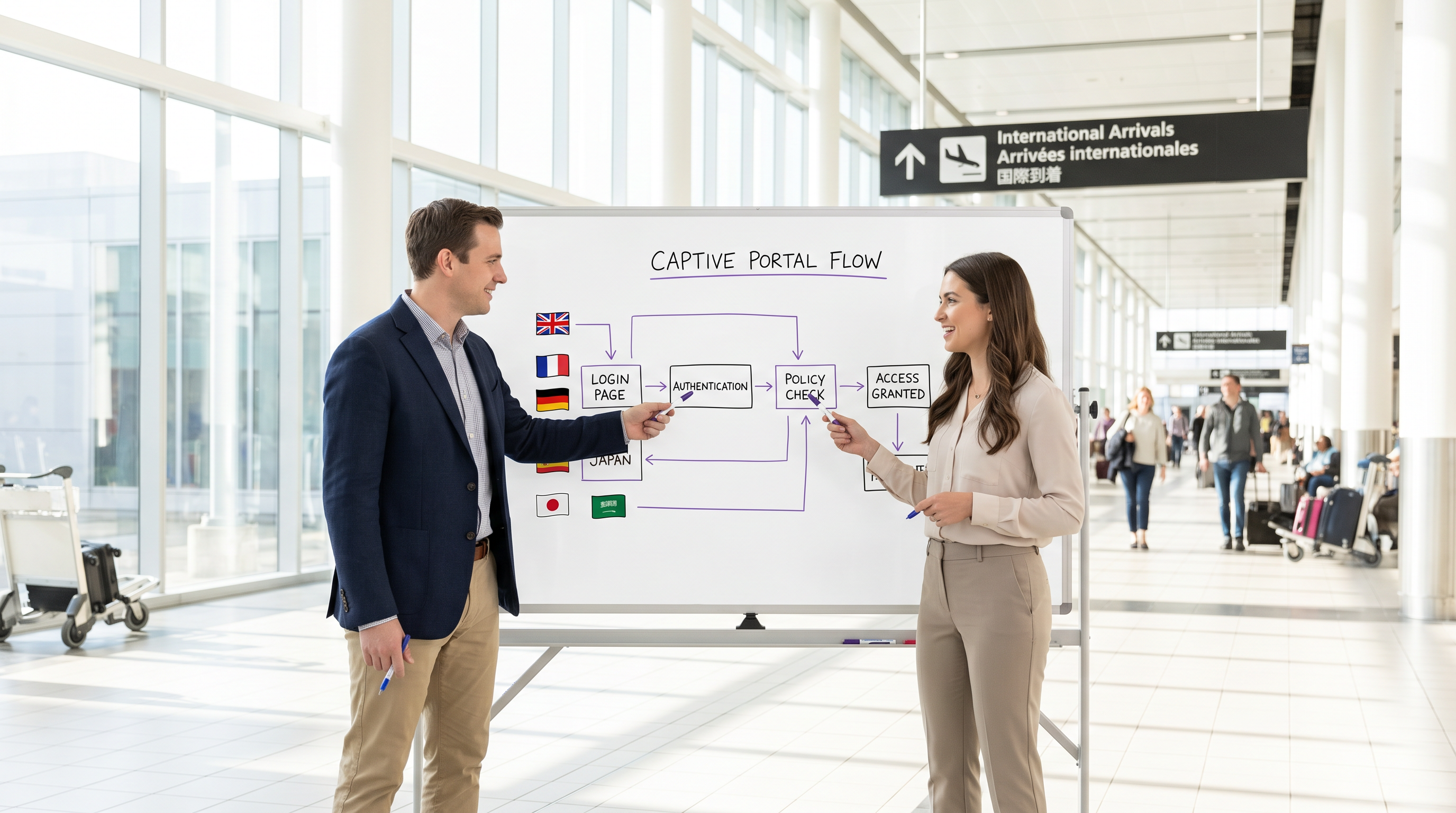
Para locais internacionais — sejam grandes aeroportos, cadeias de hotéis globais ou grandes ambientes de varejo — o captive portal é frequentemente o primeiro ponto de contato digital que um visitante experimenta. Um portal mal localizado não só degrada a experiência do convidado, mas também pode introduzir riscos significativos de conformidade e reduzir a eficácia da sua análise de WiFi. Este guia fornece uma estrutura técnica abrangente para a implantação de captive portals multilíngues. Vamos além da tradução básica para abordar a arquitetura subjacente da detecção de idioma, as complexidades da renderização de UI da direita para a esquerda (RTL) e os requisitos rigorosos para o consentimento informado sob a GDPR. Ao implementar as estratégias detalhadas aqui, gerentes de TI e arquitetos de rede podem garantir que sua infraestrutura de Guest WiFi ofereça uma experiência de autenticação segura, acessível e legalmente compatível para visitantes em todo o mundo, apoiando, em última análise, objetivos de negócios mais amplos, como os vistos em Varejo e Hotelaria .
Análise Técnica Aprofundada
A Pilha de Prioridade de Detecção de Idioma
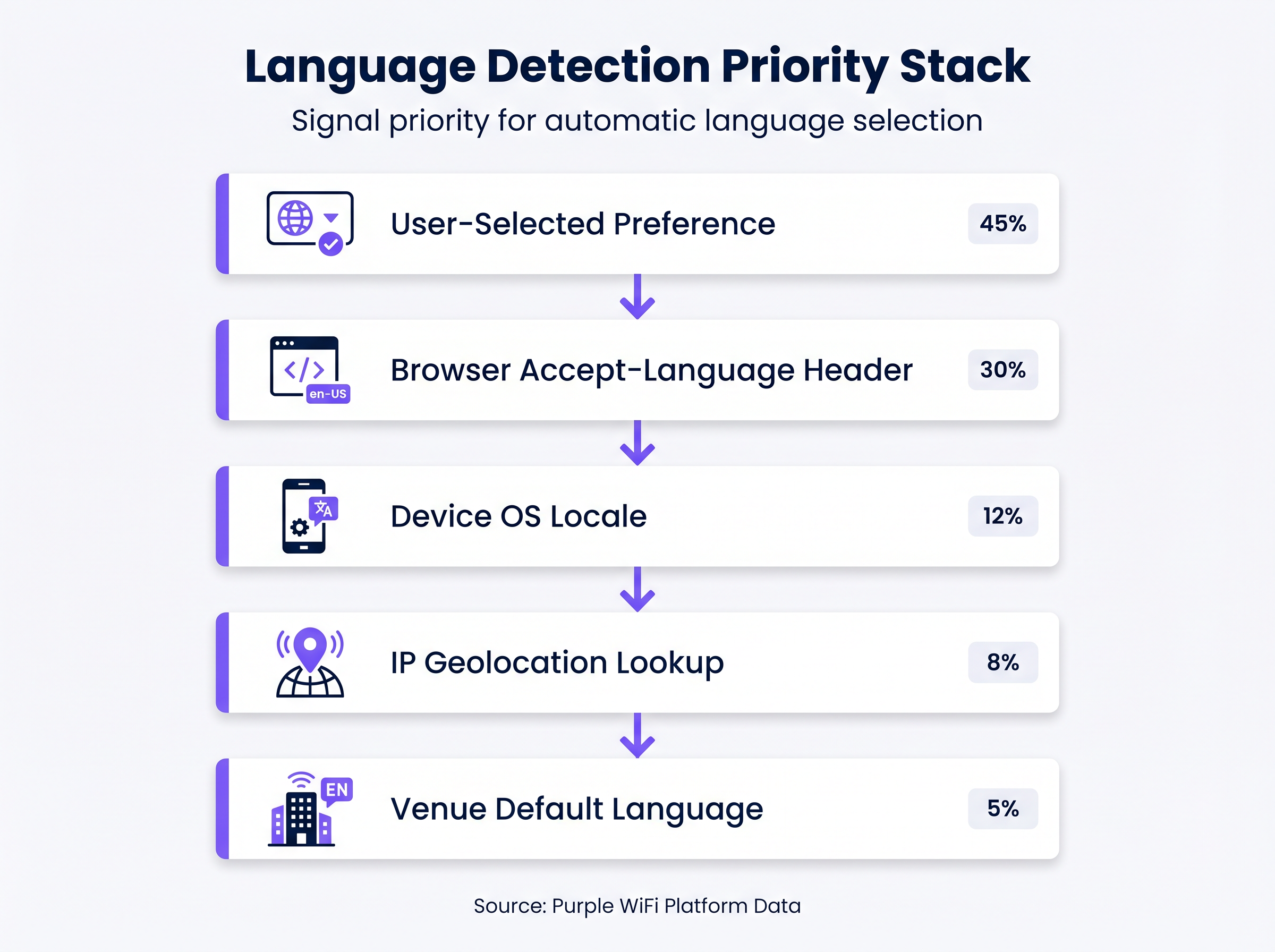
Confiar apenas na geolocalização por IP para determinar o idioma de um usuário é uma falha arquitetônica comum. Em ambientes como aeroportos ou conferências internacionais, os usuários frequentemente se conectam via VPNs corporativas ou perfis de dados em roaming, tornando a geolocalização baseada em IP imprecisa em até 30% dos casos. Em vez disso, um captive portal robusto deve implementar uma pilha de prioridade de várias camadas para detecção de idioma:
- Preferência Selecionada pelo Usuário (Prioridade Mais Alta): Se um usuário recorrente selecionou previamente um idioma, essa preferência deve ser armazenada (por exemplo, via um cookie persistente ou associação de endereço MAC no backend) e aplicada automaticamente na reconexão.
- Cabeçalho
Accept-Languagedo Navegador: Este cabeçalho HTTP fornece uma reflexão altamente precisa das configurações explícitas do dispositivo ou navegador do usuário (por exemplo,en-US,en;q=0.9,fr;q=0.8). Deve ser o principal mecanismo de detecção automatizada. - Localidade do SO do Dispositivo: Onde acessível, consultar a localidade do sistema operacional subjacente fornece um fallback se o cabeçalho do navegador for inconclusivo.
- Consulta de Geolocalização por IP: Usado apenas como um fallback secundário, isso mapeia o IP de origem para uma região geográfica, embora suas limitações devam ser reconhecidas.
- Idioma Padrão do Local (Prioridade Mais Baixa): O fallback final, tipicamente o idioma principal do país onde o local está situado.
Lidando com Scripts da Direita para a Esquerda (RTL)
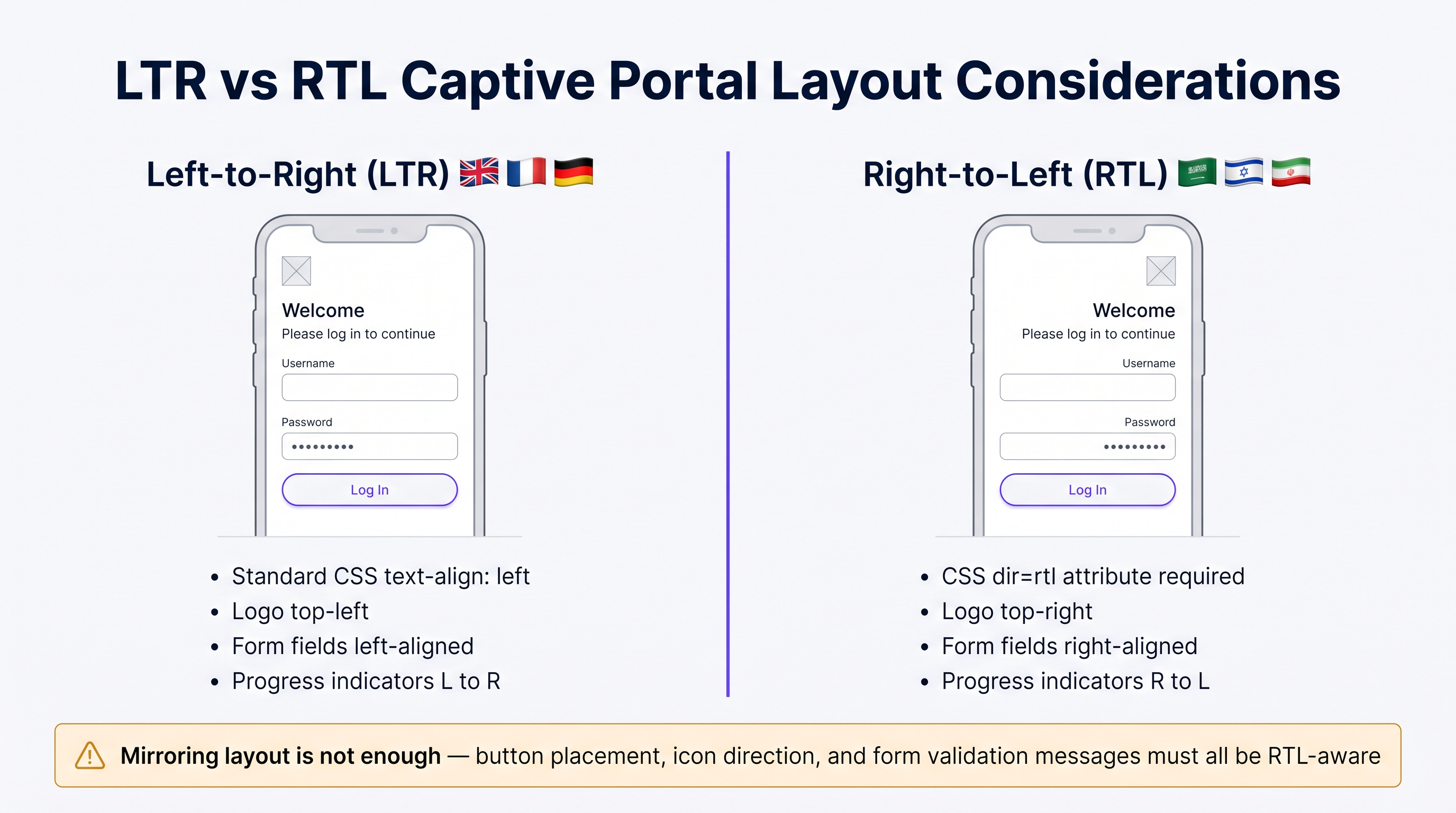
A implantação de idiomas como árabe, hebraico ou persa requer mais do que simplesmente traduzir o texto; exige uma mudança fundamental na arquitetura da UI. Um portal projetado exclusivamente para idiomas da esquerda para a direita (LTR) falhará ao renderizar conteúdo RTL, levando a texto sobreposto, campos de formulário desalinhados e uma interface inutilizável.
Principais considerações técnicas para a implementação de RTL incluem:
- Direcionalidade do Documento: O atributo HTML
dirdeve ser definido dinamicamente comortl(<html dir="rtl">) ao servir esses idiomas. Isso instrui o navegador a espelhar o fluxo do documento. - Espelhamento de Elementos da UI: Todos os elementos de layout devem ser invertidos. Logotipos tipicamente colocados no canto superior esquerdo devem mover-se para o canto superior direito. Rótulos de formulário, campos de entrada e botões de envio devem alinhar-se à direita.
- Suporte a Frameworks CSS: Frameworks CSS modernos (como Tailwind ou Bootstrap) oferecem variantes RTL. Garanta que o pipeline de build do seu portal compile essas variantes e as sirva condicionalmente com base no idioma detectado.
- Seleção de Fonte: Fontes latinas padrão frequentemente falham em renderizar ligaduras árabes corretamente. Utilize fontes Unicode robustas (por exemplo, Google Noto) para garantir a formação e conectividade adequadas dos caracteres.
Guia de Implementação
Estratégia de Implantação Passo a Passo
- Seleção de Idioma Orientada por Dados: Não tente lançar com 20 idiomas simultaneamente. Analise seus WiFi Analytics existentes para identificar os 5 a 7 idiomas mais falados por seus visitantes. Concentre sua implantação inicial neste subconjunto para garantir alta qualidade.
- Entrega Dinâmica de Conteúdo: Arquiteture seu portal para buscar strings traduzidas dinamicamente de uma Content Delivery Network (CDN) ou de um serviço de localização dedicado, em vez de codificá-las diretamente no aplicativo do portal. Isso desvincula as atualizações de conteúdo das implantações de código.
- Contêineres de UI Flexíveis: O texto em alemão pode ser até 30% mais longo que o inglês, enquanto idiomas asiáticos podem exigir mais altura vertical. Projete contêineres de UI (botões, caixas de alerta, campos de formulário) para serem flexíveis. Evite larguras fixas e implemente um tratamento robusto de estouro de texto (por exemplo, CSS
text-overflow: ellipsiscombinado com tooltips). - Formatação Padronizada de Data e Hora: Evite formatos de data ambíguos (como
04/05/2025). Sempre use a formatação ISO 8601 (YYYY-MM-DD) ou escreva explicitamente o mês no idioma localizado para evitar confusão em relação à expiração da sessão ou aceitação dos termos.
Melhores Práticas
Textos Legais e Conformidade com a GDPR
Traduzir Termos de Serviço (ToS) e Políticas de Privacidade não é meramente um exercício linguístico; é um requisito legal rigoroso sob regulamentações como a GDPR. Conforme destacado em discussões sobre CCPA vs GDPR: Conformidade Global de Privacidade para Dados de Guest WiFi , apresentar textos legais complexos em um idioma que o usuário não compreende invalida o consentimento informado.
- ProfissiTradução Jurídica: Nunca use tradução automática para documentos jurídicos. Contrate tradutores jurídicos qualificados que compreendam as nuances jurisdicionais específicas (por exemplo, os requisitos da CNIL francesa versus a Datenschutzbehörde alemã).
- Controle de Versão e Trilhas de Auditoria: Seu backend de autenticação deve registrar não apenas que um usuário aceitou os termos, mas qual versão dos termos ele aceitou e em qual idioma. Essa trilha de auditoria é fundamental para demonstrar conformidade durante investigações regulatórias.
Solução de Problemas e Mitigação de Riscos
A "Armadilha da Localização Parcial"
Um modo de falha comum é traduzir a tela de login principal, mas deixar mensagens de erro, avisos de validação ou páginas splash pós-autenticação no idioma padrão. Isso cria uma experiência de usuário desagradável e mina a confiança. Garanta que sua matriz de localização cubra todos os casos extremos, incluindo:
- Mensagens de falha de autenticação RADIUS.
- Erros de validação de formulário (por exemplo, "Formato de e-mail inválido").
- Avisos de tempo limite de sessão.
- Redirecionamentos pós-autenticação e páginas de sucesso.
ROI e Impacto nos Negócios
Um portal multilíngue implementado corretamente impacta diretamente as principais métricas de negócios. Ao remover o atrito na camada de autenticação, os locais veem taxas de conexão mais altas, o que, por sua vez, alimenta dados mais robustos em suas plataformas de marketing. Para uma análise mais aprofundada sobre a quantificação desse valor, consulte nosso guia sobre Medindo o ROI do WiFi para Convidados: Uma Estrutura para CMOs . Além disso, garantir a conformidade em várias jurisdições mitiga o risco de multas regulatórias substanciais, protegendo o resultado final da organização.
Briefing de Áudio de Especialista
Ouça nosso briefing técnico de 10 minutos para uma discussão mais aprofundada sobre esses conceitos:
Termos-Chave e Definições
Accept-Language Header
An HTTP request header sent by the browser indicating the user's preferred languages and locales.
This is the most reliable automated signal for determining which language version of the captive portal to serve.
RTL (Right-to-Left)
Scripts such as Arabic and Hebrew that are read from right to left, requiring specific HTML and CSS handling.
IT teams must ensure their portal frameworks support RTL variants to prevent layout breakage for these users.
Informed Consent
The requirement under GDPR that a user clearly understands what data is being collected and how it will be used before agreeing.
Presenting Terms of Service in a language the user does not understand invalidates informed consent.
Audit Trail
A secure, timestamped record of events.
Captive portals must maintain an audit trail showing exactly which version and language of the ToS a specific user accepted.
IP Geolocation
The process of determining a device's physical location based on its IP address.
Often inaccurate for language detection due to VPNs and roaming, and should only be used as a fallback.
Unicode Font Stack
A set of fonts designed to support a vast array of international characters and scripts.
Essential for ensuring that languages like Japanese or Arabic render correctly without 'tofu' (missing character boxes).
Text Overflow Handling
CSS techniques used to manage text that exceeds the bounds of its container.
Crucial for multi-language portals where translated strings (e.g., in German) may be significantly longer than the original English.
Dynamic Content Delivery
Serving content (like translated strings) from a separate service or CDN rather than hardcoding it.
Allows content teams to update translations without requiring a new code deployment from the network team.
Estudos de Caso
A major international airport in Europe is upgrading its captive portal. Analytics show that 40% of users connect from devices set to English, 20% German, 15% Arabic, 10% Mandarin, and 15% other languages. The current portal uses IP geolocation and defaults to German.
- Implement the priority stack: Browser Accept-Language > OS Locale > Default (English). 2. Deploy English, German, Arabic, and Mandarin translations. 3. For Arabic, implement a dynamic
<html dir="rtl">switch and load a mirrored CSS stylesheet. 4. Ensure all Terms of Service are translated into these four languages by legal professionals and that the backend logs the accepted language version.
A global retail brand is rolling out a unified guest WiFi portal across its stores in the UK, France, and Japan. They want a consistent brand experience but are concerned about UI consistency across different character sets.
- Design the UI with flexible containers rather than fixed widths. 2. Use CSS Flexbox or Grid to allow buttons and text areas to expand dynamically. 3. Select a robust Unicode font stack (e.g., Google Noto) to ensure consistent rendering of Japanese characters alongside Latin scripts. 4. Implement a prominent language selector dropdown on the portal, using native script names (e.g., 'Français', '日本語') rather than just flags.
Análise de Cenário
Q1. Your venue is hosting a major tech conference with attendees primarily from the US, Germany, and Japan. Your current portal uses IP geolocation to set the language. What is the primary risk, and how should you resolve it?
💡 Dica:Consider how international travelers typically connect their devices to foreign networks.
Mostrar Abordagem Recomendada
The primary risk is that international travelers often use corporate VPNs or roaming data profiles, which will mask their true location and cause the IP geolocation to serve the wrong language (likely the venue's default). The solution is to implement a priority stack that relies first on the browser's Accept-Language header, which accurately reflects the user's device settings regardless of their network routing.
Q2. You are expanding your portal to support Arabic. You have translated all the text and applied standard CSS right-alignment to the text blocks. During testing, native speakers report the portal feels 'broken'. What critical step was missed?
💡 Dica:RTL support requires more than just text alignment; consider the entire document structure.
Mostrar Abordagem Recomendada
Simply aligning text to the right is insufficient for RTL languages. The critical missing step is setting the HTML document direction (<html dir="rtl">) and implementing a mirrored CSS layout. This ensures that UI elements like logos, form fields, buttons, and progress indicators are properly reversed to match the RTL reading flow.
Q3. To save costs, your marketing team proposes using an automated AI translation tool to translate the portal's Terms of Service and Privacy Policy into five new languages. As the IT manager, how do you respond?
💡 Dica:Consider the legal implications of inaccurate translations under data protection regulations.
Mostrar Abordagem Recomendada
You must reject this proposal. Under regulations like GDPR, valid informed consent requires that the user fully understands the legal terms. Automated translations often miss critical legal nuances or jurisdictional specificities. Legal copy must be translated and reviewed by qualified legal professionals in the target jurisdictions to avoid severe compliance risks and potential fines.
Principais Conclusões
- ✓IP geolocation is unreliable for language detection; prioritize the browser's Accept-Language header.
- ✓Supporting RTL languages requires mirroring the entire UI layout, not just changing text alignment.
- ✓Never use machine translation for Terms of Service or Privacy Policies due to GDPR compliance risks.
- ✓Design UI containers to be flexible to accommodate text expansion (e.g., German translations).
- ✓Maintain a strict audit trail logging which language version of the ToS each user accepted.
- ✓Use robust Unicode fonts to ensure proper rendering of non-Latin characters.
- ✓Avoid the 'partial localisation trap' by ensuring error messages and post-login pages are also translated.




