

Portails Captive multilingues : Bonnes pratiques pour les sites internationaux
Ce guide de référence technique faisant autorité fournit aux professionnels de l'informatique seniors des stratégies concrètes pour la conception et le déploiement de portails Captive multilingues. Il couvre l'architecture avancée de détection de langue, les considérations de mise en page RTL et la localisation de textes juridiques conformes au GDPR afin d'assurer un accès WiFi invité fluide dans les sites internationaux.
🎧 Écouter ce guide
Voir la transcription
Résumé Exécutif
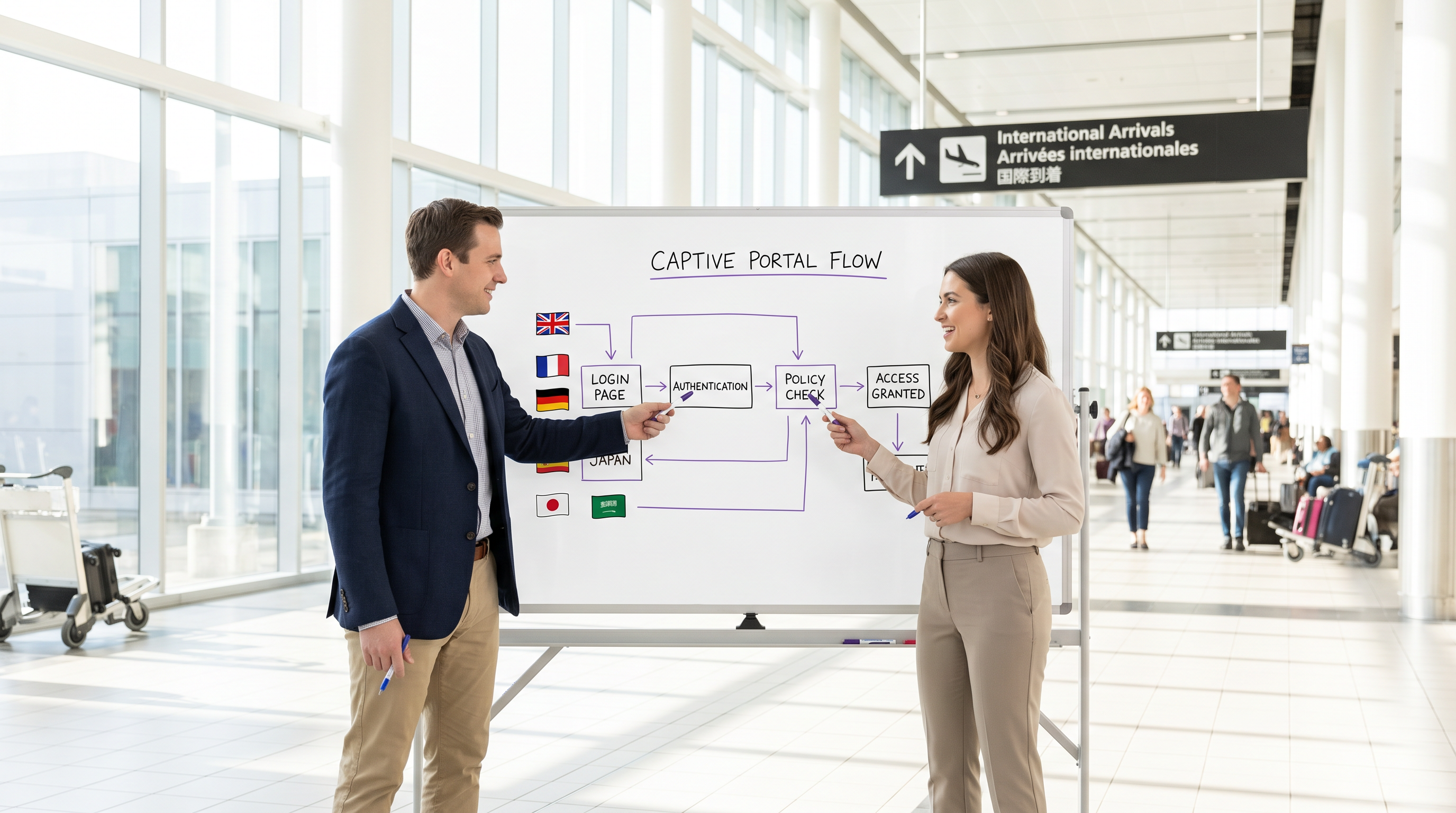
Pour les sites internationaux — qu'il s'agisse de grands aéroports, de chaînes d'hôtels mondiales ou de grands environnements de vente au détail — le portail Captive est souvent le premier point de contact numérique qu'un visiteur expérimente. Un portail mal localisé non seulement dégrade l'expérience de l'invité, mais peut également introduire des risques de conformité importants et réduire l'efficacité de vos analyses WiFi. Ce guide fournit un cadre technique complet pour le déploiement de portails Captive multilingues. Nous allons au-delà de la traduction de base pour aborder l'architecture sous-jacente de la détection de langue, les complexités du rendu d'interface utilisateur de droite à gauche (RTL) et les exigences strictes en matière de consentement éclairé en vertu du GDPR. En mettant en œuvre les stratégies détaillées ici, les responsables informatiques et les architectes réseau peuvent s'assurer que leur infrastructure Guest WiFi offre une expérience d'authentification sécurisée, accessible et légalement conforme aux visiteurs du monde entier, soutenant ainsi des objectifs commerciaux plus larges comme ceux observés dans le Commerce de détail et l' Hôtellerie .
Approfondissement Technique
La pile de priorités de détection de langue
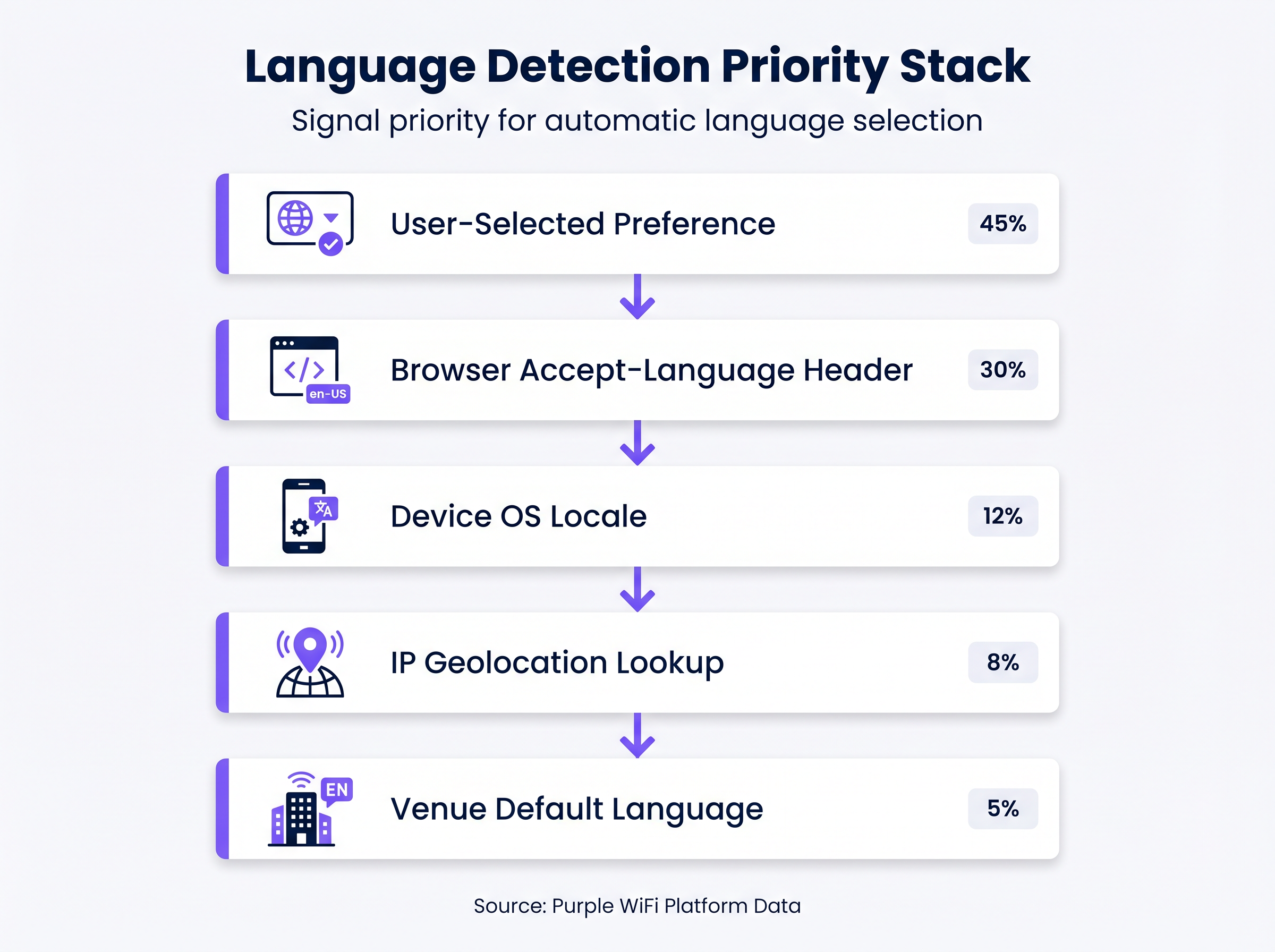
S'appuyer uniquement sur la géolocalisation IP pour déterminer la langue d'un utilisateur est une faille architecturale courante. Dans des environnements tels que les aéroports ou les conférences internationales, les utilisateurs se connectent fréquemment via des VPN d'entreprise ou des profils de données en itinérance, rendant la géolocalisation basée sur l'IP imprécise dans jusqu'à 30 % des cas. Au lieu de cela, un portail Captive robuste doit implémenter une pile de priorités à plusieurs niveaux pour la détection de langue :
- Préférence sélectionnée par l'utilisateur (Priorité la plus élevée) : Si un utilisateur récurrent a précédemment sélectionné une langue, cette préférence doit être stockée (par exemple, via un cookie persistant ou une association d'adresse MAC dans le backend) et appliquée automatiquement lors de la reconnexion.
- En-tête
Accept-Languagedu navigateur : Cet en-tête HTTP fournit un reflet très précis des paramètres explicites de l'appareil ou du navigateur de l'utilisateur (par exemple,en-US,en;q=0.9,fr;q=0.8). Il doit être le principal mécanisme de détection automatisée. - Paramètres régionaux du système d'exploitation de l'appareil : Lorsque cela est accessible, l'interrogation des paramètres régionaux du système d'exploitation sous-jacent fournit une solution de repli si l'en-tête du navigateur n'est pas concluant.
- Recherche de géolocalisation IP : Utilisée uniquement comme solution de repli secondaire, elle associe l'IP source à une région géographique, bien que ses limitations doivent être reconnues.
- Langue par défaut du site (Priorité la plus basse) : La solution de repli ultime, généralement la langue principale du pays où se trouve le site.
Gestion des écritures de droite à gauche (RTL)
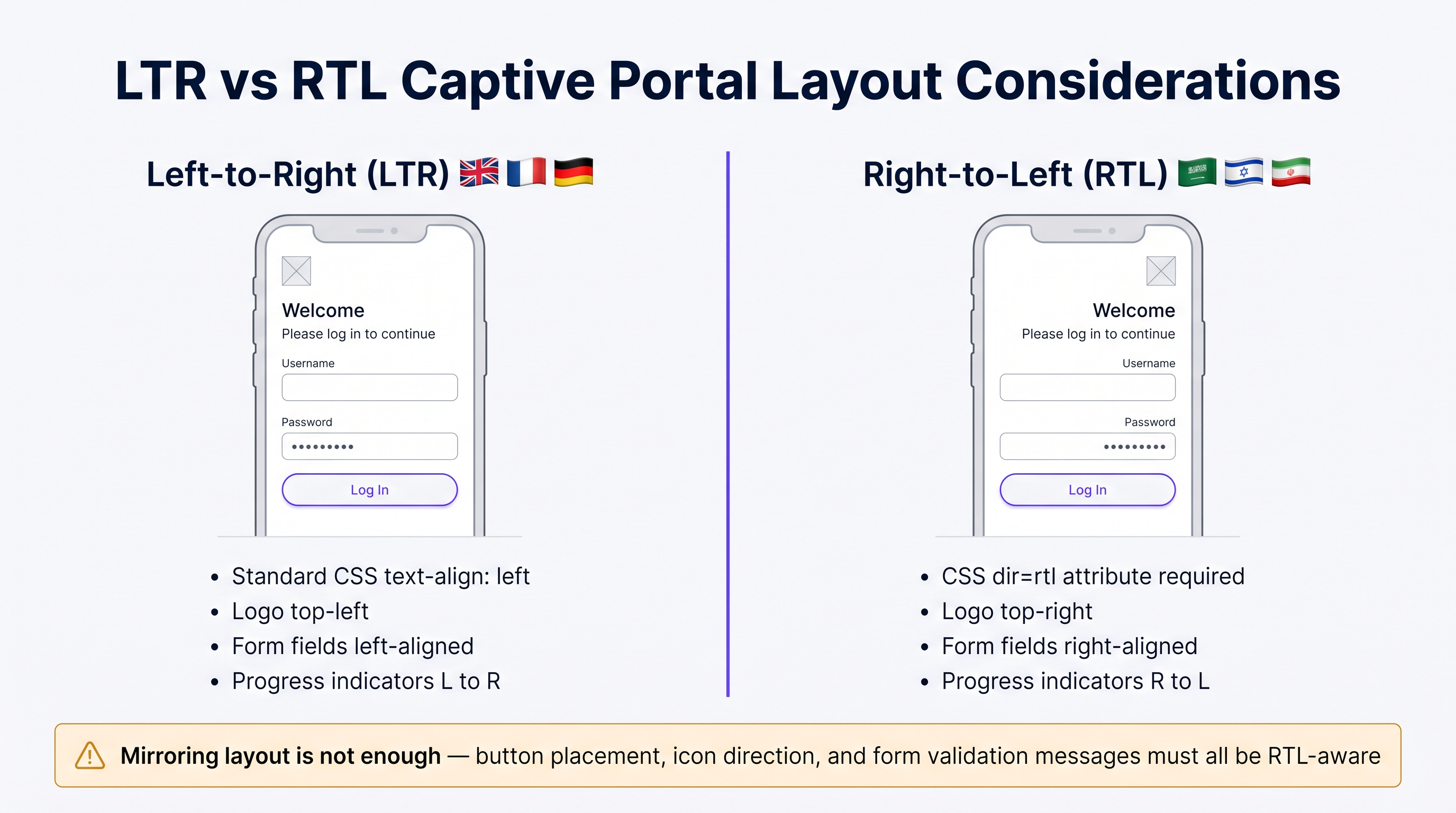
Le déploiement de langues telles que l'arabe, l'hébreu ou le persan exige plus qu'une simple traduction du texte ; il demande un changement fondamental dans l'architecture de l'interface utilisateur. Un portail conçu exclusivement pour les langues de gauche à droite (LTR) se brisera lors du rendu du contenu RTL, entraînant des chevauchements de texte, des champs de formulaire mal alignés et une interface inutilisable.
Les considérations techniques clés pour l'implémentation RTL incluent :
- Directionnalité du document : L'attribut HTML
dirdoit être défini dynamiquement surrtl(<html dir="rtl">) lors de la diffusion de ces langues. Cela indique au navigateur de refléter le flux du document. - Miroir des éléments d'interface utilisateur : Tous les éléments de mise en page doivent être inversés. Les logos généralement placés en haut à gauche doivent se déplacer en haut à droite. Les étiquettes de formulaire, les champs de saisie et les boutons de soumission doivent s'aligner à droite.
- Prise en charge des frameworks CSS : Les frameworks CSS modernes (comme Tailwind ou Bootstrap) offrent des variantes RTL. Assurez-vous que le pipeline de construction de votre portail compile ces variantes et les diffuse conditionnellement en fonction de la langue détectée.
- Sélection de polices : Les polices latines standard ne parviennent souvent pas à rendre correctement les ligatures arabes. Utilisez des polices Unicode robustes (par exemple, Google Noto) pour assurer une mise en forme et une connectivité des caractères appropriées.
Guide d'implémentation
Stratégie de déploiement étape par étape
- Sélection de langue basée sur les données : N'essayez pas de lancer avec 20 langues simultanément. Analysez vos analyses WiFi existantes pour identifier les 5 à 7 langues les plus parlées par vos visiteurs. Concentrez votre déploiement initial sur ce sous-ensemble pour garantir une haute qualité.
- Diffusion de contenu dynamique : Concevez votre portail pour récupérer les chaînes traduites dynamiquement à partir d'un réseau de diffusion de contenu (CDN) ou d'un service de localisation dédié, plutôt que de les coder en dur dans l'application du portail. Cela dissocie les mises à jour de contenu des déploiements de code.
- Conteneurs d'interface utilisateur flexibles : Le texte allemand peut être jusqu'à 30 % plus long que l'anglais, tandis que les langues asiatiques peuvent nécessiter plus de hauteur verticale. Concevez des conteneurs d'interface utilisateur (boutons, boîtes d'alerte, champs de formulaire) pour qu'ils soient flexibles. Évitez les largeurs fixes et implémentez une gestion robuste du débordement de texte (par exemple,
text-overflow: ellipsisen CSS combiné avec des info-bulles). - Formatage standardisé de la date et de l'heure : Évitez les formats de date ambigus (comme
04/05/2025). Utilisez toujours le format ISO 8601 (AAAA-MM-JJ) ou épellez explicitement le mois dans la langue localisée pour éviter toute confusion concernant l'expiration de session ou l'acceptation des conditions.
Bonnes pratiques
Textes juridiques et conformité au GDPR
La traduction des Conditions d'utilisation (ToS) et des Politiques de confidentialité n'est pas seulement un exercice linguistique ; c'est une exigence légale stricte en vertu de réglementations comme le GDPR. Comme souligné dans les discussions autour de CCPA vs GDPR : Conformité mondiale à la confidentialité des données WiFi des invités , présenter un texte juridique complexe dans une langue que l'utilisateur ne comprend pas invalide le consentement éclairé.
- ProfessiTraduction juridique professionnelle : N'utilisez jamais de traduction automatique pour les documents juridiques. Faites appel à des traducteurs juridiques qualifiés qui comprennent les nuances juridictionnelles spécifiques (par exemple, les exigences de la CNIL française par rapport à la Datenschutzbehörde allemande).
- Contrôle de version et pistes d'audit : Votre backend d'authentification doit enregistrer non seulement qu'un utilisateur a accepté les conditions, mais aussi quelle version des conditions il a acceptées, et dans quelle langue. Cette piste d'audit est essentielle pour prouver la conformité lors des enquêtes réglementaires.
Dépannage et atténuation des risques
Le "piège de la localisation partielle"
Un mode d'échec courant consiste à traduire l'écran de connexion principal tout en laissant les messages d'erreur, les avertissements de validation ou les pages d'accueil post-authentification dans la langue par défaut. Cela crée une expérience utilisateur désagréable et nuit à la confiance. Assurez-vous que votre matrice de localisation couvre tous les cas limites, y compris :
- Messages d'échec d'authentification RADIUS.
- Erreurs de validation de formulaire (par exemple, "Format d'e-mail invalide").
- Avertissements d'expiration de session.
- Redirections post-authentification et pages de succès.
ROI et impact commercial
Un portail multilingue correctement mis en œuvre a un impact direct sur les indicateurs commerciaux clés. En éliminant les frictions au niveau de l'authentification, les établissements constatent des taux de connexion plus élevés, ce qui alimente à son tour des données plus robustes dans leurs plateformes marketing. Pour une analyse plus approfondie de la quantification de cette valeur, consultez notre guide sur Mesurer le ROI du WiFi invité : Un cadre pour les CMO . De plus, assurer la conformité dans plusieurs juridictions atténue le risque d'amendes réglementaires substantielles, protégeant ainsi les résultats financiers de l'organisation.
Briefing audio d'expert
Écoutez notre briefing technique de 10 minutes pour une discussion plus approfondie sur ces concepts :
Termes clés et définitions
Accept-Language Header
An HTTP request header sent by the browser indicating the user's preferred languages and locales.
This is the most reliable automated signal for determining which language version of the captive portal to serve.
RTL (Right-to-Left)
Scripts such as Arabic and Hebrew that are read from right to left, requiring specific HTML and CSS handling.
IT teams must ensure their portal frameworks support RTL variants to prevent layout breakage for these users.
Informed Consent
The requirement under GDPR that a user clearly understands what data is being collected and how it will be used before agreeing.
Presenting Terms of Service in a language the user does not understand invalidates informed consent.
Audit Trail
A secure, timestamped record of events.
Captive portals must maintain an audit trail showing exactly which version and language of the ToS a specific user accepted.
IP Geolocation
The process of determining a device's physical location based on its IP address.
Often inaccurate for language detection due to VPNs and roaming, and should only be used as a fallback.
Unicode Font Stack
A set of fonts designed to support a vast array of international characters and scripts.
Essential for ensuring that languages like Japanese or Arabic render correctly without 'tofu' (missing character boxes).
Text Overflow Handling
CSS techniques used to manage text that exceeds the bounds of its container.
Crucial for multi-language portals where translated strings (e.g., in German) may be significantly longer than the original English.
Dynamic Content Delivery
Serving content (like translated strings) from a separate service or CDN rather than hardcoding it.
Allows content teams to update translations without requiring a new code deployment from the network team.
Études de cas
A major international airport in Europe is upgrading its captive portal. Analytics show that 40% of users connect from devices set to English, 20% German, 15% Arabic, 10% Mandarin, and 15% other languages. The current portal uses IP geolocation and defaults to German.
- Implement the priority stack: Browser Accept-Language > OS Locale > Default (English). 2. Deploy English, German, Arabic, and Mandarin translations. 3. For Arabic, implement a dynamic
<html dir="rtl">switch and load a mirrored CSS stylesheet. 4. Ensure all Terms of Service are translated into these four languages by legal professionals and that the backend logs the accepted language version.
A global retail brand is rolling out a unified guest WiFi portal across its stores in the UK, France, and Japan. They want a consistent brand experience but are concerned about UI consistency across different character sets.
- Design the UI with flexible containers rather than fixed widths. 2. Use CSS Flexbox or Grid to allow buttons and text areas to expand dynamically. 3. Select a robust Unicode font stack (e.g., Google Noto) to ensure consistent rendering of Japanese characters alongside Latin scripts. 4. Implement a prominent language selector dropdown on the portal, using native script names (e.g., 'Français', '日本語') rather than just flags.
Analyse de scénario
Q1. Your venue is hosting a major tech conference with attendees primarily from the US, Germany, and Japan. Your current portal uses IP geolocation to set the language. What is the primary risk, and how should you resolve it?
💡 Astuce :Consider how international travelers typically connect their devices to foreign networks.
Afficher l'approche recommandée
The primary risk is that international travelers often use corporate VPNs or roaming data profiles, which will mask their true location and cause the IP geolocation to serve the wrong language (likely the venue's default). The solution is to implement a priority stack that relies first on the browser's Accept-Language header, which accurately reflects the user's device settings regardless of their network routing.
Q2. You are expanding your portal to support Arabic. You have translated all the text and applied standard CSS right-alignment to the text blocks. During testing, native speakers report the portal feels 'broken'. What critical step was missed?
💡 Astuce :RTL support requires more than just text alignment; consider the entire document structure.
Afficher l'approche recommandée
Simply aligning text to the right is insufficient for RTL languages. The critical missing step is setting the HTML document direction (<html dir="rtl">) and implementing a mirrored CSS layout. This ensures that UI elements like logos, form fields, buttons, and progress indicators are properly reversed to match the RTL reading flow.
Q3. To save costs, your marketing team proposes using an automated AI translation tool to translate the portal's Terms of Service and Privacy Policy into five new languages. As the IT manager, how do you respond?
💡 Astuce :Consider the legal implications of inaccurate translations under data protection regulations.
Afficher l'approche recommandée
You must reject this proposal. Under regulations like GDPR, valid informed consent requires that the user fully understands the legal terms. Automated translations often miss critical legal nuances or jurisdictional specificities. Legal copy must be translated and reviewed by qualified legal professionals in the target jurisdictions to avoid severe compliance risks and potential fines.
Points clés à retenir
- ✓IP geolocation is unreliable for language detection; prioritize the browser's Accept-Language header.
- ✓Supporting RTL languages requires mirroring the entire UI layout, not just changing text alignment.
- ✓Never use machine translation for Terms of Service or Privacy Policies due to GDPR compliance risks.
- ✓Design UI containers to be flexible to accommodate text expansion (e.g., German translations).
- ✓Maintain a strict audit trail logging which language version of the ToS each user accepted.
- ✓Use robust Unicode fonts to ensure proper rendering of non-Latin characters.
- ✓Avoid the 'partial localisation trap' by ensuring error messages and post-login pages are also translated.




