

Captive Portal Multilingue: Migliori Pratiche per Sedi Internazionali
Questa autorevole guida tecnica di riferimento fornisce ai professionisti IT senior strategie attuabili per la progettazione e l'implementazione di Captive Portal multilingue. Copre l'architettura avanzata di rilevamento della lingua, le considerazioni sul layout RTL e la localizzazione dei testi legali conformi al GDPR per garantire un accesso WiFi senza interruzioni agli ospiti in tutte le sedi internazionali.
🎧 Ascolta questa guida
Visualizza trascrizione
Riepilogo Esecutivo
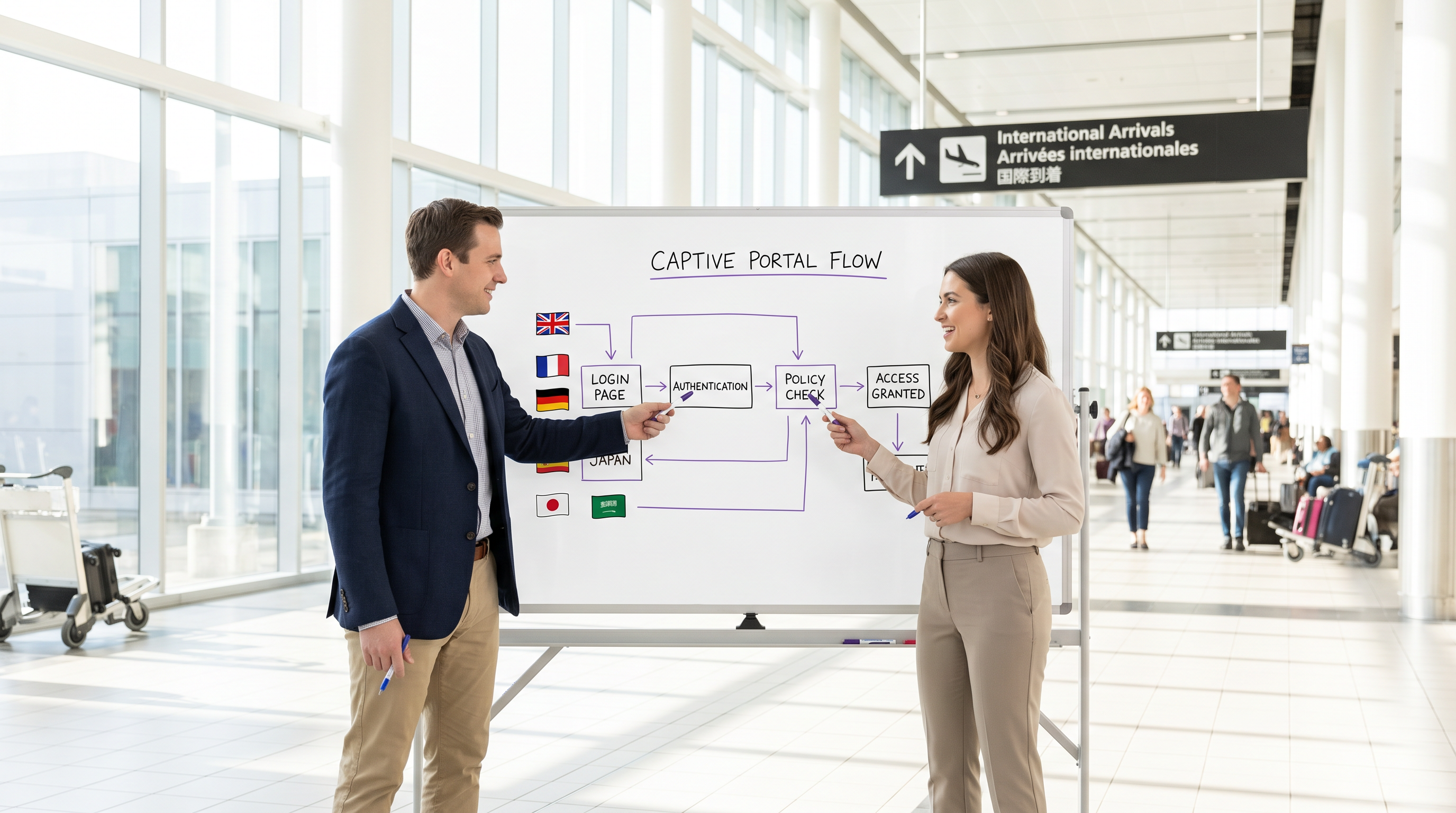
Per le sedi internazionali — che si tratti di grandi hub aeroportuali, catene alberghiere globali o ambienti di vendita al dettaglio su larga scala — il Captive Portal è spesso il primo punto di contatto digitale che un visitatore sperimenta. Un portale mal localizzato non solo degrada l'esperienza dell'ospite, ma può anche introdurre significativi rischi di conformità e ridurre l'efficacia delle tue analisi WiFi. Questa guida fornisce un quadro tecnico completo per la distribuzione di Captive Portal multilingue. Andiamo oltre la traduzione di base per affrontare l'architettura sottostante del rilevamento della lingua, le complessità del rendering dell'interfaccia utente da destra a sinistra (RTL) e i rigorosi requisiti per il consenso informato ai sensi del GDPR. Implementando le strategie qui dettagliate, i responsabili IT e gli architetti di rete possono garantire che la loro infrastruttura Guest WiFi offra un'esperienza di autenticazione sicura, accessibile e legalmente conforme per i visitatori di tutto il mondo, supportando in ultima analisi obiettivi aziendali più ampi come quelli osservati nel Retail e nell' Hospitality .
Approfondimento Tecnico
Lo Stack di Priorità per il Rilevamento della Lingua
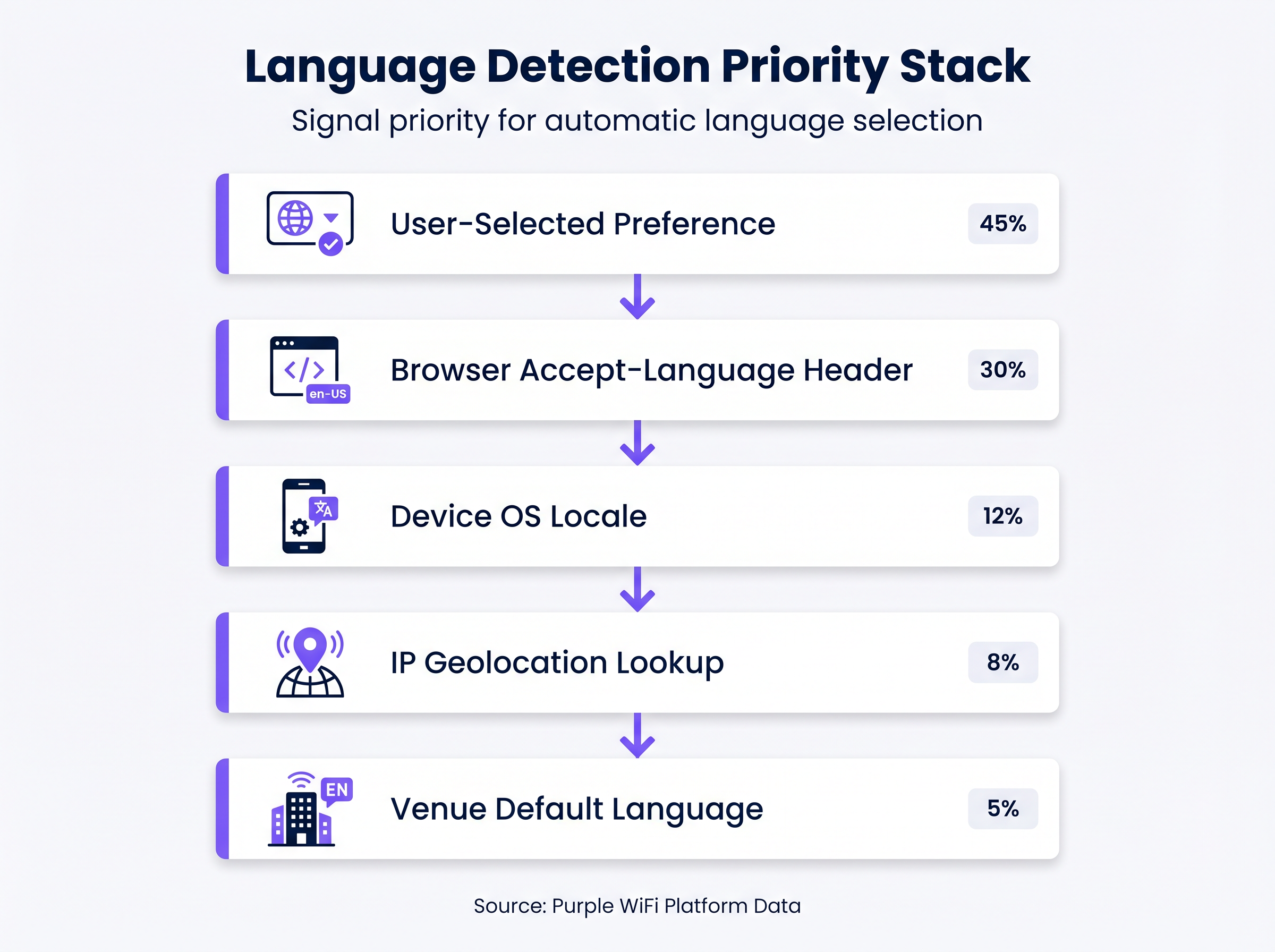
Affidarsi esclusivamente alla geolocalizzazione IP per determinare la lingua di un utente è un difetto architettonico comune. In ambienti come aeroporti o conferenze internazionali, gli utenti si connettono frequentemente tramite VPN aziendali o profili dati in roaming, rendendo la geolocalizzazione basata su IP imprecisa fino al 30% dei casi. Invece, un Captive Portal robusto deve implementare uno stack di priorità a più livelli per il rilevamento della lingua:
- Preferenza Selezionata dall'Utente (Massima Priorità): Se un utente di ritorno ha precedentemente selezionato una lingua, questa preferenza dovrebbe essere memorizzata (ad esempio, tramite un cookie persistente o un'associazione dell'indirizzo MAC nel backend) e applicata automaticamente al momento della riconnessione.
- Header
Accept-Languagedel Browser: Questo header HTTP fornisce un riflesso altamente accurato delle impostazioni esplicite del dispositivo o del browser dell'utente (ad esempio,en-US,en;q=0.9,fr;q=0.8). Dovrebbe essere il meccanismo di rilevamento automatico primario. - Locale del Sistema Operativo del Dispositivo: Laddove accessibile, l'interrogazione del locale del sistema operativo sottostante fornisce un fallback se l'header del browser non è conclusivo.
- Ricerca di Geolocalizzazione IP: Utilizzato solo come fallback secondario, questo mappa l'IP di origine a una regione geografica, sebbene le sue limitazioni debbano essere riconosciute.
- Lingua Predefinita della Sede (Minima Priorità): Il fallback finale, tipicamente la lingua principale del paese in cui si trova la sede.
Gestione degli Script da Destra a Sinistra (RTL)
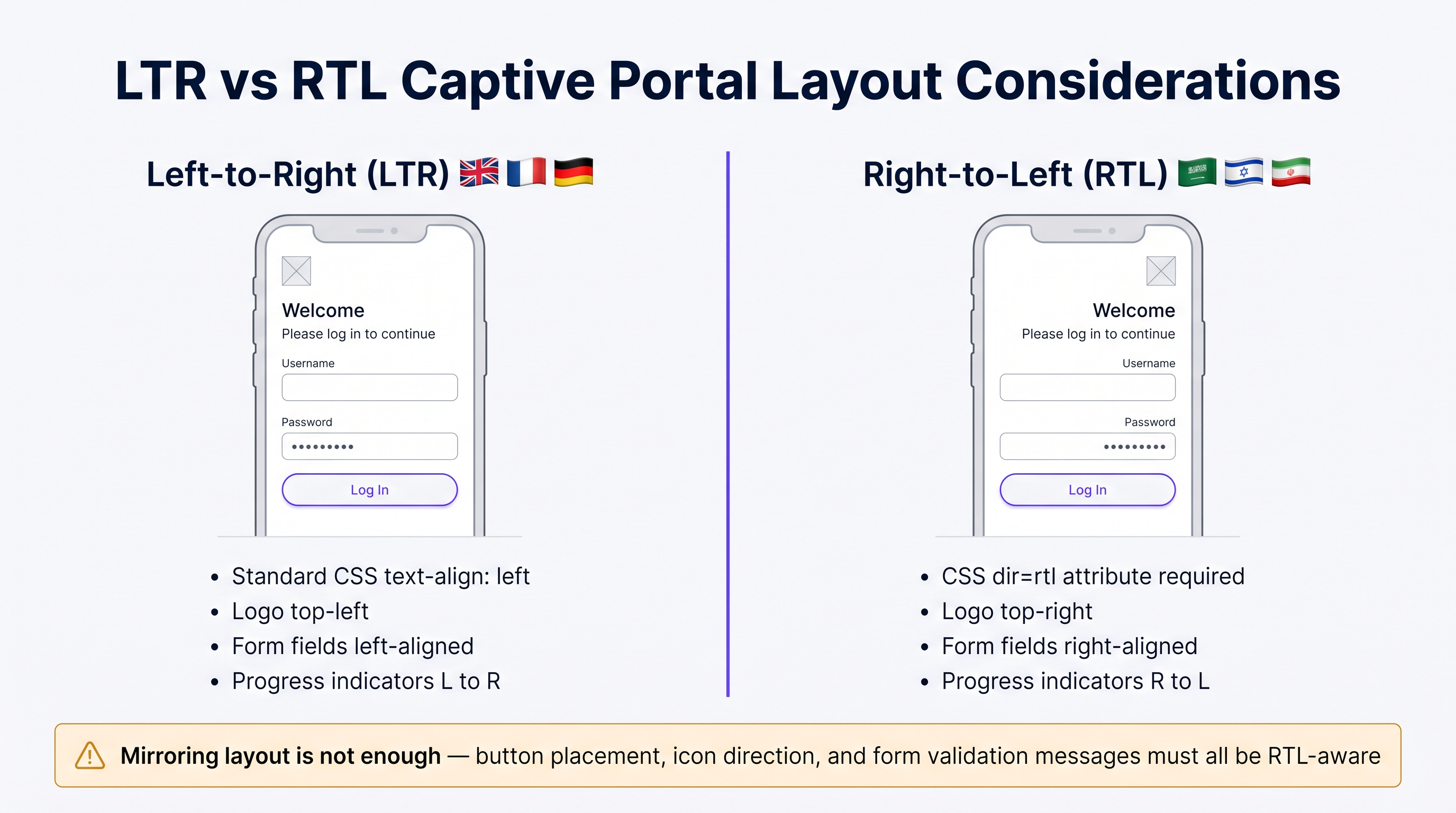
La distribuzione di lingue come l'arabo, l'ebraico o il persiano richiede più di una semplice traduzione del testo; richiede un cambiamento fondamentale nell'architettura dell'interfaccia utente. Un portale progettato esclusivamente per le lingue da sinistra a destra (LTR) si romperà durante il rendering di contenuti RTL, portando a testo sovrapposto, campi modulo disallineati e un'interfaccia inutilizzabile.
Le considerazioni tecniche chiave per l'implementazione RTL includono:
- Direzionalità del Documento: L'attributo HTML
dirdeve essere impostato dinamicamente surtl(<html dir="rtl">) quando si servono queste lingue. Questo istruisce il browser a riflettere il flusso del documento. - Mirroring degli Elementi dell'Interfaccia Utente: Tutti gli elementi del layout devono essere invertiti. I loghi tipicamente posizionati in alto a sinistra dovrebbero spostarsi in alto a destra. Le etichette dei moduli, i campi di input e i pulsanti di invio devono allinearsi a destra.
- Supporto del Framework CSS: I moderni framework CSS (come Tailwind o Bootstrap) offrono varianti RTL. Assicurati che la pipeline di build del tuo portale compili queste varianti e le serva condizionalmente in base alla lingua rilevata.
- Selezione del Carattere: I caratteri latini standard spesso non riescono a rendere correttamente le legature arabe. Utilizza caratteri Unicode robusti (ad esempio, Google Noto) per garantire una corretta modellazione e connettività dei caratteri.
Guida all'Implementazione
Strategia di Implementazione Passo-Passo
- Selezione della Lingua Basata sui Dati: Non tentare di lanciare con 20 lingue contemporaneamente. Analizza i tuoi WiFi Analytics esistenti per identificare le 5-7 lingue più parlate dai tuoi visitatori. Concentra la tua implementazione iniziale su questo sottoinsieme per garantire un'alta qualità.
- Consegna Dinamica dei Contenuti: Progetta il tuo portale per recuperare le stringhe tradotte dinamicamente da una Content Delivery Network (CDN) o da un servizio di localizzazione dedicato, piuttosto che codificarle direttamente nell'applicazione del portale. Questo disaccoppia gli aggiornamenti dei contenuti dalle distribuzioni di codice.
- Contenitori UI Flessibili: Il testo tedesco può essere fino al 30% più lungo dell'inglese, mentre le lingue asiatiche potrebbero richiedere maggiore altezza verticale. Progetta i contenitori dell'interfaccia utente (pulsanti, caselle di avviso, campi modulo) in modo che siano flessibili. Evita larghezze fisse e implementa una robusta gestione del testo in eccesso (ad esempio, CSS
text-overflow: ellipsiscombinato con tooltip). - Formattazione Standardizzata di Data e Ora: Evita formati di data ambigui (come
04/05/2025). Utilizza sempre la formattazione ISO 8601 (YYYY-MM-DD) o scrivi esplicitamente il mese nella lingua localizzata per prevenire confusione riguardo alla scadenza della sessione o all'accettazione dei termini.
Migliori Pratiche
Testi Legali e Conformità GDPR
Tradurre i Termini di Servizio (ToS) e le Politiche sulla Privacy non è meramente un esercizio linguistico; è un requisito legale rigoroso ai sensi di normative come il GDPR. Come evidenziato nelle discussioni su CCPA vs GDPR: Conformità Globale alla Privacy per i Dati Guest WiFi , presentare testi legali complessi in una lingua che l'utente non comprende invalida il consenso informato.
- Professional Legal Translation: Non usare mai la traduzione automatica per documenti legali. Rivolgiti a traduttori legali qualificati che comprendano le sfumature giurisdizionali specifiche (ad esempio, i requisiti della CNIL francese rispetto alla Datenschutzbehörde tedesca).
- Controllo delle versioni e tracce di audit: Il tuo backend di autenticazione deve registrare non solo che un utente ha accettato i termini, ma quale versione dei termini ha accettato e in quale lingua. Questa traccia di audit è fondamentale per dimostrare la conformità durante le indagini normative.
Risoluzione dei problemi e mitigazione dei rischi
La "trappola della localizzazione parziale"
Una modalità di errore comune è la traduzione della schermata di login principale lasciando messaggi di errore, avvisi di convalida o pagine splash post-autenticazione nella lingua predefinita. Ciò crea un'esperienza utente sgradevole e mina la fiducia. Assicurati che la tua matrice di localizzazione copra tutti i casi limite, inclusi:
- Messaggi di errore di autenticazione RADIUS.
- Errori di convalida del modulo (ad esempio, "Formato email non valido").
- Avvisi di timeout della sessione.
- Reindirizzamenti post-autenticazione e pagine di successo.
ROI e impatto aziendale
Un portale multilingue correttamente implementato ha un impatto diretto sulle metriche aziendali chiave. Eliminando l'attrito a livello di autenticazione, le sedi registrano tassi di connessione più elevati, il che a sua volta alimenta dati più robusti nelle loro piattaforme di marketing. Per un approfondimento sulla quantificazione di questo valore, consulta la nostra guida su Misurare il ROI del WiFi Ospiti: Un Framework per i CMO . Inoltre, garantire la conformità in più giurisdizioni mitiga il rischio di multe normative sostanziali, proteggendo i profitti dell'organizzazione.
Briefing audio degli esperti
Ascolta il nostro briefing tecnico di 10 minuti per una discussione più approfondita su questi concetti:
Termini chiave e definizioni
Accept-Language Header
An HTTP request header sent by the browser indicating the user's preferred languages and locales.
This is the most reliable automated signal for determining which language version of the captive portal to serve.
RTL (Right-to-Left)
Scripts such as Arabic and Hebrew that are read from right to left, requiring specific HTML and CSS handling.
IT teams must ensure their portal frameworks support RTL variants to prevent layout breakage for these users.
Informed Consent
The requirement under GDPR that a user clearly understands what data is being collected and how it will be used before agreeing.
Presenting Terms of Service in a language the user does not understand invalidates informed consent.
Audit Trail
A secure, timestamped record of events.
Captive portals must maintain an audit trail showing exactly which version and language of the ToS a specific user accepted.
IP Geolocation
The process of determining a device's physical location based on its IP address.
Often inaccurate for language detection due to VPNs and roaming, and should only be used as a fallback.
Unicode Font Stack
A set of fonts designed to support a vast array of international characters and scripts.
Essential for ensuring that languages like Japanese or Arabic render correctly without 'tofu' (missing character boxes).
Text Overflow Handling
CSS techniques used to manage text that exceeds the bounds of its container.
Crucial for multi-language portals where translated strings (e.g., in German) may be significantly longer than the original English.
Dynamic Content Delivery
Serving content (like translated strings) from a separate service or CDN rather than hardcoding it.
Allows content teams to update translations without requiring a new code deployment from the network team.
Casi di studio
A major international airport in Europe is upgrading its captive portal. Analytics show that 40% of users connect from devices set to English, 20% German, 15% Arabic, 10% Mandarin, and 15% other languages. The current portal uses IP geolocation and defaults to German.
- Implement the priority stack: Browser Accept-Language > OS Locale > Default (English). 2. Deploy English, German, Arabic, and Mandarin translations. 3. For Arabic, implement a dynamic
<html dir="rtl">switch and load a mirrored CSS stylesheet. 4. Ensure all Terms of Service are translated into these four languages by legal professionals and that the backend logs the accepted language version.
A global retail brand is rolling out a unified guest WiFi portal across its stores in the UK, France, and Japan. They want a consistent brand experience but are concerned about UI consistency across different character sets.
- Design the UI with flexible containers rather than fixed widths. 2. Use CSS Flexbox or Grid to allow buttons and text areas to expand dynamically. 3. Select a robust Unicode font stack (e.g., Google Noto) to ensure consistent rendering of Japanese characters alongside Latin scripts. 4. Implement a prominent language selector dropdown on the portal, using native script names (e.g., 'Français', '日本語') rather than just flags.
Analisi degli scenari
Q1. Your venue is hosting a major tech conference with attendees primarily from the US, Germany, and Japan. Your current portal uses IP geolocation to set the language. What is the primary risk, and how should you resolve it?
💡 Suggerimento:Consider how international travelers typically connect their devices to foreign networks.
Mostra l'approccio consigliato
The primary risk is that international travelers often use corporate VPNs or roaming data profiles, which will mask their true location and cause the IP geolocation to serve the wrong language (likely the venue's default). The solution is to implement a priority stack that relies first on the browser's Accept-Language header, which accurately reflects the user's device settings regardless of their network routing.
Q2. You are expanding your portal to support Arabic. You have translated all the text and applied standard CSS right-alignment to the text blocks. During testing, native speakers report the portal feels 'broken'. What critical step was missed?
💡 Suggerimento:RTL support requires more than just text alignment; consider the entire document structure.
Mostra l'approccio consigliato
Simply aligning text to the right is insufficient for RTL languages. The critical missing step is setting the HTML document direction (<html dir="rtl">) and implementing a mirrored CSS layout. This ensures that UI elements like logos, form fields, buttons, and progress indicators are properly reversed to match the RTL reading flow.
Q3. To save costs, your marketing team proposes using an automated AI translation tool to translate the portal's Terms of Service and Privacy Policy into five new languages. As the IT manager, how do you respond?
💡 Suggerimento:Consider the legal implications of inaccurate translations under data protection regulations.
Mostra l'approccio consigliato
You must reject this proposal. Under regulations like GDPR, valid informed consent requires that the user fully understands the legal terms. Automated translations often miss critical legal nuances or jurisdictional specificities. Legal copy must be translated and reviewed by qualified legal professionals in the target jurisdictions to avoid severe compliance risks and potential fines.
Punti chiave
- ✓IP geolocation is unreliable for language detection; prioritize the browser's Accept-Language header.
- ✓Supporting RTL languages requires mirroring the entire UI layout, not just changing text alignment.
- ✓Never use machine translation for Terms of Service or Privacy Policies due to GDPR compliance risks.
- ✓Design UI containers to be flexible to accommodate text expansion (e.g., German translations).
- ✓Maintain a strict audit trail logging which language version of the ToS each user accepted.
- ✓Use robust Unicode fonts to ensure proper rendering of non-Latin characters.
- ✓Avoid the 'partial localisation trap' by ensuring error messages and post-login pages are also translated.




