

¿Por qué nuestro WiFi para invitados es tan lento? Diagnóstico de la congestión de la red
Esta guía diagnostica los factores ocultos de la congestión del WiFi para invitados —telemetría en segundo plano, redes de anuncios programáticos y actualizaciones automáticas del sistema operativo— que en conjunto consumen hasta el 40% del ancho de banda del WiFi público antes de que un invitado abra un navegador. Proporciona un marco de implementación por fases y neutral en cuanto a proveedores para el filtrado DNS y las políticas de QoS que recuperan ese ancho de banda, mejoran la experiencia del invitado y ofrecen un ROI medible. Dirigido a Directores de TI y Gerentes de Operaciones en entornos de hostelería, comercio minorista, eventos y sector público.
Escucha esta guía
Ver transcripción del podcast
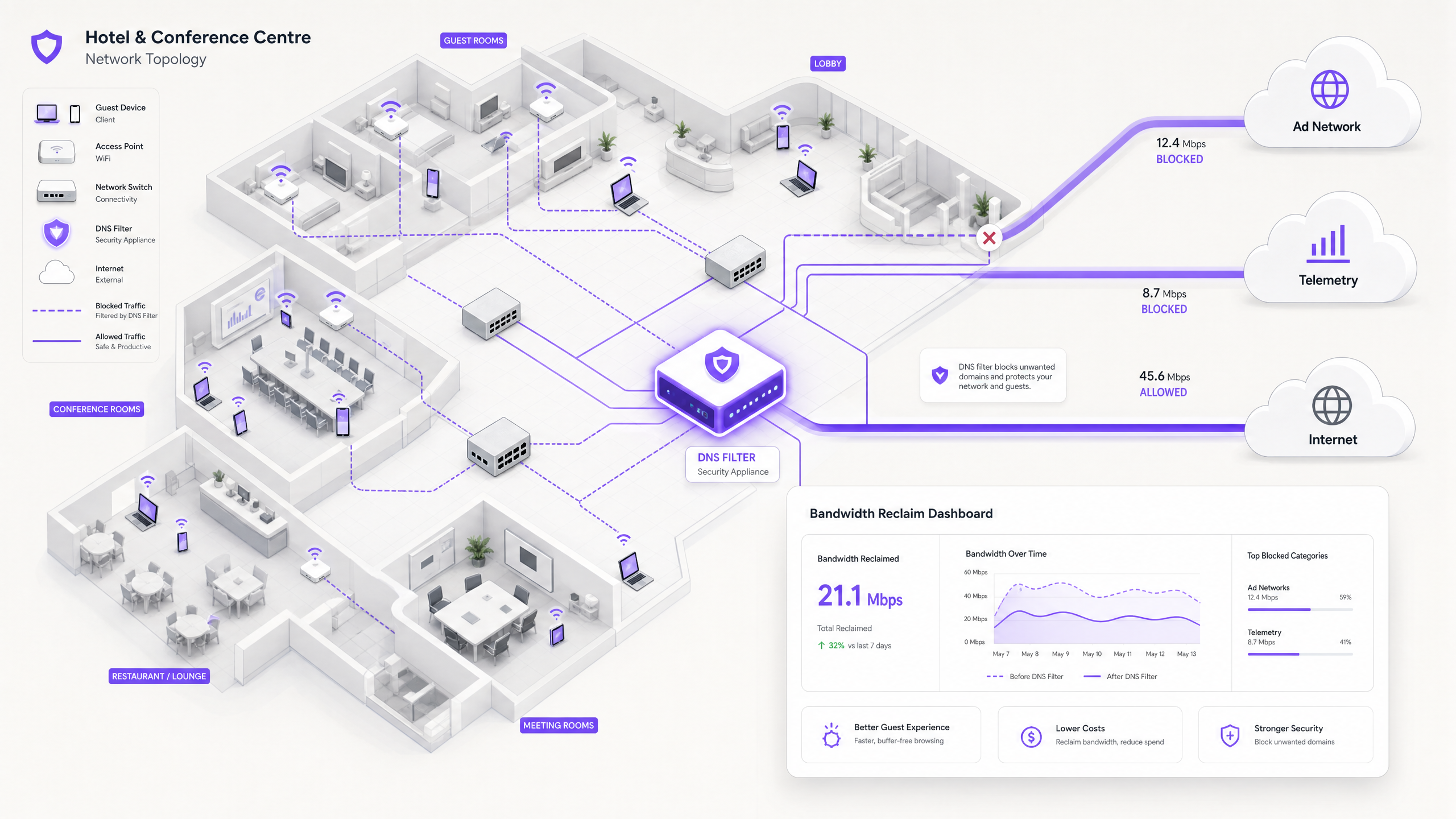
Resumen Ejecutivo
Para los Directores de TI y Gerentes de Operaciones que supervisan recintos de alta densidad, garantizar una experiencia de WiFi para invitados fiable es una batalla constante contra la congestión de la red. Si bien los enfoques tradicionales se centran en aumentar el ancho de banda general o desplegar puntos de acceso adicionales, la causa raíz del bajo rendimiento a menudo no reside en el tráfico legítimo de los usuarios, sino en la capa oculta de datos en segundo plano. En entornos modernos —desde complejos de Hostelería en expansión hasta espacios de Comercio Minorista con gran afluencia— hasta el 40% del ancho de banda del WiFi público es consumido por la telemetría de dispositivos, las redes de anuncios programáticos y las actualizaciones automáticas del sistema operativo antes de que un invitado abra un navegador.
Esta guía de referencia técnica proporciona una metodología definitiva para diagnosticar esta congestión e implementar una mitigación estratégica. Al desplegar filtrado DNS a nivel de red y Zonas de Política de Respuesta (RPZ), los arquitectos de redes empresariales pueden recuperar un ancho de banda significativo, reducir la latencia y mejorar drásticamente la experiencia del usuario final sin incurrir en el gasto de capital de las actualizaciones de infraestructura. Exploraremos la arquitectura técnica de estas soluciones, estudios de caso de implementación en el mundo real y el ROI medible de recuperar su red.
Análisis Técnico Detallado
La Anatomía de la Congestión en Segundo Plano
Cuando un dispositivo de invitado se autentica en una red pública, inmediatamente inicia un aluvión de conexiones en segundo plano. Estas conexiones son impulsadas principalmente por tres categorías de tráfico que, en conjunto, constituyen lo que los ingenieros de red llaman la carga fantasma —ancho de banda consumido por la red antes de que ocurra cualquier actividad deliberada del invitado.
1. Telemetría y Análisis de Dispositivos
Los sistemas operativos modernos (iOS, Android, Windows) y las aplicaciones instaladas transmiten constantemente datos de uso, métricas de ubicación, informes de fallos y análisis de comportamiento a servidores remotos. En un entorno denso, como un centro de Transporte o un centro de conferencias, miles de dispositivos que transmiten simultáneamente cargas útiles de telemetría pequeñas pero frecuentes pueden agotar el tiempo de aire inalámbrico disponible y saturar las tablas NAT. Un solo dispositivo iOS puede generar más de 200 consultas DNS distintas en segundo plano en los primeros 60 segundos de conectarse a una red no medida.
2. Redes de Anuncios Programáticos
Muchas aplicaciones gratuitas dependen de ecosistemas de publicidad programática. En el momento en que un dispositivo detecta una conexión WiFi no medida, estas aplicaciones comienzan a precargar anuncios de video, banners de alta resolución y scripts de seguimiento de plataformas de intercambio de anuncios. Este tráfico es de alto ancho de banda y sensible a la latencia, y competirá agresivamente por el tiempo de aire con la navegación legítima de los invitados. El análisis de las redes de recintos públicos muestra consistentemente que el tráfico de anuncios programáticos representa entre el 15% y el 22% de la utilización total de la WAN durante las horas pico.
3. Actualizaciones Automáticas de SO y Aplicaciones
Sin una adecuada gestión del tráfico, los dispositivos intentarán descargar grandes parches del sistema operativo y actualizaciones de aplicaciones tan pronto como detecten una conexión WiFi no medida. Una sola actualización importante de iOS puede ser de 3 a 5 GB. En un entorno de 500 dispositivos, un disparador de actualización simultáneo —común cuando se lanza una nueva versión del sistema operativo— puede saturar incluso un enlace WAN de 1 Gbps en cuestión de minutos.
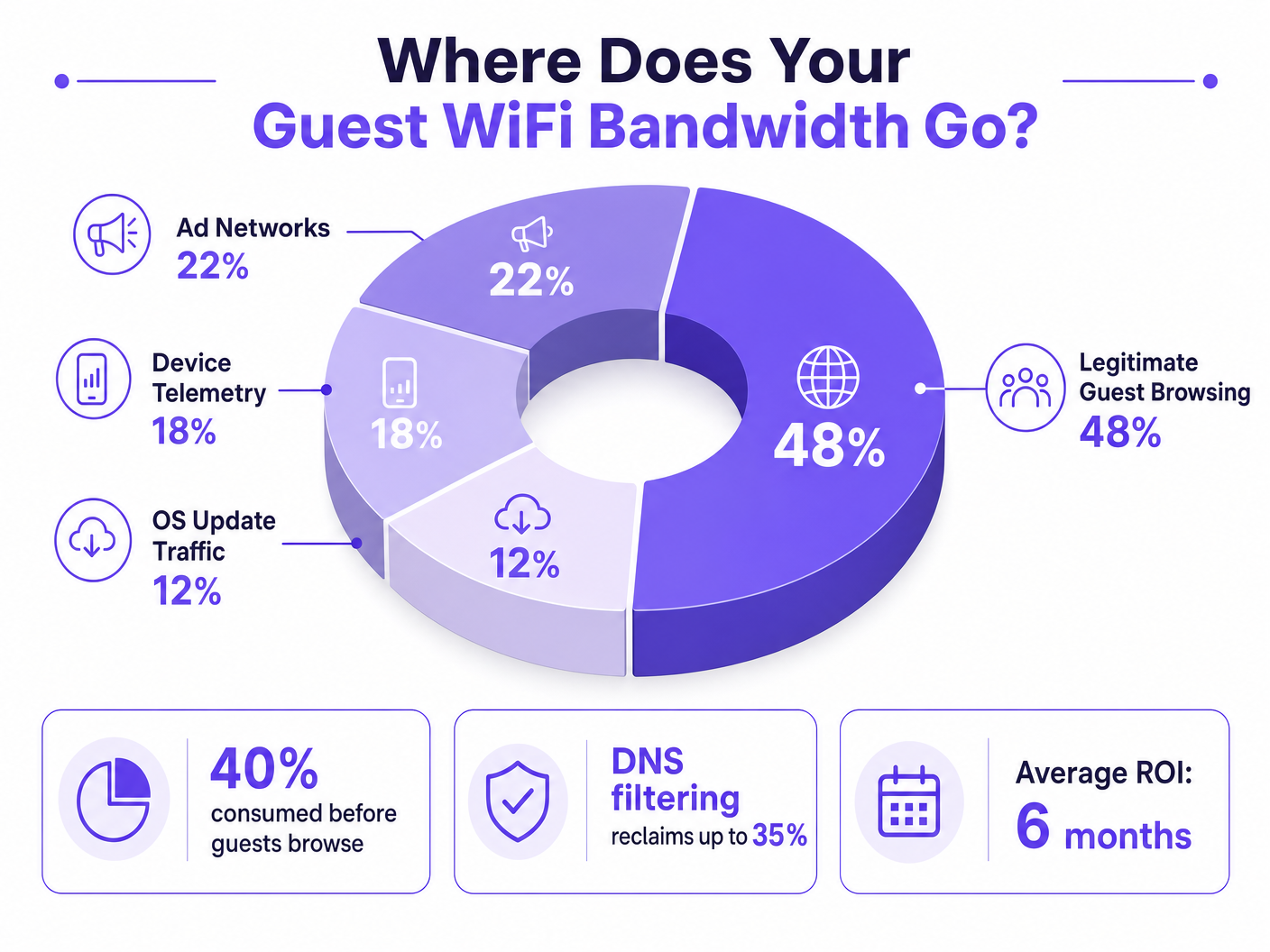
Por Qué los Enfoques Tradicionales se Quedan Cortos
La respuesta convencional a la congestión del WiFi para invitados es aumentar el ancho de banda de la WAN o desplegar puntos de acceso adicionales. Si bien ambas medidas tienen su lugar, ninguna aborda la carga fantasma. Añadir más ancho de banda simplemente proporciona más capacidad para que el tráfico en segundo plano lo consuma. La Inspección Profunda de Paquetes (DPI), la otra herramienta tradicional, es cada vez más ineficaz: la adopción generalizada de TLS 1.3 y el cifrado de extremo a extremo significan que la mayoría de las cargas útiles de tráfico son opacas para los motores de inspección. No se puede limitar lo que no se puede clasificar.
Para una discusión más amplia sobre cómo las frecuencias inalámbricas interactúan con las implementaciones de alta densidad, consulte nuestra guía sobre Frecuencias Wi-Fi: Una Guía de Frecuencias Wi-Fi en 2026 .
Filtrado DNS: La Contramedida Eficiente
La solución moderna y escalable es el filtrado DNS en el borde de la red. En lugar de inspeccionar las cargas útiles de tráfico, el filtrado DNS opera en la capa de resolución, evitando que se establezcan conexiones en primer lugar.
Cuando un dispositivo solicita acceso a una red de anuncios o dominio de telemetría conocido, el resolvedor DNS verifica la solicitud contra una Zona de Política de Respuesta (RPZ). Si el dominio aparece en la lista de bloqueo, el resolvedor devuelve una respuesta NXDOMAIN (Dominio Inexistente), o redirige el tráfico a una dirección IP nula local. La conexión se termina antes de que ocurra el handshake TCP, preservando tanto el tiempo de aire inalámbrico como el ancho de banda de la WAN. Este enfoque es computacionalmente económico, escala linealmente con la capacidad del resolvedor y no se ve afectado por el cifrado de la carga útil.
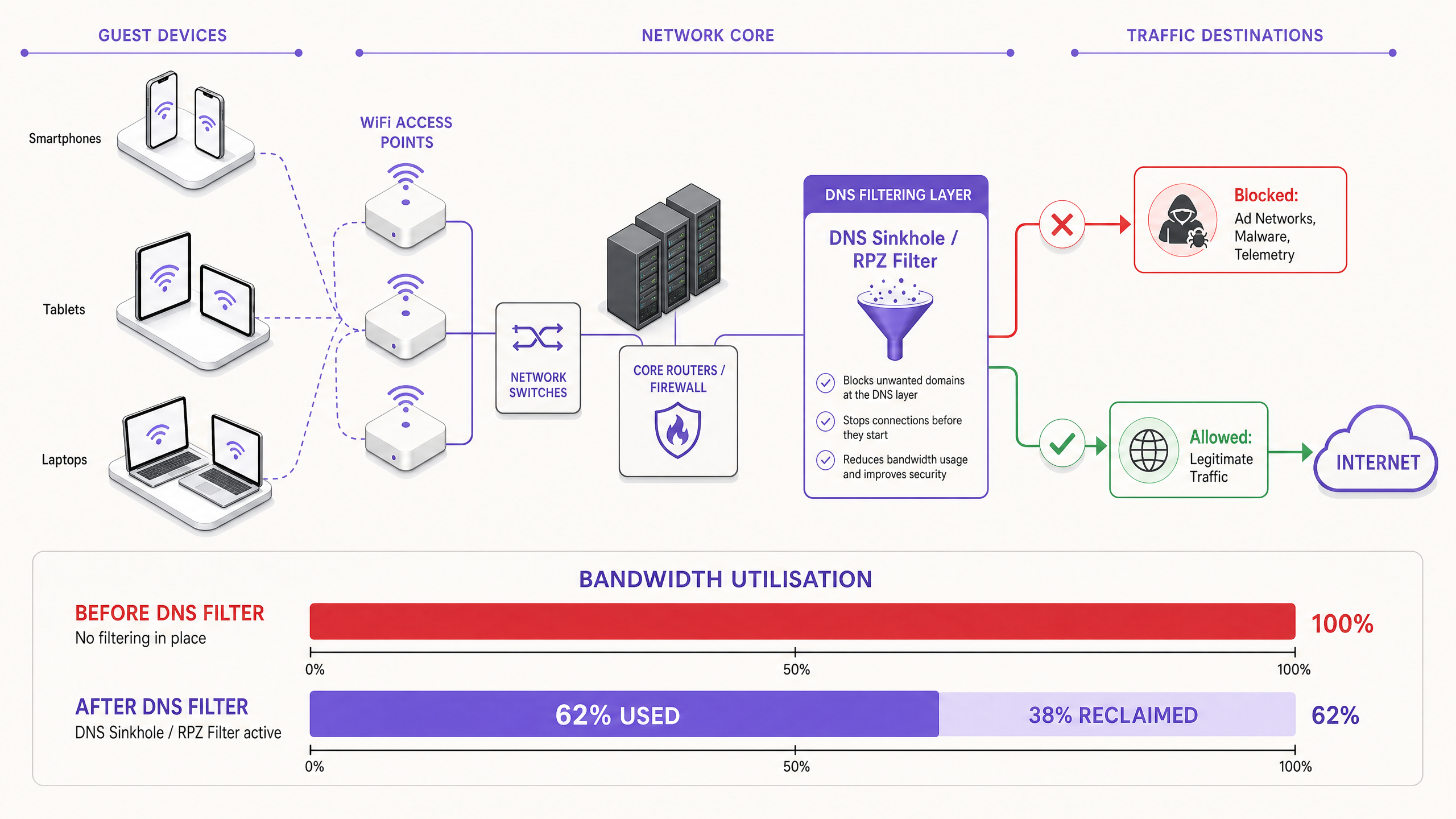
La Dimensión de la Seguridad
El filtrado DNS ofrece un beneficio secundario significativo: seguridad. Al bloquear dominios conocidos de Comando y Control (C2) de malware, infraestructura de phishing y redes de entrega de kits de exploits en la capa DNS, la red de invitados se vuelve sustancialmente más segurasible. Esto es directamente relevante para las obligaciones de cumplimiento bajo marcos como PCI DSS (que requiere segmentación de red y monitoreo para entornos de datos de titulares de tarjetas) y GDPR (que exige medidas técnicas apropiadas para proteger los datos personales). Para un tratamiento detallado de los requisitos de la pista de auditoría en este contexto, consulte Explain what is audit trail for IT Security in 2026 .
Para organizaciones que gestionan entornos educativos donde el bloqueo de anuncios también cumple una función de salvaguarda, los principios cubiertos en Minimising Student Distractions with Network-Level Ad Blocking son directamente aplicables.
Guía de Implementación
Desplegar una arquitectura robusta de filtrado DNS requiere una planificación cuidadosa para evitar interrumpir los servicios legítimos para invitados. La implementación debe seguir un enfoque por fases.
Fase 1: Evaluación de Línea Base y Visibilidad
Antes de implementar cualquier bloqueo, establezca una línea base de los patrones de tráfico actuales. Utilice WiFi Analytics para identificar los dominios y categorías que consumen más ancho de banda durante un período representativo de 7 a 14 días. Esta fase de auditoría es crítica para comprender el perfil de tráfico específico de su ubicación y para construir el caso de negocio para la inversión. Las métricas clave a capturar incluyen:
| Métrica | Línea Base Objetivo | Notas |
|---|---|---|
| Los 20 principales dominios DNS por volumen de consultas | Lista completa | Identificar dominios de telemetría y anuncios |
| Utilización de WAN por categoría | % de división | Cuantificar la carga fantasma |
| Recuento máximo de dispositivos concurrentes | Número | Dimensionar la infraestructura del resolvedor |
| Tasa de fallos de consultas DNS | < 0.1% | Establecer el punto de referencia previo al despliegue |
Fase 2: Despliegue Escalonado de RPZ
Comience desplegando el RPZ en modo solo registro. Esto le permite verificar la precisión de sus listas de bloqueo sin afectar la experiencia del usuario. Concéntrese primero en categorías de alta confianza:
- Malware Conocido y Dominios C2: Beneficio de seguridad inmediato con riesgo casi nulo de falsos positivos. Utilice fuentes de inteligencia de amenazas de proveedores reputados.
- Redes de Anuncios Programáticos de Alto Ancho de Banda: Apunte a las principales plataformas de intercambio de anuncios de video. Estas están bien documentadas y es poco probable que alojen contenido legítimo.
- Puntos Finales de Telemetría Agresivos: Bloquee los dominios de seguimiento no esenciales. Mantenga una lista de permitidos cuidadosa para los dominios requeridos para los flujos de autenticación de Captive Portal.
Una vez que el modo solo registro confirme tasas de falsos positivos aceptables (objetivo < 0.5% de las consultas), pase al modo de aplicación.
Fase 3: Modelado de Tráfico e Integración de QoS
Para el tráfico que no se puede bloquear por completo (por ejemplo, actualizaciones de SO de Apple, Microsoft y Google), implemente políticas de Calidad de Servicio (QoS). Limite la velocidad de los servidores de actualización a un techo definido —típicamente del 10 al 15% de la capacidad total de WAN— asegurando que el tráfico interactivo de los invitados (navegación web, VoIP, videoconferencia) reciba una cola prioritaria. Esto es particularmente importante para entornos de Healthcare donde el personal clínico puede compartir un segmento de red con los invitados.
Para obtener orientación sobre la optimización de entornos de red más amplios, incluyendo implementaciones de oficina y de uso mixto, consulte Office Wi-Fi: Optimize Your Modern Office Wi-Fi Network .
Mejores Prácticas
Mantener Listas de Permitidos Explícitas para Servicios Críticos. Asegúrese de que los dominios esenciales para la autenticación de Captive Portal, pasarelas de pago (cumplimiento de PCI DSS) y operaciones centrales del lugar estén explícitamente permitidos. Una lista de bloqueo mal configurada que interrumpe el flujo de inicio de sesión generará una carga de soporte inmediata y significativa.
Comunicar la Política de Forma Transparente. Sus Términos de Servicio deben establecer que el tráfico de red se gestiona para garantizar una experiencia de alta calidad para todos los usuarios. Esta es tanto una mejor práctica legal bajo GDPR como una medida razonable para establecer expectativas para los invitados.
Automatizar las Actualizaciones de las Listas de Bloqueo. El panorama de las redes de anuncios y los dominios de telemetría cambia constantemente. Las fuentes de inteligencia de amenazas y las listas RPZ deben actualizarse dinámicamente —idealmente en un ciclo de menos de 24 horas— para seguir siendo efectivas.
Abordar la Evasión de DNS de Forma Proactiva. Implemente reglas de firewall para interceptar y redirigir todo el tráfico saliente del puerto 53 (UDP y TCP) al resolvedor local. Esto evita que los clientes eludan el filtrado codificando servidores DNS externos.
Planificar para DNS over HTTPS (DoH). A medida que aumenta la adopción de DoH, los clientes pueden enrutar las consultas DNS a través de HTTPS para eludir completamente los resolvedores locales. Evalúe si bloquear proveedores de DoH conocidos (por ejemplo, dns.google, cloudflare-dns.com) o desplegar un proxy DoH transparente que aplique la política local.
Alinear con IEEE 802.1X y WPA3. Asegúrese de que su arquitectura de filtrado DNS sea compatible con su marco de autenticación. En entornos que utilizan IEEE 802.1X con autenticación basada en RADIUS, las políticas de filtrado DNS se pueden aplicar por VLAN o por grupo de usuarios, lo que permite un control granular.
Solución de Problemas y Mitigación de Riesgos
Modos de Fallo Comunes
| Modo de Fallo | Síntoma | Mitigación |
|---|---|---|
| Bloqueo excesivo (colisión de CDN) | Páginas web rotas, imágenes faltantes | Listas de bloqueo granulares; proceso rápido de inclusión en listas de permitidos |
| Evasión de DNS (resolvedores codificados) | Filtrado eludido por aplicaciones específicas | Reglas de redirección de firewall para el puerto 53 |
| Bypass de DoH | Filtrado eludido por navegadores modernos | Bloquear proveedores de DoH conocidos o desplegar proxy DoH |
| Cuello de botella en el rendimiento del resolvedor | Mayor latencia de DNS en todos los clientes | Escalar la infraestructura del resolvedor; implementar anycast |
| Fallo del Captive Portal | Los invitados no pueden autenticarse | Lista de permitidos explícita para dominios del portal y puntos finales de detección de SO |
| Listas de bloqueo obsoletas | Nuevos dominios de anuncios no bloqueados | Automatizar actualizaciones de feeds; monitorear registros de consultas para nuevos dominios de alto volumen |
Respuesta a Incidentes de Seguridad
Si se identifica que un dispositivo de invitado se comunica con un dominio C2 de malware conocido (visible en los registros de consultas DNS), el RPZ bloqueará automáticamente la comunicación posterior. Asegúrese de que su proceso de respuesta a incidentes incluya un flujo de trabajo para revisar estos eventos, ya que pueden indicar un dispositivo comprometido que requiere aislamiento de la VLAN de invitados.
ROI e Impacto Comercial
La implementación del filtrado DNS a nivel de red ofrece resultados comerciales medibles y cuantificables en múltiples dimensiones.
Recuperación de Ancho de Banda y Aplazamiento de CapEx. Los recintos suelen recuperar entre el 20% y el 40% de su ancho de banda WAN total. Esto se traduce directamente en ahorros de costos al aplazar la necesidad de costosas actualizaciones de circuitos. Para un recinto que actualmente paga por una línea arrendada de 500 Mbps, recuperar el 30% de la capacidad equivale a obtener 150 Mbps de rendimiento efectivo sin costo adicional.
Mejora de la Satisfacción del Huésped y NPS. Al eliminar la congestión de fondo, la velocidad percibida y la fiabilidad del WiFi para Invitados mejoran drásticamente. La latencia reducida y el rendimiento constante conducen a puntuaciones más altas en el Net Promoter Score y a menos escaladas de soporte operativo.
Postura de Seguridad y Cumplimiento Mejorada. El bloqueo de malware y dominios de phishing en la capa DNS reduce significativamente el riesgo de una brecha de seguridad originada en la red de invitados. Esto apoya directamente el cumplimiento de los requisitos de segmentación de red de PCI DSS y la obligación de GDPR de implementar medidas de seguridad técnicas adecuadas.
Eficiencia Operativa. El filtrado DNS automatizado reduce la carga de trabajo manual de los equipos de operaciones de red. En lugar de responder de forma reactiva a los eventos de congestión, la red gestiona proactivamente su propio perfil de tráfico.
| Resultado | Rango Típico | Método de Medición |
|---|---|---|
| Ancho de banda recuperado | 20–40% de la capacidad WAN | Monitoreo de utilización WAN antes/después |
| Tasa de bloqueo de consultas DNS | 15–35% de todas las consultas | Registros de consultas del resolvedor |
| Mejora de la satisfacción del huésped | +8–15 puntos NPS | Encuestas post-estancia/post-visita |
| Aplazamiento de CapEx | 1–3 años en actualización de circuito | Modelado de costos |
| Reducción de incidentes de seguridad | 40–60% menos detecciones C2 | Correlación SIEM |
Al tratar la red no solo como una tubería, sino como una puerta de enlace inteligente y filtrada, los líderes de TI pueden ofrecer una experiencia de conectividad superior, segura y rentable, una que escala con el crecimiento del recinto sin una inversión de infraestructura proporcional.
Definiciones clave
Response Policy Zone (RPZ)
A mechanism in DNS servers that allows the modification of DNS responses based on a defined policy. When a queried domain matches an entry in the RPZ, the resolver can return a synthetic response (e.g., NXDOMAIN or a sinkhole IP) instead of the real answer.
The primary technical mechanism for implementing network-wide DNS filtering. IT teams configure RPZs on their internal resolvers to block ad networks, malware domains, and telemetry endpoints without requiring client-side software.
Deep Packet Inspection (DPI)
A form of network packet filtering that examines the data payload of a packet as it passes an inspection point, searching for protocol non-compliance, specific content, or defined criteria.
Traditionally used for traffic classification and shaping. Increasingly limited by the widespread adoption of TLS 1.3 end-to-end encryption, which renders payloads opaque. DNS filtering is the preferred alternative for encrypted traffic environments.
NXDOMAIN
A DNS response code (RCODE 3) indicating that the queried domain name does not exist in the DNS namespace.
Returned by a filtering DNS resolver to intentionally block a connection to an unwanted domain. The client application receives this response and abandons the connection attempt, preventing any bandwidth from being consumed.
DNS over HTTPS (DoH)
A protocol for performing DNS resolution via the HTTPS protocol (RFC 8484), encrypting DNS queries and responses between the client and a DoH-capable resolver.
Can bypass local network DNS filtering if clients are configured to use external DoH providers. Network administrators must implement firewall rules or proxy DoH traffic to enforce local RPZ policies.
Quality of Service (QoS)
A set of network mechanisms that control traffic prioritisation, rate-limiting, and queuing to ensure the performance of critical applications.
Used alongside DNS filtering to manage legitimate but high-bandwidth traffic (e.g., OS updates) that cannot be blocked. QoS ensures that interactive guest traffic receives priority over background bulk transfers.
Telemetry
The automated collection and transmission of operational data from devices to remote servers for monitoring, analytics, and diagnostics.
In the context of guest WiFi, device telemetry from mobile operating systems and applications can silently consume 15–20% of available bandwidth. It is a primary target for DNS filtering in public network deployments.
DNS Sinkholing
A technique in which a DNS server is configured to return a false IP address (typically a local null address) for specific domains, redirecting traffic away from its intended destination.
Used to neutralise malware C2 traffic and aggressively block high-bandwidth ad networks. More definitive than NXDOMAIN responses, as it allows the sinkhole server to log connection attempts for security analysis.
Airtime Fairness
A wireless network feature that allocates equal access to the wireless medium across all connected clients, regardless of their individual data rates.
Critical in high-density environments. Without airtime fairness, a single slow device (e.g., an older 802.11g client) can disproportionately consume airtime, degrading throughput for all other clients. Background telemetry traffic from many devices exacerbates this effect.
Phantom Load
Bandwidth consumed by automated background processes on connected devices before any deliberate user activity occurs.
The collective term for telemetry, ad network pre-fetching, and OS update traffic. Understanding and quantifying the phantom load is the first step in any guest WiFi congestion diagnosis.
Ejemplos resueltos
A 400-room resort hotel is experiencing severe network congestion every evening between 7:00 PM and 10:00 PM. The 1 Gbps WAN link is saturated, and guests are complaining about slow streaming and dropped VoIP calls. The IT Director needs to identify the root cause and implement a solution without upgrading the circuit.
Step 1 — Traffic Analysis: Deploy a network flow analyser (NetFlow/IPFIX) on the core router and run it for 5 days across peak and off-peak periods. Correlate with DNS query logs from the existing resolver. The analysis reveals that 35% of evening traffic is destined for known programmatic video ad networks (DoubleClick, AppNexus) and automated app update servers (Apple Software Update, Google Play). Legitimate guest browsing accounts for only 52% of total traffic.
Step 2 — DNS Filtering Deployment: Configure the core firewall to redirect all guest VLAN DNS queries (UDP/TCP port 53) to a locally hosted RPZ-enabled resolver. Import a curated blocklist covering the identified ad networks and telemetry domains. Run in log-only mode for 48 hours to validate false positive rates.
Step 3 — Policy Enforcement: After validating a false positive rate below 0.3%, switch to enforcement mode. Simultaneously, implement a QoS policy that rate-limits Apple and Google update servers to a combined ceiling of 80 Mbps during the 6 PM–11 PM window.
Step 4 — Validation: Monitor WAN utilisation over the following 7 days. Peak utilisation drops from 98% to 61%, resolving guest complaints. The hotel defers a planned circuit upgrade by an estimated 18 months.
A large conference centre is hosting a technology summit with 5,000 attendees. During the keynote, the WiFi network becomes completely unusable. Post-incident analysis shows that thousands of devices simultaneously attempted to download a major iOS update that was released that morning.
Immediate Mitigation (Day of Event): The network operations team identifies the surge via real-time DNS query monitoring. They immediately sinkhole the specific Apple software update domains (mesu.apple.com, appldnld.apple.com, updates.cdn-apple.com) at the DNS layer. Within 4 minutes, WAN utilisation drops from 99% to 68%, and the network stabilises.
Short-Term Fix (Same Event): A QoS policy is applied to rate-limit all remaining update traffic to 50 Mbps for the duration of the event.
Long-Term Strategy (Post-Event): The network team implements a dynamic QoS policy that automatically activates when total WAN utilisation exceeds 75%, throttling known update servers to 10% of total capacity. A pre-event checklist is created that includes temporarily sinkholes of major update domains during the 2 hours before and after high-profile sessions. The team also subscribes to Apple's and Microsoft's update release notification feeds to anticipate future surge events.
Preguntas de práctica
Q1. You are the IT Manager for a national retail chain. After deploying a DNS filtering solution across 50 stores, several store managers report that the captive portal login page is failing to load for guests. The support team is receiving high call volumes. What is the most likely cause, and what is the immediate remediation step?
Sugerencia: Consider the full dependency chain of a modern captive portal authentication flow, including OS-level captive portal detection mechanisms.
Ver respuesta modelo
The most likely cause is over-blocking. The DNS filter is blocking a domain required for the captive portal to function. Modern mobile operating systems use specific domains to detect captive portals (e.g., captive.apple.com for iOS, connectivitycheck.gstatic.com for Android). If these are blocked, the OS will not trigger the captive portal browser, and the guest will see no login prompt. Additionally, the portal itself may depend on a CDN or third-party authentication provider (e.g., social login via Facebook or Google) whose domains are inadvertently blocked.
Immediate remediation: Review the DNS query logs for NXDOMAIN responses originating from the guest subnet during the authentication phase. Identify all blocked domains that are queried before a successful login. Add these domains to the global allow-list. Implement a standard allow-list template for captive portal deployments that includes all major OS detection endpoints and common authentication provider domains.
Q2. A stadium network architect notices that despite implementing aggressive DNS filtering, WAN utilisation remains critically high during matches. Further investigation reveals a sustained high volume of UDP port 443 traffic that does not correlate with any blocked domains in the DNS logs. What is happening, and how should it be addressed?
Sugerencia: Consider modern transport protocols and how they interact with DNS-layer controls.
Ver respuesta modelo
The high volume of UDP 443 traffic indicates the use of QUIC (HTTP/3). QUIC is a UDP-based transport protocol used by major platforms (Google, Meta, YouTube) that bypasses traditional TCP-based proxies and DPI engines. More critically, clients using QUIC may also be using DNS over HTTPS (DoH) to resolve domains, completely bypassing the local RPZ resolver and rendering DNS filtering ineffective for those clients.
To address this: First, implement firewall rules to block outbound DoH traffic to known public DoH providers (Google, Cloudflare, NextDNS) on TCP/UDP port 443 by destination IP, forcing clients to fall back to the local resolver. Second, evaluate blocking outbound UDP 443 entirely (or rate-limiting it aggressively) to force QUIC clients to fall back to TCP-based HTTP/2, which is subject to existing traffic management policies. Third, review whether a transparent DoH proxy can be deployed to intercept and inspect DoH queries while enforcing local RPZ policies.
Q3. You are designing a QoS policy for a large public hospital's guest WiFi network. The network is shared between patient entertainment devices, visitor personal devices, and a small number of clinical staff using VoIP softphones on their personal mobiles. Prioritise the following traffic types: VoIP (SIP/RTP), Guest Web Browsing (HTTP/HTTPS), Windows/iOS Updates, and Streaming Video (Netflix/YouTube).
Sugerencia: Consider both latency sensitivity and the business/clinical impact of each traffic type. Also consider the regulatory context of a healthcare environment.
Ver respuesta modelo
Priority 1 — VoIP (SIP/RTP): Strict Priority Queuing (Expedited Forwarding, DSCP EF). VoIP is highly sensitive to latency (target < 150ms one-way) and jitter (target < 30ms). Packet loss above 1% causes audible degradation. In a clinical context, a dropped call could have patient safety implications.
Priority 2 — Guest Web Browsing (HTTP/HTTPS): Assured Forwarding (AF31). This is the primary expected use case for both patients and visitors. It requires reasonable responsiveness but is tolerant of moderate latency.
Priority 3 — Streaming Video (Netflix/YouTube): Rate-limited per client (e.g., 3–5 Mbps cap) with Assured Forwarding (AF21). While important for patient experience during long stays, uncapped streaming will saturate the link. A per-client cap ensures equitable access. Consider time-of-day policies that relax limits during off-peak hours.
Priority 4 — OS/App Updates (Scavenger Class, DSCP CS1): Lowest priority, best-effort queuing, with an aggregate rate limit (e.g., 50 Mbps total across all update traffic). These are background tasks with no latency sensitivity. They should only consume spare capacity. In a healthcare environment, also consider whether the guest network is fully isolated from clinical systems — if not, update traffic management becomes a security concern as well as a bandwidth one.