

¿Qué es el filtrado DNS? Cómo bloquear contenido dañino en el WiFi para invitados
Esta guía técnica exhaustiva explica cómo funciona el filtrado DNS en la capa de red para asegurar el WiFi para invitados empresariales, cubriendo arquitecturas de implementación, prevención de evasión e integración con Captive Portal. Ofrece una guía de implementación práctica para líderes de TI en entornos minoristas, hoteleros y del sector público que necesitan aplicar políticas de contenido, proteger la reputación de la marca y demostrar el cumplimiento con PCI DSS y GDPR. Estudios de caso reales de entornos hoteleros y minoristas ilustran las compensaciones prácticas y las decisiones de configuración que determinan el éxito de la implementación.
Escucha esta guía
Ver transcripción del podcast
Resumen Ejecutivo
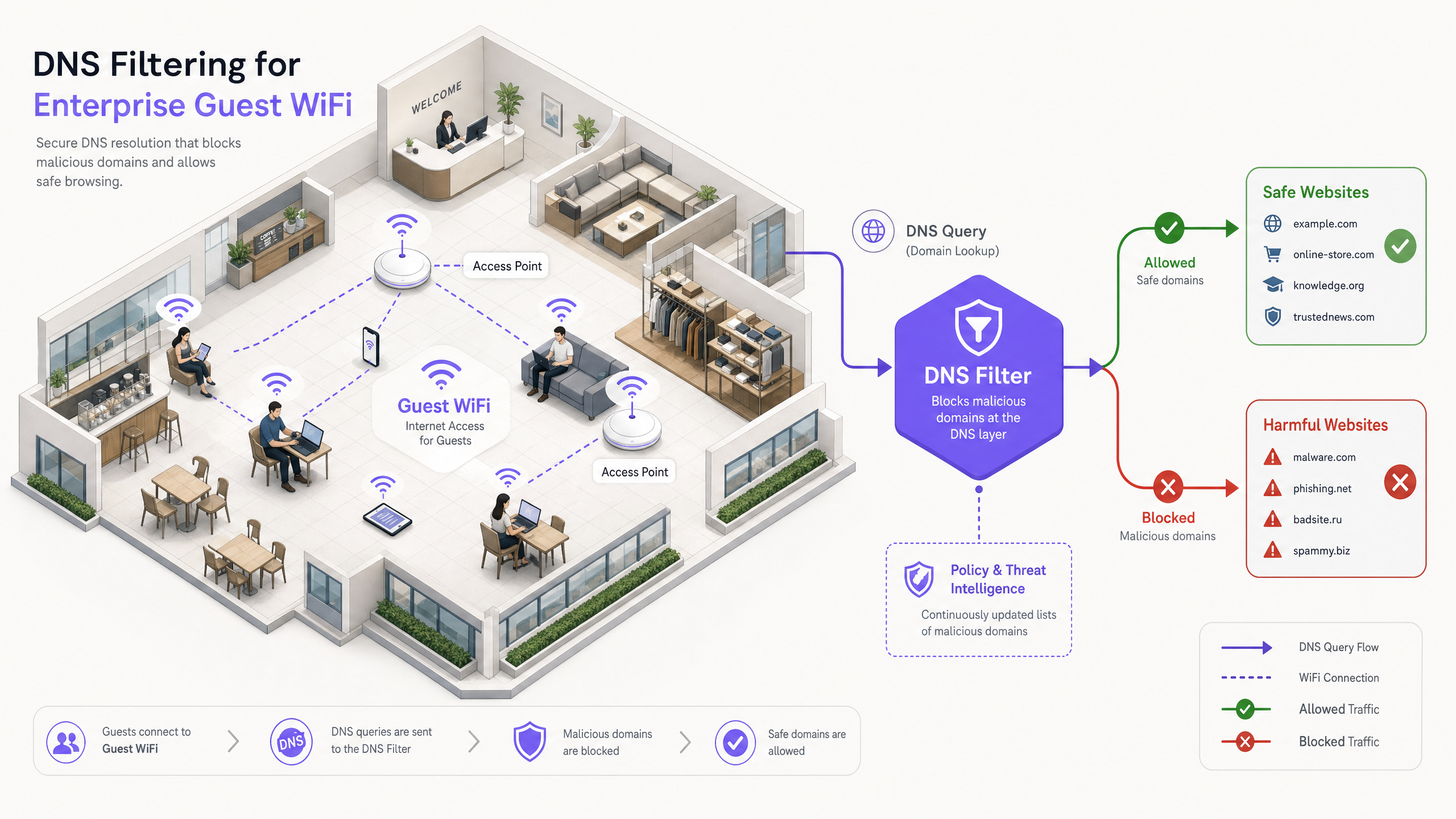
Para los líderes de TI empresariales que gestionan redes públicas a gran escala, garantizar una experiencia de navegación segura, conforme y de alto rendimiento es un mandato operativo crítico. Las redes WiFi para invitados en entornos hoteleros, minoristas y públicos son objetivos principales para actividades maliciosas y violaciones de políticas, desde tráfico de comando y control de botnets hasta streaming ilegal y contenido inapropiado. Esta guía proporciona una referencia técnica definitiva sobre el filtrado DNS: el mecanismo más eficiente para bloquear contenido dañino y mitigar riesgos en el borde de la red.
A diferencia de la inspección profunda de paquetes (DPI) que consume muchos recursos o las listas de bloqueo de IP rígidas, el filtrado DNS intercepta la solicitud inicial de resolución de dominio. Al evaluar las consultas contra fuentes de inteligencia de amenazas en tiempo real, previene conexiones a dominios maliciosos o inapropiados antes de que se intercambie cualquier carga útil. Este enfoque garantiza un alto rendimiento y una latencia mínima, esencial para entornos que soportan miles de usuarios concurrentes.
La implementación de un filtrado DNS robusto no solo protege la reputación del lugar, sino que también apoya el cumplimiento de las regulaciones de protección de datos y las políticas de uso familiar. Para las organizaciones que aprovechan soluciones como Guest WiFi y WiFi Analytics , la integración de controles a nivel DNS es un requisito de seguridad fundamental que sustenta todas las demás capas de la pila de red para invitados.
Análisis Técnico Detallado: Cómo Opera el Filtrado DNS
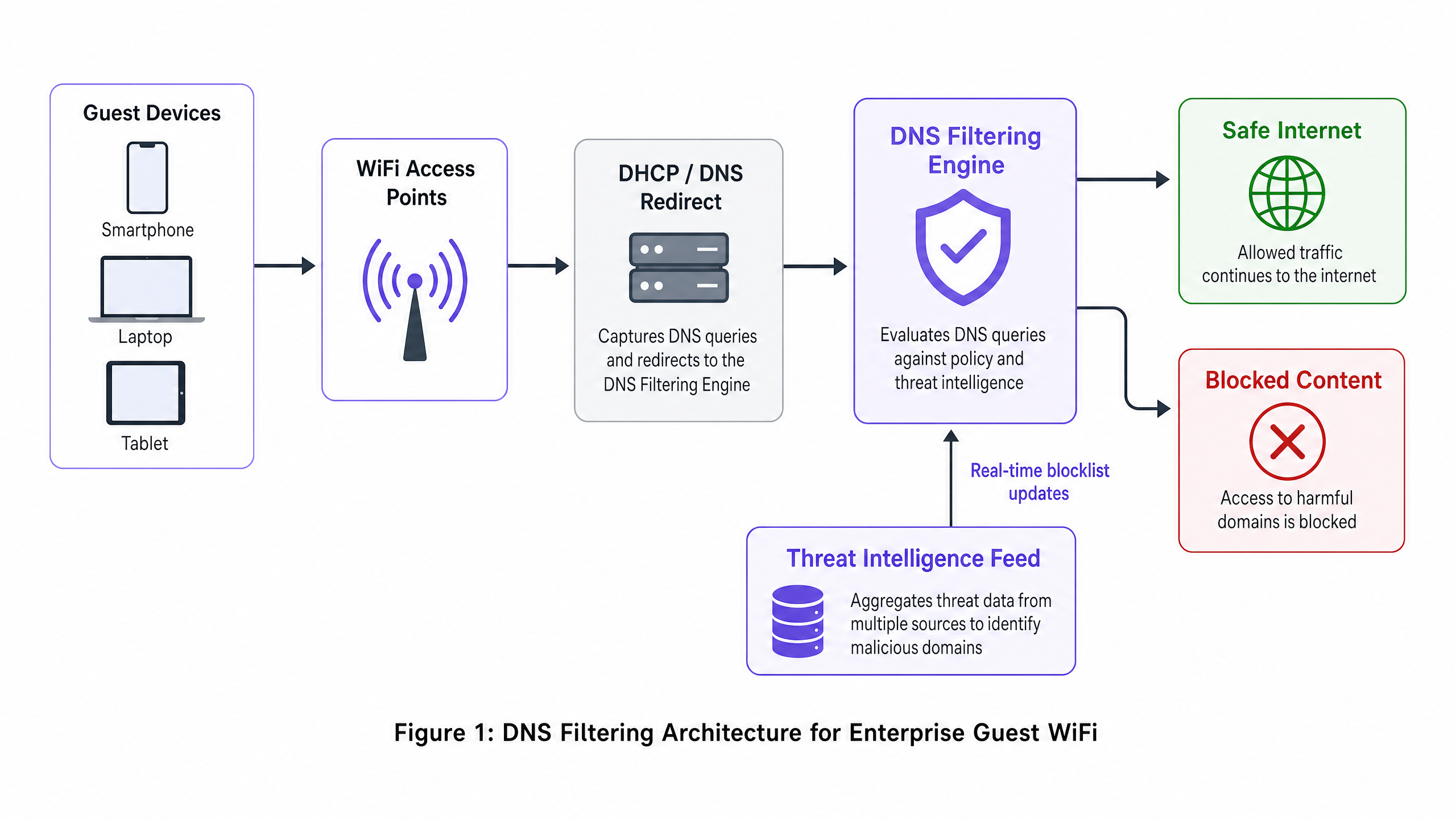
El filtrado DNS funciona como una capa de seguridad proactiva dentro de la arquitectura de red. Cuando un dispositivo cliente intenta acceder a un dominio, el resolvedor DNS local intercepta la consulta. En lugar de devolver inmediatamente la dirección IP, la consulta se reenvía a un motor de filtrado que la evalúa según la política y la inteligencia de amenazas antes de decidir si resolverla o bloquearla.
El Proceso de Resolución
El proceso de resolución del filtrado DNS opera en cuatro etapas distintas. Primero, intercepción de consultas: el dispositivo invitado se conecta a la red y recibe la configuración IP a través de DHCP, que especifica el servidor de filtrado DNS como el resolvedor principal. Segundo, evaluación de políticas: el motor de filtrado recibe la consulta (por ejemplo, malicious-domain.com) y la compara con listas de bloqueo categorizadas y fuentes de inteligencia de amenazas dinámicas actualizadas en tiempo real. Tercero, resolución o sinkholing: si el dominio es benigno, el motor resuelve la dirección IP real y la conexión procede normalmente. Si el dominio viola la política, el motor devuelve una dirección IP no enrutable —una técnica conocida como sinkholing— o redirige al usuario a una página de bloqueo personalizada. Cuarto, registro: cada consulta, ya sea resuelta o bloqueada, se registra para fines de auditoría y análisis.
Ventajas Arquitectónicas
La implementación del filtrado DNS ofrece ventajas distintivas sobre otros métodos de control de contenido. La sobrecarga de latencia es insignificante: las consultas DNS son paquetes UDP ligeros, y evaluarlas añade menos de 2 ms, imperceptible para el usuario final. El enfoque también es agnóstico al protocolo: dado que el filtrado ocurre antes de que se establezca la conexión, es efectivo independientemente del protocolo de aplicación subyacente (HTTP, HTTPS, FTP) o del número de puerto. Esta es una ventaja significativa sobre el filtrado de proxy basado en URL, que no puede inspeccionar el tráfico HTTPS cifrado sin implementar un certificado raíz personalizado en cada punto final, una imposibilidad en dispositivos de invitados no gestionados.
La escalabilidad es otra fortaleza fundamental. Un único clúster DNS robusto puede manejar millones de consultas por segundo, lo que lo hace ideal para entornos de alta densidad como estadios, grandes centros de conferencias o implementaciones minoristas en múltiples sitios. Para topologías multi-inquilino complejas, el filtrado DNS se integra limpiamente con estrategias de segmentación basadas en VLAN, como se detalla en Diseño de una Arquitectura WiFi Multi-Inquilino para MDU .
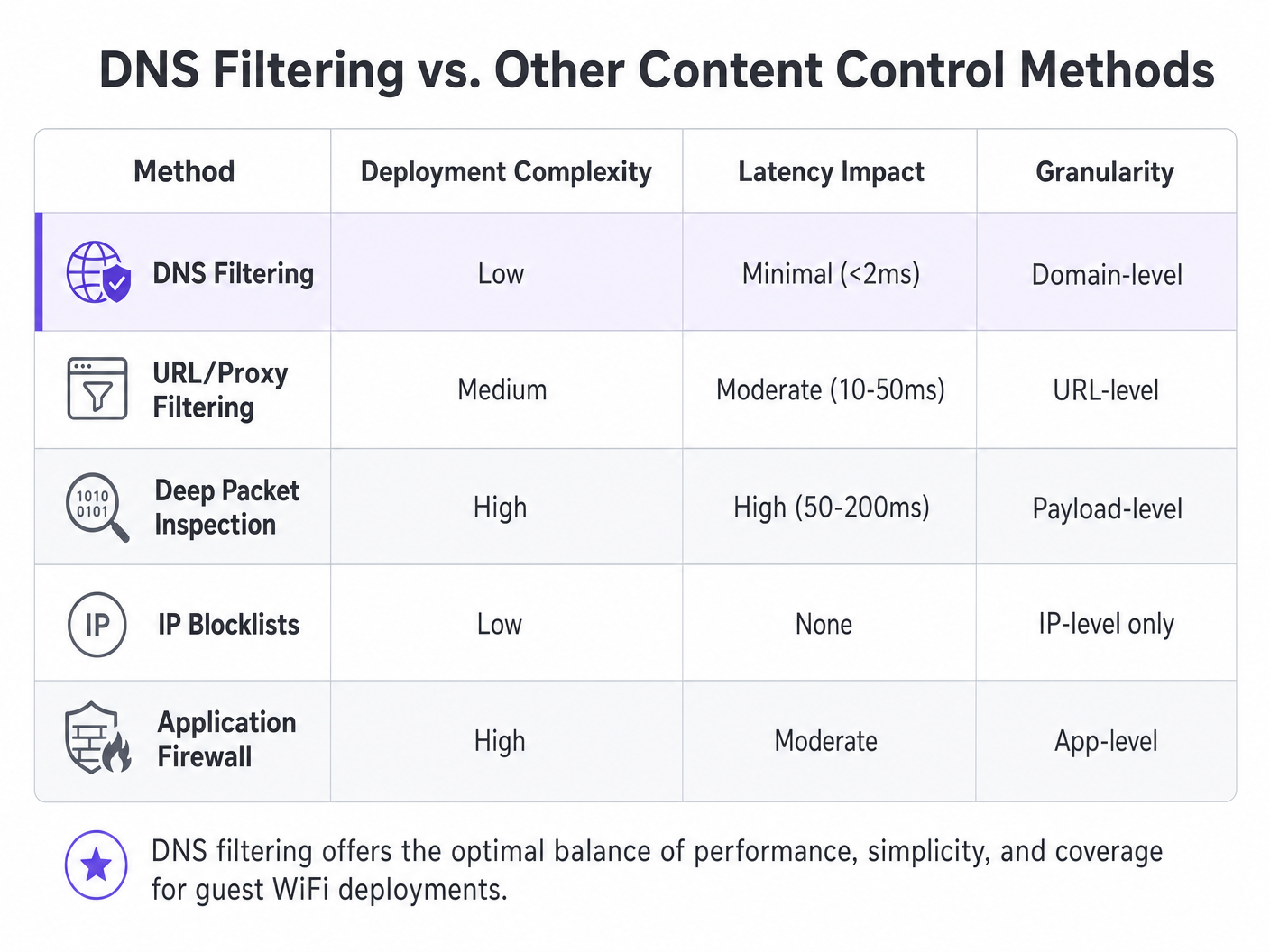
| Método | Complejidad de Implementación | Impacto en la Latencia | Granularidad | Idoneidad para Red de Invitados |
|---|---|---|---|---|
| DNS Filtering | Baja | Mínima (<2ms) | Nivel de dominio | Recomendado |
| URL/Proxy Filtering | Media | Moderada (10–50ms) | Nivel de URL | Limitada (problemas con HTTPS) |
| Deep Packet Inspection | Alta | Alta (50–200ms) | Nivel de carga útil | No recomendado |
| IP Blocklists | Baja | Ninguno | Solo a nivel de IP | Solo complementario |
| Application Firewall | Alta | Moderada | Nivel de aplicación | Complementario |
Guía de Implementación
La implementación del filtrado DNS requiere una planificación cuidadosa para garantizar una cobertura integral sin interrumpir el tráfico legítimo. Los siguientes pasos describen una estrategia de implementación independiente del proveedor aplicable en entornos hoteleros , de atención médica , de transporte y minoristas.
Paso 1: Segmentación de Red y Configuración DHCP
El método de implementación más robusto es configurar la puerta de enlace de red o el servidor DHCP para que asigne las direcciones IP del servidor de filtrado DNS a todos los clientes invitados. Esto garantiza que cualquier dispositivo que se una a la red utilice automáticamente el resolvedor seguro sin necesidad de instalar ningún agente en el punto final.
Para entornontes con topologías complejas — como las descritas en Diseño de una arquitectura WiFi multi-inquilino para MDU — aseguran que las VLAN dedicadas al tráfico de invitados se enruten estrictamente a través del DNS filtrado, mientras que las VLAN operativas (PMS, POS, gestión de edificios) continúan utilizando resolutores internos. Este aislamiento basado en VLAN es un requisito previo para el cumplimiento de PCI DSS, que exige una segmentación de red estricta entre los entornos de datos de titulares de tarjetas y las redes de invitados no confiables.
Paso 2: Prevención de Evasión — Bloquear Puerto 53
Este paso es donde muchas implementaciones fallan. Asignar los servidores DNS solo a través de DHCP es insuficiente. Un usuario con configuraciones DNS personalizadas en su dispositivo — apuntando a 8.8.8.8 o 1.1.1.1 — eludirá el filtro por completo. La mitigación es sencilla: implementar reglas de firewall en la puerta de enlace que bloqueen todo el tráfico saliente en el puerto 53 (UDP y TCP) a cualquier dirección IP que no sean los servidores de filtrado designados. Esto fuerza todo el tráfico DNS a través del resolutor controlado.
Además, considere bloquear DNS over HTTPS (DoH). DoH cifra la consulta DNS dentro del tráfico HTTPS en el puerto 443, haciéndolo indistinguible del tráfico web normal a nivel de red. La contramedida más efectiva es mantener una lista de bloqueo de direcciones IP de proveedores DoH conocidos (Cloudflare, Google, NextDNS) y bloquearlas en el firewall.
Paso 3: Definición de Políticas y Gestión de Categorías
Establezca políticas granulares basadas en los requisitos y la audiencia del lugar. Una política de referencia típica para WiFi público incluye el bloqueo de amenazas de seguridad (malware, phishing, servidores C2 de botnets), contenido para adultos y actividad ilegal (piratería, streaming ilegal). En sectores específicos, pueden ser apropiadas categorías adicionales: juegos de azar y armas para instalaciones de Healthcare , o redes sociales durante el horario comercial para redes de invitados corporativas.
Paso 4: Integración de Captive Portal — El Jardín Amurallado
Este es el aspecto más técnicamente matizado de la implementación. Los Captive portals requieren que los invitados se autentiquen antes de recibir acceso completo a internet. Durante la fase de preautenticación, el dispositivo del invitado se encuentra en un estado restringido — solo puede acceder al propio Captive portal. Si el filtrado DNS está activo durante esta fase, puede bloquear los dominios externos necesarios para el inicio de sesión social (Google OAuth, Facebook Login) o las páginas de aceptación de términos de servicio.
La solución es un jardín amurallado configurado correctamente: un conjunto de dominios que están explícitamente permitidos en la política de filtrado DNS antes de que se complete la autenticación. Esta lista debe incluir el propio dominio del Captive portal, cualquier dominio de proveedor de identidad OAuth y cualquier punto final de CDN requerido para renderizar los activos del portal. No configurar esto correctamente es la causa más común de experiencias de incorporación de invitados fallidas. Esta consideración de integración se aplica igualmente a los entornos de oficina, como se discute en Office Wi Fi: Optimice su red Wi-Fi moderna de oficina .
Paso 5: Personalización de la Página de Bloqueo y Comunicación con el Usuario
Proporcione páginas de bloqueo claras y con la marca que expliquen por qué se restringió el contenido y ofrezcan una vía para solicitar una revisión si el bloqueo es un falso positivo. Esto reduce significativamente los tickets de soporte y refuerza el compromiso del lugar con un entorno de navegación seguro. Una página de bloqueo bien diseñada convierte una restricción en un punto de contacto de la marca.
Mejores Prácticas
Para maximizar la efectividad del filtrado DNS, siga las siguientes recomendaciones estándar de la industria.
Arquitectura de Alta Disponibilidad: Configure resolutores DNS secundarios y terciarios. Si el motor de filtrado principal deja de ser accesible, el tráfico debería conmutar por error sin problemas a un resolutor secundario. Evite configurar el resolutor predeterminado del ISP como respaldo, ya que esto eludiría el filtrado por completo durante una interrupción.
Auditorías de Políticas Regulares: Revise continuamente los registros y análisis para identificar falsos positivos y patrones de amenazas emergentes. Integre los registros de consultas DNS con su plataforma de WiFi Analytics para correlacionar el comportamiento de navegación con las métricas de rendimiento de la red.
Calidad del Feed de Inteligencia de Amenazas: La efectividad del filtrado DNS es directamente proporcional a la calidad y frescura del feed de inteligencia de amenazas. Evalúe a los proveedores en función de la frecuencia de las actualizaciones del feed (cada hora es la base; en tiempo real es preferible), la amplitud de la cobertura de categorías y la tasa de falsos positivos.
Validación DNSSEC: Donde sea compatible, habilite la validación DNSSEC en el resolutor de filtrado. Esto previene ataques de envenenamiento de caché DNS, donde un atacante inyecta registros DNS falsos para redirigir a los usuarios a sitios maliciosos.
Solución de Problemas y Mitigación de Riesgos
Incluso con una arquitectura robusta, surgen problemas operativos. Los siguientes son los modos de falla más comunes y sus mitigaciones.
Falsos Positivos: Dominios legítimos mal categorizados como maliciosos o que violan políticas. Mantenga un proceso de gestión de listas de permitidos de fácil acceso y un SLA de respuesta rápida para los informes de los usuarios. Monitoree la relación de consultas bloqueadas a totales; una tasa de bloqueo inusualmente alta es un fuerte indicador de configuraciones de política demasiado agresivas.
Falla del Captive Portal: Como se describió anteriormente, esto es causado por entradas faltantes en el jardín amurallado. Diagnostique capturando consultas DNS de un dispositivo de prueba durante la fase de preautenticación e identificando qué consultas están siendo bloqueadas. Agregue esos dominios a la lista de permitidos de preautenticación.
Degradación del Rendimiento: Una infraestructura DNS inadecuada puede provocar una navegación lenta, manifestándose como tiempos de carga de página altos en lugar de fallas completas. Implemente resolutores de caché locales para reducir la carga de consultas en los motores de filtrado ascendentes. Monitoree los tiempos de respuesta de las consultas DNS; cualquier cosa por encima de 50 ms justifica una investigación.
Bypass de DoH: Si los análisis muestran tráfico a proveedores DoH conocidos a pesar de las reglas del firewall, verifique que la lista de bloqueo de IP de proveedores DoH esté actualizada y que las reglas del firewall se apliquen a todas las VLAN de invitados epuntos de acceso.
ROI e Impacto Comercial
El retorno de la inversión del filtrado DNS va mucho más allá de la simple mitigación de riesgos. Para los establecimientos de Hostelería , garantizar un entorno familiar impacta directamente en la reputación de la marca y en los Net Promoter Scores. Un solo incidente en el que un huésped —especialmente un menor— acceda a contenido inapropiado en la red de un establecimiento puede generar una exposición reputacional y legal significativa.
Al bloquear el streaming ilícito de gran consumo de ancho de banda, los establecimientos también pueden optimizar el rendimiento de la red, retrasando costosas actualizaciones de infraestructura. En un hotel de 500 habitaciones donde una proporción significativa de huéspedes transmitía desde sitios de piratería, la implementación de filtrado DNS para bloquear esos dominios puede reducir la utilización máxima del ancho de banda entre un 20 y un 35%, mejorando directamente la experiencia de todos los huéspedes y aplazando la necesidad de capacidad de enlace ascendente adicional.
Desde una perspectiva de cumplimiento, demostrar controles de seguridad de red robustos es a menudo un requisito previo para la certificación PCI DSS y apoya el principio de protección de datos desde el diseño de GDPR. El costo de una implementación de filtrado DNS —típicamente una fracción de un centavo por usuario al mes para soluciones basadas en la nube— es insignificante en comparación con el costo potencial de una multa regulatoria o un incidente de seguridad que dañe la marca.
Para los equipos de TI que gestionan implementaciones de alta frecuencia en múltiples sitios, la sobrecarga operativa es mínima. Las soluciones de filtrado DNS basadas en la nube no requieren hardware local, actualizan la inteligencia de amenazas automáticamente y proporcionan una gestión de políticas centralizada en cientos de ubicaciones desde un único panel.
Definiciones clave
DNS Filtering
A security technique that intercepts DNS queries and evaluates them against policy and threat intelligence before resolving or blocking the requested domain.
The primary mechanism for content control on enterprise guest WiFi networks, operating at the network layer without requiring endpoint agents.
DNS Sinkholing
The practice of returning a false, non-routable IP address in response to a DNS query for a malicious or policy-violating domain, preventing the connection from being established.
Used to neutralise malware command-and-control traffic and prevent access to harmful sites without the user receiving a standard connection error.
Captive Portal
A web page that a user of a public-access network is required to interact with before full internet access is granted, typically used for terms acceptance, authentication, or data capture.
Crucial for guest onboarding and data collection; must be carefully integrated with DNS filtering to prevent the walled garden catch-22.
Walled Garden
A set of domains that are explicitly allowed in the DNS filtering policy during the pre-authentication phase, enabling the captive portal and authentication services to function before the user has accepted terms.
Misconfiguration of the walled garden is the most common cause of broken captive portal experiences in DNS-filtered guest networks.
Deep Packet Inspection (DPI)
A form of network packet filtering that examines the data payload of packets as they pass through an inspection point, enabling content-level analysis.
A more resource-intensive alternative to DNS filtering; impractical for high-throughput guest networks and unable to inspect encrypted HTTPS traffic without certificate interception.
DNS over HTTPS (DoH)
A protocol that encrypts DNS queries within HTTPS traffic, preventing network-level interception of DNS lookups.
Can be used to bypass traditional DNS filtering; administrators should block known DoH provider IPs at the firewall to maintain filtering coverage.
VLAN (Virtual Local Area Network)
A logical network segment that groups devices independently of their physical location, enforced at the switch or router level.
Essential for isolating guest WiFi traffic from internal corporate or operational networks, a prerequisite for PCI DSS compliance.
Threat Intelligence Feed
A continuously updated data stream containing information about known malicious domains, IP addresses, and URLs, used to power security systems.
The quality and freshness of the threat intelligence feed directly determines the effectiveness of a DNS filtering deployment against newly registered malicious domains.
DNSSEC (DNS Security Extensions)
A suite of IETF specifications that add cryptographic authentication to DNS responses, preventing cache poisoning and spoofing attacks.
Should be enabled on DNS filtering resolvers where supported to prevent attackers from injecting false DNS records to redirect users.
Ejemplos resueltos
A 500-room luxury hotel chain needs to implement content filtering on their guest WiFi. They currently experience high bandwidth utilisation due to illegal streaming and have received complaints about inappropriate content accessible in public areas. They require a solution that does not impact the performance of their property management system (PMS) which shares the same physical infrastructure via VLANs.
- Deploy a cloud-based DNS filtering solution. Configure the DHCP scope for the Guest WiFi VLAN to assign the cloud DNS filtering IPs as the primary and secondary resolvers. 2. Implement firewall rules on the gateway to block all outbound UDP and TCP traffic on port 53 from the Guest VLAN to any external IP other than the approved DNS filtering servers. 3. Create a content filtering policy blocking 'Adult Content', 'Piracy/Copyright Theft', 'Malware/Phishing', and 'Botnet C2'. 4. Configure a branded block page with the hotel's logo and a clear message. 5. Critically, ensure the PMS VLAN DHCP scope continues to use the internal DNS servers. The firewall rules blocking port 53 must be scoped exclusively to the Guest VLAN, not applied globally. 6. Monitor DNS query logs for the first 30 days to identify and resolve any false positives affecting legitimate guest services.
A large retail shopping centre wants to offer free public WiFi but must comply with strict family-friendly corporate policies. They also need to gather demographic data through a captive portal with social login options. How should they configure DNS filtering to support both requirements without breaking the onboarding flow?
- Integrate the DNS filtering solution with the existing network gateway, assigning filtering DNS IPs via DHCP on the guest SSID. 2. Before applying any blocking policy, configure the walled garden. Add the following to the pre-authentication allowlist: the captive portal's own domain and CDN endpoints, Google OAuth domains (accounts.google.com, oauth2.googleapis.com), Facebook Login domains ( www.facebook.com , graph.facebook.com), and any other identity providers in use. 3. Apply the content filtering policy (adult, gambling, malware, piracy categories) to activate only after successful authentication. 4. Implement port 53 egress blocking on the guest VLAN. 5. Customise the block page with the retail centre's branding and a clear, friendly message about family-friendly browsing. 6. Test the complete onboarding flow with multiple device types (iOS, Android, Windows) before go-live.
Preguntas de práctica
Q1. A stadium IT director reports that since deploying DNS filtering on the guest WiFi, guests are unable to complete the social login process on the captive portal. The portal uses Google and Facebook OAuth. What is the most likely architectural flaw and how would you resolve it?
Sugerencia: Consider what external resources are required during the pre-authentication phase, before the user has accepted the terms of service.
Ver respuesta modelo
The social login domains (accounts.google.com, oauth2.googleapis.com, www.facebook.com , graph.facebook.com) have not been added to the walled garden — the pre-authentication allowlist in the DNS filtering policy. The filter is blocking these queries because the user has not yet authenticated, creating a catch-22. The resolution is to explicitly add all required OAuth and identity provider domains to the pre-authentication allowlist, then re-test the full onboarding flow across iOS, Android, and Windows devices before re-deploying.
Q2. To improve network performance, a network architect proposes implementing a transparent HTTPS proxy to inspect all guest traffic instead of DNS filtering. Why is this approach fundamentally unsuitable for a public guest WiFi environment?
Sugerencia: Think about the requirements for inspecting encrypted HTTPS traffic and the nature of unmanaged guest devices.
Ver respuesta modelo
Transparent HTTPS inspection requires deploying a custom root certificate to every client device to perform a man-in-the-middle decryption of TLS traffic. On a managed corporate network this is achievable via MDM or Group Policy. On a public guest network, the venue has no control over guest endpoints, making certificate deployment impossible. Without the certificate, the proxy will generate severe TLS certificate warnings on every HTTPS site, completely breaking the browsing experience. DNS filtering is the correct approach for BYOD environments as it requires no endpoint agent or certificate.
Q3. A retail chain has deployed DNS filtering by assigning the filtering DNS IPs via DHCP on the guest SSID. Analytics show that a significant volume of adult content is still being accessed. What network configuration step was most likely missed, and what is the remediation?
Sugerencia: How might a technically capable user override the DNS settings assigned by DHCP?
Ver respuesta modelo
The network administrator failed to implement outbound firewall rules blocking port 53 (UDP and TCP) from the guest VLAN to any external IP other than the approved DNS filtering servers. Users with custom DNS settings hardcoded on their devices (e.g., 8.8.8.8) are bypassing the DHCP-assigned filtering resolvers entirely. The remediation is to add gateway firewall rules that redirect or drop all outbound port 53 traffic not destined for the filtering servers. Additionally, consider blocking known DoH provider IPs on port 443 to prevent encrypted DNS bypass.
Q4. A conference centre is planning a major international event. They expect 8,000 concurrent WiFi users over three days. Their current DNS infrastructure consists of a single on-premises filtering appliance. What architectural risks does this present and what changes would you recommend?
Sugerencia: Consider both performance capacity and availability. What happens if the single appliance fails or becomes overloaded?
Ver respuesta modelo
The single on-premises appliance presents two critical risks: a single point of failure (if it goes offline, all DNS resolution fails, taking down the entire guest network) and potential performance bottleneck under peak load. Recommendations: 1) Migrate to a cloud-based DNS filtering service with geographically distributed resolver infrastructure, capable of handling millions of queries per second. 2) Configure at least two resolver IPs in the DHCP scope (primary and secondary) pointing to different cloud resolver endpoints. 3) Implement local caching resolvers at the venue to reduce upstream query load and improve response times. 4) Conduct a load test prior to the event simulating peak concurrent users to validate the architecture.