
Políticas de BYOD seguras para redes WiFi de personal
Esta guía autorizada ofrece a los líderes de TI un marco de trabajo neutral respecto a proveedores para la incorporación segura de dispositivos personales del personal. Detalla las decisiones críticas de arquitectura -incluyendo la segmentación de red, la autenticación EAP-TLS y la integración de MDM- necesarias para admitir BYOD sin comprometer la infraestructura corporativa central.
Video overview
Escucha esta guía
Ver transcripción del podcast
Parte de nuestra serie principal: Guía de Seguridad de WiFi para Empresas →

Resumen Ejecutivo
El entorno empresarial moderno exige flexibilidad y la expectativa de los empleados de acceder con sus propios dispositivos (BYOD) ya no es negociable. Sin embargo, la integración de dispositivos personales no gestionados en las redes inalámbricas corporativas introduce importantes riesgos de seguridad y cumplimiento. Esta guía de referencia técnica proporciona a los arquitectos de redes y directores de TI un marco sólido para implementar políticas de BYOD seguras para las redes WiFi del personal. Describimos decisiones arquitectónicas críticas, centrándonos en la segmentación de red, la autenticación IEEE 802.1X y la integración de la gestión de dispositivos móviles (MDM). Al alejarse de las contraseñas compartidas y la autenticación basada en MAC para adoptar la identidad basada en certificados (EAP-TLS) y el cifrado WPA3-Enterprise, las organizaciones pueden ofrecer una conectividad fluida sin comprometer su infraestructura principal. Ya sea que opere en el sector de retail, salud, hotelería o transporte, esta guía proporciona las mejores prácticas independientes del proveedor que se requieren para proteger el borde de su red mientras respalda la productividad del personal.
Escuche nuestro podcast complementario para obtener información ejecutiva sobre estos conceptos:
Technical Deep Dive
Network Architecture and Segmentation
El principio fundamental de cualquier despliegue seguro de BYOD es una segmentación de red rigurosa. Los dispositivos personales nunca deben residir en la misma Virtual Local Area Network (VLAN) que la infraestructura corporativa, los sistemas de Punto de Venta (POS) o las bases de datos sensibles. Una VLAN de BYOD dedicada actúa como un nivel intermedio seguro, lógicamente aislado tanto de la red central corporativa como de las redes de Guest WiFi.
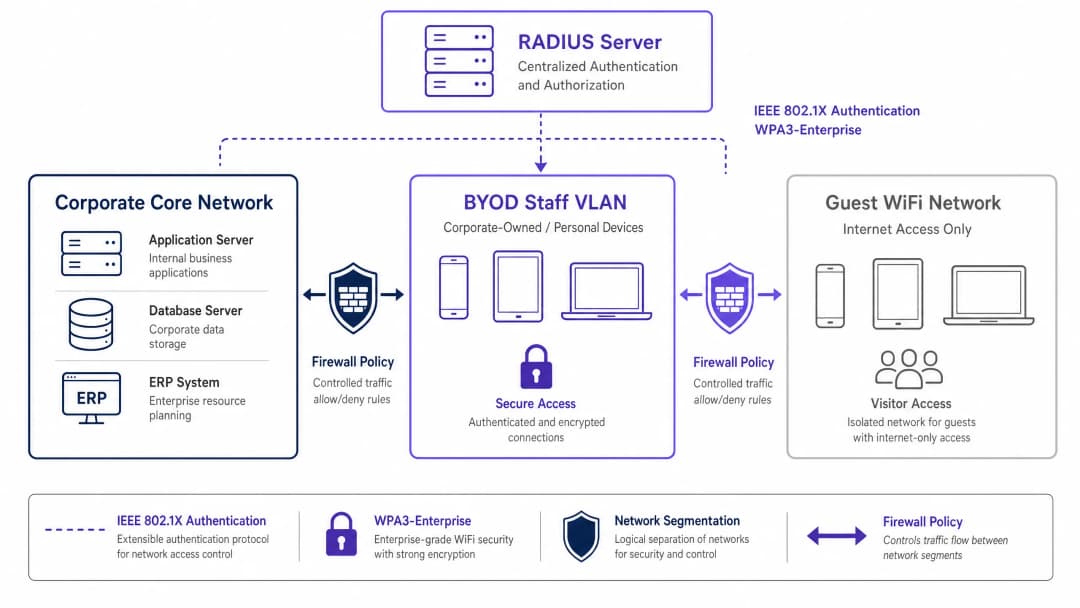
Esta segmentación garantiza que, incluso si el dispositivo personal de un empleado se ve comprometido, la amenaza permanezca contenida. El acceso desde la VLAN de BYOD a los recursos corporativos internos debe estar regido por Listas de Control de Acceso (ACL) de firewall estrictas, operando bajo un principio de denegación por defecto con permisos explícitos únicamente para servicios esenciales (por ejemplo, portales de intranet o aplicaciones en la nube específicas).
Authentication: The IEEE 802.1X Standard
Asegurar el perímetro de BYOD requiere una autenticación robusta. El estándar IEEE 802.1X proporciona un control de acceso a la red basado en puertos, lo que garantiza que los dispositivos se autentiquen antes de obtener acceso a la capa de red. Dentro del marco de 802.1X, el Extensible Authentication Protocol con Transport Layer Security (EAP-TLS) es el estándar de oro para entornos de BYOD.
EAP-TLS se basa en la autenticación mutua basada en certificados. En lugar de contraseñas débiles, el dispositivo presenta un certificado digital emitido por la Infraestructura de Claves Públicas (PKI) de la organización. El servidor RADIUS valida este certificado, asegurando que se verifiquen tanto la identidad del dispositivo como la del usuario. Este enfoque mitiga los riesgos asociados con el robo de credenciales, el phishing y la carga operativa de los restablecimientos de contraseñas.
Encryption and Compliance
Los datos en tránsito deben protegerse contra la interceptación. WPA3-Enterprise es el estándar actual para proteger el tráfico inalámbrico, reemplazando a WPA2 al eliminar vulnerabilidades como el ataque KRACK. WPA3-Enterprise exige un modo de seguridad de 192 bits para entornos altamente sensibles y proporciona confidencialidad directa perfecta a través de Simultaneous Authentication of Equals (SAE). La implementación de WPA3-Enterprise se está convirtiendo rápidamente en un requisito obligatorio para los marcos de cumplimiento, incluidos PCI-DSS 4.0 y diversos estándares de seguridad de datos de atención médica.
Además, el cumplimiento normativo requiere una visibilidad integral. Cada evento de conexión en la red de BYOD debe registrarse, incluyendo la identidad del dispositivo, la identidad del usuario, las marcas de tiempo y la asignación de VLAN. Este registro de auditoría es fundamental para demostrar el cumplimiento de regulaciones como el GDPR Artículo 32. Para obtener más contexto sobre los requisitos de registro, consulte nuestra guía sobre What is an audit trail for IT security in 2026 explained.
¿Tiene preguntas sobre su configuración específica?
Nuestro equipo trabaja con gestores de espacios, responsables de TI e ingenieros de redes en 80 000 establecimientos. Reserve una llamada de 20 minutos y le mostraremos cómo lo resolvieron otros profesionales como usted.
Implementation Guide
El despliegue de una red de BYOD segura requiere coordinación entre las políticas, la gestión de identidades y la infraestructura de red.

Despliegue paso a paso
- Definición de políticas: Antes de realizar cambios en la infraestructura, defina la política de BYOD. Determine los grupos de usuarios elegibles, los tipos de dispositivos aprobados y los recursos corporativos específicos accesibles desde la VLAN de BYOD. Obtenga la aprobación de los líderes legales, de recursos humanos y de seguridad.
- Integración de MDM y aprovisionamiento de certificados: Aproveche su plataforma de gestión de dispositivos móviles (MDM) (por ejemplo, Intune, Jamf) para aprovisionar certificados EAP-TLS en los dispositivos del personal. Utilice el Protocolo de inscripción de certificados simple (SCEP) para automatizar esta distribución. El MDM también actúa como un motor de ejecución para las comprobaciones de postura del dispositivo (por ejemplo, verificar los niveles de parche del sistema operativo y el estado de cifrado) antes de que se conceda el acceso a la red.
- Configuración de RADIUS: Configure el servidor RADIUS con políticas específicas para dispositivos BYOD. Cuando un dispositivo BYOD se autentica correctamente a través de su certificado, el servidor RADIUS debe devolver un atributo de asignación de VLAN dinámica (por ejemplo,
Tunnel-Private-Group-ID) para colocar el dispositivo en la VLAN de BYOD aislada. - Configuración de la infraestructura inalámbrica: Implemente la asignación dinámica de VLAN en su SSID corporativo existente. Esto proporciona una experiencia de usuario fluida: los empleados se conectan a una sola red y la infraestructura los dirige a la VLAN adecuada según su identidad autenticada.
- Cortafuegos y control de acceso: Aplique ACL estrictas en el límite entre la VLAN de BYOD y el núcleo corporativo. Documente cada regla de permiso y establezca un proceso de revisión trimestral para evitar la expansión descontrolada del alcance.
- Monitoreo y analítica: Integre los registros de conexión de BYOD con su sistema de gestión de eventos e información de seguridad (SIEM). Utilice plataformas como WiFi Analytics para monitorear el rendimiento de la red, la distribución de dispositivos y las posibles anomalías.
Mejores prácticas
- Abandone la autenticación basada en MAC: Los sistemas operativos móviles modernos (iOS, Android) aleatorizan las direcciones MAC para proteger la privacidad del usuario. Esto interrumpe la autenticación y el seguimiento tradicionales basados en MAC. Confíe completamente en la identidad basada en certificados (EAP-TLS) vinculada al usuario, en lugar de las direcciones de hardware.
- Implemente la evaluación de postura: Una política de BYOD está incompleta sin comprobaciones de postura. Asegúrese de que su solución de control de acceso a la red (NAC) consulte al MDM antes de otorgar acceso para verificar que los dispositivos cumplan con los niveles de seguridad mínimos (por ejemplo, que no tengan jailbreak y tengan el bloqueo de pantalla habilitado). Los dispositivos no conformes deben dirigirse a una VLAN de remediación.* Automatice la gestión del ciclo de vida de los certificados: Los certificados caducan. Configure su MDM para renovar automáticamente los certificados mucho antes de su vencimiento (por ejemplo, 30 días antes) para evitar fallas de conectividad a gran escala. Además, integre la revocación de certificados con su proceso de salida de recursos humanos para terminar el acceso de inmediato cuando un empleado deje la organización.
- Mantenga un aislamiento estricto: Garantice un aislamiento completo entre la VLAN de BYOD y la red de invitados. Un dispositivo comprometido en la red de invitados no debe tener una ruta de movimiento lateral hacia los dispositivos del personal. Para solucionar problemas de acceso de invitados, consulte Solving Connected but No Internet Error on Guest WiFi.
Solución de problemas y mitigación de riesgos
- Acrecentamiento del alcance de las reglas del firewall: El modo de falla más común en las implementaciones de BYOD es la erosión gradual de la segmentación de la red. Las reglas de acceso temporal se vuelven permanentes, mezclando de manera efectiva las redes de BYOD y corporativas. Mitigación: Implemente un proceso riguroso de gestión de cambios para las reglas de firewall de BYOD y realice revisiones trimestrales obligatorias.
- Interrupciones por vencimiento de certificados: No gestionar el ciclo de vida de los certificados conduce a caídas repentinas de conectividad para grandes grupos de personal. Mitigación: Implemente la renovación automatizada a través de SCEP/MDM y configure alertas proactivas para vencimientos inminentes.
- Salida de personal incompleta: El acceso prolongado de ex empleados es una vulnerabilidad de seguridad significativa. Mitigación: Automatice la revocación de su certificado en la PKI tan pronto como cambie el estado del usuario en el sistema de recursos humanos.
ROI e impacto empresarial
La implementación de una arquitectura BYOD segura requiere una inversión inicial en infraestructura NAC, MDM y RADIUS. Sin embargo, el retorno de la inversión (ROI) es sustancial:
- Mitigación de riesgos: Al aislar los dispositivos no administrados, la organización reduce significativamente la superficie de ataque para el ransomware y el movimiento lateral, protegiendo los activos críticos y evitando costosas filtraciones de datos.
- Eficiencia operativa: La autenticación basada en certificados elimina la sobrecarga de soporte de TI asociada con el restablecimiento de contraseñas y la gestión de credenciales compartidas.
- Productividad de los empleados: Brindar un acceso seguro y fluido a los recursos necesarios en dispositivos personales mejora la satisfacción y productividad del personal, especialmente en entornos dinámicos como tiendas minoristas o salas de hospitales.
- Garantía de cumplimiento: El registro de auditoría integral y el cifrado sólido garantizan que la organización cumpla con los requisitos regulatorios, evitando posibles multas y daños a la reputación.
A medida que las organizaciones expanden su presencia digital, la conectividad segura sigue siendo primordial. Las iniciativas como la integración de ciudades inteligentes respaldadas por líderes de la industria (consulte Purple nombra a Iain Fox como VP de Crecimiento - Sector Público para impulsar la inclusión digital y la innovación en ciudades inteligentes) dependen de arquitecturas de seguridad fundamentales y sólidas. Además, garantizar una navegación sin interrupciones dentro de grandes recintos, respaldada por funciones como Purple lanza el Modo de Mapas Sin Conexión para una navegación fluida y segura a puntos de acceso WiFi, depende de una infraestructura de red subyacente confiable y segura.
Definiciones clave
IEEE 802.1X
Un estándar IEEE para el Control de Acceso a Redes basado en puertos (PNAC). Proporciona un mecanismo de autenticación para los dispositivos que desean conectarse a una LAN o WLAN.
El protocolo fundamental utilizado para autenticar los dispositivos del personal antes de que se les permita ingresar a la red BYOD.
EAP-TLS (Extensible Authentication Protocol-Transport Layer Security)
Un método EAP que se basa en certificados de cliente y servidor para establecer un túnel seguro de autenticación mutua.
Considerado el método de autenticación más seguro para BYOD, ya que elimina la dependencia de contraseñas de usuario vulnerables.
RADIUS (Remote Authentication Dial-In User Service)
Un protocolo de red que proporciona una gestión centralizada de Autenticación, Autorización y Contabilidad (AAA) para los usuarios que se conectan y utilizan un servicio de red.
El servidor backend que evalúa las solicitudes 802.1X de los puntos de acceso y decide si concede a un dispositivo el acceso a la red.
Asignación dinámica de VLAN
Una configuración de red en la que el servidor RADIUS dicta en qué VLAN debe colocarse un usuario o dispositivo tras una autenticación exitosa, en lugar de codificar de forma fija la VLAN en la SSID.
Permite a las organizaciones transmitir una única SSID mientras separan de forma segura el tráfico (por ejemplo, corporativo frente a BYOD) según la identidad del usuario.
Aleatorización de direcciones MAC
Una función de privacidad en los OS móviles modernos en la que el dispositivo utiliza una dirección MAC generada de forma aleatoria en lugar de su dirección de hardware real al buscar o conectarse a redes.
Esta función deja obsoletos los métodos de autenticación heredados basados en MAC, lo que obliga a realizar un cambio hacia la autenticación basada en identidad como 802.1X.
MDM (Mobile Device Management)
Software que permite a los administradores de TI controlar, asegurar y aplicar políticas en smartphones, tablets y otros endpoints.
Se utiliza en implementaciones BYOD para enviar certificados de red a los dispositivos y verificar su estado de seguridad (por ejemplo, el nivel de parches) antes de permitir el acceso a la red.
WPA3-Enterprise
La última generación de seguridad WiFi, que proporciona un cifrado sólido y requiere autenticación 802.1X para redes empresariales.
Obligatorio para implementaciones seguras modernas para proteger los datos en tránsito contra ataques criptográficos avanzados.
Evaluación de postura
El proceso de evaluar el estado de seguridad de un dispositivo (por ejemplo, versión de OS, estado de antivirus, cifrado) antes de concederle acceso a la red.
Garantiza que el dispositivo personal de un miembro del personal no albergue malware ni ejecute un OS desactualizado antes de conectarse a la VLAN de BYOD.
Ejemplos resueltos
Un hospital con 400 camas necesita permitir que el personal de enfermería utilice teléfonos inteligentes personales para acceder a una aplicación interna segura de programación, pero estos dispositivos deben estar estrictamente aislados de la red clínica que contiene los expedientes de pacientes (EHR) y los dispositivos médicos.
El hospital implementa una VLAN dedicada para BYOD. Implementan una solución MDM para enviar certificados EAP-TLS a los teléfonos inteligentes del personal. La infraestructura inalámbrica utiliza autenticación 802.1X; cuando un enfermero se conecta, el servidor RADIUS valida el certificado y asigna el dispositivo a la VLAN de BYOD. Un firewall se ubica entre la VLAN de BYOD y la red clínica, con una política estricta de denegación por defecto. Una única regla de permiso explícita permite el tráfico HTTPS desde la VLAN de BYOD hacia la dirección IP específica del servidor de la aplicación de programación.
Una cadena minorista nacional con 150 tiendas desea que los gerentes de tienda accedan a los paneles de inventario en sus tabletas personales. Actualmente, la cadena utiliza WPA2-Personal con una contraseña compartida para la red WiFi del personal, la cual se comparte con frecuencia con personas que no son gerentes.
El minorista elimina gradualmente la SSID con contraseña compartida. Implementan un servidor RADIUS centralizado y lo integran con su Azure AD. Utilizan su MDM para desplegar certificados en las tabletas aprobadas de los gerentes. Las tiendas transmiten una única SSID corporativa. Los gerentes se autentican a través de 802.1X (EAP-TLS) y se les asigna dinámicamente a una VLAN de 'BYOD de Gerentes', que tiene reglas de firewall que permiten el acceso al panel de inventario centralizado. Los empleados que no son gerentes y no tienen certificados no pueden conectarse.
Preguntas de práctica
Q1. Su organización está implementando un programa BYOD. El equipo de red propone utilizar WPA2-Personal con una clave precompartida (PSK) compleja y rotativa que cambia mensualmente, argumentando que es más sencillo de implementar que 802.1X. Como Director de TI, ¿cómo debería responder?
Sugerencia: Considere los requisitos de responsabilidad individual y la carga operativa de dar de baja a un empleado a mitad de mes.
Ver respuesta modelo
Rechace la propuesta. Una PSK, incluso una rotativa, no proporciona responsabilidad por dispositivo o por usuario. Si un empleado se va a mitad de mes, la clave debe cambiarse inmediatamente, lo que interrumpe a todos los demás usuarios. Debe exigir el uso de IEEE 802.1X (preferiblemente EAP-TLS) para garantizar la autenticación individual, lo que permite la revocación inmediata y específica del acceso sin afectar al resto del personal.
Q2. Un miembro del personal informa que no puede conectar su nuevo iPhone personal a la red BYOD. Sus registros de RADIUS muestran fallas de autenticación, pero el usuario insiste en que tiene instalado el perfil correcto. Los registros indican que el dispositivo presenta una dirección MAC diferente en cada intento de conexión. ¿Cuál es la causa raíz y la solución arquitectónica?
Sugerencia: Los sistemas operativos móviles modernos implementan funciones de privacidad que afectan la identificación de capa 2.
Ver respuesta modelo
La causa raíz es la aleatorización de direcciones MAC, una función de privacidad predeterminada en los dispositivos iOS y Android modernos. La solución arquitectónica es desacoplar por completo la autenticación y la aplicación de políticas de las direcciones MAC. La red debe depender exclusivamente de la identidad criptográfica proporcionada por el certificado EAP-TLS para la autenticación y el posterior seguimiento de la sesión.
Q3. Durante una auditoría de seguridad, el auditor observa que la VLAN de BYOD tiene una regla de firewall que permite todo el tráfico (Any/Any) hacia la subred corporativa que alberga la base de datos de recursos humanos, citando un requisito temporal de hace seis meses que nunca se eliminó. ¿Qué falla de proceso ocurrió y cómo se remedia?
Sugerencia: Enfóquese en el ciclo de vida de las reglas de firewall y el principio de privilegio mínimo.
Ver respuesta modelo
La falla es la acumulación descontrolada de reglas de firewall (scope creep) y la falta de gestión del ciclo de vida para los controles de acceso. La remediación consta de dos partes: Primero, eliminar inmediatamente la regla Any/Any y reemplazarla con un permiso explícito solo para los puertos y protocolos requeridos (si aún se necesita el acceso). Segundo, implementar un proceso de revisión trimestral obligatorio para todas las ACL que rigen el tráfico entre la VLAN de BYOD y el núcleo corporativo para garantizar que se eliminen las reglas temporales.
Continúe leyendo esta serie
Autenticación basada en certificados para dispositivos corporativos (EAP-TLS)
Esta guía de referencia técnica autorizada cubre la arquitectura, la implementación y las mejores prácticas operativas de la autenticación basada en certificados EAP-TLS para dispositivos corporativos. Diseñada para arquitectos de TI y líderes de operaciones de recintos, proporciona una ruta práctica para eliminar los riesgos de credenciales basadas en contraseñas y lograr un control de acceso a la red 802.1X sólido en entornos empresariales de múltiples sitios.
Administración de la seguridad de BYOD (Trae tu propio dispositivo) en redes del personal
Una guía de referencia técnica y de autoridad para gerentes de TI empresariales y arquitectos de red sobre cómo proteger el acceso BYOD (Bring Your Own Device) en las redes del personal. Esta guía detalla la arquitectura de red exacta, los protocolos de autenticación y los flujos de integración de MDM necesarios para mitigar las filtraciones de datos y mantener el cumplimiento normativo en recintos de gran afluencia de personas.
Mitigación de puntos de acceso no autorizados en redes empresariales
Esta guía de referencia técnica detalla la arquitectura, el despliegue y los procedimientos operativos para mitigar los puntos de acceso no autorizados en redes empresariales mediante sistemas de prevención de intrusiones inalámbricas (WIPS) y sistemas de detección de intrusiones inalámbricas (WIDS). Proporciona marcos de trabajo prácticos para que los administradores de seguridad de TI detecten, clasifiquen y neutralicen los AP no autorizados en entornos físicos complejos, incluidos los sectores hotelero, de retail, salud y público. La guía abarca la clasificación de amenazas, los mecanismos de contención automatizados, las implicaciones de cumplimiento (PCI-DSS, GDPR, HIPAA) y los resultados de negocio medibles.
¿Tiene preguntas sobre su configuración específica?
Nuestro equipo trabaja con gestores de espacios, responsables de TI e ingenieros de redes en 80 000 establecimientos. Reserve una llamada de 20 minutos y le mostraremos cómo lo resolvieron otros profesionales como usted.