
स्टाफ WiFi नेटवर्क के लिए सुरक्षित BYOD नीतियां
यह आधिकारिक मार्गदर्शिका IT लीडर्स को स्टाफ के व्यक्तिगत उपकरणों को सुरक्षित रूप से ऑनबोर्ड करने के लिए एक विक्रेता-तटस्थ ढाँचा प्रदान करती है। यह BYOD का समर्थन करने के लिए आवश्यक महत्वपूर्ण वास्तुकला निर्णयों—जिसमें नेटवर्क सेगमेंटेशन, EAP-TLS प्रमाणीकरण और MDM एकीकरण शामिल हैं—का विवरण देती है, ताकि मुख्य कॉर्पोरेट इन्फ्रास्ट्रक्चर से समझौता न हो।
इस गाइड को सुनें
पॉडकास्ट ट्रांसक्रिप्ट देखें

कार्यकारी सारांश
आधुनिक उद्यम वातावरण में लचीलेपन की मांग है, और Bring Your Own Device (BYOD) एक्सेस के लिए स्टाफ की अपेक्षा अब गैर-परक्राम्य नहीं है। हालांकि, अप्रबंधित व्यक्तिगत उपकरणों को कॉर्पोरेट वायरलेस नेटवर्क में एकीकृत करने से महत्वपूर्ण सुरक्षा और अनुपालन जोखिम उत्पन्न होते हैं। यह तकनीकी संदर्भ मार्गदर्शिका नेटवर्क आर्किटेक्ट्स और IT डायरेक्टर्स को स्टाफ WiFi नेटवर्क के लिए सुरक्षित BYOD नीतियां लागू करने हेतु एक मजबूत ढाँचा प्रदान करती है। हम नेटवर्क सेगमेंटेशन, IEEE 802.1X प्रमाणीकरण और Mobile Device Management (MDM) एकीकरण पर ध्यान केंद्रित करते हुए महत्वपूर्ण वास्तुकला निर्णयों की रूपरेखा प्रस्तुत करते हैं। साझा पासफ्रेज़ और MAC-आधारित प्रमाणीकरण से हटकर प्रमाणपत्र-आधारित पहचान (EAP-TLS) और WPA3-Enterprise एन्क्रिप्शन की ओर बढ़ने से, संगठन अपने मुख्य इन्फ्रास्ट्रक्चर से समझौता किए बिना सहज कनेक्टिविटी प्रदान कर सकते हैं। चाहे Retail , Healthcare , Hospitality , या Transport में काम कर रहे हों, यह मार्गदर्शिका स्टाफ की उत्पादकता का समर्थन करते हुए आपके नेटवर्क एज को सुरक्षित करने के लिए आवश्यक विक्रेता-तटस्थ सर्वोत्तम प्रथाओं को प्रदान करती है।
इन अवधारणाओं पर एक कार्यकारी ब्रीफिंग के लिए हमारे सहयोगी पॉडकास्ट को सुनें:
तकनीकी गहन-विश्लेषण
नेटवर्क वास्तुकला और सेगमेंटेशन
किसी भी सुरक्षित BYOD परिनियोजन का मूलभूत सिद्धांत कठोर नेटवर्क सेगमेंटेशन है। व्यक्तिगत उपकरण कभी भी कॉर्पोरेट इन्फ्रास्ट्रक्चर, पॉइंट-ऑफ-सेल (POS) सिस्टम, या संवेदनशील डेटाबेस के समान वर्चुअल लोकल एरिया नेटवर्क (VLAN) पर नहीं होने चाहिए। एक समर्पित BYOD VLAN एक सुरक्षित मध्य स्तरीय के रूप में कार्य करता है, जो कॉर्पोरेट कोर और Guest WiFi नेटवर्क दोनों से तार्किक रूप से अलग होता है।
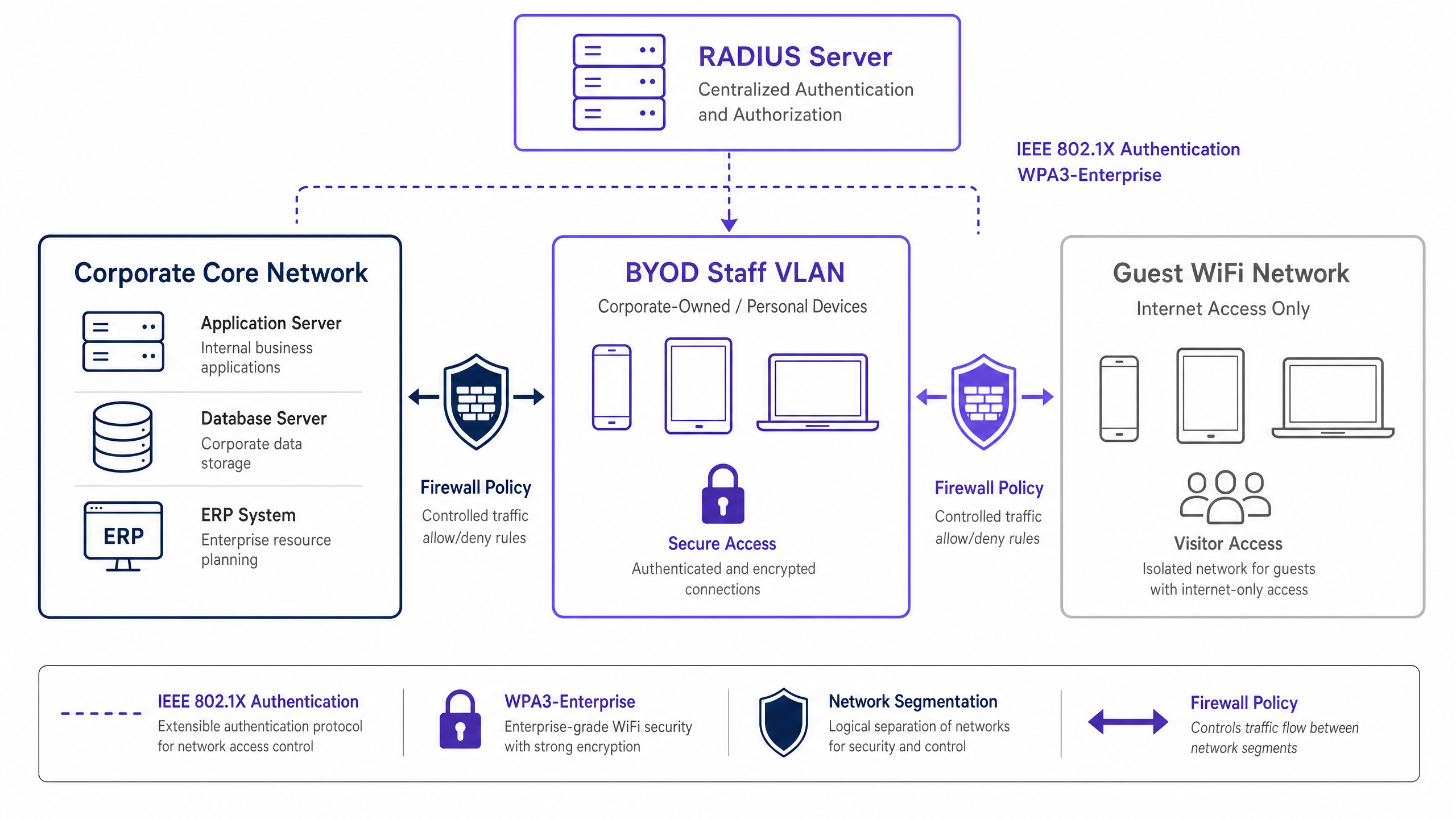
यह सेगमेंटेशन सुनिश्चित करता है कि यदि किसी स्टाफ सदस्य का व्यक्तिगत उपकरण भी समझौता किया जाता है, तो खतरा सीमित रहता है। BYOD VLAN से आंतरिक कॉर्पोरेट संसाधनों तक पहुंच को सख्त फ़ायरवॉल एक्सेस कंट्रोल लिस्ट (ACLs) द्वारा नियंत्रित किया जाना चाहिए, जो डिफ़ॉल्ट-अस्वीकार सिद्धांत पर काम करते हुए केवल आवश्यक सेवाओं (जैसे, इंट्रानेट पोर्टल या विशिष्ट क्लाउड एप्लिकेशन) के लिए स्पष्ट अनुमति प्रदान करते हैं।
प्रमाणीकरण: IEEE 802.1X मानक
BYOD परिधि को सुरक्षित करने के लिए मजबूत प्रमाणीकरण की आवश्यकता होती है। IEEE 802.1X मानक पोर्ट-आधारित नेटवर्क एक्सेस कंट्रोल प्रदान करता है, यह सुनिश्चित करता है कि नेटवर्क लेयर एक्सेस प्राप्त करने से पहले उपकरणों को प्रमाणित किया जाए। 802.1X फ्रेमवर्क के भीतर, ट्रांसपोर्ट लेयर सिक्योरिटी (EAP-TLS) के साथ एक्सटेंसिबल ऑथेंटिकेशन प्रोटोकॉल BYOD वातावरण के लिए स्वर्ण मानक है।
EAP-TLS प्रमाणपत्र-आधारित पारस्परिक प्रमाणीकरण पर निर्भर करता है। कमजोर पासवर्ड के बजाय, डिवाइस संगठन के पब्लिक की इन्फ्रास्ट्रक्चर (PKI) द्वारा जारी एक डिजिटल प्रमाणपत्र प्रस्तुत करता है। RADIUS सर्वर इस प्रमाणपत्र को मान्य करता है, यह सुनिश्चित करता है कि डिवाइस और उपयोगकर्ता पहचान दोनों सत्यापित हों। यह दृष्टिकोण क्रेडेंशियल चोरी, फ़िशिंग और पासवर्ड रीसेट के परिचालन ओवरहेड से जुड़े जोखिमों को कम करता है।
एन्क्रिप्शन और अनुपालन
पारगमन में डेटा को अवरोधन से बचाया जाना चाहिए। WPA3-Enterprise वायरलेस ट्रैफिक को सुरक्षित करने के लिए वर्तमान मानक है, जो KRACK हमले जैसी कमजोरियों को समाप्त करके WPA2 का स्थान लेता है। WPA3-Enterprise अत्यधिक संवेदनशील वातावरण के लिए 192-बिट सुरक्षा मोड अनिवार्य करता है और Simultaneous Authentication of Equals (SAE) के माध्यम से फॉरवर्ड सीक्रेसी प्रदान करता है। WPA3-Enterprise को लागू करना PCI DSS 4.0 और विभिन्न स्वास्थ्य सेवा डेटा संरक्षण मानकों सहित अनुपालन फ्रेमवर्क के लिए तेजी से एक अनिवार्य आवश्यकता बन रहा है।
इसके अलावा, अनुपालन के लिए व्यापक दृश्यता की आवश्यकता होती है। BYOD नेटवर्क पर प्रत्येक कनेक्शन इवेंट को लॉग किया जाना चाहिए, जिसमें डिवाइस पहचान, उपयोगकर्ता पहचान, टाइमस्टैम्प और VLAN असाइनमेंट कैप्चर किया जाए। यह ऑडिट ट्रेल GDPR अनुच्छेद 32 जैसे विनियमों के अनुपालन को प्रदर्शित करने के लिए महत्वपूर्ण है। लॉगिंग आवश्यकताओं पर अधिक संदर्भ के लिए, Explain what is audit trail for IT Security in 2026 पर हमारी मार्गदर्शिका देखें।
कार्यान्वयन मार्गदर्शिका
एक सुरक्षित BYOD नेटवर्क को परिनियोजित करने के लिए नीति, पहचान प्रबंधन और नेटवर्क इन्फ्रास्ट्रक्चर में समन्वय की आवश्यकता होती है।

चरण-दर-चरण परिनियोजन
- नीति परिभाषा: इन्फ्रास्ट्रक्चर में बदलाव करने से पहले, BYOD नीति को परिभाषित करें। योग्य उपयोगकर्ता समूहों, अनुमोदित डिवाइस प्रकारों और BYOD VLAN से पहुंच योग्य विशिष्ट कॉर्पोरेट संसाधनों का निर्धारण करें। कानूनी, HR और सुरक्षा नेतृत्व से अनुमोदन प्राप्त करें।
- MDM एकीकरण और प्रमाणपत्र प्रावधान: स्टाफ उपकरणों को EAP-TLS प्रमाणपत्र प्रदान करने के लिए अपने Mobile Device Management (MDM) प्लेटफॉर्म (जैसे, Intune, Jamf) का लाभ उठाएं। इस वितरण को स्वचालित करने के लिए Simple Certificate Enrollment Protocol (SCEP) का उपयोग करें। नेटवर्क एक्सेस प्रदान करने से पहले MDM डिवाइस पोस्चर जांच (जैसे, OS पैच स्तरों और एन्क्रिप्शन स्थिति को सत्यापित करना) के लिए प्रवर्तन इंजन के रूप में भी कार्य करता है।
- RADIUS कॉन्फ़िगरेशन: BYOD उपकरणों के लिए विशिष्ट नीतियों के साथ RADIUS सर्वर को कॉन्फ़िगर करें। जब एक BYOD डिवाइस अपने प्रमाणपत्र के माध्यम से सफलतापूर्वक प्रमाणित होता है, तो RADIUS सर्वर को डिवाइस को अलग-थलग BYOD VLAN पर रखने के लिए एक गतिशील VLAN असाइनमेंट विशेषता (जैसे,
Tunnel-Private-Group-ID) वापस करनी होगी। - वायरलेस इन्फ्रास्ट्रक्चर सेटअप: अपने मौजूदा कॉर्पोरेट Service Set Identifier (SSID) पर गतिशील VLAN असाइनमेंट लागू करें। यह एक सहज उपयोगकर्ता अनुभव प्रदान करता है—स्टाफ एक नेटवर्क से कनेक्ट करें, और इन्फ्रास्ट्रक्चर उन्हें उनकी प्रमाणित पहचान के आधार पर उपयुक्त VLAN पर रूट करता है।
- फ़ायरवॉल और एक्सेस कंट्रोल: BYOD VLAN और कॉर्पोरेट कोर के बीच की सीमा पर सख्त ACLs लागू करें। प्रत्येक अनुमति नियम का दस्तावेज़ीकरण करें और स्कोप क्रीप को रोकने के लिए एक त्रैमासिक समीक्षा प्रक्रिया स्थापित करें।
- मॉनिटरिंग और एनालिटिक्स: BYOD कनेक्शन लॉग को अपने Security Information and Event Management (SIEM) सिस्टम के साथ एकीकृत करें। नेटवर्क प्रदर्शन, डिवाइस वितरण और संभावित विसंगतियों की निगरानी के लिए WiFi Analytics जैसे प्लेटफॉर्म का उपयोग करें।
सर्वोत्तम अभ्यास
- MAC-आधारित प्रमाणीकरण छोड़ें: आधुनिक मोबाइल ऑपरेटिंग सिस्टम (iOS, Android) उपयोगकर्ता की गोपनीयता की रक्षा के लिए MAC एड्रेस को रैंडमाइज़ करते हैं। यह पारंपरिक MAC-आधारित प्रमाणीकरण और ट्रैकिंग को तोड़ता है। विशेष रूप से उपयोगकर्ता से जुड़ी प्रमाणपत्र-आधारित पहचान (EAP-TLS) पर निर्भर रहें, न कि हार्डवेयर एड्रेस पर।
- पोस्चर असेसमेंट लागू करें: पोस्चर चेक के बिना BYOD नीति अधूरी है। सुनिश्चित करें कि आपका Network Access Control (NAC) समाधान MDM से यह सत्यापित करने के लिए क्वेरी करता है कि डिवाइस एक्सेस देने से पहले न्यूनतम सुरक्षा बेसलाइन (जैसे, जेलब्रेक नहीं किया गया, स्क्रीन लॉक सक्षम) को पूरा करते हैं। गैर-अनुपालक डिवाइस को एक रेमेडिएशन VLAN पर रूट किया जाना चाहिए।
- प्रमाणपत्र जीवनचक्र प्रबंधन को स्वचालित करें: प्रमाणपत्र समाप्त हो जाते हैं। बड़े पैमाने पर कनेक्टिविटी विफलताओं को रोकने के लिए अपने MDM को समाप्ति से काफी पहले (जैसे, 30 दिन पहले) प्रमाणपत्रों को स्वचालित रूप से नवीनीकृत करने के लिए कॉन्फ़िगर करें। इसके अलावा, जब कोई कर्मचारी छोड़ता है तो तुरंत एक्सेस समाप्त करने के लिए प्रमाणपत्र निरस्तीकरण को अपनी HR ऑफबोर्डिंग प्रक्रिया के साथ एकीकृत करें।
- सख्त अलगाव बनाए रखें: BYOD VLAN और गेस्ट नेटवर्क के बीच पूर्ण अलगाव सुनिश्चित करें। गेस्ट नेटवर्क पर एक समझौता किए गए डिवाइस का स्टाफ डिवाइस तक कोई पार्श्व गति पथ नहीं होना चाहिए। गेस्ट एक्सेस समस्याओं के निवारण के लिए, Solving the Connected but No Internet Error on Guest WiFi देखें।
समस्या निवारण और जोखिम न्यूनीकरण
- फ़ायरवॉल नियम स्कोप क्रीप: BYOD परिनियोजन में सबसे आम विफलता मोड नेटवर्क सेगमेंटेशन का क्रमिक क्षरण है। अस्थायी एक्सेस नियम स्थायी हो जाते हैं, जिससे BYOD और कॉर्पोरेट नेटवर्क प्रभावी ढंग से विलीन हो जाते हैं। न्यूनीकरण: BYOD फ़ायरवॉल नियमों के लिए एक कठोर परिवर्तन प्रबंधन प्रक्रिया लागू करें और अनिवार्य त्रैमासिक समीक्षा करें।
- प्रमाणपत्र समाप्ति आउटेज: प्रमाणपत्र जीवनचक्रों को प्रबंधित करने में विफलता से कर्मचारियों के बड़े समूहों के लिए कनेक्टिविटी में अचानक गिरावट आती है। न्यूनीकरण: SCEP/MDM के माध्यम से स्वचालित नवीनीकरण लागू करें और आसन्न समाप्ति के लिए सक्रिय अलर्टिंग कॉन्फ़िगर करें।
- अधूरा ऑफबोर्डिंग: पूर्व कर्मचारियों के लिए लंबे समय तक एक्सेस एक महत्वपूर्ण सुरक्षा भेद्यता है। न्यूनीकरण: HR सिस्टम में उनकी स्थिति बदलते ही PKI में उपयोगकर्ता के प्रमाणपत्र के निरस्तीकरण को स्वचालित करें।
ROI और व्यावसायिक प्रभाव
एक सुरक्षित BYOD आर्किटेक्चर को लागू करने के लिए NAC, MDM और RADIUS इन्फ्रास्ट्रक्चर में अग्रिम निवेश की आवश्यकता होती है। हालांकि, निवेश पर प्रतिफल (ROI) पर्याप्त है:
- जोखिम न्यूनीकरण: अप्रबंधित उपकरणों को अलग करके, संगठन रैंसमवेयर और पार्श्व गति के लिए हमले की सतह को नाटकीय रूप से कम करता है, महत्वपूर्ण संपत्तियों की रक्षा करता है और महंगी डेटा उल्लंघनों से बचता है।
- परिचालन दक्षता: प्रमाणपत्र-आधारित प्रमाणीकरण पासवर्ड रीसेट और साझा क्रेडेंशियल प्रबंधन से जुड़े IT हेल्पडेस्क ओवरहेड को समाप्त करता है।
- कर्मचारी उत्पादकता: व्यक्तिगत उपकरणों पर आवश्यक संसाधनों तक सुरक्षित, निर्बाध पहुंच प्रदान करने से कर्मचारियों की संतुष्टि और उत्पादकता में सुधार होता है, विशेष रूप से खुदरा फर्श या अस्पताल वार्ड जैसे गतिशील वातावरण में।
- अनुपालन आश्वासन: व्यापक ऑडिट लॉगिंग और मजबूत एन्क्रिप्शन यह सुनिश्चित करते हैं कि संगठन नियामक आवश्यकताओं को पूरा करता है, संभावित जुर्माने और प्रतिष्ठा को नुकसान से बचाता है।
जैसे-जैसे संगठन अपनी डिजिटल उपस्थिति का विस्तार करते हैं, सुरक्षित कनेक्टिविटी सर्वोपरि रहती है। स्मार्ट सिटी एकीकरण जैसी पहल, जैसा कि उद्योग के नेताओं द्वारा समर्थित है (देखें Purple Appoints Iain Fox as VP Growth – Public Sector to Drive Digital Inclusion and Smart City Innovation ), मजबूत मूलभूत सुरक्षा आर्किटेक्चर पर निर्भर करती हैं। इसके अलावा, बड़े स्थानों के भीतर निर्बाध नेविगेशन सुनिश्चित करना, Purple Launches Offline Maps Mode for Seamless, Secure Navigation to WiFi Hotspots जैसी सुविधाओं द्वारा समर्थित, एक विश्वसनीय और सुरक्षित अंतर्निहित नेटवर्क इन्फ्रास्ट्रक्चर पर निर्भर करता है।
मुख्य परिभाषाएं
IEEE 802.1X
An IEEE standard for port-based Network Access Control (PNAC). It provides an authentication mechanism to devices wishing to attach to a LAN or WLAN.
The foundational protocol used to authenticate staff devices before they are allowed onto the BYOD network.
EAP-TLS (Extensible Authentication Protocol-Transport Layer Security)
An EAP method that relies on client and server certificates to establish a secure mutual authentication tunnel.
Considered the most secure authentication method for BYOD, as it eliminates the reliance on vulnerable user passwords.
RADIUS (Remote Authentication Dial-In User Service)
A networking protocol that provides centralized Authentication, Authorization, and Accounting (AAA) management for users who connect and use a network service.
The backend server that evaluates the 802.1X requests from access points and decides whether to grant a device access to the network.
Dynamic VLAN Assignment
A network configuration where the RADIUS server dictates which VLAN a user or device should be placed in upon successful authentication, rather than hardcoding the VLAN to the SSID.
Allows organizations to broadcast a single SSID while securely separating traffic (e.g., corporate vs. BYOD) based on the user's identity.
MAC Address Randomization
A privacy feature in modern mobile OSs where the device uses a randomly generated MAC address instead of its true hardware address when scanning for or connecting to networks.
This feature renders legacy MAC-based authentication methods obsolete, forcing a shift to identity-based authentication like 802.1X.
MDM (Mobile Device Management)
Software that allows IT administrators to control, secure, and enforce policies on smartphones, tablets, and other endpoints.
Used in BYOD deployments to push network certificates to devices and verify their security posture (e.g., patch level) before allowing network access.
WPA3-Enterprise
The latest generation of Wi-Fi security, providing robust encryption and requiring 802.1X authentication for enterprise networks.
Mandatory for modern secure deployments to protect data in transit against advanced cryptographic attacks.
Posture Assessment
The process of evaluating a device's security state (e.g., OS version, antivirus status, encryption) before granting it network access.
Ensures that a staff member's personal device isn't harboring malware or running an outdated OS before it connects to the BYOD VLAN.
हल किए गए उदाहरण
A 400-bed hospital needs to allow nursing staff to use personal smartphones to access a secure internal scheduling application, but these devices must be strictly isolated from the clinical network containing patient records (EHR) and medical devices.
The hospital implements a dedicated BYOD VLAN. They deploy an MDM solution to push EAP-TLS certificates to staff smartphones. The wireless infrastructure uses 802.1X authentication; when a nurse connects, the RADIUS server validates the certificate and assigns the device to the BYOD VLAN. A firewall sits between the BYOD VLAN and the clinical network, with a strict default-deny policy. A single explicit permit rule allows HTTPS traffic from the BYOD VLAN to the specific IP address of the scheduling application server.
A national retail chain with 150 stores wants store managers to access inventory dashboards on their personal tablets. The chain currently uses WPA2-Personal with a shared password for staff WiFi, which is frequently shared with non-managers.
The retailer phases out the shared password SSID. They implement a centralized RADIUS server and integrate it with their Azure AD. They use their MDM to deploy certificates to approved manager tablets. The stores broadcast a single corporate SSID. Managers authenticate via 802.1X (EAP-TLS) and are dynamically assigned to a 'Manager BYOD' VLAN, which has firewall rules permitting access to the centralized inventory dashboard. Non-managers without certificates cannot connect.
अभ्यास प्रश्न
Q1. Your organization is rolling out a BYOD program. The network team proposes using WPA2-Personal with a complex, rotating pre-shared key (PSK) that changes monthly, arguing it is simpler to deploy than 802.1X. As the IT Director, how should you respond?
संकेत: Consider the requirements for individual accountability and the operational overhead of offboarding an employee mid-month.
मॉडल उत्तर देखें
Reject the proposal. A PSK, even a rotating one, provides no per-device or per-user accountability. If an employee leaves mid-month, the key must be changed immediately, disrupting all other users. You must mandate IEEE 802.1X (preferably EAP-TLS) to ensure individual authentication, enabling immediate, targeted revocation of access without affecting the rest of the staff.
Q2. A staff member reports they cannot connect their new personal iPhone to the BYOD network. Your RADIUS logs show authentication failures, but the user insists they have the correct profile installed. The logs indicate the device is presenting a different MAC address on each connection attempt. What is the root cause and the architectural fix?
संकेत: Modern mobile operating systems implement privacy features that affect layer 2 identification.
मॉडल उत्तर देखें
The root cause is MAC address randomization, a default privacy feature in modern iOS and Android devices. The architectural fix is to completely decouple authentication and policy enforcement from MAC addresses. The network must rely solely on the cryptographic identity provided by the EAP-TLS certificate for authentication and subsequent session tracking.
Q3. During a security audit, the auditor notes that the BYOD VLAN has a firewall rule permitting all traffic (Any/Any) to the corporate subnet housing the HR database, citing a temporary requirement from six months ago that was never removed. What process failure occurred, and how is it remediated?
संकेत: Focus on the lifecycle of firewall rules and the principle of least privilege.
मॉडल उत्तर देखें
The failure is 'firewall rule scope creep' and a lack of lifecycle management for access controls. The remediation is two-fold: First, immediately remove the Any/Any rule and replace it with an explicit permit only for the required ports/protocols (if access is still needed). Second, implement a mandatory quarterly review process for all ACLs governing traffic between the BYOD VLAN and the corporate core to ensure temporary rules are purged.