
Sichere BYOD-Richtlinien für Mitarbeiter-WiFi-Netzwerke
Dieser maßgebliche Leitfaden bietet IT-Leitern ein herstellerneutrales Framework für das sichere Onboarding persönlicher Geräte von Mitarbeitern. Er beschreibt die kritischen Architekturentscheidungen - einschließlich Netzwerkesegmentierung, EAP-TLS-Authentifizierung und MDM-Integration - die erforderlich sind, um BYOD ohne Gefährdung der zentralen Unternehmensinfrastruktur zu unterstützen.
Video overview
Diesen Leitfaden anhören
Podcast-Transkript ansehen
Teil unserer Kernserie: Enterprise WiFi Security Guide →

Executive Summary
Die moderne Unternehmensumgebung verlangt Flexibilität, und die Erwartung der Mitarbeiter an den BYOD-Zugriff (Bring Your Own Device) ist nicht mehr verhandelbar. Die Integration nicht verwalteter persönlicher Geräte in drahtlose Unternehmensnetzwerke bringt jedoch erhebliche Sicherheits- und Compliance-Risiken mit sich. Dieser technische Leitfaden bietet Netzwerkarchitekten und IT-Leitern einen robusten Rahmen für die Implementierung sicherer BYOD-Richtlinien für das Mitarbeiter-WiFi. Wir beschreiben kritische Architekturentscheidungen und konzentrieren uns dabei auf Netzwerksegmentierung, 802.1X-Authentifizierung und die Integration von Mobile Device Management (MDM). Durch die Abkehr von gemeinsam genutzten Passwörtern und MAC-basierter Authentifizierung hin zu zertifikatsbasierter Identität (EAP-TLS) und WPA3-Enterprise-Verschlüsselung können Unternehmen eine nahtlose Konnektivität bereitstellen, ohne ihre Kerninfrastruktur zu gefährden. Unabhängig davon, ob Sie im Einzelhandel, im Gesundheitswesen, im Gastgewerbe oder im Transportwesen tätig sind, bietet dieser Leitfaden die herstellerneutralen Best Practices, die zur Sicherung Ihres Netzwerkrandes bei gleichzeitiger Unterstützung der Mitarbeiterproduktivität erforderlich sind.
Hören Sie sich unseren begleitenden Podcast an, um Einblicke für Führungskräfte in diese Konzepte zu erhalten:
Technische Detailanalyse
Netzwerkarchitektur und Segmentierung
Das grundlegende Prinzip jeder sicheren BYOD-Bereitstellung ist eine strenge Netzwerksegmentierung. Private Geräte dürfen sich niemals im selben Virtual Local Area Network (VLAN) befinden wie die Unternehmens-Infrastruktur, Point-of-Sale-Systeme (POS) oder sensible Datenbanken. Ein dediziertes BYOD-VLAN fungiert als sichere mittlere Ebene, die logisch sowohl vom Unternehmenskern als auch von den Guest WiFi Netzwerken isoliert ist.
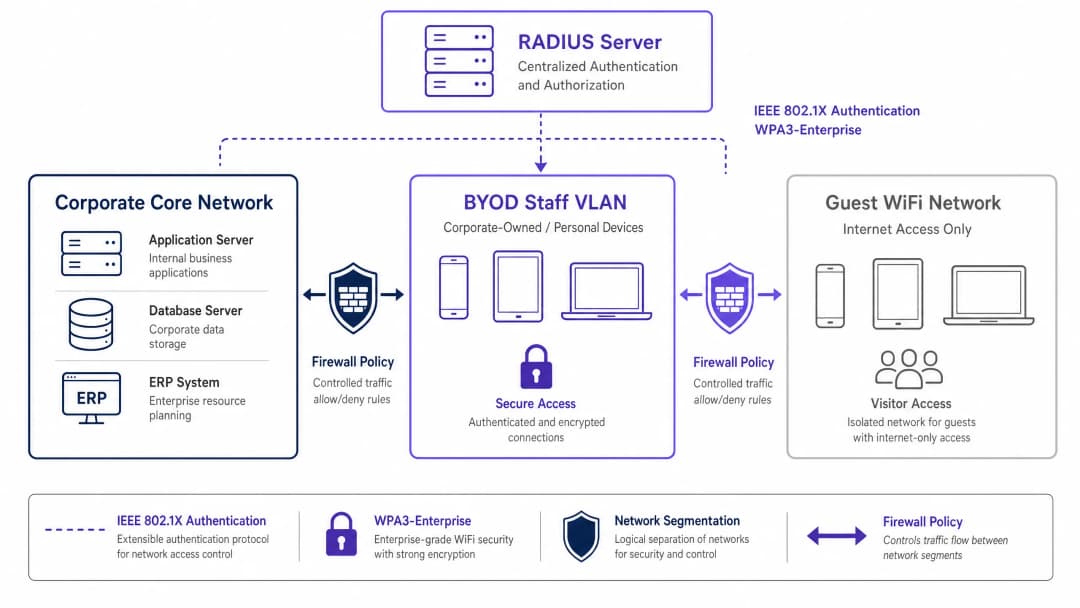
Diese Segmentierung stellt sicher, dass selbst bei einer Kompromittierung des privaten Geräts eines Mitarbeiters die Bedrohung eingedämmt bleibt. Der Zugriff vom BYOD-VLAN auf interne Unternehmensressourcen muss durch strenge Firewall-Zugriffskontrolllisten (ACLs) geregelt werden, die nach dem Prinzip der Standardverweigerung (Default-Deny) arbeiten und nur für wesentliche Dienste (z. B. Intranetportale oder bestimmte Cloud-Anwendungen) explizite Berechtigungen erteilen.
Authentifizierung: Der IEEE 802.1X Standard
Die Sicherung des BYOD-Perimeters erfordert eine robuste Authentifizierung. Der IEEE 802.1X Standard bietet eine portbasierte Netzwerkzugriffskontrolle und stellt sicher, dass Geräte authentifiziert werden, bevor sie Zugriff auf die Netzwerkschicht erhalten. Innerhalb des 802.1X-Frameworks ist das Extensible Authentication Protocol mit Transport Layer Security (EAP-TLS) der Goldstandard für BYOD-Umgebungen.
EAP-TLS basiert auf einer zertifikatsbasierten gegenseitigen Authentifizierung. Anstelle von schwachen Passwörtern legt das Gerät ein digitales Zertifikat vor, das von der Public-Key-Infrastruktur (PKI) der Organisation ausgestellt wurde. Der RADIUS-Server validiert dieses Zertifikat, wodurch sowohl die Geräte- als auch die Benutzeridentität verifiziert werden. Dieser Ansatz minimiert die Risiken im Zusammenhang mit Diebstahl von Anmeldedaten, Phishing und dem betrieblichen Aufwand für Passwortrücksetzungen.
Verschlüsselung und Compliance
Daten im Übertragungskanal müssen vor dem Abfangen geschützt werden. WPA3-Enterprise ist der aktuelle Standard zur Sicherung des drahtlosen Datenverkehrs und ersetzt WPA2, indem Schwachstellen wie der KRACK-Angriff beseitigt werden. WPA3-Enterprise schreibt einen 192-Bit-Sicherheitsmodus für hochsensible Umgebungen vor und bietet Vorwärtsgeheimnis (Forward Secrecy) durch Simultaneous Authentication of Equals (SAE). Die Implementierung von WPA3-Enterprise wird rasch zu einer zwingenden Anforderung für Compliance-Frameworks, einschließlich PCI-DSS 4.0 und verschiedener Datensicherheitsstandards im Gesundheitswesen.
Darüber hinaus erfordert Compliance eine umfassende Transparenz. Jedes Verbindungsereignis im BYOD-Netzwerk muss protokolliert werden, einschließlich Geräteidentität, Benutzeridentität, Zeitstempeln und VLAN-Zuweisung. Dieser Audit-Trail ist entscheidend für den Nachweis der Compliance mit Vorschriften wie der GDPR Artikel 32. Weitere Informationen zu den Protokollierungsanforderungen finden Sie in unserem Leitfaden What is an audit trail for IT security in 2026 explained.
Haben Sie Fragen zu Ihrem spezifischen Setup?
Unser Team arbeitet mit Standortbetreibern, IT-Managern und Netzwerktechnikern an über 80.000 Standorten zusammen. Buchen Sie ein 20-minütiges Gespräch und wir zeigen Ihnen, wie andere diese Herausforderungen gelöst haben.
Implementierungsleitfaden
Die Bereitstellung eines sicheren BYOD-Netzwerks erfordert eine Koordination zwischen Richtlinien, Identitätsmanagement und Netzwerkinfrastruktur.

Schritt-für-Schritt-Implementierung
- Richtliniendefinition: Bevor Sie Änderungen an der Infrastruktur vornehmen, definieren Sie die BYOD-Richtlinie. Bestimmen Sie berechtigte Benutzergruppen, zugelassene Gerätetypen und die spezifischen Unternehmensressourcen, auf die vom BYOD-VLAN aus zugegriffen werden kann. Holen Sie die Freigabe von Rechts-, HR- und Sicherheitsverantwortlichen ein.
- MDM-Integration und Zertifikatsbereitstellung: Nutzen Sie Ihre Mobile Device Management (MDM) Plattform (z. B. Intune, Jamf), um EAP-TLS-Zertifikate für die Geräte der Mitarbeiter bereitzustellen. Verwenden Sie das Simple Certificate Enrollment Protocol (SCEP), um diese Verteilung zu automatisieren. Das MDM dient auch als Kontrollinstanz für Überprüfungen des Gerätestatus (z. B. Überprüfung von OS-Patch-Ständen und Verschlüsselungsstatus), bevor der Netzwerkzugriff gewährt wird.
- RADIUS-Konfiguration: Konfigurieren Sie den RADIUS-Server mit spezifischen Richtlinien für BYOD-Geräte. Wenn sich ein BYOD-Gerät erfolgreich über sein Zertifikat authentifiziert, muss der RADIUS-Server ein dynamisches VLAN-Zuweisungsattribut (z. B.
Tunnel-Private-Group-ID) zurückgeben, um das Gerät im isolierten BYOD-VLAN zu platzieren. - Einrichtung der Wireless-Infrastruktur: Implementieren Sie eine dynamische VLAN-Zuweisung auf Ihrer bestehenden Unternehmens-SSID. Dies bietet eine nahtlose Benutzererfahrung - Mitarbeiter verbinden sich mit einem einzigen Netzwerk, und die Infrastruktur leitet sie basierend auf ihrer authentifizierten Identität an das entsprechende VLAN weiter.
- Firewall und Zugriffskontrolle: Setzen Sie strenge ACLs an der Grenze zwischen dem BYOD-VLAN und dem Unternehmenskern durch. Dokumentieren Sie jede Berechtigungsregel und richten Sie einen vierteljährlichen Überprüfungsprozess ein, um eine schleichende Ausweitung der Zugriffsrechte zu verhindern.
- Überwachung und Analysen: Integrieren Sie BYOD-Verbindungsprotokolle in Ihr Security Information and Event Management (SIEM) System. Nutzen Sie Plattformen wie WiFi Analytics, um die Netzwerkleistung, die Geräteverteilung und potenzielle Anomalien zu überwachen.
Best Practices
- Verzichten Sie auf MAC-basierte Authentifizierung: Moderne mobile Betriebssysteme (iOS, Android) nutzen zufällige MAC-Adressen, um die Privatsphäre der Benutzer zu schützen. Dies stört die herkömmliche MAC-basierte Authentifizierung und Nachverfolgung. Verlassen Sie sich stattdessen vollständig auf zertifikatsbasierte Identitäten (EAP-TLS), die an den Benutzer und nicht an Hardware-Adressen gebunden sind.
- Implementieren Sie Gerätestatus-Überprüfungen: Eine BYOD-Richtlinie ist ohne Überprüfungen des Gerätestatus unvollständig. Stellen Sie sicher, dass Ihre Network Access Control (NAC) Lösung das MDM abfragt, bevor sie Zugriff gewährt, um zu verifizieren, dass die Geräte die Mindestanforderungen an die Sicherheit erfüllen (z. B. kein Jailbreak, aktivierte Bildschirmsperre). Nicht konforme Geräte sollten in ein Quarantäne-VLAN umgeleitet werden.* Zertifikats-Lebenszyklus-Management automatisieren: Zertifikate laufen ab. Konfigurieren Sie Ihr MDM so, dass Zertifikate lange vor Ablauf (z. B. 30 Tage vorher) automatisch erneuert werden, um weitreichende Konnektivitätsausfälle zu vermeiden. Integrieren Sie zudem den Zertifikatswiderruf in Ihren HR-Offboarding-Prozess, um den Zugriff sofort zu sperren, wenn ein Mitarbeiter das Unternehmen verlässt.
- Strikte Isolierung beibehalten: Stellen Sie eine vollständige Isolierung zwischen dem BYOD VLAN und dem Gastnetzwerk sicher. Ein kompromittiertes Gerät im Gastnetzwerk darf keinen Pfad für laterale Bewegungen zu den Geräten der Mitarbeiter haben. Informationen zur Fehlerbehebung bei Problemen mit dem Gastzugang finden Sie unter Solving Connected but No Internet Error on Guest WiFi.
Fehlerbehebung und Risikominderung
- Schleichende Ausweitung von Firewall-Regeln: Der häufigste Fehlermodus bei BYOD-Bereitstellungen ist die schrittweise Aufweichung der Netzwerksegmentierung. Temporäre Zugriffsregeln werden dauerhaft, was BYOD- und Unternehmensnetzwerke effektiv miteinander vermischt. Minderung: Implementieren Sie einen strengen Change-Management-Prozess für BYOD-Firewall-Regeln und führen Sie obligatorische vierteljährliche Überprüfungen durch.
- Ausfälle durch abgelaufene Zertifikate: Wenn der Zertifikatslebenszyklus nicht verwaltet wird, führt dies zu plötzlichen Verbindungsabbrüchen bei großen Gruppen von Mitarbeitern. Minderung: Implementieren Sie eine automatisierte Verlängerung über SCEP/MDM und konfigurieren Sie proaktive Warnmeldungen für bevorstehende Abläufe.
- Unvollständiges Offboarding: Fortbestehender Zugriff für ehemalige Mitarbeiter stellt ein erhebliches Sicherheitsrisiko dar. Minderung: Automatisieren Sie den Widerruf ihres Zertifikats in der PKI, sobald sich der Status des Benutzers im HR-System ändert.
ROI und geschäftliche Auswirkungen
Die Implementierung einer sicheren BYOD-Architektur erfordert Vorabinvestitionen in NAC-, MDM- und RADIUS-Infrastrukturen. Der Return on Investment (ROI) ist jedoch beträchtlich:
- Risikominderung: Durch die Isolierung nicht verwalteter Geräte reduziert das Unternehmen die Angriffsfläche für Ransomware und laterale Bewegungen erheblich, was kritische Assets schützt und kostspielige Datenschutzverletzungen verhindert.
- Operative Effizienz: Die zertifikatsbasierte Authentifizierung eliminiert den IT-Helpdesk-Overhead, der mit Passwort-Resets und der Verwaltung gemeinsamer Anmeldedaten verbunden ist.
- Mitarbeiterproduktivität: Der sichere, nahtlose Zugriff auf benötigte Ressourcen auf persönlichen Geräten steigert die Zufriedenheit und Produktivität der Mitarbeiter, insbesondere in dynamischen Umgebungen wie Verkaufsflächen oder Krankenhausstationen.
- Compliance-Sicherung: Eine umfassende Audit-Protokollierung und eine robuste Verschlüsselung stellen sicher, dass das Unternehmen die regulatorischen Anforderungen erfüllt, wodurch potenzielle Geldstrafen und Reputationsschäden vermieden werden. Da Unternehmen ihre digitale Präsenz ausbauen, bleibt eine sichere Konnektivität von größter Bedeutung. Initiativen wie die Integration von Smart Cities, die von Branchenführern unterstützt werden (siehe Purple ernennt Iain Fox zum VP Growth - Public Sector, um die digitale Inklusion und Smart-City-Innovationen voranzutreiben), basieren auf robusten grundlegenden Sicherheitsarchitekturen. Darüber hinaus hängt die Gewährleistung einer nahtlosen Navigation in großen Veranstaltungsorten, die durch Funktionen wie Purple führt den Offline-Kartenmodus für die nahtlose, sichere Navigation zu WiFi Hotspots ein unterstützt wird, von einer zuverlässigen und sicheren zugrunde liegenden Netzwerkinfrastruktur ab.
Schlüsseldefinitionen
IEEE 802.1X
Ein IEEE-Standard für portbasierte Netzwerkzugriffskontrolle (PNAC). Er bietet einen Authentifizierungsmechanismus für Geräte, die eine Verbindung zu einem LAN oder WLAN herstellen möchten.
Das grundlegende Protokoll zur Authentifizierung von Mitarbeitergeräten, bevor diese im BYOD-Netzwerk zugelassen werden.
EAP-TLS (Extensible Authentication Protocol-Transport Layer Security)
Eine EAP-Methode, die auf Client- und Server-Zertifikaten basiert, um einen sicheren, gegenseitig authentifizierten Tunnel aufzubauen.
Gilt als die sicherste Authentifizierungsmethode für BYOD, da sie die Abhängigkeit von anfälligen Benutzerpasswörtern eliminiert.
RADIUS (Remote Authentication Dial-In User Service)
Ein Netzwerkprotokoll, das eine zentralisierte Verwaltung von Authentifizierung, Autorisierung und Accounting (AAA) für Benutzer bietet, die eine Verbindung zu einem Netzwerkdienst herstellen und diesen nutzen.
Der Backend-Server, der die 802.1X-Anfragen von Access Points auswertet und entscheidet, ob einem Gerät Zugriff auf das Netzwerk gewährt wird.
Dynamische VLAN-Zuweisung
Eine Netzwerkkonfiguration, bei der der RADIUS-Server nach erfolgreicher Authentifizierung vorschreibt, in welches VLAN ein Benutzer oder Gerät platziert werden soll, anstatt das VLAN fest mit der SSID zu verknüpfen.
Ermöglicht es Organisationen, eine einzige SSID auszustrahlen und gleichzeitig den Traffic (z. B. Unternehmen vs. BYOD) basierend auf der Benutzeridentität sicher zu trennen.
MAC-Adressen-Randomisierung
Eine Datenschutzfunktion in modernen mobilen Betriebssystemen, bei der das Gerät eine zufällig generierte MAC-Adresse anstelle seiner echten Hardware-Adresse verwendet, wenn es nach Netzwerken sucht oder sich mit ihnen verbindet.
Diese Funktion macht herkömmliche MAC-basierte Authentifizierungsmethoden obsolet und erzwingt den Übergang zu identitätsbasierter Authentifizierung wie 802.1X.
MDM (Mobile Device Management)
Software, mit der IT-Administratoren Smartphones, Tablets und andere Endgeräte steuern, sichern und Richtlinien auf ihnen durchsetzen können.
Wird bei BYOD-Bereitstellungen verwendet, um Netzwerkzertifikate an Geräte zu verteilen und deren Sicherheitsstatus (z. B. Patch-Level) vor dem Erlauben des Netzwerkzugriffs zu überprüfen.
WPA3-Enterprise
Die neueste Generation der WiFi-Sicherheit, die eine robuste Verschlüsselung bietet und eine 802.1X-Authentifizierung für Unternehmensnetzwerke erfordert.
Zwingend erforderlich für moderne, sichere Bereitstellungen, um Daten während der Übertragung vor fortgeschrittenen kryptografischen Angriffen zu schützen.
Posture Assessment
Der Prozess der Bewertung des Sicherheitsstatus eines Geräts (z. B. Betriebssystemversion, Antiviren-Status, Verschlüsselung), bevor ihm Netzwerkzugriff gewährt wird.
Stellt sicher, dass das persönliche Gerät eines Mitarbeiters keine Schadsoftware enthält oder mit einem veralteten Betriebssystem läuft, bevor es eine Verbindung zum BYOD-VLAN herstellt.
Ausgearbeitete Beispiele
Ein Krankenhaus mit 400 Betten muss dem Pflegepersonal die Nutzung privater Smartphones für den Zugriff auf eine sichere interne Planungsanwendung ermöglichen, aber diese Geräte müssen strikt vom klinischen Netzwerk isoliert werden, das Patientendaten (EHR) und medizinische Geräte enthält.
Das Krankenhaus implementiert ein dediziertes BYOD-VLAN. Es stellt eine MDM-Lösung bereit, um EAP-TLS-Zertifikate auf die Smartphones der Mitarbeiter zu übertragen. Die Wireless-Infrastruktur nutzt die 802.1X-Authentifizierung. Wenn sich eine Pflegekraft verbindet, validiert der RADIUS-Server das Zertifikat und weist das Gerät dem BYOD-VLAN zu. Zwischen dem BYOD-VLAN und dem klinischen Netzwerk befindet sich eine Firewall mit einer strikten Default-Deny-Richtlinie. Eine einzige explizite Erlaubnisregel lässt HTTPS-Traffic vom BYOD-VLAN zur spezifischen IP-Adresse des Servers der Planungsanwendung zu.
Eine nationale Einzelhandelskette mit 150 Filialen möchte, dass Filialleiter auf ihren persönlichen Tablets auf Bestands-Dashboards zugreifen können. Die Kette nutzt derzeit WPA2-Personal mit einem gemeinsam genutzten Passwort für das Mitarbeiter-WiFi, das häufig an Nicht-Manager weitergegeben wird.
Der Einzelhändler schafft die SSID mit dem gemeinsam genutzten Passwort ab. Er implementiert einen zentralen RADIUS-Server und integriert diesen in sein Azure AD. Über sein MDM stellt er Zertifikate auf den genehmigten Tablets der Manager bereit. Die Filialen senden eine einzige Unternehmens-SSID aus. Manager authentifizieren sich über 802.1X (EAP-TLS) und werden dynamisch einem 'Manager BYOD'-VLAN zugewiesen, das über Firewall-Regeln verfügt, die den Zugriff auf das zentrale Bestands-Dashboard erlauben. Nicht-Manager ohne Zertifikat können sich nicht verbinden.
Übungsfragen
Q1. Ihre Organisation führt ein BYOD-Programm ein. Das Netzwerkteam schlägt vor, WPA2-Personal mit einem komplexen, rotierenden Pre-Shared Key (PSK) zu verwenden, der sich monatlich ändert, und argumentiert, dies sei einfacher bereitzustellen als 802.1X. Wie sollten Sie als IT-Leiter reagieren?
Hinweis: Berücksichtigen Sie die Anforderungen an die individuelle Nachvollziehbarkeit und den betrieblichen Aufwand bei der Abmeldung eines Mitarbeiters mitten im Monat.
Musterlösung anzeigen
Lehnen Sie den Vorschlag ab. Ein PSK, selbst ein rotierender, bietet keine Zuordnung pro Gerät oder Benutzer. Wenn ein Mitarbeiter mitten im Monat das Unternehmen verlässt, muss der Schlüssel sofort geändert werden, was alle anderen Benutzer beeinträchtigt. Sie müssen IEEE 802.1X (vorzugsweise EAP-TLS) vorschreiben, um eine individuelle Authentifizierung zu gewährleisten, die einen sofortigen, gezielten Entzug des Zugriffs ermöglicht, ohne die restlichen Mitarbeiter zu beeinträchtigen.
Q2. Ein Mitarbeiter meldet, dass er sein neues privates iPhone nicht mit dem BYOD-Netzwerk verbinden kann. Ihre RADIUS-Protokolle zeigen Authentifizierungsfehler, aber der Benutzer besteht darauf, dass das richtige Profil installiert ist. Die Protokolle deuten darauf hin, dass das Gerät bei jedem Verbindungsversuch eine andere MAC-Adresse präsentiert. Was ist die Ursache und die architektonische Lösung?
Hinweis: Moderne mobile Betriebssysteme implementieren Datenschutzfunktionen, die die Identifizierung auf Schicht 2 beeinflussen.
Musterlösung anzeigen
Die Ursache ist die MAC-Adressen-Randomisierung, eine standardmäßige Datenschutzfunktion in modernen iOS- und Android-Geräten. Die architektonische Lösung besteht darin, die Authentifizierung und die Richtliniendurchsetzung vollständig von MAC-Adressen zu entkoppeln. Das Netzwerk muss sich für die Authentifizierung und die anschließende Sitzungsverfolgung ausschließlich auf die kryptografische Identität verlassen, die durch das EAP-TLS-Zertifikat bereitgestellt wird.
Q3. Bei einem Sicherheitsaudit stellt der Prüfer fest, dass das BYOD-VLAN eine Firewall-Regel besitzt, die jeglichen Datenverkehr (Any/Any) zum internen Netz mit der HR-Datenbank erlaubt. Als Begründung wird eine temporäre Anforderung von vor sechs Monaten genannt, die nie entfernt wurde. Welcher Prozessfehler ist aufgetreten und wie wird er behoben?
Hinweis: Konzentrieren Sie sich auf den Lebenszyklus von Firewall-Regeln und das Prinzip der minimalen Rechtevergabe.
Musterlösung anzeigen
Der Fehler liegt in der schleichenden Ausweitung von Firewall-Regeln ("firewall rule scope creep") und einem fehlenden Lebenszyklusmanagement für Zugriffskontrollen. Die Behebung ist zweigeteilt: Erstens muss die Any/Any-Regel sofort entfernt und durch eine explizite Freigabe nur für die erforderlichen Ports/Protokolle ersetzt werden (falls der Zugriff noch benötigt wird). Zweitens muss ein obligatorischer vierteljährlicher Überprüfungsprozess für alle ACLs eingeführt werden, die den Datenverkehr zwischen dem BYOD-VLAN und dem internen Netzwerk regeln, um sicherzustellen, dass temporäre Regeln gelöscht werden.
Weiterlesen in dieser Reihe
Zertifikatsbasierte Authentifizierung für Unternehmensgeräte (EAP-TLS)
Dieses maßgebliche technische Referenzhandbuch behandelt die Architektur, die Bereitstellung und die bewährten betrieblichen Praktiken für die zertifikatsbasierte EAP-TLS Authentifizierung auf Unternehmensgeräten. Es wurde für IT-Architekten und Betriebsleiter konzipiert und bietet einen praktischen Leitfaden zur Eliminierung passwortbasierter Anmeldedatenrisiken sowie zur Implementierung einer robusten 802.1X Netzwerkzugriffskontrolle in standortübergreifenden Unternehmensumgebungen.
Verwaltung der BYOD (Bring Your Own Device) Sicherheit in Mitarbeiternetzwerken
Ein maßgeblicher, technischer Leitfaden für Enterprise IT-Manager und Netzwerkarchitekten zur Absicherung des Bring Your Own Device (BYOD) Zugriffs in Mitarbeiternetzwerken. Dieser Leitfaden beschreibt die genaue Netzwerkarchitektur, die Authentifizierungsprotokolle und die MDM-Integrations-Workflows, die erforderlich sind, um Datenabflüsse zu minimieren und die gesetzliche Compliance in stark frequentierten Standorten aufrechtzuerhalten.
Abwehr von Rogue Access Points in Unternehmensnetzwerken
Dieser technische Leitfaden beschreibt die Architektur, Bereitstellung und Betriebsabläufe zur Abwehr von Rogue Access Points in Unternehmensnetzwerken mithilfe von Wireless Intrusion Prevention Systems (WIPS) und Wireless Intrusion Detection Systems (WIDS). Er bietet IT-Sicherheitsadministratoren praktische Rahmenbedingungen zur Erkennung, Klassifizierung und Neutralisierung nicht autorisierter APs in komplexen physischen Umgebungen, einschließlich des Gastgewerbes, des Einzelhandels, des Gesundheitswesens und des öffentlichen Sektors. Der Leitfaden deckt die Bedrohungsklassifizierung, automatisierte Eindämmungsmechanismen, Compliance-Auswirkungen (PCI-DSS, GDPR, HIPAA) und messbare Geschäftsergebnisse ab.
Haben Sie Fragen zu Ihrem spezifischen Setup?
Unser Team arbeitet mit Standortbetreibern, IT-Managern und Netzwerktechnikern an über 80.000 Standorten zusammen. Buchen Sie ein 20-minütiges Gespräch und wir zeigen Ihnen, wie andere diese Herausforderungen gelöst haben.