
Secure BYOD Policies for Staff WiFi Networks
This authoritative guide provides IT leaders with a vendor-neutral framework for securely onboarding staff personal devices. It details the critical architecture decisions - including network segmentation, EAP-TLS authentication, and MDM integration - required to support BYOD without compromising core corporate infrastructure.
Video overview
Listen to this guide
View podcast transcript
Part of our core series: Enterprise WiFi Security Guide →

Executive Summary
The modern enterprise environment demands flexibility, and employee expectation for Bring Your Own Device (BYOD) access is no longer negotiable. However, integrating unmanaged personal devices into corporate wireless networks introduces significant security and compliance risks. This technical reference guide provides network architects and IT directors with a robust framework for implementing secure BYOD policies for staff WiFi networks. We outline critical architectural decisions, focusing on network segmentation, IEEE 802.1X authentication, and Mobile Device Management (MDM) integration. By moving away from shared passphrases and MAC-based authentication towards certificate-based identity (EAP-TLS) and WPA3-Enterprise encryption, organizations can deliver seamless connectivity without compromising their core infrastructure. Whether you operate in retail, healthcare, hospitality, or transportation, this guide provides the vendor-neutral best practices required to secure your network edge while supporting staff productivity.
Listen to our companion podcast for executive insights on these concepts:
Technical Deep Dive
Network Architecture and Segmentation
The foundational principle of any secure BYOD deployment is rigorous network segmentation. Personal devices must never reside on the same Virtual Local Area Network (VLAN) as corporate infrastructure, Point-of-Sale (POS) systems, or sensitive databases. A dedicated BYOD VLAN acts as a secure middle tier, logically isolated from both the corporate core and Guest WiFi networks.
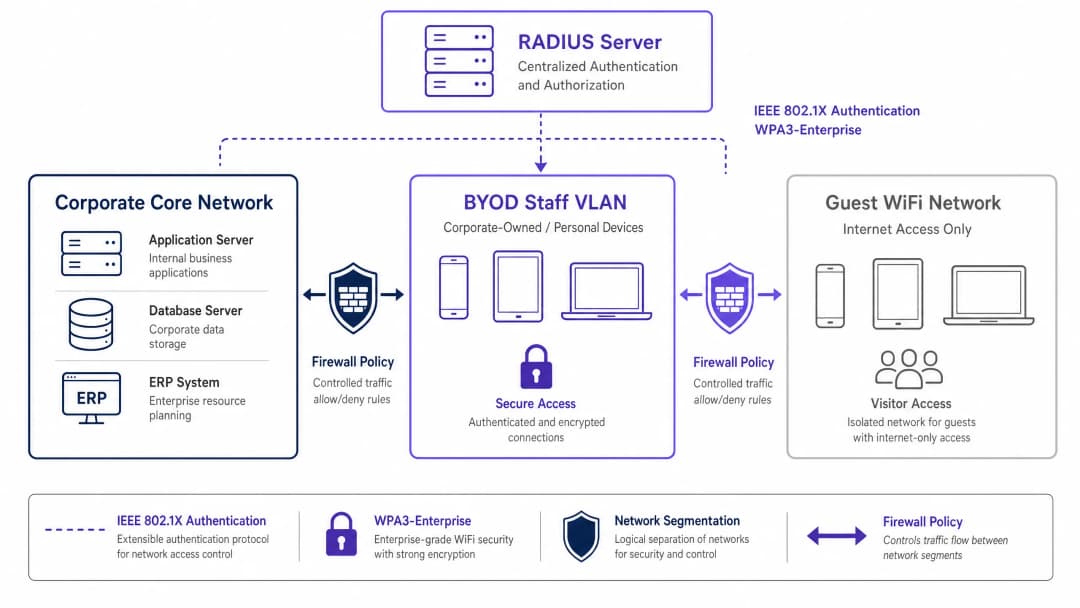
This segmentation ensures that even if an employee's personal device is compromised, the threat remains contained. Access from the BYOD VLAN to internal corporate resources must be governed by strict firewall Access Control Lists (ACLs), operating on a default-deny principle with explicit permission only for essential services (e.g., intranet portals or specific cloud applications).
Authentication: The IEEE 802.1X Standard
Securing the BYOD perimeter requires robust authentication. The IEEE 802.1X standard provides port-based network access control, ensuring devices are authenticated before obtaining network-layer access. Within the 802.1X framework, Extensible Authentication Protocol with Transport Layer Security (EAP-TLS) is the gold standard for BYOD environments.
EAP-TLS relies on certificate-based mutual authentication. Instead of weak passwords, the device presents a digital certificate issued by the organization's Public Key Infrastructure (PKI). The RADIUS server validates this certificate, ensuring both device and user identities are verified. This approach mitigates risks associated with credential theft, phishing, and the operational overhead of password resets.
Encryption and Compliance
Data in transit must be protected from interception. WPA3-Enterprise is the current standard for securing wireless traffic, replacing WPA2 by eliminating vulnerabilities such as the KRACK attack. WPA3-Enterprise mandates a 192-bit security mode for highly sensitive environments and provides forward secrecy through Simultaneous Authentication of Equals (SAE). Implementing WPA3-Enterprise is rapidly becoming a mandatory requirement for compliance frameworks, including PCI DSS 4.0 and various healthcare data security standards.
Furthermore, compliance requires comprehensive visibility. Every connection event on the BYOD network must be logged, including device identity, user identity, timestamps, and VLAN assignment. This audit trail is critical for demonstrating compliance with regulations such as CCPA/CPRA. For more context on logging requirements, see our guide on What is an audit trail for IT security in 2026 explained.
Got questions about your specific setup?
Our team works with venue operators, IT managers, and network engineers across 80,000 venues. Book a 20-minute call and we will show you how others like you solved it.
Implementation Guide
Deploying a secure BYOD network requires coordination across policy, identity management, and network infrastructure.

Step-by-Step Deployment
- Policy Definition: Before making infrastructure changes, define the BYOD policy. Determine eligible user groups, approved device types, and the specific corporate resources accessible from the BYOD VLAN. Obtain sign-off from legal, HR, and security leadership.
- MDM Integration and Certificate Provisioning: Leverage your Mobile Device Management (MDM) platform (e.g., Intune, Jamf) to provision EAP-TLS certificates to staff devices. Use Simple Certificate Enrollment Protocol (SCEP) to automate this distribution. The MDM also acts as an enforcement engine for device posture checks (e.g., verifying OS patch levels and encryption status) before network access is granted.
- RADIUS Configuration: Configure the RADIUS server with specific policies for BYOD devices. When a BYOD device successfully authenticates via its certificate, the RADIUS server must return a dynamic VLAN assignment attribute (e.g.,
Tunnel-Private-Group-ID) to place the device on the isolated BYOD VLAN. - Wireless Infrastructure Setup: Implement dynamic VLAN assignment on your existing corporate Service Set Identifier (SSID). This provides a seamless user experience - employees connect to a single network, and the infrastructure routes them to the appropriate VLAN based on their authenticated identity.
- Firewall and Access Control: Enforce stringent ACLs at the boundary between the BYOD VLAN and the corporate core. Document every permission rule and establish a quarterly review process to prevent scope creep.
- Monitoring and Analytics: Integrate BYOD connection logs with your Security Information and Event Management (SIEM) system. Utilize platforms like WiFi Analytics to monitor network performance, device distribution, and potential anomalies.
Best Practices
- Abandon MAC-Based Authentication: Modern mobile operating systems (iOS, Android) randomize MAC addresses to protect user privacy. This disrupts traditional MAC-based authentication and tracking. Rely entirely on certificate-based identity (EAP-TLS) tied to the user, rather than hardware addresses.
- Implement Posture Assessment: A BYOD policy is incomplete without posture checks. Ensure your Network Access Control (NAC) solution queries the MDM before granting access to verify that devices meet minimum security baselines (e.g., not jailbroken, screen lock enabled). Non-compliant devices should be routed to a remediation VLAN.
- Automate Certificate Lifecycle Management: Certificates expire. Configure your MDM to automatically renew certificates well before expiration (e.g., 30 days prior) to prevent large-scale connectivity failures. Additionally, integrate certificate revocation with your HR offboarding process to terminate access immediately when an employee leaves the organization.
- Maintain Strict Isolation: Ensure complete isolation between the BYOD VLAN and the guest network. A compromised device on the guest network must have no lateral movement path to staff devices. For troubleshooting guest access issues, see Solving Connected but No Internet Error on Guest WiFi.
Troubleshooting and Risk Mitigation
- Firewall Rule Scope Creep: The most common failure mode in BYOD deployments is the gradual erosion of network segmentation. Temporary access rules become permanent, effectively blending the BYOD and corporate networks. Mitigation: Implement a rigorous change management process for BYOD firewall rules and conduct mandatory quarterly reviews.
- Certificate Expiration Outages: Failure to manage the certificate lifecycle leads to sudden connectivity drops for large groups of staff. Mitigation: Implement automated renewal via SCEP/MDM and configure proactive alerting for impending expirations.
- Incomplete Offboarding: Lingering access for former employees is a significant security vulnerability. Mitigation: Automate the revocation of their certificate in the PKI as soon as the user's status changes in the HR system.
ROI and Business Impact
Implementing a secure BYOD architecture requires upfront investment in NAC, MDM, and RADIUS infrastructure. However, the Return on Investment (ROI) is substantial:
- Risk Mitigation: By isolating unmanaged devices, the organization significantly reduces the attack surface for ransomware and lateral movement, protecting critical assets and avoiding costly data breaches.
- Operational Efficiency: Certificate-based authentication eliminates IT helpdesk overhead associated with password resets and shared credential management.
- Employee Productivity: Providing secure, seamless access to necessary resources on personal devices improves staff satisfaction and productivity, especially in dynamic environments like retail floors or hospital wards.
- Compliance Assurance: Comprehensive audit logging and robust encryption ensure the organization meets regulatory requirements, avoiding potential fines and reputational damage.
As organizations expand their digital footprint, secure connectivity remains paramount. Initiatives like smart city integration supported by industry leaders (see Purple appoints Iain Fox as VP Growth - Public Sector to drive digital inclusion and smart city innovation) rely on robust foundational security architectures. Furthermore, ensuring seamless navigation within large venues, supported by features like Purple launches Offline Maps Mode for seamless, secure navigation to WiFi hotspots, depends on a reliable and secure underlying network infrastructure.
Key Definitions
IEEE 802.1X
An IEEE standard for port-based Network Access Control (PNAC). It provides an authentication mechanism to devices wishing to attach to a LAN or WLAN.
The foundational protocol used to authenticate staff devices before they are allowed onto the BYOD network.
EAP-TLS (Extensible Authentication Protocol-Transport Layer Security)
An EAP method that relies on client and server certificates to establish a secure mutual authentication tunnel.
Considered the most secure authentication method for BYOD, as it eliminates the reliance on vulnerable user passwords.
RADIUS (Remote Authentication Dial-In User Service)
A networking protocol that provides centralized Authentication, Authorization, and Accounting (AAA) management for users who connect and use a network service.
The backend server that evaluates the 802.1X requests from access points and decides whether to grant a device access to the network.
Dynamic VLAN Assignment
A network configuration where the RADIUS server dictates which VLAN a user or device should be placed in upon successful authentication, rather than hardcoding the VLAN to the SSID.
Allows organizations to broadcast a single SSID while securely separating traffic (e.g., corporate vs. BYOD) based on the user's identity.
MAC Address Randomization
A privacy feature in modern mobile OSs where the device uses a randomly generated MAC address instead of its true hardware address when scanning for or connecting to networks.
This feature renders legacy MAC-based authentication methods obsolete, forcing a shift to identity-based authentication like 802.1X.
MDM (Mobile Device Management)
Software that allows IT administrators to control, secure, and enforce policies on cell phones, tablets, and other endpoints.
Used in BYOD deployments to push network certificates to devices and verify their security posture (e.g., patch level) before allowing network access.
WPA3-Enterprise
The latest generation of WiFi security, providing robust encryption and requiring 802.1X authentication for enterprise networks.
Mandatory for modern secure deployments to protect data in transit against advanced cryptographic attacks.
Posture Assessment
The process of evaluating a device's security state (e.g., OS version, antivirus status, encryption) before granting it network access.
Ensures that a staff member's personal device isn't harboring malware or running an outdated OS before it connects to the BYOD VLAN.
Worked Examples
A 400-bed hospital needs to allow nursing staff to use personal smartphones to access a secure internal scheduling application, but these devices must be strictly isolated from the clinical network containing patient records (EHR) and medical devices.
The hospital implements a dedicated BYOD VLAN. They deploy an MDM solution to push EAP-TLS certificates to staff smartphones. The wireless infrastructure uses 802.1X authentication; when a nurse connects, the RADIUS server validates the certificate and assigns the device to the BYOD VLAN. A firewall sits between the BYOD VLAN and the clinical network, with a strict default-deny policy. A single explicit permit rule allows HTTPS traffic from the BYOD VLAN to the specific IP address of the scheduling application server.
A national retail chain with 150 stores wants store managers to access inventory dashboards on their personal tablets. The chain currently uses WPA2-Personal with a shared password for staff WiFi, which is frequently shared with non-managers.
The retailer phases out the shared password SSID. They implement a centralized RADIUS server and integrate it with their Azure AD. They use their MDM to deploy certificates to approved manager tablets. The stores broadcast a single corporate SSID. Managers authenticate via 802.1X (EAP-TLS) and are dynamically assigned to a "Manager BYOD" VLAN, which has firewall rules permitting access to the centralized inventory dashboard. Non-managers without certificates cannot connect.
Practice Questions
Q1. Your organization is rolling out a BYOD program. The network team proposes using WPA2-Personal with a complex, rotating pre-shared key (PSK) that changes monthly, arguing it is simpler to deploy than 802.1X. As the IT Director, how should you respond?
Hint: Consider the requirements for individual accountability and the operational overhead of offboarding an employee mid-month.
View model answer
Reject the proposal. A PSK, even a rotating one, provides no per-device or per-user accountability. If an employee leaves mid-month, the key must be changed immediately, disrupting all other users. You must mandate IEEE 802.1X (preferably EAP-TLS) to ensure individual authentication, enabling immediate, targeted revocation of access without affecting the rest of the staff.
Q2. A staff member reports they cannot connect their new personal iPhone to the BYOD network. Your RADIUS logs show authentication failures, but the user insists they have the correct profile installed. The logs indicate the device is presenting a different MAC address on each connection attempt. What is the root cause and the architectural fix?
Hint: Modern mobile operating systems implement privacy features that affect layer 2 identification.
View model answer
The root cause is MAC address randomization, a default privacy feature in modern iOS and Android devices. The architectural fix is to completely decouple authentication and policy enforcement from MAC addresses. The network must rely solely on the cryptographic identity provided by the EAP-TLS certificate for authentication and subsequent session tracking.
Q3. During a security audit, the auditor notes that the BYOD VLAN has a firewall rule permitting all traffic (Any/Any) to the corporate subnet housing the HR database, citing a temporary requirement from six months ago that was never removed. What process failure occurred, and how is it remediated?
Hint: Focus on the lifecycle of firewall rules and the principle of least privilege.
View model answer
The failure is 'firewall rule scope creep' and a lack of lifecycle management for access controls. The remediation is two-fold: First, immediately remove the Any/Any rule and replace it with an explicit permit only for the required ports/protocols (if access is still needed). Second, implement a mandatory quarterly review process for all ACLs governing traffic between the BYOD VLAN and the corporate core to ensure temporary rules are purged.
Continue reading in this series
Certificate-Based Authentication for Corporate Devices (EAP-TLS)
This authoritative technical reference guide covers the architecture, deployment, and operational best practices of EAP-TLS certificate-based authentication for corporate devices. Designed for IT architects and venue operations leaders, it provides a practical roadmap to eliminate password-based credential risks and achieve robust 802.1X network access control across multi-site enterprise environments.
Managing BYOD (Bring Your Own Device) Security on Staff Networks
An authoritative, technical reference guide for enterprise IT managers and network architects on securing Bring Your Own Device (BYOD) access on staff networks. This guide outlines the exact network architecture, authentication protocols, and MDM integration workflows required to mitigate data leakages and maintain regulatory compliance across high-footfall venues.
Mitigating Rogue Access Points on Enterprise Networks
This technical reference guide details the architecture, deployment, and operational procedures for mitigating rogue access points on enterprise networks using Wireless Intrusion Prevention Systems (WIPS) and Wireless Intrusion Detection Systems (WIDS). It provides actionable frameworks for IT security administrators to detect, classify, and neutralize unauthorized APs across complex physical environments including hospitality, retail, healthcare, and public sector venues. The guide covers threat classification, automated containment mechanisms, compliance implications (PCI-DSS, CCPA/CPRA, HIPAA), and measurable business outcomes.
Got questions about your specific setup?
Our team works with venue operators, IT managers, and network engineers across 80,000 venues. Book a 20-minute call and we will show you how others like you solved it.