

Solución de alta latencia y fluctuación (jitter) en el WiFi del personal
Esta guía de referencia técnica autorizada examina las causas fundamentales de la alta latencia y la fluctuación (jitter) en las redes WiFi empresariales para el personal, proporcionando a los arquitectos de red y directores de TI estrategias prácticas para diagnosticar y resolver la degradación del rendimiento que afecta a aplicaciones en tiempo real como Microsoft Teams y Zoom. Cubre la optimización del entorno de RF, la implementación de QoS de extremo a extremo, la mecánica de roaming y las técnicas de gestión de clientes. Los operadores de recintos y los equipos de TI encontrarán orientación de implementación concreta, estudios de casos reales y puntos de referencia medibles para asegurar que su infraestructura inalámbrica soporte la movilidad y colaboración fluida del personal.
Escucha esta guía
Ver transcripción del podcast
Resumen Ejecutivo
Para recintos empresariales —desde amplias plantas de Retail hasta estadios de alta densidad y propiedades de Hospitality — el rendimiento del WiFi del personal es una dependencia operativa crítica, no una conveniencia. Cuando la latencia unidireccional supera los 50ms o la fluctuación (jitter) excede los 20ms, las plataformas de comunicación en tiempo real, incluyendo Microsoft Teams y Zoom, se degradan visiblemente: el audio se vuelve robótico, el video se congela y las llamadas se caen. Esta guía proporciona a los arquitectos de red y directores de TI la profundidad técnica y las estrategias prácticas necesarias para identificar, diagnosticar y resolver las causas fundamentales de la alta latencia WiFi en las WLAN corporativas. Al abordar la interferencia de RF, implementar la Calidad de Servicio de extremo a extremo y ajustar los parámetros de roaming en línea con IEEE 802.11r/k/v, las organizaciones pueden ofrecer una experiencia inalámbrica robusta que soporte la movilidad fluida del personal. La inversión es directamente medible: menos tickets de soporte, mayor rendimiento operativo y una infraestructura de red que escala con el negocio.
Análisis Técnico Detallado
Latencia y Fluctuación (Jitter): La Distinción Fundamental
La latencia es el tiempo requerido para que un paquete de datos viaje desde el origen hasta el destino. La fluctuación (jitter) es la variación en ese retardo entre paquetes consecutivos. En el contexto de las redes 802.11, ambas métricas están fuertemente influenciadas por la naturaleza semidúplex de la transmisión inalámbrica y el protocolo Carrier Sense Multiple Access with Collision Avoidance (CSMA/CA) — el mecanismo por el cual los dispositivos compiten por el tiempo de aire.
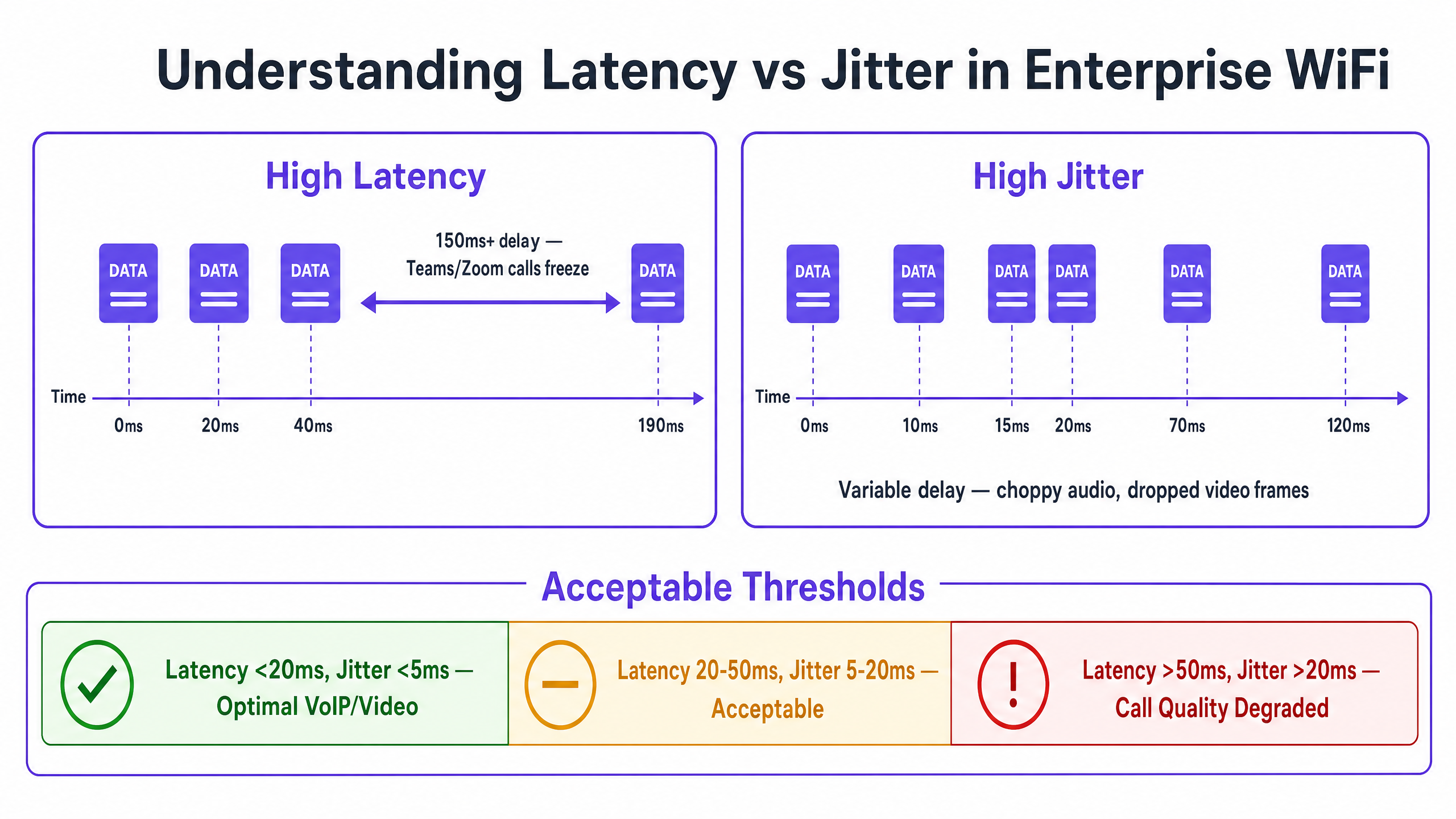
Los códecs de voz y video están diseñados con búferes de fluctuación (jitter) fijos. Cuando la fluctuación (jitter) excede la profundidad del búfer —típicamente 20–30ms para VoIP de grado empresarial— los paquetes se descartan, produciendo el audio entrecortado o robótico característico que indica una llamada degradada. La alta latencia, por el contrario, causa el retardo conversacional que dificulta la colaboración en tiempo real. La recomendación ITU-T G.114 especifica un retardo unidireccional máximo de 150ms para una calidad de voz aceptable, con 50ms como objetivo para implementaciones empresariales.
| Métrica | Óptimo | Aceptable | Degradado |
|---|---|---|---|
| Latencia Unidireccional | < 20ms | 20–50ms | > 50ms |
| Fluctuación (Jitter) | < 5ms | 5–20ms | > 20ms |
| Pérdida de Paquetes | < 0.1% | 0.1–1% | > 1% |
Causa Fundamental 1: Entorno de RF e Interferencia Co-Canal
La Interferencia Co-Canal (CCI) es la principal causa de RF de latencia elevada en implementaciones empresariales densas. Cuando múltiples Puntos de Acceso operan en el mismo canal, comparten el tiempo de aire bajo CSMA/CA. Cada AP debe aplazar la transmisión cuando detecta que otro AP en el mismo canal está transmitiendo, serializando efectivamente el tráfico y aumentando el retardo de la cola. En una tienda minorista con 20 APs en tres canales de 2.4GHz no superpuestos, cada canal puede ser compartido por seis o siete APs — una configuración que producirá una latencia significativa bajo carga.
La banda de 5GHz, con su plan de canales más amplio (hasta 25 canales de 20MHz no superpuestos bajo 802.11ac/ax en muchos dominios regulatorios), ofrece sustancialmente más capacidad para la planificación de la reutilización de canales. Comprender el panorama completo de frecuencias es esencial; la guía Wi Fi Frequencies: A Guide to Wi-Fi Frequencies in 2026 proporciona una referencia completa para las decisiones de planificación de frecuencias.
La Interferencia de Canal Adyacente (ACI) presenta un riesgo secundario. La ACI ocurre cuando los canales no están suficientemente separados, causando una superposición parcial que corrompe las tramas y fuerza las retransmisiones — cada retransmisión se suma directamente a la latencia observada.
Causa Fundamental 2: Tasas de Datos Heredadas e Ineficiencia del Tiempo de Aire
En un BSS 802.11 estándar, a todos los clientes asociados se les asignan oportunidades de transmisión. Un cliente que transmite a 1 Mbps ocupa el canal aproximadamente 100 veces más tiempo que un cliente que transmite a 100 Mbps para enviar la misma carga útil. Este consumo desproporcionado de tiempo de aire —causado por dispositivos heredados o clientes en el límite de la cobertura— aumenta el retardo de la cola para todos los demás clientes en el AP. Deshabilitar las tasas de datos por debajo de 12 Mbps en la banda de 5GHz y por debajo de 5.5 Mbps en 2.4GHz obliga a los clientes a usar una modulación más eficiente, reduciendo el tiempo de aire por trama y mejorando la latencia general.
Causa Fundamental 3: Mala Configuración de QoS
Sin Calidad de Servicio, una transferencia de archivos masiva se trata idénticamente a una llamada de Teams. Wi-Fi Multimedia (WMM), la implementación de QoS 802.11e, define cuatro Categorías de Acceso: Voz (AC_VO), Video (AC_VI), Mejor Esfuerzo (AC_BE) y Fondo (AC_BK). Cada categoría tiene parámetros de Ventana de Contención distintos que determinan cuán agresivamente compite por el tiempo de aire. El tráfico de voz utiliza ventanas de contención más pequeñas y espacios inter-trama de arbitraje (AIFS) más cortos, dándole prioridad estadística sobre los datos masivos.
El detalle de implementación crítico que muchas implementaciones pasan por alto es el límite de confianza en la infraestructura cableada. WMM opera en la Capa 2 dentro del dominio inalámbrico. Para que QoS se mantenga de extremo a extremo, los puertos del switch que conectan los APs y los Controladores de LAN Inalámbrica deben configurarse para confiar en las marcas DSCP aplicadas por la infraestructura inalámbrica. Sin esto, los paquetes se reclasifican como Mejor Esfuerzo en el primer salto cableado, haciendo que la configuración de QoS inalámbrica sea ineficaz más allá del AP.
Para entornos de Healthcare donde las comunicaciones clínicas a través de VoWLAN son críticas para la seguridad, esta cadena de QoS de extremo a extremo no es negociable.
Causa Fundamental 4: Latencia de Roaming y Sobrecarga de Autenticación
La latencia inducida por el roaming es la causa más disruptiva operativamente de la degradación de la calidad de las llamadas en entornos de personal móvil. Cuando un cliente transiciona entre APs, el proceso implica: activoo escaneo pasivo para descubrir APs candidatos, autenticación y reasociación. Bajo WPA3-Enterprise con 802.1X, la fase de autenticación requiere un intercambio RADIUS completo, que puede tardar entre 300 y 800 ms dependiendo del tiempo de respuesta del servidor RADIUS y la topología de la red. Este retraso se experimenta directamente como una interrupción de llamada.
IEEE 802.11r (Transición Rápida de BSS) aborda esto permitiendo que el cliente prenegocie la Clave Transitoria de Par con el AP objetivo antes de la itinerancia, utilizando una clave PMK-R1 en caché distribuida por el WLC. Esto reduce la fase de autenticación a un intercambio de dos tramas, lo que lleva el tiempo total de itinerancia por debajo de los 50 ms. Para entornos con una movilidad significativa del personal — centros de Transporte , salas de hospital, plantas de almacén — 802.11r no es opcional; es un requisito básico.
IEEE 802.11k (Medición de Recursos de Radio) proporciona a los clientes un Informe de Vecinos, eliminando la necesidad de escanear cada canal posible para descubrir APs candidatos. IEEE 802.11v (Gestión de Transición de BSS) permite a la red sugerir proactivamente mejores APs a los clientes, abordando el problema del cliente "pegajoso". Para un tratamiento exhaustivo de la arquitectura de itinerancia, consulte Resolución de Problemas de Itinerancia en WLANs Corporativas .
Guía de Implementación
Fase 1: Auditoría de RF y Planificación de Canales
Comience con un estudio de sitio inalámbrico exhaustivo utilizando un analizador de espectro para identificar fuentes de interferencia, incluyendo fuentes no-WiFi como Bluetooth, teléfonos DECT y hornos de microondas. Documente la ubicación de los APs, los niveles de potencia de transmisión y las asignaciones de canales. Identifique los APs con una utilización de canal consistentemente superior al 50% — estos son sus principales puntos críticos de latencia.
Reduzca la potencia de transmisión del AP al nivel mínimo requerido para mantener una cobertura adecuada (-67 dBm RSSI en el borde de la celda para aplicaciones de voz). Esto reduce la huella de CCI de cada AP, permitiendo una reutilización de canales más ajustada. Habilite la gestión de RF automatizada en el WLC, pero configure restricciones de horario para evitar cambios de canal durante las horas de trabajo, lo que puede causar breves interrupciones de conectividad.
Fase 2: Optimización de la Tasa de Datos
En la banda de 5GHz, desactive todas las tasas obligatorias y soportadas por debajo de 12 Mbps. En la banda de 2.4GHz, desactive las tasas por debajo de 5.5 Mbps. Esto obliga a los clientes a asociarse a tasas más altas, reduciendo el consumo de tiempo de aire por trama. Habilite Airtime Fairness para evitar que un solo cliente monopolice el canal.
Fase 3: Implementación de QoS de Extremo a Extremo
Habilite WMM en todos los SSIDs corporativos. Configure las asignaciones de DSCP a WMM: DSCP EF (46) a AC_VO, DSCP AF41 (34) a AC_VI. En la infraestructura cableada, configure los puertos del switch que se conectan a los APs y WLCs con mls qos trust dscp (sintaxis de Cisco IOS) o equivalente. Verifique la cadena de QoS utilizando una captura de paquetes en el router WAN para confirmar que el tráfico de voz llega con las marcas DSCP correctas.
Utilice WiFi Analytics para identificar aplicaciones que consumen mucho ancho de banda y que utilizan un tiempo de aire desproporcionado, y aplique límites de tasa o políticas de modelado de tráfico para proteger el tráfico de voz y video.
Fase 4: Optimización de la Itinerancia
Habilite 802.11r, 802.11k y 802.11v en el SSID del personal. Tenga en cuenta que algunos clientes heredados pueden no ser compatibles con estos estándares; pruebe a fondo antes de la implementación. Configure el WLC para desasociar clientes con RSSI por debajo de -75 dBm para abordar los clientes "pegajosos". Establezca el umbral mínimo de RSSI para la asociación en -80 dBm para evitar que los clientes se asocien a APs distantes.
Mejores Prácticas
Seguridad y Rendimiento: Implemente WPA3-Enterprise con 802.1X para el SSID del personal. Si bien 802.1X introduce una sobrecarga de autenticación inicial, 802.11r la elimina durante la itinerancia. Asegúrese de que los servidores RADIUS se implementen con redundancia y tiempos de respuesta inferiores a 100 ms. El cumplimiento de GDPR y PCI DSS requiere que el tráfico del personal y del Guest WiFi se separe lógicamente utilizando VLANs y SSIDs distintos.
Segmentación de Red: Mantenga una estricta separación entre las redes del personal y de invitados. El tráfico de invitados debe aislarse en un SSID dedicado con autenticación de Captive Portal, evitando que los dispositivos de invitados afecten el rendimiento de la red del personal. Esto es particularmente relevante para propiedades de Hostelería donde la densidad de Guest WiFi puede ser extremadamente alta.
Monitoreo y Establecimiento de Líneas Base: Establezca mediciones de latencia y jitter de referencia durante las horas de menor actividad. Configure trampas SNMP o telemetría de streaming para alertar sobre la utilización del canal que exceda el 50% o el RSSI del cliente que caiga por debajo de -70 dBm. El monitoreo proactivo previene la resolución de problemas reactiva.
Para una estrategia de conectividad en el lugar de trabajo más amplia, Wi-Fi de Oficina: Optimice su Red Wi-Fi Moderna de Oficina proporciona orientación complementaria sobre el diseño de WLAN empresariales.
Solución de Problemas y Mitigación de Riesgos
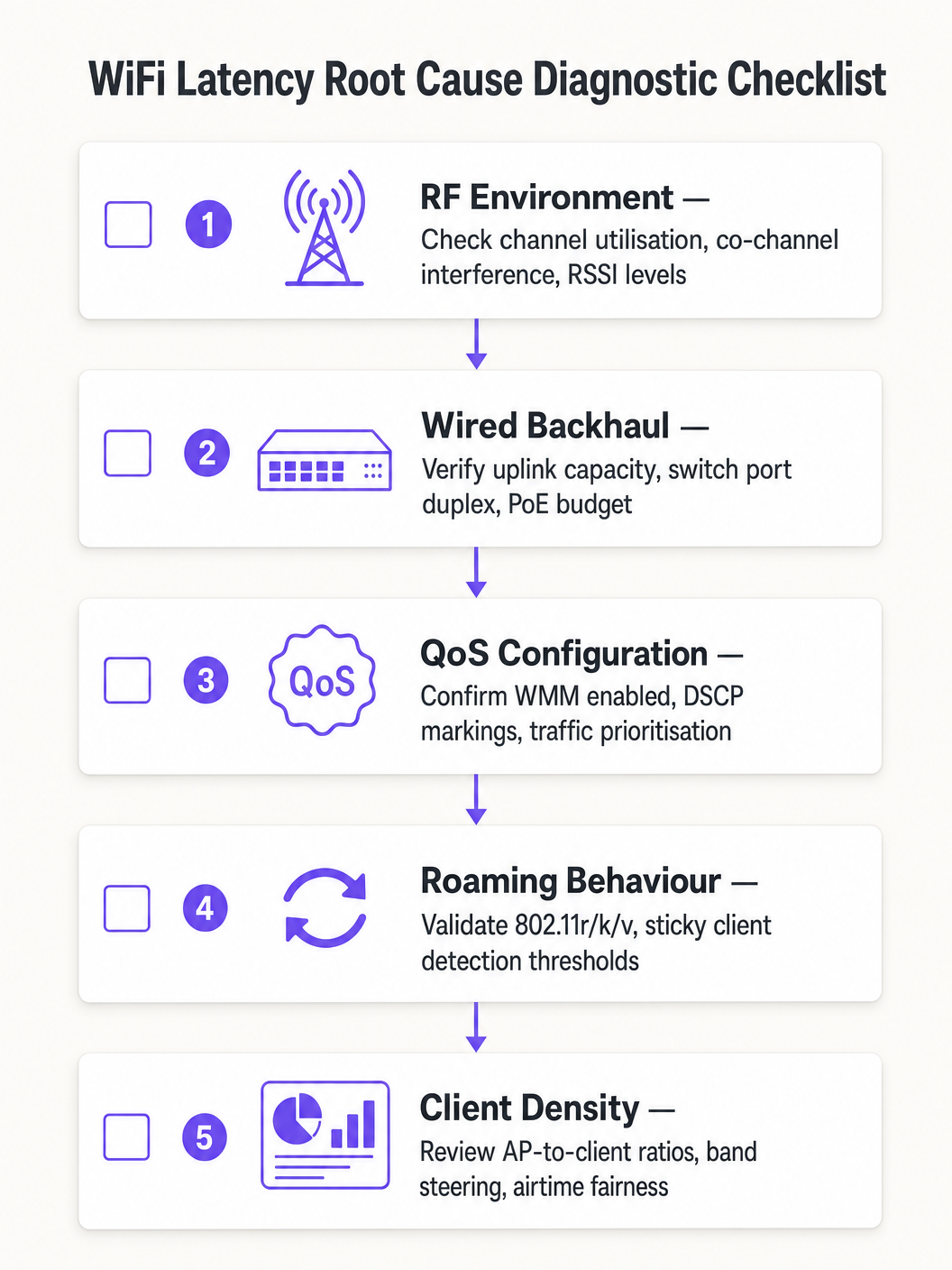
Siga un enfoque de diagnóstico estructurado para evitar atribuir erróneamente la causa raíz:
- Aislar el dominio: Haga ping a la puerta de enlace predeterminada local desde el cliente afectado. Si la latencia es baja, la red inalámbrica funciona adecuadamente y el problema reside en el dominio cableado o WAN. Si la latencia es alta, proceda con el diagnóstico inalámbrico.
- Verificar la utilización del canal: Una utilización alta (>50%) indica CCI o limitaciones de capacidad. Una utilización baja con alta latencia apunta a problemas de QoS o itinerancia.
- Revisar la asociación del cliente: Identifique los clientes asociados a bajas tasas de datos o con RSSI débil. Es probable que estos estén causando ineficiencia en el tiempo de aire o experimentando una cobertura deficiente.
- Validar QoS de extremo a extremo: Capture paquetes en la interfaz WAN y verifique las marcas DSCP en el tráfico de voz.
- Probar la itinerancia: Utilice una herramienta de diagnóstico WiFi para medir los tiempos de transición de itinerancia. Cualquier valor superior a 100 ms indica que 802.11r no funciona correctamente.
Modos de Falla Comunes:
| Síntoma | Causa probable | Resolución |
|---|---|---|
| Picos de latencia durante horas pico | CCI / alta utilización del canal | Reducir la potencia del AP, migrar a 5GHz |
| Interrupciones de audio al caminar | Roaming lento / falta de 802.11r | Habilitar 802.11r, ajustar umbrales RSSI |
| Latencia alta consistente, baja utilización | Falta de límite de confianza QoS | Configurar confianza DSCP en puertos de switch |
| Pérdida intermitente de paquetes | ACI / superposición de canales | Corregir plan de canales, aumentar separación de canales |
ROI & Impacto empresarial
El caso de negocio para la optimización de la latencia de WiFi es sencillo. En una operación de almacén o logística, reducir la latencia del escáner de 150ms a menos de 20ms puede aumentar el rendimiento de preparación y empaque entre un 10 y un 15%, impactando directamente los costos operativos. En un entorno corporativo, eliminar las llamadas de Teams caídas reduce los tickets de soporte de TI —que suelen costar entre £25 y £50 por ticket de resolución— y mejora la productividad de ejecutivos y personal.
Para organizaciones de Atención médica que implementan VoWLAN para comunicaciones clínicas, el valor de mitigación de riesgos es aún mayor: las comunicaciones poco fiables en un entorno clínico conllevan implicaciones para la seguridad del paciente que superan con creces el costo de la optimización de la red.
Mida el éxito con estos KPI: latencia promedio unidireccional para el tráfico de voz, mediciones de jitter, tiempos de transición de roaming, porcentajes de utilización del canal y volumen de tickets de soporte relacionados con el rendimiento de WiFi. Establezca líneas de base previas y posteriores a la optimización para cuantificar la mejora y construir el caso de negocio para la inversión continua.
Definiciones clave
Latency
The one-way time delay for a data packet to travel from source to destination, measured in milliseconds.
High latency causes conversational delay in voice calls and video conferencing. The ITU-T G.114 standard specifies a maximum acceptable one-way latency of 150ms, with 50ms as the enterprise target.
Jitter
The statistical variation in packet arrival times, representing the inconsistency of latency across a stream of packets.
High jitter causes choppy or robotic audio as the receiving application's jitter buffer is overwhelmed and packets are discarded. Target jitter below 20ms for enterprise voice applications.
CSMA/CA (Carrier Sense Multiple Access with Collision Avoidance)
The medium access protocol used in 802.11 WiFi networks, where devices listen for channel activity before transmitting and back off randomly if the channel is busy.
The half-duplex nature of CSMA/CA means only one device can transmit at a time on a given channel. In dense environments, this contention mechanism is the primary source of variable latency.
Co-Channel Interference (CCI)
Interference caused when multiple Access Points or clients transmit on the same frequency channel within range of each other.
CCI forces APs to defer transmission, increasing queuing delay. It is the primary RF cause of high latency in dense enterprise deployments and is mitigated through careful channel planning and power management.
WMM (Wi-Fi Multimedia)
The 802.11e QoS implementation for wireless networks, defining four Access Categories (Voice, Video, Best Effort, Background) with differentiated contention parameters.
WMM is the mechanism that gives voice and video traffic statistical priority over bulk data on the wireless medium. It must be enabled on all SSIDs carrying real-time traffic.
802.11r (Fast BSS Transition)
An IEEE standard that allows a client to pre-negotiate security credentials with a target AP before roaming, eliminating the need for a full RADIUS re-authentication during the handoff.
Without 802.11r, roaming under WPA2/WPA3-Enterprise can take 300–800ms, causing audible call dropouts. With 802.11r, roaming completes in under 50ms.
Sticky Client
A wireless device that remains associated to an AP with a degraded signal, even when a closer AP with a stronger signal is available.
Sticky clients experience high latency due to poor signal quality and consume disproportionate airtime at low data rates. WLC-side RSSI threshold enforcement is required to force these clients to roam.
Airtime Fairness
A wireless scheduling mechanism that allocates equal transmission time to all associated clients, rather than equal numbers of transmission opportunities.
Without airtime fairness, a single slow client can monopolise the channel, increasing latency for all other clients on the AP. Enabling airtime fairness protects high-speed clients from the impact of legacy or distant devices.
DSCP (Differentiated Services Code Point)
A 6-bit field in the IP header used to classify and prioritise network traffic for QoS purposes.
DSCP EF (46) is used for voice traffic; DSCP AF41 (34) for video. These markings must be trusted by wired switches to maintain QoS end-to-end from the wireless client to the WAN.
Ejemplos resueltos
A 1,200-delegate conference centre reports that staff using mobile devices experience dropped Zoom calls when moving between exhibition halls. Signal strength is consistently above -65 dBm throughout the venue, and the wireless controller shows no obvious errors. The issue is intermittent and correlates with staff movement.
A wireless packet capture during a roaming event revealed that clients were taking 480–650ms to complete the roaming process due to full 802.1X re-authentication with the RADIUS server at each AP transition. The RADIUS server was located off-site, adding approximately 80ms of round-trip WAN latency to each authentication exchange.
The resolution involved three steps: First, enable 802.11r (Fast BSS Transition) on the staff SSID to eliminate full RADIUS re-authentication during roams. Second, deploy a local RADIUS proxy or cache to reduce authentication latency for initial associations. Third, enable 802.11k to provide clients with neighbour reports, reducing the scanning phase from 200ms+ to under 30ms. Post-implementation roaming times measured at 35–45ms, eliminating all call dropouts during staff movement.
A national retail chain with 85 stores reports that inventory management scanners on the warehouse floor experience severe latency (150–200ms) during peak trading hours, despite a recent AP hardware refresh. Signal strength is strong, and the WLC dashboard shows no alarms. The issue is worst between 10am and 2pm.
Analysis of the WLC RF dashboard revealed channel utilisation on the 2.4GHz band exceeding 75% during peak hours. The store had 18 APs deployed, all operating on the 2.4GHz band across channels 1, 6, and 11 — meaning six APs per channel were competing for airtime. Additionally, the scanner devices were legacy 802.11n devices operating at data rates as low as 6 Mbps.
The remediation plan: Migrate the scanner SSID exclusively to the 5GHz band, leveraging the wider channel plan to reduce co-channel contention. Disable data rates below 12 Mbps on the 5GHz SSID. Enable WMM and configure the scanner traffic (UDP, port 9100) to be marked as DSCP AF41 (Video class) at the WLC. Configure switch ports to trust DSCP. Post-implementation latency measured at 8–12ms during peak hours.
Preguntas de práctica
Q1. You are the network architect for a 450-bed hospital deploying VoWLAN handsets for clinical staff across three floors. During UAT, nurses report that calls drop for approximately half a second when moving between wards. Signal strength throughout the building is consistently -62 to -68 dBm. The WLC shows no errors and channel utilisation is below 35%. What is the most likely root cause and what is your recommended resolution?
Sugerencia: Consider what happens at the network layer when a client moves from one AP to another under WPA2-Enterprise authentication. Signal strength and channel utilisation are both healthy, so the issue is not RF-related.
Ver respuesta modelo
The root cause is roaming latency caused by full 802.1X re-authentication at each AP transition. With healthy RSSI and low channel utilisation, the RF environment is not the issue. The half-second dropout is characteristic of a RADIUS authentication exchange occurring during the roam. The recommended resolution is to enable IEEE 802.11r (Fast BSS Transition) on the VoWLAN SSID, which pre-negotiates the PMK-R1 key with the target AP before the roam occurs, reducing transition time to under 50ms. Additionally, enable 802.11k to provide clients with neighbour reports and reduce scanning time, and verify that the RADIUS server response time is below 100ms. Test all handset models for 802.11r compatibility before full deployment.
Q2. A large retail distribution centre has 40 APs deployed across a 20,000 sq ft warehouse floor, all operating on the 2.4GHz band using channels 1, 6, and 11. Barcode scanners used by warehouse operatives are experiencing 120–180ms latency during peak shift hours, causing the inventory management system to time out. Signal strength is strong throughout. What is the primary architectural problem and what is the remediation strategy?
Sugerencia: Calculate how many APs are sharing each channel. Consider the fundamental limitation of the 2.4GHz band in terms of non-overlapping channel availability.
Ver respuesta modelo
The primary problem is severe Co-Channel Interference (CCI). With 40 APs sharing only three non-overlapping channels, approximately 13–14 APs are competing for airtime on each channel. Under CSMA/CA, this creates extreme contention and queuing delay, producing the observed 120–180ms latency. The remediation strategy is: (1) Migrate the scanner SSID exclusively to the 5GHz band, which provides up to 25 non-overlapping 20MHz channels in most regulatory domains, dramatically reducing per-channel AP density. (2) Disable data rates below 12 Mbps to reduce per-frame airtime consumption. (3) Enable WMM and mark scanner UDP traffic as DSCP AF41 to protect it from bulk data traffic. (4) Configure switch ports to trust DSCP markings. (5) Reduce AP transmit power to minimise the CCI footprint of each AP.
Q3. Your network team has implemented WMM on all corporate SSIDs and configured DSCP EF markings for Teams voice traffic at the wireless controller. However, a packet capture taken at the WAN firewall shows Teams voice traffic arriving with DSCP 0 (Best Effort). Helpdesk tickets for call quality issues have not reduced. What has been missed and how do you resolve it?
Sugerencia: QoS is only effective if it is maintained end-to-end. Consider what happens to DSCP markings as packets traverse the wired network infrastructure between the AP and the WAN firewall.
Ver respuesta modelo
The wired network infrastructure is not configured to trust the DSCP markings applied by the wireless controller. When packets leave the AP and traverse the access layer switches, the switch ports are re-marking all traffic to DSCP 0 (Best Effort) because they are not configured to trust incoming DSCP values. The resolution is to configure all switch ports connecting to APs and the WLC with DSCP trust (e.g., 'mls qos trust dscp' in Cisco IOS, or equivalent in other vendor platforms). Additionally, verify that distribution and core layer switches are configured to honour DSCP markings in their QoS policies. After implementing the trust boundary configuration, re-capture at the WAN firewall to confirm that Teams voice traffic is now arriving with DSCP EF (46).