
Guía paso a paso: Configuración de controladores inalámbricos Ruijie para Captive Portals de WiFi para invitados
Esta guía proporciona un recorrido técnico completo para configurar controladores y gateways inalámbricos Ruijie para implementar Captive Portals de WiFi para invitados de nivel empresarial. Cubre la segmentación de VLAN, la autenticación RADIUS externa a través del protocolo WISPr, la configuración de walled garden y la integración fluida con la plataforma de redes basadas en identidad de Purple para capturar datos de origen y generar un valor comercial medible en entornos de hotelería, retail y sector público.
Escucha esta guía
Ver transcripción del podcast
Parte de nuestra serie principal: Guía de Captive Portal →

Resumen Ejecutivo
El despliegue de WiFi para invitados en empresas distribuidas implica mucho más que simplemente proporcionar un SSID abierto. Para los administradores de TI y arquitectos de redes, el desafío radica en equilibrar un acceso sin fricciones con una seguridad estricta, el cumplimiento de regulaciones como GDPR y las necesidades de adquisición de datos. Esta guía detalla los pasos de configuración específicos requeridos para implementar un Captive Portal seguro y escalable utilizando controladores y gateways inalámbricos Ruijie, ilustrando cómo la integración de esta infraestructura con la plataforma de Guest WiFi de Purple transforma la conectividad inalámbrica básica en un activo compatible con la normativa y generador de ingresos.
Abordaremos los requisitos técnicos previos, las estrategias de aislamiento de VLAN, la autenticación RADIUS externa a través del protocolo WISPr, la configuración de Walled Garden y los ajustes específicos de QoS necesarios para un despliegue de calidad de producción. Ya sea que administre un hotel de 200 habitaciones, una cadena minorista de 50 tiendas o un estadio con capacidad para 40,000 personas, esta guía proporciona el plan de acción definitivo para una configuración segura de Captive Portal de Ruijie. Con operaciones en más de 80,000 establecimientos activos en todo el mundo y el procesamiento de 440 millones de inicios de sesión en 2024 (datos internos de Purple), los patrones de integración descritos aquí han sido probados a gran escala.
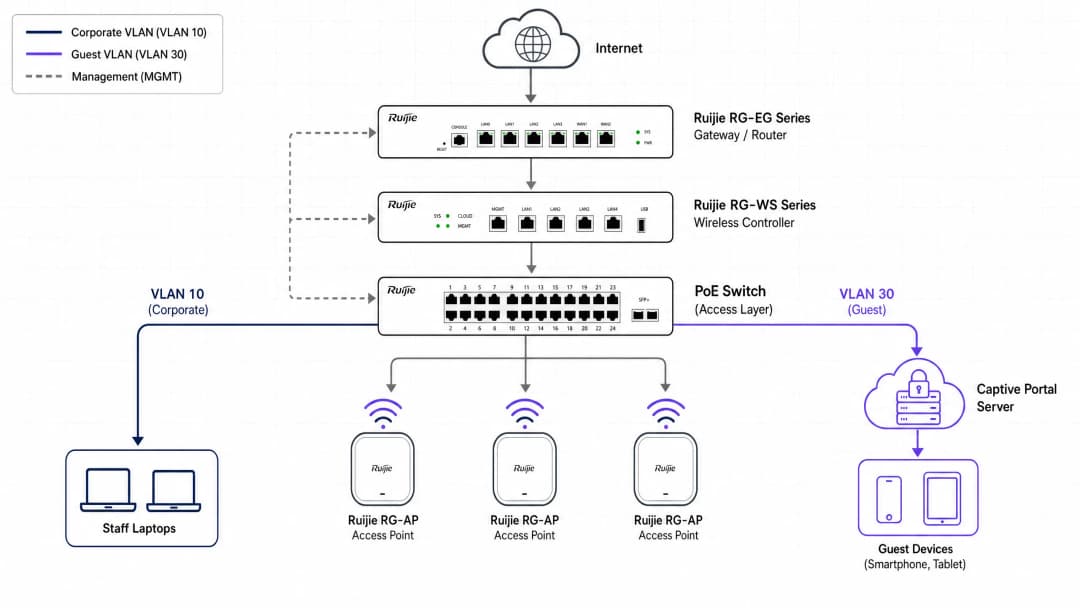
Arquitectura Técnica y Requisitos Previos
Antes de modificar su controlador Ruijie, establezca la arquitectura de red correcta. Una red de invitados segura requiere un aislamiento completo del tráfico corporativo en la Capa 2 (nivel de switch).
Segmentación de Red
La piedra angular de un WiFi para invitados seguro es el aislamiento de VLAN. Debe crear una VLAN de invitados dedicada en el gateway o switch principal de Ruijie. Esto garantiza que el tráfico de los invitados nunca se cruce con los sistemas internos, las terminales de pago o los dispositivos del personal. A continuación se muestra un esquema de VLAN empresarial estándar para despliegues de Ruijie:
| ID de VLAN | Propósito | Notas |
|---|---|---|
| 10 | Corporativo | Dispositivos del personal, servidores internos |
| 20 | Voz | Teléfonos VoIP |
| 30 | Invitado | Captive Portal, solo internet |
| 40 | IoT | Impresoras, smart TVs, sensores |
| 99 | Gestión | Controlador, gestión de switches |
Para obtener más información sobre por qué los enfoques de nivel de consumo fallan en este ámbito, lea Por qué los equipos WiFi de nivel de consumo no son para su red de invitados.
Componentes Requeridos
Para completar este despliegue, necesitará:
- Una cuenta de Ruijie Cloud o un controlador inalámbrico físico de la serie Ruijie RG-WS (por ejemplo, RG-WS6008 o RG-WS7110).
- Un gateway de la serie Ruijie RG-EG, esencial para la autenticación de portal externo a través de WISPr.
- Puntos de acceso de la serie Ruijie RG-AP (por ejemplo, RG-AP820-I, RG-AP850-AR).
- Una licencia de Purple Connect, Capture, o Engage.
- Acceso UDP de salida permitido desde la puerta de enlace hacia los servidores de Purple para el puerto 1812 (autenticación RADIUS) y 1813 (contabilidad RADIUS).
Descripción general del protocolo de autenticación
Ruijie admite múltiples métodos de autenticación. Las implementaciones de nivel empresarial deben utilizar autenticación RADIUS externa. Este método utiliza el protocolo WISPr (Wireless Internet Service Provider Roaming) para redirigir de forma segura a los usuarios no autenticados a la Splash Page de Purple, procesar sus credenciales y devolver un mensaje RADIUS Accept o Reject al controlador Ruijie.
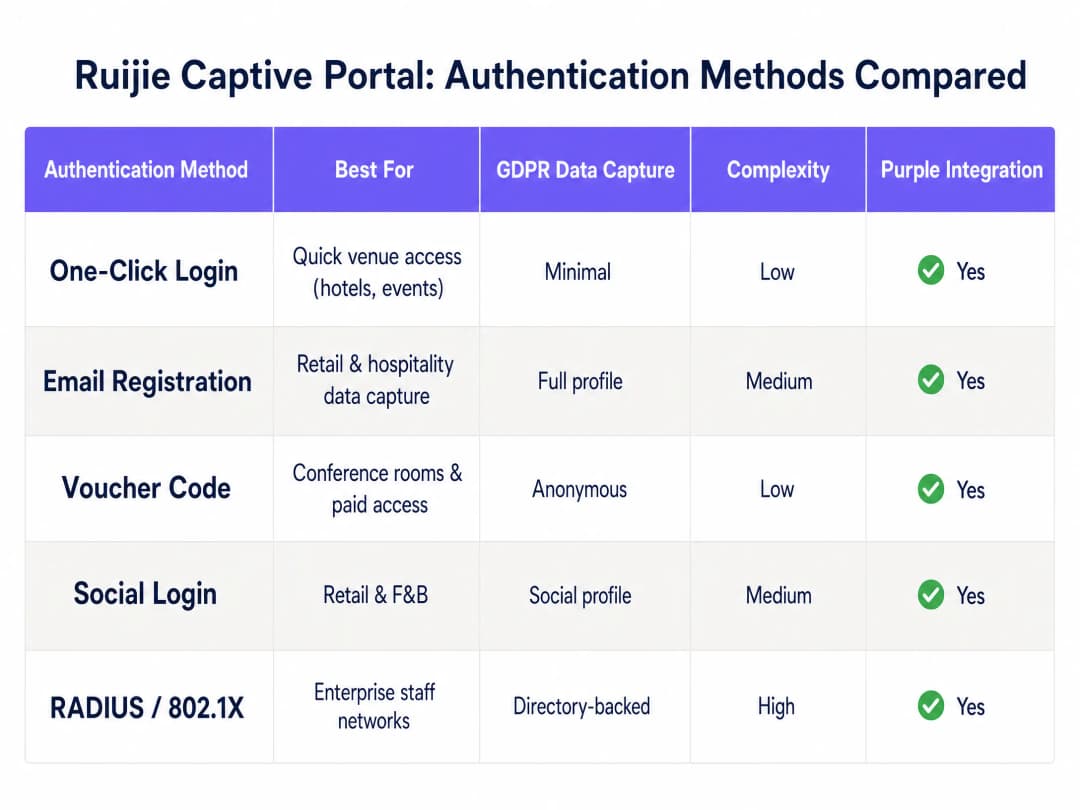
La tabla anterior resume los cinco métodos de autenticación que ofrece la plataforma Ruijie. Los registros por correo electrónico y los inicios de sesión con redes sociales son las opciones más comunes para entornos de hospitalidad y comercio minorista, ya que capturan datos de primera mano estructurados y compatibles con GDPR. Los códigos de cupón son adecuados para salas de reuniones y niveles de acceso de pago. RADIUS con 802.1X está reservado exclusivamente para redes de personal que requieren autenticación respaldada por un directorio.
Guía de implementación paso a paso
Por favor, ejecute los siguientes pasos en la interfaz del controlador local o de Ruijie Cloud. Las rutas de la interfaz de usuario a continuación se aplican a la nueva interfaz de Ruijie Cloud (posterior a 2024) y a la plataforma Ruijie JaCS.
Paso 1: Configurar el SSID de invitados
Establezca la red de transmisión inalámbrica.
- Inicie sesión en la interfaz web del controlador local o de Ruijie Cloud.
- Navegue a Device Config y seleccione WiFi en la sección Wireless.
- Haga clic en + para crear un nuevo SSID o edite un SSID existente.
- Establezca el SSID Name (por ejemplo, "Free Guest WiFi").
- Establezca el Security Mode en Open - sin clave precompartida.
- Asigne el SSID a su VLAN de invitados dedicada (por ejemplo, VLAN 30).
- Guarde la configuración del SSID.
Paso 2: Definir la política del Captive Portal
Indique al controlador que intercepte el tráfico de invitados y lo redirija a Purple.
- Navegue a Auth & Account y seleccione Captive Portal en la sección Authentication.
- Cree una nueva política. Establezca un Policy Name descriptivo (por ejemplo, "Purple-Guest-Portal").
- Establezca el Policy Mode en External.
- Establezca el Authentication Device en su puerta de enlace Ruijie (serie RG-EG) o punto de acceso.
- Seleccione el SSID de invitados creado en el Paso 1.
- En el campo Portal Server URL, ingrese su URL única de la Splash Page de Purple (la cual se encuentra en el panel de control de Purple bajo 'Hardware Configuration').
- Ingrese las direcciones IP del servidor RADIUS de Purple en los campos designados.
- Establezca la duración de Seamless Online para que coincida con su política de límite de tiempo de sesión (por ejemplo, 24 horas para hospitalidad, 1 hora para comercio minorista).
- Determine el comportamiento de Portal Escape - consulte la sección "Mejores prácticas" a continuación.
Paso 3: Configurar el Walled Garden (lista de permitidos)
Un Captive Portal intercepta todo el tráfico hasta que el usuario se autentica. Cierto tráfico debe permitirse en la etapa de preautenticación para cargar la página de inicio de sesión y procesar los inicios de sesión de redes sociales. Esta es la parte que más frecuentemente se configura de forma errónea en cualquier implementación de Captive Portal.
- Diríjase a Auth & Account y seleccione Allowlist.
- Agregue todos los dominios de infraestructura de Purple requeridos. Su panel de Purple proporciona la lista específica para su región.
- Si ofrece inicios de sesión con redes sociales, agregue los dominios de OAuth para cada proveedor:
- Para Microsoft Entra ID:
*.microsoft.com,*.microsoftonline.com,login.live.com - Para Google Workspace:
*.google.com,accounts.google.com - Para Okta: su dominio de tenant de Okta específico
- Para Microsoft Entra ID:
- Si ofrece planes de WiFi de pago, agregue los dominios de los procesadores de pago.
- Guarde y aplique la allowlist.
Paso 4: Configurar la Autenticación RADIUS
Configure el canal de comunicación seguro entre Ruijie y Purple.
- Diríjase a la configuración del servidor RADIUS en su controlador o gateway de Ruijie.
- Agregue la dirección IP del servidor RADIUS primario de Purple y el puerto 1812 para la autenticación.
- Agregue la dirección IP del servidor RADIUS secundario de Purple para la tolerancia a fallas.
- Ingrese el Shared Secret desde su panel de Purple. Este debe coincidir exactamente.
- Agregue el servidor de contabilidad (accounting) en el puerto 1813 y habilite el registro RADIUS (accounting). Esto rastrea la duración de la sesión y el uso de datos, enviando la información directamente a los reportes de WiFi Analytics de Purple.
- Establezca el NAS Identifier con una cadena de texto significativa (por ejemplo, el nombre de su establecimiento) para diferenciar el tráfico en las analíticas de Purple.
Paso 5: Aplicar Políticas de QoS
El acceso de invitados sin restricciones puede saturar su enlace de internet durante las horas pico.
- Diríjase a la sección de QoS o administración de ancho de banda de su gateway de Ruijie.
- Establezca límites de descarga por usuario (por ejemplo, 10 Mbps para huéspedes de hotel, 5 Mbps para clientes de tiendas minoristas).
- Establezca límites de subida por usuario (por ejemplo, 2 - 5 Mbps).
- Deshabilite Client Escape para garantizar que los usuarios no autenticados no puedan acceder a la red si el servidor del portal no se encuentra disponible temporalmente.
- Guarde y envíe la configuración a todos los dispositivos correspondientes.
Paso 6: Probar la Implementación
Realice siempre las pruebas utilizando un dispositivo limpio sin credenciales almacenadas en caché.
- Conecte un dispositivo móvil al SSID de invitados.
- Abra un navegador y diríjase a una URL que no sea HTTPS (por ejemplo,
http://example.com). La página del portal debería redireccionarlo. - Verifique que la página de inicio de Purple cargue correctamente.
- Complete el proceso de autenticación.
- Confirme que se conceda acceso a internet después de la autenticación.
- Revise el panel de Purple para confirmar que la sesión aparezca en sus analíticas.
¿Tiene preguntas sobre su configuración específica?
Nuestro equipo trabaja con gestores de espacios, responsables de TI e ingenieros de redes en 80 000 establecimientos. Reserve una llamada de 20 minutos y le mostraremos cómo lo resolvieron otros profesionales como usted.
Prácticas Recomendadas para la Implementación Empresarial
Seguridad y Cumplimiento
Nunca confíe en las PSK compartidas para el acceso de invitados. Las contraseñas compartidas no ofrecen un registro de auditoría y no se pueden revocar de forma individual. Al utilizar un Captive Portal de Purple con autenticación individual, puede exigir el consentimiento explícito para el procesamiento de datos, cumpliendo con los requisitos del Artículo 7 del GDPR. Purple cuenta con las certificaciones ISO 27001, GDPR, CCPA y Cyber Essentials, lo que garantiza que el mecanismo de captura de datos en sí mismo sea auditable.
Para profundizar en la arquitectura de seguridad, lea nuestra Enterprise WiFi Security: Complete Guide for 2026 y What is Secure WiFi: The Essential Enterprise Guide for 2026.
Portal Escape: Una decisión deliberada
La función Portal Escape de Ruijie permite automáticamente el paso del tráfico de los usuarios si el AP no puede conectarse al servidor del Portal. En un entorno de hotelería, es posible que prefiera habilitar esto - los invitados que no puedan conectarse a WiFi debido a una breve falla del servidor generarán quejas. En entornos de comercio minorista o de atención médica, es posible que prefiera deshabilitarlo - el acceso no autenticado representa un riesgo de cumplimiento y seguridad. Documente su decisión y razonamiento en sus manuales de operaciones de red.
Consistencia multisitio
Utilice Ruijie Cloud para administrar la configuración de forma centralizada en todas las ubicaciones. Implemente políticas de portal de forma simultánea para eliminar la discrepancia de configuración entre sitios - la causa más común de experiencias de invitados inconsistentes en propiedades distribuidas. El sistema en la nube de Purple opera bajo el mismo principio: un solo panel, todos los establecimientos.
Gestión de firmware
Ciertas funciones de Captive Portal de Ruijie, particularmente el control de ancho de banda y la asignación dinámica de VLAN, requieren versiones de firmware específicas en sus puertas de enlace. Ruijie documenta estas dependencias en sus notas de lanzamiento. Asegúrese de que sus puertas de enlace RG-EG ejecuten la versión de firmware RGOS11.9(6)B17T1 o superior para obtener un soporte de QoS completo en implementaciones administradas desde la nube.
Resolución de problemas y mitigación de riesgos
La página del portal no se carga
Si el Captive Portal no aparece cuando un dispositivo se conecta, primero verifique la configuración de su Walled Garden. El dispositivo debe poder resolver el DNS y acceder a la URL del portal de Purple antes de poder autenticarse. Verifique que su lista de permitidos de Ruijie incluya todos los dominios necesarios y que sus servidores DNS sean accesibles desde la VLAN de invitados.
Tiempos de espera de autenticación agotados
Si los usuarios ven el portal pero no pueden iniciar sesión, el problema suele estar en la configuración de RADIUS. Verifique las IP del servidor RADIUS, los puertos (1812 para autenticación, 1813 para contabilidad) y el secreto compartido. Asegúrese de que sus firewalls permitan el tráfico UDP entrante y saliente en estos puertos desde la IP de administración de la puerta de enlace de Ruijie.
Inicios de sesión de redes sociales atascados
Si los usuarios hacen clic en un botón de inicio de sesión de redes sociales y no sucede nada, la redirección de OAuth está bloqueada. Agregue los dominios de los proveedores de redes sociales requeridos a su lista de permitidos de Ruijie. Pruebe esto permitiendo temporalmente todo el tráfico antes de la autenticación para confirmar si el portal funciona, luego restrinja la lista de permitidos de forma incremental.
Falla en la asignación dinámica de VLAN
Si utiliza RADIUS para asignar dinámicamente usuarios a VLANs, asegúrese de que la respuesta de RADIUS incluya los atributos de VLAN correctos (Tunnel-Type, Tunnel-Medium-Type, Tunnel-Private-Group-ID). El RG-EG310GH-E de Ruijie y gateways similares admiten la asignación dinámica de VLAN, pero esta función requiere una configuración explícita tanto en el servidor RADIUS como en el gateway.
ROI e impacto empresarial
La implementación de un Captive Portal seguro transforma el WiFi de invitados de un centro de costos en un activo estratégico. La plataforma WiFi Analytics de Purple se integra con su infraestructura Ruijie para capturar datos de primera mano, crear listas de contactos de alta intención y ofrecer información útil sobre el comportamiento de los invitados en todos sus establecimientos.
Harrods utilizó el Guest WiFi de Purple para promover su programa de lealtad, logrando una tasa de suscripción líder en la industria y un ROI de 57x (datos de clientes de Purple). c2c Rail utilizó Purple para fomentar las reservas directas, logrando un retorno de inversión del 121% y ahorrando £76,000 en costos operativos (datos de clientes de Purple). Pizza Express implementó Purple en más de 470 restaurantes para crear perfiles de clientes más completos.
Para los operadores de hospitality, los datos capturados al iniciar sesión (correo electrónico, datos demográficos, frecuencia de visitas) se pueden enviar directamente a los sistemas CRM y programas de lealtad. Para los entornos de retail, los análisis de visitas recurrentes identifican a sus compradores de mayor valor. Para los centros de transport, los datos de flujo de pasajeros optimizan la asignación de personal y la planificación del espacio comercial.
Purple se integra con Cisco Meraki, HPE Aruba, Ruckus, Juniper Mist, Ubiquiti UniFi, Cambium, Extreme, Fortinet y Ruijie, lo que lo convierte en un software de superposición en la nube independiente del hardware que funciona con su equipo existente sin requerir un reemplazo total.
Guía relacionada: Integración de Puntos de Acceso Grandstream GWN y Purple WiFi
Definiciones clave
Captive Portal
Una página web que un usuario de una red de acceso público debe ver e interactuar con ella antes de que se le conceda acceso a Internet. Intercepta todo el tráfico HTTP y redirige el navegador del usuario a la página del portal.
El mecanismo principal para aplicar la autenticación en redes WiFi de invitados. Se utiliza en hoteles, retail, estadios y sedes del sector público para controlar el acceso y capturar el consentimiento.
Walled garden
Una lista de permitidos (allowlist) de autenticación previa que permite a dominios y direcciones IP específicos omitir la intercepción del Captive Portal. El tráfico hacia estos destinos se permite antes de que el usuario se autentique.
Esencial para permitir que los dispositivos carguen la página de bienvenida, accedan a los proveedores de inicio de sesión social y procesen los flujos de pago antes de que el usuario esté completamente autenticado. Una configuración incorrecta aquí es la causa principal de fallas en el Captive Portal.
RADIUS
Remote Authentication Dial-In User Service. Un protocolo de red que proporciona una gestión centralizada de Autenticación, Autorización y Contabilidad para los usuarios que se conectan a un servicio de red.
El protocolo seguro que los controladores Ruijie utilizan para comunicarse con los servidores de Purple. Las solicitudes de autenticación van al puerto 1812 (UDP); los registros de contabilidad (accounting) van al puerto 1813 (UDP).
WISPr
Wireless Internet Service Provider roaming. Una especificación de protocolo que define cómo un Captive Portal redirecciona a los usuarios no autenticados a una página de inicio de sesión y cómo el controlador de acceso recibe el resultado de la autenticación.
El marco de protocolo específico utilizado por Ruijie y Purple para gestionar la redirección del Captive Portal externo y el flujo de autenticación. Requerido para el modo de portal externo en las puertas de enlace Ruijie.
Aislamiento de VLAN
La práctica de separar el tráfico de red en diferentes redes de área local virtuales a nivel de switch, evitando que los dispositivos en diferentes VLAN se comuniquen directamente.
No negociable para redes de invitados. Garantiza que los dispositivos de los invitados no puedan comunicarse con los servidores corporativos, las laptops del personal o las terminales de pago, incluso si están conectados a la misma infraestructura física.
Portal Escape
Una función de Ruijie que libera automáticamente el tráfico de los usuarios si el punto de acceso y el servidor del portal dejan de estar disponibles, lo que permite el acceso a internet sin autenticación durante una interrupción del servicio.
Un equilibrio deliberado entre disponibilidad y seguridad. Los operadores de hotelería pueden activarlo para evitar quejas de los huéspedes durante las interrupciones del servicio. Los operadores de salud y comercio minorista suelen desactivarlo para exigir una autenticación estricta en todo momento.
SSID
Service Set Identifier. El nombre público de una red inalámbrica que los dispositivos muestran en su lista de redes disponibles.
El nombre de red que los invitados seleccionan en sus dispositivos, el cual activa la redirección al Captive Portal. Cada SSID en una implementación de Ruijie se asigna a una VLAN y a una política de autenticación específicas.
QoS
Quality of Service. Un conjunto de tecnologías que gestionan el tráfico de datos para reducir la pérdida de paquetes, la latencia y el jitter, y para garantizar un rendimiento predecible para tipos de tráfico específicos.
Utilizado en redes de invitados para limitar el ancho de banda por usuario, evitando que un solo dispositivo sature el enlace de internet y degrade la experiencia de todos los demás usuarios conectados.
802.1X
Un estándar de la IEEE para el control de acceso a redes basado en puertos, que proporciona un mecanismo de autenticación para los dispositivos que se conectan a una LAN o WLAN.
Utilizado para redes de personal que requieren identidad respaldada por un directorio (por ejemplo, a través de Microsoft Entra ID o Okta). No se utiliza habitualmente para redes de invitados, donde un Captive Portal con RADIUS es el patrón adecuado.
Ejemplos resueltos
Un hotel de 250 habitaciones utiliza puntos de acceso Ruijie RG-AP820-I y un gateway RG-EG310GH-E. Requieren que los huéspedes se autentiquen por correo electrónico para crear una base de datos de marketing. A la administración le preocupa que los huéspedes evadan el portal y la saturación del ancho de banda en horas pico durante eventos de conferencias.
El equipo de TI crea una VLAN de invitados dedicada (VLAN 40) en el switch principal y la conecta en cajuela (trunk) al gateway y a los AP Ruijie. En Ruijie Cloud, crean un SSID abierto asignado a la VLAN 40. Configuran una política de Captive Portal externo que apunta a la URL de la página de bienvenida de Purple, con la URL del servidor del portal y las credenciales de RADIUS del panel de Purple. De manera crucial, configuran el Walled Garden para permitir el tráfico únicamente hacia los dominios de Purple y desactivan la función Portal Escape en el gateway Ruijie, lo que evita el acceso sin autenticación durante cualquier interrupción del portal. Aplican una política de QoS que limita a cada cliente a 10 Mbps de bajada y 3 Mbps de subida. Para los eventos de conferencias, crean un SSID independiente en la VLAN 50 con un portal basado en cupones y límites de ancho de banda más estrictos de 5 Mbps por dispositivo.
Una cadena de tiendas de retail con 50 ubicaciones utiliza controladores Ruijie WS6008. Implementan el inicio de sesión social (Facebook y Google Workspace) para los compradores que acceden al WiFi, pero la página del portal se congela cuando los usuarios hacen clic en los botones de inicio de sesión social. El problema afecta a los 50 sitios simultáneamente.
El gerente de TI identifica que en la configuración de la lista de permitidos (Walled Garden) en los controladores Ruijie faltan los dominios OAuth requeridos por Facebook y Google. Aunque la URL del portal de Purple estaba permitida correctamente, los dominios del proveedor social necesarios para el intercambio de OAuth fueron bloqueados por la intercepción del Captive Portal. El equipo agrega los dominios comodín requeridos, específicamente *.facebook.com, *.fbcdn.net, accounts.google.com y *.googleapis.com, a la lista de permitidos de Ruijie. Envían la configuración actualizada a los 50 sitios simultáneamente a través de Ruijie Cloud, resolviendo el problema en toda la infraestructura en una sola operación.
Preguntas de práctica
Q1. Ha configurado un Captive Portal externo en una puerta de enlace Ruijie RG-EG. Los invitados se conectan al SSID, pero sus dispositivos reportan "Sin conexión a Internet" y la página del portal nunca se carga. ¿Cuál es el error de configuración más probable y cómo lo resuelve?
Sugerencia: Considere qué operaciones de red deben realizarse con éxito antes de que el usuario pueda ver la página de inicio de sesión.
Ver respuesta modelo
El walled garden (lista de permitidos) está mal configurado. La puerta de enlace Ruijie está bloqueando la resolución de DNS o el tráfico HTTP requerido para llegar a la URL externa de la página de bienvenida de Purple. Antes de la autenticación, el dispositivo debe poder resolver el dominio del portal y realizar una conexión HTTP al mismo. Agregue los dominios específicos de Purple a la lista de permitidos de autenticación previa en la sección Auth & Account de Ruijie. También verifique que la VLAN de invitados tenga un servidor DNS válido asignado a través de DHCP.
Q2. El director de TI de un estadio desea implementar puntos de acceso Ruijie para ofrecer WiFi a los aficionados durante los eventos. Quieren recopilar datos de marketing, pero les preocupa que la autenticación RADIUS cause demoras cuando 10,000 aficionados se conecten simultáneamente durante los primeros 30 minutos de la apertura de puertas. ¿Cómo deben diseñar el flujo de autenticación para equilibrar la captura de datos con la experiencia de usuario?
Sugerencia: Considere el equilibrio entre la riqueza de los datos y la fricción de autenticación a escala.
Ver respuesta modelo
Deben utilizar el inicio de sesión con un solo clic de Purple para los aficionados que ya se han autenticado anteriormente, lo que evita tener que rellenar el formulario y reduce la carga en RADIUS. Para los nuevos aficionados, es preferible un formulario básico de captura de correo electrónico en lugar de un inicio de sesión con redes sociales, el cual requiere viajes de ida y vuelta adicionales de OAuth. El gateway de Ruijie debe estar dimensionado para soportar solicitudes RADIUS simultáneas; para 10,000 conexiones simultáneas, se requiere un gateway de la serie RG-EG de alta capacidad. Habilitar la conexión continua con una duración de sesión de 30 días permitirá que los aficionados que regresen se conecten automáticamente en eventos posteriores. Los límites de QoS deben ser estrictos (5 Mbps por dispositivo) para evitar que las primeras personas que lleguen saturen el enlace antes de que llegue la mayor parte de la multitud.
Q3. Durante una auditoría de seguridad, un evaluador de penetración accede al servidor de archivos corporativo mientras está conectado al SSID "Guest WiFi" emitido por un punto de acceso Ruijie. La red de invitados utiliza un Captive Portal configurado correctamente. ¿Cómo resuelve esta vulnerabilidad crítica?
Sugerencia: La autenticación y la segmentación de red son cuestiones independientes. Una no implica la otra.
Ver respuesta modelo
El Captive Portal funciona correctamente, pero falta el aislamiento de VLAN o está mal configurado. El SSID de invitados está enviando a los usuarios autenticados a la VLAN corporativa o a la VLAN nativa, que tiene acceso de enrutamiento a los servidores internos. Debe realizar lo siguiente: (1) crear una VLAN de invitados dedicada (por ejemplo, VLAN 50) en el switch principal; (2) asignar el SSID de invitados a la VLAN 50 en el controlador Ruijie; (3) configurar los puertos del switch que conectan los puntos de acceso como enlaces troncales 802.1Q que permitan la VLAN 50; (4) configurar el gateway de Ruijie para bloquear el enrutamiento entre la VLAN 50 y todas las subredes corporativas, permitiendo únicamente el tráfico saliente a internet desde la VLAN de invitados. La autenticación y la segmentación de red son controles independientes; ambos deben estar configurados correctamente.
Q4. Su implementación de Ruijie tiene habilitado Portal Escape. Durante una ventana de mantenimiento programada en los servidores RADIUS de Purple, nota que los invitados acceden a internet sin autenticarse. ¿Es este el comportamiento esperado y cuáles son las implicaciones de cumplimiento?
Sugerencia: Considere el propósito de Portal Escape y sus obligaciones con el GDPR.
Ver respuesta modelo
Sí, este es el comportamiento esperado de Portal Escape. Cuando el servidor del portal no está disponible, Ruijie libera automáticamente el tráfico para mantener la conectividad. Sin embargo, esto genera una brecha de cumplimiento: los usuarios acceden a internet sin otorgar su consentimiento para el procesamiento de datos, lo que puede violar los requisitos del GDPR si sus términos de servicio o la captura de datos están vinculados al evento de autenticación. Para los establecimientos donde la captura del consentimiento es un requisito legal o comercial, se debe desactivar Portal Escape. Programe el mantenimiento del servidor RADIUS durante períodos de mínima actividad de invitados y comunique la ventana de mantenimiento a la administración del establecimiento. Considere la posibilidad de implementar un servidor RADIUS secundario de Purple como respaldo para evitar este escenario por completo.
Continúe leyendo esta serie
El portal de invitados de Ubiquiti UniFi no redirige: causas y soluciones
Esta guía aisla una falla de redirección en el portal de invitados de UniFi siguiendo en secuencia el estado del invitado, la redirección, la ruta de preautorización y la autorización del controlador. Ofrece a los equipos de TI de los establecimientos un método estructurado para abordar la confusión entre red de invitados y Hotspot, integraciones con portales externos, los requisitos actuales de cuenta de UniFi OS y pruebas de aislamiento de DNS.
La página de inicio de Cisco Meraki no funciona: diagrama de flujo para la resolución de problemas
Esta guía práctica de soporte posterior a la instalación aísla en qué punto ha fallado el flujo de inicio de Cisco Meraki: autorización del cliente, inicio de la redirección HTTP, accesibilidad del walled garden o inicio de sesión RADIUS. Ofrece a los equipos de TI de los establecimientos una ruta de validación controlada para restablecer el WiFi de invitados sin realizar cambios drásticos en toda la red activa.
Guía de configuración de WiFi para invitados empresarial: segmentación de VLAN, seguridad y Captive Portals
Esta guía técnica muestra a los equipos de TI cómo configurar el WiFi para invitados como un servicio de acceso controlado a internet, utilizando segmentación de VLAN, políticas de firewall y un Captive Portal. También explica cómo los formularios de registro y los controles de incorporación de Purple respaldan una experiencia de visitante proporcionada sin debilitar el límite en torno a los sistemas operativos, de pago y del personal.
¿Tiene preguntas sobre su configuración específica?
Nuestro equipo trabaja con gestores de espacios, responsables de TI e ingenieros de redes en 80 000 establecimientos. Reserve una llamada de 20 minutos y le mostraremos cómo lo resolvieron otros profesionales como usted.