
Wi-Fi 6 vs Wi-Fi 5: ¿Resuelve la interferencia de canal?
Esta guía ofrece un análisis técnico profundo sobre cómo Wi-Fi 6 (802.11ax) aborda la interferencia de canal en entornos empresariales de alta densidad mediante OFDMA y BSS Coloring. Proporciona a gerentes de TI, arquitectos de red y CTOs estrategias de implementación prácticas, estudios de caso reales de hostelería y atención médica, y un marco para evaluar el ROI de las actualizaciones de infraestructura en lugares donde el rendimiento inalámbrico es crítico para el negocio.
Escucha esta guía
Ver transcripción del podcast
Resumen Ejecutivo
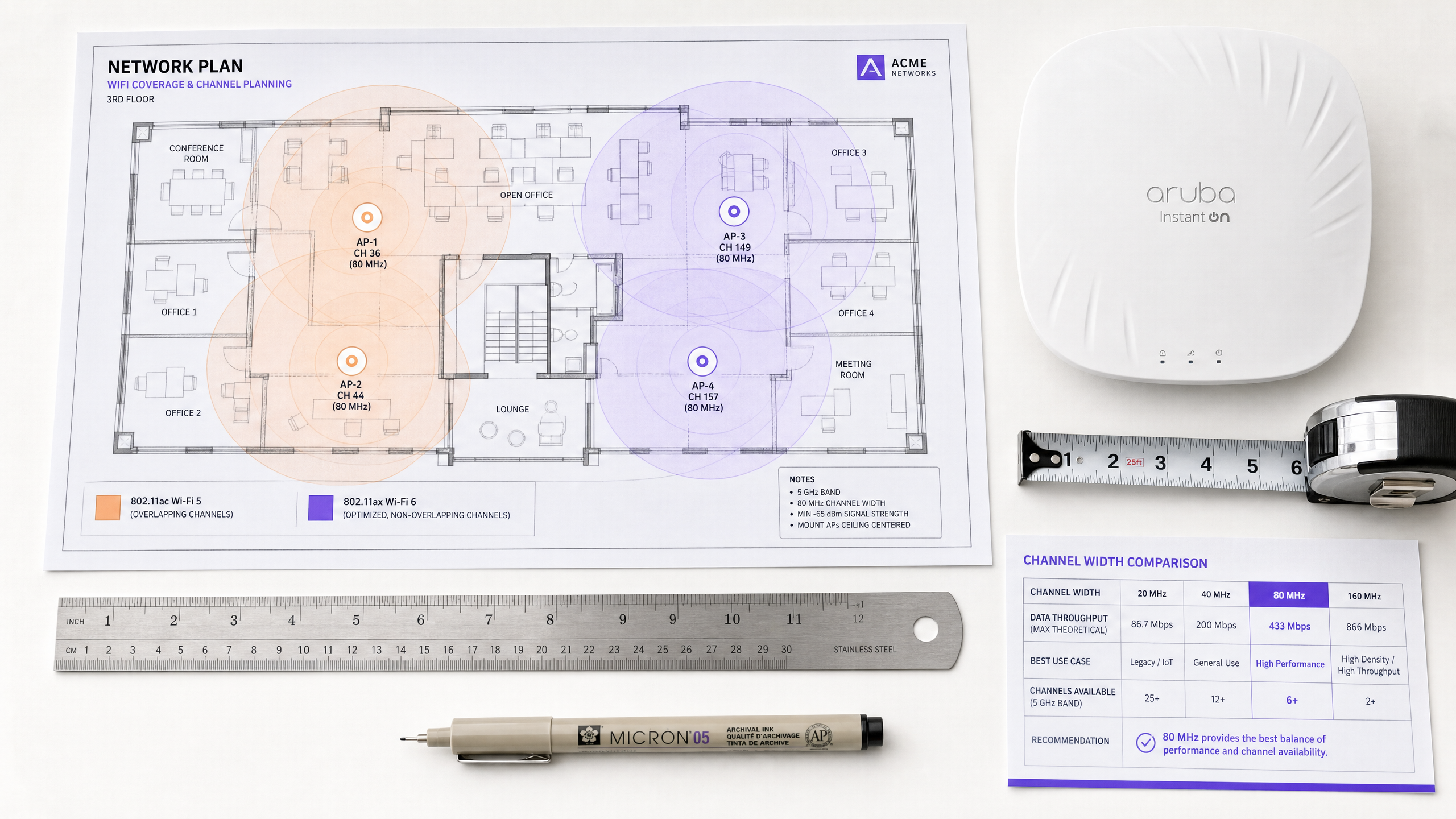
Para los directores de TI y arquitectos de red que gestionan entornos de alta densidad —ya sea en hostelería, comercio minorista o grandes espacios públicos— la interferencia de cocanal sigue siendo el principal cuello de botella para el rendimiento inalámbrico. El enfoque tradicional de mitigar la interferencia reduciendo la potencia de transmisión o deshabilitando las radios de 2.4 GHz en puntos de acceso alternos ha llegado a su límite lógico.
La transición de Wi-Fi 5 (802.11ac) a Wi-Fi 6 (802.11ax) representa un cambio arquitectónico fundamental. En lugar de simplemente aumentar el rendimiento teórico, Wi-Fi 6 fue diseñado específicamente para abordar la capacidad y la eficiencia en espacios aéreos congestionados. Mediante la introducción de Orthogonal Frequency-Division Multiple Access (OFDMA) y Basic Service Set (BSS) Coloring, Wi-Fi 6 proporciona mecanismos deterministas para gestionar la interferencia en lugar de simplemente reaccionar a ella.
Esta guía explora las realidades técnicas de la mitigación de interferencias de Wi-Fi 6, proporcionando estrategias de implementación prácticas para equipos de TI empresariales. Examinamos cómo estos estándares operan en entornos de clientes mixtos y cómo la integración de plataformas de inteligencia como los análisis de Guest WiFi puede validar el ROI de su actualización de infraestructura.
Análisis Técnico Profundo: Cómo Wi-Fi 6 Cambia las Reglas
Para entender cómo Wi-Fi 6 aborda la interferencia, primero debemos examinar las limitaciones de su predecesor.
El Problema de Contención de Wi-Fi 5
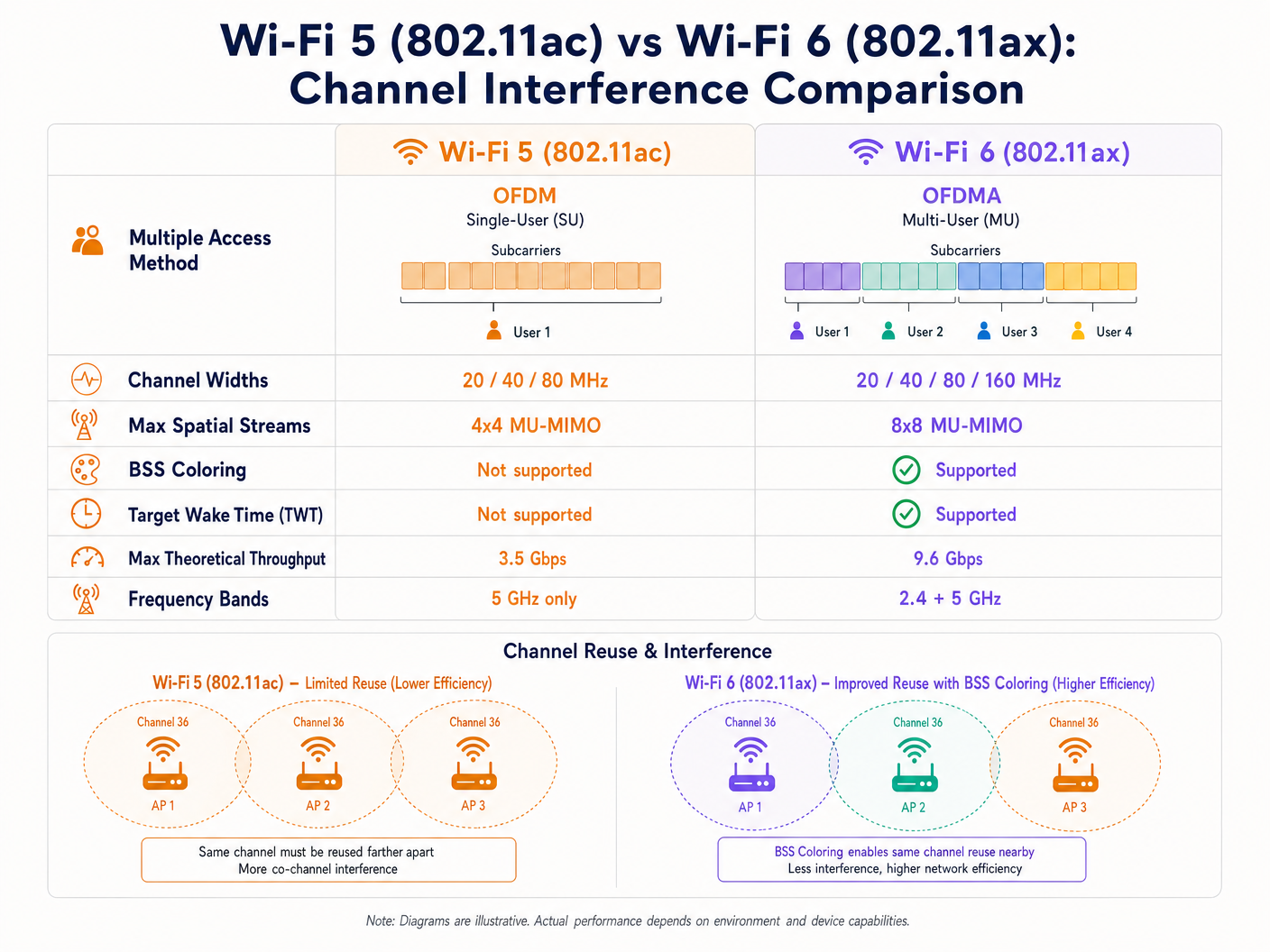
Wi-Fi 5 se basa en Orthogonal Frequency-Division Multiplexing (OFDM). En este modelo de usuario único, un Access Point (AP) debe asignar todo el ancho de banda del canal —ya sea de 20, 40 u 80 MHz— a un solo cliente para una transmisión dada, independientemente del tamaño de la carga útil. Esto es altamente ineficiente para paquetes de datos pequeños, como los generados por dispositivos IoT o telemetría en tiempo real.
Además, Wi-Fi 5 utiliza un estricto mecanismo de Carrier Sense Multiple Access with Collision Avoidance (CSMA/CA). Si un AP o cliente detecta energía de RF en su canal por encima de un umbral específico (típicamente -82 dBm), pospone la transmisión. En implementaciones densas, las áreas de cobertura superpuestas resultan en una significativa interferencia de cocanal (CCI), donde los dispositivos pasan más tiempo esperando que transmitiendo. Este es el problema central que Wi-Fi 6 fue diseñado para resolver.
OFDMA: Asignación Granular del Espectro
Wi-Fi 6 introduce OFDMA, que divide el canal en subportadoras más pequeñas y discretas llamadas Resource Units (RUs). En lugar de dedicar un canal completo de 20 MHz a un solo dispositivo, un AP puede subdividir ese canal en hasta nueve RUs distintas, transmitiendo o recibiendo de múltiples clientes simultáneamente. Esto reduce drásticamente la sobrecarga de contención y la latencia. Si bien OFDMA no elimina la interferencia externa, hace que la red sea mucho más eficiente, reduciendo el tiempo total que el medio está ocupado y, por lo tanto, la probabilidad de colisión.
BSS Coloring: Reutilización Espacial en Acción
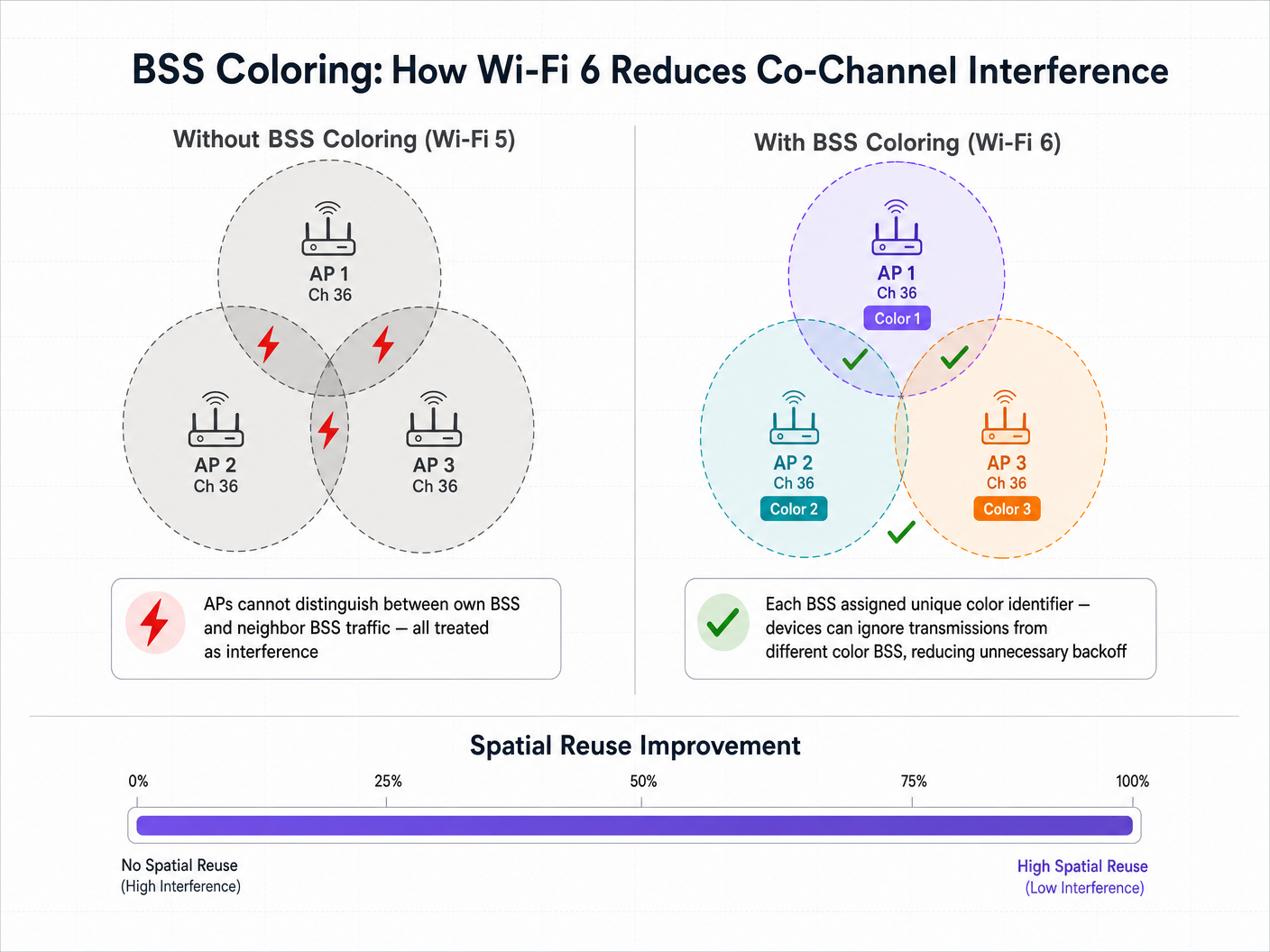
La característica que aborda más directamente la interferencia de cocanal es BSS Coloring, formalmente conocida como Reutilización Espacial. En una implementación densa, múltiples APs a menudo operan en el mismo canal debido a la disponibilidad limitada del espectro. En Wi-Fi 5, un dispositivo cliente no puede distinguir entre el tráfico destinado a su propio AP (su Basic Service Set) y el tráfico de un AP vecino en el mismo canal. Trata todo el tráfico como interferencia y pospone la transmisión, independientemente de cuán débil sea realmente la señal interferente.
Wi-Fi 6 añade un identificador de 6 bits —el "color"— al encabezado de la capa física (PHY). Los dispositivos ahora pueden diferenciar entre el tráfico intra-BSS (mismo color) y el tráfico inter-BSS (diferente color). Si un dispositivo detecta una transmisión con un color diferente, aplica un umbral de Clear Channel Assessment (CCA) adaptativo. Si la señal interferente es relativamente débil, el dispositivo puede ignorarla y transmitir simultáneamente, aumentando significativamente la capacidad general de la red a través de la reutilización espacial.
Guía de Implementación: Despliegue para Alta Densidad
El despliegue de Wi-Fi 6 requiere un cambio estratégico de un diseño centrado en la cobertura a una arquitectura centrada en la capacidad. Las siguientes recomendaciones se aplican a entornos de Hostelería , Comercio Minorista y del sector público.
1. Estrategia de Ancho de Canal
Aunque Wi-Fi 6 soporta canales de 160 MHz, su despliegue en entornos empresariales rara vez es aconsejable. Los canales más anchos significan que hay menos canales no superpuestos disponibles, lo que aumenta drásticamente la interferencia de cocanal.
Recomendación: Estandarice en canales de 20 MHz o 40 MHz en la banda de 5 GHz para entornos de alta densidad como estadios y centros de conferencias. Confíe en OFDMA y esquemas de modulación más altos (1024-QAM) para ofrecer rendimiento, en lugar de forzarlo con canales anchos.
Al planificar su espectro, tenga en cuenta los Canales DFS: Qué son y cuándo evitarlos . Aunque Wi-Fi 6 es más eficiente, los eventos de detección de radar seguirán forzando cambios de canal, interrumpiendo la conectividad del cliente. Para los equipos de habla italiana, la misma guía está disponible como Canali DFS: Cosa sono e quando evitarli .
2. Gestión de la realidad de clientes mixtos
La principal advertencia de las características de Wi-Fi 6 como OFDMA y BSS Coloring es que requieren soporte del cliente. En entornos de cara al público como Retail o Hospitality , usted no controla los dispositivos cliente. Cuando se conectan dispositivos Wi-Fi 5 o Wi-Fi 4 heredados, la red debe recurrir a los mecanismos de contención heredados y OFDM estándar para esas transmisiones específicas. Por lo tanto, los beneficios de mitigación de interferencias de Wi-Fi 6 escalan proporcionalmente con la penetración de clientes Wi-Fi 6 en su entorno.
3. Integración de inteligencia de red
Para justificar la inversión de capital de una actualización a Wi-Fi 6, los líderes de TI necesitan visibilidad de la utilización de la red y las capacidades del cliente. Aquí es donde una plataforma de WiFi Analytics se vuelve esencial. Al integrar la superposición de análisis de Purple, los arquitectos de red pueden rastrear la tasa de adopción de dispositivos compatibles con Wi-Fi 6 que ingresan a sus recintos, correlacionar las métricas de rendimiento de la red con los datos de afluencia y tiempo de permanencia, e identificar zonas específicas donde los dispositivos heredados están causando una contención desproporcionada.
Mejores prácticas e integración de seguridad
Incorporación sin interrupciones a escala
A medida que actualiza la infraestructura para manejar una mayor capacidad, la experiencia de incorporación debe escalar en consecuencia. Wi-Fi 6 exige soporte para WPA3, lo que proporciona un cifrado más fuerte. Para el Guest WiFi público, la industria se está moviendo hacia una autenticación segura y sin interrupciones. Purple actúa como un proveedor de identidad gratuito para servicios como OpenRoaming bajo la licencia Connect, permitiendo a los usuarios conectarse de forma automática y segura sin captive portals, aprovechando la autenticación 802.1X de nivel empresarial. Esto es particularmente relevante a medida que miramos hacia el futuro de la conectividad — vea nuestras recientes perspectivas sobre Cómo un wi fi assistant habilita el acceso sin contraseña en 2026 .
Optimización de la banda de 2.4 GHz
A diferencia de Wi-Fi 5, que solo operaba en la banda de 5 GHz, Wi-Fi 6 se aplica tanto a 2.4 GHz como a 5 GHz. Esto da nueva vida al concurrido espectro de 2.4 GHz, que es crucial para implementaciones de IoT en Healthcare y logística. BSS Coloring es particularmente valioso aquí, dado el número limitado de canales no superpuestos (1, 6 y 11). Target Wake Time (TWT) también extiende drásticamente la duración de la batería de los sensores IoT y los dispositivos de telemetría médica que operan en esta banda.
Consideraciones de cumplimiento
Para implementaciones en industrias reguladas, las mejoras de seguridad en Wi-Fi 6 son directamente relevantes para la postura de cumplimiento. WPA3 con Simultaneous Authentication of Equals (SAE) aborda vulnerabilidades en WPA2-Personal que eran explotables mediante ataques de diccionario fuera de línea. Para entornos sujetos a PCI DSS (procesamiento de pagos minoristas) o GDPR (captura de datos de invitados), WPA3 fortalece la capa de cifrado de la red inalámbrica, reduciendo el alcance del riesgo de cumplimiento.
Solución de problemas y mitigación de riesgos
Modos de falla comunes
La causa más común de interferencia autoinducida en implementaciones de Wi-Fi 6 es el sobreaprovisionamiento de la potencia de transmisión. Los equipos de TI a menudo dejan la potencia de transmisión del AP en "Auto", lo que resulta en APs con celdas de cobertura superpuestas que se "gritan" entre sí. La mitigación es ajustar manualmente los límites de la potencia de transmisión, asegurando que la superposición de celdas sea suficiente para un roaming sin interrupciones, pero lo suficientemente ajustada para minimizar la interferencia de co-canal.
Una segunda falla común es diseñar una red asumiendo que todos los clientes soportan Wi-Fi 6, lo que lleva a cuellos de botella de capacidad cuando la realidad de la prevalencia de dispositivos heredados se hace evidente. La mitigación es utilizar análisis para comprender su combinación específica de clientes antes de finalizar el diseño de RF.
Finalmente, un BSS Coloring mal configurado — donde los APs no asignan o coordinan correctamente los identificadores de color — significa que los beneficios de la reutilización espacial simplemente no se materializan. Asegúrese de que su controlador de LAN inalámbrica o plataforma de gestión en la nube esté ejecutando el firmware más reciente y que BSS Coloring esté explícitamente habilitado y monitoreado a través de la consola de gestión.
ROI e impacto empresarial
El caso de negocio para Wi-Fi 6 se extiende más allá de las métricas de TI. En grandes recintos, el rendimiento de la red impacta directamente la experiencia del usuario y la eficiencia operativa. Por ejemplo, en un entorno de estadio, habilitar la conectividad sin interrupciones permite realizar pedidos desde el asiento y una interacción en tiempo real. Al combinar la infraestructura Wi-Fi 6 con la plataforma de Purple, los recintos pueden aprovechar los servicios basados en la ubicación y la navegación interior — Purple lanzó recientemente el Modo de Mapas sin Conexión para una Navegación Segura y sin Interrupciones a Puntos de Acceso WiFi , extendiendo esta capacidad incluso sin una conexión a internet activa.
Además, la expansión de Purple a nuevos sectores — incluyendo el reciente nombramiento de Iain Fox como VP de Crecimiento para el Sector Público para Impulsar la Inclusión Digital y la Innovación en Ciudades Inteligentes — destaca la creciente necesidad de una conectividad robusta y resistente a las interferencias en implementaciones municipales y de Transport , donde la fiabilidad de la red es una cuestión de seguridad pública y prestación de servicios.
Medición del éxito: En el aspecto técnico, rastree la reducción en los porcentajes de utilización del canal durante las horas pico y la disminución en las tasas de reintento del cliente. En el aspecto empresarial, mida el aumento de usuarios conectados concurrentes, mayores tasas de captura de datos a través del portal de invitados y mejores puntuaciones de satisfacción del invitado. Wi-Fi 6 no rompe las leyes de la física — la interferencia de RF aún existe. Sin embargo, proporciona a los equipos de TI herramientas sofisticadas y deterministas para gestionar esa interferencia, transformando la conexión inalámbrica de un medio de "mejor esfuerzo" en una utilidad empresarial fiable.
Definiciones clave
BSS Coloring (Spatial Reuse)
A Wi-Fi 6 mechanism that adds a 6-bit identifier to PHY headers, allowing devices to differentiate between their own network traffic and overlapping neighbour network traffic, thereby reducing unnecessary transmission deferrals and enabling simultaneous transmissions on the same channel.
Critical for high-density environments (stadiums, multi-tenant buildings) where co-channel interference previously crippled network capacity. Must be enabled explicitly on the wireless LAN controller.
OFDMA (Orthogonal Frequency-Division Multiple Access)
A multi-user technology that subdivides a Wi-Fi channel into smaller Resource Units (RUs), allowing an AP to communicate with multiple clients simultaneously within a single channel occupancy event.
Solves the inefficiency of Wi-Fi 5 OFDM, particularly for environments with many devices sending small amounts of data — IoT sensors, retail point-of-sale terminals, and mobile messaging applications.
Resource Unit (RU)
The smallest unit of frequency allocation in OFDMA. A 20 MHz channel can be divided into up to 9 RUs, each serving a different client simultaneously.
IT architects need to understand RUs to grasp how Wi-Fi 6 achieves its capacity improvements without requiring wider channels or additional spectrum.
Co-Channel Interference (CCI)
Performance degradation that occurs when multiple access points and clients operate on the exact same frequency channel within range of one another, forcing them to wait for clear airtime via CSMA/CA.
The primary enemy of high-density Wi-Fi design. Mitigated by careful channel planning, cell size management, and Wi-Fi 6 BSS Coloring.
Target Wake Time (TWT)
A Wi-Fi 6 feature that allows APs to negotiate scheduled wake windows with client devices, defining exactly when they will wake up to send or receive data.
Crucial for IoT deployments in healthcare and retail logistics, as it dramatically extends device battery life and reduces overall medium contention by preventing all devices from competing for airtime simultaneously.
Clear Channel Assessment (CCA)
The 'listen before talk' mechanism devices use to determine if the RF medium is busy before transmitting. In Wi-Fi 5, a single threshold applies to all detected energy. In Wi-Fi 6, BSS Coloring enables adaptive CCA thresholds based on the color of the detected transmission.
BSS Coloring modifies the CCA thresholds, allowing devices to be more aggressive in transmitting when the interfering signal originates from a different-color BSS.
1024-QAM (Quadrature Amplitude Modulation)
An advanced modulation scheme in Wi-Fi 6 that encodes 10 bits of data per symbol, a 25% increase over Wi-Fi 5's 256-QAM (8 bits per symbol).
Delivers higher peak throughput, but requires very high Signal-to-Noise Ratio (SNR). Clients must be in close proximity to the AP to benefit, making it most relevant for short-range, high-throughput use cases.
OpenRoaming
A federation standard built on Passpoint (802.11u/Hotspot 2.0) that allows users to seamlessly and securely connect to participating Wi-Fi networks without captive portals, using 802.1X authentication and roaming agreements between identity providers.
The future of enterprise guest access. Purple acts as a free identity provider for this service under the Connect license, streamlining the user journey while maintaining enterprise-grade security and enabling GDPR-compliant data capture.
Ejemplos resueltos
A large conference centre is upgrading its main auditorium from Wi-Fi 5 to Wi-Fi 6. The current deployment uses 80 MHz channels to maximise marketing claims of 'gigabit speeds,' but during keynote speeches with 2,000 attendees, the network grinds to a halt due to co-channel interference. How should the new Wi-Fi 6 architecture be configured?
Step 1: Reduce channel width from 80 MHz to 20 MHz. This increases the number of available non-overlapping channels in the 5 GHz band from 6 to 25, drastically reducing co-channel interference. Step 2: Enable BSS Coloring on the wireless controller to allow spatial reuse among APs that must share a channel. Step 3: Implement OFDMA for both uplink and downlink to efficiently handle the high volume of small packets (social media updates, messaging) typical of conference environments. Step 4: Tune AP transmit power down to create smaller, denser micro-cells, minimising the RF footprint of each AP. Step 5: Disable legacy data rates (below 12 Mbps) to force clients to use more efficient modulation and clear the airtime faster.
A hospital IT director is deploying a new fleet of Wi-Fi 6 IoT telemetry monitors across a ward. The ward already has legacy Wi-Fi 4 guest devices operating heavily on the 2.4 GHz band. How does Wi-Fi 6 help, and what configuration is required?
Step 1: Unlike Wi-Fi 5, Wi-Fi 6 operates in the 2.4 GHz band. The new telemetry monitors can leverage OFDMA and Target Wake Time (TWT) in 2.4 GHz, dramatically extending battery life. Step 2: Configure a dedicated SSID for the IoT devices on a separate VLAN, steering them to specific AP radios if the hardware supports dual 5GHz or software-defined radios. Step 3: Enable BSS Coloring on the 2.4 GHz band to mitigate interference from the legacy guest devices and neighbouring wards. Step 4: Strictly enforce the 1, 6, 11 channel plan with 20 MHz channel widths on 2.4 GHz — do not use 40 MHz channels. Step 5: Integrate Purple's analytics to monitor the airtime utilisation of the legacy guest devices and ensure they are not starving the critical IoT traffic.
Preguntas de práctica
Q1. You are designing the Wi-Fi network for a high-density retail mall. You have deployed Wi-Fi 6 APs on 20 MHz channels. However, your analytics dashboard shows high latency and channel utilisation during peak trading hours. You verify that BSS Coloring is enabled and correctly configured. What is the most likely cause of the ongoing interference, and how do you investigate it?
Sugerencia: Consider the capabilities of the devices actually connecting to the network in a public retail space, and how legacy devices interact with Wi-Fi 6 efficiency features.
Ver respuesta modelo
The most likely cause is a high percentage of legacy (Wi-Fi 4 or Wi-Fi 5) client devices. BSS Coloring and OFDMA only mitigate interference when the client devices also support Wi-Fi 6. In a public retail environment, the network must fall back to legacy CSMA/CA contention mechanisms for older devices, negating many of the Wi-Fi 6 efficiency benefits. To investigate, use Purple's analytics to generate a client capability breakdown, segmenting devices by Wi-Fi generation. If less than 60-70% of clients are Wi-Fi 6 capable, the interference mitigation gains will be limited. The remediation is to increase AP density to create smaller cells, reduce transmit power further, and potentially implement band steering to push capable devices to less congested channels.
Q2. A stadium IT team is planning to use 80 MHz channels to support 4K video streaming for journalists in the press box. The press box has 15 APs deployed in close proximity across a 400 square metre area. Why is this a high-risk design, even with Wi-Fi 6, and what is the recommended alternative?
Sugerencia: Calculate how many non-overlapping 80 MHz channels exist in the 5 GHz band, then consider what happens when 15 APs must share those channels.
Ver respuesta modelo
Using 80 MHz channels in the 5 GHz band provides only 6 non-overlapping channels (including DFS). With 15 APs in a 400 square metre area, every channel must be reused multiple times in close proximity. Even with BSS Coloring, the noise floor will be elevated to the point where the adaptive CCA threshold cannot provide sufficient spatial reuse benefit — the signals will simply be too strong to ignore. The recommended alternative is to use 20 MHz channels (25 non-overlapping channels available), rely on OFDMA to handle the multi-stream video traffic efficiently, and configure the APs for micro-cell architecture with reduced transmit power. For the specific 4K streaming use case, the guaranteed throughput of a 20 MHz OFDMA channel serving a small number of dedicated journalists is more than sufficient.
Q3. You are configuring a new Wi-Fi 6 deployment in a hospital. The medical telemetry devices are legacy 2.4 GHz only (802.11n / Wi-Fi 4). How should you configure the 2.4 GHz radios on the new Wi-Fi 6 APs to support these devices while minimising interference? What compliance considerations apply?
Sugerencia: Focus on fundamental RF design principles for the 2.4 GHz band, which only has 3 non-overlapping channels, and consider the regulatory environment for medical devices.
Ver respuesta modelo
You must strictly adhere to the 1, 6, 11 channel plan using 20 MHz channel widths — never use 40 MHz channels in 2.4 GHz in a healthcare environment. Carefully tune transmit power down to minimise cell overlap. Disable lower data rates (1, 2, 5.5, 11 Mbps) to force clients to use more efficient modulation schemes, clearing the airtime faster. Enable BSS Coloring on the 2.4 GHz radios to help manage interference from neighbouring wards. From a compliance perspective, medical device wireless deployments must adhere to IEC 60601-1-2 (electromagnetic compatibility for medical electrical equipment). You should conduct a formal RF site survey before and after deployment, and document the interference environment as part of the device risk assessment. Ensure the telemetry devices are on a dedicated VLAN with QoS prioritisation, and that the network is segmented from general guest traffic in accordance with your healthcare data governance policy.