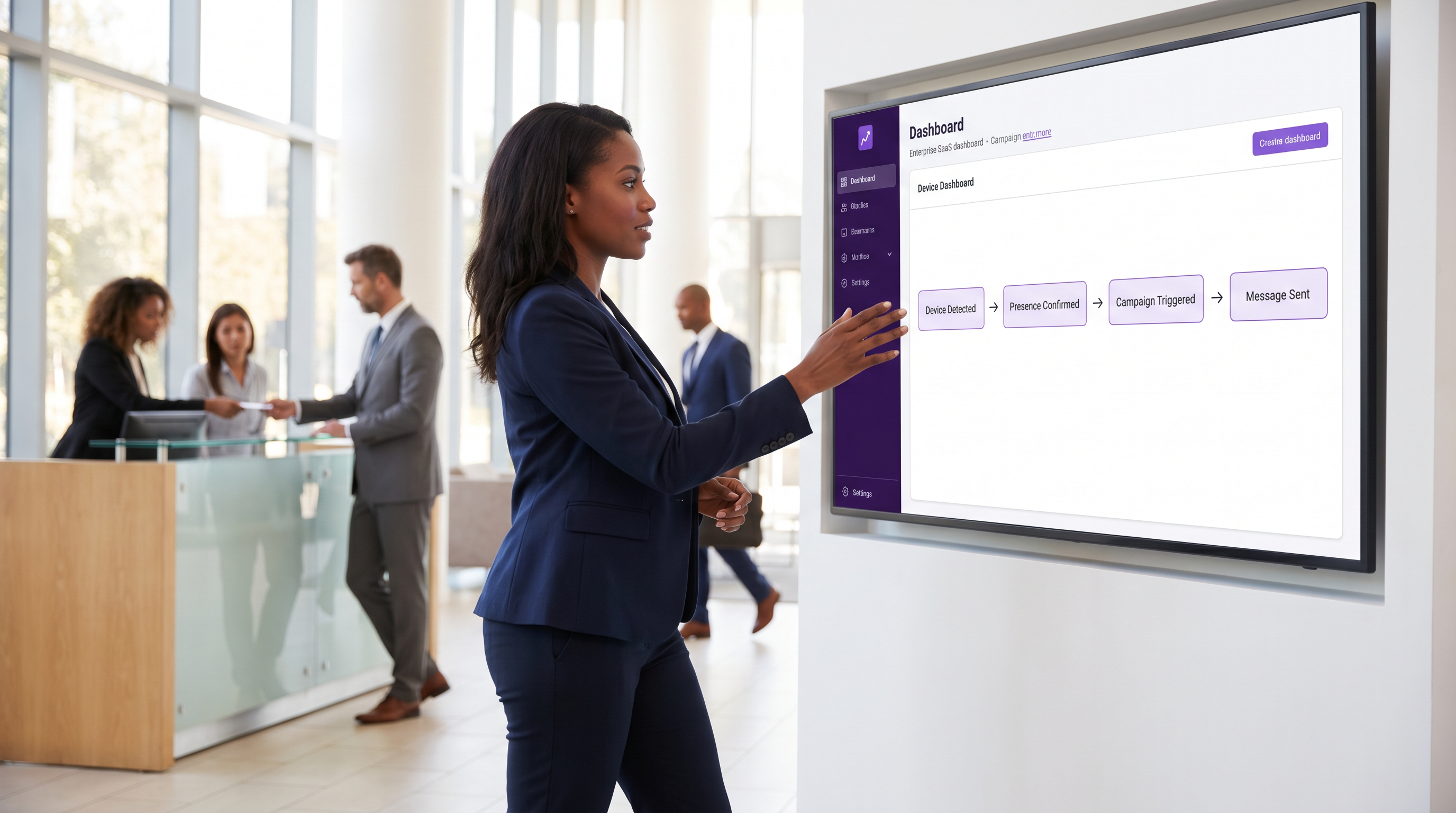
Automatización de Marketing Orientada por Eventos Activada por Presencia WiFi

Esta guía de referencia arquitectónica proporciona a los líderes senior de TI y operaciones un plan para diseñar la automatización de marketing orientada por eventos activada por la presencia WiFi. Cubre los requisitos de infraestructura, la gestión de latencia, las estrategias de deduplicación y los marcos de cumplimiento de privacidad necesarios para implementaciones a escala empresarial.

📖 5 min de lectura📝 1,005 palabras🔧 2 ejemplos3 preguntas📚 8 términos clave

🎧 Escucha esta guía

Ver transcripción
Welcome to the Purple Technical Briefing Series. I'm your host, and today we're covering a topic that sits at the intersection of network infrastructure and revenue generation: WiFi presence automation — specifically, how to architect event-driven marketing systems where a guest's physical presence, detected through your WiFi network, becomes the trigger for personalised, real-time marketing campaigns. If you're a marketing technologist, a network architect, or a venue operations director, this briefing is for you. We'll move through the core architecture, the latency considerations that separate a good implementation from a frustrating one, the deduplication problem that every team underestimates, and the privacy frameworks you cannot afford to ignore. Let's get into it. --- SECTION ONE: WHY PRESENCE IS THE MOST VALUABLE MARKETING SIGNAL YOU'RE ALREADY COLLECTING Let me start with a question. Your venue — whether it's a hotel, a retail chain, a stadium, or a conference centre — already has WiFi infrastructure. You're already generating presence events every time a device associates with an access point. The question isn't whether you have the data. The question is whether you're doing anything useful with it. Traditional digital marketing operates on intent signals: someone searches for a product, clicks an ad, opens an email. Those are valuable, but they're all happening outside your venue. WiFi presence automation operates on a fundamentally different and arguably more powerful signal: physical proximity. The guest is already there. They've already made the decision to visit. Your job is to make that visit more valuable — for them and for you. The architectural challenge is converting a raw network event — a device association, a probe request, a DHCP lease — into a contextually relevant, personalised marketing action within a timeframe that's still useful. In a retail environment, that window might be two to five minutes. In a hotel, you have the entire stay. The architecture has to be designed around those constraints from day one. --- SECTION TWO: THE FOUR-LAYER ARCHITECTURE Let me walk you through the reference architecture we recommend for enterprise WiFi presence automation. It has four distinct layers, and getting the boundaries between them right is critical. Layer one is the Network Layer. This is your physical infrastructure: access points, controllers, and the RADIUS server that handles authentication. The key design decision here is what events you're surfacing from the network. You have three options. First, probe requests — passive signals from devices scanning for known networks. Second, association events — the moment a device successfully connects to your SSID. Third, authenticated session events — where you have a confirmed user identity tied to a device, typically via a captive portal login or 802.1X authentication. My strong recommendation is to build your automation on authenticated session events, not probe requests. Here's why. Since iOS 14 and Android 10, both Apple and Google have implemented MAC address randomisation by default. A device scanning for networks will present a randomised MAC address that changes per network and, in some implementations, per session. If you're building a presence detection system on probe-based MAC tracking, you're building on sand. Association events tied to a captive portal login give you a persistent, consent-linked identifier that survives MAC randomisation. Layer two is the Presence Engine. This is where raw network events are transformed into meaningful presence signals. Purple's platform handles this through the Event Stream Engine, which performs four critical functions. Probe detection and filtering — separating genuine dwell from drive-by signals. Association event processing — capturing the moment of authenticated connection. Dwell time calculation — determining how long a device has been present before a trigger fires. And deduplication — preventing the same device from triggering the same campaign multiple times within a suppression window. The deduplication component deserves particular attention. In a busy retail environment, a single device might associate, disassociate, and reassociate with your network multiple times in an hour as the guest moves between areas of the store. Without a robust deduplication engine, you'll fire the same welcome message three times in forty minutes. That's not personalisation — that's harassment. The suppression window needs to be configurable per campaign type, per venue type, and per user segment. Layer three is the Automation Layer. This is where business logic lives. In Purple's implementation, this is LogicFlow — a visual workflow engine that lets marketing and operations teams define trigger conditions, branching logic, and action sequences without writing code. The key architectural principle here is that the automation layer should be decoupled from the network layer. Changes to your campaign logic should not require changes to your network configuration, and vice versa. This separation of concerns is what allows marketing teams to iterate on campaigns without involving IT for every change. Layer four is the Delivery Layer. This is where the triggered action actually reaches the guest: an email, an SMS, a push notification, a webhook to your CRM, or an update to your loyalty platform. The critical design consideration here is that the delivery layer must respect the consent and preference data captured at the captive portal. If a guest opted into SMS but not email, your automation must honour that. This isn't just good practice — under GDPR and PECR, it's a legal requirement. --- SECTION THREE: LATENCY — WHAT'S ACCEPTABLE AND WHAT ISN'T Let me give you the numbers, because this is where a lot of implementations go wrong. End-to-end latency in a WiFi presence automation system is the time from a device associating with your network to the guest receiving the triggered communication. In a well-architected system on modern infrastructure, this should be achievable in under ten seconds for most venue types. But acceptable latency varies significantly by context. In a transport hub — an airport or a rail terminal — you might have a guest who connects to WiFi for three minutes while waiting for a gate change. Your trigger needs to fire within sixty to ninety seconds of connection, or the moment has passed. In a hotel, where the guest will be on-property for twelve to forty-eight hours, a ten-second or even thirty-second latency is entirely acceptable. The latency budget breaks down across three components. Network-to-platform latency: the time for the association event to travel from the access point controller to the Purple platform. In a cloud-connected deployment with a well-configured controller, this should be under one second. Platform processing latency: the time for the Event Stream Engine to classify the event, check deduplication, evaluate automation conditions, and dispatch the action. In Purple's architecture, this is typically under two seconds. Delivery channel latency: the time for the downstream channel — email provider, SMS gateway, push notification service — to deliver the message. This is the component you have least control over, and it's where most of the variance lives. SMS via a Tier 1 gateway is typically under five seconds. Email delivery can range from two seconds to two minutes depending on the recipient's mail server. The practical implication: if you need sub-ten-second end-to-end delivery, SMS or push notifications are your only reliable options. Email is not a real-time channel, and you should not architect your presence automation as if it were. --- SECTION FOUR: THE DEDUPLICATION PROBLEM IN DEPTH I want to spend a few minutes on deduplication because it's the component that most commonly causes production issues in presence automation deployments. The core problem is this: a single physical visit can generate dozens of network events. A guest walks into your hotel, connects to WiFi in the lobby, walks to their room, the device briefly loses signal and reconnects, they go to the restaurant and the device roams to a different access point. From the network's perspective, that's potentially four or five association events. From the guest's perspective, it's one visit. Your deduplication engine needs to operate at two levels. Device-level deduplication collapses multiple association events from the same device within a session window into a single presence event. A session window of fifteen to thirty minutes is appropriate for most venue types — if a device disassociates and reassociates within that window, it's treated as a continuation of the same session, not a new visit. Campaign-level deduplication prevents the same campaign from firing for the same guest within a suppression window. This window should be configurable per campaign. A welcome message should have a suppression window equal to the length of a typical stay — seven days for a hotel, twenty-four hours for a retail store. A time-sensitive offer might have a suppression window of just four hours. A loyalty points reminder might suppress for thirty days. The third deduplication consideration is cross-device deduplication. If a guest has previously connected to your network on their laptop and their phone, and both devices are present simultaneously, you should fire the campaign once, not twice. This requires a profile-linking capability — typically implemented via the email address or loyalty ID captured at the captive portal — that associates multiple devices with a single guest profile. --- SECTION FIVE: PRIVACY FRAMEWORKS — THE NON-NEGOTIABLES Let me be direct about the regulatory landscape, because I've seen implementations that were technically excellent but legally problematic. Under GDPR and the UK GDPR, processing a guest's location data — which is what WiFi presence detection effectively constitutes — requires a lawful basis. The two most commonly applicable bases are consent and legitimate interest. Consent is the cleaner option: the guest explicitly agrees to presence-based marketing at the captive portal. Legitimate interest requires a documented balancing test demonstrating that your interest in sending the communication does not override the guest's privacy rights. For most marketing use cases, consent is the safer and more defensible basis. PECR — the Privacy and Electronic Communications Regulations — adds an additional layer for electronic marketing. Sending a marketing SMS or email triggered by WiFi presence requires prior consent from the recipient, regardless of your GDPR lawful basis. This consent must be specific, informed, and freely given. A pre-ticked checkbox on a captive portal does not constitute valid PECR consent. On the technical side, MAC address randomisation has effectively ended the era of passive, consent-free device tracking. Any architecture that relies on tracking randomised MAC addresses without user consent is both technically unreliable and legally questionable. The correct approach is to use the authenticated session identifier — the email address or loyalty ID — as your primary tracking key, with the MAC address used only as a session-level correlation handle. PCI DSS compliance requires that your guest WiFi network be completely isolated from any network segment that processes payment card data. This means VLAN separation at minimum, with firewall rules preventing any traffic flow between the guest network and the payment network. Your presence automation platform should sit on or connect to the guest network segment, never the payment network. --- SECTION SIX: IMPLEMENTATION RECOMMENDATIONS AND COMMON PITFALLS Let me give you the five recommendations I give every client before they go live with a presence automation deployment. First: start with your data model, not your campaigns. Before you configure a single automation rule, define your guest identity model. What is the primary identifier? How do you handle multiple devices per guest? How do you link WiFi identity to your CRM or loyalty platform? Getting this wrong at the start creates technical debt that's expensive to unwind. Second: instrument your deduplication before you go live. Run the system in observation mode — logging events without firing campaigns — for at least two weeks before launch. This gives you real data on your association event frequency, your typical session patterns, and your re-visit rates. Use this data to calibrate your suppression windows. Third: design your consent flow before your campaign flow. The captive portal is not just a network access mechanism — it's your consent capture point. Every data processing activity you intend to perform must be disclosed and consented to at this point. Work with your legal team to ensure the consent language is specific enough to be valid under PECR. Fourth: test your latency under load. A presence automation system that performs well with ten concurrent connections may degrade significantly with a thousand. Load test your event processing pipeline at two to three times your expected peak concurrent device count before going live at a major event or peak trading period. Fifth: build suppression management into your operations workflow. Marketing teams will want to run multiple campaigns simultaneously. Without a clear suppression hierarchy — which campaign takes priority when multiple triggers fire simultaneously — you'll end up with guests receiving three messages in five minutes. Define the hierarchy before campaigns go live, not after the first complaint. --- RAPID-FIRE Q&A Question: Can I use WiFi presence automation without a captive portal? Answer: Technically yes, using probe-based detection, but practically no for any compliant marketing use case. Without a captive portal, you have no consent capture mechanism and no persistent guest identifier. You're tracking randomised MACs with no legal basis. Don't do it. Question: What's the minimum access point density for reliable presence detection? Answer: For dwell time accuracy within five metres, you need overlapping coverage from at least three access points. For zone-level presence — knowing a guest is in the store, not which aisle — one AP per zone is sufficient. Design your AP density to match your use case. Question: How do I integrate Purple's event stream with my existing CRM? Answer: Purple supports webhook-based event dispatch and native integrations via Zapier and direct API. For enterprise CRM platforms like Salesforce or HubSpot, the recommended approach is a webhook to a middleware layer that handles data transformation and CRM API calls. This keeps the integration loosely coupled and easier to maintain. --- SUMMARY AND NEXT STEPS WiFi presence automation is one of the highest-ROI applications of your existing network infrastructure. The technology is mature, the regulatory framework is clear, and the implementation patterns are well-established. The difference between a successful deployment and a problematic one comes down to three things: a robust identity model that survives MAC randomisation, a deduplication engine calibrated to your specific venue and visit patterns, and a consent architecture that satisfies both GDPR and PECR requirements. If you're evaluating Purple for this use case, the two components to focus on are the Event Stream Engine for presence signal processing and LogicFlow for automation logic. Both are designed to operate at enterprise scale with the configurability you need to serve multiple venue types and campaign types from a single platform. For your next steps: review your current captive portal consent language against PECR requirements, audit your existing WiFi infrastructure for AP density adequacy, and define your guest identity model before touching any automation configuration. Thank you for listening to the Purple Technical Briefing Series. Full documentation, architecture guides, and integration references are available at purple.ai.

Resumen Ejecutivo

header_image.png

Para los recintos modernos —desde cadenas minoristas y grupos hoteleros hasta estadios a gran escala— la infraestructura de red inalámbrica existente representa un activo subutilizado para la interacción con el cliente en tiempo real. La automatización de marketing orientada por eventos activada por la presencia WiFi transforma la conectividad de red pasiva en un canal de interacción activo. Esta guía proporciona un plan arquitectónico definitivo para implementar la automatización basada en presencia, centrándose en la mecánica técnica de convertir eventos de red brutos en acciones de marketing contextualmente relevantes y conformes. Al cerrar la brecha entre la infraestructura de red y la tecnología de marketing, los líderes de TI pueden generar un impacto comercial medible mientras mantienen estrictos estándares de privacidad y seguridad.

Escuche el podcast informativo ejecutivo:

Análisis Técnico Detallado: La Arquitectura de Cuatro Capas

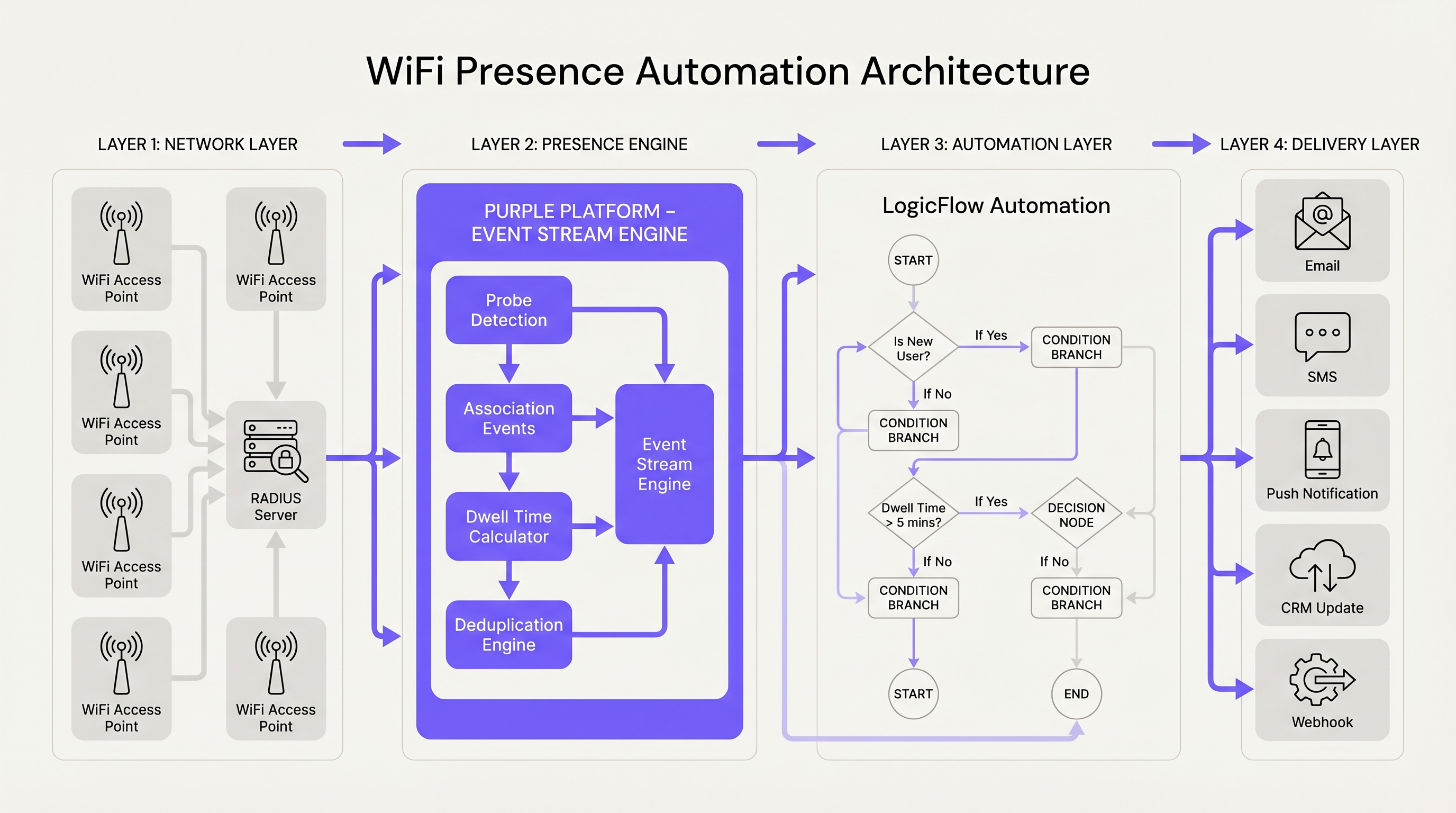
Diseñar un sistema robusto de automatización de presencia WiFi requiere un enfoque desacoplado de cuatro capas. Esta separación de responsabilidades asegura que los cambios en la lógica de marketing no requieran una reconfiguración de la red, y que las actualizaciones de la red no interrumpan las campañas automatizadas.

Capa 1: La Capa de Red

La base de la detección de presencia se apoya en la infraestructura física: puntos de acceso, controladores de LAN inalámbrica y el servidor RADIUS. La decisión arquitectónica crítica en esta capa es determinar qué eventos de red activarán la automatización posterior. Mientras que los sistemas heredados a menudo dependían de solicitudes de sondeo pasivas, las implementaciones modernas deben priorizar los eventos de sesión autenticados. Desde la introducción de la aleatorización de direcciones MAC por defecto en los sistemas operativos móviles modernos, el seguimiento basado en sondeos se ha vuelto técnicamente poco fiable y legalmente precario. En su lugar, aprovechar los eventos de asociación vinculados a un inicio de sesión en un portal cautivo de Guest WiFi proporciona un identificador persistente y vinculado al consentimiento que sobrevive a la aleatorización de MAC.

Capa 2: El Motor de Presencia

Los eventos de red brutos son inherentemente ruidosos y requieren procesamiento antes de que puedan activar la lógica de negocio. El Motor de Presencia, impulsado por Event Stream de Purple, ingiere eventos de asociación y realiza un filtrado crítico. Esto incluye el filtrado de detección de sondeos para eliminar señales de 'paso', el cálculo del tiempo de permanencia para asegurar que el dispositivo ha permanecido en el recinto por un umbral mínimo, y una deduplicación sofisticada. En entornos de alta densidad como Retail u Hospitality , una sola visita de un huésped puede generar docenas de eventos de asociación y roaming. El Motor de Presencia colapsa estos eventos en una única y limpia señal de 'presencia'.
architecture_overview.png

Capa 3: La Capa de Automatización

Una vez que se establece una señal de presencia limpia, esta pasa a la Capa de Automatización. En el ecosistema de Purple, esto es gestionado por LogicFlow. Esta capa evalúa el evento de presencia contra reglas de negocio predefinidas, como la segmentación de usuarios, la frecuencia de visitas y las ventanas de supresión de campañas. Por ejemplo, una regla podría dictar que una campaña de 'Bienvenido de Nuevo' solo se active si el usuario no ha visitado en los últimos 30 días y ha estado presente en la red durante al menos cinco minutos.

Capa 4: La Capa de Entrega

La capa final es responsable de ejecutar la acción. Esto podría ser el envío de un SMS, el envío de un correo electrónico, la activación de una notificación push a través de una aplicación del recinto, o el disparo de un webhook para actualizar un CRM externo. La Capa de Entrega debe adherirse estrictamente a las preferencias de consentimiento capturadas durante la fase de autenticación inicial, asegurando el cumplimiento de las regulaciones de privacidad.

Guía de Implementación: Latencia y Deduplicación

Una implementación exitosa depende de la gestión de dos restricciones técnicas críticas: la latencia de extremo a extremo y la deduplicación de eventos.

Gestión de la Latencia de Extremo a Extremo

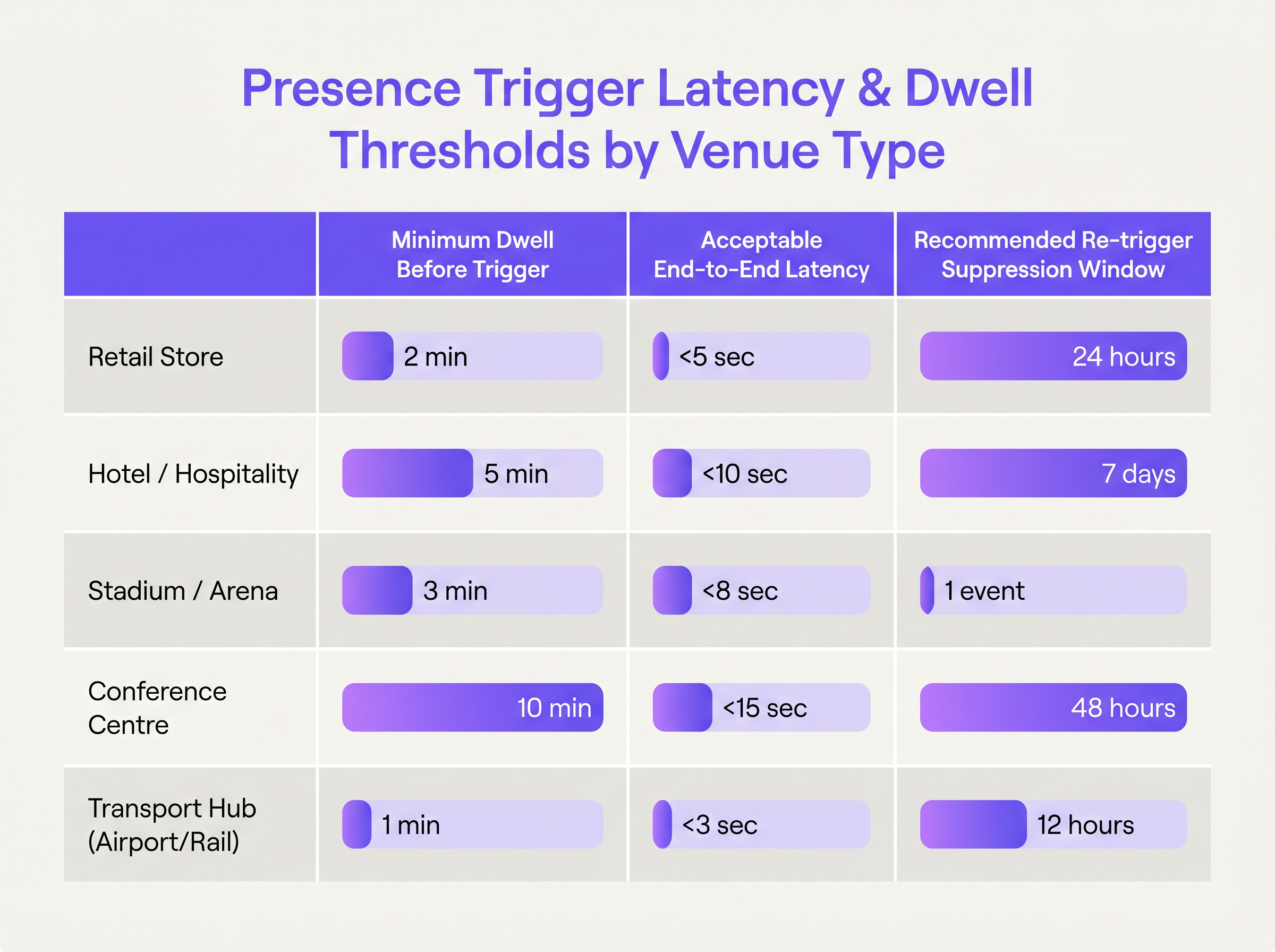
La latencia en la automatización de presencia se define como el tiempo transcurrido entre la asociación de un dispositivo con la red y la recepción de la comunicación activada por parte del huésped. La latencia aceptable varía significativamente según el tipo de recinto. En un centro de Transport , un disparador debe activarse en segundos, mientras que una implementación hotelera puede tolerar una latencia mayor.
latency_trigger_matrix.png

Para lograr una latencia inferior a diez segundos, los arquitectos deben optimizar la transmisión de eventos de la red a la plataforma (típicamente a través de syslog o push de API desde el controlador) y seleccionar los canales de entrega apropiados. Los SMS y las notificaciones push son adecuados para disparadores en tiempo real, mientras que el correo electrónico debe reservarse para comunicaciones asíncronas debido a los retrasos inherentes en la entrega.

El Desafío de la Deduplicación

La deduplicación debe ocurrir tanto a nivel de dispositivo como a nivel de campaña. La deduplicación a nivel de dispositivo implica definir una 'ventana de sesión', típicamente de 15 a 30 minutos. Si un dispositivo se desasocia y se reasocia dentro de esta ventana, se trata como una continuación de la sesión existente en lugar de una nueva visita. La deduplicación a nivel de campaña requiere configurar ventanas de supresión para evitar la fatiga de mensajes. Un error común es no implementar la deduplicación entre dispositivos, donde un usuario se conecta tanto con un smartphone como con una laptop, lo que resulta en disparadores de campaña duplicados. Esto se mitiga vinculando las direcciones MAC a un único perfil de usuario autenticado (por ejemplo, una dirección de correo electrónico) dentro de WiFi Analytics platform.

Marcos de Privacidad y Cumplimiento

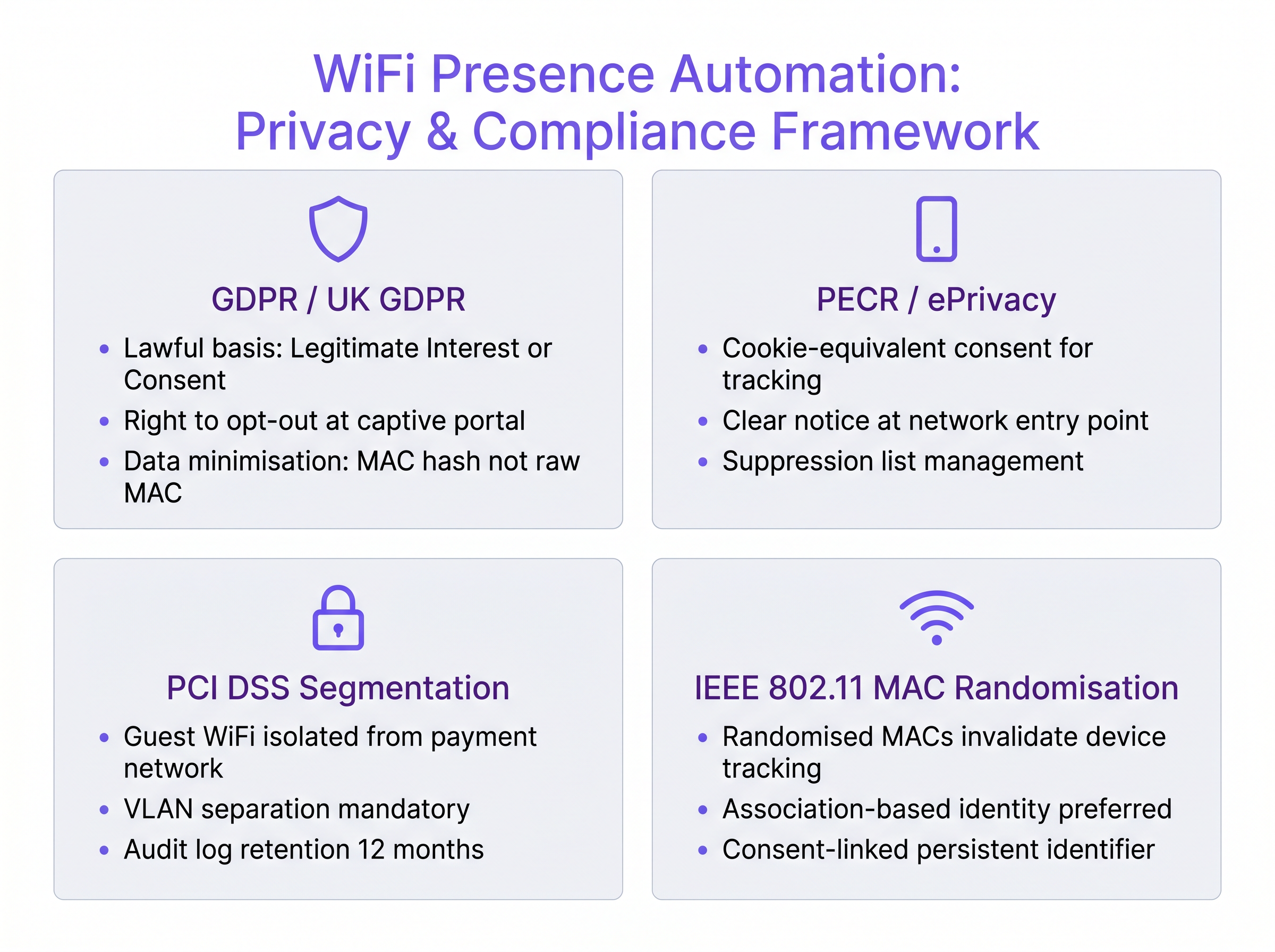
La implementación de la automatización basada en presencia requiere una estricta adhesión a los marcos de privacidad y seguridad. Un sistema técnicamente impecable que viola los estándares de cumplimiento introduce un riesgo inaceptable para la empresa.
privacy_compliance_framework.png

Cumplimiento de GDPR y PECR

Según el Reglamento General de Protección de Datos (GDPR), el procesamiento de datos de ubicación requiere una base legal. Si bien el 'Interés Legítimo' se utiliza a veces, el 'Consentimiento' explícito capturado en el Captive Portal es el enfoque más defendible para la automatización de marketing. Además, las Regulaciones de Privacidad y Comunicaciones Electrónicas (PECR) exigen un consentimiento específico e informado para las comunicaciones de marketing electrónico (SMS, correo electrónico). Las casillas premarcadas no son válidas; se requiere una suscripción activa (opt-in).

Seguridad y Segmentación

Desde una perspectiva de seguridad de red, la infraestructura de WiFi para invitados debe estar estrictamente segmentada de las redes corporativas y de pago. En entornos que procesan datos de titulares de tarjetas, el cumplimiento de PCI DSS exige la separación de VLAN y el aislamiento del firewall. La plataforma de automatización de presencia solo debe interactuar con el segmento de red de invitados aislado. Para obtener más información sobre cómo asegurar el acceso a la red, revise nuestra guía sobre Aruba ClearPass vs Cisco ISE: Comparación de Plataformas NAC .

ROI e Impacto Comercial

El valor comercial de la automatización de marketing basada en eventos se mide en el aumento de la tasa de conversión y la eficiencia operativa. Al pasar del marketing masivo ('batch-and-blast') a un compromiso en tiempo real y contextualmente relevante, los lugares suelen observar un aumento de 3 a 5 veces en las tasas de participación. Por ejemplo, un estadio que activa una oferta de mercancía por SMS 15 minutos después de que un aficionado se conecta a la red aprovecha el tiempo de permanencia de alta intención. Además, la integración de estos eventos de presencia en flujos de trabajo empresariales más amplios, como Conectando Eventos de WiFi a más de 1,500 Aplicaciones con Zapier y Purple , permite a los equipos de TI automatizar tareas operativas, como alertar al personal cuando un invitado VIP llega a las instalaciones. De manera similar a las ganancias de eficiencia de red discutidas en Los Beneficios Clave de SD WAN para Empresas Modernas , la automatización de los flujos de trabajo de marketing reduce la sobrecarga manual y garantiza una ejecución consistente a escala.

Términos clave y definiciones

MAC Randomisation

A privacy feature in modern operating systems where a device broadcasts a randomly generated MAC address instead of its true hardware address when scanning for networks.

Crucial for IT teams to understand because it invalidates legacy presence analytics systems that rely on passive probe tracking.

Probe Request

A frame sent by a client device to discover available 802.11 networks within its proximity.

Useful for footfall counting, but insufficient for marketing automation due to lack of identity and consent.

Association Event

The moment a wireless client successfully connects and authenticates to an Access Point.

The primary, reliable trigger point for event-driven marketing automation.

Dwell Time

The continuous duration a device remains associated with the network during a single visit.

Used as a condition in automation logic to differentiate between a transient passerby and an engaged customer.

Suppression Window

A defined period during which a specific automated campaign will not fire again for the same user, regardless of trigger conditions being met.

Essential for preventing message fatigue and maintaining a positive user experience.

Captive Portal

A web page that the user of a public-access network is obliged to view and interact with before access is granted.

The critical juncture for capturing user identity and securing legal consent for marketing automation.

LogicFlow

A visual workflow automation engine that evaluates presence events against business rules to trigger downstream actions.

Allows marketing teams to manage campaign logic without requiring network engineers to alter infrastructure configurations.

VLAN Segmentation

The practice of partitioning a physical network into multiple distinct broadcast domains.

A mandatory security requirement to isolate guest WiFi traffic from corporate or payment processing systems.

Casos de éxito

A 400-room resort hotel wants to trigger a 'Welcome to the Spa' SMS offer when a guest connects to the WiFi network near the spa facilities. They are currently using probe requests for detection, but the marketing team reports that the campaign is firing inconsistently, and some guests are receiving the message multiple times a day.

  1. Migrate from probe-based detection to authenticated association events. Probe requests use randomised MAC addresses, causing the system to treat a single device as multiple new visitors. 2. Implement Location-Based Triggers using specific Access Point (AP) MAC addresses located in the spa zone, rather than the general venue SSID. 3. Configure a Dwell Time Threshold of 3 minutes to filter out guests merely walking past the spa to the elevators. 4. Set a Campaign Suppression Window of 7 days to ensure a guest only receives the offer once per typical stay, preventing message fatigue.
Notas de implementación: This solution addresses the root cause of the inconsistency (MAC randomisation) while implementing necessary business logic (dwell time and suppression) to protect the guest experience. It correctly shifts the trigger from passive scanning to active, authenticated presence.

A large retail chain wants to integrate their WiFi presence events with their central CRM (Salesforce) to update customer profiles in real-time when they enter a store. The IT team is concerned about API rate limits being exceeded during peak weekend trading hours.

  1. Do not use direct, synchronous API calls from the WiFi controller to the CRM for every association event. 2. Route all association events through the Purple Event Stream Engine to perform device-level deduplication, collapsing multiple micro-disconnects into a single 'Visit Started' event. 3. Configure a webhook in LogicFlow to send only the processed 'Visit Started' event to an enterprise integration middleware (e.g., Zapier or a custom AWS Lambda function). 4. Implement a queuing mechanism in the middleware to batch CRM updates or apply rate-limiting logic before pushing the data to Salesforce.
Notas de implementación: This architecture demonstrates a mature understanding of enterprise system integration. By using the presence engine to filter noise and middleware to handle API constraints, the design protects the downstream CRM from being overwhelmed by raw network telemetry.

Análisis de escenarios

Q1. A stadium IT director wants to send a push notification via the venue's mobile app the moment a fan connects to the WiFi at the entrance gates. They are currently seeing a 45-second delay between connection and notification delivery. Where should they investigate first to reduce latency?

💡 Sugerencia:Consider the components of the latency budget: Network-to-platform, Platform processing, and Delivery channel.

Mostrar enfoque recomendado

They should investigate the network-to-platform event transmission. In a high-density environment like a stadium, if the wireless controller is batching syslog events or API updates rather than streaming them in real-time, it introduces significant artificial latency before the automation platform even receives the trigger signal. Secondary investigation should verify the push notification gateway's processing queue.

Q2. A retail marketing team requests that the IT department configure the network to track all devices walking past their storefront windows to trigger a 'Come Inside' SMS campaign. How should the IT architect respond?

💡 Sugerencia:Consider the technical reality of modern mobile devices and the legal requirements for electronic marketing.

Mostrar enfoque recomendado

The IT architect must reject the request on both technical and compliance grounds. Technically, tracking devices outside the store relies on passive probe requests, which use randomised MAC addresses, making reliable identification impossible. Legally, under PECR and GDPR, sending an SMS requires explicit, prior opt-in consent, which cannot be obtained from a device merely walking past. The architect should propose an alternative: triggering campaigns only for users who have previously authenticated via the captive portal and explicitly opted into SMS marketing.

Q3. During testing of a new presence automation deployment in a hospital waiting room, the system is correctly identifying devices, but the 'Welcome to the Clinic' email is firing every time a patient's device roams between two adjacent access points. What configuration is missing?

💡 Sugerencia:Consider how the system differentiates between a network roaming event and a new visit.

Mostrar enfoque recomendado

The system is missing device-level deduplication (specifically, a session window configuration). The Event Stream Engine needs to be configured to recognise that a disassociation followed immediately by a reassociation to a different AP within the same venue constitutes a roaming event within an ongoing session, not a new visit. The session window should be set to at least 15-30 minutes to collapse these micro-events.