
WiFi Familiar: Mejores Prácticas para Centros Comerciales
Esta guía de referencia técnica proporciona metodologías prácticas para implementar el filtrado de URL basado en categorías en redes de WiFi para invitados en entornos de retail. Detalla la arquitectura de red, la definición de políticas y las estrategias de mitigación de riesgos para garantizar el cumplimiento y proteger la reputación de la marca.
Video overview
Escucha esta guía
Ver transcripción del podcast
Parte de nuestra serie principal: Guía de WiFi para Invitados →
Resumen ejecutivo
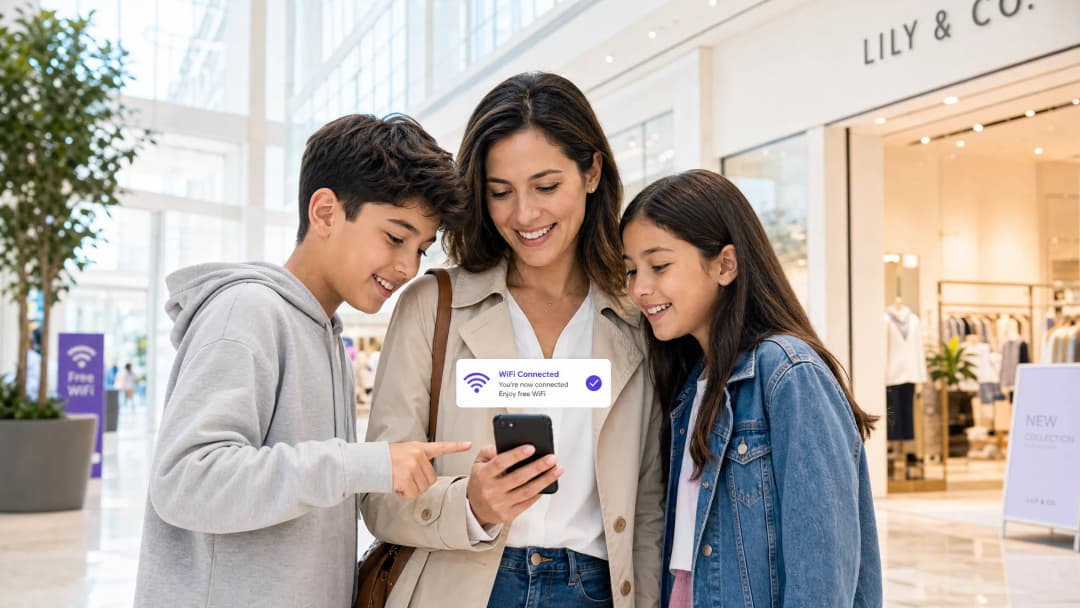
Ofrecer WiFi público en entornos comerciales requiere un equilibrio entre una conectividad fluida y una sólida mitigación de riesgos. Para los centros comerciales, implementar un WiFi familiar no es solo una característica adicional, es un requisito fundamental para las operaciones del lugar. Esta guía detalla la arquitectura técnica, las metodologías de implementación y las mejores prácticas operativas para el filtrado de URL basado en categorías en redes de invitados. Al implementar controles de contenido a nivel de DNS, los administradores de TI y los arquitectos de redes pueden garantizar el cumplimiento, proteger la reputación de la marca y proporcionar un entorno de navegación seguro para todos los grupos de edad. Además, una implementación de Guest WiFi estructurada de manera adecuada transforma un centro de costos en un activo estratégico, capturando datos de primera mano que impulsan la fidelización y los ingresos, al tiempo que reduce el riesgo de tráfico malicioso y el acceso a contenido inapropiado.
Análisis técnico profundo
Arquitectura de filtrado de DNS
En el núcleo de una red familiar se encuentra el filtrado de DNS basado en categorías. A diferencia del filtrado de URL en la capa de aplicación o la inspección profunda de paquetes (DPI), que requieren un procesamiento significativo y a menudo rompen el cifrado SSL, el filtrado de DNS opera en la capa de red. Cuando un dispositivo cliente intenta resolver un dominio, la consulta es interceptada por un motor de filtrado de DNS basado en la nube. El motor comprueba el dominio solicitado con una base de datos continuamente actualizada de URL categorizadas. Si el dominio entra en una categoría restringida (por ejemplo, malware, contenido para adultos), la resolución se bloquea y el usuario es redirigido a una página de bloqueo.
Este enfoque ofrece un alto rendimiento y una baja latencia, lo que lo hace altamente escalable para entornos de alta densidad como los centros comerciales, donde es común tener miles de conexiones concurrentes. Para diseñar esto correctamente, es fundamental comprender What is DNS Filtering? How to Block Harmful Content on Guest WiFi.

Segmentación y aislamiento de red
El aislamiento completo de la red de invitados de la infraestructura corporativa es un requisito de seguridad fundamental. El SSID de invitados debe operar en una VLAN dedicada con un alcance de DHCP independiente. El tráfico debe enrutarse a través del motor de filtrado de DNS antes de llegar a internet. Esta segmentación evita el movimiento lateral en caso de que un dispositivo de invitado se vea comprometido y garantiza que las políticas de tráfico de invitados no afecten de manera no deseada a las operaciones de la oficina de soporte.
Estándares de cifrado y autenticación
Para la infraestructura inalámbrica, WPA3 es el estándar actual para un cifrado robusto, que protege contra ataques de diccionario fuera de línea en claves precompartidas. Aunque WPA2 sigue siendo frecuente, el soporte de WPA3 debería ser obligatorio en las nuevas implementaciones. La autenticación se gestiona normalmente a través de un Captive Portal, que cumple un doble propósito: la aceptación de los términos de servicio y la captura de datos. Integrar esto con una plataforma de WiFi Analytics permite a los operadores de los establecimientos recopilar datos de primera mano basados en el consentimiento de conformidad con el GDPR y otros marcos de privacidad regionales.
¿Tiene preguntas sobre su configuración específica?
Nuestro equipo trabaja con gestores de espacios, responsables de TI e ingenieros de redes en 80 000 establecimientos. Reserve una llamada de 20 minutos y le mostraremos cómo lo resolvieron otros profesionales como usted.
Guía de implementación
Se requiere un enfoque por fases para implementar el filtrado basado en categorías a fin de minimizar la interrupción del tráfico legítimo.
1. Auditoría y línea base
Antes de aplicar las reglas de bloqueo, realice una auditoría de la arquitectura de red existente para confirmar el aislamiento adecuado de la VLAN. Implemente el motor de filtrado DNS en "modo de monitoreo" de dos a cuatro semanas. Este período de línea base brinda visibilidad sobre los patrones de tráfico reales en la red de invitados, lo que permite a los equipos de TI identificar servicios legítimos que podrían clasificarse erróneamente de forma involuntaria.
2. Definir la política de categorías
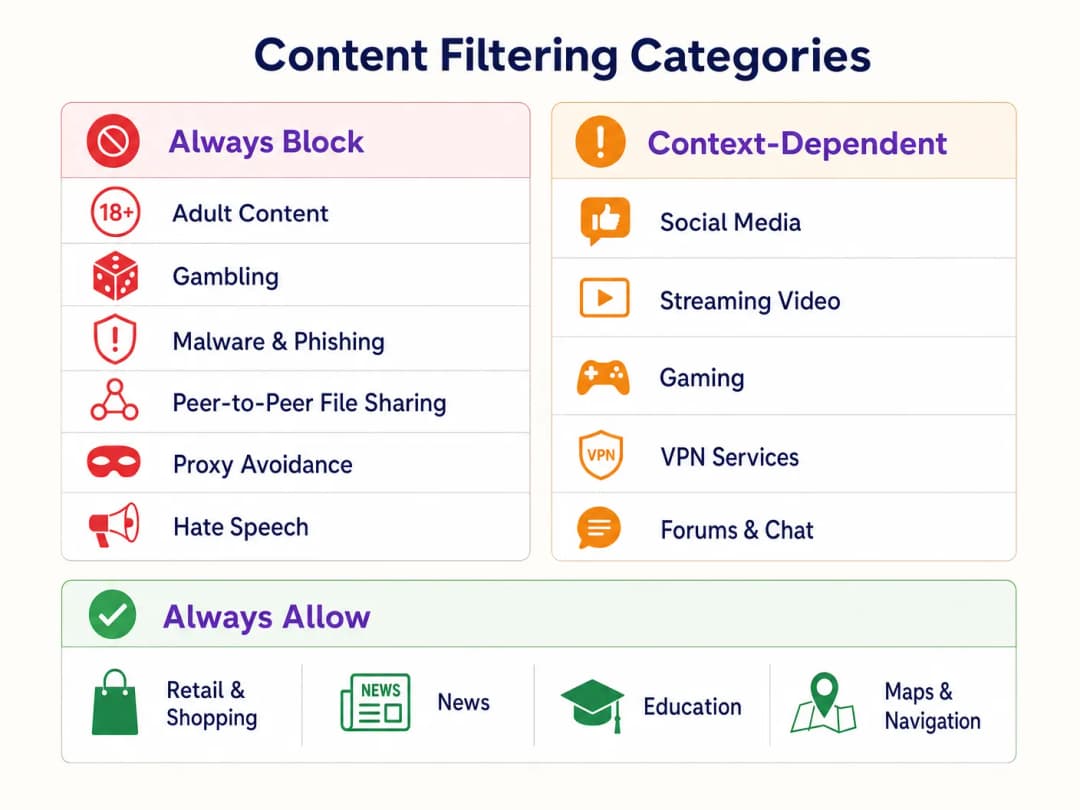
Establezca un marco de políticas por niveles:
- Bloquear siempre: Contenido para adultos, apuestas, malware, phishing, intercambio de archivos de igual a igual (P2P) y herramientas para evadir proxies.
- Dependiente del contexto: Redes sociales, transmisión de video y videojuegos. Esto requiere alineación con los objetivos operativos del establecimiento (por ejemplo, conservación del ancho de banda frente al fomento del tiempo de permanencia).
- Permitir siempre: Dominios de Retail, noticias, educación y navegación.
3. Abordar DNS sobre HTTPS (DoH)
Los navegadores modernos utilizan cada vez más de forma predeterminada DNS sobre HTTPS (DoH), cifrando las consultas DNS y evitando el filtrado a nivel de red. Para aplicar la política de filtrado, el firewall perimetral debe configurarse para bloquear el tráfico saliente del puerto 443 hacia proveedores de DoH conocidos (por ejemplo, 1.1.1.1 de Cloudflare, 8.8.8.8 de Google). Esto obliga a los dispositivos de los clientes a recurrir al sistema de resolución DNS proporcionado por la red.
4. Aplicación y manejo de excepciones
Realice la transición del modo de monitoreo al modo de aplicación. Configure una página de bloqueo clara y personalizada con la marca que informe al usuario por qué se restringió el contenido y proporcione un mecanismo para reportar falsos positivos. Establezca un flujo de trabajo documentado para revisar y agregar a la lista de permitidos los dominios solicitados por los inquilinos comerciales o la administración del establecimiento.
Mejores prácticas
- Comunicación proactiva: Informe a los inquilinos comerciales sobre la política de filtrado antes de su aplicación para evitar interrupciones en sus aplicaciones operativas.
- Revisiones periódicas de políticas: El panorama de amenazas y los patrones de uso de internet evolucionan. Programe una revisión trimestral de la política de categorías y de la precisión de la base de datos del motor de filtrado.
- Aproveche el Captive Portal: Utilice el Captive Portal no solo para el control de acceso, sino como un punto de contacto estratégico. Asegúrese de que el diseño del portal se alinee con la marca del establecimiento y establezca claramente los términos de uso con respecto a las restricciones de contenido.
- Monitoree el uso de ancho de banda: Aunque el filtrado de DNS restringe el acceso a contenido específico, la gestión del ancho de banda sigue siendo necesaria. Implemente la limitación de velocidad por cliente para garantizar una distribución equitativa de los recursos, especialmente en áreas de alta densidad. Obtenga más información sobre cómo optimizar el rendimiento en nuestra guía sobre WiFi para oficinas: Optimice su red WiFi para oficinas modernas.
Resolución de problemas y mitigación de riesgos
Bloqueo excesivo (falsos positivos)
El modo de falla más común es una política inicial demasiado agresiva que bloquea dominios legítimos. La mitigación se basa en la fase de monitoreo inicial para el tráfico de referencia y en un proceso de lista blanca receptivo.
Evasión de DoH
Si los usuarios logran acceder a contenido bloqueado, verifique que las reglas del firewall que bloquean los solucionadores de DoH conocidos estén activas y actualizadas. No bloquear el DoH hace que el filtrado de DNS a nivel de red sea ineficaz.
Problemas con el Captive Portal
En entornos con características de RF complejas, los dispositivos pueden tener dificultades para mantener una conexión el tiempo suficiente para completar la autenticación del Captive Portal. Asegúrese de contar con una densidad de AP adecuada y una planificación de canales óptima. Consulte Frecuencias de WiFi: Una guía de frecuencias de WiFi en 2026 para conocer estrategias detalladas de planificación de RF.
ROI e impacto empresarial
La implementación de un WiFi familiar a través del filtrado de DNS ofrece un valor comercial medible:
- Mitigación de riesgos: Reduce significativamente la probabilidad de multas regulatorias y daños a la reputación asociados con el acceso a contenido ilegal o inapropiado en la red del establecimiento.
- Optimización del ancho de banda: Bloquear el intercambio de archivos P2P y la transmisión de video no autorizada preserva el ancho de banda para un uso legítimo, lo que pospone las costosas actualizaciones de circuitos.
- Captura de datos mejorada: Una red de invitados segura y confiable fomenta tasas de suscripción más altas en el Captive Portal, lo que enriquece el CRM del establecimiento con datos de primera mano útiles para campañas de marketing dirigidas.
- Satisfacción de los inquilinos: Ofrecer un entorno de red limpio y de alto rendimiento respalda las iniciativas digitales de los inquilinos minoristas y mejora la experiencia general del cliente.
Escuche nuestro podcast de informe técnico a continuación para obtener más información sobre las estrategias de implementación y los errores comunes:
Definiciones clave
Filtrado DNS
El proceso de bloquear el acceso a sitios web específicos al evitar la resolución de sus nombres de dominio en direcciones IP, basándose en bases de datos categorizadas.
El mecanismo principal para aplicar de manera eficiente políticas de contenido familiar a gran escala.
Aislamiento de VLAN
La práctica de separar lógicamente el tráfico de red en distintos dominios de difusión.
Esencial para la seguridad, ya que garantiza que el tráfico de invitados no pueda interactuar con los sistemas corporativos o de administración.
Captive Portal
Una página web que un usuario debe ver e interactuar con ella antes de que se le conceda acceso a una red pública.
Se utiliza para la aceptación de los términos de servicio y para recopilar datos de primera mano basados en el consentimiento.
DNS sobre HTTPS (DoH)
Un protocolo para realizar la resolución remota del Sistema de Nombres de Dominio a través del protocolo HTTPS.
Un desafío importante para los administradores de red, ya que cifra las consultas DNS, evadiendo el filtrado estándar a nivel de red.
WPA3
La tercera generación de Acceso Protegido Wi-Fi, que ofrece un cifrado mejorado y protección contra ataques de diccionario fuera de línea.
El estándar actual para proteger redes inalámbricas, particularmente importante para SSIDs públicos o de invitados.
Falso Positivo
En el contexto del filtrado de contenido, un sitio web legítimo que es clasificado de manera incorrecta y bloqueado por el motor de filtrado.
Requiere un proceso ágil de lista de permitidos para minimizar la interrupción de las operaciones del lugar o de los negocios de los inquilinos.
Inspección Profunda de Paquetes (DPI)
Una forma de filtrado de paquetes de red informática que examina la parte de datos de un paquete a medida que pasa por un punto de inspección.
A menudo consume demasiados recursos para redes de invitados de alta densidad en comparación con el filtrado DNS.
Datos de Primera Mano
Información que una empresa recopila directamente de sus clientes y de la cual es propietaria.
Un motor clave de ROI para las implementaciones de WiFi para invitados, capturados a través del Captive Portal con el consentimiento del usuario.
Ejemplos resueltos
Un gran centro comercial con 150 locales comerciales experimenta congestión de red y quejas de padres de familia sobre el acceso a contenido inapropiado en la red abierta de WiFi para invitados.
- Implementar el aislamiento de VLAN para el SSID de invitados. 2. Implementar un motor de filtrado DNS basado en la nube. 3. Configurar una política de bloqueo estricta para las categorías de Adultos, Apuestas, Malware y P2P. 4. Bloquear el tráfico DoH saliente en el firewall. 5. Implementar un Captive Portal que requiera la aceptación de los términos de servicio.
Un gerente de TI de un hotel necesita implementar WiFi familiar en las áreas públicas, pero debe garantizar que los huéspedes corporativos puedan seguir accediendo a los servicios VPN necesarios.
- Implementar filtrado DNS con una política base que bloquee las categorías de Adultos, Malware y Apuestas. 2. Permitir explícitamente la categoría 'Servicios VPN' en la política de filtrado. 3. Monitorear los registros de tráfico para identificar cualquier endpoint de VPN corporativa específico que pueda estar mal clasificado e incluirlo de manera proactiva en la lista de permitidos.
Preguntas de práctica
Q1. Un inquilino minorista se queja de que su nueva aplicación web de gestión de inventario está bloqueada en la red de invitados del centro comercial. ¿Cuál es el siguiente paso inmediato?
Sugerencia: Considere el flujo de trabajo para la resolución de falsos positivos.
Ver respuesta modelo
Revisar los registros de filtrado DNS para identificar a qué categoría está asignado actualmente el dominio de la aplicación del inquilino. Si se trata de un falso positivo (por ejemplo, clasificado erróneamente como 'Evasión de Proxy'), agregar el dominio específico a la lista global de permitidos y notificar al inquilino.
Q2. Durante la fase de monitoreo de una nueva implementación de filtrado DNS, nota un alto volumen de tráfico hacia el 1.1.1.1 de Cloudflare. ¿Qué indica esto y cómo debería responder?
Sugerencia: Piense en los protocolos DNS cifrados.
Ver respuesta modelo
Esto indica que los dispositivos clientes están utilizando DNS sobre HTTPS (DoH) para eludir el resolutor DNS de la red. Debe configurar el firewall perimetral para bloquear el tráfico saliente del puerto 443 hacia las direcciones IP de proveedores de DoH conocidos para forzar la redirección al DNS estándar.
Q3. El director de TI de un estadio desea implementar un WiFi familiar pero le preocupa el impacto en el rendimiento al inspeccionar todo el tráfico durante un día de partido con 50,000 usuarios concurrentes. ¿Qué arquitectura recomienda?
Sugerencia: Compare el filtrado a nivel de red frente al de capa de aplicación.
Ver respuesta modelo
Recomiende el filtrado DNS basado en la nube en lugar de la Inspección Profunda de Paquetes (DPI) de forma local. El filtrado DNS solo intercepta la solicitud inicial de resolución de dominio, agregando una latencia insignificante, mientras que la DPI requiere una sobrecarga de procesamiento significativa para inspeccionar la carga útil de cada paquete, lo que generaría un cuello de botella bajo las cargas de alta densidad del estadio.
Continúe leyendo esta serie
Cómo implementar restricciones de tiempo y ancho de banda en el WiFi de invitados
Una guía de referencia técnica autorizada sobre cómo implementar restricciones de tiempo y ancho de banda en redes WiFi de invitados empresariales. Esta guía proporciona planos arquitectónicos prácticos, configuraciones neutrales respecto al proveedor y casos de estudio del mundo real para ayudar a los líderes de TI a equilibrar el rendimiento de la red, el cumplimiento de la seguridad y la experiencia del visitante.
Acceso Seguro de Invitados: Implementación de NAC para Dispositivos no Administrados
Esta guía de referencia técnica autorizada detalla la arquitectura, el despliegue y las consideraciones de cumplimiento para implementar Network Access Control (NAC) con el fin de proteger los dispositivos no administrados de los invitados. Proporciona orientación práctica para que los líderes de TI logren un acceso seguro de invitados sin comprometer la infraestructura corporativa.
Asegurar redes WiFi de invitados: mejores prácticas e implementación
Esta guía de referencia técnica autorizada describe la arquitectura, la autenticación y los controles operativos necesarios para implementar una red WiFi de invitados empresarial segura. Proporciona mejores prácticas prácticas para que los líderes de TI apliquen la segmentación de red, gestionen el ancho de banda y garanticen el cumplimiento mientras maximizan la captura de datos.
¿Tiene preguntas sobre su configuración específica?
Nuestro equipo trabaja con gestores de espacios, responsables de TI e ingenieros de redes en 80 000 establecimientos. Reserve una llamada de 20 minutos y le mostraremos cómo lo resolvieron otros profesionales como usted.