

Captive Portal डिज़ाइन: उच्च-परिवर्तनशील लॉगिन अनुभव कैसे बनाएँ
यह आधिकारिक तकनीकी संदर्भ मार्गदर्शिका बताती है कि एंटरप्राइज़ गेस्ट WiFi के लिए Captive Portal को कैसे डिज़ाइन करें, सुरक्षित करें और अनुकूलित करें। यह IT प्रबंधकों और स्थल संचालकों के लिए लॉगिन पूर्णता दरों को अधिकतम करने के लिए कार्रवाई योग्य सिफारिशें प्रदान करता है, साथ ही GDPR अनुपालन और मजबूत नेटवर्क सुरक्षा सुनिश्चित करता है।
🎧 इस गाइड को सुनें
ट्रांसक्रिप्ट देखें
कार्यकारी सारांश
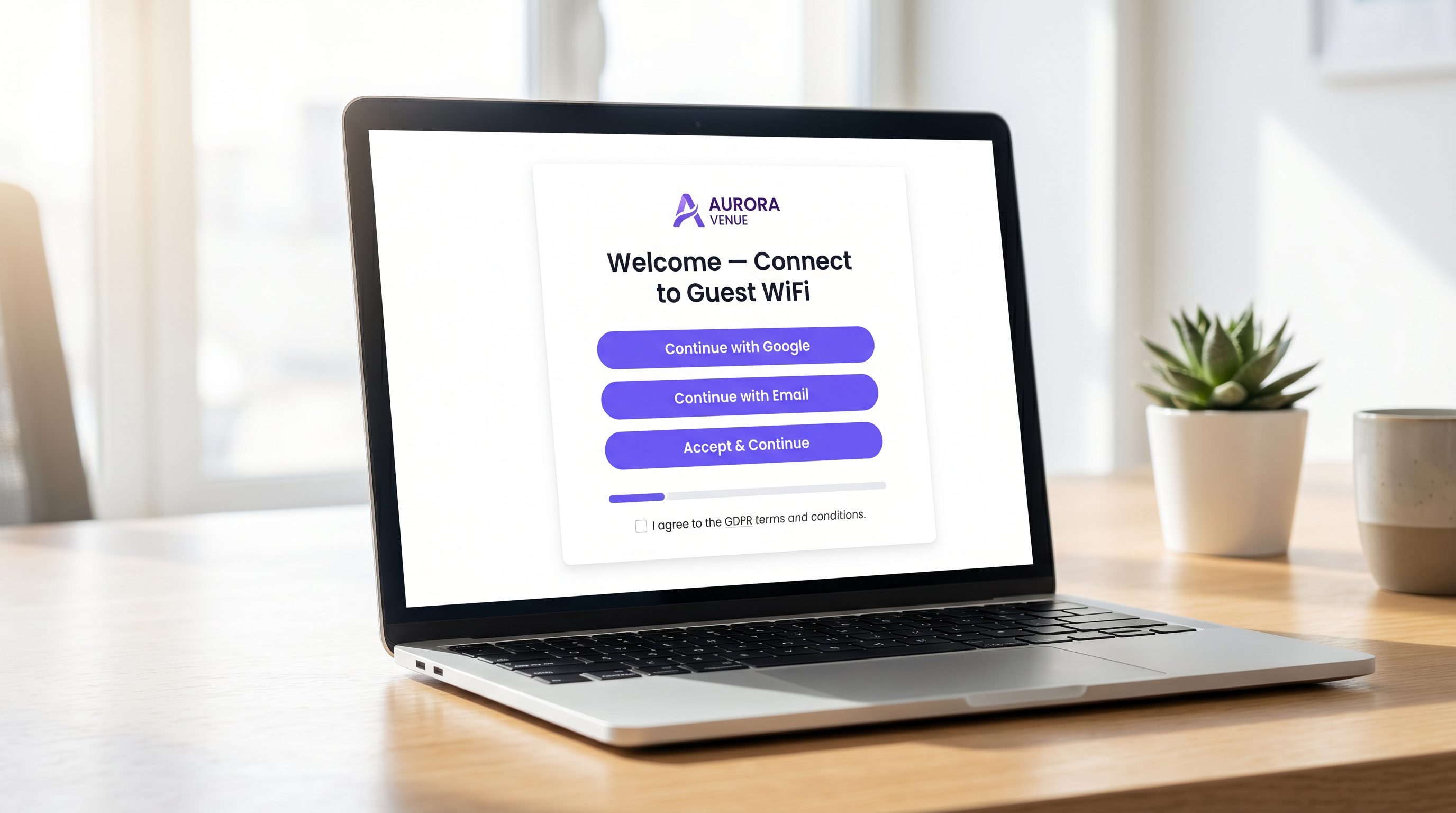
एंटरप्राइज़ स्थल संचालकों के लिए, Captive Portal महत्वपूर्ण डिजिटल प्रवेश द्वार का प्रतिनिधित्व करता है। यह वह क्षण है जहाँ नेटवर्क इन्फ्रास्ट्रक्चर वाणिज्यिक रणनीति के साथ प्रतिच्छेद करता है। एक खराब डिज़ाइन किया गया Captive Portal घर्षण पैदा करता है, परित्याग को बढ़ावा देता है, और एक सत्यापित प्रथम-पक्ष डेटाबेस बनाने के अवसर का लाभ उठाने में विफल रहता है। इसके विपरीत, एक अत्यधिक अनुकूलित Captive Portal एक बुनियादी उपयोगिता— गेस्ट WiFi —को एक मापने योग्य राजस्व-उत्पादक संपत्ति में बदल देता है।
यह मार्गदर्शिका IT प्रबंधकों, नेटवर्क आर्किटेक्ट्स और CTOs को उच्च-परिवर्तनशील लॉगिन अनुभव डिज़ाइन करने के लिए एक विक्रेता-तटस्थ, तकनीकी ब्लूप्रिंट प्रदान करती है। हम अंतर्निहित प्रमाणीकरण वास्तुकला, WPA3 और IEEE 802.1X सहित सुरक्षा अनिवार्यताओं, GDPR अनुपालन फ्रेमवर्क और रूपांतरण-अनुकूलित उपयोगकर्ता इंटरफ़ेस डिज़ाइन को कवर करते हैं। इन सिद्धांतों को लागू करके, हॉस्पिटैलिटी , रिटेल और सार्वजनिक क्षेत्रों के स्थल प्रमाणीकरण दरों में उल्लेखनीय वृद्धि कर सकते हैं, अपने नेटवर्क को सुरक्षित कर सकते हैं, और WiFi Analytics जैसे प्लेटफार्मों के माध्यम से मापने योग्य ROI प्राप्त कर सकते हैं।
तकनीकी गहन-अध्ययन: वास्तुकला और प्रमाणीकरण
Captive Portal के यांत्रिकी को समझना इसके प्रदर्शन को अनुकूलित करने के लिए आवश्यक है। जब कोई उपयोगकर्ता गेस्ट SSID से जुड़ता है, तो उसका डिवाइस एक प्रतिबंधित VLAN में रखा जाता है, जिसे आमतौर पर "वॉल्ड गार्डन" कहा जाता है। यह स्थिति सीमित नेटवर्क एक्सेस की अनुमति देती है—विशेष रूप से, DNS रिज़ॉल्यूशन और HTTP/HTTPS ट्रैफ़िक जो Captive Portal सर्वर की ओर निर्देशित होता है।
इंटरसेप्शन और रीडायरेक्शन प्रक्रिया वायरलेस LAN कंट्रोलर (WLC) या एक्सेस पॉइंट द्वारा स्वयं प्रबंधित की जाती है। जब उपयोगकर्ता वेब ब्राउज़ करने का प्रयास करता है, तो कंट्रोलर अनुरोध को रोकता है और एक HTTP 302 रीडायरेक्ट जारी करता है, जिससे उपयोगकर्ता के ब्राउज़र को पोर्टल पेज लोड करने के लिए मजबूर किया जाता है।
एक बार जब उपयोगकर्ता एक प्रमाणीकरण विधि का चयन करता है और अपनी क्रेडेंशियल सबमिट करता है, तो पोर्टल एक RADIUS (रिमोट ऑथेंटिकेशन डायल-इन यूजर सर्विस) सर्वर के साथ संचार करता है। RADIUS सर्वर एक बैकएंड डेटाबेस के खिलाफ क्रेडेंशियल को मान्य करता है—जो एक स्थानीय उपयोगकर्ता स्टोर, एक प्रॉपर्टी मैनेजमेंट सिस्टम (PMS), या एक CRM प्लेटफॉर्म हो सकता है। सफल सत्यापन पर, RADIUS सर्वर कंट्रोलर को एक एक्सेस-एक्सेप्ट संदेश भेजता है, जो डिवाइस के MAC पते को पूर्ण नेटवर्क एक्सेस के लिए अधिकृत करता है।
सुरक्षा और अनुपालन अनिवार्यताएँ
उच्च रूपांतरण दरों की तलाश में सुरक्षा से समझौता नहीं किया जा सकता है। उपयोगकर्ता और स्थल दोनों की सुरक्षा के लिए परिनियोजन को कड़े मानकों का पालन करना चाहिए।
- एन्क्रिप्शन मानक: खुले, अनएन्क्रिप्टेड गेस्ट नेटवर्क एक महत्वपूर्ण दायित्व हैं। WPA3 वर्तमान उद्योग मानक है और सभी नए परिनियोजनों के लिए अनिवार्य होना चाहिए। विरासत वाले वातावरण के लिए, AES एन्क्रिप्शन के साथ WPA2-एंटरप्राइज़ न्यूनतम स्वीकार्य मानक है।
- नेटवर्क विभाजन: VLANs और उचित फ़ायरवॉल नियमों का उपयोग करके गेस्ट ट्रैफ़िक को कॉर्पोरेट और परिचालन नेटवर्क से कड़ाई से अलग किया जाना चाहिए।
- HTTPS प्रवर्तन: Captive Portal को TLS 1.3 का उपयोग करके HTTPS पर परोसा जाना चाहिए। सादे HTTP पर पोर्टल परोसना उपयोगकर्ताओं को मैन-इन-द-मिडल हमलों के माध्यम से क्रेडेंशियल इंटरसेप्शन के लिए उजागर करता है।
- GDPR और डेटा गोपनीयता: EU या UK नागरिकों से व्यक्तिगत डेटा एकत्र करते समय, स्पष्ट, असंदिग्ध सहमति आवश्यक है। पहले से टिक किए गए बॉक्स अनुपालन योग्य नहीं हैं। स्थलों को एक स्पष्ट गोपनीयता नीति, विपणन संचार के लिए एक ऑप्ट-आउट तंत्र, और एक मजबूत डेटा प्रतिधारण रणनीति प्रदान करनी चाहिए।
कार्यान्वयन मार्गदर्शिका: लॉगिन अनुभव का अनुकूलन
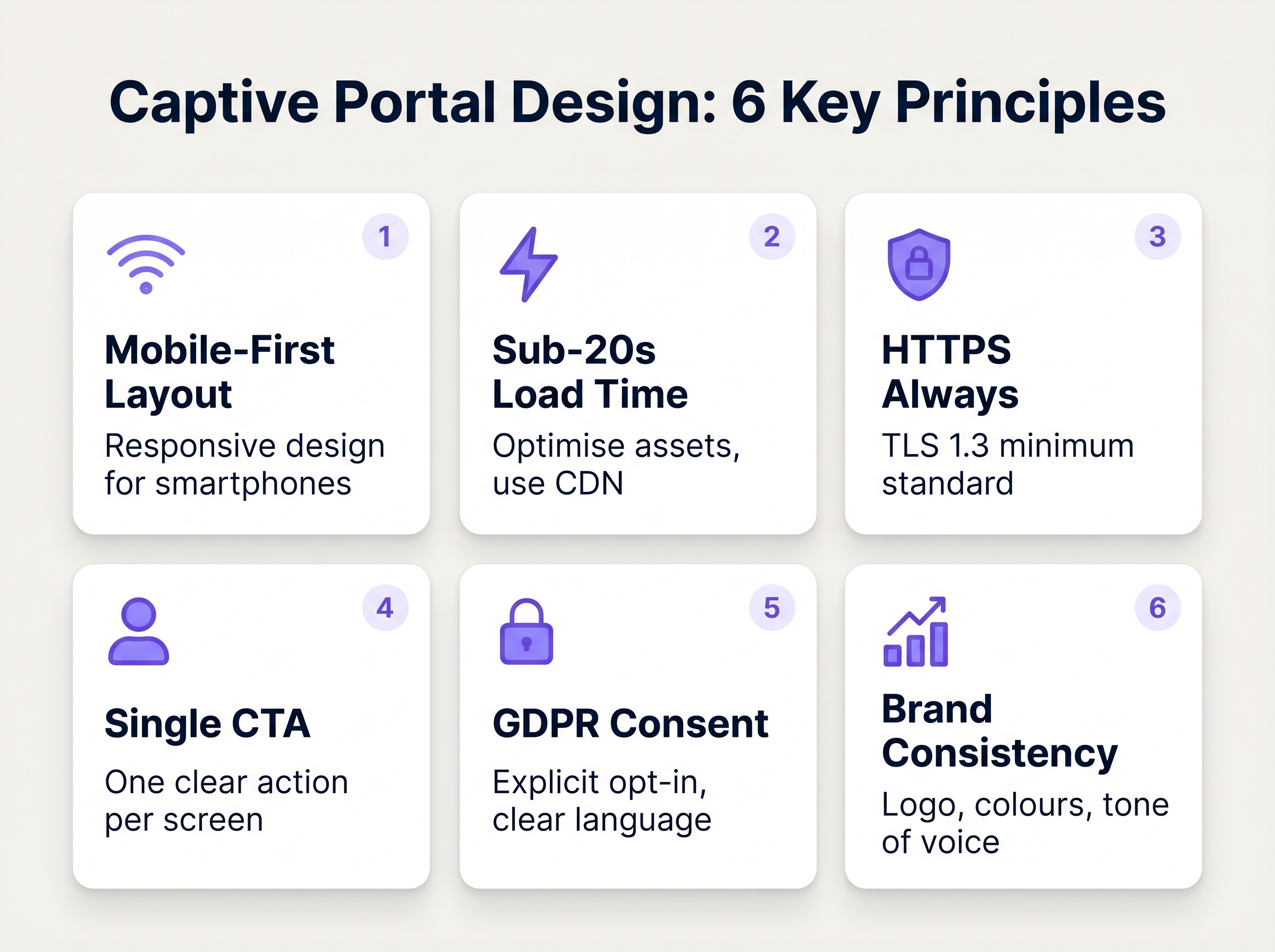
पोर्टल इंटरफ़ेस का डिज़ाइन सीधे रूपांतरण दर निर्धारित करता है। लोड समय का हर अतिरिक्त सेकंड और हर अनावश्यक फ़ॉर्म फ़ील्ड परित्याग दर को तेजी से बढ़ाता है।
1. घर्षण और फ़ॉर्म फ़ील्ड को कम करें
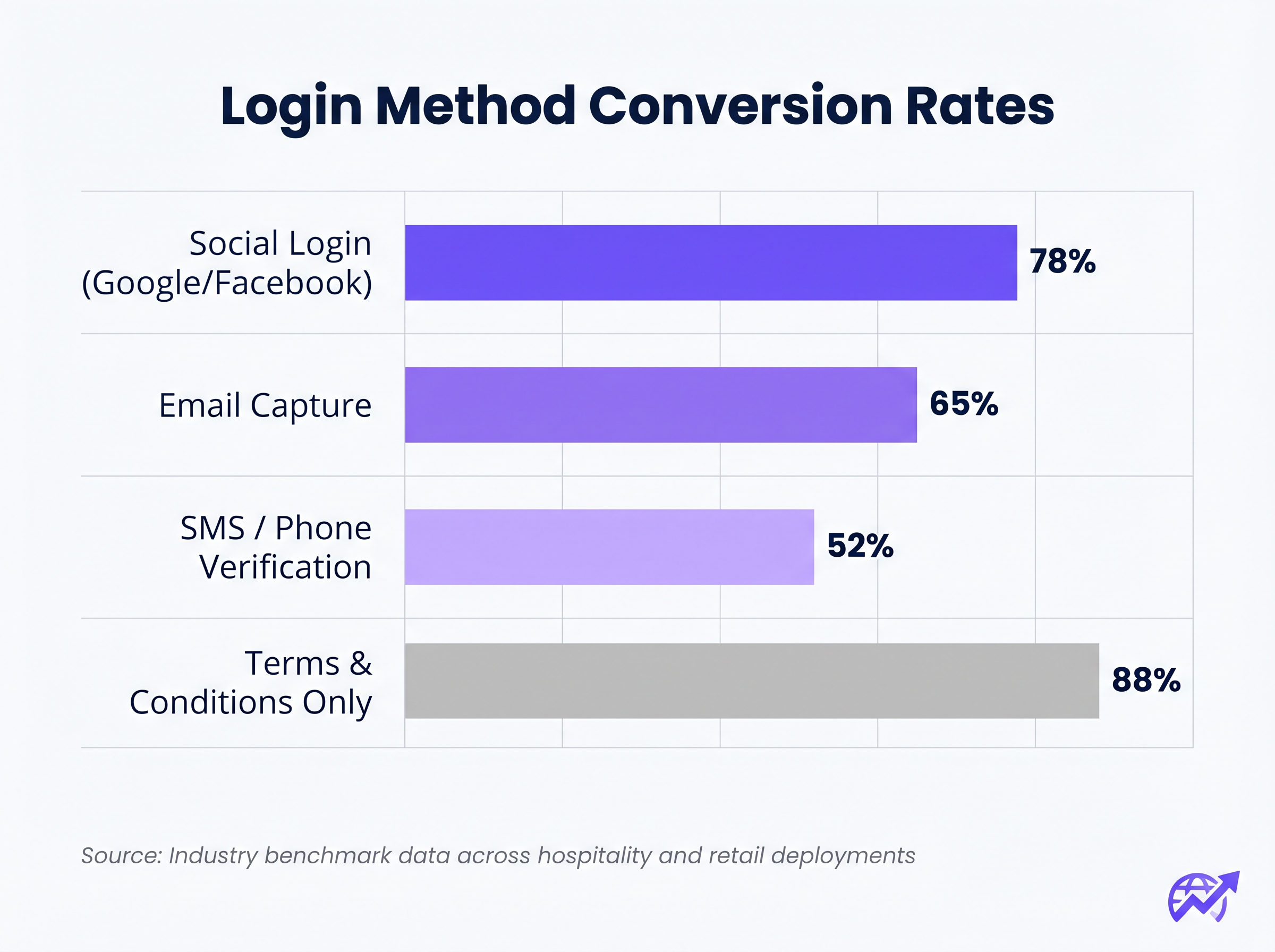
आवश्यक फ़ॉर्म फ़ील्ड की संख्या और ड्रॉप-ऑफ दर के बीच संबंध पूर्ण है। यदि आपका उद्देश्य डेटा कैप्चर है, तो सोशल लॉगिन (Google, Facebook, Apple के माध्यम से OAuth 2.0) का उपयोग करें। यह एक टैप से सत्यापित जनसांख्यिकीय डेटा प्रदान करता है। यदि ईमेल कैप्चर को प्राथमिकता दी जाती है, तो केवल आवश्यक फ़ील्ड की आवश्यकता होती है: पहला नाम, अंतिम नाम और ईमेल पता।
2. मोबाइल प्रतिक्रियाशीलता को प्राथमिकता दें
75% से अधिक Captive Portal प्रमाणीकरण मोबाइल उपकरणों पर होते हैं। लेआउट मोबाइल-फर्स्ट होना चाहिए। प्राथमिक कॉल-टू-एक्शन (CTA) बटन प्रमुख, आसानी से टैप करने योग्य और उपयोगकर्ता को स्क्रॉल करने की आवश्यकता के बिना फोल्ड के ऊपर दिखाई देना चाहिए।
3. लोड समय को अनुकूलित करें
एक पोर्टल जिसे भीड़भाड़ वाले 4G कनेक्शन पर लोड होने में तीन सेकंड से अधिक समय लगता है, उसे भारी परित्याग का सामना करना पड़ेगा। सभी इमेज एसेट को अनुकूलित करें, CSS और JavaScript को छोटा करें, और उपयोगकर्ता के स्थान या नेटवर्क लोड की परवाह किए बिना तेजी से वितरण सुनिश्चित करने के लिए कंटेंट डिलीवरी नेटवर्क (CDN) का लाभ उठाएं।
4. ब्रांड निरंतरता
Captive Portal स्थल के ब्रांड का एक विस्तार है। सुनिश्चित करें कि लोगो स्पष्ट है, टाइपोग्राफी ब्रांड दिशानिर्देशों के अनुरूप है, और प्राथमिक CTA बटन ब्रांड के एक्सेंट रंग का उपयोग करता है। एक दृश्यात्मक रूप से असंबद्ध पोर्टल विश्वास को कम करता है और रूपांतरण दरों को गिराता है।
विशिष्ट वर्टिकल के लिए सर्वोत्तम अभ्यास
विभिन्न उद्योगों के अपने गेस्ट नेटवर्क के लिए अलग-अलग उद्देश्य होते हैं, जिसके लिए पोर्टल डिज़ाइन के लिए अनुकूलित दृष्टिकोण की आवश्यकता होती है।
हॉस्पिटैलिटी
In thई हॉस्पिटैलिटी सेक्टर में, Captive Portal को प्रॉपर्टी मैनेजमेंट सिस्टम (PMS) के साथ सहजता से एकीकृत होना चाहिए। मेहमानों को उनके कमरे के नंबर और उपनाम के आधार पर प्रमाणित करने से एक घर्षण-रहित अनुभव मिलता है, साथ ही यह भी सुनिश्चित होता है कि केवल भुगतान करने वाले मेहमानों को ही प्रीमियम बैंडविड्थ टियर तक पहुंच मिले। लॉगिन के बाद, उपयोगकर्ताओं को एक डायनामिक लैंडिंग पेज पर रीडायरेक्ट करें जो ऑन-साइट सुविधाओं जैसे स्पा सेवाओं या रेस्तरां बुकिंग को बढ़ावा देता है।
रिटेल
रिटेल वातावरण के लिए, CRM और मार्केटिंग ऑटोमेशन प्लेटफॉर्म को बढ़ावा देने के लिए तीव्र डेटा अधिग्रहण पर ध्यान केंद्रित किया जाता है। सोशल लॉगिन यहां अत्यधिक प्रभावी है। लॉगिन के बाद रीडायरेक्ट से तत्काल मूल्य दिखना चाहिए, जैसे कि एक डिजिटल कूपन या रिटेलर के मोबाइल एप्लिकेशन को डाउनलोड करने का संकेत।
समस्या निवारण और जोखिम न्यूनीकरण
यहां तक कि अच्छी तरह से डिज़ाइन किए गए पोर्टल भी विफल हो सकते हैं यदि अंतर्निहित बुनियादी ढांचा गलत तरीके से कॉन्फ़िगर किया गया हो।
- वॉल्ड गार्डन गलत कॉन्फ़िगरेशन: सोशल लॉगिन (जैसे Facebook, Google) का उपयोग करते समय, संबंधित डोमेन को वॉल्ड गार्डन के भीतर स्पष्ट रूप से श्वेतसूचीबद्ध किया जाना चाहिए। ऐसा करने में विफलता के कारण OAuth प्रवाह चुपचाप विफल हो जाएगा, जिससे उपयोगकर्ता लॉगिन पेज पर फंस जाएगा।
- Captive Portal Assistant (CPA) समस्याएँ: आधुनिक ऑपरेटिंग सिस्टम वॉल्ड गार्डन का स्वचालित रूप से पता लगाने और एक मिनी-ब्राउज़र पॉप अप करने के लिए CPA (जैसे Apple का Captive Network Assistant) का उपयोग करते हैं। सुनिश्चित करें कि आपका पोर्टल इन प्रतिबंधित ब्राउज़रों के साथ संगत है, जिनमें अक्सर कुकीज़ या उन्नत JavaScript के लिए समर्थन की कमी होती है।
- DHCP समाप्ति: स्टेडियम या सम्मेलन केंद्रों जैसे उच्च-घनत्व वाले वातावरण में, सुनिश्चित करें कि आपका DHCP स्कोप तीव्र क्लाइंट टर्नओवर को संभालने के लिए पर्याप्त आकार का है। एक समाप्त DHCP पूल उपकरणों को Captive Portal तक पहुंचने से भी रोकेगा।
ROI और व्यावसायिक प्रभाव
एक उच्च-परिवर्तनशील Captive Portal IT खर्च को मापने योग्य व्यावसायिक मूल्य में बदल देता है। पोर्टल को एक मजबूत WiFi Analytics प्लेटफॉर्म के साथ एकीकृत करके, स्थल ट्रैक कर सकते हैं:
- प्रमाणीकरण सफलता दर: प्राथमिक KPI, पूर्ण किए गए लॉगिन को कुल पोर्टल इंप्रेशन से विभाजित करके गणना की जाती है।
- डेटाबेस वृद्धि: CRM में जोड़े गए सत्यापित, ऑप्ट-इन संपर्कों की मात्रा।
- ठहरने का समय और वापसी दरें: WiFi प्रमाणीकरण को भौतिक उपस्थिति मेट्रिक्स के साथ सहसंबंधित करना।
समाधानों का मूल्यांकन करते समय, यह सुनिश्चित करने के लिए The Best Captive Portal Software in 2026: A Comparison Guide जैसे संसाधनों से परामर्श करें कि चुना गया प्लेटफॉर्म आवश्यक एकीकरण और स्केलेबिलिटी आवश्यकताओं का समर्थन करता है।
मुख्य शब्द और परिभाषाएं
Captive Portal
A web page that a user of a public-access network is obliged to view and interact with before access is granted.
The primary interface for managing guest network access, enforcing terms of service, and capturing user data.
Walled Garden
A restricted network environment that allows access only to specific, pre-approved web pages or services prior to full authentication.
Essential for allowing the device to reach the captive portal server and external identity providers (like Google) without granting full internet access.
RADIUS (Remote Authentication Dial-In User Service)
A networking protocol that provides centralised Authentication, Authorization, and Accounting (AAA) management.
The backend engine that verifies the user's credentials against a database and tells the controller whether to grant access.
MAC Authentication Bypass (MAB)
A mechanism where the network authenticates a device based on its MAC address rather than requiring user credentials.
Used to allow returning guests to seamlessly reconnect to the network without having to view the captive portal again.
VLAN (Virtual Local Area Network)
A logical subnetwork that groups a collection of devices from different physical LANs.
Crucial for security; guest traffic must be isolated on a separate VLAN to prevent access to corporate resources.
WPA3
The latest generation of Wi-Fi security, providing robust encryption and enhanced protection against brute-force attacks.
The required security standard for modern wireless deployments to ensure data transmitted over the air is protected.
HTTP 302 Redirect
A standard HTTP response status code indicating that the requested resource resides temporarily under a different URI.
The mechanism used by the Wireless LAN Controller to force the user's browser to load the captive portal page.
OAuth 2.0
An industry-standard protocol for authorization, enabling applications to obtain limited access to user accounts on an HTTP service.
The underlying technology that powers 'Social Login' options like 'Continue with Google' or 'Continue with Facebook'.
केस स्टडीज
A 300-room resort hotel is experiencing a 45% drop-off rate on their guest WiFi login page. The current portal requires guests to manually enter their Title, First Name, Last Name, Email, Phone Number, Date of Birth, and Home Address before clicking 'Connect'.
The portal must be redesigned to eliminate friction. The solution is to integrate the captive portal with the hotel's Property Management System (PMS). The new authentication flow requires only two fields: 'Room Number' and 'Guest Surname'. Upon submission, the RADIUS server queries the PMS via API. If a match is found, access is granted. For non-resident guests (e.g., conference attendees or restaurant patrons), a secondary 'Social Login' option is provided.
A national retail chain wants to implement social login via Facebook and Google on their captive portal. However, during pilot testing, users tap the 'Continue with Google' button, but the page simply hangs, and authentication fails.
The network architect must update the 'Walled Garden' configuration on the Wireless LAN Controllers across all pilot stores. The domains and IP ranges associated with Google and Facebook's OAuth authentication servers must be explicitly whitelisted. This allows the client device to communicate with the identity provider before full network access is granted.
परिदृश्य विश्लेषण
Q1. You are deploying a new guest WiFi network for a chain of coffee shops. The marketing director insists on collecting Name, Email, Phone Number, Date of Birth, and Postcode on the captive portal to build a comprehensive customer database. As the IT Manager, how do you advise them?
💡 संकेत:Consider the relationship between form length and abandonment rate, particularly in a high-turnover environment like a coffee shop.
अनुशंसित दृष्टिकोण दिखाएं
Advise the marketing director that requiring five fields of manual data entry will result in a massive abandonment rate, severely limiting the total volume of data collected. Recommend implementing Social Login (Google/Facebook) as the primary option, which securely captures demographic data with a single tap. Alternatively, suggest a progressive profiling approach: capture only Email on the first visit, and request additional details on subsequent visits via automated email campaigns.
Q2. A hospital is updating its guest WiFi. They want to ensure patients and visitors have easy access, but the Information Security Officer is concerned about the legal implications of an open network and data privacy. What architecture do you propose?
💡 संकेत:Address both the over-the-air encryption requirement and the data processing compliance requirement.
अनुशंसित दृष्टिकोण दिखाएं
Deploy the guest network using WPA3-Personal (or WPA3 OWE - Opportunistic Wireless Encryption) to ensure over-the-air traffic is encrypted, protecting users from eavesdropping without requiring complex enterprise authentication. Implement a captive portal that requires explicit, opt-in consent for the Terms of Service to address liability. Do not collect unnecessary personal data (use a simple click-through or anonymous MAC authentication) to minimise GDPR exposure, and ensure the guest VLAN is strictly isolated from the clinical network.
Q3. After deploying a captive portal that includes a credit card payment gateway for premium bandwidth, users report that the payment page fails to load, though the initial portal page loads fine. What is the most likely cause?
💡 संकेत:Consider how the device communicates with external servers before full authentication is granted.
अनुशंसित दृष्टिकोण दिखाएं
The domains and IP addresses associated with the third-party payment gateway have not been whitelisted in the Wireless LAN Controller's walled garden. Because the device is not yet fully authenticated, the controller blocks the outbound traffic to the payment processor, causing the page to hang. The solution is to add the payment gateway's URLs to the walled garden configuration.




