

Conception de Captive Portal : Comment créer une expérience de connexion à fort taux de conversion
Ce guide de référence technique faisant autorité détaille comment concevoir, sécuriser et optimiser les Captive Portals pour le WiFi invité d'entreprise. Il fournit des recommandations exploitables aux responsables informatiques et aux opérateurs de sites pour maximiser les taux d'achèvement de connexion tout en garantissant la conformité au GDPR et une sécurité réseau robuste.
🎧 Écouter ce guide
Voir la transcription
Résumé Exécutif
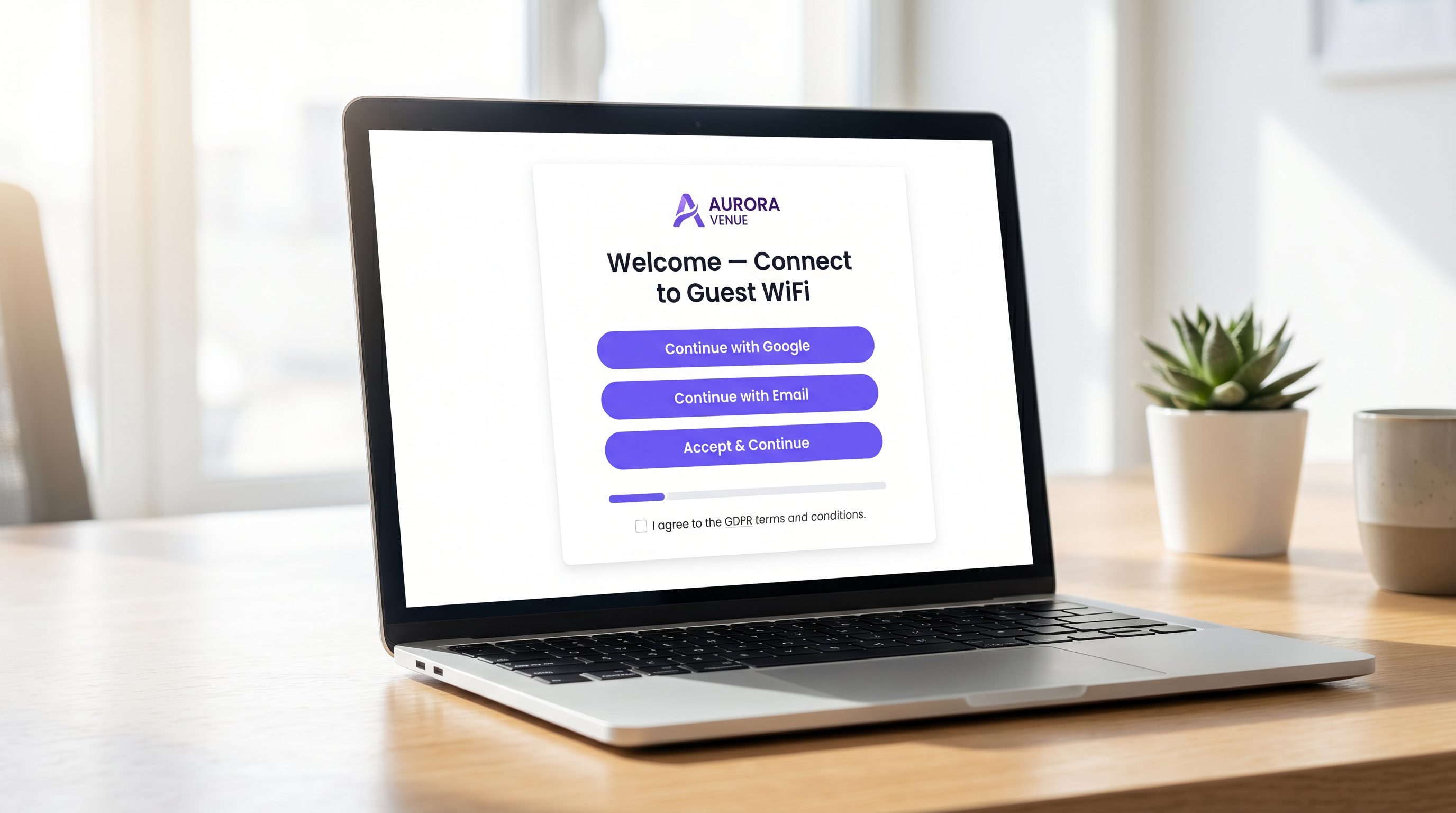
Pour les opérateurs de sites d'entreprise, le Captive Portal représente la porte d'entrée numérique essentielle. C'est le moment où l'infrastructure réseau rencontre la stratégie commerciale. Un Captive Portal mal conçu crée des frictions, entraîne l'abandon et ne parvient pas à capitaliser sur l'opportunité de construire une base de données vérifiée de première partie. Inversement, un Captive Portal hautement optimisé transforme un service de base — WiFi invité — en un actif mesurable générant des revenus.
Ce guide fournit aux responsables informatiques, aux architectes réseau et aux CTO un plan technique neutre vis-à-vis des fournisseurs pour concevoir une expérience de connexion à fort taux de conversion. Nous couvrons l'architecture d'authentification sous-jacente, les impératifs de sécurité incluant WPA3 et IEEE 802.1X, les cadres de conformité GDPR et la conception d'interface utilisateur optimisée pour la conversion. En appliquant ces principes, les sites des secteurs de l' Hôtellerie , du Commerce de détail et des secteurs publics peuvent augmenter considérablement les taux d'authentification, sécuriser leurs réseaux et générer un ROI mesurable grâce à des plateformes comme WiFi Analytics .
Plongée Technique : Architecture et Authentification
Comprendre les mécanismes d'un Captive Portal est essentiel pour optimiser ses performances. Lorsqu'un utilisateur se connecte à un SSID invité, son appareil est placé dans un VLAN restreint, communément appelé "jardin clos". Cet état permet un accès réseau limité — spécifiquement, la résolution DNS et le trafic HTTP/HTTPS dirigés vers le serveur du Captive Portal.
Le processus d'interception et de redirection est géré par le contrôleur de réseau local sans fil (WLC) ou le point d'accès lui-même. Lorsque l'utilisateur tente de naviguer sur le web, le contrôleur intercepte la requête et émet une redirection HTTP 302, forçant le navigateur de l'utilisateur à charger la page du portail.
Une fois que l'utilisateur a sélectionné une méthode d'authentification et soumis ses identifiants, le portail communique avec un serveur RADIUS (Remote Authentication Dial-In User Service). Le serveur RADIUS valide les identifiants par rapport à une base de données backend — qui pourrait être un magasin d'utilisateurs local, un système de gestion immobilière (PMS) ou une plateforme CRM. Après une validation réussie, le serveur RADIUS envoie un message Access-Accept au contrôleur, autorisant l'adresse MAC de l'appareil pour un accès réseau complet.
Impératifs de Sécurité et de Conformité
La sécurité ne peut être compromise dans la quête de taux de conversion plus élevés. Les déploiements doivent respecter des normes strictes pour protéger à la fois l'utilisateur et le site.
- Normes de Chiffrement : Les réseaux invités ouverts et non chiffrés représentent une responsabilité importante. WPA3 est la norme industrielle actuelle et devrait être obligatoire pour tous les nouveaux déploiements. Pour les environnements existants, WPA2-Enterprise avec chiffrement AES est la norme minimale acceptable.
- Segmentation du Réseau : Le trafic invité doit être strictement isolé des réseaux d'entreprise et opérationnels à l'aide de VLANs et de règles de pare-feu appropriées.
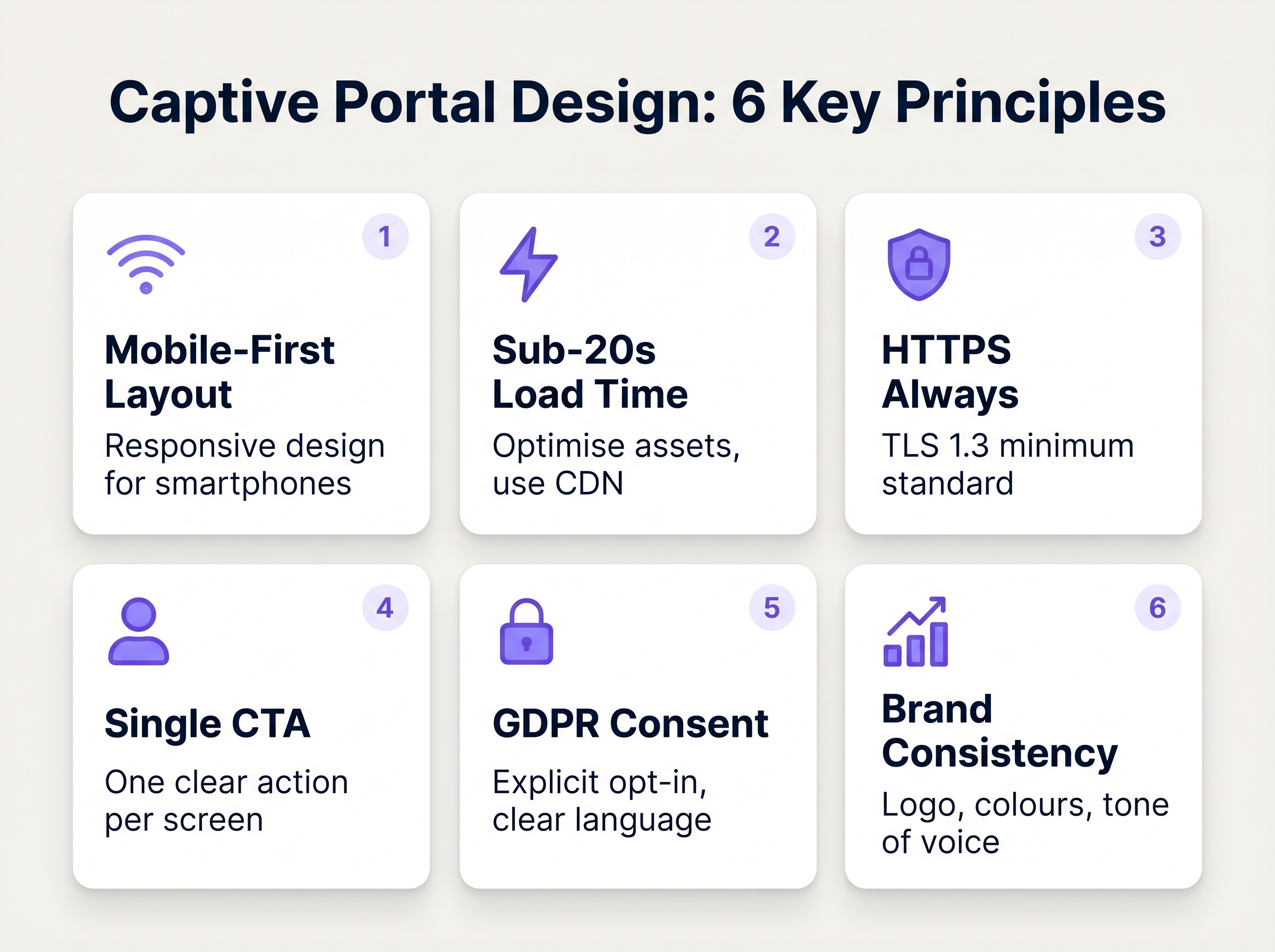
- Application du HTTPS : Le Captive Portal doit être servi via HTTPS en utilisant TLS 1.3. Servir un portail via HTTP simple expose les utilisateurs à l'interception d'identifiants via des attaques de l'homme du milieu.
- GDPR et Confidentialité des Données : Lors de la collecte de données personnelles de citoyens de l'UE ou du Royaume-Uni, un consentement explicite et univoque est requis. Les cases pré-cochées ne sont pas conformes. Les sites doivent fournir une politique de confidentialité claire, un mécanisme de désabonnement pour les communications marketing et une stratégie robuste de conservation des données.
Guide d'Implémentation : Optimisation de l'Expérience de Connexion
La conception de l'interface du portail dicte directement le taux de conversion. Chaque seconde supplémentaire de temps de chargement et chaque champ de formulaire superflu augmente exponentiellement le taux d'abandon.
1. Minimiser les Frictions et les Champs de Formulaire
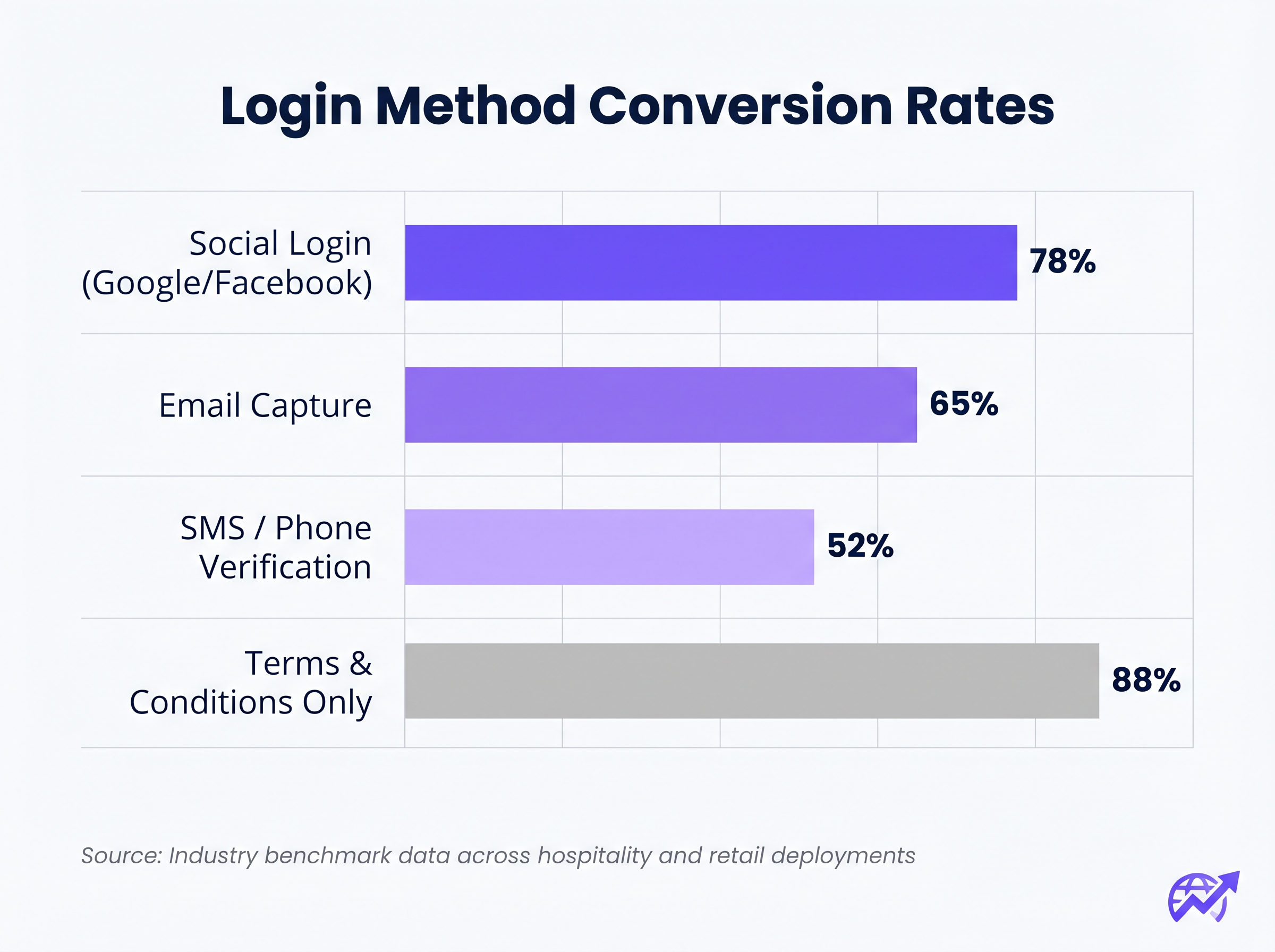
La corrélation entre le nombre de champs de formulaire requis et le taux d'abandon est absolue. Si votre objectif est la capture de données, utilisez la Connexion Sociale (OAuth 2.0 via Google, Facebook, Apple). Cela fournit des données démographiques vérifiées en un seul clic. Si la capture d'e-mails est préférée, ne demandez que les champs essentiels : Prénom, Nom de famille et Adresse e-mail.
2. Prioriser la Réactivité Mobile
Plus de 75 % des authentifications de Captive Portal se produisent sur des appareils mobiles. La mise en page doit être mobile-first. Le bouton d'appel à l'action (CTA) principal doit être proéminent, facilement cliquable et visible au-dessus du pli sans que l'utilisateur n'ait à faire défiler.
3. Optimiser les Temps de Chargement
Un portail qui prend plus de trois secondes à charger sur une connexion 4G encombrée subira un abandon massif. Optimisez tous les actifs d'image, minifiez le CSS et le JavaScript, et utilisez un réseau de diffusion de contenu (CDN) pour assurer une livraison rapide quelle que soit la localisation de l'utilisateur ou la charge du réseau.
4. Cohérence de la Marque
Le Captive Portal est une extension de la marque du site. Assurez-vous que le logo est net, que la typographie est conforme aux directives de la marque et que le bouton CTA principal utilise la couleur d'accentuation de la marque. Un portail visuellement incohérent érode la confiance et diminue les taux de conversion.
Bonnes Pratiques pour des Secteurs Spécifiques
Différentes industries ont des objectifs distincts pour leurs réseaux invités, nécessitant des approches adaptées à la conception du portail.
Hôtellerie
Dans l'le secteur de l' Hôtellerie , le Captive Portal doit s'intégrer de manière transparente au système de gestion immobilière (PMS). L'authentification des clients par leur numéro de chambre et leur nom de famille offre une expérience fluide tout en garantissant que seuls les clients payants accèdent aux niveaux de bande passante premium. Après la connexion, redirigez les utilisateurs vers une page de destination dynamique faisant la promotion des commodités sur place, telles que les services de spa ou les réservations de restaurant.
Commerce de détail
Pour les environnements de Commerce de détail , l'accent est mis sur l'acquisition rapide de données pour alimenter les plateformes de CRM et d'automatisation du marketing. La connexion sociale est très efficace ici. La redirection après connexion doit faire apparaître une valeur immédiate, telle qu'un coupon numérique ou une invitation à télécharger l'application mobile du détaillant.
Dépannage et atténuation des risques
Même les portails bien conçus peuvent échouer si l'infrastructure sous-jacente est mal configurée.
- Mauvaise configuration du Walled Garden : Lors de l'utilisation de la connexion sociale (par exemple, Facebook, Google), les domaines respectifs doivent être explicitement mis sur liste blanche dans le walled garden. Ne pas le faire entraînera l'échec silencieux du flux OAuth, piégeant l'utilisateur sur la page de connexion.
- Problèmes d'Assistant de Captive Portal (CPA) : Les systèmes d'exploitation modernes utilisent des CPA (comme l'Assistant de réseau Captive d'Apple) pour détecter automatiquement les walled gardens et faire apparaître un mini-navigateur. Assurez-vous que votre portail est compatible avec ces navigateurs restreints, qui manquent souvent de prise en charge des cookies ou du JavaScript avancé.
- Épuisement DHCP : Dans les environnements à haute densité comme les stades ou les centres de conférence, assurez-vous que votre portée DHCP est dimensionnée de manière adéquate pour gérer un renouvellement rapide des clients. Un pool DHCP épuisé empêchera les appareils d'atteindre le Captive Portal.
ROI et impact commercial
Un Captive Portal à fort taux de conversion transforme les dépenses IT en valeur commerciale mesurable. En intégrant le portail à une plateforme robuste de WiFi Analytics , les lieux peuvent suivre :
- Taux de réussite de l'authentification : Le KPI principal, calculé comme le nombre de connexions terminées divisé par le total des impressions du portail.
- Croissance de la base de données : Le volume de contacts vérifiés et opt-in ajoutés au CRM.
- Temps de présence et taux de retour : Corrélation de l'authentification WiFi avec les métriques de présence physique.
Lors de l'évaluation des solutions, consultez des ressources telles que Le meilleur logiciel de Captive Portal en 2026 : Un guide comparatif pour vous assurer que la plateforme choisie prend en charge les intégrations nécessaires et les exigences de scalabilité.
Termes clés et définitions
Captive Portal
A web page that a user of a public-access network is obliged to view and interact with before access is granted.
The primary interface for managing guest network access, enforcing terms of service, and capturing user data.
Walled Garden
A restricted network environment that allows access only to specific, pre-approved web pages or services prior to full authentication.
Essential for allowing the device to reach the captive portal server and external identity providers (like Google) without granting full internet access.
RADIUS (Remote Authentication Dial-In User Service)
A networking protocol that provides centralised Authentication, Authorization, and Accounting (AAA) management.
The backend engine that verifies the user's credentials against a database and tells the controller whether to grant access.
MAC Authentication Bypass (MAB)
A mechanism where the network authenticates a device based on its MAC address rather than requiring user credentials.
Used to allow returning guests to seamlessly reconnect to the network without having to view the captive portal again.
VLAN (Virtual Local Area Network)
A logical subnetwork that groups a collection of devices from different physical LANs.
Crucial for security; guest traffic must be isolated on a separate VLAN to prevent access to corporate resources.
WPA3
The latest generation of Wi-Fi security, providing robust encryption and enhanced protection against brute-force attacks.
The required security standard for modern wireless deployments to ensure data transmitted over the air is protected.
HTTP 302 Redirect
A standard HTTP response status code indicating that the requested resource resides temporarily under a different URI.
The mechanism used by the Wireless LAN Controller to force the user's browser to load the captive portal page.
OAuth 2.0
An industry-standard protocol for authorization, enabling applications to obtain limited access to user accounts on an HTTP service.
The underlying technology that powers 'Social Login' options like 'Continue with Google' or 'Continue with Facebook'.
Études de cas
A 300-room resort hotel is experiencing a 45% drop-off rate on their guest WiFi login page. The current portal requires guests to manually enter their Title, First Name, Last Name, Email, Phone Number, Date of Birth, and Home Address before clicking 'Connect'.
The portal must be redesigned to eliminate friction. The solution is to integrate the captive portal with the hotel's Property Management System (PMS). The new authentication flow requires only two fields: 'Room Number' and 'Guest Surname'. Upon submission, the RADIUS server queries the PMS via API. If a match is found, access is granted. For non-resident guests (e.g., conference attendees or restaurant patrons), a secondary 'Social Login' option is provided.
A national retail chain wants to implement social login via Facebook and Google on their captive portal. However, during pilot testing, users tap the 'Continue with Google' button, but the page simply hangs, and authentication fails.
The network architect must update the 'Walled Garden' configuration on the Wireless LAN Controllers across all pilot stores. The domains and IP ranges associated with Google and Facebook's OAuth authentication servers must be explicitly whitelisted. This allows the client device to communicate with the identity provider before full network access is granted.
Analyse de scénario
Q1. You are deploying a new guest WiFi network for a chain of coffee shops. The marketing director insists on collecting Name, Email, Phone Number, Date of Birth, and Postcode on the captive portal to build a comprehensive customer database. As the IT Manager, how do you advise them?
💡 Astuce :Consider the relationship between form length and abandonment rate, particularly in a high-turnover environment like a coffee shop.
Afficher l'approche recommandée
Advise the marketing director that requiring five fields of manual data entry will result in a massive abandonment rate, severely limiting the total volume of data collected. Recommend implementing Social Login (Google/Facebook) as the primary option, which securely captures demographic data with a single tap. Alternatively, suggest a progressive profiling approach: capture only Email on the first visit, and request additional details on subsequent visits via automated email campaigns.
Q2. A hospital is updating its guest WiFi. They want to ensure patients and visitors have easy access, but the Information Security Officer is concerned about the legal implications of an open network and data privacy. What architecture do you propose?
💡 Astuce :Address both the over-the-air encryption requirement and the data processing compliance requirement.
Afficher l'approche recommandée
Deploy the guest network using WPA3-Personal (or WPA3 OWE - Opportunistic Wireless Encryption) to ensure over-the-air traffic is encrypted, protecting users from eavesdropping without requiring complex enterprise authentication. Implement a captive portal that requires explicit, opt-in consent for the Terms of Service to address liability. Do not collect unnecessary personal data (use a simple click-through or anonymous MAC authentication) to minimise GDPR exposure, and ensure the guest VLAN is strictly isolated from the clinical network.
Q3. After deploying a captive portal that includes a credit card payment gateway for premium bandwidth, users report that the payment page fails to load, though the initial portal page loads fine. What is the most likely cause?
💡 Astuce :Consider how the device communicates with external servers before full authentication is granted.
Afficher l'approche recommandée
The domains and IP addresses associated with the third-party payment gateway have not been whitelisted in the Wireless LAN Controller's walled garden. Because the device is not yet fully authenticated, the controller blocks the outbound traffic to the payment processor, causing the page to hang. The solution is to add the payment gateway's URLs to the walled garden configuration.




