

Diseño de Captive Portal: Cómo Crear una Experiencia de Inicio de Sesión de Alta Conversión
Esta guía de referencia técnica autorizada detalla cómo diseñar, asegurar y optimizar los captive portals para el WiFi de invitados empresarial. Ofrece recomendaciones prácticas para gerentes de TI y operadores de recintos para maximizar las tasas de finalización de inicio de sesión mientras se garantiza el cumplimiento del GDPR y una seguridad de red robusta.
🎧 Escucha esta guía
Ver transcripción
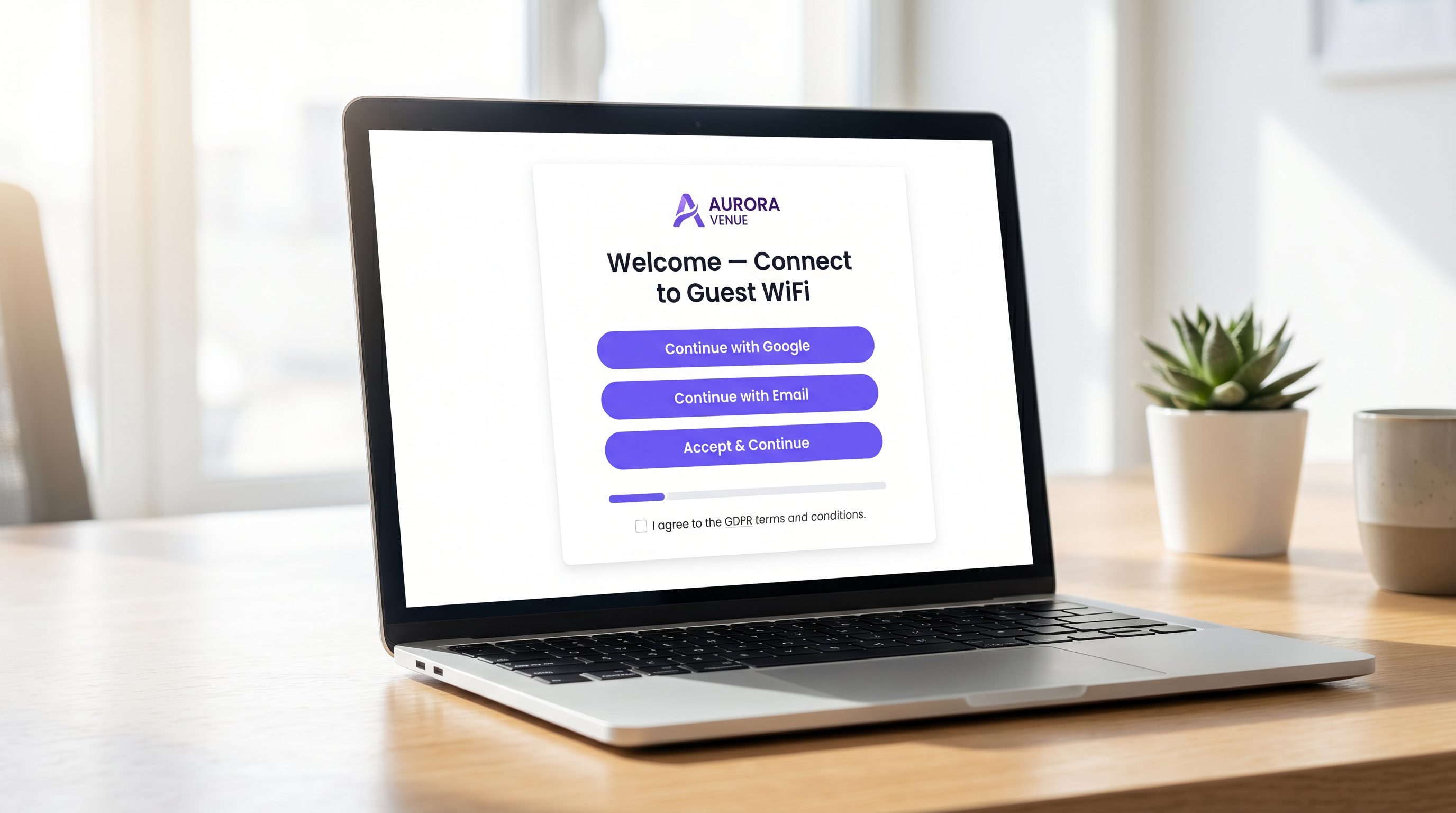
Resumen Ejecutivo
Para los operadores de recintos empresariales, el captive portal representa la puerta de entrada digital crítica. Es el momento en que la infraestructura de red se cruza con la estrategia comercial. Un captive portal mal diseñado crea fricción, impulsa el abandono y no logra capitalizar la oportunidad de construir una base de datos verificada de primera parte. Por el contrario, un captive portal altamente optimizado transforma una utilidad básica — WiFi de Invitados — en un activo medible generador de ingresos.
Esta guía proporciona a gerentes de TI, arquitectos de red y CTOs un plan técnico, neutral en cuanto a proveedores, para diseñar una experiencia de inicio de sesión de alta conversión. Cubrimos la arquitectura de autenticación subyacente, los imperativos de seguridad, incluyendo WPA3 e IEEE 802.1X, los marcos de cumplimiento del GDPR y el diseño de la interfaz de usuario optimizado para la conversión. Al aplicar estos principios, los recintos de los sectores de Hostelería , Minorista y público pueden aumentar significativamente las tasas de autenticación, asegurar sus redes y generar un ROI medible a través de plataformas como WiFi Analytics .
Análisis Técnico Detallado: Arquitectura y Autenticación
Comprender la mecánica de un captive portal es esencial para optimizar su rendimiento. Cuando un usuario se conecta a un SSID de invitado, su dispositivo se coloca en una VLAN restringida, comúnmente conocida como "jardín vallado". Este estado permite un acceso limitado a la red —específicamente, resolución de DNS y tráfico HTTP/HTTPS dirigido al servidor del captive portal.
El proceso de intercepción y redirección es gestionado por el Controlador de Red de Área Local Inalámbrica (WLC) o el propio punto de acceso. Cuando el usuario intenta navegar por la web, el controlador intercepta la solicitud y emite una redirección HTTP 302, forzando al navegador del usuario a cargar la página del portal.
Una vez que el usuario selecciona un método de autenticación y envía sus credenciales, el portal se comunica con un servidor RADIUS (Remote Authentication Dial-In User Service). El servidor RADIUS valida las credenciales contra una base de datos de backend —que podría ser un almacén de usuarios local, un Sistema de Gestión de Propiedades (PMS) o una plataforma CRM. Tras una validación exitosa, el servidor RADIUS envía un mensaje de Access-Accept al controlador, autorizando la dirección MAC del dispositivo para un acceso completo a la red.
Imperativos de Seguridad y Cumplimiento
La seguridad no puede comprometerse en la búsqueda de tasas de conversión más altas. Las implementaciones deben adherirse a estándares estrictos para proteger tanto al usuario como al recinto.
- Estándares de Cifrado: Las redes de invitados abiertas y sin cifrar son una responsabilidad significativa. WPA3 es el estándar actual de la industria y debe ser obligatorio para todas las nuevas implementaciones. Para entornos heredados, WPA2-Enterprise con cifrado AES es el estándar mínimo aceptable.
- Segmentación de Red: El tráfico de invitados debe estar estrictamente aislado de las redes corporativas y operacionales utilizando VLANs y reglas de firewall apropiadas.
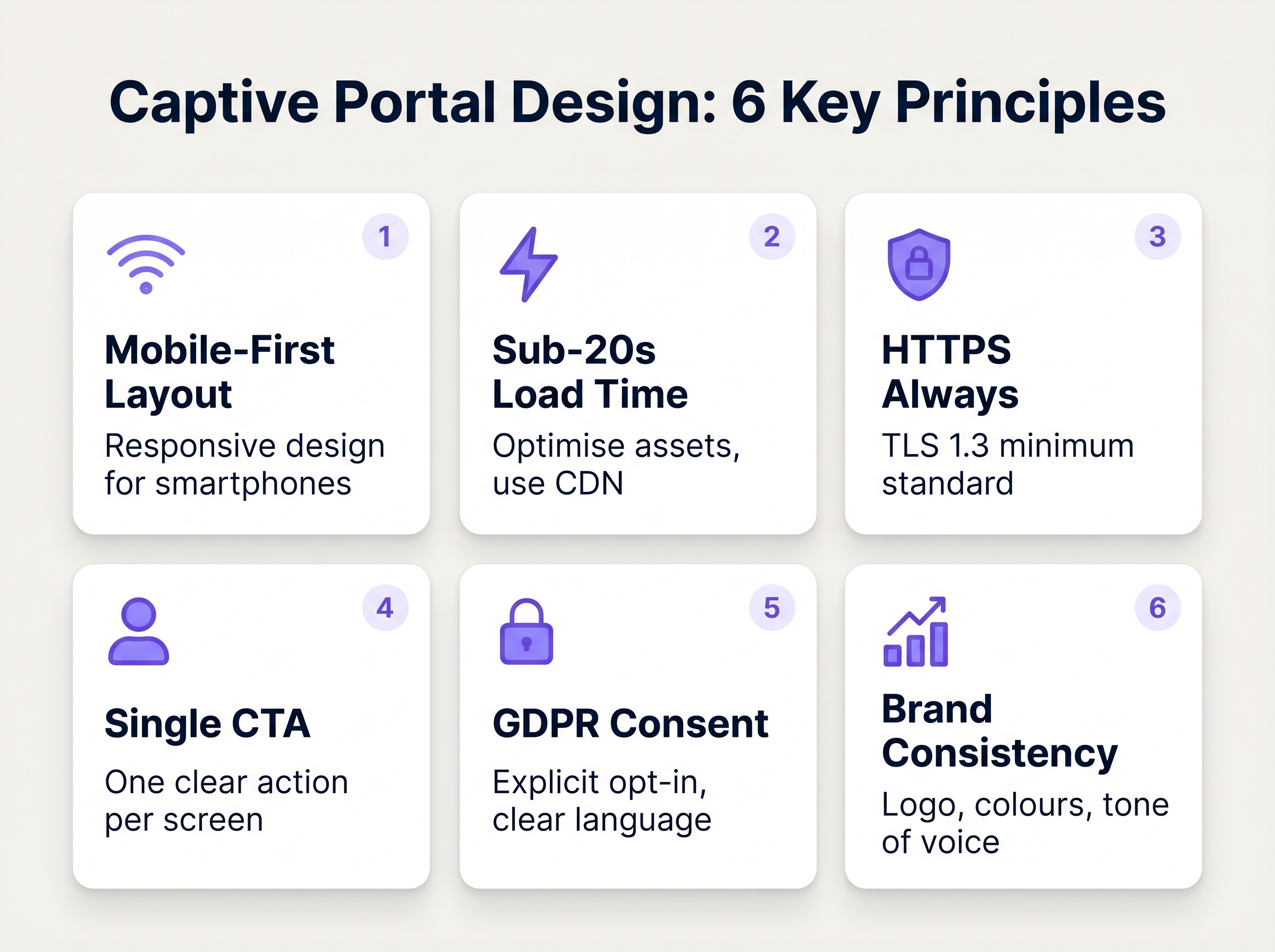
- Aplicación de HTTPS: El captive portal debe servirse a través de HTTPS utilizando TLS 1.3. Servir un portal a través de HTTP simple expone a los usuarios a la intercepción de credenciales mediante ataques de intermediario.
- GDPR y Privacidad de Datos: Al recopilar datos personales de ciudadanos de la UE o del Reino Unido, se requiere un consentimiento explícito e inequívoco. Las casillas premarcadas no cumplen con la normativa. Los recintos deben proporcionar una política de privacidad clara, un mecanismo de exclusión voluntaria para las comunicaciones de marketing y una estrategia robusta de retención de datos.
Guía de Implementación: Optimización de la Experiencia de Inicio de Sesión
El diseño de la interfaz del portal dicta directamente la tasa de conversión. Cada segundo adicional de tiempo de carga y cada campo de formulario superfluo aumenta exponencialmente la tasa de abandono.
1. Minimizar la Fricción y los Campos del Formulario
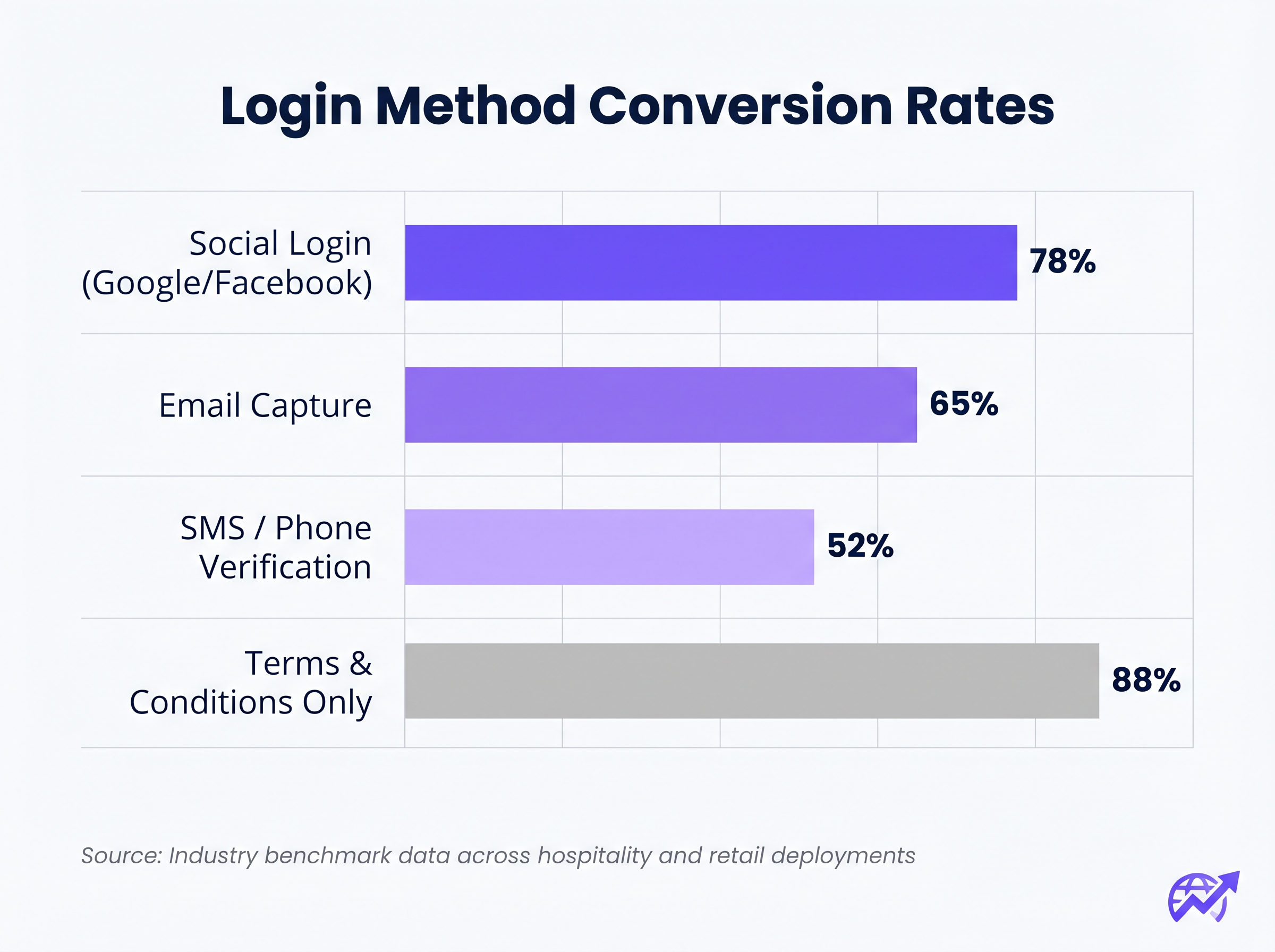
La correlación entre el número de campos de formulario requeridos y la tasa de abandono es absoluta. Si su objetivo es la captura de datos, utilice el Inicio de Sesión Social (OAuth 2.0 a través de Google, Facebook, Apple). Esto proporciona datos demográficos verificados con un solo toque. Si se prefiere la captura de correo electrónico, solicite solo los campos esenciales: Nombre, Apellido y Dirección de Correo Electrónico.
2. Priorizar la Adaptabilidad Móvil
Más del 75% de las autenticaciones de captive portal ocurren en dispositivos móviles. El diseño debe ser mobile-first. El botón principal de Llamada a la Acción (CTA) debe ser prominente, fácil de tocar y visible sin necesidad de que el usuario se desplace.
3. Optimizar los Tiempos de Carga
Un portal que tarda más de tres segundos en cargar en una conexión 4G congestionada sufrirá un abandono masivo. Optimice todos los activos de imagen, minimice CSS y JavaScript, y aproveche una Red de Entrega de Contenido (CDN) para asegurar una entrega rápida independientemente de la ubicación del usuario o la carga de la red.
4. Consistencia de Marca
El captive portal es una extensión de la marca del recinto. Asegúrese de que el logotipo sea nítido, la tipografía se alinee con las directrices de la marca y el botón principal de CTA utilice el color de acento de la marca. Un portal visualmente desarticulado erosiona la confianza y deprime las tasas de conversión.
Mejores Prácticas para Sectores Específicos
Diferentes industrias tienen objetivos distintos para sus redes de invitados, lo que requiere enfoques personalizados para el diseño del portal.
Hostelería
En laEn el sector de Hospitalidad , el Captive Portal debe integrarse sin problemas con el Sistema de Gestión de Propiedades (PMS). Autenticar a los huéspedes con su número de habitación y apellido proporciona una experiencia sin fricciones, al tiempo que garantiza que solo los huéspedes de pago accedan a los niveles de ancho de banda premium. Después de iniciar sesión, redirija a los usuarios a una página de destino dinámica que promocione los servicios del hotel, como servicios de spa o reservas en restaurantes.
Retail
Para entornos de Retail , el enfoque es la adquisición rápida de datos para alimentar las plataformas de CRM y automatización de marketing. El inicio de sesión social es muy efectivo aquí. La redirección posterior al inicio de sesión debe mostrar un valor inmediato, como un cupón digital o una invitación para descargar la aplicación móvil del minorista.
Solución de Problemas y Mitigación de Riesgos
Incluso los portales bien diseñados pueden fallar si la infraestructura subyacente está mal configurada.
- Mala configuración del Walled Garden: Al utilizar el inicio de sesión social (por ejemplo, Facebook, Google), los dominios respectivos deben estar explícitamente en la lista blanca dentro del walled garden. Si no se hace, el flujo de OAuth fallará silenciosamente, atrapando al usuario en la página de inicio de sesión.
- Problemas con el Captive Portal Assistant (CPA): Los sistemas operativos modernos utilizan CPAs (como el Captive Network Assistant de Apple) para detectar automáticamente los walled gardens y abrir un mini-navegador. Asegúrese de que su portal sea compatible con estos navegadores restringidos, que a menudo carecen de soporte para cookies o JavaScript avanzado.
- Agotamiento de DHCP: En entornos de alta densidad como estadios o centros de conferencias, asegúrese de que su alcance de DHCP tenga un tamaño adecuado para manejar una rápida rotación de clientes. Un pool de DHCP agotado impedirá que los dispositivos lleguen al Captive Portal.
ROI e Impacto Comercial
Un Captive Portal de alta conversión transforma el gasto de TI en valor comercial medible. Al integrar el portal con una sólida plataforma de WiFi Analytics , los establecimientos pueden rastrear:
- Tasa de éxito de autenticación: El KPI principal, calculado como inicios de sesión completados divididos por el total de impresiones del portal.
- Crecimiento de la base de datos: El volumen de contactos verificados y con consentimiento añadido al CRM.
- Tiempo de permanencia y tasas de retorno: Correlacionar la autenticación WiFi con las métricas de presencia física.
Al evaluar soluciones, consulte recursos como El Mejor Software de Captive Portal en 2026: Una Guía Comparativa para asegurarse de que la plataforma elegida admita las integraciones necesarias y los requisitos de escalabilidad.
Términos clave y definiciones
Captive Portal
A web page that a user of a public-access network is obliged to view and interact with before access is granted.
The primary interface for managing guest network access, enforcing terms of service, and capturing user data.
Walled Garden
A restricted network environment that allows access only to specific, pre-approved web pages or services prior to full authentication.
Essential for allowing the device to reach the captive portal server and external identity providers (like Google) without granting full internet access.
RADIUS (Remote Authentication Dial-In User Service)
A networking protocol that provides centralised Authentication, Authorization, and Accounting (AAA) management.
The backend engine that verifies the user's credentials against a database and tells the controller whether to grant access.
MAC Authentication Bypass (MAB)
A mechanism where the network authenticates a device based on its MAC address rather than requiring user credentials.
Used to allow returning guests to seamlessly reconnect to the network without having to view the captive portal again.
VLAN (Virtual Local Area Network)
A logical subnetwork that groups a collection of devices from different physical LANs.
Crucial for security; guest traffic must be isolated on a separate VLAN to prevent access to corporate resources.
WPA3
The latest generation of Wi-Fi security, providing robust encryption and enhanced protection against brute-force attacks.
The required security standard for modern wireless deployments to ensure data transmitted over the air is protected.
HTTP 302 Redirect
A standard HTTP response status code indicating that the requested resource resides temporarily under a different URI.
The mechanism used by the Wireless LAN Controller to force the user's browser to load the captive portal page.
OAuth 2.0
An industry-standard protocol for authorization, enabling applications to obtain limited access to user accounts on an HTTP service.
The underlying technology that powers 'Social Login' options like 'Continue with Google' or 'Continue with Facebook'.
Casos de éxito
A 300-room resort hotel is experiencing a 45% drop-off rate on their guest WiFi login page. The current portal requires guests to manually enter their Title, First Name, Last Name, Email, Phone Number, Date of Birth, and Home Address before clicking 'Connect'.
The portal must be redesigned to eliminate friction. The solution is to integrate the captive portal with the hotel's Property Management System (PMS). The new authentication flow requires only two fields: 'Room Number' and 'Guest Surname'. Upon submission, the RADIUS server queries the PMS via API. If a match is found, access is granted. For non-resident guests (e.g., conference attendees or restaurant patrons), a secondary 'Social Login' option is provided.
A national retail chain wants to implement social login via Facebook and Google on their captive portal. However, during pilot testing, users tap the 'Continue with Google' button, but the page simply hangs, and authentication fails.
The network architect must update the 'Walled Garden' configuration on the Wireless LAN Controllers across all pilot stores. The domains and IP ranges associated with Google and Facebook's OAuth authentication servers must be explicitly whitelisted. This allows the client device to communicate with the identity provider before full network access is granted.
Análisis de escenarios
Q1. You are deploying a new guest WiFi network for a chain of coffee shops. The marketing director insists on collecting Name, Email, Phone Number, Date of Birth, and Postcode on the captive portal to build a comprehensive customer database. As the IT Manager, how do you advise them?
💡 Sugerencia:Consider the relationship between form length and abandonment rate, particularly in a high-turnover environment like a coffee shop.
Mostrar enfoque recomendado
Advise the marketing director that requiring five fields of manual data entry will result in a massive abandonment rate, severely limiting the total volume of data collected. Recommend implementing Social Login (Google/Facebook) as the primary option, which securely captures demographic data with a single tap. Alternatively, suggest a progressive profiling approach: capture only Email on the first visit, and request additional details on subsequent visits via automated email campaigns.
Q2. A hospital is updating its guest WiFi. They want to ensure patients and visitors have easy access, but the Information Security Officer is concerned about the legal implications of an open network and data privacy. What architecture do you propose?
💡 Sugerencia:Address both the over-the-air encryption requirement and the data processing compliance requirement.
Mostrar enfoque recomendado
Deploy the guest network using WPA3-Personal (or WPA3 OWE - Opportunistic Wireless Encryption) to ensure over-the-air traffic is encrypted, protecting users from eavesdropping without requiring complex enterprise authentication. Implement a captive portal that requires explicit, opt-in consent for the Terms of Service to address liability. Do not collect unnecessary personal data (use a simple click-through or anonymous MAC authentication) to minimise GDPR exposure, and ensure the guest VLAN is strictly isolated from the clinical network.
Q3. After deploying a captive portal that includes a credit card payment gateway for premium bandwidth, users report that the payment page fails to load, though the initial portal page loads fine. What is the most likely cause?
💡 Sugerencia:Consider how the device communicates with external servers before full authentication is granted.
Mostrar enfoque recomendado
The domains and IP addresses associated with the third-party payment gateway have not been whitelisted in the Wireless LAN Controller's walled garden. Because the device is not yet fully authenticated, the controller blocks the outbound traffic to the payment processor, causing the page to hang. The solution is to add the payment gateway's URLs to the walled garden configuration.




