

Captive Portal Design: How to Create a High-Converting Login Experience
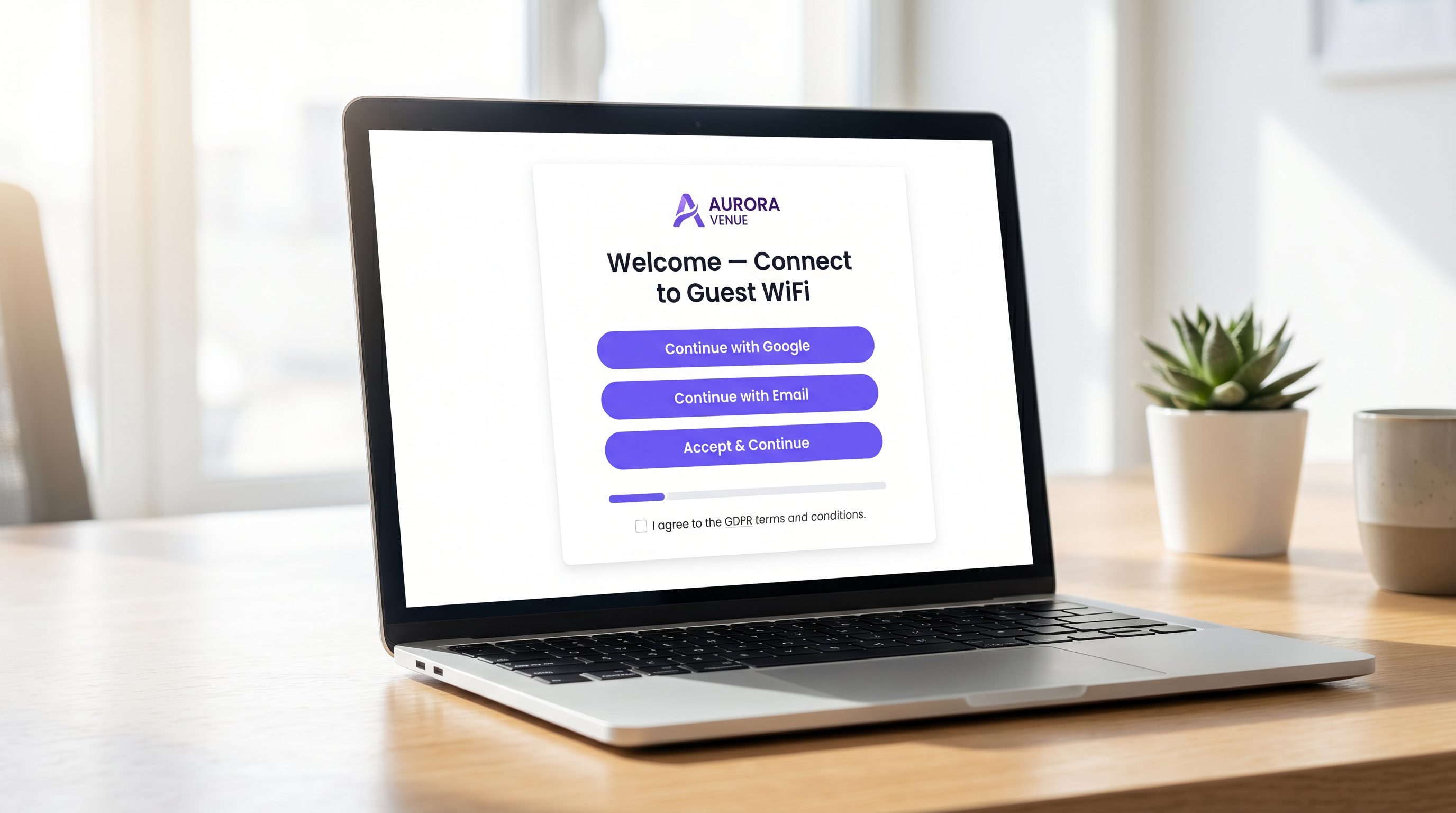
This authoritative technical reference guide details how to design, secure, and optimise captive portals for enterprise guest WiFi. It provides actionable recommendations for IT managers and venue operators to maximise login completion rates while ensuring GDPR compliance and robust network security.
🎧 Listen to this Guide
View Transcript
Executive Summary
For enterprise venue operators, the captive portal represents the critical digital front door. It is the moment where network infrastructure intersects with commercial strategy. A poorly designed captive portal creates friction, drives abandonment, and fails to capitalise on the opportunity to build a verified first-party database. Conversely, a highly optimised captive portal transforms a basic utility— Guest WiFi —into a measurable revenue-generating asset.
This guide provides IT managers, network architects, and CTOs with a vendor-neutral, technical blueprint for designing a high-converting login experience. We cover the underlying authentication architecture, security imperatives including WPA3 and IEEE 802.1X, GDPR compliance frameworks, and conversion-optimised user interface design. By applying these principles, venues across Hospitality , Retail , and public sectors can significantly increase authentication rates, secure their networks, and drive measurable ROI through platforms like WiFi Analytics .
Technical Deep-Dive: Architecture and Authentication
Understanding the mechanics of a captive portal is essential for optimising its performance. When a user connects to a guest SSID, their device is placed into a restricted VLAN, commonly referred to as a "walled garden". This state permits limited network access—specifically, DNS resolution and HTTP/HTTPS traffic directed towards the captive portal server.
The interception and redirection process is managed by the Wireless LAN Controller (WLC) or the access point itself. When the user attempts to browse the web, the controller intercepts the request and issues an HTTP 302 redirect, forcing the user's browser to load the portal page.
Once the user selects an authentication method and submits their credentials, the portal communicates with a RADIUS (Remote Authentication Dial-In User Service) server. The RADIUS server validates the credentials against a backend database—which could be a local user store, a Property Management System (PMS), or a CRM platform. Upon successful validation, the RADIUS server sends an Access-Accept message to the controller, authorising the MAC address of the device for full network access.
Security and Compliance Imperatives
Security cannot be compromised in the pursuit of higher conversion rates. Deployments must adhere to stringent standards to protect both the user and the venue.
- Encryption Standards: Open, unencrypted guest networks are a significant liability. WPA3 is the current industry standard and should be mandated for all new deployments. For legacy environments, WPA2-Enterprise with AES encryption is the minimum acceptable standard.
- Network Segmentation: Guest traffic must be strictly isolated from corporate and operational networks using VLANs and appropriate firewall rules.
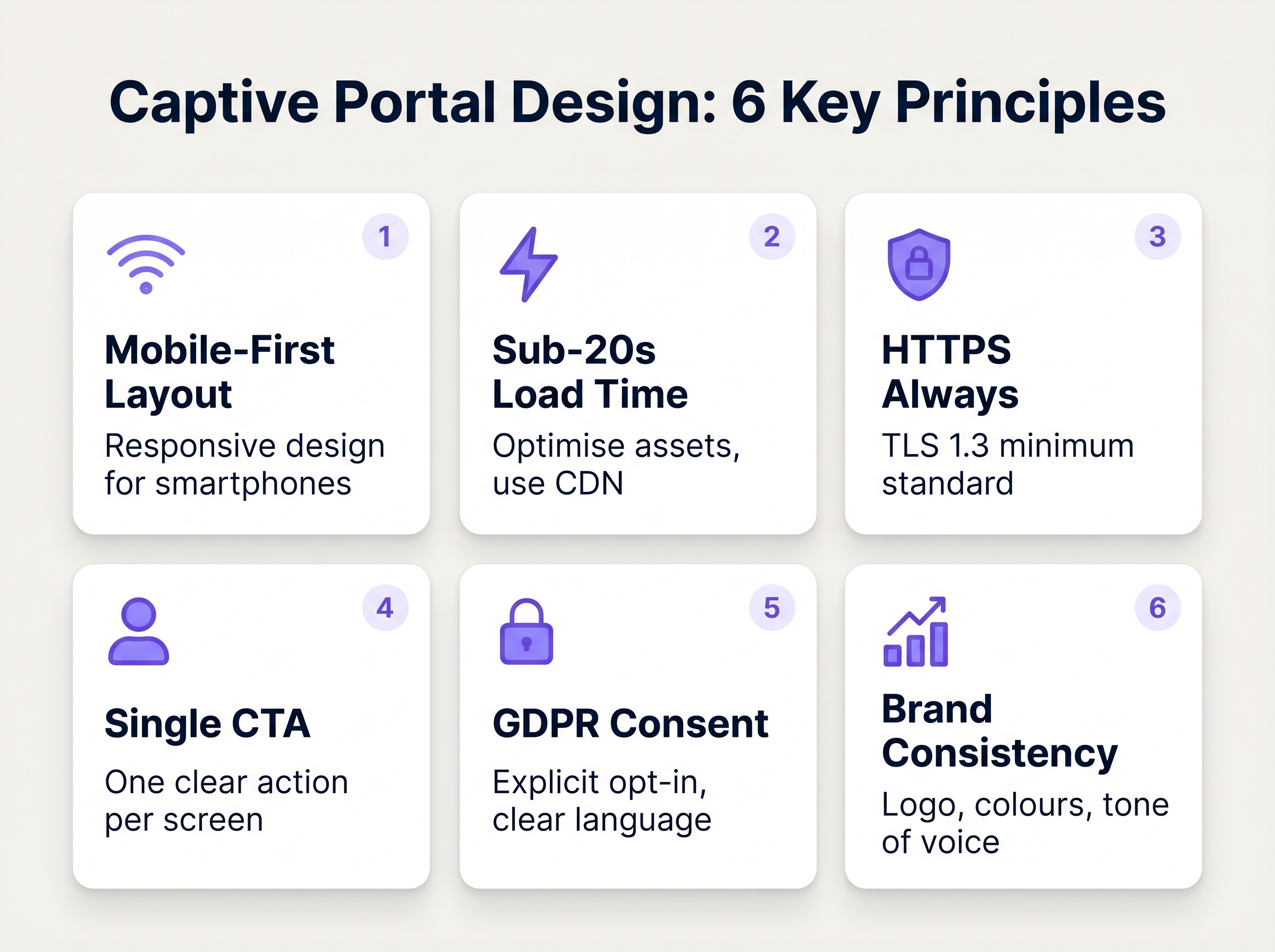
- HTTPS Enforcement: The captive portal must be served over HTTPS using TLS 1.3. Serving a portal over plain HTTP exposes users to credential interception via man-in-the-middle attacks.
- GDPR and Data Privacy: When collecting personal data from EU or UK citizens, explicit, unambiguous consent is required. Pre-ticked boxes are not compliant. Venues must provide a clear privacy policy, an opt-out mechanism for marketing communications, and a robust data retention strategy.
Implementation Guide: Optimising the Login Experience
The design of the portal interface directly dictates the conversion rate. Every additional second of load time and every superfluous form field exponentially increases the abandonment rate.
1. Minimise Friction and Form Fields
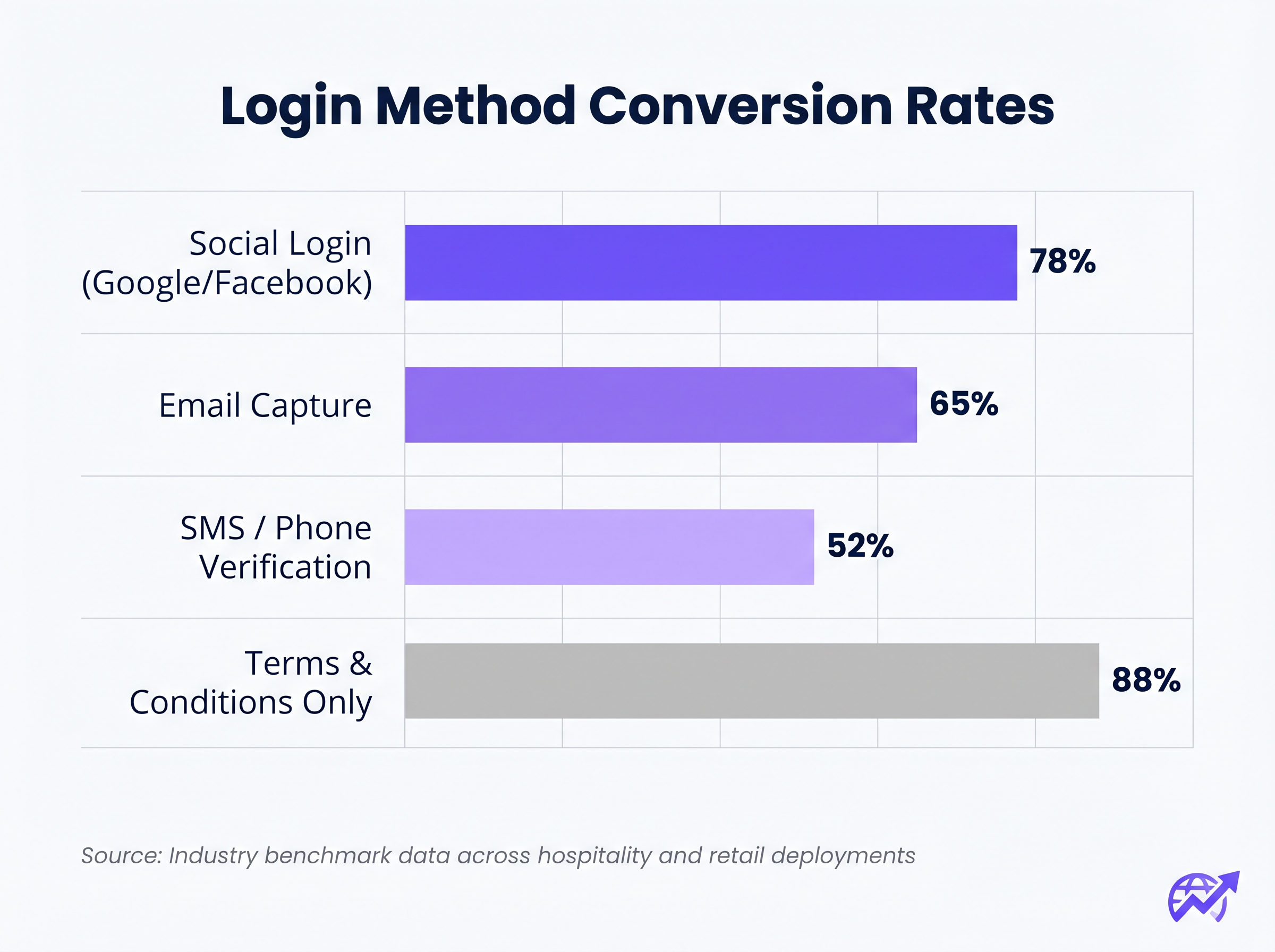
The correlation between the number of required form fields and the drop-off rate is absolute. If your objective is data capture, utilise Social Login (OAuth 2.0 via Google, Facebook, Apple). This provides verified demographic data with a single tap. If email capture is preferred, require only the essential fields: First Name, Last Name, and Email Address.
2. Prioritise Mobile Responsiveness
Over 75% of captive portal authentications occur on mobile devices. The layout must be mobile-first. The primary Call-To-Action (CTA) button must be prominent, easily tappable, and visible above the fold without requiring the user to scroll.
3. Optimise Load Times
A portal that takes longer than three seconds to load on a congested 4G connection will suffer massive abandonment. Optimise all image assets, minify CSS and JavaScript, and leverage a Content Delivery Network (CDN) to ensure rapid delivery regardless of the user's location or the network load.
4. Brand Consistency
The captive portal is an extension of the venue's brand. Ensure the logo is crisp, typography aligns with brand guidelines, and the primary CTA button utilises the brand's accent colour. A visually disjointed portal erodes trust and depresses conversion rates.
Best Practices for Specific Verticals
Different industries have distinct objectives for their guest networks, requiring tailored approaches to portal design.
Hospitality
In the Hospitality sector, the captive portal should integrate seamlessly with the Property Management System (PMS). Authenticating guests against their room number and surname provides a frictionless experience while ensuring only paying guests access premium bandwidth tiers. Post-login, redirect users to a dynamic landing page promoting on-site amenities such as spa services or restaurant bookings.
Retail
For Retail environments, the focus is rapid data acquisition to fuel CRM and marketing automation platforms. Social login is highly effective here. The post-login redirect should surface immediate value, such as a digital coupon or a prompt to download the retailer's mobile application.
Troubleshooting & Risk Mitigation
Even well-designed portals can fail if the underlying infrastructure is misconfigured.
- Walled Garden Misconfiguration: When utilising social login (e.g., Facebook, Google), the respective domains must be explicitly whitelisted within the walled garden. Failure to do so will cause the OAuth flow to fail silently, trapping the user on the login page.
- Captive Portal Assistant (CPA) Issues: Modern operating systems use CPAs (like Apple's Captive Network Assistant) to automatically detect walled gardens and pop up a mini-browser. Ensure your portal is compatible with these restricted browsers, which often lack support for cookies or advanced JavaScript.
- DHCP Exhaustion: In high-density environments like stadiums or conference centres, ensure your DHCP scope is adequately sized to handle rapid client turnover. A depleted DHCP pool will prevent devices from even reaching the captive portal.
ROI & Business Impact
A high-converting captive portal transitions IT expenditure into measurable business value. By integrating the portal with a robust WiFi Analytics platform, venues can track:
- Authentication Success Rate: The primary KPI, calculated as completed logins divided by total portal impressions.
- Database Growth: The volume of verified, opted-in contacts added to the CRM.
- Dwell Time and Return Rates: Correlating WiFi authentication with physical presence metrics.
When evaluating solutions, consult resources like The Best Captive Portal Software in 2026: A Comparison Guide to ensure the chosen platform supports necessary integrations and scalability requirements.
Key Terms & Definitions
Captive Portal
A web page that a user of a public-access network is obliged to view and interact with before access is granted.
The primary interface for managing guest network access, enforcing terms of service, and capturing user data.
Walled Garden
A restricted network environment that allows access only to specific, pre-approved web pages or services prior to full authentication.
Essential for allowing the device to reach the captive portal server and external identity providers (like Google) without granting full internet access.
RADIUS (Remote Authentication Dial-In User Service)
A networking protocol that provides centralised Authentication, Authorization, and Accounting (AAA) management.
The backend engine that verifies the user's credentials against a database and tells the controller whether to grant access.
MAC Authentication Bypass (MAB)
A mechanism where the network authenticates a device based on its MAC address rather than requiring user credentials.
Used to allow returning guests to seamlessly reconnect to the network without having to view the captive portal again.
VLAN (Virtual Local Area Network)
A logical subnetwork that groups a collection of devices from different physical LANs.
Crucial for security; guest traffic must be isolated on a separate VLAN to prevent access to corporate resources.
WPA3
The latest generation of Wi-Fi security, providing robust encryption and enhanced protection against brute-force attacks.
The required security standard for modern wireless deployments to ensure data transmitted over the air is protected.
HTTP 302 Redirect
A standard HTTP response status code indicating that the requested resource resides temporarily under a different URI.
The mechanism used by the Wireless LAN Controller to force the user's browser to load the captive portal page.
OAuth 2.0
An industry-standard protocol for authorization, enabling applications to obtain limited access to user accounts on an HTTP service.
The underlying technology that powers 'Social Login' options like 'Continue with Google' or 'Continue with Facebook'.
Case Studies
A 300-room resort hotel is experiencing a 45% drop-off rate on their guest WiFi login page. The current portal requires guests to manually enter their Title, First Name, Last Name, Email, Phone Number, Date of Birth, and Home Address before clicking 'Connect'.
The portal must be redesigned to eliminate friction. The solution is to integrate the captive portal with the hotel's Property Management System (PMS). The new authentication flow requires only two fields: 'Room Number' and 'Guest Surname'. Upon submission, the RADIUS server queries the PMS via API. If a match is found, access is granted. For non-resident guests (e.g., conference attendees or restaurant patrons), a secondary 'Social Login' option is provided.
A national retail chain wants to implement social login via Facebook and Google on their captive portal. However, during pilot testing, users tap the 'Continue with Google' button, but the page simply hangs, and authentication fails.
The network architect must update the 'Walled Garden' configuration on the Wireless LAN Controllers across all pilot stores. The domains and IP ranges associated with Google and Facebook's OAuth authentication servers must be explicitly whitelisted. This allows the client device to communicate with the identity provider before full network access is granted.
Scenario Analysis
Q1. You are deploying a new guest WiFi network for a chain of coffee shops. The marketing director insists on collecting Name, Email, Phone Number, Date of Birth, and Postcode on the captive portal to build a comprehensive customer database. As the IT Manager, how do you advise them?
💡 Hint:Consider the relationship between form length and abandonment rate, particularly in a high-turnover environment like a coffee shop.
Show Recommended Approach
Advise the marketing director that requiring five fields of manual data entry will result in a massive abandonment rate, severely limiting the total volume of data collected. Recommend implementing Social Login (Google/Facebook) as the primary option, which securely captures demographic data with a single tap. Alternatively, suggest a progressive profiling approach: capture only Email on the first visit, and request additional details on subsequent visits via automated email campaigns.
Q2. A hospital is updating its guest WiFi. They want to ensure patients and visitors have easy access, but the Information Security Officer is concerned about the legal implications of an open network and data privacy. What architecture do you propose?
💡 Hint:Address both the over-the-air encryption requirement and the data processing compliance requirement.
Show Recommended Approach
Deploy the guest network using WPA3-Personal (or WPA3 OWE - Opportunistic Wireless Encryption) to ensure over-the-air traffic is encrypted, protecting users from eavesdropping without requiring complex enterprise authentication. Implement a captive portal that requires explicit, opt-in consent for the Terms of Service to address liability. Do not collect unnecessary personal data (use a simple click-through or anonymous MAC authentication) to minimise GDPR exposure, and ensure the guest VLAN is strictly isolated from the clinical network.
Q3. After deploying a captive portal that includes a credit card payment gateway for premium bandwidth, users report that the payment page fails to load, though the initial portal page loads fine. What is the most likely cause?
💡 Hint:Consider how the device communicates with external servers before full authentication is granted.
Show Recommended Approach
The domains and IP addresses associated with the third-party payment gateway have not been whitelisted in the Wireless LAN Controller's walled garden. Because the device is not yet fully authenticated, the controller blocks the outbound traffic to the payment processor, causing the page to hang. The solution is to add the payment gateway's URLs to the walled garden configuration.




