

Design de Captive Portal: Como Criar uma Experiência de Login de Alta Conversão
Este guia de referência técnica e autoritário detalha como projetar, proteger e otimizar captive portals para WiFi de convidados empresariais. Fornece recomendações acionáveis para gestores de TI e operadores de espaços para maximizar as taxas de conclusão de login, garantindo a conformidade com o GDPR e uma segurança de rede robusta.
🎧 Ouça este Guia
Ver Transcrição
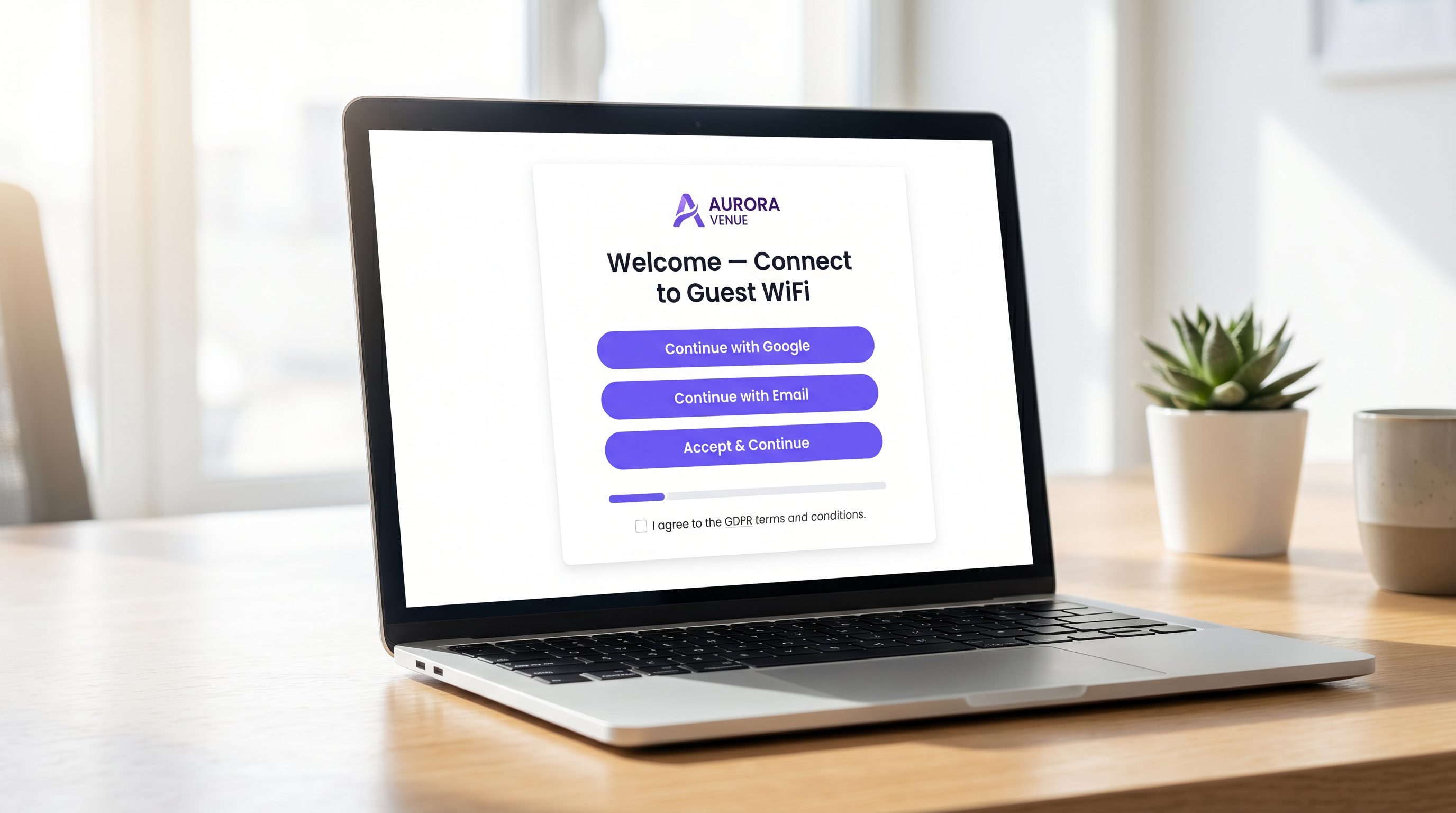
Resumo Executivo
Para operadores de espaços empresariais, o captive portal representa a porta de entrada digital crítica. É o momento em que a infraestrutura de rede se cruza com a estratégia comercial. Um captive portal mal projetado cria atrito, leva ao abandono e falha em capitalizar a oportunidade de construir uma base de dados verificada de primeira parte. Pelo contrário, um captive portal altamente otimizado transforma uma utilidade básica — WiFi de Convidados — num ativo mensurável gerador de receita.
Este guia fornece a gestores de TI, arquitetos de rede e CTOs um plano técnico e neutro em relação a fornecedores para projetar uma experiência de login de alta conversão. Abordamos a arquitetura de autenticação subjacente, imperativos de segurança, incluindo WPA3 e IEEE 802.1X, estruturas de conformidade com o GDPR e design de interface de utilizador otimizado para conversão. Ao aplicar estes princípios, espaços nos setores de Hotelaria , Retalho e público podem aumentar significativamente as taxas de autenticação, proteger as suas redes e gerar ROI mensurável através de plataformas como WiFi Analytics .
Análise Técnica Aprofundada: Arquitetura e Autenticação
Compreender a mecânica de um captive portal é essencial para otimizar o seu desempenho. Quando um utilizador se conecta a um SSID de convidado, o seu dispositivo é colocado numa VLAN restrita, comummente referida como "walled garden". Este estado permite acesso limitado à rede — especificamente, resolução de DNS e tráfego HTTP/HTTPS direcionado para o servidor do captive portal.
O processo de interceção e redirecionamento é gerido pelo Wireless LAN Controller (WLC) ou pelo próprio ponto de acesso. Quando o utilizador tenta navegar na web, o controlador interceta o pedido e emite um redirecionamento HTTP 302, forçando o navegador do utilizador a carregar a página do portal.
Assim que o utilizador seleciona um método de autenticação e submete as suas credenciais, o portal comunica com um servidor RADIUS (Remote Authentication Dial-In User Service). O servidor RADIUS valida as credenciais contra uma base de dados de backend — que pode ser um armazenamento de utilizadores local, um Sistema de Gestão de Propriedades (PMS) ou uma plataforma CRM. Após validação bem-sucedida, o servidor RADIUS envia uma mensagem Access-Accept ao controlador, autorizando o endereço MAC do dispositivo para acesso total à rede.
Imperativos de Segurança e Conformidade
A segurança não pode ser comprometida na busca por taxas de conversão mais altas. As implementações devem aderir a padrões rigorosos para proteger tanto o utilizador quanto o espaço.
- Padrões de Encriptação: Redes de convidados abertas e não encriptadas são uma responsabilidade significativa. WPA3 é o padrão atual da indústria e deve ser obrigatório para todas as novas implementações. Para ambientes legados, WPA2-Enterprise com encriptação AES é o padrão mínimo aceitável.
- Segmentação de Rede: O tráfego de convidados deve ser estritamente isolado das redes corporativas e operacionais usando VLANs e regras de firewall apropriadas.
- Aplicação de HTTPS: O captive portal deve ser servido via HTTPS usando TLS 1.3. Servir um portal via HTTP simples expõe os utilizadores à interceção de credenciais através de ataques man-in-the-middle.
- GDPR e Privacidade de Dados: Ao recolher dados pessoais de cidadãos da UE ou do Reino Unido, é necessário consentimento explícito e inequívoco. Caixas pré-selecionadas não estão em conformidade. Os espaços devem fornecer uma política de privacidade clara, um mecanismo de opt-out para comunicações de marketing e uma estratégia robusta de retenção de dados.
Guia de Implementação: Otimizar a Experiência de Login
O design da interface do portal dita diretamente a taxa de conversão. Cada segundo adicional de tempo de carregamento e cada campo de formulário supérfluo aumenta exponencialmente a taxa de abandono.
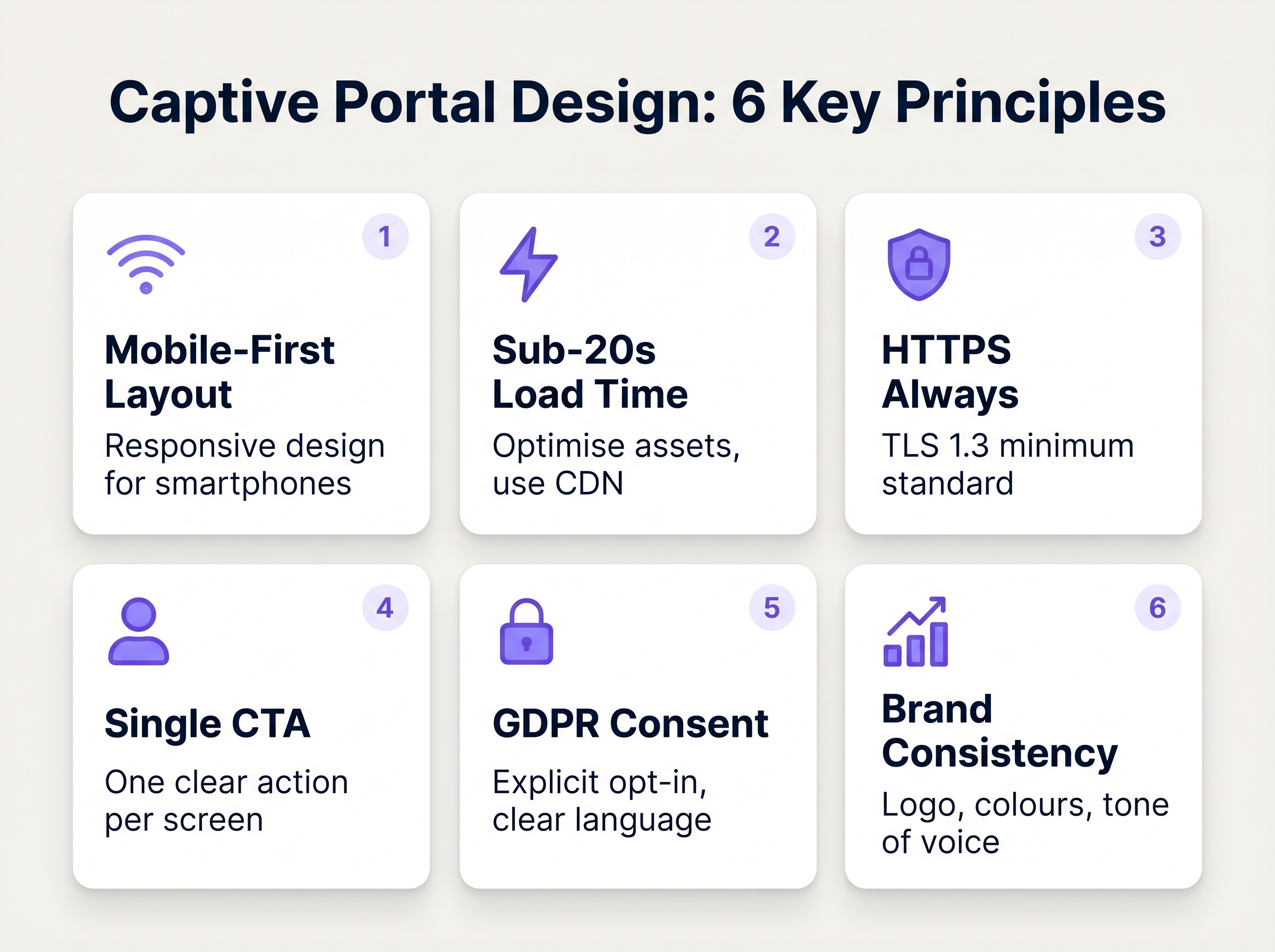
1. Minimizar Atrito e Campos de Formulário
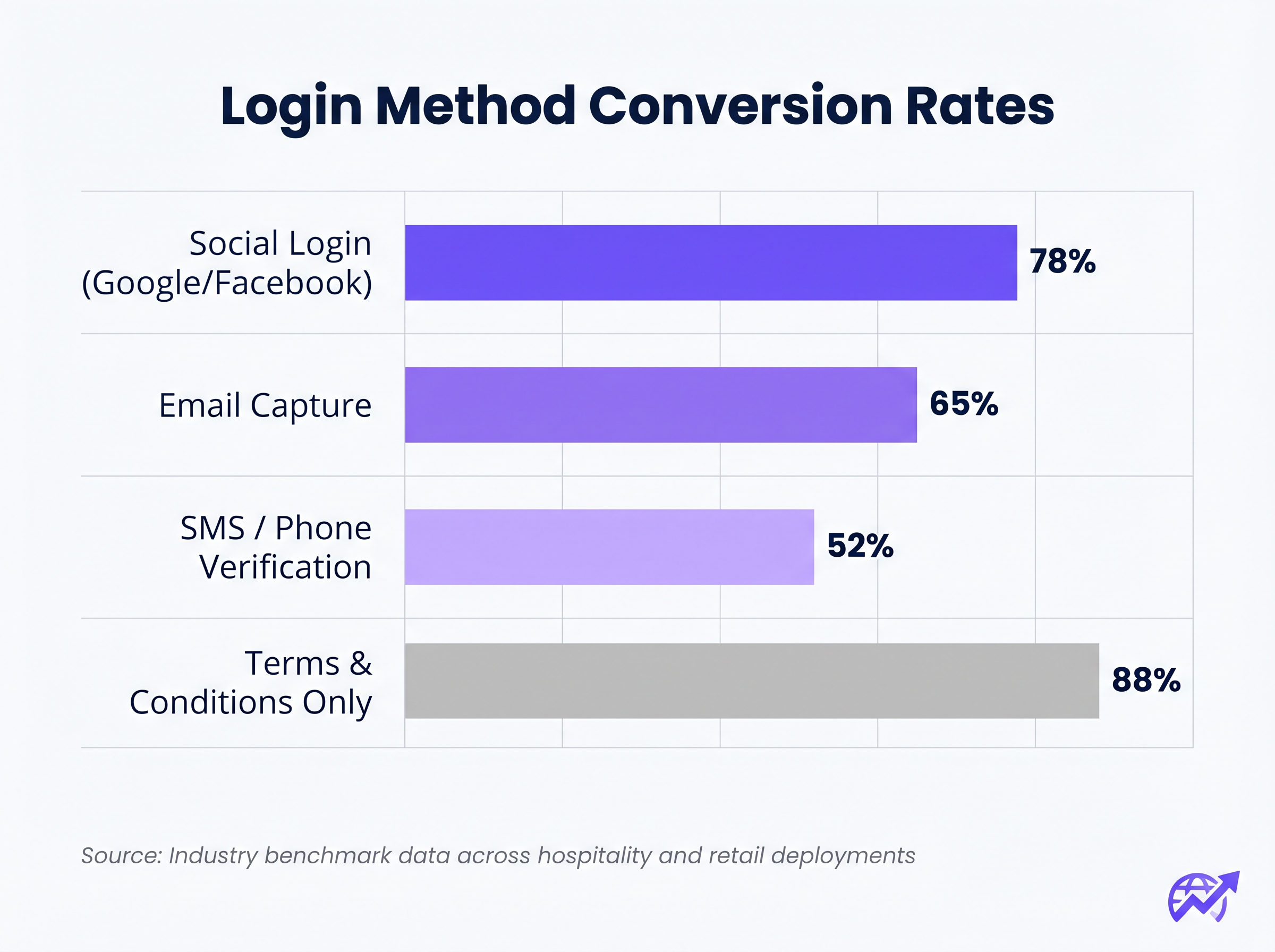
A correlação entre o número de campos de formulário obrigatórios e a taxa de abandono é absoluta. Se o seu objetivo é a recolha de dados, utilize o Social Login (OAuth 2.0 via Google, Facebook, Apple). Isso fornece dados demográficos verificados com um único toque. Se a recolha de e-mail for preferida, exija apenas os campos essenciais: Nome Próprio, Apelido e Endereço de E-mail.
2. Priorizar a Responsividade Móvel
Mais de 75% das autenticações de captive portal ocorrem em dispositivos móveis. O layout deve ser mobile-first. O botão principal de Call-To-Action (CTA) deve ser proeminente, facilmente clicável e visível acima da dobra, sem exigir que o utilizador faça scroll.
3. Otimizar Tempos de Carregamento
Um portal que demore mais de três segundos a carregar numa ligação 4G congestionada sofrerá um abandono massivo. Otimize todos os ativos de imagem, minifique CSS e JavaScript e utilize uma Content Delivery Network (CDN) para garantir uma entrega rápida, independentemente da localização do utilizador ou da carga da rede.
4. Consistência da Marca
O captive portal é uma extensão da marca do espaço. Garanta que o logótipo é nítido, a tipografia está alinhada com as diretrizes da marca e o botão principal de CTA utiliza a cor de destaque da marca. Um portal visualmente desconexo erode a confiança e deprime as taxas de conversão.
Melhores Práticas para Verticais Específicas
Diferentes indústrias têm objetivos distintos para as suas redes de convidados, exigindo abordagens personalizadas ao design do portal.
Hotelaria
Nae o setor de Hospitality , o Captive Portal deve integrar-se perfeitamente com o Sistema de Gestão de Propriedades (PMS). Autenticar os hóspedes com base no número do quarto e apelido proporciona uma experiência sem atritos, garantindo que apenas os hóspedes pagantes acedam a níveis de largura de banda premium. Após o login, redirecione os utilizadores para uma página de destino dinâmica que promova as comodidades no local, como serviços de spa ou reservas de restaurantes.
Retalho
Para ambientes de Retalho , o foco é a aquisição rápida de dados para alimentar plataformas de CRM e automação de marketing. O login social é altamente eficaz aqui. O redirecionamento pós-login deve apresentar valor imediato, como um cupão digital ou um pedido para descarregar a aplicação móvel do retalhista.
Resolução de Problemas e Mitigação de Riscos
Mesmo portais bem concebidos podem falhar se a infraestrutura subjacente estiver mal configurada.
- Má Configuração do Walled Garden: Ao utilizar o login social (por exemplo, Facebook, Google), os respetivos domínios devem ser explicitamente adicionados à lista de permissões (whitelisted) dentro do walled garden. A falha em fazê-lo fará com que o fluxo OAuth falhe silenciosamente, prendendo o utilizador na página de login.
- Problemas com o Captive Portal Assistant (CPA): Os sistemas operativos modernos usam CPAs (como o Captive Network Assistant da Apple) para detetar automaticamente walled gardens e abrir um mini-navegador. Certifique-se de que o seu portal é compatível com estes navegadores restritos, que frequentemente não suportam cookies ou JavaScript avançado.
- Esgotamento de DHCP: Em ambientes de alta densidade, como estádios ou centros de conferências, certifique-se de que o seu âmbito DHCP tem um tamanho adequado para lidar com a rápida rotatividade de clientes. Um pool DHCP esgotado impedirá que os dispositivos sequer cheguem ao Captive Portal.
ROI e Impacto nos Negócios
Um Captive Portal de alta conversão transforma os gastos de TI em valor de negócio mensurável. Ao integrar o portal com uma plataforma robusta de WiFi Analytics , os locais podem monitorizar:
- Taxa de Sucesso de Autenticação: O KPI principal, calculado como logins concluídos divididos pelo total de impressões do portal.
- Crescimento da Base de Dados: O volume de contactos verificados e com consentimento adicionados ao CRM.
- Tempo de Permanência e Taxas de Retorno: Correlacionar a autenticação WiFi com métricas de presença física.
Ao avaliar soluções, consulte recursos como O Melhor Software de Captive Portal em 2026: Um Guia de Comparação para garantir que a plataforma escolhida suporta as integrações necessárias e os requisitos de escalabilidade.
Termos-Chave e Definições
Captive Portal
A web page that a user of a public-access network is obliged to view and interact with before access is granted.
The primary interface for managing guest network access, enforcing terms of service, and capturing user data.
Walled Garden
A restricted network environment that allows access only to specific, pre-approved web pages or services prior to full authentication.
Essential for allowing the device to reach the captive portal server and external identity providers (like Google) without granting full internet access.
RADIUS (Remote Authentication Dial-In User Service)
A networking protocol that provides centralised Authentication, Authorization, and Accounting (AAA) management.
The backend engine that verifies the user's credentials against a database and tells the controller whether to grant access.
MAC Authentication Bypass (MAB)
A mechanism where the network authenticates a device based on its MAC address rather than requiring user credentials.
Used to allow returning guests to seamlessly reconnect to the network without having to view the captive portal again.
VLAN (Virtual Local Area Network)
A logical subnetwork that groups a collection of devices from different physical LANs.
Crucial for security; guest traffic must be isolated on a separate VLAN to prevent access to corporate resources.
WPA3
The latest generation of Wi-Fi security, providing robust encryption and enhanced protection against brute-force attacks.
The required security standard for modern wireless deployments to ensure data transmitted over the air is protected.
HTTP 302 Redirect
A standard HTTP response status code indicating that the requested resource resides temporarily under a different URI.
The mechanism used by the Wireless LAN Controller to force the user's browser to load the captive portal page.
OAuth 2.0
An industry-standard protocol for authorization, enabling applications to obtain limited access to user accounts on an HTTP service.
The underlying technology that powers 'Social Login' options like 'Continue with Google' or 'Continue with Facebook'.
Estudos de Caso
A 300-room resort hotel is experiencing a 45% drop-off rate on their guest WiFi login page. The current portal requires guests to manually enter their Title, First Name, Last Name, Email, Phone Number, Date of Birth, and Home Address before clicking 'Connect'.
The portal must be redesigned to eliminate friction. The solution is to integrate the captive portal with the hotel's Property Management System (PMS). The new authentication flow requires only two fields: 'Room Number' and 'Guest Surname'. Upon submission, the RADIUS server queries the PMS via API. If a match is found, access is granted. For non-resident guests (e.g., conference attendees or restaurant patrons), a secondary 'Social Login' option is provided.
A national retail chain wants to implement social login via Facebook and Google on their captive portal. However, during pilot testing, users tap the 'Continue with Google' button, but the page simply hangs, and authentication fails.
The network architect must update the 'Walled Garden' configuration on the Wireless LAN Controllers across all pilot stores. The domains and IP ranges associated with Google and Facebook's OAuth authentication servers must be explicitly whitelisted. This allows the client device to communicate with the identity provider before full network access is granted.
Análise de Cenários
Q1. You are deploying a new guest WiFi network for a chain of coffee shops. The marketing director insists on collecting Name, Email, Phone Number, Date of Birth, and Postcode on the captive portal to build a comprehensive customer database. As the IT Manager, how do you advise them?
💡 Dica:Consider the relationship between form length and abandonment rate, particularly in a high-turnover environment like a coffee shop.
Mostrar Abordagem Recomendada
Advise the marketing director that requiring five fields of manual data entry will result in a massive abandonment rate, severely limiting the total volume of data collected. Recommend implementing Social Login (Google/Facebook) as the primary option, which securely captures demographic data with a single tap. Alternatively, suggest a progressive profiling approach: capture only Email on the first visit, and request additional details on subsequent visits via automated email campaigns.
Q2. A hospital is updating its guest WiFi. They want to ensure patients and visitors have easy access, but the Information Security Officer is concerned about the legal implications of an open network and data privacy. What architecture do you propose?
💡 Dica:Address both the over-the-air encryption requirement and the data processing compliance requirement.
Mostrar Abordagem Recomendada
Deploy the guest network using WPA3-Personal (or WPA3 OWE - Opportunistic Wireless Encryption) to ensure over-the-air traffic is encrypted, protecting users from eavesdropping without requiring complex enterprise authentication. Implement a captive portal that requires explicit, opt-in consent for the Terms of Service to address liability. Do not collect unnecessary personal data (use a simple click-through or anonymous MAC authentication) to minimise GDPR exposure, and ensure the guest VLAN is strictly isolated from the clinical network.
Q3. After deploying a captive portal that includes a credit card payment gateway for premium bandwidth, users report that the payment page fails to load, though the initial portal page loads fine. What is the most likely cause?
💡 Dica:Consider how the device communicates with external servers before full authentication is granted.
Mostrar Abordagem Recomendada
The domains and IP addresses associated with the third-party payment gateway have not been whitelisted in the Wireless LAN Controller's walled garden. Because the device is not yet fully authenticated, the controller blocks the outbound traffic to the payment processor, causing the page to hang. The solution is to add the payment gateway's URLs to the walled garden configuration.




