

Captive Portal Design: Wie man ein hochkonvertierendes Login-Erlebnis schafft
Dieser maßgebliche technische Leitfaden beschreibt, wie Captive Portals für Unternehmens-Gast-WiFi entworfen, gesichert und optimiert werden. Er bietet umsetzbare Empfehlungen für IT-Manager und Betreiber von Veranstaltungsorten, um die Anmeldequoten zu maximieren und gleichzeitig die GDPR-Konformität und eine robuste Netzwerksicherheit zu gewährleisten.
🎧 Diesen Leitfaden anhören
Transkript anzeigen
Zusammenfassung für die Geschäftsleitung
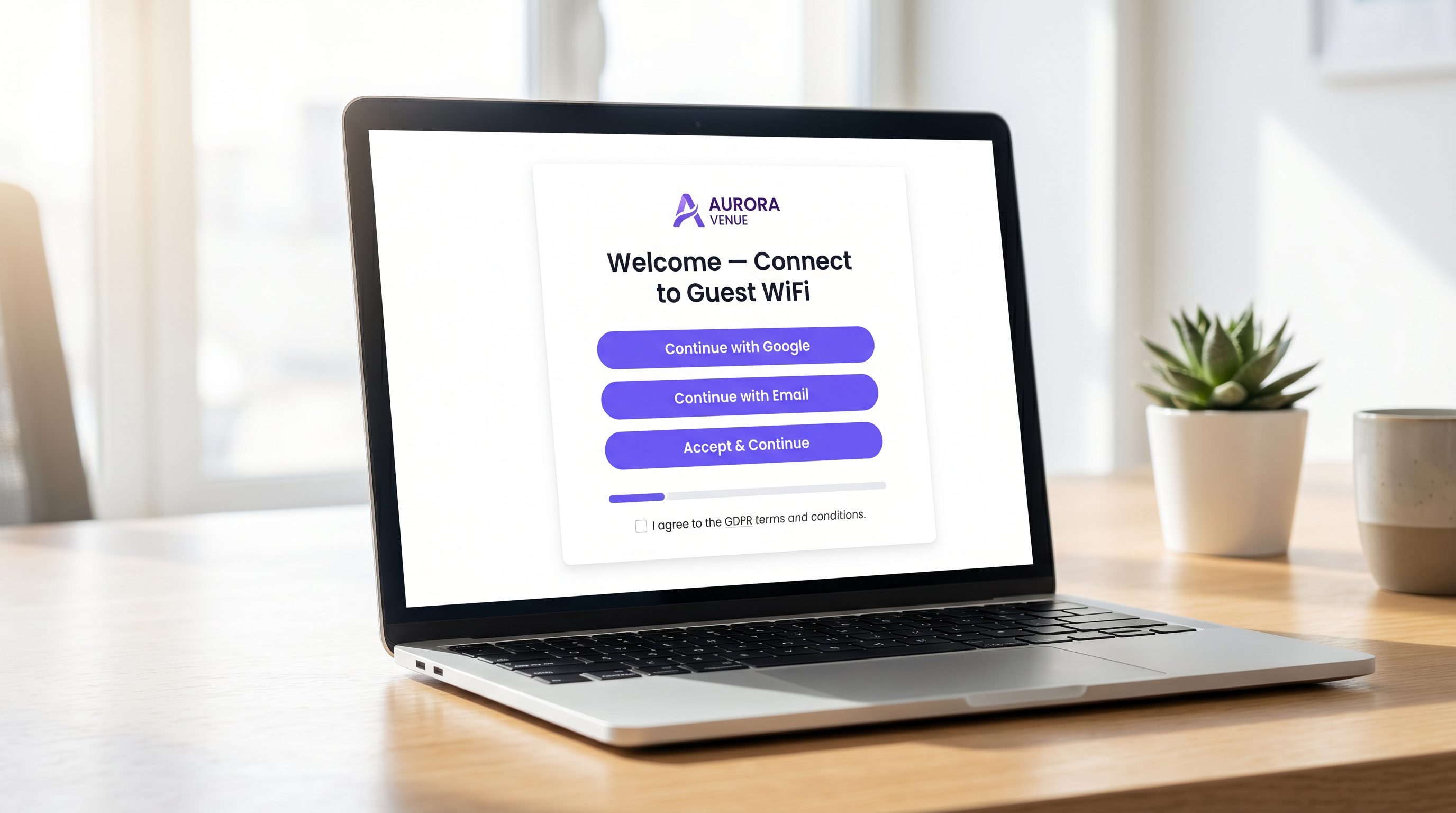
Für Betreiber von Unternehmensstandorten stellt das Captive Portal die entscheidende digitale Eingangstür dar. Es ist der Moment, in dem die Netzwerkinfrastruktur auf die kommerzielle Strategie trifft. Ein schlecht gestaltetes Captive Portal erzeugt Reibung, führt zu Abbrüchen und versäumt es, die Möglichkeit zu nutzen, eine verifizierte Erstanbieterdatenbank aufzubauen. Umgekehrt verwandelt ein hochoptimiertes Captive Portal eine grundlegende Dienstleistung – Gast-WiFi – in einen messbaren umsatzgenerierenden Vermögenswert.
Dieser Leitfaden bietet IT-Managern, Netzwerkarchitekten und CTOs einen herstellerneutralen, technischen Entwurf für die Gestaltung eines hochkonvertierenden Login-Erlebnisses. Wir behandeln die zugrunde liegende Authentifizierungsarchitektur, Sicherheitsanforderungen einschließlich WPA3 und IEEE 802.1X, GDPR-Konformitätsrahmen und ein konversionsoptimiertes Benutzeroberflächendesign. Durch die Anwendung dieser Prinzipien können Veranstaltungsorte in den Bereichen Gastgewerbe , Einzelhandel und im öffentlichen Sektor die Authentifizierungsraten erheblich steigern, ihre Netzwerke sichern und einen messbaren ROI durch Plattformen wie WiFi Analytics erzielen.
Technischer Deep-Dive: Architektur und Authentifizierung
Das Verständnis der Mechanik eines Captive Portals ist entscheidend für die Optimierung seiner Leistung. Wenn ein Benutzer sich mit einer Gast-SSID verbindet, wird sein Gerät in ein eingeschränktes VLAN platziert, das gemeinhin als „Walled Garden“ bezeichnet wird. Dieser Zustand erlaubt einen begrenzten Netzwerkzugriff – insbesondere DNS-Auflösung und HTTP/HTTPS-Verkehr, der auf den Captive Portal-Server gerichtet ist.
Der Abfang- und Umleitungsprozess wird vom Wireless LAN Controller (WLC) oder dem Access Point selbst verwaltet. Wenn der Benutzer versucht, im Web zu surfen, fängt der Controller die Anfrage ab und gibt eine HTTP 302-Umleitung aus, die den Browser des Benutzers zwingt, die Portalseite zu laden.
Sobald der Benutzer eine Authentifizierungsmethode auswählt und seine Anmeldeinformationen übermittelt, kommuniziert das Portal mit einem RADIUS (Remote Authentication Dial-In User Service)-Server. Der RADIUS-Server validiert die Anmeldeinformationen anhand einer Backend-Datenbank – dies kann ein lokaler Benutzerspeicher, ein Property Management System (PMS) oder eine CRM-Plattform sein. Nach erfolgreicher Validierung sendet der RADIUS-Server eine Access-Accept-Nachricht an den Controller, die die MAC-Adresse des Geräts für den vollständigen Netzwerkzugriff autorisiert.
Sicherheits- und Compliance-Anforderungen
Die Sicherheit darf nicht zugunsten höherer Konversionsraten kompromittiert werden. Implementierungen müssen strengen Standards entsprechen, um sowohl den Benutzer als auch den Veranstaltungsort zu schützen.
- Verschlüsselungsstandards: Offene, unverschlüsselte Gastnetzwerke stellen ein erhebliches Risiko dar. WPA3 ist der aktuelle Industriestandard und sollte für alle neuen Implementierungen vorgeschrieben werden. Für ältere Umgebungen ist WPA2-Enterprise mit AES-Verschlüsselung der minimal akzeptable Standard.
- Netzwerksegmentierung: Gastverkehr muss mithilfe von VLANs und entsprechenden Firewall-Regeln strikt von Unternehmens- und Betriebsnetzwerken isoliert werden.
- HTTPS-Erzwingung: Das Captive Portal muss über HTTPS unter Verwendung von TLS 1.3 bereitgestellt werden. Die Bereitstellung eines Portals über reines HTTP setzt Benutzer der Abfangung von Anmeldeinformationen durch Man-in-the-Middle-Angriffe aus.
- GDPR und Datenschutz: Bei der Erfassung personenbezogener Daten von EU- oder UK-Bürgern ist eine explizite, eindeutige Zustimmung erforderlich. Vorausgewählte Kästchen sind nicht konform. Veranstaltungsorte müssen eine klare Datenschutzrichtlinie, einen Opt-out-Mechanismus für Marketingkommunikation und eine robuste Datenaufbewahrungsstrategie bereitstellen.
Implementierungsleitfaden: Optimierung des Login-Erlebnisses
Das Design der Portaloberfläche bestimmt direkt die Konversionsrate. Jede zusätzliche Sekunde Ladezeit und jedes überflüssige Formularfeld erhöht die Abbruchrate exponentiell.
1. Reibung und Formularfelder minimieren
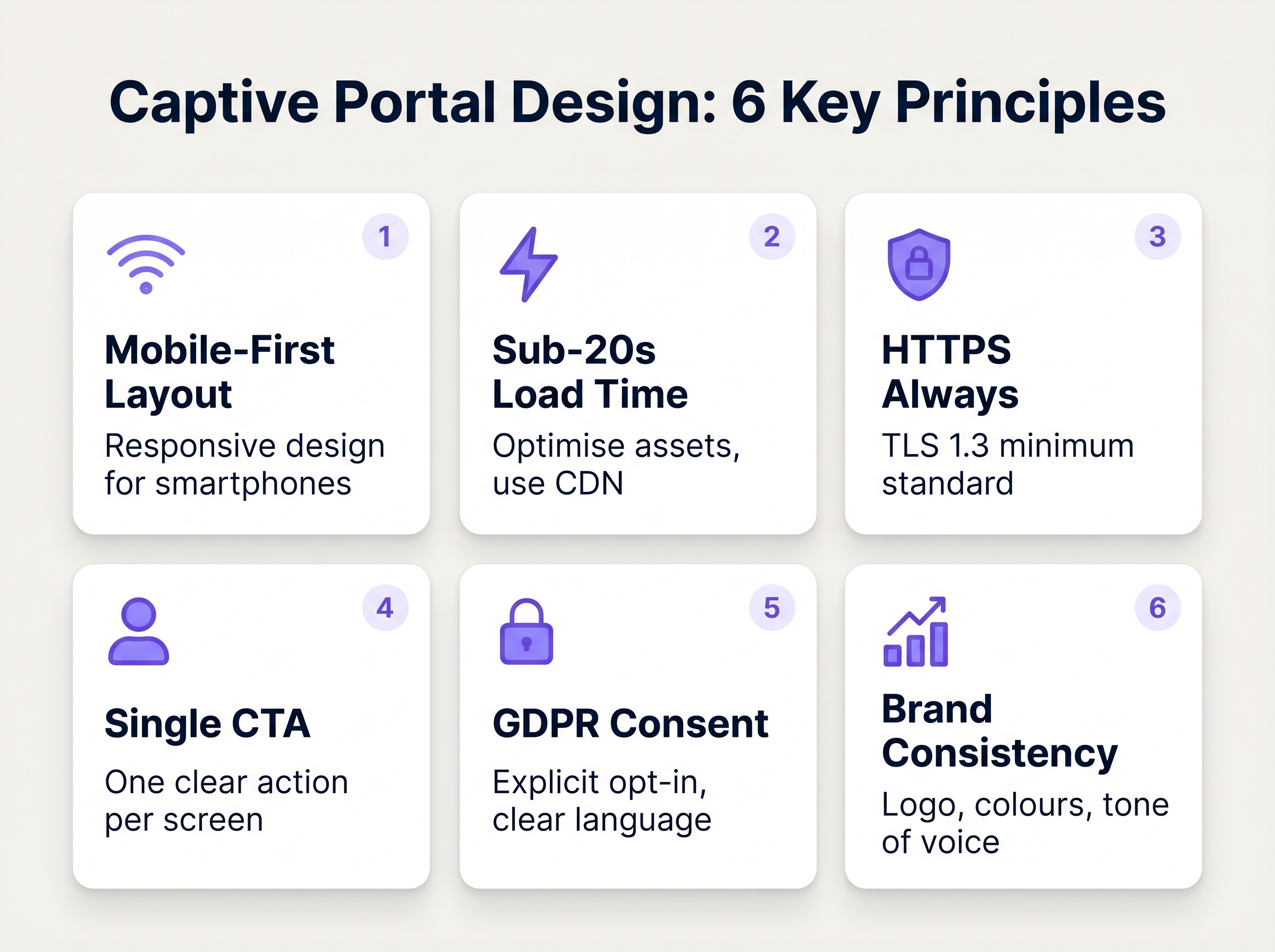
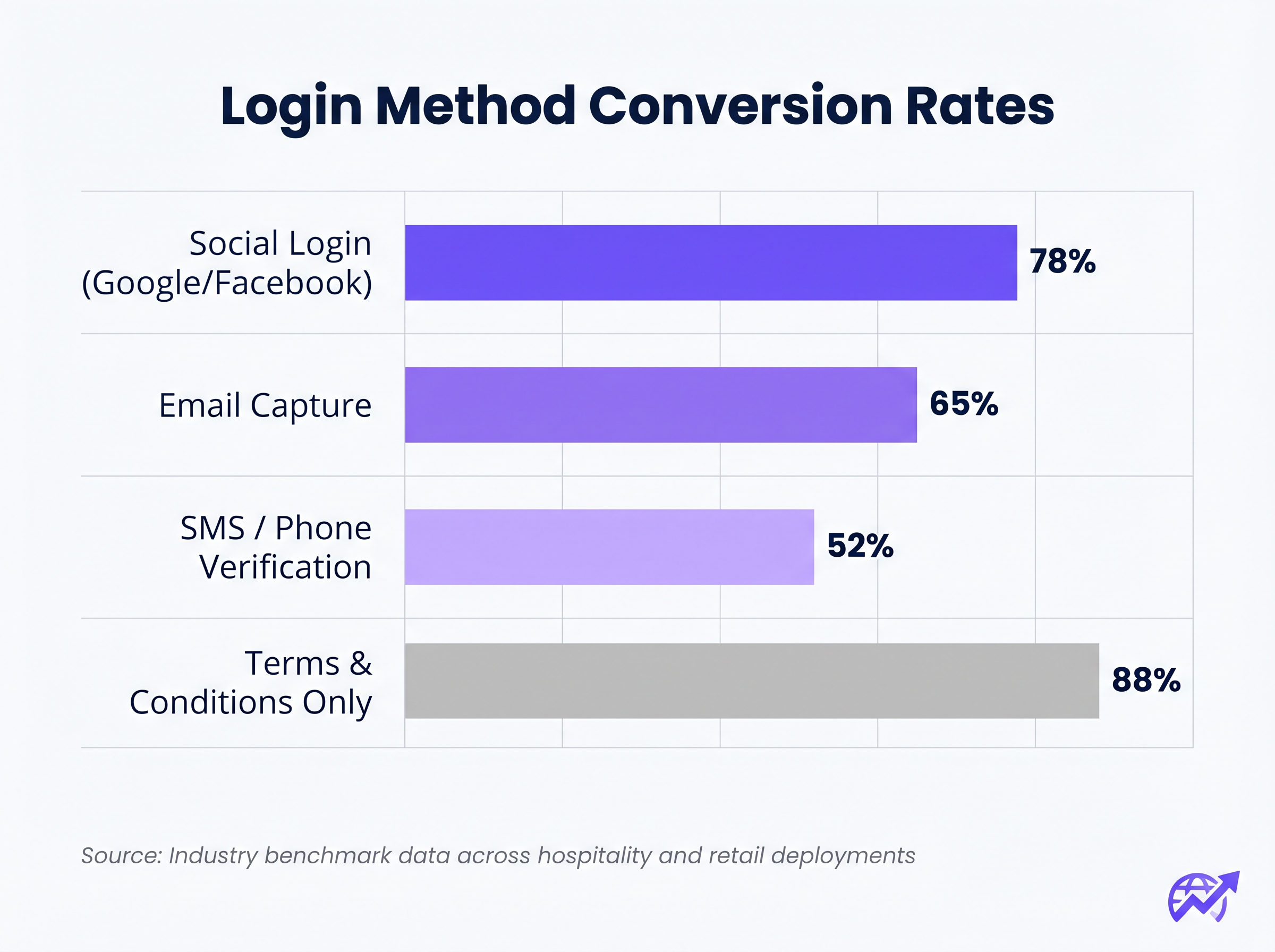
Die Korrelation zwischen der Anzahl der erforderlichen Formularfelder und der Abbruchrate ist absolut. Wenn Ihr Ziel die Datenerfassung ist, nutzen Sie Social Login (OAuth 2.0 über Google, Facebook, Apple). Dies liefert verifizierte demografische Daten mit einem einzigen Tippen. Wenn die E-Mail-Erfassung bevorzugt wird, fordern Sie nur die wesentlichen Felder an: Vorname, Nachname und E-Mail-Adresse.
2. Mobile Responsivität priorisieren
Über 75 % der Captive Portal-Authentifizierungen erfolgen auf mobilen Geräten. Das Layout muss mobil-first sein. Der primäre Call-To-Action (CTA)-Button muss prominent, leicht antippbar und ohne Scrollen des Benutzers sichtbar sein.
3. Ladezeiten optimieren
Ein Portal, das auf einer überlasteten 4G-Verbindung länger als drei Sekunden zum Laden benötigt, wird massive Abbrüche erleiden. Optimieren Sie alle Bildressourcen, minimieren Sie CSS und JavaScript und nutzen Sie ein Content Delivery Network (CDN), um eine schnelle Bereitstellung unabhängig vom Standort des Benutzers oder der Netzwerklast zu gewährleisten.
4. Markenkonsistenz
Das Captive Portal ist eine Erweiterung der Marke des Veranstaltungsortes. Stellen Sie sicher, dass das Logo scharf ist, die Typografie den Markenrichtlinien entspricht und der primäre CTA-Button die Akzentfarbe der Marke verwendet. Ein visuell uneinheitliches Portal untergräbt das Vertrauen und senkt die Konversionsraten.
Best Practices für spezifische Branchen
Verschiedene Branchen haben unterschiedliche Ziele für ihre Gastnetzwerke, die maßgeschneiderte Ansätze für das Portaldesign erfordern.
Gastgewerbe
Im Gae Gastgewerbe sollte das Captive Portal nahtlos in das Property Management System (PMS) integriert werden. Die Authentifizierung von Gästen anhand ihrer Zimmernummer und ihres Nachnamens bietet ein reibungsloses Erlebnis und stellt gleichzeitig sicher, dass nur zahlende Gäste Zugang zu Premium-Bandbreitenstufen erhalten. Nach dem Login leiten Sie die Benutzer auf eine dynamische Landingpage weiter, die Annehmlichkeiten vor Ort wie Spa-Dienste oder Restaurantreservierungen bewirbt.
Einzelhandel
Für Einzelhandelsumgebungen liegt der Fokus auf der schnellen Datenerfassung, um CRM- und Marketing-Automatisierungsplattformen zu speisen. Social Login ist hier sehr effektiv. Die Weiterleitung nach dem Login sollte einen sofortigen Mehrwert bieten, wie z. B. einen digitalen Coupon oder eine Aufforderung zum Download der mobilen Anwendung des Einzelhändlers.
Fehlerbehebung & Risikominderung
Selbst gut konzipierte Portale können fehlschlagen, wenn die zugrunde liegende Infrastruktur falsch konfiguriert ist.
- Walled Garden Fehlkonfiguration: Bei der Nutzung von Social Login (z. B. Facebook, Google) müssen die jeweiligen Domains explizit innerhalb des Walled Garden auf die Whitelist gesetzt werden. Andernfalls schlägt der OAuth-Flow stillschweigend fehl und der Benutzer bleibt auf der Login-Seite hängen.
- Captive Portal Assistant (CPA) Probleme: Moderne Betriebssysteme verwenden CPAs (wie Apples Captive Network Assistant), um Walled Gardens automatisch zu erkennen und einen Mini-Browser aufzurufen. Stellen Sie sicher, dass Ihr Portal mit diesen eingeschränkten Browsern kompatibel ist, denen oft die Unterstützung für Cookies oder erweitertes JavaScript fehlt.
- DHCP-Erschöpfung: In Umgebungen mit hoher Dichte wie Stadien oder Konferenzzentren stellen Sie sicher, dass Ihr DHCP-Bereich ausreichend dimensioniert ist, um einen schnellen Client-Wechsel zu bewältigen. Ein erschöpfter DHCP-Pool verhindert, dass Geräte überhaupt das Captive Portal erreichen.
ROI & Geschäftsauswirkungen
Ein hochkonvertierendes Captive Portal wandelt IT-Ausgaben in messbaren Geschäftswert um. Durch die Integration des Portals mit einer robusten WiFi Analytics Plattform können Veranstaltungsorte verfolgen:
- Authentifizierungs-Erfolgsrate: Der primäre KPI, berechnet als abgeschlossene Logins geteilt durch die Gesamtzahl der Portal-Impressionen.
- Datenbankwachstum: Das Volumen der verifizierten, zugestimmten Kontakte, die dem CRM hinzugefügt werden.
- Verweildauer und Wiederkehrerquoten: Korrelation der WiFi-Authentifizierung mit physischen Präsenzmetriken.
Bei der Bewertung von Lösungen konsultieren Sie Ressourcen wie Die beste Captive Portal Software im Jahr 2026: Ein Vergleichsleitfaden , um sicherzustellen, dass die gewählte Plattform die notwendigen Integrationen und Skalierbarkeitsanforderungen unterstützt.
Schlüsselbegriffe & Definitionen
Captive Portal
A web page that a user of a public-access network is obliged to view and interact with before access is granted.
The primary interface for managing guest network access, enforcing terms of service, and capturing user data.
Walled Garden
A restricted network environment that allows access only to specific, pre-approved web pages or services prior to full authentication.
Essential for allowing the device to reach the captive portal server and external identity providers (like Google) without granting full internet access.
RADIUS (Remote Authentication Dial-In User Service)
A networking protocol that provides centralised Authentication, Authorization, and Accounting (AAA) management.
The backend engine that verifies the user's credentials against a database and tells the controller whether to grant access.
MAC Authentication Bypass (MAB)
A mechanism where the network authenticates a device based on its MAC address rather than requiring user credentials.
Used to allow returning guests to seamlessly reconnect to the network without having to view the captive portal again.
VLAN (Virtual Local Area Network)
A logical subnetwork that groups a collection of devices from different physical LANs.
Crucial for security; guest traffic must be isolated on a separate VLAN to prevent access to corporate resources.
WPA3
The latest generation of Wi-Fi security, providing robust encryption and enhanced protection against brute-force attacks.
The required security standard for modern wireless deployments to ensure data transmitted over the air is protected.
HTTP 302 Redirect
A standard HTTP response status code indicating that the requested resource resides temporarily under a different URI.
The mechanism used by the Wireless LAN Controller to force the user's browser to load the captive portal page.
OAuth 2.0
An industry-standard protocol for authorization, enabling applications to obtain limited access to user accounts on an HTTP service.
The underlying technology that powers 'Social Login' options like 'Continue with Google' or 'Continue with Facebook'.
Fallstudien
A 300-room resort hotel is experiencing a 45% drop-off rate on their guest WiFi login page. The current portal requires guests to manually enter their Title, First Name, Last Name, Email, Phone Number, Date of Birth, and Home Address before clicking 'Connect'.
The portal must be redesigned to eliminate friction. The solution is to integrate the captive portal with the hotel's Property Management System (PMS). The new authentication flow requires only two fields: 'Room Number' and 'Guest Surname'. Upon submission, the RADIUS server queries the PMS via API. If a match is found, access is granted. For non-resident guests (e.g., conference attendees or restaurant patrons), a secondary 'Social Login' option is provided.
A national retail chain wants to implement social login via Facebook and Google on their captive portal. However, during pilot testing, users tap the 'Continue with Google' button, but the page simply hangs, and authentication fails.
The network architect must update the 'Walled Garden' configuration on the Wireless LAN Controllers across all pilot stores. The domains and IP ranges associated with Google and Facebook's OAuth authentication servers must be explicitly whitelisted. This allows the client device to communicate with the identity provider before full network access is granted.
Szenarioanalyse
Q1. You are deploying a new guest WiFi network for a chain of coffee shops. The marketing director insists on collecting Name, Email, Phone Number, Date of Birth, and Postcode on the captive portal to build a comprehensive customer database. As the IT Manager, how do you advise them?
💡 Hinweis:Consider the relationship between form length and abandonment rate, particularly in a high-turnover environment like a coffee shop.
Empfohlenen Ansatz anzeigen
Advise the marketing director that requiring five fields of manual data entry will result in a massive abandonment rate, severely limiting the total volume of data collected. Recommend implementing Social Login (Google/Facebook) as the primary option, which securely captures demographic data with a single tap. Alternatively, suggest a progressive profiling approach: capture only Email on the first visit, and request additional details on subsequent visits via automated email campaigns.
Q2. A hospital is updating its guest WiFi. They want to ensure patients and visitors have easy access, but the Information Security Officer is concerned about the legal implications of an open network and data privacy. What architecture do you propose?
💡 Hinweis:Address both the over-the-air encryption requirement and the data processing compliance requirement.
Empfohlenen Ansatz anzeigen
Deploy the guest network using WPA3-Personal (or WPA3 OWE - Opportunistic Wireless Encryption) to ensure over-the-air traffic is encrypted, protecting users from eavesdropping without requiring complex enterprise authentication. Implement a captive portal that requires explicit, opt-in consent for the Terms of Service to address liability. Do not collect unnecessary personal data (use a simple click-through or anonymous MAC authentication) to minimise GDPR exposure, and ensure the guest VLAN is strictly isolated from the clinical network.
Q3. After deploying a captive portal that includes a credit card payment gateway for premium bandwidth, users report that the payment page fails to load, though the initial portal page loads fine. What is the most likely cause?
💡 Hinweis:Consider how the device communicates with external servers before full authentication is granted.
Empfohlenen Ansatz anzeigen
The domains and IP addresses associated with the third-party payment gateway have not been whitelisted in the Wireless LAN Controller's walled garden. Because the device is not yet fully authenticated, the controller blocks the outbound traffic to the payment processor, causing the page to hang. The solution is to add the payment gateway's URLs to the walled garden configuration.




