
Aruba के लिए कैप्टिव पोर्टल
Aruba Instant (IAP) और Aruba Central प्रबंधित एक्सेस पॉइंट्स को कॉन्फ़िगर करने के लिए एक आधिकारिक तकनीकी संदर्भ मार्गदर्शिका, ताकि गेस्ट उपयोगकर्ताओं को Purple के उच्च-परिवर्तित, सुरक्षित बाहरी कैप्टिव पोर्टल पर रीडायरेक्ट किया जा सके। यह मार्गदर्शिका चरण-दर-चरण गेस्ट SSID सेटअप, बाहरी कैप्टिव पोर्टल रीडायरेक्शन, RADIUS सर्वर प्रमाणीकरण और अकाउंटिंग पैरामीटर, वॉल्ड गार्डन अपवाद सूचियों और WISPr समर्थन को कवर करती है।
इस गाइड को सुनें
पॉडकास्ट ट्रांसक्रिप्ट देखें
📚 हमारी मुख्य श्रृंखला का हिस्सा: मल्टी-टेनेंट WiFi →
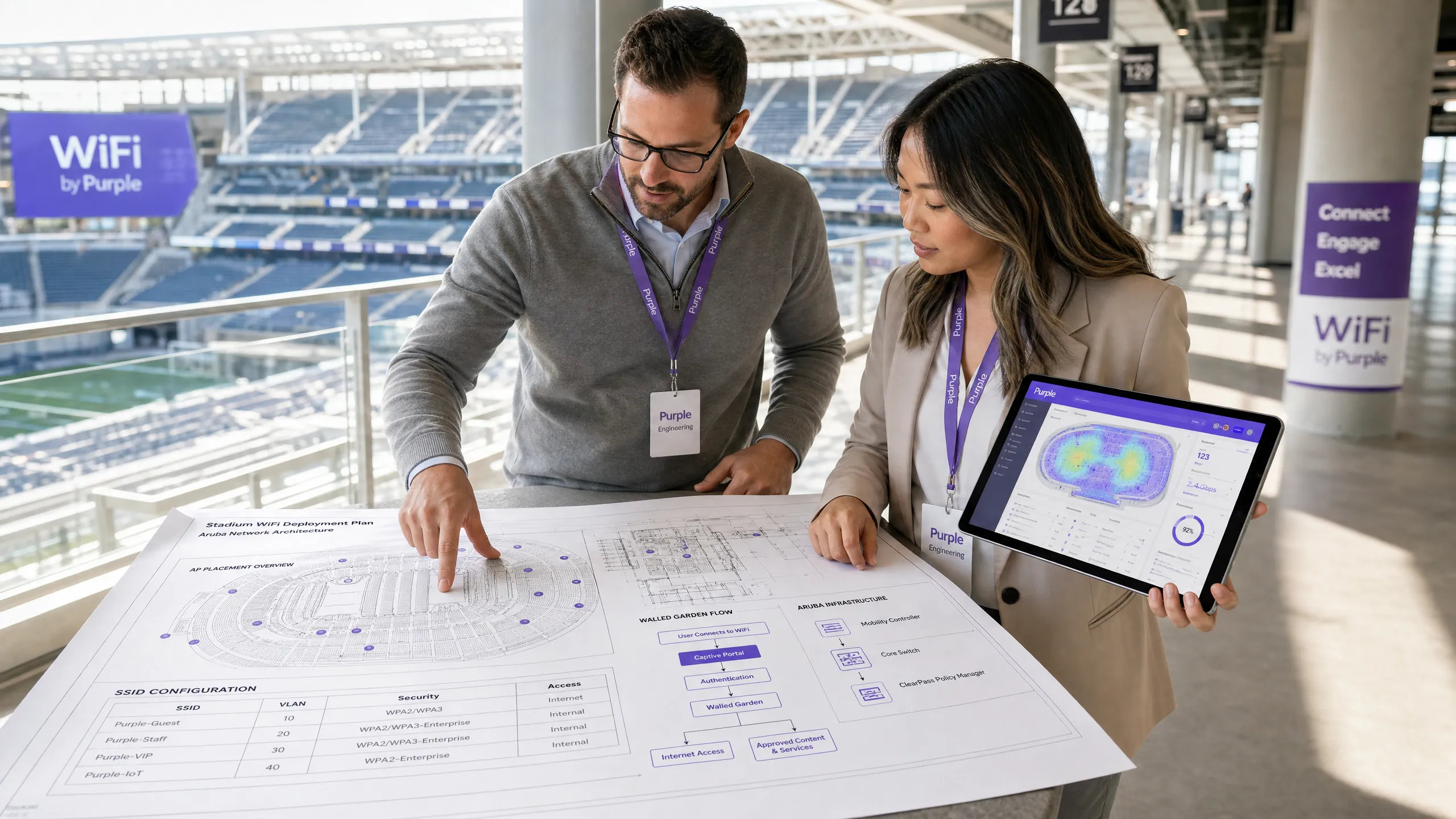
Executive Summary
For enterprise wireless engineers, network architects, and venue operations directors, deploying a robust guest wireless infrastructure is no longer just about providing basic internet access. Modern venues require a solution that balances strict network security, regulatory compliance, and a high-converting guest experience. While HPE Aruba's native captive portal capabilities are highly reliable, they lack the sophisticated marketing data capture, global multi-site scalability, and real-time location and demographic analytics required by enterprise venues in hospitality, retail, and public sectors.
By integrating Purple directly with Aruba Instant (IAP) or Aruba Central managed access points, organisations can replace basic local splash pages with a secure, highly-scalable, global guest portal. This integration leverages standard network protocols, including Remote Authentication Dial-In User Service (RADIUS) and Wireless Internet Service Provider roaming (WISPr), to deliver seamless, secure, and brand-consistent onboarding. This technical reference guide provides the exact configuration parameters, architectural diagrams, and troubleshooting workflows required to successfully deploy Purple on Aruba infrastructure.
Technical Deep-Dive
The integration of Purple with Aruba wireless infrastructure relies on a standard external captive portal redirect and RADIUS authentication flow. This architecture ensures that user authentication and traffic accounting are handled securely in the cloud, while local access points enforce access control and quality of service (QoS) policies.
The Captive Portal Redirect Flow
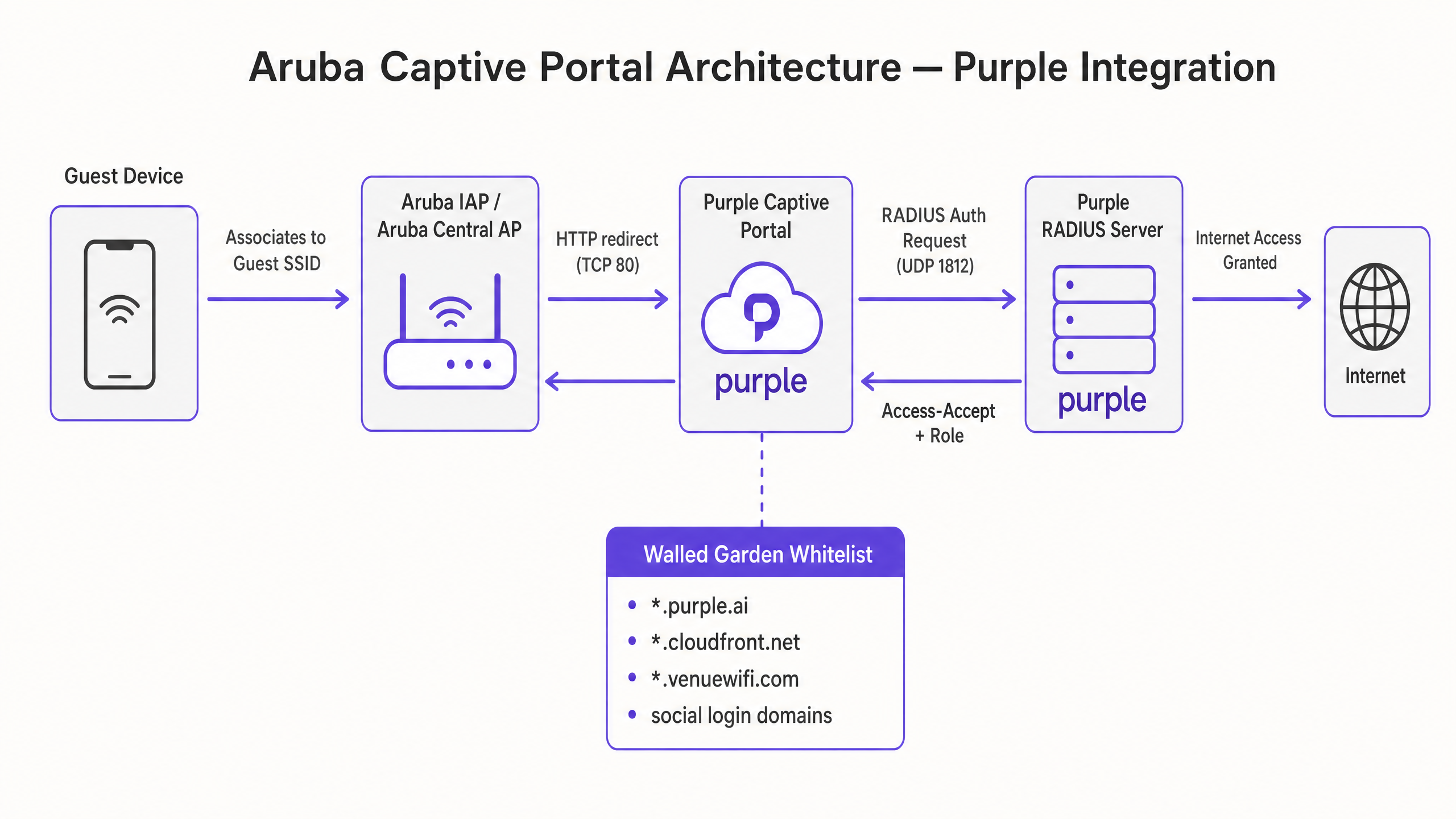
When an unauthenticated client associates with the guest Service Set Identifier (SSID), the Aruba access point intercepts the client's initial HTTP request (typically TCP port 80) and performs a HTTP 302 redirect to Purple's cloud-hosted splash page.
+--------------+             +-----------------+             +------------------+             +------------------+
| Guest Device |             |  Aruba AP / AP  |             |  Purple Captive  |             |  Purple RADIUS   |
|   (Client)   |             |  (Central/IAP)  |             |  Portal (Cloud)  |             |  Server (Cloud)  |
+--------------+             +-----------------+             +------------------+             +------------------+
       |                              |                               |                                |
       |-- 1. Associates to SSID ---->|                               |                                |
       |                              |                               |                                |
       |-- 2. HTTP Request (TCP 80) ->|                               |                                |
       |                              |-- 3. HTTP 302 Redirect ------>|                                |
       |<-- 4. Presents Splash Page ----------------------------------|                                |
       |                              |                               |                                |
       |-- 5. Submits Login Form ------------------------------------>|                                |
       |                              |                               |-- 6. RADIUS Access-Request --->|
       |                              |<-- 7. RADIUS Access-Accept ------------------------------------|
       |                              |      (with Session Timeout)   |                                |
       |<-- 8. Internet Granted ------|                               |                                |
       |                              |                               |                                |
       |                              |-- 9. RADIUS Accounting Start --------------------------------->|
       |                              |-- 10. RADIUS Accounting Interim (every 5 min) ---------------->|
RADIUS Authentication and Accounting Parameters
Once the guest submits their credentials or completes a social login on the Purple splash page, the Purple portal backend communicates with the local Aruba access point or controller to initiate RADIUS authentication. The Aruba AP acts as the Network Access Server (NAS) and sends a RADIUS Access-Request to Purple's cloud RADIUS servers on UDP port 1812.
To ensure accurate session tracking, policy enforcement, and reporting, the following RADIUS attributes must be exchanged:
| Attribute Name | Attribute ID | Description | Practical Context |
|---|---|---|---|
| NAS-IP-Address | 4 | The management IP address of the Aruba virtual controller or AP. | Identifies the physical hardware originating the authentication request. |
| Calling-Station-Id | 31 | The MAC address of the client device (typically formatted as XX-XX-XX-XX-XX-XX). |
Used by Purple to track unique devices and enforce MAC caching for returning guests. |
| Called-Station-Id | 30 | The MAC address of the AP radio (BSSID) combined with the SSID name (formatted as MAC:SSID). |
Crucial for Purple to identify the exact physical venue and specific SSID the user is connecting to. |
| Acct-Session-Id | 44 | A unique identifier generated by the AP for each client session. | Links authentication events with subsequent accounting start, interim, and stop records. |
| Acct-Status-Type | 40 | Indicates the type of accounting record: Start (1), Stop (2), or Interim-Update (3). |
Enables real-time tracking of active sessions and accurate dwell-time calculations. |
| Acct-Interim-Interval | 85 | Specifies the frequency (in seconds) of interim accounting updates sent by the AP. | Must be set to 300 seconds (5 minutes) to ensure Purple's analytics dashboard displays accurate real-time data. |
The Walled Garden (Exception List) Architecture
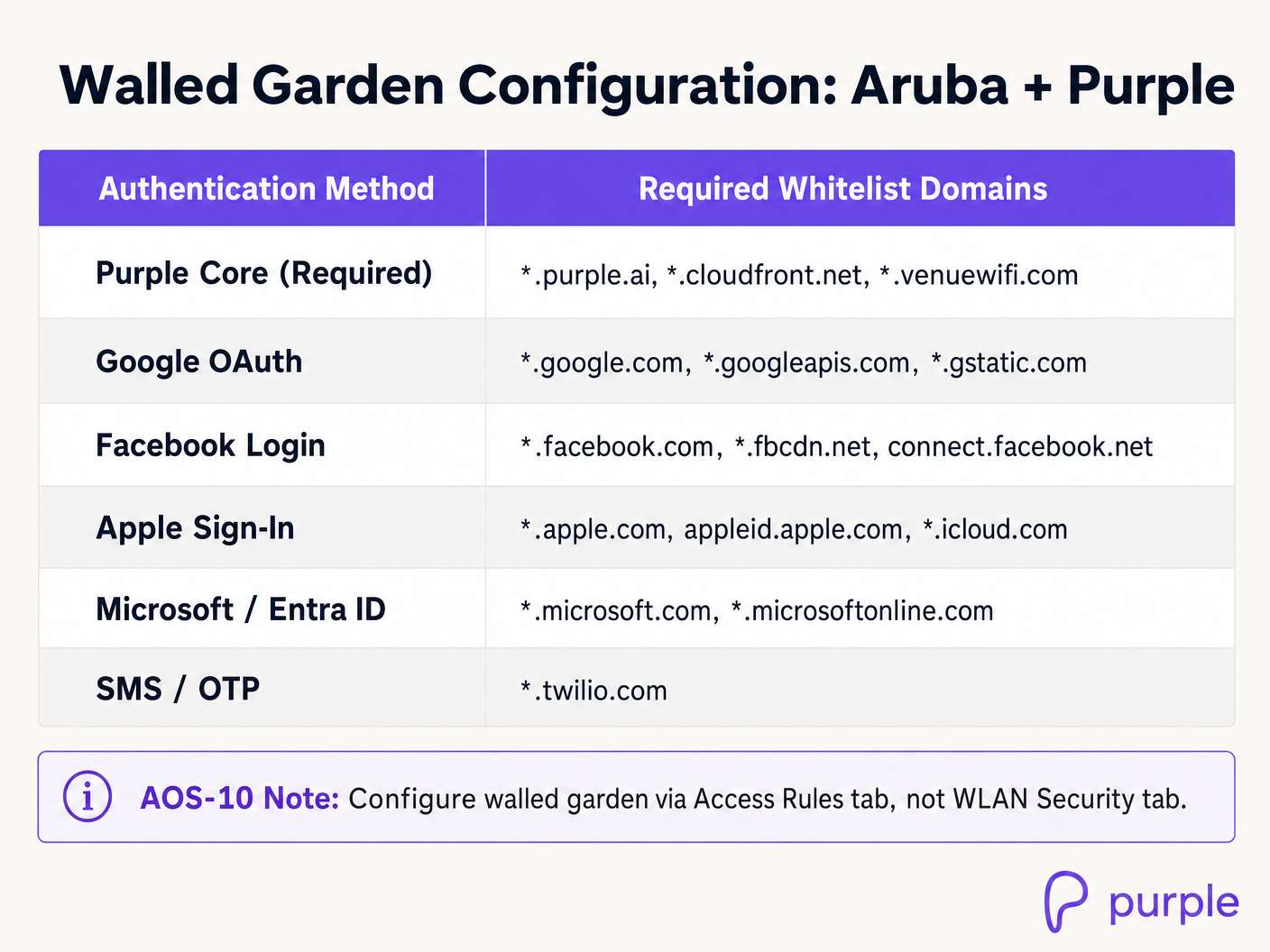
Before a user is authenticated, the Aruba AP restricts all traffic except for destinations explicitly defined in the Walled Garden (or exception list). Because Purple's portal is cloud-hosted and relies on external identity providers (such as Google, Facebook, and Apple) for social authentication, the AP must allow unauthenticated clients to resolve DNS and communicate with these external domains.
If any required domain is omitted from the walled garden, the guest will experience a blank page, broken CSS, missing images, or a complete timeout during the login flow.
Implementation Guide
Deploying Purple on Aruba wireless infrastructure can be achieved via Aruba Instant (IAP) running ArubaOS 8.x (on-premises virtual-controller mode) or Aruba Central (cloud-managed AOS-8 or AOS-10).
Aruba Instant (IAP) Configuration (ArubaOS 8.x)
Step 1: Configure RADIUS Servers
- Log in to the Aruba Instant AP virtual controller web interface.
- Navigate to Security > Authentication Server and click New.
- Configure the Primary RADIUS Server with the following parameters:
- Name:
Purple_Primary - IP Address:
34.94.146.135 - Auth Port:
1812 - Acct Port:
1813 - Shared Key: [Provided in your Purple Venue Dashboard]
- Name:
- Click OK to save.
- Click New again to configure the Secondary RADIUS Server:
- Name:
Purple_Secondary - IP Address:
34.94.183.201 - Auth Port:
1812 - Acct Port:
1813 - Shared Key: [Provided in your Purple Venue Dashboard]
- Name:
- Click OK to save.
Step 2: Create the Captive Portal Profile
- Navigate to Security > Captive Portal and click New.
- Configure the profile with the following settings:
- Name:
Purple_Portal - Type:
External - IP or Hostname:
portal.venuewifi.com - URL:
/ - Port:
443 - Use HTTPS:
Enabled - Redirect URL:
https://portal.venuewifi.com - WISPr:
Enabled(Crucial for auto-triggering the portal on iOS and Android devices)
- Name:
- Click OK to save.
Step 3: Configure the Walled Garden Whitelist
- In the Security > Captive Portal menu, select your newly created
Purple_Portalprofile. - Under the Walled Garden section, click the link to open the whitelist configuration.
- Add the following core Purple domains:
*.purple.ai*.cloudfront.net*.venuewifi.com
- If social login is enabled, add the respective domains (e.g.,
*.google.com,*.facebook.com,*.apple.com). - Click Save.
Step 4: Create and Configure the Guest SSID
- Navigate to Network > New to start the WLAN wizard.
- On the WLAN Settings tab:
- Name (SSID):
Guest-WiFi - Primary Usage:
Guest - Click Next.
- Name (SSID):
- On the VLAN tab, configure IP and VLAN assignment according to your network architecture (typically Client IP assignment: Network Assigned on a dedicated guest VLAN). Click Next.
- On the Security tab:
- Splash Page Type:
External - Captive Portal Profile: Select
Purple_Portal - Auth Server 1: Select
Purple_Primary - Auth Server 2: Select
Purple_Secondary - Reauth Interval:
1440(24 hours, or as per venue policy) - Accounting:
Enabled - Accounting Interval:
5minutes
- Splash Page Type:
- Click Next to proceed to the Access tab. Ensure the default guest rule allows DHCP and DNS pre-authentication, then click Finish.
Aruba Central Configuration (AOS-8 and AOS-10)
Aruba Central AOS-8
- Navigate to Devices under the Manage section of your group in Aruba Central.
- Click Config (gear icon) on the top right, then go to the WLANs tab and click + Add SSID.
- In Step 1: General, enter the SSID name (e.g.,
Guest-WiFi) and click Next. - In Step 2: VLANs, configure your guest VLAN mapping and click Next.
- In Step 3: Security:
- Set Security Level to
Visitors. - Set Type to
External Captive Portal. - Ensure Key Management is set to
Open(do not use Enhanced Open/OWE for standard guest portals as it can cause client compatibility issues). - Click the + icon next to Captive Portal Profile to add a new profile:
- Name:
Purple_Central_Portal - IP or Hostname:
portal.venuewifi.com - URL:
/ - Port:
443 - Redirect URL:
https://portal.venuewifi.com - Use HTTPS:
True - Captive Portal Failure:
Deny Internet(Recommended for security compliance)
- Name:
- Click Save.
- Click the + icon next to Primary Server and Secondary Server to add the Purple RADIUS servers using the IPs
34.94.146.135and34.94.183.201respectively, with ports1812(Auth) and1813(Acct). - Expand Advanced Settings, scroll to Accounting, select
Use authentication servers, and set Accounting Interval to5minutes.
- Set Security Level to
- Scroll down to the Walled Garden section, click + Add, and input the required Purple and social login domains.
- Click Save Settings.
Aruba Central AOS-10
In AOS-10, the walled garden configuration moves from the WLAN Security tab to Access Rules.
- Follow the same SSID and RADIUS configuration steps as AOS-8 above.
- In the SSID wizard, navigate to the Access tab.
- Click + Add Role and create a pre-authentication role named
Purple_Pre_Auth. - In the rules editor for this role, configure explicit Allow rules for DNS, DHCP, and the required walled garden domains (e.g.,
*.purple.ai,*.venuewifi.com). - Scroll down to Assign Pre-Authentication Role, enable the option, and select
Purple_Pre_Authfrom the dropdown. - The post-authorisation role (typically matching the SSID name) should remain configured with
Allow any to all destinationsor your specific corporate access policies. - Click Save Settings.
Best Practices
To ensure maximum performance, security, and compliance, network architects must adhere to the following industry standards and vendor-neutral best practices when deploying captive portals on Aruba and Purple.
1. Secure Certificate Management
Aruba access points must present a valid, trusted SSL/TLS certificate during the captive portal redirect flow.
- Avoid Self-Signed Certificates: If the AP presents a self-signed certificate, modern browsers will display a highly visible "Your connection is not private" warning, severely damaging guest trust and reducing conversion rates.
- Deploy a Trusted CA Certificate: Upload a wildcard certificate from a globally recognised Certificate Authority (CA) to your Aruba Central global settings or Instant virtual controllers. Ensure that the intermediate and root certificates are combined into a single file to complete the trust chain.
2. Network Segmentation and Compliance
Guest traffic must be kept entirely separate from corporate and administrative traffic to mitigate security risks and ensure compliance with industry standards.
- VLAN Isolation: Map the guest SSID to a dedicated, non-routable VLAN. Use Access Control Lists (ACLs) on the upstream core switch or firewall to prevent any routing between the guest VLAN and internal corporate subnets.
- PCI DSS Compliance: If your venue processes card payments (e.g., retail point-of-sale), network segmentation is a mandatory requirement under PCI DSS Requirement 1.2 [3]. Guest WiFi must be physically or logically isolated from the Cardholder Data Environment (CDE).
- GDPR and Data Privacy: Ensure that the Purple portal is configured to display explicit, un-ticked consent checkboxes for marketing opt-ins, meeting the strict requirements of the General Data Protection Regulation (GDPR) [4].
3. Optimising WISPr and Captive Portal Detection
Modern mobile operating systems use active probing to detect captive portals immediately upon association.
- Enable WISPr: Always ensure that WISPr support is enabled in your Aruba captive portal profile. This protocol passes XML-formatted metadata to the client operating system, allowing iOS (Captive Network Assistant) and Android (Captive Portal Login) to gracefully launch the login screen in a dedicated browser window.
- Prevent "Enhanced Open" (OWE) Issues: While Opportunistic Wireless Encryption (OWE) provides encryption on open networks, many legacy client devices do not support it. For public guest networks, stick to standard Open key management to maximise device compatibility.
Troubleshooting & Risk Mitigation
Even with meticulous planning, captive portal deployments can encounter common failure modes. The following troubleshooting matrix provides immediate, actionable steps for wireless engineers.
Captive Portal Troubleshooting Matrix
| Symptom | Probable Cause | Diagnostic Steps | Actionable Solution |
|---|---|---|---|
| Guest associates but the splash page does not load (Timeout/Blank Page). | Missing or incomplete Walled Garden configuration. | Attempt to ping portal.venuewifi.com from a wired device on the same VLAN. Check if the device is trying to load external resources (e.g., social login scripts) that are blocked. |
Explicitly add *.purple.ai, *.venuewifi.com, and *.cloudfront.net to the Aruba walled garden. Verify that DNS resolution is allowed in the pre-auth role. |
| Guest is redirected but browser displays an SSL/TLS Certificate Warning. | The Aruba AP is presenting an untrusted or self-signed certificate for the local redirect page. | Inspect the browser certificate details to see which certificate is being presented. | Upload a valid, trusted SSL certificate signed by a public CA to the Aruba virtual controller or Central global settings. |
| Guest completes the login form but is not granted internet access (Redirect Loop). | RADIUS communication failure between the Aruba AP and Purple servers. | Check the Aruba virtual controller logs for RADIUS timeouts or access-rejects. Run show auth-survivability or check firewall logs. |
Verify that outbound UDP ports 1812 (Auth) and 1813 (Acct) are open on your perimeter firewall. Ensure the RADIUS shared secret matches exactly on both Purple and Aruba. |
| The captive portal does not auto-popup on iOS or Android devices. | WISPr is disabled, or the AP is blocking the operating system's captive portal detection URLs. | Verify if the device can access the internet without logging in, or if it remains connected with "No Internet" and no popup. | Enable WISPr in the Aruba captive portal profile. Ensure that captive portal detection URLs (e.g., captive.apple.com, connectivitycheck.gstatic.com) are not blocked by custom pre-auth ACLs. |
| Real-time dwell-time analytics are inaccurate or missing in Purple. | RADIUS Accounting is disabled or the accounting interval is set too high. | Check the AP configuration to see if accounting is enabled and inspect the interval. | Enable RADIUS Accounting on the Aruba SSID. Set the Accounting Interval to exactly 5 minutes (300 seconds) to ensure regular session updates. |
ROI & Business Impact
Transitioning from a basic, local captive portal to an enterprise-grade WiFi intelligence platform like Purple delivers measurable business outcomes across operations, marketing, and network management.
Operational Efficiency and Scalability
Managing individual local captive portals across hundreds of retail stores, hotels, or public venues is an administrative bottleneck. Purple provides a centralised, cloud-managed console that allows IT teams to deploy, update, and audit captive portal configurations globally with a single click. This reduces configuration drift, ensures consistent branding, and slashes administrative overhead by up to 60%.
Data Monetisation and Marketing ROI
For industries like Retail and Hospitality, guest WiFi is a powerful channel for customer acquisition and engagement. Purple replaces anonymous connections with rich demographic profiles.
- Direct Integration: Purple integrates with CRM and marketing automation platforms to trigger real-time, context-aware campaigns. For example, a retail venue can trigger a personalised discount SMS the moment a loyalty customer connects to the guest WiFi.
- Measurable Footfall Analytics: By analysing RADIUS accounting data and BSSID associations, Purple provides highly accurate dwell-time, return-rate, and path-analysis reporting. This data enables venue operations directors to optimise staffing levels, evaluate window display effectiveness, and measure the direct ROI of marketing campaigns.
Cost-Benefit Analysis: Native Aruba vs. Purple Integration
| Feature / Metric | Native Aruba Local Portal | Aruba + Purple Integration | Business Impact |
|---|---|---|---|
| Centralised Multi-Site Management | Limited. Requires individual configuration per virtual controller or complex Central group mapping. | Fully Centralised. Manage thousands of venues and SSIDs from a single cloud dashboard. | Reduces IT overhead and eliminates configuration drift across distributed estates. |
| Data Capture & Compliance | Basic form capture. No built-in GDPR/CCPA consent validation workflows. | Enterprise-grade. Automated, legally-compliant consent tracking with real-time API sync to CRMs. | Mitigates legal risk and ensures compliance with global privacy regulations [4]. |
| Social Authentication | Requires custom external web development and manual API maintenance. | Out-of-the-box support for Google, Facebook, Apple, Microsoft, LinkedIn, and SMS. | Increases conversion rates by up to 40% through friction-free login options. |
| Analytics & Reporting | Basic session logs (IP, MAC, connect time). No demographic or behaviour tracking. | Rich analytics: age, gender, dwell-time, return rates, heatmaps, and cross-venue roaming. | Drives marketing ROI and provides actionable business intelligence for operations. |
मुख्य परिभाषाएं
कैप्टिव पोर्टल
एक वेब पेज जो WiFi नेटवर्क के नए जुड़े उपयोगकर्ताओं को नेटवर्क संसाधनों तक व्यापक पहुंच प्रदान करने से पहले प्रदर्शित किया जाता है।
गेस्ट डेटा कैप्चर करने, सेवा की शर्तों को लागू करने और ब्रांडेड मार्केटिंग सामग्री प्रस्तुत करने के लिए उपयोग किया जाता है।
RADIUS (Remote Authentication Dial-In User Service)
एक नेटवर्किंग प्रोटोकॉल जो उन उपयोगकर्ताओं के लिए केंद्रीकृत प्रमाणीकरण, प्राधिकरण और अकाउंटिंग (AAA) प्रबंधन प्रदान करता है जो नेटवर्क सेवा से जुड़ते हैं और उसका उपयोग करते हैं।
Purple बाहरी RADIUS सर्वर के रूप में कार्य करता है, मेहमानों को प्रमाणित करता है और उनके सत्र की अवधि को ट्रैक करता है।
WISPr (Wireless Internet Service Provider roaming)
एक ड्राफ्ट प्रोटोकॉल जो स्वतंत्र वायरलेस इंटरनेट सेवा प्रदाताओं को एक सामान्य लॉगिन पोर्टल का उपयोग करके उपयोगकर्ताओं को एक-दूसरे के नेटवर्क पर रोम करने की अनुमति देने में सक्षम बनाता है।
Aruba APs पर WISPr सक्षम करने से आधुनिक स्मार्टफोन स्वचालित रूप से कैप्टिव पोर्टल का पता लगा सकते हैं और सिस्टम-मूल (system-native) विंडो में स्प्लैश पेज प्रदर्शित कर सकते हैं।
Walled Garden
वेब साइटों या डोमेन का एक प्रतिबंधित सेट जिसे एक अप्रमाणित उपयोगकर्ता को कैप्टिव पोर्टल लॉगिन प्रक्रिया पूरी करने से पहले एक्सेस करने की अनुमति होती है।
प्रमाणित होने से पहले मेहमानों को स्प्लैश पेज एसेट (CSS, JS, चित्र) लोड करने और सोशल लॉगिन प्रदाताओं (Google, Facebook) तक पहुँचने की अनुमति देने के लिए महत्वपूर्ण है।
BSSID (Basic Service Set Identifier)
एक विशिष्ट SSID के लिए वायरलेस एक्सेस पॉइंट के रेडियो इंटरफ़ेस का MAC पता।
RADIUS Called-Station-Id विशेषता में भेजा जाता है, जिससे Purple उपयोगकर्ता के भौतिक स्थान को एक विशिष्ट AP पर मैप कर सकता है।
NAS-IP-Address
नेटवर्क एक्सेस सर्वर (Aruba AP या कंट्रोलर) का IP पता जहां से RADIUS अनुरोध उत्पन्न हो रहा है।
प्रमाणीकरण का अनुरोध करने वाले भौतिक हार्डवेयर की पहचान करने के लिए RADIUS पैकेट में उपयोग किया जाता है।
RadSec
एक प्रोटोकॉल जो TCP पर Transport Layer Security (TLS) का उपयोग करके RADIUS लेनदेन को सुरक्षित करता है।
स्थानीय AP और Purple के क्लाउड के बीच अविश्वसनीय सार्वजनिक नेटवर्क से गुजरते समय RADIUS प्रमाणीकरण और अकाउंटिंग ट्रैफ़िक को एन्क्रिप्ट करने के लिए उपयोग किया जाता है।
Enhanced Open (OWE)
WiFi Certified Easy Connect का एक विस्तार जो पासवर्ड की आवश्यकता के बिना खुले नेटवर्क पर वायरलेस प्रसारण का एन्क्रिप्शन प्रदान करता है।
पुराने गेस्ट उपकरणों के साथ संगतता समस्याएं पैदा कर सकता है; सार्वजनिक कैप्टिव पोर्टल्स के लिए मानक Open सुरक्षा की सिफारिश की जाती है।
हल किए गए उदाहरण
एक एंटरप्राइज वायरलेस इंजीनियर 150 स्टोरों वाली एक राष्ट्रीय रिटेल श्रृंखला में गेस्ट WiFi तैनात कर रहा है। प्रत्येक स्टोर में Aruba Central के माध्यम से प्रबंधित 3-5 Aruba Instant APs हैं। मार्केटिंग टीम को Facebook और Google सोशल लॉगिन विकल्पों के साथ एक ब्रांडेड कैप्टिव पोर्टल की आवश्यकता है, और अनुपालन टीम का आदेश है कि गेस्ट ट्रैफ़िक को स्टोर के पॉइंट-ऑफ-सेल (PoS) नेटवर्क से पूरी तरह से अलग किया जाना चाहिए। इसे कैसे आर्किटेक्ट और कॉन्फ़िगर किया जाना चाहिए?
- नेटवर्क सेगमेंटेशन: Aruba APs पर गेस्ट SSID को VLAN 100 पर मैप करें। स्थानीय स्विच पोर्ट को ट्रंक पोर्ट के रूप में कॉन्फ़िगर करें, जिससे VLAN 100 की अनुमति मिले। स्टोर के गेटवे फ़ायरवॉल पर, DHCP स्कोप और केवल-आउटबाउंड NAT नीति के साथ VLAN 100 को कॉन्फ़िगर करें। VLAN 100 से PoS VLAN (VLAN 10) तक के सभी ट्रैफ़िक को ब्लॉक करने के लिए फ़ायरवॉल पर एक ACL लागू करें।
- Aruba Central में RADIUS और पोर्टल कॉन्फ़िगरेशन: VLAN 100 पर 'Store-Guest' नाम से एक नया SSID बनाएं। Security को 'Visitors' और Splash Page को 'External Captive Portal' पर सेट करें। पोर्ट 1812/1813 के साथ Purple का प्राथमिक RADIUS सर्वर (34.94.146.135) and द्वितीयक सर्वर (34.94.183.201) जोड़ें। 5 मिनट के अंतराल के साथ RADIUS Accounting सक्षम करें।
- वॉल्ड गार्डन: Aruba Central में वॉल्ड गार्डन को कॉन्फ़िगर करें जिसमें शामिल हों: *.purple.ai, *.venuewifi.com, *.cloudfront.net (Purple कोर के लिए), और सोशल लॉगिन डोमेन: *.google.com, *.googleapis.com, *.gstatic.com (Google के लिए) और *.facebook.com, *.fbcdn.net, connect.facebook.net (Facebook के लिए)।
- परीक्षण: एक परीक्षण उपकरण को 'Store-Guest' से कनेक्ट करें, सत्यापित करें कि DHCP VLAN 100 पर एक IP असाइन करता है, पुष्टि करें कि ब्राउज़र HTTPS पर Purple पोर्टल पर रीडायरेक्ट करता है, Facebook लॉगिन पूरा करें, और सत्यापित करें कि इंटरनेट एक्सेस प्रदान किया गया है जबकि आंतरिक PoS संसाधन पूरी तरह से अप्राप्य रहते हैं।
50,000 सीटों वाला एक स्टेडियम वेन्यू उच्च-घनत्व वाले AP-555 एक्सेस पॉइंट्स के साथ AOS-10 पर Aruba Central चला रहा है। पीक इवेंट घंटों के दौरान, हजारों उपयोगकर्ता एक साथ गेस्ट WiFi से कनेक्ट करने का प्रयास करते हैं। IT निदेशक वर्चुअल कंट्रोलर पर कैप्टिव पोर्टल रीडायरेक्ट के प्रदर्शन प्रभाव के बारे में चिंतित हैं और यह सुनिश्चित करना चाहते हैं कि प्रमाणीकरण प्रक्रिया यथासंभव तेज़ और लचीली हो। कौन से उन्नत कॉन्फ़िगरेशन लागू किए जाने चाहिए?
- पूर्व-प्रमाणीकरण भूमिका (AOS-10): AOS-10 में, 'Stadium-Pre-Auth' नाम से एक समर्पित पूर्व-प्रमाणीकरण भूमिका कॉन्फ़िगर करें। एक ACL लागू करें जो DHCP (UDP 67-68), DNS (UDP 53), और Purple वॉल्ड गार्डन डोमेन के लिए आउटबाउंड ट्रैफ़िक की अनुमति देता है। SSID सेटिंग्स में इस भूमिका को 'Pre-Authentication Role' के रूप में असाइन करें। यह पैकेट फ़िल्टरिंग के भार को केंद्रीय कंट्रोलर से हटाकर व्यक्तिगत APs पर डाल देता है, जिससे लोड वितरित हो जाता है।
- RADIUS लोड बैलेंसिंग: Aruba Central में, प्राथमिक और द्वितीयक Purple RADIUS सर्वरों में RADIUS लोड बैलेंसिंग सक्षम करें। यह पीक प्रवेश समय के दौरान प्रमाणीकरण लोड को समान रूप से वितरित करता है।
- सर्वर ऑफलोड: कैप्टिव पोर्टल प्रोफ़ाइल सेटिंग्स में 'Server Offload' सक्षम करें। यह गैर-ब्राउज़र क्लाइंट अनुप्रयोगों (जैसे पृष्ठभूमि मोबाइल ऐप, सिस्टम अपडेट, या IoT डिवाइस) को बाहरी कैप्टिव पोर्टल पर बार-बार रीडायरेक्ट होने से रोकता है, जिससे AP CPU चक्र और WAN बैंडविड्थ सुरक्षित रहती है।
- कैप्टिव पोर्टल विफलता नीति: 'Captive Portal Failure' को 'Deny Internet' पर सेट करें। हालांकि 'Allow Internet' ग्राहक-अनुकूल लगता है, लेकिन एक अत्यधिक नेटवर्क लोड के दौरान यह अनियंत्रित खुली पहुंच का कारण बन सकता है, जिससे सुरक्षा नियंत्रण बायपास हो सकते हैं और DHCP पूल समाप्त हो सकते हैं।
अभ्यास प्रश्न
Q1. एक नेटवर्क इंजीनियर Aruba Instant AP क्लस्टर पर एक नया गेस्ट SSID कॉन्फ़िगर करता है। परीक्षण करते समय, वे SSID से कनेक्ट होते हैं, लेकिन ब्रांडेड Purple स्प्लैश पेज के बजाय, उन्हें ब्राउज़र टाइमआउट त्रुटि दिखाई देती है। इस समस्या का सबसे संभावित कारण क्या है, और क्या समस्या निवारण कदम उठाए जाने चाहिए?
संकेत: इस बारे में सोचें कि प्रमाणीकरण से पहले क्लाइंट डिवाइस को क्लाउड-होस्टेड स्प्लैश पेज तक पहुँचने के लिए क्या आवश्यक है।
मॉडल उत्तर देखें
सबसे संभावित कारण वॉल्ड गार्डन कॉन्फ़िगरेशन का गायब होना या अधूरा होना, या DNS रिज़ॉल्यूशन की समस्या है। प्रमाणीकरण से पहले, AP व्हाइटलिस्ट किए गए डोमेन को छोड़कर सभी ट्रैफ़िक को ब्लॉक कर देता है। यदि Purple डोमेन (*.purple.ai, *.venuewifi.com, *.cloudfront.net) वॉल्ड गार्डन में नहीं हैं, तो क्लाइंट स्प्लैश पेज लोड नहीं कर सकता है। समस्या निवारण कदम: 1. सत्यापित करें कि क्लाइंट डिवाइस को DHCP के माध्यम से एक वैध IP पता और DNS सर्वर प्राप्त हुआ है। 2. DNS काम कर रहा है या नहीं, इसकी पुष्टि करने के लिए उसी VLAN पर एक वायर्ड डिवाइस से 'portal.venuewifi.com' को हल (resolve) करने का प्रयास करें। 3. यह सुनिश्चित करने के लिए Aruba AP कॉन्फ़िगरेशन की जांच करें कि वॉल्ड गार्डन व्हाइटलिस्ट सक्रिय है और इसमें सभी आवश्यक Purple डोमेन शामिल हैं। 4. सत्यापित करें कि पूर्व-प्रमाणीकरण भूमिका DNS सर्वर पर DNS ट्रैफ़िक (UDP पोर्ट 53) की अनुमति देती है।
Q2. एक बड़े कन्वेंशन सेंटर में Purple गेस्ट WiFi के रोलआउट के दौरान, IT टीम रिपोर्ट करती है कि गेस्ट डिवाइस सफलतापूर्वक कनेक्ट होते हैं, लेकिन उन्हें हर 15 मिनट में फिर से लॉग इन करने के लिए प्रेरित किया जाता है। वांछित व्यवहार यह है कि मेहमान 24 घंटे तक लॉग इन रहें। इसे हल करने के लिए किन Aruba और Purple कॉन्फ़िगरेशन मापदंडों का निरीक्षण किया जाना चाहिए?
संकेत: सत्र जीवनकाल (session lifetime) और पुनः प्रमाणीकरण अंतराल को नियंत्रित करने वाले मापदंडों को देखें।
मॉडल उत्तर देखें
यह समस्या सत्र समय-समाप्ति (session timeout) या पुनः प्रमाणीकरण अंतराल सेटिंग्स में बेमेल होने के कारण होती है। इसे हल करने के लिए: 1. Aruba SSID सुरक्षा टैब पर 'Reauth Interval' का निरीक्षण करें; इसे 15 मिनट के बजाय 1440 मिनट (24 घंटे) पर सेट किया जाना चाहिए। 2. Access-Accept संदेश में Purple RADIUS सर्वर द्वारा लौटाई गई 'Session Timeout' विशेषता की जांच करें। यदि Purple को कम सत्र जीवनकाल के साथ कॉन्फ़िगर किया गया है, तो यह पुनः प्रमाणीकरण के लिए बाध्य करेगा। 3. सुनिश्चित करें कि Aruba SSID पर MAC Authentication सक्षम है। यह AP को 24 घंटे की अवधि के दौरान फिर से स्प्लैश पेज दिखाए बिना, Purple के डेटाबेस के विरुद्ध उनके MAC पते के माध्यम से लौटने वाले मेहमानों को स्वचालित रूप से प्रमाणित करने की अनुमति देता है।
Q3. एक सार्वजनिक क्षेत्र का संगठन AOS-10 पर Aruba Central का उपयोग करके कई पुस्तकालयों में गेस्ट WiFi तैनात कर रहा है। सुरक्षा नीति का आदेश है कि सभी गेस्ट ट्रैफ़िक हवा में (over the air) एन्क्रिप्टेड होना चाहिए, लेकिन पुस्तकालय निदेशक एक निर्बाध, घर्षण-मुक्त लॉगिन अनुभव चाहते हैं। वायरलेस आर्किटेक्ट Aruba और Purple का उपयोग करके दोनों आवश्यकताओं को कैसे प्राप्त कर सकता है?
संकेत: Open, OWE (Enhanced Open), और WPA2/WPA3-Enterprise के बीच के अंतरों पर विचार करें, और वे कैप्टिव पोर्टल्स के साथ कैसे इंटरैक्ट करते हैं।
मॉडल उत्तर देखें
ओवर-द-एयर एन्क्रिप्शन और एक निर्बाध कैप्टिव पोर्टल अनुभव दोनों प्राप्त करने के लिए, आर्किटेक्ट को 'Enhanced Open' (Opportunistic Wireless Encryption - OWE) को ट्रांज़िशन मोड के साथ तैनात करना चाहिए यदि पुराने डिवाइस संगतता की आवश्यकता है। Enhanced Open बिना किसी प्री-शेयर्ड कुंजी की आवश्यकता के क्लाइंट और AP के बीच वायरलेस कनेक्शन को एन्क्रिप्ट करता है, जिससे मेहमानों को पैसिव ईव्सड्रॉपिंग (passive eavesdropping) से बचाया जा सकता है। 1. Aruba Central में गेस्ट SSID को Security Level को 'Visitors' और Key Management को 'Enhanced Open' पर सेट करके कॉन्फ़िगर करें। 2. 'OWE Transition Mode' सक्षम करें और इसे उन पुराने उपकरणों का समर्थन करने के लिए एक मानक Open गेस्ट SSID के साथ संबद्ध करें जो WPA3 OWE का समर्थन नहीं करते हैं। 3. हमेशा की तरह Purple की ओर इशारा करते हुए External Captive Portal प्रोफ़ाइल को कॉन्फ़िगर करें। यह संयोजन सुनिश्चित करता है कि आधुनिक उपकरणों को स्वचालित रूप से एन्क्रिप्टेड वायरलेस ट्रांसपोर्ट मिले, जबकि डेटा कैप्चर और अनुपालन के लिए अभी भी Purple स्प्लैश पेज पर रीडायरेक्ट किया जा रहा हो।
इस श्रृंखला में आगे पढ़ें
Cisco WLC और Catalyst का Purple WiFi के साथ एकीकरण: चरण-दर-चरण गेस्ट एक्सेस गाइड
यह आधिकारिक गाइड Cisco Catalyst 9800 WLCs के Purple WiFi के साथ चरण-दर-चरण एकीकरण का विवरण देती है। इसमें गेस्ट Captive Portal के लिए External Web Authentication, सुरक्षित स्टाफ एक्सेस के लिए 802.1X EAP-TLS, और मल्टी-टेनेंट डायनेमिक VLAN सेगमेंटेशन के लिए Cisco iPSK शामिल है।
Purple WiFi के साथ CommScope Ruckus एकीकरण: सेटअप और कॉन्फ़िगरेशन गाइड
यह तकनीकी संदर्भ मार्गदर्शिका CommScope Ruckus आर्किटेक्चर को Purple WiFi के साथ एकीकृत करने के लिए एक आधिकारिक कॉन्फ़िगरेशन प्लेबुक प्रदान करती है। यह Guest WiFi कैप्टिव पोर्टल, 802.1X के माध्यम से सुरक्षित स्टाफ WiFi, और Ruckus Dynamic PSK का उपयोग करके मल्टी-टेनेंट नेटवर्क आइसोलेशन के लिए चरण-दर-चरण परिनियोजन का विवरण देती है।
Purple WiFi के साथ Allied Telesis Access Points का एकीकरण
यह गाइड Allied Telesis TQ-Series एक्सेस पॉइंट्स को Purple WiFi के साथ एकीकृत करने के लिए एक व्यापक कॉन्फ़िगरेशन प्लेबुक प्रदान करती है। इसमें सुरक्षित मल्टी-टेनेंट परिनियोजन के लिए बाहरी कैप्टिव पोर्टल रीडायरेक्शन, 802.1X RADIUS प्रमाणीकरण, और Private Pre-Shared Keys (PPSK) का उपयोग करके डायनेमिक VLAN स्टीयरिंग शामिल है।