
सार्वजनिक गेस्ट नेटवर्क पर कानूनी देनदारियां और कंटेंट फ़िल्टरिंग
यह मार्गदर्शिका IT प्रबंधकों, नेटवर्क आर्किटेक्ट्स और CTOs को सार्वजनिक गेस्ट WiFi नेटवर्क पर कंटेंट फ़िल्टरिंग तैनात करने के लिए एक निश्चित तकनीकी और कानूनी ढांचा प्रदान करती है। इसमें GDPR, यूके ऑनलाइन सुरक्षा अधिनियम 2023 और PCI-DSS के तहत नियामक दायित्वों के साथ-साथ DNS फ़िल्टरिंग, कैप्टिव पोर्टल प्रमाणीकरण, एप्लिकेशन-परत फ़ायरवॉलिंग और VLAN सेगमेंटेशन के लिए एक बहु-स्तरीय आर्किटेक्चर शामिल है। हॉस्पिटैलिटी, रिटेल, हेल्थकेयर और ट्रांसपोर्ट के स्थान संचालकों को कानूनी रूप से बचाव योग्य, उच्च-प्रदर्शन वाले गेस्ट नेटवर्क बनाने के लिए व्यावहारिक कार्यान्वयन चरण, वास्तविक दुनिया के केस स्टडीज और निर्णय ढांचे मिलेंगे।
इस गाइड को सुनें
पॉडकास्ट ट्रांसक्रिप्ट देखें
हमारी मुख्य श्रृंखला का हिस्सा: Enterprise WiFi Security Guide →

कार्यकारी सारांश
सार्वजनिक स्थानों का प्रबंधन करने वाले IT प्रबंधकों, नेटवर्क आर्किटेक्ट्स और मुख्य तकनीकी अधिकारियों (CTO) के लिए, Guest WiFi को तैनात करना एक बुनियादी परिचालन आवश्यकता है। हालांकि, मजबूत कंटेंट फ़िल्टरिंग के बिना ओपन इंटरनेट एक्सेस प्रदान करना स्थानों को गंभीर कानूनी, वित्तीय और प्रतिष्ठित जोखिमों में डालता है। जब आप सार्वजनिक इंटरनेट एक्सेस प्रदान करते हैं, तो आपका संगठन एक इंटरनेट सेवा प्रदाता (ISP) की भूमिका ग्रहण कर लेता है। यदि दुर्भावनापूर्ण या अवैध ट्रैफ़िक (जैसे कॉपीराइट उल्लंघन, पीयर-टू-पीयर (P2P) पाइरेसी, या प्रतिबंधित डेटा तक पहुंच) आपके सार्वजनिक IP पते से उत्पन्न होता है, तो जिम्मेदारी आमतौर पर स्थान संचालक पर आती है।
यह मार्गदर्शिका अनिवार्य कंटेंट फ़िल्टरिंग को लागू करने के लिए एक निर्णायक तकनीकी ढांचा प्रदान करती है। हम सेफ हार्बर सुरक्षा बनाए रखने, अनुपालन सुनिश्चित करने (जिसमें GDPR, यूके का ऑनलाइन सुरक्षा अधिनियम 2023 और PCI-DSS v4.0 शामिल हैं) और बड़े पैमाने पर नेटवर्क प्रदर्शन को बनाए रखने के लिए आवश्यक आर्किटेक्चर का पता लगाएंगे। मजबूत फ़िल्टरिंग को WiFi Analytics के साथ जोड़कर, रिटेल, हॉस्पिटैलिटी, हेल्थकेयर, और ट्रांसपोर्ट जैसे उद्योगों के स्थान जोखिमों को कम करते हुए एक सहज ग्राहक अनुभव बनाए रख सकते हैं।
तकनीकी गहन विश्लेषण
कानूनी परिदृश्य और सेफ हार्बर
कंटेंट फ़िल्टरिंग का मुख्य प्रेरक कारक सार्वजनिक WiFi की कानूनी देनदारी है। अधिकांश न्यायालयों में, ISP और सार्वजनिक WiFi प्रदाताओं को "सेफ हार्बर" प्रावधानों द्वारा संरक्षित किया जाता है—जैसे कि अमेरिका में डिजिटल मिलेनियम कॉपीराइट एक्ट (DMCA), या यूरोपीय संघ का ई-कॉमर्स निर्देश और उसके बाद के ढांचे। हालांकि, ये सुरक्षाएं स्पष्ट रूप से सशर्त हैं। पात्र होने के लिए, प्रदाताओं को यह साबित करना होगा कि उन्होंने अवैध गतिविधियों को रोकने के लिए उचित तकनीकी कदम उठाए हैं और आवश्यकता पड़ने पर कानून प्रवर्तन की सहायता कर सकते हैं।
ऑडिट ट्रेल और सक्रिय फ़िल्टरिंग के बिना, स्थान यह साबित नहीं कर सकते कि उन्होंने उचित कदम उठाए हैं, जिससे सेफ हार्बर सुरक्षा पूरी तरह से अमान्य हो जाएगी। यह सार्वजनिक क्षेत्र के परिनियोजन और शैक्षणिक संस्थानों के लिए विशेष रूप से महत्वपूर्ण है, जहां जवाबदेही की आवश्यकताएं अधिक सख्त हैं। सुरक्षा-संवेदनशील वातावरण में WiFi के प्रबंधन पर पृष्ठभूमि की जानकारी के लिए, कृपया स्कूलों में WiFi: 2026 एडमिनिस्ट्रेटर और IT गाइड देखें।
अनफ़िल्टर्ड नेटवर्क के तीन मुख्य कानूनी जोखिम वेक्टर इस प्रकार हैं। पहला, P2P पाइरेसी के माध्यम से कॉपीराइट उल्लंघन: अधिकार धारक BitTorrent प्रोटोकॉल के माध्यम से कॉपीराइट-संरक्षित फ़ाइलों को साझा करने वाले IP पतों की पहचान करने के लिए स्वचालित निगरानी का उपयोग करते हैं। यूके के डिजिटल इकोनॉमी एक्ट 2017 जैसे नियमों के तहत, किसी स्थान के सार्वजनिक IP से जुड़े बार-बार होने वाले उल्लंघन के कारण सेवा थ्रॉटलिंग, नागरिक जुर्माना या अधिकार धारकों द्वारा मुकदमा हो सकता है। दूसरा, हानिकारक या अवैध कंटेंट तक पहुंच: यूके का ऑनलाइन सुरक्षा अधिनियम 2023 इंटरनेट एक्सेस प्रदाताओं पर देखभाल का एक सख्त कर्तव्य लागू करता है। Ofcom गंभीर उल्लंघनों के लिए £18 मिलियन या वैश्विक टर्नओवर का 10% तक का जुर्माना लगा सकता है। यदि ग्राहक आपके नेटवर्क के माध्यम से अवैध डेटा तक पहुंचते हैं और आपने उद्योग-मानक ब्लॉकिंग (जैसे कि Internet Watch Foundation की ब्लॉकलिस्ट) लागू नहीं की है, तो आपके संगठन को सख्त नियामक जांच का सामना करना पड़ेगा। तीसरा, डेटा गोपनीयता और रिकॉर्ड-कीपिंग अनुपालन: GDPR और UK GDPR के तहत, एकत्र किया गया कोई भी नेटवर्क मेटाडेटा (IP लीज, MAC पता, टाइमस्टैम्प) व्यक्तिगत डेटा का गठन करता है। स्थानों को कानून प्रवर्तन द्वारा उपयोग के लिए कनेक्शन लॉग बनाए रखने के कानूनी दायित्व (यूके दूरसंचार नियमों के तहत आमतौर पर 12 महीने) और GDPR के डेटा न्यूनीकरण सिद्धांतों के बीच संतुलन बनाना चाहिए।

बहु-स्तरीय सुरक्षा आर्किटेक्चर
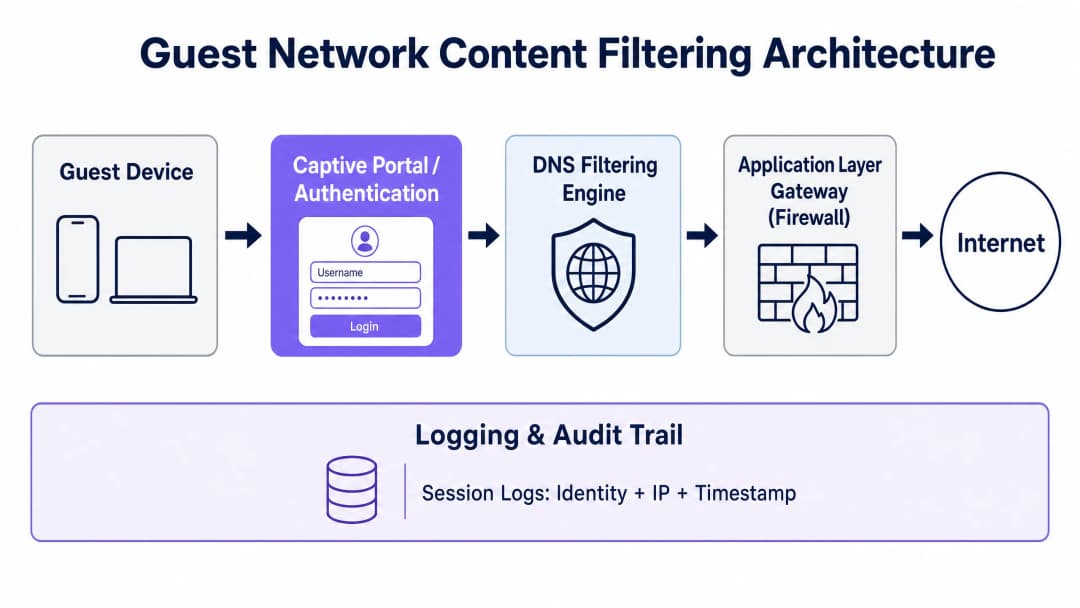
ग्राहकों और व्यवसायों की सुरक्षा के लिए गहराई से रक्षा (defense-in-depth) के दृष्टिकोण की आवश्यकता होती है। एकल फ़ायरवॉल नियम या बुनियादी DNS फ़िल्टरिंग को तकनीकी रूप से समझदार उपयोगकर्ताओं द्वारा आसानी से बायपास किया जा सकता है। एक मजबूत ग्राहक नेटवर्क आर्किटेक्चर को चार अलग-अलग नियंत्रण परतों में एक बहु-स्तरीय सुरक्षा स्टैक लागू करना चाहिए।
परत 1 — प्रमाणीकरण और पहचान (कैप्टिव पोर्टल): नेटवर्क एक्सेस प्रदान करने से पहले, उपयोगकर्ताओं को कैप्टिव पोर्टल के माध्यम से प्रमाणित होना चाहिए। यह डिवाइस के भौतिक MAC पते और उसके असाइन किए गए स्थानीय IP लीज को एक सत्यापित पहचान (जैसे SMS-सत्यापित फ़ोन नंबर, ईमेल पता, या सोशल मीडिया प्रोफ़ाइल) के साथ जोड़ता है। यह प्रक्रिया कानूनी देनदारी को स्थान से व्यक्तिगत उपयोगकर्ता पर स्थानांतरित करने के लिए आवश्यक महत्वपूर्ण ऑडिट ट्रेल स्थापित करती है। उच्च सुरक्षा आश्वासन की आवश्यकता वाले उद्यम वातावरण के लिए, नेटवर्क एक्सेस कंट्रोल (NAC) समाधान को एकीकृत करना या Cloud RADIUS के साथ 802.1X प्रमाणीकरण लागू करना यह सुनिश्चित करता है कि केवल अधिकृत और अनुपालन करने वाले डिवाइस ही कनेक्ट हो सकें।
परत 2 — DNS-स्तरीय फ़िल्टरिंग: DNS फ़िल्टरिंग नेटवर्क के किनारे पर हानिकारक कंटेंट को ब्लॉक करने का सबसे स्केलेबल, कम-विलंबता वाला तरीका है। जब कोई ग्राहक डिवाइस डोमेन नाम रिज़ॉल्यूशन का अनुरोध करता, तो उस अनुरोध को एक सुरक्षित क्लाउड DNS रिज़ॉल्वर पर रूट किया जाता है। रिज़ॉल्वर कंटेंट प्रकार (वयस्क, जुआ, P2P, मैलवेयर, फ़िशिंग) द्वारा वर्गीकृत रीयल-टाइम थ्रेट इंटेलिजेंस डेटाबेस के खिलाफ उस डोमेन की जांच करता है। यदि डोमेन ब्लॉक की गई श्रेणी में आता है, तो रिज़ॉल्वर एक स्थानीय ब्लॉक पेज का पता लौटाता है, जिससे कनेक्शन स्थापित होने से रुक जाता है। स्टेडियम या बड़े रिटेल संपत्तियों जैसे उच्च-थ्रूपुट परिनियोजन के लिए, स्थानीय कैशिंग के साथ क्लाउड DNS फ़िल्टरिंग बहुत कम विलंबता पेश करती है—आमतौर पर 20 मिलीसेकंड से कम।
परत 3 — एप्लिकेशन-परत गेटवे (नेक्स्ट-जनरेशन फ़ायरवॉल): चूंकि DNS फ़िल्टरिंग केवल डोमेन नामों को ब्लॉक करती है, उपयोगकर्ता ज्ञात IP पतों से सीधे कनेक्ट करके या एन्क्रिप्टेड DNS टनल का उपयोग करके इसे बायपास कर सकते हैं। इसलिए, नेटवर्क गेटवे को BitTorrent, Tor और सामान्य VPN हस्ताक्षरों जैसे विशिष्ट प्रोटोकॉल की पहचान करने और ब्लॉक करने के लिए डीप पैकेट इंस्पेक्शन (DPI) का उपयोग करके एप्लिकेशन-परत फ़िल्टरिंग करनी चाहिए, चाहे किसी भी पोर्ट या DNS सर्वर का उपयोग किया जा रहा हो। DPI थ्रूपुट ओवरहेड पेश करता है, इसलिए इसे सभी ट्रैफ़िक के बजाय उच्च-जोखिम वाले प्रोटोकॉल श्रेणियों पर चुनिंदा रूप से लागू किया जाना चाहिए।
परत 4 — नेटवर्क सेगमेंटेशन (VLAN): गेस्ट नेटवर्क को समर्पित VLAN और सख्त एक्सेस कंट्रोल सूचियों (ACL) के माध्यम से कॉर्पोरेट संसाधनों, पॉइंट-ऑफ-सेल (POS) सिस्टम और बैक-ऑफ-हाउस इंफ्रास्ट्रक्चर से पूरी तरह से अलग किया जाना चाहिए। PCI-DSS v4.0 विनिर्देशों के तहत, यदि गेस्ट ट्रैफ़िक को कार्डधारक डेटा वातावरण (CDE) से कड़ाई से अलग नहीं किया जाता है, तो पूरा गेस्ट नेटवर्क PCI ऑडिट के दायरे में आ जाता है, जिससे अनुपालन लागत और ऑडिट जटिलता काफी बढ़ जाती है।
कार्यान्वयन गाइड
चरण 1: नेटवर्क सेगमेंटेशन और VLAN कॉन्फ़िगरेशन
सभी कोर स्विच और वायरलेस कंट्रोलर पर गेस्ट ट्रैफ़िक के लिए एक समर्पित VLAN कॉन्फ़िगर करें। सुनिश्चित करें कि गेस्ट VLAN और किसी भी आंतरिक कॉर्पोरेट VLAN के बीच इंटर-VLAN रूटिंग अक्षम है। अपने फ़ायरवॉल पर, एक एक्सेस कंट्रोल सूची (ACL) लागू करें जो गेस्ट सबनेट को किसी भी RFC 1918 निजी IP रेंज तक पहुंचने से स्पष्ट रूप से ब्लॉक करती है, जबकि इंटरनेट पर अन्य सभी आउटबाउंड ट्रैफ़िक की अनुमति देती है। यह एकल कॉन्फ़िगरेशन चरण गेस्ट नेटवर्क को PCI-DSS के दायरे से बाहर रखता है और गेस्ट डिवाइस के साथ समझौता होने की स्थिति में लेटरल मूवमेंट को रोकता है।
चरण 2: DNS फ़िल्टरिंग परिनियोजन और DoH शमन
मेहमानों को DNS over HTTPS (DoH) या DNS over TLS (DoT) का उपयोग करके DNS-स्तरीय फ़िल्टर को बायपास करने से रोकने के लिए, नेटवर्क गेटवे को सभी DNS ट्रैफ़िक को निर्दिष्ट सुरक्षित रिज़ॉल्वर के माध्यम से जाने के लिए बाध्य करना चाहिए। गेस्ट VLAN से सभी आउटबाउंड UDP/TCP पोर्ट 53 अनुरोधों को इंटरसेप्ट करने और उन्हें आपके सुरक्षित DNS फ़िल्टरिंग IP पर रीडायरेक्ट करने के लिए एक डेस्टिनेशन NAT (DNAT) नियम कॉन्फ़िगर करें। DoH शमन के लिए, आउटबाउंड TCP पोर्ट 853 (DoT) को ब्लॉक करें, और फ़ायरवॉल की अंतर्निहित DNS over HTTPS एप्लिकेशन ब्लॉकिंग श्रेणियों या थ्रेट इंटेलिजेंस प्रदाताओं द्वारा बनाए रखी गई क्यूरेटेड IP ब्लॉक सूचियों का उपयोग करके पोर्ट 443 के माध्यम से ज्ञात सार्वजनिक DoH रिज़ॉल्वर IP तक पहुंच को प्रतिबंधित करें।
चरण 3: कैप्टिव पोर्टल और सत्र लॉगिंग कॉन्फ़िगरेशन
अपने वायरलेस एक्सेस पॉइंट्स — जैसे कि Cisco Wireless APs — को एक केंद्रीकृत कैप्टिव पोर्टल प्लेटफॉर्म के साथ एकीकृत करें। पोर्टल को इंटरनेट एक्सेस प्रदान करने से पहले सेवा की शर्तों और गोपनीयता नीति के लिए उपयोगकर्ता की स्पष्ट सहमति प्राप्त करनी चाहिए। GDPR और UK GDPR के तहत, एक विभाजित प्रतिधारण शेड्यूल बनाए रखें: कानून प्रवर्तन डेटा प्रतिधारण आवश्यकताओं का अनुपालन करने के लिए कनेक्शन मेटाडेटा लॉग (MAC पता, असाइन किया गया IP, सत्र टाइमस्टैम्प) को एक एन्क्रिप्टेड और एक्सेस-नियंत्रित स्टोरेज में 12 महीनों के लिए बनाए रखें, जबकि मार्केटिंग प्रोफ़ाइल डेटा को उपयोगकर्ता द्वारा सहमति वापस लेने या हटाने का अनुरोध करने पर तुरंत हटा दिया जाना चाहिए।
चरण 4: कंटेंट फ़िल्टरिंग नीति कॉन्फ़िगरेशन
स्थान के प्रकार के आधार पर एक स्तरित कंटेंट फ़िल्टरिंग नीति तैनात करें। सभी सार्वजनिक गेस्ट नेटवर्क को कम से कम निम्नलिखित श्रेणियों को ब्लॉक करना चाहिए: मैलवेयर और फ़िशिंग डोमेन, पीयर-टू-पीयर फ़ाइल साझाकरण प्रोटोकॉल, वयस्क और अश्लील कंटेंट, और ज्ञात प्रॉक्सी और अनाम सेवाएं। परिवारों या नाबालिगों की सेवा करने वाले स्थान — जैसे कि अवकाश केंद्र, पुस्तकालय, या परिवहन केंद्र — को रिज़ॉल्वर स्तर पर DNS प्रश्नों को फिर से लिखकर सर्च इंजन SafeSearch मोड लागू करना चाहिए, और Friendly WiFi प्रमाणन मानकों का अनुपालन करने के लिए इंटरनेट वॉच फाउंडेशन (IWF) URL ब्लॉक सूची के साथ एकीकृत करना चाहिए।
अपने विशिष्ट सेटअप को लेकर कोई सवाल हैं?
हमारी टीम 80,000 से अधिक वेन्यू में वेन्यू ऑपरेटरों, IT मैनेजरों और नेटवर्क इंजीनियरों के साथ काम करती है। 20 मिनट का कॉल बुक करें और हम आपको दिखाएंगे कि आपके जैसे अन्य लोगों ने इसे कैसे हल किया।
सर्वोत्तम अभ्यास
Friendly WiFi मानकों का अनुपालन
परिवारों, स्थानीय सरकारी या शैक्षणिक स्थानों की सेवा करने वाले सार्वजनिक स्थानों के लिए, Friendly WiFi प्रमाणन प्राप्त करने की अत्यधिक अनुशंसा की जाती है। यह मानक यूके काउंसिल फॉर चाइल्ड इंटरनेट सेफ्टी (UKCCIS) के सहयोग से विकसित किया गया था, जो जनता को आश्वस्त करता है कि आपका गेस्ट नेटवर्क अवैध डेटा और अश्लील कंटेंट तक पहुंच को सक्रिय रूप से ब्लॉक करता है। स्थान के प्रवेश द्वार पर और कैप्टिव पोर्टल स्वागत पृष्ठ पर Friendly WiFi Approved लोगो प्रदर्शित करने से सीधे ग्राहकों का विश्वास बढ़ता है और स्थान प्रतिस्पर्धियों से अलग दिखता है।
कंटेंट फ़िल्टरिंग नीति मैट्रिक्स
IT प्रबंधकों को स्थान के प्रकार और बैंडविड्थ क्षमता के आधार पर स्तरित कंटेंट फ़िल्टरिंग नीतियां तैनात करनी चाहिए:
| स्थान का प्रकार | मुख्य फोकस | अनिवार्य ब्लॉक श्रेणियां | वैकल्पिक / बैंडविड्थ नियंत्रण |
|---|---|---|---|
| रिटेल और शॉपिंग मॉल | सुरक्षा और अनुपालन | मैलवेयर, फ़िशिंग, वयस्क, P2P | उच्च-बैंडविड्थ वीडियो स्ट्रीमिंग को सीमित करें |
| हॉस्पिटैलिटी और होटल | प्रदर्शन और कानूनी देनदारी | मैलवेयर, P2P पाइरेसी, वयस्क | प्रति सत्र गतिशील बैंडविड्थ सीमा |
| हेल्थकेयर और क्लिनिक | गोपनीयता और सुरक्षा | मैलवेयर, वयस्क, जुआ, P2P | VPN टनल को पूरी तरह से ब्लॉक करें |
| स्कूल और कॉलेज | बाल सुरक्षा | वयस्क, हिंसा, प्रॉक्सी/VPN, P2P | सख्त एप्लिकेशन नियंत्रण, सोशल मीडिया प्रतिबंध |
| स्टेडियम और एरिना | थ्रूपुट और अनुपालन | मैलवेयर, P2P, वयस्क | प्रति डिवाइस सख्त बैंडविड्थ सीमा लागू करें |
केंद्रीकृत बहु-साइट नीति प्रबंधन
कई स्थानों पर काम करने वाले संगठनों के लिए — जैसे कि होटल चेन, रिटेल संपत्तियां, या स्थानीय सरकारें — केंद्रीकृत नीति प्रबंधन अपरिहार्य है। एक ही इंटरफ़ेस के माध्यम से सभी एक्सेस पॉइंट्स और गेटवे पर एक साथ नीति अपडेट पुश करने से पूरी संपत्ति में एक सुसंगत अनुपालन स्थिति सुनिश्चित होती है। केंद्रीकृत प्रबंधन के बिना संचालित होने वाला कोई भी स्थान प्रभावी रूप से एक अनऑडिटेड नेटवर्क चला रहा है, जो नियामक जांच में असमर्थनीय होगा।
समस्या निवारण और जोखिम शमन
समस्या 1: उपयोगकर्ता VPN के माध्यम से फ़िल्टर को बायपास करते हैं
व्यावसायिक VPN क्लाइंट का उपयोग करने वाले मेहमान अपने ट्रैफ़िक को एंड-टू-एंड एन्क्रिप्ट करते हैं, जिससे DNS और एप्लिकेशन-परत फ़िल्टर बायपास हो जाते हैं। शमन रणनीति आपके नेक्स्ट-जनरेशन फ़ायरवॉल पर प्रॉक्सी और VPN श्रेणियों को सक्षम करके गेटवे स्तर पर सामान्य VPN प्रोटोकॉल को ब्लॉक करना है। हालांकि, यह ध्यान देने योग्य है कि मेहमानों द्वारा VPN का सफलतापूर्वक उपयोग करने का अर्थ है कि उनका ट्रैफ़िक आपके बजाय VPN प्रदाता के IP पते से बाहर निकल रहा है। कई मामलों में, यह वास्तव में आपके जोखिम जोखिम को बढ़ाने के बजाय कम करता है, क्योंकि कानूनी देनदारी VPN प्रदाता पर स्थानांतरित हो जाती है।
समस्या 2: वैध व्यावसायिक अनुप्रयोगों को अत्यधिक ब्लॉक करना
अत्यधिक आक्रामक फ़िल्टरिंग नीतियां अक्सर वैध उद्यम SaaS प्लेटफार्मों को ब्लॉक कर देती हैं, जिससे व्यावसायिक मेहमानों द्वारा कनेक्शन विफलताओं की रिपोर्ट की जाती है। शमन उपाय आवश्यक उद्यम डोमेन (जैसे Microsoft 365, Google Workspace, Zoom, Salesforce और इसी तरह के प्लेटफॉर्म) की एक क्यूरेटेड श्वेतसूची बनाए रखना है, जिससे वे प्रतिबंधात्मक फ़िल्टरिंग श्रेणियों को बायपास कर सकें। उन सत्यापित व्यावसायिक क्लाइंट के लिए कम प्रतिबंधात्मक फ़िल्टरिंग के साथ एक अलग "Corporate Guest" SSID तैनात करने पर विचार करें जिन्हें कॉर्पोरेट VPN एंडपॉइंट तक पहुंचने की आवश्यकता होती है।
समस्या 3: MAC पता रैंडमाइजेशन ऑडिट ट्रेल को बाधित करता है
आधुनिक मोबाइल ऑपरेटिंग सिस्टम (iOS 14+, Android 10+) हर बार नया नेटवर्क कनेक्शन स्थापित होने पर डिवाइस के MAC पते को रैंडमाइज करते हैं, जिससे निरंतर डिवाइस ट्रैकिंग रुक जाती है। शमन उपाय ऑडिट ट्रेल को हार्डवेयर MAC पते के बजाय कैप्टिव पोर्टल सत्र टोकन (Session Token) पर आधारित करना है। जब कोई उपयोगकर्ता पोर्टल के माध्यम से प्रमाणित होता है, तो उनकी सत्यापित पहचान उनके सक्रिय DHCP लीज और सत्र ID से जुड़ जाती है। यदि MAC पता बदलता है, तो उपयोगकर्ता को कैप्टिव पोर्टल के माध्यम से फिर से प्रमाणित होना होगा, जिससे एक नया वैध रिकॉर्ड प्रविष्टि उत्पन्न होगी।
समस्या 4: "सेट एंड फॉरगेट" नीतियां विफल हो जाती हैं
थ्रेट इंटेलिजेंस डेटाबेस लगातार अपडेट होते रहते हैं। तैनाती के समय पूरी तरह से सही कंटेंट फ़िल्टरिंग नीति कुछ ही हफ्तों में हजारों नए पंजीकृत दुर्भावनापूर्ण डोमेन को मिस कर सकती है। सुनिश्चित करें कि आपका DNS फ़िल्टरिंग प्रदाता स्वचालित, रीयल-टाइम थ्रेट इंटेलिजेंस फ़ीड अपडेट प्रदान करता, और यह आकलन करने के लिए त्रैमासिक नीति समीक्षा निर्धारित करें कि क्या ब्लॉक और श्वेतसूची श्रेणियां अभी भी स्थान की परिचालन आवश्यकताओं और वर्तमान थ्रेट परिदृश्य के साथ संरेखित हैं।
ROI और व्यावसायिक प्रभाव
गेस्ट नेटवर्क पर एक मजबूत कंटेंट फ़िल्टरिंग और कानूनी अनुपालन ढांचा लागू करना शुद्ध जोखिम शमन से परे पर्याप्त परिचालन और वित्तीय रिटर्न प्रदान करता है।
बैंडविड्थ अनुकूलन और लागत बचत: अनफ़िल्टर्ड गेस्ट नेटवर्क अक्सर उन उपयोगकर्ताओं द्वारा दुरुपयोग किए जाते हैं जो P2P प्रोटोकॉल चलाते हैं या लगातार हाई-डेफिनिशन वीडियो स्ट्रीम करते हैं। सक्रिय रूप से P2P नेटवर्क को ब्लॉक करके और गैर-आवश्यक स्ट्रीमिंग सेवाओं को सीमित करके, स्थान कुल नेटवर्क बैंडविड्थ का 40% तक वापस पा सकते हैं। यह अनुकूलन सीधे महंगी लीज्ड लाइन अपग्रेड खरीदने की आवश्यकता में देरी करता है या समाप्त करता है, जिससे सालाना हजारों पाउंड की आवर्ती दूरसंचार लागत बचती है।
कानूनी रक्षा और देनदारी बाधा: एक एकल कॉपीराइट उल्लंघन मुकदमा या ऑनलाइन सुरक्षा अधिनियम (Online Safety Act) के तहत नियामक जांच के वित्तीय परिणाम गंभीर हो सकते हैं। एक पूरी तरह से ऑडिटेड, फ़िल्टर किया गया नेटवर्क बचाव योग्य सेफ हार्बर सुरक्षा प्रदान करता है। यदि अवैध गतिविधि का पता चलता है, तो स्थान कानून प्रवर्तन के अनुरोधों के अनुपालन को साबित करने के लिए तुरंत सुरक्षित, डी-आइडेंटिफाइड कनेक्शन लॉग प्रदान कर सकते हैं, जिससे व्यवसाय से जिम्मेदारी हट जाती है और वैश्विक वार्षिक टर्नओवर के 4% तक के GDPR जुर्माने से बचा जा सकता है।
ब्रांड प्रतिष्ठा और अतिथि विश्वास बढ़ाना: आधुनिक उपभोक्ताओं के लिए, डिजिटल सुरक्षा एक महत्वपूर्ण अंतरक है। अपने स्थान के प्रवेश द्वार पर या कैप्टिव पोर्टल लॉगिन पेज पर Friendly WiFi प्रमाणन प्रदर्शित करना परिवारों, व्यावसायिक ग्राहकों और सार्वजनिक क्षेत्र के भागीदारों को आश्वस्त करता है कि आपका डिजिटल वातावरण सुरक्षित और पेशेवर रूप से प्रबंधित है। यह विश्वास सीधे लंबे समय तक रुकने, उच्च अतिथि संतुष्टि स्कोर और आपके रिटेल या हॉस्पिटैलिटी संपत्तियों में मजबूत ब्रांड निष्ठा में बदल जाता है।
संदर्भ
[1] यूके संसद। Digital Economy Act 2017। Legislation.gov.uk।
[2] अमेरिकी कॉपीराइट कार्यालय। Digital Millennium Copyright Act (DMCA)। Copyright.gov।
[3] Purple.ai। WiFi in Schools: The 2026 Administrator & IT Guide। /blog/wifi-in-schools।
[4] Friendly WiFi। Is Your Public WiFi Safe? Understanding the Online Safety Act। FriendlyWiFi.com।
[5] Spotipo। Are Your Captive Portals Legal? GDPR, Data Retention, and Privacy Rules by Region। Spotipo.com।
[6] Purple.ai। How to Implement 802.1X Authentication with Cloud RADIUS। /guides/implementing-8021x-with-cloud-radius।
[7] TitanHQ。Web Filtering For Guest WiFi。TitanHQ.com。
[8] Purple.ai। Cisco Wireless APs: 2026 Guide to Products & Deployment। /blog/cisco-wireless-ap।
मुख्य परिभाषाएं
सेफ हार्बर
एक कानूनी सुरक्षा जो इंटरनेट एक्सेस प्रदाताओं को उनके नेटवर्क पर प्रसारित अवैध कंटेंट या गतिविधि के लिए देनदारी से बचाती है, बशर्ते वे यह प्रदर्शित कर सकें कि उन्होंने दुरुपयोग को रोकने के लिए उचित तकनीकी कदम उठाए हैं और कानून प्रवर्तन के साथ सहयोग करते हैं। सेफ हार्बर सशर्त है, स्वचालित नहीं।
IT टीमें अनफ़िल्टर्ड गेस्ट नेटवर्क को तैनात करने के कानूनी जोखिम का मूल्यांकन करते समय इस अवधारणा का सामना करती हैं। मुख्य परिचालन निहितार्थ यह है कि सेफ हार्बर के लिए सक्रिय फ़िल्टरिंग और एक सत्यापन योग्य ऑडिट ट्रेल दोनों की आवश्यकता होती है - दोनों में से कोई भी अकेला पर्याप्त नहीं है।
DNS फ़िल्टरिंग
एक नेटवर्क सुरक्षा तकनीक जो कनेक्शन स्थापित होने से पहले दुर्भावनापूर्ण, अवैध या नीति-उल्लंघन के रूप में वर्गीकृत डोमेन के लिए DNS रिज़ॉल्यूशन अनुरोधों को इंटरसेप्ट करती है और प्रश्नों को ब्लॉक या रीडायरेक्ट करती है। DNS परत (UDP/TCP पोर्ट 53) पर काम करती है और आमतौर पर क्लाउड-आधारित सेवा के रूप में प्रदान की जाती है।
गेस्ट WiFi परिनियोजन के लिए प्राथमिक कंटेंट फ़िल्टरिंग तंत्र। IT टीमों को पता होना चाहिए कि DNS over HTTPS (DoH) बायपास प्रयासों को ब्लॉक करने के लिए पूरक नियंत्रणों के बिना केवल DNS फ़िल्टरिंग पर्याप्त नहीं है।
DNS over HTTPS (DoH)
एक प्रोटोकॉल जो मानक HTTPS ट्रैफ़िक (TCP पोर्ट 443) के भीतर DNS रिज़ॉल्यूशन प्रश्नों को एन्क्रिप्ट करता है, जिससे वे नियमित वेब ट्रैफ़िक से अप्रभेद्य हो जाते हैं। DoH डिवाइसों को नेटवर्क के प्रबंधित DNS सर्वर के बजाय सीधे सार्वजनिक DoH रिज़ॉल्वर पर प्रश्न भेजकर नेटवर्क-स्तरीय DNS फ़िल्टरिंग को बायपास करने की अनुमति देता है।
DNS-आधारित कंटेंट फ़िल्टरिंग के लिए सबसे महत्वपूर्ण तकनीकी बायपास वेक्टर। नेटवर्क आर्किटेक्ट्स को मेहमानों को कंटेंट फ़िल्टरिंग नीतियों को दरकिनार करने से रोकने के लिए गेटवे पर ज्ञात DoH रिज़ॉल्वर IP और TCP पोर्ट 853 (DoT) को स्पष्ट रूप से ब्लॉक करना चाहिए।
कैप्टिव पोर्टल
एक वेब-आधारित प्रमाणीकरण गेटवे जो नए कनेक्टेड गेस्ट डिवाइस से सभी HTTP/HTTPS ट्रैफ़िक को इंटरसेप्ट करता है और पूर्ण इंटरनेट एक्सेस प्रदान करने से पहले इसे लॉगिन या सेवा की शर्तों की स्वीकृति पृष्ठ पर रीडायरेक्ट करता है। कैप्टिव पोर्टल कानूनी रूप से बचाव योग्य ऑडिट ट्रेल बनाने का प्राथमिक तंत्र है।
किसी भी सार्वजनिक गेस्ट नेटवर्क के लिए आवश्यक। कैप्टिव पोर्टल एक सत्यापित उपयोगकर्ता पहचान को नेटवर्क सत्र, MAC पते और IP लीज से जोड़ता है - कानून प्रवर्तन डेटा अनुरोध का जवाब देने या कॉपीराइट उल्लंघन के दावे के खिलाफ बचाव करने के लिए आवश्यक तीन तत्व।
VLAN सेगमेंटेशन
स्विच और राउटर स्तर पर नेटवर्क ट्रैफ़िक को तार्किक रूप से अलग वर्चुअल लोकल एरिया नेटवर्क (VLAN) में विभाजित करने का अभ्यास, स्पष्ट रूटिंग नियमों के बिना एक VLAN से ट्रैफ़िक को दूसरे डिवाइस पर पहुँचने से रोकना। गेस्ट ट्रैफ़िक को कॉर्पोरेट, POS और प्रबंधन नेटवर्क से अलग, एक समर्पित VLAN में अलग किया जाना चाहिए।
भुगतान कार्ड डेटा को संसाधित करने वाले किसी भी स्थान के लिए एक अनिवार्य PCI-DSS v4.0 आवश्यकता। VLAN सेगमेंटेशन के बिना, गेस्ट नेटवर्क PCI कार्डधारक डेटा वातावरण (CDE) के दायरे में आता है, जिससे ऑडिट जटिलता और अनुपालन लागत नाटकीय रूप से बढ़ जाती है।
डीप पैकेट इंस्पेक्शन (DPI)
एक फ़ायरवॉल तकनीक जो केवल पैकेट हेडर के बजाय नेटवर्क पैकेट की पूरी सामग्री - जिसमें पेलोड डेटा भी शामिल है - का विश्लेषण करती है। DPI उपयोग किए गए पोर्ट नंबर की परवाह किए बिना विशिष्ट एप्लिकेशन प्रोटोकॉल (जैसे BitTorrent या Tor) की पहचान कर सकता है और ब्लॉक कर सकता, जिससे यह प्रोटोकॉल-स्तरीय बायपास प्रयासों के खिलाफ प्रभावी हो जाता है।
DNS-स्तरीय फ़िल्टरिंग को बायपास करने वाले P2P प्रोटोकॉल और VPN टनल को ब्लॉक करने के लिए एप्लिकेशन-परत गेटवे पर उपयोग किया जाता है। DPI मापने योग्य थ्रूपुट ओवरहेड पेश करता है और इसे सभी गेस्ट ट्रैफ़िक के बजाय उच्च-जोखिम वाले प्रोटोकॉल श्रेणियों पर चुनिंदा रूप से लागू किया जाना चाहिए।
UK GDPR / EU GDPR
ब्रेक्सिट के बाद यूके के कानून में बनाए रखा गया जनरल डेटा प्रोटेक्शन रेगुलेशन (UK GDPR) और यूरोपीय संघ के सदस्य देशों में लागू (EU GDPR)। दोनों ढांचों को व्यक्तिगत डेटा को संसाधित करने के लिए कानूनी आधार, डेटा न्यूनीकरण, पारदर्शी गोपनीयता नोटिस और डेटा विषय पहुंच अनुरोधों का जवाब देने की क्षमता की आवश्यकता होती है। UK GDPR के तहत जुर्माना £17.5 मिलियन या वैश्विक वार्षिक टर्नओवर का 4% तक पहुंच सकता है।
सीधे किसी भी ऐसे स्थान पर लागू होता है जो कैप्टिव पोर्टल के माध्यम से गेस्ट WiFi कनेक्शन मेटाडेटा (IP पते, MAC पते, सत्र टाइमस्टैम्प) या उपयोगकर्ता द्वारा प्रदान किया गया डेटा (ईमेल, फ़ोन नंबर) एकत्र करता है। स्थान डेटा नियंत्रक है; कैप्टिव पोर्टल प्रदाता डेटा प्रोसेसर है।
PCI DSS v4.0
पेमेंट कार्ड इंडस्ट्री डेटा सिक्योरिटी स्टैंडर्ड संस्करण 4.0, जो भुगतान कार्ड डेटा को स्टोर, प्रोसेस या ट्रांसमिट करने वाले किसी भी संगठन के लिए सुरक्षा आवश्यकताओं को परिभाषित करता है। आवश्यकता 1.3 कार्डधारक डेटा वातावरण (CDE) और गेस्ट WiFi सहित अन्य सभी नेटवर्क के बीच सख्त नेटवर्क सेगमेंटेशन को अनिवार्य करती है।
किसी भी हॉस्पिटैलिटी या रिटेल स्थान के लिए प्रासंगिक जहां मेहमान भुगतान कार्ड प्रोसेसिंग सिस्टम के समान भौतिक परिसर का उपयोग कर सकते हैं। CDE से गेस्ट नेटवर्क को विभाजित करने में विफलता पूरे गेस्ट नेटवर्क को PCI ऑडिट के दायरे में लाती है, जिसके लिए सभी गेस्ट WiFi इंफ्रास्ट्रक्चर के पूर्ण अनुपालन मूल्यांकन की आवश्यकता होती है।
Internet Watch Foundation (IWF) ब्लॉकलिस्ट
यूके-आधारित इंटरनेट वॉच फाउंडेशन द्वारा निर्मित एक गतिशील रूप से बनाए रखी जाने वाली URL ब्लॉकलिस्ट, जिसमें बाल यौन शोषण सामग्री (CSAM) और अन्य अवैध इमेजरी की मेजबानी करने की पुष्टि की गई URL शामिल हैं। IWF ब्लॉकलिस्ट के साथ एकीकरण Friendly WiFi प्रमाणन के लिए एक अनिवार्य आवश्यकता है और इसे यूके में किसी भी सार्वजनिक WiFi परिनियोजन के लिए एक उद्योग-मानक न्यूनतम माना जाता है।
IT टीमों को यह सत्यापित करना चाहिए कि उनका DNS फ़िल्टरिंग प्रदाता IWF URL सूची के साथ एक सक्रिय एकीकरण बनाए रखता है और अपडेट रीयल-टाइम में लागू होते हैं। यह किसी भी यूके सार्वजनिक स्थान के लिए एक गैर-परक्राम्य आधार रेखा है और सार्वजनिक क्षेत्र के खरीद ढांचों द्वारा इसकी तेजी से उम्मीद की जा रही है।
Friendly WiFi प्रमाणन
यूके सरकार समर्थित प्रमाणन योजना जिसे यूके काउंसिल फॉर चाइल्ड इंटरनेट सेफ्टी (UKCCIS) के सहयोग से विकसित किया गया है जो यह सत्यापित करती है कि एक सार्वजनिक WiFi नेटवर्क अवैध और हानिकारक कंटेंट को सक्रिय रूप से फ़िल्टर करता है, जिसमें IWF ब्लॉकलिस्ट के साथ एकीकरण और वयस्क कंटेंट प्रतिबंधों को लागू करना शामिल है। प्रमाणित स्थान Friendly WiFi Approved प्रतीक प्रदर्शित कर सकते हैं।
हॉस्पिटैलिटी, रिटेल, ट्रांसपोर्ट और सार्वजनिक क्षेत्र के स्थानों के लिए प्रासंगिक। प्रमाणन मेहमानों को अनुपालन का एक दृश्यमान, विश्वसनीय संकेत प्रदान करता है और सार्वजनिक क्षेत्र की खरीद आवश्यकताओं में इसका तेजी से संदर्भ दिया जा रहा है। यह नियामक जांच की स्थिति में उचित परिश्रम का एक बचाव योग्य रिकॉर्ड भी प्रदान करता है।
हल किए गए उदाहरण
यूके में 12 संपत्तियों वाली 350 कमरों की एक फुल-सर्विस होटल चेन को एक अनुपालन वाले गेस्ट WiFi समाधान को तैनात करने की आवश्यकता है। प्रत्येक संपत्ति में अवकाश मेहमानों, कॉर्पोरेट यात्रियों और सम्मेलन प्रतिनिधियों का मिश्रण है। IT निदेशक को उनके सार्वजनिक IP में से एक से जुड़ी P2P गतिविधि के संबंध में एक अधिकार धारक से संघर्ष विराम (cease and desist) पत्र प्राप्त हुआ है। चेन के पास वर्तमान में कोई कंटेंट फ़िल्टरिंग लागू नहीं है, कोई कैप्टिव पोर्टल नहीं है, और कोई सत्र लॉगिंग नहीं है। अनुशंसित सुधारात्मक आर्किटेक्चर क्या है?
सुधार को तीन चरणों में निष्पादित किया जाना चाहिए। चरण 1 (सप्ताह 1-2): आपातकालीन VLAN सेगमेंटेशन। सभी 12 संपत्तियों पर, सभी कोर स्विच और वायरलेस कंट्रोलर पर तुरंत एक समर्पित गेस्ट VLAN (जैसे, VLAN 200) कॉन्फ़िगर करें। गेस्ट और कॉर्पोरेट नेटवर्क के बीच सभी इंटर-VLAN रूटिंग को ब्लॉक करने के लिए गेटवे पर एक ACL लागू करें। यह तुरंत गेस्ट नेटवर्क को PCI-DSS के दायरे से हटा देता है और किसी भी अन्य लेटरल मूवमेंट के जोखिम को रोकता है। चरण 2 (सप्ताह 2-4): क्लाउड-आधारित DNS फ़िल्टरिंग तैनात करें। केंद्रीकृत प्रबंधन के माध्यम से सभी 12 साइटों पर एक क्लाउड DNS फ़िल्टरिंग सेवा का प्रावधान करें। सुरक्षित DNS रिज़ॉल्वर IP को प्राथमिक और द्वितीयक DNS सर्वर के रूप में असाइन करने के लिए गेस्ट VLAN DHCP स्कोप को कॉन्फ़िगर करें। न्यूनतम रूप से निम्नलिखित ब्लॉकिंग श्रेणियों को सक्षम करें: P2P/टोरेंटिंग, मैलवेयर, फ़िशिंग, वयस्क कंटेंट, और प्रॉक्सी/अनाम सेवाएं। गेस्ट VLAN से सभी पोर्ट 53 ट्रैफ़िक को इंटरसेप्ट करने और इसे प्रबंधित DNS रिज़ॉल्वर पर रीडायरेक्ट करने के लिए प्रत्येक साइट के गेटवे पर एक DNAT नियम कॉन्फ़िगर करें। DNS बायपास को रोकने के लिए आउटबाउंड TCP पोर्ट 853 और ज्ञात DoH रिज़ॉल्वर IP को ब्लॉक करें। चरण 3 (सप्ताह 4-6): कैप्टिव पोर्टल और सत्र लॉगिंग तैनात करें। वायरलेस कंट्रोलर को एक केंद्रीकृत कैप्टिव पोर्टल प्लेटफॉर्म के साथ एकीकृत करें। इंटरनेट एक्सेस देने से पहले ईमेल या SMS प्रमाणीकरण की आवश्यकता के लिए पोर्टल को कॉन्फ़िगर करें। सुनिश्चित करें कि सत्र लॉग कैप्चर करें: सत्यापित पहचान, MAC पता, असाइन किया गया स्थानीय IP, NAT सार्वजनिक IP, सत्र प्रारंभ/समाप्ति टाइमस्टैम्प। एक एन्क्रिप्टेड, एक्सेस-नियंत्रित स्टोरेज सिस्टम में 12 महीनों के लिए स्वचालित लॉग प्रतिधारण कॉन्फ़िगर करें। GDPR अनुच्छेद 28 की आवश्यकताओं को पूरा करने के लिए पोर्टल प्रदाता के साथ एक डेटा प्रोसेसिंग समझौता (DPA) तैयार करें।
85 स्टोर संचालित करने वाली एक राष्ट्रीय रिटेल चेन ग्राहकों को आकर्षित करने और मार्केटिंग डेटा कैप्चर टूल के रूप में मुफ्त गेस्ट WiFi की पेशकश करना चाहती है। CTO तीन विशिष्ट जोखिमों के बारे में चिंतित है: (1) स्कूलों के पास के स्टोरों में अवैध कंटेंट एक्सेस के लिए नेटवर्क का उपयोग किया जाना, (2) कैप्टिव पोर्टल पर एकत्र किए गए डेटा के लिए GDPR अनुपालन, और (3) लंबे समय तक वीडियो स्ट्रीमिंग करने वाले ग्राहकों द्वारा बैंडविड्थ का दुरुपयोग। इन तीनों चिंताओं को एक साथ दूर करने के लिए नेटवर्क को कैसे आर्किटेक्ट किया जाना चाहिए?
आर्किटेक्चर को तीन अलग-अलग नियंत्रण विमानों (control planes) को एकीकृत करना चाहिए। चिंता 1 (हानिकारक कंटेंट) के लिए: सभी 85 स्टोरों में Friendly WiFi प्रमाणन-अनुपालन श्रेणी सेट सक्षम के साथ एक क्लाउड DNS फ़िल्टरिंग सेवा तैनात करें। इसमें इंटरनेट वॉच फाउंडेशन (IWF) URL ब्लॉकलिस्ट के साथ अनिवार्य एकीकरण, DNS क्वेरी रीराइटिंग के माध्यम से सभी प्रमुख सर्च इंजनों और वीडियो प्लेटफार्मों पर SafeSearch को लागू करना, और वयस्क कंटेंट, हिंसा, और प्रॉक्सी/अनाम श्रेणियों को ब्लॉक करना शामिल है। स्कूलों से निकटता की परवाह किए बिना सभी स्टोरों पर इस नीति को समान रूप से लागू करें - स्थान-आधारित नीति की तुलना में एक सुसंगत नीति का ऑडिट करना और बचाव करना आसान है। चिंता 2 (GDPR अनुपालन) के लिए: कैप्टिव पोर्टल को GDPR-अनुपालन सहमति प्रवाह के साथ कॉन्फ़िगर करें: प्रमाणीकरण से पहले प्रदर्शित एक स्पष्ट गोपनीयता नोटिस, एक अनटिक किया गया मार्केटिंग सहमति चेकबॉक्स जो सेवा की शर्तों की स्वीकृति से अलग हो, और एक विभाजित डेटा प्रतिधारण शेड्यूल - कनेक्शन मेटाडेटा को एक एन्क्रिप्टेड लॉग स्टोर में 12 महीनों के लिए बनाए रखा जाता है, मार्केटिंग प्रोफ़ाइल केवल तब तक बनाए रखी जाती है जब तक सक्रिय सहमति बनी रहती है। सुनिश्चित करें कि कैप्टिव पोर्टल प्रदाता के साथ एक हस्ताक्षरित डेटा प्रोसेसिंग समझौता (DPA) लागू है। चिंता 3 (बैंडविड्थ प्रबंधन) के लिए: वायरलेस कंट्रोलर स्तर पर प्रति-डिवाइस बैंडविड्थ सीमा लागू करें (जैसे, 5 Mbps डाउनलोड / 2 Mbps अपलोड प्रति डिवाइस)। पीक ट्रेडिंग घंटों के दौरान उच्च-बैंडविड्थ स्ट्रीमिंग प्रोटोकॉल को कम प्राथमिकता देने के लिए QoS नीतियां कॉन्फ़िगर करें। अतिथि लाभ के रूप में ऑफ-पीक अवधि के दौरान पहुंच की अनुमति देते हुए, परिभाषित पीक घंटों (जैसे, 12:00-14:00 और 17:00-19:00) के दौरान उच्च-बैंडविड्थ स्ट्रीमिंग प्लेटफार्मों तक पहुंच को थ्रॉटल या ब्लॉक करने के लिए DNS फ़िल्टरिंग सेवा का उपयोग करें।
अभ्यास प्रश्न
Q1. प्रतिदिन 5,000 प्रतिनिधियों की मेजबानी करने वाले एक सम्मेलन केंद्र ने बिना किसी कैप्टिव पोर्टल और बिना किसी कंटेंट फ़िल्टरिंग के एक गेस्ट WiFi नेटवर्क तैनात किया है। एक बड़े उद्योग कार्यक्रम के दौरान, स्थान की IT टीम को उनके ISP से एक अधिसूचना प्राप्त होती है कि स्थान के सार्वजनिक IP पते को बार-बार कॉपीराइट उल्लंघन गतिविधि के लिए फ़्लैग किया गया है। स्थान की कानूनी टीम पूछती है कि क्या स्थान उत्तरदायी है। आपका मूल्यांकन क्या है, और क्या तत्काल तकनीकी कदम उठाए जाने चाहिए?
संकेत: विचार करें कि सेफ हार्बर सुरक्षा के संदर्भ में 'उचित तकनीकी कदम' का क्या अर्थ है, और इस परिदृश्य में फ़िल्टरिंग स्टैक की कौन सी परतें अनुपस्थित हैं।
मॉडल उत्तर देखें
स्थान अत्यधिक उजागर कानूनी स्थिति में है। कैप्टिव पोर्टल के बिना, उल्लंघनकारी गतिविधि से किसी विशिष्ट व्यक्ति को जोड़ने वाला कोई ऑडिट ट्रेल नहीं है - स्थान कानून प्रवर्तन या अधिकार धारक के लिए जिम्मेदार उपयोगकर्ता की पहचान नहीं कर सकता है। कंटेंट फ़िल्टरिंग के बिना, स्थान यह प्रदर्शित नहीं कर सकता कि उसने उल्लंघन को रोकने के लिए उचित तकनीकी कदम उठाए हैं, जो कि डिजिटल इकोनॉमी एक्ट के तहत सेफ हार्बर सुरक्षा के लिए मुख्य शर्त है। तत्काल तकनीकी कदम हैं: (1) एप्लिकेशन-परत गेटवे पर P2P ट्रैकर डोमेन और BitTorrent प्रोटोकॉल हस्ताक्षरों को ब्लॉक करने वाली एक आपातकालीन DNS फ़िल्टरिंग नीति तैनात करें - यह कुछ ही घंटों में सक्रिय उल्लंघन को रोक देता है। (2) इंटरनेट एक्सेस देने से पहले ईमेल या SMS प्रमाणीकरण की आवश्यकता वाले कैप्टिव पोर्टल को सक्षम करें - यह भविष्य के सभी सत्रों के लिए एक ऑडिट ट्रेल बनाता है। (3) पहचान, MAC पता, असाइन किया गया IP और टाइमस्टैम्प कैप्चर करने के लिए सत्र लॉगिंग कॉन्फ़िगर करें, जिसे 12 महीनों के लिए बनाए रखा जाए। (4) उठाए गए कदमों और कार्यान्वयन की तारीख की पुष्टि करते हुए ISP को एक लिखित प्रतिक्रिया जारी करें। ये कदम पूर्वव्यापी रूप से मौजूदा दावे को हल नहीं करेंगे, लेकिन वे भविष्य की सभी गतिविधियों के लिए एक बचाव योग्य अनुपालन स्थिति स्थापित करते हैं और अधिकार धारक और किसी भी नियामक के प्रति सद्भावना प्रदर्शित करते हैं।
Q2. एक क्षेत्रीय होटल समूह 20 संपत्तियों में एक नया गेस्ट WiFi प्लेटफॉर्म तैनात कर रहा है। IT आर्किटेक्ट एकमात्र कंटेंट फ़िल्टरिंग नियंत्रण के रूप में क्लाउड-आधारित DNS फ़िल्टरिंग सेवा का उपयोग करने का प्रस्ताव करता है, यह तर्क देते हुए कि यह अनुपालन के लिए पर्याप्त है। एक सुरक्षा सलाहकार असहमत है। कौन सही है, और अकेले DNS फ़िल्टरिंग किन विशिष्ट तकनीकी कमियों को अनसुलझा छोड़ देती है?
संकेत: इस बारे में सोचें कि कोई अतिथि बिना किसी विशेषज्ञ उपकरण का उपयोग किए पूरी तरह से DNS फ़िल्टरिंग को कैसे बायपास कर सकता है, और कौन से प्रोटोकॉल DNS रिज़ॉल्यूशन से स्वतंत्र रूप से काम करते हैं।
मॉडल उत्तर देखें
सुरक्षा सलाहकार सही है। केवल DNS फ़िल्टरिंग तीन विशिष्ट कारणों से अपर्याप्त है। पहला, DNS over HTTPS (DoH) बायपास: DoH सक्षम (Chrome, Firefox, Edge सभी डिफ़ॉल्ट रूप से इसका समर्थन करते हैं) वाले आधुनिक ब्राउज़र का उपयोग करने वाला कोई भी अतिथि पोर्ट 443 पर सीधे सार्वजनिक DoH रिज़ॉल्वर पर एन्क्रिप्टेड DNS प्रश्न भेज सकता है, जिससे प्रबंधित DNS फ़िल्टर पूरी तरह से बायपास हो जाता है। ज्ञात DoH रिज़ॉल्वर IP और TCP पोर्ट 853 (DoT) को ब्लॉक करने वाले पूरक फ़ायरवॉल नियम के बिना, DNS फ़िल्टर को आसानी से दरकिनार कर दिया जाता है। दूसरा, प्रत्यक्ष IP कनेक्शन: DNS फ़िल्टरिंग केवल डोमेन नाम रिज़ॉल्यूशन को ब्लॉक करती है। एक उपयोगकर्ता जो किसी ब्लॉक किए गए संसाधन (जैसे, एक टोरेंट ट्रैकर) का सीधा IP पता जानता है, वह बिना DNS क्वेरी जारी किए सीधे कनेक्ट हो सकता, जिससे फ़िल्टर पूरी तरह से बायपास हो जाता है। तीसरा, P2P प्रोटोकॉल संचालन: BitTorrent और इसी तरह के P2P प्रोटोकॉल पीयर खोज के लिए पूरी तरह से DNS पर भरोसा नहीं करते हैं - वे वितरित हैश टेबल (DHT) और पीयर एक्सचेंज (PEX) तंत्र का उपयोग करते हैं जो DNS से स्वतंत्र रूप से काम करते हैं। केवल गेटवे पर एप्लिकेशन-परत डीप पैकेट इंस्पेक्शन ही BitTorrent ट्रैफ़िक की विश्वसनीय रूप से पहचान कर सकता है और ब्लॉक कर सकता है। सही आर्किटेक्चर क्लाउड DNS फ़िल्टरिंग को नेक्स्ट-जनरेशन फ़ायरवॉल के साथ जोड़ता है जिसे DoH रिज़ॉल्वर, ज्ञात P2P प्रोटोकॉल और Tor एक्जिट नोड्स को ब्लॉक करने के लिए कॉन्फ़िगर किया गया है।
Q3. एक बड़ी रिटेल चेन कैप्टिव पोर्टल के माध्यम से मार्केटिंग डेटा कैप्चर को शामिल करने के लिए अपने गेस्ट WiFi कार्यक्रम का विस्तार कर रही है। मार्केटिंग टीम सभी कनेक्टिंग मेहमानों से ईमेल पते और फ़ोन नंबर एकत्र करना चाहती है और उन्हें री-मार्केटिंग अभियानों के लिए अनिश्चित काल के लिए बनाए रखना चाहती है। IT टीम GDPR चिंताओं को फ़्लैग करती है। कौन सी विशिष्ट GDPR आवश्यकताएं लागू होती हैं, और अनुपालन करते हुए मार्केटिंग लक्ष्य को प्राप्त करने के लिए डेटा आर्किटेक्चर को कैसे कॉन्फ़िगर किया जाना चाहिए?
संकेत: कनेक्शन मेटाडेटा (कानून प्रवर्तन के लिए आवश्यक) और मार्केटिंग प्रोफ़ाइल डेटा (सहमति और डेटा न्यूनीकरण के अधीन) के बीच अंतर पर विचार करें, और GDPR के तहत वैध मार्केटिंग सहमति के लिए विशिष्ट आवश्यकताओं पर विचार करें।
मॉडल उत्तर देखें
कई विशिष्ट GDPR आवश्यकताएं लागू होती हैं। पहला, कानूनी आधार: मार्केटिंग के लिए ईमेल पते और फ़ोन नंबर एकत्र करने के लिए GDPR अनुच्छेद 6(1)(a) के तहत स्पष्ट, स्वतंत्र रूप से दी गई सहमति की आवश्यकता होती है। कैप्टिव पोर्टल को एक अनटिक किया गया मार्केटिंग सहमति चेकबॉक्स प्रस्तुत करना चाहिए जो सेवा की शर्तों की स्वीकृति से पूरी तरह से अलग हो - WiFi एक्सेस शर्तों के साथ मार्केटिंग सहमति को बंडल करना GDPR रीसिटल 43 के तहत स्पष्ट रूप से प्रतिबंधित है। दूसरा, डेटा न्यूनीकरण: चेन को केवल वही डेटा एकत्र करना चाहिए जिसका वह सक्रिय रूप से उपयोग करेगी। यदि SMS मार्केटिंग की योजना नहीं है, तो फ़ोन नंबर एकत्र करने का कोई कानूनी आधार नहीं है। तीसरा, प्रतिधारण: मार्केटिंग प्रोफ़ाइल डेटा को अनिश्चित काल के लिए बनाए नहीं रखा जाना चाहिए। चेन को निष्क्रिय संपर्कों (जैसे, जिन्होंने 12 महीनों में मार्केटिंग संचार के साथ जुड़ाव नहीं किया है) के लिए एक स्वचालित शुद्धिकरण (purge) प्रक्रिया लागू करनी चाहिए और डेटा विषय हटाने के अनुरोध (अनुच्छेद 17) पर तुरंत किसी भी प्रोफ़ाइल को हटाना होगा। चौथा, विभाजित प्रतिधारण आर्किटेक्चर: कानून प्रवर्तन अनुपालन के लिए कनेक्शन मेटाडेटा (IP, MAC, सत्र टाइमस्टैम्प) को एक अलग, एक्सेस-नियंत्रित लॉग स्टोर में 12 महीनों के लिए बनाए रखा जाना चाहिए। इस डेटा को मार्केटिंग डेटाबेस के साथ विलय नहीं किया जाना चाहिए। अनुपालन आर्किटेक्चर है: एक GDPR सहमति स्क्रीन के साथ कैप्टिव पोर्टल जो प्रदर्शित करता है कि कौन सा डेटा एकत्र किया गया है और क्यों, एक अलग अनटिक किया गया मार्केटिंग सहमति चेकबॉक्स, 12-महीने के स्वचालित शुद्धिकरण के साथ एक एन्क्रिप्टेड लॉग डेटाबेस में संग्रहीत कनेक्शन मेटाडेटा, और स्वचालित निष्क्रिय-संपर्क शुद्धिकरण और तत्काल हटाने की क्षमता के साथ एक अलग CRM में संग्रहीत मार्केटिंग प्रोफ़ाइल। कैप्टिव पोर्टल प्रदाता और CRM प्रदाता दोनों के साथ एक हस्ताक्षरित डेटा प्रोसेसिंग समझौता (DPA) लागू होना चाहिए।
इस श्रृंखला में आगे पढ़ें
Cyber Essentials और Staff WiFi: अपने वायरलेस नेटवर्क पर पांच नियंत्रणों को पास करना
आप अपने staff WiFi के लिए पांच Cyber Essentials नियंत्रणों में से प्रत्येक का मिलान करने और मूल्यांकनकर्ताओं को मिलने वाली कमियों को दूर करने में सक्षम होंगे। फिर आप प्रत्येक डिवाइस श्रेणी के लिए 802.1X, iPSK और एक अलग किए गए WPA2-PSK नेटवर्क के बीच चयन कर सकते हैं। अंत में, आप जानेंगे कि Cyber Essentials Plus ऑडिट के लिए एक्सेस पॉइंट्स, कंट्रोलर्स और BYOD को कैसे तैयार किया जाए।
HPE Aruba Central presence analytics: सेटअप, एक्सपोर्ट और सीमाएं
आप प्रति साइट Aruba Central presence analytics को सक्षम करने, ग्राउंड-ट्रुथ काउंट के आधार पर RSSI थ्रेशोल्ड और ड्वेल सीमाओं को कैलिब्रेट करने, और Central REST API के माध्यम से साइट-स्तरीय एग्रीगेट्स को एक्सपोर्ट करने में सक्षम होंगे। आप यह भी जानेंगे कि मूल presence analytics कहाँ समाप्त होती है और आपके मौजूदा Aruba एक्सेस पॉइंट्स पर Purple जैसे हार्डवेयर-अज्ञेयवादी प्लेटफॉर्म लेयर की आवश्यकता कब होती है।
CIPA अनुपालन: वेन्यू ऑपरेटरों के लिए अनुपालन चेकलिस्ट
आप यह तय कर सकेंगे कि CIPA आपके WiFi को बाध्य करता है या नहीं, फिर नेटवर्क को विभाजित करें, DNS को Purple Shield के माध्यम से रूट करें और बाईपास मार्गों को बंद करें। आपको यह भी पता चल जाएगा कि Form 486 या Form 479 प्रमाणन के लिए कौन से साक्ष्य रखने हैं। चेकलिस्ट प्रत्येक आवश्यकता के लिए एक मालिक सौंपती है, ताकि आपके अगले फंडिंग वर्ष के प्रमाणन में कुछ भी न छूटे।
अपने विशिष्ट सेटअप को लेकर कोई सवाल हैं?
हमारी टीम 80,000 से अधिक वेन्यू में वेन्यू ऑपरेटरों, IT मैनेजरों और नेटवर्क इंजीनियरों के साथ काम करती है। 20 मिनट का कॉल बुक करें और हम आपको दिखाएंगे कि आपके जैसे अन्य लोगों ने इसे कैसे हल किया।