
Purple WiFi के साथ Alcatel-Lucent Enterprise (ALE) OmniAccess का एकीकरण
यह गाइड Alcatel-Lucent Enterprise (ALE) OmniAccess Stellar एक्सेस पॉइंट्स और Purple WiFi के बीच तकनीकी एकीकरण का विवरण देती है। इसमें Captive Portal रीडायरेक्शन, RADIUS ऑथेंटिकेशन, Walled Garden कॉन्फ़िगरेशन, सुरक्षित 802.1X Staff WiFi, और डायनेमिक VLAN स्टीयरिंग के साथ Private Pre-Shared Keys (PPSK) का उपयोग करके Multi-Tenant WiFi सेगमेंटेशन शामिल है - जो IT प्रबंधकों और नेटवर्क आर्किटेक्ट्स को ALE हार्डवेयर पर आइडेंटिटी-बेस्ड नेटवर्क को तैनात करने के लिए एक संपूर्ण, व्यावहारिक संदर्भ प्रदान करता है।
इस गाइड को सुनें
पॉडकास्ट ट्रांसक्रिप्ट देखें
कार्यकारी सारांश
Alcatel-Lucent Enterprise (ALE) OmniAccess Stellar एक्सेस पॉइंट्स मानक RADIUS प्रोटोकॉल और बाहरी Captive Portal रीडायरेक्शन का उपयोग करके Purple के साथ एकीकृत होते हैं। इसके लिए किसी मालिकाना मिडलवेयर की आवश्यकता नहीं होती है। Purple एक क्लाउड ओवरले के रूप में कार्य करता है, जो आपके मौजूदा ALE इन्फ्रास्ट्रक्चर के शीर्ष पर काम करता है और हार्डवेयर में बदलाव की आवश्यकता के बिना ऑथेंटिकेशन, डेटा कैप्चर और सेशन पॉलिसी को संभालता है।
यह गाइड तीन परिनियोजन परिदृश्यों को कवर करती है। पहला, बाहरी Captive Portal रीडायरेक्शन और Walled Garden कॉन्फ़िगरेशन के साथ Guest WiFi। दूसरा, PEAP या EAP-TLS के साथ 802.1X का उपयोग करके सुरक्षित Staff WiFi। तीसरा, RADIUS Attributes 64, 65, और 81 के माध्यम से Private Pre-Shared Keys (PPSK) और डायनेमिक VLAN स्टीयरिंग का उपयोग करके Multi-Tenant WiFi।
Purple 80,000 से अधिक लाइव वेन्यू को सेवाएं प्रदान करता है और इसने 2024 में 440 मिलियन से अधिक लॉगिन प्रोसेस किए हैं (Purple आंतरिक डेटा, 2024)। यह ISO 27001, GDPR, CCPA, और Cyber Essentials प्रमाणपत्र रखता है। यह प्लेटफॉर्म 99.999% अपटाइम पर काम करता है, जो इसे एंटरप्राइज डिप्लॉयमेंट के लिए एक विश्वसनीय ऑथेंटिकेशन बैकएंड बनाता है।
यदि आप हॉस्पिटैलिटी, रिटेल, इवेंट्स या पब्लिक-सेक्टर के वातावरण में ALE OmniAccess हार्डवेयर तैनात करने वाले IT प्रबंधक या नेटवर्क आर्किटेक्ट हैं, तो यह गाइड आपको हार्डवेयर से पूरी तरह से चालू आइडेंटिटी-बेस्ड नेटवर्क तक जाने के लिए सटीक कॉन्फ़िगरेशन चरण प्रदान करती है।
तकनीकी आर्किटेक्चर और एकीकरण प्रवाह
ALE OmniAccess Stellar के साथ Purple एकीकरण दो मानक प्रोटोकॉल पर निर्भर करता: ऑथेंटिकेशन और अकाउंटिंग के लिए RADIUS, और Captive Portal डिलीवरी के लिए HTTP/HTTPS रीडायरेक्ट। ALE AP नेटवर्क एक्सेस सर्वर (NAS) के रूप में कार्य करता है, जो ऑथेंटिकेशन अनुरोधों को Purple क्लाउड RADIUS सर्वर पर फॉरवर्ड करता है और Access-Accept प्रतिक्रिया में लौटाई गई पॉलिसियों को लागू करता है।
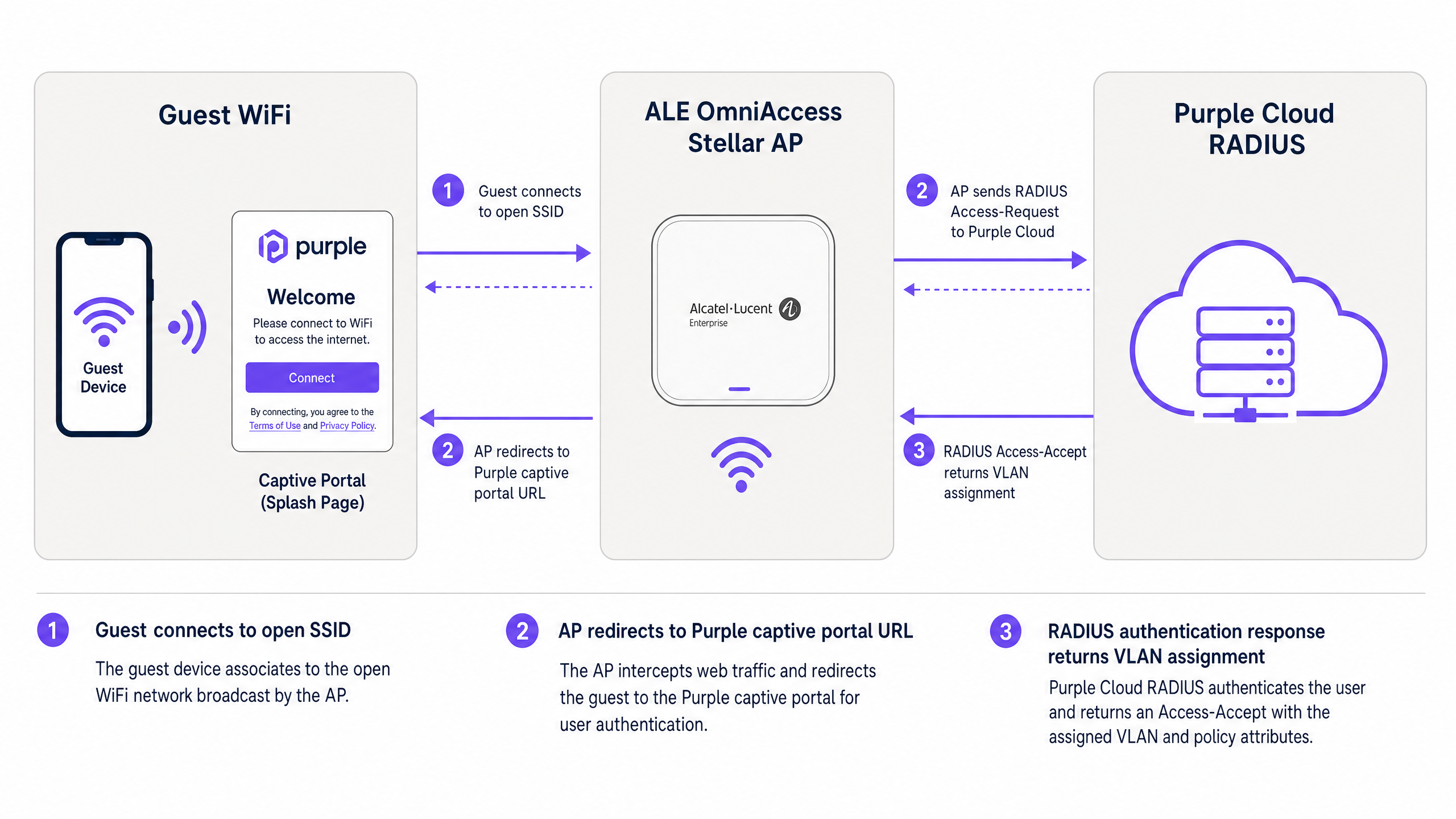
चित्र 1: गेस्ट डिवाइस, ALE OmniAccess Stellar AP, और Purple क्लाउड RADIUS के बीच ऑथेंटिकेशन प्रवाह।
यह प्रवाह इस प्रकार काम करता है। एक विज़िटर ओपन Guest WiFi SSID से कनेक्ट होता है। ALE AP प्री-ऑथेंटिकेशन DHCP पूल से एक अस्थायी IP पता असाइन करता है और विज़िटर के पहले HTTP या HTTPS अनुरोध को इंटरसेप्ट करता है। AP ब्राउज़र को Purple Captive Portal URL पर रीडायरेक्ट करता है, जिसमें क्लाइंट का MAC पता और AP का NAS आइडेंटिफायर URL पैरामीटर के रूप में पास किया जाता है। विज़िटर Purple स्प्लैश पेज के माध्यम से ऑथेंटिकेट करता है - ईमेल, सोशल लॉगिन, या SMS वेरिफिकेशन का उपयोग करके। Purple का RADIUS सर्वर सेशन को सत्यापित करता है और ALE AP को एक Access-Accept संदेश लौटाता है। AP इंटरनेट एक्सेस प्रदान करता है और कॉन्फ़िगर किए गए अंतराल पर Purple को RADIUS Accounting अपडेट भेजना शुरू करता है।
PPSK और डायनेमिक VLAN स्टीयरिंग का उपयोग करने वाले उन्नत डिप्लॉयमेंट के लिए, RADIUS Access-Accept संदेश में VLAN असाइनमेंट एट्रिब्यूट भी शामिल होते हैं। ALE AP इनका उपयोग क्लाइंट ट्रैफ़िक को सीधे सही VLAN सेगमेंट पर भेजने के लिए करता है, जिससे उन्हें उसी भौतिक इन्फ्रास्ट्रक्चर पर अन्य उपयोगकर्ताओं से अलग किया जा सके।
कार्यान्वयन गाइड
भाग 1: बाहरी Captive Portal के साथ Guest WiFi
यह अनुभाग Purple पर बाहरी रीडायरेक्शन के लिए Alcatel-Lucent Captive Portal कॉन्फ़िगरेशन को कवर करता है। ये चरण OmniVista Cirrus, OmniVista 2500, या Stellar Express वेब इंटरफ़ेस के माध्यम से प्रबंधित ALE OmniAccess Stellar APs पर लागू होते हैं।
चरण 1: Purple RADIUS क्रेडेंशियल प्राप्त करें
अपने Purple पोर्टल पर लॉग इन करें। Management > Venues पर जाएं, अपना वेन्यू चुनें, और Hardware अनुभाग खोलें। एक नई हार्डवेयर प्रविष्टि जोड़ें और हार्डवेयर प्रकार के रूप में Alcatel-Lucent OmniAccess Stellar चुनें। Purple आपके वेन्यू के लिए एक विशिष्ट RADIUS शेयर्ड सीक्रेट, ऑथेंटिकेशन सर्वर IP, और Captive Portal URL जनरेट करता है। आगे बढ़ने से पहले इन मानों को नोट कर लें।
चरण 2: ALE AP पर RADIUS सर्वर कॉन्फ़िगर करें
अपने ALE प्रबंधन इंटरफ़ेस में, ऑथेंटिकेशन सेटिंग्स पर जाएं और एक नया RADIUS सर्वर प्रोफ़ाइल जोड़ें।
| पैरामीटर | मान |
|---|---|
| सर्वर IP / होस्टनाम | जैसा कि Purple पोर्टल में प्रदान किया गया है |
| ऑथेंटिकेशन पोर्ट | 1812 |
| अकाउंटिंग पोर्ट | 1813 |
| शेयर्ड सीक्रेट | जैसा कि Purple पोर्टल में प्रदान किया गया है |
| RADIUS Accounting | सक्षम (Enabled) |
| अकाउंटिंग अंतराल | 300 सेकंड |
Purple पोर्टल से बैकअप IP का उपयोग करके एक सेकेंडरी RADIUS सर्वर सक्षम करें। यह सुनिश्चित करता है कि यदि प्राथमिक सर्वर अस्थायी रूप से अनुपलब्ध हो, तो फ़ेलओवर हो सके।
चरण 3: Walled Garden कॉन्फ़िगर करें
Walled Garden उन डोमेन को परिभाषित करता है जिन तक कोई डिवाइस ऑथेंटिकेशन पूरा होने से पहले पहुंच सकता है। प्री-ऑथेंटिकेशन एक्सेस लिस्ट में निम्नलिखित प्रविष्टियों को कॉन्फ़िगर करें:
मुख्य Purple डोमेन (अनिवार्य):
| डोमेन | उद्देश्य |
|---|---|
| region1.purpleportal.net | Purple Captive Portal |
| venuewifi.com | Purple सेशन प्रबंधन |
| cloudfront.net | पोर्टल एसेट्स के लिए CDN |
| openweathermap.org | वेदर विजेट (वैकल्पिक) |
| stripe.com | पेड WiFi भुगतान (यदि लागू हो) |
सोशल लॉगिन डोमेन (आवश्यकतानुसार जोड़ें):
| प्रदाता | डोमेन |
|---|---|
| facebook.com, fbcdn.net, connect.facebook.net | |
| linkedin.com, licdn.net | |
| accounts.google.com, googleapis.com |
किसी भी आवश्यक डोमेन को छोड़ने से संबंधित लॉगिन विधि बिना किसी त्रुटि संदेश के विफल हो जाएगी। कॉन्फ़िगरेशन के बाद प्रत्येक लॉगिन विधि का परीक्षण करें।
चरण 4: Guest WiFi SSID कॉन्फ़िगर करें
निम्नलिखित सेटिंग्स के साथ एक नया WLAN प्रोफ़ाइल बनाएं:
| पैरामीटर | मान |
|---|---|
| सुरक्षा स्तर | ओपन (Open) |
| Captive Portal | सक्षम (Enabled) |
| Captive Portal प्रकार | बाहरी (External) |
| रीडायरेक्ट URL | जैसा कि Purple पोर्टल में प्रदान किया गया है |
| HTTPS रीडायरेक्ट | अक्षम (Disabled) (जब तक कि SSL प्रमाणपत्र स्थापित न हो) |
| निष्क्रियता टाइमआउट | 1800 सेकंड (30 मिनट) |
| RADIUS सर्वर प्रोफ़ाइल | Purple RADIUS प्रोफ़ाइल (चरण 2 में बनाई गई) |
यदि आपको HTTPS रीडायरेक्ट की आवश्यकता है, तो ALE AP में System > General > Certificate Management के अंतर्गत एक वैध SSL प्रमाणपत्र स्थापित करें। ध्यान दें कि वाइल्डकार्ड प्रमाणपत्र समर्थित नहींइस उद्देश्य के लिए Stellar AP द्वारा समर्थित।
चरण 5: SSID को एक AP समूह में असाइन करें
OmniVista में प्रासंगिक AP समूह पर WLAN प्रोफाइल लागू करें। Captive Portal फ्लो का परीक्षण करने से पहले सत्यापित करें कि APs SSID को ब्रॉडकास्ट कर रहे हैं और क्लाइंट्स इससे जुड़ सकते हैं।
भाग 2: 802.1X का उपयोग करके Staff WiFi को सुरक्षित करें
Staff WiFi के लिए, 802.1X प्रमाणीकरण के साथ WPA2-Enterprise या WPA3-Enterprise का उपयोग करें। यह साझा पासवर्ड की आवश्यकता को समाप्त करता है और Microsoft Entra ID, Okta, या Google Workspace में प्रबंधित व्यक्तिगत उपयोगकर्ता पहचानों से एक्सेस को जोड़ता है।
चरण 1: 802.1X SSID को कॉन्फ़िगर करें
स्टाफ के लिए एक अलग WLAN प्रोफाइल बनाएं। सुरक्षा प्रकार को WPA2-Enterprise या WPA3-Enterprise पर सेट करें और Purple RADIUS सर्वर को प्रमाणीकरण बैकएंड के रूप में असाइन करें। Purple का RADIUS सर्वर LDAP या SAML के माध्यम से आपके पहचान प्रदाता को प्रमाणीकरण अनुरोधों को प्रॉक्सी करता है।
चरण 2: EAP विधि चुनें
अधिकांश डिप्लॉयमेंट के लिए, MSCHAPv2 के साथ PEAP का उपयोग करें। इसके लिए केवल एक सर्वर-साइड सर्टिफिकेट की आवश्यकता होती है और यह मानक Windows, macOS, iOS, और Android सप्लीकेंट्स के साथ काम करता है। उच्च-सुरक्षा वाले वातावरण के लिए, अपने PKI के माध्यम से जारी क्लाइंट सर्टिफिकेट के साथ EAP-TLS का उपयोग करें।
चरण 3: स्टाफ को एक समर्पित VLAN में असाइन करें
Access-Accept प्रतिक्रिया में Tunnel-Private-Group-ID = आपका स्टाफ VLAN ID वापस करने के लिए Purple RADIUS सर्वर को कॉन्फ़िगर करें। यह सुनिश्चित करता है कि स्टाफ डिवाइस कॉर्पोरेट नेटवर्क सेगमेंट पर जाएं, जो Layer 2 पर गेस्ट ट्रैफ़िक से अलग हो।
भाग 3: PPSK और डायनेमिक VLAN स्टीयरिंग का उपयोग करके मल्टी-टेनेंट WiFi
PPSK (Private Pre-Shared Key) - जिसे कुछ वेंडर दस्तावेज़ों में iPSK (Identity PSK) भी कहा जाता है - एक ही SSID को कई अलग-अलग उपयोगकर्ता समूहों को सेवा प्रदान करने की अनुमति देता है। प्रत्येक समूह को एक अद्वितीय पासफ़्रेज़ प्राप्त होता है। RADIUS सर्वर प्रत्येक पासफ़्रेज़ को एक विशिष्ट VLAN से मैप करता है, जिससे कई SSIDs के RF ओवरहेड के बिना प्रति-टेनेंट नेटवर्क अलगाव मिलता है।
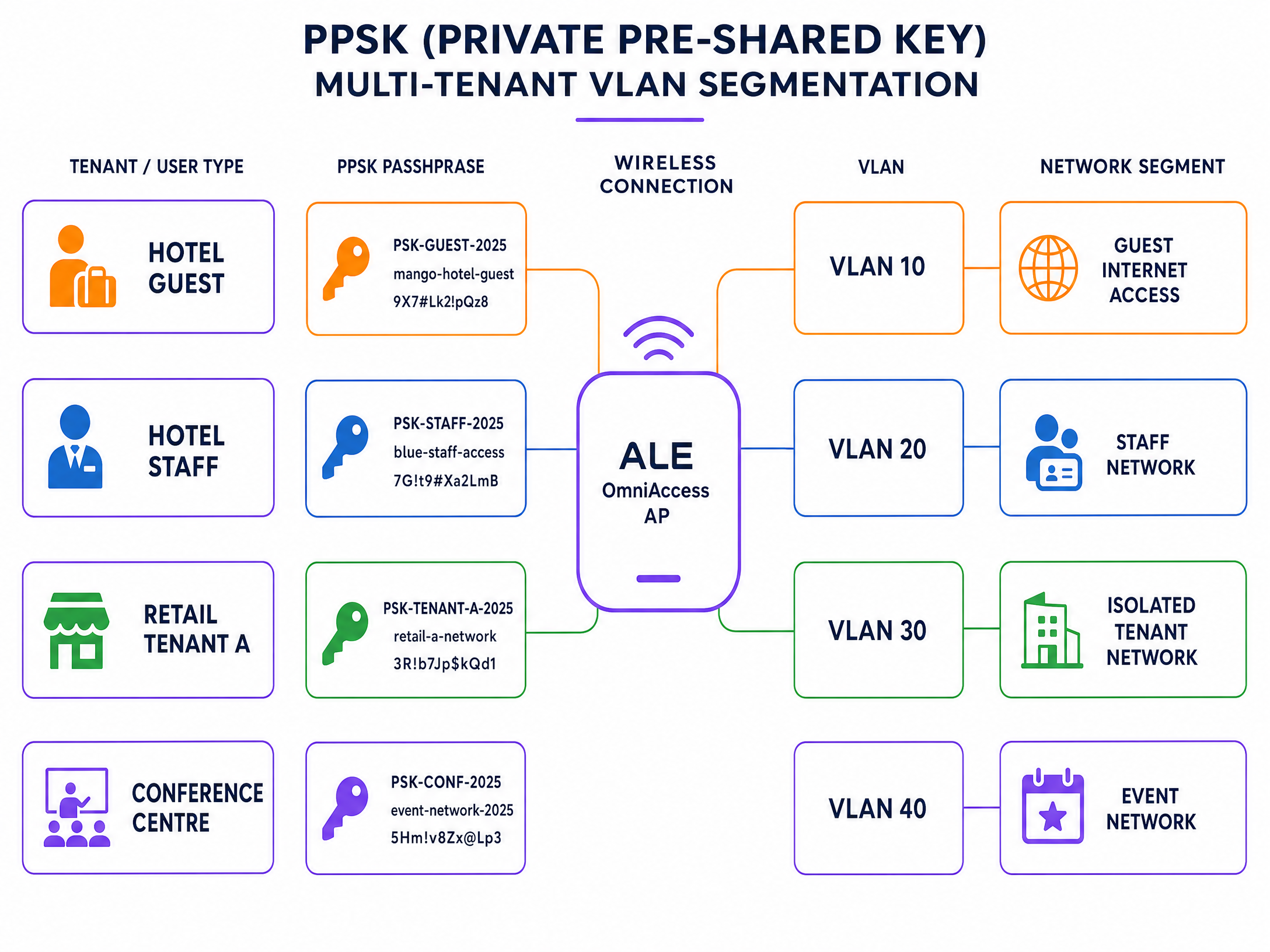
चित्र 2: एकल ALE OmniAccess SSID पर PPSK मल्टी-टेनेंट VLAN सेगमेंटेशन।
चरण 1: PPSK SSID बनाएं
एक नया WLAN प्रोफाइल बनाएं और प्रमाणीकरण प्रकार को RADIUS-समर्थित PSK सत्यापन के साथ WPA2-PSK पर सेट करें। Stellar फ़र्मवेयर 4.0.8.16 और उससे ऊपर (AP1301 और उच्चतर मॉडल के लिए), Express Mode में RADIUS के माध्यम से डायनेमिक VLAN असाइनमेंट समर्थित है। पुराने मॉडल या पुराने फ़र्मवेयर के लिए, OmniVista-प्रबंधित मोड का उपयोग करें।
चरण 2: Purple में टेनेंट पासफ़्रेज़ परिभाषित करें
Purple पोर्टल में, प्रत्येक टेनेंट के लिए एक PPSK समूह बनाएं। प्रति टेनेंट एक अद्वितीय पासफ़्रेज़ असाइन करें और प्रत्येक पासफ़्रेज़ को संबंधित VLAN ID से मैप करें। Purple इन मैपिंग को अपने RADIUS डेटाबेस में स्टोर करता है।
चरण 3: VLAN स्टीयरिंग के लिए RADIUS एट्रिब्यूट कॉन्फ़िगर करें
सुनिश्चित करें कि Purple RADIUS सर्वर प्रत्येक Access-Accept प्रतिक्रिया में निम्नलिखित IETF मानक एट्रिब्यूट लौटाता है:
| एट्रिब्यूट संख्या | एट्रिब्यूट का नाम | मान |
|---|---|---|
| 64 | Tunnel-Type | 13 (VLAN) |
| 65 | Tunnel-Medium-Type | 6 (IEEE 802 / Ethernet) |
| 81 | Tunnel-Private-Group-ID | VLAN ID (जैसे, "30") |
तीनों एट्रिब्यूट मौजूद होने चाहिए। यदि कोई एक भी गायब है, तो ALE AP VLAN असाइनमेंट को अनदेखा कर देता है और क्लाइंट को डिफ़ॉल्ट VLAN पर रख देता है।
चरण 4: अपलिंक पर VLAN ट्रंकिंग सत्यापित करें
सुनिश्चित करें कि सभी टेनेंट VLANs को ALE AP और डिस्ट्रीब्यूशन स्विच के बीच अपलिंक पोर्ट पर टैग किया गया है। एक AP उस VLAN पर ट्रैफ़िक को स्टीयर नहीं कर सकता है जो उसके अपलिंक ट्रंक पर अनुमत नहीं है।
सर्वोत्तम प्रथाएं
निम्नलिखित सिफारिशें एंटरप्राइज़ वायरलेस डिप्लॉयमेंट के लिए मानक प्रथाओं को दर्शाती हैं और IEEE 802.1X, PCI DSS 4.0, और GDPR आवश्यकताओं के अनुरूप हैं।
Layer 2 पर Guest WiFi को Staff WiFi से अलग करें। गेस्ट और स्टाफ ट्रैफ़िक को कभी भी एक ही VLAN पर न रखें। इस अलगाव को स्वचालित रूप से लागू करने के लिए RADIUS-संचालित VLAN असाइनमेंट का उपयोग करें, चाहे उपयोगकर्ता किसी भी AP से कनेक्ट हो।
सभी Captive Portal रीडायरेक्शन के लिए HTTPS का उपयोग करें। HTTPS रीडायरेक्ट को सक्षम करने के लिए ALE AP पर एक वैध SSL सर्टिफिकेट इंस्टॉल करें। यह ब्राउज़रों को स्प्लैश पेज पर सुरक्षा चेतावनियां प्रदर्शित करने से रोकता है, जिससे ड्रॉपआउट दर कम होती है और सुरक्षित डेटा हैंडलिंग के लिए GDPR आवश्यकताओं के अनुरूप काम होता है।
RADIUS Accounting अंतराल को 300 सेकंड पर सेट करें। यह एनालिटिक्स सटीकता के लिए Purple को नियमित सत्र अपडेट प्रदान करता है। 600 सेकंड से अधिक का अंतराल होने पर यदि कोई क्लाइंट बिना क्लीन डी-ऑथेंटिकेशन के डिस्कनेक्ट हो जाता है, तो सत्र डेटा खोने का जोखिम रहता है।
गो-लाइव से पहले Walled Garden का परीक्षण करें। Guest WiFi SSID से एक परीक्षण डिवाइस कनेक्ट करें और प्रत्येक सोशल लॉगिन प्रदाता तक पहुंचने का प्रयास करें। यदि लॉगिन विफल हो जाता है, तो संबंधित डोमेन Walled Garden से गायब है।
PPSK का उपयोग करके IoT उपकरणों को सेगमेंट करें। रिटेल और हॉस्पिटैलिटी वातावरण में, डिजिटल साइनेज, भुगतान टर्मिनल और पर्यावरणीय सेंसर जैसे IoT उपकरणों में से प्रत्येक को एक अलग VLAN से मैप किया गया एक अद्वितीय PPSK प्राप्त होना चाहिए। यह एक प्रभावित IoT डिवाइस को व्यापक नेटवर्क तक पहुंचने से रोकता है।
एंटरप्राइज़ WiFi सुरक्षा मानकों और आर्किटेक्चर पर अधिक पढ़ने के लिए, हमारी एंटरप्राइज़ WiFi सुरक्षा गाइड देखें।
समस्या निवारण और जोखिम न्यूनीकरण
निम्नलिखित तालिका ALE OmniAccess और Purple एकीकरण में सबसे आम विफलता मोड को कवर करती है।
| लक्षण | सबसे संभावित कारण | समाधान |
|---|---|---|
| Captive portal दिखाई नहीं देता है | Walled Garden का गलत कॉन्फ़िगरेशन या गायब DNS | सत्यापित करें कि Purple डोमेन व्हाइटलिस्टेड हैं; जांचें कि DHCP स्कोप में एक वैध DNS सर्वर शामिल है |
| RADIUS प्रमाणीकरण विफल रहता है | साझा सीक्रेट का बेमेल होना या फ़ायरवॉल द्वारा UDP 1812/1813 को ब्लॉक करना | Purple पोर्टल से साझा सीक्रेट को पुनः दर्ज करें; पुष्टि करें कि फ़ायरवॉल नियम आउटबाउंड UDP 1812 और 1813 की अनुमति देते हैं |
| उपयोगकर्ता गलत VLAN पर चले जाते हैं | गायब RADIUS टनल एट्रिब्यूट या AP फ़र्मवेयर सीमा | पुष्टि करें कि तीनों RADIUS एट्रिब्यूट (64, 65, 81) वापस आ रहे हैं; जांचें कि ALE फ़र्मवेयर संस्करण डायनेमिक VLAN का समर्थन करता है |
| सोशल लॉगिन बटन विफल रहता है | सोशल प्रदाता डोमेन Walled Garden से गायब है | आवश्यक सोशल प्रदाता डोमेन tप्री-ऑथेंटिकेशन एक्सेस लिस्ट को |
| HTTPS Captive Portal सर्टिफिकेट चेतावनी दिखाता है | वाइल्डकार्ड सर्टिफिकेट का उपयोग किया गया है या कोई सर्टिफिकेट इंस्टॉल नहीं है | System > General > Certificate Management के माध्यम से डोमेन-विशिष्ट SSL सर्टिफिकेट इंस्टॉल करें |
| Purple एनालिटिक्स में सेशन डेटा गायब है | RADIUS Accounting अक्षम है या अंतराल बहुत लंबा है | RADIUS Accounting सक्षम करें; अंतराल को 300 सेकंड पर सेट करें |
लगातार आने वाली RADIUS समस्याओं के लिए, ALE AP पर डीबग लॉगिंग सक्षम करें और RADIUS एक्सचेंज को कैप्चर करें। Access-Reject संदेशों को खोजें और रिजेक्ट कारण कोड की जांच करें। सामान्य कोड में 16 (ऑथेंटिकेशन विफलता) और 18 (लापता एट्रिब्यूट) शामिल हैं।
ROI और व्यावसायिक प्रभाव
ALE OmniAccess हार्डवेयर पर Purple को डिप्लॉय करने से एक निष्क्रिय नेटवर्क एक सक्रिय डेटा एसेट में बदल जाता है। प्रत्येक ऑथेंटिकेट किए गए सेशन से एक विज़िटर प्रोफ़ाइल जनरेट होती है: ईमेल पता, विज़िट की आवृत्ति, रुकने का समय (dwell time), और डिवाइस का प्रकार। यह फर्स्ट-पार्टी डेटा Purple के 400 से अधिक कनेक्टर्स की लाइब्रेरी के माध्यम से सीधे आपके CRM में फीड होता है।
Harrods ने लॉयल्टी प्रोग्राम साइन-अप को बढ़ावा देने के लिए Purple के डेटा कैप्चर का उपयोग करके अपने Guest WiFi डिप्लॉयमेंट से 57 गुना मार्केटिंग ROI प्राप्त किया (Purple केस स्टडी, 2023)। AGS Airports ने अपनी पूरी प्रॉपर्टी में टियर-आधारित बैंडविड्थ Paid WiFi लागू करके 842% ROI जनरेट किया (Purple केस स्टडी, 2022)।
हॉस्पिटैलिटी ऑपरेटरों के लिए, Captive Portal अतिथि डेटा कैप्चर करने का प्राथमिक टचपॉइंट है। रिटेल परिवेशों के लिए, यह खरीदार व्यवहार एनालिटिक्स और लक्षित प्रचारों को सक्षम बनाता है। ट्रांसपोर्ट हब के लिए, यह यात्री प्रवाह डेटा और अनुपालन-अनुकूल (compliance-ready) सेशन लॉगिंग प्रदान करता है।
Purple का Guest WiFi प्लेटफॉर्म और WiFi Analytics टूल आपको इन परिणामों को मापने के लिए रिपोर्टिंग इंफ्रास्ट्रक्चर प्रदान करते हैं। एक ही डैशबोर्ड से ऑथेंटिकेशन दर, सेशन की अवधि, बार-बार आने वाले विज़िटर की दर और ऑप्ट-इन कन्वर्शन को ट्रैक करें।
संबंधित इंटीग्रेशन गाइड के लिए, WatchGuard Firebox इंटीग्रेशन गाइड देखें, जिसमें एक अलग हार्डवेयर प्लेटफॉर्म पर समान RADIUS-आधारित आर्किटेक्चर को कवर किया गया है।
मुख्य परिभाषाएं
PPSK (Private Pre-Shared Key)
A security method where individual users or devices are issued unique passphrases for a single SSID, rather than sharing one global password. The RADIUS server maps each passphrase to a specific policy or VLAN.
Used in Multi-Tenant WiFi to isolate traffic between tenants, residents, or event groups without deploying multiple SSIDs.
RADIUS (Remote Authentication Dial-In User Service)
A networking protocol defined in RFC 2865 that provides centralised Authentication, Authorization, and Accounting (AAA) management for users connecting to a network service.
The core protocol Purple uses to communicate with ALE hardware. The ALE AP sends Access-Request messages; Purple responds with Access-Accept or Access-Reject.
Dynamic VLAN steering
The process of assigning a connected device to a specific VLAN based on RADIUS attributes returned during authentication, rather than a static VLAN configured on the SSID.
Essential for multi-tenant deployments where different user groups must be isolated on the same physical AP infrastructure.
Walled Garden
A controlled environment that restricts a device's internet access to a predefined set of domains before authentication is complete.
Required to allow devices to reach the Purple captive portal and external identity providers before the user has logged in.
Captive portal
A web page that intercepts a user's browser session and requires them to authenticate or accept terms before gaining full network access.
The primary interface where visitors provide consent and first-party data. Purple hosts this page in the cloud; the ALE AP performs the redirect.
Identity-Based Network
A network architecture where access policies, VLAN assignments, and bandwidth controls are determined by who the user is, rather than where or how they connect.
The architectural outcome of integrating ALE hardware with Purple's authentication overlay.
802.1X
An IEEE standard for port-based network access control that provides an authentication mechanism for devices connecting to a LAN or WLAN. It requires a supplicant on the client device, an authenticator (the AP), and an authentication server (RADIUS).
The standard used for secure Staff WiFi deployments. Eliminates shared passwords and ties access to individual user identities.
EAP-TLS (Extensible Authentication Protocol - Transport Layer Security)
A certificate-based EAP method where both the client and the RADIUS server present digital certificates for mutual authentication.
The most secure 802.1X method. Requires a PKI infrastructure to issue client certificates, but eliminates password-based credential theft entirely.
PEAP (Protected Extensible Authentication Protocol)
An EAP method that tunnels the inner authentication exchange inside a TLS session, protecting credentials in transit. Commonly used with MSCHAPv2 as the inner method.
The most common 802.1X method in enterprise deployments. Requires only a server-side certificate and works with standard OS supplicants.
NAS (Network Access Server)
In RADIUS terminology, the device that enforces access control - in this case, the ALE OmniAccess Stellar AP. The NAS forwards authentication requests to the RADIUS server and enforces the policies returned.
The ALE AP acts as the NAS in the Purple integration. Its IP address and shared secret must be registered in the Purple portal as a trusted NAS client.
हल किए गए उदाहरण
A 200-room hotel in central London uses ALE OmniAccess Stellar APs throughout the property. They need to serve hotel guests, back-of-house staff, and a ground-floor restaurant as three completely separate network segments. They want to avoid broadcasting multiple SSIDs to preserve RF performance.
Deploy a single secure SSID using PPSK. Configure the ALE OmniAccess APs to authenticate against the Purple RADIUS server. In the Purple portal, create three PPSK groups: Hotel Guests (VLAN 10), Staff (VLAN 20), and Restaurant (VLAN 30). The RADIUS server returns Tunnel-Private-Group-ID = 10, 20, or 30 depending on which passphrase the device uses. The ALE AP dynamically steers each device to the correct VLAN. Hotel guests receive internet access only. Staff receive access to the property management system. The restaurant receives an isolated segment for their EPOS terminals.
A conference centre hosts 15 corporate events simultaneously. Each event organiser needs their own isolated WiFi network for attendees, but the venue only has a single ALE OmniAccess infrastructure. The venue IT team needs to provision and de-provision networks quickly between events.
Use Purple's PPSK management to create per-event passphrases mapped to dedicated event VLANs. The venue pre-configures 15 VLAN segments on the ALE infrastructure. For each event, the IT team creates a new PPSK entry in the Purple portal, assigns it to the correct VLAN, and provides the passphrase to the event organiser. At the end of the event, they revoke the passphrase in Purple. The ALE AP immediately stops accepting that passphrase, isolating the de-provisioned VLAN. No AP reconfiguration is required.
अभ्यास प्रश्न
Q1. You have configured the Alcatel-Lucent captive portal on an ALE OmniAccess Stellar AP. Guests connect to the SSID and receive an IP address, but their devices show 'No Internet Connection' and the splash page does not appear. What are the two most likely causes, and how do you resolve each?
संकेत: Consider what must happen at the DNS and HTTP layer before the captive portal redirect can occur.
मॉडल उत्तर देखें
Cause 1: The DHCP scope does not include a valid DNS server. Without DNS, the client cannot resolve the captive portal URL and the OS captive portal detection mechanism fails. Resolution: Add a valid DNS server (e.g., 8.8.8.8) to the DHCP scope on the guest VLAN. Cause 2: The Walled Garden does not include the Purple portal domains. Without these, the AP blocks the redirect request before it reaches the client. Resolution: Add region1.purpleportal.net, venuewifi.com, and cloudfront.net to the pre-authentication access list.
Q2. Your Multi-Tenant WiFi deployment uses PPSK on a single ALE OmniAccess SSID. Users authenticate successfully - the Purple portal shows successful logins - but all users receive IP addresses from VLAN 1 instead of their assigned tenant VLANs. What is the most likely cause?
संकेत: Check the communication between the RADIUS server and the AP, and the AP's uplink configuration.
मॉडल उत्तर देखें
There are two likely causes. First, the Purple RADIUS server may not be returning all three required RADIUS tunnel attributes (64, 65, 81) in the Access-Accept message. Verify the enforcement policy includes Tunnel-Type = 13, Tunnel-Medium-Type = 6, and Tunnel-Private-Group-ID = the correct VLAN ID. Second, the tenant VLANs may not be tagged on the uplink trunk between the ALE AP and the distribution switch. If the VLAN does not exist on the trunk, the AP cannot steer traffic to it, even if the RADIUS attributes are correct.
Q3. A venue requires that guest sessions are automatically terminated after 60 minutes, and that guests who return within 24 hours are recognised and bypass the registration form. How should this be configured in the Purple and ALE architecture?
संकेत: Consider which system controls session lifetime and which system controls returning visitor recognition.
मॉडल उत्तर देखें
Session termination is controlled via the RADIUS Session-Timeout attribute. Configure the Purple RADIUS server to include Session-Timeout = 3600 (seconds) in the Access-Accept message. The ALE AP will disconnect the client after 3600 seconds. Returning visitor recognition is controlled in the Purple portal. Enable the 'remember device' or MAC-based re-authentication setting for your venue. When a returning visitor connects within the configured window, Purple's RADIUS server recognises their MAC address and returns an Access-Accept without requiring the splash page interaction, providing a seamless reconnection experience.
Q4. You are deploying Staff WiFi using 802.1X on ALE OmniAccess Stellar APs. Your organisation uses Microsoft Entra ID as the identity provider. Staff devices are Windows 11 laptops managed via Intune. Which EAP method should you use, and what certificate requirements apply?
संकेत: Consider the balance between security, deployment complexity, and the capabilities of the existing infrastructure.
मॉडल उत्तर देखें
Use PEAP with MSCHAPv2 as the EAP method. This requires only a server-side certificate on the Purple RADIUS server (already provisioned by Purple) and leverages the user's Entra ID credentials for authentication. No client certificates are required, which simplifies deployment on Intune-managed devices. Configure the Windows 11 supplicant via an Intune Wi-Fi profile, specifying the SSID, WPA2-Enterprise security, PEAP method, and the Purple RADIUS server certificate thumbprint for server validation. If your security policy requires certificate-based mutual authentication, upgrade to EAP-TLS and deploy client certificates via Intune SCEP profiles, but this adds significant PKI management overhead.
इस श्रृंखला में आगे पढ़ें
NETGEAR Insight और Enterprise Access Points का Purple WiFi के साथ एकीकरण
यह गाइड IT प्रबंधकों को NETGEAR Insight और WAX एंटरप्राइज एक्सेस पॉइंट्स को Purple WiFi के साथ एकीकृत करने के लिए एक निश्चित तकनीकी रोडमैप प्रदान करती है। इसमें Guest Captive Portals, 802.1X स्टाफ नेटवर्क, और PPSK व डायनेमिक VLAN असाइनमेंट का उपयोग करके मल्टी-टेनेंट सेगमेंटेशन सहित आवश्यक कॉन्फ़िगरेशन शामिल हैं।
Ruckus के लिए कैप्टिव पोर्टल
यह तकनीकी संदर्भ मार्गदर्शिका CommScope Ruckus SmartZone और Unleashed आर्किटेक्चर पर बाहरी कैप्टिव पोर्टल तैनात करने के लिए एक आधिकारिक एकीकरण प्लेबुक प्रदान करती है। यह एक सुरक्षित, हाई-डेंसिटी गेस्ट WiFi समाधान प्रदान करने के लिए गेस्ट WLANs, WISPr रीडायरेक्शन, RADIUS AAA सर्वर सेटिंग्स और Walled Garden अपवादों के लिए चरण-दर-चरण कॉन्फ़िगरेशन के माध्यम से नेटवर्क इंजीनियरों का मार्गदर्शन करती है।
Aruba के लिए कैप्टिव पोर्टल
Aruba Instant (IAP) और Aruba Central प्रबंधित एक्सेस पॉइंट्स को गेस्ट उपयोगकर्ताओं को Purple के उच्च-परिवर्तित, सुरक्षित बाहरी कैप्टिव पोर्टल पर रीडायरेक्ट करने के लिए कॉन्फ़िगर करने के लिए एक आधिकारिक तकनीकी संदर्भ मार्गदर्शिका। यह मार्गदर्शिका चरण-दर-चरण गेस्ट SSID सेटअप, बाहरी कैप्टिव पोर्टल रीडायरेक्शन, RADIUS सर्वर प्रमाणीकरण और अकाउंटिंग पैरामीटर, वॉल्ड गार्डन अपवाद सूचियों और WISPr समर्थन को कवर करती है।