
हाई-डेंसिटी WiFi नेटवर्क पर लेटेंसी कम करना
यह गाइड विस्तार से बताती है कि ट्रैकिंग डोमेन के लिए अनावश्यक DNS लुकअप को खत्म करने से हाई-डेंसिटी WiFi नेटवर्क पर लेटेंसी कैसे काफी कम हो जाती है। यह भीड़भाड़ वाले वेन्यू परिवेशों का प्रबंधन करने वाले IT लीडर्स के लिए कार्रवाई योग्य आर्किटेक्चर, कार्यान्वयन और ROI मार्गदर्शन प्रदान करती है।
इस गाइड को सुनें
पॉडकास्ट ट्रांसक्रिप्ट देखें
हमारी मुख्य श्रृंखला का हिस्सा: Guest WiFi Guide →
कार्यकारी सारांश

Hospitality वेन्यू, स्टेडियम और Retail एस्टेट जैसे हाई-डेंसिटी वाले परिवेशों का प्रबंधन करने वाले CTO और नेटवर्क आर्किटेक्ट्स के लिए, लेटेंसी को अक्सर केवल RF या बैकहॉल समस्या के रूप में गलत समझा जाता है। हालाँकि, आधुनिक WiFi नेटवर्क पर महसूस की जाने वाली लेटेंसी का एक महत्वपूर्ण प्रतिशत DNS लेयर से उत्पन्न होता है। जब कोई उपयोगकर्ता आपके Guest WiFi से कनेक्ट होता है, तो एक सिंगल पेज लोड 20 से 70 DNS क्वेरी ट्रिगर कर सकता है, जो मुख्य रूप से थर्ड-पार्टी ट्रैकिंग पिक्सल, विज्ञापन नेटवर्क और टेलीमेट्री बीकन के लिए होती हैं। भीड़भाड़ वाले वेन्यू में, यह एक 'DNS क्वेरी स्टॉर्म' (DNS query storm) बनाता है जो लोकल रिज़ॉल्वर को अवरुद्ध करता है और मूल्यवान एयरटाइम (airtime) घेरता है।
एज (edge) पर आक्रामक लोकल DNS कैशिंग लागू करके और ट्रैकिंग डोमेन को फ़िल्टर करके, वेन्यू अनावश्यक अनुरोधों के लिए तुरंत NXDOMAIN लौटा सकते हैं। यह दृष्टिकोण पब्लिक इंटरनेट के राउंड-ट्रिप को समाप्त करता है, जिससे महसूस की जाने वाली लेटेंसी 87% तक कम हो जाती है। यह गाइड DNS-अनुकूलित WiFi को तैनात करने, उपयोगकर्ता अनुभव को बेहतर बनाने, सपोर्ट टिकट कम करने और निर्बाध WiFi Analytics डेटा कैप्चर सुनिश्चित करने के लिए तकनीकी आर्किटेक्चर और कार्यान्वयन फ्रेमवर्क प्रदान करती है。
तकनीकी डीप-डाइव
DNS क्वेरी स्टॉर्म की संरचना
802.11ax (WiFi 6/6E) चलाने वाले हाई-डेंसिटी डिप्लॉयमेंट में, OFDMA और BSS कलरिंग जैसे दक्षता तंत्र को-चैनल इंटरफेरेंस को प्रबंधित करने और एयरटाइम को अनुकूलित करने के लिए डिज़ाइन किए गए हैं। हालाँकि, ये तंत्र यह मानकर चलते हैं कि रेडियो माध्यम वास्तविक उपयोगकर्ता डेटा ट्रांसमिट कर रहा है। जब किसी होटल में 3,000 मेहमान या स्टेडियम में 10,000 प्रशंसक एक साथ वेब पेज लोड करने का प्रयास करते हैं, तो गैर-आवश्यक डोमेन (जैसे, ad-tracker.com, analytics.thirdparty.net) के लिए DNS क्वेरी की भारी मात्रा बड़े पैमाने पर ओवरहेड पेश करती है।
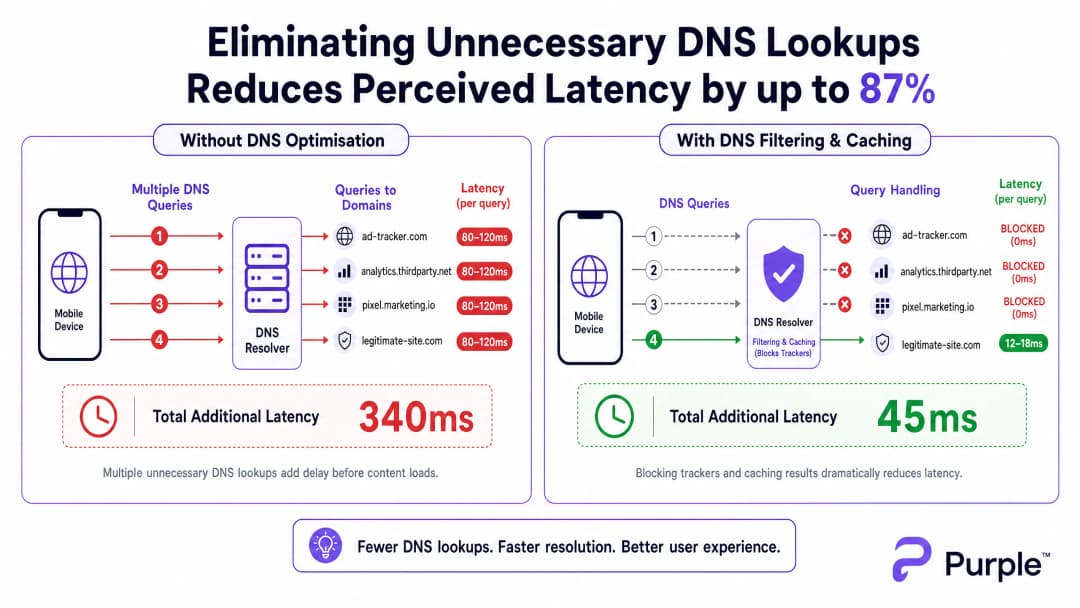
बाहरी रिज़ॉल्वर (जैसे ISP के डिफ़ॉल्ट DNS या Google के 8.8.8.8) को भेजी गई प्रत्येक DNS क्वेरी में भीड़भाड़ वाले नेटवर्क पर 80-150ms का राउंड-ट्रिप समय लगता है। यदि किसी पेज को कंटेंट रेंडर करने से पहले 15 ट्रैकिंग डोमेन लुकअप की आवश्यकता होती है, तो उपयोगकर्ता को एक सेकंड से अधिक की 'अदृश्य' देरी का अनुभव होता है। यह थ्रूपुट की समस्या नहीं है; यह एक ट्रांज़ैक्शनल बॉटलनेक है।
एज रिज़ॉल्यूशन के लिए आर्किटेक्चर
इसे कम करने के लिए, आर्किटेक्चर को रिज़ॉल्यूशन को नेटवर्क एज पर स्थानांतरित करना होगा। आक्रामक TTL कैश के साथ लोकल DNS रिज़ॉल्वर को तैनात करने से यह सुनिश्चित होता है कि वैध, बार-बार अनुरोध किए जाने वाले डोमेन 5ms से कम समय में रिज़ॉल्व हो जाते हैं।

महत्वपूर्ण रूप से, इस रिज़ॉल्वर को ज्ञात ट्रैकिंग डोमेन के लिए क्वेरीज़ को ड्रॉप करने के लिए एक क्यूरेटेड ब्लॉकलिस्ट (जैसे, Pi-hole एंटरप्राइज़ मोड, Cisco Umbrella) को एकीकृत करना चाहिए। तुरंत NXDOMAIN लौटाने से वायरलेस माध्यम पर ट्रांसमिशन अवसर (TXOP) मुक्त हो जाता है, जिससे वास्तविक पेलोड डेटा तेज़ी से प्रवाहित हो पाता है।
अपने विशिष्ट सेटअप को लेकर कोई सवाल हैं?
हमारी टीम 80,000 से अधिक वेन्यू में वेन्यू ऑपरेटरों, IT मैनेजरों और नेटवर्क इंजीनियरों के साथ काम करती है। 20 मिनट का कॉल बुक करें और हम आपको दिखाएंगे कि आपके जैसे अन्य लोगों ने इसे कैसे हल किया।
कार्यान्वयन गाइड
चरण 1: बेसलाइन ऑडिटिंग
DNS पाथ को बदलने से पहले, एक बेसलाइन स्थापित करें। पीक उपयोग विंडो के दौरान क्वेरी लॉग कैप्चर करने के लिए अपने मौजूदा रिज़ॉल्वर को इंस्ट्रूमेंट करें या पैसिव टैप तैनात करें। शीर्ष 50 सबसे अधिक क्वेरी किए गए डोमेन की पहचान करें; आमतौर पर, 30-50% ट्रैकिंग या टेलीमेट्री सेवाएँ होंगी।
चरण 2: लोकल रिज़ॉल्वर डिप्लॉयमेंट
ऑन-प्रिमाइसेस या एज-होस्टेड रिज़ॉल्वर तैनात करें। आंतरिक संसाधनों (स्प्लिट DNS) के लिए ऑथोरिटेटिव ज़ोन कॉन्फ़िगर करें और एक रूढ़िवादी ब्लॉकलिस्ट लागू करें। वैध एप्लिकेशन को टूटने से बचाने के लिए शुरुआत में आक्रामक सूचियों से बचें।
चरण 3: DNS over HTTPS (DoH) का प्रबंधन
आधुनिक ऑपरेटिंग सिस्टम DoH का उपयोग करके लोकल रिज़ॉल्वर को तेज़ी से बायपास कर रहे हैं। नियंत्रण बनाए रखने के लिए, ज्ञात DoH प्रदाताओं के लिए आउटबाउंड TCP/UDP 443 को ब्लॉक करके फ़ायरवॉल पर DoH ट्रैफ़िक को इंटरसेप्ट करें, और उन्हें अपने प्रबंधित DoH रिज़ॉल्वर पर रीडायरेक्ट करें। इसके गहरे प्रभावों के लिए, DNS Over HTTPS (DoH): Implications for Public WiFi Filtering पर हमारी गाइड की समीक्षा करें।
सर्वोत्तम कार्यप्रणालियाँ
- इटरेटिव ब्लॉकलिस्टिंग: स्वचालित फ़ीड के माध्यम से साप्ताहिक रूप से ब्लॉकलिस्ट अपडेट करें, लेकिन फ़ॉल्स पॉज़िटिव के लिए त्वरित-प्रतिक्रिया वाइटलिस्ट प्रक्रिया बनाए रखें।
- अनुपालन संरेखण: अपने Captive Portal की सेवा की शर्तों में DNS फ़िल्टरिंग का दस्तावेज़ीकरण करें। यह थर्ड-पार्टी डेटा संग्रह को सक्रिय रूप से कम करके GDPR के साथ संरेखित होता है。
- VLAN सेगमेंटेशन: पूरे वेन्यू में रोलआउट करने से पहले स्टेजिंग VLAN या APs के विशिष्ट सबसेट पर नई ब्लॉकलिस्ट का परीक्षण करें।
समस्या निवारण और जोखिम न्यूनीकरण
- एप्लिकेशन ब्रेकेज: सबसे आम विफलता मोड एक वैध ऐप का विफल होना है क्योंकि एक निर्भरता ब्लॉक कर दी गई थी।
NXDOMAINस्पाइक दरों की निगरानी करें; अचानक वृद्धि आमतौर पर फ़ॉल्स पॉज़िटिव का संकेत देती है। - DoH बायपास विफलताएँ: यदि लोकल फ़िल्टरिंग के बावजूद लेटेंसी अधिक रहती है, तो आपके इंटरसेप्ट नियमों को बायपास करने वाले एन्क्रिप्टेड DNS के लिए फ़ायरवॉल लॉग की जाँच करें।
- कैश पॉइज़निंग: सुनिश्चित करें कि आपका लोकल रिज़ॉल्वर कैश पॉइज़निंग हमलों के खिलाफ सुरक्षित है, विशेष रूप से सार्वजनिक-सामना करने वाले Transport या Healthcare डिप्लॉयमेंट में।
ROI और व्यावसायिक प्रभाव
DNS ऑप्टिमाइज़ेशन के माध्यम से लेटेंसी कम करने से सीधे बॉटम लाइन पर प्रभाव पड़ता है। एक होटल के लिए, तेज़ Captive Portal लोड और उत्तरदायी ब्राउज़िंग सीधे उच्च TripAdvisor स्कोर से संबंधित हैं। एक रिटेल परिवेश के लिए, यह Purple Appoints Iain Fox as VP Growth – Public Sector to Drive Digital Inclusion and Smart City Innovation पहल या Purple Launches Offline Maps Mode for Seamless, Secure Navigation to WiFi Hotspots जैसी स्थान-आधारित सेवाओं जैसे टूल के साथ निर्बाध एकीकरण सुनिश्चित करता है।
DNS को बाद के विचार के बजाय एक महत्वपूर्ण इन्फ्रास्ट्रक्चर लेयर के रूप में मानकर, वेन्यू अपने मौजूदा RF हार्डवेयर निवेश से अधिकतम प्रदर्शन प्राप्त कर सकते हैं।
एक्सपर्ट ब्रीफिंग पॉडकास्ट
हाई-डेंसिटी वेन्यू में DNS ऑप्टिमाइज़ेशन के लिए मैकेनिक्स और कार्यान्वयन रणनीतियों पर हमारे वरिष्ठ सलाहकार का विश्लेषण सुनें।
मुख्य परिभाषाएं
DNS क्वेरी स्टॉर्म
डोमेन नाम रिज़ॉल्यूशन अनुरोधों में एक भारी, एक साथ होने वाली वृद्धि, जो आमतौर पर तब होती है जब सैकड़ों डिवाइस एक साथ कनेक्ट होते हैं और ट्रैकिंग-भारी वेब पेज लोड करते हैं।
पीक इनग्रेस समय के दौरान स्टेडियमों और होटलों में आम है, जिससे बैंडविड्थ उपलब्ध होने पर भी नेटवर्क विफलता महसूस होती है।
NXDOMAIN
एक DNS रिस्पॉन्स कोड जो यह दर्शाता है कि अनुरोधित डोमेन नाम मौजूद नहीं है।
लेटेंसी और एयरटाइम बचाने के लिए ज्ञात ट्रैकिंग डोमेन के अनुरोधों को तुरंत समाप्त करने के लिए DNS फ़िल्टरिंग में रणनीतिक रूप से उपयोग किया जाता है।
DNS over HTTPS (DoH)
HTTPS प्रोटोकॉल के माध्यम से रिमोट डोमेन नेम सिस्टम रिज़ॉल्यूशन करने के लिए एक प्रोटोकॉल, जो DoH क्लाइंट और DoH-आधारित DNS रिज़ॉल्वर के बीच डेटा को एन्क्रिप्ट करता है।
हालाँकि यह उपभोक्ता गोपनीयता के लिए अच्छा है, DoH कॉर्पोरेट नेटवर्क नियंत्रण और फ़िल्टरिंग को बायपास कर सकता है, जिसके लिए विशिष्ट फ़ायरवॉल इंटरसेप्शन रणनीतियों की आवश्यकता होती है।
TTL कैश (Time to Live)
एक तंत्र जहाँ लोकल DNS रिज़ॉल्वर एक निर्दिष्ट अवधि के लिए हाल ही में रिज़ॉल्व किए गए डोमेन का IP पता संग्रहीत करता है, ऑथोरिटेटिव सर्वर को क्वेरी किए बिना बाद के अनुरोधों को तुरंत पूरा करता है।
किसी वेन्यू में वैध, अत्यधिक ट्रैफ़िक वाले डोमेन (जैसे, google.com, netflix.com) के लिए लेटेंसी कम करने के लिए महत्वपूर्ण।
एयरटाइम ओवरहेड
वायरलेस ट्रांसमिशन क्षमता का वह अनुपात जो वास्तविक उपयोगकर्ता पेलोड डेटा के बजाय प्रबंधन फ़्रेम, नियंत्रण फ़्रेम और ट्रांज़ैक्शनल प्रोटोकॉल (जैसे DNS) द्वारा उपभोग किया जाता है।
अनावश्यक DNS क्वेरीज़ को कम करने से सीधे एयरटाइम ओवरहेड कम हो जाता है, जिससे पूरे AP क्लस्टर की दक्षता में सुधार होता है।
स्प्लिट DNS
एक कार्यान्वयन जहाँ अनुरोध के स्रोत IP पते के आधार पर अलग-अलग DNS रिस्पॉन्स प्रदान किए जाते हैं, जिसका उपयोग अक्सर आंतरिक होस्टनामों को बाहरी होस्टनामों से अलग तरीके से रिज़ॉल्व करने के लिए किया जाता है।
तब आवश्यक होता है जब कोई वेन्यू स्थानीय सेवाओं (जैसे Captive Portal या लोकल मीडिया सर्वर) को होस्ट करता है जिन्हें पब्लिक इंटरनेट के माध्यम से रिज़ॉल्व नहीं किया जाना चाहिए।
BSS कलरिंग
802.11ax (WiFi 6) में एक स्थानिक पुन: उपयोग तकनीक जो प्रत्येक बेसिक सर्विस सेट को एक 'रंग' (एक संख्या) प्रदान करती है, जिससे एक ही चैनल पर APs को अपने स्वयं के ट्रैफ़िक और ओवरलैपिंग नेटवर्क ट्रैफ़िक के बीच अंतर करने की अनुमति मिलती है।
एक प्रमुख RF ऑप्टिमाइज़ेशन सुविधा जो तब सबसे अच्छा काम करती है जब नेटवर्क अत्यधिक DNS लुकअप जैसे अनावश्यक ट्रांज़ैक्शनल ओवरहेड से धीमा नहीं होता है।
पैसिव DNS टैप
ट्रैफ़िक के वास्तविक प्रवाह में हस्तक्षेप किए बिना स्विच पोर्ट (SPAN पोर्ट) से पैकेट कॉपी करके DNS ट्रैफ़िक की निगरानी करने की एक विधि।
फ़िल्टरिंग लागू करने से पहले क्वेरी वॉल्यूम को समझने और शीर्ष ट्रैकिंग डोमेन की पहचान करने के लिए प्रारंभिक ऑडिट चरण के दौरान उपयोग किया जाता है।
हल किए गए उदाहरण
एक 500 कमरों वाले रिज़ॉर्ट होटल में पिछले साल WiFi 6 एक्सेस पॉइंट में अपग्रेड करने के बावजूद, शाम 4:00 बजे से 6:00 बजे के चेक-इन विंडो के दौरान गंभीर 'धीमे WiFi' की शिकायतें आती हैं। बैकहॉल उपयोग केवल 40% पर है।
- गेस्ट VLAN पर लोकल कैशिंग DNS रिज़ॉल्वर (जैसे, Unbound) तैनात करें। 2. एक रूढ़िवादी ट्रैकिंग डोमेन ब्लॉकलिस्ट लागू करें। 3. सभी गेस्ट क्लाइंट्स को लोकल रिज़ॉल्वर का IP असाइन करने के लिए DHCP सर्वर कॉन्फ़िगर करें। 4. सभी DNS ट्रैफ़िक को लोकल रिज़ॉल्वर के माध्यम से बाध्य करने के लिए आउटबाउंड पोर्ट 53 को ब्लॉक करने वाले फ़ायरवॉल नियम लागू करें।
एक बड़े सम्मेलन केंद्र को लेटेंसी में सुधार के लिए DNS फ़िल्टरिंग लागू करने की आवश्यकता है, लेकिन वह आधुनिक स्मार्टफ़ोन द्वारा DNS over HTTPS (DoH) का उपयोग करके लोकल रिज़ॉल्वर को बायपास करने के बारे में चिंतित है।
- प्रमुख सार्वजनिक DoH प्रदाताओं (Cloudflare, Google, Quad9) की IP रेंजों की पहचान करें। 2. इन विशिष्ट IP रेंजों के लिए आउटबाउंड TCP पोर्ट 443 को ब्लॉक करने वाले फ़ायरवॉल नियम बनाएँ। 3. एक लोकल DoH-सक्षम रिज़ॉल्वर तैनात करें। 4. क्लाइंट्स को प्रबंधित DoH रिज़ॉल्वर पर निर्देशित करने के लिए नेटवर्क पॉलिसी (जैसे, DHCP विकल्प 6) का उपयोग करें।
अभ्यास प्रश्न
Q1. आप एक स्टेडियम WiFi नेटवर्क का प्रबंधन कर रहे हैं। हाफ़टाइम के दौरान, उपयोगकर्ता धीमे लोडिंग समय की रिपोर्ट करते हैं। डैशबोर्ड मेट्रिक्स दिखाते हैं कि AP CPU उपयोग कम है, और बैकहॉल बैंडविड्थ 30% क्षमता पर है। सबसे संभावित कारण क्या है, और तत्काल शमन क्या है?
संकेत: उस ट्रांज़ैक्शनल वॉल्यूम पर विचार करें जो तब होता है जब 15,000 लोग एक साथ अपने फ़ोन खोलते हैं।
मॉडल उत्तर देखें
सबसे संभावित कारण एक DNS क्वेरी स्टॉर्म है जो लोकल रिज़ॉल्वर या अपस्ट्रीम ISP रिज़ॉल्वर को अभिभूत कर रहा है। तत्काल शमन लोकल रिज़ॉल्वर की कैश हिट दर को सत्यापित करना और यह सुनिश्चित करना है कि उच्च-वॉल्यूम ट्रैकिंग डोमेन के लिए एक ब्लॉकलिस्ट सक्रिय है, जो क्वेरी लोड को कम करने के लिए तुरंत NXDOMAIN लौटाती है।
Q2. एक रिटेल चेन ट्रैकिंग डोमेन को ब्लॉक करने के लिए लोकल DNS फ़िल्टरिंग लागू करती है। एक सप्ताह बाद, मार्केटिंग टीम शिकायत करती है कि उनका नया इन-स्टोर एनालिटिक्स ऐप गेस्ट WiFi पर लोड होने में विफल हो रहा है। लेटेंसी लाभों को बनाए रखते हुए आप इसका समाधान कैसे करेंगे?
संकेत: फ़िल्टरिंग कोई सेट-एंड-फ़ॉरगेट कॉन्फ़िगरेशन नहीं है।
मॉडल उत्तर देखें
उन विशिष्ट उपकरणों या समय-सीमाओं के लिए DNS क्वेरी लॉग की समीक्षा करें जब ऐप विफल हुआ था। उस ब्लॉक किए गए डोमेन की पहचान करें जिस पर ऐप निर्भर करता है (एक फ़ॉल्स पॉज़िटिव)। इस विशिष्ट डोमेन को रिज़ॉल्वर की वाइटलिस्ट में जोड़ें, यह सुनिश्चित करते हुए कि ऐप काम करता है जबकि बाकी ट्रैकिंग डोमेन ब्लॉक रहते हैं।
Q3. आप एक सार्वजनिक क्षेत्र के भवन में आक्रामक कैशिंग और फ़िल्टरिंग के साथ एक लोकल DNS रिज़ॉल्वर तैनात करते हैं। हालाँकि, पैकेट कैप्चर दिखाते हैं कि DNS ट्रैफ़िक की एक महत्वपूर्ण मात्रा अभी भी पोर्ट 443 पर नेटवर्क छोड़ रही है। क्या हो रहा है, और आप स्थानीय नीति कैसे लागू करते हैं?
संकेत: आधुनिक ब्राउज़र मानक पोर्ट 53 DNS को बायपास करने के लिए एन्क्रिप्टेड प्रोटोकॉल का उपयोग करते हैं।
मॉडल उत्तर देखें
डिवाइस लोकल रिज़ॉल्वर को बायपास करने के लिए DNS over HTTPS (DoH) का उपयोग कर रहे हैं। नीति लागू करने के लिए, आपको ज्ञात सार्वजनिक DoH प्रदाता IP रेंजों (जैसे, Cloudflare, Google) के लिए नियत आउटबाउंड TCP/UDP पोर्ट 443 ट्रैफ़िक को ब्लॉक करने के लिए फ़ायरवॉल को कॉन्फ़िगर करना होगा, जिससे डिवाइस DHCP-प्रदत्त लोकल रिज़ॉल्वर पर वापस जाने के लिए बाध्य हो जाएँ।
इस श्रृंखला में आगे पढ़ें
सर्वोत्तम चैनल प्लानिंग के लिए RSSI और सिग्नल स्ट्रेंथ को समझना
यह गाइड सर्वोत्तम चैनल प्लानिंग के लिए RSSI, सिग्नल-टू-नॉइज़ रेशियो (SNR), और RF प्रोपेगेशन सिद्धांतों की एक व्यापक तकनीकी समझ प्रदान करती है। यह IT प्रबंधकों, नेटवर्क आर्किटेक्ट्स और वेन्यू ऑपरेशंस डायरेक्टरों को को-चैनल और एडजसेंट चैनल इंटरफेरेंस को कम करने, AP प्लेसमेंट को बेहतर बनाने और हॉस्पिटैलिटी, रिटेल और पब्लिक-सेक्टर परिवेशों में मापने योग्य व्यावसायिक प्रभाव के लिए एनालिटिक्स का लाभ उठाने की व्यावहारिक रणनीतियों से लैस करती है।
20MHz बनाम 40MHz बनाम 80MHz: आपको किस चैनल चौड़ाई का उपयोग करना चाहिए?
यह गाइड IT प्रबंधकों, नेटवर्क आर्किटेक्ट्स और वेन्यू ऑपरेशंस निदेशकों के लिए हॉस्पिटैलिटी, रिटेल, इवेंट्स और सार्वजनिक क्षेत्र के वातावरण में एंटरप्राइज डिप्लॉयमेंट में सही WiFi चैनल चौड़ाई - 20MHz, 40MHz, या 80MHz - चुनने के लिए एक निश्चित, वेंडर-न्यूट्रल तकनीकी संदर्भ प्रदान करती है। यह अंतर्निहित IEEE 802.11 मैकेनिक्स, वास्तविक दुनिया के क्षमता समझौतों और चरण-दर-चरण डिप्लॉयमेंट मार्गदर्शन को कवर करती है ताकि टीमों को इस तिमाही में सही निर्णय लेने में मदद मिल सके। चैनल चौड़ाई के चयन को समझना किसी भी वायरलेस LAN डिज़ाइन में सबसे अधिक प्रभाव डालने वाले निर्णयों में से एक है, जो थ्रूपुट, हस्तक्षेप, क्लाइंट डेंसिटी सपोर्ट और अतिथि-सामना करने वाली सेवाओं की विश्वसनीयता को सीधे प्रभावित करता है।
WiFi 6 बनाम WiFi 5: क्या यह चैनल इंटरफेरेंस को हल करता है?
यह गाइड एक तकनीकी डीप-डाइव प्रदान करती है कि कैसे WiFi 6 (802.11ax) OFDMA और BSS कलरिंग के माध्यम से हाई-डेंसिटी एंटरप्राइज़ वातावरण में चैनल इंटरफेरेंस को संबोधित करता है। यह IT प्रबंधकों, नेटवर्क आर्किटेक्ट्स और CTOs को कार्रवाई योग्य डिप्लॉयमेंट रणनीतियों, हॉस्पिटैलिटी और हेल्थकेयर से वास्तविक दुनिया के केस स्टडीज़, और उन स्थानों में इंफ्रास्ट्रक्चर अपग्रेड के ROI का मूल्यांकन करने के लिए एक रूपरेखा से लैस करता है जहां वायरलेस परफॉरमेंस व्यवसाय के लिए महत्वपूर्ण है।
अपने विशिष्ट सेटअप को लेकर कोई सवाल हैं?
हमारी टीम 80,000 से अधिक वेन्यू में वेन्यू ऑपरेटरों, IT मैनेजरों और नेटवर्क इंजीनियरों के साथ काम करती है। 20 मिनट का कॉल बुक करें और हम आपको दिखाएंगे कि आपके जैसे अन्य लोगों ने इसे कैसे हल किया।