Cisco Wireless AP Fleet Sizing & Architecture Advisor
Model device concurrency, calculate switch PoE power budgets, compare Catalyst versus Meraki hardware, and export production captive portal configurations.
Deployment Parameters
High-density enterprise tier (99.99% uptime target). Multi-floor corporate headquarters running video conferencing, identity-based staff VLANs, and cloud-managed guest onboarding.
| Model | Generation | Radio Chains | Max Draw | Min PoE | Ethernet Uplink |
|---|---|---|---|---|---|
| Cisco Catalyst 9136I | WiFi 6E (802.11ax 6 GHz) | 4x4 (2.4 GHz) + 8x8 (5 GHz) + 4x4 (6 GHz) | 47.3 W | 802.3bt (60W) | Dual 5 Gbps mGig RJ45 |
| Cisco Catalyst 9130AX | WiFi 6 (802.11ax) | Dual 4x4 or 8x8 (5 GHz) + 4x4 (2.4 GHz) | 30 W | 802.3at (PoE+) / 802.3bt | 1x 5 Gbps mGig RJ45 |
| Cisco Meraki CW9164 | WiFi 6E (802.11ax 6 GHz) | 2x2 (2.4 GHz) + 4x4 (5 GHz) + 4x4 (6 GHz) | 28.5 W | 802.3at (PoE+) | 1x 2.5 Gbps mGig RJ45 |
| Cisco Meraki CW9162 | WiFi 6E (802.11ax 6 GHz) | 2x2 (2.4 GHz) + 2x2 (5 GHz) + 2x2 (6 GHz) | 22 W | 802.3at (PoE+) | 1x 2.5 Gbps mGig RJ45 |
| Cisco Catalyst 9105AX | WiFi 6 (802.11ax) | 2x2 (2.4 GHz) + 2x2 (5 GHz) | 14.5 W | 802.3af (PoE) | 1x 1 Gbps RJ45 |
! Cisco Catalyst 9800 Wireless Controller (IOS XE 17.12+)
! External Cloud Captive Portal Integration with Purple Cloud
! Safe RFC 1918 Private Subnet Architecture

radius server PURPLE_PRIMARY_RADIUS
 address ipv4 192.168.10.25 auth-port 1812 acct-port 1813
 key 7 <RADIUS_SHARED_SECRET>

aaa group server radius PURPLE_RADIUS_GROUP
 server name PURPLE_PRIMARY_RADIUS
 deadtime 5

aaa authentication dot1x PURPLE_AUTH_METHOD group PURPLE_RADIUS_GROUP
aaa authorization network PURPLE_AUTHZ_METHOD group PURPLE_RADIUS_GROUP
aaa accounting network PURPLE_ACCT_METHOD start-stop group PURPLE_RADIUS_GROUP

parameter-map type webauth PURPLE_WEBAUTH_PARAM
 type consent
 redirect-url "https://portal.purple.ai/auth"
 max-http-conns 120
 timeout init-state-sec 180

ip access-list extended PURPLE_REDIRECT_ACL
 10 deny ip any host 192.168.10.25
 20 deny ip any 10.88.0.0 0.0.15.255
 30 permit tcp any any eq 80
 40 permit tcp any any eq 443

wlan Guest_WiFi 10 Guest_WiFi
 client vlan 88
 security web-auth
 security web-auth parameter-map PURPLE_WEBAUTH_PARAM
 security web-auth authentication-list PURPLE_AUTH_METHOD
 security web-auth acl PURPLE_REDIRECT_ACL
 radio policy all
 no shutdown
Modernise guest and staff access across your Cisco estate
Purple integrates natively with Cisco Catalyst and Meraki infrastructure to provide passwordless 802.1X onboarding, GDPR-compliant guest captive portals, and physical footfall analytics without hardware replacement.
तुम्ही कदाचित यापूर्वी अशी थोडक्यात माहिती पाहिली असेल. एका हॉटेलला अधिक चांगले गेस्ट WiFi आणि सोपे ऑनबोर्डिंग हवे आहे. हॉस्पिटलला सपोर्ट टीमवरील रोजचा ताण न वाढवता कर्मचाऱ्यांच्या डिव्हाइसेससाठी विश्वासार्ह रोमिंग हवे आहे. एखादे कॅम्पस जुने ॲक्सेस पॉइंट्स बदलत आहे आणि कोणीतरी साधा वाटणारा प्रश्न विचारतो: "आम्ही कोणता Cisco वायरलेस AP खरेदी करावा?"
तो प्रश्न केवळ ॲक्सेस पॉईंटबद्दल नसतो. तो रेडिओ डिझाइन, कंट्रोलर स्ट्रॅटेजी, नियामक तंदुरुस्ती, ऑथेंटिकेशन, युझर एक्सपिरीयन्स आणि तुमची टीम किती ऑपरेशन्सची गुंतागुंत प्रत्यक्ष हाताळू शकते याबद्दल असतो. Cisco तुम्हाला एक विस्तृत इकोसिस्टम देते, परंतु विस्ताराने स्वतःची स्वतंत्र आव्हाने निर्माण होतात. प्रॉडक्ट फॅमिली एकमेकांवर ओव्हरलॅप होतात, मॅनेजमेंटच्या निवडींचा आर्किटेक्चरवर परिणाम होतो आणि पासवर्डलेस ॲक्सेस, आयडेंटिटी आणि झिरो - ट्रस्ट पॉलिसी यांसारख्या आधुनिक अपेक्षांमध्ये जुन्या डिप्लॉयमेंटच्या सवयी नेहमीच तंतोतंत बसत नाहीत.
एक चांगली Cisco वायरलेस AP उपयोजन केवळ मजबूत सिग्नल प्रसारित करत नाही. तर ती अशी यंत्रणा असते जी परिसराला साजेशी असते, UK स्पेक्ट्रम नियमांचे पालन करते, दाट क्लायंट वर्तन हाताळते आणि वापरकर्त्यांना सोयीस्कर वाटणाऱ्या ऑथेंटिकेशन मॉडेलशी जोडली जाते.
Cisco वायरलेस AP विश्वाचे विश्लेषण
एक सामान्य एंटरप्राइझ रिफ्रेश अशा प्रत्यक्ष समस्येपासून सुरू होतो जी वायरलेस समस्येसारखी दिसते. अतिथी तक्रार करतात की ॲट्रीयममध्ये WiFi डिस्कनेक्ट होते. क्लिनिशियन्स म्हणतात की वॉर्ड्स दरम्यान रोमिंग विसंगत वाटते. ऑफिसमधील वापरकर्ते आग्रह धरतात की नेटवर्क "हळू" आहे, परंतु केवळ मीटिंग्स दरम्यान. बऱ्याचदा पहिली प्रवृत्ती मॉडेल नंबरची तुलना करण्याची असते.
ती चुकीची सुरुवात आहे.
जेव्हा तुम्ही AP कडे एका मोठ्या सिस्टमचा भाग म्हणून पाहता, तेव्हा Cisco वायरलेस डिझाइन अधिक चांगले काम करते. AP महत्त्वाचा आहेच, परंतु कंट्रोलर दृष्टिकोन, RF वातावरण, बांधकाम साहित्य, क्लायंटचे मिश्रण आणि लोक कसे ऑथेंटिकेट करतात हे देखील महत्त्वाचे आहे. बऱ्याच वास्तविक वातावरणात, हार्डवेअर खरेदी करणे कठीण काम नाही. तर हार्डवेअर जेव्हा खऱ्या वापरकर्त्यांशी जोडले जाते तेव्हा त्याचे वर्तन अंदाज लावण्याजोगे ठेवणे हे कठीण असते.
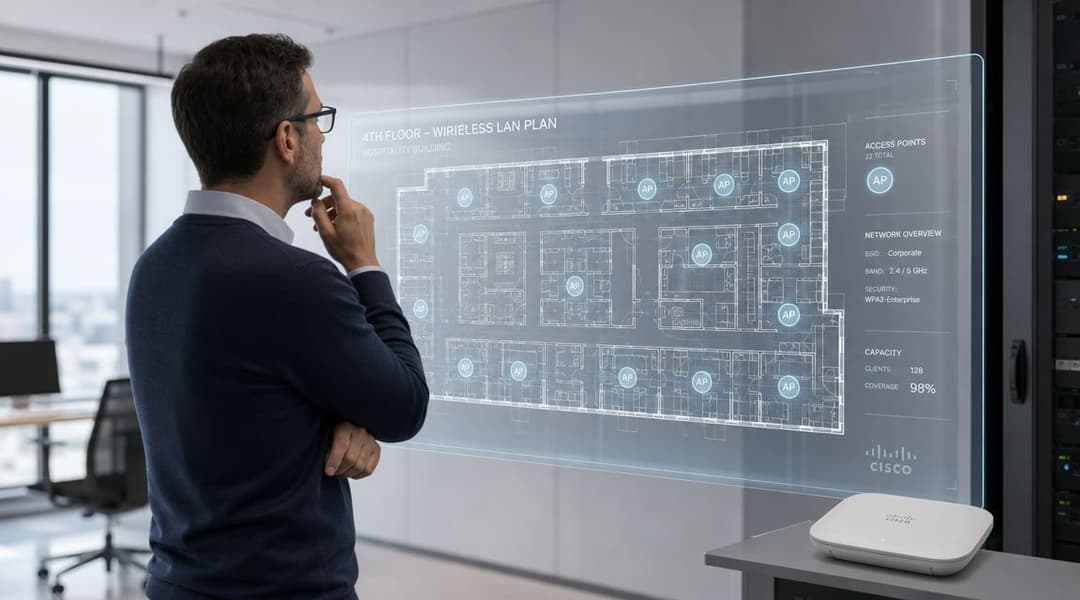
Cisco निवडीची प्रक्रिया कशामुळे कठीण वाटते
Cisco च्या पोर्टफोलिओमध्ये जुने Aironet डिप्लॉयमेंट्स, नवीन Catalyst प्लॅटफॉर्म्स आणि एकाधिक व्यवस्थापन मॉडेल्स समाविष्ट आहेत. यामुळे व्यावहारिक प्रश्नांची उत्तरे शोधू पाहणाऱ्या प्रशासकांसाठी गोंधळ निर्माण होतो, जसे की:
- आता कोणती मानके महत्त्वाची आहेत: एस्टेट अजूनही आधीच्या उच्च-क्षमता WiFi नुसार ऑप्टिमाइझ केलेले आहे, की तुम्ही नवीन 6 GHz आणि Wi-Fi 7 क्षमतांनुसार नियोजन करत आहात?
- याचे व्यवस्थापन कसे केले जाईल: कामकाज प्रामुख्याने कंट्रोलर-केंद्रित राहील, की टीमला अधिक लवचिक क्लाउड आणि हायब्रिड वर्कफ्लो हवे आहेत?
- कोण कनेक्ट होत आहे: कर्मचारी, पाहुणे, कंत्राटदार, IoT डिव्हाइसेस आणि रहिवासी या सर्वांच्या पॉलिसी आणि ऑनबोर्डिंगबाबत वेगवेगळ्या गरजा असतात.
- यश कशावर अवलंबून आहे: गर्दीच्या ठिकाणी केवळ कव्हरेज असणे पुरेसे नाही. क्षमता, रोमिंग गुणवत्ता आणि सुसंगत ऑथेंटिकेशन या गोष्टी अधिक महत्त्वाच्या आहेत.
UK मधील प्रोजेक्ट्समध्ये, या सर्वांच्या खाली आणखी एक स्तर असतो. रेडिओ योजना स्थानिक नियामक मर्यादांशी सुसंगत असणे आवश्यक आहे. हे आपण काय उपयोजित करू शकता यावर परिणाम करते, केवळ डेटाशीटमध्ये काय आकर्षक दिसते यावर नाही.
मजबूत वायरलेस प्रोजेक्ट्सची सुरुवात ही हार्डवेअरच्या उत्साहाने नव्हे, तर सर्व्हिस डिझाईनने होते.
मदत करणारा एक व्यावहारिक दृष्टिकोन
जेव्हा मी Cisco वायरलेस AP इस्टेटचे मूल्यांकन करतो, तेव्हा मी निर्णयांचे तीन गटांमध्ये वर्गीकरण करतो:
प्लॅटफॉर्म फिट
तुम्हाला हवी असलेली डेंसिटी, लाईफसायकल आणि स्टँडर्ड्स हॉरिझॉनशी जुळणारी AP फॅमिली निवडा.ऑपरेशन्स फिट
इन्स्टॉलेशन टीम गेल्यानंतर तुमची टीम या नेटवर्कचे मॉनिटरिंग, ट्रबलशूटिंग आणि मेंटेनन्स कशी करेल हे निश्चित करा.आयडेंटिटी फिट
गेस्ट, कर्मचारी आणि अनमॅनेज्ड डिव्हाइसेससाठी ऑथेंटिकेशन हे वायरलेस आर्किटेक्चरचा एक भाग म्हणून डिझाइन करा, नंतर विचार करायची गोष्ट म्हणून नाही.
शेवटचा मुद्दा असा आहे जिथे एरवी भक्कम असलेली Cisco डिप्लॉयमेंट्स मागे पडतात. रेडिओ नेटवर्क चांगले तयार केले गेले असेल, परंतु वापरकर्त्याचा प्रवास अद्याप शेअर केलेल्या पासवर्ड्स, कमकुवत Captive Portals किंवा जुन्या RADIUS वर्कफ्लोवर अवलंबून असतो जे चालवण्यासाठी खर्चिक असतात. आजची आधुनिक संधी म्हणजे Cisco च्या वायरलेस ताकदीचा वापर करत असतानाच ओळख आणि ॲक्सेसला पासवर्डशिवाय, क्लाउड-कनेक्टेड मॉडेल्सकडे नेणे ही आहे.
Cisco च्या वायरलेस AP फॅमिलींचे वर्गीकरण समजून घेणे
जर तुम्हाला सोप्या भाषेत समजून घ्यायचे असेल, तर Aironet ला स्थापित एंटरप्राइझ वारसा समजा जो अजूनही अनेक संस्थांना चांगला माहित आहे, आणि Catalyst 9100 ला सध्याच्या आणि भविष्यातील वायरलेस अपेक्षांसाठी तयार केलेला आधुनिक प्लॅटफॉर्म समजा. Aironet ने अनेक ठिकाणी आपले स्थान मिळवले आहे. तर Catalyst हा असा प्लॅटफॉर्म आहे जिथे बहुतांश नवीन एंटरप्राइझ डिप्लॉयमेंटसाठी स्ट्रॅटेजिक गुंतवणूक करणे आता अधिक फायदेशीर ठरेल.
व्यावहारिक दृष्टीने Aironet विरुद्ध Catalyst
Aironet मॉडेल्स सहसा अशा वातावरणात दिसतात जे मजबूत एंटरप्राइझ नियंत्रण, सिद्ध ऑपरेशनल पॅटर्न आणि उच्च क्षमतेच्या WiFi च्या मागील पिढ्यांभोवती डिझाइन केले गेले होते. Cisco आणि प्रशिक्षण सामग्रीमध्ये Aironet 2800 Series ही 802.11ac Wave 2 ला सपोर्ट करत असल्याचे आणि प्रति रेडिओ इंटरफेस कमाल 2.6 Gbps पर्यंतचा सैद्धांतिक डेटा दर प्रदान करत असल्याचे वर्णन केले आहे, तर Cisco चे सध्याचे पोझिशनिंग Wi-Fi 7 आणि 6E क्षमतेसाठी डिझाइन केलेल्या ऍक्सेस पॉईंट्सवर केंद्रित आहे, जे गर्दीच्या ठिकाणांना आता प्रीमियम वैशिष्ट्याऐवजी सामान्य बेसलाइन म्हणून मल्टी-गीगाबीट वायरलेसची अपेक्षा कशी आहे हे दर्शवते (Cisco wireless guidepaper reference).
जेव्हा तुम्हाला आधुनिक मानकांकडे जाण्याचा सोपा मार्ग, अपडेटेड मॅनेजमेंट पर्याय आणि डेन्सिटी, लेटन्सी आणि इंटिग्रेशनच्या बाबतीत नवीन एंटरप्राइझ अपेक्षांशी जुळणारा प्लॅटफॉर्म हवा असतो, तेव्हा Catalyst हा अधिक चांगला पर्याय आहे. बऱ्याच IT टीम्ससाठी, जुना स्थिर प्लॅटफॉर्म वाढवणे आणि पुढील रिफ्रेश सायकलसाठी योग्य प्रकारे तयारी करणे यामधील हाच फरक आहे.
फॅमिलीच्या निर्णयाचा अर्थ कसा लावावा
हा निर्णय केवळ "जुने विरुद्ध नवीन" असा नाही. तो साधारण असा आहे:
- जेव्हा तुमच्याकडे विद्यमान इन्फ्रास्ट्रक्चर, माहित असलेले कंट्रोलर डिपेंडन्सी आणि कमी ते मध्यम कालावधीचे ऑपरेशन्स हॉरिझॉन असेल तेव्हा Aironet कायम ठेवा किंवा वाढवा.
- जेव्हा तुम्ही लाईफसायकल लाँगिव्हिटी, नवीन क्लायंटचे वर्तन आणि आधुनिक आयडेंटिटी इंटिग्रेशनसाठी पुन्हा डिझाइन करत असाल तेव्हा Catalyst वर स्टँडर्डाईझ करा.
- तुम्ही मॅनेजमेंट, फर्मवेअर, नियामक आणि पॉलिसीच्या परिणामांचे आधीच नियोजन केले नसल्यास मिश्र - स्ट्रॅटेजीचा वापर टाळा.
बऱ्याच प्रशासकांना आवश्यक असणारी ही एक संक्षिप्त तुलना आहे.
| वैशिष्ट्य | Catalyst 9100 Series | Aironet Series |
|---|---|---|
| प्लॅटफॉर्म भूमिका | सध्याचा स्ट्रॅटेजिक एंटरप्राइझ प्लॅटफॉर्म | जुना एंटरप्राइझ प्लॅटफॉर्म जो जुन्या एस्टेट्समध्ये मोठ्या प्रमाणावर वापरला गेला आहे |
| मानकांवर लक्ष केंद्रित | 6E आणि Wi-Fi 7 पोझिशनिंगसह आधुनिक WiFi उत्क्रांतीनुसार डिझाइन केलेले | साधारणपणे 802.11ac Wave 2 सारख्या आधीच्या पिढ्यांशी संबंधित |
| डेन्सिटी सुसंगतता | सध्याच्या डेन्स व्हेन्यू अपेक्षांशी अधिक चांगल्या प्रकारे सुसंगत | अनेक स्थापित उपयोजनांमध्ये मजबूत, परंतु नवीन मानकांच्या रोडमॅपशी कमी सुसंगत |
| व्यवस्थापन दिशा | आर्किटेक्चरनुसार आधुनिक ऑन-प्रिमाइसेस, क्लाउड आणि हायब्रिड विचारसरणीसाठी योग्य | बहुतेकदा पारंपारिक एंटरप्राइझ उपयोजन पद्धतींशी जोडलेले |
| रिफ्रेश दृष्टिकोन | नवीन एंटरप्राइझ डिझाइनसाठी उत्तम दीर्घकालीन निवड | अनेक प्रकरणांमध्ये वारशाने मिळालेला किंवा संक्रमणकालीन प्लॅटफॉर्म म्हणून हाताळणे अधिक योग्य |
| विशिष्ट खरेदी प्रकरण | नवीन कॅम्पस, हॉस्पिटॅलिटी, हेल्थकेअर आणि मल्टी-साइट रिफ्रेश प्रोजेक्ट्स | विद्यमान एस्टेट्स जे आयुष्य वाढवत आहेत किंवा जुन्या डिझाइन गृहितकांना सपोर्ट करत आहेत |
नावापेक्षा डिझाईनचा हेतू अधिक महत्त्वाचा आहे
Cisco मॉडेल नंबर खरेदीदारांना स्पेक-शीटनुसार खरेदी करण्यासाठी आकर्षित करू शकतात. यामुळे सहसा चुकीची चर्चा सुरू होते. त्याऐवजी AP कोणत्या वर्गाच्या पर्यावरणासाठी डिझाइन केले आहे हे अधिक महत्त्वाचे आहे. विचारा:
- हा एक स्टँडर्ड इनडोअर एंटरप्राइझ AP आहे का?
- हा अधिक डेन्सिटी असलेल्या क्लायंट लोडसाठी योग्य आहे का?
- हा तुमचे क्लायंट्स वापरणार असलेल्या रेडिओ बँड्स आणि मानकांना सपोर्ट करतो का?
- हा तुमच्या पॉवर, माउंटिंग आणि कंट्रोलरच्या मर्यादांशी सुसंगत आहे का?
केवळ मॉडेल नंबरवरून Cisco वायरलेस AP खरेदी करणे म्हणजे अपलिंक्स, पॉवर आणि सॉफ्टवेअरकडे दुर्लक्ष करून केवळ पोर्ट काउंटवरून स्विच निवडण्यासारखे आहे.
उपयुक्त मानसिक बदल हा आहे. कोणती Cisco AP "सर्वोत्तम" आहे हे विचारू नका. त्याऐवजी, तुमच्या पर्यावरणाला आवश्यक असणारी घनता, व्यवस्थापन पद्धत आणि ऑथेंटिकेशन मॉडेल यावर कोणती Cisco AP फॅमिली सर्वात योग्य बसते ते विचारा.
मुख्य हार्डवेअर आणि रेडिओ तंत्रज्ञान स्पष्टीकरण
हार्डवेअरची गोष्ट महत्त्वाची आहे कारण हेल्पडेस्क तिकिटे येण्यापूर्वीच रेडिओची क्षमता युझरच्या अनुभवाला आकार देते. नवीन Cisco ॲक्सेस पॉइंट्स हे केवळ मार्केटिंगच्या दृष्टीने जलद नाहीत. ते अशा गजबजलेल्या वातावरणात अधिक चांगल्या प्रकारे काम करण्यासाठी डिझाइन केलेले आहेत जिथे एकाच वेळी अनेक क्लायंट्स एअरटाईमसाठी स्पर्धा करतात.
नवीन मानके वास्तविक डिप्लॉयमेंट्समध्ये का बदल घडवून आणतात
कमी वापर असलेल्या शांत ऑफिसमध्ये, जुन्या आणि नवीन पिढीच्या AP मधील फरक जाणवत नाही. पण हॉस्पिटल, हॉटेल, ट्रान्सपोर्ट हब किंवा लेक्चर बिल्डिंगमध्ये हा फरक स्पष्टपणे जाणवतो. जशी क्लायंटची गर्दी वाढते, तसे AP ला वाद हाताळावा लागतो, सेवेची गुणवत्ता राखावी लागते आणि उपकरणांच्या एका गोंगाट करणाऱ्या ग्रुपमुळे इतरांचा वापर खराब होणार नाही याची खात्री करावी लागते.
Cisco चे म्हणणे आहे की त्यांचे WiFi 7 access points व्हिडिओ स्ट्रीमिंग, AR आणि VR सारख्या रिअल-टाइम वर्कलोडसाठी कमी लेटन्सी आणि उच्च प्रेडिक्टॅबिलिटी प्रदान करण्यासाठी डिझाइन केलेले आहेत. यामुळे नेटवर्कवरील गर्दी आणि स्पर्धा कमी होते जेणेकरून अनेक क्लायंट्स सक्रिय असतानाही सेवेची गुणवत्ता अधिक स्थिर राहते (Cisco WiFi 7 access point data sheet). हे महत्त्वपूर्ण आहे कारण लोड असताना नेटवर्कची स्थिरता ही युझर्सना कधीही न मिळणाऱ्या केवळ कागदावरील थ्रूपुट आकड्यांपेक्षा नेहमीच अधिक मोलाची असते.
तुम्हाला स्वतः हार्डवेअरच्या मूलभूत भूमिकेबद्दल माहिती हवी असल्यास, Cisco - विशिष्ट डिझाइन पर्यायांचा सखोल विचार करण्यापूर्वी wireless access point fundamentals चे हे संक्षिप्त मार्गदर्शक एक उपयुक्त माहिती पुस्तक आहे.
थेट कार्यरत वातावरणात रेडिओ कोणत्या समस्या सोडवतात
एक आधुनिक Cisco वायरलेस AP काही विशिष्ट मार्गांनी आपले मूल्य सिद्ध करतो:
दाट क्लायंट हाताळणी
कॉन्फरन्स फ्लोअर्स, रुग्णांचे वॉर्ड आणि सार्वजनिक ठिकाणी केवळ वेगापेक्षा उत्तम शेड्यूलिंग आणि एअरटाइमचा वापर अधिक महत्त्वाचा ठरतो.सुधारलेली सुसंगतता
रिअल-टाइम ॲप्सना केवळ बँडविड्थचीच गरज नसते. त्यांना कमी जिटर, अधिक प्रेडिक्टेबल वर्तन आणि गुणवत्तेमध्ये अचानक होणारे कमी बदल हवे असतात.पॉलिसी डिझाइनसाठी अधिक वाव
नवीन प्लॅटफॉर्म्स सेगमेंटेड SSIDs, आधुनिक ऑथेंटिकेशन फ्लो आणि मिश्रित डिव्हाइसेसच्या समूहाशी जुळवून घेण्यासाठी अधिक सोपे आहेत.
लक्ष देण्यायोग्य वैशिष्ट्ये
प्रत्येक प्रगत वैशिष्ट्य दैनंदिन परिणामांमध्ये बदल घडवून आणत नाही. पण हे करतात.
रेडिओ जनरेशन आणि व्हेन्यूची घनता
तुमच्या ठिकाणी नियमितपणे एकाच जागेत अनेक ॲक्टिव्ह क्लायंट्स असतील, तर अडथळे हाताळण्याची क्षमता आणि अंदाज लावता येण्याजोग्या पर्यायांची निवड करा. म्हणूनच हॉटेल्स, उच्च शिक्षण आणि हेल्थकेअरसाठी नवीन Catalyst प्लॅटफॉर्म्स अधिक योग्य ठरतात. अडचण "हा AP डिव्हाइसेस कनेक्ट करू शकतो का?" ही नाही. तर "जेव्हा सर्वजण एकाच वेळी कनेक्ट होतील तेव्हा हा सेवा वापरण्यायोग्य ठेवू शकतो का?" ही आहे.
कंट्रोलर आणि आर्किटेक्चरची सुसंगतता
AP ला वायरलेस सिस्टीमच्या व्यवस्थापनापासून वेगळे केले जाऊ शकत नाही. अडचणीच्या कंट्रोलर धोरणामध्ये तैनात केलेले तांत्रिकदृष्ट्या सक्षम AP हे ऑपरेशन्ससाठी ओझे ठरते. सुसंगत सॉफ्टवेअर पॉलिसी, अंदाज वर्तवण्यायोग्य रोमिंग वर्तन आणि व्यवस्थापन करण्यायोग्य लाइफसायकल प्रक्रिया या सहसा हार्डवेअरमधून प्रत्येक वैशिष्ट्य पिळून काढण्यापेक्षा जास्त महत्त्वाच्या असतात.
रेडिओ डिझाईनची समस्या म्हणून सुरक्षा
वायरलेस सिक्युरिटी हा केवळ नेटवर्कच्या टोकावर घेतला जाणारा ऑथेंटिकेशनचा निर्णय नाही. याचा परिणाम SSID संख्या, रोमिंग डिझाइन, सेगमेंटेशन, ऑनबोर्डिंगमधील अडचणी आणि युझर्स अधिकृत नेटवर्क पूर्णपणे टाळतात की नाही यावर होतो. म्हणूनच आधुनिक AP धोरण हे ओळख धोरणाच्या जवळ असायला हवे.
जर युझर्स वारंवार टेदरिंगचा वापर करत राहिले, तर सिग्नल मॅप अगदी अचूक दिसत असला तरीही वायरलेस डिझाइन अयशस्वी ठरले आहे.
प्रत्यक्षात, उत्तम रेडिओ तंत्रज्ञान तुम्हाला प्लॅटफॉर्म देते. युझर्सना त्याचा फायदा होईल की नाही हे उत्तम नेटवर्क डिझाइन आणि उत्तम आयडेंटिटी डिझाइन ठरवते.
तुमचे Cisco वायरलेस नेटवर्क डिझाइन आणि डिप्लॉय करणे
बहुतेक अयशस्वी वायरलेस प्रकल्प खरेदीच्या पातळीवर अयशस्वी होत नाहीत. ते नियोजनात अपयशी ठरतात. AP मॉडेल कदाचित पूर्णपणे योग्य असू शकते, परंतु डिझाइनमध्ये प्रत्यक्ष क्लायंटची घनता, इमारतीचे कठीण बांधकाम साहित्य, PoE मर्यादा किंवा स्थानिक नियामक मर्यादा याकडे दुर्लक्ष केले गेलेले असते.
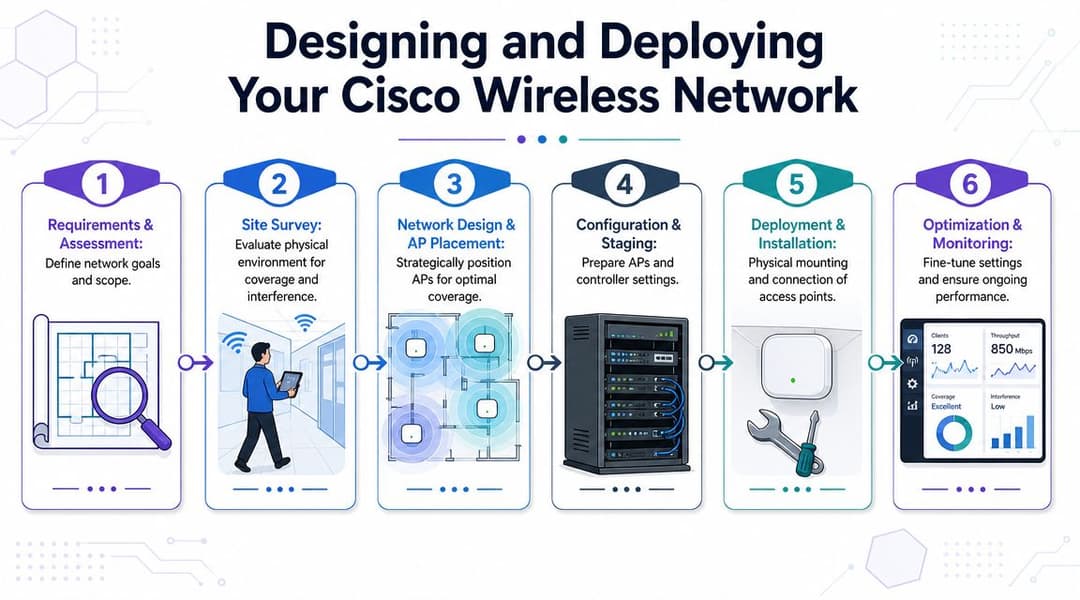
सर्वात उत्कृष्ट Cisco डिप्लॉयमेंट्स आवश्यकतांपासून ते ऑप्टिमायझेशनपर्यंतच्या शिस्तबद्ध प्रक्रियेचे पालन करतात.
कव्हरेज आणि कॅपॅसिटी या दोन्ही गोष्टींचा एकाच वेळी विचार करून सुरुवात करा
केवळ-कव्हरेज डिझाइन अद्याप बर्याच प्रोजेक्ट्समध्ये दिसून येते. हे चांगले दिसणारे हीटमॅप्स तयार करते आणि थेट सेवेमध्ये खराब वापरकर्ता अनुभव देते. हॉटेलचे बॉलरूम, बाह्यरुग्ण क्लिनिक किंवा विद्यार्थ्यांची सामायिक जागा यामध्ये स्वीकार्य सिग्नल सामर्थ्य असू शकते आणि तरीही ती खराब कामगिरी करू शकते कारण चुकीच्या ठिकाणी खूप कमी रेडिओसह खूप जास्त डिव्हाइसेस जोडलेले असतात.
एक व्यावहारिक डिप्लॉयमेंट वर्कफ्लो खालीलप्रमाणे दिसतो:
सेवा हेतू निश्चित करा
नेटवर्क हे पाहुण्यांच्या वापरासाठी (guest-heavy), कर्मचाऱ्यांसाठी गंभीर (staff-critical), डिव्हाइस-डेन्स, लेटन्सी-संवेदनशील आहे की या चौघांचे मिश्रण आहे हे ठरवा.पर्यावरणाचे योग्य सर्वेक्षण करा
भौतिक साहित्य, लिफ्टचे कोअर्स, स्वयंपाकघर, प्लांट रूम्स आणि काचेचे मोठे अट्रिअम्स हे सर्व गृहितके बदलू शकतात.AP ची जागा वापरासाठी डिझाइन करा, सममितीसाठी नाही फ्लोअर प्लॅनवर समान अंतर असणे हे इंटेलिजेंट डिझाइन नाही. AP अशा ठिकाणी ठेवा जिथे युजर्स जास्त प्रमाणात एकत्र येतात आणि जिथे रोमिंगचे मार्ग अस्तित्वात आहेत.
स्विचिंग आणि पॉवरची आधीच तपासणी करा
PoE मर्यादा, अपलिंक बॉटलनेक्स किंवा ॲक्सेस स्विच प्लेसमेंटमुळे AP च्या कार्यक्षमतेवर मर्यादा येऊ शकतात.फील्ड रोलआउटपूर्वी स्टेज कॉन्फिगरेशन करा
इन्स्टॉलर्सनी हार्डवेअर बसवण्यास सुरुवात करण्यापूर्वी WLAN पॉलिसी, टॅगिंग, देश सेटिंग्ज आणि कंट्रोलरचे वर्तन सुसंगत असावे.वास्तविक क्लायंट आल्यानंतर ऑप्टिमाइझ करा
अंतिम ट्यूनिंग केवळ सर्वेक्षण साधनांनी नव्हे, तर लाइव्ह ट्रॅफिकसह होते.
व्यापक डिप्लॉयमेंट शैलींचे मूल्यांकन करणाऱ्या टीम्ससाठी, Meraki सह वायरलेस ॲक्सेस पॉइंट दृष्टिकोनाची ही तुलना उपयुक्त आहे कारण व्यवस्थापन मॉडेल रोलआउट गती आणि ऑपरेटिंग ओव्हरहेडवर जवळजवळ रेडिओ हार्डवेअरइतकाच परिणाम करते.
UK रेग्युलेटरी डोमेन ही केवळ एक टीप नाही
इतर बाबींमध्ये पूर्णपणे सक्षम असणाऱ्या अनेक प्रकल्पांना अनेकदा या क्षेत्रात आव्हानांचा सामना करावा लागतो. Cisco APs त्यांच्या कॉन्फिगर केलेल्या नियामक डोमेनद्वारे मर्यादित असतात. Aironet 3800 साठीचे Cisco चे एक प्रशिक्षण उदाहरण चॅनल मॅप आणि 8 ट्रान्समिट पॉवर लेव्हल्स दाखवते, सोबतच हे देखील स्पष्ट करते की सर्व देशांमध्ये सर्व चॅनेल्स उपलब्ध नसतात. UK मधील उपयोजनांसाठी, AP चे UK आणि ETSI नियमांच्या आधारे प्रमाणीकरण करणे आवश्यक आहे, कारण ते त्याच्या कॉन्फिगर केलेल्या डोमेन बाहेरील चॅनेल्सना परवानगी देणार नाही, ज्याचा थेट परिणाम कव्हरेज प्लॅनिंग आणि अनुपालनावर होतो (Cisco regulatory domain training reference).
ते अनेक प्रकारे महत्त्वाचे ठरते:
इंपोर्ट केलेले किंवा विसंगत हार्डवेअर रोलआउटमध्ये अडथळा आणू शकते
जर नियामक डोमेन सुसंगत नसेल, तर तुमचे डिझाइनचे अंदाज कोलमडू शकतात.चॅनल प्लॅनिंग हे देश-विशिष्ट असते
दुसऱ्या प्रदेशातील डिझाइन टेम्पलेट जसेच्या तसे वापरून ते UK मध्येही तसेच काम करेल असा अंदाज बांधू नका.कंट्रोलर कंट्री सेटिंग्ज ऑपरेशनल दृष्ट्या महत्त्वाच्या आहेत
मायग्रेशन किंवा मिश्रित-इस्टेट बदलांनंतर, प्रमाणीकरणाचा एक भाग म्हणून डोमेन अलाइनमेंट तपासणे आवश्यक आहे.
UK 6 GHz चा प्रश्न
UK मधील टीम्सना स्थानिक 6 GHz वातावरणात कशाला परवानगी आहे याकडे देखील बारीक लक्ष देणे आवश्यक आहे. विषय हा नाही की "Wi-Fi 6E" आकर्षक वाटतो की नाही. विषय हा आहे की मॉडेल, सॉफ्टवेअर आणि रेग्युलेटरी सेटिंग्ज तुम्ही आखत असलेल्या अचूक डिप्लॉयमेंट परिस्थितीमधील UK च्या वापर नियमांशी सुसंगत आहेत की नाही.
एक सुसंगत परंतु खराब नियोजित डिझाइन अद्यापही खराब कामगिरी करते. चुकीच्या नियामक फिटसह उत्तम नियोजित डिझाइन कदाचित कधीही लाइव्ह होऊ शकत नाही.
म्हणूनच उपयोजन टप्प्यात नेहमी सर्वेक्षण, स्टेजिंग आणि इन्स्टॉलेशनसह औपचारिक नियामक पडताळणीची पायरी समाविष्ट असावी.
आधुनिक ऑथेंटिकेशन आणि इंटिग्रेशन धोरणे
रेडिओ नेटवर्क हा युझर अनुभवाचा केवळ अर्धा भाग आहे. दुसरा अर्धा भाग म्हणजे लोक आणि डिव्हाइसेस त्यावर कशा प्रकारे कनेक्ट होतात.
बरेच Cisco वायरलेस वातावरण अजूनही दोनपैकी एका सवयीवर अवलंबून असतात. एकतर एक सामायिक पासवर्ड असतो जो हेतू असलेल्या वापरकर्त्यांच्या पलीकडे पसरतो किंवा एक Captive Portal प्रवाह असतो जो तांत्रिकदृष्ट्या कार्य करतो परंतु मोठ्या प्रमाणावर हाताळण्यास अनाठायी, नाजूक आणि कठीण वाटतो. हे दोन्ही दृष्टिकोन सपोर्ट लोड वाढवतात आणि पॉलिसी नियंत्रण कमकुवत करतात.
शेअर्ड-पासवर्ड WiFi ने आपली मर्यादा का गाठली आहे
सामायिक PSKs आकर्षक आहेत कारण ते समजवायला सोपे आहेत. ते रोखणे देखील कठीण आहे. एकदा पासवर्ड साइनवर प्रिंट झाल्यावर, ईमेलद्वारे पाठवल्यावर किंवा अनमॅनेज्ड डिव्हाइसेसवर स्टोअर केल्यावर, तुमचे ॲक्सेस मॉडेल आधीच विस्कळीत झालेले असते. ते बदलणे त्रासदायक ठरते आणि सामान्य सीक्रेटभोवती वापरकर्त्यांचे वर्गीकरण करणे अवघड असते.
पारंपारिक गेस्ट Captive Portals वेगळी समस्या सोडवतात, पण ते बऱ्याचदा तिथे अडचणी निर्माण करतात जिथे युझर्सना त्या अजिबात नको असतात. पाहुण्यांना जलद, सुरक्षित ऑनबोर्डिंग हवे असते. कर्मचाऱ्यांना त्यांच्या ओळखीशी जोडलेला सुलभ ॲक्सेस हवा असतो. ऑपरेशन्स टीम्सना रिव्होकेशन, ऑडिट करण्याची क्षमता आणि कमी तिकिटे हवी असतात.
त्यामुळेच आधुनिक वायरलेस स्ट्रॅटेजी आता "पासवर्ड कोणाला माहित आहे" वरून "हा युझर किंवा डिव्हाइस कोण आहे, आणि त्याला काय करण्याची परवानगी दिली पाहिजे?" याकडे बदलत आहे.
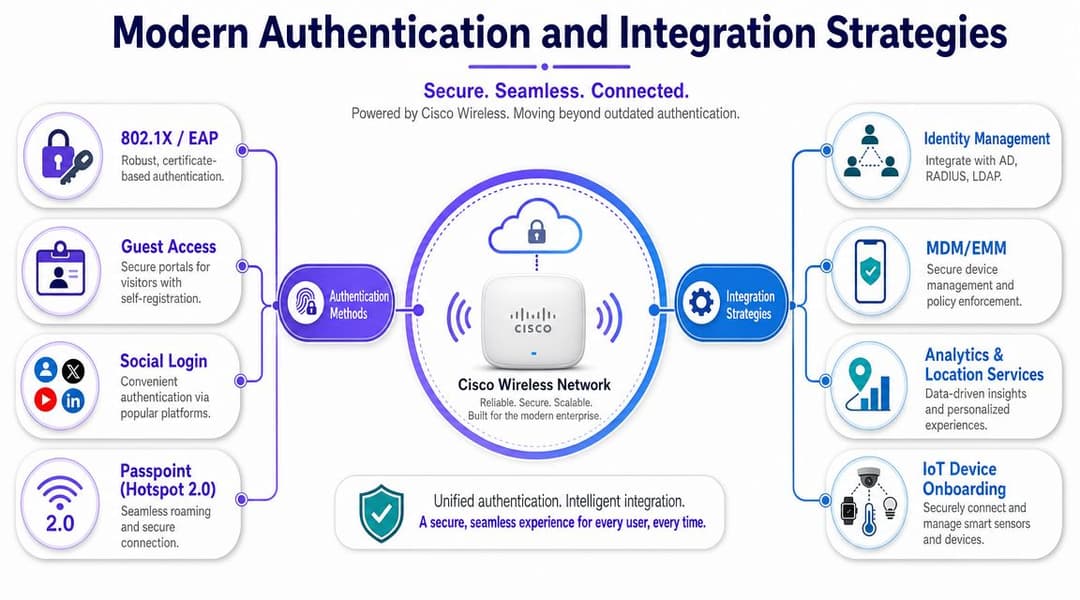
आधुनिक Cisco ऍक्सेस कसा असायला हवा
Cisco इन्फ्रास्ट्रक्चरवरील एक मजबूत ऑथेंटिकेशन मॉडेल सहसा एका ऐवजी अनेक पॅटर्न्स एकत्र आणते:
व्यवस्थापित कर्मचारी डिव्हाइसेससाठी 802.1X
कर्मचारी ऍक्सेससाठी हे अजूनही योग्य फाउंडेशन आहे जिथे डिव्हाइस ट्रस्ट आणि पॉलिसी महत्त्वाची असते.प्रमाणपत्र-आधारित ऑनबोर्डिंग
पासवर्डच्या विस्कळीतपणापेक्षा अधिक चांगले, विशेषतः जेव्हा ते क्लाउड डिरेक्टरी आणि लाइफसायकल ऑटोमेशनशी जोडलेले असते.पाहुण्यांसाठी Passpoint आणि OpenRoaming
हे अडथळे कमी करतात आणि फर्स्ट-पॅकेट एन्क्रिप्शन तसेच पुन्हा भेट देणाऱ्यांसाठी सोयीस्कर अनुभव अधिक वास्तववादी बनवतात.IoT आणि जुन्या एंडपॉइंट्ससाठी विभागलेले ऑनबोर्डिंग
प्रत्येक डिव्हाइस आधुनिक EAP फ्लो करू शकत नाही, त्यामुळे तुम्हाला पॉलिसीशी तडजोड करण्याऐवजी नियंत्रित अपवाद हवे आहेत.
ऑथेंटिकेशनचे निर्णय कुठे लागू होतात याबद्दल जर तुमच्या टीमला तांत्रिक उजळणी हवी असेल, तर प्रवेश नियंत्रणामध्ये RADIUS सर्व्हर काय करतो याच्या या विहंगावलोकनला पुन्हा भेट देणे फायद्याचे ठरेल.
क्लाउड आयडेंटिटी प्लॅटफॉर्म्स समीकरण कुठे बदलतात
हा असा भाग आहे ज्याकडे अनेक पारंपारिक केवळ - Cisco डिझाइनमध्ये दुर्लक्ष केले जाते. Cisco APs आणि कंट्रोलर्स तुम्हाला ट्रान्सपोर्ट, RF नियंत्रण आणि एन्टरप्राइझ पॉलिसी हुक्स देतात. ते पाहुणे, कर्मचारी, कंत्राटदार आणि मल्टि - टेनंट युझर्ससाठी आपोआप सर्वात सोपा ओळख अनुभव देत नाहीत.
क्लाउड-आधारित आयडेंटिटी प्लॅटफॉर्म वायरलेस इन्फ्रास्ट्रक्चरच्या वर कार्य करू शकतो आणि ऍक्सेस लेयर सोपा करू शकतो. याचे एक उदाहरण म्हणजे Purple, जे पासवर्डशिवाय गेस्ट आणि कर्मचारी ऍक्सेस मॉडेल्स, OpenRoaming आणि Passpoint वर्कफ्लो आणि Microsoft Entra ID, Google Workspace आणि Okta सारख्या क्लाउड आयडेंटिटी प्रोव्हाइडर्ससह इंटिग्रेशनला सपोर्ट करते. व्यावहारिक भाषेत सांगायचे तर, यामुळे संस्थांना Cisco वायरलेसला नेटवर्कचा पाया म्हणून कायम ठेवता येते आणि त्याच वेळी कमकुवत शेअर्ड-पासवर्ड किंवा केवळ ऑन-प्रिमाइसेस असणाऱ्या ऑथेंटिकेशन पद्धतींपासून मुक्ती मिळते.
जेव्हा तुम्हाला खालील गोष्टी एकत्र करायच्या असतात तेव्हा ते मॉडेल विशेषतः उपयुक्त ठरते:
- अतिशय सोपा वाटणारा अतिथी प्रवेश,
- कर्मचाऱ्यांचे ऑथेंटिकेशन जे त्यांच्या डिरेक्टरी आयडेंटिटीशी जोडलेले असते,
- वापरकर्त्यांनी नोकरी सोडल्यास त्यांचे हक्क त्वरित रद्द करणे,
- आणि भाडेकरू, रहिवासी, विभाग किंवा फ्रँचायझी यांच्यामध्ये योग्य विलगीकरण.
सर्वोत्तम वायरलेस लॉगिन तेच आहे जे युझर्सच्या फारसे लक्षात येत नाही आणि ॲडमिनिस्ट्रेटर्स तरीही त्यावर पूर्ण नियंत्रण ठेवू शकतात.
व्यावहारिकदृष्ट्या काय अधिक चांगले काम करते
कर्मचाऱ्यांसाठी, सर्टिफिकेट-ग्रेड किंवा आयडेंटिटी-बाउंड प्रवेश हा सहसा योग्य दीर्घकालीन पर्याय असतो. हे पासवर्ड रिसेट करण्याचे प्रमाण कमी करते, हक्क रद्द करण्याची प्रक्रिया सुधारते आणि झिरो-ट्रस्ट विचारांशी अधिक सुसंगत राहते.
पाहुण्यांसाठी (guests), सुलभता महत्त्वाची असते. जर वापरकर्त्यांना सतत पुन्हा नोंदणी करावी लागत असेल किंवा विसंगत स्प्लॅश फ्लोचा सामना करावा लागत असेल, तर त्याचा वापर कमी होतो आणि सपोर्टची मागणी वाढते. पासवर्डशिवाय फिरण्याचे (Passwordless roaming) मॉडेल्स ही केवळ सोयीची बाब नसून प्रत्यक्ष ऑपरेशनल समस्या सोडवतात.
legacy devices साठी, त्यांना अशा डिझाइनमध्ये बसवण्याची सक्ती करू नका ज्याला ते सपोर्ट करू शकत नाहीत. त्याऐवजी अधिक कडक सेगमेंटेशन आणि विशिष्ट उद्देशासाठी तयार केलेल्या ऑनबोर्डिंगसह त्यांना वेगळे करा.
जेव्हा ऑथेंटिकेशन हे आयडेंटिटी-ड्रिव्हन, क्लाउड-कनेक्टेड आणि संपूर्ण इस्टेटमध्ये व्यवस्थापित करण्यासाठी पुरेसे सोपे बनते, तेव्हा आधुनिक Cisco वायरलेस AP उपयोजन त्याच्या पूर्ण क्षमतेपर्यंत पोहोचते.
परफॉर्मन्स ट्यूनिंग आणि सामान्य समस्यांचे निवारण
जेव्हा युझर्स वायरलेसबाबत तक्रार करतात, तेव्हा अनेक टीम्स अजूनही कंट्रोलरपासून सुरुवात करतात आणि आत काम करतात. ते सोपा प्रश्न विचारण्यापूर्वी जॉइनिंग एरर्स, रजिस्ट्रेशनमधील विसंगती किंवा AP अलर्ट्स शोधतात: RF वातावरण ओव्हरलोड झाले आहे का?
त्या क्रमाने बऱ्याचदा वेळ वाया जातो.
दोषारोप करण्याऐवजी वातावरणापासून सुरुवात करा
UK च्या गर्दीच्या ठिकाणी, आजूबाजूची परिस्थिती खराब असल्याने एक उत्तम Cisco AP देखील अविश्वासू वाटू शकतो. जाड भिंती, परावर्तित साहित्य, क्लायंटची गर्दी, AP ची चुकीची जागा आणि अनमॅनेज्ड शेजारील RF या सर्व गोष्टी वापरकर्त्याच्या अनुभवावर परिणाम करतात. हॉस्पिटॅलिटी, हेल्थकेअर, रिटेल आणि विद्यार्थ्यांची वसतिगृहे यामध्ये विशेषतः हे जास्त जाणवते कारण वायरलेस वातावरण दिवसभरात बदलत राहते.
एक दुर्लक्षित पण महत्त्वाचा ट्रबलशूटिंग दृष्टिकोन म्हणजे AP किंवा कंट्रोलर निकामी झाला आहे असे मानण्यापूर्वी RF आणि कॅपॅसिटी गृहीतकांची चाचणी करणे. जर युझर्सना केवळ गर्दीच्या वेळेतच समस्या येत असतील, तर ही समस्या एअरटाईम प्रेशर, को - चॅनल वाद किंवा चुकीची जागा यामुळे असू शकते, खराब हार्डवेअरमुळे नाही.
पुराव्यासाठी टेलिमेट्रीचा वापर करा
Cisco ने एक महत्त्वपूर्ण ऑपरेशनल क्षमता जोडली जेव्हा त्यांच्या आधुनिक एंटरप्राइझ वायरलेस प्लॅटफॉर्मने Cisco IOS XE Bengaluru 17.5.1 मध्ये रिअल-टाइम AP हेल्थ मॉनिटरिंग सुरू केले, ज्यामुळे टीम्सना 2 ते 900 सेकंद पर्यंतच्या कॉन्फिगर करण्यायोग्य अंतरासह CPU utilisation आणि मेमरी वापर ट्रॅक करण्याची परवानगी मिळाली, ज्यामध्ये 10 सेकंद हा डीफॉल्ट रिपोर्टिंग नमुना म्हणून दर्शविला गेला आहे. यामुळे AP व्हिजिबिलिटी साध्या अप/डाउन चेक्सवरून ट्रबलशूटिंग आणि परफॉर्मन्स मॅनेजमेंटसाठी थ्रेशोल्ड-आधारित ऑब्झर्वेबिलिटीकडे सरकली आहे (Cisco AP real-time statistics guide).
ते उपयुक्त आहे कारण ते दोन अतिशय भिन्न परिस्थिती वेगळे करण्यास मदत करते:
AP अंतर्गत तणावाखाली आहे
CPU किंवा मेमरीचा दाब वास्तविक प्लॅटफॉर्म किंवा वर्कलोड समस्या दर्शवू शकतो.AP निरोगी आहे परंतु सेवा खराब आहे
हे तुम्हाला पुन्हा RF परिस्थिती, स्पर्धा, क्लायंटचे वर्तन किंवा पॉलिसी डिझाइनकडे निर्देशित करते.
एक अधिक उपयुक्त ट्रबलशूटिंग क्रम
थेट लॉग्स तपासण्याऐवजी या क्रमाचा वापर करून पहा.
पहिले क्लायंट पॅटर्न तपासा
तक्रारी केवळ एका डिव्हाइस प्रकारापुरत्या, एका क्षेत्रापुरत्या किंवा एका विशिष्ट कालावधीपुरत्या मर्यादित आहेत का?दुसरे RF परिस्थितीचे निरीक्षण करा
चॅनेल ओव्हरलॅप, स्टिकी क्लायंट आणि डिझाइनच्या कल्पनेपेक्षा त्या जागेत जास्त मागणी आहे का ते पहा.तिसरे AP हेल्थ टेलिमेट्रीचे पुनरावलोकन करा
AP-बाजूचा ताण निश्चित करण्यासाठी किंवा नाकारण्यासाठी CPU आणि मेमरी ट्रेंड्स वापरा.त्यानंतर ऑथेंटिकेशन फ्लो तपासा
वापरकर्ते सहसा ऑनबोर्डिंग किंवा पॉलिसीच्या अपयशाला "खराब WiFi" असे म्हणतात.शेवटी कंट्रोलर डीबगिंग वापरा, सुरुवातीला नाही
हे अत्यंत महत्त्वाचे आहे, परंतु ते तुमचे एकमेव माध्यम नसावे.
जर तोच AP केवळ जेव्हा खोली पूर्ण भरलेली असते तेव्हाच "अयशस्वी" होत असेल, तर ती खोली फॉल्ट डोमेनचा भाग आहे.
कोणत्या ट्यूनिंगमुळे सहसा परिणामांमध्ये सुधारणा होते
सर्वात जास्त मोलाचे ट्यूनिंगचे काम क्वचितच ग्लॅमरस असते. यामध्ये चॅनेल प्लॅन्स साफ करणे, अनावश्यक SSIDs कमी करणे, ओव्हरपॉवर्ड सेल्स दुरुस्त करणे आणि प्रत्यक्ष ऑक्युपन्सी पॅटर्नशी RF डिझाइन जुळवणे समाविष्ट आहे. यामध्ये ऑथेंटिकेशन डिझाइन अशी छुपी घसरण तर निर्माण करत नाही ना, ज्याला वापरकर्ते अस्थिरता समजतात, हे तपासणे देखील समाविष्ट आहे.
उत्कृष्ट Cisco ऑपरेशन्स टीम केवळ AP चालू आहे की नाही एवढेच विचारत नाहीत. त्याऐवजी, ते विचारतात की रेडिओ सेल, क्लायंट वर्तन आणि ॲक्सेस वर्कफ्लो हे AP ज्या पर्यावरणात सेवा देत आहे त्याच्याशी पुरेसे सुसंगत आहेत का.
तुमच्या वातावरणासाठी योग्य Cisco AP निवडणे
योग्य Cisco वायरलेस AP निवडणे हे ब्रँड लॉयल्टीवर कमी आणि तुम्ही ज्या परिस्थितीसाठी डिझाइन करत आहात त्यावर जास्त अवलंबून असते. निवडण्याचा सर्वात सुरक्षित मार्ग म्हणजे पर्यावरणावर आधारित निवड करणे.
हॉस्पिटॅलिटी
हॉटेल्स, रिसॉर्ट्स आणि इव्हेंटच्या ठिकाणांना शांत वातावरणातून वेगाने गर्दीकडे जाणाऱ्या जागांमध्ये अंदाज लावता येणारे रोमिंग, सोपे गेस्ट ऑनबोर्डिंग आणि स्थिर परफॉर्मन्सची आवश्यकता असते. जेव्हा गेस्ट डेन्सिटी जास्त असते आणि व्यवसायाला रिसेप्शनवर लिहिलेल्या स्टॅटिक गेस्ट पासवर्ड ऐवजी आधुनिक ऑथेंटिकेशन प्रवासाचे समर्थन करायचे असते, तेव्हा नवीन Catalyst मॉडेल्स अधिक योग्य ठरतात.
खोलीचे कव्हरेज, कॉरिडॉर रोमिंग आणि सार्वजनिक क्षेत्रातील गर्दीचे व्यवस्थापन याला प्राधान्य देणारे डिझाइन शोधा. हॉस्पिटॅलिटी क्षेत्रात, तांत्रिकदृष्ट्या उत्कृष्ट असलेले AP देखील जर त्रासदायक अतिथी प्रवेश देत असेल, तर तो वाईट अनुभव ठरतो.
Retail
रिटेल नेटवर्कला एकाच वेळी दोन वेगवेगळ्या गोष्टींची गरज असते. कर्मचारी डिव्हाइसेसना विश्वसनीय ऑपरेशनल प्रवेश आवश्यक असतो. खरेदीदारांना अशा ऑनबोर्डिंगची आवश्यकता असते ज्यामुळे घसरण किंवा अनावश्यक ड्वेल-टाइम सपोर्ट समस्या निर्माण होणार नाहीत. जर विश्लेषण, लॉयल्टी किंवा स्थान-जागरूक अनुभव महत्त्वाचे असतील, तर वायरलेस डिझाइनने त्या ऑपरेशनल मॉडेलला चांगल्या प्रकारे सपोर्ट केला पाहिजे.
रिफ्रेश केलेल्या रिटेल इस्टेटसाठी Catalyst सहसा अधिक योग्य ठरते, विशेषतः जेथे आयडेंटिटी-ड्रिव्हन ॲक्सेस आणि सेगमेंटेड सर्व्हिस पॉलिसी या योजनेचा भाग असतात.
हेल्थकेअर
हॉस्पिटल आणि क्लिनिक्स हे वायरलेससाठी कठीण वातावरण असतात. तेथील बांधकाम साहित्य अडथळा आणणारे असते, मोबिलिटी महत्त्वाची असते आणि विसंगत रोमिंग अजिबात सहन केले जात नाही. केवळ फिचर्सच्या समृद्धतेचा विचार न करता ऑपरेशन्सच्या स्थिरतेचा विचार करून APs आणि कंट्रोलर आर्किटेक्चर निवडा. नवीन प्लॅटफॉर्मची दिशा येथे सामान्यतः योग्य उत्तर ठरते कारण हेल्थकेअर क्षेत्राला लोड असतानाच्या प्रेडिक्टेबल परफॉर्मन्सचा आणि आधुनिक मानकांकडे जाण्याच्या सोप्या मार्गाचा फायदा होतो.
नियामक सुसंगतता आणि इन्स्टॉलेशनच्या तपशीलांची काळजीपूर्वक पडताळणी करा. हेल्थकेअर क्षेत्रामध्ये, एकदा पर्यावरण लाइव्ह झाल्यावर उपयोजनातील चुका दुरुस्त करणे खूप खर्चिक ठरते.
एंटरप्राइझ ऑफिस आणि कॅम्पस
कॉर्पोरेट ऑफिसेस, हायब्रिड कॅम्पस आणि जास्त कोलॅबोरेशन असणाऱ्या जागांसाठी, नवीन Catalyst डिप्लॉयमेंट हे व्हिडिओ, दाटीवाटीचे मीटिंग एरिया आणि ओळख-आधारित कर्मचारी ॲक्सेस या सर्वांसाठी योग्य आहे. जर तुम्ही जुने Aironet इस्टेट्स बदलत असाल, तर केवळ रेडिओ रिफ्रेश न करता ऑथेंटिकेशन देखील व्यवस्थित करण्याची हीच योग्य वेळ आहे.
वारसा मिळालेल्या मालमत्तांमध्ये जिथे जीवनचक्र आणि सुसंगततेचे विचार महत्त्वाचे असतात, तिथे Aironet अजूनही योग्य ठरू शकते. परंतु अगदी नवीन धोरणात्मक डिझाइनसाठी, बहुतेक कॉर्पोरेट वातावरणात Catalyst हा दीर्घकालीन चांगला पर्याय आहे.
असे AP निवडा जे तुम्ही अनेक वर्षे चालवणार असलेल्या पर्यावरणासाठी योग्य असेल, जे या तिमाहीच्या स्प्रेडशीटवर सर्वात सोपे दिसते ते नाही.
महत्त्वाचा निर्णय केवळ तुमच्या छतावर कोणते Cisco वायरलेस AP बसवायचे हा नाही. तर, नेटवर्कवर दररोज अवलंबून राहणाऱ्या लोकांसाठी रेडिओ क्षमता, अनुपालन, व्यवस्थापनक्षमता आणि आधुनिक ओळख एकत्रीकरणाचा योग्य समतोल कोणते प्लॅटफॉर्म प्रदान करते हा आहे.
जर तुम्ही Cisco वायरलेस आधुनिक करत असाल आणि शेअर्ड पासवर्ड्स व जुन्या Captive Portals च्या पलीकडे जाऊ इच्छित असाल, तर तुमच्या विद्यमान इन्फ्रास्ट्रक्चरवर आयडेंटिटी आणि ऑथेंटिकेशन लेअर म्हणून Purple चे मूल्यांकन करणे योग्य ठरेल. हे तुमच्या Cisco वायरलेस इन्फ्रास्ट्रक्चरला न बदलता ॲक्सेस कंट्रोल सुलभ करू शकणारे पासवर्डलेस गेस्ट ॲक्सेस, OpenRoaming आणि Passpoint, स्टाफ SSO फ्लोज आणि क्लाउड आयडेंटिटी इंटिग्रेशन्सना सपोर्ट करते.