
Captive Portal विरुद्ध Splash Page
हा अधिकृत मार्गदर्शक अतिथी WiFi नेटवर्कमधील captive portals आणि splash pages मधील महत्त्वाचा फरक स्पष्ट करतो. हे अंतर्निहित नेटवर्क इंटरसेप्शन मेकॅनिझम व्हिज्युअल अतिथी इंटरफेसच्या संयोगाने कसे कार्य करते हे स्पष्ट करते, ज्यामुळे IT लीडर्स आणि वेन्यू ऑपरेटर्सना माहितीपूर्ण आर्किटेक्चरल आणि खरेदीचे निर्णय घेण्यास मदत होते.
Video overview
हे मार्गदर्शक ऐका
पॉडकास्ट ट्रान्सक्रिप्ट पहा
आमच्या मुख्य मालिकेचा भाग: Captive Portals चा अंतिम मार्गदर्शक →
Captive portal vs splash page architecture evaluator
Evaluate network enforcement boundaries, size concurrent guest device capacity, audit RFC 8908 walled gardens, and export controller configurations.
Technical layer differentiation matrix
| Dimension | Captive portal (network gate) | Splash page (user presentation) | Architectural verdict |
|---|---|---|---|
| Enforcement layer | L2/L3 network layer (gateway, wireless controller, eBPF firewall) | L7 application and presentation layer (HTML/CSS responsive web viewport) | Captive portal enforces boundaries; splash page displays user interface. |
| Traffic intercept | DNS interception, HTTP 302 redirect, RFC 8908 CAPPORT API JSON endpoint | Standard web application GET and POST forms within browser or CNA | Network intercepts unauthenticated packets to trigger the splash page. |
| Walled garden control | Stateful IP and FQDN allowlist enforced at gateway routing level | Asset hosting paths for logos, CSS, and third-party scripts | Portal restricts non-allowlisted traffic until authentication completes. |
| Authentication and AAA | RADIUS Access-Request (RFC 2865/6614), dynamic VLAN, ACL push | Collects credentials, social OAuth tokens, SMS OTP, or marketing consent | Splash collects user data; portal transmits RADIUS payloads to authorize access. |
| Session management | Hardware MAC tracking, RADIUS CoA disconnect (RFC 3576), DHCP lease bound | Browser session cookies, local storage, CRM profile syncing tokens | Network controls device uptime and bandwidth; splash stores profile telemetry. |
| Regulatory compliance | Cryptographic MAC hashing, network audit logging, HIPAA/PCI VLAN isolation | GDPR/CCPA unticked consent checkboxes, privacy policy acceptance links | Both layers work together to provide end-to-end data privacy compliance. |
Learn how to deploy hardware-agnostic captive portals with automated walled gardens, dynamic VLAN steering, and CRM integrations.
Explore the captive portal guideSpeak with a Purple technical architect to design compliant guest WiFi onboarding tailored to your controllers.
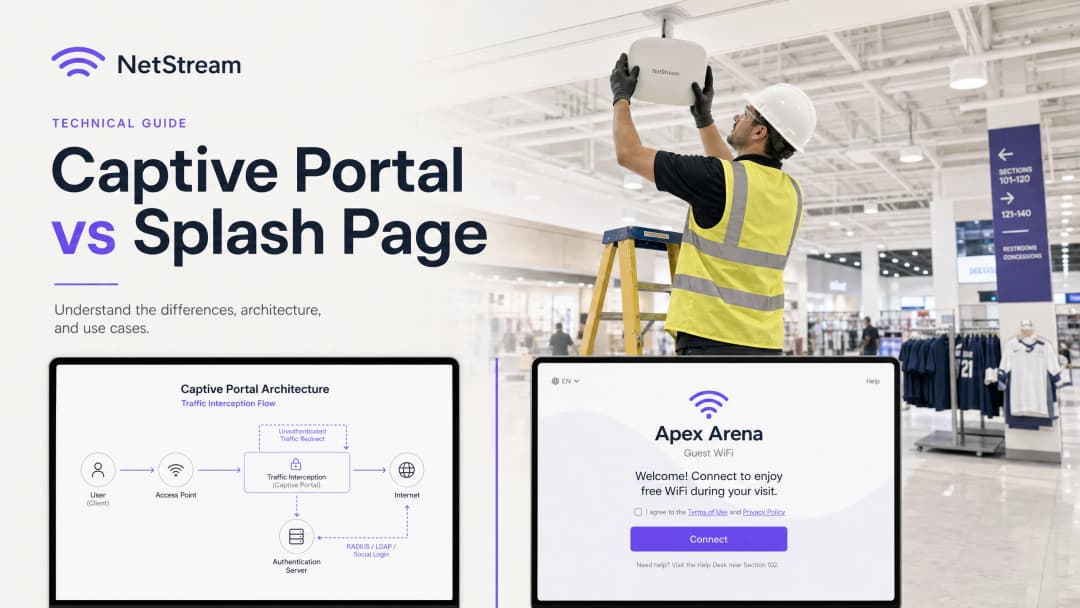
कार्यकारी सारांश (Executive Summary)
आयटी व्यवस्थापक, नेटवर्क आर्किटेक्ट आणि वेन्यू ऑपरेशन्स डायरेक्टर्ससाठी, अतिथी WiFi आता केवळ एक सोय राहिलेली नाही - तर तो फर्स्ट-पार्टी डेटा कॅप्चर, मार्केटिंग प्रतिबद्धता आणि नेटवर्क सुरक्षिततेसाठी एक महत्त्वपूर्ण टचपॉइंट आहे. तरीही RFPs (प्रस्तावांसाठी विनंत्या) आणि उपयोजन चर्चेमध्ये गोंधळ निर्माण करणारा एक महत्त्वाचा मुद्दा म्हणजे Captive Portal आणि splash pages ची गल्लत करणे.
हे मार्गदर्शक तो मूलभूत फरक स्पष्ट करण्यासाठी तयार केले आहे. Captive Portal ही एक नेटवर्क-लेयर नियंत्रण यंत्रणा आहे जी ट्रॅफिक अडवते, इंटरनेट प्रवेश ब्लॉक करते आणि सुरक्षित प्रमाणीकरण व्यवस्थापित करते. याउलट, splash page हा ॲप्लिकेशन-लेयर व्हिज्युअल इंटरफेस आहे - म्हणजेच ते वेब पेज जे अतिथी पाहतात, संवाद साधतात आणि प्रमाणीकरणासाठी वापरतात.
या दोन घटकांची गल्लत केल्याने खरेदी आणि अंमलबजावणीमध्ये मोठा धोका निर्माण होतो, जसे की असुरक्षित बॅकएंड नियंत्रणे असलेले सुंदर डिझाइन केलेले splash page खरेदी करणे, किंवा अत्यंत सुरक्षित Captive Portal सह एक क्लिष्ट, विना-ब्रँडचा वापरकर्ता इंटरफेस तैनात करणे ज्यामुळे अतिथी दूर जातात. हे तंत्रज्ञान एकत्र कसे कार्य करते हे समजून घेऊन, संस्था मोजता येण्याजोगे व्यावसायिक मूल्य निर्माण करणारा सुरक्षित, सुसंगत आणि अत्यंत आकर्षक अतिथी WiFi अनुभव देण्यासाठी Purple सारख्या प्लॅटफॉर्मचा वापर करू शकतात.

तांत्रिक सखोल माहिती
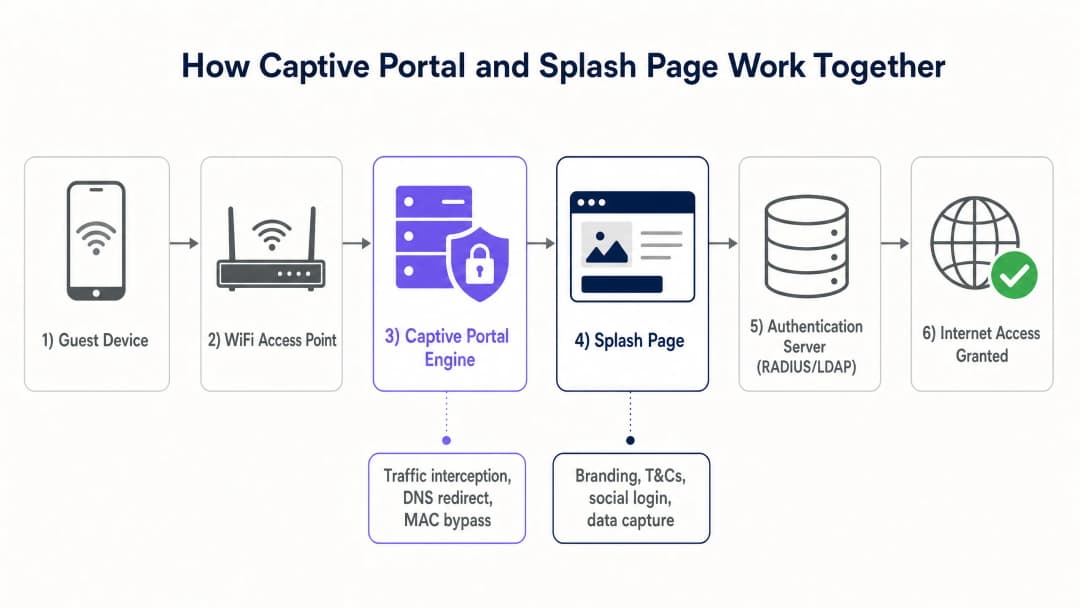
Captive Portal: नेटवर्क-लेयर ट्रॅफिक इंटरसेप्शन
प्रवेश नियंत्रण लागू करण्यासाठी Captive Portal OSI मॉडेलच्या खालच्या स्तरांवर (सामान्यतः लेयर्स २ आणि ३) कार्यरत असते. जेव्हा एखादे अतिथी डिव्हाइस ओपन SSID शी कनेक्ट होते, तेव्हा स्थानिक DHCP सर्व्हर त्याला एक IP ॲड्रेस, सबनेट मास्क आणि डीफॉल्ट गेटवे नियुक्त करतो. तथापि, वायरलेस ॲक्सेस पॉइंट (AP) किंवा गेटवे कंट्रोलर त्या डिव्हाइसचा MAC ॲड्रेस फायरवॉलच्या सेशन टेबलमध्ये अप्रमाणित स्थितीत ठेवतो.
या स्थितीत, फायरवॉल DNS आणि DHCP सारख्या आवश्यक नेटवर्क सेवांच्या व्यतिरिक्त सर्व आउटबाउंड IP ट्रॅफिक ब्लॉक करते. जेव्हा अतिथी बाह्य वेबसाइटला भेट देण्याचा प्रयत्न करतो, तेव्हा Captive Portal दोन मुख्य पद्धतींपैकी एकाचा वापर करून ट्रॅफिक अडवते:
- HTTP रिडायरेक्शन (302 रिडायरेक्ट): गेटवे सुरुवातीची HTTP विनंती अडवतो आणि HTTP 302 Found प्रतिसाद परत करतो, ज्यामुळे क्लायंट ब्राउझर splash page URL वर रिडायरेक्ट होतो.
- DNS हायजॅकिंग: गेटवे DNS क्वेरी अडवतो आणि सर्व डोमेन नेम्स स्थानिक splash page सर्व्हरच्या IP ॲड्रेसवर रिझॉल्व्ह करतो. जरी साधी असली, तरी DNSSEC आणि ब्राउझर-स्तरीय सुरक्षा इशाऱ्यांमुळे ही पद्धत हळूहळू बंद करण्यात आली आहे.
आधुनिक मोबाईल ऑपरेटिंग सिस्टीम्स Captive Network Assistant (CNA) नावाच्या अंगभूत डीमनचा वापर करतात. नेटवर्कशी कनेक्ट केल्यावर, CNA एका ज्ञात, अनएन्क्रिप्टेड HTTP एंडपॉइंटवर (उदाहरणार्थ, Apple चे captive.apple.com किंवा Google चे connectivitycheck.gstatic.com) पोहोचण्याचा प्रयत्न करते. जर तो प्रतिसाद इंटरसेप्ट आणि रिडायरेक्ट केला गेला, तर ऑपरेटिंग सिस्टीमला समजते की ते एका Captive Portal च्या मागे आहे आणि ती वापरकर्त्याला मॅन्युअली वेब ब्राउझर उघडण्याची गरज न ठेवता एका समर्पित सिस्टीम ब्राउझर विंडोमध्ये स्वयंचलितपणे Splash Page प्रदर्शित करते.
एकदा वापरकर्त्याने Splash Page वर प्रमाणीकरण प्रक्रिया पूर्ण केली की, प्रमाणीकरण सर्व्हर (सामान्यतः RADIUS सर्व्हर) नेटवर्क कंट्रोलरला Access-Accept पॅकेट पाठवतो. कंट्रोलर नंतर त्या डिव्हाइसच्या MAC ॲड्रेसला पूर्ण इंटरनेट प्रवेश देण्यासाठी आपले फायरवॉल नियम अपडेट करतो, ज्यासाठी विशिष्ट सत्र कालावधीकरिता डिव्हाइस लक्षात ठेवण्यासाठी सामान्यतः MAC Address Bypass (MAB) चा वापर केला जातो.
Splash Page: ॲप्लिकेशन-लेयर वापरकर्ता अनुभव
Captive Portal च्या विपरीत, Splash Page हे लेयर ७ (ॲप्लिकेशन लेयर) वर कार्यरत असणारे एक मानक वेब ॲप्लिकेशन आहे. हे मानक वेब तंत्रज्ञानाचा (HTML, CSS आणि JavaScript) वापर करून तयार केले जाते आणि एकतर गेटवे कंट्रोलरवर स्थानिकरित्या किंवा अधिक सामान्यपणे, Purple सारख्या क्लाउड प्लॅटफॉर्मवर होस्ट केले जाते.
Splash Page पाहुण्यांसाठी एक व्हिज्युअल इंटरफेस आणि ब्रँड टचपॉइंट म्हणून काम करते. त्याच्या प्राथमिक तांत्रिक कार्यांमध्ये खालील गोष्टींचा समावेश होतो:
- आयडेंटिटी फेडरेशन: OAuth 2.0 प्रोटोकॉल वापरून सोशल लॉगिन (Google, Facebook, Apple) सुलभ करणे.
- डेटा कॅप्चर: पाहुण्यांचे तपशील जसे की ईमेल पत्ते, नावे आणि लॉयल्टी प्रोग्राम नंबर गोळा करणे.
- संमती व्यवस्थापन: विपणनासाठी स्पष्ट निवड-संमती (opt-in consent) घेणे, सोबतच सेवा अटी आणि गोपनीयता धोरणांना मंजुरी मिळवणे, जे GDPR [1] आणि CCPA सारख्या नियमांचे पालन सुनिश्चित करते.
- जाहिरात वितरण आणि ब्रँडिंग: भौतिक जागेतून कमाई करण्यासाठी लक्ष्यित प्रमोशनल बॅनर्स, व्हिडिओ जाहिराती किंवा कनेक्शननंतर रिडायरेक्ट पृष्ठे दाखवणे.
Splash Page हे एक वेब ॲप्लिकेशन असल्याने, ते अत्यंत प्रतिसाद देणारे (responsive) आणि मोबाईल डिव्हाइसेससाठी अनुकूलित असणे आवश्यक आहे, ज्यांचा पाहुण्यांच्या ८०% पेक्षा जास्त WiFi कनेक्शनमध्ये वाटा असतो.
अंमलबजावणी मार्गदर्शक
एंटरप्राइझ-ग्रेड पाहुण्यांचे WiFi सोल्यूशन तैनात करण्यासाठी नेटवर्क इन्फ्रास्ट्रक्चर आणि क्लाउड सॉफ्टवेअर यांच्यात जवळचे समन्वय आवश्यक आहे. खाली Captive Portal आणि Splash Page सिस्टीमची अंमलबजावणी करण्यासाठी विक्रेता-तटस्थ आर्किटेक्चरल मार्गदर्शक दिले आहे.
स्टेप-बाय-स्टेप डिप्लॉयमेंट आर्किटेक्चर
- नेटवर्क विभाजन: पाहुण्यांच्या रहदारीला अंतर्गत कॉर्पोरेट नेटवर्क, पॉइंट-ऑफ-सेल (POS) टर्मिनल्स आणि IoT डिव्हाइसेसपासून वेगळे करण्यासाठी तुमच्या स्विचेस आणि ॲक्सेस पॉइंट्सवर एक समर्पित अतिथी VLAN कॉन्फिगर करा. PCI-DSS अनुपालनासाठी ही एक मुख्य आवश्यकता आहे [2].
- SSID configuration: आपल्या हार्डवेअरने सपोर्ट केल्यास Opportunistic Wireless Encryption (OWE) सक्षम असलेले ओपन SSID कॉन्फिगर करा किंवा मानक ओपन SSID कॉन्फिगर करा. आपल्या वायरलेस कंट्रोलरवर (उदाहरणार्थ, Cisco Catalyst, Aruba Instant On, किंवा Ruckus SmartZone) SSID प्रोफाइलमध्ये Captive Portal रिडायरेक्शन सक्षम करा.
- Walled Garden (ACL) configuration: ऑथेंटिकेशनपूर्वी, अतिथी उपकरणांना विशिष्ट बाह्य डोमेन्सपर्यंत पोहोचण्याची परवानगी देणे आवश्यक आहे जेणेकरून Splash पेज योग्यरित्या प्रदर्शित होईल. याला "Walled Garden" किंवा ॲक्सेस कंट्रोल लिस्ट (ACL) म्हणतात. आपण यामध्ये खालील गोष्टी समाविष्ट करणे आवश्यक आहे:
- आपल्या क्लाउड-होस्ट केलेल्या Splash पेजचे डोमेन (उदाहरणार्थ,
*.purple.ai). - सोशल लॉगिन प्रदात्यांचे OAuth एंडपॉइंट्स (उदाहरणार्थ,
*.facebook.com,*.google.com,*.apple.com). - आवश्यक ॲसेट्स (फॉन्ट, स्टाईलशीट, प्रतिमा) होस्ट करणारे कंटेंट डिलिव्हरी नेटवर्क्स (CDNs).
- आपल्या क्लाउड-होस्ट केलेल्या Splash पेजचे डोमेन (उदाहरणार्थ,
- RADIUS server integration: ऑथेंटिकेशन आणि अकाउंटिंग (802.1X / AAA) साठी बाह्य RADIUS सर्व्हर (जसे की Purple चे क्लाउड RADIUS) वापरण्यासाठी वायरलेस कंट्रोलर कॉन्फिगर करा [3].
- Splash page customisation: ब्रँड सुसंगतता, मोबाईल रिस्पॉन्सिव्हनेस आणि स्पष्ट कायदेशीर संमती चेकबॉक्स सुनिश्चित करून Purple पोर्टलमध्ये Splash पेज डिझाइन करा.
- Session and bandwidth policies: नेटवर्कचा गैरवापर रोखण्यासाठी आणि सर्व अतिथींना योग्य ॲक्सेस मिळण्याची खात्री करण्यासाठी नेटवर्क कंट्रोलरवर सेशन टाईमआउट (उदाहरणार्थ, ८ तास), आयडल टाईमआउट (उदाहरणार्थ, ३० मिनिटे) आणि प्रति-वापरकर्ता बँडविड्थ मर्यादा (उदाहरणार्थ, ५ Mbps डाऊन, २ Mbps अप) निर्धारित करा.
| तांत्रिक पॅरामीटर | Captive Portal (नेटवर्क गेटवे) | Splash Page (क्लाउड ॲप्लिकेशन) |
|---|---|---|
| OSI Layer | लेयर २ / लेयर ३ (नेटवर्क/डेटा लिंक) | लेयर ७ (ॲप्लिकेशन) |
| Primary Protocols | RADIUS, DHCP, HTTP (302 रिडायरेक्ट) | HTTP, HTTPS, HTML5, CSS3, OAuth 2.0 |
| Core Functions | ट्रॅफिक इंटरसेप्शन, ॲक्सेस कंट्रोल, बँडविड्थ शेपिंग | युझर इंटरफेस, डेटा संकलन, संमती, ब्रँडिंग |
| User Visibility | पूर्णपणे अदृश्य (बॅकएंड यंत्रणा) | १००% दृश्यमान (व्हिज्युअल वेलकम स्क्रीन) |
| Security Standards | IEEE 802.1X, WPA3, OWE, PCI DSS | HTTPS, SSL/TLS, GDPR, CCPA |
| Typical Hardware | वायरलेस APs, गेटवे राउटर, कंट्रोलर | क्लाउड सर्व्हर, CDNs |
तुमच्या विशिष्ट सेटअपबद्दल काही प्रश्न आहेत का?
आमची टीम ८०,००० हून अधिक वेन्यूजमधील वेन्यू ऑपरेटर्स, IT मॅनेजर्स आणि नेटवर्क इंजिनिअर्ससोबत काम करते. २० मिनिटांचा कॉल बुक करा आणि तुमच्यासारख्या इतरांनी ही समस्या कशी सोडवली हे आम्ही तुम्हाला दाखवू.
सर्वोत्तम पद्धती (Best Practices)
अतिशय उपलब्ध, सुरक्षित आणि कायदेशीररित्या सुसंगत guest WiFi नेटवर्क सुनिश्चित करण्यासाठी, IT टीम्सनी या उद्योग-मानक सर्वोत्तम पद्धतींचे पालन केले पाहिजे:
१. HTTPS आणि SSL/TLS प्रमाणपत्रे अनिवार्य करा
guest डिव्हाइस आणि स्प्लॅश पेजमधील सर्व ट्रॅफिक HTTPS वापरून एन्क्रिप्ट केलेले असावे. असुरक्षित HTTP वर स्प्लॅश पेज चालवल्याने guest डेटा - ज्यामध्ये लॉगिन क्रेडेंशियल आणि ईमेल पत्ते समाविष्ट आहेत - पॅकेट स्निफिंग आणि मॅन-इन-द-मिडल (man-in-the-middle) हल्ल्यांसाठी खुला होतो. तुमच्या स्प्लॅश पेज डोमेनकडे वैध, सार्वजनिकरित्या विश्वसनीय SSL/TLS प्रमाणपत्र असल्याची खात्री करा. सेल्फ-साइन केलेल्या प्रमाणपत्रांमुळे ब्राउझरमध्ये गंभीर चेतावणी दर्शवली जाते, ज्यामुळे युजर्स कनेक्शन सोडून देतात.
२. नेटवर्क आयसोलेशन (Network Isolation) लागू करा
guest WiFi ट्रॅफिक कधीही कॉर्पोरेट मालमत्तांसारख्याच VLAN किंवा सबनेटमध्ये पाठवू नका. guest ट्रॅफिक कठोर फायरवॉल नियमांसह केवळ "guest-only" VLAN मध्ये आयसोलेट केले पाहिजे, जे अंतर्गत सबनेटच्या दिशेने जाणारे कोणतेही क्रॉस-VLAN राउटिंग प्रतिबंधित करते. यामुळे मालवेअरचा प्रसार आणि संवेदनशील कॉर्पोरेट डेटाचा अनधिकृत ऍक्सेस मिळण्याचा धोका कमी होतो.
३. GDPR आणि CCPA सुसंगतता सुनिश्चित करा
तुमचे ठिकाण जर UK, EU किंवा कॅलिफोर्नियामध्ये कार्यरत असेल किंवा तिथल्या नागरिकांना सेवा देत असेल, तर तुमचे स्प्लॅश पेज कठोर डेटा गोपनीयता कायद्यांचे पालन करणारे असले पाहिजे:
- मुक्तपणे दिलेली संमती: मार्केटिंग ऑप्ट-इन चेकबॉक्स बाय डीफॉल्ट अनटिक (unticked) असायला हवेत. इंटरनेट ऍक्सेस मिळवण्यासाठी मार्केटिंग संवादांना संमती देणे ही पूर्वअट असू शकत नाही.
- स्पष्ट गोपनीयता धोरण (Privacy Policy): स्प्लॅश पेजवर तुमच्या गोपनीयता धोरणाची थेट, सहज उपलब्ध असणारी लिंक प्रदान करा.
- विस्मरणाचा अधिकार (Right to erasure): तुमचा guest WiFi प्लॅटफॉर्म (उदा. Purple) वैयक्तिक डेटा हटवण्याची विनंती करणाऱ्या युजर्ससाठी स्वयंचलित वर्कफ्लोला सपोर्ट करतो याची खात्री करा.
४. मोबाईल डिव्हाइसेस आणि CNA साठी अनुकूल करा
स्प्लॅश पेज हलके आणि अत्यंत रिस्पॉन्सिव्ह असल्याची खात्री करा. भारी व्हिडिओ बॅकग्राउंड किंवा मोठ्या अनकम्प्रेस केलेल्या इमेज वापरणे टाळा, ज्यामुळे पेज लोड होण्याचा वेग कमी होतो - विशेषतः स्टेडियम किंवा कॉन्फरन्स सेंटर्स सारख्या अत्यंत दाटीवाटीच्या वातावरणात. मूळ Captive Network Assistant (CNA) ब्राउझरमध्ये अडथळामुक्त रेंडरिंगची हमी देण्यासाठी विविध मोबाईल ऑपरेटिंग सिस्टमवर स्प्लॅश पेजची चाचणी घ्या.
समस्यानिवारण (Troubleshooting) आणि जोखीम निवारण
सामान्य त्रुटी आणि निवारण धोरणे
- CNA पॉपअप दिसण्यात अपयश: जर Captive Portal रिडायरेक्ट डिव्हाइसचे CNA ट्रिगर करण्यात अयशस्वी ठरले, तर guest युजर्स इंटरनेट ऍक्सेस नसताना आणि लॉगिन करण्याचा कोणताही स्पष्ट मार्ग नसताना SSID ला कनेक्टेड राहू शकतात.
- निवारण: DHCP द्वारे guest युजर्सना नियुक्त केलेले DNS सर्व्हर पूर्णपणे कार्यरत आहेत आणि बाह्य डोमेन रिझॉल्व्ह करण्यास सक्षम आहेत याची खात्री करा. जर DNS रिझोल्यूशन अयशस्वी झाले, तर CNA त्याची कनेक्टिव्हिटी चाचणी करू शकत नाही आणि रिडायरेक्ट कधीही ट्रिगर होत नाही.
- Walled Garden ची चुकीची कॉन्फिगरेशन: OAuth लॉगिन पेज लोड न झाल्यामुळे किंवा कनेक्शन एरर दाखवल्यामुळे guest युजर्स सोशल मीडिया लॉगिन पूर्ण करू शकत नाहीत.
- निवारण: गेटवेच्या Walled Garden ACL ची पुन्हा तपासणी करा. सोशल लॉगिन प्रदाते त्यांचे IP रेंज आणि डोमेन्स वारंवार बदलतात. Purple सारख्या क्लाउड व्यवस्थापित अतिथी WiFi प्लॅटफॉर्मचा वापर केल्याने हे सुनिश्चित होते की Walled Garden डोमेन्स स्वयंचलितपणे अपडेट केले जातात आणि तुमच्या हार्डवेअरसह सिंकमध्ये ठेवले जातात.* CNA ब्राउझर मर्यादा: मोबाईल उपकरणांवरील मूळ CNA ब्राउझरमध्ये Safari किंवा Chrome सारख्या मानक ब्राउझरच्या तुलनेत मर्यादित कार्यक्षमता असते. हे कुकीज, पॉपअप किंवा बाह्य रिडायरेक्ट ब्लॉक करू शकते.
- निवारण: स्प्लॅश पेजवर जटिल JavaScript किंवा थर्ड पार्टी इंटिग्रेशन्स टाळा ज्यासाठी कुकी सातत्य किंवा ब्राउझर पॉपअपची आवश्यकता असते. प्रमाणीकरण फ्लो शक्य तितका सोपा आणि थेट ठेवा.
ROI आणि व्यावसायिक प्रभाव
Captive Portal आणि स्प्लॅश पेजमधील फरक समजून घेतल्याने संस्थांना त्यांच्या अतिथी WiFi नेटवर्कचे नेटवर्क कार्यप्रदर्शन आणि व्यावसायिक उपयुक्तता दोन्ही ऑप्टिमाइझ करून गुंतवणुकीवरील परतावा (ROI) जास्तीत जास्त वाढवणे शक्य होते.
दुहेरी - ऑप्टिमाइझ केलेल्या सोल्यूशनचे व्यावसायिक मूल्य
- अतिथींच्या सहभागामध्ये वाढ: जेनेरिक, विना ब्रँडच्या स्वागत पेजच्या तुलनेत, व्यावसायिकरित्या डिझाइन केलेले स्प्लॅश पेज - जेव्हा Purple च्या मुख्य उत्पादनांशी जसे की Guest WiFi आणि WiFi Analytics [4] [5] जोडले जाते - तेव्हा अतिथी लॉगिन दर 40% पर्यंत वाढवू शकते.
- समृद्ध फर्स्ट-पार्टी डेटा कॅप्चर: अखंड सोशल मीडिया लॉगिन आणि संरचित फॉर्म फील्ड ऑफर करून, Retail, Hospitality, Healthcare, आणि Transport सारख्या क्षेत्रातील ठिकाणे स्वच्छ, सत्यापित ईमेल पत्ते, लोकसंख्याशास्त्रीय डेटा आणि भेट - वारंवारता डेटा कॅप्चर करू शकतात.
- कमाईच्या संधी: रिटेल मीडिया मॉनिटायझेशनसाठी स्प्लॅश पेजचा वापर केल्याने ठिकाणांना कनेक्शनच्या वेळी अतिथींना लक्ष्यित जाहिराती दाखवणे शक्य होते, ज्यामुळे वेगाने वाढणाऱ्या डिजिटल जाहिरात बाजारात प्रवेश मिळतो.
- कार्यात्मक कार्यक्षमता: एक मजबूत Captive Portal डिव्हाइस ऑनबोर्डिंग स्वयंचलित करून, सत्र कालबाह्यता व्यवस्थापित करून आणि नेटवर्क गर्दी रोखण्यासाठी बँडविड्थ मर्यादा लागू करून आयटी सपोर्ट तिकिटे कमी करते.
Purple चे एंटरप्राइझ-ग्रेड सोल्यूशन तैनात करून, संस्था त्यांचे नेटवर्क आर्किटेक्चर सुरक्षित आणि सुसंगत असल्याचे सुनिश्चित करू शकतात आणि त्यांच्या विपणन टीमला सुंदर, उच्च - रूपांतरित स्प्लॅश पेजेस डिझाइन करण्यासाठी पूर्ण सर्जनशील स्वातंत्र्य देऊ शकतात जे ग्राहकांचे निष्ठा वाढवतात आणि महसूल मिळवून देतात.
संदर्भ
- [1] Regulation (EU) 2016/679 (General Data Protection Regulation)
- [2] PCI Security Standards Council - PCI DSS Quick Reference Guide
- [3] IEEE 802.1X Port-Based Network Access Control Standard
- [4] Cisco Wireless APs: 2026 Guide to Products & Deployment
- [5] 10 Best Network Access Control (NAC) Solutions for 2026
- [6] WiFi in Schools: The 2026 Administrator & IT Guide
- [7] क्लाउड RADIUS सह 802.1X प्रमाणीकरण कसे लागू करावे
महत्वाच्या व्याख्या
Captive Portal
एक नेटवर्क - लेयर मेकॅनिझम जे क्लायंट ट्रॅफिकला अडवते आणि प्रमाणीकरण निकष पूर्ण होईपर्यंत इंटरनेट प्रवेश प्रतिबंधित करते.
अनधिकृत MAC पत्त्यांना पुनर्निर्देशित करण्यासाठी वायरलेस नियंत्रक, गेटवे किंवा फायरवॉल कॉन्फिगर करताना IT टीमद्वारे याचा सामना केला जातो.
स्प्लॅश पृष्ठ
पाहुण्यांच्या ब्राउझरमध्ये दृश्यमान होणारे दृश्यमान, वेब - आधारित लँडिंग पृष्ठ जे प्रमाणीकरण, डेटा कॅप्चर आणि ब्रँड प्रतिबद्धता सुलभ करते.
वापरकर्त्याच्या ऑनबोर्डिंग अनुभवाची रचना करण्यासाठी आणि ग्राहकांचा डेटा संकलित करण्यासाठी मार्केटिंग आणि वेन्यू ऑपरेशन्स टीम्सद्वारे व्यवस्थापित केले जाते.
Captive Network Assistant (CNA)
मोबाईल डिव्हाइसेसवरील एक अंगभूत ऑपरेटिंग सिस्टम वैशिष्ट्य जे स्वयंचलितपणे Captive Portal शोधते आणि सिस्टम ब्राउझर विंडोमध्ये स्प्लॅश पृष्ठ उघडते.
वापरकर्त्याच्या अनुभवासाठी अत्यंत महत्त्वाचे आहे, कारण यामुळे पाहुण्यांना लॉग इन करण्यासाठी मॅन्युअली ब्राउझर उघडण्याची आवश्यकता भासत नाही.
Walled Garden (ACL)
IP पत्ते किंवा डोमेनची सूची ज्यावर अनधिकृत वापरकर्त्याला नेटवर्कमध्ये लॉग इन करण्यापूर्वी प्रवेश करण्याची परवानगी दिली जाते.
स्प्लॅश पृष्ठ आणि सोशल लॉगिन OAuth प्रवाह लोड होण्यासाठी वायरलेस गेटवेवर योग्यरित्या कॉन्फिगर केलेले असणे आवश्यक आहे.
RADIUS (Remote Authentication Dial-In User Service)
एक नेटवर्किंग प्रोटोकॉल जो नेटवर्कशी कनेक्ट होणाऱ्या वापरकर्त्यांसाठी केंद्रीकृत प्रमाणीकरण, अधिकृतता आणि लेखा (AAA) व्यवस्थापन प्रदान करतो.
डेटाबेसच्या विरूद्ध पाहुण्यांच्या क्रेडेन्शियलची पडताळणी करण्यासाठी आणि नेटवर्क प्रवेश मंजूर करण्यासाठी Captive Portal द्वारे वापरले जाते.
MAC Address Bypass (MAB)
एक यंत्रणा जी डिव्हाइसला त्याच्या हार्डवेअर MAC पत्त्याची आठवण ठेवून त्यानंतरच्या कनेक्शन्सवर Captive Portal लॉगिन स्क्रीन बायपास करण्यास अनुमती देते.
परत येणाऱ्या पाहुण्यांसाठी वारंवार लॉग इन करण्याची आवश्यकता काढून टाकून अखंड अनुभव तयार करण्यासाठी वापरला जातो.
Opportunistic Wireless Encryption (OWE)
एक WiFi मानक (WPA3 चा भाग) जे सामायिक पासवर्डची आवश्यकता नसताना खुल्या नेटवर्कवर एन्क्रिप्शन प्रदान करते.
सार्वजनिक पाहुण्यांच्या नेटवर्कवर सुरक्षित डेटा ट्रान्समिशन सक्षम करते आणि तरीही Captive Portal पुनर्निर्देशनास अनुमती देते.
VLAN Segmentation
ट्रॅफिक वेगळे करण्यासाठी लेयर २ वर भौतिक नेटवर्कला एकाधिक लॉजिकल नेटवर्क्समध्ये विभाजित करण्याची पद्धत.
पाहुण्यांचे ट्रॅफिक सुरक्षित कॉर्पोरेट नेटवर्कपासून पूर्णपणे वेगळे असल्याची खात्री करण्यासाठी पाहुण्यांच्या WiFi उपयोजनांसाठी आवश्यक आहे.
सोडवलेली उदाहरणे
१५० स्टोअर्स असलेल्या एका राष्ट्रीय रिटेल साखळीला एक अतिथी WiFi नेटवर्क लागू करायचे आहे जे मार्केटिंगच्या उद्देशाने ग्राहकांचे ईमेल कॅप्चर करेल, परंतु त्यांच्या IT सुरक्षा टीमला अतिथी ट्रॅफिक कॉर्पोरेट पॉइंट-ऑफ-सेल (POS) सिस्टममध्ये प्रवेश करण्याबद्दल काळजी वाटत आहे. याचे आर्किटेक्चर कसे असावे?
- सर्व १५० स्टोअर्समधील सर्व स्विचेस आणि ॲक्सेस पॉइंट्सवर एक समर्पित Guest VLAN (उदा. VLAN 50) कॉन्फिगर करा, जे फायरवॉल ACLs चा वापर करून कॉर्पोरेट POS VLAN (VLAN 10) पासून पूर्णपणे वेगळे असेल. 2. Guest SSID वर captive portal रिडायरेक्शन सक्षम करा, जे रिडायरेक्ट URL ला Purple च्या सुरक्षित क्लाउड-होस्ट केलेल्या splash page कडे निर्देशित करेल. 3. VLAN 50 वरील सर्व प्री-ऑथेंटिकेटेड ट्रॅफिक प्रतिबंधित करण्यासाठी नेटवर्क गेटवे कॉन्फिगर करा, ज्यामुळे केवळ DNS, DHCP आणि Purple च्या Walled Garden डोमेन्सना प्रवेश मिळेल. 4. RADIUS द्वारे अतिथींचे ऑथेंटिकेशन करण्यासाठी वायरलेस कंट्रोलरसह Purple च्या इंटिग्रेशनचा वापर करा, अतिथीने splash page वर सत्यापित ईमेल पत्ता प्रदान केल्यानंतर आणि सेवा अटी स्वीकारल्यानंतरच इंटरनेट प्रवेश मंजूर केला जाईल.
५०,००० आसनक्षमता असलेल्या स्पोर्ट्स स्टेडियमला सामन्यांदरम्यान विनामूल्य WiFi ऑफर करायचे आहे. ऑपरेशन्स टीमला सामन्यांच्या सुरुवातीला नेटवर्क कोंडी टाळण्यासाठी अखंड लॉगिनचा अनुभव हवा आहे, तर मार्केटिंग टीमला splash page वर स्पॉन्सर व्हिडिओ जाहिराती दाखवायच्या आहेत. तुम्ही या आवश्यकतांमध्ये कसा समतोल साधाल?
- हाय-डेन्सिटी ॲक्सेस पॉइंट्स तैनात करा आणि MAC Address Bypass (MAB) ३० दिवसांसाठी सेट करून captive portal कॉन्फिगर करा, जेणेकरून परत येणाऱ्या चाहत्यांना प्रत्येक भेटीदरम्यान splash page पाहावा लागणार नाही. 2. नवीन कनेक्शनसाठी, मोबाईल डिव्हाइसेसवर जलद लोड होण्यासाठी ऑप्टिमाइझ केलेले एक अत्यंत हलके splash page डिझाइन करा. 3. थेट splash page वर प्ले होणारी एक लहान, ५-सेकंदांची स्पॉन्सर व्हिडिओ जाहिरात एम्बेड करा, ज्यामध्ये 'Skip and Connect' बटण असेल जे त्वरित captive portal ऑथेंटिकेशन सुरू करेल. 4. गुळगुळीत व्हिडिओ स्ट्रीमिंग आणि वेब ब्राउझिंग सुनिश्चित करण्यासाठी प्रति वापरकर्ता उदार बँडविड्थ प्रोफाइल (उदा. 10 Mbps) वाटप करण्यासाठी captive portal कॉन्फिगर करा.
एका मोठ्या सार्वजनिक हॉस्पिटलला रुग्ण आणि अभ्यागतांसाठी अतिथी WiFi प्रदान करायचे आहे. अनुपालन (compliance) टीमची अशी आवश्यकता आहे की नेटवर्कने हेल्थकेअर डेटा गोपनीयता मानकांचे पालन केले पाहिजे आणि रुग्ण दुर्भावनापूर्ण किंवा अयोग्य वेब सामग्रीमध्ये प्रवेश करू शकणार नाहीत. शिफारस केलेली डिप्लोयमेंट रणनीती काय आहे?
- वापरकर्त्यांना एका splash page कडे रिडायरेक्ट करण्यासाठी captive portal कॉन्फिगर करा ज्यामध्ये स्पष्ट हेल्थकेअर-विशिष्ट गोपनीयता सूचना आणि सेवा अटी असतील. 2. प्रौढ सामग्री, मालवेअर आणि फिशिंग साइट्सचा प्रवेश स्वयंचलितपणे ब्लॉक करण्यासाठी क्लाउड-आधारित DNS फिल्टरिंग सेवेसह (जसे की Cisco किंवा इतर सुरक्षित फिल्टर) captive portal गेटवे एकत्रित करा. 3. अनावश्यक वैयक्तिक डेटा गोळा करणे टाळण्यासाठी सोशल लॉगिन पर्याय अक्षम करा, त्याऐवजी साध्या 'Accept and Connect' बटणावर किंवा मूलभूत ईमेल पडताळणी फॉर्मवर अवलंबून रहा. 4. अतिथी स्ट्रीमिंग ट्रॅफिकपेक्षा क्लिनिकल ॲप्लिकेशन्स आणि हॉस्पिटल IoT डिव्हाइसेसना प्राधान्य देण्यासाठी captive portal वर कडक बँडविड्थ शेपिंग लागू करा.
सराव प्रश्न
Q1. एक IT व्यवस्थापक लक्षात घेतो की पाहुणे अतिथी WiFi SSID शी कनेक्ट होत आहेत, परंतु ब्रँडेड स्प्लॅश पृष्ठ दिसत नाही आणि वापरकर्ते इंटरनेटवर प्रवेश करू शकत नाहीत. या समस्येचे सर्वात संभाव्य तांत्रिक कारण काय आहे आणि त्याचे निदान कसे केले पाहिजे?
टीप: Captive Portal पुनर्निर्देशन प्रक्रियेमध्ये DNS च्या भूमिकेचा विचार करा.
नमुना उत्तर पहा
सर्वात संभाव्य कारण म्हणजे DNS रिझोल्यूशन प्रक्रियेतील बिघाड. जेव्हा एखादे डिव्हाइस कनेक्ट होते, तेव्हा स्वागत स्क्रीन लोड करण्यासाठी त्याने स्प्लॅश पृष्ठ डोमेन नेमचे निराकरण केले पाहिजे. जर अतिथी VLAN ला नियुक्त केलेले DNS सर्व्हर डाउन असेल, चुकीचे कॉन्फिगर केले असेल किंवा गेटवेच्या पूर्व - प्रमाणीकरण फायरवॉल नियमांद्वारे ब्लॉक केले असेल, तर डिव्हाइस डोमेनचे निराकरण करू शकत नाही आणि पुनर्निर्देशन अपयशी ठरेल. निदान करण्यासाठी, चाचणी डिव्हाइसला SSID शी कनेक्ट करा, DHCP द्वारे वैध IP आणि DNS सर्व्हर पत्ता प्राप्त झाल्याची पडताळणी करा आणि सार्वजनिक डोमेनला पिंग किंवा रिझॉल्व्ह करण्याचा प्रयत्न करा. जर DNS अपयशी ठरले, तर DNS सर्व्हरची स्थिती तपासा आणि गेटवेच्या पूर्व - प्रमाणीकरण ACL मध्ये DNS ट्रॅफिकला (UDP पोर्ट ५३) अनुमती असल्याची खात्री करा.
Q2. एका रिटेल वेन्यूला पाहुण्यांना त्यांच्या Facebook खात्यांचा वापर करून लॉग इन करण्याची परवानगी द्यायची आहे. तथापि, जेव्हा वापरकर्ते स्प्लॅश पृष्ठावरील Facebook लॉगिन बटणावर क्लिक करतात, तेव्हा त्यांना "Connection Refused" त्रुटी येते. उर्वरित स्प्लॅश पृष्ठ उत्तम प्रकारे लोड होते. समस्या काय आहे आणि आपण तिचे निराकरण कसे कराल?
टीप: पूर्व - प्रमाणित डिव्हाइसला कोणत्या बाह्य संसाधनांमध्ये प्रवेश करण्याची परवानगी आहे याचा विचार करा.
नमुना उत्तर पहा
समस्या अशी आहे की फेसबुक ऑथेंटिकेशन डोमेन्स गेटवेच्या प्री-ऑथेंटिकेशन Walled Garden ॲक्सेस कंट्रोल लिस्ट (ACL) मध्ये समाविष्ट केलेले नाहीत. युझर अद्याप ऑथेंटिकेट झाला नसल्यामुळे, Captive Portal सर्व बाह्य ट्रॅफिक ब्लॉक करतो. जेव्हा युझर फेसबुक बटणावर क्लिक करतो, तेव्हा ब्राउझर फेसबुकच्या OAuth सर्व्हर्सपर्यंत पोहोचण्याचा प्रयत्न करतो, जे गेटवेद्वारे ब्लॉक केले जाते. याचे निराकरण करण्यासाठी, आयटी टीमने आवश्यक फेसबुक OAuth डोमेन्स (उदा. *.facebook.com, *.facebook.net) वायरलेस कंट्रोलर किंवा गेटवेवरील Walled Garden ACL मध्ये जोडणे आवश्यक आहे.
Q3. एका हॉस्पिटॅलिटी वेन्यूने गेस्ट WiFi नेटवर्क तैनात केले आहे. मार्केटिंग टीमला गेस्टचे ईमेल पत्ते गोळा करून त्यांना लगेच वेलकम न्यूजलेटर पाठवायचे आहे. तथापि, संमती संदर्भातील GDPR पालनाबाबत कायदेशीर टीम चिंतेत आहे. दोन्ही टीम्सचे समाधान करण्यासाठी स्प्लॅश पेज आणि Captive Portal कसे कॉन्फिगर केले जावे?
टीप: GDPR नुसार मार्केटिंगसाठीची संमती ही स्वेच्छेने दिलेली असावी आणि ती सेवेची अट नसावी.
नमुना उत्तर पहा
GDPR अंतर्गत मार्केटिंग आणि कायदेशीर दोन्ही टीम्सचे समाधान करण्यासाठी: १. स्प्लॅश पेजवर मार्केटिंग ऑप्ट-इनसाठी स्पष्ट, अनचेक केलेला चेकबॉक्स असणे आवश्यक आहे ('मी मार्केटिंग ईमेल प्राप्त करण्यास संमती देतो'). २. सेवा अटी (Terms of Service) आणि गोपनीयता धोरण (Privacy Policy) मान्य करणे हा एक वेगळा चेकबॉक्स असावा किंवा फ्री नेटवर्क वापरण्याची ती एक अट असल्याचे स्पष्टपणे नमूद केलेले असावे. ३. मार्केटिंग चेकबॉक्स चेक केला असो वा नसो, इंटरनेट ॲक्सेस मंजूर करण्यासाठी मूळ Captive Portal आणि स्प्लॅश पेज सिस्टम कॉन्फिगर केलेली असणे आवश्यक आहे. जर युझरने मार्केटिंग बॉक्स अनचेक ठेवला परंतु सेवा अटी स्वीकारल्या, तरीही सिस्टमने नेटवर्क कंट्रोलरला Access-Accept पॅकेट पाठवले पाहिजे. यामुळे संमती स्वेच्छेने दिली गेल्याची खात्री होते, ज्यामुळे GDPR चे पालन होते, आणि तरीही मार्केटिंग टीमला ऑप्ट-इन करणाऱ्या युझर्सचे ईमेल गोळा करण्याची अनुमती मिळते.
वारंवार विचारले जाणारे प्रश्न
What is the technical difference between a captive portal and a splash page?
A captive portal operates at the network layer (L2/L3) through a gateway, access point, or wireless LAN controller that intercepts unauthenticated client traffic, enforces a walled garden, and manages RADIUS AAA sessions. A splash page is the presentation layer (L7) - the responsive web interface displayed inside the client browser or Captive Network Assistant (CNA) that captures guest credentials, terms acceptance, and marketing consent.
How does a network firewall intercept guest traffic before splash page authentication?
Prior to authentication, the wireless gateway blocks all outbound IP traffic except for explicitly defined walled garden IP/FQDN rules and DNS resolution. When the client attempts to reach an external web resource, the gateway intercepts port 80 HTTP requests or DHCP Option 114 (RFC 8910) advertisements, returning an HTTP 302 redirect or RFC 8908 JSON payload that directs the device browser to the splash page URL.
What is RFC 8908 and why is it replacing legacy HTTP interception?
RFC 8908 defines a standardized Captive Portal API that allows client operating systems (iOS, Android, Windows) to query a JSON endpoint directly to discover captivity state, user session duration, and portal endpoints. This eliminates the need for brute-force HTTPS interception, which causes browser SSL/TLS certificate warnings, while providing deterministic portal closure upon successful authentication.
What domains and network services belong in a captive portal walled garden?
A secure walled garden allowlist includes the splash page hosting FQDN, static CDN asset endpoints, DNS resolvers, and external identity provider authentication URLs (such as Apple ID, Google OAuth, and Microsoft Entra) with their CRL and OCSP validation paths. Crucially, OS captive probe hostnames must be excluded from allowlists so the device operating system reliably identifies captivity and launches the login sheet.
How does Purple integrate captive portal network isolation with custom branded splash pages?
Purple decouples network hardware enforcement from visitor experience design. The platform integrates natively with enterprise controllers (Cisco Meraki, HPE Aruba, Ruckus, Ubiquiti) via RADIUS and cloud APIs to enforce dynamic VLANs and bandwidth controls, while serving high-converting, mobile-responsive splash pages with real-time CRM synchronization, GDPR compliance tracking, and marketing automation.
या मालिकेमध्ये पुढे वाचा
Ubiquiti UniFi guest portal redirection होत नाही: कारणे आणि उपाय
ही मार्गदर्शिका guest state, redirect, pre-authorisation route आणि controller authorisation यांचा अनुक्रमे मागोवा घेऊन UniFi guest portal redirect बिघाड वेगळा करते. हे वेन्यू IT टीम्सना guest-network विरुद्ध Hotspot गोंधळ, बाह्य portal हँड-ऑफ, सद्य UniFi OS खाते आवश्यकता आणि DNS आयसोलेशन चाचणीचे निराकरण करण्यासाठी एक विश्वसनीय पद्धत प्रदान करते.
Cisco Meraki splash page काम करत नाही: एक ट्रबलशूटिंग फ्लोचार्ट
हा प्रॅक्टिकल मार्गदर्शक Cisco Meraki splash फ्लो नेमका कुठे अयशस्वी झाला आहे ते शोधून काढतो: client authorisation, HTTP redirect initiation, walled-garden reachability किंवा RADIUS sign-on. हा व्हेन्यू IT टीम्सना एक नियंत्रित पुरावा मार्ग प्रदान करतो, जेणेकरून ते थेट सुरू असलेल्या नेटवर्कवर मोठे बदल न करता Guest WiFi पूर्ववत करू शकतील.
Enterprise Guest WiFi सेटअप मार्गदर्शक: VLAN विभागणी, सुरक्षा आणि Captive Portals
हे तांत्रिक मार्गदर्शक IT टीम्सना VLAN विभागणी, फायरवॉल पॉलिसी आणि captive portal चा वापर करून Guest WiFi एक नियंत्रित इंटरनेट - ऍक्सेस सेवा म्हणून कसे सेट करावे हे दर्शवते. हे मार्गदर्शक कर्मचारी, पेमेंट आणि ऑपरेशनल सिस्टम्सच्या सुरक्षिततेची सीमा कमकुवत न करता Purple चे नोंदणी फॉर्म्स आणि ऑनबोर्डिंग नियंत्रणे पाहुण्यांना एक सुयोग्य अनुभव कसा देतात हे देखील स्पष्ट करते.
तुमच्या विशिष्ट सेटअपबद्दल काही प्रश्न आहेत का?
आमची टीम ८०,००० हून अधिक वेन्यूजमधील वेन्यू ऑपरेटर्स, IT मॅनेजर्स आणि नेटवर्क इंजिनिअर्ससोबत काम करते. २० मिनिटांचा कॉल बुक करा आणि तुमच्यासारख्या इतरांनी ही समस्या कशी सोडवली हे आम्ही तुम्हाला दाखवू.