
Captive Portal vs Splash Page
This authoritative guide breaks down the critical distinction between captive portals and splash pages in guest WiFi networks. It clarifies how the underlying network interception mechanism works in tandem with the visual guest interface, helping IT leaders and venue operators make informed architectural and procurement decisions.
Video overview
Listen to this guide
View podcast transcript
Part of our core series: The Definitive Guide to Captive Portals →
Captive portal vs splash page architecture evaluator
Evaluate network enforcement boundaries, size concurrent guest device capacity, audit RFC 8908 walled gardens, and export controller configurations.
Technical layer differentiation matrix
| Dimension | Captive portal (network gate) | Splash page (user presentation) | Architectural verdict |
|---|---|---|---|
| Enforcement layer | L2/L3 network layer (gateway, wireless controller, eBPF firewall) | L7 application and presentation layer (HTML/CSS responsive web viewport) | Captive portal enforces boundaries; splash page displays user interface. |
| Traffic intercept | DNS interception, HTTP 302 redirect, RFC 8908 CAPPORT API JSON endpoint | Standard web application GET and POST forms within browser or CNA | Network intercepts unauthenticated packets to trigger the splash page. |
| Walled garden control | Stateful IP and FQDN allowlist enforced at gateway routing level | Asset hosting paths for logos, CSS, and third-party scripts | Portal restricts non-allowlisted traffic until authentication completes. |
| Authentication and AAA | RADIUS Access-Request (RFC 2865/6614), dynamic VLAN, ACL push | Collects credentials, social OAuth tokens, SMS OTP, or marketing consent | Splash collects user data; portal transmits RADIUS payloads to authorize access. |
| Session management | Hardware MAC tracking, RADIUS CoA disconnect (RFC 3576), DHCP lease bound | Browser session cookies, local storage, CRM profile syncing tokens | Network controls device uptime and bandwidth; splash stores profile telemetry. |
| Regulatory compliance | Cryptographic MAC hashing, network audit logging, HIPAA/PCI VLAN isolation | GDPR/CCPA unticked consent checkboxes, privacy policy acceptance links | Both layers work together to provide end-to-end data privacy compliance. |
Learn how to deploy hardware-agnostic captive portals with automated walled gardens, dynamic VLAN steering, and CRM integrations.
Explore the captive portal guideSpeak with a Purple technical architect to design compliant guest WiFi onboarding tailored to your controllers.
Executive Summary
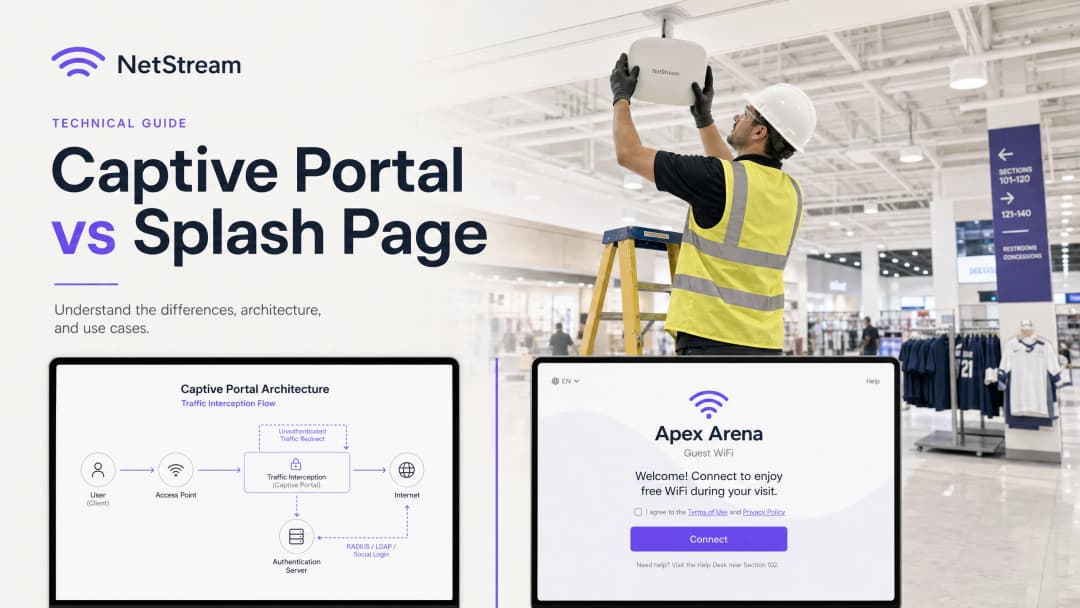
For IT managers, network architects, and venue operations directors, guest WiFi is no longer merely a convenience - it is a critical touchpoint for first-party data capture, marketing engagement, and network security. Yet a persistent point of confusion in RFPs (requests for proposals) and deployment discussions is the conflation of the Captive Portal with splash pages.
This guide sets out to clarify that fundamental distinction. The Captive Portal is a network-layer control mechanism that intercepts traffic, blocks internet access, and manages secure authentication. The splash page, by contrast, is the application-layer visual interface - the web page guests see, interact with, and use to authenticate.
Conflating these two components leads to significant procurement and implementation risk, such as purchasing a beautifully designed splash page with insecure backend controls, or deploying a highly secure Captive Portal with a clunky, unbranded user interface that drives guests away. By understanding how these technologies work in tandem, organisations can use platforms such as Purple to deliver a secure, compliant, and highly engaging guest WiFi experience that creates measurable business value.

Technical Deep-Dive
The Captive Portal: Network-Layer Traffic Interception
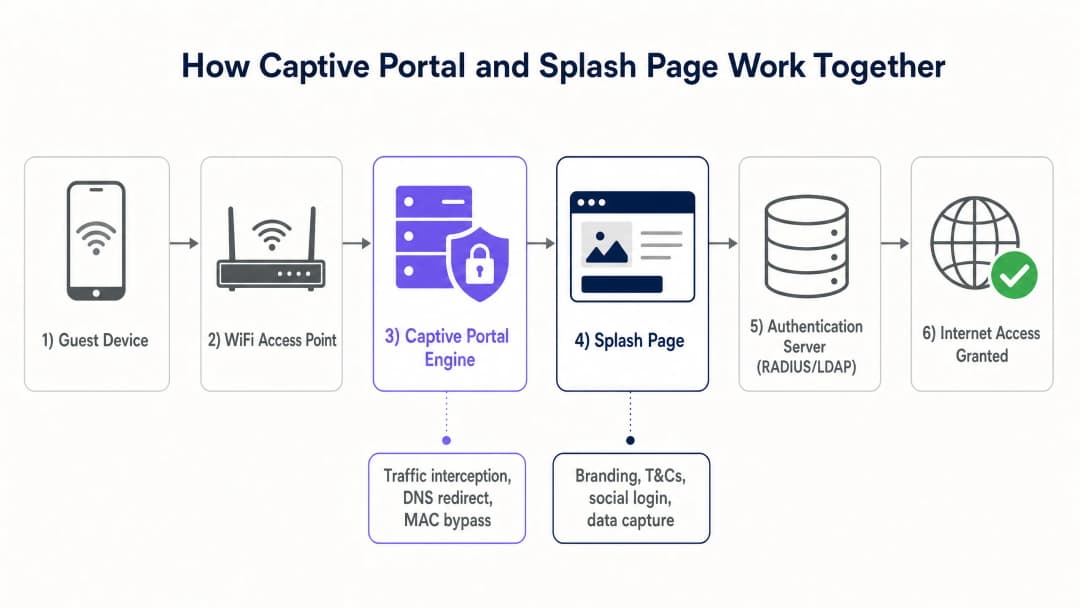
The Captive Portal operates at the lower layers of the OSI model (typically Layers 2 and 3) to enforce access control. When a guest device connects to an open SSID, the local DHCP server assigns it an IP address, subnet mask, and default gateway. However, the wireless access point (AP) or gateway controller places that device's MAC address into an unauthenticated state within the firewall's session table.
In this state, the firewall blocks all outbound IP traffic, with the exception of essential network services such as DNS and DHCP. When the guest attempts to visit an external website, the Captive Portal intercepts the traffic using one of two primary methods:
- HTTP redirection (302 redirect): The gateway intercepts the initial HTTP request and returns an HTTP 302 Found response, redirecting the client browser to the splash page URL.
- DNS hijacking: The gateway intercepts DNS queries and resolves all domain names to the IP address of the local splash page server. While simple, this method has been progressively deprecated due to DNSSEC and browser-level security warnings.
Modern mobile operating systems make use of a built-in daemon called the Captive Network Assistant (CNA). Upon connecting to a network, the CNA attempts to reach a known, unencrypted HTTP endpoint (for example, Apple's captive.apple.com or Google's connectivitycheck.gstatic.com). If that response is intercepted and redirected, the operating system recognises that it is behind a Captive Portal and automatically displays the Splash Page in a dedicated system browser window, removing the need for the user to open a web browser manually.
Once the user has completed the authentication flow on the Splash Page, the authentication server (typically a RADIUS server) sends an Access-Accept packet to the network controller. The controller then updates its firewall rules to grant that device's MAC address full internet access, typically leveraging MAC Address Bypass (MAB) to remember the device for a specified session duration.
The Splash Page: Application-Layer User Experience
Unlike the Captive Portal, the Splash Page is a standard web application operating at Layer 7 (the application layer). It is built with standard web technologies (HTML, CSS, and JavaScript) and hosted either locally on the gateway controller or, more commonly, on a cloud platform such as Purple.
The Splash Page serves as the guest's visual interface and brand touchpoint. Its primary technical functions include:
- Identity federation: Facilitating social login (Google, Facebook, Apple) using the OAuth 2.0 protocol.
- Data capture: Collecting guest details such as email addresses, names, and loyalty programme numbers.
- Consent management: Capturing explicit opt-in consent for marketing, along with agreement to terms of service and privacy policies, ensuring compliance with regulations such as the General Data Protection Regulation (GDPR) [1] and the California Consumer Privacy Act (CCPA).
- Advertising delivery and branding: Serving targeted promotional banners, video adverts, or post-connection redirect pages to monetise the physical space.
Because the Splash Page is a web application, it must be highly responsive and optimised for mobile devices, which account for more than 80% of guest WiFi connections.
Implementation Guide
Deploying an enterprise-grade guest WiFi solution requires close coordination between network infrastructure and cloud software. The following is a vendor-neutral architectural guide to implementing a Captive Portal and Splash Page system.
Step-by-Step Deployment Architecture
- Network segmentation: Configure a dedicated guest VLAN on your switches and access points to isolate guest traffic from the internal corporate network, point-of-sale (POS) terminals, and IoT devices. This is a key requirement for PCI DSS compliance [2].
- SSID configuration: Configure an open SSID with Opportunistic Wireless Encryption (OWE) enabled if your hardware supports it, or a standard open SSID. Enable Captive Portal redirection within the SSID profile on your wireless controller (for example, Cisco Catalyst, Aruba Instant On, or Ruckus SmartZone).
- Walled Garden (ACL) configuration: Prior to authentication, guest devices must be permitted to reach certain external domains so the Splash page renders correctly. This is known as the "Walled Garden" or access control list (ACL). You must include:
- The domain of your cloud-hosted Splash page (for example,
*.purple.ai). - The OAuth endpoints of social login providers (for example,
*.facebook.com,*.google.com,*.apple.com). - The content delivery networks (CDNs) hosting required assets (fonts, stylesheets, images).
- The domain of your cloud-hosted Splash page (for example,
- RADIUS server integration: Configure the wireless controller to use an external RADIUS server (such as Purple's cloud RADIUS) for authentication and accounting (802.1X / AAA) [3].
- Splash page customisation: Design the Splash page within the Purple portal, ensuring brand consistency, mobile responsiveness, and clear legal consent checkboxes.
- Session and bandwidth policies: Define session timeouts (for example, 8 hours), idle timeouts (for example, 30 minutes), and per-user bandwidth limits (for example, 5 Mbps down, 2 Mbps up) on the network controller to prevent network abuse and ensure fair access for all guests.
| Technical Parameter | Captive Portal (Network Gateway) | Splash Page (Cloud Application) |
|---|---|---|
| OSI Layer | Layer 2 / Layer 3 (Network/Data Link) | Layer 7 (Application) |
| Primary Protocols | RADIUS, DHCP, HTTP (302 redirect) | HTTP, HTTPS, HTML5, CSS3, OAuth 2.0 |
| Core Functions | Traffic interception, access control, bandwidth shaping | User interface, data collection, consent, branding |
| User Visibility | Entirely invisible (backend mechanism) | 100% visible (visual welcome screen) |
| Security Standards | IEEE 802.1X, WPA3, OWE, PCI DSS | HTTPS, SSL/TLS, GDPR, CCPA |
| Typical Hardware | Wireless APs, gateway routers, controllers | Cloud servers, CDNs |
Got questions about your specific setup?
Our team works with venue operators, IT managers, and network engineers across 80,000 venues. Book a 20-minute call and we will show you how others like you solved it.
Best Practices
To ensure a highly available, secure, and legally compliant guest WiFi network, IT teams should follow these industry best practices:
1. Enforce HTTPS and SSL/TLS Certificates
All traffic between the guest device and the splash page must be encrypted using HTTPS. Running a splash page over unencrypted HTTP exposes guest data - including login credentials and email addresses - to packet sniffing and man-in-the-middle attacks. Ensure your splash page domain has a valid, publicly trusted SSL/TLS certificate. Self-signed certificates trigger severe browser warnings that cause guests to abandon the connection.
2. Implement Network Isolation
Never route guest WiFi traffic into the same VLAN or subnet as corporate assets. Guest traffic should be isolated into a "guest-only" VLAN with strict firewall rules preventing any cross-VLAN routing towards internal subnets. This reduces the risk of malware propagation and unauthorised access to sensitive corporate data.
3. Ensure GDPR and CCPA Compliance
If your venue operates in, or serves citizens of, the UK, the EU, or California, your splash page must adhere to strict data privacy laws:
- Freely given consent: Marketing opt-in checkboxes must be unticked by default. Consent to marketing communications cannot be made a precondition of internet access.
- Clear privacy policy: Provide a direct, easily accessible link to your privacy policy on the splash page.
- Right to be forgotten (right to erasure): Ensure your guest WiFi platform (such as Purple) supports automated workflows for guests requesting deletion of their personal data.
4. Optimise for Mobile Devices and the CNA
Ensure the splash page is lightweight and highly responsive. Avoid heavy video backgrounds or large uncompressed images, which slow page loading - particularly in extremely high-density environments such as stadiums or conference centres. Test the splash page across a range of mobile operating systems to guarantee seamless rendering within the native Captive Network Assistant (CNA) browser.
Troubleshooting and Risk Mitigation
Common Failure Modes and Mitigation Strategies
- CNA popup fails to appear: If the Captive Portal redirect fails to trigger the device's CNA, guests may remain connected to the SSID with no internet access and no obvious way to log in.
- Mitigation: Ensure the DNS servers assigned to guests via DHCP are fully functional and able to resolve external domains. If DNS resolution fails, the CNA cannot perform its connectivity check and the redirect is never triggered.
- Walled Garden misconfiguration: Guests cannot complete social media login because the OAuth login page fails to load or displays a connection error.
- Mitigation: Double-check the gateway's Walled Garden ACL. Social login providers frequently change their IP ranges and domains. Using a cloud-managed guest WiFi platform such as Purple ensures Walled Garden domains are updated automatically and kept in sync with your hardware.* CNA browser limitations: The native CNA browser on mobile devices has limited functionality compared with standard browsers such as Safari or Chrome. It may block cookies, popups, or external redirects.
- Mitigation: Avoid complex JavaScript or third-party integrations on the splash page that require cookie persistence or browser popups. Keep the authentication flow as simple and direct as possible.
ROI and Business Impact
Understanding the distinction between the Captive Portal and the splash page enables organisations to maximise return on investment (ROI) by optimising both the network performance and the commercial utility of their guest WiFi networks.
The Business Value of a Dual-Optimised Solution
- Increased guest engagement: Compared with a generic, unbranded welcome page, a professionally designed splash page - when combined with Purple's core products such as Guest WiFi and WiFi Analytics [4] [5] - can lift guest login rates by up to 40%.
- Rich first-party data capture: By offering seamless social media login and structured form fields, venues in sectors such as Retail, Hospitality, Healthcare, and Transport can capture clean, verified email addresses, demographic data, and visit-frequency data.
- Monetisation opportunities: Using the splash page for retail media monetisation allows venues to serve targeted advertising to guests at the moment of connection, tapping into the rapidly growing digital advertising market.
- Operational efficiency: A robust Captive Portal reduces IT support tickets by automating device onboarding, managing session timeouts, and enforcing bandwidth limits to prevent network congestion.
By deploying Purple's enterprise-grade solution, venues can ensure their network architecture is secure and compliant while giving their marketing teams full creative freedom to design beautiful, high-converting splash pages that build customer loyalty and drive revenue.
References
- [1] Regulation (EU) 2016/679 (General Data Protection Regulation)
- [2] PCI Security Standards Council - PCI DSS Quick Reference Guide
- [3] IEEE 802.1X Port-Based Network Access Control Standard
- [4] Cisco Wireless APs: 2026 Guide to Products & Deployment
- [5] 10 Best Network Access Control (NAC) Solutions for 2026
- [6] WiFi in Schools: The 2026 Administrator & IT Guide
- [7] How to Implement 802.1X Authentication with Cloud RADIUS
Key Definitions
Captive Portal
A network-layer mechanism that intercepts client traffic and restricts internet access until authentication criteria are met.
Encountered by IT teams when configuring wireless controllers, gateways, or firewalls to redirect unauthenticated MAC addresses.
Splash Page
The visual, web-based landing page rendered in a guest's browser that facilitates authentication, data capture, and brand engagement.
Managed by marketing and venue operations teams to design the user onboarding experience and collect customer data.
Captive Network Assistant (CNA)
A built-in operating system feature on mobile devices that automatically detects a captive portal and opens the splash page in a system browser window.
Crucial for user experience, as it bypasses the need for guests to manually open a browser to log in.
Walled Garden (ACL)
A list of IP addresses or domains that an unauthenticated user is permitted to access before logging into the network.
Must be configured correctly on the wireless gateway to allow the splash page and social login OAuth flows to load.
RADIUS (Remote Authentication Dial-In User Service)
A networking protocol that provides centralised Authentication, Authorisation, and Accounting (AAA) management for users connecting to a network.
Used by the captive portal to verify guest credentials against a database and grant network access.
MAC Address Bypass (MAB)
A mechanism that allows a device to bypass the captive portal login screen on subsequent connections by remembering its hardware MAC address.
Used to create a seamless experience for returning guests by eliminating the need to log in repeatedly.
Opportunistic Wireless Encryption (OWE)
A WiFi standard (part of WPA3) that provides encryption on open networks without requiring a shared password.
Enables secure data transmission on public guest networks while still allowing captive portal redirection.
VLAN Segmentation
The practice of dividing a physical network into multiple logical networks at Layer 2 to isolate traffic.
Essential for guest WiFi deployments to ensure guest traffic is completely isolated from secure corporate networks.
Worked Examples
A national retail chain with 150 stores wants to implement a guest WiFi network that captures customer emails for marketing purposes, but their IT security team is concerned about guest traffic accessing corporate Point-of-Sale (POS) systems. How should this be architected?
- Configure a dedicated Guest VLAN (e.g., VLAN 50) on all switches and access points across all 150 stores, completely isolated from the corporate POS VLAN (VLAN 10) using firewall ACLs. 2. Enable captive portal redirection on the Guest SSID, pointing the redirect URL to Purple's secure cloud-hosted splash page. 3. Configure the network gateway to restrict all pre-authenticated traffic on VLAN 50, allowing access only to DNS, DHCP, and Purple's Walled Garden domains. 4. Utilise Purple's integration with the wireless controller to authenticate guests via RADIUS, granting internet access only after the guest provides a verified email address and accepts the terms of service on the splash page.
A 50,000-seat sports stadium wants to offer free WiFi during events. The operations team wants a seamless login experience to prevent network congestion at the start of games, while the marketing team wants to display sponsor video ads on the splash page. How do you balance these requirements?
- Deploy high-density access points and configure a captive portal with MAC Address Bypass (MAB) set to 30 days, so returning fans do not have to see the splash page on every visit. 2. For new connections, design an ultra-lightweight splash page optimised for fast loading on mobile devices. 3. Embed a short, 5-second sponsor video ad that plays directly on the splash page, with a 'Skip and Connect' button that immediately triggers the captive portal authentication. 4. Configure the captive portal to allocate a generous bandwidth profile (e.g., 10 Mbps) per user to ensure smooth video streaming and web browsing.
A large public hospital wants to provide guest WiFi for patients and visitors. The compliance team requires that the network comply with healthcare data privacy standards and that patients cannot access malicious or inappropriate web content. What is the recommended deployment strategy?
- Configure the captive portal to redirect users to a splash page that contains a clear healthcare-specific privacy notice and terms of service. 2. Integrate the captive portal gateway with a cloud-based DNS filtering service (such as Cisco Umbrella or Webroot) to automatically block access to adult content, malware, and phishing sites. 3. Disable social login options to prevent the collection of unnecessary personal data, relying instead on a simple 'Accept and Connect' button or a basic email verification form. 4. Enforce strict bandwidth shaping on the captive portal to prioritise clinical applications and hospital IoT devices over guest streaming traffic.
Practice Questions
Q1. An IT manager notices that guests are connecting to the guest WiFi SSID, but the branded splash page is not appearing, and users cannot access the internet. What is the most likely technical cause of this issue, and how should it be diagnosed?
Hint: Consider the role of DNS in the captive portal redirection process.
View model answer
The most likely cause is a failure in the DNS resolution process. When a device connects, it must resolve the splash page domain name to load the welcome screen. If the DNS server assigned to the guest VLAN is down, misconfigured, or blocked by the gateway's pre-authentication firewall rules, the device cannot resolve the domain, and the redirect will fail. To diagnose, connect a test device to the SSID, verify that it receives a valid IP and DNS server address via DHCP, and attempt to ping or resolve a public domain. If DNS fails, check the DNS server status and ensure that DNS traffic (UDP port 53) is allowed in the gateway's pre-authentication ACL.
Q2. A retail venue wants to allow guests to log in using their Facebook accounts. However, when users click the Facebook login button on the splash page, they receive a 'Connection Refused' error. The rest of the splash page loads perfectly. What is the issue, and how do you resolve it?
Hint: Think about what external resources a pre-authenticated device is allowed to access.
View model answer
The issue is that the Facebook authentication domains are not included in the gateway's pre-authentication Walled Garden Access Control List (ACL). Because the user is not yet authenticated, the captive portal blocks all external traffic. When the user clicks the Facebook button, the browser attempts to reach Facebook's OAuth servers, which is blocked by the gateway. To resolve this, the IT team must add the required Facebook OAuth domains (e.g., *.facebook.com, *.facebook.net) to the Walled Garden ACL on the wireless controller or gateway.
Q3. A hospitality venue has deployed a guest WiFi network. The marketing team wants to collect guest email addresses and immediately send a welcome newsletter. However, the legal team is concerned about GDPR compliance regarding consent. How should the splash page and captive portal be configured to satisfy both teams?
Hint: GDPR requires that consent for marketing must be freely given and not a condition of service.
View model answer
To satisfy both marketing and legal teams under GDPR: 1. The splash page must feature a clear, unchecked checkbox for the marketing opt-in ('I consent to receive marketing emails'). 2. Agreeing to the Terms of Service and Privacy Policy must be a separate checkbox or clearly stated as a condition of using the free network. 3. The underlying captive portal and splash page system must be configured to grant internet access regardless of whether the marketing checkbox is checked or unchecked. If a user leaves the marketing box unchecked but accepts the Terms of Service, the system must still send an Access-Accept packet to the network controller. This ensures consent is freely given, satisfying GDPR, while still allowing marketing to collect emails from users who do opt-in.
Frequently asked questions
What is the technical difference between a captive portal and a splash page?
A captive portal operates at the network layer (L2/L3) through a gateway, access point, or wireless LAN controller that intercepts unauthenticated client traffic, enforces a walled garden, and manages RADIUS AAA sessions. A splash page is the presentation layer (L7) - the responsive web interface displayed inside the client browser or Captive Network Assistant (CNA) that captures guest credentials, terms acceptance, and marketing consent.
How does a network firewall intercept guest traffic before splash page authentication?
Prior to authentication, the wireless gateway blocks all outbound IP traffic except for explicitly defined walled garden IP/FQDN rules and DNS resolution. When the client attempts to reach an external web resource, the gateway intercepts port 80 HTTP requests or DHCP Option 114 (RFC 8910) advertisements, returning an HTTP 302 redirect or RFC 8908 JSON payload that directs the device browser to the splash page URL.
What is RFC 8908 and why is it replacing legacy HTTP interception?
RFC 8908 defines a standardized Captive Portal API that allows client operating systems (iOS, Android, Windows) to query a JSON endpoint directly to discover captivity state, user session duration, and portal endpoints. This eliminates the need for brute-force HTTPS interception, which causes browser SSL/TLS certificate warnings, while providing deterministic portal closure upon successful authentication.
What domains and network services belong in a captive portal walled garden?
A secure walled garden allowlist includes the splash page hosting FQDN, static CDN asset endpoints, DNS resolvers, and external identity provider authentication URLs (such as Apple ID, Google OAuth, and Microsoft Entra) with their CRL and OCSP validation paths. Crucially, OS captive probe hostnames must be excluded from allowlists so the device operating system reliably identifies captivity and launches the login sheet.
How does Purple integrate captive portal network isolation with custom branded splash pages?
Purple decouples network hardware enforcement from visitor experience design. The platform integrates natively with enterprise controllers (Cisco Meraki, HPE Aruba, Ruckus, Ubiquiti) via RADIUS and cloud APIs to enforce dynamic VLANs and bandwidth controls, while serving high-converting, mobile-responsive splash pages with real-time CRM synchronization, GDPR compliance tracking, and marketing automation.
Continue reading in this series
Ubiquiti UniFi guest portal not redirecting: causes and fixes
This guide isolates a UniFi guest portal redirect failure by following the guest state, redirect, pre-authorisation route and controller authorisation in sequence. It gives venue IT teams a sourced method to address guest-network versus Hotspot confusion, external portal hand-offs, current UniFi OS account requirements and DNS isolation testing.
Cisco Meraki splash page not working: a troubleshooting flowchart
This practical day-two guide isolates where a Cisco Meraki splash flow has failed: client authorisation, HTTP redirect initiation, walled-garden reachability or RADIUS sign-on. It gives venue IT teams a controlled evidence path, so they can restore Guest WiFi without making broad changes to a live estate.
Enterprise Guest WiFi Setup Guide: VLAN Segmentation, Security, and Captive Portals
This technical guide shows IT teams how to set up Guest WiFi as a controlled internet-access service, using VLAN segmentation, firewall policy and a captive portal. It also explains how Purple's registration forms and onboarding controls support a proportionate visitor experience without weakening the boundary around staff, payment and operational systems.
Got questions about your specific setup?
Our team works with venue operators, IT managers, and network engineers across 80,000 venues. Book a 20-minute call and we will show you how others like you solved it.