
Captive Portal vs Splash Page
Este guia definitivo detalha a distinção crítica entre captive portals e splash pages em redes WiFi para convidados. Clarifica como o mecanismo subjacente de interceção de rede funciona em conjunto com a interface visual do convidado, ajudando os líderes de TI e operadores de recintos a tomar decisões informadas de arquitetura e aquisição.
Video overview
Ouça este guia
Ver transcrição do podcast
Parte da nossa série principal: O Guia Definitivo para Captive Portals →
Captive portal vs splash page architecture evaluator
Evaluate network enforcement boundaries, size concurrent guest device capacity, audit RFC 8908 walled gardens, and export controller configurations.
Technical layer differentiation matrix
| Dimension | Captive portal (network gate) | Splash page (user presentation) | Architectural verdict |
|---|---|---|---|
| Enforcement layer | L2/L3 network layer (gateway, wireless controller, eBPF firewall) | L7 application and presentation layer (HTML/CSS responsive web viewport) | Captive portal enforces boundaries; splash page displays user interface. |
| Traffic intercept | DNS interception, HTTP 302 redirect, RFC 8908 CAPPORT API JSON endpoint | Standard web application GET and POST forms within browser or CNA | Network intercepts unauthenticated packets to trigger the splash page. |
| Walled garden control | Stateful IP and FQDN allowlist enforced at gateway routing level | Asset hosting paths for logos, CSS, and third-party scripts | Portal restricts non-allowlisted traffic until authentication completes. |
| Authentication and AAA | RADIUS Access-Request (RFC 2865/6614), dynamic VLAN, ACL push | Collects credentials, social OAuth tokens, SMS OTP, or marketing consent | Splash collects user data; portal transmits RADIUS payloads to authorize access. |
| Session management | Hardware MAC tracking, RADIUS CoA disconnect (RFC 3576), DHCP lease bound | Browser session cookies, local storage, CRM profile syncing tokens | Network controls device uptime and bandwidth; splash stores profile telemetry. |
| Regulatory compliance | Cryptographic MAC hashing, network audit logging, HIPAA/PCI VLAN isolation | GDPR/CCPA unticked consent checkboxes, privacy policy acceptance links | Both layers work together to provide end-to-end data privacy compliance. |
Learn how to deploy hardware-agnostic captive portals with automated walled gardens, dynamic VLAN steering, and CRM integrations.
Explore the captive portal guideSpeak with a Purple technical architect to design compliant guest WiFi onboarding tailored to your controllers.
Resumo Executivo
Para gestores de TI, arquitetos de rede e diretores de operações de espaços físicos, o WiFi para convidados já não é apenas uma comodidade - é um ponto de contacto crítico para a captura de dados primários (first-party data), envolvimento de marketing e segurança de rede. No entanto, um ponto persistente de confusão em RFPs (pedidos de propostas) e discussões de implementação é a fusão do Captive Portal com as splash pages.
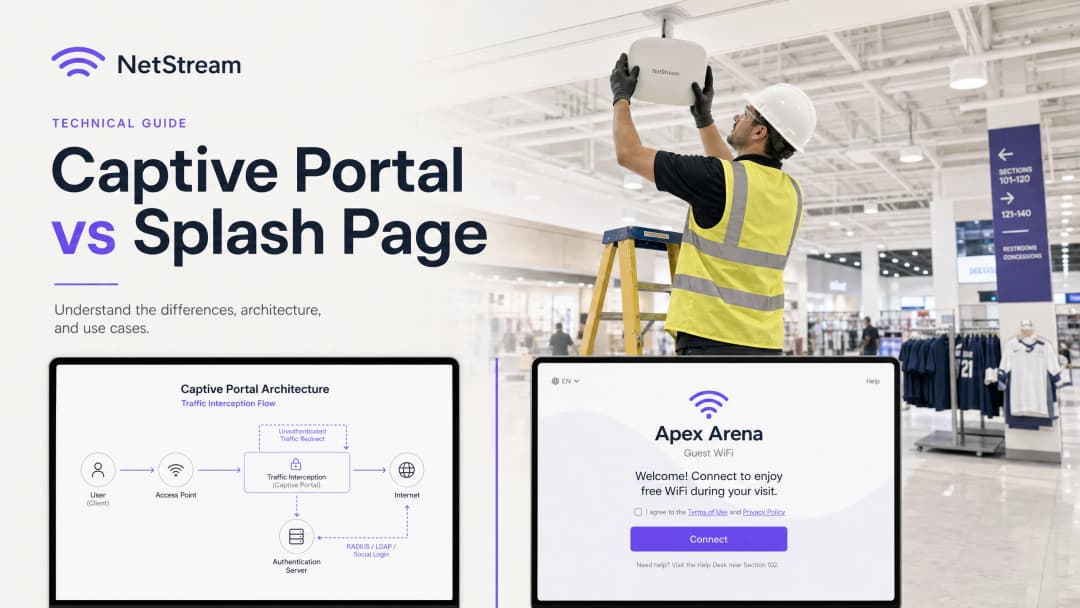
Este guia visa esclarecer essa distinção fundamental. O Captive Portal é um mecanismo de controlo ao nível da camada de rede que interpeta o tráfego, bloqueia o acesso à internet e gere a autenticação segura. A splash page, por contraste, é a interface visual ao nível da camada de aplicação - a página web que os convidados veem, com a qual interagem e que utilizam para se autenticar.
Fundir estes dois componentes leva a riscos significativos de aquisição e implementação, tais como adquirir uma splash page com um design apelativo mas com controlos de backend inseguros, ou implementar um Captive Portal altamente seguro com uma interface de utilizador pesada e sem identidade de marca que afasta os convidados. Ao compreender como estas tecnologias funcionam em conjunto, as organizações podem utilizar plataformas como a Purple para fornecer uma experiência de WiFi para convidados segura, em conformidade e altamente envolvente que cria valor comercial mensurável.

Análise Técnica Detalhada
O Captive Portal: Interceção de Tráfego ao Nível da Camada de Rede
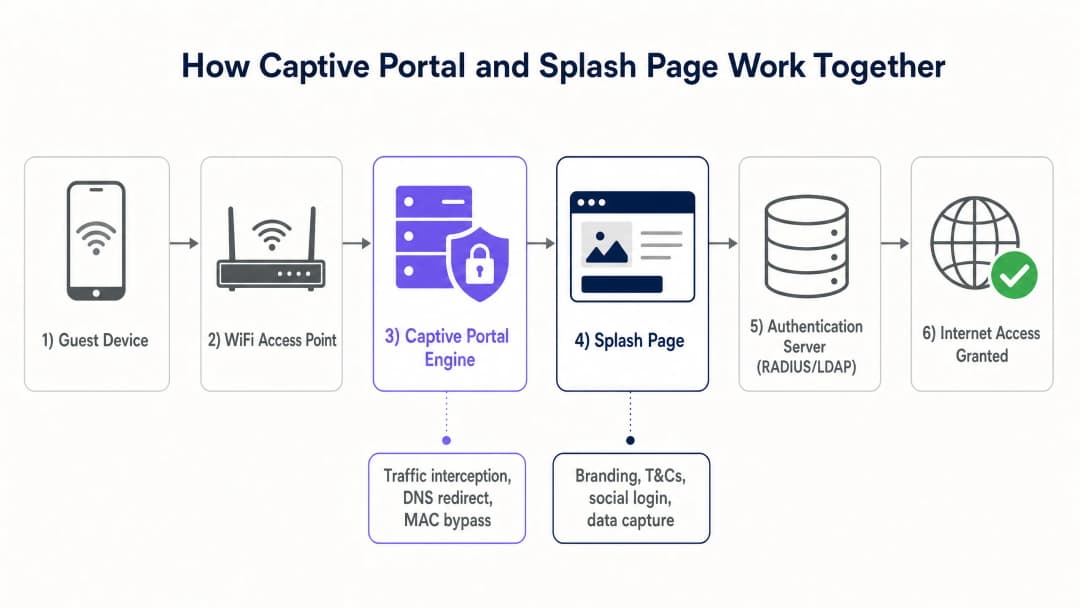
O Captive Portal opera nas camadas inferiores do modelo OSI (normalmente as Camadas 2 e 3) para aplicar o controlo de acessos. Quando um dispositivo de um convidado se liga a um SSID aberto, o servidor DHCP local atribui-lhe um endereço IP, máscara de sub-rede e gateway padrão. No entanto, o ponto de acesso sem fios (AP) ou o controlador de gateway coloca o endereço MAC desse dispositivo num estado não autenticado dentro da tabela de sessões da firewall.
Neste estado, a firewall bloqueia todo o tráfego IP de saída, com exceção dos serviços de rede essenciais, tais como DNS e DHCP. Quando o convidado tenta visitar um website externo, o Captive Portal interpeta o tráfego utilizando um de dois métodos principais:
- Redirecionamento HTTP (redirecionamento 302): O gateway interpeta o pedido HTTP inicial e devolve uma resposta HTTP 302 Found, redirecionando o navegador do cliente para o URL da splash page.
- Sequestro de DNS: O gateway interpeta as consultas DNS e resolve todos os nomes de domínio para o endereço IP do servidor local da splash page. Embora simples, este método tem sido progressivamente descontinuado devido ao DNSSEC e aos avisos de segurança ao nível do navegador.
Os sistemas operativos móveis modernos utilizam um daemon integrado chamado Captive Network Assistant (CNA). Ao ligar-se a uma rede, o CNA tenta aceder a um endpoint HTTP conhecido e não encriptado (por exemplo, o captive.apple.com da Apple ou o connectivitycheck.gstatic.com da Google). Se essa resposta for intercetada e redirecionada, o sistema operativo reconhece que está por trás de um Captive Portal e apresenta automaticamente a Splash Page numa janela dedicada do navegador do sistema, eliminando a necessidade de o utilizador abrir um navegador web manualmente.
Assim que o utilizador conclui o fluxo de autenticação na Splash Page, o servidor de autenticação (geralmente um servidor RADIUS) envia um pacote Access-Accept para o controlador de rede. O controlador atualiza então as suas regras de firewall para conceder ao endereço MAC desse dispositivo acesso total à internet, tirando partido, normalmente, do MAC Address Bypass (MAB) para memorizar o dispositivo durante uma duração de sessão especificada.
A Splash Page: Experiência do Utilizador na Camada de Aplicação
Ao contrário do Captive Portal, a Splash Page é uma aplicação web padrão que opera na Camada 7 (a camada de aplicação). É desenvolvida com tecnologias web padrão (HTML, CSS e JavaScript) e alojada localmente no controlador gateway ou, mais frequentemente, numa plataforma cloud como a Purple.
A Splash Page serve como interface visual e ponto de contacto da marca para o convidado. As suas principais funções técnicas incluem:
- Federação de identidade: Facilitar o login social (Google, Facebook, Apple) utilizando o protocolo OAuth 2.0.
- Captura de dados: Recolher dados dos convidados, tais como endereços de email, nomes e números de programas de fidelização.
- Gestão de consentimento: Capturar o consentimento explícito (opt-in) para marketing, juntamente com a aceitação dos termos de serviço e políticas de privacidade, garantindo a conformidade com regulamentos como o Regulamento Geral sobre a Proteção de Dados (GDPR) [1] e a California Consumer Privacy Act (CCPA).
- Disponibilização de publicidade e branding: Apresentar banners promocionais direcionados, anúncios em vídeo ou páginas de redirecionamento pós-ligação para rentabilizar o espaço físico.
Como a Splash Page é uma aplicação web, deve ser altamente responsiva e otimizada para dispositivos móveis, que representam mais de 80% das ligações de WiFi de convidados.
Guia de Implementação
A implementação de uma solução de WiFi para convidados de nível empresarial exige uma coordenação estreita entre a infraestrutura de rede e o software cloud. O seguinte é um guia de arquitetura neutro em termos de fornecedor para implementar um sistema de Captive Portal e Splash Page.
Arquitetura de Implementação Passo a Passo
- Segmentação de rede: Configure uma VLAN dedicada a convidados nos seus switches e pontos de acesso para isolar o tráfego de convidados da rede corporativa interna, terminais de ponto de venda (POS) e dispositivos IoT. Este é um requisito fundamental para a conformidade com o PCI-DSS [2].2. Configuração de SSID: Configure um SSID aberto com Opportunistic Wireless Encryption (OWE) ativado se o seu hardware o suportar, ou um SSID aberto padrão. Ative o redirecionamento de Captive Portal no perfil do SSID no seu controlador sem fios (por exemplo, Cisco Catalyst, Aruba Instant On ou Ruckus SmartZone).
- Configuração de Walled Garden (ACL): Antes da autenticação, os dispositivos dos convidados devem ter permissão para aceder a determinados domínios externos para que a Splash page seja apresentada corretamente. Isto é conhecido como "Walled Garden" ou lista de controlo de acessos (ACL). Deve incluir:
- O domínio da sua Splash page alojada na nuvem (por exemplo,
*.purple.ai). - Os endpoints OAuth dos fornecedores de início de sessão social (por exemplo,
*.facebook.com,*.google.com,*.apple.com). - As redes de distribuição de conteúdos (CDNs) que alojam os elementos necessários (fontes, folhas de estilo, imagens).
- O domínio da sua Splash page alojada na nuvem (por exemplo,
- Integração de servidor RADIUS: Configure o controlador sem fios para utilizar um servidor RADIUS externo (como o cloud RADIUS da Purple) para autenticação e faturação (802.1X / AAA) [3].
- Personalização da Splash page: Desenhe a Splash page no portal Purple, garantindo a consistência da marca, a capacidade de resposta móvel e caixas de seleção de consentimento legal claras.
- Políticas de sessão e de largura de banda: Defina tempos limite de sessão (por exemplo, 8 horas), tempos limite de inatividade (por exemplo, 30 minutos) e limites de largura de banda por utilizador (por exemplo, 5 Mbps de download, 2 Mbps de upload) no controlador de rede para evitar abusos na rede e garantir um acesso justo a todos os convidados.
| Parâmetro Técnico | Captive Portal (Gateway de Rede) | Splash Page (Aplicação Cloud) |
|---|---|---|
| Camada OSI | Camada 2 / Camada 3 (Rede/Ligação de Dados) | Camada 7 (Aplicação) |
| Protocolos Principais | RADIUS, DHCP, HTTP (redirecionamento 302) | HTTP, HTTPS, HTML5, CSS3, OAuth 2.0 |
| Funções Principais | Interceção de tráfego, controlo de acessos, limitação de largura de banda | Interface do utilizador, recolha de dados, consentimento, imagem de marca |
| Visibilidade do Utilizador | Totalmente invisível (mecanismo de backend) | 100% visível (ecrã visual de boas-vindas) |
| Normas de Segurança | IEEE 802.1X, WPA3, OWE, PCI-DSS | HTTPS, SSL/TLS, GDPR, CCPA |
| Hardware Típico | APs sem fios, routers gateway, controladores | Servidores cloud, CDNs |
Tem dúvidas sobre a sua configuração específica?
A nossa equipa trabalha com operadores de espaços, gestores de TI e engenheiros de rede em 80.000 espaços. Agende uma chamada de 20 minutos e mostraremos como outros profissionais na sua área o resolveram.
Melhores Práticas
Para garantir uma rede WiFi de convidados altamente disponível, segura e legalmente conforme, as equipas de TI devem seguir estas melhores práticas do setor:
1. Impor Certificados HTTPS e SSL/TLS
Todo o tráfego entre o dispositivo do convidado e a splash page deve ser encriptado através de HTTPS. Executar uma splash page em HTTP não encriptado expõe os dados dos convidados - incluindo credenciais de início de sessão e endereços de email - a packet sniffing e ataques man-in-the-middle. Certifique-se de que o domínio da sua splash page tem um certificado SSL/TLS válido e publicamente fidedigno. Os certificados autoassinados geram avisos graves no navegador que fazem com que os convidados abandonem a ligação.
2. Implementar Isolamento de Rede
Nunca encaminhe o tráfego de WiFi de convidados para a mesma VLAN ou sub-rede que os ativos corporativos. O tráfego de convidados deve ser isolado numa VLAN "exclusiva para convidados" com regras de firewall estritas que impeçam qualquer encaminhamento entre VLANs em direção a sub-redes internas. Isto reduz o risco de propagação de malware e de acesso não autorizado a dados corporativos confidenciais.
3. Garantir a Conformidade com o GDPR e a CCPA
Se o seu espaço opera no, ou serve cidadãos do, Reino Unido, da UE ou da Califórnia, a sua splash page deve cumprir leis estritas de privacidade de dados:
- Consentimento livremente dado: As caixas de seleção de aceitação de marketing devem estar desmarcadas por predefinição. O consentimento para comunicações de marketing não pode ser uma condição prévia para o acesso à Internet.
- Política de privacidade clara: Disponibilize uma hiperligação direta e de fácil acesso para a sua política de privacidade na splash page.
- Direito ao esquecimento (direito ao apagamento): Certifique-se de que a sua plataforma de WiFi de convidados (como a Purple) suporta fluxos de trabalho automatizados para convidados que solicitem a eliminação dos seus dados pessoais.
4. Otimizar para Dispositivos Móveis e o CNA
Certifique-se de que a splash page é leve e altamente responsiva. Evite fundos de vídeo pesados ou imagens grandes não comprimidas, que abrandam o carregamento da página - particularmente em ambientes de densidade extremamente elevada, como estádios ou centros de conferências. Teste a splash page numa variedade de sistemas operativos móveis para garantir uma renderização perfeita no navegador nativo do Captive Network Assistant (CNA).
Resolução de Problemas e Mitigação de Riscos
Modos de Falha Comuns e Estratégias de Mitigação
- O popup do CNA não aparece: Se o redirecionamento do Captive Portal não conseguir ativar o CNA do dispositivo, os convidados podem permanecer ligados ao SSID sem acesso à Internet e sem uma forma óbvia de iniciar sessão.
- Mitigação: Certifique-se de que os servidores DNS atribuídos aos convidados através de DHCP estão totalmente funcionais e são capazes de resolver domínios externos. Se a resolução de DNS falhar, o CNA não conseguirá realizar a sua verificação de conectividade e o redirecionamento nunca será ativado.
- Configuração incorreta do Walled Garden: Os convidados não conseguem concluir o início de sessão através de redes sociais porque a página de início de sessão OAuth não carrega ou apresenta um erro de ligação.
- Mitigação: Verifique novamente a ACL do Walled Garden do gateway. Os fornecedores de login social alteram frequentemente os seus intervalos de IP e domínios. A utilização de uma plataforma de WiFi para convidados gerida na nuvem, como a Purple, garante que os domínios do Walled Garden são atualizados automaticamente e mantidos em sincronia com o seu hardware.* Limitações do navegador CNA: O navegador CNA nativo em dispositivos móveis tem funcionalidades limitadas em comparação com navegadores padrão como o Safari ou o Chrome. Pode bloquear cookies, pop-ups ou redirecionamentos externos.
- Mitigação: Evite JavaScript complexo ou integrações de terceiros na splash page que exijam persistência de cookies ou pop-ups no navegador. Mantenha o fluxo de autenticação o mais simples e direto possível.
ROI e Impacto Comercial
Compreender a distinção entre o Captive Portal e a splash page permite que as organizações maximizem o retorno do investimento (ROI), otimizando tanto o desempenho da rede como a utilidade comercial das suas redes de WiFi para convidados.
O Valor Comercial de uma Solução de Dupla Otimização
- Aumento do envolvimento dos convidados: Em comparação com uma página de boas-vindas genérica e sem marca, uma splash page concebida profissionalmente - quando combinada com os produtos principais da Purple, tais como Guest WiFi e WiFi Analytics [4] [5] - pode aumentar as taxas de login de convidados em até 40%.
- Captura de dados primários valiosos: Ao oferecer um login integrado em redes sociais e campos de formulário estruturados, os espaços em setores como o Retail, Hospitality, Healthcare e Transport podem capturar endereços de email limpos e verificados, dados demográficos e dados de frequência de visitas.
- Oportunidades de monetização: A utilização da splash page para a monetização de suportes de retalho permite que os espaços apresentem publicidade direcionada aos convidados no momento da ligação, aproveitando o mercado de publicidade digital em rápido crescimento.
- Eficiência operacional: Um Captive Portal robusto reduz os pedidos de suporte de TI ao automatizar a integração de dispositivos, gerir tempos de limite de sessão e impor limites de largura de banda para evitar o congestionamento da rede.
Ao implementar a solução de nível empresarial da Purple, os espaços podem garantir que a sua arquitetura de rede é segura e está em conformidade, ao mesmo tempo que dão às suas equipas de marketing total liberdade criativa para desenharem splash pages apelativas e de alta conversão que fidelizam os clientes e geram receitas.
Referências
- [1] Regulation (EU) 2016/679 (General Data Protection Regulation)
- [2] PCI Security Standards Council - PCI DSS Quick Reference Guide
- [3] IEEE 802.1X Port-Based Network Access Control Standard
- [4] Cisco Wireless APs: 2026 Guide to Products & Deployment
- [5] 10 Best Network Access Control (NAC) Solutions for 2026
- [6] WiFi in Schools: The 2026 Administrator & IT Guide
- [7] Como Implementar a Autenticação 802.1X com Cloud RADIUS
Definições Principais
Captive Portal
Um mecanismo de camada de rede que intercepta o tráfego do cliente e restringe o acesso à internet até que os critérios de autenticação sejam atendidos.
Encontrado por equipas de TI ao configurar controladores sem fios, gateways ou firewalls para redirecionar endereços MAC não autenticados.
Página de Boas-Vindas
A página de destino visual, baseada na Web, apresentada no navegador de um convidado que facilita a autenticação, captura de dados e interação com a marca.
Gerido pelas equipas de marketing e de operações de espaços para desenhar a experiência de adesão do utilizador e recolher dados dos clientes.
Captive Network Assistant (CNA)
Uma funcionalidade integrada do sistema operativo em dispositivos móveis que deteta automaticamente um Captive Portal e abre a página de boas-vindas numa janela do navegador do sistema.
Crucial para a experiência do utilizador, pois evita a necessidade de os convidados abrirem manualmente um navegador para iniciar sessão.
Walled Garden (ACL)
Uma lista de endereços IP ou domínios que um utilizador não autenticado tem permissão para aceder antes de iniciar sessão na rede.
Deve ser configurado corretamente no gateway sem fios para permitir o carregamento da página de boas-vindas e dos fluxos OAuth de login social.
RADIUS (Remote Authentication Dial-In User Service)
Um protocolo de rede que fornece gestão centralizada de Autenticação, Autorização e Auditoria (AAA) para utilizadores que se ligam a uma rede.
Utilizado pelo Captive Portal para verificar as credenciais dos convidados numa base de dados e conceder acesso à rede.
MAC Address Bypass (MAB)
Um mecanismo que permite a um dispositivo ignorar o ecrã de início de sessão do Captive Portal em ligações subsequentes, lembrando o seu endereço MAC de hardware.
Utilizado para criar uma experiência fluida para convidados frequentes, eliminando a necessidade de iniciar sessão repetidamente.
Opportunistic Wireless Encryption (OWE)
Um padrão WiFi (parte do WPA3) que fornece encriptação em redes abertas sem a necessidade de uma palavra-passe partilhada.
Permite a transmissão segura de dados em redes públicas de convidados, ao mesmo tempo que permite o redirecionamento do Captive Portal.
Segmentação de VLAN
A prática de dividir uma rede física em várias redes lógicas na Camada 2 para isolar o tráfego.
Essencial para implementações de WiFi de convidados para garantir que o tráfego de convidados esteja completamente isolado de redes corporativas seguras.
Exemplos Práticos
Uma cadeia de retalho nacional com 150 lojas pretende implementar uma rede WiFi para convidados que capte os emails dos clientes para fins de marketing, mas a sua equipa de segurança de TI está preocupada com o facto de o tráfego de convidados aceder aos sistemas corporativos de Ponto de Venda (POS). Como deve ser desenhada esta arquitetura?
- Configure uma VLAN de Convidados dedicada (ex. VLAN 50) em todos os switches e pontos de acesso nas 150 lojas, completamente isolada da VLAN do POS corporativo (VLAN 10) utilizando ACLs de firewall. 2. Ative o redirecionamento de captive portal no SSID de Convidados, apontando o URL de redirecionamento para a splash page segura alojada na cloud do Purple. 3. Configure o gateway de rede para restringir todo o tráfego pré-autenticado na VLAN 50, permitindo o acesso apenas a DNS, DHCP e aos domínios de Walled Garden do Purple. 4. Utilize a integração do Purple com o controlador sem fios para autenticar convidados através de RADIUS, concedendo acesso à internet apenas após o convidado fornecer um endereço de email verificado e aceitar os termos de serviço na splash page.
Um estádio desportivo com 50.000 lugares pretende oferecer WiFi gratuito durante os eventos. A equipa de operações quer uma experiência de início de sessão fluida para evitar o congestionamento da rede no início dos jogos, enquanto a equipa de marketing pretende exibir anúncios de vídeo de patrocinadores na splash page. Como se equilibram estes requisitos?
- Implante pontos de acesso de alta densidade e configure um captive portal com MAC Address Bypass (MAB) definido para 30 dias, para que os adeptos que regressam não tenham de ver a splash page em cada visita. 2. Para novas ligações, desenhe uma splash page ultra-leve otimizada para carregamento rápido em dispositivos móveis. 3. Incorpore um pequeno anúncio de vídeo de patrocinador de 5 segundos que seja reproduzido diretamente na splash page, com um botão "Ignorar e Ligar" que acione imediatamente a autenticação do captive portal. 4. Configure o captive portal para alocar um perfil de largura de banda generoso (ex. 10 Mbps) por utilizador para garantir a transmissão fluida de vídeo e navegação na web.
Um grande hospital público pretende disponibilizar WiFi para convidados a doentes e visitantes. A equipa de conformidade exige que a rede esteja em conformidade com as normas de privacidade de dados de saúde e que os doentes não consigam aceder a conteúdos web maliciosos ou inadequados. Qual é a estratégia de implementação recomendada?
- Configure o captive portal para redirecionar os utilizadores para uma splash page que contenha um aviso de privacidade claro e termos de serviço específicos para a área da saúde. 2. Integre o gateway do captive portal com um serviço de filtragem de DNS baseado na cloud (como Cisco Umbrella ou Webroot) para bloquear automaticamente o acesso a conteúdos para adultos, malware e sites de phishing. 3. Desative as opções de início de sessão social para evitar a recolha de dados pessoais desnecessários, dependendo antes de um botão simples "Aceitar e Ligar" ou de um formulário básico de verificação de email. 4. Aplique uma modelação de largura de banda rigorosa no captive portal para priorizar as aplicações clínicas e os dispositivos IoT do hospital em detrimento do tráfego de streaming dos convidados.
Perguntas de Prática
Q1. Um gestor de TI nota que os convidados se estão a ligar ao SSID do WiFi de convidados, mas a página de boas-vindas personalizada não aparece e os utilizadores não conseguem aceder à internet. Qual é a causa técnica mais provável deste problema e como deve ser diagnosticado?
Dica: Considere o papel do DNS no processo de redirecionamento do Captive Portal.
Ver resposta modelo
A causa mais provável é uma falha no processo de resolução de DNS. Quando um dispositivo se liga, deve resolver o nome de domínio da página de boas-vindas para carregar o ecrã de boas-vindas. Se o servidor DNS atribuído à VLAN de convidados estiver inativo, mal configurado ou bloqueado pelas regras de firewall de pré-autenticação do gateway, o dispositivo não conseguirá resolver o domínio e o redirecionamento falhará. Para diagnosticar, ligue um dispositivo de teste ao SSID, verifique se recebe um IP válido e um endereço de servidor DNS através de DHCP, e tente fazer ping ou resolver um domínio público. Se o DNS falhar, verifique o estado do servidor DNS e certifique-se de que o tráfego DNS (porta UDP 53) é permitido na ACL de pré-autenticação do gateway.
Q2. Um espaço comercial pretende permitir que os convidados iniciem sessão utilizando as suas contas do Facebook. No entanto, quando os utilizadores clicam no botão de início de sessão do Facebook na página de boas-vindas, recebem um erro de "Ligação Recusada". O restante conteúdo da página de boas-vindas carrega perfeitamente. Qual é o problema e como o resolve?
Dica: Pense em quais recursos externos um dispositivo pré-autenticado tem permissão para aceder.
Ver resposta modelo
O problema é que os domínios de autenticação do Facebook não estão incluídos na Lista de Controlo de Acesso (ACL) do Walled Garden de pré-autenticação do gateway. Como o utilizador ainda não está autenticado, o Captive Portal bloqueia todo o tráfego externo. Quando o utilizador clica no botão do Facebook, o browser tenta aceder aos servidores OAuth do Facebook, o que é bloqueado pelo gateway. Para resolver isto, a equipa de TI deve adicionar os domínios OAuth do Facebook necessários (ex.: *.facebook.com, *.facebook.net) à ACL do Walled Garden no controlador wireless ou gateway.
Q3. Um espaço hoteleiro implementou uma rede WiFi de convidados. A equipa de marketing pretende recolher os endereços de email dos convidados e enviar de imediato uma newsletter de boas-vindas. No entanto, a equipa jurídica está preocupada com a conformidade com o GDPR relativamente ao consentimento. Como devem a splash page e o Captive Portal ser configurados para satisfazer ambas as equipas?
Dica: O GDPR exige que o consentimento para marketing seja dado livremente e não seja uma condição para a prestação do serviço.
Ver resposta modelo
Para satisfazer tanto a equipa de marketing como a jurídica ao abrigo do GDPR: 1. A splash page deve apresentar uma caixa de seleção clara e desmarcada para a adesão ao marketing ("Consinto receber emails de marketing"). 2. A aceitação dos Termos de Serviço e da Política de Privacidade deve ser uma caixa de seleção separada ou claramente indicada como condição para utilizar a rede gratuita. 3. O Captive Portal subjacente e o sistema de splash page devem ser configurados para conceder acesso à Internet independentemente de a caixa de marketing estar marcada ou desmarcada. Se um utilizador deixar a caixa de marketing desmarcada mas aceitar os Termos de Serviço, o sistema deve ainda assim enviar um pacote Access-Accept para o controlador de rede. Isto garante que o consentimento é dado livremente, cumprindo o GDPR, enquanto permite ao marketing recolher os emails dos utilizadores que optarem por aderir.
Perguntas frequentes
What is the technical difference between a captive portal and a splash page?
A captive portal operates at the network layer (L2/L3) through a gateway, access point, or wireless LAN controller that intercepts unauthenticated client traffic, enforces a walled garden, and manages RADIUS AAA sessions. A splash page is the presentation layer (L7) - the responsive web interface displayed inside the client browser or Captive Network Assistant (CNA) that captures guest credentials, terms acceptance, and marketing consent.
How does a network firewall intercept guest traffic before splash page authentication?
Prior to authentication, the wireless gateway blocks all outbound IP traffic except for explicitly defined walled garden IP/FQDN rules and DNS resolution. When the client attempts to reach an external web resource, the gateway intercepts port 80 HTTP requests or DHCP Option 114 (RFC 8910) advertisements, returning an HTTP 302 redirect or RFC 8908 JSON payload that directs the device browser to the splash page URL.
What is RFC 8908 and why is it replacing legacy HTTP interception?
RFC 8908 defines a standardized Captive Portal API that allows client operating systems (iOS, Android, Windows) to query a JSON endpoint directly to discover captivity state, user session duration, and portal endpoints. This eliminates the need for brute-force HTTPS interception, which causes browser SSL/TLS certificate warnings, while providing deterministic portal closure upon successful authentication.
What domains and network services belong in a captive portal walled garden?
A secure walled garden allowlist includes the splash page hosting FQDN, static CDN asset endpoints, DNS resolvers, and external identity provider authentication URLs (such as Apple ID, Google OAuth, and Microsoft Entra) with their CRL and OCSP validation paths. Crucially, OS captive probe hostnames must be excluded from allowlists so the device operating system reliably identifies captivity and launches the login sheet.
How does Purple integrate captive portal network isolation with custom branded splash pages?
Purple decouples network hardware enforcement from visitor experience design. The platform integrates natively with enterprise controllers (Cisco Meraki, HPE Aruba, Ruckus, Ubiquiti) via RADIUS and cloud APIs to enforce dynamic VLANs and bandwidth controls, while serving high-converting, mobile-responsive splash pages with real-time CRM synchronization, GDPR compliance tracking, and marketing automation.
Continue a ler esta série
Portal de convidados Ubiquiti UniFi não redireciona: causas e correções
Este guia isola uma falha de redirecionamento do portal de convidados UniFi ao seguir sequencialmente o estado do convidado, o redirecionamento, a rota de pré-autorização e a autorização do controlador. Oferece às equipas de TI dos recintos um método fundamentado para resolver a confusão entre rede de convidados e Hotspot, transições de portais externos, requisitos atuais de conta do UniFi OS e testes de isolamento de DNS.
Cisco Meraki splash page não funciona: um fluxograma de resolução de problemas
Este guia prático do dia dois isola o ponto de falha num fluxo splash Cisco Meraki: autorização do cliente, início de redirecionamento HTTP, acessibilidade do walled-garden ou início de sessão RADIUS. Disponibiliza às equipas de TI dos locais um caminho de evidências controlado para que possam restaurar o WiFi de convidados sem fazer alterações gerais num parque ativo.
Guia de Configuração de WiFi para Visitantes Empresariais: Segmentação de VLAN, Segurança e Portais Cativos
Este guia técnico mostra às equipas de TI como configurar o WiFi para Visitantes como um serviço controlado de acesso à internet, utilizando segmentação de VLAN, política de firewall e um captive portal. Também explica como os formulários de registo e controlos de adesão do Purple apoiam uma experiência de visitante proporcional sem enfraquecer o limite em torno dos sistemas operacionais, de pagamento e dos funcionários.
Tem dúvidas sobre a sua configuração específica?
A nossa equipa trabalha com operadores de espaços, gestores de TI e engenheiros de rede em 80.000 espaços. Agende uma chamada de 20 minutos e mostraremos como outros profissionais na sua área o resolveram.