
Captive Portal vs Splash Page
Questa guida autorevole analizza la differenza fondamentale tra captive portal e splash page nelle reti WiFi per ospiti. Chiarisce come il meccanismo di intercettazione di rete sottostante funzioni in sinergia con l'interfaccia visiva per l'ospite, aiutando i responsabili IT e i gestori delle strutture a prendere decisioni informate in materia di architettura e acquisti.
Video overview
Ascolta questa guida
Visualizza trascrizione del podcast
Parte della nostra serie principale: La Guida Definitiva ai Captive Portal →
Captive portal vs splash page architecture evaluator
Evaluate network enforcement boundaries, size concurrent guest device capacity, audit RFC 8908 walled gardens, and export controller configurations.
Technical layer differentiation matrix
| Dimension | Captive portal (network gate) | Splash page (user presentation) | Architectural verdict |
|---|---|---|---|
| Enforcement layer | L2/L3 network layer (gateway, wireless controller, eBPF firewall) | L7 application and presentation layer (HTML/CSS responsive web viewport) | Captive portal enforces boundaries; splash page displays user interface. |
| Traffic intercept | DNS interception, HTTP 302 redirect, RFC 8908 CAPPORT API JSON endpoint | Standard web application GET and POST forms within browser or CNA | Network intercepts unauthenticated packets to trigger the splash page. |
| Walled garden control | Stateful IP and FQDN allowlist enforced at gateway routing level | Asset hosting paths for logos, CSS, and third-party scripts | Portal restricts non-allowlisted traffic until authentication completes. |
| Authentication and AAA | RADIUS Access-Request (RFC 2865/6614), dynamic VLAN, ACL push | Collects credentials, social OAuth tokens, SMS OTP, or marketing consent | Splash collects user data; portal transmits RADIUS payloads to authorize access. |
| Session management | Hardware MAC tracking, RADIUS CoA disconnect (RFC 3576), DHCP lease bound | Browser session cookies, local storage, CRM profile syncing tokens | Network controls device uptime and bandwidth; splash stores profile telemetry. |
| Regulatory compliance | Cryptographic MAC hashing, network audit logging, HIPAA/PCI VLAN isolation | GDPR/CCPA unticked consent checkboxes, privacy policy acceptance links | Both layers work together to provide end-to-end data privacy compliance. |
Learn how to deploy hardware-agnostic captive portals with automated walled gardens, dynamic VLAN steering, and CRM integrations.
Explore the captive portal guideSpeak with a Purple technical architect to design compliant guest WiFi onboarding tailored to your controllers.
Executive Summary
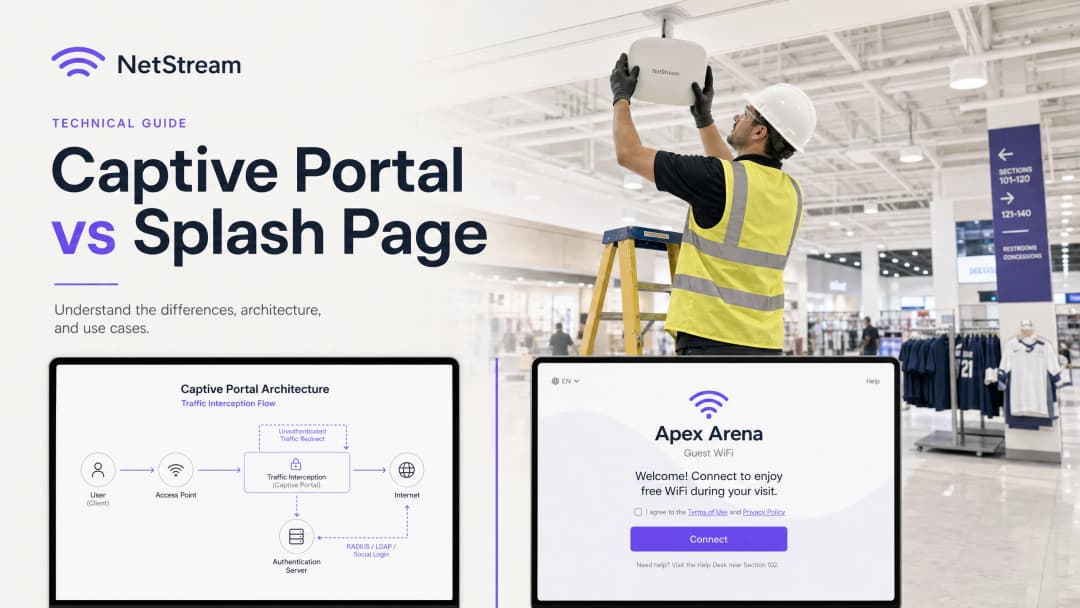
Per i responsabili IT, gli architetti di rete e i direttori operativi delle sedi, il WiFi per gli ospiti non è più solo una comodità - è un punto di contatto fondamentale per l'acquisizione di dati di prima parte, il coinvolgimento di marketing e la sicurezza di rete. Eppure, un costante punto di confusione nelle RFP (richieste di offerta) e nelle discussioni di implementazione è la sovrapposizione del Captive Portal con le splash page.
Questa guida si propone di chiarire tale distinzione fondamentale. Il Captive Portal è un meccanismo di controllo a livello di rete che intercetta il traffico, blocca l'accesso a Internet e gestisce l'autenticazione sicura. La splash page, al contrario, è l'interfaccia visiva a livello applicativo - la pagina web che gli ospiti vedono, con cui interagiscono e che utilizzano per autenticarsi.
Confondere questi due componenti comporta rischi significativi in fase di acquisto e implementazione, come l'acquisto di una splash page dal design accattivante ma con controlli backend non sicuri, o l'implementazione di un Captive Portal altamente sicuro ma con un'interfaccia utente macchinosa e priva di brand che allontana gli ospiti. Comprendendo come queste tecnologie lavorano in sinergia, le organizzazioni possono utilizzare piattaforme come Purple per offrire un'esperienza WiFi per gli ospiti sicura, conforme e altamente coinvolgente, in grado di generare un valore aziendale misurabile.

Analisi Tecnica Dettagliata
Il Captive Portal: Intercettazione del Traffico a Livello di Rete
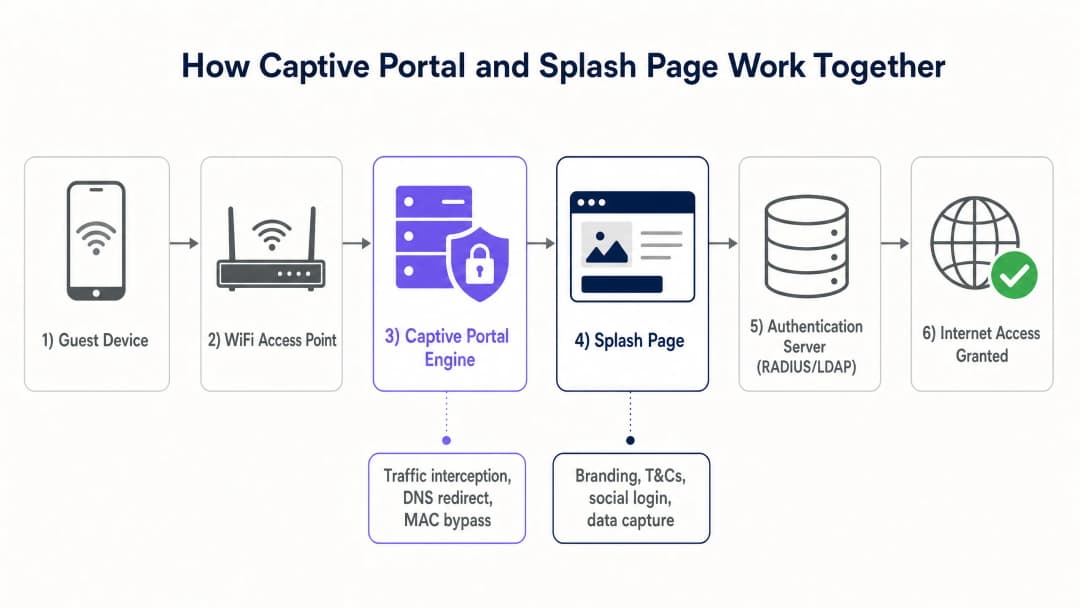
Il Captive Portal opera ai livelli inferiori del modello OSI (tipicamente i Livelli 2 e 3) per applicare il controllo degli accessi. Quando un dispositivo ospite si connette a un SSID aperto, il server DHCP locale gli assegna un indirizzo IP, una subnet mask e un gateway predefinito. Tuttavia, l'access point (AP) wireless o il controller del gateway inserisce l'indirizzo MAC di quel dispositivo in uno stato non autenticato all'interno della tabella delle sessioni del firewall.
In questo stato, il firewall blocca tutto il traffico IP in uscita, ad eccezione dei servizi di rete essenziali come DNS e DHCP. Quando l'ospite tenta di visitare un sito web esterno, il Captive Portal intercetta il traffico utilizzando uno dei due metodi principali:
- Reindirizzamento HTTP (reindirizzamento 302): Il gateway intercetta la richiesta HTTP iniziale e restituisce una risposta HTTP 302 Found, reindirizzando il browser del client all'URL della splash page.
- Hijacking del DNS: Il gateway intercetta le query DNS e risolve tutti i nomi di dominio con l'indirizzo IP del server locale della splash page. Sebbene semplice, questo metodo è stato progressivamente deprecato a causa di DNSSEC e degli avvisi di sicurezza a livello di browser.
I moderni sistemi operativi mobili utilizzano un daemon integrato chiamato Captive Network Assistant (CNA). Al momento della connessione a una rete, il CNA tenta di raggiungere un endpoint HTTP non crittografato noto (ad esempio, captive.apple.com di Apple o connectivitycheck.gstatic.com di Google). Se tale risposta viene intercettata e reindirizzata, il sistema operativo riconosce di trovarsi dietro un Captive Portal e mostra automaticamente la Splash Page in una finestra dedicata del browser di sistema, evitando all'utente di dover aprire manualmente un browser web.
Una volta che l'utente ha completato il flusso di autenticazione sulla Splash Page, il server di autenticazione (tipicamente un server RADIUS) invia un pacchetto Access-Accept al controller di rete. Il controller aggiorna quindi le sue regole di firewall per concedere all'indirizzo MAC del dispositivo il pieno accesso a Internet, sfruttando solitamente il MAC Address Bypass (MAB) per ricordare il dispositivo per una durata di sessione specificata.
La Splash Page: esperienza utente a livello applicazione
A differenza del Captive Portal, la Splash Page è una normale applicazione web che opera al Layer 7 (il livello applicazione). È realizzata con tecnologie web standard (HTML, CSS e JavaScript) e ospitata localmente sul gateway controller o, più comunemente, su una piattaforma cloud come Purple.
La Splash Page funge da interfaccia visiva e punto di contatto del brand per l'ospite. Le sue principali funzioni tecniche includono:
- Federazione delle identità: facilitazione del social login (Google, Facebook, Apple) utilizzando il protocollo OAuth 2.0.
- Acquisizione dati: raccolta dei dati degli ospiti, come indirizzi email, nomi e numeri di programmi fedeltà.
- Gestione del consenso: acquisizione del consenso esplicito di opt-in per il marketing, insieme all'accettazione dei termini di servizio e delle informative sulla privacy, garantendo la conformità a normative come il GDPR [1] e il CCPA.
- Erogazione di pubblicità e branding: visualizzazione di banner promozionali mirati, annunci video o pagine di reindirizzamento post-connessione per monetizzare lo spazio fisico.
Poiché la Splash Page è un'applicazione web, deve essere altamente reattiva e ottimizzata per i dispositivi mobili, che rappresentano oltre l'80% delle connessioni WiFi degli ospiti.
Guida all'implementazione
L'implementazione di una soluzione WiFi per ospiti di livello enterprise richiede uno stretto coordinamento tra l'infrastruttura di rete e il software cloud. Di seguito è riportata una guida architetturale indipendente dai fornitori per l'implementazione di un sistema Captive Portal e Splash Page.
Architettura di implementazione passo-passo
- Segmentazione della rete: configura una VLAN dedicata agli ospiti sui tuoi switch e access point per isolare il traffico degli ospiti dalla rete aziendale interna, dai terminali POS e dai dispositivi IoT. Questo è un requisito chiave per la conformità PCI-DSS [2].
- Configurazione SSID: configurare un SSID aperto con Opportunistic Wireless Encryption (OWE) abilitato se l'hardware lo supporta, oppure un SSID aperto standard. Abilitare il reindirizzamento del Captive Portal all'interno del profilo SSID sul controller wireless (ad esempio, Cisco Catalyst, Aruba Instant On o Ruckus SmartZone).
- Configurazione del Walled Garden (ACL): prima dell'autenticazione, ai dispositivi degli ospiti deve essere consentito di raggiungere determinati domini esterni affinché la Splash page venga visualizzata correttamente. Questo meccanismo è noto come "Walled Garden" o lista di controllo degli accessi (ACL). È necessario includere:
- Il dominio della Splash page ospitata in cloud (ad esempio,
*.purple.ai). - Gli endpoint OAuth dei provider di social login (ad esempio,
*.facebook.com,*.google.com,*.apple.com). - Le reti di distribuzione dei contenuti (CDN) che ospitano le risorse necessarie (font, fogli di stile, immagini).
- Il dominio della Splash page ospitata in cloud (ad esempio,
- Integrazione del server RADIUS: configurare il controller wireless per utilizzare un server RADIUS esterno (come il cloud RADIUS di Purple) per l'autenticazione e l'accounting (802.1X / AAA) [3].
- Personalizzazione della Splash page: progettare la Splash page all'interno del portale Purple, garantendo la coerenza del brand, la reattività sui dispositivi mobili e caselle di controllo chiare per il consenso legale.
- Criteri di sessione e larghezza di banda: definire i timeout di sessione (ad esempio, 8 ore), i timeout di inattività (ad esempio, 30 minuti) e i limiti di larghezza di banda per utente (ad esempio, 5 Mbps in download, 2 Mbps in upload) sul controller di rete per prevenire abusi della rete e garantire un accesso equo a tutti gli ospiti.
| Parametro Tecnico | Captive Portal (Gateway di Rete) | Splash Page (Applicazione Cloud) |
|---|---|---|
| Livello OSI | Livello 2 / Livello 3 (Rete/Collegamento Dati) | Livello 7 (Applicazione) |
| Protocolli Principali | RADIUS, DHCP, HTTP (reindirizzamento 302) | HTTP, HTTPS, HTML5, CSS3, OAuth 2.0 |
| Funzioni Principali | Intercettazione del traffico, controllo degli accessi, limitazione della larghezza di banda | Interfaccia utente, raccolta dati, consenso, branding |
| Visibilità per l'Utente | Completamente invisibile (meccanismo backend) | Visibile al 100% (schermata visiva di benvenuto) |
| Standard di Sicurezza | IEEE 802.1X, WPA3, OWE, PCI-DSS | HTTPS, SSL/TLS, GDPR, CCPA |
| Hardware Tipico | AP WiFi, router gateway, controller | Server cloud, CDN |
Hai domande sulla tua configurazione specifica?
Il nostro team collabora con gestori di sedi, responsabili IT e ingegneri di rete in 80.000 sedi. Prenota una chiamata di 20 minuti e ti mostreremo come altri professionisti come te hanno risolto il problema.
Best Practices
Per garantire una rete WiFi per gli ospiti altamente disponibile, sicura e legalmente conforme, i team IT dovrebbero seguire queste best practice di settore:
1. Imporre HTTPS e certificati SSL/TLS
Tutto il traffico tra il dispositivo dell'ospite e la splash page deve essere crittografato tramite HTTPS. L'esecuzione di una splash page su HTTP non crittografato espone i dati degli ospiti - inclusi credenziali di accesso e indirizzi email - allo sniffing dei pacchetti e ad attacchi man-in-the-middle. Assicurati che il dominio della tua splash page abbia un certificato SSL/TLS valido e pubblicamente attendibile. I certificati autofirmati attivano gravi avvisi del browser che spingono gli ospiti ad abbandonare la connessione.
2. Implementare l'isolamento della rete
Non instradare mai il traffico della rete WiFi ospiti nella stessa VLAN o subnet delle risorse aziendali. Il traffico degli ospiti deve essere isolato in una VLAN dedicata esclusivamente agli ospiti, con regole di firewall rigorose che impediscano qualsiasi instradamento cross-VLAN verso le subnet interne. Ciò riduce il rischio di propagazione di malware e di accesso non autorizzato a dati aziendali sensibili.
3. Garantire la conformità GDPR e CCPA
Se la tua struttura opera in, o serve cittadini di, Regno Unito, Unione Europea o California, la tua splash page deve aderire a rigide leggi sulla privacy dei dati:
- Consenso liberamente fornito: Le caselle di controllo per l'adesione al marketing devono essere deselezionate per impostazione predefinita. Il consenso alle comunicazioni di marketing non può essere impostato come condizione preliminare per l'accesso a Internet.
- Informativa sulla privacy chiara: Fornisci un link diretto e facilmente accessibile alla tua informativa sulla privacy sulla splash page.
- Diritto all'oblio (diritto alla cancellazione): Assicurati che la tua piattaforma WiFi per ospiti (come Purple) supporti flussi di lavoro automatizzati per gli ospiti che richiedono la cancellazione dei propri dati personali.
4. Ottimizzare per i dispositivi mobili e il CNA
Assicurati che la splash page sia leggera e altamente reattiva. Evita sfondi video pesanti o immagini grandi non compresse, che rallentano il caricamento della pagina - in particolare in ambienti ad altissima densità come stadi o centri congressi. Testa la splash page su una vasta gamma di sistemi operativi mobili per garantire un rendering perfetto all'interno del browser nativo del Captive Network Assistant (CNA).
Risoluzione dei problemi e mitigazione dei rischi
Modalità di guasto comuni e strategie di mitigazione
- La comparsa del popup CNA non riesce: Se il reindirizzamento al Captive Portal non riesce ad attivare il CNA del dispositivo, gli ospiti potrebbero rimanere connessi all'SSID senza accesso a Internet e senza un modo ovvio per accedere.
- Mitigazione: Assicurati che i server DNS assegnati agli ospiti tramite DHCP siano completamente funzionanti e in grado di risolvere i domini esterni. Se la risoluzione DNS non va a buon fine, il CNA non può eseguire il controllo di connettività e il reindirizzamento non viene mai attivato.
- Errata configurazione del Walled Garden: Gli ospiti non riescono a completare l'accesso tramite social media perché la pagina di login OAuth non si carica o mostra un errore di connessione.
- Mitigazione: Controlla due volte l'ACL della Walled Garden del gateway. I provider di login social modificano frequentemente i loro intervalli IP e domini. L'utilizzo di una piattaforma WiFi per ospiti gestita in cloud come Purple garantisce che i domini della Walled Garden siano aggiornati automaticamente e mantenuti sincronizzati con il tuo hardware.* Limitazioni del browser CNA: Il browser CNA nativo sui dispositivi mobili ha funzionalità limitate rispetto ai browser standard come Safari o Chrome. Potrebbe bloccare cookie, popup o reindirizzamenti esterni.
- Mitigazione: Evita JavaScript complessi o integrazioni di terze parti sulla splash page che richiedono la persistenza dei cookie o popup del browser. Mantieni il flusso di autenticazione il più semplice e diretto possibile.
ROI e Impatto Aziendale
Comprendere la distinzione tra il Captive Portal e la splash page consente alle organizzazioni di massimizzare il ritorno sull'investimento (ROI) ottimizzando sia le prestazioni di rete sia l'utilità commerciale delle loro reti WiFi per ospiti.
Il Valore Aziendale di una Soluzione Doppiamente Ottimizzata
- Maggiore coinvolgimento degli ospiti: Rispetto a una pagina di benvenuto generica e senza brand, una splash page progettata in modo professionale - se combinata con i prodotti principali di Purple come Guest WiFi e WiFi Analytics [4] [5] - può aumentare i tassi di login degli ospiti fino al 40%.
- Acquisizione di ricchi dati di prima parte: Offrendo un login social senza interruzioni e campi di modulo strutturati, le sedi in settori come Retail, Hospitality, Healthcare e Transport possono acquisire indirizzi email puliti e verificati, dati demografici e dati sulla frequenza delle visite.
- Opportunità di monetizzazione: L'uso della splash page per la monetizzazione dei media retail consente alle sedi di servire pubblicità mirata agli ospiti al momento della connessione, inserendosi nel mercato della pubblicità digitale in rapida crescita.
- Efficienza operativa: Un Captive Portal robusto riduce i ticket di supporto IT automatizzando l'onboarding dei dispositivi, gestendo i timeout delle sessioni e applicando limiti di larghezza di banda per prevenire la congestione della rete.
Implementando la soluzione di livello enterprise di Purple, le sedi possono garantire che la loro architettura di rete sia sicura e conforme, offrendo al contempo ai loro team di marketing la piena libertà creativa per progettare splash page bellissime e ad alta conversione che costruiscono la fedeltà dei clienti e guidano i ricavi.
Riferimenti
- [1] Regolamento (UE) 2016/679 (GDPR)
- [2] PCI Security Standards Council - Guida di Riferimento Rapido PCI DSS
- [3] Standard di Controllo dell'Accesso alla Rete Basato su Porta IEEE 802.1X
- [4] Cisco Wireless AP: Guida 2026 ai Prodotti e all'Installazione
- [5] Le 10 Migliori Soluzioni di Controllo dell'Accesso alla Rete (NAC) per il 2026
- [6] WiFi nelle Scuole: La Guida 2026 per Amministratori e IT
- [7] Come implementare l'autenticazione 802.1X con Cloud RADIUS
Definizioni chiave
Captive Portal
Un meccanismo a livello di rete che intercetta il traffico dei client e limita l'accesso a internet fino al soddisfacimento dei criteri di autenticazione.
Incontrato dai team IT durante la configurazione di controller wireless, gateway o firewall per reindirizzare gli indirizzi MAC non autenticati.
Splash Page
La pagina di destinazione visiva, basata sul web, visualizzata nel browser di un ospite che facilita l'autenticazione, l'acquisizione dei dati e il coinvolgimento con il brand.
Gestita dai team di marketing e di gestione delle sedi per progettare l'esperienza di onboarding degli utenti e raccogliere i dati dei clienti.
Captive Network Assistant (CNA)
Una funzionalità integrata nel sistema operativo dei dispositivi mobili che rileva automaticamente un Captive Portal e apre la splash page in una finestra del browser di sistema.
Cruciale per l'esperienza utente, in quanto evita agli ospiti la necessità di aprire manualmente un browser per accedere.
Walled Garden (ACL)
Un elenco di indirizzi IP o domini a cui un utente non autenticato è autorizzato ad accedere prima di effettuare il login alla rete.
Deve essere configurato correttamente sul gateway wireless per consentire il caricamento della splash page e dei flussi OAuth dei login social.
RADIUS (Remote Authentication Dial-In User Service)
Un protocollo di rete che fornisce una gestione centralizzata di autenticazione, autorizzazione e tracciamento (AAA) per gli utenti che si connettono a una rete.
Utilizzato dal Captive Portal per verificare le credenziali degli ospiti rispetto a un database e concedere l'accesso alla rete.
MAC Address Bypass (MAB)
Un meccanismo che consente a un dispositivo di aggirare la schermata di login del Captive Portal nelle connessioni successive memorizzando il suo indirizzo MAC hardware.
Utilizzato per creare un'esperienza fluida per gli ospiti che ritornano, eliminando la necessità di accedere ripetutamente.
Opportunistic Wireless Encryption (OWE)
Uno standard WiFi (parte di WPA3) che fornisce la crittografia sulle reti aperte senza richiedere una password condivisa.
Consente la trasmissione sicura dei dati sulle reti WiFi pubbliche per gli ospiti, consentendo comunque il reindirizzamento al Captive Portal.
VLAN Segmentation
La pratica di suddividere una rete fisica in più reti logiche a livello Layer 2 per isolare il traffico.
Essenziale per le implementazioni di WiFi per gli ospiti per garantire che il traffico guest sia completamente isolato dalle reti aziendali sicure.
Esempi pratici
Una catena di vendita al dettaglio nazionale con 150 negozi desidera implementare una rete WiFi per ospiti che acquisisca le e-mail dei clienti per scopi di marketing, ma il team di sicurezza IT teme che il traffico degli ospiti possa accedere ai sistemi POS aziendali. Come dovrebbe essere progettata l'architettura?
- Configurare una VLAN dedicata agli ospiti (ad es. VLAN 50) su tutti gli switch e gli access point in tutti i 150 negozi, completamente isolata dalla VLAN dei POS aziendali (VLAN 10) tramite ACL del firewall. 2. Abilitare il reindirizzamento al captive portal sull'SSID ospite, puntando l'URL di reindirizzamento alla splash page protetta ospitata sul cloud di Purple. 3. Configurare il gateway di rete per limitare tutto il traffico pre-autenticato sulla VLAN 50, consentendo l'accesso solo a DNS, DHCP e ai domini Walled Garden di Purple. 4. Utilizzare l'integrazione di Purple con il controller wireless per autenticare gli ospiti tramite RADIUS, concedendo l'accesso a Internet solo dopo che l'ospite ha fornito un indirizzo e-mail verificato e accettato i termini di servizio sulla splash page.
Uno stadio sportivo da 50.000 posti desidera offrire WiFi gratuito durante gli eventi. Il team operativo desidera un'esperienza di accesso fluida per prevenire la congestione della rete all'inizio delle partite, mentre il team di marketing desidera mostrare annunci video degli sponsor sulla splash page. Come si bilanciano queste esigenze?
- Distribuire access point ad alta densità e configurare un captive portal con bypass dell'indirizzo MAC (MAB) impostato su 30 giorni, in modo che i tifosi che ritornano non debbano visualizzare la splash page a ogni visita. 2. Per le nuove connessioni, progettare una splash page estremamente leggera e ottimizzata per un caricamento rapido sui dispositivi mobili. 3. Incorporare un breve annuncio video dello sponsor di 5 secondi che viene riprodotto direttamente sulla splash page, con un pulsante "Salta e Connetti" che attiva immediatamente l'autenticazione del captive portal. 4. Configurare il captive portal per allocare un profilo di banda generoso (ad es. 10 Mbps) per utente per garantire uno streaming video fluido e una navigazione web ottimale.
Un grande ospedale pubblico desidera fornire WiFi per ospiti a pazienti e visitatori. Il team di conformità richiede che la rete sia conforme agli standard di privacy dei dati sanitari e che i pazienti non possano accedere a contenuti web dannosi o inappropriati. Qual è la strategia di distribuzione consigliata?
- Configurare il captive portal per reindirizzare gli utenti a una splash page contenente un'informativa sulla privacy specifica per il settore sanitario e i termini di servizio. 2. Integrare il gateway del captive portal con un servizio di filtraggio DNS basato su cloud (come Cisco Umbrella o Webroot) per bloccare automaticamente l'accesso a contenuti per adulti, malware e siti di phishing. 3. Disabilitare le opzioni di accesso social per impedire la raccolta di dati personali non necessari, affidandosi invece a un semplice pulsante "Accetta e Connetti" o a un modulo di verifica e-mail di base. 4. Applicare una rigida limitazione della larghezza di banda sul captive portal per dare priorità alle applicazioni cliniche e ai dispositivi IoT dell'ospedale rispetto al traffico di streaming degli ospiti.
Domande di esercitazione
Q1. Un responsabile IT nota che gli ospiti si connettono al SSID del WiFi ospiti, ma la splash page personalizzata non compare e gli utenti non riescono ad accedere a internet. Qual è la causa tecnica più probabile di questo problema e come dovrebbe essere diagnosticato?
Suggerimento: Considera il ruolo del DNS nel processo di reindirizzamento del Captive Portal.
Visualizza risposta modello
La causa più probabile è un errore nel processo di risoluzione DNS. Quando un dispositivo si connette, deve risolvere il nome di dominio della splash page per caricare la schermata di benvenuto. Se il server DNS assegnato alla VLAN degli ospiti è inattivo, configurato in modo errato o bloccato dalle regole firewall di pre-autenticazione del gateway, il dispositivo non può risolvere il dominio e il reindirizzamento fallisce. Per diagnosticare, connetti un dispositivo di test al SSID, verifica che riceva un IP valido e l'indirizzo del server DNS tramite DHCP e prova a fare un ping o a risolvere un dominio pubblico. Se il DNS fallisce, controlla lo stato del server DNS e assicurati che il traffico DNS (porta UDP 53) sia consentito nelle ACL di pre-autenticazione del gateway.
Q2. Un punto vendita desidera consentire agli ospiti di accedere utilizzando i propri account Facebook. Tuttavia, quando gli utenti fanno clic sul pulsante di login di Facebook sulla splash page, ricevono un errore "Connessione rifiutata". Il resto della splash page si carica perfettamente. Qual è il problema e come si risolve?
Suggerimento: Pensa a quali risorse esterne un dispositivo pre-autenticato è autorizzato ad accedere.
Visualizza risposta modello
Il problema è che i domini di autenticazione di Facebook non sono inclusi nella Access Control List (ACL) del Walled Garden pre-autenticazione del gateway. Poiché l'utente non è ancora autenticato, il Captive Portal blocca tutto il traffico esterno. Quando l'utente fa clic sul pulsante Facebook, il browser tenta di raggiungere i server OAuth di Facebook, operazione che viene bloccata dal gateway. Per risolvere questo problema, il team IT deve aggiungere i domini OAuth di Facebook richiesti (ad esempio, *.facebook.com, *.facebook.net) alla ACL del Walled Garden sul controller wireless o sul gateway.
Q3. Una struttura ricettiva ha distribuito una rete WiFi per gli ospiti. Il team di marketing desidera raccogliere gli indirizzi e-mail degli ospiti e inviare immediatamente una newsletter di benvenuto. Tuttavia, il team legale è preoccupato per la conformità al GDPR in materia di consenso. Come dovrebbero essere configurati la splash page e il Captive Portal per soddisfare entrambi i team?
Suggerimento: Il GDPR richiede che il consenso per il marketing sia prestato liberamente e non sia una condizione per l'erogazione del servizio.
Visualizza risposta modello
Per soddisfare sia il team di marketing che quello legale ai sensi del GDPR: 1. La splash page deve presentare una casella di controllo chiara e non selezionata per l'opt-in di marketing ("Consento a ricevere e-mail di marketing"). 2. L'accettazione dei Termini di Servizio e dell'Informativa sulla Privacy deve essere una casella di controllo separata o chiaramente indicata come condizione per l'utilizzo della rete gratuita. 3. Il Captive Portal e il sistema della splash page sottostanti devono essere configurati in modo da concedere l'accesso a Internet indipendentemente dal fatto che la casella di controllo del marketing sia selezionata o meno. Se un utente lascia deselezionata la casella di marketing ma accetta i Termini di Servizio, il sistema deve comunque inviare un pacchetto Access-Accept al controller di rete. Ciò garantisce che il consenso sia prestato liberamente, soddisfacendo il GDPR, pur consentendo al marketing di raccogliere le e-mail degli utenti che effettuano l'opt-in.
Domande frequenti
What is the technical difference between a captive portal and a splash page?
A captive portal operates at the network layer (L2/L3) through a gateway, access point, or wireless LAN controller that intercepts unauthenticated client traffic, enforces a walled garden, and manages RADIUS AAA sessions. A splash page is the presentation layer (L7) - the responsive web interface displayed inside the client browser or Captive Network Assistant (CNA) that captures guest credentials, terms acceptance, and marketing consent.
How does a network firewall intercept guest traffic before splash page authentication?
Prior to authentication, the wireless gateway blocks all outbound IP traffic except for explicitly defined walled garden IP/FQDN rules and DNS resolution. When the client attempts to reach an external web resource, the gateway intercepts port 80 HTTP requests or DHCP Option 114 (RFC 8910) advertisements, returning an HTTP 302 redirect or RFC 8908 JSON payload that directs the device browser to the splash page URL.
What is RFC 8908 and why is it replacing legacy HTTP interception?
RFC 8908 defines a standardized Captive Portal API that allows client operating systems (iOS, Android, Windows) to query a JSON endpoint directly to discover captivity state, user session duration, and portal endpoints. This eliminates the need for brute-force HTTPS interception, which causes browser SSL/TLS certificate warnings, while providing deterministic portal closure upon successful authentication.
What domains and network services belong in a captive portal walled garden?
A secure walled garden allowlist includes the splash page hosting FQDN, static CDN asset endpoints, DNS resolvers, and external identity provider authentication URLs (such as Apple ID, Google OAuth, and Microsoft Entra) with their CRL and OCSP validation paths. Crucially, OS captive probe hostnames must be excluded from allowlists so the device operating system reliably identifies captivity and launches the login sheet.
How does Purple integrate captive portal network isolation with custom branded splash pages?
Purple decouples network hardware enforcement from visitor experience design. The platform integrates natively with enterprise controllers (Cisco Meraki, HPE Aruba, Ruckus, Ubiquiti) via RADIUS and cloud APIs to enforce dynamic VLANs and bandwidth controls, while serving high-converting, mobile-responsive splash pages with real-time CRM synchronization, GDPR compliance tracking, and marketing automation.
Continua a leggere questa serie
Ubiquiti UniFi guest portal non reindirizza: cause e soluzioni
Questa guida isola un errore di reindirizzamento del portale ospiti UniFi analizzando in sequenza lo stato dell'ospite, il reindirizzamento, il percorso di pre-autorizzazione e l'autorizzazione del controller. Fornisce ai team IT locali un metodo collaudato per risolvere i dubbi tra rete ospiti e Hotspot, i passaggi ai portali esterni, i requisiti correnti degli account UniFi OS e i test di isolamento DNS.
Cisco Meraki splash page non funzionante: un diagramma di flusso per la risoluzione dei problemi
Questa guida pratica per il secondo giorno isola il punto in cui un flusso di splash Cisco Meraki ha fallito: autorizzazione del client, avvio del redirect HTTP, raggiungibilità del walled garden o sign-on RADIUS. Fornisce ai team IT delle sedi un percorso di prove controllato per ripristinare il WiFi per gli ospiti senza apportare modifiche estese a un'infrastruttura attiva.
Guida alla configurazione del WiFi ospiti aziendale: segmentazione VLAN, sicurezza e Captive Portals
Questa guida tecnica mostra ai team IT come configurare il WiFi ospiti come servizio di accesso internet controllato, utilizzando la segmentazione VLAN, le policy del firewall e un Captive Portal. Spiega inoltre come i moduli di registrazione e i controlli di onboarding di Purple supportino un'esperienza per i visitatori proporzionata senza indebolire il perimetro che circonda il personale, i pagamenti e i sistemi operativi.
Hai domande sulla tua configurazione specifica?
Il nostro team collabora con gestori di sedi, responsabili IT e ingegneri di rete in 80.000 sedi. Prenota una chiamata di 20 minuti e ti mostreremo come altri professionisti come te hanno risolto il problema.