
मल्टी-भाडेकरू (Multi-Tenant) इमारतींमध्ये Dynamic VLAN Assignment कसे काम करते
हा तांत्रिक संदर्भ मार्गदर्शक मल्टी-भाडेकरू वातावरणात 802.1X आणि RADIUS वापरून Dynamic VLAN Assignment च्या आर्किटेक्चर आणि अंमलबजावणीचा तपशील देतो. हे IT व्यवस्थापक आणि नेटवर्क आर्किटेक्ट्सना SSID ओव्हरहेड कमी करण्यासाठी, Layer 2 आयसोलेशन लागू करण्यासाठी आणि सामायिक इमारतींमध्ये सुरक्षित, स्केलेबल कनेक्टिव्हिटी सुनिश्चित करण्यासाठी कृतीयोग्य मार्गदर्शन प्रदान करते.
हे मार्गदर्शक ऐका
पॉडकास्ट ट्रान्सक्रिप्ट पहा
आमच्या मुख्य मालिकेचा भाग: Multi-Tenant WiFi Guide →
कार्यकारी सारांश
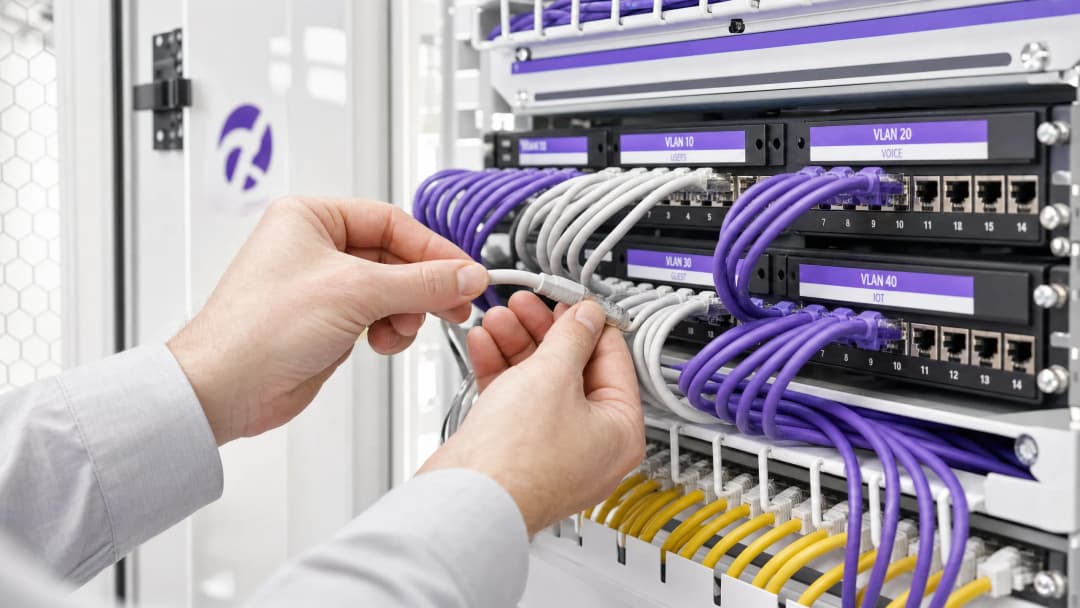
व्यावसायिक कार्यालये, किरकोळ विक्री संकुल किंवा विस्तीर्ण आदरातिथ्य ठिकाणे यांसारख्या बहु-भाडेकरू (multi-tenant) इमारतींवर देखरेख ठेवणाऱ्या IT व्यवस्थापक आणि नेटवर्क आर्किटेक्ट्ससाठी नेटवर्क विभाजन व्यवस्थापित करणे हे एक मोठे आव्हान आहे. ऐतिहासिकदृष्ट्या, भाडेकरूंच्या ट्रॅफिकला वेगळे ठेवणे म्हणजे स्वतंत्र भौतिक पायाभूत सुविधा तैनात करणे किंवा प्रत्येक भाडेकरूसाठी एक युनिक SSID ब्रॉडकास्ट करणे असा होता. हे दोन्ही दृष्टिकोन मुळातच त्रुटीयुक्त आहेत. भौतिक अलगाव हे अत्यंत खर्चिक आणि अनम्य आहे, तर मल्टिपल SSIDs ब्रॉडकास्ट केल्याने अतिरिक्त व्यवस्थापन फ्रेम ओव्हरहेडमुळे RF कामगिरी गंभीरपणे खालावते.
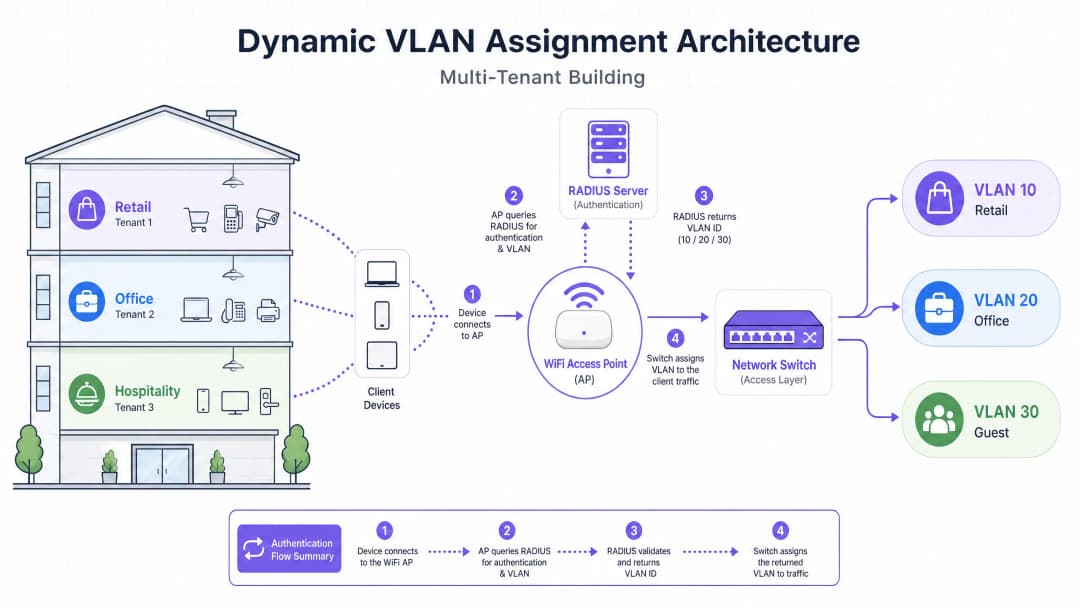
डायनॅमिक VLAN असाइनमेंट वायरलेस वातावरणाला एकाच सुरक्षित SSID मध्ये एकत्रित करून या समस्येचे निवारण करते. IEEE 802.1X ऑथेंटिकेशन आणि RADIUS चा फायदा घेऊन, हे नेटवर्क युजर्सनी निवडलेल्या नेटवर्कच्या आधारे नव्हे, तर त्यांच्या ओळखीच्या आधारे त्यांना त्यांच्या समर्पित व्हर्च्युअल लोकल एरिया नेटवर्क (VLAN) वर डायनॅमिकली असाइन करते. हे मार्गदर्शक डायनॅमिक VLAN असाइनमेंटचे आर्किटेक्टिंग, डिप्लॉइंग आणि ट्रबलशूटिंग करण्यासाठी, सुरक्षित लेयर २ अलगाव सुनिश्चित करण्यासाठी, PCI-DSS आणि GDPR सारख्या मानकांचे पालन करण्यासाठी आणि वेन्यू ऑपरेटर्ससाठी एक मजबूत ROI सुनिश्चित करण्यासाठी सर्वसमावेशक तांत्रिक माहिती प्रदान करते.
सखोल तांत्रिक माहिती
मल्टिपल SSIDs मधील समस्या
एका सामायिक इमारतीमध्ये, डझनभर SSIDs ब्रॉडकास्ट केलेले दिसणे सामान्य आहे (उदा. "TenantA_Corp", "TenantB_Secure", "Building_Guest"). Access Point (AP) द्वारे ब्रॉडकास्ट केलेल्या प्रत्येक SSID ने सर्वात कमी अनिवार्य डेटा दराने (सहसा 1 Mbps किंवा 6 Mbps) बीकन फ्रेम्स ट्रान्समिट करणे आवश्यक असते. जसजशी SSIDs ची संख्या वाढते, तसतसे व्यवस्थापन ओव्हरहेडद्वारे वापरल्या जाणाऱ्या एअरटाइमचे प्रमाण झपाट्याने वाढते, ज्यामुळे प्रत्यक्ष डेटा ट्रान्समिशनसाठी कमी एअरटाइम उरतो. याचा परिणाम हाय लेटन्सी, लो थ्रुपुट आणि खराब युझर अनुभवामध्ये होतो, मग इंटरनेट कनेक्शनचा मूळ स्पीड कितीही असो.
802.1X आणि RADIUS आर्किटेक्चर
डायनॅमिक VLAN असाइनमेंट विभाजनाचे लॉजिक RF लेयरकडून ऑथेंटिकेशन लेयरकडे स्थलांतरित करते. हे पोर्ट-बेस्ड नेटवर्क ॲक्सेस कंट्रोलसाठी IEEE 802.1X मानकांवर अवलंबून असते, जे RADIUS (रिमोट ऑथेंटिकेशन डायल-इन युझर सर्व्हिस) सर्व्हरसह समाकलित केलेले असते.
या आर्किटेक्चरमध्ये तीन प्राथमिक घटक असतात:
- सप्लिकंट (Supplicant): क्लायंट डिव्हाइस (लॅपटॉप, स्मार्टफोन) जे नेटवर्क ॲक्सेसची विनंती करत आहे.
- ऑथेंटिकेटर (Authenticator): नेटवर्क ॲक्सेस डिव्हाइस, सामान्यतः WiFi Access Point किंवा वायरलेस कंट्रोलर, जे ऑथेंटिकेशन यशस्वी होईपर्यंत ट्रॅफिक ब्लॉक करते.
- ऑथेंटिकेशन सर्व्हर (Authentication Server): RADIUS सर्व्हर जो आयडेंटिटी स्टोअर (उदा. Active Directory, LDAP) च्या तुलनेत क्रेडेंशियल्स सत्यापित करतो आणि नेटवर्क पॉलिसी ठरवतो.
ऑथेंटिकेशन फ्लो
जेव्हा एखादा सप्लिकंट युनिफाइड SSID शी कनेक्ट करण्याचा प्रयत्न करतो, तेव्हा खालील फ्लो कार्य करतो:
- EAPOL प्रारंभ: सप्लीकंट AP शी कनेक्ट होतो. AP, Extensible Authentication Protocol over LAN (EAPOL) पॅकेट्स व्यतिरिक्त इतर सर्व रहदारी (ट्राफिक) ब्लॉक करतो.
- RADIUS Access-Request: AP, EAP डेटा एन्कॅप्स्युलेट करतो आणि तो RADIUS सर्व्हरकडे
Access-Requestम्हणून फॉरवर्ड करतो. - क्रेडेन्शियल पडताळणी: RADIUS सर्व्हर वापरकर्त्याच्या क्रेडेन्शियल्सची पडताळणी करतो (EAP-TLS, PEAP, इत्यादी द्वारे).
- RADIUS Access-Accept: यशस्वी पडताळणीवर, RADIUS सर्व्हर
Access-Acceptसंदेशासह प्रतिसाद देतो. महत्त्वपूर्ण बाब म्हणजे, या संदेशामध्ये विशिष्ट IETF मानक RADIUS ॲट्रिब्युट्स समाविष्ट असतात जे AP ला वापरकर्त्याला कोणत्या VLAN वर नियुक्त करायचे आहे याचे निर्देश देतात.
डायनॅमिक VLAN वितरणासाठी आवश्यक असणारे महत्त्वपूर्ण RADIUS ॲट्रिब्युट्स खालीलप्रमाणे आहेत:
Tunnel-Type(64):VLANवर सेट करा (मूल्य 13)Tunnel-Medium-Type(65):802वर सेट करा (मूल्य 6)Tunnel-Private-Group-ID(81): विशिष्ट VLAN ID वर सेट करा (उदा. टेनंट A साठी "20", टेनंट B साठी "30")
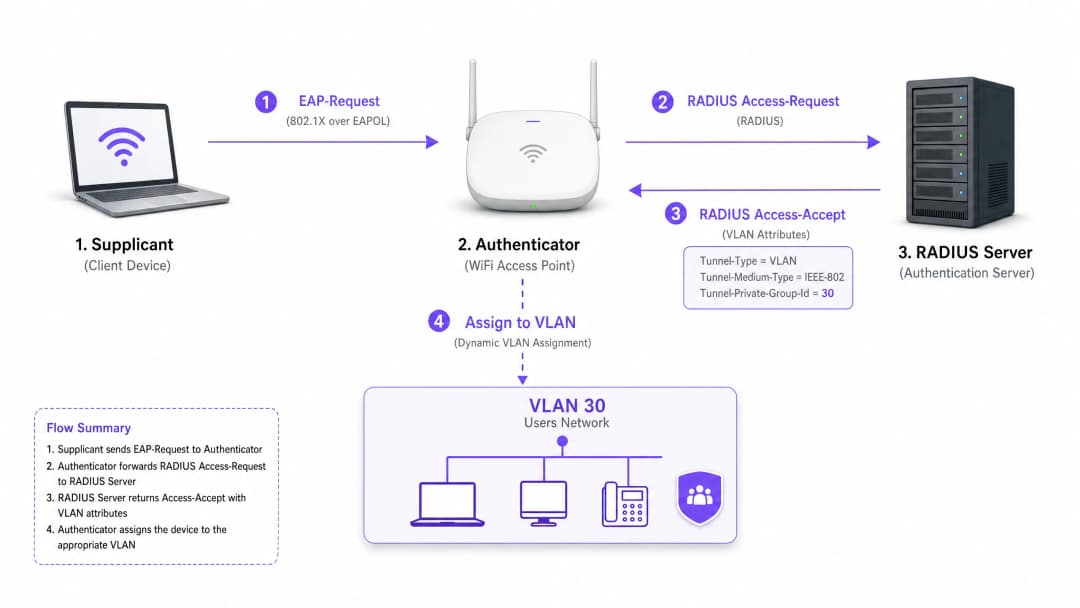
एकदा AP ला हे ॲट्रिब्युट्स मिळाल्यावर, तो वापरकर्त्याची रहदारी थेट निर्दिष्ट केलेल्या VLAN मध्ये पाठवतो. अपस्ट्रीम नेटवर्क स्विचेस नंतर या रहदारीचे अशा प्रकारे व्यवस्थापन करतात की जणू वापरकर्ता त्या टेनंटसाठीच्या समर्पित पोर्टशी प्रत्यक्षपणे जोडलेला आहे, ज्यामुळे संपूर्ण लेयर 2 विलगीकरण (isolation) सुनिश्चित होते.
तुमच्या विशिष्ट सेटअपबद्दल काही प्रश्न आहेत का?
आमची टीम ८०,००० हून अधिक वेन्यूजमधील वेन्यू ऑपरेटर्स, IT मॅनेजर्स आणि नेटवर्क इंजिनिअर्ससोबत काम करते. २० मिनिटांचा कॉल बुक करा आणि तुमच्यासारख्या इतरांनी ही समस्या कशी सोडवली हे आम्ही तुम्हाला दाखवू.
अंमलबजावणी मार्गदर्शिका
डायनॅमिक VLAN वितरण तैनात करण्यासाठी वायरलेस इन्फ्रास्ट्रक्चर, एज स्विचेस आणि आयडेंटिटी प्रोव्हायडर यांच्यात काळजीपूर्वक समन्वय आवश्यक आहे. या व्हेंडर-तटस्थ अंमलबजावणी क्रमाचे अनुसरण करा.
टप्पा 1: नेटवर्क इन्फ्रास्ट्रक्चरची तयारी
- VLAN प्रोव्हिजनिंग: तुमच्या कोअर राउटिंग इन्फ्रास्ट्रक्चर आणि DHCP सर्व्हरवर आवश्यक VLAN व्याख्या करा आणि तयार करा. प्रत्येक टेनंट VLAN कडे स्वतःचा वेगळा सबनेट आणि योग्य राउटिंग धोरणे (उदा. इंटरनेटवर राउटिंग करणे, परंतु आंतर-VLAN रहदारी बंद करणे) असल्याची खात्री करा.
- स्विच ट्रंकिंग: ही एक अत्यंत महत्त्वाची पायरी आहे. तुमच्या ऍक्सेस पॉईंट्सशी (APs) जोडणारे स्विच पोर्ट्स 802.1Q ट्रंक पोर्ट्स म्हणून कॉन्फिगर केलेले असणे आवश्यक आहे. AP ला नियुक्त कराव्या लागणाऱ्या सर्व संभाव्य टेनंट VLANs तुम्ही टॅग करणे आवश्यक आहे. जर RADIUS सर्व्हर VLAN 40 नियुक्त करत असेल, परंतु स्विच पोर्टवर VLAN 40 टॅग केलेले नसेल, तर क्लायंट प्रमाणीकृत (authenticate) होईल परंतु IP पत्ता मिळवण्यात अयशस्वी होईल.
- AP कॉन्फिगरेशन: एकाच 802.1X सक्षम SSID (उदा. WPA3-Enterprise) चे ब्रॉडकास्ट करण्यासाठी APs कॉन्फिगर करा. तुमच्या वायरलेस कंट्रोलर किंवा AP वर विशिष्ट सेटिंग सक्षम करा जी त्यांना RADIUS ओव्हरराइड ॲट्रिब्युट्स स्वीकारण्याची परवानगी देते (याला सहसा "AAA Override" किंवा "Dynamic VLAN" असे लेबल लावले जाते).
टप्पा 2: RADIUS आणि आयडेंटिटी इंटिग्रेशन
- आयडेंटिटी स्टोअर इंटिग्रेशन: तुमच्या RADIUS सर्व्हरला वापरकर्त्याची ओळख आणि त्यांचे टेनंट असोसिएशन असलेल्या डिरेक्टरी सर्व्हिसशी कनेक्ट करा.
- नेटवर्क पॉलिसी निर्मिती: RADIUS सर्व्हरमध्ये अशी धोरणे तयार करा जी वापरकर्ता गटांना VLAN IDs शी मॅप करतात. उदाहरणार्थ, असे धोरण: जर वापरकर्ता 'Retail_Staff' ग्रुपचा असेल, तर Tunnel-Private-Group-ID = 10 परत करा.
- प्रमाणपत्र व्यवस्थापन (Certificate Management): EAP-TLS वापरत असल्यास (कॉर्पोरेट डिव्हाइसेससाठी शिफारस केलेले), क्लायंट प्रमाणपत्रे तैनात करा. PEAP-MSCHAPv2 वापरत असल्यास (BYOD साठी सामान्य), RADIUS सर्व्हरवर वैध, विश्वसनीय सर्व्हर प्रमाणपत्र स्थापित असल्याचे सुनिश्चित करा.
टप्पा 3: चाचणी आणि टप्प्याटप्प्याने रोलआउट
- पायलट चाचणी: वेगवेगळ्या टेनंट्समधील डिव्हाइसेसच्या लहान गटासह चाचणी करा. कनेक्शन केल्यावर डिव्हाइसला योग्य सबनेटवरून IP पत्ता मिळत असल्याचे आणि ते इतर टेनंट VLANs मधील डिव्हाइसेसना पिंग करू शकत नसल्याचे सत्यापित करा.
- IoT आणि हेडलेस डिव्हाइसेस: 802.1X ला सपोर्ट न करणाऱ्या डिव्हाइसेससाठी (प्रिंटर, स्मार्ट टीव्ही), MAC Authentication Bypass (MAB) लागू करा. RADIUS सर्व्हर डिव्हाइसच्या MAC पत्त्याच्या आधारे त्याचे प्रमाणीकरण करतो आणि योग्य VLAN नियुक्त करतो. टीप: हे डिव्हाइसेस कठोरपणे विलग केलेल्या VLANs मध्ये ठेवा कारण MAC पत्ते स्पूफ केले जाऊ शकतात.
सर्वोत्तम पद्धती
- SSID एकत्रित करा: जास्तीत जास्त तीन SSIDs चे ध्येय ठेवा: सर्व टेनंट्ससाठी एक 802.1X SSID, जुन्या IoT डिव्हाइसेससाठी एक (PSK किंवा MAB वापरून), आणि एक Guest WiFi साठी (कॅप्टिव्ह पोर्टल वापरून).
- क्लायंट आयसोलेशन लागू करा: गेस्ट नेटवर्क आणि अविश्वासू टेनंट नेटवर्क्समध्ये, डिव्हाइसेसना एकमेकांशी संवाद साधण्यापासून रोखण्यासाठी AP स्तरावर लेयर २ क्लायंट आयसोलेशन सक्षम करा, ज्यामुळे लॅटरल मूव्हमेंटचे धोके कमी होतात.
- प्रगत विश्लेषण वैशिष्ट्ये वापरा: ठिकाणाचा वापर, थांबण्याचा वेळ (dwell times) आणि टेनंट नेटवर्कच्या कामगिरीची दृश्यमानता मिळवण्यासाठी आपल्या प्रमाणीकरण प्रवाहाला मजबूत WiFi Analytics प्लॅटफॉर्मसह समाकलित करा.
- WPA3 वर प्रमाणीकरण करा: जेथे क्लायंट सपोर्ट असेल तेथे, डिक्शनरी हल्ल्यांपासून सर्वाधिक पातळीचे एन्क्रिप्शन आणि संरक्षण सुनिश्चित करण्यासाठी 802.1X SSID साठी WPA3-Enterprise अनिवार्य करा.
- उद्योग संदर्भ: तैनात करण्याची प्रक्रिया संबंधित क्षेत्राला साजेशी बनवा. Retail वातावरणामध्ये, PCI DSS चे पालन राखण्यासाठी POS सिस्टीम पूर्णपणे विलग केलेल्या VLAN वर असल्याचे सुनिश्चित करा. Hospitality मध्ये, गेस्ट VLANs बॅक-ऑफ-हाऊस ऑपरेशन्सपासून पूर्णपणे वेगळे असल्याचे सुनिश्चित करा.
त्रुटी निवारण आणि जोखीम कमी करणे
सामान्य बिघाड प्रकार
"प्रमाणित झाले परंतु IP नाही" ही परिस्थिती:
- लक्षण: क्लायंट कनेक्ट होतो, प्रमाणीकरण यशस्वी होते, परंतु डिव्हाइस स्वतःला APIPA पत्ता (169.254.x.x) नियुक्त करते.
- मूळ कारण: RADIUS सर्व्हरने VLAN नियुक्त केले आहे, परंतु ते VLAN एकतर DHCP सर्व्हरवर तयार केलेले नाही, किंवा अधिक सामान्यपणे, स्विचला AP शी जोडणाऱ्या ट्रंक पोर्टवर VLAN टॅग केलेले नाही.
- तोडगा: एज स्विचवरील 802.1Q ट्रंक कॉन्फिगरेशन सत्यापित करा.
RADIUS टाइमआउट / पोहोचण्याबाहेर:
- लक्षण: क्लायंट "कनेक्ट होत आहे..." वर अडकतात किंवा त्यांना वारंवार क्रेडेन्शियल्स विचारले जातात.
- मूळ कारण: AP RADIUS सर्व्हरपर्यंत पोहोचू शकत नाही, किंवा AP आणि सर्व्हरमधील RADIUS सामायिक सिक्रेट (shared secret) जुळत नाही.
- तोडगा: AP व्यवस्थापन IP आणि RADIUS सर्व्हरमधील नेटवर्क कनेक्टिव्हिटी सत्यापित करा. सामायिक सिक्रेट पुन्हा तपासा.
प्रमाणपत्राची मुदत संपणे:
- लक्षण: PEAP किंवा EAP-TLS वरील सर्व युजर्ससाठी मोठ्या प्रमाणावर अचानक ऑथेंटिकेशन अयशस्वी होणे.
- मूळ कारण: RADIUS सर्व्हर सर्टिफिकेट एक्स्पायर झाले आहे, ज्यामुळे क्लायंट्स कनेक्शन नाकारत आहेत.
- निवारण: RADIUS सर्टिफिकेटसाठी आक्रमक मॉनिटरिंग आणि अलर्टिंग लागू करा. सर्टिफिकेट्स एक्स्पायर होण्याच्या किमान ३० दिवस आधी त्यांचे नूतनीकरण करा.
जोखीम कमी करण्याच्या धोरणे (Risk Mitigation Strategies)
- फेल - ओपन विरुद्ध फेल - क्लोज्ड: जेव्हा RADIUS सर्व्हरशी संपर्क होऊ शकत नाही तेव्हासाठी स्पष्ट पॉलिसी निश्चित करा. टेनंट कॉर्पोरेट नेटवर्कसाठी, सुरक्षिततेच्या दृष्टीने फेल - क्लोज्ड (प्रवेश नाकारणे) आवश्यक आहे. गेस्ट ॲक्सेससाठी, तुम्ही फेल - ओपन पॉलिसी कॉन्फिगर करू शकता जी युजर्सना अत्यंत मर्यादित, फक्त - इंटरनेट असलेल्या "क्वारंटाईन" VLAN मध्ये ठेवते.
- रेडंडन्सी: नेहमी हायली अवेलेबल (HA) पेअरमध्ये RADIUS सर्व्हर तैनात करा, विशेषतः एकापेक्षा जास्त साईट्सना सपोर्ट करत असल्यास ते भौगोलिकदृष्ट्या वेगवेगळ्या ठिकाणी वितरित असावेत.
ROI आणि व्यावसायिक प्रभाव
डायनॅमिक VLAN असाइनमेंट लागू केल्याने वेन्यू ऑपरेटर्ससाठी महत्त्वपूर्ण, मोजता येण्याजोगे व्यावसायिक परिणाम मिळतात:
१. कमी झालेला OpEx: सिंगल SSID चे सेंट्रलाइज्ड मॅनेजमेंट वैयक्तिक टेनंट नेटवर्क्स प्रोव्हिजनिंग, अपडेट आणि ट्रबलशूट करण्याशी संबंधित IT ओव्हरहेड मोठ्या प्रमाणात कमी करते. २. ऑप्टिमाइज्ड RF स्पेक्ट्रम: SSID ब्लोट काढून टाकल्याने मौल्यवान एअरटाइम परत मिळतो. स्पेक्ट्रम व्यवस्थापित करण्याच्या मार्गदर्शकासाठी, आमचा Wi Fi Frequencies: A Guide to Wi-Fi Frequencies in 2026 हा लेख पहा. यामुळे जास्त थ्रूपुट मिळते आणि "स्लो WiFi" बाबतच्या सपोर्ट तिकिटांमध्ये घट होते. ३. वर्धित सुरक्षा आणि अनुपालन: कडक लेयर २ आयसोलेशन हे सुनिश्चित करते की एका टेनंटच्या नेटवर्कमधील तडजोड इतरांमध्ये पसरणार नाही. PCI-DSS आणि GDPR सारख्या नियामक आवश्यकता पूर्ण करण्यासाठी हे अत्यंत महत्त्वपूर्ण आहे. ४. स्केलेबिलिटी: नवीन टेनंट ऑनबोर्ड करण्यासाठी फिजिकल इन्फ्रास्ट्रक्चर किंवा वायरलेस कॉन्फिगरेशनमध्ये काहीही बदल करण्याची आवश्यकता नसते; ही फक्त RADIUS सर्व्हरमध्ये नवीन पॉलिसी तयार करण्याची बाब आहे.
शेअर्ड स्पेसेससाठी नेटवर्क्स डिझाइन करण्याच्या अधिक व्यापक धोरणांसाठी, आमचे Designing a Multi-Tenant WiFi Architecture for MDU वरील मार्गदर्शक पहा.
महत्वाच्या व्याख्या
802.1X
पोर्ट-आधारित नेटवर्क ऍक्सेस कंट्रोलसाठी एक IEEE मानक जे LAN किंवा WLAN ला कनेक्ट करू इच्छिणाऱ्या उपकरणांना ऑथेंटिकेशन यंत्रणा प्रदान करते.
पायाभूत प्रोटोकॉल जो नेटवर्कला प्रवेश देण्यापूर्वी ओळखीची मागणी करण्यास परवानगी देतो, ज्यामुळे डायनॅमिक पॉलिसी सक्षम होतात.
RADIUS (Remote Authentication Dial-In User Service)
एक नेटवर्किंग प्रोटोकॉल जो नेटवर्क सेवा कनेक्ट करणाऱ्या आणि वापरणाऱ्या वापरकर्त्यांसाठी केंद्रीकृत Authentication, Authorization, and Accounting (AAA) व्यवस्थापन प्रदान करतो.
निर्णय घेणारे इंजिन जे क्रेडेंशियल प्रमाणित करते आणि वापरकर्त्याला कोणते VLAN असाइन करायचे हे नेटवर्कला सांगते.
Supplicant
क्लायंट डिव्हाइस (उदा. लॅपटॉप, स्मार्टफोन) किंवा सॉफ्टवेअर जे नेटवर्कवर प्रवेश करण्याची विनंती करते आणि क्रेडेंशियल्स प्रदान करते.
एंडपॉइंट जो 802.1X ला सपोर्ट करण्यासाठी कॉन्फिगर केलेला असणे आवश्यक आहे (उदा. WiFi सेटिंग्जमध्ये PEAP किंवा EAP-TLS निवडणे).
Authenticator
नेटवर्क डिव्हाइस (उदा. WiFi ऍक्सेस पॉइंट किंवा स्विच) जे supplicant आणि ऑथेंटिकेशन सर्व्हर दरम्यान मेसेज रिले करून ऑथेंटिकेशन प्रक्रियेस सुलभ करते.
गेटकीपर जोपर्यंत RADIUS हिरवा कंदील दाखवत नाही तोपर्यंत ट्रॅफिक ब्लॉक करतो आणि नंतर असाइन केलेले VLAN लागू करतो.
EAP (Extensible Authentication Protocol)
वायरलेस नेटवर्क आणि पॉइंट-टू-पॉइंट कनेक्शनमध्ये वारंवार वापरले जाणारे ऑथेंटिकेशन फ्रेमवर्क, जे एकाधिक ऑथेंटिकेशन पद्धतींना (उदा. EAP-TLS, PEAP) सपोर्ट करते.
क्रेडेंशियल्सची सुरक्षितपणे देवाणघेवाण करण्यासाठी supplicant आणि RADIUS सर्व्हर दरम्यान बोलली जाणारी भाषा.
MAB (MAC Authentication Bypass)
८०२.१X ला सपोर्ट न करणाऱ्या उपकरणांचे त्यांचे MAC ॲड्रेस क्रेडेंशियल म्हणून वापरून ऑथेंटिकेशन करण्यासाठी वापरले जाणारे तंत्रज्ञान.
मल्टी-टेनंट वातावरणात जुनी IoT उपकरणे, प्रिंटर किंवा स्मार्ट टीव्ही ऑनबोर्ड करण्यासाठी वापरले जाते.
Tunnel-Private-Group-ID
RADIUS सर्व्हरकडून ऑथेंटिकेटरकडे VLAN ID पाठवण्यासाठी वापरले जाणारे विशिष्ट RADIUS ॲट्रिब्यूट (ॲट्रिब्यूट ८१).
डेटाचा अत्यंत महत्त्वाचा भाग जो युझरला नक्की कोणत्या नेटवर्क सेगमेंटमध्ये पाठवायचे हे ठरवतो.
Layer 2 Isolation
एक सुरक्षा उपाय जो एकाच नेटवर्क सेगमेंट किंवा VLAN वरील उपकरणांना एकमेकांशी थेट संवाद साधण्यापासून रोखतो.
गेस्ट नेटवर्क्स आणि अविश्वासू टेनंट नेटवर्क्ससाठी मालवेअरच्या लॅटरल मूव्हमेंटला किंवा अनधिकृत प्रवेशाला रोखण्यासाठी आवश्यक आहे.
सोडवलेली उदाहरणे
एक मोठे कॉन्फरन्स सेंटर एकाच वेळी तीन इव्हेंट आयोजित करते. इव्हेंट A ला सुरक्षित कॉर्पोरेट ऍक्सेस आवश्यक आहे, इव्हेंट B ला उपस्थितांसाठी ओपन ऍक्सेस आवश्यक आहे आणि इव्हेंट C ला विशिष्ट अंतर्गत प्रेझेंटेशन सर्व्हरचा ऍक्सेस आवश्यक आहे. नेटवर्क आर्किटेक्टने डायनॅमिक VLANs वापरून हे कसे तैनात करावे?
आर्किटेक्ट कर्मचारी आणि सुरक्षित उपस्थितांसाठी एकच 802.1X SSID कॉन्फिगर करतो आणि सामान्य पाहुण्यांसाठी Captive Portal सह स्वतंत्र ओपन SSID कॉन्फिगर करतो.
802.1X SSID साठी, RADIUS सर्व्हर तीन पॉलिसीसह कॉन्फिगर केला आहे:
- जर User Group = 'Event_A_Staff' असेल, तर VLAN 100 असाइन करा (इंटरनेट + कॉर्पोरेट VPN ऍक्सेस).
- जर User Group = 'Event_C_Presenters' असेल, तर VLAN 102 असाइन करा (इंटरनेट + प्रेझेंटेशन सर्व्हर ऍक्सेस).
इव्हेंट B साठी, उपस्थित लोक ओपन Guest SSID वापरतात, जे त्यांना VLAN 101 मध्ये पाठवते (केवळ इंटरनेट, क्लायंट आयसोलेशन सक्षम केलेले).
एक रिटेल साखळी एका सामायिक इमारतीमध्ये कॉफी शॉप, कपड्यांचे दुकान आणि फार्मसी चालवते. फार्मसीने HIPAA चे पालन करणे आवश्यक आहे आणि कपड्यांच्या दुकानाला त्याच्या वायरलेस POS टर्मिनल्ससाठी PCI-DSS अनुपालन आवश्यक आहे. आयसोलेशनची हमी कशी दिली जाते?
IT टीम एकच WPA3-Enterprise SSID तैनात करते.
- फार्मसी कर्मचारी 802.1X द्वारे ऑथेंटिकेट करतात आणि RADIUS त्यांना VLAN 50 वर असाइन करतो, ज्यामध्ये इतर कोणत्याही अंतर्गत सबनेटमध्ये प्रवेश रोखणारे कडक फायरवॉल नियम आहेत.
- कपड्यांच्या दुकानाचे POS टर्मिनल्स EAP-TLS (प्रमाणपत्र-आधारित) वापरून ऑथेंटिकेट करतात आणि VLAN 60 वर असाइन केले जातात. VLAN 60 थेट पेमेंट प्रोसेसर गेटवेवर राउट केले जाते आणि इतर सर्व ट्रॅफिकपासून आयसोलेट केले जाते.
- कॉफी शॉप ग्राहकांसाठी स्वतंत्र Guest SSID वापरते, जे क्लायंट आयसोलेशनसह VLAN 70 वर समाप्त होते.
सराव प्रश्न
Q1. एक टेनंट कळवतो की ते 802.1X SSID वर यशस्वीरित्या ऑथेंटिकेट करू शकतात, परंतु त्यांच्या उपकरणाला स्वयंचलितपणे IP ॲड्रेस (169.254.x.x) मिळतो आणि इंटरनेट चालत नाही. सर्वात संभाव्य कॉन्फिगरेशन त्रुटी कोणती आहे?
टीप: ॲक्सेस पॉईंट आणि कोर नेटवर्क सेवांमधील मार्गाचा विचार करा.
नमुना उत्तर पहा
याचे सर्वात संभाव्य कारण म्हणजे RADIUS सर्व्हरद्वारे असाइन केलेले VLAN, एज स्विचला ॲक्सेस पॉईंटशी जोडणाऱ्या 802.1Q ट्रंक पोर्टवर टॅग केलेले नाही. AP ट्रॅफिक योग्य VLAN वर पाठवण्याचा प्रयत्न करत आहे, परंतु स्विच ते फ्रेम्स ड्रॉप करतो कारण त्या पोर्टवर ते स्वीकारण्यासाठी तो कॉन्फिगर केलेला नाही.
Q2. तुम्ही एका शेअर्ड ऑफिस स्पेससाठी मल्टी-टेनंट नेटवर्क डिझाइन करत आहात. टेनंट्सना 'त्यांचे नेटवर्क शोधणे सोपे जावे' म्हणून क्लायंटला १५ टेनंट्सपैकी प्रत्येकासाठी स्वतंत्र SSID ब्रॉडकास्ट करायचे आहे. तुम्ही क्लायंटला काय सल्ला द्याल?
टीप: मॅनेजमेंट फ्रेम ओव्हरहेडचा RF परफॉर्मन्सवर होणाऱ्या परिणामाचा विचार करा.
नमुना उत्तर पहा
क्लायंटला या पद्धतीचा वापर न करण्याचा ठाम सल्ला द्या. १५ SSID ब्रॉडकास्ट केल्याने बीकन फ्रेम्समुळे मोठ्या प्रमाणावर एअरटाइम वाया जाईल, ज्यामुळे नेटवर्क परफॉर्मन्स कमालीचा ढासळेल, लॅटन्सी वाढेल आणि सर्व युझर्ससाठी थ्रूटपुट कमी होईल. त्याऐवजी एकच 802.1X SSID तैनात करण्याचा आणि बॅकएंडवर टेनंट्सना सुरक्षितपणे सेगमेंट करण्यासाठी RADIUS द्वारे Dynamic VLAN Assignment वापरण्याचा सल्ला द्या.
Q3. एका मल्टी-टेनंट इमारतीमध्ये अशा अनेक हेडलेस IoT उपकरणांसाठी (उदा. स्मार्ट थर्मोस्टॅट्स, डिजिटल साइनेज) नेटवर्क ऍक्सेस आवश्यक आहे जी 802.1X सप्लिकंट्सना सपोर्ट करत नाहीत. ही उपकरणे योग्य टेनंट VLAN वर सुरक्षितपणे कशी ऑनबोर्ड केली जाऊ शकतात?
टीप: RADIUS द्वारे सपोर्ट असलेल्या पर्यायी ऑथेंटिकेशन पद्धतींचा विचार करा.
नमुना उत्तर पहा
MAC Authentication Bypass (MAB) लागू करा. ॲक्सेस पॉईंट उपकरणाचा MAC ॲड्रेस युझरनेम आणि पासवर्ड म्हणून RADIUS सर्व्हरकडे पाठवेल. हे विशिष्ट MAC ॲड्रेसेस ओळखण्यासाठी आणि योग्य VLAN ID परत पाठवण्यासाठी RADIUS सर्व्हर कॉन्फिगर केला जाऊ शकतो. MAC ॲड्रेसेस स्पूफ केले जाऊ शकत असल्याने, ही उपकरणे मर्यादित नेटवर्क ऍक्सेससह पूर्णपणे आयसोलेटेड VLAN मध्ये ठेवली पाहिजेत.
या मालिकेमध्ये पुढे वाचा
विद्यार्थी निवास नेटवर्क्समध्ये बँडविड्थ व्यवस्थापित करणे
हे मार्गदर्शक IT व्यवस्थापक, नेटवर्क आर्किटेक्ट्स आणि प्रॉपर्टी ऑपरेशन्स डायरेक्टर्सना हाय-डेन्सिटी विद्यार्थी निवास वातावरणात WiFi बँडविड्थ व्यवस्थापित करण्यासाठी एक वेंडर-न्यूट्रल तांत्रिक संदर्भ प्रदान करते. यामध्ये VLAN सेगमेंटेशन, क्वालिटी ऑफ सर्व्हिस (QoS) पॉलिसी डिझाइन, आयडेंटिटी-बेस्ड ट्रॅफिक शेपिंग आणि ॲप्लिकेशन-लेयर व्हिजिबिलिटी यांचा समावेश आहे - जे स्केलेबल, फेअर-ॲक्सेस नेटवर्कचे चार मुख्य आधारस्तंभ आहेत. वास्तविक-जगातील डिप्लॉयमेंट परिस्थिती, मोजता येण्याजोगे परिणाम आणि निर्णय फ्रेमवर्कसह, मोठ्या प्रमाणावर निवासी नेटवर्क इन्फ्रास्ट्रक्चरसाठी जबाबदार असलेल्या कोणत्याही टीमसाठी हे एक ऑपरेशनल प्लेबुक आहे.
फ्लॅट्स आणि को-वर्किंग स्पेसेससाठी WPA2-Enterprise विरुद्ध Personal
हे अधिकृत तांत्रिक संदर्भ मार्गदर्शक फ्लॅट्स आणि को-वर्किंग स्पेसेससारख्या मल्टी-टेनंट वातावरणासाठी WPA2-Personal विरुद्ध WPA2-Enterprise चे मूल्यांकन करते. हे नेटवर्क आर्किटेक्ट्स आणि IT मॅनेजर्सना 802.1X ऑथेंटिकेशन, डायनॅमिक VLAN असाइनमेंट आणि सुरक्षा अनुपालनाबद्दल उपयुक्त माहिती प्रदान करते, आणि सामायिक केलेले पासवर्ड्स आधुनिक सामायिक ठिकाणी कसे अस्वीकार्य जोखीम निर्माण करतात हे दर्शवते. ठिकाण चालवणाऱ्या ऑपरेटर्सना या तिमाहीत मायग्रेशनचा निर्णय घेण्यासाठी ठोस अंमलबजावणी मार्गदर्शन, वास्तविक केस स्टडीज आणि ROI विश्लेषण मिळेल.
सामायिक WiFi नेटवर्कसाठी मायक्रो-सेगमेंटेशनच्या सर्वोत्तम पद्धती
हे तांत्रिक संदर्भ मार्गदर्शक सामायिक WiFi पायाभूत सुविधांवर मायक्रो-सेगमेंटेशन लागू करण्यासाठी व्यावहारिक धोरणे प्रदान करते. IT व्यवस्थापक आणि नेटवर्क आर्किटेक्ट्स जोखीम कमी करण्यासाठी, अनुपालन सुनिश्चित करण्यासाठी आणि नेटवर्क कार्यक्षमता ऑप्टिमाइझ करण्यासाठी अतिथी, IoT आणि कर्मचारी ट्रॅफिक सुरक्षितपणे कसे आयसोलेट करू शकतात याचे तपशील यात दिले आहेत.
तुमच्या विशिष्ट सेटअपबद्दल काही प्रश्न आहेत का?
आमची टीम ८०,००० हून अधिक वेन्यूजमधील वेन्यू ऑपरेटर्स, IT मॅनेजर्स आणि नेटवर्क इंजिनिअर्ससोबत काम करते. २० मिनिटांचा कॉल बुक करा आणि तुमच्यासारख्या इतरांनी ही समस्या कशी सोडवली हे आम्ही तुम्हाला दाखवू.