
सामान्य ॲक्सेस पॉइंट प्लॅटफॉर्म्स (Cisco, Aruba, Ubiquiti) वर WPA2-Enterprise कसे कॉन्फिगर करावे
हे तांत्रिक संदर्भ मार्गदर्शक वरिष्ठ IT व्यावसायिक आणि नेटवर्क आर्किटेक्ट्सना Cisco, Aruba, आणि Ubiquiti प्लॅटफॉर्म्सवर WPA2-Enterprise तैनात करण्यासाठी एक निश्चित, विक्रेता-विशिष्ट सविस्तर मार्गदर्शन प्रदान करते. हे एंटरप्राइझ आणि ठिकाणांच्या वातावरणात आर्किटेक्चर, RADIUS एकत्रीकरण, अनुपालन आवश्यकता आणि वास्तविक-जगातील तैनाती परिस्थितींचा तपशील देते.
हे मार्गदर्शक ऐका
पॉडकास्ट ट्रान्सक्रिप्ट पहा
आमच्या मुख्य मालिकेचा भाग: Enterprise WiFi Security Guide →
Executive Summary
WPA2-Enterprise उपयोजित करणे आता ऐच्छिक सुरक्षा अपग्रेड राहिलेले नाही - हे कोणत्याही एंटरप्राइझ-श्रेणीच्या वायरलेस नेटवर्कसाठी आवश्यक बेसलाइन आहे. हॉस्पिटॅलिटी, रिटेल आणि सार्वजनिक क्षेत्रातील वातावरणात कार्यरत असलेल्या IT व्यवस्थापक आणि नेटवर्क आर्किटेक्ट्ससाठी, Pre-Shared Keys कडून 802.1X ऑथेंटिकेशनकडे जाणे हे PCI DSS आणि GDPR सह कडक अनुपालन आदेशांमुळे प्रेरित आहे. हे तांत्रिक संदर्भ मार्गदर्शक तीन आघाडीच्या ॲक्सेस पॉइंट विक्रेत्यांसाठी: Cisco, Aruba आणि Ubiquiti साठी ठोस, कृतीयोग्य आणि प्लॅटफॉर्म-विशिष्ट कॉन्फिगरेशन पायऱ्या प्रदान करते.
WPA2-Enterprise वर स्थलांतरित करून, एंटरप्राइझ संस्था सामायिक क्रेडेंशियल्सशी संबंधित जोखीम दूर करू शकतात, तपशीलवार प्रति-सत्र ऑडिट ट्रेल्स मिळवू शकतात आणि डायनॅमिक नेटवर्क सेगमेंटेशन सक्षम करू शकतात. योग्यरित्या अंमलात आणल्यास, हे आर्किटेक्चर केवळ कॉर्पोरेट परिमिती सुरक्षित करत नाही तर व्यापक Guest WiFi प्लॅटफॉर्मद्वारे व्यवस्थापित केलेल्या अभ्यागत नेटवर्कसह अखंडपणे समाकलित होते. खालील विभाग यशस्वी रोलआउटसाठी आवश्यक तांत्रिक आर्किटेक्चर, डिप्लोयमेंट पायऱ्या आणि जोखीम कमी करण्याच्या धोरणांचे तपशील देतात.
Technical Deep-Dive
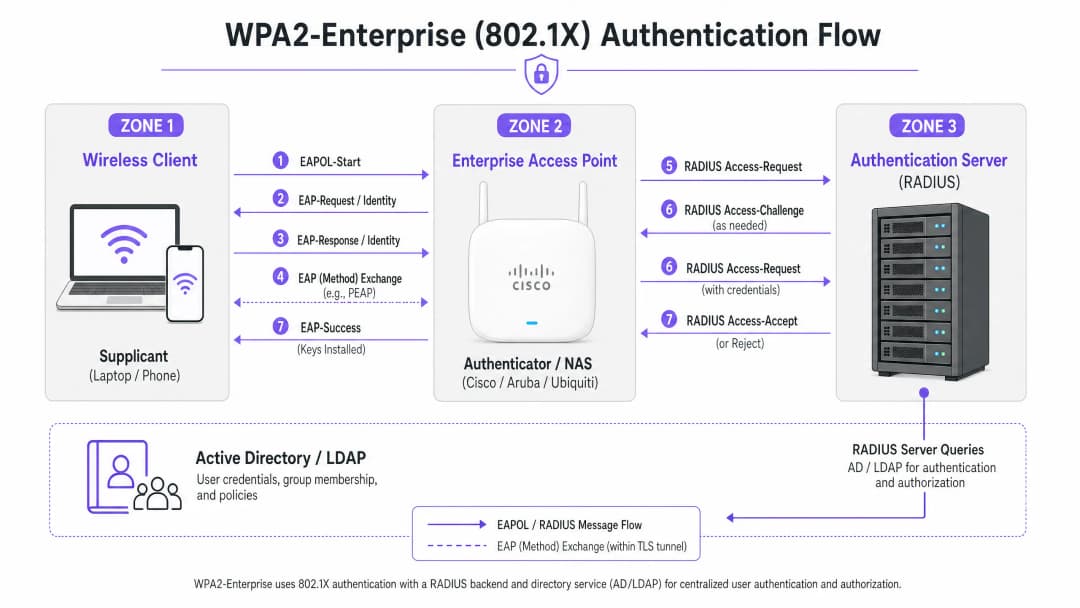
WPA2-Enterprise पोर्ट-आधारित नेटवर्क ॲक्सेस कंट्रोल प्रदान करण्यासाठी IEEE 802.1X मानकांवर अवलंबून असते. स्टॅटिक Pre-Shared Key (PSK) वापरणाऱ्या WPA2-Personal च्या विपरीत, WPA2-Enterprise ला नेटवर्कवर प्रवेश मिळण्यापूर्वी प्रत्येक सप्लिकंट (क्लायंट डिव्हाइस) ने बाह्य ऑथेंटिकेशन सर्व्हर - सामान्यत: RADIUS सर्व्हर - च्या विरोधात वैयक्तिकरित्या ऑथेंटिकेट करणे आवश्यक असते.
या आर्किटेक्चरमध्ये तीन मुख्य घटक असतात:
- The Supplicant: नेटवर्कशी कनेक्ट करण्याचा प्रयत्न करणारे क्लायंट डिव्हाइस.
- The Authenticator: एंटरप्राइझ-श्रेणीचा ॲक्सेस पॉइंट किंवा वायरलेस LAN कंट्रोलर (उदाहरणार्थ, Cisco WLC किंवा Aruba Mobility Controller) जो ऑथेंटिकेशन प्रक्रियेस सुलभ करतो.
- The Authentication Server: बॅक-एंड RADIUS सर्व्हर (उदाहरणार्थ, Cisco ISE, Aruba ClearPass किंवा Windows NPS), जो Active Directory किंवा LDAP सारख्या डिरेक्टरी सर्व्हिसच्या विरुद्ध क्रेडेंशियल्स प्रमाणित करतो.
The EAP Exchange Process
ऑथेंटिकेशन प्रक्रिया Extensible Authentication Protocol over LAN (EAPOL) चा वापर करते. सुरुवातीच्या टप्प्यादरम्यान, ऑथेंटिकेटर पूर्णपणे पारदर्शक प्रॉक्सी म्हणून काम करतो. एकदा RADIUS सर्व्हरने क्रेडेंशियल्स प्रमाणित केले की, तो ऑथेंटिकेटरला Access-Accept संदेश पाठवतो, जो नंतर वायरलेस सत्र सुरक्षित करण्यासाठी आवश्यक एन्क्रिप्शन कीज मिळवतो.
EAP पद्धतीची निवड अत्यंत महत्त्वाची आहे. PEAP-MSCHAPv2 ही सर्वात जास्त वापरली जाणारी पद्धत आहे कारण ती पारंपारिक Active Directory पासवर्ड प्रमाणीकरणाला (authentication) समर्थन देते आणि त्याच वेळी सर्व्हर प्रमाणपत्राद्वारे स्थापित TLS टनेलमध्ये डेटा एक्सचेंज सुरक्षित ठेवते. तथापि, कमाल सुरक्षिततेसाठी EAP-TLS ची शिफारस केली जाते. EAP-TLS साठी परस्पर प्रमाणपत्र प्रमाणीकरण आवश्यक असते (सर्व्हर आणि क्लायंट दोघांनीही वैध प्रमाणपत्रे सादर करणे आवश्यक आहे), जे क्रेडेंशियल चोरीपासून संरक्षण करते परंतु प्रमाणपत्र वितरणासाठी मजबूत Public Key Infrastructure (PKI) किंवा Mobile Device Management (MDM) सोल्यूशनची मागणी करते.
अंमलबजावणी मार्गदर्शक
WPA2-Enterprise कॉन्फिगर करण्याचे मूलभूत नियम सर्व व्हेंडर्ससाठी सारखेच असतात, परंतु व्यवस्थापन इंटरफेस आणि इकोसिस्टमनुसार त्यांची अंमलबजावणी वेगळी असू शकते.

Cisco (Catalyst आणि Meraki)
Cisco चे वातावरण सामान्यतः कॅम्पस डेप्लॉयमेंटपासून ते डिस्ट्रिब्युटेड एंटरप्राइझ नेटवर्क्सपर्यंत असू शकते.
Cisco Catalyst (WLC/DNA Center):
- RADIUS सर्व्हर परिभाषित करा: "Security" टॅबवर जा, "AAA" निवडा आणि प्रायमरी व सेकंडरी RADIUS प्रमाणीकरण (authentication) आणि अकाउंटिंग सर्व्हर कॉन्फिगर करा. शेअर्ड सिक्रेट RADIUS सर्व्हर कॉन्फिगरेशनशी जुळत असल्याची खात्री करा.
- WLAN प्रोफाइल तयार करा: "WLANs" टॅब अंतर्गत, नवीन प्रोफाइल तयार करा.
- सुरक्षा पॉलिसी कॉन्फिगर करा: Layer 2 Security ला WPA+WPA2 वर सेट करा आणि Authentication Key Management (AKM) पद्धत म्हणून 802.1X सक्षम करा.
- AAA सर्व्हर बाइंड करा: पूर्वी परिभाषित केलेले RADIUS सर्व्हर WLAN प्रोफाइलमध्ये मॅप करा. डायनॅमिक VLAN असाइनमेंट आवश्यक असल्यास, "AAA Override" सक्षम करा.
Cisco Meraki:
- SSID कॉन्फिगरेशन: Meraki डॅशबोर्डमध्ये, Wireless > SSIDs वर जा आणि लक्ष्यित नेटवर्क निवडा.
- access control: असोसिएशन आवश्यकता "WPA2-Enterprise with my RADIUS server" वर सेट करा.
- RADIUS सेटिंग्ज: तुमच्या RADIUS इन्फ्रास्ट्रक्चरचा IP पत्ता, ऑथेंटिकेशन पोर्ट (सामान्यतः 1812), अकाउंटिंग पोर्ट (1813) आणि शेअर्ड सिक्रेट प्रविष्ट करा. Meraki डॅशबोर्डमध्ये डेप्लॉयमेंटपूर्वी RADIUS कनेक्टिव्हिटी तपासण्यासाठी अंगभूत (built-in) चाचणी टूल समाविष्ट आहे.
Aruba Networks
Aruba हे Hospitality आणि उच्च शिक्षणातील एक आघाडीचे व्यासपीठ आहे, जे प्रगत ॲक्सेस कंट्रोलसाठी त्याच्या ClearPass Policy Manager चा व्यापक वापर करते.
- AAA प्रोफाइल परिभाषित करा: Aruba Central किंवा Mobility Controller UI मध्ये, नवीन AAA प्रोफाइल तयार करा. हे प्रोफाइल प्रमाणीकरण कसे हाताळले जाते हे निर्धारित करते.
- RADIUS सर्व्हर ग्रुप कॉन्फिगर करा: तुमच्या RADIUS सर्व्हरला सर्व्हर ग्रुपमध्ये जोडा, फेलोव्हर नियम आणि टाइमआउट व्हॅल्यूज निर्दिष्ट करा. हा ग्रुप AAA प्रोफाइलशी कनेक्ट करा.
- Virtual AP कॉन्फिगरेशन: Virtual AP (SSID) प्रोफाइल तयार करा किंवा त्यामध्ये बदल करा. सुरक्षा प्रकार WPA2-Enterprise वर सेट करा.
- प्रोफाईल्स बाईंड करा: AAA प्रोफाईल Virtual AP प्रोफाईलशी बाईंड करा. ClearPass वापरत असल्यास, डायनॅमिक पॉलिसी अंमलबजावणी सक्षम करण्यासाठी RADIUS CoA (Change of Authorization) पोर्ट (3799) ला कोणत्याही मध्यवर्ती फायरवॉलमधून जाण्याची परवानगी असल्याची खात्री करा.
Ubiquiti (UniFi)
Ubiquiti, UniFi Network Controller च्या माध्यमातून, Retail आणि SMB वातावरणासाठी अत्यंत किफायतशीर उपाय ऑफर करते.
- RADIUS प्रोफाईल तयार करा: Settings > Profiles > RADIUS वर जा. तुमच्या बाह्य RADIUS सर्व्हरचा IP पत्ता, पोर्ट्स (1812/1813) आणि सामायिक गुप्त कोड (shared secret) वापरून नवीन प्रोफाईल तयार करा.
- SSID कॉन्फिगरेशन: Settings > WiFi वर जा आणि नवीन वायरलेस नेटवर्क तयार करा.
- सुरक्षा सेटिंग्ज: सुरक्षा प्रोटोकॉल म्हणून "WPA2 Enterprise" निवडा आणि नवीन तयार केलेले RADIUS प्रोफाईल बाईंड करा.
- RADIUS आर्किटेक्चरचा विचार: स्थानिक पातळीवर कार्यरत राहणारे (local survivable) RADIUS ऑफर करणाऱ्या एंटरप्राइझ-ग्रेड नियंत्रकांच्या उलट, UniFi बाह्य सर्व्हरवर (उदा. FreeRADIUS किंवा Windows NPS) मोठ्या प्रमाणावर अवलंबून असते. UniFi APs आणि RADIUS बॅक-एंड दरम्यान विश्वसनीय कनेक्टिव्हिटी सुनिश्चित करा.
तुमच्या विशिष्ट सेटअपबद्दल काही प्रश्न आहेत का?
आमची टीम ८०,००० हून अधिक वेन्यूजमधील वेन्यू ऑपरेटर्स, IT मॅनेजर्स आणि नेटवर्क इंजिनिअर्ससोबत काम करते. २० मिनिटांचा कॉल बुक करा आणि तुमच्यासारख्या इतरांनी ही समस्या कशी सोडवली हे आम्ही तुम्हाला दाखवू.
सर्वोत्तम पद्धती
उपयोजन लवचिक आणि सुरक्षित दोन्ही असल्याची खात्री करण्यासाठी, नेटवर्क आर्किटेक्ट्सनी खालील काही महत्त्वपूर्ण सर्वोत्तम पद्धतींचे पालन केले पाहिजे:
- प्रमाणपत्र प्रमाणीकरण सक्तीचे करा: क्लायंट डिव्हाइसेसना विश्वसनीय सर्टिफिकेट ऑथॉरिटी (CA) कडून RADIUS सर्व्हरचे प्रमाणपत्र प्रमाणित करण्यासाठी स्पष्टपणे कॉन्फिगर केले पाहिजे. असे न केल्यास नेटवर्कवर "Evil Twin" हल्ल्यांचा धोका निर्माण होतो, ज्यामुळे फसव्या ॲक्सेस पॉईंटला युझर क्रेडेंशियल्स चोरण्याची संधी मिळते.
- RADIUS रिडंडन्सी लागू करा: RADIUS सर्व्हर हा नेटवर्क ॲक्सेससाठी अत्यंत महत्त्वाचा घटक आहे. नेहमी प्राथमिक आणि दुय्यम RADIUS सर्व्हर्स कॉन्फिगर करा. वितरित वातावरणात, उच्च उपलब्धतेसाठी क्लाउड-होस्ट केलेल्या RADIUS उपायाचा विचार करा.
- डायनॅमिक VLAN असाइनमेंटचा लाभ घ्या: युझर्सना त्यांच्या Active Directory ग्रुप मेंबरशिपच्या आधारे विशिष्ट VLAN मध्ये डायनॅमिकली नियुक्त करण्यासाठी RADIUS ॲट्रिब्युट्सचा (जसे की
Tunnel-Pvt-Group-ID) वापर करा. हे एकाधिक SSIDs ब्रॉडकास्ट न करता नेटवर्कचे विभाजन सुलभ करते. - RADIUS Accounting सक्षम करा: केवळ ऑथेंटिकेशन कॉन्फिगर करू नका. अनुपालन फ्रेमवर्कसाठी आवश्यक ऑडिट ट्रेल तयार करण्यासाठी RADIUS Accounting (पोर्ट 1813) अनिवार्य आहे.
- नेटवर्कची सुरक्षा सुनिश्चित करा: आमच्या Protecting Your Network with Robust DNS and Security या मार्गदर्शकामध्ये तुमच्या इन्फ्रास्ट्रक्चरच्या सुरक्षेबद्दल अधिक वाचा.
त्रुटी निवारण आणि जोखीम कमी करणे
काळजीपूर्वक नियोजन करूनही उपयोजनामध्ये समस्या येऊ शकतात. सामान्य अपयशाच्या कारणांमध्ये खालील गोष्टींचा समावेश होतो:
- सामायिक गुप्त कोड (Shared secret) न जुळणे: RADIUS सामायिक गुप्त कोडमधील साध्या टाईप करण्याच्या चुकीमुळे ऑथेंटिकेशन अयशस्वी होते आणि त्याचा कोणताही अलर्ट मिळत नाही. ऑथेंटिकेटर आणि RADIUS सर्व्हर दोन्हीवर गुप्त कोडची पडताळणी करा.
- वेळ सिंक्रोनाइझेशन त्रुटी: प्रमाणपत्र प्रमाणीकरणासाठी अचूक टाइमस्टॅम्प आवश्यक आहेत. सर्व APs, नियंत्रक आणि RADIUS सर्व्हर्स एका विश्वसनीय NTP स्रोताद्वारे सिंक्रोनाइझ केले असल्याची खात्री करा.
- RADIUs ट्रॅफिक ब्लॉक करणारे फायरवॉल्स: APs/कंट्रोलर्स आणि RADIUS सर्व्हर्स दरम्यान UDP पोर्ट्स 1812 (authentication) आणि 1813 (accounting) उघडे असल्याची खात्री करा. CoA वापरत असल्यास, UDP 3799 उघडे असल्याची खात्री करा.
- क्लायंट चुकीचे कॉन्फिगरेशन: सर्वात सामान्य समस्या म्हणजे क्लायंट डिव्हाइसेस RADIUS सर्व्हरचे सर्टिफिकेट जारी करणाऱ्या CA वर विश्वास ठेवण्यासाठी कॉन्फिगर केलेले नसतात. कॉर्पोरेट डिव्हाइसेसवर योग्य वायरलेस प्रोफाइल पुश करण्यासाठी MDM किंवा Group Policy वापरा.
ऑथेंटिकेशन प्रोटोकॉलच्या अधिक चांगल्या आकलनासाठी, How to Configure 802.1X WiFi Authentication: A Step-by-Step Guide पहा.
ROI आणि व्यावसायिक प्रभाव
थेट मिळणाऱ्या सुरक्षा सुधारणेच्या पलीकडे, WPA2-Enterprise वर स्थलांतरित होणे महत्त्वपूर्ण व्यावसायिक मूल्य प्रदान करते.
- जोखीम कमी करणे: सामायिक केलेले पासवर्ड काढून टाकल्याने हल्ल्याचे क्षेत्र आणि डेटा ब्रीचचा धोका लक्षणीयरीत्या कमी होतो, ज्याचे गंभीर आर्थिक आणि प्रतिष्ठेचे परिणाम होऊ शकतात.
- कार्यक्षम कार्यक्षमता: तुमच्या विद्यमान आयडेंटिटी प्रोव्हाइडरसोबत (जसे की Active Directory) WiFi ऑथेंटिकेशन समाकलित केल्याने स्वयंचलित कर्मचारी ऑनबोर्डिंग आणि ऑफबोर्डिंग सक्षम होते. जेव्हा एखादा कर्मचारी नोकरी सोडतो, तेव्हा त्याचे AD खाते निष्क्रिय केल्याने त्याचे WiFi ॲक्सेस त्वरित रद्द होतो.
- अनुपालन सुसंगतता: PCI-DSS आणि ISO 27001 अनुपालनासाठी तपशीलवार ऑडिट ट्रेल्स आणि प्रति-वापरकर्ता ऑथेंटिकेशन या पूर्वअटी आहेत.
- एकत्रित इन्फ्रास्ट्रक्चर: डायनॅमिक VLAN असाइनमेंट वापरून, व्यावसायिक ठिकाणे कॉर्पोरेट, बॅक-ऑफ-हाउस आणि IoT ट्रॅफिक सुरक्षितपणे त्याच फिजिकल हार्डवेअरवर चालवू शकतात जे गेस्ट ॲक्सेससाठी वापरले जाते. त्यानंतर समर्पित WiFi Analytics सोल्यूशनचा वापर करून गेस्ट नेटवर्कमधून कमाई केली जाऊ शकते आणि त्याचे विश्लेषण केले जाऊ शकते, ज्यामुळे हार्डवेअर गुंतवणुकीवर जास्तीत जास्त परतावा मिळतो. What Is a Leased Line? Dedicated Business Internet समजून घेऊन तुमच्याकडे पुरेशी बँडविड्थ असल्याची खात्री करा.
महत्वाच्या व्याख्या
WPA2-Enterprise
वायरलेस नेटवर्कसाठी एक सुरक्षा प्रोटोकॉल जो एका सामायिक पासवर्डऐवजी बाह्य सर्व्हरद्वारे प्रति-वापरकर्ता ऑथेंटिकेशन प्रदान करण्यासाठी 802.1X चा वापर करतो.
एंटरप्राइझ वातावरणात कॉर्पोरेट आणि ऑपरेशनल WiFi नेटवर्क सुरक्षित करण्यासाठी अनिवार्य मानक.
802.1X
पोर्ट-आधारित नेटवर्क ॲक्सेस नियंत्रणासाठी एक IEEE मानक जे LAN किंवा WLAN ला कनेक्ट करू इच्छिणाऱ्या उपकरणांना ऑथेंटिकेशन यंत्रणा प्रदान करते.
WPA2-Enterprise कार्यक्षम बनवणारी मूळ फ्रेमवर्क.
RADIUS
Remote Authentication Dial-In User Service; एक नेटवर्किंग प्रोटोकॉल जो केंद्रीकृत ऑथेंटिकेशन, ऑथरायझेशन आणि अकाउंटिंग (AAA) व्यवस्थापन प्रदान करतो.
Active Directory सारख्या डेटाबेसच्या विरुद्ध वापरकर्ता क्रेडेंशियल्सची पडताळणी करणारा सर्व्हर घटक.
Supplicant
डिव्हाइस (लॅपटॉप, स्मार्टफोन) वरील सॉफ्टवेअर क्लायंट जो नेटवर्क ॲक्सेसची विनंती करण्यासाठी ऑथेंटिकेटरशी संवाद साधतो.
योग्य EAP सेटिंग्ज आणि सर्टिफिकेट ट्रस्टसह कॉन्फिगर केलेले एंडपॉइंट.
Authenticator
नेटवर्क डिव्हाइस (ॲक्सेस पॉइंट किंवा स्विच) जे supplicant आणि ऑथेंटिकेशन सर्व्हर दरम्यान मेसेजेस पाठवून ऑथेंटिकेशन प्रक्रिया सुलभ करते.
IT टीमद्वारे व्यवस्थापित केलेले Cisco, Aruba, किंवा Ubiquiti हार्डवेअर.
EAP (Extensible Authentication Protocol)
वायरलेस नेटवर्क्स आणि पॉइंट-टू-पॉइंट कनेक्शन्समध्ये वारंवार वापरले जाणारे ऑथेंटिकेशन फ्रेमवर्क, जे एकाधिक ऑथेंटिकेशन पद्धतींना समर्थन देते.
क्रेडेंशियल एक्स्चेंज एन्कॅप्स्युलेट करण्यासाठी वापरला जाणारा प्रोटोकॉल.
PEAP-MSCHAPv2
एक EAP पद्धत जी सर्व्हरच्या प्रमाणपत्राद्वारे स्थापित केलेल्या सुरक्षित TLS टनेलमध्ये MSCHAPv2 पासवर्ड एक्सचेंज सुरक्षितपणे एन्कॅप्स्युलेट करते.
सर्वात सामान्य तैनाती पद्धत कारण ती सुरक्षितता आणि मानक AD पासवर्ड वापरण्याच्या सुविधेचा समतोल राखते.
Dynamic VLAN Assignment
अशी प्रक्रिया ज्यामध्ये RADIUS सर्व्हर ॲक्सेस पॉइंटला वापरकर्त्याच्या ओळखीच्या किंवा ग्रुप मेंबरशिपच्या आधारे विशिष्ट VLAN वर प्रमाणित वापरकर्ता ठेवण्यास निर्देशित करतो.
नेटवर्क विभागणीसाठी अत्यंत महत्त्वाचे आहे, ज्यामुळे वेगवेगळ्या वापरकर्त्यांच्या प्रकारांना समान भौतिक APs सुरक्षितपणे शेअर करता येतात.
सोडवलेली उदाहरणे
एका २०० खोल्यांच्या हॉटेलला त्यांच्या बॅक-ऑफ-हाउस कर्मचाऱ्यांसाठी (हाऊसकीपिंग, व्यवस्थापन) सध्याचे Aruba ॲक्सेस पॉइंट्स वापरून सुरक्षित WiFi तैनात करायचे आहे, तसेच कर्मचाऱ्यांच्या ट्रॅफिकला पाहुण्यांच्या नेटवर्कपासून पूर्णपणे वेगळे ठेवायचे आहे.
IT टीम WPA2-Enterprise चा वापर करून एकच 'Hotel_Staff' SSID कॉन्फिगर करते. ते हॉटेलच्या Active Directory सोबत Aruba ClearPass समाविष्ट करतात. ClearPass मध्ये, ते अंमलबजावणी धोरणे कॉन्फिगर करतात: जर एखादा वापरकर्ता 'Management' AD ग्रुपमध्ये असेल, तर ClearPass त्यांना VLAN 10 (व्यवस्थापन नेटवर्क) वर नियुक्त करणारे RADIUS ॲट्रिब्युट परत पाठवते. जर वापरकर्ता 'Housekeeping' ग्रुपमध्ये असेल, तर त्यांना VLAN 20 (ऑपरेशन्स नेटवर्क) वर नियुक्त केले जाते. APs हे डायनॅमिक VLAN असाइनमेंट्स लागू करण्यासाठी कॉन्फिगर केले जातात.
५० ठिकाणी उपस्थित असलेल्या एका राष्ट्रीय रिटेल चेनद्वारे Cisco Meraki चा वापर केला जातो. त्यांना PCI-DSS अनुपालन पूर्ण करण्यासाठी त्यांच्या पॉइंट-ऑफ-सेल (POS) टर्मिनल्सना WiFi वर सुरक्षित करणे आवश्यक आहे, जेणेकरून त्यांचे जुने WPA2-Personal सेटअप बदलता येईल.
नेटवर्क आर्किटेक्ट प्रत्येक स्टोअरमध्ये स्थानिक सर्व्हर तैनात करणे टाळण्यासाठी क्लाउड-होस्टेड RADIUS सेवा तैनात करतो. Meraki डॅशबोर्डमध्ये, ते WPA2-Enterprise साठी 'Retail_POS' SSID कॉन्फिगर करतात आणि क्लाउड RADIUS IPs कडे निर्देशित करतात. ते त्यांच्या MDM प्लॅटफॉर्मद्वारे प्रत्येक POS टर्मिनलसाठी युनिक क्लायंट सर्टिफिकेट्स तयार करतात आणि EAP-TLS आवश्यक करण्यासाठी RADIUS सर्व्हर कॉन्फिगर करतात. Meraki APs क्लाउड सेवेला RADIUS Authentication आणि Accounting दोन्ही डेटा पाठवण्यासाठी कॉन्फिगर केले जातात.
सराव प्रश्न
Q1. तुमची संस्था Ubiquiti UniFi ॲक्सेस पॉइंट्स वापरून WPA2-Enterprise तैनात करत आहे. चाचणी दरम्यान, क्लायंट यशस्वीरित्या कनेक्ट होऊ शकतात, परंतु अनुपालन (compliance) टीमच्या लक्षात आले की सेंट्रल लॉगिंग सिस्टममध्ये वापरकर्ता सत्राचा कालावधी किंवा डेटा वापराचे कोणतेही लॉग्स नाहीत. सर्वात संभाव्य कॉन्फिगरेशन त्रुटी कोणती आहे?
टीप: प्रमाणीकरण (Authentication) ॲक्सेस मंजूर करते, परंतु दुसरी प्रक्रिया वापर ट्रॅक करते.
नमुना उत्तर पहा
RADIUS Accounting पोर्ट (1813) कॉन्फिगर केलेले नाही किंवा फायरवॉलद्वारे ब्लॉक केले गेले आहे. Authentication (पोर्ट 1812) काम करत असताना, सेशन ऑडिट ट्रेल तयार करण्यासाठी Accounting स्पष्टपणे सक्षम केले जाणे आवश्यक आहे.
Q2. एक वापरकर्ता तक्रार करतो की तो कॉर्पोरेट WPA2-Enterprise नेटवर्कशी कनेक्ट होऊ शकत नाही. तुम्ही Cisco WLC लॉग्स तपासता आणि पाहता की AP EAP-Request पास करत आहे, परंतु RADIUS सर्व्हर लॉग्स 'Unknown CA' मुळे 'Access-Reject' दर्शवतात. काय दुरुस्त करणे आवश्यक आहे?
टीप: TLS टनेल सेटअप दरम्यान स्थापित केलेल्या विश्वासाच्या संबंधाचा विचार करा.
नमुना उत्तर पहा
क्लायंट डिव्हाइसचा सप्लिकंट RADIUS सर्व्हरचे प्रमाणपत्र जारी करणाऱ्या Certificate Authority (CA) वर विश्वास ठेवण्यासाठी कॉन्फिगर केलेला नाही. संभाव्य Evil Twin हल्ला टाळण्यासाठी क्लायंट कनेक्शन थांबवत आहे. CA प्रमाणपत्र क्लायंट डिव्हाइसवर पुश केले जाणे आवश्यक आहे.
Q3. तुम्ही स्टेडियमसाठी नेटवर्क डिझाइन करत आहात. तुम्हाला कॉर्पोरेट कर्मचारी, तिकीट टर्मिनल आणि गेस्ट WiFi ला सपोर्ट करणे आवश्यक आहे. सुरक्षितता राखून RF हस्तक्षेप कमी करण्यासाठी तुम्ही SSIDs ची रचना कशी करावी?
टीप: प्रत्येक वापर प्रकरणासाठी स्वतंत्र SSID ब्रॉडकास्ट करणे टाळा.
नमुना उत्तर पहा
जास्तीत जास्त दोन SSIDs तैनात करा. Captive Portal (जसे की Purple) वापरून गेस्टसाठी एक SSID. WPA2-Enterprise वापरून सर्व कॉर्पोरेट ऑपरेशन्ससाठी दुसरा SSID. कॉर्पोरेट कर्मचारी आणि तिकीट टर्मिनल्सना त्यांच्या प्रमाणीकरण क्रेडेंशियलच्या आधारे वेगवेगळ्या VLAN वर विभागण्यासाठी RADIUS सर्व्हरद्वारे Dynamic VLAN Assignment वापरा.
या मालिकेमध्ये पुढे वाचा
पाहुण्यांच्या WiFi साठी RADIUS प्रमाणीकरण कॉन्फिगर करण्यासाठी नेटवर्क ॲडमिनिस्ट्रेटरचे मार्गदर्शक
पाहुण्यांच्या WiFi साठी RADIUS प्रमाणीकरण उपयोजित करण्याबाबत नेटवर्क ॲडमिनिस्ट्रेटरसाठी एक सर्वसमावेशक तांत्रिक संदर्भ. यामध्ये आर्किटेक्चर, व्हेंडर-तटस्थ कॉन्फिगरेशन पायऱ्या, सुरक्षा सर्वोत्तम पद्धती आणि सामान्य उपयोजन त्रुटींचे ट्रबलशूटिंग समाविष्ट आहे.
उच्च शिक्षणामध्ये सुरक्षित BYOD आणि 802.1X WiFi साठी SCEP लागू करणे
हा तांत्रिक मार्गदर्शक दर्शवतो की उच्च शिक्षण आयटी टीम SCEP चा वापर करून हजारो BYOD उपकरणांसाठी 802.1X प्रमाणपत्र नोंदणी स्वयंचलित कशी करू शकतात. यामध्ये मॅन्युअल ऑनबोर्डिंगला सुरक्षित, झिरो-टच नेटवर्क ऍक्सेस मॉडेलसह बदलण्यासाठी आर्किटेक्चर, सुरक्षा फायदे आणि प्रत्यक्ष उपयोजन टप्पे समाविष्ट आहेत.
Guest आणि Staff WiFi नेटवर्क्ससाठी RADIUS Authentication कॉन्फिगर करणे
हे तांत्रिक संदर्भ मार्गदर्शक एंटरप्राइझ guest आणि staff WiFi नेटवर्क्ससाठी RADIUS authentication च्या आर्किटेक्चर, कॉन्फिगरेशन आणि डिप्लॉयमेंटची रूपरेषा स्पष्ट करते. हे नेटवर्क आर्किटेक्ट्स आणि IT मॅनेजर्सना सुरक्षित, स्केलेबल वायरलेस ॲक्सेस कंट्रोल सिस्टम्स तयार करण्यासाठी आवश्यक असलेले अचूक प्रोटोकॉल्स, सुरक्षा मानके आणि ट्रबलशूटिंग पद्धती प्रदान करते.
तुमच्या विशिष्ट सेटअपबद्दल काही प्रश्न आहेत का?
आमची टीम ८०,००० हून अधिक वेन्यूजमधील वेन्यू ऑपरेटर्स, IT मॅनेजर्स आणि नेटवर्क इंजिनिअर्ससोबत काम करते. २० मिनिटांचा कॉल बुक करा आणि तुमच्यासारख्या इतरांनी ही समस्या कशी सोडवली हे आम्ही तुम्हाला दाखवू.