
सामान्य एक्सेस पॉइंट प्लेटफ़ॉर्म (Cisco, Aruba, Ubiquiti) पर WPA2-Enterprise को कैसे कॉन्फ़िगर करें
यह तकनीकी संदर्भ मार्गदर्शिका वरिष्ठ IT पेशेवरों और नेटवर्क आर्किटेक्ट्स को Cisco, Aruba, और Ubiquiti प्लेटफ़ॉर्म पर WPA2-Enterprise को स्थापित करने के लिए एक निश्चित, विक्रेता - विशिष्ट गाइड प्रदान करती है। यह एंटरप्राइज़ और वेन्यू परिवेशों में आर्किटेक्चर, RADIUS एकीकरण, अनुपालन आवश्यकताओं और वास्तविक दुनिया के परिनियोजन परिदृश्यों का विवरण देती है।
इस गाइड को सुनें
पॉडकास्ट ट्रांसक्रिप्ट देखें
हमारी मुख्य श्रृंखला का हिस्सा: Enterprise WiFi Security Guide →
Executive Summary
WPA2-Enterprise को तैनात करना अब एक वैकल्पिक सुरक्षा अपडेट नहीं है - यह किसी भी एंटरप्राइज-ग्रेड वायरलेस नेटवर्क के लिए आवश्यक आधारभूत आवश्यकता है। हॉस्पिटैलिटी, रिटेल और सार्वजनिक क्षेत्र के वातावरण में काम करने वाले IT प्रबंधकों और नेटवर्क आर्किटेक्ट्स के लिए, Pre-Shared Keys से हटकर 802.1X प्रमाणीकरण की ओर बढ़ने का कारण PCI-DSS और GDPR सहित कड़े अनुपालन निर्देश हैं। यह तकनीकी संदर्भ मार्गदर्शिका तीन प्रमुख एक्सेस पॉइंट विक्रेताओं: Cisco, Aruba और Ubiquiti के लिए ठोस, व्यावहारिक, प्लेटफ़ॉर्म-विशिष्ट कॉन्फ़िगरेशन चरण प्रदान करती है।
WPA2-Enterprise पर संक्रमण करके, एंटरप्राइज संगठन साझा क्रेडेंशियल्स से जुड़े जोखिमों को समाप्त कर सकते हैं, विस्तृत प्रति-सत्र ऑडिट ट्रेल प्राप्त कर सकते हैं, और डायनेमिक नेटवर्क सेगमेंटेशन को सक्षम कर सकते हैं। सही ढंग से लागू होने पर, यह आर्किटेक्चर न केवल कॉर्पोरेट परिधि को सुरक्षित करता है बल्कि एक व्यापक Guest WiFi प्लेटफ़ॉर्म के माध्यम से प्रबंधित विज़िटर नेटवर्क के साथ भी निर्बाध रूप से एकीकृत होता है। निम्नलिखित अनुभाग एक सफल रोलआउट के लिए आवश्यक तकनीकी आर्किटेक्चर, तैनाती चरणों और जोखिम शमन रणनीतियों का विवरण देते हैं।
Technical Deep-Dive
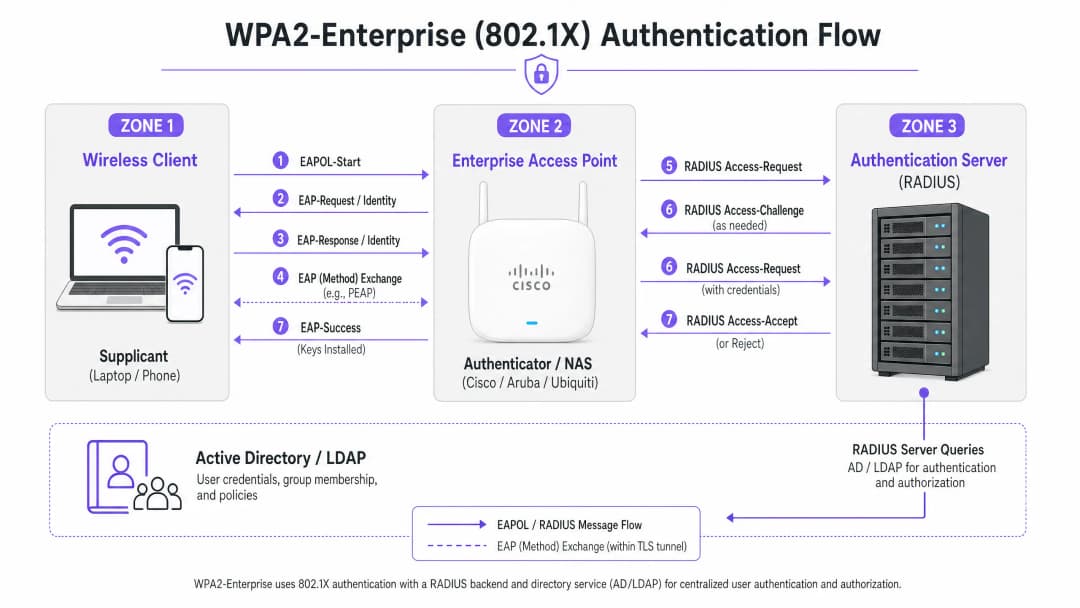
WPA2-Enterprise पोर्ट-आधारित नेटवर्क एक्सेस कंट्रोल प्रदान करने के लिए IEEE 802.1X मानक पर निर्भर करता है। WPA2-Personal के विपरीत, जो एक स्थिर Pre-Shared Key (PSK) का उपयोग करता है, WPA2-Enterprise के लिए आवश्यक है कि प्रत्येक सप्लिकेंट (क्लाइंट डिवाइस) नेटवर्क तक पहुंच प्राप्त करने से पहले एक बाहरी प्रमाणीकरण सर्वर - आमतौर पर एक RADIUS सर्वर - के विरुद्ध व्यक्तिगत रूप से प्रमाणित हो।
इस आर्किटेक्चर में तीन मुख्य घटक शामिल हैं:
- सप्लिकेंट (The Supplicant): नेटवर्क से कनेक्ट करने का प्रयास करने वाला क्लाइंट डिवाइस।
- प्रमाणकर्ता (The Authenticator): एंटरप्राइज-ग्रेड एक्सेस पॉइंट या वायरलेस LAN कंट्रोलर (उदाहरण के लिए, एक Cisco WLC या Aruba मोबिलिटी कंट्रोलर) जो प्रमाणीकरण प्रक्रिया को सुगम बनाता है।
- प्रमाणीकरण सर्वर (The Authentication Server): बैक-एंड RADIUS सर्वर (उदाहरण के लिए, Cisco ISE, Aruba ClearPass या Windows NPS), जो एक्टिव डायरेक्टरी या LDAP जैसी डायरेक्टरी सेवा के विरुद्ध क्रेडेंशियल्स को सत्यापित करता है।
EAP एक्सचेंज प्रक्रिया
प्रमाणीकरण प्रक्रिया LAN पर एक्सटेंसिबल ऑथेंटिकेशन प्रोटोकॉल (EAPOL) का उपयोग करती है। प्रारंभिक चरण के दौरान, प्रमाणकर्ता पूरी तरह से एक पारदर्शी प्रॉक्सी के रूप में कार्य करता है। एक बार जब RADIUS सर्वर ने क्रेडेंशियल्स को सत्यापित कर लिया है, तो यह प्रमाणकर्ता को एक Access-Accept संदेश भेजता है, जो फिर वायरलेस सत्र को सुरक्षित करने के लिए आवश्यक एन्क्रिप्शन कुंजियाँ प्राप्त करता है।
EAP विधि का चयन अत्यंत महत्वपूर्ण है। PEAP-MSCHAPv2 सबसे व्यापक रूप से उपयोग की जाने वाली विधि है क्योंकि यह सर्वर प्रमाणपत्र द्वारा स्थापित TLS टनल के भीतर एक्सचेंज को सुरक्षित रखते हुए पारंपरिक Active Directory पासवर्ड प्रमाणीकरण का समर्थन करती है। हालांकि, अधिकतम सुरक्षा के लिए, EAP-TLS की सिफारिश की जाती है। EAP-TLS के लिए पारस्परिक प्रमाणपत्र प्रमाणीकरण (सर्वर और क्लाइंट दोनों को वैध प्रमाणपत्र प्रस्तुत करना होगा) आवश्यक है, जो क्रेडेंशियल चोरी से बचाता है लेकिन प्रमाणपत्र वितरण के लिए एक मजबूत पब्लिक की इन्फ्रास्ट्रक्चर (PKI) या मोबाइल डिवाइस मैनेजमेंट (MDM) समाधान की मांग करता है।
कार्यान्वयन मार्गदर्शिका
WPA2-Enterprise को कॉन्फ़िगर करने के मूलभूत सिद्धांत सभी वेंडरों में समान हैं, लेकिन इसका निष्पादन प्रबंधन इंटरफ़ेस और इकोसिस्टम के अनुसार भिन्न होता है।

Cisco (Catalyst और Meraki)
Cisco वातावरण आमतौर पर कैंपस परिनियोजन से लेकर वितरित उद्यम नेटवर्क तक के पैमाने में होते हैं।
Cisco Catalyst (WLC/DNA Center):
- RADIUS सर्वर परिभाषित करें: "Security" टैब पर जाएं, "AAA" चुनें, और प्राथमिक व माध्यमिक RADIUS प्रमाणीकरण और अकाउंटिंग सर्वर कॉन्फ़िगर करें। सुनिश्चित करें कि साझा रहस्य RADIUS सर्वर कॉन्फ़िगरेशन से मेल खाता है।
- WLAN प्रोफाइल बनाएं: "WLANs" टैब के अंतर्गत, एक नया प्रोफाइल बनाएं।
- सुरक्षा नीति कॉन्फ़िगर करें: लेयर 2 सुरक्षा को WPA+WPA2 पर सेट करें और 802.1X को प्रमाणीकरण कुंजी प्रबंधन (AKM) विधि के रूप में सक्षम करें।
- AAA सर्वर को बाइंड करें: पहले से परिभाषित RADIUS सर्वर को WLAN प्रोफाइल से मैप करें। यदि डायनेमिक VLAN असाइनमेंट आवश्यक है, तो "AAA Override" सक्षम करें।
Cisco Meraki:
- SSID कॉन्फ़िगरेशन: Meraki डैशबोर्ड में, Wireless > SSIDs पर जाएं और लक्षित नेटवर्क चुनें।
- एक्सेस कंट्रोल: एसोसिएशन आवश्यकता को "WPA2-Enterprise with my RADIUS server" पर सेट करें।
- RADIUS सेटिंग्स: अपने RADIUS इन्फ्रास्ट्रक्चर का IP पता, प्रमाणीकरण पोर्ट (आमतौर पर 1812), अकाउंटिंग पोर्ट (1813) और साझा रहस्य दर्ज करें। Meraki डैशबोर्ड में परिनियोजन से पहले RADIUS कनेक्टिविटी को सत्यापित करने के लिए एक अंतर्निहित परीक्षण उपकरण शामिल है।
Aruba Networks
Aruba Hospitality और उच्च शिक्षा में प्रमुख प्लेटफॉर्म है, जो उन्नत एक्सेस कंट्रोल के लिए अपने ClearPass पॉलिसी मैनेजर का व्यापक उपयोग करता है।
- एक AAA प्रोफाइल परिभाषित करें: Aruba Central या Mobility Controller UI में, एक नया AAA प्रोफाइल बनाएं। यह प्रोफाइल यह निर्धारित करती है कि प्रमाणीकरण को कैसे संभाला जाता है।
- एक RADIUS सर्वर समूह कॉन्फ़िगर करें: अपने RADIUS सर्वर को एक सर्वर समूह में जोड़ें, जिसमें फ़ेलओवर नियम और टाइमआउट मान निर्दिष्ट हों। इस समूह को AAA प्रोफाइल से जोड़ें।3. Virtual AP कॉन्फ़िगरेशन: Virtual AP (SSID) प्रोफ़ाइल बनाएं या संशोधित करें। सुरक्षा प्रकार को WPA2-Enterprise पर सेट करें।
- प्रोफ़ाइल बाइंड करें: AAA प्रोफ़ाइल को Virtual AP प्रोफ़ाइल से बाइंड करें। यदि ClearPass का उपयोग कर रहे हैं, तो सुनिश्चित करें कि गतिशील नीति लागू करने को सक्षम करने के लिए RADIUS CoA (Change of Authorization) पोर्ट (3799) को किसी भी मध्यवर्ती फ़ायरवॉल के माध्यम से अनुमति दी गई है।
Ubiquiti (UniFi)
Ubiquiti, UniFi Network Controller के माध्यम से, Retail और SMB परिवेशों के लिए एक लागत प्रभावी समाधान प्रदान करता है।
- एक RADIUS प्रोफ़ाइल बनाएं: Settings > Profiles > RADIUS पर जाएं। अपने बाहरी RADIUS सर्वर के IP एड्रेस, पोर्ट (1812/1813) और शेयर्ड सीक्रेट का उपयोग करके एक नई प्रोफ़ाइल बनाएं।
- SSID कॉन्फ़िगरेशन: Settings > WiFi पर जाएं और एक नया वायरलेस नेटवर्क बनाएं।
- सुरक्षा सेटिंग्स: सुरक्षा प्रोटोकॉल के रूप में "WPA2 Enterprise" चुनें और नई बनाई गई RADIUS प्रोफ़ाइल को बाइंड करें।
- RADIUS आर्किटेक्चर विचार: एंटरप्राइज़-ग्रेड कंट्रोलर्स के विपरीत जो स्थानीय रूप से जीवित रहने योग्य RADIUS की पेशकश कर सकते हैं, UniFi बाहरी सर्वरों (उदाहरण के लिए, FreeRADIUS या Windows NPS) पर बहुत अधिक निर्भर करता है। UniFi APs और RADIUS बैक-एंड के बीच विश्वसनीय कनेक्टिविटी सुनिश्चित करें।
अपने विशिष्ट सेटअप को लेकर कोई सवाल हैं?
हमारी टीम 80,000 से अधिक वेन्यू में वेन्यू ऑपरेटरों, IT मैनेजरों और नेटवर्क इंजीनियरों के साथ काम करती है। 20 मिनट का कॉल बुक करें और हम आपको दिखाएंगे कि आपके जैसे अन्य लोगों ने इसे कैसे हल किया।
सर्वोत्तम प्रथाएं
यह सुनिश्चित करने के लिए कि परिनियोजन लचीला और सुरक्षित दोनों है, नेटवर्क आर्किटेक्ट्स को कई महत्वपूर्ण सर्वोत्तम प्रथाओं का पालन करना चाहिए:
- प्रमाणपत्र सत्यापन लागू करें: क्लाइंट डिवाइसों को स्पष्ट रूप से कॉन्फ़िगर किया जाना चाहिए ताकि वे एक विश्वसनीय प्रमाणपत्र प्राधिकरण (CA) के खिलाफ RADIUS सर्वर के प्रमाणपत्र को सत्यापित कर सकें। ऐसा न करने पर नेटवर्क पर "Evil Twin" हमलों का खतरा रहता है, जिससे एक दुष्ट एक्सेस पॉइंट उपयोगकर्ता क्रेडेंशियल चुरा सकता है।
- RADIUS रिडंडेंसी लागू करें: RADIUS सर्वर नेटवर्क एक्सेस के लिए महत्वपूर्ण पथ में स्थित होता है। हमेशा प्राथमिक और माध्यमिक RADIUS सर्वर कॉन्फ़िगर करें। वितरित परिवेशों में, उच्च उपलब्धता के लिए क्लाउड-होस्टेड RADIUS समाधान पर विचार करें।
- गतिशील VLAN असाइनमेंट का लाभ उठाएं: उपयोगकर्ताओं को उनकी Active Directory समूह सदस्यता के आधार पर विशिष्ट VLAN में गतिशील रूप से असाइन करने के लिए RADIUS विशेषताओं (जैसे
Tunnel-Pvt-Group-ID) का उपयोग करें। यह एकाधिक SSIDs को प्रसारित किए बिना नेटवर्क विभाजन को लागू करता है। - RADIUS एकाउंटिंग सक्षम करें: केवल प्रमाणीकरण को ही कॉन्फ़िगर न करें। अनुपालन संरचनाओं द्वारा आवश्यक ऑडिट ट्रेल्स उत्पन्न करने के लिए RADIUS एकाउंटिंग (पोर्ट 1813) अनिवार्य है।
- नेटवर्क एज को सुरक्षित करें: हमारे गाइड Protecting Your Network with Robust DNS and Security में अपने बुनियादी ढांचे की सुरक्षा के बारे में अधिक पढ़ें।
समस्या निवारण और जोखिम न्यूनीकरण
सावधानीपूर्वक योजना बनाने के बाद भी, परिनियोजन में समस्याएं आ सकती हैं। सामान्य विफलता मोड में शामिल हैं:
- शेयर्ड सीक्रेट बेमेल: RADIUS शेयर्ड सीक्रेट में एक साधारण टाइपो साइलेंट प्रमाणीकरण विफलताओं का कारण बनता है। ऑथेंटिकेटर और RADIUS सर्वर दोनों पर सीक्रेट को सत्यापित करें।
- समय सिंक्रनाइज़ेशन त्रुटियां: प्रमाणपत्र सत्यापन के लिए सटीक टाइमस्टैम्प की आवश्यकता होती है। सुनिश्चित करें कि सभी APs, कंट्रोलर्स और RADIUS सर्वर एक विश्वसनीय NTP स्रोत के माध्यम से सिंक्रनाइज़ हैं।
- RADIUS ट्रैफ़िक को ब्लॉक करने वाले फ़ायरवॉल: सुनिश्चित करें कि APs/कंट्रोलर्स और RADIUS सर्वर के बीच UDP पोर्ट 1812 (प्रमाणीकरण) और 1813 (अकाउंटिंग) खुले हैं। यदि CoA का उपयोग कर रहे हैं, तो सुनिश्चित करें कि UDP 3799 खुला है।
- क्लाइंट का गलत कॉन्फ़िगरेशन: सबसे आम समस्या यह है कि क्लाइंट डिवाइस को उस CA पर भरोसा करने के लिए कॉन्फ़िगर नहीं किया जाता है जिसने RADIUS सर्वर का सर्टिफिकेट जारी किया है। कॉर्पोरेट डिवाइसों पर सही वायरलेस प्रोफ़ाइल भेजने के लिए MDM या ग्रुप पॉलिसी का उपयोग करें।
प्रमाणीकरण प्रोटोकॉल की व्यापक समझ के लिए, देखें How to Configure 802.1X WiFi Authentication: A Step-by-Step Guide।
ROI और व्यावसायिक प्रभाव
सुरक्षा में ठोस सुधार के अलावा, WPA2-Enterprise पर स्थानांतरित होना महत्वपूर्ण व्यावसायिक मूल्य प्रदान करता है।
- जोखिम में कमी: साझा किए गए पासवर्ड को समाप्त करने से हमले की संभावना और डेटा ब्रीच का जोखिम नाटकीय रूप से कम हो जाता है, जिसके गंभीर वित्तीय और प्रतिष्ठित परिणाम हो सकते हैं।
- परिचालन दक्षता: अपने मौजूदा पहचान प्रदाता (जैसे कि Active Directory) के साथ WiFi प्रमाणीकरण को एकीकृत करने से कर्मचारियों की स्वचालित ऑनबोर्डिंग और ऑफबोर्डिंग सक्षम होती है। जब कोई कर्मचारी छोड़ता है, तो उसके AD खाते को अक्षम करने से उसकी WiFi पहुंच तुरंत रद्द हो जाती है।
- अनुपालन संरेखण: PCI-DSS और ISO 27001 अनुपालन के लिए विस्तृत ऑडिट ट्रेल और प्रति-उपयोगकर्ता प्रमाणीकरण आवश्यक शर्तें हैं।
- एकीकृत बुनियादी ढांचा: डायनेमिक VLAN असाइनमेंट का उपयोग करके, स्थान कॉर्पोरेट, बैक-ऑफ-हाउस और IoT ट्रैफ़िक को उसी भौतिक हार्डवेयर पर सुरक्षित रूप से चला सकते हैं जिसका उपयोग अतिथि पहुंच के लिए किया जाता है। अतिथि नेटवर्क को फिर एक समर्पित WiFi Analytics समाधान का उपयोग करके मुद्रित (monetised) और विश्लेषण किया जा सकता है, जिससे हार्डवेयर निवेश पर रिटर्न अधिकतम होता है। What Is a Leased Line? Dedicated Business Internet को समझकर सुनिश्चित करें कि आपके पास पर्याप्त बैंडविड्थ है।
मुख्य परिभाषाएं
WPA2-Enterprise
वायरलेस नेटवर्क के लिए एक सुरक्षा प्रोटोकॉल जो एक एकल साझा पासवर्ड के बजाय, एक बाहरी सर्वर के माध्यम से प्रति-उपयोगकर्ता प्रमाणीकरण प्रदान करने के लिए IEEE 802.1X का उपयोग करता है।
एंटरप्राइज़ परिवेशों में कॉर्पोरेट और परिचालन WiFi नेटवर्क को सुरक्षित करने के लिए अनिवार्य मानक।
802.1X
पोर्ट-आधारित नेटवर्क एक्सेस कंट्रोल के लिए एक IEEE मानक जो LAN या WLAN से जुड़ने की इच्छा रखने वाले उपकरणों को एक प्रमाणीकरण तंत्र प्रदान करता है।
वह अंतर्निहित ढांचा जो WPA2-Enterprise को काम करने योग्य बनाता है।
RADIUS
रिमोट ऑथेंटिकेशन डायल-इन यूजर सर्विस; एक नेटवर्किंग प्रोटोकॉल जो केंद्रीकृत प्रमाणीकरण (Authentication), प्राधिकरण (Authorisation), और लेखाकरण (Accounting) (AAA) प्रबंधन प्रदान करता है।
सर्वर घटक जो Active Directory जैसे डेटाबेस के विरुद्ध उपयोगकर्ता क्रेडेंशियल को सत्यापित करता है।
Supplicant
किसी डिवाइस (लैपटॉप, स्मार्टफोन) पर मौजूद सॉफ़्टवेयर क्लाइंट जो नेटवर्क एक्सेस का अनुरोध करने के लिए प्रमाणक (authenticator) के साथ संचार करता है।
एंडपॉइंट जिसे सही EAP सेटिंग्स और प्रमाणपत्र ट्रस्ट के साथ कॉन्फ़िगर किया जाना चाहिए।
Authenticator
नेटवर्क डिवाइस (एक्सेस पॉइंट या स्विच) जो सप्लीकेंट और प्रमाणीकरण सर्वर के बीच संदेश भेजकर प्रमाणीकरण प्रक्रिया को सुगम बनाता है।
IT टीम द्वारा प्रबंधित Cisco, Aruba, या Ubiquiti हार्डवेयर।
EAP (Extensible Authentication Protocol)
वायरलेस नेटवर्क और पॉइंट-टू-पॉइंट कनेक्शन में अक्सर उपयोग किया जाने वाला एक प्रमाणीकरण ढांचा, जो कई प्रमाणीकरण विधियों का समर्थन करता है।
क्रेडेंशियल एक्सचेंज को एनकैप्सुलेट करने के लिए उपयोग किया जाने वाला प्रोटोकॉल।
PEAP-MSCHAPv2
एक EAP विधि जो सर्वर के प्रमाणपत्र द्वारा स्थापित एक सुरक्षित TLS टनल के भीतर MSCHAPv2 पासवर्ड एक्सचेंज को एनकैप्सुलेट करती है।
सबसे आम परिनियोजन विधि क्योंकि यह मानक AD पासवर्ड का उपयोग करने की सुविधा के साथ सुरक्षा को संतुलित करती है।
Dynamic VLAN Assignment
वह प्रक्रिया जिसमें एक RADIUS सर्वर एक्सेस पॉइंट को उपयोगकर्ता की पहचान या समूह सदस्यता के आधार पर एक विशिष्ट VLAN पर रखने का निर्देश देता है।
नेटवर्क सेगमेंटेशन के लिए महत्वपूर्ण है, जिससे विभिन्न प्रकार के उपयोगकर्ता सुरक्षित रूप से समान भौतिक APs को साझा कर सकें।
हल किए गए उदाहरण
एक 200 कमरों वाले होटल को अपने बैक-ऑफ-हाउस स्टाफ (हाउसकीपिंग, प्रबंधन) के लिए मौजूदा Aruba एक्सेस पॉइंट्स का उपयोग करके सुरक्षित WiFi स्थापित करने की आवश्यकता है, जबकि स्टाफ ट्रैफ़िक को अतिथि नेटवर्क से पूरी तरह से अलग रखना है।
IT टीम WPA2-Enterprise का उपयोग करके एक एकल 'Hotel_Staff' SSID कॉन्फ़िगर करती है। वे Aruba ClearPass को होटल के Active Directory के साथ एकीकृत करते हैं। ClearPass में, वे प्रवर्तन नीतियां कॉन्फ़िगर करते हैं: यदि कोई उपयोगकर्ता 'Management' AD समूह में है, तो ClearPass एक RADIUS विशेषता लौटाता है जो उन्हें VLAN 10 (मैनेजमेंट नेटवर्क) में असाइन करता है। यदि उपयोगकर्ता 'Housekeeping' समूह में है, तो उन्हें VLAN 20 (ऑपरेशन्स नेटवर्क) में असाइन किया जाता है। APs को इन डायनेमिक VLAN असाइनमेंट को लागू करने के लिए कॉन्फ़िगर किया गया है।
50 स्थानों वाली एक राष्ट्रीय रिटेल श्रृंखला Cisco Meraki का उपयोग करती है। उन्हें PCI DSS अनुपालन को पूरा करने के लिए अपने पुराने WPA2-Personal सेटअप को बदलकर, WiFi पर अपने पॉइंट-ऑफ-सेल (POS) टर्मिनलों को सुरक्षित करने की आवश्यकता है।
नेटवर्क आर्किटेक्ट प्रत्येक स्टोर पर स्थानीय सर्वर स्थापित करने से बचने के लिए क्लाउड-होस्ट की गई RADIUS सेवा तैनात करता है। Meraki डैशबोर्ड में, वे WPA2-Enterprise के लिए 'Retail_POS' SSID कॉन्फ़ि加र करते हैं और इसे क्लाउड RADIUS IPs पर इंगित करते हैं। वे अपने MDM प्लेटफ़ॉर्म के माध्यम से प्रत्येक POS टर्मिनल के लिए अद्वितीय क्लाइंट प्रमाणपत्र उत्पन्न करते हैं और RADIUS सर्वर को EAP-TLS की आवश्यकता के लिए कॉन्फ़िगर करते हैं। Meraki APs को क्लाउड सेवा में RADIUS Authentication और Accounting दोनों डेटा भेजने के लिए कॉन्फ़िगर किया गया है।
अभ्यास प्रश्न
Q1. आपका संगठन Ubiquiti UniFi एक्सेस पॉइंट्स का उपयोग करके WPA2-Enterprise तैनात कर रहा है। परीक्षण के दौरान, क्लाइंट सफलतापूर्वक कनेक्ट हो सकते हैं, लेकिन अनुपालन टीम ने ध्यान दिया कि केंद्रीय लॉगिंग सिस्टम में उपयोगकर्ता सत्र की अवधि या डेटा उपयोग का कोई लॉग नहीं है। सबसे संभावित कॉन्फ़िगरेशन चूक क्या है?
संकेत: ऑथेंटिकेशन एक्सेस प्रदान करता है, लेकिन एक अन्य प्रक्रिया उपयोग को ट्रैक करती है।
मॉडल उत्तर देखें
RADIUS Accounting पोर्ट (1813) कॉन्फ़िगर नहीं किया गया है या फ़ायरवॉल द्वारा ब्लॉक किया जा रहा है। हालांकि ऑथेंटिकेशन (पोर्ट 1812) काम कर रहा है, सत्र ऑडिट ट्रेल जेनरेट करने के लिए Accounting को स्पष्ट रूप से सक्षम किया जाना चाहिए।
Q2. एक उपयोगकर्ता रिपोर्ट करता है कि वे कॉर्पोरेट WPA2-Enterprise नेटवर्क से कनेक्ट नहीं हो पा रहे हैं। आप Cisco WLC लॉग्स की जाँच करते हैं और देखते हैं कि AP EAP-Request पास कर रहा है, लेकिन RADIUS सर्वर लॉग्स 'Unknown CA' के कारण 'Access-Reject' दिखाते हैं। क्या ठीक करने की आवश्यकता है?
संकेत: TLS टनल सेटअप के दौरान स्थापित विश्वास संबंध के बारे में सोचें।
मॉडल उत्तर देखें
क्लाइंट डिवाइस का सप्लीकेंट उस सर्टिफिकेट अथॉरिटी (CA) पर भरोसा करने के लिए कॉन्फ़िगर नहीं है जिसने RADIUS सर्वर का प्रमाणपत्र जारी किया है। संभावित Evil Twin हमले को रोकने के लिए क्लाइंट कनेक्शन को समाप्त कर रहा है। CA प्रमाणपत्र को क्लाइंट डिवाइस पर पुश किया जाना चाहिए।
Q3. आप एक स्टेडियम के लिए एक नेटवर्क डिजाइन कर रहे हैं। आपको कॉर्पोरेट कर्मचारियों, टिकटिंग टर्मिनलों और गेस्ट WiFi का समर्थन करने की आवश्यकता है। सुरक्षा बनाए रखते हुए RF व्यवधान को कम करने के लिए आपको SSIDs को कैसे डिजाइन करना चाहिए?
संकेत: प्रत्येक उपयोग के मामले के लिए SSID प्रसारित करने से बचें।
मॉडल उत्तर देखें
अधिकतम दो SSIDs तैनात करें। Captive Portal (जैसे Purple) का उपयोग करने वाले मेहमानों के लिए एक SSID। WPA2-Enterprise का उपयोग करके सभी कॉर्पोरेट संचालन के लिए एक दूसरा SSID। उनके ऑथेंटिकेशन क्रेडेंशियल्स के आधार पर कॉर्पोरेट कर्मचारियों को एक VLAN पर और टिकटिंग टर्मिनलों को दूसरे VLAN पर सेगमेंट करने के लिए RADIUS सर्वर के माध्यम से Dynamic VLAN Assignment का उपयोग करें।
इस श्रृंखला में आगे पढ़ें
गैस्ट WiFi के लिए RADIUS ऑथेंटिकेशन कॉन्फ़िगर करने के लिए एक नेटवर्क एडमिनिस्ट्रेटर की गाइड
गैस्ट WiFi के लिए RADIUS ऑथेंटिकेशन को डिप्लॉय करने पर नेटवर्क एडमिनिस्ट्रेटर के लिए एक व्यापक तकनीकी संदर्भ। इसमें आर्किटेक्चर, वेंडर-न्यूट्रल कॉन्फ़िगरेशन स्टेप्स, सुरक्षा के सर्वोत्तम तरीके और सामान्य डिप्लॉयमेंट विफलताओं को हल करना शामिल है।
उच्च शिक्षा में सुरक्षित BYOD और 802.1X WiFi के लिए SCEP लागू करना
यह तकनीकी मार्गदर्शिका विस्तार से बताती है कि कैसे उच्च शिक्षा IT टीमें SCEP का उपयोग करके हजारों BYOD उपकरणों के लिए 802.1X प्रमाणपत्र नामांकन को स्वचालित कर सकती हैं। इसमें आर्किटेक्चर, सुरक्षा लाभ और मैनुअल ऑनबोर्डिंग को एक सुरक्षित, जीरो-टच नेटवर्क एक्सेस मॉडल से बदलने के व्यावहारिक तैनाती कदम शामिल हैं।
अतिथि और स्टाफ WiFi नेटवर्क के लिए RADIUS ऑथेंटिकेशन को कॉन्फ़िगर करना
यह तकनीकी संदर्भ गाइड एंटरप्राइज़ अतिथि और स्टाफ WiFi नेटवर्क के लिए RADIUS ऑथेंटिकेशन के आर्किटेक्चर, कॉन्फ़िगरेशन और डिप्लॉयमेंट की रूपरेखा तैयार करती है। यह नेटवर्क आर्किटेक्ट्स और IT प्रबंधकों को सुरक्षित, स्केलेबल वायरलेस एक्सेस कंट्रोल सिस्टम बनाने के लिए आवश्यक सटीक प्रोटोकॉल, सुरक्षा मानक और ट्रबलशूटिंग कार्यप्रणाली प्रदान करती है।
अपने विशिष्ट सेटअप को लेकर कोई सवाल हैं?
हमारी टीम 80,000 से अधिक वेन्यू में वेन्यू ऑपरेटरों, IT मैनेजरों और नेटवर्क इंजीनियरों के साथ काम करती है। 20 मिनट का कॉल बुक करें और हम आपको दिखाएंगे कि आपके जैसे अन्य लोगों ने इसे कैसे हल किया।