
How to Configure WPA2-Enterprise on Common Access Point Platforms (Cisco, Aruba, Ubiquiti)
This technical reference guide provides senior IT professionals and network architects with a definitive, vendor-specific walkthrough for deploying WPA2-Enterprise on Cisco, Aruba, and Ubiquiti platforms. It details architecture, RADIUS integration, compliance requirements, and real-world deployment scenarios across enterprise and venue environments.
Video overview
Listen to this guide
View podcast transcript
Part of our core series: Enterprise WiFi Security Guide →
Executive Summary
Deploying WPA2-Enterprise is no longer an optional security upgrade - it is the essential baseline for any enterprise-grade wireless network. For IT managers and network architects operating in hospitality, retail and public sector environments, the move away from Pre-Shared Keys towards 802.1X authentication is driven by stringent compliance mandates, including PCI DSS and CCPA/CPRA. This technical reference guide provides concrete, actionable, platform-specific configuration steps for the three leading access point vendors: Cisco, Aruba and Ubiquiti.
By transitioning to WPA2-Enterprise, enterprise organizations can eliminate the risks associated with shared credentials, gain granular per-session audit trails, and enable dynamic network segmentation. When implemented correctly, this architecture not only secures the corporate perimeter but also integrates seamlessly with visitor networks managed through a comprehensive Guest WiFi platform. The following sections detail the technical architecture, deployment steps and risk mitigation strategies required for a successful rollout.
Technical Deep-Dive
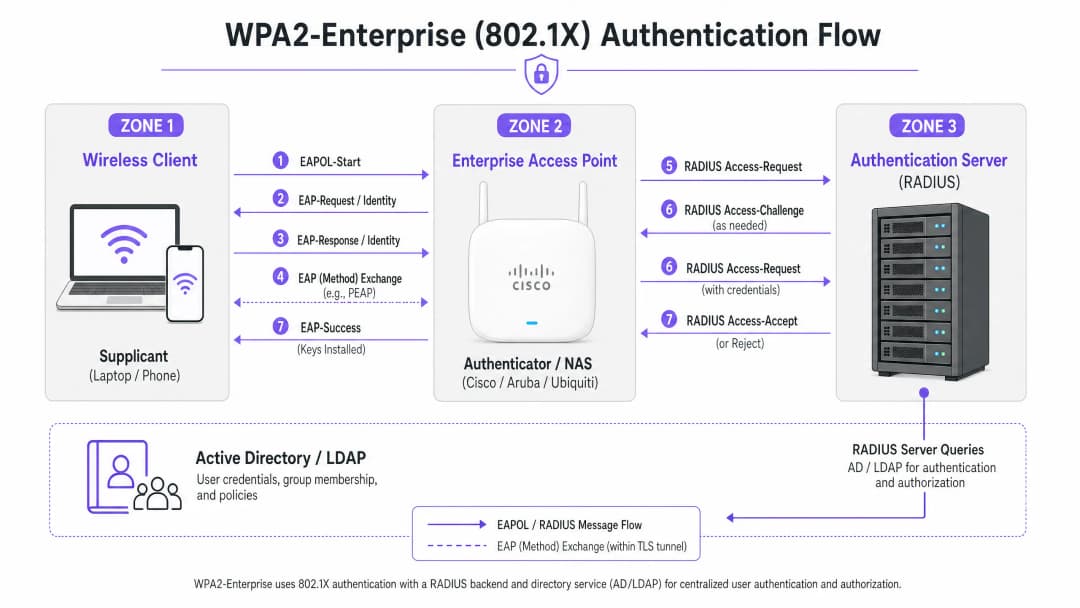
WPA2-Enterprise relies on the IEEE 802.1X standard to deliver port-based network access control. Unlike WPA2-Personal, which uses a static Pre-Shared Key (PSK), WPA2-Enterprise requires every supplicant (client device) to authenticate individually against an external authentication server - typically a RADIUS server - before being granted access to the network.
The architecture consists of three principal components:
- The Supplicant: The client device attempting to connect to the network.
- The Authenticator: The enterprise-grade access point or wireless LAN controller (for example, a Cisco WLC or Aruba Mobility Controller) that facilitates the authentication process.
- The Authentication Server: The back-end RADIUS server (for example, Cisco ISE, Aruba ClearPass or Windows NPS), which validates credentials against a directory service such as Active Directory or LDAP.
The EAP Exchange Process
The authentication process utilizes the Extensible Authentication Protocol over LAN (EAPOL). During the initial phase, the authenticator acts purely as a transparent proxy. Once the RADIUS server has validated the credentials, it returns an Access-Accept message to the authenticator, which then derives the encryption keys required to secure the wireless session.
The choice of EAP method is critical. PEAP-MSCHAPv2 is the most widely deployed method because it supports traditional Active Directory password authentication while protecting the exchange within a TLS tunnel established by the server certificate. For maximum security, however, EAP-TLS is recommended. EAP-TLS requires mutual certificate authentication (both the server and the client must present valid certificates), which protects against credential theft but demands a robust Public Key Infrastructure (PKI) or Mobile Device Management (MDM) solution for certificate distribution.
Got questions about your specific setup?
Our team works with venue operators, IT managers, and network engineers across 80,000 venues. Book a 20-minute call and we will show you how others like you solved it.
Implementation Guide
The fundamental principles of configuring WPA2-Enterprise are consistent across vendors, but the execution varies according to the management interface and ecosystem.

Cisco (Catalyst and Meraki)
Cisco environments typically range in scale from campus deployments to distributed enterprise networks.
Cisco Catalyst (WLC/DNA Center):
- Define the RADIUS servers: Navigate to the "Security" tab, select "AAA", and configure primary and secondary RADIUS authentication and accounting servers. Ensure the shared secret matches the RADIUS server configuration.
- Create a WLAN profile: Under the "WLANs" tab, create a new profile.
- Configure the security policy: Set Layer 2 Security to WPA+WPA2 and enable 802.1X as the Authentication Key Management (AKM) method.
- Bind the AAA servers: Map the previously defined RADIUS servers to the WLAN profile. If dynamic VLAN assignment is required, enable "AAA Override".
Cisco Meraki:
- SSID configuration: In the Meraki dashboard, navigate to Wireless > SSIDs and select the target network.
- Access control: Set the association requirement to "WPA2-Enterprise with my RADIUS server".
- RADIUS settings: Enter the IP address of your RADIUS infrastructure, the authentication port (typically 1812), the accounting port (1813), and the shared secret. The Meraki dashboard includes a built-in test tool to verify RADIUS connectivity before deployment.
Aruba Networks
Aruba is the dominant platform in Hospitality and higher education, making extensive use of its ClearPass Policy Manager for advanced access control.
- Define an AAA profile: In Aruba Central or the Mobility Controller UI, create a new AAA profile. This profile determines how authentication is handled.
- Configure a RADIUS server group: Add your RADIUS servers to a server group, specifying failover rules and timeout values. Attach this group to the AAA profile.
- Virtual AP configuration: Create or modify the Virtual AP (SSID) profile. Set the security type to WPA2-Enterprise.
- Bind the profiles: Bind the AAA profile to the Virtual AP profile. If using ClearPass, ensure the RADIUS CoA (Change of Authorization) port (3799) is permitted through any intermediate firewalls to enable dynamic policy enforcement.
Ubiquiti (UniFi)
Ubiquiti, through the UniFi Network Controller, offers a cost-effective solution for Retail and SMB environments.
- Create a RADIUS profile: Navigate to Settings > Profiles > RADIUS. Create a new profile using the IP address, ports (1812/1813) and shared secret of your external RADIUS server.
- SSID configuration: Go to Settings > WiFi and create a new wireless network.
- Security settings: Select "WPA2 Enterprise" as the security protocol and bind the newly created RADIUS profile.
- RADIUS architecture considerations: Unlike enterprise-grade controllers that may offer local survivable RADIUS, UniFi relies heavily on external servers (for example, FreeRADIUS or Windows NPS). Ensure reliable connectivity between the UniFi APs and the RADIUS back-end.
Best Practices
To ensure the deployment is both resilient and secure, network architects must follow several critical best practices:
- Enforce certificate validation: Client devices must be explicitly configured to validate the RADIUS server's certificate against a trusted Certificate Authority (CA). Failure to do so exposes the network to "Evil Twin" attacks, allowing a rogue access point to harvest user credentials.
- Implement RADIUS redundancy: The RADIUS server sits in the critical path for network access. Always configure primary and secondary RADIUS servers. In distributed environments, consider a cloud-hosted RADIUS solution for high availability.
- Leverage dynamic VLAN assignment: Use RADIUS attributes (such as
Tunnel-Pvt-Group-ID) to dynamically assign users to specific VLANs based on their Active Directory group membership. This enforces network segmentation without broadcasting multiple SSIDs. - Enable RADIUS Accounting: Do not configure authentication alone. RADIUS Accounting (port 1813) is mandatory for generating the audit trails required by compliance frameworks.
- Secure the network edge: Read more about protecting your infrastructure in our guide Protecting Your Network with Robust DNS and Security.
Troubleshooting and Risk Mitigation
Even with careful planning, deployments can run into problems. Common failure modes include:
- Shared secret mismatch: A simple typo in the RADIUS shared secret causes silent authentication failures. Verify the secret on both the authenticator and the RADIUS server.
- Time synchronization errors: Certificate validation requires accurate timestamps. Ensure all APs, controllers and RADIUS servers are synchronized via a reliable NTP source.
- Firewalls blocking RADIUS traffic: Ensure UDP ports 1812 (authentication) and 1813 (accounting) are open between the APs/controllers and the RADIUS servers. If using CoA, ensure UDP 3799 is open.
- Client misconfiguration: The most common issue is client devices not being configured to trust the CA that issued the RADIUS server's certificate. Use MDM or Group Policy to push the correct wireless profile to corporate devices.
For a broader understanding of the authentication protocol, see How to Configure 802.1X WiFi Authentication: A Step-by-Step Guide.
ROI and Business Impact
Beyond the tangible security uplift, transitioning to WPA2-Enterprise delivers significant business value.
- Risk reduction: Eliminating shared passwords dramatically reduces the attack surface and the risk of a data breach, which can carry severe financial and reputational consequences.
- Operational efficiency: Integrating WiFi authentication with your existing identity provider (such as Active Directory) enables automated staff onboarding and offboarding. When an employee leaves, disabling their AD account instantly revokes their WiFi access.
- Compliance alignment: Detailed audit trails and per-user authentication are prerequisites for PCI DSS and ISO 27001 compliance.
- Unified infrastructure: By using dynamic VLAN assignment, venues can securely run corporate, back-of-house, and IoT traffic on the same physical hardware used for guest access. The guest network can then be monetized and analyzed using a dedicated WiFi Analytics solution, maximizing the return on hardware investment. Ensure you have sufficient bandwidth by understanding What Is a Leased Line? Dedicated Business Internet.
Key Definitions
WPA2-Enterprise
A security protocol for wireless networks that uses IEEE 802.1X to provide per-user authentication via an external server, rather than a single shared password.
The mandatory standard for securing corporate and operational WiFi networks in enterprise environments.
802.1X
An IEEE standard for port-based network access control that provides an authentication mechanism to devices wishing to attach to a LAN or WLAN.
The underlying framework that makes WPA2-Enterprise work.
RADIUS
Remote Authentication Dial-In User Service; a networking protocol that provides centralized Authentication, Authorization, and Accounting (AAA) management.
The server component that validates user credentials against a database like Active Directory.
Supplicant
The software client on a device (laptop, smartphone) that communicates with the authenticator to request network access.
The endpoint that must be configured with the correct EAP settings and certificate trust.
Authenticator
The network device (Access Point or Switch) that facilitates the authentication process by passing messages between the supplicant and the authentication server.
The Cisco, Aruba, or Ubiquiti hardware managed by the IT team.
EAP (Extensible Authentication Protocol)
An authentication framework frequently used in wireless networks and point-to-point connections, supporting multiple authentication methods.
The protocol used to encapsulate the credential exchange.
PEAP-MSCHAPv2
An EAP method that encapsulates the MSCHAPv2 password exchange within a secure TLS tunnel established by the server's certificate.
The most common deployment method as it balances security with the convenience of using standard AD passwords.
Dynamic VLAN Assignment
The process where a RADIUS server instructs the access point to place an authenticated user onto a specific VLAN based on their identity or group membership.
Crucial for network segmentation, allowing different user types to share the same physical APs securely.
Worked Examples
A 200-room hotel needs to deploy secure WiFi for its back-of-house staff (housekeeping, management) using existing Aruba access points, while keeping the staff traffic strictly separated from the guest network.
The IT team configures a single 'Hotel_Staff' SSID using WPA2-Enterprise. They integrate Aruba ClearPass with the hotel's Active Directory. In ClearPass, they configure enforcement policies: if a user is in the 'Management' AD group, ClearPass returns a RADIUS attribute assigning them to VLAN 10 (Management Network). If the user is in the 'Housekeeping' group, they are assigned to VLAN 20 (Operations Network). The APs are configured to enforce these dynamic VLAN assignments.
A national retail chain with 50 locations uses Cisco Meraki. They need to secure their point-of-sale (POS) terminals over WiFi to meet PCI-DSS compliance, replacing their old WPA2-Personal setup.
The network architect deploys a cloud-hosted RADIUS service to avoid deploying local servers at each store. In the Meraki dashboard, they configure the 'Retail_POS' SSID for WPA2-Enterprise and point it to the cloud RADIUS IPs. They generate unique client certificates for each POS terminal via their MDM platform and configure the RADIUS server to require EAP-TLS. The Meraki APs are configured to send both RADIUS Authentication and Accounting data to the cloud service.
Practice Questions
Q1. Your organization is deploying WPA2-Enterprise using Ubiquiti UniFi access points. During testing, clients can connect successfully, but the compliance team notes that there are no logs of user session durations or data usage in the central logging system. What is the most likely configuration omission?
Hint: Authentication grants access, but another process tracks usage.
View model answer
The RADIUS Accounting port (1813) has not been configured or is being blocked by a firewall. While Authentication (port 1812) is working, Accounting must be explicitly enabled to generate session audit trails.
Q2. A user reports they cannot connect to the corporate WPA2-Enterprise network. You check the Cisco WLC logs and see the AP is passing the EAP-Request, but the RADIUS server logs show an 'Access-Reject' due to 'Unknown CA'. What needs to be fixed?
Hint: Think about the trust relationship established during the TLS tunnel setup.
View model answer
The client device's supplicant is not configured to trust the Certificate Authority (CA) that issued the RADIUS server's certificate. The client is terminating the connection to prevent a potential Evil Twin attack. The CA certificate must be pushed to the client device.
Q3. You are designing a network for a stadium. You need to support corporate staff, ticketing terminals, and guest WiFi. How should you architect the SSIDs to minimize RF interference while maintaining security?
Hint: Avoid broadcasting an SSID for every single use case.
View model answer
Deploy a maximum of two SSIDs. One SSID for Guests using a Captive Portal (like Purple). A second SSID for all corporate operations using WPA2-Enterprise. Use Dynamic VLAN Assignment via the RADIUS server to segment the corporate staff onto one VLAN and the ticketing terminals onto another based on their authentication credentials.
Continue reading in this series
A Network Administrator’s Guide to Configuring RADIUS Authentication for Guest WiFi
A comprehensive technical reference for network administrators on deploying RADIUS authentication for guest WiFi. Covers architecture, vendor-neutral configuration steps, security best practices, and troubleshooting common deployment failures.
Implementing SCEP for Secure BYOD and 802.1X WiFi in Higher Education
This technical guide details how higher education IT teams can automate 802.1X certificate enrollment for thousands of BYOD devices using SCEP. It covers the architecture, security benefits, and practical deployment steps to replace manual onboarding with a secure, zero-touch network access model.
Configuring RADIUS Authentication for Guest and Staff WiFi Networks
This technical reference guide outlines the architecture, configuration, and deployment of RADIUS authentication for enterprise guest and staff WiFi networks. It provides network architects and IT managers with the exact protocols, security standards, and troubleshooting methodologies required to build secure, scalable wireless access control systems.
Got questions about your specific setup?
Our team works with venue operators, IT managers, and network engineers across 80,000 venues. Book a 20-minute call and we will show you how others like you solved it.