
Active Directory किंवा ऑन-प्रिम सर्व्हरशिवाय Enterprise WiFi प्रमाणीकरण
हे मार्गदर्शक ऑन-प्रिमाइसेस Active Directory, Windows NPS किंवा RADIUS सर्व्हरशिवाय सुरक्षित WPA2/3-Enterprise WiFi प्रमाणीकरण कसे उपयोजित करावे हे स्पष्ट करते. यामध्ये क्लाउड ओळख प्रदाते आणि 802.1X मधील प्रोटोकॉल विसंगती, PEAP-MSCHAPv2 ऐवजी EAP-TLS चा वापर आणि Microsoft Entra ID, Okta किंवा Google Workspace विरुद्ध MDM-जारी केलेल्या प्रमाणपत्रांसह क्लाउड RADIUS कसे उपयोजित करावे याचा समावेश आहे. हे क्लाउड-फर्स्ट आणि Mac/Chromebook-भारी संस्थांमधील IT प्रमुखांसाठी लिहिले गेले आहे जे ऑन-प्रिमाइसेस इन्फ्रास्ट्रक्चर बंद करण्यास तयार आहेत.
हे मार्गदर्शक ऐका
पॉडकास्ट ट्रान्सक्रिप्ट पहा
आमच्या मुख्य मालिकेचा भाग: Enterprise WiFi Security Guide →
Management-Summary
Die meisten Unternehmen haben ihre Identitätsverwaltung in die Cloud verlagert. Microsoft Entra ID, Okta und Google Workspace verwalten heute Benutzer, Gruppen und Zugriffsrichtlinien für E-Mails, SaaS-Apps und die Geräteverwaltung. Doch das Enterprise-WiFi hat nicht Schritt gehalten. Access Points erwarten immer noch einen RADIUS-Server. Dieser RADIUS-Server war in der Vergangenheit meist ein Windows Network Policy Server (NPS), der mit einem lokalen Active Directory-Domänencontroller verbunden war.
Diese Diskrepanz zwingt IT-Teams dazu, eine redundante lokale Infrastruktur zu unterhalten, nur um das WiFi am Laufen zu halten. Die Lösung ist Cloud-RADIUS: ein vollständig verwalteter Authentifizierungsdienst, der RADIUS mit Ihren Access Points und OAuth2, SCIM sowie SAML mit Ihrem Cloud-Identity-Provider spricht. Kombinieren Sie dies mit der Bereitstellung von EAP-TLS-Zertifikaten über Ihr MDM, und Sie erhalten eine vollständige 802.1X-Bereitstellung – ganz ohne lokale Server, ohne OS-Patching und mit sofortigem Entzug von Zugriffsrechten direkt über Ihr Cloud-Verzeichnis.
Purple betreibt Cloud-RADIUS an über 80.000 Standorten weltweit mit einer Ausfallsicherheit von 99,999 % (interne Daten von Purple, 2024) und nativen Integrationen für Microsoft Entra ID, Okta und Google Workspace. In weniger als einer Stunde können Sie auf Ihren bestehenden Access Points von Cisco Meraki, HPE Aruba, Ruckus, Juniper Mist, Ubiquiti UniFi, Cambium, Extreme oder Fortinet live gehen.
Technischer Deep-Dive
Die Protokoll-Diskrepanz als Kern des Problems
Die grundlegende Herausforderung besteht darin, dass Cloud-Identity-Provider und WiFi-Access-Points völlig unterschiedliche Sprachen sprechen. Microsoft Entra ID (ehemals Azure AD) authentifiziert Benutzer über SAML, OIDC und OAuth2 – also die Protokolle, die Browser und SaaS-Apps nutzen. WiFi-Access-Points verwenden RADIUS (Remote Authentication Dial-In User Service, RFC 2865), ein UDP-basiertes Protokoll aus den 1990er-Jahren, das für Wählleitungen und VPNs entwickelt wurde. Microsoft hat nie einen nativen RADIUS-Endpunkt für Entra ID bereitgestellt. Sie können einen Meraki- oder Aruba-Access-Point nicht direkt auf Azure verweisen und erwarten, dass 802.1X funktioniert.
Das ist die Hürde, an die jedes Cloud-First-IT-Team stößt, wenn es versucht, das Mitarbeiter-WiFi mit WPA2-Enterprise oder WPA3-Enterprise zu sichern. Es braucht eine Brücke zwischen dem Access Point und dem Cloud-Identity-Provider. Diese Brücke ist Cloud-RADIUS.
Warum PEAP-MSCHAPv2 ohne Active Directory scheitert
In der Vergangenheit basierten 802.1X-Bereitstellungen auf PEAP-MSCHAPv2 (Protected Extensible Authentication Protocol mit Microsoft Challenge Handshake Authentication Protocol Version 2). Der Benutzer gab seinen Benutzernamen und sein Passwort ein, der Access Point leitete die Anfrage an den RADIUS-Server weiter und der RADIUS-Server glich das Passwort mit einem in Active Directory gespeicherten NTLM-Hash ab.
Microsoft Entra ID speichert keine NTLM-Hashes. Dies ist keine Konfigurationslücke, sondern eine bewusste architektonische Entscheidung. Entra ID ist ein moderner Cloud-Identity-Provider, kein Domänencontroller. Folglich kann ein RADIUS-Server, der auf Entra ID verweist, eine PEAP-MSCHAPv2-Anfrage nicht validieren. Der einzige Weg, PEAP mit Entra ID zu nutzen, besteht darin, Entra Domain Services bereitzustellen – ein kostenpflichtiges, verwaltetes Active Directory, das mit Entra ID synchronisiert wird – und NPS darauf aufzusetzen. Damit führen Sie genau das wieder ein, was Sie eigentlich abschaffen wollten: Windows Server-VMs, OS-Patching, NTLM-Hash-Speicherung und manuelle Zertifikatsverwaltung.
EAP-TLS: Die richtige Lösung für Cloud-First-Unternehmen
EAP-TLS (Extensible Authentication Protocol-Transport Layer Security, RFC 5216) ersetzt Passwörter durch digitale X.509-Zertifikate. Das Gerät legt dem RADIUS-Server ein Zertifikat vor. Der RADIUS-Server validiert das Zertifikat anhand einer vertrauenswürdigen Zertifizierungsstelle (Certificate Authority, CA). Da bei diesem Austausch kein Passwort übertragen wird, benötigt der RADIUS-Server keinen NTLM-Hash-Speicher. Er muss lediglich der CA vertrauen und die Gruppenmitgliedschaft des Benutzers im Identity-Provider prüfen, um das richtige VLAN und die passende Zugriffsrichtlinie anzuwenden.
EAP-TLS ist von Haus aus phishing-resistent. Es gibt keine Anmeldedaten, die gestohlen werden könnten. Es erfüllt die CISA-Richtlinien für phishing-resistente Multi-Faktor-Authentifizierung und entspricht den PCI-DSS-Anforderungen für starke Authentifizierung in Netzwerken, die Karteninhaberdaten verarbeiten. Es ist die von IEEE 802.1X empfohlene Authentifizierungsmethode für verwaltete Geräteflotten.
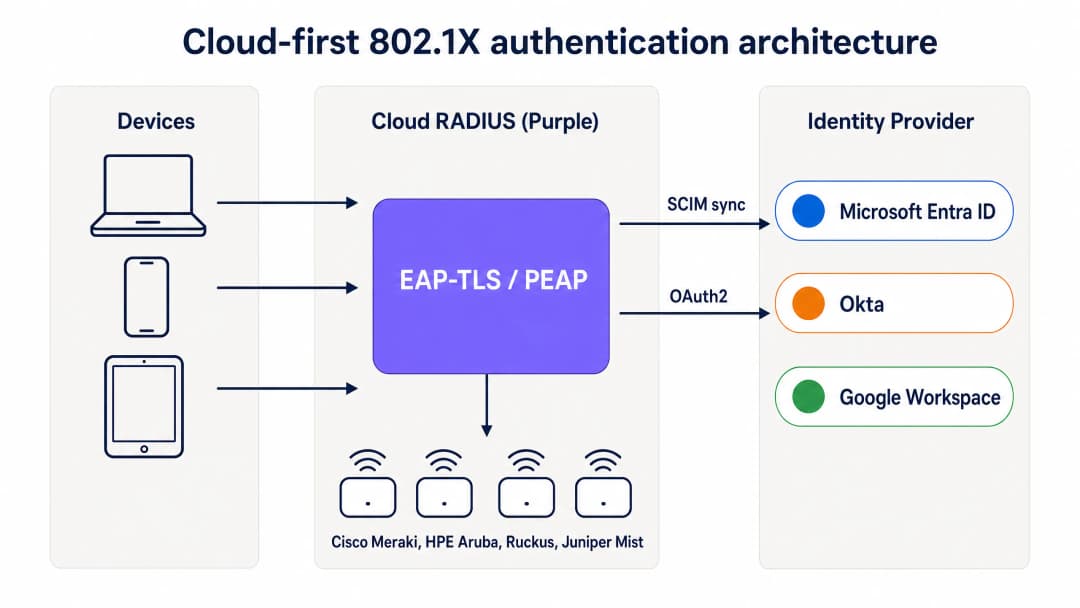
Cloud-First-802.1X-Authentifizierungsarchitektur: Geräte authentifizieren sich über EAP-TLS über den Cloud-RADIUS von Purple, der Zertifikate validiert und gruppenbasierte Richtlinien von Entra ID, Okta oder Google Workspace anwendet.
Wie MDM die lokale CA ersetzt
In einer traditionellen 802.1X-Bereitstellung wurden Zertifikate von einer lokalen Zertifizierungsstelle ausgestellt, auf der Active Directory Certificate Services (AD CS) lief. In einer Cloud-First-Bereitstellung übernimmt das MDM diese Rolle mithilfe von SCEP (Simple Certificate Enrollment Protocol). Microsoft Intune, Jamf Pro und andere MDM-Plattformen können Zertifikate von einer in der Cloud gehosteten CA anfordern und diese geräuschlos auf verwaltete Geräte übertragen.
Der Ablauf sieht wie folgt aus: Der IT-Administrator erstellt im MDM ein SCEP-Zertifikatsprofil, das auf die Gerätegruppen ausgerichtet ist, die WiFi-Zugriff benötigen. Das MDM pusht das Zertifikat automatisch auf Windows-, macOS-, iOS-, iPadOS-, Android Enterprise- und ChromeOS-Geräte. Der Benutzer bemerkt davon nichts. Das Zertifikat ist an die Geräteidentität im MDM gebunden und verlängert sich vor dem Ablauf automatisch. Wenn sich das Gerät mit dem WiFi verbindet, legt es das Zertifikat dem Cloud-RADIUS-Server vor. Dieser validiert es anhand der CA und wendet die entsprechende Netzwerkrichtlinie an.
Für Unternehmen, die Microsoft Intune nutzen, bietet Microsoft Cloud PKI eine vollständig verwaltete CA, die sich direkt in Intune-SCEP-Profile integrieren lässt. Dadurch wird ein lokaler NDES-Server (Network Device Enrollment Service) überflüssig. Für von Jamf verwaltete Mac- und iOS-Flotten erfüllt die integrierte CA von Jamf oder eine Cloud-CA eines Drittanbieters denselben Zweck.
SCIM und sofortiger Entzug von Zugriffsrechten
Einer der betrieblich wichtigsten Aspekte von Cloud-RADIUS ist das SCIM-Provisioning (System for Cross-domain Identity Management). SCIM is ein offener Standard, der Identitätsänderungen in Echtzeit von der Single Source of Truth – Ihrem Cloud-Identity-Provider – an abhängige Systeme überträgt. Wenn ein Mitarbeiter in Entra ID oder Okta deaktiviert wird, überträgt SCIM diese Änderung sofort an den Cloud-RADIUS-Dienst. Beim nächsten Authentifizierungsversuch des Geräts gibt der RADIUS-Server ein Access-Reject zurück. Wenn auf dem Access Point ein kurzes Sitzungs-Timeout konfiguriert ist, wird das Gerät innerhalb weniger Minuten nach der Deaktivierung des Kontos aus dem Netzwerk entfernt.
Dies ist eine erhebliche Sicherheitsverbesserung gegenüber Netzwerken mit gemeinsam genutzten PSKs (wo der Zugriff nur durch Ändern des Passworts auf allen Geräten entzogen werden kann) und gegenüber älteren RADIUS-Bereitstellungen, die auf periodischen LDAP-Synchronisierungen mit einem Zeitfenster von Stunden oder Tagen basieren.
RadSec: Sicherung des RADIUS-Verkehrs über das Internet
Klassisches RADIUS verwendet UDP und bietet nur eine grundlegende Nachrichtenauthentifizierung. Wenn sich Ihr RADIUS-Server im selben Rechenzentrum wie Ihre Access Points befindet, ist das akzeptabel. Wenn Ihr RADIUS-Server jedoch ein Cloud-Dienst ist, läuft der Authentifizierungsverkehr über das öffentliche Internet. RadSec (RADIUS over TLS, RFC 6614) verschlüsselt den RADIUS-Austausch mittels TLS und sorgt so für Vertraulichkeit und Integrität des Authentifizierungsverkehrs. Purple unterstützt RadSec nativ, mit einem IPsec-Fallback für Access Points, die RadSec noch nicht unterstützen.
तुमच्या विशिष्ट सेटअपबद्दल काही प्रश्न आहेत का?
आमची टीम ८०,००० हून अधिक वेन्यूजमधील वेन्यू ऑपरेटर्स, IT मॅनेजर्स आणि नेटवर्क इंजिनिअर्ससोबत काम करते. २० मिनिटांचा कॉल बुक करा आणि तुमच्यासारख्या इतरांनी ही समस्या कशी सोडवली हे आम्ही तुम्हाला दाखवू.
Implementierungsleitfaden
Die Bereitstellung von Cloud-RADIUS mit EAP-TLS erfordert vier koordinierte Schritte. Eine Pilot-SSID kann in weniger als einer Stunde live gehen, wenn Entra ID und ein MDM bereits vorhanden sind.
Schritt 1: Cloud-RADIUS mit Ihrem Identity-Provider verbinden
Verbinden Sie Purple über die OAuth2-Admin-Zustimmung (für Entra ID) oder ein API-Token (für Okta und Google Workspace) mit Ihrem Identity-Provider. Dies autorisiert Purple, Benutzer, Gruppen und Gruppenmitgliedschaften aus dem Verzeichnis auszulesen. Konfigurieren Sie das SCIM-Provisioning, um Änderungen des Benutzerstatus in Echtzeit an Purple zu übertragen. Es werden keine Anmeldedaten von Dienstprinzipalen auf der Festplatte gespeichert. Gruppenänderungen werden beim nächsten Authentifizierungsereignis wirksam, nicht nach einem festen Synchronisierungszeitplan.
Schritt 2: MDM und SCEP-Profil konfigurieren
Erstellen Sie in Microsoft Intune ein Profil für vertrauenswürdige Zertifikate für den CA-Root und anschließend ein SCEP-Zertifikatsprofil, das auf die von Purple verwaltete CA verweist. Richten Sie beide Profile auf die Gerätegruppen aus, die WiFi-Zugriff benötigen. Konfigurieren Sie für Jamf eine SCEP-Payload in einem Konfigurationsprofil. Das MDM pusht die Zertifikate geräuschlos. Überprüfen Sie die Zertifikatsbereitstellung im MDM-Compliance-Dashboard, bevor Sie fortfahren.
Schritt 3: Netzwerkrichtlinien im Cloud-RADIUS-Dashboard definieren
Erstellen Sie RADIUS-Richtlinien, die Gruppen des Identity-Providers bestimmten VLANs und Zugriffskontrollen zuweisen. Weisen Sie beispielsweise der Entra ID-Gruppe „Staff-Finance“ das VLAN 20 mit vollem Internetzugriff zu und der Gruppe „Staff-Contractors“ das VLAN 30 mit zeitlich begrenztem Zugriff, der automatisch abläuft. Das Dashboard von Purple wendet diese Richtlinien direkt beim Authentifizierungsvorgang an, ohne dass Änderungen an der Firewall erforderlich sind.
Schritt 4: Access-Point-Konfiguration aktualisieren
Aktualisieren Sie die SSID-Konfiguration auf Ihren Access Points, um WPA2-Enterprise oder WPA3-Enterprise mit 802.1X zu verwenden. Geben Sie die Hostnamen oder IP-Adressen der primären und sekundären Cloud-RADIUS-Endpunkte von Purple zusammen mit dem Shared Secret ein. Konfigurieren Sie die Access Points so, dass sie eine dynamische VLAN-Zuweisung basierend auf den von Purple zurückgegebenen RADIUS-Attributen nutzen. Testen Sie dies mit einer einzelnen SSID auf einer Auswahl von Access Points, bevor Sie den Rollout für den gesamten Standort durchführen.

Cloud-RADIUS vs. lokaler RADIUS: Ein direkter Vergleich in Bezug auf Bereitstellungszeit, Active Directory-Abhängigkeit, Hochverfügbarkeit, OS-Patching, Identitätsintegration und Zertifikats-Lebenszyklusmanagement.
Best Practices
Diese Empfehlungen spiegeln die IEEE-802.1X-Standards, die PCI-DSS-v4.0-Anforderungen und die Betriebserfahrung an den über 80.000 Standorten von Purple wider.
Schreiben Sie EAP-TLS für verwaltete Geräte vor. Passwörter sind anfällig für Phishing und Credential Stuffing. Zertifikate bieten einen kryptografischen Identitäts- und Geräte-Compliance-Nachweis. EAP-TLS ist die einzige 802.1X-Methode, die von Haus aus phishing-resistent ist.
Nutzen Sie SCIM für den sofortigen Entzug von Zugriffsrechten. Periodische LDAP-Synchronisierungen lassen ein Zeitfenster offen, in dem ein ausgeschiedener Mitarbeiter weiterhin Netzwerkzugriff hat. SCIM stellt sicher, dass der Zugriff in dem Moment entzogen wird, in dem das Konto im Identity-Provider deaktiviert wird.
Stellen Sie Multi-Region-RADIUS bereit. Konfigurieren Sie Ihre Access Points mit mindestens zwei RADIUS-Endpunkten in verschiedenen geografischen Regionen. Purple bietet standardmäßig ein Active-Active-Multi-Region-Failover, das in Sekundenschnelle umschaltet.
Segmentieren Sie den Datenverkehr mit dynamischen VLANs. Nutzen Sie die Gruppenmitgliedschaften des Identity-Providers, um Benutzer dynamisch bestimmten VLANs zuzuweisen. Dies isoliert sensiblen Datenverkehr und begrenzt das Schadensausmaß eines kompromittierten Geräts, ohne dass manuelle Änderungen an der Firewall erforderlich sind.
Aktivieren Sie RadSec. Wenn Ihre Access Points RadSec unterstützen, aktivieren Sie es, um den Authentifizierungsverkehr zwischen dem Access Point und dem Cloud-RADIUS-Server zu verschlüsseln. Dies ist besonders wichtig für Filialen und Standorte, an denen sich der Access Point in einem nicht vertrauenswürdigen Netzwerksegment befindet.
Überwachen Sie den Zertifikats-Lebenszyklus. Stellen Sie die automatische MDM-Verlängerung so ein, dass sie bei 80 % der Zertifikatslaufzeit ausgelöst wird. Bei einem einjährigen Zertifikat beginnt die Verlängerung nach 10 Monaten. Richten Sie Warnmeldungen für Geräte ein, bei denen die Verlängerung vor Ablauf des Zertifikats fehlschlägt.
Für eine umfassendere Betrachtung von Sicherheitsstandards und Frameworks für Enterprise-WiFi lesen Sie unseren Leitfaden Enterprise WiFi Security: A Complete Guide for 2026 .
Fehlerbehebung und Risikominimierung
Der Übergang zu Cloud-RADIUS bringt neue Abhängigkeiten mit sich. Bereiten Sie sich auf diese häufigen Fehlerszenarien vor, bevor sie den Produktivbetrieb beeinträchtigen.
Ablauf von Zertifikaten. Wenn ein Gerätezertifikat abläuft, bevor das MDM es verlängert, schlägt die Authentifizierung des Geräts geräuschlos fehl. Der Benutzer sieht eine Fehlermeldung ohne Erklärung. Beugen Sie dem vor, indem Sie die automatische MDM-Verlängerung auf 80 % der Zertifikatslaufzeit einstellen und das MDM-Compliance-Dashboard auf Geräte mit bald ablaufenden Zertifikaten überwachen.
MDM-Synchronisierungsfehler. Ein Gerät, das die MDM-Compliance-Richtlinien nicht mehr erfüllt oder sich nicht meldet, erhält möglicherweise kein verlängertes Zertifikat. Implementieren Sie Compliance-Richtlinien, die fehlerhafte Geräte kennzeichnen und Administratoren warnen, bevor das Zertifikat abläuft.
Firewall blockiert RADIUS-Verkehr. Die Access Points müssen die Cloud-RADIUS-Endpunkte über den UDP-Port 1812 (Authentifizierung) und den UDP-Port 1813 (Accounting) oder über den TCP-Port 2083 für RadSec erreichen können. Ausgehende Firewall-Regeln in Filialen blockieren diese Ports häufig. Testen Sie die Erreichbarkeit aus dem Management-VLAN des Access Points vor der Bereitstellung.
SCIM-Provisionierungsfehler. Wenn die SCIM-Verbindung zwischen dem Identity-Provider und Purple unterbrochen wird, werden Änderungen des Benutzerstatus nicht übertragen. Überwachen Sie den SCIM-Synchronisierungsstatus sowohl im Identity-Provider als auch im Purple-Dashboard. Richten Sie Warnmeldungen für Synchronisierungsfehler ein.
Altsysteme ohne Zertifikatsunterstützung. IoT-Geräte, Drucker und ältere Hardware unterstützen EAP-TLS möglicherweise nicht. Verwenden Sie für diese Geräte iPSK (individual pre-shared keys) anstelle eines gemeinsam genutzten PSK. Purple unterstützt iPSK nativ, weist jedem Gerät einen eindeutigen Schlüssel zu und platziert jedes Gerät im richtigen VLAN, ohne dass eine 802.1X-Supplicant-Unterstützung erforderlich ist.
ROI und geschäftliche Auswirkungen
Die migration von lokalem RADIUS zu Cloud-RADIUS bietet messbaren Mehrwert für Infrastruktur, Betrieb und Sicherheit.
| Dimension | Lokaler NPS | Cloud-RADIUS (Purple) |
|---|---|---|
| Infrastrukturkosten | Windows Server-Lizenzen, VM-Rechenleistung, Speicher | Abonnement pro AP, keine Server-Hardware |
| Bereitstellungszeit | Tage bis Wochen | Unter einer Stunde |
| Hochverfügbarkeit | Manuell – zwei Server plus Replikation | Multi-Region Active-Active, Standard |
| OS-Patching | Monatlich, durch Ihr Team | Vom Anbieter verwaltet |
| WiFi-Helpdesk-Tickets | Hoch – Passwort-Resets, manuelles Onboarding | Um 80 % reduziert (Kundendaten von Purple) |
| Entzug von Zugriffsrechten | Stunden bis Tage via LDAP-Sync | Sekunden via SCIM |
IT-Teams, die das Mitarbeiter-WiFi von Purple nutzen, verzeichnen in der Regel einen Rückgang der WiFi-Support-Tickets um 80 % (interne Daten von Purple, 2024), was auf den Wegfall von Passwort-Resets und manuellem Geräte-Onboarding zurückzuführen ist. Die zertifikatsbasierte Authentifizierung erfüllt zudem die PCI-DSS-Anforderung 8.3 für starke Authentifizierung und die ISO 27001-Maßnahme A.9.4 für die System- und Anwendungszugriffskontrolle, was den Audit-Aufwand für Ihr Sicherheitsteam verringert.
Für Unternehmen in den Bereichen Einzelhandel und Gastgewerbe reduziert die Möglichkeit, Mitarbeiter-WiFi und Gäste-WiFi über ein einziges Cloud-Dashboard mit einer einheitlichen Identitätsebene zu verwalten, die betriebliche Komplexität an mehreren Standorten. Für Transportunternehmen und Gesundheitsdienstleister erfüllen der sofortige Entzug von Zugriffsrechten und der vollständige Audit-Trail regulatorische Anforderungen ohne zusätzliche Tools.
Die WiFi Analytics -Ebene von Purple ergänzt die Authentifizierungsinfrastruktur um Belegungsdaten und Daten zum hybriden Arbeiten. So wird das Mitarbeiter-WiFi von einer Kostenstelle zu einer Quelle für betriebliche Erkenntnisse.
Weiterführende Literatur: Enterprise WiFi Security: A Complete Guide for 2026 – OpenWrt Custom Firmware Integration with Purple WiFi
महत्वाच्या व्याख्या
802.1X
पोर्ट-आधारित नेटवर्क प्रवेश नियंत्रणासाठी एक IEEE मानक (IEEE 802.1X-2020). यामध्ये डिव्हाइसेसना नेटवर्क प्रवेश मिळण्यापूर्वी प्रमाणित करणे आवश्यक असते, ज्यासाठी RADIUS सर्व्हरद्वारे मध्यस्थी केलेली EAP देवाणघेवाण वापरली जाते.
IT टीम्स हे सुनिश्चित करण्यासाठी 802.1X चा वापर करतात की केवळ अधिकृत वापरकर्ते आणि डिव्हाइसेस कॉर्पोरेट नेटवर्कशी कनेक्ट होतील. हे प्रति-वापरकर्ता कूटबद्धीकरण, प्रति-सत्र की आणि प्रत्येक कनेक्शन इव्हेंटचा संपूर्ण ऑडिट ट्रेल प्रदान करते.
RADIUS
Remote Authentication Dial-In User Service (RFC 2865). एक नेटवर्किंग प्रोटोकॉल जो नेटवर्क प्रवेशासाठी केंद्रीकृत प्रमाणीकरण, अधिकृतता आणि लेखा (AAA) व्यवस्थापन प्रदान करतो.
ॲक्सेस पॉइंट्स प्रत्येक कनेक्शन विनंती RADIUS सर्व्हरकडे पाठवतात, जो डिव्हाइसला प्रवेश द्यायचा की नाही आणि त्याला कोणता VLAN नियुक्त करायचा हे ठरवतो. क्लाउड RADIUS ऑन-प्रिमाइसेस NPS किंवा FreeRADIUS सर्व्हरची जागा घेते.
EAP-TLS
Extensible Authentication Protocol-Transport Layer Security (RFC 5216). एक 802.1X प्रमाणीकरण पद्धत जी पासवर्डऐवजी परस्पर X.५०९ प्रमाणपत्र देवाणघेवाण वापरते.
EAP-TLS हे व्यवस्थापित डिव्हाइस ताफ्यांसाठी सुवर्ण मानक आहे. हे फिशिंग-प्रतिरोधक आहे, यासाठी कोणत्याही पासवर्ड हॅश स्टोअरची आवश्यकता नसते आणि ही एकमेव 802.1X पद्धत आहे जी CISA फिशिंग-प्रतिरोधक MFA मार्गदर्शनाचे समाधान करते.
PEAP-MSCHAPv2
Protected Extensible Authentication Protocol with Microsoft Challenge Handshake Authentication Protocol version 2. एक जुनी 802.1X पद्धत जी Active Directory मध्ये संग्रहित केलेल्या NTLM हॅशच्या विरूद्ध पासवर्ड प्रमाणित करते.
PEAP-MSCHAPv2 क्लाउड-ओन्ली वातावरणात अपयशी ठरते कारण Entra ID NTLM हॅश संग्रहित करत नाही. ऑन-प्रिमाइसेस AD वरून स्थलांतरित करणाऱ्या संस्थांनी PEAP च्या जागी EAP-TLS वापरणे आवश्यक आहे.
SCEP
Simple Certificate Enrollment Protocol. वापरकर्त्याच्या हस्तक्षेपाशिवाय डिव्हाइसेसवर स्वयंचलितपणे डिजिटल प्रमाणपत्रे मागवण्यासाठी आणि स्थापित करण्यासाठी MDM प्लॅटफॉर्मद्वारे वापरला जाणारा प्रोटोकॉल.
IT टीम्स कर्मचाऱ्यांच्या डिव्हाइसेसवर WiFi प्रमाणपत्रे बॅकग्राउंडमध्ये पाठवण्यासाठी Intune किंवा Jamf सह SCEP चा वापर करतात. SCEP क्लाउड-फर्स्ट उपयोजनांमध्ये ऑन-प्रिमाइसेस NDES (Network Device Enrollment Service) सर्व्हरची जागा घेते.
SCIM
System for Cross-domain Identity Management (RFC 7644). एक खुला मानक जो IT सिस्टम्स दरम्यान वापरकर्त्याच्या ओळखीच्या माहितीची रिअल-टाइम देवाणघेवाण स्वयंचलित करतो.
SCIM हे सुनिश्चित करते की जेव्हा एखादा कर्मचारी Entra ID किंवा Okta मध्ये निष्क्रिय केला जातो, तेव्हा तो बदल त्वरित क्लाउड RADIUS सेवेकडे पाठवला जातो, ज्यामुळे काही तासांऐवजी काही सेकंदात WiFi प्रवेश रद्द होतो.
NPS
Network Policy Server. Microsoft चे RADIUS अंमलबजावणी, जे सामान्यतः ऑन-प्रिमाइसेस Active Directory वातावरणाचा भाग म्हणून Windows Server वर चालवले जाते.
क्लाउड-फर्स्ट संस्था Windows Server VMs, OS पॅचिंग आणि ऑन-प्रिमाइसेस Active Directory वरील अवलंबित्व काढून टाकण्यासाठी NPS बंद करत आहेत. क्लाउड RADIUS हा त्याचा थेट पर्याय आहे.
RadSec
RADIUS over TLS (RFC 6614). एक प्रोटोकॉल जो TLS वापरून RADIUS प्रमाणीकरण ट्रॅफिक कूटबद्ध करतो, जो पारंपारिक RADIUS द्वारे वापरल्या जाणाऱ्या UDP-आधारित स्पष्ट मजकूर (cleartext) ट्रान्सपोर्टची जागा घेतो.
क्लाउड RADIUS वापरताना RadSec आवश्यक आहे, कारण प्रमाणीकरण ट्रॅफिक ॲक्सेस पॉइंट आणि क्लाउड सेवेदरम्यान सार्वजनिक इंटरनेटवरून प्रवास करणे आवश्यक असते. Purple नेटिव्हली RadSec ला सपोर्ट करते.
iPSK
Individual Pre-Shared Key. WPA2-Personal चा एक प्रकार जो सर्व डिव्हाइसेससाठी एकाच सामायिक की ऐवजी प्रत्येक डिव्हाइसला एक युनिक प्री-शेअर्ड की नियुक्त करतो.
iPSK चा वापर IoT डिव्हाइसेस, प्रिंटर आणि इतर हार्डवेअरसाठी केला जातो जे 802.1X EAP-TLS ला सपोर्ट करू शकत नाहीत. हे प्रमाणपत्र सपोर्टची आवश्यकता नसताना प्रति-डिव्हाइस जबाबदारी आणि VLAN असाइनमेंट प्रदान करते.
Dynamic VLAN
एक नेटवर्क वर्गीकरण तंत्र जिथे RADIUS सर्व्हर Access-Accept प्रतिसादात VLAN आयडेंटिफायर परत करतो आणि ॲक्सेस पॉइंट स्वयंचलितपणे डिव्हाइसला त्या VLAN वर ठेवतो.
डायनॅमिक VLANs IT टीम्सना मॅन्युअल फायरवॉल बदलांशिवाय, ओळख प्रदाता गट सदस्यत्वाच्या आधारे कर्मचारी, कंत्राटदार, IoT डिव्हाइसेस आणि अतिथींना स्वतंत्र नेटवर्क सेगमेंटवर विभाजित करण्याची परवानगी देतात.
सोडवलेली उदाहरणे
४००-साइट्स असलेल्या रिटेल चेनला सर्व ठिकाणी Staff WiFi सुरक्षित करणे आवश्यक आहे. ते Cisco Meraki ॲक्सेस पॉइंट्स चालवतात आणि डिव्हाइस व्यवस्थापनासाठी Intune सह Microsoft Entra ID वापरतात. ते सध्या सामायिक WPA2-Personal PSK वापरतात कारण त्यांच्याकडे NPS चालवण्यासाठी ऑन-प्रिमाइसेस Active Directory नाही. अलीकडील अंतर्गत ऑडिटमध्ये सामायिक PSK ला PCI-DSS अनुपालन त्रुटी म्हणून चिन्हांकित केले गेले आहे.
ही चेन Purple चे क्लाउड RADIUS उपयोजित करते. प्रथम, ते OAuth प्रशासक संमतीद्वारे Purple ला Entra ID शी जोडतात आणि SCIM प्रोव्हिजनिंग कॉन्फिगर करतात. Intune मध्ये, ते Purple CA रूटसाठी एक Trusted Certificate Profile आणि 'Staff-Retail' डिव्हाइस गटासाठी मर्यादित असलेले SCEP प्रमाणपत्र प्रोफाइल तयार करतात. Intune सर्व व्यवस्थापित पॉइंट-ऑफ-सेल टर्मिनल्स आणि स्टाफ टॅब्लेटवर बॅकग्राउंडमध्ये प्रमाणपत्रे पाठवते. Meraki डॅशबोर्डमध्ये, ते Staff SSID ला WPA2-Enterprise वर अपडेट करतात, Purple क्लाउड RADIUS चे प्राथमिक आणि दुय्यम एंडपॉइंट्स प्रविष्ट करतात आणि डायनॅमिक VLAN असाइनमेंट सक्षम करतात. जेव्हा एखादे डिव्हाइस कनेक्ट होते, तेव्हा ते त्याचे Intune-जारी केलेले प्रमाणपत्र सादर करते, Purple CA विरुद्ध त्याचे प्रमाणीकरण करते आणि Entra ID गट तपासते, आणि डिव्हाइसला गट सदस्यत्वाच्या आधारे VLAN 10 (स्टाफ नेटवर्क) किंवा VLAN 20 (व्यवस्थापन नेटवर्क) वर ठेवले जाते. सामायिक PSK बंद केला जातो. ४०० साइट्सवर रोलआउट करण्यासाठी एक वीकेंड लागतो, कारण कोणतेही ऑन-साइट हार्डवेअर उपयोजित केले जात नाही - केवळ Meraki मध्ये SSID कॉन्फिगरेशन बदल केले जातात.
१५,००० विद्यार्थ्यांचे विद्यापीठ Google Workspace चा प्राथमिक ओळख प्रदाता म्हणून वापर करते. IT टीमला MacBooks, Chromebooks आणि Android फोन्सच्या BYOD इस्टेटवरील कर्मचारी आणि विद्यार्थ्यांसाठी सुरक्षित WiFi प्रदान करायचे आहे. त्यांच्याकडे ऑन-प्रिमाइसेस Active Directory नाही आणि सर्व्हर चालवण्याची त्यांची इच्छा नाही.
विद्यापीठ Google Workspace सह Purple चे क्लाउड RADIUS समाकलित करते. व्यवस्थापित Chromebooks साठी, ते SCEP द्वारे WiFi प्रमाणपत्र प्रोफाइल पाठवण्यासाठी Google Admin चा वापर करतात, ज्यामुळे प्रत्येक डिव्हाइस बॅकग्राउंडमध्ये नोंदणीकृत होते. BYOD MacBooks and Android फोन्ससाठी, ते एक हलके ऑनबोर्डिंग ॲप्लिकेशन उपयोजित करतात जे वापरकर्त्याला त्यांच्या Google क्रेडेंशियल्ससह प्रमाणित करते आणि एका टॅपमध्ये डिव्हाइसवर प्रमाणपत्र स्थापित करते. त्यानंतरचे कनेक्शन बॅकग्राउंडमध्ये EAP-TLS वापरतात. Purple Google Workspace ऑर्गनायझेशनल युनिट्सना VLANs शी मॅप करते: कर्मचारी VLAN 10 वर, विद्यार्थी VLAN 20 वर आणि अतिथी अभ्यागत कॅप्टिव्ह पोर्टल SSID वर येतात. जेव्हा एखादा विद्यार्थी पदवीधर होतो आणि त्याचे Google खाते निलंबित केले जाते, तेव्हा SCIM तो बदल Purple कडे पाठवतो आणि त्यांचा WiFi प्रवेश काही मिनिटांत रद्द केला जातो.
सराव प्रश्न
Q1. तुमच्या संस्थेने ऑन-प्रिमाइसेस Active Directory वरून Microsoft Entra ID वर पूर्णपणे स्थलांतर केले आहे. तुमचे सध्याचे Staff WiFi जुन्या डोमेनशी जोडलेल्या NPS सर्व्हरविरुद्ध PEAP-MSCHAPv2 वापरते. डोमेन कंट्रोलर बंद केल्यानंतर, कर्मचारी तक्रार करतात की ते आता WiFi शी कनेक्ट होऊ शकत नाहीत. याचे मूळ कारण काय आहे आणि दीर्घकालीन योग्य उपाय काय आहे?
टीप: PEAP-MSCHAPv2 ला डिरेक्टरीकडून कशाची आवश्यकता असते आणि Entra ID ते प्रदान करते का याचा विचार करा.
नमुना उत्तर पहा
मूळ कारण असे आहे की PEAP-MSCHAPv2 ला RADIUS सर्व्हरने Active Directory मध्ये संग्रहित केलेल्या NTLM हॅशच्या विरूद्ध वापरकर्त्याचा पासवर्ड प्रमाणित करणे आवश्यक असते. डोमेन कंट्रोलर बंद केल्यामुळे, NPS कडे प्रमाणीकरण करण्यासाठी कोणतीही डिरेक्टरी नाही. Entra ID NTLM हॅश संग्रहित करत नाही, त्यामुळे NPS ला Entra ID कडे पुनर्निर्देशित केले जाऊ शकत नाही. दीर्घकालीन योग्य उपाय म्हणजे NPS च्या जागी क्लाउड RADIUS सेवा आणणे, PEAP-MSCHAPv2 वरून EAP-TLS वर स्थलांतर करणे आणि SCEP द्वारे डिव्हाइस प्रमाणपत्रे जारी करण्यासाठी MDM (Intune) चा वापर करणे. हे कोणत्याही ऑन-प्रिमाइसेस डिरेक्टरीवरील अवलंबित्व काढून टाकते.
Q2. तुम्ही Jamf Pro द्वारे व्यवस्थापित केलेल्या कॉर्पोरेट MacBooks च्या २००-डिव्हाइस ताफ्यासाठी क्लाउड RADIUS उपयोजित करत आहात. तुमचा ओळख प्रदाता Okta आहे. या डिव्हाइसेसवर WiFi क्रेडेंशियल्स पाठवण्याचा सर्वात सुरक्षित आणि कार्यात्मकदृष्ट्या कार्यक्षम मार्ग कोणता आहे?
टीप: अशी पद्धत शोधा ज्यासाठी वापरकर्त्याच्या हस्तक्षेपाची आवश्यकता नाही, पासवर्ड टाळता येतो आणि तुमच्या विद्यमान MDM शी समाकलित होते.
नमुना उत्तर पहा
MacBooks वर बॅकग्राउंडमध्ये डिव्हाइस प्रमाणपत्रे पाठवण्यासाठी SCEP वापरण्यासाठी Jamf Pro कॉन्फिगर करा. तुमच्या क्लाउड RADIUS प्रदात्याद्वारे व्यवस्थापित केलेल्या CA कडे निर्देशित करणारे Jamf कॉन्फिगरेशन प्रोफाइलमध्ये SCEP पेलोड तयार करा. प्रोफाइलचा विस्तार संबंधित डिव्हाइस गटापर्यंत मर्यादित करा. Jamf वापरकर्त्याच्या हस्तक्षेपाशिवाय प्रत्येक MacBook वर स्वयंचलितपणे प्रमाणपत्र पाठवेल. SCEP-जारी केलेल्या प्रमाणपत्रासह EAP-TLS वापरण्यासाठी त्याच कॉन्फिगरेशन प्रोफाइलमध्ये WiFi प्रोफाइल कॉन्फिगर करा. जेव्हा एखाडी कर्मचारी Okta मध्ये निष्क्रिय केला जातो, तेव्हा त्यांचा WiFi प्रवेश त्वरित रद्द केला जाईल याची खात्री करण्यासाठी SCIM द्वारे क्लाउड RADIUS सेवेला Okta शी जोडा.
Q3. सोमवारी सकाळी ९ वाजता एका कर्मचाऱ्याला नोकरीवरून काढले जाते. त्यांचे Entra ID खाते HR द्वारे सकाळी ९:०५ वाजता निष्क्रिय केले जाते. सकाळी ९:३० वाजता, एक सुरक्षा अलर्ट दर्शवतो की कर्मचाऱ्याचा लॅपटॉप अजूनही कार पार्कमधून कॉर्पोरेट WiFi शी कनेक्ट केलेला आहे. कोणते कॉन्फिगरेशन गहाळ आहे आणि तुम्ही ते कसे दुरुस्त कराल?
टीप: ओळख प्रदात्यामध्ये वापरकर्त्याची स्थिती बदलली आहे हे RADIUS सर्व्हरला कसे समजते?
नमुना उत्तर पहा
हे उपयोजन SCIM प्रोव्हिजनिंग ऐवजी नियतकालिक LDAP सिंकवर अवलंबून आहे. खाते निष्क्रिय केल्यापासून LDAP सिंक अद्याप चाललेला नाही, त्यामुळे क्लाउड RADIUS सेवा अजूनही वापरकर्त्याला सक्रिय मानते. यावरील उपाय म्हणजे Entra ID आणि क्लाउड RADIUS सेवेदरम्यान SCIM प्रोव्हिजनिंग सक्षम करणे. SCIM वापरकर्त्याच्या स्थितीतील बदल रिअल टाइममध्ये पाठवते, त्यामुळे जेव्हा सकाळी ९:०५ वाजता Entra ID मध्ये खाते निष्क्रिय केले जाते, तेव्हा RADIUS सेवेला तो बदल त्वरित प्राप्त होतो. पुढच्या वेळी जेव्हा डिव्हाइस पुन्हा प्रमाणित करण्याचा प्रयत्न करेल (जे ॲक्सेस पॉइंटवरील सेशन टाइमआउटद्वारे नियंत्रित केले जाते), तेव्हा त्याला Access-Reject प्राप्त होईल. ॲक्सेस पॉइंटवर लहान सेशन टाइमआउट (१५ ते ३० मिनिटे) सेट केल्याने खाते निष्क्रिय करणे आणि नेटवर्कवरून काढून टाकणे यामधील जास्तीत जास्त वेळ मर्यादित होतो.
Q4. तुमच्या ठिकाणी ५० IoT डिव्हाइसेस आहेत - डिजिटल साईनएज प्लेयर्स, पर्यावरणीय सेन्सर्स आणि प्रिंटर - जे 802.1X EAP-TLS ला सपोर्ट करत नाहीत. तुम्ही ही डिव्हाइसेस तुमच्या EAP-TLS स्टाफ नेटवर्कसारख्याच WiFi इन्फ्रास्ट्रक्चरवर कशी सुरक्षित कराल?
टीप: प्रमाणपत्र सपोर्टची आवश्यकता नसताना कोणती प्रमाणीकरण पद्धत प्रति-डिव्हाइस जबाबदारी प्रदान करते याचा विचार करा.
नमुना उत्तर पहा
IoT डिव्हाइसेससाठी iPSK (individual pre-shared keys) वापरा. क्लाउड RADIUS डॅशबोर्डमध्ये प्रत्येक डिव्हाइसला एक युनिक प्री-शेअर्ड की आणि VLAN असाइनमेंट नियुक्त करा. प्रत्येक डिव्हाइस त्याच्या युनिक कीसह प्रमाणित होते, ज्याचे RADIUS सर्व्हर प्रमाणीकरण करतो आणि स्टाफ नेटवर्कपासून वेगळे ठेवून डिव्हाइसला IoT VLAN वर ठेवण्यासाठी वापरतो. जर एखाद्या डिव्हाइसशी तडजोड झाली किंवा ते बंद केले गेले, तर तुम्ही इतर कोणत्याही डिव्हाइसवर परिणाम न करता केवळ त्या डिव्हाइसची की रद्द करू शकता. हा दृष्टिकोन IoT हार्डवेअरवर 802.1X सप्लिकेंट सपोर्टची आवश्यकता नसताना प्रति-डिव्हाइस जबाबदारी आणि नेटवर्क वर्गीकरण प्रदान करतो.
या मालिकेमध्ये पुढे वाचा
कर्मचारी बाहेर पडल्यावर WiFi ॲक्सेस कसा रद्द करावा
ही मार्गदर्शिका IT आणि स्थळ ऑपरेशन्स टीम्सना उर्वरित कर्मचाऱ्यांच्या कामात व्यत्यय न आणता, एखादा कर्मचारी बाहेर पडल्यावर स्टाफ WiFi ॲक्सेस कसा काढून टाकावा हे दाखवते. हे सर्टिफिकेट-आधारित 802.1X, ओळख-विशिष्ट iPSK आणि SCIM-संचालित डीप्रॉव्हिजनिंगची तुलना करते, आणि त्यानंतर एकाच दिवसात लागू करता येईल अशी रनबुक, चाचणी पद्धत आणि ऑडिट पुरावा मॉडेल प्रदान करते.
सुरक्षित BYOD WiFi: Passpoint प्रमाणपत्र ऑनबोर्डिंग विरुद्ध xPSK (iPSK)
झिरो-टच Passpoint EAP-TLS प्रमाणपत्रे विरुद्ध व्हेंडर-विशिष्ट xPSK (iPSK/easyPSK, DPSK, PPSK, MPSK) चा वापर करून व्यवस्थापित नसलेली कर्मचारी आणि विद्यार्थ्यांची उपकरणे (BYOD) सुरक्षित करण्यासाठी IT टीम्ससाठी एक सर्वसमावेशक तांत्रिक मार्गदर्शक.
WPA2 Personal विरुद्ध Enterprise: फरक काय आहे आणि तुम्ही कोणते वापरावे?
हे तांत्रिक संदर्भ मार्गदर्शक WPA2 Personal आणि WPA2 Enterprise वायरलेस सुरक्षा मानकांमधील अधिकृत तुलना प्रदान करते. हे IT प्रमुखांना त्यांचे एंटरप्राइझ नेटवर्क सुरक्षित करण्यासाठी आवश्यक असणारे अंतर्गत क्रिप्टोग्राफिक हँडशेक, आर्किटेक्चरल आवश्यकता आणि उपयोजन पद्धती सविस्तरपणे स्पष्ट करते. अनुपालन फ्रेमवर्कचे पालन करण्यासाठी आणि अंतर्गत धोके कमी करण्यासाठी सामायिक पासफ्रेजेसकडून वैयक्तिकृत, प्रमाणपत्र - आधारित प्रमाणीकरणाकडे कसे जावे हे वाचक शिकतील.
तुमच्या विशिष्ट सेटअपबद्दल काही प्रश्न आहेत का?
आमची टीम ८०,००० हून अधिक वेन्यूजमधील वेन्यू ऑपरेटर्स, IT मॅनेजर्स आणि नेटवर्क इंजिनिअर्ससोबत काम करते. २० मिनिटांचा कॉल बुक करा आणि तुमच्यासारख्या इतरांनी ही समस्या कशी सोडवली हे आम्ही तुम्हाला दाखवू.