
Authentification WiFi d'entreprise sans Active Directory ni serveur sur site
Ce guide explique comment déployer une authentification WiFi sécurisée WPA2/3-Enterprise sans Active Directory sur site, sans Windows NPS ni serveur RADIUS. Il aborde l'incompatibilité de protocole entre les fournisseurs d'identité cloud et 802.1X, l'intérêt d'EAP-TLS par rapport à PEAP-MSCHAPv2, et comment déployer un cloud RADIUS avec des certificats émis par MDM par rapport à Microsoft Entra ID, Okta ou Google Workspace. Conçu pour les responsables informatiques des organisations axées sur le cloud et utilisant principalement des Mac ou Chromebooks qui souhaitent abandonner leur infrastructure sur site.
Video overview
Écouter ce guide
Voir la transcription du podcast
Fait partie de notre série principale : Guide de sécurité WiFi d'entreprise →
Synthèse de haut niveau
La plupart des organisations ont migré leur identité vers le cloud. Microsoft Entra ID, Okta et Google Workspace gèrent désormais les utilisateurs, les groupes et les politiques d'accès pour la messagerie, les applications SaaS et la gestion des terminaux. Pourtant, le WiFi d'entreprise n'a pas suivi le rythme. Les points d'accès requièrent toujours un serveur RADIUS, et ce serveur RADIUS a historiquement été un serveur Windows NPS (Network Policy Server) connecté à un contrôleur de domaine Active Directory sur site.
Ce décalage oblige les équipes informatiques à maintenir une infrastructure sur site redondante uniquement pour assurer le fonctionnement du WiFi. La solution réside dans le cloud RADIUS : un service d'authentification entièrement managé qui communique en RADIUS avec vos points d'accès et utilise OAuth2, SCIM et SAML avec votre fournisseur d'identité cloud. Associez-le à une distribution de certificats EAP-TLS via votre MDM, et vous obtenez un déploiement 802.1X complet sans serveurs sur site, sans correctifs de système d'exploitation et avec une révocation d'accès instantanée directement liée à votre annuaire cloud.
Purple opère un service cloud RADIUS sur plus de 80 000 sites à l'échelle mondiale, avec une disponibilité de 99,999 % (données internes Purple, 2024) et des intégrations natives avec Microsoft Entra ID, Okta et Google Workspace. Vous pouvez être opérationnel sur vos points d'accès Cisco Meraki, HPE Aruba, Ruckus, Juniper Mist, Ubiquiti UniFi, Cambium, Extreme Networks ou Fortinet existants en moins d'une heure.
Analyse technique approfondie
L'incompatibilité de protocole au cœur du problème
Le défi fondamental réside dans le fait que les fournisseurs d'identité cloud et les points d'accès WiFi parlent des langages totalement différents. Microsoft Entra ID (anciennement Azure AD) authentifie les utilisateurs via SAML, OIDC et OAuth2 - les protocoles utilisés par les navigateurs et les applications SaaS. Les points d'accès WiFi utilisent RADIUS (Remote Authentication Dial-In User Service, RFC 2865), un protocole basé sur UDP conçu dans les années 1990 pour les connexions bas débit et VPN. Microsoft n'a jamais fourni de point de terminaison RADIUS natif pour Entra ID. Vous ne pouvez pas pointer un point d'accès Meraki ou Aruba directement vers Azure et espérer que le 802.1X fonctionne.
C'est l'obstacle auquel se heurte chaque équipe informatique orientée cloud lorsqu'elle tente de sécuriser le WiFi du personnel avec le WPA2-Enterprise ou le WPA3-Enterprise. Il faut un élément pour combler le fossé entre le point d'accès et le fournisseur d'identité cloud. Cet élément, c'est le cloud RADIUS.
Pourquoi PEAP-MSCHAPv2 échoue sans Active Directory
Historiquement, les déploiements 802.1X reposaient sur PEAP-MSCHAPv2 (Protected Extensible Authentication Protocol avec Microsoft Challenge Handshake Authentication Protocol version 2). L'utilisateur saisissait son identifiant et son mot de passe, le point d'accès transmettait la demande au serveur RADIUS, et le serveur RADIUS validait le mot de passe par rapport à un hachage NTLM stocké dans Active Directory.Microsoft Entra ID ne stocke pas les hachages NTLM. Ce n'est pas un défaut de configuration - c'est une décision d'architecture délibérée. Entra ID est un fournisseur d'identité cloud moderne, pas un contrôleur de domaine. Par conséquent, un serveur RADIUS pointant vers Entra ID ne peut pas valider un challenge PEAP-MSCHAPv2. La seule façon de faire fonctionner PEAP avec Entra ID est de déployer Entra Domain Services, un Active Directory géré payant qui se synchronise à partir de Entra ID, puis d'exécuter NPS sur celui-ci. Cela réintroduit la plupart des éléments que vous essayiez d'éliminer : les VM Windows Server, les correctifs d'OS, le stockage des hachages NTLM et la gestion manuelle des certificats.
EAP-TLS : la bonne réponse pour les organisations cloud-first
EAP-TLS (Extensible Authentication Protocol-Transport Layer Security, RFC 5216) remplace les mots de passe par des certificats numériques X.509. L'appareil présente un certificat au serveur RADIUS. Le serveur RADIUS valide le certificat par rapport à une autorité de certification (CA) de confiance. Comme il n'y a pas de mot de passe dans l'échange, le serveur RADIUS n'a pas besoin de stockage de hachage NTLM. Il lui suffit de faire confiance à la CA et de vérifier l'appartenance de l'utilisateur à un groupe dans le fournisseur d'identité pour appliquer le bon VLAN et la bonne politique d'accès.
EAP-TLS est résistant au phishing par conception. Il n'y a aucun identifiant à voler. Il répond aux directives de la CISA sur l'authentification multifacteur résistante au phishing et s'aligne sur les exigences PCI-DSS pour une authentification forte sur les réseaux qui traitent les données des titulaires de cartes. C'est la méthode d'authentification recommandée par IEEE 802.1X pour les flottes d'appareils gérés.
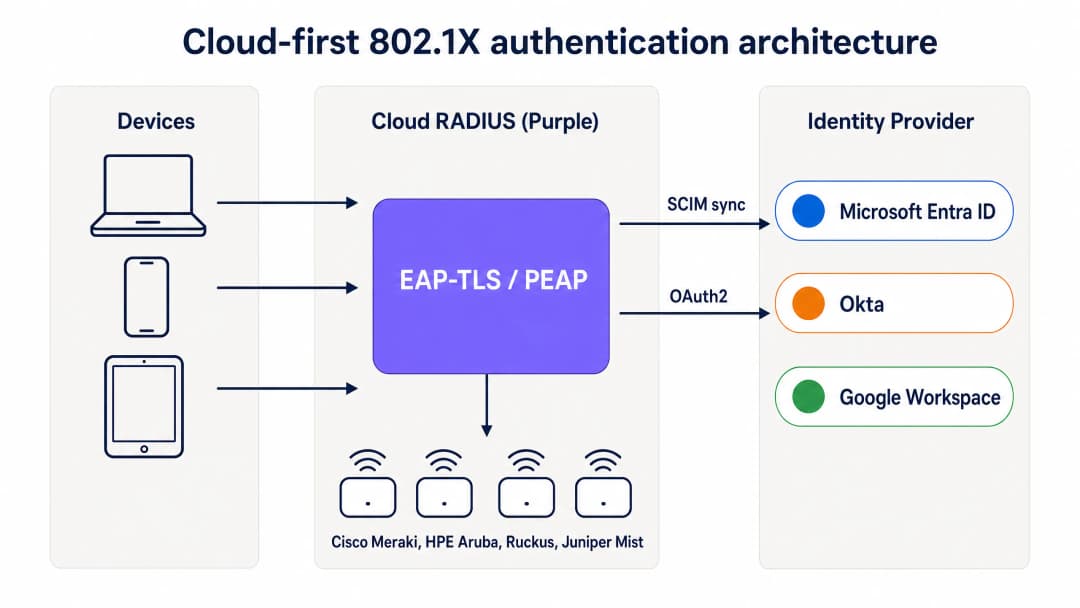
Architecture d'authentification 802.1X cloud-first : les appareils s'authentifient via EAP-TLS à travers le RADIUS cloud de Purple, qui valide les certificats et applique la politique basée sur les groupes depuis Entra ID, Okta ou Google Workspace.
Comment le MDM remplace la CA sur site
Dans un déploiement 802.1X traditionnel, les certificats étaient émis par une autorité de certification sur site exécutant Active Directory Certificate Services (AD CS). Dans un déploiement cloud-first, le MDM assume ce rôle en utilisant SCEP (Simple Certificate Enrollment Protocol). Microsoft Intune, Jamf Pro et d'autres plateformes MDM peuvent demander des certificats à une CA hébergée dans le cloud et les pousser silencieusement vers les appareils gérés.
Le flux fonctionne comme suit. L'administrateur informatique crée un profil de certificat SCEP dans le MDM, ciblant les groupes d'appareils qui nécessitent un accès WiFi. Le MDM pousse automatiquement le certificat vers les appareils Windows, macOS, iOS, iPadOS, Android Enterprise et ChromeOS. L'utilisateur ne voit rien. Le certificat est lié à l'identité de l'appareil dans le MDM et se renouvelle automatiquement avant son expiration. Lorsque l'appareil se connecte au WiFi, il présente le certificat au serveur RADIUS cloud, qui le valide par rapport à la CA et applique la bonne politique réseau.
Pour les organisations utilisant Microsoft Intune, Microsoft Cloud PKI fournit une autorité de certification (CA) entièrement gérée qui s'intègre directement aux profils SCEP de Intune, éliminant ainsi le besoin d'un serveur NDES (Network Device Enrollment Service) sur site. Pour les parcs de Mac et d'appareils iOS gérés par Jamf, la CA intégrée de Jamf ou une CA cloud tierce remplit la même fonction.
SCIM et révocation instantanée des accès
L'un des aspects opérationnels les plus importants de cloud RADIUS est le provisionnement SCIM (System for Cross-domain Identity Management). SCIM est un standard ouvert qui transmet les modifications d'identité depuis la source unique de vérité - votre fournisseur d'identité cloud - vers les systèmes dépendants en temps réel. Lorsqu'un employé est désactivé dans Entra ID ou Okta, SCIM pousse immédiatement cette modification vers le service cloud RADIUS. Lors de la tentative d'authentification suivante de l'appareil, le serveur RADIUS renvoie un message Access-Reject. Avec une courte temporisation de session configurée sur le point d'accès, l'appareil est exclu du réseau dans les minutes qui suivent la désactivation du compte.
Il s'agit d'une amélioration matérielle de la sécurité par rapport aux réseaux PSK partagés, où le seul moyen de révoquer un accès est de changer le mot de passe sur chaque appareil, et par rapport aux déploiements RADIUS existants qui reposent sur des synchronisations LDAP périodiques avec un délai de plusieurs heures ou jours.
RadSec : sécuriser le trafic RADIUS sur internet
Le RADIUS traditionnel utilise UDP et ne fournit qu'une authentification de base des messages. Lorsque votre serveur RADIUS se trouve dans le même centre de données que vos points d'accès, cela est acceptable. Lorsque votre serveur RADIUS est un service cloud, le trafic d'authentification traverse l'internet public. RadSec (RADIUS sur TLS, RFC 6614) chiffre l'échange RADIUS à l'aide de TLS, garantissant la confidentialité et l'intégrité du trafic d'authentification. Purple prend en charge RadSec de manière native, avec un repli IPsec pour les points d'accès qui ne supportent pas encore RadSec.
Vous avez des questions sur votre configuration spécifique ?
Notre équipe collabore avec des exploitants de sites, des responsables informatiques et des ingénieurs réseau au sein de 80 000 sites. Réservez un appel de 20 minutes et nous vous montrerons comment d'autres professionnels comme vous ont résolu ce problème.
Guide d'implémentation
Le déploiement de cloud RADIUS avec EAP-TLS nécessite quatre étapes coordonnées. Un SSID pilote peut être opérationnel en moins d'une heure si Entra ID et un MDM sont déjà en place.
Étape 1 : Connecter cloud RADIUS à votre fournisseur d'identité
Connectez Purple à votre fournisseur d'identité via le consentement de l'administrateur OAuth2 (pour Entra ID) ou un jeton d'API (pour Okta et Google Workspace). Cela autorise Purple à lire les utilisateurs, les groupes et les appartenances aux groupes à partir de l'annuaire. Configurez le provisionnement SCIM pour pousser les changements d'état des utilisateurs vers Purple en temps réel. Aucun identifiant de principal de service n'est stocké sur le disque. Les modifications de groupe se propagent lors de l'événement d'authentification suivant, et non selon un calendrier de synchronisation.
Étape 2 : Configurer votre MDM et votre profil SCEP
Dans Microsoft Intune, créez un profil de certificat approuvé pour la racine de la CA, puis créez un profil de certificat SCEP pointant vers la CA gérée par Purple. Ciblez les deux profils sur les groupes d'appareils qui nécessitent un accès WiFi. Pour Jamf, configurez une charge utile SCEP dans un profil de configuration. Le MDM pousse les certificats de manière transparente. Vérifiez la distribution des certificats dans le tableau de bord de conformité du MDM avant de continuer.
Étape 3 : Définir les politiques réseau dans le tableau de bord RADIUS dans le cloud
Créez des politiques RADIUS qui associent les groupes de fournisseurs d'identité à des VLANs et des contrôles d'accès spécifiques. Par exemple, associez le groupe Entra ID "Staff-Finance" au VLAN 20 avec un accès internet complet, et associez "Staff-Contractors" au VLAN 30 avec un accès limité dans le temps qui expire automatiquement. Le tableau de bord de Purple applique ces politiques au moment de l'authentification, sans aucune modification du pare-feu nécessaire.
Étape 4 : Mettre à jour la configuration des points d'accès
Mettez à jour la configuration du SSID sur vos points d'accès pour utiliser WPA2-Enterprise ou WPA3-Enterprise avec 802.1X. Saisissez les noms d'hôte ou les adresses IP des terminaux primaires et secondaires du cloud RADIUS de Purple, ainsi que le secret partagé. Configurez les points d'accès pour utiliser l'attribution dynamique de VLAN en fonction des attributs RADIUS renvoyés par Purple. Testez avec un seul SSID sur un sous-ensemble de points d'accès avant de déployer sur l'ensemble du parc.

Cloud RADIUS vs RADIUS sur site : une comparaison directe sur le temps de déploiement, la dépendance à Active Directory, la haute disponibilité, les correctifs du système d'exploitation, l'intégration de l'identité et la gestion du cycle de vie des certificats.
-
Bonnes pratiques
Ces recommandations reflètent les normes IEEE 802.1X, les exigences PCI-DSS v4.0 et l'expérience opérationnelle acquise sur le parc de plus de 80 000 sites de Purple.
Exigez EAP-TLS pour les appareils gérés. Les mots de passe sont sensibles au phishing et au credential stuffing. Les certificats fournissent une preuve cryptographique de l'identité et de la conformité de l'appareil. EAP-TLS est la seule méthode 802.1X résistante au phishing par conception.
Utilisez SCIM pour une révocation instantanée. Les synchronisations LDAP périodiques laissent une fenêtre durant laquelle un employé licencié conserve l'accès au réseau. SCIM garantit que l'accès est révoqué dès que le compte est désactivé chez le fournisseur d'identité.
Déployez un système RADIUS multi-régions. Configurez vos points d'accès avec au moins deux terminaux RADIUS dans des régions géographiques différentes. Purple propose par défaut un basculement actif-actif multi-régions, le basculement s'effectuant en quelques secondes.
Segmentez le trafic avec des VLANs dynamiques. Utilisez les appartenances aux groupes du fournisseur d'identité pour attribuer dynamiquement les utilisateurs à des VLANs spécifiques. Cela isole le trafic sensible et limite la surface d'attaque d'un appareil compromis sans nécessiter de modifications manuelles du pare-feu.
Activez RadSec. Si vos points d'accès prennent en charge RadSec, activez-le pour chiffrer le trafic d'authentification entre le point d'accès et le serveur cloud RADIUS. Ceci est particulièrement important pour les succursales et les sites où le point d'accès se trouve sur un segment de réseau non sécurisé.
Surveillez le cycle de vie des certificats. Configurez le renouvellement automatique MDM pour qu'il se déclenche à 80 % de la durée de vie du certificat. Pour un certificat d'un an, le renouvellement commence au bout de 10 mois. Créez des alertes pour les appareils qui ne parviennent pas à se renouveler avant l'expiration du certificat. Pour un aperçu plus large des normes et des frameworks de sécurité WiFi d'entreprise, consultez notre Sécurité WiFi d'entreprise : Le guide complet pour 2026.
-
Résolution des problèmes et atténuation des risques
La transition vers un RADIUS cloud introduit de nouvelles dépendances. Préparez-vous à ces modes de défaillance courants avant qu'ils n'affectent la production.
Expiration des certificats. Si le certificat d'un appareil expire avant que la solution MDM ne le renouvelle, l'authentification de l'appareil échoue silencieusement. L'utilisateur voit une erreur de connexion sans explication. Limitez ce risque en configurant le renouvellement automatique MDM à 80 % de la durée de vie du certificat et en surveillant le tableau de bord de conformité MDM pour identifier les appareils dont les certificats expirent.
Échecs de synchronisation MDM. Un appareil qui n'est plus conforme au MDM ou qui ne parvient pas à se synchroniser peut ne pas recevoir de certificat renouvelé. Mettez en œuvre des politiques de conformité qui signalent les appareils défectueux et alertent les administrateurs avant l'expiration du certificat.
Blocage du trafic RADIUS par le pare-feu. Les points d'accès doivent pouvoir atteindre les points de terminaison du RADIUS cloud sur le port UDP 1812 (authentification) et le port UDP 1813 (comptabilité), ou sur le port TCP 2083 pour RadSec. Les règles de pare-feu sortantes des succursales bloquent fréquemment ces ports. Testez la connectivité depuis le VLAN de gestion du point d'accès avant le déploiement.
Échecs de provisionnement SCIM. Si la connexion SCIM entre le fournisseur d'identité et Purple est interrompue, les changements d'état des utilisateurs ne seront pas propagés. Surveillez l'état de la synchronisation SCIM dans le fournisseur d'identité et dans le tableau de bord Purple. Configurez des alertes pour les échecs de synchronisation.
Appareils existants sans prise en charge des certificats. Les appareils IoT, les imprimantes et le matériel plus ancien peuvent ne pas prendre en charge EAP-TLS. Pour ces appareils, utilisez iPSK (clés pré-partagées individuelles) plutôt qu'une clé PSK partagée. Purple prend en charge iPSK nativement, en attribuant une clé unique par appareil et en plaçant chaque appareil sur le bon VLAN sans nécessiter la prise en charge d'un suppliant 802.1X.
-
ROI et impact commercial
La migration d'un RADIUS sur site vers un RADIUS cloud offre une valeur mesurable sur l'ensemble de l'infrastructure, des opérations et de la sécurité.
| Dimension | NPS sur site | RADIUS Cloud (Purple) |
|---|---|---|
| Coût de l'infrastructure | Licences Windows Server, calcul VM, stockage | Abonnement par AP, pas de matériel serveur |
| Temps de déploiement | Jours à semaines | Moins d'une heure |
| Haute disponibilité | Manuel - deux serveurs plus réplication | Actif-actif multi-région, par défaut |
| Correctifs OS | Mensuels, par votre équipe | Gérés par le fournisseur |
| Tickets helpdesk WiFi | Élevé - réinitialisations de mots de passe, intégration manuelle | En baisse de 80 % (données clients Purple) |
| Révocation des accès | Heures à jours via synchronisation LDAP | Secondes via SCIM |
| Les équipes informatiques utilisant le Staff WiFi de Purple constatent généralement une baisse de 80 % des tickets de support WiFi (données internes Purple, 2024), grâce à l'élimination des réinitialisations de mots de passe et de l'intégration manuelle des appareils. L'authentification par certificat répond également à l'exigence PCI-DSS 8.3 pour une authentification forte et au contrôle ISO 27001 A.9.4 pour le contrôle d'accès aux systèmes et aux applications, réduisant ainsi la charge d'audit de votre équipe de sécurité. |
Pour les organisations du commerce de détail et de l'hôtellerie, la possibilité de gérer le Staff WiFi et le Guest WiFi depuis un tableau de bord cloud unique - avec une couche d'identité unifiée - réduit la complexité opérationnelle sur les parcs multi-sites. Pour les opérateurs de transport et les prestataires de santé, la capacité de révocation instantanée et la piste d'audit complète répondent aux exigences réglementaires sans outil supplémentaire.
La couche WiFi Analytics de Purple ajoute des données d'occupation et de travail hybride au-dessus de l'infrastructure d'authentification, transformant le Staff WiFi d'un centre de coûts en une source d'intelligence opérationnelle.
Lecture associée : Enterprise WiFi Security: A Complete Guide for 2026 - OpenWrt Custom Firmware Integration with Purple WiFi
Définitions clés
802.1X
Une norme IEEE (IEEE 802.1X-2020) pour le contrôle d'accès réseau basé sur les ports. Elle exige que les appareils s'authentifient avant que le point d'accès n'accorde l'accès au réseau, en utilisant un échange EAP géré par un serveur RADIUS.
Les équipes informatiques utilisent le 802.1X pour garantir que seuls les utilisateurs et appareils autorisés se connectent au réseau de l'entreprise. Il fournit un chiffrement par utilisateur, des clés par session et un suivi d'audit complet de chaque événement de connexion.
RADIUS
Remote Authentication Dial-In User Service (RFC 2865). Un protocole réseau qui fournit une gestion centralisée de l'authentification, de l'autorisation et de la comptabilisation (AAA) pour l'accès au réseau.
Les points d'accès transfèrent chaque demande de connexion au serveur RADIUS, qui décide s'il faut admettre l'appareil et à quel VLAN l'attribuer. Le RADIUS dans le cloud remplace les serveurs NPS ou FreeRADIUS sur site.
EAP-TLS
Extensible Authentication Protocol-Transport Layer Security (RFC 5216). Une méthode d'authentification 802.1X qui utilise un échange mutuel de certificats X.509 au lieu de mots de passe.
EAP-TLS est la référence absolue pour les parcs d'appareils gérés. Il résiste au hameçonnage, ne nécessite aucun stockage de hachage de mot de passe et constitue la seule méthode 802.1X conforme aux directives de la CISA sur l'authentification multifacteur résistante au hameçonnage.
PEAP-MSCHAPv2
Protected Extensible Authentication Protocol avec Microsoft Challenge Handshake Authentication Protocol version 2. Une méthode 802.1X héritée qui valide les mots de passe par rapport aux hachages NTLM stockés dans Active Directory.
PEAP-MSCHAPv2 échoue dans les environnements exclusivement cloud car Entra ID ne stocke pas les hachages NTLM. Les organisations qui migrent depuis un AD sur site doivent remplacer PEAP par EAP-TLS.
SCEP
Simple Certificate Enrollment Protocol. Un protocole utilisé par les plateformes MDM pour demander et installer automatiquement des certificats numériques sur les appareils, sans intervention de l'utilisateur.
Les équipes informatiques utilisent SCEP avec Intune ou Jamf pour déployer silencieusement des certificats WiFi sur les appareils des employés. SCEP remplace le serveur NDES (Network Device Enrollment Service) sur site dans les déploiements orientés cloud.
SCIM
System for Cross-domain Identity Management (RFC 7644). Un standard ouvert qui automatise l'échange en temps réel des informations d'identité des utilisateurs entre les systèmes informatiques.
SCIM garantit que lorsqu'un employé est désactivé dans Microsoft Entra ID ou Okta, ce changement est immédiatement poussé vers le service cloud RADIUS, révoquant l'accès WiFi en quelques secondes plutôt qu'en plusieurs heures.
NPS
Network Policy Server. L'implémentation RADIUS de Microsoft, généralement exécutée sur Windows Server dans le cadre d'un environnement Active Directory sur site.
Les organisations orientées cloud abandonnent NPS pour éliminer les machines virtuelles Windows Server, les correctifs de système d'exploitation et la dépendance à l'égard d'Active Directory sur site. RADIUS-as-a-Service est le remplaçant direct.
RadSec
RADIUS sur TLS (RFC 6614). Un protocole qui chiffre le trafic d'authentification RADIUS à l'aide de TLS, remplaçant le transport en clair basé sur UDP utilisé par le RADIUS traditionnel.
RadSec est indispensable lors de l'utilisation de RADIUS dans le cloud, car le trafic d'authentification doit traverser l'internet public entre le point d'accès et le service cloud. Purple prend en charge RadSec nativement.
iPSK
Individual Pre-Shared Key. Une variante de WPA2-Personal qui attribue une clé pré-partagée unique à chaque appareil, plutôt qu'une seule clé partagée pour tous les appareils.
iPSK est utilisé pour les appareils IoT, les imprimantes et autres équipements qui ne prennent pas en charge EAP-TLS 802.1X. Il offre une traçabilité par appareil et une attribution de VLAN sans nécessiter de support de certificat.
Dynamic VLAN
Une technique de segmentation de réseau dans laquelle le serveur RADIUS renvoie un identifiant de VLAN dans la réponse Access-Accept, et le point d'accès place automatiquement l'appareil sur ce VLAN.
Les VLAN dynamiques permettent aux équipes informatiques de segmenter le personnel, les sous-traitants, les appareils IoT et les invités sur des segments de réseau distincts en fonction de leur appartenance aux groupes du fournisseur d'identité, sans modification manuelle du pare-feu.
Exemples concrets
Une chaîne de vente au détail de 400 points de vente doit sécuriser le WiFi du personnel dans tous ses établissements. Elle utilise des points d'accès Cisco Meraki et Microsoft Entra ID avec Intune pour la gestion des appareils. Actuellement, elle utilise une clé WPA2-Personal PSK partagée car elle ne dispose pas d'Active Directory sur site pour exécuter NPS. Un récent audit interne a signalé cette clé PSK partagée comme un écart de conformité PCI-DSS.
La chaîne déploie le cloud RADIUS de Purple. Tout d'abord, elle connecte Purple à Entra ID via le consentement administrateur OAuth et configure le provisionnement SCIM. Dans Intune, elle crée un profil de certificat approuvé pour la racine de l'autorité de certification Purple et un profil de certificat SCEP étendu au groupe d'appareils "Staff-Retail". Intune pousse silencieusement les certificats vers tous les terminaux de point de vente et tablettes du personnel gérés. Dans le tableau de bord Meraki, elle met à jour le SSID du personnel vers WPA2-Enterprise, saisit les points de terminaison principal et secondaire du cloud RADIUS de Purple, et active l'attribution dynamique de VLAN. Lorsqu'un appareil se connecte, il présente son certificat émis par Intune, Purple le valide auprès de l'autorité de certification et vérifie le groupe Entra ID, puis l'appareil est placé sur le VLAN 10 (réseau du personnel) ou le VLAN 20 (réseau de gestion) selon son appartenance au groupe. La clé PSK partagée est retirée. Le déploiement sur 400 sites prend un week-end, car aucun matériel n'est déployé sur site - seules des modifications de configuration SSID sont effectuées dans Meraki.
Une université de 15 000 étudiants utilise Google Workspace comme principal fournisseur d'identité. L'équipe informatique souhaite fournir un accès WiFi sécurisé au personnel et aux étudiants sur un parc d'appareils personnels (BYOD) composé de MacBooks, de Chromebooks et de téléphones Android. Elle ne dispose d'aucun Active Directory sur site et ne souhaite pas gérer de serveurs.
L'université intègre le cloud RADIUS de Purple à Google Workspace. Pour les Chromebooks gérés, elle utilise Google Admin pour pousser un profil de certificat WiFi via SCEP, inscrivant silencieusement chaque appareil. Pour les MacBooks et téléphones Android personnels (BYOD), elle déploie une application d'intégration légère qui authentifie l'utilisateur avec ses identifiants Google et installe un certificat sur l'appareil en un seul clic. Les connexions ultérieures utilisent silencieusement EAP-TLS. Purple associe les unités organisationnelles Google Workspace aux VLAN : le personnel est dirigé vers le VLAN 10, les étudiants vers le VLAN 20 et les visiteurs invités vers un SSID avec Captive Portal. Lorsqu'un étudiant est diplômé et que son compte Google est suspendu, SCIM pousse le changement vers Purple et son accès WiFi est révoqué en quelques minutes.
Questions d'entraînement
Q1. Votre organisation a entièrement migré d'un Active Directory sur site vers Microsoft Entra ID. Votre WiFi personnel actuel utilise PEAP-MSCHAPv2 avec un serveur NPS qui était joint à l'ancien domaine. Après le démantèlement du contrôleur de domaine, le personnel signale qu'il ne peut plus se connecter au WiFi. Quelle est la cause racine et quel est le correctif à long terme approprié ?
Conseil : Pensez à ce que PEAP-MSCHAPv2 exige de l'annuaire, et si Microsoft Entra ID le fournit.
Voir la réponse type
La cause racine est que PEAP-MSCHAPv2 exige que le serveur RADIUS valide le mot de passe de l'utilisateur par rapport à un hachage NTLM stocké dans Active Directory. Le contrôleur de domaine étant démantelé, le NPS n'a plus d'annuaire par rapport auquel valider. Entra ID ne stockant pas les hachages NTLM, le NPS ne peut pas être redirigé vers Entra ID. Le correctif à long terme approprié consiste à remplacer le NPS par un service cloud RADIUS, à migrer de PEAP-MSCHAPv2 vers EAP-TLS, et à utiliser le MDM (Intune) pour délivrer des certificats d'appareil via SCEP. Cela élimine toute dépendance à un annuaire sur site.
Q2. Vous déployez un cloud RADIUS pour une flotte de 200 appareils MacBooks d'entreprise gérés par Jamf Pro. Votre fournisseur d'identité est Okta. Quel est le moyen le plus sécurisé et le plus efficace sur le plan opérationnel pour provisionner les identifiants WiFi sur ces appareils ?
Conseil : Recherchez une méthode qui ne nécessite aucune interaction de l'utilisateur, évite les mots de passe et s'intègre à votre MDM existant.
Voir la réponse type
Configurez Jamf Pro pour utiliser SCEP afin de pousser silencieusement les certificats d'appareil vers les MacBooks. Créez une charge utile SCEP dans un profil de configuration Jamf, en pointant vers l'AC gérée par votre fournisseur cloud RADIUS. Ciblez le profil sur le groupe d'appareils concerné. Jamf poussera automatiquement le certificat sur chaque MacBook, sans aucune interaction de l'utilisateur. Configurez le profil WiFi dans le même profil de configuration pour utiliser EAP-TLS avec le certificat délivré par SCEP. Connectez le service cloud RADIUS à Okta via SCIM pour vous assurer que lorsqu'un employé est désactivé dans Okta, son accès WiFi est révoqué immédiatement.
Q3. Un employé est licencié à 9h00 un lundi. Son compte Microsoft Entra ID est désactivé par les RH à 9h05. À 9h30, une alerte de sécurité indique que l'ordinateur portable de l'employé est toujours connecté au WiFi de l'entreprise depuis le parking. Quelle configuration est manquante, et comment y remédier ?
Conseil : Comment le serveur RADIUS apprend-il que le statut de l'utilisateur a changé chez le fournisseur d'identité ?
Voir la réponse type
Le déploiement repose sur des synchronisations LDAP périodiques plutôt que sur un provisionnement SCIM. La synchronisation LDAP n'a pas encore été exécutée depuis que le compte a été désactivé, de sorte que le service cloud RADIUS considère toujours l'utilisateur comme actif. La solution consiste à activer le provisionnement SCIM entre Microsoft Entra ID et le service cloud RADIUS. SCIM pousse les changements d'état des utilisateurs en temps réel, de sorte que lorsque le compte est désactivé dans Microsoft Entra ID à 9h05, le service RADIUS reçoit immédiatement la modification. La prochaine fois que l'appareil tentera de se réauthentifier (ce qui est contrôlé par le délai d'expiration de la session sur le point d'accès), il recevra un Access-Reject. Définir un délai d'expiration de session court (15 à 30 minutes) sur le point d'accès limite la fenêtre maximale entre la désactivation du compte et l'exclusion du réseau.
Q4. Votre site dispose de 50 appareils IoT - lecteurs d'affichage dynamique, capteurs environnementaux et imprimantes - qui ne prennent pas en charge la norme 802.1X EAP-TLS. Comment sécurisez-vous ces appareils sur la même infrastructure WiFi que le réseau du personnel en EAP-TLS ?
Conseil : Déterminez quelle méthode d'authentification offre une responsabilisation par appareil sans nécessiter de prise en charge des certificats.
Voir la réponse type
Utilisez iPSK (clés pré-partagées individuelles) pour les appareils IoT. Attribuez une clé pré-partagée unique à chaque appareil dans le tableau de bord cloud RADIUS, ainsi qu'une attribution de VLAN. Chaque appareil s'authentifie avec sa clé unique, que le serveur RADIUS valide et utilise pour placer l'appareil sur le VLAN IoT, isolé du réseau du personnel. Si un appareil est compromis ou mis hors service, vous révoquez uniquement la clé de cet appareil sans affecter les autres. Cette approche permet une responsabilisation par appareil et une segmentation du réseau sans exiger la prise en charge d'un suppliant 802.1X sur le matériel IoT.
Continuer la lecture de cette série
Les arguments de conformité pour le WiFi sans mot de passe : HIPAA, PCI, ISO 27001
Vous serez en mesure de décider si le passage des réseaux du personnel d'un mot de passe partagé à 802.1X avec EAP-TLS comble vos lacunes d'audit dans le cadre de PCI DSS 4.0, HIPAA et ISO 27001:2022. Vous saurez quels contrôles cela satisfait, lesquels ne le sont pas, et quelles preuves rassembler avant le travail sur le terrain.
Comment révoquer l'accès WiFi lorsqu'un employé s'en va
Ce guide montre aux équipes informatiques et opérationnelles des sites comment supprimer l'accès WiFi du personnel lorsqu'un employé s'en va, sans perturber le reste des équipes. Il compare l'authentification 802.1X basée sur des certificats, l'iPSK spécifique à l'identité et le déprovisionnement via SCIM, puis fournit un plan d'action pour le jour même, une méthode de test et un modèle de preuve d'audit.
WiFi BYOD sécurisé : intégration de certificats Passpoint vs xPSK (iPSK)
Un guide technique complet pour les équipes informatiques sur la sécurisation des appareils non gérés des employés et des étudiants (BYOD) à l'aide de certificats Passpoint EAP-TLS sans intervention vs les solutions xPSK spécifiques aux constructeurs (iPSK/easyPSK, DPSK, PPSK, MPSK).
Vous avez des questions sur votre configuration spécifique ?
Notre équipe collabore avec des exploitants de sites, des responsables informatiques et des ingénieurs réseau au sein de 80 000 sites. Réservez un appel de 20 minutes et nous vous montrerons comment d'autres professionnels comme vous ont résolu ce problème.