
Autenticación WiFi empresarial sin Active Directory ni un servidor on-premise
Esta guía explica cómo desplegar una autenticación WiFi segura WPA2/3-Enterprise sin un Active Directory local, Windows NPS o servidor RADIUS. Cubre la incompatibilidad de protocolos entre los proveedores de identidad en la nube y 802.1X, los argumentos a favor de EAP-TLS sobre PEAP-MSCHAPv2 y cómo desplegar un RADIUS en la nube con certificados emitidos por MDM frente a Microsoft Entra ID, Okta o Google Workspace. Escrito para responsables de TI en organizaciones cloud-first y con un uso intensivo de Mac o Chromebook que estén listas para retirar la infraestructura local.
Video overview
Escuchar esta guía
Ver transcripción del podcast
Parte de nuestra serie principal: Guía de seguridad WiFi empresarial →
Resumen ejecutivo
La mayoría de las organizaciones han trasladado su identidad a la nube. Microsoft Entra ID, Okta y Google Workspace gestionan ahora los usuarios, los grupos y las políticas de acceso para el correo electrónico, las aplicaciones SaaS y la gestión de dispositivos. Pero el WiFi empresarial no ha seguido el mismo ritmo. Los puntos de acceso siguen esperando un servidor RADIUS, y ese servidor RADIUS ha sido históricamente Windows Network Policy Server (NPS) conectado a un controlador de dominio de Active Directory local.
Este desajuste obliga a los equipos de TI a mantener una infraestructura local redundante únicamente para mantener el WiFi en funcionamiento. La solución es cloud RADIUS: un servicio de autenticación totalmente gestionado que se comunica mediante RADIUS con sus puntos de acceso y mediante OAuth2, SCIM y SAML con su proveedor de identidad en la nube. Al combinarlo con la distribución de certificados EAP-TLS a través de su MDM, obtendrá un despliegue completo de 802.1X sin servidores locales, sin parches de sistema operativo y con revocación instantánea de acceso vinculada directamente a su directorio en la nube.
Purple opera cloud RADIUS en más de 80.000 sedes en todo el mundo, con un tiempo de actividad del 99,999 % (datos internos de Purple, 2024) e integraciones nativas con Microsoft Entra ID, Okta y Google Workspace. Puede estar operativo en sus puntos de acceso existentes de Cisco Meraki, HPE Aruba, Ruckus, Juniper Mist, Ubiquiti UniFi, Cambium, Extreme o Fortinet en menos de una hora.
Análisis técnico detallado
El desajuste de protocolos en el centro del problema
El desafío fundamental es que los proveedores de identidad en la nube y los puntos de acceso WiFi hablan idiomas completamente diferentes. Microsoft Entra ID (anteriormente Azure AD) autentica a los usuarios a través de SAML, OIDC y OAuth2, los protocolos que utilizan los navegadores y las aplicaciones SaaS. Los puntos de acceso WiFi utilizan RADIUS (Remote Authentication Dial-In User Service, RFC 2865), un protocolo basado en UDP diseñado en la década de 1990 para conexiones telefónicas y VPN. Microsoft nunca ha ofrecido un endpoint RADIUS nativo para Entra ID. No se puede apuntar un punto de acceso Meraki o Aruba directamente a Azure y esperar que 802.1X funcione.
Este es el muro contra el que chocan todos los equipos de TI que priorizan la nube cuando intentan proteger el WiFi del personal con WPA2 o WPA3. Algo tiene que salvar la brecha entre el punto de acceso y el proveedor de identidad en la nube. Ese algo es cloud RADIUS.
Por qué PEAP-MSCHAPv2 falla sin Active Directory
Históricamente, los despliegues de 802.1X dependían de PEAP-MSCHAPv2 (Protected Extensible Authentication Protocol con Microsoft Challenge Handshake Authentication Protocol versión 2). El usuario introducía su nombre de usuario y contraseña, el punto de acceso enviaba la solicitud al servidor RADIUS y este validaba la contraseña con un hash NTLM almacenado en Active Directory.
Microsoft Entra ID no almacena hashes NTLM. Esto no es un fallo de configuración - es una decisión de arquitectura deliberada. Entra ID es un proveedor de identidad en la nube moderno, no un controlador de dominio. En consecuencia, un servidor RADIUS apuntado a Entra ID no puede validar un desafío PEAP-MSCHAPv2. La única forma de hacer que PEAP funcione con Entra ID es desplegar Entra Domain Services, un Active Directory gestionado de pago que se sincroniza desde Entra ID, y luego ejecutar NPS contra él. Esto reintroduce la mayor parte de lo que intentaba eliminar: máquinas virtuales de Windows Server, parches de sistema operativo, almacenamiento de hashes NTLM y gestión manual de certificados.
EAP-TLS: la respuesta correcta para organizaciones que priorizan la nube
EAP-TLS (Extensible Authentication Protocol-Transport Layer Security, RFC 5216) sustituye las contraseñas por certificados digitales X.509. El dispositivo presenta un certificado al servidor RADIUS. El servidor RADIUS valida el certificado frente a una Entidad de Certificación (CA) de confianza. Dado que no hay ninguna contraseña en el intercambio, el servidor RADIUS no necesita un almacén de hashes NTLM. Solo necesita confiar en la CA y verificar la pertenencia a grupos del usuario en el proveedor de identidad para aplicar la VLAN y la política de acceso correctas.
EAP-TLS es resistente al phishing por diseño. No hay ninguna credencial que robar. Cumple con las directrices de CISA sobre autenticación multifactor resistente al phishing y se alinea con los requisitos de PCI-DSS para una autenticación sólida en redes que gestionan datos de titulares de tarjetas. Es el método de autenticación recomendado por IEEE 802.1X para flotas de dispositivos gestionados.
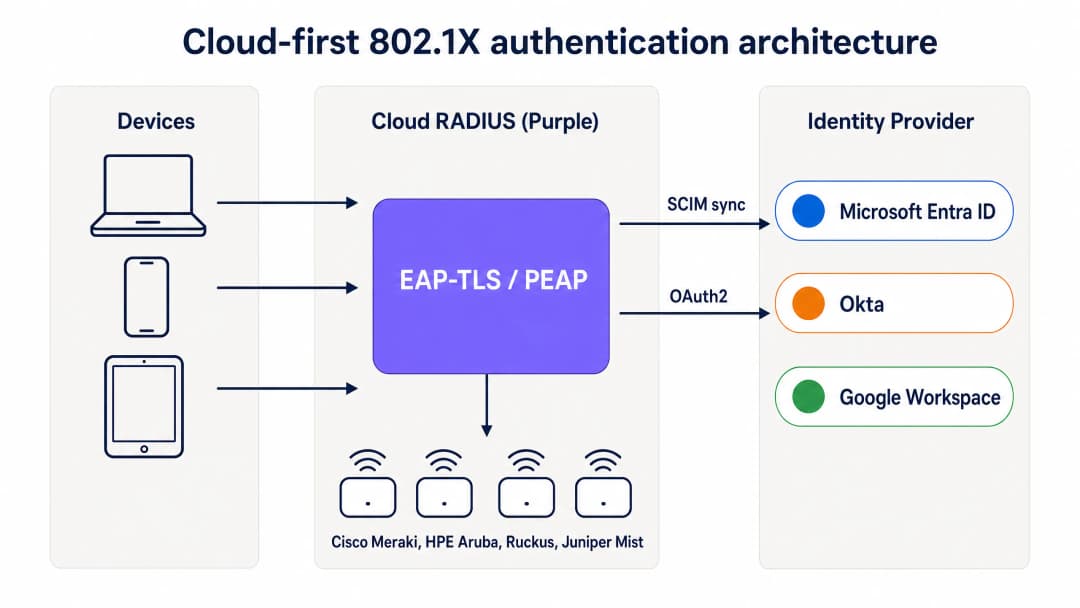
Arquitectura de autenticación 802.1X que prioriza la nube: los dispositivos se autentican a través de EAP-TLS mediante el RADIUS en la nube de Purple, que valida los certificados y aplica políticas basadas en grupos desde Entra ID, Okta o Google Workspace.
Cómo el MDM sustituye a la CA local
En un despliegue tradicional de 802.1X, los certificados los emitía una Entidad de Certificación local que ejecutaba Active Directory Certificate Services (AD CS). En un despliegue que prioriza la nube, el MDM asume este rol utilizando SCEP (Simple Certificate Enrollment Protocol). Microsoft Intune, Jamf Pro y otras plataformas de MDM pueden solicitar certificados a una CA alojada en la nube y distribuirlos de forma silenciosa a los dispositivos gestionados.
El flujo funciona de la siguiente manera. El administrador de TI crea un perfil de certificado SCEP en el MDM, asignado a los grupos de dispositivos que requieren acceso WiFi. El MDM distribuye el certificado a los dispositivos Windows, macOS, iOS, iPadOS, Android Enterprise y ChromeOS automáticamente. El usuario no ve nada. El certificado se vincula a la identidad del dispositivo en el MDM y se renueva automáticamente antes de caducar. Cuando el dispositivo se conecta al WiFi, presenta el certificado al servidor RADIUS en la nube, que lo valida frente a la CA y aplica la política de red correcta.
Para las organizaciones que utilizan Microsoft Intune, Microsoft Cloud PKI proporciona una CA totalmente gestionada que se integra directamente con los perfiles SCEP de Intune, eliminando la necesidad de un servidor NDES (Network Device Enrollment Service) local. Para las flotas de Mac e iOS gestionadas por Jamf, la CA integrada de Jamf o una CA en la nube de terceros cumplen la misma función.
SCIM y revocación de acceso instantánea
Uno de los aspectos operativamente más importantes de RADIUS en la nube es el aprovisionamiento SCIM (System for Cross-domain Identity Management). SCIM es un estándar abierto que envía los cambios de identidad desde la fuente de información original - su proveedor de identidad en la nube - a los sistemas dependientes en tiempo real. Cuando se deshabilita a un empleado en Entra ID u Okta, SCIM envía ese cambio al servicio RADIUS en la nube de inmediato. La próxima vez que el dispositivo intente autenticarse, el servidor RADIUS devuelve un mensaje de Access-Reject. Con un tiempo de espera de sesión corto configurado en el punto de acceso, el dispositivo se elimina de la red a los pocos minutos de deshabilitar la cuenta.
Esto representa una mejora de seguridad material con respecto a las redes PSK compartidas, donde la única forma de revocar el acceso es cambiar la contraseña en todos los dispositivos, y en comparación con las implementaciones RADIUS heredadas que dependen de sincronizaciones LDAP periódicas con un intervalo de horas o días.
RadSec: protección del tráfico RADIUS a través de internet
El RADIUS tradicional utiliza UDP y solo proporciona una autenticación de mensajes básica. Cuando su servidor RADIUS está en el mismo centro de datos que sus puntos de acceso, esto es aceptable. Cuando su servidor RADIUS es un servicio en la nube, el tráfico de autenticación viaja a través de la red pública de internet. RadSec (RADIUS sobre TLS, RFC 6614) cifra el intercambio RADIUS utilizando TLS, proporcionando confidencialidad e integridad para el tráfico de autenticación. Purple es compatible con RadSec de forma nativa, con alternativa de IPsec para los puntos de acceso que aún no admiten RadSec.
¿Tiene preguntas sobre su configuración específica?
Nuestro equipo trabaja con operadores de recintos, responsables de TI e ingenieros de redes en 80 000 espacios. Reserve una llamada de 20 minutos y le mostraremos cómo lo han solucionado otros profesionales como usted.
Guía de implementación
La implementación de RADIUS en la nube con EAP-TLS requiere cuatro pasos coordinados. Un SSID piloto puede estar activo en menos de una hora si ya se dispone de Entra ID y un MDM.
Paso 1: Conecte RADIUS en la nube a su proveedor de identidad
Conecte Purple a su proveedor de identidad a través del consentimiento de administrador OAuth2 (para Entra ID) o un token de API (para Okta y Google Workspace). Esto autoriza a Purple a leer usuarios, grupos y membresías de grupos desde el directorio. Configure el aprovisionamiento SCIM para enviar los cambios de estado de los usuarios a Purple en tiempo real. No se almacenan credenciales de entidad de servicio en el disco. Los cambios de grupo se propagan en el siguiente evento de autenticación, no en una programación de sincronización.
Paso 2: Configure su MDM y perfil SCEP
En Microsoft Intune, cree un perfil de certificado de confianza para la CA raíz, luego cree un perfil de certificado SCEP que apunte a la CA gestionada por Purple. Aplique ambos perfiles a los grupos de dispositivos que requieren acceso a la WiFi. Para Jamf, configure una carga útil SCEP en un perfil de configuración. El MDM envía los certificados de forma silenciosa. Verifique la entrega del certificado en el panel de cumplimiento del MDM antes de continuar.
Paso 3: Defina las políticas de red en el panel de control de RADIUS en la nube
Cree políticas de RADIUS que asocien los grupos del proveedor de identidad con VLANs y controles de acceso específicos. Por ejemplo, asocie el grupo de Entra ID "Staff-Finance" a la VLAN 20 con acceso total a Internet, y asocie "Staff-Contractors" a la VLAN 30 con un acceso limitado en el tiempo que caduque automáticamente. El panel de Purple aplica estas políticas en el momento de la autenticación, sin necesidad de realizar cambios en el firewall.
Paso 4: Actualice la configuración de los puntos de acceso
Actualice la configuración del SSID en sus puntos de acceso para utilizar WPA2-Enterprise o WPA3-Enterprise con 802.1X. Introduzca los nombres de host o direcciones IP de los endpoints primario y secundario de RADIUS en la nube de Purple, junto con el secreto compartido. Configure los puntos de acceso para que utilicen la asignación dinámica de VLAN basándose en los atributos de RADIUS devueltos por Purple. Realice pruebas con un único SSID en un subconjunto de puntos de acceso antes de implementarlo en toda la infraestructura.

RADIUS en la nube frente a RADIUS local: una comparación directa del tiempo de implementación, la dependencia de Active Directory, la alta disponibilidad, el parcheado del sistema operativo, la integración de identidades y la gestión del ciclo de vida de los certificados.
Buenas prácticas
Estas recomendaciones reflejan los estándares IEEE 802.1X, los requisitos de PCI-DSS v4.0 y la experiencia operativa en los más de 80 000 establecimientos de Purple.
Exija EAP-TLS para dispositivos gestionados. Las contraseñas son susceptibles al phishing y al relleno de credenciales. Los certificados proporcionan una prueba criptográfica de identidad y del cumplimiento del dispositivo. EAP-TLS es el único método 802.1X que es resistente al phishing por diseño.
Utilice SCIM para la revocación instantánea. Las sincronizaciones periódicas de LDAP dejan una ventana temporal en la que un empleado despedido conserva el acceso a la red. SCIM garantiza que el acceso se revoque en el mismo instante en que se deshabilita la cuenta en el proveedor de identidad.
Implemente RADIUS multirregión. Configure sus puntos de acceso con al menos dos endpoints de RADIUS en diferentes regiones geográficas. Purple proporciona una conmutación por error activa-activa multirregión de forma predeterminada, que se completa en cuestión de segundos.
Segmente el tráfico con VLANs dinámicas. Utilice la pertenencia a grupos del proveedor de identidad para asignar a los usuarios a VLANs específicas de forma dinámica. Esto aísla el tráfico confidencial y limita el radio de impacto de un dispositivo comprometido sin necesidad de realizar cambios manuales en el firewall.
Habilite RadSec. Si sus puntos de acceso son compatibles con RadSec, habilítelo para cifrar el tráfico de autenticación entre el punto de acceso y el servidor RADIUS en la nube. Esto es especialmente importante para sucursales y establecimientos donde el punto de acceso se encuentra en un segmento de red no seguro.
Supervise el ciclo de vida de los certificados. Configure la renovación automática del MDM para que se active al 80 % de la vida útil del certificado. Para un certificado de un año, la renovación comienza a los 10 meses. Active alertas para los dispositivos que no se renueven antes de que caduque el certificado. Para un análisis más amplio de los estándares y marcos de seguridad para redes WiFi corporativas, consulte nuestra Guía completa de seguridad WiFi empresarial para 2026.
Resolución de problemas y mitigación de riesgos
La transición a un RADIUS en la nube introduce nuevas dependencias. Prepárese para estos fallos comunes antes de que afecten al entorno de producción.
Caducidad de certificados. Si el certificado de un dispositivo caduca antes de que el MDM lo renueve, la autenticación del dispositivo fallará de forma silenciosa. El usuario verá un error de conexión sin ninguna explicación. Mitigue esto configurando la renovación automática del MDM al 80% de la vida útil del certificado y supervisando el panel de cumplimiento del MDM para detectar dispositivos con certificados a punto de caducar.
Fallos de sincronización del MDM. Es posible que un dispositivo que deje de cumplir las políticas del MDM o que no se conecte correctamente no reciba el certificado renovado. Implemente políticas de cumplimiento que identifiquen los dispositivos con problemas y alerten a los administradores antes de que expire el certificado.
Bloqueo del tráfico RADIUS por parte del cortafuegos. Los puntos de acceso deben poder comunicarse con los endpoints de RADIUS en la nube a través del puerto UDP 1812 (autenticación) y del puerto UDP 1813 (accounting), o mediante el puerto TCP 2083 para RadSec. Las reglas de salida de los cortafuegos en las sucursales suelen bloquear estos puertos. Pruebe la conectividad desde la VLAN de gestión de los puntos de acceso antes del despliegue.
Fallos de aprovisionamiento de SCIM. Si se interrumpe la conexión SCIM entre el proveedor de identidad y Purple, los cambios en el estado de los usuarios no se propagarán. Supervise el estado de la sincronización SCIM tanto en el proveedor de identidad como en el panel de control de Purple. Configure alertas para los fallos de sincronización.
Dispositivos heredados sin soporte para certificados. Es posible que los dispositivos IoT, las impresoras y el hardware más antiguo no sean compatibles con EAP-TLS. Para estos dispositivos, utilice iPSK (claves individuales previamente compartidas) en lugar de una PSK compartida. Purple ofrece soporte nativo para iPSK, asignando una clave única por dispositivo y ubicando cada dispositivo en la VLAN correcta sin necesidad de soporte para el suplicante 802.1X.
ROI e impacto empresarial
La migración de un servidor RADIUS local a un servicio RADIUS en la nube ofrece un valor cuantificable en toda la infraestructura, las operaciones y la seguridad.
| Dimensión | NPS local | RADIUS en la nube (Purple) |
|---|---|---|
| Coste de infraestructura | Licencias de Windows Server, computación de VM, almacenamiento | Suscripción por punto de acceso, sin hardware de servidor |
| Tiempo de despliegue | De días a semanas | Menos de una hora |
| Alta disponibilidad | Manual: dos servidores más replicación | Activo-activo multirregión, por defecto |
| Parcheado del SO | Mensual, a cargo de su equipo | Gestionado por el proveedor |
| Tickets de soporte de WiFi | Alto: restablecimiento de contraseñas, registro manual | Reducción del 80% (datos de clientes de Purple) |
| Revocación de acceso | De horas a días mediante sincronización LDAP | Segundos mediante SCIM |
Los equipos de TI que utilizan el WiFi para el personal de Purple suelen ver cómo los tickets de soporte de WiFi disminuyen en un 80% (datos internos de Purple, 2024), gracias a la eliminación del restablecimiento de contraseñas y de la incorporación manual de dispositivos. La autenticación basada en certificados también cumple con el requisito 8.3 de PCI-DSS para una autenticación sólida y el control A.9.4 de ISO 27001 para el control de acceso a sistemas y aplicaciones, lo que reduce la carga de auditoría de su equipo de seguridad.
Para las organizaciones de los sectores de comercio minorista y hostelería, la capacidad de gestionar el WiFi para el personal y el Guest WiFi desde un único panel de control en la nube - con una capa de identidad unificada - reduce la complejidad operativa en entornos de múltiples sedes. Para los operadores de transporte y proveedores de salud, la capacidad de revocación instantánea y el registro de auditoría completo cumplen con los requisitos normativos sin necesidad de herramientas adicionales.
La capa de WiFi Analytics de Purple añade datos de ocupación y trabajo híbrido sobre la infraestructura de autenticación, transformando el WiFi para el personal de un centro de costes a una fuente de inteligencia operativa.
-
Lectura relacionada: Seguridad WiFi para empresas: una guía completa para 2026 - Integración de firmware personalizado OpenWrt con Purple WiFi
```Block="none">
Definiciones clave
802.1X
Un estándar IEEE (IEEE 802.1X-2020) para el control de acceso a redes basado en puertos. Requiere que los dispositivos se autentiquen antes de que el punto de acceso conceda acceso a la red, utilizando un intercambio EAP mediado por un servidor RADIUS.
Los equipos de TI utilizan 802.1X para garantizar que solo los usuarios y dispositivos autorizados se conecten a la red corporativa. Proporciona cifrado por usuario, claves por sesión y un registro de auditoría completo de cada evento de conexión.
RADIUS
Remote Authentication Dial-In User Service (RFC 2865). Un protocolo de red que proporciona una gestión centralizada de autenticación, autorización y contabilidad (AAA) para el acceso a la red.
Los puntos de acceso reenvían cada solicitud de conexión al servidor RADIUS, que decide si admite el dispositivo y qué VLAN le asigna. RADIUS-as-a-Service en la nube sustituye a los servidores locales NPS o FreeRADIUS.
EAP-TLS
Extensible Authentication Protocol-Transport Layer Security (RFC 5216). Un método de autenticación 802.1X que utiliza un intercambio de certificados mutuo X.509 en lugar de contraseñas.
EAP-TLS es el estándar de oro para flotas de dispositivos gestionados. Es resistente al phishing, no requiere almacenamiento de hash de contraseñas y es el único método 802.1X que cumple con las directrices de MFA resistente al phishing de la CISA.
PEAP-MSCHAPv2
Protected Extensible Authentication Protocol con Microsoft Challenge Handshake Authentication Protocol versión 2. Un método heredado de 802.1X que valida contraseñas frente a hashes NTLM almacenados en Active Directory.
PEAP-MSCHAPv2 falla en entornos que son exclusivamente en la nube porque Entra ID no almacena hashes NTLM. Las organizaciones que migran desde AD local deben sustituir PEAP por EAP-TLS.
SCEP
Simple Certificate Enrollment Protocol. Un protocolo utilizado por las plataformas MDM para solicitar e instalar automáticamente certificados digitales en los dispositivos, sin interacción del usuario.
Los equipos de TI utilizan SCEP con Intune o Jamf para aprovisionar de forma silenciosa certificados de WiFi a los dispositivos de los empleados. SCEP sustituye al servidor local NDES (Network Device Enrollment Service) en despliegues con prioridad en la nube.
SCIM
System for Cross-domain Identity Management (RFC 7644). Un estándar abierto que automatiza el intercambio en tiempo real de información de identidad de usuarios entre sistemas de TI.
SCIM garantiza que cuando se deshabilita a un empleado en Microsoft Entra ID o en Okta, ese cambio se inserta en el servicio RADIUS en la nube inmediatamente, revocando el acceso a la WiFi en cuestión de segundos en lugar de horas.
NPS
Network Policy Server. La implementación de RADIUS de Microsoft, que normalmente se ejecuta en Windows Server como parte de un entorno de Active Directory local.
Las organizaciones con prioridad en la nube están retirando NPS para eliminar las máquinas virtuales de Windows Server, el parcheado de sistemas operativos y la dependencia de Active Directory local. RADIUS-as-a-Service en la nube es su sustituto directo.
RadSec
RADIUS sobre TLS (RFC 6614). Un protocolo que cifra el tráfico de autenticación de RADIUS mediante TLS, sustituyendo el transporte de texto plano basado en UDP utilizado por el RADIUS tradicional.
RadSec es esencial cuando se utiliza RADIUS en la nube, ya que el tráfico de autenticación debe atravesar la internet pública entre el punto de acceso y el servicio en la nube. Purple es compatible con RadSec de forma nativa.
iPSK
Individual Pre-Shared Key. Una variante de WPA2-Personal que asigna una clave precompartida única a cada dispositivo, en lugar de una única clave compartida para todos los dispositivos.
iPSK se utiliza para dispositivos IoT, impresoras y otro hardware que no admite 802.1X EAP-TLS. Proporciona trazabilidad por dispositivo y asignación de VLAN sin necesidad de soporte para certificados.
VLAN dinámica
Una técnica de segmentación de red en la que el servidor RADIUS devuelve un identificador de VLAN en la respuesta Access-Accept, y el punto de acceso ubica automáticamente al dispositivo en esa VLAN.
Las VLAN dinámicas permiten a los equipos de TI segmentar al personal, a los contratistas, a los dispositivos IoT y a los invitados en segmentos de red independientes en función de la pertenencia a grupos del proveedor de identidad, sin necesidad de realizar cambios manuales en el cortafuegos.
Ejemplos prácticos
Una cadena minorista de 400 tiendas necesita proteger el WiFi del personal en todas las ubicaciones. Utilizan puntos de acceso Cisco Meraki y Microsoft Entra ID con Intune para la gestión de dispositivos. Actualmente utilizan una clave compartida WPA2-Personal PSK porque no tienen Active Directory local para ejecutar NPS. Una auditoría interna reciente señaló la PSK compartida como una brecha de cumplimiento de PCI DSS.
La cadena despliega el RADIUS en la nube de Purple. En primer lugar, conectan Purple a Entra ID mediante el consentimiento de administrador de OAuth y configuran el aprovisionamiento SCIM. En Intune, crean un perfil de certificado de confianza para la CA raíz de Purple y un perfil de certificado SCEP asignado al grupo de dispositivos 'Staff-Retail'. Intune envía de forma silenciosa los certificados a todos los terminales de punto de venta y tabletas del personal gestionados. En el panel de Meraki, actualizan el SSID del personal a WPA2-Enterprise, introducen los endpoints primario y secundario de RADIUS en la nube de Purple y habilitan la asignación dinámica de VLAN. Cuando un dispositivo se conecta, presenta su certificado emitido por Intune, Purple lo valida contra la CA y comprueba el grupo de Entra ID, y el dispositivo se ubica en la VLAN 10 (red de personal) o en la VLAN 20 (red de gestión) según su pertenencia al grupo. La PSK compartida se retira. El despliegue en las 400 tiendas se realiza en un fin de semana, ya que no se despliega hardware en el sitio, solo cambios de configuración de SSID en Meraki.
Una universidad con 15.000 estudiantes utiliza Google Workspace como su proveedor de identidad principal. El equipo de TI quiere proporcionar WiFi seguro para el personal y los estudiantes en una flota BYOD de MacBooks, Chromebooks y teléfonos Android. No tienen un Active Directory local ni interés en gestionar servidores.
La universidad integra el RADIUS en la nube de Purple con Google Workspace. Para los Chromebooks gestionados, utilizan Google Admin para enviar un perfil de certificado WiFi a través de SCEP, registrando silenciosamente cada dispositivo. Para los MacBooks y teléfonos Android BYOD, despliegan una aplicación ligera de incorporación que autentica al usuario con sus credenciales de Google e instala un certificado en el dispositivo con un solo toque. Las conexiones posteriores utilizan EAP-TLS de forma silenciosa. Purple asigna las Unidades Organizativas de Google Workspace a las VLAN: el personal accede a la VLAN 10, los estudiantes a la VLAN 20 y los visitantes invitados a un SSID con Captive Portal. Cuando un estudiante se gradúa y su cuenta de Google se suspende, SCIM envía el cambio a Purple y su acceso WiFi se revoca en cuestión de minutos.
Preguntas de práctica
Q1. Su organización se ha migrado por completo de Active Directory local a Microsoft Entra ID. Su WiFi de personal actual utiliza PEAP-MSCHAPv2 contra un servidor NPS que estaba unido al antiguo dominio. Después de desmantelar el controlador de dominio, el personal informa que ya no puede conectarse a la WiFi. ¿Cuál es la causa principal y cuál es la solución correcta a largo plazo?
Sugerencia: Piense en qué requiere PEAP-MSCHAPv2 del directorio y si Microsoft Entra ID lo proporciona.
Ver respuesta modelo
La causa principal es que PEAP-MSCHAPv2 requiere que el servidor RADIUS valide la contraseña del usuario contra un hash NTLM almacenado en Active Directory. Al desmantelar el controlador de dominio, NPS no tiene un directorio contra el cual realizar la validación. Entra ID no almacena hashes NTLM, por lo que NPS no se puede redirigir a Entra ID. La solución correcta a largo plazo es reemplazar NPS con un servicio de RADIUS en la nube, migrar de PEAP-MSCHAPv2 a EAP-TLS y utilizar el MDM (Intune) para emitir certificados de dispositivo a través de SCEP. Esto elimina la dependencia de cualquier directorio local.
Q2. Está implementando RADIUS en la nube para una flota de 200 dispositivos MacBook corporativos gestionados por Jamf Pro. Su proveedor de identidad es Okta. ¿Cuál es la forma más segura y operativamente eficiente de aprovisionar las credenciales WiFi en estos dispositivos?
Sugerencia: Busque un método que no requiera interacción del usuario, evite contraseñas y se integre con su MDM existente.
Ver respuesta modelo
Configure Jamf Pro para usar SCEP para enviar de forma silenciosa certificados de dispositivo a los MacBook. Cree una carga útil SCEP en un perfil de configuración de Jamf, apuntando a la CA gestionada por su proveedor de RADIUS en la nube. Asigne el perfil al grupo de dispositivos correspondiente. Jamf enviará el certificado a cada MacBook de forma automática, sin interacción del usuario. Configure el perfil de WiFi en el mismo perfil de configuración para usar EAP-TLS con el certificado emitido por SCEP. Conecte el servicio de RADIUS en la nube a Okta a través de SCIM para garantizar que, cuando se deshabilite a un empleado en Okta, su acceso a la WiFi se revoque de inmediato.
Q3. Un empleado es despedido a las 9:00 am de un lunes. Su cuenta de Entra ID es deshabilitada por Recursos Humanos a las 9:05 am. A las 9:30 am, una alerta de seguridad muestra que el portátil del empleado todavía está conectado a la WiFi corporativa desde el aparcamiento. ¿Qué configuración falta y cómo se soluciona?
Sugerencia: ¿Cómo se entera el servidor RADIUS de que el estado del usuario ha cambiado en el proveedor de identidad?
Ver respuesta modelo
La implementación depende de sincronizaciones periódicas de LDAP en lugar de un aprovisionamiento SCIM. La sincronización LDAP aún no se ha ejecutado desde que se deshabilitó la cuenta, por lo que el servicio RADIUS en la nube todavía considera al usuario como activo. La solución es habilitar el aprovisionamiento SCIM entre Entra ID y el servicio RADIUS en la nube. SCIM envía los cambios de estado de los usuarios en tiempo real, de modo que cuando la cuenta se deshabilita en Entra ID a las 9:05 am, el servicio RADIUS recibe el cambio de inmediato. La próxima vez que el dispositivo intente volver a autenticarse (lo cual está controlado por el tiempo de espera de la sesión en el punto de acceso), recibirá un Access-Reject. Establecer un tiempo de espera de sesión corto (de 15 a 30 minutos) en el punto de acceso limita el intervalo máximo entre la inhabilitación de la cuenta y la expulsión de la red.
Q4. Su sede tiene 50 dispositivos IoT (reproductores de señalización digital, sensores ambientales e impresoras) que no son compatibles con 802.1X EAP-TLS. ¿Cómo protege estos dispositivos en la misma infraestructura WiFi que su red de personal con EAP-TLS?
Sugerencia: Considere qué método de autenticación proporciona responsabilidad por dispositivo sin requerir soporte de certificados.
Ver respuesta modelo
Utilice iPSK (claves precompartidas individuales) para los dispositivos IoT. Asigne una clave precompartida única a cada dispositivo en el panel de RADIUS en la nube, junto con una asignación de VLAN. Cada dispositivo se autentica con su clave única, que el servidor RADIUS valida y utiliza para colocar el dispositivo en la VLAN de IoT, aislada de la red del personal. Si un dispositivo se ve comprometido o se desmantela, revoca únicamente la clave de ese dispositivo sin afectar a ningún otro. Este enfoque proporciona responsabilidad por dispositivo y segmentación de red sin requerir soporte de suplicante 802.1X en el hardware de IoT.
Continúe leyendo esta serie
El caso de conformidad para un WiFi sin contraseñas: HIPAA, PCI, ISO 27001
Podrá decidir si migrar las redes del personal de una contraseña compartida a 802.1X con EAP-TLS soluciona sus brechas de auditoría bajo PCI DSS 4.0, HIPAA e ISO 27001:2022. Sabrá qué controles cumple, cuáles no y qué pruebas recopilar antes del trabajo de campo.
Cómo revocar el acceso WiFi cuando un empleado se va
Esta guía muestra a los equipos de TI y operaciones cómo eliminar el acceso a Staff WiFi cuando un empleado se marcha sin interrumpir al resto del personal. Compara el aprovisionamiento mediante 802.1X basado en certificados, iPSK específicos de identidad y la desprogramación basada en SCIM, para luego ofrecer un manual del mismo día, un método de prueba y un modelo de auditoría.
WiFi seguro para BYOD: Incorporación de certificados Passpoint frente a xPSK (iPSK)
Una guía técnica exhaustiva para equipos de TI sobre cómo proteger los dispositivos no gestionados de empleados y estudiantes (BYOD) mediante certificados EAP-TLS de Passpoint sin intervención frente a xPSK específico de cada fabricante (iPSK/easyPSK, DPSK, PPSK, MPSK).
¿Tiene preguntas sobre su configuración específica?
Nuestro equipo trabaja con operadores de recintos, responsables de TI e ingenieros de redes en 80 000 espacios. Reserve una llamada de 20 minutos y le mostraremos cómo lo han solucionado otros profesionales como usted.