
Event WiFi: तात्पुरत्या वायरलेस नेटवर्क्सचे नियोजन आणि उपयोजन (Deploying)
हे मार्गदर्शक IT व्यवस्थापक, नेटवर्क आर्किटेक्ट आणि वेन्यू ऑपरेशन्स डायरेक्टर्सना कोणत्याही स्तरावरील कार्यक्रमांमध्ये तात्पुरते WiFi नेटवर्क नियोजित आणि उपयोजित करण्यासाठी एक संपूर्ण तांत्रिक संदर्भ प्रदान करते. यामध्ये क्षमता नियोजन, हार्डवेअर निवड, VLAN आर्किटेक्चर, captive portal एकत्रीकरण, GDPR अनुपालन आणि इव्हेंट-नंतरचे विश्लेषण समाविष्ट आहे - ज्यामध्ये हॉस्पिटॅलिटी आणि मोठ्या प्रमाणावरील कॉन्फरन्स वातावरणातील ठोस केस स्टडीज आहेत. इव्हेंट उत्पादक आणि AV कंपन्यांसाठी, हे इव्हेंटच्या सुरुवातीच्या साइट सर्वेक्षणापासून ते टियरडाउन आणि रिपोर्टिंगपर्यंतच्या संपूर्ण जीवनचक्राचा नकाशा तयार करते.
हे मार्गदर्शक ऐका
पॉडकास्ट ट्रान्सक्रिप्ट पहा
आमच्या मुख्य मालिकेचा भाग: Guest WiFi Guide →
मुख्य सारांश (Executive Summary)
इव्हेंट WiFi ही एक वेगळी अभियांत्रिकी शाखा आहे. कायमस्वरूपी एंटरप्राइझ डिप्लॉयमेंटच्या उलट, तात्पुरत्या वायरलेस नेटवर्कला कमी कालावधीत अत्यंत दाट क्लायंट हाताळावे लागतात, उसने घेतलेल्या किंवा भाड्याने घेतलेल्या पायाभूत सुविधांवर कार्य करावे लागते आणि अनुपालन दायित्वे पूर्ण करावी लागतात - हे सर्व करत असताना इव्हेंट ब्रँडला साजेसा अखंड वापरकर्ता अनुभव द्यावा लागतो. ३,००० लोकांच्या परिषदेत नेटवर्क निकामी होणे ही केवळ गैरसोय नाही; ती एक प्रतिष्ठा आणि व्यावसायिक हानी आहे.
हे मार्गदर्शक संपूर्ण डिप्लॉयमेंट लाइफसायकल संबोधित करते: क्षमता मॉडेलिंग (capacity modelling), हार्डवेअर भाड्याने घेणे, बॅकहॉल प्रोव्हिजनिंग, VLAN आर्किटेक्चर, कॅप्टिव्ह पोर्टल (captive portal) डिझाइन आणि ऑन-साइट व्यवस्थापन. हे मार्गदर्शक अशा IT व्यावसायिकांसाठी लिहिले आहे ज्यांना या तिमाहीत खरेदी आणि आर्किटेक्चरचे निर्णय घ्यावे लागतील, वायरलेस मानकांचे केवळ सैद्धांतिक पुनरावलोकन करण्यासाठी नाही. जिथे Purple चे Guest WiFi आणि WiFi Analytics प्लॅटफॉर्म विशिष्ट मूल्य जोडते - विशेषतः कॅप्टिव्ह पोर्टल व्यवस्थापन, GDPR-सुसंगत डेटा संकलन आणि इव्हेंट-नंतरच्या रिपोर्टिंगच्या बाबतीत - ते इंटिग्रेशन पॉईंट्स स्पष्टपणे हायलाइट केले आहेत.
तांत्रिक सखोल विश्लेषण (Technical Deep-Dive)
इव्हेंट WiFi का वेगळे आहे
इव्हेंट WiFi चे मूलभूत आव्हान म्हणजे एकाच वेळी येणारी अति-घनता (density). नेहमीच्या ऑफिस डिप्लॉयमेंटमध्ये, तुमच्याकडे १,००० चौरस मीटरमध्ये पसरलेली १०० डिव्हाइसेस असू शकतात, ज्यांचे कामाच्या वेळेत टप्प्याटप्प्याने कनेक्शन होते. एका परिषदेच्या मुख्य भाषणाच्या (keynote) वेळी, हॉलमध्ये उपस्थित असलेले लोक आत येताच अवघ्या पाच मिनिटांच्या खिडकीमध्ये २,००० डिव्हाइसेस एकाच वेळी जोडण्याचा प्रयत्न करू शकतात. RF वातावरण, DHCP इन्फ्रास्ट्रक्चर आणि ऑथेंटिकेशन बॅकएंड या सर्वांची रचना सरासरी लोडसाठी नव्हे, तर त्या पीक लोडसाठी (peak load) करावी लागते.
इव्हेंट डिप्लॉयमेंटमधील प्रत्येक आर्किटेक्चरल निर्णय तीन चलांवर अवलंबून असतो: क्लायंट संख्या, प्रति वापरकर्ता आवश्यक थ्रूपुट (throughput), आणि इव्हेंटचा कालावधी. नियोजन टप्प्यात हे चुकल्यास, ऑन-साइटवरील कोणतीही ट्रबलशूटिंग परिस्थिती सुधारू शकत नाही.
क्षमता नियोजन: महत्त्वाचे आकडे
उच्च-घनता WiFi साठी उद्योगाचे बेसलाइन प्रति २५ ते ५० समवर्ती (concurrent) वापरकर्त्यांमागे एक ऍक्सेस पॉईंट आहे, परंतु या आकड्याला महत्त्वपूर्ण पात्रतेची आवश्यकता आहे. हे प्रमाण AP च्या रेडिओ क्षमतांवर, २.४ GHz आणि ५ GHz क्लायंटच्या अपेक्षित प्रमाणावर आणि इव्हेंटमध्ये जास्त मीडिया वापर (लाइव्ह स्ट्रीमिंग, व्हिडिओ कॉल्स) होणार आहे की कमी ब्राउझिंग आणि मेसेजिंग ट्रॅफिक असणार आहे यावर अवलंबून असते.
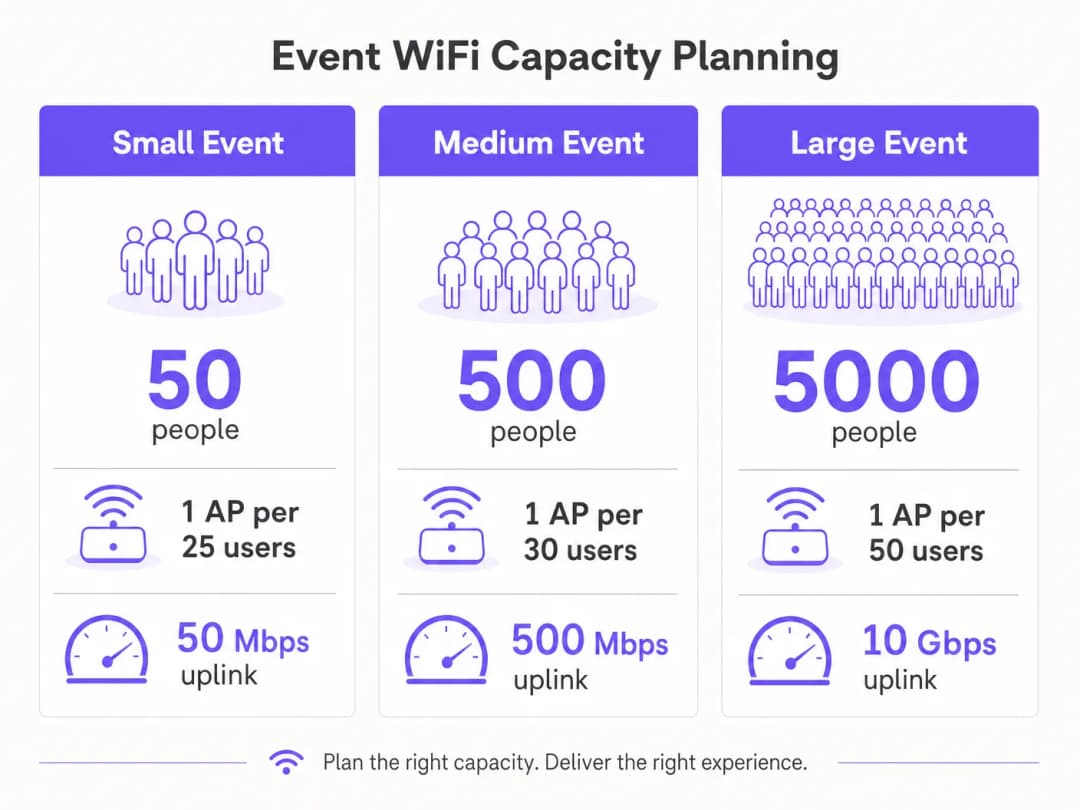
थ्रूपुट नियोजनासाठी, सामान्य परिषद किंवा प्रदर्शन वापरासाठी प्रति सक्रिय वापरकर्ता १ - २ Mbps चा पुराणमतवादी अंदाज योग्य आहे. थेट प्रवाह (live streaming) किंवा ब्रॉडकास्ट - दर्जाच्या व्हिडिओ आवश्यकता असलेल्या इव्हेंट्ससाठी - जसे की उत्पादन लॉन्च किंवा प्रेस इव्हेंट्स - प्रॉडक्शन VLAN वर प्रति सक्रिय वापरकर्ता ५ - १० Mbps चे बजेट ठेवा. तुमच्या अपलिंकचा आकार सर्व VLAN च्या एकत्रित वापराला एकाच वेळी सामावून घेण्यासाठी पुरेसा असावा, ज्यामध्ये किमान २०% हेडरूम असावी.
| इव्हेंट स्केल | उपस्थित | शिफारस केलेले APs | किमान अपलिंक | DHCP व्याप्ती |
|---|---|---|---|---|
| लहान | १०० पर्यंत | ४ - ६ | ५० Mbps | /२४ |
| मध्यम | १०० - ५०० | १५ - २५ | २०० - ५०० Mbps | /२३ |
| मोठे | ५०० - २,००० | ५० - १०० | १ - २ Gbps | /२१ |
| एंटरप्राइझ | २,०००+ | १००+ | ५ - १० Gbps | /२० किंवा मोठी |
बॅकहॉल: तडजोड न करता येणारा पाया
कोणत्याही प्रकारचे उत्तम डिझाइन केलेले वायरलेस इन्फ्रास्ट्रक्चर अपुऱ्या बॅकहॉलची भरपाई करू शकत नाही. २०० पेक्षा जास्त उपस्थित असलेल्या इव्हेंट्ससाठी, एक समर्पित लीझ्ड लाईन हा एकमेव योग्य अपलिंक पर्याय आहे. लीझ्ड लाईन हमी दिलेला SLA - सामान्यतः ९९.९५% अपटाईम - सह एक सिंक्रोनस, अनकंटेन्डेड कनेक्शन प्रदान करते, जे बऱ्याच ठिकाणांनी स्वतःच्या कामकाजासाठी स्थापित केलेल्या सामायिक, असममित ब्रॉडबँडपेक्षा मूलभूतपणे भिन्न असते.
लीझ्ड लाईनच्या तरतुदीसाठी सहसा चार ते सहा आठवड्यांचा लीड टाईम लागतो. इव्हेंट WiFi उपयोजनांमधील हे सर्वात सामान्य नियोजन अपयश आहे: जे संघ इव्हेंटच्या दोन आठवडे आधी नेटवर्क डिझाइन सुरू करतात आणि त्यांना समजते की त्यांना वेळेत समर्पित सर्किट मिळू शकत नाही. ज्या इव्हेंट्ससाठी लीझ्ड लाईन खरोखरच अव्यवहार्य आहे - बाहेरील फेस्टिव्हल्स, तात्पुरत्या उभारणी - वेगवेगळ्या कॅरियर्सच्या एकाधिक सिम कार्डांचा वापर करून बाँडेड ४G/५G पर्याय एक व्यवहार्य पर्याय प्रदान करतो, जरी यात कमी थ्रूपुटची हमी आणि जास्त लेटन्सी असते.
नेटवर्क आर्किटेक्चर आणि VLAN डिझाइन
कठोर नेटवर्क विभाजन ही कामगिरी आणि अनुपालन अशा दोन्ही प्रकारची आवश्यकता आहे. कोणत्याही इव्हेंट उपयोजनासाठी शिफारस केलेले किमान आर्किटेक्चर तीन VLAN वापरते:

VLAN १० - Guest WiFi: सर्व सार्वजनिक-दर्शनी उपस्थितांचे ट्रॅफिक. हे VLAN प्रमाणीकरण आणि डेटा कॅप्चरसाठी Captive Portal शी जोडते. डिव्हाइसेस दरम्यान लॅटरल मूव्हमेंट रोखण्यासाठी क्लायंट आयसोलेशन सक्षम केले पाहिजे. दुर्भावनापूर्ण डोमेन ब्लॉक करण्यासाठी DNS फिल्टरिंग लागू केले पाहिजे - अंमलबजावणीच्या तपशीलांसाठी protecting your network with strong DNS and security या Purple च्या मार्गदर्शकाचा संदर्भ घ्या.
VLAN २० - कर्मचारी आणि पॉईंट ऑफ सेल: इव्हेंट कर्मचारी, तिकिटिंग सिस्टीम आणि कार्ड पेमेंट टर्मिनल्ससाठीचे ऑपरेशन्स ट्रॅफिक. या VLAN वर कार्ड पेमेंट प्रविष्ट केले जात असल्यास, PCI-DSS लागू होते आणि हे VLAN कोणत्याही राउटिंगशिवाय गेस्ट नेटवर्कपासून पूर्णपणे वेगळे केले पाहिजे. VLAN 30 — AV and Production: ब्रॉडकास्ट उपकरणे, प्रेझेंटेशन सिस्टीम्स आणि प्रोडक्शन क्रूसाठी समर्पित. या VLAN ला सहसा सर्वोच्च हमी दिलेला थ्रूपुट आणि सर्वात कमी लेटन्सी आवश्यक असते, आणि त्यास अतिथी ट्रॅफिकपेक्षा प्राधान्य देणाऱ्या QoS पॉलिसीसह प्रोव्हिजन केले पाहिजे.
मोठ्या इव्हेंट्ससाठी, एक्झिबिटर्स, प्रेस आणि सुरक्षा यंत्रणांसाठी अतिरिक्त VLANs असणे सामान्य आहे. प्रत्येक SSID एकाच VLAN शी मॅप झाला पाहिजे आणि स्पष्टपणे आवश्यक असल्याशिवाय कोर स्विचवर इंटर-VLAN राउटिंग अक्षम केले पाहिजे.
Radio Frequency Planning
हाय-डेन्सिटी वातावरणात, बहुतेक एंटरप्राइझ APs चे डीफॉल्ट वर्तन - ऑटोमॅटिक चॅनल सिलेक्शन आणि कमाल ट्रान्समिट पॉवर - सक्रियपणे हानीकारक ठरते. एकाच चॅनेलवरील लगतच्या APs मधील को-चॅनेल इंटरफेरन्समुळे कव्हरेज एरियामधील किंचित घसरणीपेक्षा कामगिरीमध्ये खूप जास्त घट होते.
योग्य दृष्टीकोन म्हणजे चॅनेल्स व्यक्तिचलितपणे नियुक्त करणे आणि ट्रान्समिट पॉवर कमी करणे. 5 GHz बँडवर, UNII-1 (36, 40, 44, 48), UNII-2 (52-64), आणि UNII-3 (149-165) बँडवर उपलब्ध असलेले नॉन-ओव्हरलॅपिंग चॅनेल्स वापरा. डेन्स डिप्लॉयमेंट्समध्ये AP ट्रान्समिट पॉवर 8-12 dBm पर्यंत कमी करा. यामुळे कमी इंटरफेरन्स असलेले लहान, स्वच्छ सेल्स तयार होतात, ज्यामुळे संपूर्ण ठिकाणाचा एकूण थ्रूपुट सुधारतो.
5 GHz-सक्षम क्लायंट्स - जे की बहुसंख्य आधुनिक स्मार्टफोन आणि लॅपटॉप आहेत - त्यांना गर्दीच्या 2.4 GHz स्पेक्ट्रमपासून दूर ठेवण्यासाठी सर्व APs वर बँड स्टिअरिंग सक्षम केले पाहिजे. 5 GHz शी कनेक्ट होऊ न शकणाऱ्या जुन्या IoT डिव्हाइसेस आणि ॲक्सेसिबिलिटी उपकरणांसाठी 2.4 GHz राखून ठेवा.
आउटडोअर इव्हेंट्ससाठी, RF वातावरण मूलभूतपणे वेगळे असते. सिग्नल नियंत्रित ठेवण्यासाठी भिंती आणि छत नसल्यामुळे, कव्हरेज सेल्स मोठे असतात आणि लगतच्या डिप्लॉयमेंट्स किंवा ग्राहक हॉटस्पॉट्समधील इंटरफेरन्स नियंत्रित करणे कठीण असते. आउटडोअर सेटिंग्जमध्ये ओम्नीडायरेक्शनल APs पेक्षा डायरेक्शनल सेक्टर अँटेना अधिक श्रेयस्कर आहेत, कारण ते तुम्हाला अंदाधुंद ब्रॉडकास्टिंग करण्याऐवजी विशिष्ट झोन्सवर - मुख्य स्टेज एरिया, फूड कोर्ट, रजिस्ट्रेशन रांग - कव्हरेज केंद्रित करण्यास अनुमती देतात. सर्व आउटडोअर हार्डवेअरमध्ये किमान IP55 इनग्रेस प्रोटेक्शन रेटिंग असणे आवश्यक आहे; फेस्टिव्हल किंवा उघड्या वातावरणासाठी IP67 अधिक श्रेयस्कर आहे.
Captive Portal Architecture and GDPR Compliance
Captive Portal ही युझरची तुमच्या इव्हेंट नेटवर्कशी होणारी पहिली संवाद प्रक्रिया आहे आणि अनुपालन (compliance) व डेटा कॅप्चर या दोन्हीसाठी तुमची प्राथमिक यंत्रणा आहे. एक खराब डिझाइन केलेले पोर्टल जे टाईम आउट होते, iOS वर योग्यरित्या रिडायरेक्ट करण्यात अपयशी ठरते किंवा अस्पष्ट संमती वर्कफ्लो सादर करते, त्यामुळे मोठ्या प्रमाणात सपोर्ट विनंत्या निर्माण होतील आणि नेटवर्कवरील उपस्थितांचा विश्वास कमी होईल.
GDPR च्या दृष्टिकोनातून, वैयक्तिक डेटाचे कोणतेही संकलन - ईमेल पत्ते, सोशल लॉगिन टोकन किंवा डिव्हाइस आयडेंटिफायर्स - यासाठी कायदेशीर आधार, स्पष्ट प्रायव्हसी नोटीस आणि कोणत्याही मार्केटिंग वापरासाठी स्पष्ट संमती असणे आवश्यक आहे. ही संमती विशिष्ट स्वरूपाची असावी: WiFi वापरण्यासाठीची संमती ही मार्केटिंग कम्युनिकेशन्स मिळविण्याच्या संमतीसारखी नसते. Purple चे Guest WiFi प्लॅटफॉर्म हे संमती वर्कफ्लो स्थानिक पातळीवर हाताळते, नियम-सुसंगत ऑप्ट-इन फ्लो सादर करते आणि GDPR च्या कलम 7 नुसार आवश्यकतेनुसार टाइमस्टॅम्प आणि IP पत्त्यांसह संमतीचे रेकॉर्ड स्टोअर करते.
कॅप्टिव्ह पोर्टलचे टेक्निकल आर्किटेक्चर परफॉर्मन्ससाठी महत्त्वाचे ठरते. क्लाउड-होस्टेड पोर्टल जे ऑथेंटिकेशन विनंत्या बाह्य सर्व्हरकडे रिडायरेक्ट करते, त्यामुळे लॉगिन फ्लोमध्ये लेटन्सी (विलंब) निर्माण होते. पीक लोडच्या वेळी - जेव्हा शेकडो युजर्स एकाच वेळी ऑथेंटिकेट करत असतात - तेव्हा या लेटन्सीमुळे टाइमआउट आणि अयशस्वी लॉगिन होऊ शकतात. Purple चे प्लॅटफॉर्म तंतोतंत याच वापरासाठी डिझाइन केलेले आहे, ज्यामध्ये ऑटो-स्केलिंग इन्फ्रास्ट्रक्चर समाविष्ट आहे जे कोणताही अडथळा न आणता बस्ट ऑथेंटिकेशन लोड हाताळते.
तुमच्या विशिष्ट सेटअपबद्दल काही प्रश्न आहेत का?
आमची टीम ८०,००० हून अधिक वेन्यूजमधील वेन्यू ऑपरेटर्स, IT मॅनेजर्स आणि नेटवर्क इंजिनिअर्ससोबत काम करते. २० मिनिटांचा कॉल बुक करा आणि तुमच्यासारख्या इतरांनी ही समस्या कशी सोडवली हे आम्ही तुम्हाला दाखवू.
अंमलबजावणी मार्गदर्शिका
टप्पा 1: साइट सर्व्हे आणि कॅपॅसिटी मॉडेलिंग (इव्हेंटच्या 8 आठवडे आधी)
प्रत्यक्ष साइट सर्व्हेपासून सुरुवात करा. जिथे उपस्थित लोक असणार आहेत अशा प्रत्येक भागात फिरून छताची उंची, भिंतीचे साहित्य, स्ट्रक्चरल अडथळे आणि सध्याचे इन्फ्रास्ट्रक्चर (कंड्युट रन्स, पॉवर आउटलेट्स, डेटा पोर्ट्स) यांची नोंद करा. हार्डवेअरची ऑर्डर देण्यापूर्वी अंदाजित कव्हरेजचे मॉडेल तयार करण्यासाठी आणि डेड झोन ओळखण्यासाठी WiFi सर्व्हे टूल - Ekahau Site Survey किंवा iBwave हे इंडस्ट्री स्टँडर्ड्स आहेत - वापरा.
त्याच वेळी, वेन्यूचे सद्य नेटवर्क इन्फ्रास्ट्रक्चर तपासा. उपलब्ध डेटा पोर्ट्स, मुख्य डिस्ट्रिब्युशन फ्रेमचे ठिकाण आणि सद्य स्विचेसची क्षमता ओळखा. वेन्यूचे सद्य केबलिंग तुम्ही तैनात करू इच्छित असलेल्या APs साठी PoE+ (802.3at) ला सपोर्ट करू शकते का, किंवा तुम्हाला स्वतःचे PoE स्विचेस आणि केबलिंग आणावे लागेल का हे ठरवा.
अपेक्षित उपस्थित संख्या, इव्हेंट प्रोग्राम (एक कीनोट सेशन हे नेटवर्किंग रिसेप्शनच्या तुलनेत खूप वेगळा लोड प्रोफाइल तयार करते) आणि कोणत्याही प्रॉडक्शन सिस्टीमच्या थ्रुपुट गरजांच्या आधारे तुमचे कॅपॅसिटी मॉडेल अंतिम करा.
टप्पा 2: हार्डवेअर खरेदी आणि बॅकहॉल ऑर्डरिंग (इव्हेंटच्या 6 ते 8 आठवडे आधी)
साइट सर्व्हेनंतर लगेचच तुमची लीज्ड लाईन ऑर्डर करा. चार ते सहा आठवड्यांचा प्रोव्हिजनिंग कालावधी हा संपूर्ण तैनातीसाठी अत्यंत महत्त्वाचा टप्पा असतो. इव्हेंट वेन्यूवर आधीच लीज्ड लाईन असल्यास, वेन्यूच्या IT टीमसोबत डेडिकेटेड बँडविड्थ अलोकेशनबाबत बोलणी करा - सद्य इन्फ्रास्ट्रक्चर सहज उपलब्ध करून दिले जाईल असे गृहीत धरू नका.
हार्डवेअरसाठी, खरेदी किंवा भाड्याने घेणे यामधील निवड तुमच्या इव्हेंटच्या वारंवारतेवर अवलंबून असते. जे ऑर्गनायझेशन्स वर्षातून चारपेक्षा जास्त वेळा इव्हेंट WiFi तैनात करतात, त्यांच्यासाठी पोर्टेबल किटची मालकी असणे - एंटरप्राइझ APs, मॅनेज्ड PoE स्विच, रॅक-माउंट राउटर आणि केबलिंग - वारंवार भाड्याने घेण्यापेक्षा अधिक किफायतशीर ठरते. एकवेळच्या इव्हेंटसाठी, स्पेशलिस्ट इव्हेंट WiFi भाड्याने देणाऱ्या कंपन्या प्री-कॉन्फिगर केलेले हार्डवेअर ऑन-साइट सपोर्टसह पुरवतात, ज्यामुळे तैनातीमधील जोखीम लक्षणीयरीत्या कमी होते. भाड्याने किंवा खरेदी करण्यासाठी APs निवडताना, 200 पेक्षा जास्त युजर्सच्या कोणत्याही डिप्लॉयमेंटसाठी WiFi 6 (802.11ax) हार्डवेअरला प्राधान्य द्या. WiFi 6 मधील OFDMA आणि BSS Colouring फीचर्स WiFi 5 (802.11ac) च्या तुलनेत हाय-डेन्सिटी वातावरणात लक्षणीय परफॉर्मन्स सुधारणा प्रदान करतात.
टप्पा 3: इव्हेंट-पूर्व कॉन्फिगरेशन आणि टेस्टिंग (इव्हेंटच्या 1 - 2 आठवडे आधी)
साइटवर पोहोचण्यापूर्वी स्टेजिंग वातावरणात सर्व नेटवर्क उपकरणांचे कॉन्फिगरेशन करा. यामध्ये कोअर स्विचवर VLAN कॉन्फिगरेशन, वायरलेस कंट्रोलरवर SSID-to-VLAN मॅपिंग, DHCP स्कोप कॉन्फिगरेशन आणि Captive Portal इंटिग्रेशन समाविष्ट आहे. इव्हेंटच्या दिवशी ट्रबलशूटिंग करण्यापेक्षा स्टेजिंग वातावरणात टेस्टिंग करणे खूपच अधिक कार्यक्षम असते.
Captive Portal कॉन्फिगरेशनसाठी, याच टप्प्यावर Purple च्या प्लॅटफॉर्मचे इंटिग्रेशन करा. ब्रँडेड स्प्लॅश पेज, ऑथेंटिकेशन पद्धत (ईमेल, सोशल लॉगिन किंवा SMS), संमती वर्कफ्लो आणि ऑथेंटिकेशन नंतरचे कोणतेही रिडायरेक्ट कॉन्फिगर करा. एकाधिक डिव्हाइस प्रकारांवर संपूर्ण युजर प्रवासाची चाचणी घ्या - iOS, Android, Windows आणि macOS हे सर्व Captive Portal डिटेक्शन वेगवेगळ्या प्रकारे हाताळतात आणि रिडायरेक्ट मेकॅनिझम योग्यरित्या काम करण्यासाठी प्रत्येकाच्या विशिष्ट आवश्यकता असतात.
DHCP स्कोप, ऑथेंटिकेशन बॅकएंड आणि अपलिंक अपेक्षित पीक लोड हाताळू शकतात की नाही हे तपासण्यासाठी WiFi क्लायंट सिम्युलेटरचा वापर करून लोड टेस्ट करा. या उद्देशासाठी Spirent किंवा Ixia सारखी टूल्स शेकडो समवर्ती WiFi क्लायंट्स सिम्युलेट करू शकतात.
टप्पा 4: ऑन-साइट डिप्लॉयमेंट (इव्हेंटच्या आदल्या दिवशी)
इव्हेंटचे ठिकाण उपस्थितांसाठी खुले होण्यापूर्वी इन्स्टॉलेशन आणि टेस्टिंग पूर्ण करण्यासाठी पुरेसा वेळ ठेवून साइटवर पोहोचा. साइट सर्वे प्लॅननुसार APs माउंट करा - ऑम्निडायरेक्शनल कव्हरेजसाठी सिलिंग माउंटिंगला प्राधान्य दिले जाते; जिथे सिलिंग ॲक्सेस उपलब्ध नसेल तिथे वॉल माउंटिंग स्वीकार्य आहे. सर्व केबलिंग रन करा आणि त्यांना लेबल लावा, तसेच प्रत्येक AP च्या प्रत्यक्ष ठिकाणाची नोंद फोटो आणि फ्लोअर प्लॅन ॲनोटेशनसह डॉक्युमेंट करा.
सर्व हार्डवेअर इन्स्टॉल झाल्यानंतर, कव्हरेज तपासण्यासाठी लॅपटॉप किंवा समर्पित सर्वे डिव्हाइसचा वापर करून इन्स्टॉलेशन-नंतरचा सर्वे करा. संपूर्ण उपस्थित क्षेत्रात फिरा आणि सर्वत्र -65 dBm किंवा त्याहून चांगल्या सिग्नल स्ट्रेंथची पुष्टी करा. इव्हेंट सुरू होण्यापूर्वी कव्हरेजमधील कोणतीही त्रुटी ओळखा आणि ती दूर करा.
सुरुवातीपासून शेवटपर्यंतच्या युजर प्रवासाची चाचणी घ्या: प्रत्येक SSID ला एक चाचणी डिव्हाइस कनेक्ट करा, Captive Portal ऑथेंटिकेशन पूर्ण करा आणि इंटरनेट ॲक्सेस उपलब्ध असल्याची खात्री करा. स्टाफ VLAN वर कार्ड पेमेंट टर्मिनल्सची चाचणी घ्या. प्रॉडक्शन VLAN वरील AV उपकरणे सर्व आवश्यक डेस्टिनेशन्सपर्यंत पोहोचू शकत असल्याची खात्री करा.
टप्पा 5: ऑन-साइट मॅनेजमेंट आणि मॉनिटरिंग
इव्हेंट दरम्यान, वायरलेस कंट्रोलरच्या मॅनेजमेंट डॅशबोर्डचा वापर करून रिअल टाईममध्ये नेटवर्कचे निरीक्षण करा. खालील मुख्य मेट्रिक्सवर लक्ष ठेवणे आवश्यक आहे: AP असोसिएशन संख्या (शिफारस केलेल्या क्लायंट क्षमतेच्या ८०% पेक्षा जास्त जाणाऱ्या कोणत्याही AP ला चिन्हांकित करा), चॅनल युटिलायझेशन, DHCP पूल युटिलायझेशन आणि अपलिंक थ्रुपुट. Purple चे WiFi Analytics प्लॅटफॉर्म वापरकर्त्याच्या वर्तनाबद्दल - ड्वेल टाईम, पीक कनेक्शन कालावधी आणि पोर्टल कन्व्हर्शन दर - अतिरिक्त दृश्यमानता प्रदान करते, जे रिअल-टाईम व्यवस्थापन आणि इव्हेंटनंतरच्या रिपोर्टिंगसाठी मौल्यवान आहे.
नेटवर्क समस्यांसाठी एक स्पष्ट एस्केलेशन प्रक्रिया ठेवा. इव्हेंट स्टाफच्या सर्व नेटवर्क संबंधित सपोर्ट विनंत्यांसाठी संपर्काचा एकच बिंदू नियुक्त करा आणि खात्री करा की ऑन-साइट नेटवर्क इंजिनिअरकडे गेस्ट नेटवर्कपेक्षा स्वतंत्र असलेल्या आउट ऑफ बँड मॅनेजमेंट कनेक्शनद्वारे सर्व उपकरणांचा रिमोट ॲक्सेस आहे.
सर्वोत्तम पद्धती (Best Practices)
खालील शिफारसी hospitality, retail आणि कॉन्फरन्स वातावरणातील मोठ्या प्रमाणावरील इव्हेंट उपयोजनांमधून घेतलेल्या वेंडर-न्यूट्रल सर्वोत्तम पद्धतींचे प्रतिनिधित्व करतात.
स्टाफ आणि प्रोडक्शन नेटवर्कसाठी SSID ब्रॉडकास्टिंग निष्क्रिय करा. हे SSIDs उपस्थितांना दिसण्यासाठी कोणतेही ऑपरेशनल कारण नाही. ते लपवून ठेवल्याने अटॅक सरफेस कमी होतो आणि अपघाती कनेक्शन टाळता येतात.
गेस्ट VLAN वर आक्रमक DHCP लीझ टाईम सेट करा. ३० - ६० मिनिटांचा लीझ टाईम हे सुनिश्चित करतो की डिस्कनेक्ट केलेल्या उपकरणांचे IP ॲड्रेस त्वरित परत मिळवले जातील. हे विशेषतः बहु-दिवसीय इव्हेंट्समध्ये महत्त्वाचे असते जेथे सेशन्सच्या दरम्यान उपस्थित लोकांची संख्या लक्षणीयरीत्या बदलते.
स्टाफ आणि प्रोडक्शन VLANs वर 802.1X ऑथेंटिकेशन लागू करा. 802.1X सह WPA3-Enterprise प्रति-वापरकर्ता ऑथेंटिकेशन प्रदान करते आणि शेअर्ड प्री-शेअर्ड की तडजोड होण्याचा धोका काढून टाकते. गेस्ट नेटवर्कसाठी, WPA3-Personal किंवा Captive Portal असलेले ओपन नेटवर्क हा प्रमाणित दृष्टिकोन आहे.
गेस्ट VLAN वर DNS-over-HTTPS किंवा DNS फिल्टरिंग वापरा. सार्वजनिक इव्हेंट नेटवर्क हे DNS हायजॅकिंग आणि फिशिंग हल्ल्यांचे लक्ष्य असतात. DNS फिल्टरिंग लागू करणे - एकतर तुमच्या अपस्ट्रीम प्रदाता किंवा समर्पित DNS सुरक्षा सेवेद्वारे - उपस्थितांसाठी संरक्षणाचा एक महत्त्वपूर्ण स्तर प्रदान करते. Purple चे प्लॅटफॉर्म Captive Portal लेयरवर हे फिल्टरिंग लागू करण्यासाठी DNS सुरक्षा प्रदात्यांशी समाकलित होते.
प्रत्येक गोष्टीचे दस्तऐवजीकरण (Document) करा. तुम्ही साइटवर पोहोचण्यापूर्वी नेटवर्क डायग्राम, केबलिंग शेड्युल आणि AP प्लेसमेंट मॅप तयार करा. हे दस्तऐवजीकरण इव्हेंट दरम्यान त्रुटी निवारणासाठी आणि त्याच ठिकाणी भविष्यातील उपयोजनांचे नियोजन करण्यासाठी अमूल्य आहे.
विमानतळ आणि ट्रान्सपोर्ट हब उपयोजनांसाठी, अतिरिक्त सुरक्षा बाबी लागू होतात - Purple चे airport WiFi security वरील मार्गदर्शक उच्च-पादचारी रहदारी असलेल्या सार्वजनिक वातावरणाशी संबंधित विशिष्ट थ्रेट मॉडेल आणि शमन धोरणे समाविष्ट करते.
त्रुटी निवारण आणि जोखीम शमन (Troubleshooting and Risk Mitigation)
DHCP पूल संपणे (DHCP Pool Exhaustion)
इव्हेंट WiFi मधील हे सर्वात सामान्य अपयशाचे कारण आहे. यामध्ये डिव्हाइसेस WiFi ला कनेक्ट होतात परंतु IP ॲड्रेस मिळवू शकत नाहीत, किंवा त्यांना APIPA ॲड्रेस (169.254.x.x) मिळतो अशी लक्षणे दिसतात. यावरील उपाय म्हणजे DHCP स्कोपचा आकार वाढवणे आणि लीझची वेळ कमी करणे हा आहे. प्रतिबंध करणे सोपे आहे: तुमच्या DHCP स्कोपचा आकार अपेक्षित कमाल क्लायंट संख्येच्या किमान दुप्पट ठेवा आणि लीझची वेळ 30 - 60 मिनिटांवर सेट करा.
Authentication Server Overload
कमाल लोड असताना, एकाच वेळी येणाऱ्या मोठ्या संख्येतील ऑथेंटिकेशन विनंत्यांमुळे ऑन-प्रिमायसेस RADIUS सर्व्हर किंवा captive portal बॅकएंडवर ताण येऊ शकतो. हे धीमे किंवा अयशस्वी लॉगिनच्या स्वरूपात दिसून येते. Purple सारखे क्लाउड-होस्ट केलेले प्लॅटफॉर्म्स बस्ट लोड हाताळण्यासाठी ऑटो-स्केल होतात, जे इव्हेंट वापराच्या प्रकरणांसाठी ऑन-प्रिमायसेस डिप्लॉयमेंटच्या तुलनेत एक महत्त्वपूर्ण आर्किटेक्चरल फायदा आहे.
Co-Channel Interference
जर अनेक APs अगदी जवळ एकाच चॅनेलवर कार्यरत असतील, तर कार्यक्षमता लक्षणीयरीत्या घसरते. चांगली सिग्नल स्ट्रेंथ असूनही कमी थ्रूपुट मिळणे आणि वायरलेस कंट्रोलरमध्ये हाय रिट्राय रेट दिसणे ही याची लक्षणे आहेत. यावरील उपाय म्हणजे चॅनेल असाइनमेंटचे पुनरावलोकन करणे आणि लगतचे APs ओव्हरलॅप न होणाऱ्या चॅनेल्सवर आहेत याची खात्री करणे हा आहे. ट्रान्समिट पॉवर कमी केल्याने प्रत्येक AP ची इंटरफेअरेन्स रेडियस कमी होऊन मदत होते.
Captive Portal Redirect Failures
वेगवेगळी ऑपरेटिंग सिस्टीम्स captive portals शोधण्यासाठी वेगवेगळ्या यंत्रणा वापरतात. iOS एक समर्पित CNA (Captive Network Assistant) वापरते जे विशिष्ट Apple URLs ला HTTP विनंत्या पाठवते. Android देखील Google च्या कनेक्टिव्हिटी चेक सर्व्हर्ससह अशीच यंत्रणा वापरते. जर तुमचे captive portal या प्रोब्जला योग्य प्रतिसाद देत नसेल, तर पोर्टल आपोआप उघडणार नाही आणि युजर्सना मॅन्युअली पोर्टल URL वर जावे लागेल. तुमचे captive portal या विशिष्ट प्रोब विनंत्या इंटरसेप्ट करण्यासाठी आणि त्यांना प्रतिसाद देण्यासाठी कॉन्फिगर केले असल्याची खात्री करा.
Uplink Failure
अपलिंकवरील सिंगल पॉईंट ऑफ फेल्युअर हा इव्हेंट डिप्लॉयमेंटमधील सर्वात मोठा परिणाम करणारा धोका आहे. प्रायमरी लीझ्ड लाईन निकामी झाल्यास आपोआप सक्रिय होणारे 4G/5G बॅकअप कनेक्शन प्रस्थापित करून हा धोका कमी करा. बहुतेक एंटरप्राइझ राउटर एका सेकंदापेक्षा कमी स्विचओव्हर वेळेसह ड्युअल-WAN फेलओव्हरला सपोर्ट करतात. फेलओव्हर यंत्रणेची चाचणी इव्हेंट दरम्यान न करता, इव्हेंटपूर्व सेटअप दरम्यानच करा.
ROI and Business Impact
इव्हेंट WiFi कडे आता केवळ एक उपयुक्तता म्हणून नव्हे, तर एक डेटा ॲसेट म्हणून पाहिले जात आहे. तुमच्या इव्हेंट नेटवर्कशी कनेक्ट होणारा आणि captive portal द्वारे ऑथेंटिकेट होणारा प्रत्येक उपस्थित व्यक्ती फर्स्ट-पार्टी डेटा प्रदान करत असतो - ज्यामध्ये ईमेल ॲड्रेस, डेमोग्राफिक माहिती आणि बिहेविअरल डेटाचा समावेश असतो - ज्याचे इव्हेंट आयोजक, व्हेन्यू ऑपरेटर्स आणि स्पॉन्सर्ससाठी महत्त्वपूर्ण व्यावसायिक मूल्य असते.
Purple चे WiFi Analytics प्लॅटफॉर्म थेट या मूल्याचे मोजमाप करते. इव्हेंट-नंतरचे अहवाल एकूण युनिक कनेक्शन्स, पीक कॉन्करंट युजर्स, सरासरी सेशनचा कालावधी, पोर्टल कन्व्हर्जन रेट्स आणि मार्केटिंग संवादांसाठी ऑप्ट-इन रेट्स याबद्दल डेटा प्रदान करतात. ७०% पोर्टल ऑप्ट-इन रेट असलेल्या २,०००-उपस्थितांच्या कॉन्फरन्ससाठी, हे एकाच इव्हेंटमध्ये मिळवलेल्या १,४०० नवीन, संमती असलेल्या मार्केटिंग संपर्कांचे प्रतिनिधित्व करते - प्रति एक्विझिशन खर्च जो इतर कोणत्याही चॅनेलद्वारे जुळवणे कठीण आहे.
hospitality क्षेत्रातील व्हेन्यू ऑपरेटरसाठी, अॅनालिटिक्स लेयर फूटफॉल अॅनालिसिस आणि ड्वेल टाइम मॅपिंगद्वारे अतिरिक्त मूल्य प्रदान करते. व्हेन्यूमधील कोणते क्षेत्र सर्वात जास्त व्यस्तता आकर्षित करते - आणि किती काळासाठी - हे समजल्याने भविष्यातील इव्हेंटसाठी मांडणीचे निर्णय, F&B प्लेसमेंट आणि स्पॉन्सर पोझिशनिंगची माहिती मिळते.
इव्हेंट WiFi गुंतवणुकीसाठी ROI चे मोजमाप तीन प्रकारच्या रिटर्नसाठी विचारात घेतले पाहिजे: ऑपरेशनल (अॅड-हॉकच्या तुलनेत चांगल्या प्रकारे डिझाइन केलेल्या नेटवर्कमुळे कमी झालेला सपोर्ट खर्च), कमर्शियल (फर्स्ट-पार्टी डेटा कॅप्चर आणि मार्केटिंग ऑप्ट-इन्स), आणि रेप्युटेशनल (उपस्थितांचा अनुभव वाढवणाऱ्या विश्वसनीय, वेगवान नेटवर्कचे ब्रँड मूल्य). मोठ्या प्रमाणावरील इव्हेंटसाठी, केवळ कमर्शियल रिटर्न सामान्यतः दोन किंवा तीन इव्हेंटमध्ये इन्फ्रास्ट्रक्चर गुंतवणुकीचे समर्थन करते.
महत्वाच्या व्याख्या
Access Point (AP)
एक हार्डवेअर डिव्हाइस जे WiFi सिग्नल ट्रान्समिट आणि रिसीव्ह करून वायरलेस लोकल एरिया नेटवर्क (WLAN) तयार करते. इव्हेंट डिप्लॉयमेंट्समध्ये, ग्राहक उपकरणांऐवजी एंटरप्राइझ-ग्रेड APs चा वापर केला जातो, कारण ते एकाधिक SSIDs, VLAN टॅगिंग, सेंट्रलाइज्ड मॅनेजमेंट आणि एकाच वेळी जास्त क्लायंट संख्येला सपोर्ट करतात.
डिप्लॉयमेंटचा आकार ठरवताना IT टीम्सना AP तपशीलांचा सामना करावा लागतो. मुख्य पॅरामीटर्स म्हणजे कमाल एकाच वेळी असणारी क्लायंट संख्या (एंटरप्राइझ APs साठी सामान्यत: १०० ते २००), सपोर्टेड WiFi मानके (802.11ax/WiFi 6 हे सध्याचे सर्वोत्तम सराव आहे) आणि इनग्रेस प्रोटेक्शन रेटिंग (आउटडोअर वापरासाठी IP55+).
VLAN (Virtual Local Area Network)
IEEE 802.1Q टॅगिंग वापरून फिजिकल नेटवर्क इन्फ्रास्ट्रक्चरमध्ये तयार केलेले लॉजिकल नेटवर्क सेगमेंट. VLANs मुळे एकाधिक स्वतंत्र नेटवर्क्सना समान फिजिकल स्विचेस आणि केबलिंग शेअर करण्याची परवानगी मिळते, ज्यामध्ये VLANs मधील ट्रॅफिक राउटिंग पॉलिसीद्वारे नियंत्रित केले जाते.
VLANs हे इव्हेंट डिप्लॉयमेंट्समध्ये नेटवर्क सेगमेंटेशनचे प्राथमिक साधन आहेत. गेस्ट, स्टाफ आणि प्रोडक्शन ट्रॅफिक वेगवेगळ्या VLANs वर विभक्त करणे हा उत्तम परफॉर्मन्स सराव आणि जिथे कार्ड पेमेंटचा संबंध येतो तिथे PCI DSS नियमांचे पालन करण्याची आवश्यकता देखील आहे.
Captive Portal
जेव्हा युझर्स पहिल्यांदा WiFi नेटवर्कशी कनेक्ट होतात तेव्हा त्यांच्यासमोर सादर केले जाणारे वेब पेज, ज्यामध्ये इंटरनेट ऍक्सेस मिळण्यापूर्वी ऑथेंटिकेशन किंवा अटींचे संमती देणे आवश्यक असते. पाहुण्यांच्या WiFi ऍक्सेस नियंत्रणासाठी, GDPR संमती गोळा करण्यासाठी आणि फर्स्ट-पार्टी डेटा संकलनासाठी Captive Portal ही मानक यंत्रणा आहे.
Captive Portal हा युझरचा इव्हेंट नेटवर्कसोबतचा पहिला संवाद असतो. लोड असतानाची - विशेषतः पीक ऑथेंटिकेशन बर्स्ट दरम्यानची त्याची कामगिरी - थेट उपस्थित लोकांच्या अनुभवावर परिणाम करते. Purple च्या प्लॅटफॉर्मसारखे क्लाउड-होस्ट केलेले पोर्टल अचानक वाढणारा लोड हाताळण्यासाठी आपोआप स्केल होतात.
DHCP (Dynamic Host Configuration Protocol)
एक नेटवर्क प्रोटोकॉल जो डिव्हाइसेस नेटवर्कशी कनेक्ट झाल्यावर त्यांना आपोआप IP पत्ते नियुक्त करतो. DHCP सर्व्हर उपलब्ध पत्त्यांचा पूल (व्याप्ती) राखतो आणि एका निश्चित कालावधीसाठी (लीझ टाईम) क्लायंटला ते नियुक्त करतो.
DHCP पूल संपणे - जिथे सर्व उपलब्ध IP पत्ते वापरात असतात आणि नवीन डिव्हाइसेस कनेक्ट होऊ शकत नाहीत - हा इव्हेंट WiFi मधील सर्वात सामान्य बिघाड आहे. योग्य व्याप्ती आकारमान आणि लीझ टाईम कॉन्फिगरेशन हे अत्यंत महत्त्वाचे नियोजन टप्पे आहेत.
Leased Line
दोन बिंदूंमधील एक समर्पित, समकालिक, अनकंटेन्डेड डेटा कनेक्शन, जे गॅरंटीड सर्विस लेव्हल एग्रीमेंट (SLA) सह दूरसंचार कंपनीद्वारे प्रदान केले जाते. ब्रॉडबँडच्या उलट, Leased Line समान अपलोड आणि डाउनलोड गती प्रदान करते आणि इतर ग्राहकांसोबत सामायिक केली जात नाही.
२०० पेक्षा जास्त उपस्थिती असलेल्या इव्हेंट WiFi उपयोजनांसाठी Leased Line ही शिफारस केलेली अपलिंक आहे. ब्रॉडबँडपेक्षा याचा मुख्य फरक म्हणजे SLA हमी आणि कनेक्शनचे अनकंटेन्डेड (असहभागी) स्वरूप होय. यासाठी सहसा ४ - ६ आठवडे लागतात.
802.11ax (WiFi 6)
सध्याच्या पिढीचे WiFi मानक, जे हाय-डेन्सिटी वातावरणात कामगिरी सुधारण्यासाठी OFDMA (Orthogonal Frequency Division Multiple Access) आणि MU-MIMO (Multi-User Multiple Input Multiple Output) चा परिचय करून देते. WiFi 6 एका AP ला एकाच चॅनेलवर एकाच वेळी अनेक क्लायंट्सना सेवा देण्याची परवानगी देते, एकापाठोपाठ एक नाही.
२०० पेक्षा जास्त युझर्स असलेल्या इव्हेंट उपयोजनांसाठी WiFi 6 हे शिफारस केलेले मानक आहे. WiFi 5 (802.11ac) च्या तुलनेत त्याची हाय-डेन्सिटी कामगिरीतील सुधारणा ही इव्हेंट WiFi मुळे तयार होणाऱ्या वातावरणात सर्वात स्पष्टपणे दिसून येते: अनेक क्लायंट्स, जास्त गर्दी आणि मिश्र डिव्हाइस प्रकार.
GDPR (General Data Protection Regulation)
EU नियमन (2016/679) जे वैयक्तिक डेटाचे संकलन, प्रक्रिया आणि संचयन नियंत्रित करते. इव्हेंट WiFi साठी, GDPR नुसार डेटा संकलनासाठी कायदेशीर आधार, स्पष्ट गोपनीयता नोटीस, मार्केटिंग वापरासाठी स्पष्ट आणि सविस्तर संमती आणि संमतीच्या नोंदींद्वारे अनुपालन सिद्ध करण्याची क्षमता आवश्यक आहे.
वैयक्तिक डेटा - जसे की ईमेल पत्ते, सोशल लॉगिन टोकन किंवा डिव्हाइस आयडेंटिफायर्स गोळा करणारे कोणतेही इव्हेंट WiFi उपयोजन GDPR चे पालन करणारे असणे आवश्यक आहे. Captive Portal हा नियमांचे पालन करवून घेणारा प्राथमिक बिंदू आहे. WiFi ऍक्सेससाठी संमती आणि मार्केटिंग संवादांसाठी संमती हे स्वतंत्र, सविस्तर पर्याय (opt-ins) असणे आवश्यक आहे.
PCI DSS (Payment Card Industry Data Security Standard)
सुरक्षा मानकांचा संच जो कार्ड पेमेंट डेटावर प्रक्रिया, संचयन किंवा ट्रान्समिट करणाऱ्या संस्थांनी त्या डेटाचे संरक्षण कसे केले पाहिजे हे अनिवार्य करतो. PCI DSS नुसार कार्डधारक डेटा वातावरण कोणत्याही सार्वजनिक प्रणालींपासून नेटवर्कद्वारे वेगळे असणे आवश्यक आहे.
कार्डद्वारे पेमेंट प्रक्रियेचे व्यवहार हाताळणाऱ्या कोणत्याही इव्हेंटने - जसे की तिकीट विक्री, अन्न व पेये, मर्चेंडाईझ - पेमेंट सिस्टीम्स अशा नेटवर्क सेगमेंटवर असल्याची खात्री केली पाहिजे जे अतिथींच्या WiFi नेटवर्कपासून पूर्णपणे वेगळे आहे. सार्वजनिक WiFi सारख्याच VLAN वर पेमेंट टर्मिनल्स ठेवणे हे PCI DSS अनुपालनाचे उल्लंघन आहे.
Band Steering
एक वायरलेस नेटवर्क वैशिष्ट्य जे ड्युअल-बँड सक्षम क्लायंट डिव्हाइसेसना २.४ GHz ऐवजी ५ GHz बँडशी कनेक्ट होण्यासाठी सक्रियपणे प्रोत्साहन देते, यासाठी ५ GHz साठी सक्षम असलेल्या क्लायंट्सचे २.४ GHz वरील असोसिएशन विनंत्या काही काळ थांबवून किंवा नाकारून हे केले जाते.
हाय-डेन्सिटी इव्हेंट वातावरणात, २.४ GHz स्पेक्ट्रम लवकरच संपृक्त (सॅच्युरेटेड) होतो. Band steering हे एंटरप्राइझ APs वरील एक मानक कॉन्फिगरेशन आहे जे सक्षम क्लायंट्सना कमी गर्दी असलेल्या ५ GHz बँडकडे वळवून २.४ GHz वरील गर्दी कमी करते.
QoS (Quality of Service)
नेटवर्क ट्रॅफिक व्यवस्थापन तंत्र जे विशिष्ट प्रकारच्या ट्रॅफिकला इतरांपेक्षा प्राधान्य देते, ज्यामुळे नेटवर्क व्यस्त असताना देखील उच्च-प्राधान्य असलेल्या ॲप्लिकेशन्सना आवश्यक असलेली बँडविड्थ आणि लेटन्सी मिळते याची खात्री होते.
उत्पादन आणि प्रेस VLANs साठी बँडविड्थची हमी देण्यासाठी आणि अतिथी VLAN वरील प्रति-वापरकर्ता थ्रूपुट मर्यादित करून वैयक्तिक हेवी युजर्समुळे इतर सर्व उपस्थितांच्या अनुभवात अडथळा येऊ नये म्हणून इव्हेंट उपयोजनांमध्ये QoS चा वापर केला जातो.
सोडवलेली उदाहरणे
एक ३,००० आसनांचे कॉन्फरन्स सेंटर दोन दिवसीय तंत्रज्ञान परिषदेचे आयोजन करत आहे. या कार्यक्रमामध्ये २,५०० लोकांचे मुख्य सभागृह (keynote hall), प्रत्येकी ५०-१५0 लोकांचे १२ ब्रेकआउट रूम्स, ८० एक्झिबिटर स्टँड असलेला एक प्रदर्शन विभाग आणि विश्वसनीय हाय-थ्रूपूट कनेक्टिव्हिटीची आवश्यकता असलेले ३० पत्रकार असलेला एक प्रेस रूम समाविष्ट आहे. वेन्यूमध्ये संपूर्णपणे सध्याचे Cat6 केबलिंग आहे परंतु केवळ २०० Mbps सामायिक (shared) ब्रॉडबँड कनेक्शन आहे. नेटवर्कची रचना कशी केली जावी?
पहिली प्राथमिकता बॅकहॉलला आहे. या कार्यक्रमासाठी २०० Mbps चे सामायिक ब्रॉडबँड कनेक्शन पूर्णपणे अपुरे आहे. किमान २ Gbps ची समर्पित (dedicated) लीज्ड लाइन त्वरित ऑर्डर केली जावी - हा ४-६ आठवड्यांच्या लीड टाइमसह एक गंभीर पाथ घटक आहे. फेलओव्हर म्हणून ४G/५G बाँडेड बॅकअपची तरतूद केली पाहिजे.
वायरलेस आर्किटेक्चरसाठी, मुख्य सभागृहाला सर्वात काळजीपूर्वक नियोजनाची आवश्यकता आहे. २,५०० संभाव्य समवर्ती (concurrent) युजर्ससह, केवळ सभागृहातच ६०-८० APs चे नियोजन करा, जे कमी ट्रान्समिट पॉवर (८-१० dBm) आणि मॅन्युअली नियुक्त केलेल्या चॅनेलसह उच्च घनतेवर (high density) उपयोजित केले जातील. या स्तरावर WiFi 6 APs असणे आवश्यक आहे.
VLAN डिझाइन: VLAN १० (अतिथी/उपस्थित), VLAN २० (कर्मचारी/नोंदणी), VLAN ३० (प्रदर्शक), VLAN ४० (प्रेस/उत्पादन), VLAN ५० (AV/प्रसारण). प्रेस VLAN कडे QoS द्वारे गॅरंटीड बँडविड्थ वाटप असावे - व्हिडिओ अपलोड क्षमतेसाठी प्रति पत्रकार ५ Mbps बजेट ठेवा.
प्रदर्शकांसाठी, नोंदणीच्या वेळी वितरित केलेल्या प्रति स्टँड युनिक पासवर्डसह आणि WPA2-PSK सह VLAN ३० वर स्वतंत्र SSID प्रदान करा. हे प्रदर्शकांना एकमेकांच्या नेटवर्कमध्ये प्रवेश करण्यापासून प्रतिबंधित करते आणि प्रोव्हिजनिंग प्रक्रिया सुलभ ठेवते.
DHCP: अतिथी VLAN साठी /२० स्कोप (४,०९४ वापरण्यायोग्य पत्ते), प्रत्येक ऑपरेशनल VLAN साठी /२४ वापरा. अतिथी लीज वेळ ३० मिनिटांवर सेट करा.
Captive Portal: ईमेल किंवा सोशल लॉगिन ऑथेंटिकेशन, ब्रँडेड स्प्लॅश पेज आणि इव्हेंट-नंतरच्या मार्केटिंगसाठी स्पष्ट GDPR संमतीसह उपस्थित असणाऱ्यांच्या VLAN वर Purple चे Guest WiFi प्लॅटफॉर्म उपयोजित करा. अंदाजित ऑप्ट-इन उत्पन्न ६५-७०%: अंदाजे १,६००-१,७५० संमती प्राप्त मार्केटिंग संपर्क.
एक मोठी रिटेल साखळी शहराच्या मध्यवर्ती चौकात तीन दिवसीय मैदानी पॉप-अप इव्हेंट चालवत आहे. अपेक्षित पादचारी संख्या दररोज ५००-८०० अभ्यागत आहे. या कार्यक्रमामध्ये उत्पादन प्रात्यक्षिक क्षेत्र, पेमेंट किओस्क आणि सोशल मीडिया ॲक्टिव्हेशन झोन समाविष्ट आहे जेथे अभ्यागतांना सामग्री शेअर करण्यासाठी प्रोत्साहित केले जाते. येथे कोणतेही निश्चित इन्फ्रास्ट्रक्चर नाही - केबलिंग नाही, वीज नाही, कोणतेही अस्तित्वात असलेले नेटवर्क नाही. तुम्ही कनेक्टिव्हिटी कशी प्रदान कराल?
कोणतीही स्थिर पायाभूत सुविधा नसताना, हे डिप्लॉयमेंट पूर्णपणे स्व-संरक्षित असणे आवश्यक आहे. नेटवर्क स्टॅकमध्ये पुढील गोष्टींचा समावेश होतो: लवचिकतेसाठी दोन वेगवेगळ्या वाहकांचे SIM कार्ड वापरणारा 5G बॉन्डेड राउटर जो अपलिंक प्रदान करतो; जनरेटर किंवा पोर्टेबल UPS वर चालणारा मॅनेज्ड PoE स्विच; आणि तात्पुरत्या रिगिंग किंवा इव्हेंट स्ट्रक्चर्सवर माउंट केलेले IP67 इनग्रेस प्रोटेक्शन असलेले आउटडोअर दर्जाचे WiFi 6 APs.
आउटडोअर वातावरणासाठी, आजूबाजूच्या परिसरात होणारा हस्तक्षेप कमी करण्यासाठी आणि इव्हेंटच्या कार्यक्षेत्रावर कव्हरेज केंद्रित करण्यासाठी ओम्नीडायरेक्शनल APs ऐवजी डायरेक्शनल सेक्टर अँटेना वापरा. ग्राउंड लेव्हलवरील हस्तक्षेप कमी करताना कव्हरेजची त्रिज्या जास्तीत जास्त वाढवण्यासाठी APs योग्य उंचीवर - ४ ते ६ मीटरवर - ठेवा.
VLAN डिझाइन: VLAN 10 (Captive Portal सह व्हिजिटर WiFi), VLAN 20 (स्टाफ आणि पेमेंट किओस्क - PCI DSS कक्षेतील), VLAN 30 (सोशल मीडिया अॅक्टिव्हेशन झोन - उच्च बँडविड्थ वाटप). पेमेंट किओस्क VLAN हा व्हिजिटर ट्रॅफिकपासून पूर्णपणे वेगळा असणे आवश्यक आहे आणि शक्य तिथे WiFi ऐवजी PoE स्विचला वायरने जोडलेला असावा.
सोशल मीडिया अॅक्टिव्हेशन झोनसाठी, अपलोड ट्रॅफिकला प्राधान्य देण्यासाठी QoS कॉन्फिगर करा (इंस्टाग्राम, टिकटॉक अपलोडमध्ये अपलोडचे प्रमाण जास्त असते) आणि अपलिंकमध्ये पुरेशी जागा असल्याची खात्री करा. एकाच वेळी ८०० व्हिजिटर्स असताना आणि कोणत्याही क्षणी १०% लोक सक्रियपणे कंटेंट अपलोड करत असताना, प्रत्येक सक्रिय अपलोडरसाठी ५ Mbps चे बजेट ठेवा: ८० युजर्स × ५ Mbps = ४०० Mbps अपलोड क्षमतेची आवश्यकता असेल.
Captive Portal: मोहिमेशी संबंधित ब्रँडेड स्पॅश पेजसह Purple च्या प्लॅटफॉर्मचा वापर करा. इव्हेंटनंतरच्या फॉलो-अपसाठी संमतीसह ईमेल पत्ते आणि सोशल मीडिया हँडल्स गोळा करा. सोशल मीडिया अॅक्टिव्हेशन झोन हा ऑथेंटिकेटेड युजर्सना स्वयंचलितपणे मोहिमेच्या हॅशटॅग पेजवर रिडायरेक्ट करण्यासाठी कॉन्फिगर केला जाऊ शकतो.
हवामानातील लवचिकतेसाठी, सर्व उपकरणे IP65 किंवा त्याहून अधिक रेटिंग असलेल्या वॉटरप्रूफ एनक्लोजरमध्ये ठेवलेली असावीत. जलद रिप्लेसमेंटसाठी साइटवर एक अतिरिक्त AP आणि अतिरिक्त PoE इंजेक्टर ठेवा.
सराव प्रश्न
Q1. तुम्ही एका कॉन्फरन्स सेंटरचे IT संचालक आहात जे दरवर्षी २० इव्हेंट आयोजित करते, ज्यामध्ये ५० लोकांच्या बोर्डरूम मीटिंग्सपासून ते १,५०० लोकांच्या वार्षिक परिषदांचा समावेश असतो. सध्या या ठिकाणी ५०० Mbps चे शेअर्ड ब्रॉडबँड कनेक्शन आणि मागील IT टीमने इंस्टॉल केलेले ग्राहक-दर्जाचे WiFi राउटर्स आहेत. WiFi गुणवत्तेबद्दल उपस्थितांच्या तक्रारी वाढत आहेत. तुमचा इन्फ्रास्ट्रक्चर अपग्रेड रोडमॅप काय आहे आणि या गुंतवणुकीसाठी बिझनेस केस काय आहे?
टीप: इव्हेंटच्या विविध आकारांचा आणि प्रत्येकासाठी वेगवेगळ्या नेटवर्क आवश्यकतांचा विचार करा. एकच इन्फ्रास्ट्रक्चर सर्व प्रकारच्या इव्हेंटसाठी उपयुक्त ठरू शकते की टायर्ड दृष्टिकोनाची गरज आहे, याचा विचार करा. बिझनेस केसमध्ये सद्य परिस्थितीतील तोटे (तक्रारी, गमावलेला व्यवसाय) आणि उत्पन्नाची संधी (डेटा कॅप्चर, प्रीमियम WiFi सेवा ऑफर म्हणून) या दोन्ही गोष्टींचा समावेश असावा.
नमुना उत्तर पहा
अपग्रेड रोडमॅपमध्ये तीन घटक आहेत. पहिले, शेअर्ड ब्रॉडबँड बदलून किमान १ Gbps ची समर्पित लीज्ड लाईन घेणे - हा सर्वात मोठा प्रभाव पाडणारा बदल आहे आणि बऱ्याच कामगिरीविषयक तक्रारींचे मूळ कारण याद्वारे सोडवले जाते. दुसरे, ग्राहक-दर्जाचे WiFi राउटर्स बदलून मॅनेज्ड एंटरप्राइझ वायरलेस इन्फ्रास्ट्रक्चर स्थापित करणे: एक वायरलेस कंट्रोलर, योग्य साईट सर्व्हेनुसार उपयोजित केलेले एंटरप्राइझ-दर्जाचे APs आणि एक मॅनेज्ड PoE स्विच. या आकाराच्या ठिकाणासाठी, सर्व इव्हेंट स्पेस कव्हर करणारे २० - ३० APs ही एक वाजवी सुरुवात आहे. तिसरे, ब्रँडेड ऑथेंटिकेशन, GDPR सुसंगत डेटा कॅप्चर आणि ॲनालिटिक्स रिपोर्टिंग प्रदान करण्यासाठी कॅप्टिव्ह पोर्टल प्लॅटफॉर्म - Purple चे Guest WiFi सोल्यूशन उपयोजित करणे.
बिझनेस केसमध्ये दोन घटक आहेत. सद्य परिस्थितीच्या तोट्यांमध्ये खराब WiFi मुळे होणारे ब्रँडचे नुकसान (उपस्थितांच्या फीडबॅक स्कोअरद्वारे मोजता येण्याजोगे), त्यांच्या ठिकाणाच्या आवश्यकतांमध्ये WiFi गुणवत्तेचा उल्लेख करणाऱ्या इव्हेंट आयोजकांकडून गमावल्या जाणाऱ्या संभाव्य बुकिंग्ज आणि तक्रारींचे निवारण करण्यात IT टीमचा जाणारा वेळ यांचा समावेश होतो. उत्पन्नाच्या संधींमध्ये प्रत्येक इव्हेंटमधून फर्स्ट-पार्टी डेटा कॅप्चर (सरासरी ५०० उपस्थितांसह वर्षाला २० इव्हेंट आणि ६५% ऑप्ट-इन असल्यास, ते वर्षाला ६,५०० नवीन मार्केटिंग कॉन्टॅक्ट्स होतात), इव्हेंट आयोजकांना बिल करण्यायोग्य सेवा म्हणून प्रीमियम WiFi ऑफर करण्याची क्षमता आणि ठिकाणाचे लेआउट व F&B निर्णयांना पूरक ठरणारा ॲनालिटिक्स डेटा यांचा समावेश होतो.
Q2. ८,००० उपस्थितांच्या आउटडोअर म्युझिक फेस्टिव्हलने तुमच्या कंपनीला इव्हेंट WiFi सेवा प्रदान करण्यासाठी नियुक्त केले आहे. ही जागा एक ग्रीनफील्ड लोकेशन आहे जिथे कोणतेही विद्यमान इन्फ्रास्ट्रक्चर नाही - वीज नाही, केबलिंग नाही, कोणतीही स्थिर रचना नाही. हा इव्हेंट तीन दिवस चालणार आहे. या उपयोजनातील पाच सर्वात मोठे जोखीम घटक कोणते आहेत आणि तुम्ही त्यातील प्रत्येकाचे निवारण कसे कराल?
टीप: घराबाहेरील (आउटडोअर), इन्फ्रास्ट्रक्चर नसलेल्या वातावरणात अयशस्वी होण्याची सर्वाधिक शक्यता असलेल्या घटकांचा विचार करा. हवामान, वीज, कनेक्टिव्हिटी, हार्डवेअर बिघाड आणि मानवी घटक लक्षात घ्या. प्रत्येक जोखमीसाठी प्रतिबंध आणि आपत्कालीन नियोजन या दोन्हीचा विचार करा.
नमुना उत्तर पहा
धोका १ - अपलिंक निकामी होणे: कोणतीही निश्चित पायाभूत सुविधा नसल्यामुळे, लीज्ड लाइन हा पर्याय असू शकत नाही. यावरील उपाय म्हणजे स्वयंचलित फेलओव्हरसह किमान दोन वेगवेगळ्या कॅरियर्सची SIM कार्डे वापरून बाँडेड 5G सोल्यूशन वापरणे. विशिष्ट साइटच्या ठिकाणी सर्वोत्तम कव्हरेज असलेल्या कॅरियर्समध्ये ४-५ SIM कार्डांसाठी बजेट ठेवा (कार्यक्रमापूर्वी प्रत्यक्ष साइटला भेट देऊन याची पडताळणी करा). धोका २ - पॉवर फेल्युअर: सर्व नेटवर्क उपकरणे जनरेटरवर चालतात. यावरील उपाय म्हणजे जनरेटर आणि नेटवर्क उपकरणांच्या दरम्यान UPS (अनइंटरप्टिबल पॉवर सप्लाय) ठेवणे, जे जनरेटर बदलताना किंवा इंधन भरताना १५-३० मिनिटांचा रनटाइम प्रदान करेल. साइटवर एक अतिरिक्त जनरेटर तयार ठेवा. धोका ३ - हार्डवेअर बिघाड: बाहेरील वातावरणात, हवामान, कंपन आणि भौतिक नुकसानामुळे हार्डवेअर बिघाड होण्याचे प्रमाण जास्त असते. २०% अतिरिक्त हार्डवेअर सोबत ठेवा - अतिरिक्त APs, अतिरिक्त PoE इंजेक्टर, अतिरिक्त पॅच केबल्स. प्रत्येक डिव्हाइसच्या कॉन्फिगरेशनची नोंद ठेवा जेणेकरून बदली डिव्हाइस १० मिनिटांपेक्षा कमी वेळात कार्यान्वित केले जाऊ शकेल. धोका ४ - हवामानामुळे होणारे नुकसान: सर्व बाह्य हार्डवेअर IP67 रेटेड असणे आवश्यक आहे. सर्व केबलिंग मैदानी वापरासाठी रेट केलेल्या कॉन्ड्यूइट किंवा केबल मॅनेजमेंटमध्ये चालवले पाहिजे. पाणी आत जाण्यापासून रोखण्यासाठी सर्व उपकरणांचे एन्क्लोजर सीलबंद आणि जमिनीपासून उंचावलेले असावे. धोका ५ - DHCP एक्झॉस्टशन: ८,००० उपस्थितांच्या संख्येवर, एक मानक DHCP स्कोप निकामी होईल. ३० मिनिटांच्या लीज वेळेसह /१९ सबनेट (८,१९० वापरण्यायोग्य पत्ते) कॉन्फिगर करा. रिअल टाइममध्ये DHCP पूलच्या वापराचे निरीक्षण करा आणि वापर ८०% पेक्षा जास्त झाल्यास स्कोप वाढवण्याची योजना तयार ठेवा.
Q3. एक कायदेशीर परिषद तुमची इव्हेंट WiFi सेवा वापरत आहे. इव्हेंट आयोजकाला Captive Portal द्वारे उपस्थितांचे ईमेल पत्ते गोळा करायचे आहेत आणि त्यांचा वापर इव्हेंटनंतरच्या मार्केटिंगसाठी करायचा आहे. या इव्हेंटमध्ये UK आणि EU दोन्हीकडील उपस्थित आहेत. येथे कोणते GDPR अनुपालन नियम लागू होतात आणि त्यांचे पालन करण्यासाठी Captive Portal कसे कॉन्फिगर केले जावे?
टीप: WiFi प्रवेश प्रदान करण्याचा कायदेशीर आधार आणि मार्केटिंग संवादांसाठीचा कायदेशीर आधार यातील फरकाचा विचार करा. वापरकर्त्यांना कोणती माहिती सादर केली पाहिजे, कोणते संमतीचे रेकॉर्ड ठेवले पाहिजेत आणि डेटा विषयांच्या हक्कांचे व्यवस्थापन कसे केले जाते याचा विचार करा.
नमुना उत्तर पहा
GDPR (आणि ब्रेक्झिटनंतरच्या UK GDPR) अंतर्गत, ईमेल पत्ते गोळा करणे आणि मार्केटिंगसाठी त्यांचा वापर करण्यासाठी स्पष्ट, माहितीपूर्ण आणि स्वेच्छेने दिलेली संमती आवश्यक आहे. Captive Portal खालीलप्रमाणे कॉन्फिगर केले जाणे आवश्यक आहे. पहिले, स्प्लॅश पेजवर स्पष्ट गोपनीयता सूचना असणे आवश्यक आहे जी डेटा नियंत्रक (इव्हेंट आयोजक) ओळखते, कोणता डेटा गोळा केला जातो, तो कसा वापरला जाईल आणि तो किती काळ ठेवला जाईल हे निर्दिष्ट करते. दुसरे, WiFi प्रवेशासाठी संमती आणि मार्केटिंग संवादांसाठी संमती हे स्वतंत्र ऑप्ट-इन्स असणे आवश्यक आहे - दोन्ही एकत्र करणारा एकच चेकबॉक्स नियमांचे उल्लंघन करणारा ठरेल. मार्केटिंगला संमती न देताही वापरकर्त्यांना WiFi वापरता आले पाहिजे. तिसरे, मार्केटिंग ऑप्ट-इन चेकबॉक्स डीफॉल्टनुसार अनचेक केलेला असणे आवश्यक आहे (आधीच टिक केलेले बॉक्स नसावेत). चौथे, कलम 7(1) GDPR च्या आवश्यकतेनुसार, टाइमस्टँप, IP पत्ता आणि सादर केलेला विशिष्ट संमती मजकूर यासह संमतीचे रेकॉर्ड संग्रहित आणि पुनर्प्राप्त करण्यायोग्य असणे आवश्यक आहे. पाचवे, गोपनीयता सूचनेमध्ये डेटा विषयांच्या हक्कांबद्दल माहिती (प्रवेश, मिटवणे, पोर्टेबिलिटी) समाविष्ट असणे आवश्यक आहे आणि त्या हक्कांचा वापर करण्यासाठी संपर्क यंत्रणा प्रदान करणे आवश्यक आहे. Purple चे Guest WiFi प्लॅटफॉर्म या सर्व आवश्यकता मूळतः हाताळते, संपूर्ण ऑडिट ट्रेलसह संमती रेकॉर्ड संचयित करते आणि बॉक्सच्या बाहेर सुसंगत संमती वर्कफ्लो प्रदान करते. UK/EU मिश्र प्रेक्षकांसाठी, दोघांनाही तोच GDPR मानक लागू होतो - UK GDPR आणि EU GDPR त्यांच्या संमती आवश्यकतांमध्ये मूलभूतपणे समान आहेत.
या मालिकेमध्ये पुढे वाचा
Staff WiFi vs. Guest WiFi: Corporate Network Segmentation साठी सर्वोत्तम पद्धती
स्टाफ आणि guest WiFi नेटवर्क्सचे विभाजन करण्याबाबत IT लीडर्ससाठी एक सर्वसमावेशक तांत्रिक मार्गदर्शक. यामध्ये VLAN आर्किटेक्चर, 802.1X ऑथेंटिकेशन, फायरवॉल पॉलिसीज आणि सुरक्षित नेटवर्क डिझाइनचा व्यवसायावर होणारा प्रभाव समाविष्ट आहे.
हॉटेल अतिथी WiFi व्यवस्थापन: PMS, पोर्टल्स आणि ब्रँड मानके यांचे एकत्रीकरण
हे तांत्रिक मार्गदर्शक एंटरप्राइझ-श्रेणीचे हॉटेल WiFi नेटवर्क कसे डिझाइन करावे हे तपशीलवार सांगते, ज्यामध्ये VLAN विभाजन, स्वयंचलित सत्र व्यवस्थापनासाठी PMS एकत्रीकरण आणि GDPR-अनुपालक डेटा संकलनासाठी captive portal ऑप्टिमायझेशन यावर लक्ष केंद्रित केले आहे.
Guest WiFi कसा सेट करावा: एक सुरक्षित Enterprise कॉन्फिगरेशन मार्गदर्शिका
ही अधिकृत मार्गदर्शिका IT लीडर्स आणि नेटवर्क आर्किटेक्ट्सना सुरक्षित enterprise guest WiFi तैनात करण्यासाठी एक निश्चित ब्ल्यूप्रिंट प्रदान करते. यामध्ये अंतर्गत प्रणालींचे संरक्षण करताना सुसंगत फर्स्ट - पार्टी डेटा गोळा करण्यासाठी आवश्यक आर्किटेक्चर, WPA3 मायग्रेशन, VLAN सेगमेंटेशन आणि captive portal इंटिग्रेशन समाविष्ट आहे.
तुमच्या विशिष्ट सेटअपबद्दल काही प्रश्न आहेत का?
आमची टीम ८०,००० हून अधिक वेन्यूजमधील वेन्यू ऑपरेटर्स, IT मॅनेजर्स आणि नेटवर्क इंजिनिअर्ससोबत काम करते. २० मिनिटांचा कॉल बुक करा आणि तुमच्यासारख्या इतरांनी ही समस्या कशी सोडवली हे आम्ही तुम्हाला दाखवू.