
Event WiFi: अस्थायी वायरलेस नेटवर्क की योजना बनाना और उन्हें परिनियोजित करना
यह गाइड IT प्रबंधकों, नेटवर्क आर्किटेक्ट्स और वेन्यू ऑपरेशंस निदेशकों को किसी भी पैमाने के कार्यक्रमों में अस्थायी WiFi नेटवर्क की योजना बनाने और उन्हें परिनियोजित करने के लिए एक संपूर्ण तकनीकी संदर्भ प्रदान करती है। इसमें क्षमता योजना, हार्डवेयर चयन, VLAN आर्किटेक्चर, captive portal एकीकरण, GDPR अनुपालन और कार्यक्रम के बाद के एनालिटिक्स शामिल हैं - जिसमें हॉस्पिटैलिटी और बड़े पैमाने के कॉन्फ्रेंस परिवेशों के ठोस केस स्टडी शामिल हैं। कार्यक्रम निर्माताओं और AV कंपनियों के लिए, यह शुरुआती साइट सर्वेक्षण से लेकर टियरडाउन और रिपोर्टिंग तक एक Event WiFi जुड़ाव के पूरे जीवनचक्र को मैप करता है।
इस गाइड को सुनें
पॉडकास्ट ट्रांसक्रिप्ट देखें
कार्यकारी सारांश
इवेंट WiFi एक विशिष्ट इंजीनियरिंग विषय है। स्थायी उद्यम डिप्लॉयमेंट के विपरीत, अस्थायी वायरलेस नेटवर्क को संकुचित समय सीमा के भीतर अत्यधिक क्लाइंट डेंसिटी को संभालना होता है, उधार या किराए के बुनियादी ढांचे पर काम करना होता है, और अनुपालन दायित्वों को पूरा करना होता है - यह सब एक सहज उपयोगकर्ता अनुभव प्रदान करते हुए किया जाता है जो सीधे इवेंट ब्रांड को दर्शाता है। 3,000 लोगों के सम्मेलन में नेटवर्क का विफल होना केवल एक असुविधा नहीं है; यह एक प्रतिष्ठित और व्यावसायिक घटना है।
यह गाइड पूर्ण डिप्लॉयमेंट लाइफसाइकल को संबोधित करती है: क्षमता मॉडलिंग, हार्डवेयर किराया, बैकहॉल प्रोविजनिंग, VLAN आर्किटेक्चर, Captive Portal डिज़ाइन, और ऑन-साइट प्रबंधन। यह उन IT पेशेवरों के लिए लिखी गई है जिन्हें इस तिमाही में खरीद और आर्किटेक्चर के निर्णय लेने हैं, न कि वायरलेस मानकों का सैद्धांतिक अवलोकन करने के लिए। जहाँ Purple का Guest WiFi और WiFi Analytics प्लेटफॉर्म विशिष्ट मूल्य जोड़ता है - विशेष रूप से Captive Portal प्रबंधन, GDPR-अनुपालक डेटा कैप्चर, और इवेंट के बाद की रिपोर्टिंग के संबंध में - उन एकीकरण बिंदुओं को स्पष्ट रूप से बताया गया है।
तकनीकी गहन विश्लेषण
इवेंट WiFi अलग क्यों है
इवेंट WiFi की मौलिक चुनौती एक साथ होने वाली डेंसिटी है। एक मानक कार्यालय डिप्लॉयमेंट में, आपके पास 1,000 वर्ग मीटर में फैले 100 डिवाइस हो सकते हैं, जिनका कनेक्शन समय कार्यदिवस के दौरान अलग-अलग होता है। एक सम्मेलन के कीनोट में, आपके पास 2,000 डिवाइस हो सकते हैं जो पांच मिनट के भीतर जुड़ने का प्रयास करते हैं क्योंकि उपस्थित लोग हॉल में प्रवेश करते हैं। RF वातावरण, DHCP बुनियादी ढांचा, और प्रमाणीकरण बैकएंड सभी को उस पीक लोड के लिए इंजीनियर करने की आवश्यकता होती है - न कि औसत के लिए।
एक इवेंट डिप्लॉयमेंट में तीन चर हर आर्किटेक्चरल निर्णय को संचालित करते हैं: क्लाइंट संख्या, प्रति उपयोगकर्ता थ्रूपुट की आवश्यकता, और इवेंट की अवधि। नियोजन चरण में इन्हें गलत समझने पर ऑन-साइट समस्या निवारण का कोई भी प्रयास स्थिति को नहीं सुधार पाएगा।
क्षमता योजना: वे आँकड़े जो मायने रखते हैं
उच्च-डेंसिटी WiFi के लिए उद्योग का आधार रेखा प्रति 25–50 समवर्ती उपयोगकर्ताओं पर एक एक्सेस पॉइंट है, लेकिन इस आंकड़े के लिए महत्वपूर्ण योग्यता की आवश्यकता होती है। यह अनुपात AP की रेडियो क्षमताओं, 2.4 GHz और 5 GHz क्लाइंट के अपेक्षित मिश्रण, और इस बात पर निर्भर करता है कि इवेंट में भारी मीडिया खपत (लाइव स्ट्रीमिंग, वीडियो कॉल) शामिल है या हल्का ब्राउज़िंग और मैसेजिंग ट्रैफ़िक।
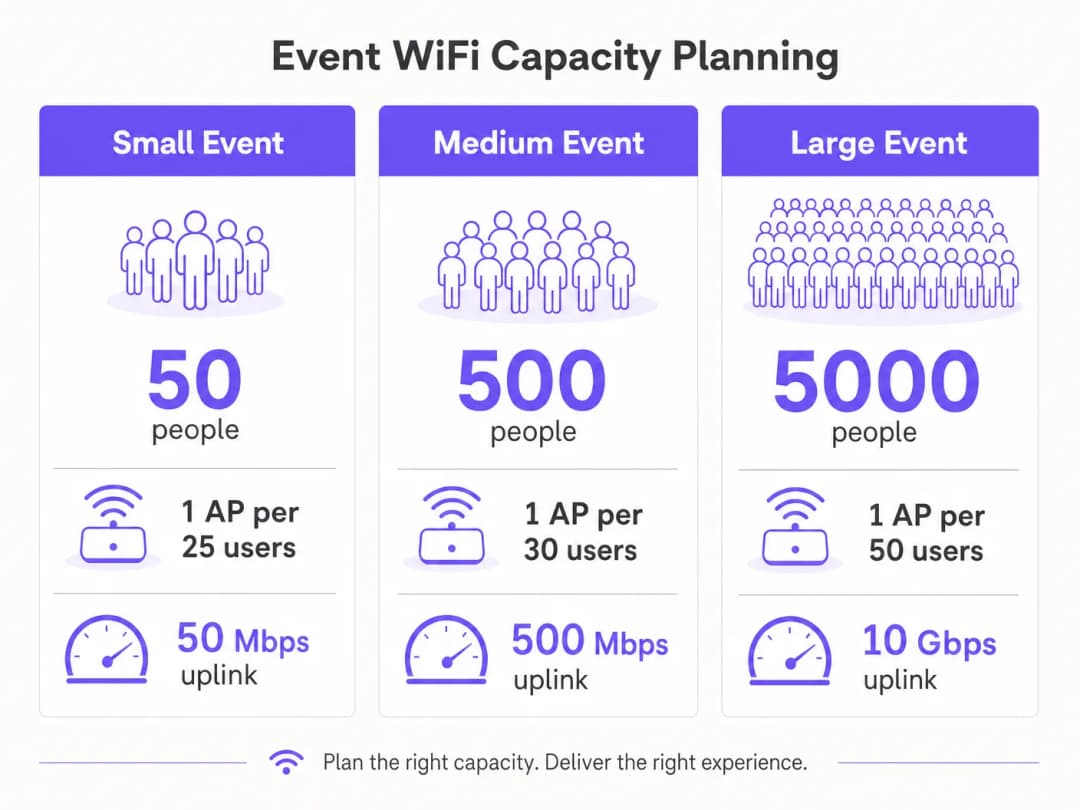 थ्रूपुट प्लानिंग के लिए, सामान्य कॉन्फ्रेंस या प्रदर्शनी उपयोग के लिए प्रति सक्रिय उपयोगकर्ता 1 - 2 Mbps का एक रूढ़िवादी अनुमान उपयुक्त है। लाइव स्ट्रीमिंग या ब्रॉडकास्ट-गुणवत्ता वाले वीडियो आवश्यकताओं वाले इवेंट्स के लिए - जैसे कि प्रोडक्ट लॉन्च या प्रेस इवेंट्स - प्रोडक्शन VLAN पर प्रति सक्रिय उपयोगकर्ता 5 - 10 Mbps का बजट रखें। आपके अपलिंक का आकार एक साथ सभी VLANs के योग को समायोजित करने के लिए होना चाहिए, जिसमें कम से कम 20% हेडरूम हो।
| इवेंट का पैमाना | प्रतिभागी | अनुशंसित APs | न्यूनतम अपलिंक | DHCP स्कोप |
|---|---|---|---|---|
| छोटा | 100 तक | 4 - 6 | 50 Mbps | /24 |
| मध्यम | 100 - 500 | 15 - 25 | 200 - 500 Mbps | /23 |
| बड़ा | 500 - 2,000 | 50 - 100 | 1 - 2 Gbps | /21 |
| एंटरप्राइज | 2,000+ | 100+ | 5 - 10 Gbps | /20 या बड़ा |
बैकहॉल: गैर-परक्राम्य आधार
कोई भी अच्छी तरह से डिजाइन किया गया वायरलेस इन्फ्रास्ट्रक्चर अपर्याप्त बैकहॉल की भरपाई नहीं कर सकता है। 200 से अधिक प्रतिभागियों वाले इवेंट्स के लिए, एक समर्पित leased line ही एकमात्र उपयुक्त अपलिंक समाधान है। एक leased line एक सिंक्रोनस, अनकंटेन्डेड कनेक्शन प्रदान करती है जिसमें गारंटीकृत SLA - आमतौर पर 99.95% अपटाइम - होता है, जो कि उस साझा, असममित ब्रॉडबैंड से मौलिक रूप से भिन्न है जिसे अधिकांश स्थानों ने अपने स्वयं के संचालन के लिए स्थापित किया है।
Leased line प्रोविजनिंग के लिए आमतौर पर चार से छह सप्ताह का लीड टाइम आवश्यक होता है। इवेंट WiFi डिप्लॉयमेंट में यह सबसे आम योजना विफलता है: वे टीमें जो किसी इवेंट से दो सप्ताह पहले नेटवर्क डिजाइन शुरू करती हैं और पाती हैं कि वे समय पर एक समर्पित सर्किट प्राप्त नहीं कर सकती हैं। उन इवेंट्स के लिए जहां एक leased line वास्तव में अव्यावहारिक है - जैसे बाहरी उत्सव, अस्थायी संरचनाएं - विभिन्न ऑपरेटरों के कई सिम कार्ड का उपयोग करने वाला एक बॉन्डेड 4G/5G समाधान एक व्यावहारिक विकल्प प्रदान करता है, हालांकि कम गारंटीकृत थ्रूपुट और उच्च लेटेंसी के साथ।
नेटवर्क आर्किटेक्चर और VLAN डिजाइन
सख्त नेटवर्क सेगमेंटेशन एक प्रदर्शन और अनुपालन दोनों की आवश्यकता है। किसी भी इवेंट डिप्लॉयमेंट के लिए अनुशंसित न्यूनतम आर्किटेक्चर तीन VLANs का उपयोग करता है:

VLAN 10 — Guest WiFi: सभी जनता के सामने आने वाले प्रतिभागी ट्रैफ़िक। यह VLAN प्रमाणीकरण और डेटा कैप्चर के लिए Captive Portal से जुड़ता है। उपकरणों के बीच लैटरल मूवमेंट को रोकने के लिए क्लाइंट आइसोलेशन सक्षम होना चाहिए। दुर्भावनापूर्ण डोमेन को ब्लॉक करने के लिए DNS फ़िल्टरिंग लागू की जानी चाहिए - कार्यान्वयन विवरण के लिए protecting your network with strong DNS and security पर Purple की गाइड देखें।
VLAN 20 — Staff and Point of Sale: इवेंट स्टाफ, टिकटिंग सिस्टम और कार्ड भुगतान टर्मिनलों के लिए परिचालन ट्रैफ़िक। यदि इस VLAN पर कार्ड भुगतान संसाधित किए जाते हैं, तो PCI DSS स्कोप लागू होता है और VLAN को गेस्ट नेटवर्क से पूरी तरह से अलग किया जाना चाहिए और उनके बीच कोई राउटिंग नहीं होनी चाहिए।
VLAN 30 - AV and Production: ब्रॉडकास्ट उपकरण, प्रेजेंटेशन सिस्टम और प्रोडक्शन क्रू के लिए समर्पित। इस VLAN को आम तौर पर उच्चतम गारंटीकृत थ्रूपुट और न्यूनतम लेटेंसी की आवश्यकता होती है, और इसे QoS नीतियों के साथ कॉन्फ़िगर किया जाना चाहिए जो इसे गेस्ट ट्रैफ़िक से अधिक प्राथमिकता देती हैं।
बड़े आयोजनों के लिए, प्रदर्शकों, प्रेस और सुरक्षा प्रणालियों के लिए अतिरिक्त VLAN होना सामान्य है। प्रत्येक SSID को एकल VLAN पर मैप होना चाहिए, और कोर स्विच पर inter-VLAN राउटिंग को तब तक अक्षम किया जाना चाहिए जब तक कि स्पष्ट रूप से इसकी आवश्यकता न हो।
रेडियो फ्रीक्वेंसी प्लानिंग
उच्च-घनत्व वाले वातावरण में, अधिकांश एंटरप्राइज APs का डिफ़ॉल्ट व्यवहार - ऑटोमैटिक चैनल चयन और अधिकतम ट्रांसमिट पावर - सक्रिय रूप से नुकसानदेह होता है। एक ही चैनल पर आस-पास के APs के बीच को-चैनल हस्तक्षेप (co-channel interference) कवरेज क्षेत्र में मामूली कमी की तुलना में प्रदर्शन को कहीं अधिक खराब करता है।
सही तरीका यह है कि चैनलों को मैन्युअल रूप से असाइन किया जाए और ट्रांसमिट पावर को कम किया जाए। 5 GHz बैंड पर, UNII-1 (36, 40, 44, 48), UNII-2 (52-64), और UNII-3 (149-165) बैंड में उपलब्ध नॉन-ओवरलैपिंग चैनलों का उपयोग करें। सघन डिप्लॉयमेंट में AP ट्रांसमिट पावर को कम करके 8-12 dBm करें। यह कम हस्तक्षेप के साथ छोटे, साफ सेल बनाता है, जिससे पूरे वेन्यू में कुल मिलाकर थ्रूपुट में सुधार होता है।
बैंड स्टीयरिंग को सभी APs पर सक्षम किया जाना चाहिए ताकि 5 GHz-सक्षम क्लाइंट्स - जो कि आधुनिक स्मार्टफोन और लैपटॉप का एक बड़ा हिस्सा हैं - को भीड़भाड़ वाले 2.4 GHz स्पेक्ट्रम से दूर भेजा जा सके। 2.4 GHz को लीगेसी IoT डिवाइस और एक्सेसिबिलिटी उपकरणों के लिए सुरक्षित रखें जो 5 GHz से कनेक्ट नहीं हो सकते।
आउटडोर आयोजनों के लिए, RF वातावरण मौलिक रूप से भिन्न होता है। सिग्नल को रोकने के लिए दीवारों और छतों के बिना, कवरेज सेल बड़े होते हैं और आस-पास के डिप्लॉयमेंट या उपभोक्ता हॉटस्पॉट से होने वाले हस्तक्षेप को नियंत्रित करना कठिन होता है। आउटडोर सेटिंग्स में ऑम्निडायरेक्शनल APs की तुलना में डायरेक्शनल सेक्टर एंटेना बेहतर होते हैं, क्योंकि वे आपको अंधाधुंध ब्रॉडकास्ट करने के बजाय विशिष्ट जोन - मुख्य मंच क्षेत्र, फूड कोर्ट, रजिस्ट्रेशन कतार - पर कवरेज केंद्रित करने की अनुमति देते हैं। सभी आउटडोर हार्डवेयर में न्यूनतम IP55 इनग्रेड प्रोटेक्शन रेटिंग होनी चाहिए; फेस्टिवल या खुले वातावरण के लिए IP67 बेहतर है।
Captive Portal आर्किटेक्चर और GDPR अनुपालन
Captive Portal आपके इवेंट नेटवर्क के साथ उपयोगकर्ता का पहला इंटरैक्शन है और अनुपालन और डेटा कैप्चर दोनों के लिए आपका प्राथमिक तंत्र है। एक खराब डिज़ाइन किया गया पोर्टल जो टाइम आउट हो जाता है, iOS पर सही ढंग से रीडायरेक्ट करने में विफल रहता है, या एक अस्पष्ट सहमति वर्कफ़्लो प्रस्तुत करता है, वह भारी मात्रा में सपोर्ट रिक्वेस्ट जनरेट करेगा और नेटवर्क में उपस्थित लोगों के विश्वास को कमजोर करेगा।
GDPR के दृष्टिकोण से, व्यक्तिगत डेटा का कोई भी संग्रह - ईमेल पते, सोशल लॉगिन टोकन, या डिवाइस आइडेंटिफायर्स - के लिए एक वैध आधार, एक स्पष्ट गोपनीयता नोटिस और किसी भी मार्केटिंग उपयोग के लिए स्पष्ट सहमति की आवश्यकता होती है। यह सहमति विस्तृत (granular) होनी चाहिए: WiFi का उपयोग करने की सहमति और मार्केटिंग संचार प्राप्त करने की सहमति दोनों अलग-अलग हैं। Purple का Guest WiFi प्लेटफॉर्म इस सहमति वर्कफ़्लो को मूल रूप से संभालता है, अनुपालन योग्य ऑप्ट-इन फ़्लो प्रस्तुत करता है और GDPR के Article 7 के अनुसार आवश्यक टाइमस्टैम्प और IP पते के साथ सहमति रिकॉर्ड को स्टोर करता है।
कैप्टिव पोर्टल (captive portal) का तकनीकी आर्किटेक्चर प्रदर्शन के लिए बहुत मायने रखता है। एक क्लाउड-होस्टेड पोर्टल जो बाहरी सर्वर पर ऑथेंटिकेशन अनुरोधों को रीडायरेक्ट करता है, वह लॉगिन फ़्लो में लेटेंसी (विलंबता) पैदा करता है। पीक लोड के समय - जब सैकड़ों उपयोगकर्ता एक साथ ऑथेंटिकेट कर रहे हों - यह लेटेंसी टाइमआउट और विफल लॉगिन का कारण बन सकती है। Purple का प्लेटफॉर्म विशेष रूप से इसी उपयोग के मामले के लिए डिज़ाइन किया गया है, जिसमें ऑटो-स्केलिंग इंफ्रास्ट्रक्चर है जो बिना किसी गिरावट के बस्ट ऑथेंटिकेशन लोड को संभालता है।
कार्यान्वयन गाइड (Implementation Guide)
चरण 1: साइट सर्वेक्षण और क्षमता मॉडलिंग (इवेंट से 8 सप्ताह पहले)
एक भौतिक साइट सर्वेक्षण के साथ शुरुआत करें। हर उस क्षेत्र का दौरा करें जहाँ प्रतिभागी उपस्थित होंगे और छत की ऊँचाई, दीवारों की सामग्री, संरचनात्मक बाधाओं और मौजूदा इंफ्रास्ट्रक्चर (कंड्यूट रन, पावर आउटलेट, डेटा पोर्ट) का दस्तावेजीकरण करें। हार्डवेयर का ऑर्डर देने से पहले अनुमानित कवरेज को मॉडल करने और डेड ज़ोन की पहचान करने के लिए एक WiFi सर्वेक्षण टूल - Ekahau Site Survey या iBwave उद्योग के मानक हैं - का उपयोग करें।
इसी समय, कार्यक्रम स्थल के मौजूदा नेटवर्क इंफ्रास्ट्रक्चर की पुष्टि करें। उपलब्ध डेटा पोर्ट, मुख्य वितरण फ्रेम के स्थान और किसी भी मौजूदा स्विच की क्षमता की पहचान करें। यह निर्धारित करें कि कार्यक्रम स्थल की मौजूदा केबलिंग आपके द्वारा तैनात किए जाने वाले APs के लिए PoE+ (802.3at) का समर्थन कर सकती है, या क्या आपको अपने स्वयं के PoE स्विच और केबलिंग लाने की आवश्यकता है।
अपेक्षित प्रतिभागी संख्या, इवेंट प्रोग्राम (एक कीनोट सत्र एक नेटवर्किंग रिसेप्शन की तुलना में बहुत अलग लोड प्रोफाइल बनाता है), और किसी भी प्रोडक्शन सिस्टम की थ्रूपुट आवश्यकताओं के आधार पर अपने क्षमता मॉडल को अंतिम रूप दें।
चरण 2: हार्डवेयर खरीद और बैकहॉल ऑर्डर करना (इवेंट से 6-8 सप्ताह पहले)
साइट सर्वेक्षण के तुरंत बाद अपनी लीज्ड लाइन का ऑर्डर दें। चार से छह सप्ताह की प्रोविजनिंग विंडो पूरे डिप्लॉयमेंट के लिए सबसे महत्वपूर्ण समय सीमा है। यदि इवेंट वेन्यू में पहले से ही लीज्ड लाइन है, तो वेन्यू की IT टीम के साथ समर्पित बैंडविड्थ आवंटन के लिए बातचीत करें - यह मानकर न चलें कि मौजूदा इंफ्रास्ट्रक्चर उपलब्ध करा दिया जाएगा।
हार्डवेयर के लिए, खरीदने और किराए पर लेने के बीच का चुनाव आपके कार्यक्रमों की आवृत्ति पर निर्भर करता है। जो संगठन प्रति वर्ष चार से अधिक बार इवेंट WiFi तैनात करते हैं, उनके लिए एक पोर्टेबल किट - एंटरप्राइज APs, एक प्रबंधित PoE स्विच, एक रैक-माउंट राउटर और केबलिंग - का स्वामित्व बार-बार किराए पर लेने की तुलना में अधिक लागत प्रभावी है। एक बार के आयोजनों के लिए, विशेषज्ञ इवेंट WiFi रेंटल कंपनियां ऑन-साइट सहायता के साथ प्री-कॉन्फ़िगर किए गए हार्डवेयर प्रदान करती हैं, जिससे डिप्लॉयमेंट का जोखिम काफी कम हो जाता है।जब किराये पर या खरीदारी के लिए APs निर्दिष्ट कर रहे हों, तो 200 से अधिक उपयोगकर्ताओं के किसी भी परिनियोजन के लिए WiFi 6 (802.11ax) हार्डवेयर को प्राथमिकता दें। WiFi 6 की OFDMA और BSS Colouring विशेषताएं WiFi 5 (802.11ac) की तुलना में उच्च-घनत्व वाले वातावरण में महत्वपूर्ण प्रदर्शन सुधार प्रदान करती हैं।
चरण 3: इवेंट से पहले का कॉन्फ़िगरेशन और परीक्षण (इवेंट से 1 - 2 सप्ताह पहले)
साइट पर पहुँचने से पहले एक स्टेजिंग वातावरण में सभी नेटवर्क उपकरणों को कॉन्फ़िगर करें। इसमें कोर स्विच पर VLAN कॉन्फ़िगरेशन, वायरलेस कंट्रोलर पर SSID-to-VLAN मैपिंग, DHCP स्कोप कॉन्फ़िगरेशन और captive portal एकीकरण शामिल है। स्टेजिंग वातावरण में परीक्षण करना इवेंट के दिन समस्या निवारण करने की तुलना में कहीं अधिक कुशल है।
captive portal कॉन्फ़िगरेशन के लिए, इस चरण में Purple के प्लेटफ़ॉर्म को एकीकृत करें। ब्रांडेड स्प्लैश पेज, प्रमाणीकरण विधि (ईमेल, सोशल लॉगिन, या SMS), सहमति वर्कफ़्लो और किसी भी प्रमाणीकरण के बाद रीडायरेक्ट होने वाले पेज को कॉन्फ़िगर करें। कई डिवाइस प्रकारों पर संपूर्ण उपयोगकर्ता यात्रा का परीक्षण करें - iOS, Android, Windows और macOS सभी captive portal की पहचान अलग-अलग तरीके से करते हैं, और रीडायरेक्ट तंत्र के सही ढंग से काम करने के लिए प्रत्येक की विशिष्ट आवश्यकताएं होती हैं।
यह सत्यापित करने के लिए कि DHCP स्कोप, प्रमाणीकरण बैकएंड और अपलिंक अपेक्षित पीक लोड को संभाल सकते हैं, WiFi क्लाइंट सिम्युलेटर का उपयोग करके लोड टेस्ट आयोजित करें। इस उद्देश्य के लिए Spirent या Ixia जैसे उपकरण सैकड़ों समवर्ती WiFi क्लाइंट का अनुकरण कर सकते हैं।
चरण 4: ऑन-साइट परिनियोजन (इवेंट से एक दिन पहले)
स्थल पर सहभागियों के लिए खुलने से पहले स्थापना और परीक्षण पूरा करने के लिए पर्याप्त समय के साथ साइट पर पहुंचें। साइट सर्वेक्षण योजना के अनुसार APs माउंट करें - सर्वदिशात्मक कवरेज के लिए सीलिंग माउंटिंग को प्राथमिकता दी जाती है; जहां सीलिंग एक्सेस उपलब्ध नहीं है वहां वॉल माउंटिंग स्वीकार्य है। सभी केबल बिछाएं और उन पर लेबल लगाएं, और प्रत्येक AP के भौतिक स्थान को एक तस्वीर और फ्लोर प्लान एनोटेशन के साथ दस्तावेजित करें।
एक बार जब सभी हार्डवेयर स्थापित हो जाएं, तो कवरेज को सत्यापित करने के लिए लैपटॉप या समर्पित सर्वेक्षण डिवाइस का उपयोग करके स्थापना के बाद का सर्वेक्षण करें। पूरे सहभागी क्षेत्र में घूमें और हर जगह -65 dBm या उससे बेहतर सिग्नल शक्ति की पुष्टि करें। इवेंट शुरू होने से पहले किसी भी कवरेज गैप की पहचान करें और उसका समाधान करें।
शुरू से अंत तक उपयोगकर्ता यात्रा का परीक्षण करें: प्रत्येक SSID से एक परीक्षण डिवाइस कनेक्ट करें, captive portal प्रमाणीकरण पूरा करें, और सत्यापित करें कि इंटरनेट एक्सेस उपलब्ध है। स्टाफ VLAN पर कार्ड भुगतान टर्मिनलों का परीक्षण करें। पुष्टि करें कि प्रोडक्शन VLAN पर AV उपकरण सभी आवश्यक गंतव्यों तक पहुंच सकते हैं।
चरण 5: ऑन-साइट प्रबंधन और निगरानी
इवेंट के दौरान, वायरलेस कंट्रोलर के मैनेजमेंट डैशबोर्ड का उपयोग करके रियल-टाइम में नेटवर्क की निगरानी करें। निगरानी रखने योग्य प्रमुख मेट्रिक्स हैं: AP एसोसिएशन काउंट (किसी भी ऐसे AP को चिह्नित करें जो अपनी अनुशंसित क्लाइंट क्षमता के 80% से अधिक हो जाता है), चैनल उपयोग, DHCP पूल उपयोग, और अपलिंक थ्रूपुट। Purple का WiFi Analytics प्लेटफॉर्म उपयोगकर्ता के व्यवहार - ड्वेल टाइम, पीक कनेक्शन पीरियड, और पोर्टल कन्वर्शन रेट - में दृश्यता का एक अतिरिक्त स्तर प्रदान करता है जो रियल-टाइम मैनेजमेंट और इवेंट के बाद की रिपोर्टिंग दोनों के लिए मूल्यवान है।
नेटवर्क समस्याओं के लिए एक स्पष्ट एस्केलेशन प्रक्रिया रखें। इवेंट स्टाफ से सभी नेटवर्क-संबंधी सपोर्ट अनुरोधों के लिए संपर्क का एक एकल बिंदु निर्दिष्ट करें, और यह सुनिश्चित करें कि ऑन-साइट नेटवर्क इंजीनियर के पास एक आउट-ऑफ-बैंड मैनेजमेंट कनेक्शन के माध्यम से सभी उपकरणों तक रिमोट एक्सेस हो जो कि गेस्ट नेटवर्क से स्वतंत्र हो।
बेस्ट प्रैक्टिसेज
निम्नलिखित सिफारिशें hospitality , retail , और कॉन्फ्रेंस वातावरण में बड़े पैमाने पर इवेंट डिप्लॉयमेंट से प्राप्त वेंडर-न्यूट्रल बेस्ट प्रैक्टिसेज का प्रतिनिधित्व करती हैं।
स्टाफ और प्रोडक्शन नेटवर्क के लिए SSID ब्रॉडकास्टिंग को अक्षम करें। उपस्थित लोगों को ये SSIDs दिखने का कोई परिचालन कारण नहीं है। इन्हें छिपाने से अटैक सरफेस कम हो जाता है और आकस्मिक कनेक्शन रुक जाते हैं।
गेस्ट VLAN पर आक्रामक DHCP लीज टाइम सेट करें। 30 - 60 मिनट का लीज टाइम यह सुनिश्चित करता है कि डिस्कनेक्ट किए गए उपकरणों के IP पते तुरंत वापस प्राप्त हो जाएं। यह बहु-दिवसीय इवेंट्स में विशेष रूप से महत्वपूर्ण है जहां सत्रों के बीच उपस्थित लोगों की संख्या में महत्वपूर्ण बदलाव होता है।
स्टाफ और प्रोडक्शन VLANs पर 802.1X ऑथेंटिकेशन लागू करें। 802.1X के साथ WPA3-Enterprise प्रति-उपयोगकर्ता ऑथेंटिकेशन प्रदान करता है और साझा प्री-शेयर्ड की (pre-shared key) के कॉम्प्रोमाइज होने के जोखिम को समाप्त करता है। गेस्ट नेटवर्क के लिए, WPA3-Personal या Captive Portal वाला एक ओपन नेटवर्क मानक दृष्टिकोण है।
गेस्ट VLAN पर DNS-over-HTTPS या DNS फ़िल्टरिंग का उपयोग करें। सार्वजनिक इवेंट नेटवर्क DNS हाईजैकिंग और फ़िशिंग हमलों का लक्ष्य होते हैं। DNS फ़िल्टरिंग लागू करना - चाहे आपके अपस्ट्रीम प्रदाता के माध्यम से या एक समर्पित DNS सुरक्षा सेवा के माध्यम से - उपस्थित लोगों के लिए सुरक्षा की एक सार्थक परत प्रदान करता है। Purple का प्लेटफॉर्म Captive Portal स्तर पर इस फ़िल्टरिंग को लागू करने के लिए DNS सुरक्षा प्रदाताओं के साथ एकीकृत होता है।
सब कुछ डॉक्युमेंट करें। ऑन-साइट पहुंचने से पहले एक नेटवर्क आरेख, एक केबलिंग शेड्यूल और एक AP प्लेसमेंट मैप बनाएं। यह डॉक्युमेंटेशन इवेंट के दौरान समस्या निवारण के लिए और उसी स्थान पर भविष्य के डिप्लॉयमेंट की योजना बनाने के लिए अमूल्य है।
एयरपोर्ट और ट्रांसपोर्ट हब डिप्लॉयमेंट के लिए, अतिरिक्त सुरक्षा विचार लागू होते हैं - airport WiFi security पर Purple की गाइड उच्च-फुटफॉल वाले सार्वजनिक वातावरण से संबंधित विशिष्ट थ्रेट मॉडल और शमन रणनीतियों को कवर करती है।
ट्रबलशूटिंग और रिस्क मिटिगेशन
DHCP पूल समाप्त DHCP पूल समाप्त होना (DHCP Pool Exhaustion)
इवेंट WiFi में यह सबसे आम विफलता मोड है। इसके लक्षणों में ऐसे डिवाइस शामिल हैं जो WiFi से कनेक्ट तो हो जाते हैं लेकिन IP एड्रेस प्राप्त नहीं कर पाते हैं, या जिन्हें एक APIPA एड्रेस (169.254.x.x) प्राप्त होता है। इसका समाधान DHCP स्कोप का आकार बढ़ाना और लीज़ समय को कम करना है। इससे बचाव सीधा है: अपने DHCP स्कोप का आकार संभावित अधिकतम क्लाइंट संख्या से कम से कम दोगुना रखें और लीज़ समय को 30 - 60 मिनट पर सेट करें।
Authentication Server Overload
अधिकतम लोड के समय, एक साथ बड़ी संख्या में आने वाले ऑथेंटिकेशन अनुरोध ऑन-प्रिमाइसेस RADIUS सर्वर या Captive Portal बैकएंड को ओवरलोड कर सकते हैं। यह धीमी या विफल लॉगिन के रूप में प्रकट होता है। क्लाउड-होस्टेड प्लेटफॉर्म जैसे कि Purple अचानक बढ़ने वाले लोड को संभालने के लिए ऑटो-स्केल करते हैं, जो इवेंट उपयोग के मामलों के लिए ऑन-प्रिमाइसेस डिप्लॉयमेंट की तुलना में एक महत्वपूर्ण आर्किटेक्चरल लाभ है।
Co-Channel Interference
यदि कई AP एक ही चैनल पर एक-दूसरे के करीब काम कर रहे हैं, तो परफॉर्मेंस काफी कम हो जाती है। इसके लक्षणों में अच्छा सिग्नल होने के बावजूद कम थ्रूपुट मिलना और वायरलेस कंट्रोलर में दिखाई देने वाली उच्च रिट्राय दरें शामिल हैं। इसका समाधान चैनल असाइनमेंट की समीक्षा करना और यह सुनिश्चित करना है कि आस-पास के AP ओवरलैप न होने वाले चैनलों पर हों। ट्रांसमिट पावर को कम करने से भी प्रत्येक AP के इंटरफेरेंस रेडियस को छोटा करके मदद मिलती है।
Captive Portal Redirect Failures
विभिन्न ऑपरेटिंग सिस्टम Captive Portal का पता लगाने के लिए अलग-अलग तंत्र का उपयोग करते हैं। iOS एक समर्पित CNA (Captive Network Assistant) का उपयोग करता है जो विशिष्ट Apple URL पर HTTP अनुरोध भेजता है। Android Google के कनेक्टिविटी चेक सर्वर के साथ इसी तरह के तंत्र का उपयोग करता है। यदि आपका Captive Portal इन जांचों का सही ढंग से जवाब नहीं देता है, तो पोर्टल स्वचालित रूप से नहीं खुलेगा और उपयोगकर्ताओं को मैन्युअल रूप से पोर्टल URL पर जाना होगा। सुनिश्चित करें कि आपका Captive Portal इन विशिष्ट जांच अनुरोधों को रोकने और उनका जवाब देने के लिए कॉन्फ़िगर किया गया है।
Uplink Failure
अपलिंक पर विफलता का एक सिंगल पॉइंट होना इवेंट डिप्लॉयमेंट में सबसे अधिक प्रभाव वाला जोखिम है। इसे कम करने के लिए एक 4G/5G बैकअप कनेक्शन की व्यवस्था करें जो प्राइमरी लीज्ड लाइन के विफल होने पर स्वचालित रूप से सक्रिय हो जाता है। अधिकांश एंटरप्राइज राउटर एक सेकंड से भी कम समय के स्विचओवर के साथ डुअल-WAN फेलओवर का समर्थन करते हैं। फेलओवर मैकेनिज्म का परीक्षण इवेंट से पहले सेटअप के दौरान करें, न कि स्वयं इवेंट के दौरान।
ROI and Business Impact
इवेंट WiFi को तेजी से न केवल एक उपयोगिता के रूप में बल्कि एक डेटा एसेट के रूप में मान्यता दी जा रही है। प्रत्येक सहभागी जो आपके इवेंट नेटवर्क से जुड़ता है और एक Captive Portal के माध्यम से ऑथेंटिकेट करता है, वह फर्स्ट-पार्टी डेटा प्रदान कर रहा है - जैसे ईमेल एड्रेस, जनसांख्यिकीय जानकारी और व्यावहारिक डेटा - जिसका इवेंट आयोजकों, वेन्यू ऑपरेटरों और प्रायोजकों के लिए महत्वपूर्ण व्यावसायिक मूल्य है।Purple का WiFi Analytics प्लेटफ़ॉर्म इस मूल्य को सीधे मापता है। इवेंट के बाद की रिपोर्ट कुल विशिष्ट कनेक्शन, पीक समवर्ती यूज़र्स, औसत सेशन अवधि, पोर्टल कन्वर्शन दर और मार्केटिंग कम्युनिकेशन्स के लिए ऑप्ट-इन दरों पर डेटा प्रदान करती है। 70% पोर्टल ऑप्ट-इन दर वाले 2,000-अटेंडी वाले कॉन्फ्रेंस के लिए, यह एक ही इवेंट में कैप्चर किए गए 1,400 नए, सहमति प्राप्त मार्केटिंग कॉन्टैक्ट्स का प्रतिनिधित्व करता है - एक प्रति अधिग्रहण लागत (cost per acquisition) जिसे किसी अन्य चैनल के माध्यम से मैच करना कठिन है।
hospitality सेक्टर में वेन्यू ऑपरेटरों के लिए, एनालिटिक्स लेयर फुटफॉल विश्लेषण और ड्वेल टाइम मैपिंग के माध्यम से अतिरिक्त मूल्य प्रदान करती है। वेन्यू के कौन से क्षेत्र सबसे अधिक जुड़ाव आकर्षित करते हैं - और कितने समय के लिए - यह समझना भविष्य के इवेंट्स के लिए लेआउट निर्णयों, F&B प्लेसमेंट और स्पॉन्सर पोजिशनिंग को सूचित करता है।
इवेंट WiFi निवेश के लिए ROI की गणना में रिटर्न की तीन श्रेणियों को शामिल किया जाना चाहिए: ऑपरेशनल (तदर्थ नेटवर्क बनाम एक अच्छी तरह से डिज़ाइन किए गए नेटवर्क से कम सपोर्ट लागत), कमर्शियल (फर्स्ट-पार्टी डेटा कैप्चर और मार्केटिंग ऑप्ट-इन्स), और रेपुटेशनल (एक विश्वसनीय, तेज़ नेटवर्क का ब्रांड मूल्य जो अटेंडी अनुभव को बढ़ाता है)। बड़े पैमाने के इवेंट्स के लिए, केवल कमर्शियल रिटर्न ही आमतौर पर दो या तीन इवेंट्स के भीतर इंफ्रास्ट्रक्चर निवेश को सही ठहराता है।
मुख्य परिभाषाएं
एक्सेस पॉइंट - Access Point (AP)
एक हार्डवेयर डिवाइस जो WiFi सिग्नलों को प्रसारित और प्राप्त करके एक वायरलेस लोकल एरिया नेटवर्क (WLAN) बनाता है। इवेंट परिनियोजन में, उपभोक्ता उपकरणों के बजाय एंटरप्राइज़-ग्रेड APs का उपयोग किया जाता है, क्योंकि वे कई SSIDs, VLAN टैगिंग, केंद्रीकृत प्रबंधन और उच्च समवर्ती क्लाइंट संख्या का समर्थन करते हैं।
IT टीमें परिनियोजन का आकार तय करते समय AP विशिष्टताओं का सामना करती हैं। मुख्य पैरामीटर अधिकतम समवर्ती क्लाइंट संख्या (आमतौर पर एंटरप्राइज़ APs के लिए 100-200), समर्थित WiFi मानक (802.11ax/WiFi 6 वर्तमान सर्वोत्तम अभ्यास है), और इनग्रैस प्रोटेक्शन रेटिंग (आउटडोर उपयोग के लिए IP55+) हैं।
VLAN (वर्चुअल लोकल एरिया नेटवर्क)
IEEE 802.1Q टैगिंग का उपयोग करके एक भौतिक नेटवर्क इंफ्रास्ट्रक्चर के भीतर बनाया गया एक तार्किक नेटवर्क सेगमेंट। VLANs कई पृथक नेटवर्क को समान भौतिक स्विच और केबलिंग साझा करने की अनुमति देते हैं, जिसमें VLANs के बीच ट्रैफ़िक को रूटिंग पॉलिसियों द्वारा नियंत्रित किया जाता है।
इवेंट परिनियोजन में नेटवर्क सेगमेंटेशन के लिए VLANs प्राथमिक तंत्र हैं। गेस्ट, स्टाफ़ और प्रोडक्शन ट्रैफ़िक को अलग-अलग VLANs में विभाजित करना एक प्रदर्शन सर्वोत्तम अभ्यास और PCI-DSS अनुपालन आवश्यकता दोनों है जहाँ कार्ड भुगतान शामिल हैं।
Captive Portal
एक वेब पेज जो उपयोगकर्ताओं को तब प्रस्तुत किया जाता है जब वे पहली बार WiFi नेटवर्क से कनेक्ट होते हैं, जिसमें इंटरनेट एक्सेस दिए जाने से पहले ऑथेंटिकेशन या शर्तों को स्वीकार करने की आवश्यकता होती है। गेस्ट WiFi एक्सेस कंट्रोल, GDPR सहमति कैप्चर, और फर्स्ट-पार्टी डेटा कलेक्शन के लिए Captive Portal मानक तंत्र हैं।
Captive Portal इवेंट नेटवर्क के साथ उपयोगकर्ता का पहला इंटरैक्शन होता है। लोड के तहत इसका प्रदर्शन - विशेष रूप से पीक ऑथेंटिकेशन बर्स्ट के दौरान - सीधे तौर पर अटेंडी के अनुभव को प्रभावित करता है। Purple के प्लेटफॉर्म जैसे क्लाउड-होस्टेड पोर्टल बर्स्ट लोड को संभालने के लिए स्वचालित रूप से स्केल होते हैं।
DHCP (Dynamic Host Configuration Protocol)
एक नेटवर्क प्रोटोकॉल जो नेटवर्क से कनेक्ट होने पर डिवाइसों को स्वचालित रूप से IP पते असाइन करता है। DHCP सर्वर उपलब्ध पतों (स्कोप) का एक पूल बनाए रखता है और उन्हें एक निश्चित अवधि (लीज टाइम) के लिए क्लाइंट्स को असाइन करता है।
DHCP पूल का समाप्त होना - जहां सभी उपलब्ध IP पते उपयोग में होते हैं और नए डिवाइस कनेक्ट नहीं हो पाते हैं - इवेंट WiFi में सबसे आम विफलता मोड है। सही स्कोप साइजिंग और लीज टाइम कॉन्फ़िगरेशन महत्वपूर्ण प्लानिंग स्टेप्स हैं।
Leased Line
दो बिंदुओं के बीच एक समर्पित, सिंक्रोनस, अनकंटेन्डेड डेटा कनेक्शन, जो एक गारंटीकृत सेवा स्तर समझौते (SLA) के साथ दूरसंचार वाहक द्वारा प्रदान किया जाता है। ब्रॉडबैंड के विपरीत, एक Leased Line समान अपलोड और डाउनलोड स्पीड प्रदान करती है और इसे अन्य ग्राहकों के साथ साझा नहीं किया जाता है।
200 से अधिक अटेंडी वाले इवेंट WiFi डिप्लॉयमेंट के लिए एक Leased Line अनुशंसित अपलिंक है। ब्रॉडबैंड से मुख्य अंतर SLA गारंटी और कनेक्शन की अनकंटेन्डेड (बिना किसी हिस्सेदारी वाली) प्रकृति है। प्रोविजनिंग में आमतौर पर 4 - 6 सप्ताह लगते हैं।
802.11ax (WiFi 6)
वर्तमान पीढ़ी का WiFi मानक, जो हाई-डेंसिटी वाले वातावरण में प्रदर्शन को बेहतर बनाने के लिए OFDMA (ऑर्थोगोनल फ्रीक्वेंसी डिवीज़न मल्टीपल एक्सेस) और MU-MIMO (मल्टी-यूज़र मल्टीपल इनपुट मल्टीपल आउटपुट) पेश करता है। WiFi 6 एक AP को क्रमिक रूप से सेवा देने के बजाय एक ही चैनल पर एक साथ कई क्लाइंट्स को सेवा देने की अनुमति देता है।
200 से अधिक उपयोगकर्ताओं वाले इवेंट डिप्लॉयमेंट के लिए WiFi 6 अनुशंसित मानक है। WiFi 5 (802.11ac) की तुलना में इसके हाई-डेंसिटी प्रदर्शन सुधार बिल्कुल उसी तरह के वातावरण में सबसे अधिक दिखाई देते हैं जो इवेंट WiFi बनाता है: कई क्लाइंट, हाई कन्टेंशन, और मिश्रित डिवाइस प्रकार।
GDPR (General Data Protection Regulation)
व्यक्तिगत डेटा के संग्रह, प्रोसेसिंग और स्टोरेज को नियंत्रित करने वाला यूरोपीय संघ का विनियमन (2016/679)। इवेंट WiFi के लिए, GDPR को डेटा संग्रह के लिए एक वैध आधार, एक स्पष्ट गोपनीयता नोटिस, मार्केटिंग उपयोग के लिए स्पष्ट और विस्तृत सहमति, और सहमति रिकॉर्ड के माध्यम से अनुपालन प्रदर्शित करने की क्षमता की आवश्यकता होती है।
कोई भी इवेंट WiFi डिप्लॉयमेंट जो व्यक्तिगत डेटा - ईमेल पते, सोशल लॉगिन टोकन, या डिवाइस आइडेंटिफायर - एकत्र करता है, उसे GDPR का पालन करना चाहिए। Captive Portal प्राथमिक अनुपालन प्रवर्तन बिंदु है। WiFi एक्सेस के लिए सहमति और मार्केटिंग कम्युनिकेशन्स के लिए सहमति अलग-अलग, विस्तृत ऑप्ट-इन होनी चाहिए।
PCI DSS (Payment Card Industry Data Security Standard)
सुरक्षा मानकों का एक सेट जो यह अनिवार्य करता है कि कार्ड भुगतान डेटा को प्रोसेस, स्टोर या ट्रांसमिट करने वाले संगठनों को उस डेटा की सुरक्षा कैसे करनी चाहिए। PCI DSS की आवश्यकता है कि कार्डधारक डेटा वातावरण किसी भी पब्लिक-फेसिंग सिस्टम से नेटवर्क-सेगमेंटेड हों।
कोई भी इवेंट जो कार्ड भुगतान प्रोसेस करता है - टिकटिंग, F&B, मर्चेंडाइज - उसे यह सुनिश्चित करना चाहिए कि भुगतान सिस्टम एक नेटवर्क सेगमेंट पर हों जो गेस्ट WiFi नेटवर्क से पूरी तरह से अलग हो। भुगतान टर्मिनलों को पब्लिक WiFi के समान VLAN पर रखना एक PCI DSS अनुपालन विफलता है।
Band Steering
एक वायरलेस नेटवर्क सुविधा जो सक्रिय रूप से ड्यूल-बैंड सक्षम क्लाइंट डिवाइसों को 2.4 GHz के बजाय 5 GHz बैंड से कनेक्ट करने के लिए प्रोत्साहित करती है, जो 5 GHz के सक्षम क्लाइंट्स के 2.4 GHz पर एसोसिएशन अनुरोधों में देरी करके या उन्हें अस्वीकार करके काम करती है।
हाई-डेंसिटी वाले इवेंट वातावरण में, 2.4 GHz स्पेक्ट्रम जल्दी से संतृप्त हो जाता है। Band steering एंटरप्राइज APs पर एक मानक कॉन्फ़िगरेशन है जो सक्षम क्लाइंट्स को कम भीड़ वाले 5 GHz बैंड पर धकेल कर 2.4 GHz की भीड़ को कम करता है।
QoS (Quality of Service)
नेटवर्क ट्रैफ़िक मैनेजमेंट तकनीकें जो कुछ प्रकार के ट्रैफ़िक को दूसरों की तुलना में प्राथमिकता देती हैं, यह सुनिश्चित करती हैं कि उच्च-प्राथमिकता वाले एप्लिकेशन्स को आवश्यक बैंडविड्थ और लेटेंसी मिले, भले ही नेटवर्क व्यस्त हो।
QoS का उपयोग इवेंट डिप्लॉयमेंट में प्रोडक्शन और प्रेस VLANs के लिए बैंडविड्थ की गारंटी देने के लिए किया जाता है, और गेस्ट VLAN पर प्रति-यूज़र थ्रूपुट को सीमित करने के लिए किया जाता है ताकि व्यक्तिगत रूप से अधिक उपयोग करने वाले यूज़र्स सभी उपस्थित लोगों के अनुभव को प्रभावित न करें।
हल किए गए उदाहरण
एक 3,000 सीटों वाला कॉन्फ्रेंस सेंटर दो दिवसीय प्रौद्योगिकी शिखर सम्मेलन की मेजबानी कर रहा है। इस कार्यक्रम में एक 2,500-व्यक्ति की क्षमता वाला कीनोट हॉल, प्रत्येक में 50 से 150 लोगों वाले 12 ब्रेकआउट रूम, 80 प्रदर्शक स्टैंडों वाला एक प्रदर्शनी क्षेत्र और विश्वसनीय हाई-थ्रूपुट कनेक्टिविटी की आवश्यकता वाले 30 पत्रकारों के साथ एक प्रेस रूम शामिल है। कार्यक्रम स्थल पर पूरे क्षेत्र में मौजूदा Cat6 केबलिंग है लेकिन केवल 200 Mbps का साझा ब्रॉडबैंड कनेक्शन है। नेटवर्क को कैसे डिजाइन किया जाना चाहिए?
पहली प्राथमिकता बैकहॉल है। इस कार्यक्रम के लिए 200 Mbps का साझा ब्रॉडबैंड कनेक्शन पूरी तरह से अपर्याप्त है। कम से कम 2 Gbps की एक समर्पित लीज्ड लाइन तुरंत ऑर्डर की जानी चाहिए - यह 4 से 6 सप्ताह के लीड टाइम वाला महत्वपूर्ण कार्य है। फेलओवर के रूप में एक 4G/5G बॉन्डेड बैकअप का प्रावधान किया जाना चाहिए।
वायरलेस आर्किटेक्चर के लिए, कीनोट हॉल में सबसे सावधानीपूर्वक योजना बनाने की आवश्यकता है। 2,500 संभावित समवर्ती उपयोगकर्ताओं के साथ, केवल इसी हॉल में 60 से 80 APs की योजना बनाएं, जिन्हें कम ट्रांसमिट पावर (8 - 10 dBm) और मैन्युअल रूप से असाइन किए गए चैनलों के साथ हाई डेंसिटी में परिनियोजित किया गया हो। इस पैमाने पर WiFi 6 APs का होना आवश्यक है।
VLAN डिज़ाइन: VLAN 10 (अतिथि/प्रतिभागी), VLAN 20 (स्टाफ/पंजीकरण), VLAN 30 (प्रदर्शक), VLAN 40 (प्रेस/प्रोडक्शन), VLAN 50 (AV/ब्रॉडकास्ट)। प्रेस VLAN के पास QoS के माध्यम से गारंटीकृत बैंडविड्थ आवंटन होना चाहिए - वीडियो अपलोड क्षमता के लिए प्रति पत्रकार 5 Mbps का बजट रखें।
प्रदर्शकों के लिए, WPA2-PSK के साथ VLAN 30 पर एक अलग SSID का प्रावधान करें और पंजीकरण के समय वितरित प्रत्येक स्टैंड के लिए एक अनूठा पासवर्ड दें। यह प्रदर्शकों को एक-दूसरे के नेटवर्क तक पहुँचने से रोकता है और प्रावधान प्रक्रिया को प्रबंधनीय रखता है।
DHCP: अतिथि VLAN के लिए /20 स्कोप (4,094 उपयोग करने योग्य पते), प्रत्येक परिचालन VLAN के लिए /24 का उपयोग करें। अतिथि लीज टाइम को 30 मिनट पर सेट करें।
Captive Portal: ईमेल या सोशल लॉगिन प्रमाणीकरण, एक ब्रांडेड स्प्लैश पेज और कार्यक्रम के बाद के विपणन के लिए स्पष्ट GDPR सहमति के साथ प्रतिभागी VLAN पर Purple के Guest WiFi प्लेटफॉर्म को तैनात करें। 65 - 70% पर अनुमानित ऑप्ट-इन उपज: लगभग 1,600 - 1,750 सहमति प्राप्त विपणन संपर्क।
एक प्रमुख खुदरा श्रृंखला शहर के केंद्र के चौक पर तीन दिवसीय आउटडोर पॉप-अप कार्यक्रम चला रही है। अपेक्षित फुटफॉल प्रति दिन 500 - 800 आगंतुक है। इस कार्यक्रम में एक उत्पाद प्रदर्शन क्षेत्र, एक भुगतान कियोस्क और एक सोशल मीडिया एक्टिवेशन ज़ोन शामिल है जहाँ आगंतुकों को सामग्री साझा करने के लिए प्रोत्साहित किया जाता है। वहाँ कोई निश्चित बुनियादी ढाँचा नहीं है - कोई केबलिंग नहीं, कोई बिजली नहीं, कोई मौजूदा नेटवर्क नहीं। आप कनेक्टिविटी का प्रावधान कैसे करते हैं?
बिना किसी निश्चित इंफ्रास्ट्रक्चर के, परिनियोजन (deployment) पूरी तरह से आत्मनिर्भर होना चाहिए। नेटवर्क स्टैक में शामिल हैं: अपलिंक प्रदान करने वाला एक 5G बॉन्डेड राउटर (लचीलेपन के लिए दो अलग-अलग कैरियर के सिम कार्ड का उपयोग करने वाला); जेनरेटर या पोर्टेबल UPS से चलने वाला एक प्रबंधित PoE स्विच; और अस्थायी हेराफेरी या इवेंट संरचनाओं पर माउंट किए गए IP67 इनग्रैस प्रोटेक्शन वाले आउटडोर-रेटेड WiFi 6 APs।
आउटडोर वातावरण के लिए, इवेंट फ़ुटप्रिंट पर कवरेज केंद्रित करने और आसपास के क्षेत्र के साथ व्यवधान को कम करने के लिए ओमनीडायरेक्शनल APs के बजाय डायरेक्शनल सेक्टर एंटेना का उपयोग करें। ग्राउंड-लेवल व्यवधान को कम करते हुए कवरेज रेडियस को अधिकतम करने के लिए APs को ऊंचाई पर - 4 से 6 मीटर पर - स्थापित करें।
VLAN डिज़ाइन: VLAN 10 (Captive Portal के साथ विज़िटर WiFi), VLAN 20 (स्टाफ़ और पेमेंट कियोस्क - PCI-DSS दायरे में), VLAN 30 (सोशल मीडिया एक्टिवेशन ज़ोन - उच्च बैंडविड्थ आवंटन)। पेमेंट कियोस्क VLAN को विज़िटर ट्रैफ़िक से पूरी तरह से अलग किया जाना चाहिए और जहाँ तक संभव हो WiFi के बजाय PoE स्विच से वायर्ड कनेक्शन का उपयोग करना चाहिए।
सोशल मीडिया एक्टिवेशन ज़ोन के लिए, अपलोड ट्रैफ़िक (इंस्टाग्राम, टिकटॉक अपलोड भारी अपलोड वाले होते हैं) को प्राथमिकता देने के लिए QoS कॉन्फ़िगर करें और सुनिश्चित करें कि अपलिंक में पर्याप्त हेडरूम हो। किसी भी समय सक्रिय रूप से कंटेंट अपलोड करने वाले 10% विज़िटर के साथ 800 समवर्ती विज़िटर्स पर, प्रति सक्रिय अपलोडर 5 Mbps का बजट रखें: 80 यूज़र्स × 5 Mbps = 400 Mbps अपलोड क्षमता की आवश्यकता।
Captive Portal: अभियान से जुड़े ब्रांडेड स्प्लैश पेज के साथ Purple का प्लेटफ़ॉर्म तैनात करें। इवेंट के बाद फ़ॉलो-अप के लिए ऑप्ट-इन के साथ ईमेल पते और सोशल हैंडल एकत्र करें। सोशल मीडिया एक्टिवेशन ज़ोन को प्रमाणित उपयोगकर्ताओं को स्वचालित रूप से अभियान हैशटैग पेज पर रीडायरेक्ट करने के लिए कॉन्फ़िगर किया जा सकता है।
मौसम के अनुकूल लचीलेपन के लिए, सभी उपकरणों को IP65 या उससे ऊपर के वॉटरप्रूफ बाड़ों में रखा जाना चाहिए। त्वरित प्रतिस्थापन के लिए साइट पर एक अतिरिक्त AP और अतिरिक्त PoE इंजेक्टर रखें।
अभ्यास प्रश्न
Q1. आप एक कॉन्फ्रेंस सेंटर के IT डायरेक्टर हैं जो प्रति वर्ष 20 इवेंट्स की मेजबानी करता है, जिसमें 50 लोगों की बोर्डरूम मीटिंग से लेकर 1,500 लोगों के वार्षिक कॉन्फ्रेंस तक शामिल हैं। वेन्यू में वर्तमान में 500 Mbps का शेयर्ड ब्रॉडबैंड कनेक्शन है और पिछली IT टीम द्वारा इंस्टॉल किए गए कंज्यूमर-ग्रेड WiFi राउटर्स का मिश्रण है। WiFi क्वालिटी के बारे में उपस्थित लोगों की शिकायतें बढ़ रही हैं। आपका इन्फ्रास्ट्रक्चर अपग्रेड रोडमैप क्या है, और इस निवेश के लिए व्यावसायिक मामला क्या है?
संकेत: इवेंट के विभिन्न आकारों की श्रेणी और प्रत्येक के लिए अलग-अलग नेटवर्क आवश्यकताओं पर विचार करें। सोचें कि क्या एक ही इन्फ्रास्ट्रक्चर सभी इवेंट प्रकारों के लिए काम कर सकता है, या क्या एक टियर वाले दृष्टिकोण की आवश्यकता है। व्यावसायिक मामले में वर्तमान स्थिति की लागत (शिकायतें, खोया हुआ व्यवसाय) और राजस्व के अवसर (डेटा कैप्चर, प्रीमियम WiFi एज़ अ सर्विस पेशकश) दोनों को शामिल किया जाना चाहिए।
मॉडल उत्तर देखें
अपग्रेड रोडमैप के तीन घटक हैं। पहला, शेयर्ड ब्रॉडबैंड को कम से कम 1 Gbps की डेडिकेटेड लीज्ड लाइन से बदलें - यह सबसे अधिक प्रभाव डालने वाला एकल बदलाव है और अधिकांश परफॉर्मेंस शिकायतों के मूल कारण को ठीक करता है। दूसरा, कंज्यूमर WiFi राउटर्स को एक मैनेज्ड एंटरप्राइज़ वायरलेस इन्फ्रास्ट्रक्चर से बदलें: एक वायरलेस कंट्रोलर, एक उचित साइट सर्वे के अनुसार डिप्लॉय किए गए एंटरप्राइज़-ग्रेड APs, और एक मैनेज्ड PoE स्विच। इस आकार के वेन्यू के लिए, सभी इवेंट स्थानों को कवर करने वाले 20-30 APs एक उचित शुरुआती बिंदु हैं। तीसरा, ब्रांडेड ऑथेंटिकेशन, GDPR-अनुरूप डेटा कैप्चर, और एनालिटिक्स रिपोर्टिंग प्रदान करने के लिए एक कैप्टिव पोर्टल प्लेटफॉर्म - Purple का Guest WiFi सॉल्यूशन - डिप्लॉय करें।
व्यावसायिक मामले के दो घटक हैं। वर्तमान स्थिति की लागत में खराब WiFi से होने वाला प्रतिष्ठा का नुकसान (उपस्थित लोगों के फीडबैक स्कोर के माध्यम से मापने योग्य), इवेंट ऑर्गनाइज़र्स से मिलने वाली बुकिंग का संभावित नुकसान जो अपने वेन्यू आवश्यकताओं में WiFi क्वालिटी निर्दिष्ट करते हैं, और शिकायतों का जवाब देने में लगने वाला IT टीम का समय शामिल है। राजस्व के अवसर में प्रत्येक इवेंट से फर्स्ट-पार्टी डेटा कैप्चर (प्रति वर्ष 20 इवेंट्स पर औसतन 500 उपस्थित लोगों और 65% ऑप्ट-इन के साथ, यानी प्रति वर्ष 6,500 नए मार्केटिंग संपर्क), इवेंट ऑर्गनाइज़र्स को बिल करने योग्य सर्विस के रूप में प्रीमियम WiFi की पेशकश करने की क्षमता, और वेन्यू लेआउट और F&B निर्णयों को सूचित करने वाला एनालिटिक्स डेटा शामिल है।
Q2. 8,000 उपस्थित लोगों वाले एक आउटडोर म्यूज़िक फेस्टिवल ने आपकी कंपनी को इवेंट WiFi सेवाएं प्रदान करने के लिए काम पर रखा है। यह साइट एक ग्रीनफील्ड लोकेशन है जहां कोई मौजूदा इन्फ्रास्ट्रक्चर नहीं है - न कोई पावर, न केबल बिछाना, न कोई फिक्स्ड स्ट्रक्चर। इवेंट तीन दिनों तक चलता है। इस डिप्लॉयमेंट में पांच सबसे अधिक जोखिम वाले आइटम कौन से हैं, और आप प्रत्येक को कैसे कम करते हैं?
संकेत: उन निर्भरताओं के बारे में सोचें जिनके आउटडोर, इन्फ्रास्ट्रक्चर-मुक्त वातावरण में विफल होने की सबसे अधिक संभावना है। मौसम, पावर, कनेक्टिविटी, हार्डवेयर विफलता और मानवीय कारकों पर विचार करें। प्रत्येक जोखिम के लिए, रोकथाम और आकस्मिक योजना दोनों के बारे में सोचें।
मॉडल उत्तर देखें
जोखिम 1 - अपलिंक विफलता: कोई निश्चित इंफ्रास्ट्रक्चर न होने के कारण, लीज्ड लाइन एक विकल्प नहीं है। इसका समाधान एक बॉन्डेड 5G सोल्यूशन है जो कम से कम दो अलग-अलग कैरियर के SIM कार्ड का उपयोग करता है, जिसमें ऑटोमैटिक फेलओवर होता है। विशिष्ट साइट स्थान पर सबसे अच्छे कवरेज वाले कैरियर में से 4 - 5 SIM कार्ड का बजट रखें (इवेंट से पहले साइट विजिट के साथ इसकी पुष्टि करें)। जोखिम 2 - पावर विफलता: सभी नेटवर्क उपकरण जनरेटर से चलते हैं। इसका समाधान जनरेटर और नेटवर्क उपकरण के बीच एक UPS (अनइंटरप्टिबल पावर सप्लाई) है, जो जनरेटर ट्रांजिशन या रिफ्यूलिंग के दौरान 15 - 30 मिनट का रनटाइम प्रदान करता है। साइट पर एक अतिरिक्त जनरेटर रखें। जोखिम 3 - हार्डवेयर विफलता: आउटडोर वातावरण में, मौसम, कंपन और शारीरिक क्षति के कारण हार्डवेयर विफलता की दर अधिक होती है। 20% अतिरिक्त हार्डवेयर लाएं - अतिरिक्त APs, अतिरिक्त PoE इंजेक्टर्स, अतिरिक्त पैच केबल्स। प्रत्येक डिवाइस के कॉन्फ़िगरेशन को डॉक्युमेंट करें ताकि 10 मिनट से कम समय में रिप्लेसमेंट प्रोविजन किया जा सके। जोखिम 4 - मौसम से नुकसान: सभी आउटडोर हार्डवेयर IP67 रेटेड होने चाहिए। सभी केबलिंग को आउटडोर उपयोग के लिए रेटेड कंड्यूट या केबल मैनेजमेंट में चलाया जाना चाहिए। पानी के प्रवेश को रोकने के लिए सभी उपकरण एन्क्लोजर सील और जमीन से ऊपर होने चाहिए। जोखिम 5 - DHCP समाप्ति: 8,000 उपस्थित लोगों पर, एक मानक DHCP स्कोप विफल हो जाएगा। 30 मिनट के लीज समय के साथ एक /19 सबनेट (8,190 उपयोगी पते) को कॉन्फ़िगर करें। वास्तविक समय में DHCP पूल उपयोग की निगरानी करें और यदि उपयोग 80% से अधिक हो जाता है तो स्कोप का विस्तार करने की योजना रखें।
Q3. एक कानूनी सम्मेलन आपके इवेंट WiFi सेवा का उपयोग कर रहा है। इवेंट आयोजक Captive Portal के माध्यम से उपस्थित लोगों के ईमेल पते एकत्र करना चाहता है और इवेंट के बाद मार्केटिंग के लिए उनका उपयोग करना चाहता है। इवेंट में UK और EU दोनों के उपस्थित लोग शामिल हैं। कौन सी GDPR अनुपालन आवश्यकताएं लागू होती हैं, और उन्हें पूरा करने के लिए Captive Portal को कैसे कॉन्फ़िगर किया जाना चाहिए?
संकेत: WiFi एक्सेस प्रदान करने के कानूनी आधार और मार्केटिंग संचार के कानूनी आधार के बीच अंतर पर विचार करें। सोचें कि उपयोगकर्ताओं को क्या जानकारी प्रस्तुत की जानी चाहिए, कौन से सहमति रिकॉर्ड रखे जाने चाहिए, और डेटा सब्जेक्ट्स के अधिकारों को कैसे संभाला जाता है।
मॉडल उत्तर देखें
GDPR (और ब्रेक्सिट के बाद UK GDPR) के तहत, ईमेल पते के संग्रह और मार्केटिंग के लिए उनके उपयोग के लिए स्पष्ट, सूचित और स्वतंत्र रूप से दी गई सहमति की आवश्यकता होती है। Captive Portal को निम्नानुसार कॉन्फ़िगर किया जाना चाहिए। पहला, स्प्लैश पेज में एक स्पष्ट गोपनीयता सूचना शामिल होनी चाहिए जो डेटा नियंत्रक (इवेंट आयोजक) की पहचान करती है, यह निर्दिष्ट करती है कि कौन सा डेटा एकत्र किया गया है, इसका उपयोग कैसे किया जाएगा, और इसे कब तक रखा जाएगा। दूसरा, WiFi एक्सेस के लिए सहमति और मार्केटिंग संचार के लिए सहमति अलग-अलग ऑप्ट-इन होनी चाहिए - एक ही चेकबॉक्स जो दोनों को जोड़ता है वह गैर-अनुपालनकारी है। उपयोगकर्ता मार्केटिंग के लिए सहमति दिए बिना भी WiFi एक्सेस करने में सक्षम होने चाहिए। तीसरा, मार्केटिंग ऑप्ट-इन चेकबॉक्स डिफ़ॉल्ट रूप से अनचेक होना चाहिए (पहले से टिक किए गए बॉक्स नहीं)। चौथा, सहमति का रिकॉर्ड - जिसमें टाइमस्टैम्प, IP एड्रेस और प्रस्तुत विशिष्ट सहमति पाठ शामिल है - संग्रहीत और पुनर्प्राप्त करने योग्य होना चाहिए, जैसा कि GDPR के अनुच्छेद 7(1) द्वारा आवश्यक है। पांचवां, गोपनीयता सूचना में डेटा सब्जेक्ट के अधिकारों (एक्सेस, इरेज़र, पोर्टेबिलिटी) के बारे में जानकारी शामिल होनी चाहिए और उन अधिकारों का प्रयोग करने के लिए एक संपर्क तंत्र प्रदान करना चाहिए। Purple का गेस्ट WiFi प्लेटफॉर्म इन सभी आवश्यकताओं को मूल रूप से संभालता है, पूर्ण ऑडिट ट्रेल के साथ सहमति रिकॉर्ड संग्रहीत करता है और बॉक्स से बाहर एक अनुपालन सहमति वर्कफ़्लो प्रदान करता है। UK/EU के मिश्रित दर्शकों के लिए, दोनों पर समान GDPR मानक लागू होता है - UK GDPR और EU GDPR अपनी सहमति आवश्यकताओं में मूल रूप से समान हैं।
इस श्रृंखला में आगे पढ़ें
Staff WiFi बनाम Guest WiFi: कॉर्पोरेट नेटवर्क सेगमेंटेशन के लिए सर्वोत्तम प्रथाएं
IT लीडर्स के लिए स्टाफ और गेस्ट WiFi नेटवर्क को विभाजित करने पर एक व्यापक तकनीकी गाइड। इसमें VLAN आर्किटेक्चर, 802.1X ऑथेंटिकेशन, फ़ायरवॉल नीतियां और सुरक्षित नेटवर्क डिज़ाइन का व्यावसायिक प्रभाव शामिल है।
अपार्टमेंट WiFi समाधान: व्यवसायों के लिए एक व्यापक गाइड
यह गाइड Build to Rent और multi-dwelling unit संपत्तियों में अपार्टमेंट WiFi समाधानों के लिए आर्किटेक्चर, परिनियोजन और व्यावसायिक मामले को कवर करती है। यह बताती है कि कैसे Identity Pre-Shared Key (iPSK) तकनीक स्मार्ट उपकरणों और IoT का समर्थन करते हुए प्रत्येक निवासी के लिए सुरक्षित, पृथक नेटवर्क बबल बनाती है। प्रॉपर्टी डेवलपर्स, मकान मालिकों और BTR ऑपरेटरों को व्यावहारिक परिनियोजन मार्गदर्शन, ROI डेटा और व्यावहारिक कार्यान्वयन परिदृश्य मिलेंगे।
Cox Business managed WiFi: व्यवसायों के लिए एक व्यापक गाइड
यह गाइड विवरण देती है कि कैसे प्रॉपर्टी डेवलपर्स और BTR ऑपरेटर Cox Business managed WiFi का उपयोग करके स्केलेबल, सुरक्षित नेटवर्क तैनात कर सकते हैं। इसमें नेटवर्क आर्किटेक्चर, वेंडर-तटस्थ हार्डवेयर परिनियोजन, और कनेक्टिविटी को एक परिचालन सिरदर्द से विश्वसनीय बुनियादी ढांचे में बदलने के व्यावसायिक प्रभाव को शामिल किया गया है।