
WiFi para eventos: planificación y despliegue de redes inalámbricas temporales
Esta guía proporciona a los directores de TI, arquitectos de red y directores de operaciones de recintos una referencia técnica completa para planificar y desplegar redes WiFi temporales en eventos de cualquier escala. Cubre la planificación de capacidad, la selección de hardware, la arquitectura de VLAN, la integración de Captive Portal, el cumplimiento del GDPR y la analítica posterior al evento, con casos de estudio concretos de entornos de hostelería y conferencias a gran escala. Para los productores de eventos y empresas de AV, traza el ciclo de vida completo de un proyecto de WiFi para eventos, desde el estudio de cobertura inicial hasta el desmontaje y la generación de informes.
Video overview
Escuchar esta guía
Ver transcripción del podcast
Parte de nuestra serie principal: Guía de WiFi para invitados →
Resumen Ejecutivo
El WiFi para eventos es una disciplina de ingeniería diferenciada. A diferencia de las implantaciones empresariales permanentes, las redes inalámbricas temporales deben absorber una densidad extrema de clientes en plazos de tiempo muy reducidos, funcionar sobre infraestructuras alquiladas o prestadas y cumplir con las obligaciones de conformidad, todo ello ofreciendo una experiencia de usuario fluida que repercute directamente en la marca del evento. Un fallo de red en un congreso de 3.000 personas no es un inconveniente; es un incidente reputacional y comercial.
Esta guía aborda todo el ciclo de vida del despliegue: modelado de capacidad, alquiler de hardware, aprovisionamiento de backhaul, arquitectura de VLAN, diseño de Captive Portal y gestión in situ. Está dirigida a profesionales de TI que necesitan tomar decisiones de compra y arquitectura este trimestre, no a ofrecer una descripción teórica de los estándares inalámbricos. En los puntos en los que la plataforma de Guest WiFi y WiFi Analytics de Purple aporta un valor específico - especialmente en la gestión del Captive Portal, la captura de datos conforme al GDPR y los informes posteriores al evento - esos puntos de integración se destacan explícitamente.
```ones"></
Análisis técnico en profundidad
Por qué el WiFi para eventos es diferente
El reto fundamental del WiFi para eventos es la densidad combinada con la simultaneidad. En un despliegue de oficina estándar, es posible que tenga 100 dispositivos distribuidos en 1.000 metros cuadrados, con tiempos de conexión escalonados a lo largo de la jornada laboral. En la conferencia principal de un evento, puede tener 2.000 dispositivos intentando asociarse dentro de un intervalo de cinco minutos a medida que los asistentes entran en una sala. El entorno de radiofrecuencia (RF), la infraestructura DHCP y el backend de autenticación deben estar diseñados para esa carga máxima, no para la media.
Tres variables guían cada decisión arquitectónica en un despliegue para eventos: el número de clientes, el requisito de rendimiento por usuario y la duración del evento. Si se equivoca en la fase de planificación, ninguna cantidad de resolución de problemas in situ podrá solucionar la situación.
Planificación de capacidad: las cifras que importan
La referencia del sector para WiFi de alta densidad es un punto de acceso por cada 25 - 50 usuarios concurrentes, pero esta cifra requiere matices importantes. La proporción depende de las capacidades de radio del AP, de la proporción prevista de clientes de 2.4 GHz y 5 GHz, y de si el evento implica un consumo intensivo de contenidos multimedia (transmisiones en directo, videollamadas) o un tráfico de navegación y mensajería más ligero.
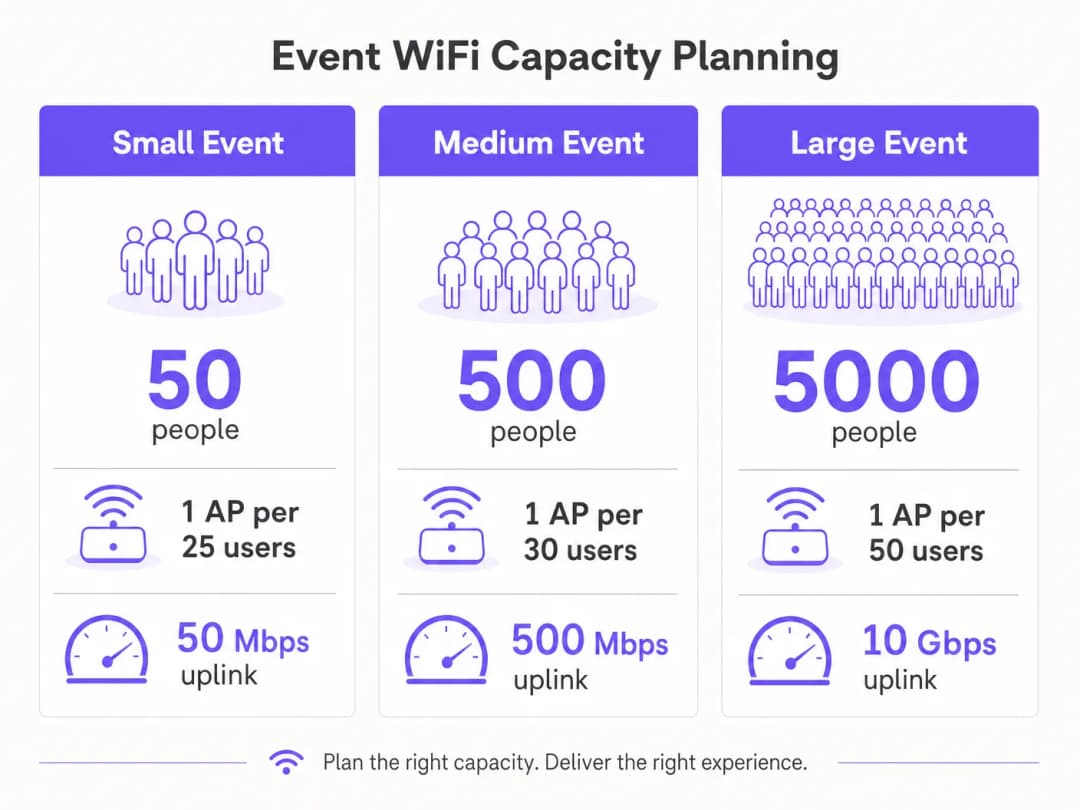
Para la planificación del rendimiento, una estimación conservadora de 1 - 2 Mbps por usuario activo es adecuada para el uso general en conferencias o exposiciones. Para eventos con requisitos de transmisión en directo o vídeo con calidad de emisión - como lanzamientos de productos o eventos de prensa - presupueste de 5 - 10 Mbps por usuario activo en la VLAN de producción. Su enlace ascendente debe estar dimensionado para dar cabida a la suma de todas las VLAN simultáneamente, con al menos un 20% de margen de seguridad.
| Escala del evento | Asistentes | APs recomendados | Enlace ascendente mínimo | Rango DHCP |
|---|---|---|---|---|
| Pequeño | Hasta 100 | 4 - 6 | 50 Mbps | /24 |
| Mediano | 100 - 500 | 15 - 25 | 200 - 500 Mbps | /23 |
| Grande | 500 - 2.000 | 50 - 100 | 1 - 2 Gbps | /21 |
| Enterprise | Más de 2.000 | Más de 100 | 5 - 10 Gbps | /20 o superior |
Backhaul: la base no negociable
Ninguna cantidad de infraestructura inalámbrica bien diseñada compensa un backhaul inadecuado. Para eventos de más de 200 asistentes, una línea dedicada arrendada es la única solución de enlace ascendente adecuada. Una línea dedicada proporciona una conexión síncrona y sin congestiones con un SLA garantizado - normalmente un 99,95% de tiempo de actividad - lo que es fundamentalmente diferente de la banda ancha compartida y asimétrica que la mayoría de los recintos tienen instalada para sus propias operaciones.
La provisión de una línea dedicada suele requerir un plazo de entrega de cuatro a seis semanas. Este es el fallo de planificación más común en los despliegues de WiFi para eventos: equipos que comienzan el diseño de la red dos semanas antes de un evento y descubren que no pueden conseguir un circuito dedicado a tiempo. Para eventos donde una línea dedicada es realmente inviable (festivales al aire libre, estructuras temporales), una solución de 4G/5G agregada que utilice múltiples tarjetas SIM de diferentes operadores ofrece una alternativa viable, aunque con un rendimiento garantizado menor y una mayor latencia.
Arquitectura de red y diseño de VLAN
Una segmentación de red estricta es un requisito tanto de rendimiento como de conformidad. La arquitectura mínima recomendada para cualquier despliegue en eventos utiliza tres VLAN:

VLAN 10 - WiFi de invitados: Todo el tráfico de los asistentes de cara al público. Esta VLAN se conecta al Captive Portal para la autenticación y la captura de datos. Se debe habilitar el aislamiento de clientes para evitar el movimiento lateral entre dispositivos. Se debe aplicar filtrado DNS para bloquear dominios maliciosos (consulte la guía de Purple sobre cómo proteger su red con un DNS sólido y seguridad para obtener detalles sobre la implementación).
VLAN 20 - Personal y punto de venta: Tráfico operativo para el personal del evento, los sistemas de venta de entradas y los terminales de pago con tarjeta. Si los pagos con tarjeta se procesan en esta VLAN, se aplica el alcance de PCI-DSS y la VLAN debe estar completamente aislada de la red de invitados, sin enrutamiento entre ellas.
VLAN 30 - AV y producción: Dedicada a los equipos de transmisión, los sistemas de presentación y el personal de producción. Esta VLAN suele requerir el mayor rendimiento garantizado y la menor latencia, y debe disponer de políticas de QoS que la prioricen sobre el tráfico de invitados.
Para eventos más grandes, es común contar con VLAN adicionales para expositores, prensa y sistemas de seguridad. Cada SSID debe asociarse a una única VLAN, y el enrutamiento entre VLAN debe desactivarse en el switch principal a menos que se requiera explícitamente.
Planificación de radiofrecuencia
En entornos de alta densidad, el comportamiento predeterminado de la mayoría de los AP empresariales (selección automática de canales y potencia de transmisión máxima) resulta perjudicial de forma activa. La interferencia de canal compartido entre AP adyacentes en el mismo canal degrada el rendimiento mucho más que una ligera reducción en el área de cobertura.
El enfoque correcto consiste en asignar canales manualmente y reducir la potencia de transmisión. En la banda de 5 GHz, utilice los canales no superpuestos disponibles en las bandas UNII-1 (36, 40, 44, 48), UNII-2 (52 a 64) y UNII-3 (149 a 165). Reduzca la potencia de transmisión del AP a 8 - 12 dBm en despliegues densos. Esto crea celdas más pequeñas y limpias con menos interferencias, lo que mejora el rendimiento global en todo el recinto.
La optimización de banda (band steering) debe activarse en todos los puntos de acceso para dirigir a los clientes compatibles con 5 GHz - que representan la inmensa mayoría de los smartphones y portátiles modernos - fuera del congestionado espectro de 2,4 GHz. Reserve la banda de 2,4 GHz para dispositivos IoT antiguos y equipos de accesibilidad que no puedan conectarse a 5 GHz.
En eventos al aire libre, el entorno de radiofrecuencia es fundamentalmente diferente. Al no haber paredes ni techos que contengan la señal, las celdas de cobertura son más grandes y la interferencia de despliegues adyacentes o puntos de acceso de consumo es más difícil de controlar. Las antenas de sector direccionales son preferibles a los puntos de acceso omnidireccionales en entornos exteriores, ya que permiten enfocar la cobertura en zonas específicas - el área del escenario principal, la zona de restauración, la cola de registro - en lugar de emitir de forma indiscriminada. Todo el hardware para exteriores debe contar, como mínimo, con una clasificación de protección de entrada IP55; la certificación IP67 es preferible para festivales o entornos expuestos.
Arquitectura del Captive Portal y conformidad con el GDPR
El Captive Portal es la primera interacción del usuario con la red de su evento y su mecanismo principal tanto para el cumplimiento normativo como para la captura de datos. Un portal mal diseñado que agota el tiempo de espera, no redirige correctamente en iOS o presenta un flujo de consentimiento confuso generará un volumen desproporcionado de solicitudes de soporte y mermará la confianza de los asistentes en la red.
Desde la perspectiva del GDPR, cualquier recopilación de datos personales - direcciones de correo electrónico, tokens de inicio de sesión social o identificadores de dispositivos - requiere una base jurídica, un aviso de privacidad claro y un consentimiento explícito para cualquier uso de marketing. El consentimiento debe ser detallado: el consentimiento para usar el WiFi no es lo mismo que el consentimiento para recibir comunicaciones de marketing. La plataforma de Guest WiFi de Purple gestiona este flujo de consentimiento de forma nativa, presentando flujos de suscripción conformes y almacenando los registros de consentimiento con marcas de tiempo y direcciones IP, tal como exige el Artículo 7 del GDPR.
La arquitectura técnica del Captive Portal es fundamental para el rendimiento. Un portal alojado en la nube que redirige las solicitudes de autenticación a un servidor externo introduce latencia en el flujo de inicio de sesión. En momentos de carga máxima - cuando cientos de usuarios se autentican simultáneamente - esta latencia puede provocar tiempos de espera agotados y fallos en el inicio de sesión. La plataforma de Purple está diseñada específicamente para este caso de uso, con una infraestructura de escalado automático que gestiona picos de carga de autenticación sin sufrir degradación.
¿Tiene preguntas sobre su configuración específica?
Nuestro equipo trabaja con operadores de recintos, responsables de TI e ingenieros de redes en 80 000 espacios. Reserve una llamada de 20 minutos y le mostraremos cómo lo han solucionado otros profesionales como usted.
Guía de implementación
Fase 1: Inspección del sitio y modelado de capacidad (8 semanas antes del evento)
Comience con una inspección física del sitio. Recorra cada área donde estarán presentes los asistentes y documente la altura de los techos, los materiales de las paredes, las obstrucciones estructurales y la infraestructura existente (tramos de conductos, tomas de corriente, puertos de datos). Utilice una herramienta de inspección de WiFi - Ekahau Site Survey o iBwave son los estándares del sector - para modelar la cobertura prevista e identificar zonas muertas antes de realizar el pedido de hardware.
Al mismo tiempo, confirme la infraestructura de red existente del espacio. Identifique los puertos de datos disponibles, la ubicación del bastidor de distribución principal y la capacidad de los switches existentes. Determine si el cableado existente del espacio puede soportar PoE+ (802.3at) para los AP que pretende desplegar, o si necesita traer sus propios switches PoE y cableado.
Finalice su modelo de capacidad en función del número previsto de asistentes, el programa del evento (una sesión de conferencia principal genera un perfil de carga muy diferente al de una recepción de networking) y los requisitos de rendimiento de cualquier sistema de producción.
Fase 2: Adquisición de hardware y contratación de red de retorno (6 a 8 semanas antes del evento)
Contrate su línea dedicada inmediatamente después del estudio de cobertura. El plazo de provisión de cuatro a seis semanas es el camino crítico para todo el despliegue. Si el espacio del evento ya dispone de una línea dedicada, negocie una asignación de ancho de banda dedicada con el equipo de TI del espacio - no asuma que la infraestructura existente estará disponible de forma automática.
Para el hardware, la elección entre compra y alquiler depende de la frecuencia de sus eventos. Para las organizaciones que despliegan WiFi para eventos más de cuatro veces al año, la propiedad de un kit portátil - AP empresariales, un switch PoE gestionado, un router de montaje en rack y cableado - es más rentable que el alquiler repetido. Para eventos puntuales, las empresas especializadas en alquiler de WiFi para eventos proporcionan hardware preconfigurado con soporte in situ, lo que reduce significativamente el riesgo del despliegue.
Al especificar los AP para alquiler o compra, priorice el hardware WiFi 6 (802.11ax) para cualquier despliegue superior a 200 usuarios. Las funciones de OFDMA y BSS Colouring de WiFi 6 proporcionan mejoras de rendimiento significativas en entornos de alta densidad en comparación con WiFi 5 (802.11ac).
Fase 3: Configuración y pruebas previas al evento (1 a 2 semanas antes del evento)
Configure todo el equipo de red en un entorno de pruebas antes de llegar al lugar del evento. Esto incluye la configuración de VLAN en el switch principal, la asignación de SSID a VLAN en la controladora inalámbrica, la configuración del rango DHCP y la integración del Captive Portal. Realizar pruebas en un entorno de preproducción es mucho más eficiente que solucionar problemas el mismo día del evento.
Para la configuración del Captive Portal, integre la plataforma de Purple en esta fase. Configure la página de inicio de sesión de marca, el método de autenticación (correo electrónico, inicio de sesión con redes sociales o SMS), el flujo de consentimiento y cualquier redirección posterior a la autenticación. Pruebe todo el proceso del usuario en varios tipos de dispositivos - iOS, Android, Windows y macOS gestionan la detección del Captive Portal de forma diferente, y cada uno tiene requisitos específicos para que el mecanismo de redirección funcione correctamente.
Realice una prueba de carga utilizando un simulador de clientes WiFi para validar que el rango DHCP, el backend de autenticación y el enlace ascendente pueden gestionar la carga máxima prevista. Herramientas como Spirent o Ixia pueden simular cientos de clientes WiFi simultáneos para este fin.
Fase 4: Despliegue in situ (el día antes del evento)
Llegue al lugar con tiempo suficiente para completar la instalación y las pruebas antes de que el recinto abra sus puertas a los asistentes. Monte los AP de acuerdo con el plan del estudio de cobertura; se prefiere el montaje en techo para una cobertura omnidireccional; el montaje en pared es aceptable cuando no se dispone de acceso al techo. Realice el tendido y etiquetado de todo el cableado, y documente la ubicación física de cada AP con una fotografía y una anotación en el plano de planta.
Una vez instalado todo el hardware, realice un estudio postinstalación utilizando un ordenador portátil o un dispositivo de medición dedicado para validar la cobertura. Recorra toda la zona destinada a los asistentes y confirme que la intensidad de la señal sea de -65 dBm o superior en todas partes. Identifique y resuelva cualquier brecha de cobertura antes de que comience el evento.
Pruebe el proceso de usuario de extremo a extremo: conecte un dispositivo de prueba a cada SSID, complete la autenticación del Captive Portal y verifique que el acceso a internet esté disponible. Pruebe los terminales de pago con tarjeta en la VLAN del personal. Confirme que los equipos audiovisuales de la VLAN de producción puedan llegar a todos los destinos requeridos.
Fase 5: Gestión y monitorización in situ
Durante el evento, monitorice la red en tiempo real mediante el panel de control del controlador inalámbrico. Las métricas clave que se deben vigilar son: recuentos de asociación de AP (marque cualquier AP que supere el 80 % de su capacidad de clientes recomendada), utilización de canales, utilización del pool DHCP y rendimiento del enlace ascendente. La plataforma de analítica de WiFi de Purple WiFi Analytics proporciona una capa adicional de visibilidad sobre el comportamiento de los usuarios - tiempo de permanencia, periodos de máxima conexión y tasas de conversión del portal -, lo que resulta valioso tanto para la gestión en tiempo real como para los informes posteriores al evento.
Tenga un proceso de escalado claro para los problemas de red. Designe un único punto de contacto para todas las solicitudes de soporte relacionadas con la red por parte del personal del evento, y asegúrese de que el ingeniero de red in situ tenga acceso remoto a todos los equipos a través de una conexión de gestión fuera de banda que sea independiente de la red de invitados.
Buenas prácticas
Las siguientes recomendaciones representan las mejores prácticas independientes del proveedor, derivadas de despliegues en eventos de gran envergadura en entornos de hospitality, retail y conferencias.
Desactive la difusión de SSID para las redes de personal y de producción. No existe ninguna razón operativa para que estos SSID estén visibles para los asistentes. Ocultarlos reduce la superficie de ataque y evita conexiones accidentales.
Establezca tiempos de concesión de DHCP agresivos en la VLAN de invitados. Un tiempo de concesión de 30 a 60 minutos garantiza que las direcciones IP de los dispositivos desconectados se recuperen rápidamente. Esto es especialmente importante en eventos de varios días de duración, donde la población de asistentes cambia significativamente entre sesiones.
Implemente la autenticación 802.1X en las VLAN de personal y producción. WPA3-Enterprise con 802.1X proporciona autenticación por usuario y elimina el riesgo de que una clave precompartida se vea comprometida. Para las redes de invitados, el enfoque estándar es WPA3-Personal o una red abierta con un Captive Portal. Utilice DNS-over-HTTPS o filtrado DNS en la VLAN de invitados. Las redes de eventos públicos son un objetivo para el secuestro de DNS y los ataques de phishing. La aplicación del filtrado DNS - ya sea a través de su proveedor principal o mediante un servicio de seguridad DNS dedicado - proporciona una capa de protección muy importante para los asistentes. La plataforma de Purple se integra con proveedores de seguridad DNS para aplicar este filtrado en la capa del Captive Portal.
Documéntelo todo. Cree un diagrama de red, un cronograma de cableado y un mapa de ubicación de AP antes de llegar al lugar del evento. Esta documentación es de un valor incalculable para la resolución de problemas durante el evento y para la planificación de futuros despliegues en el mismo recinto.
Para despliegues en aeropuertos y nodos de transporte, se aplican consideraciones de seguridad adicionales; la guía de Purple sobre seguridad de WiFi en aeropuertos cubre el modelo de amenazas específico y las estrategias de mitigación pertinentes para entornos públicos de gran afluencia.
Resolución de problemas y mitigación de riesgos
Agotamiento del pool de DHCP
Este es el modo de fallo más común en el WiFi para eventos. Los síntomas incluyen dispositivos que se conectan al WiFi pero no pueden obtener una dirección IP, o que reciben una dirección APIPA (169.254.x.x). La solución consiste en aumentar el tamaño del rango de DHCP y reducir el tiempo de concesión (lease time). La prevención es sencilla: dimensione su rango de DHCP para que sea al menos el doble del número máximo de clientes previsto y establezca tiempos de concesión de entre 30 y 60 minutos.
Sobrecarga del servidor de autenticación
En momentos de máxima carga, un gran número de solicitudes de autenticación simultáneas puede saturar un servidor RADIUS local o el backend del Captive Portal. Esto se manifiesta en inicios de sesión lentos o fallidos. Las plataformas alojadas en la nube como Purple se escalan automáticamente para gestionar picos de carga de trabajo, lo que supone una ventaja arquitectónica significativa en comparación con los despliegues locales para escenarios de eventos.
Interferencia de canal compartido (Co-Channel Interference)
Si varios AP funcionan en el mismo canal y a poca distancia entre sí, el rendimiento disminuye significativamente. Los síntomas incluyen un bajo rendimiento de datos a pesar de una buena intensidad de señal, y altas tasas de reintento visibles en el controlador inalámbrico. La solución consiste en revisar las asignaciones de canales y asegurarse de que los AP adyacentes se encuentren en canales que no se superpongan. Reducir la potencia de transmisión también ayuda a disminuir el radio de interferencia de cada AP.
Fallos en la redirección del Captive Portal
Los distintos sistemas operativos utilizan diferentes mecanismos para detectar los Captive Portals. iOS utiliza un CNA (Captive Network Assistant) dedicado que realiza solicitudes HTTP a URL específicas de Apple. Android utiliza un mecanismo similar con los servidores de comprobación de conectividad de Google. Si su Captive Portal no responde correctamente a estas sondas, el portal no se abrirá automáticamente y los usuarios tendrán que navegar manualmente a la URL del portal. Asegúrese de que su Captive Portal esté configurado para interceptar y responder a estas solicitudes de sondeo específicas.
Fallo del enlace de subida (Uplink)
Un único punto de fallo en el enlace ascendente es el riesgo de mayor impacto en el despliegue de un evento. Mitíguelo aprovisionando una conexión de respaldo 4G/5G que se active automáticamente si falla la línea dedicada principal. La mayoría de los routers empresariales admiten la conmutación por error de doble WAN con tiempos de cambio de menos de un segundo. Pruebe el mecanismo de conmutación por error durante la configuración previa al evento, no durante el propio evento.
ROI e impacto empresarial
El WiFi para eventos se reconoce cada vez más no solo como un servicio básico, sino como un activo de datos. Cada asistente que se conecta a la red de su evento y se autentica a través de un Captive Portal proporciona datos de primera mano (dirección de correo electrónico, información demográfica y datos de comportamiento) que tienen un valor comercial significativo para los organizadores de eventos, los operadores de recintos y los patrocinadores.
La plataforma WiFi Analytics de Purple cuantifica este valor directamente. Los informes posteriores al evento proporcionan datos sobre el total de conexiones únicas, el pico de usuarios concurrentes, la duración media de la sesión, las tasas de conversión del portal y las tasas de aceptación de comunicaciones de marketing. Para una conferencia de 2.000 asistentes con una tasa de aceptación en el portal del 70%, esto representa 1.400 nuevos contactos de marketing con consentimiento capturados en un solo evento, un coste por adquisición difícil de igualar a través de cualquier otro canal.
Para los operadores de recintos en el sector de la hostelería, la capa de análisis proporciona un valor adicional a través del análisis de la afluencia de público y el mapa de tiempos de permanencia. Comprender qué zonas de un recinto atraen la mayor interacción, y durante cuánto tiempo, ayuda a tomar decisiones sobre la distribución, la ubicación de restauración y el posicionamiento de los patrocinadores para futuros eventos.
El cálculo del ROI para la inversión en WiFi para eventos debe tener en cuenta tres categorías de retorno: operativo (reducción de los costes de soporte de una red bien diseñada frente a una ad-hoc), comercial (captura de datos de primera mano y autorizaciones de marketing) y reputacional (el valor de marca de una red fiable y rápida que mejora la experiencia del asistente). Para eventos a gran escala, el retorno comercial por sí solo suele justificar la inversión en infraestructura en un plazo de dos o tres eventos.
Definiciones clave
Punto de acceso (AP)
Un dispositivo de hardware que crea una red de área local inalámbrica (WLAN) mediante la transmisión y recepción de señales WiFi. En las implementaciones de eventos, se utilizan APs de calidad empresarial en lugar de dispositivos de consumo, ya que admiten múltiples SSIDs, etiquetado VLAN, gestión centralizada y un mayor número de clientes concurrentes.
Los equipos de TI se encuentran con las especificaciones de los AP al dimensionar una implementación. Los parámetros clave son el número máximo de clientes concurrentes (normalmente entre 100 y 200 para APs empresariales), el estándar de WiFi compatible (802.11ax/WiFi 6 es la práctica recomendada actual) y la clasificación de protección contra la entrada de polvo y agua (IP55+ para uso en exteriores).
VLAN (Red de área local virtual)
Un segmento de red lógico creado dentro de una infraestructura de red física utilizando el etiquetado IEEE 802.1Q. Las VLAN permiten que múltiples redes aisladas compartan los mismos conmutadores físicos y cableado, con el tráfico entre VLAN controlado mediante políticas de enrutamiento.
Las VLAN son el mecanismo principal para la segmentación de redes en implementaciones de eventos. Separar el tráfico de invitados, del personal y de producción en diferentes VLAN es tanto una práctica recomendada de rendimiento como un requisito de conformidad con PCI-DSS cuando hay pagos con tarjeta de por medio.
Captive Portal
Una página web que se presenta a los usuarios cuando se conectan por primera vez a una red WiFi, requiriendo autenticación o la aceptación de términos antes de que se les conceda acceso a internet. Los Captive Portals son el mecanismo estándar para el control de acceso WiFi de invitados, la captura de consentimiento de GDPR y la recopilación de datos de origen.
El Captive Portal es la primera interacción del usuario con la red del evento. Su rendimiento bajo carga - especialmente durante los picos de autenticación - afecta directamente a la experiencia del asistente. Los portales alojados en la nube como la plataforma de Purple se escalan automáticamente para gestionar picos de carga.
DHCP (Dynamic Host Configuration Protocol)
Un protocolo de red que asigna automáticamente direcciones IP a los dispositivos cuando se conectan a una red. El servidor DHCP mantiene un pool de direcciones disponibles (el rango) y las asigna a los clientes durante un período definido (el tiempo de concesión).
El agotamiento del pool de DHCP - donde todas las direcciones IP disponibles están en uso y los nuevos dispositivos no pueden conectarse - es el modo de fallo más común en el WiFi para eventos. Un correcto dimensionamiento del rango y la configuración del tiempo de concesión son pasos críticos en la planificación.
Línea dedicada
Una conexión de datos dedicada, síncrona y no compartida entre dos puntos, proporcionada por un operador de telecomunicaciones con un Acuerdo de Nivel de Servicio (SLA) garantizado. A diferencia de la banda ancha, una línea dedicada proporciona velocidades de subida y bajada idénticas y no se comparte con otros clientes.
Una línea dedicada es el enlace ascendente recomendado para despliegues de WiFi para eventos de más de 200 asistentes. La diferencia clave con la banda ancha es la garantía de SLA y la naturaleza no compartida de la conexión. El aprovisionamiento suele tardar de 4 a 6 semanas.
802.11ax (WiFi 6)
La generación actual del estándar WiFi, que introduce OFDMA (Orthogonal Frequency Division Multiple Access) y MU-MIMO (Multi-User Multiple Input Multiple Output) para mejorar el rendimiento en entornos de alta densidad. WiFi 6 permite que un AP atienda a múltiples clientes simultáneamente en el mismo canal, en lugar de hacerlo de forma secuencial.
WiFi 6 es el estándar recomendado para despliegues de eventos de más de 200 usuarios. Sus mejoras de rendimiento de alta densidad con respecto a WiFi 5 (802.11ac) son más pronunciadas exactamente en el tipo de entorno que crea el WiFi para eventos: muchos clientes, alta congestión y tipos de dispositivos mixtos.
GDPR (General Data Protection Regulation)
Reglamento de la UE (2016/679) que regula la recopilación, el tratamiento y el almacenamiento de datos personales. Para el WiFi de eventos, la GDPR exige una base legal para la recopilación de datos, un aviso de privacidad claro, un consentimiento explícito y detallado para el uso de marketing, y la capacidad de demostrar el cumplimiento mediante registros de consentimiento.
Cualquier despliegue de WiFi para eventos que recopile datos personales - direcciones de correo electrónico, tokens de inicio de sesión social o identificadores de dispositivos - debe cumplir con la GDPR. El Captive Portal es el principal punto de control de cumplimiento. El consentimiento para el acceso a WiFi y el consentimiento para comunicaciones de marketing deben ser opciones de inclusión voluntaria independientes y detalladas.
PCI DSS (Payment Card Industry Data Security Standard)
Un conjunto de estándares de seguridad que exige cómo deben proteger esos datos las organizaciones que procesan, almacenan o transmiten datos de pago con tarjeta. PCI DSS requiere que los entornos de datos de titulares de tarjetas estén segmentados por red de cualquier sistema orientado al público.
Cualquier evento que procese pagos con tarjeta - venta de entradas, restauración, merchandising - debe garantizar que los sistemas de pago se encuentren en un segmento de red completamente aislado de la red WiFi de invitados. Colocar terminales de pago en la misma VLAN que el WiFi público es un fallo de cumplimiento de PCI DSS.
Band Steering
Una función de red inalámbrica que fomenta activamente que los dispositivos cliente compatibles con doble banda se conecten a la banda de 5 GHz en lugar de a la de 2.4 GHz, retrasando o rechazando las solicitudes de asociación en 2.4 GHz de los clientes que son compatibles con 5 GHz.
En entornos de eventos de alta densidad, el espectro de 2.4 GHz se satura rápidamente. El band steering es una configuración estándar en los AP de nivel empresarial que reduce la congestión de 2.4 GHz empujando a los clientes compatibles hacia la banda de 5 GHz, menos congestionada.
QoS (Quality of Service)
Técnicas de gestión del tráfico de red que priorizan ciertos tipos de tráfico sobre otros, asegurando que las aplicaciones de alta prioridad reciban el ancho de banda y la latencia que requieren incluso cuando la red está congestionada.
QoS se utiliza en despliegues de eventos para garantizar el ancho de banda para las VLAN de producción y de prensa, y para limitar el rendimiento por usuario en la VLAN de invitados para evitar que los usuarios individuales de alto consumo degraden la experiencia de todos los asistentes.
Ejemplos prácticos
Un centro de conferencias con capacidad para 3.000 personas acoge una cumbre tecnológica de dos días. El evento incluye una sala principal para 2.500 personas, 12 salas de reuniones de 50 a 150 personas cada una, una zona de exposición con 80 stands de expositores y una sala de prensa con 30 periodistas que requieren una conectividad fiable de alto rendimiento. El recinto dispone de cableado Cat6 en todas sus instalaciones, pero solo cuenta con una conexión de banda ancha compartida de 200 Mbps. ¿Cómo debe diseñarse la red?
La primera prioridad es la conexión de retorno (backhaul). Una conexión de banda ancha compartida de 200 Mbps es totalmente inadecuada para este evento. Se debe solicitar inmediatamente una línea dedicada de al menos 2 Gbps; este es el elemento crítico del proceso con un plazo de entrega de 4 a 6 semanas. Se debe aprovisionar un respaldo móvil 4G/5G agregada como failover.
Para la arquitectura inalámbrica, la sala principal requiere la planificación más minuciosa. Con 2.500 usuarios concurrentes potenciales, planifique de 60 a 80 APs solo en esta sala, desplegados a alta densidad con potencia de transmisión reducida (8 a 10 dBm) y canales asignados manualmente. Los APs WiFi 6 son esenciales a esta escala.
Diseño de VLAN: VLAN 10 (Invitado/Asistente), VLAN 20 (Personal/Registro), VLAN 30 (Expositor), VLAN 40 (Prensa/Producción), VLAN 50 (AV/Transmisión). La VLAN de prensa debe tener una asignación de ancho de banda garantizada mediante QoS; reserve 5 Mbps por periodista para permitir la subida de vídeo.
Para los expositores, aprovisione un SSID independiente en la VLAN 30 con WPA2-PSK y una contraseña única por stand que se distribuirá en el momento del registro. Esto evita que los expositores accedan a las redes de los demás, manteniendo el proceso de aprovisionamiento manejable.
DHCP: Utilice un rango /20 para la VLAN de invitados (4.094 direcciones utilizables) y /24 para cada VLAN operativa. Establezca el tiempo de concesión (lease time) de invitados en 30 minutos.
Captive Portal: Despliegue la plataforma Guest WiFi de Purple en la VLAN de asistentes con autenticación mediante correo electrónico o inicio de sesión social, una página de bienvenida personalizada con la marca y el consentimiento explícito de GDPR para el marketing posterior al evento. Tasa de captación estimada entre el 65 y el 70%: aproximadamente entre 1.600 y 1.750 contactos de marketing con consentimiento.
Una importante cadena de tiendas organiza un evento efímero al aire libre de tres días en la plaza de un centro urbano. La afluencia prevista es de 500 a 800 visitantes al día. El evento incluye una zona de demostración de productos, un terminal de pago y una zona de activación de redes sociales donde se anima a los visitantes a compartir contenidos. No hay infraestructura fija: ni cableado, ni energía, ni red existente. ¿Cómo aprovisiona la conectividad?
Sin infraestructura fija, la implementación debe ser totalmente autónoma. La pila de red consta de: un router 5G combinado (que utiliza tarjetas SIM de dos operadores diferentes para mayor redundancia) que proporciona el enlace ascendente; un conmutador PoE gestionado alimentado por un generador o un SAI portátil; y APs WiFi 6 aptos para exteriores con protección contra la entrada de polvo y agua IP67 montados en andamios temporales o estructuras del evento.
Para un entorno al aire libre, utilice antenas de sector direccionales en lugar de APs omnidireccionales para enfocar la cobertura en el área del evento y minimizar las interferencias con las zonas circundantes. Coloque los APs en altura (de 4 a 6 metros) para maximizar el radio de cobertura y reducir las interferencias a nivel del suelo.
Diseño de VLAN: VLAN 10 (WiFi de visitantes con Captive Portal), VLAN 20 (personal y terminales de pago - bajo el alcance de PCI-DSS), VLAN 30 (zona de activación de redes sociales - mayor asignación de ancho de banda). La VLAN de los terminales de pago debe estar completamente aislada del tráfico de visitantes y debería utilizar una conexión cableada al conmutador PoE en lugar de WiFi siempre que sea posible.
Para la zona de activación de redes sociales, configure el QoS para priorizar el tráfico de subida (las publicaciones en Instagram y TikTok consumen mucha subida) y asegúrese de que el enlace ascendente tenga suficiente margen de maniobra. Para 800 visitantes concurrentes con un 10 % subiendo contenido de forma activa en cualquier momento dado, calcule 5 Mbps por usuario activo de subida: 80 usuarios × 5 Mbps = se requieren 400 Mbps de capacidad de subida.
Captive Portal: Implemente la plataforma de Purple con una página de bienvenida personalizada vinculada a la campaña. Recopile direcciones de correo electrónico y perfiles de redes sociales, con consentimiento expreso (opt-in) para el seguimiento posterior al evento. La zona de activación de redes sociales se puede configurar para redirigir automáticamente a los usuarios autenticados a la página del hashtag de la campaña.
Para garantizar la resistencia a la intemperie, todo el equipo debe alojarse en cajas impermeables con clasificación IP65 o superior. Tenga un AP de repuesto y un inyector PoE de reserva en el lugar para un reemplazo rápido.
Preguntas de práctica
Q1. ¿Usted es el director de TI de un centro de conferencias que alberga 20 eventos al año, que van desde reuniones de junta directiva de 50 personas hasta conferencias anuales de 1.500 personas. Actualmente, el recinto cuenta con una conexión de banda ancha compartida de 500 Mbps y una mezcla de routers WiFi de consumo instalados por el equipo de TI anterior. Las quejas de los asistentes sobre la calidad de la WiFi están aumentando. ¿Cuál es su hoja de ruta para la actualización de la infraestructura y cuál es el caso de negocio para la inversión?
Sugerencia: Considere la variedad de tamaños de los eventos y los diferentes requisitos de red para cada uno. Piense en si una sola infraestructura puede dar servicio a todos los tipos de eventos, o si es necesario un enfoque por niveles. El caso de negocio debe abordar tanto el coste de la situación actual (quejas, pérdida de negocio) como la oportunidad de ingresos (captura de datos, oferta de WiFi premium como servicio).
Ver respuesta modelo
La hoja de ruta de la actualización tiene tres componentes. En primer lugar, sustituir la banda ancha compartida por una línea dedicada de al menos 1 Gbps - este es el cambio de mayor impacto individual y aborda la causa raíz de la mayoría de las quejas de rendimiento. En segundo lugar, sustituir los routers WiFi de consumo por una infraestructura inalámbrica empresarial gestionada: una controladora inalámbrica, AP de calidad empresarial desplegados según un estudio de cobertura adecuado y un switch PoE gestionado. Para un recinto de este tamaño, de 20 a 30 AP que cubran todos los espacios de eventos es un punto de partida razonable. En tercer lugar, desplegar una plataforma de Captive Portal - la solución Guest WiFi de Purple - para proporcionar autenticación personalizada, captura de datos que cumpla con el GDPR y elaboración de informes analíticos.
El caso de negocio tiene dos componentes. El coste de la situación actual incluye el daño a la reputación debido a una WiFi deficiente (cuantificable a través de las puntuaciones de satisfacción de los asistentes), la posible pérdida de reservas de organizadores de eventos que especifican la calidad de la WiFi en los requisitos de su recinto, y el tiempo que el equipo de TI dedica a responder a las quejas. La oportunidad de ingresos incluye la captura de datos propios de cada evento (con 20 eventos al año con una media de 500 asistentes y un 65% de suscripción voluntaria, eso supone 6.500 nuevos contactos de marketing al año), la capacidad de ofrecer WiFi premium como un servicio facturable a los organizadores de eventos, y los datos analíticos que informan la distribución del recinto y las decisiones de restauración.
Q2. Un festival de música al aire libre con 8.000 asistentes ha contratado a su empresa para proporcionar servicios de WiFi para eventos. El lugar es una zona de campo abierto sin infraestructura existente: sin energía, sin cableado y sin estructuras fijas. El evento dura tres días. ¿Cuáles son los cinco elementos de mayor riesgo en este despliegue y cómo mitiga cada uno de ellos?
Sugerencia: Piense en las dependencias que tienen más probabilidades de fallar en un entorno al aire libre y sin infraestructura previa. Considere el clima, la energía, la conectividad, los fallos de hardware y los factores humanos. Para cada riesgo, piense tanto en la prevención como en la contingencia.
Ver respuesta modelo
Riesgo 1 - Fallo del enlace ascendente (uplink): Sin infraestructura fija, una línea dedicada no es una opción. La mitigación es una solución 5G vinculada utilizando tarjetas SIM de al menos dos operadores diferentes, con conmutación por error automática. Considere en el presupuesto de 4 a 5 tarjetas SIM de distintos operadores con la mejor cobertura en la ubicación específica del evento (verifique esto con una visita al sitio antes del evento). Riesgo 2 - Fallo de alimentación: Todo el equipo de red funciona con generadores. La mitigación es un SAI (sistema de alimentación ininterrumpida) entre el generador y el equipo de red, que proporcione entre 15 y 30 minutos de autonomía durante las transiciones del generador o el reabastecimiento de combustible. Disponga de un generador de repuesto en el lugar. Riesgo 3 - Fallo de hardware: En un entorno al aire libre, las tasas de fallo de hardware son mayores debido al clima, las vibraciones y los daños físicos. Lleve un 20 % de hardware de repuesto: AP de repuesto, inyectores PoE de repuesto y cables de red de repuesto. Documente la configuración de cada dispositivo para que se pueda aprovisionar un reemplazo en menos de 10 minutos. Riesgo 4 - Daños climáticos: Todo el hardware para exteriores debe tener una clasificación IP67. Todo el cableado debe tenderse en conductos o sistemas de gestión de cables aptos para exteriores. Las cajas de los equipos deben estar selladas y elevadas del suelo para evitar la entrada de agua. Riesgo 5 - Agotamiento de DHCP: Con 8.000 asistentes, un rango DHCP estándar fallará. Configure una subred /19 (8.190 direcciones útiles) con un tiempo de concesión de 30 minutos. Supervise el uso del grupo DHCP en tiempo real y tenga un plan para ampliar el rango si el uso supera el 80 %.
Q3. ¿Una conferencia legal está utilizando su servicio de WiFi para eventos. El organizador del evento quiere recopilar las direcciones de correo electrónico de los asistentes a través del Captive Portal y utilizarlas para marketing posterior al evento. El evento cuenta con asistentes tanto del Reino Unido como de la UE. ¿Qué requisitos de cumplimiento de GDPR se aplican y cómo debe configurarse el Captive Portal para cumplirlos?
Sugerencia: Considere la distinción entre la base jurídica para proporcionar acceso a la WiFi y la base jurídica para las comunicaciones de marketing. Piense en qué información debe presentarse a los usuarios, qué registros de consentimiento deben conservarse y cómo se gestionan los derechos de los interesados.
Ver respuesta modelo
Bajo el GDPR (y el UK GDPR posterior al Brexit), la recopilación de direcciones de correo electrónico y su uso para marketing requieren un consentimiento explícito, informado y libremente otorgado. El Captive Portal debe configurarse de la siguiente manera. Primero, la página de inicio debe incluir un aviso de privacidad claro que identifique al responsable del tratamiento de los datos (el organizador del evento), especifique qué datos se recopilan, cómo se utilizarán y cuánto tiempo se conservarán. Segundo, el consentimiento para el acceso a la WiFi y el consentimiento para las comunicaciones de marketing deben ser opciones de aceptación (opt-in) independientes - una única casilla de verificación que combine ambas cosas no cumple con la normativa. Los usuarios deben poder acceder a la WiFi sin tener que consentir el marketing. Tercero, la casilla de verificación de aceptación de marketing debe estar desmarcada por defecto (sin casillas marcadas previamente). Cuarto, el registro de consentimiento - que incluye la marca de tiempo, la dirección IP y el texto de consentimiento específico presentado - debe almacenarse y poder recuperarse, tal como exige el Artículo 7(1) del GDPR. Quinto, el aviso de privacidad debe incluir información sobre los derechos de los interesados (acceso, supresión, portabilidad) y proporcionar un mecanismo de contacto para ejercer dichos derechos. La plataforma de WiFi para invitados de Purple gestiona todos estos requisitos de forma nativa, almacenando los registros de consentimiento con una pista de auditoría completa y ofreciendo un flujo de trabajo de consentimiento conforme a la normativa desde el primer momento. Para un público mixto del Reino Unido y la UE, se aplica el mismo estándar de GDPR a ambos - el UK GDPR y el EU GDPR son sustancialmente idénticos en sus requisitos de consentimiento.
Continúe leyendo esta serie
Staff WiFi vs. Guest WiFi: mejores prácticas para la segmentación de redes corporativas
Una guía técnica completa para líderes de TI sobre cómo segmentar las redes de staff y guest WiFi. Cubre la arquitectura VLAN, la autenticación 802.1X, las políticas de firewall y el impacto empresarial de un diseño de red seguro.
Gestión de WiFi para huéspedes de hoteles: Integración de PMS, portales y estándares de marca
Esta guía técnica detalla cómo estructurar redes WiFi de hotel de nivel empresarial, centrándose en la segmentación de VLAN, la integración de PMS para la gestión automatizada de sesiones y la optimización del Captive Portal para la captura de datos conforme a GDPR.
Cómo configurar el WiFi de invitados: una guía de configuración empresarial segura
Esta guía de referencia proporciona a los líderes de TI y arquitectos de red un plan definitivo para desplegar un WiFi de invitados empresarial seguro. Cubre la arquitectura esencial, la migración a WPA3, la segmentación de VLAN y la integración de Captive Portal para proteger los sistemas internos mientras se recopilan datos de primera mano de conformidad con la normativa.
¿Tiene preguntas sobre su configuración específica?
Nuestro equipo trabaja con operadores de recintos, responsables de TI e ingenieros de redes en 80 000 espacios. Reserve una llamada de 20 minutos y le mostraremos cómo lo han solucionado otros profesionales como usted.