跳至主要內容

Event WiFi:規劃與部署臨時無線網路

本指南為 IT 經理、網路架構師和場館營運總監提供了在任何規模活動中規劃和部署臨時 WiFi 網路的完整技術參考。內容涵蓋容量規劃、硬體選擇、VLAN 架構、Captive Portal 整合、GDPR 合規和活動後分析——並包含來自飯店業和大規模會議環境的具體案例研究。對於活動製播公司和影音公司,它描繪了活動 WiFi 參與的完整生命週期,從初始現場勘查到拆除和報告。

📖 12 分鐘閱讀📝 2,910 字數🔧 2 範例3 練習題📚 10 關鍵定義

收聽此指南

查看播客逐字稿
歡迎收聽 Purple 企業網路簡報。今天我們要處理 IT 總監和網路架構師所面臨的一項高風險挑戰:活動 WiFi。無論您是為一個五千人會議、一個大型零售快閃店,還是一個戶外體育場活動提供連線服務,臨時無線網路都帶有永久性企業部署所不會面臨的獨特風險。今天,我們將跳脫理論,為您提供可行的架構、容量規劃和部署策略,讓您能夠提供完美無瑕的連線——並在此過程中擷取有價值的分析資料。讓我們開始吧。 讓我們從技術深入探討開始。當談到活動 WiFi 時,IT 團隊最大的錯誤是將其視為標準的企業辦公室部署。它不是。密度、客戶端的暫時性,以及大量同時認證請求創造了完全不同的射頻環境。理解這個區別是每個好的活動網路設計的基礎。 首先,來看看容量規劃。你不能依賴面積來決定存取點數量。你必須針對客戶端密度進行規劃。高密度環境——如會議主題演講或展會會場——的經驗法則是每三十到五十個使用者一個 AP,取決於射頻能力和每位使用者的預期吞吐量。如果你部署的是 802.11ax,即 WiFi 6,你會有更好的 OFDMA 和 MU-MIMO 能力來處理並發連線,但你仍需仔細管理頻道重疊。5 GHz 頻段提供更多非重疊頻道,這就是為什麼你應該盡可能將客戶端流量導向那裡。 你的回程連線同樣至關重要。你需要確保一條專用的租用線路。依賴場館共享寬頻在兩千名與會者同時嘗試串流視訊時注定會失敗。一條具備保證 SLA 的專用對稱光纖連線,是超過幾百名與會者之活動的唯一可接受選項。對於較小活動,綁定的 4G 或 5G 解決方案可作為可行的備案,但永遠不應成為你的主要上行鏈路。 現在,來討論架構。你需要嚴格的 VLAN 隔離。至少,你應該有三個獨立的網路:VLAN 10 供訪客 WiFi,VLAN 20 供員工和銷售點,VLAN 30 供影音和製播。訪客流量必須完全隔離於員工和操作系統。這不僅是性能考量——它是一項安全和合規要求。如果你在現場任一處處理信用卡支付,PCI DSS 規定你的持卡人資料環境必須與任何面向公眾的網路隔離。 這也是強大的 Captive Portal 發揮作用的地方。你的 Captive Portal 不只是一個閘道——它是你主要的資料擷取和合規執行點。整合像 Purple 的 Guest WiFi 解決方案這樣的平台,讓你能夠安全管理認證、為行銷目的擷取第一方數據,並確保符合 GDPR 對同意和資料處理的要求。Purple 的平台支援社交登入、電子郵件註冊和自訂品牌入口網站,因此對最終用戶而言體驗是無縫的,同時為活動主辦方提供可據以行動的分析。 我們來特別談談戶外活動,因為它們引入了不同的挑戰。室內場館有可預測的射頻傳播——你可以根據牆面材質和天花板高度來建模覆蓋範圍。戶外環境沒有這些邊界。你要處理的是開放空間的傳播、來自鄰近場館的潛在干擾,以及在沒有永久基礎設施的情況下安裝 AP 的實體挑戰。定向天線、扇形 AP 和網狀網路成為你的主要工具。你還需要考慮天氣——任何戶外部署,標示 IP55 防護等級的硬體是最低要求。 接下來是實作建議和常見陷阱。活動 WiFi 中最常見的故障模式是 DHCP 池耗盡。如果你有一千名與會者,一個標準的 /24 子網提供 254 個位址,在設備連接、斷開和重新連接時,將在第一小時內失效。你需要為訪客 VLAN 配置 /22 或 /21 子網,這提供了超過一千個可用位址。同樣重要的是:將 DHCP 租約時間縮短至 30 分鐘到一小時之間。這確保中斷連線設備的位址能夠迅速回收並放回池中。 另一個主要陷阱是低估了你 Captive Portal 基礎設施的認證負載。如果你有兩千人在三十分鐘內抵達會議報到處,他們都會同時嘗試對 WiFi 進行認證。你的 Captive Portal 伺服器——無論是本地還是雲端託管——需要能夠處理這波突發流量。像 Purple 這樣的雲端託管平台會自動擴展,這比起需要手動容量規劃的本地 RADIUS 伺服器具有顯著優勢。 頻道規劃是活動部署中另一經常出錯的領域。在高密度環境中,你應該停用自動頻道選擇,並手動分配頻道,以避免相鄰 AP 之間的同頻干擾。在 5 GHz 頻段,使用來自 UNII-1、UNII-2 和 UNII-3 頻段的非重疊頻道。降低個別 AP 的發射功率——與直覺相反,較低的功率意味著 AP 之間較少的干擾,並在密集部署中獲得更好的整體網路性能。 現在是根據我們從客戶那裡聽到的最常見問題進行的快問快答。 問題一:我們應該使用 2.4 GHz 還是 5 GHz?盡可能將流量導向 5 GHz。在高密度活動中,2.4 GHz 頻譜將被來自藍牙設備、場館設備和惡意行動熱點的干擾完全飽和。在你的 AP 上啟用頻段引導,主動將支援的客戶端導向 5 GHz。僅對無法連接到 5 GHz 的舊式 IoT 裝置使用 2.4 GHz。 問題二:如何處理 VIP 或參展商連線?不要把他們放在公共訪客網路上。提供一個獨立的 SSID,連結到專用 VLAN,並使用 QoS 策略提供保證頻寬分配,用 WPA3 Enterprise 認證加以保護。這確保進行現場產品展示的參展商不會與數千名一般與會者爭搶頻寬。 問題三:安全性呢?至少要在你的訪客 VLAN 上實作客戶端隔離,以防止設備間的攻擊。啟用 DNS 過濾以阻擋已知惡意網域——Purple 的平台與 DNS 安全供應商整合,可自動添加此層保護。 問題四:應該多早開始規劃?對於超過五百名與會者的活動,至少提前八週開始你的網路設計。你需要時間勘查場地、訂購或租用硬體、安排租用線路——這通常需要四到六週的前置時間——並進行以模擬客戶端負載的活動前測試。 總結今天的簡報。活動 WiFi 是一門有別於永久性企業網路的獨立學科。關鍵原則如下:針對客戶端密度而非面積進行規劃;確保具備保證 SLA 的專用租用線路;對訪客、員工和影音流量實作嚴格的 VLAN 隔離;寬裕地設定 DHCP 範圍並縮短租約時間;使用能隨需求擴展的雲端託管 Captive Portal 平台;並將入口網站視為資料擷取和合規資產,而不僅僅是閘道。 像 Purple 的 Guest WiFi 和分析解決方案這樣的平台是專為此使用案例打造的——它們在單一整合平台中處理認證負載、GDPR 同意工作流程和活動後分析報告。這意味著你的 IT 團隊可以專注於網路基礎設施,而平台處理使用者旅程和資料。 如果您正在規劃下一季的活動部署,第一步是進行適當的現場勘查和容量模型。把這些做對,其他一切就會隨之到位。感謝收聽這次技術簡報。下次見,保持網路安全,使用者保持連線。

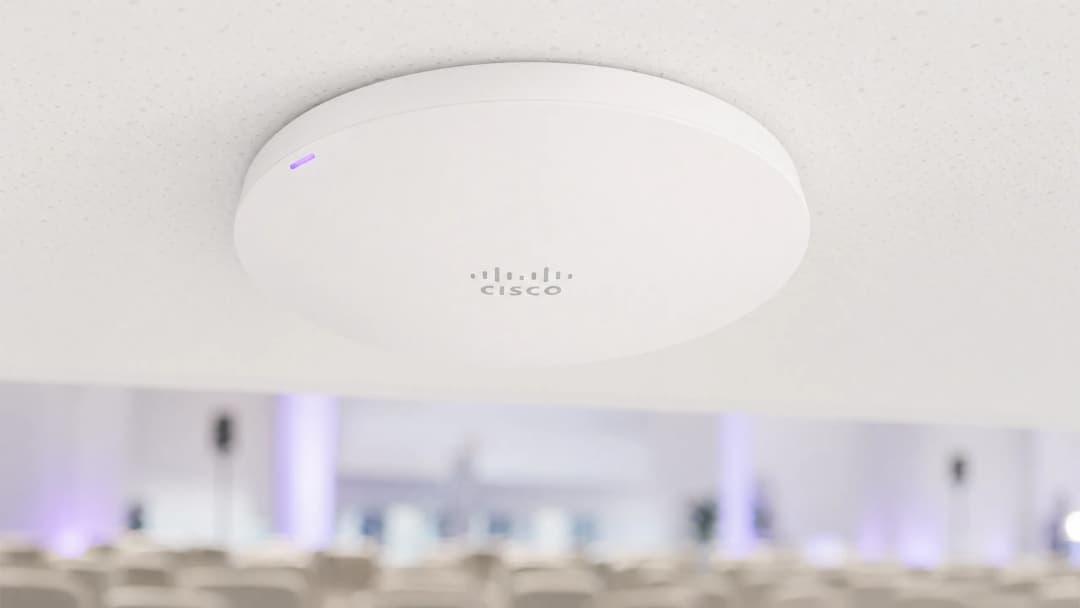
header_image.png

Executive Summary

Event WiFi is a distinct engineering discipline. Unlike permanent enterprise deployments, temporary wireless networks must absorb extreme client density within compressed timeframes, operate on borrowed or hired infrastructure, and meet compliance obligations — all while delivering a seamless user experience that reflects directly on the event brand. A failed network at a 3,000-person conference is not an inconvenience; it is a reputational and commercial incident.

This guide addresses the full deployment lifecycle: capacity modelling, hardware hire, backhaul provisioning, VLAN architecture, captive portal design, and on-site management. It is written for the IT professional who needs to make procurement and architecture decisions this quarter, not a theoretical overview of wireless standards. Where Purple's Guest WiFi and WiFi Analytics platform adds specific value — particularly around captive portal management, GDPR-compliant data capture, and post-event reporting — those integration points are called out explicitly.


Technical Deep-Dive

Why Event WiFi Is Different

The fundamental challenge of event WiFi is density combined with simultaneity. In a standard office deployment, you might have 100 devices spread across 1,000 square metres, with staggered connection times throughout the working day. At a conference keynote, you may have 2,000 devices attempting to associate within a five-minute window as attendees file into a hall. The RF environment, the DHCP infrastructure, and the authentication backend all need to be engineered for that peak load — not the average.

Three variables drive every architectural decision in an event deployment: client count, throughput requirement per user, and event duration. Get these wrong at the planning stage and no amount of on-site troubleshooting will recover the situation.

Capacity Planning: The Numbers That Matter

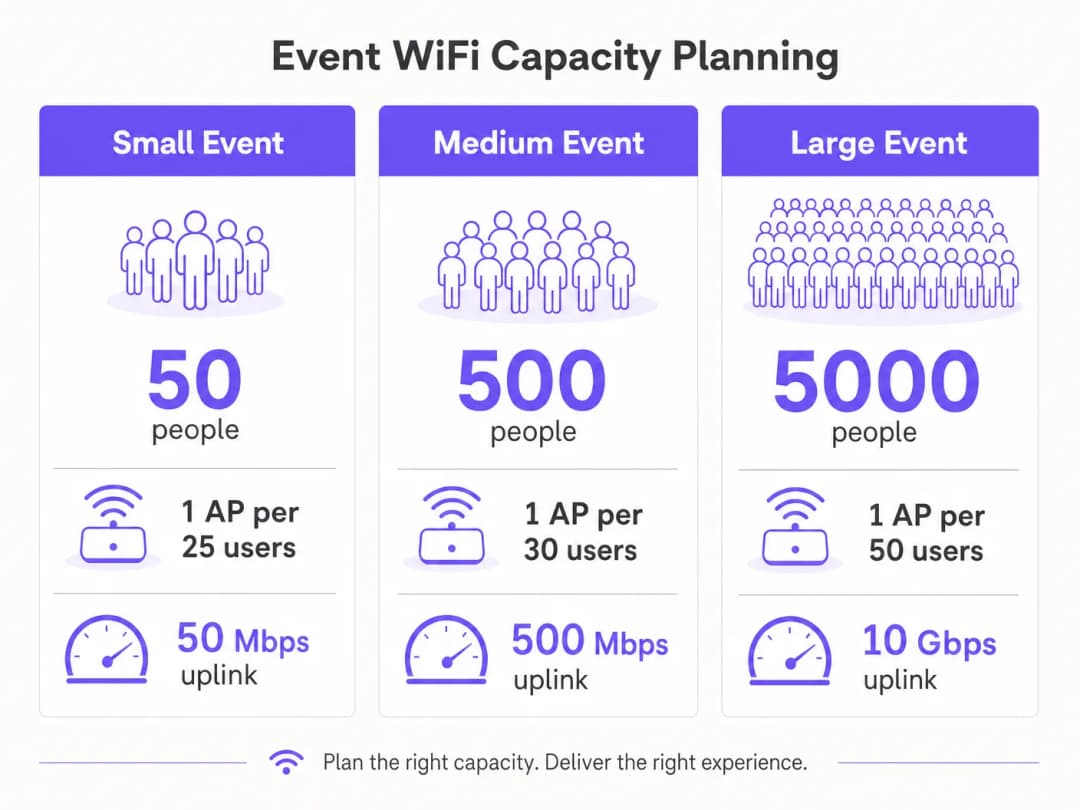
The industry baseline for high-density WiFi is one access point per 25–50 concurrent users, but this figure requires significant qualification. The ratio depends on the AP's radio capabilities, the expected mix of 2.4 GHz and 5 GHz clients, and whether the event involves heavy media consumption (live streaming, video calls) or lighter browsing and messaging traffic.

capacity_planning_infographic.png

For throughput planning, a conservative estimate of 1–2 Mbps per active user is appropriate for general conference or exhibition use. For events with live streaming or broadcast-quality video requirements — such as product launches or press events — budget 5–10 Mbps per active user on the production VLAN. Your uplink must be sized to accommodate the aggregate of all VLANs simultaneously, with at least 20% headroom.

Event Scale Attendees Recommended APs Minimum Uplink DHCP Scope
Small Up to 100 4–6 50 Mbps /24
Medium 100–500 15–25 200–500 Mbps /23
Large 500–2,000 50–100 1–2 Gbps /21
Enterprise 2,000+ 100+ 5–10 Gbps /20 or larger

Backhaul: The Non-Negotiable Foundation

No amount of well-designed wireless infrastructure compensates for an inadequate backhaul. For events above 200 attendees, a dedicated leased line is the only appropriate uplink solution. A leased line provides a synchronous, uncontended connection with a guaranteed SLA — typically 99.95% uptime — which is fundamentally different from the shared, asymmetric broadband that most venues have installed for their own operations.

Leased line provisioning typically requires a four-to-six-week lead time. This is the single most common planning failure in event WiFi deployments: teams that begin network design two weeks before an event and discover they cannot get a dedicated circuit in time. For events where a leased line is genuinely impractical — outdoor festivals, temporary structures — a bonded 4G/5G solution using multiple SIM cards across different carriers provides a viable alternative, though with lower guaranteed throughput and higher latency.

Network Architecture and VLAN Design

Strict network segmentation is both a performance and a compliance requirement. The recommended minimum architecture for any event deployment uses three VLANs:

event_wifi_deployment_diagram.png

VLAN 10 — Guest WiFi: All public-facing attendee traffic. This VLAN connects to the captive portal for authentication and data capture. Client isolation must be enabled to prevent lateral movement between devices. DNS filtering should be applied to block malicious domains — see Purple's guide on protecting your network with strong DNS and security for implementation detail.

VLAN 20 — Staff and Point of Sale: Operational traffic for event staff, ticketing systems, and card payment terminals. If card payments are processed on this VLAN, PCI DSS scope applies and the VLAN must be fully isolated from the guest network with no routing between them.

VLAN 30 — AV and Production: Dedicated to broadcast equipment, presentation systems, and production crew. This VLAN typically requires the highest guaranteed throughput and lowest latency, and should be provisioned with QoS policies that prioritise it over guest traffic.

For larger events, additional VLANs for exhibitors, press, and security systems are common. Each SSID should map to a single VLAN, and inter-VLAN routing should be disabled at the core switch unless explicitly required.

Radio Frequency Planning

In high-density environments, the default behaviour of most enterprise APs — automatic channel selection and maximum transmit power — is actively harmful. Co-channel interference between adjacent APs on the same channel degrades performance far more than a slight reduction in coverage area.

The correct approach is to manually assign channels and reduce transmit power. On the 5 GHz band, use the non-overlapping channels available across the UNII-1 (36, 40, 44, 48), UNII-2 (52–64), and UNII-3 (149–165) bands. Reduce AP transmit power to 8–12 dBm in dense deployments. This creates smaller, cleaner cells with less interference, which improves aggregate throughput across the venue.

Band steering should be enabled on all APs to push 5 GHz-capable clients — which is the vast majority of modern smartphones and laptops — away from the congested 2.4 GHz spectrum. Reserve 2.4 GHz for legacy IoT devices and accessibility equipment that cannot connect to 5 GHz.

For outdoor events, the RF environment is fundamentally different. Without walls and ceilings to contain signal, coverage cells are larger and interference from adjacent deployments or consumer hotspots is harder to control. Directional sector antennas are preferable to omnidirectional APs in outdoor settings, as they allow you to focus coverage on specific zones — the main stage area, the food court, the registration queue — rather than broadcasting indiscriminately. All outdoor hardware must carry at minimum an IP55 ingress protection rating; IP67 is preferable for festival or exposed environments.

Captive Portal Architecture and GDPR Compliance

The captive portal is the user's first interaction with your event network and your primary mechanism for both compliance and data capture. A poorly designed portal that times out, fails to redirect correctly on iOS, or presents an unclear consent workflow will generate a disproportionate volume of support requests and undermine attendee confidence in the network.

From a GDPR perspective, any collection of personal data — email addresses, social login tokens, or device identifiers — requires a lawful basis, a clear privacy notice, and explicit consent for any marketing use. The consent must be granular: consent to use the WiFi is not the same as consent to receive marketing communications. Purple's Guest WiFi platform handles this consent workflow natively, presenting compliant opt-in flows and storing consent records with timestamps and IP addresses as required by Article 7 of GDPR.

The technical architecture of the captive portal matters for performance. A cloud-hosted portal that redirects authentication requests to an external server introduces latency into the login flow. At peak load — when hundreds of users are authenticating simultaneously — this latency can cause timeouts and failed logins. Purple's platform is architected for exactly this use case, with auto-scaling infrastructure that handles burst authentication loads without degradation.


Implementation Guide

Phase 1: Site Survey and Capacity Modelling (8 Weeks Before Event)

Begin with a physical site survey. Walk every area where attendees will be present and document ceiling heights, wall materials, structural obstructions, and existing infrastructure (conduit runs, power outlets, data ports). Use a WiFi survey tool — Ekahau Site Survey or iBwave are the industry standards — to model predicted coverage and identify dead zones before hardware is ordered.

At the same time, confirm the venue's existing network infrastructure. Identify available data ports, the location of the main distribution frame, and the capacity of any existing switches. Determine whether the venue's existing cabling can support PoE+ (802.3at) for the APs you intend to deploy, or whether you need to bring your own PoE switches and cabling.

Finalise your capacity model based on the expected attendee count, the event programme (a keynote session creates a very different load profile to a networking reception), and the throughput requirements of any production systems.

Phase 2: Hardware Procurement and Backhaul Ordering (6–8 Weeks Before Event)

Order your leased line immediately after the site survey. The four-to-six-week provisioning window is the critical path for the entire deployment. If the event venue already has a leased line, negotiate dedicated bandwidth allocation with the venue's IT team — do not assume that existing infrastructure will be made available.

For hardware, the choice between purchasing and hiring depends on the frequency of your events. For organisations that deploy event WiFi more than four times per year, ownership of a portable kit — enterprise APs, a managed PoE switch, a rack-mount router, and cabling — is more cost-effective than repeated hire. For one-off events, specialist event WiFi hire companies provide pre-configured hardware with on-site support, which reduces deployment risk significantly.

When specifying APs for hire or purchase, prioritise WiFi 6 (802.11ax) hardware for any deployment above 200 users. The OFDMA and BSS Colouring features of WiFi 6 provide meaningful performance improvements in high-density environments compared to WiFi 5 (802.11ac).

Phase 3: Pre-Event Configuration and Testing (1–2 Weeks Before Event)

Configure all network equipment in a staging environment before arriving on site. This includes VLAN configuration on the core switch, SSID-to-VLAN mapping on the wireless controller, DHCP scope configuration, and captive portal integration. Testing in a staging environment is far more efficient than troubleshooting on the day of the event.

For captive portal configuration, integrate Purple's platform at this stage. Configure the branded splash page, the authentication method (email, social login, or SMS), the consent workflow, and any post-authentication redirect. Test the full user journey on multiple device types — iOS, Android, Windows, and macOS all handle captive portal detection differently, and each has specific requirements for the redirect mechanism to work correctly.

Conduct a load test using a WiFi client simulator to validate that the DHCP scope, the authentication backend, and the uplink can handle the expected peak load. Tools such as Spirent or Ixia can simulate hundreds of concurrent WiFi clients for this purpose.

Phase 4: On-Site Deployment (Day Before Event)

Arrive on site with sufficient time to complete installation and testing before the venue opens to attendees. Mount APs according to the site survey plan — ceiling mounting is preferred for omnidirectional coverage; wall mounting is acceptable where ceiling access is not available. Run and label all cabling, and document the physical location of every AP with a photograph and a floor plan annotation.

Once all hardware is installed, conduct a post-installation survey using a laptop or dedicated survey device to validate coverage. Walk the entire attendee area and confirm signal strength of -65 dBm or better throughout. Identify and address any coverage gaps before the event opens.

Test the end-to-end user journey: connect a test device to each SSID, complete the captive portal authentication, and verify that internet access is available. Test card payment terminals on the staff VLAN. Confirm that AV equipment on the production VLAN can reach all required destinations.

Phase 5: On-Site Management and Monitoring

During the event, monitor the network in real time using the wireless controller's management dashboard. Key metrics to watch are: AP association counts (flag any AP that exceeds 80% of its recommended client capacity), channel utilisation, DHCP pool utilisation, and uplink throughput. Purple's WiFi Analytics platform provides an additional layer of visibility into user behaviour — dwell time, peak connection periods, and portal conversion rates — which is valuable both for real-time management and for post-event reporting.

Have a clear escalation process for network issues. Designate a single point of contact for all network-related support requests from event staff, and ensure that the on-site network engineer has remote access to all equipment via an out-of-band management connection that is independent of the guest network.


Best Practices

The following recommendations represent vendor-neutral best practices derived from large-scale event deployments across hospitality , retail , and conference environments.

Disable SSID broadcasting for staff and production networks. There is no operational reason for these SSIDs to be visible to attendees. Hiding them reduces the attack surface and prevents accidental connections.

Set aggressive DHCP lease times on the guest VLAN. A lease time of 30–60 minutes ensures that IP addresses from disconnected devices are reclaimed promptly. This is particularly important at multi-day events where the attendee population changes significantly between sessions.

Implement 802.1X authentication on staff and production VLANs. WPA3-Enterprise with 802.1X provides per-user authentication and eliminates the risk of a shared pre-shared key being compromised. For guest networks, WPA3-Personal or an open network with a captive portal is the standard approach.

Use DNS-over-HTTPS or DNS filtering on the guest VLAN. Public event networks are a target for DNS hijacking and phishing attacks. Applying DNS filtering — either through your upstream provider or through a dedicated DNS security service — provides a meaningful layer of protection for attendees. Purple's platform integrates with DNS security providers to apply this filtering at the captive portal layer.

Document everything. Create a network diagram, a cabling schedule, and an AP placement map before you arrive on site. This documentation is invaluable for troubleshooting during the event and for planning future deployments at the same venue.

For airport and transport hub deployments, additional security considerations apply — Purple's guide on airport WiFi security covers the specific threat model and mitigation strategies relevant to high-footfall public environments.


Troubleshooting and Risk Mitigation

DHCP Pool Exhaustion

This is the most common failure mode in event WiFi. Symptoms include devices that connect to the WiFi but cannot obtain an IP address, or that receive an APIPA address (169.254.x.x). The fix is to increase the DHCP scope size and reduce the lease time. Prevention is straightforward: size your DHCP scope to at least twice the expected peak client count and set lease times to 30–60 minutes.

Authentication Server Overload

At peak load, a large number of simultaneous authentication requests can overwhelm an on-premises RADIUS server or captive portal backend. This manifests as slow or failed logins. Cloud-hosted platforms like Purple auto-scale to handle burst loads, which is a significant architectural advantage over on-premises deployments for event use cases.

Co-Channel Interference

If multiple APs are operating on the same channel in close proximity, performance degrades significantly. Symptoms include low throughput despite good signal strength, and high retry rates visible in the wireless controller. The fix is to review channel assignments and ensure that adjacent APs are on non-overlapping channels. Reducing transmit power also helps by shrinking the interference radius of each AP.

Captive Portal Redirect Failures

Different operating systems use different mechanisms to detect captive portals. iOS uses a dedicated CNA (Captive Network Assistant) that makes HTTP requests to specific Apple URLs. Android uses a similar mechanism with Google's connectivity check servers. If your captive portal does not respond correctly to these probes, the portal will not open automatically and users will need to manually navigate to the portal URL. Ensure your captive portal is configured to intercept and respond to these specific probe requests.

A single point of failure on the uplink is the highest-impact risk in an event deployment. Mitigate this by provisioning a 4G/5G backup connection that activates automatically if the primary leased line fails. Most enterprise routers support dual-WAN failover with sub-second switchover times. Test the failover mechanism during the pre-event setup, not during the event itself.


ROI and Business Impact

Event WiFi is increasingly recognised not just as a utility but as a data asset. Every attendee who connects to your event network and authenticates through a captive portal is providing first-party data — email address, demographic information, and behavioural data — that has significant commercial value for event organisers, venue operators, and sponsors.

Purple's WiFi Analytics platform quantifies this value directly. Post-event reports provide data on total unique connections, peak concurrent users, average session duration, portal conversion rates, and opt-in rates for marketing communications. For a 2,000-attendee conference with a 70% portal opt-in rate, that represents 1,400 new, consented marketing contacts captured in a single event — a cost per acquisition that is difficult to match through any other channel.

For venue operators in the hospitality sector, the analytics layer provides additional value through footfall analysis and dwell time mapping. Understanding which areas of a venue attract the most engagement — and for how long — informs layout decisions, F&B placement, and sponsor positioning for future events.

The ROI calculation for event WiFi investment should account for three categories of return: operational (reduced support costs from a well-designed network versus an ad-hoc one), commercial (first-party data capture and marketing opt-ins), and reputational (the brand value of a reliable, fast network that enhances the attendee experience). For large-scale events, the commercial return alone typically justifies the infrastructure investment within two or three events.

關鍵定義

存取點 (AP)

一種硬體設備,透過傳送和接收 WiFi 信號來建立無線區域網路(WLAN)。在活動部署中,使用企業級 AP 而非消費級設備,因為它們支援多個 SSID、VLAN 標記、集中管理以及更高的並發客戶端數量。

IT 團隊在估算部署規模時會接觸到 AP 規格。關鍵參數包括最大並發客戶數(企業 AP 通常為 100–200)、支援的 WiFi 標準(當前最佳實踐為 802.11ax/WiFi 6),以及防護等級(戶外使用需 IP55+)。

虛擬區域網路 (VLAN)

使用 IEEE 802.1Q 標記在實體網路基礎設施內建立的邏輯網路區段。VLAN 允許多個隔離的網路共用相同的實體交換器和佈線,VLAN 之間的流量由路由策略控制。

VLAN 是活動部署中網路區隔的主要機制。將訪客、員工和製播流量分隔到不同 VLAN 上既是性能最佳實踐,也是涉及信用卡支付時的 PCI DSS 合規要求。

Captive Portal

當使用者首次連接到 WiFi 網路時呈現的網頁,要求身份驗證或接受條款後才能授予網路存取權限。Captive Portal 是訪客 WiFi 訪問控制、GDPR 同意擷取和第一方數據收集的標準機制。

Captive Portal 是使用者與活動網路的首次互動。其在負載下的性能——特別是在高峰認證突發期間——直接影響與會者體驗。如 Purple 平台的雲端託管入口網站可自動擴展以處理突發負載。

動態主機配置協定 (DHCP)

一種網路協定,在設備連接到網路時自動為其分配 IP 位址。DHCP 伺服器維護可用位址池(範圍),並在定義的期間(租約時間)內將其分配給客戶端。

DHCP 池耗盡——所有可用 IP 位址都在使用中,新設備無法連線——是活動 WiFi 中最常見的故障模式。正確的範圍大小和租約時間配置是關鍵的規劃步驟。

租用線路

由電信業者提供的、兩點之間的專用、對稱、不競爭的數據連線,具有保證的服務等級協議(SLA)。與寬頻不同,租用線路提供相等的上傳和下載速度,且不與其他客戶共享。

租用線路是超過 200 名與會者之活動 WiFi 部署的推薦上行鏈路。與寬頻的關鍵區別在於 SLA 保證和連線的非競爭性。供應通常需要 4-6 週。

802.11ax (WiFi 6)

當前世代的 WiFi 標準,導入了 OFDMA(正交分頻多重存取)和 MU-MIMO(多用戶多輸入多輸出),以提升高密度環境中的性能。WiFi 6 允許 AP 在同一頻道上同時服務多個客戶端,而非循序進行。

WiFi 6 是針對超過 200 位用戶之活動部署的推薦標準。相較於 WiFi 5 (802.11ac),其高密度性能提升在活動 WiFi 所創造的環境中最為顯著:大量客戶端、高度爭用、混合設備類型。

GDPR (一般資料保護規範)

歐盟規範 (2016/679) 管轄個人資料的收集、處理和儲存。對於活動 WiFi,GDPR 要求具備資料收集的法律依據、明確的隱私權聲明、針對行銷用途的明確且細分同意,以及透過同意記錄證明合規性的能力。

任何收集個人資料的活動 WiFi 部署——電子郵件地址、社交登入令牌或設備識別碼——都必須遵守 GDPR。Captive Portal 是主要的合規執行點。WiFi 存取同意和行銷通訊同意必須是分開、細分的選擇加入。

PCI DSS (支付卡產業資料安全標準)

一套安全標準,規範處理、儲存或傳輸信用卡支付資料的組織必須如何保護該資料。PCI DSS 要求持卡人資料環境必須與任何面向公眾的系統進行網路隔離。

任何處理信用卡支付的活動——票務、餐飲、商品——必須確保支付系統位於完全隔離訪客 WiFi 網路的網路區段上。將支付終端放在與公共 WiFi 相同的 VLAN 上是 PCI DSS 合規失敗。

頻段引導 (Band Steering)

一種無線網路功能,透過延遲或拒絕支援 5 GHz 的客戶端在 2.4 GHz 上的關聯請求,主動鼓勵雙頻能力之客戶端設備連接到 5 GHz 頻段而非 2.4 GHz。

在高密度活動環境中,2.4 GHz 頻譜會迅速飽和。頻段引導是企業 AP 上的標準配置,透過將支援 5 GHz 的客戶端推向較不擁擠的 5 GHz 頻段,來減少 2.4 GHz 的壅塞。

服務品質 (QoS)

網路流量管理技術,將某些類型的流量優先於其他流量,確保高優先級應用即使在網路壅塞時也能獲得所需的頻寬和延遲。

在活動部署中,QoS 用於保證製播和媒體 VLAN 的頻寬,並限制訪客 VLAN 上每位用戶的吞吐量,以防止個別重度用戶降低所有與會者的體驗。

範例

一個可容納 3,000 人的會議中心正舉辦為期兩天的科技高峰會。活動包括一個 2,500 人的主題演講廳、12 間分別容納 50–150 人的分組討論室、一個設有 80 個參展商攤位的展覽區,以及一間容納 30 名記者、要求可靠高吞吐量連線的媒體室。場館全區佈有 Cat6 纜線,但僅有一條 200 Mbps 的共享寬頻連線。應如何設計網路?

第一優先事項是回程連線。200 Mbps 的共享寬頻連線完全不敷使用。應立即訂購一條至少 2 Gbps 的專用租用線路——這是關鍵路徑項目,有 4-6 週的前置期。應配置 4G/5G 綁定備援作為故障轉移。

就無線架構而言,主題演講廳需要最縝密的規劃。考量到 2,500 個潛在並發用戶,僅大廳就規劃 60-80 個 AP,以高密度部署,搭配降低的發射功率(8-10 dBm)和手動分配的頻道。在此規模下必須使用 WiFi 6 AP。

VLAN 設計:VLAN 10(訪客/與會者)、VLAN 20(員工/報到)、VLAN 30(參展商)、VLAN 40(媒體/製播)、VLAN 50(影音/轉播)。媒體 VLAN 應透過 QoS 保障頻寬分配——為每位記者預算 5 Mbps 以供視訊上傳之需。

對於參展商,在 VLAN 30 上提供一個獨立 SSID,使用 WPA2-PSK,並在報到時發放每個攤位的唯一密碼。這可防止參展商互相存取彼此的網路,同時維持配發流程的可管理性。

DHCP:訪客 VLAN 使用 /20 範圍(4,094 個可用位址),每個操作 VLAN 使用 /24。將訪客租約時間設為 30 分鐘。

Captive Portal:在與會者 VLAN 上部署 Purple 的 Guest WiFi 平台,採用電子郵件或社交登入認證、品牌化啟動頁面,以及對活動後行銷的明確 GDPR 同意。預估選擇加入率為 65-70%:約 1,600-1,750 個經同意的行銷聯繫人。

考官評語: 此情境說明了最常見的規劃失誤:低估了回程連線需求。200 Mbps 的共享連線在此規模下將是災難性的——即使無線基礎設施完美無瑕,上行鏈路也會成為瓶頸。VLAN 設計正確地將參展商與一般與會者分開,這對安全性(參展商經常運行敏感的展示設備)和性能(參展商通常對每個設備的吞吐量需求高於一般與會者)都很重要。具有保證 QoS 的媒體 VLAN 是一個經常被忽略但至關重要的細節——一位無法在產品發表會上傳視訊的記者,對活動主辦方而言是一項重大的聲譽風險。

一家大型連鎖零售店正在市中心廣場舉辦為期三天的戶外快閃活動。預估每日人流為 500-800 名訪客。活動包括一個產品展演區、一個支付亭和一個鼓勵訪客分享內容的社交媒體互動區。沒有任何固定基礎設施——無佈線、無電源、無現有網路。如何提供連線?

由於缺乏固定基礎設施,部署必須完全自給自足。網路堆疊包含:一個 5G 綁定路由器(使用來自兩家不同電信商的 SIM 卡以達韌性)提供上行鏈路;一個由發電機或便攜式 UPS 供電的管理型 PoE 交換器;以及安裝在臨時支架或活動結構上、具備 IP67 防護等級的戶外級 WiFi 6 AP。

戶外環境應使用定向扇形天線而非全向 AP,以將覆蓋範圍集中於活動區域,並將對周圍區域的干擾降至最低。將 AP 安裝在高處——4-6 公尺——以最大化覆蓋半徑,同時減少地面干擾。

VLAN 設計:VLAN 10(訪客 WiFi,附 Captive Portal)、VLAN 20(員工和支付亭——PCI DSS 範疇)、VLAN 30(社交媒體互動區——較高頻寬分配)。支付亭 VLAN 必須完全隔離訪客流量,並應盡可能使用有線連接到 PoE 交換器,而非 WiFi。

社交媒體互動區應配置 QoS,優先處理上傳流量(Instagram、TikTok 上傳以上傳為主),並確保上行鏈路有足夠餘裕。在 800 名並發訪客中,若有 10% 在任何時間點活躍上傳內容,為每位活躍上傳者預算 5 Mbps:80 位用戶 × 5 Mbps = 400 Mbps 上傳容量需求。

Captive Portal:部署 Purple 的平台,使用與活動連結的品牌化啟動頁面。收集電子郵件地址和社交帳號,並提供活動後續追蹤的選擇加入。社交媒體互動區可配置為自動將已認證的使用者重新導向至活動主題標籤頁面。

為應對天候,所有設備應放置在防風雨外殼中,防護等級至少 IP65。現場備有備用 AP 和備用 PoE 供電器以供快速更換。

考官評語: 戶外情境引入了室內部署所沒有的限制:無固定基礎設施、天候曝露和不可預測的 RF 環境。此處的關鍵架構決策是上行鏈路:跨兩家電信商的綁定 5G 提供了韌性,且沒有租用線路的前置期,這對臨時戶外設施而言不切實際。關於支付亭的 PCI DSS 要點至關重要——許多活動部署不經意地將信用卡支付系統放在與公共 WiFi 相同的網路區段上,這是一項嚴重的合規缺失。社交媒體互動區的 QoS 配置是一項實用細節,直接影響與會者體驗和互動的商業目標。

練習題

Q1. 你是一間會議中心的 IT 總監,該中心每年舉辦 20 場活動,規模從 50 人的董事會議到 1,500 人的年度大會不等。場館目前有一條 500 Mbps 的共享寬頻連線,以及前任 IT 團隊安裝的雜牌消費級 WiFi 路由器。與會者對 WiFi 品質的投訴日益增加。您的基礎設施升級路線圖為何?投資的商業案例是什麼?

提示:考量活動規模範圍以及每種活動的不同網路需求。思考單一基礎設施是否可服務所有活動類型,或是否需要分層處理方式。商業案例應同時闡明當前情況的成本(投訴、業務損失)和營收機會(資料擷取、優質 WiFi 作為服務項目)。

查看標準答案

升級路線圖包含三部分。首先,將共享寬頻替換為至少 1 Gbps 的專用租用線路——這是影響最大的單一變革,可解決大多數性能投訴的根本原因。第二,將消費級 WiFi 路由器替換為管理型企業無線基礎設施:無線控制器、根據適當現場勘查部署的企業級 AP,以及管理型 PoE 交換器。對於這個規模的場館,一個合理的起步點是 20-30 個 AP 覆蓋所有活動空間。第三,部署 Captive Portal 平台——Purple 的 Guest WiFi 解決方案——以提供品牌化認證、符合 GDPR 的資料擷取和分析報告。

商業案例包含兩部分。當前情況的成本包括:WiFi 不佳造成的聲譽損失(可透過與會者回饋分數量化)、因活動主辦方在場地要求中明確指定 WiFi 品質而可能損失的預訂,以及 IT 團隊花在回應投訴的時間。營收機會包括:來自每場活動的第一方數據擷取(每年 20 場活動,平均 500 名與會者,65% 選擇加入,即每年 6,500 個新行銷聯繫人)、向活動主辦方提供優質 WiFi 作為收費服務的能力,以及可為場館佈局和餐飲決策提供資訊的分析數據。

Q2. 一個有 8,000 名與會者的戶外音樂節聘請您的公司提供活動 WiFi 服務。場地是未開發的地點,無現有基礎設施——無電源、無佈線、無固定結構。活動為期三天。在此部署中,風險最高的五個項目是什麼,您如何緩解每一項?

提示:思考在無基礎設施的戶外環境中最可能失效的依賴項目。考量天氣、電源、連線、硬體故障和人為因素。針對每個風險,思考預防和應急措施。

查看標準答案

風險一——上行鏈路故障:由於缺乏固定基礎設施,無法採用租用線路。緩解方案是使用來自至少兩家不同電信商的 SIM 卡建置綁定 5G 解決方案,並具備自動故障轉移功能。預算 4-5 張 SIM 卡,選擇在該特定地點覆蓋最佳的電信商(在活動前透過現場勘察驗證)。風險二——電源故障:所有網路設備由發電機供電。緩解方案是在發電機和網路設備之間配置 UPS(不斷電系統),在發電機轉換或加油時提供 15-30 分鐘的運作時間。現場備有備用發電機。風險三——硬體故障:在戶外環境中,由於天氣、震動和物理損壞,硬體故障率較高。攜帶 20% 的備用硬體——備用 AP、備用 PoE 供電器、備用跳線。記錄每個設備的配置,以便能在 10 分鐘內完成替換。風險四——天候損害:所有戶外硬體必須具有 IP67 防護等級。所有佈線必須鋪設在戶外用管線或配線槽中。所有設備外殼必須密封並抬離地面,以防進水。風險五——DHCP 耗盡:在 8,000 名與會者下,標準 DHCP 範圍將失效。配置 /19 子網路(8,190 個可用位址),租約時間為 30 分鐘。即時監控 DHCP 池使用率,並規劃好當使用率超過 80% 時擴充範圍的方案。

Q3. 一個法律會議正在使用您的活動 WiFi 服務。活動主辦方希望透過 Captive Portal 收集與會者電子郵件地址,並用於活動後行銷。該活動有來自英國和歐盟的與會者。適用的 GDPR 合規要求有哪些,應如何配置 Captive Portal 以滿足這些要求?

提示:考量提供 WiFi 存取的法律依據與行銷通訊的法律依據之間的區別。思考必須向用戶呈現哪些資訊、必須保存哪些同意記錄,以及如何處理資料主體的權利。

查看標準答案

根據 GDPR(以及英國脫歐後的英國 GDPR),收集電子郵件地址並將其用於行銷需要明確、知情且自由給予的同意。Captive Portal 必須按以下方式配置。首先,啟動頁面必須包含明確的隱私權聲明,說明資料控制者(活動主辦方)、收集哪些資料、如何使用以及保留多長時間。其次,WiFi 存取同意和行銷通訊同意必須是分開的選擇加入——一個混淆兩者的複選框是不合規的。用戶必須能夠在不接受行銷的情況下存取 WiFi。第三,行銷選擇加入複選框預設必須為未勾選(無預先勾選)。第四,同意記錄——包括時間戳、IP 位址和所呈現的具體同意文字——必須被儲存且可擷取,如 GDPR 第 7 條第 1 款所規定。第五,隱私權聲明必須包含資料主體權利(存取、刪除、可攜)的資訊,並提供行使這些權利的聯繫機制。Purple 的 Guest WiFi 平台原生處理所有這些要求,儲存具備完整稽核軌跡的同意記錄,並提供立即可用的合規同意工作流程。對於英國/歐盟混合的受眾,同樣的 GDPR 標準適用於兩者——英國 GDPR 和歐盟 GDPR 在同意要求上實質相同。