
WiFi événementiel : Planification et déploiement de réseaux sans fil temporaires
Ce guide fournit aux responsables informatiques, aux architectes réseau et aux directeurs d'exploitation de sites une référence technique complète pour planifier et déployer des réseaux WiFi temporaires lors d'événements de toutes tailles. Il couvre la planification de la capacité, la sélection du matériel, l'architecture VLAN, l'intégration de Captive Portal, la conformité au GDPR et les analyses post-événement - avec des études de cas concrètes issues de l'hôtellerie et des environnements de conférences à grande échelle. Pour les producteurs d'événements et les entreprises audiovisuelles, il retrace l'intégralité du cycle de vie d'un projet WiFi événementiel, de l'étude de site initiale jusqu'au démontage et au reporting.
Video overview
Écouter ce guide
Voir la transcription du podcast
Fait partie de notre série principale : Guide du WiFi invité →
Résumé analytique
Le WiFi événementiel est une discipline d'ingénierie à part entière. Contrairement aux déploiements d'entreprise permanents, les réseaux sans fil temporaires doivent absorber une densité extrême d'utilisateurs dans des délais très courts, fonctionner sur une infrastructure empruntée ou louée et respecter les obligations de conformité - tout en offrant une expérience utilisateur fluide qui reflète directement l'image de marque de l'événement. Une panne de réseau lors d'une conférence de 3 000 personnes n'est pas un simple désagrément ; c'est un incident réputationnel et commercial.
Ce guide aborde l'ensemble du cycle de déploiement : modélisation de la capacité, location de matériel, provisionnement de la liaison de raccordement, architecture VLAN, conception de Captive Portal et gestion sur site. Il est rédigé à l'intention des professionnels de l'IT qui doivent prendre des décisions d'achat et d'architecture ce trimestre, et ne constitue pas un aperçu théorique des normes sans fil. Les points d'intégration spécifiques où la plateforme de Guest WiFi et de WiFi Analytics de Purple apporte de la valeur - notamment en ce qui concerne la gestion du Captive Portal, la capture de données conforme au GDPR et les rapports post-événement - sont explicitement mis en évidence.
Analyse technique approfondie
Pourquoi le WiFi événementiel est différent
Le défi fondamental du WiFi événementiel réside dans la combinaison de la densité et de la simultanéité. Dans un déploiement de bureau standard, vous pouvez avoir 100 appareils répartis sur 1 000 mètres carrés, avec des heures de connexion échelonnées tout au long de la journée de travail. Lors d'une conférence plénière, vous pouvez avoir 2 000 appareils tentant de s'associer dans une fenêtre de cinq minutes alors que les participants entrent dans une salle. L'environnement RF, l'infrastructure DHCP et le backend d'authentification doivent tous être conçus pour cette charge de pointe - et non pour la moyenne.
Trois variables dictent chaque décision d'architecture dans un déploiement événementiel : le nombre de clients, le débit requis par utilisateur et la durée de l'événement. Si vous vous trompez à l'étape de la planification, aucune quantité de dépannage sur site ne pourra redresser la situation.
Planification de la capacité : les chiffres qui comptent
La référence du secteur pour le WiFi haute densité est d'un point d'accès pour 25 à 50 utilisateurs simultanés, mais ce chiffre nécessite d'importantes nuances. Ce ratio dépend des capacités radio de l'AP, de la proportion attendue de clients 2,4 GHz et 5 GHz, et du fait que l'événement implique une forte consommation de médias (streaming en direct, appels vidéo) ou un trafic de navigation et de messagerie plus léger.
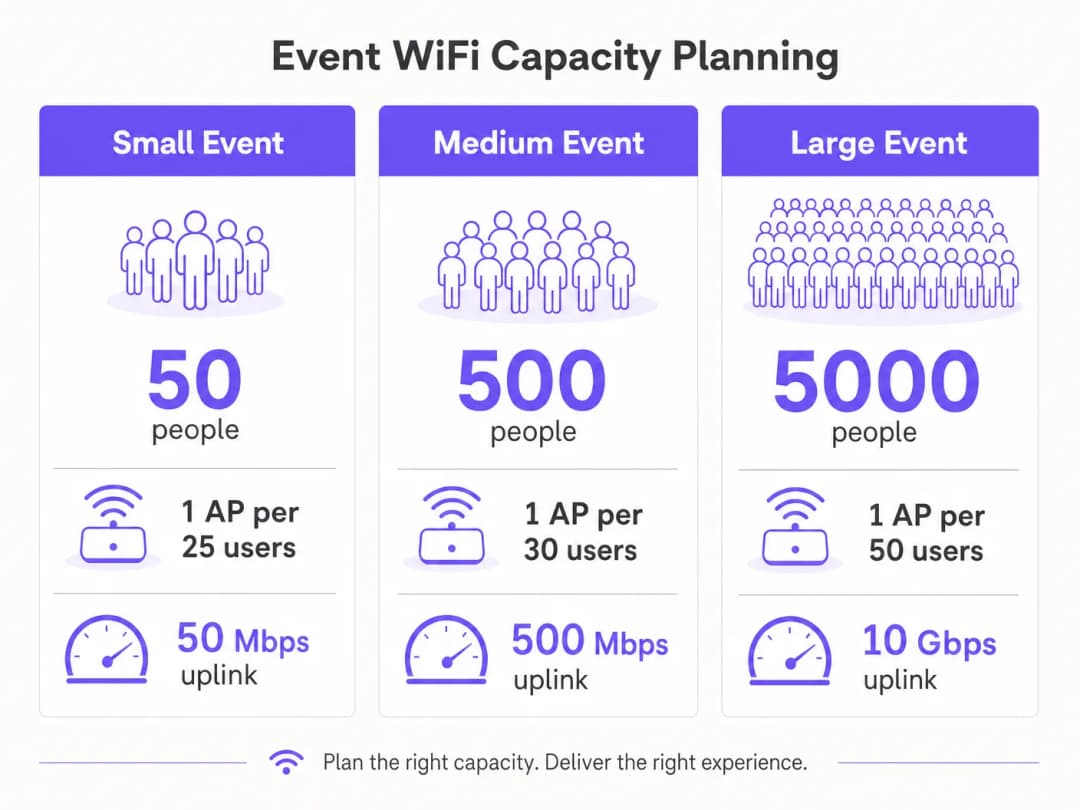
Pour la planification du débit, une estimation prudente de 1 à 2 Mbps par utilisateur actif convient pour une utilisation générale de conférence ou de salon. Pour les événements avec des exigences de streaming en direct ou de vidéo de qualité diffusion - comme les lancements de produits ou les événements de presse - prévoyez 5 à 10 Mbps par utilisateur actif sur le VLAN de production. Votre liaison montante doit être dimensionnée pour s'adapter à l'ensemble de tous les VLAN simultanément, avec une marge de sécurité d'au moins 20 %.
| Échelle de l'événement | Participants | APs recommandés | Liaison montante minimale | Plage DHCP |
|---|---|---|---|---|
| Petit | Jusqu'à 100 | 4–6 | 50 Mbps | /24 |
| Moyen | 100–500 | 15–25 | 200–500 Mbps | /23 |
| Grand | 500–2 000 | 50–100 | 1–2 Gbps | /21 |
| Entreprise | 2 000+ | 100+ | 5–10 Gbps | /20 ou plus |
Backhaul : la fondation non négociable
Aucune infrastructure sans fil, aussi bien conçue soit-elle, ne compense un backhaul inadéquat. Pour les événements de plus de 200 participants, une ligne louée dédiée est la seule solution de liaison montante appropriée. Une ligne louée fournit une connexion synchrone et non partagée avec un SLA garanti - généralement une disponibilité de 99,95 % - ce qui est fondamentalement différent du haut débit asymétrique et partagé que la plupart des sites ont installé pour leurs propres opérations.
La mise en service d'une ligne dédiée nécessite généralement un délai de quatre à six semaines. Il s'agit de la faille de planification la plus courante lors des déploiements de réseaux WiFi événementiels : des équipes qui commencent la conception du réseau deux semaines avant un événement et découvrent qu'elles ne peuvent pas obtenir un circuit dédié à temps. Pour les événements où une ligne dédiée est techniquement impossible - festivals en plein air, structures temporaires - une solution 4G/5G agrégée utilisant plusieurs cartes SIM sur différents opérateurs offre une alternative viable, bien qu'avec un débit garanti inférieur et une latence plus élevée.
Architecture réseau et conception des VLAN
Une segmentation stricte du réseau est une exigence à la fois de performance et de conformité. L'architecture minimale recommandée pour tout déploiement événementiel utilise trois VLAN :

VLAN 10 — Guest WiFi : Tout le trafic des participants orienté vers le public. Ce VLAN se connecte au Captive Portal pour l'authentification et la capture de données. L'isolation des clients doit être activée pour empêcher tout mouvement latéral entre les appareils. Le filtrage DNS doit être appliqué pour bloquer les domaines malveillants - consultez le guide de Purple sur la protection de votre réseau avec un DNS fort et la sécurité pour plus de détails sur la mise en œuvre.
VLAN 20 — Personnel et points de vente : Trafic opérationnel pour le personnel de l'événement, les systèmes de billetterie et les terminaux de paiement par carte. Si les paiements par carte sont traités sur ce VLAN, le périmètre PCI-DSS s'applique et le VLAN doit être entièrement isolé du réseau invités, sans aucun routage entre eux.
VLAN 30 — AV et Production : Dédié aux équipements de diffusion, aux systèmes de présentation et à l'équipe de production. Ce VLAN nécessite généralement le débit garanti le plus élevé et la latence la plus faible, et doit être configuré avec des règles de QoS qui le priorisent par rapport au trafic invités.
Pour les événements plus importants, des VLAN supplémentaires pour les exposants, la presse et les systèmes de sécurité sont courants. Chaque SSID doit être associé à un seul VLAN, et le routage inter-VLAN doit être désactivé sur le commutateur central, sauf s'il est explicitement requis.
Planification des fréquences radio
Dans les environnements à haute densité, le comportement par défaut de la plupart des AP d'entreprise - à savoir la sélection automatique des canaux et la puissance d'émission maximale - est réellement néfaste. Les interférences de co-canal entre des AP adjacents sur le même canal dégradent les performances bien plus qu'une légère réduction de la zone de couverture.
La bonne approche consiste à attribuer manuellement les canaux et à réduire la puissance d'émission. Sur la bande 5 GHz, utilisez les canaux sans chevauchement disponibles sur les bandes UNII-1 (36, 40, 44, 48), UNII-2 (52-64) et UNII-3 (149-165). Réduisez la puissance d'émission des AP à 8-12 dBm dans les déploiements denses. Cela crée des cellules plus petites et plus propres avec moins d'interférences, ce qui améliore le débit global sur l'ensemble du site.La répartition des bandes (band steering) doit être activée sur tous les AP afin de rediriger les clients compatibles 5 GHz - qui représentent la grande majorité des smartphones et ordinateurs portables modernes - loin du spectre encombré des 2.4 GHz. Réservez la bande 2.4 GHz pour les anciens appareils IoT et les équipements d'accessibilité qui ne peuvent pas se connecter au 5 GHz.
Pour les événements en extérieur, l'environnement RF est fondamentalement différent. En l'absence de murs et de plafonds pour contenir le signal, les cellules de couverture sont plus grandes et les interférences provenant de déploiements adjacents ou de points d'accès grand public sont plus difficiles à contrôler. Les antennes sectorielles directionnelles sont préférables aux AP omnidirectionnels dans les configurations extérieures, car elles vous permettent de concentrer la couverture sur des zones spécifiques - la scène principale, l'espace restauration, la file d'attente d'inscription - plutôt que de diffuser de manière indifférenciée. Tout le matériel extérieur doit posséder au minimum un indice de protection IP55 ; l'indice IP67 est préférable pour les festivals ou les environnements exposés.
Architecture du Captive Portal et conformité GDPR
Le Captive Portal est la première interaction de l'utilisateur avec le réseau de votre événement et votre principal mécanisme de conformité et de capture de données. Un portail mal conçu qui expire, ne parvient pas à rediriger correctement sur iOS ou présente un parcours de consentement flou générera un volume disproportionné de demandes d'assistance et sapera la confiance des participants envers le réseau.
Du point de vue du GDPR, toute collecte de données personnelles - adresses e-mail, jetons de connexion sociale ou identifiants d'appareils - nécessite une base légale, une note d'information claire sur la confidentialité et un consentement explicite pour toute utilisation marketing. Le consentement doit être granulaire : le consentement pour utiliser le WiFi n'est pas le même que le consentement pour recevoir des communications marketing. La plateforme Guest WiFi de Purple gère ce processus de consentement de manière native, en présentant des parcours d'opt-in conformes et en enregistrant les preuves de consentement avec horodatage et adresses IP, comme l'exige l'article 7 du GDPR.
L'architecture technique du Captive Portal est essentielle pour les performances. Un portail hébergé dans le cloud qui redirige les requêtes d'authentification vers un serveur externe introduit de la latence dans le flux de connexion. En période de charge maximale - lorsque des centaines d'utilisateurs s'authentifient simultanément - cette latence peut provoquer des expirations de session et des échecs de connexion. La plateforme de Purple est conçue précisément pour ce cas d'usage, avec une infrastructure à mise à l'échelle automatique qui gère les pics de charge d'authentification sans dégradation.
Vous avez des questions sur votre configuration spécifique ?
Notre équipe collabore avec des exploitants de sites, des responsables informatiques et des ingénieurs réseau au sein de 80 000 sites. Réservez un appel de 20 minutes et nous vous montrerons comment d'autres professionnels comme vous ont résolu ce problème.
Guide de mise en œuvre
Étape 1 : Audit de site et modélisation de la capacité (8 semaines avant l'événement)
Commencez par un audit physique du site. Parcourez chaque zone où les participants seront présents et documentez la hauteur des plafonds, les matériaux des murs, les obstacles structurels et l'infrastructure existante (passages de câbles, prises électriques, ports de données). Utilisez un outil d'audit WiFi - Ekahau Site Survey ou iBwave sont les normes du secteur - pour modéliser la couverture prévue et identifier les zones mortes avant de commander le matériel.Dans le même temps, confirmez l'infrastructure réseau existante du site. Identifiez les ports de données disponibles, l'emplacement du répartiteur général et la capacité des commutateurs existants. Déterminez si le câblage existant du site peut prendre en charge le PoE+ (802.3at) pour les AP que vous prévoyez de déployer, ou si vous devez apporter vos propres commutateurs PoE et câblages.
Finalisez votre modèle de capacité en fonction du nombre de participants attendus, du programme de l'événement (une session plénière crée un profil de charge très différent d'un cocktail de réseautage) et des exigences de débit de tous les systèmes de production.
Phase 2 : Approvisionnement en matériel et commande de backhaul (6 à 8 semaines avant l'événement)
Commandez votre ligne louée immédiatement après l'étude de site. Le délai de provisionnement de quatre à six semaines est le chemin critique pour l'ensemble du déploiement. Si le lieu de l'événement dispose déjà d'une ligne louée, négociez une allocation de bande passante dédiée avec l'équipe informatique du site - ne supposez pas que l'infrastructure existante sera mise à disposition.
Pour le matériel, le choix entre l'achat et la location dépend de la fréquence de vos événements. Pour les organisations qui déploient du WiFi événementiel plus de quatre fois par an, l'acquisition d'un kit portable - AP d'entreprise, commutateur PoE administrable, routeur monté en rack et câblage - est plus rentable que la location répétée. Pour les événements ponctuels, les entreprises spécialisées dans la location de WiFi événementiel fournissent du matériel préconfiguré avec une assistance sur site, ce qui réduit considérablement les risques de déploiement.
Lors de la spécification des AP à louer ou à acheter, donnez la priorité au matériel WiFi 6 (802.11ax) pour tout déploiement supérieur à 200 utilisateurs. Les fonctionnalités OFDMA et BSS Colouring du WiFi 6 offrent des améliorations de performances significatives dans les environnements à haute densité par rapport au WiFi 5 (802.11ac).
Phase 3 : Configuration et tests pré-événement (1 à 2 semaines avant l'événement)
Configurez tous les équipements réseau dans un environnement de staging avant d'arriver sur site. Cela comprend la configuration des VLAN sur le commutateur central, le mappage SSID vers VLAN sur le contrôleur sans fil, la configuration de la plage DHCP et l'intégration du Captive Portal. Tester dans un environnement de staging est bien plus efficace que de résoudre les problèmes le jour de l'événement.
Pour la configuration du Captive Portal, intégrez la plateforme de Purple à ce stade. Configurez le portail d'accès personnalisé, la méthode d'authentification (e-mail, connexion sociale ou SMS), le processus de consentement et toute redirection post-authentification. Testez l'intégralité du parcours utilisateur sur plusieurs types d'appareils - iOS, Android, Windows et macOS gèrent tous la détection du Captive Portal différemment, et chacun a des exigences spécifiques pour que le mécanisme de redirection fonctionne correctement.
Réalisez un test de charge à l'aide d'un simulateur de client WiFi pour valider que la plage DHCP, le backend d'authentification et la liaison montante peuvent gérer la charge maximale attendue. Des outils tels que Spirent ou Ixia peuvent simuler des centaines de clients WiFi simultanés à cette fin.
Phase 4 : Déploiement sur site (veille de l'événement)
Arrivez sur site avec suffisamment de temps pour terminer l'installation et les tests avant l'ouverture du site aux participants. Montez les AP conformément au plan de l'étude sur site - le montage au plafond est préférable pour une couverture omnidirectionnelle ; le montage mural est acceptable là où l'accès au plafond n'est pas possible. Posez et étiquetez tous les câblages, et documentez l'emplacement physique de chaque AP avec une photographie et une annotation sur le plan de masse.
Une fois tout le matériel installé, effectuez une étude post-installation à l'aide d'un ordinateur portable ou d'un appareil d'étude dédié pour valider la couverture. Parcourez l'ensemble de la zone des participants et confirmez une force de signal de -65 dBm ou supérieure partout. Identifiez et résolvez toutes les zones d'ombre avant l'ouverture de l'événement.
Testez le parcours utilisateur de bout en bout : connectez un appareil de test à chaque SSID, effectuez l'authentification sur le Captive Portal et vérifiez que l'accès à internet est disponible. Testez les terminaux de paiement par carte sur le VLAN du personnel. Confirmez que l'équipement audiovisuel sur le VLAN de production peut atteindre toutes les destinations requises.
Phase 5 : Gestion et surveillance sur site
Pendant l'événement, surveillez le réseau en temps réel à l'aide du tableau de bord de gestion du contrôleur sans fil. Les indicateurs clés à surveiller sont : le nombre d'associations d'AP (signalez tout AP qui dépasse 80 % de sa capacité client recommandée), l'utilisation des canaux, l'utilisation du pool DHCP et le débit de la liaison montante. La plateforme de WiFi Analytics de Purple offre une visibilité supplémentaire sur le comportement des utilisateurs - temps de séjour, périodes de pointe de connexion et taux de conversion du portail - ce qui est précieux tant pour la gestion en temps réel que pour les rapports post-événement.
Disposez d'un processus d'escalade clair pour les problèmes de réseau. Désignez un point de contact unique pour toutes les demandes d'assistance réseau du personnel de l'événement, et assurez-vous que l'ingénieur réseau sur site dispose d'un accès à distance à tous les équipements via une connexion de gestion hors bande indépendante du réseau invité.
Bonnes pratiques
Les recommandations suivantes représentent les meilleures pratiques indépendantes des fournisseurs, issues de déploiements d'événements à grande échelle dans les secteurs de l'hôtellerie, de la vente au détail et des conférences.
Désactivez la diffusion du SSID pour les réseaux du personnel et de production. Il n'y a aucune raison opérationnelle pour que ces SSID soient visibles par les participants. Les masquer réduit la surface d'attaque et empêche les connexions accidentelles.
Définissez des durées de bail DHCP courtes sur le VLAN invité. Une durée de bail de 30 à 60 minutes garantit que les adresses IP des appareils déconnectés sont rapidement récupérées. Ceci est particulièrement important lors d'événements de plusieurs jours où la population de participants change de manière significative entre les sessions.
Implémentez l'authentification 802.1X sur les VLAN du personnel et de production. WPA3-Enterprise avec 802.1X fournit une authentification par utilisateur et élimine le risque de compromission d'une clé prépartagée. Pour les réseaux invités, WPA3-Personal ou un réseau ouvert avec un Captive Portal est l'approche standard.Utilisez DNS-over-HTTPS ou le filtrage DNS sur le VLAN invité. Les réseaux d'événements publics sont une cible pour le détournement de DNS et les attaques de phishing. L'application d'un filtrage DNS - que ce soit par le biais de votre fournisseur en amont ou d'un service de sécurité DNS dédié - offre une couche de protection significative pour les participants. La plateforme de Purple s'intègre aux fournisseurs de sécurité DNS pour appliquer ce filtrage au niveau de la couche du Captive Portal.
Documentez tout. Créez un schéma réseau, un plan de câblage et une carte d'emplacement des AP avant d'arriver sur site. Cette documentation est précieuse pour le dépannage pendant l'événement et pour la planification des futurs déploiements dans le même lieu.
Pour les déploiements dans les aéroports et les hubs de transport, des considérations de sécurité supplémentaires s'appliquent - le guide de Purple sur la sécurité du WiFi dans les aéroports couvre le modèle de menace spécifique et les stratégies d'atténuation adaptées aux environnements publics à fort trafic.
Dépannage et atténuation des risques
Épuisement de la plage DHCP
C'est le mode de défaillance le plus courant dans le WiFi d'événement. Les symptômes incluent des appareils qui se connectent au WiFi mais ne peuvent pas obtenir d'adresse IP, ou qui reçoivent une adresse APIPA (169.254.x.x). La solution consiste à augmenter la taille de la plage DHCP et à réduire la durée du bail. La prévention est simple : dimensionnez votre plage DHCP pour qu'elle soit au moins deux fois supérieure au nombre maximal de clients attendu et définissez des durées de bail de 30 à 60 minutes.
Surcharge du serveur d'authentification
En période de pointe, un grand nombre de requêtes d'authentification simultanées peut submerger un serveur RADIUS sur site ou le backend d'un Captive Portal. Cela se manifeste par des connexions lentes ou échouées. Les plateformes hébergées dans le cloud comme Purple s'adaptent automatiquement pour gérer les pics de charge, ce qui constitue un avantage architectural majeur par rapport aux déploiements sur site pour les événements.
Interférence co-canal
Si plusieurs AP fonctionnent sur le même canal à proximité immédiate, les performances se dégradent considérablement. Les symptômes incluent un débit faible malgré une bonne force de signal, et des taux de réessai élevés visibles dans le contrôleur sans fil. La solution consiste à revoir l'attribution des canaux et à s'assurer que les AP adjacents se trouvent sur des canaux non chevauchants. La réduction de la puissance de transmission aide également en réduisant le rayon d'interférence de chaque AP.
Échecs de redirection du Captive Portal
Différents systèmes d'exploitation utilisent différents mécanismes pour détecter les portails captifs. iOS utilise un assistant réseau captif (CNA) dédié qui effectue des requêtes HTTP vers des URL Apple spécifiques. Android utilise un mécanisme similaire avec les serveurs de vérification de connectivité de Google. Si votre Captive Portal ne répond pas correctement à ces requêtes, le portail ne s'ouvrira pas automatiquement et les utilisateurs devront naviguer manuellement vers l'URL du portail. Assurez-vous que votre Captive Portal est configuré pour intercepter ces requêtes spécifiques et y répondre.
Panne de liaison montante
Un point de défaillance unique sur la liaison montante est le risque ayant le plus d'impact dans le déploiement d'un événement. Atténuez ce risque en prévoyant une connexion de secours 4G/5G qui s'active automatiquement en cas de défaillance de la ligne louée principale. La plupart des routeurs d'entreprise prennent en charge le basculement double WAN avec des temps de commutation inférieurs à la seconde. Testez le mécanisme de basculement lors de la configuration préalable, et non pendant l'événement lui-même.
-
ROI et impact commercial
Le WiFi événementiel est de plus en plus reconnu non seulement comme un service utilitaire, mais comme un actif de données. Chaque participant qui se connecte au réseau de votre événement et s'authentifie via un Captive Portal fournit des données de première main - adresse e-mail, informations démographiques et données comportementales - qui possèdent une valeur commerciale significative pour les organisateurs d'événements, les exploitants de sites et les sponsors.
La plateforme de WiFi Analytics de Purple quantifie directement cette valeur. Les rapports post-événement fournissent des données sur le nombre total de connexions uniques, les pics d'utilisateurs simultanés, la durée moyenne des sessions, les taux de conversion du portail et les taux d'inscription aux communications marketing. Pour une conférence de 2 000 participants avec un taux d'inscription au portail de 70 %, cela représente 1 400 nouveaux contacts marketing consentis capturés en un seul événement - un coût par acquisition difficile à égaler par tout autre canal.
Pour les exploitants de sites dans le secteur de l'hospitality, la couche d'analyse apporte une valeur supplémentaire grâce à l'analyse de la fréquentation et à la cartographie du temps de visite. Comprendre quelles zones d'un établissement attirent le plus d'engagement - et pendant combien de temps - permet de guider les décisions d'aménagement, le placement de la restauration et le positionnement des sponsors pour les événements futurs.
Le calcul du ROI pour l'investissement dans le WiFi événementiel doit prendre en compte trois catégories de rendement : opérationnel (réduction des coûts d'assistance grâce à un réseau bien conçu par rapport à un réseau ad hoc), commercial (capture de données de première main et inscriptions marketing) et réputationnel (la valeur de marque d'un réseau fiable et rapide qui améliore l'expérience des participants). Pour les événements de grande envergure, le seul rendement commercial justifie généralement l'investissement dans l'infrastructure en l'espace de deux ou trois événements.
Définitions clés
Access Point (AP)
Un équipement matériel qui crée un réseau local sans fil (WLAN) en transmettant et en recevant des signaux WiFi. Dans les déploiements événementiels, des AP de classe entreprise sont utilisés plutôt que des appareils grand public, car ils prennent en charge plusieurs SSIDs, le marquage VLAN, la gestion centralisée et un nombre plus élevé de clients simultanés.
Les équipes informatiques analysent les spécifications des AP lors du dimensionnement d'un déploiement. Les paramètres clés sont le nombre maximum de clients simultanés (généralement 100 à 200 pour les AP d'entreprise), la norme WiFi prise en charge (802.11ax/WiFi 6 est la bonne pratique actuelle) et l'indice de protection contre l'infiltration (IP55+ pour un usage extérieur).
VLAN (Virtual Local Area Network)
Un segment de réseau logique créé au sein d'une infrastructure réseau physique à l'aide du marquage IEEE 802.1Q. Les VLANs permettent à plusieurs réseaux isolés de partager les mêmes commutateurs physiques et câblages, le trafic entre les VLANs étant contrôlé par des politiques de routage.
Les VLANs sont le mécanisme principal de segmentation réseau dans les déploiements événementiels. Séparer le trafic des invités, du personnel et de la production sur des VLANs différents est à la fois une bonne pratique de performance et une exigence de conformité PCI-DSS lorsque des paiements par carte sont effectués.
Captive Portal
Une page web présentée aux utilisateurs lorsqu'ils se connectent pour la première fois à un réseau WiFi, nécessitant une authentification ou l'acceptation de conditions avant de pouvoir accéder à Internet. Les portails captifs constituent le mécanisme standard pour le contrôle d'accès au WiFi invité, la collecte de consentement GDPR et la collecte de données de première partie.
Le Captive Portal est la première interaction de l'utilisateur avec le réseau de l'événement. Ses performances en charge - en particulier lors des pics d'authentification - affectent directement l'expérience des participants. Les portails hébergés dans le cloud comme la plateforme de Purple évoluent automatiquement pour gérer les pics de charge.
DHCP (Dynamic Host Configuration Protocol)
Un protocole réseau qui attribue automatiquement des adresses IP aux appareils lorsqu'ils se connectent à un réseau. Le serveur DHCP maintient un pool d'adresses disponibles (la plage d'adresses) et les attribue aux clients pour une période définie (la durée du bail).
L'épuisement du pool DHCP - lorsque toutes les adresses IP disponibles sont utilisées et que les nouveaux appareils ne peuvent plus se connecter - est le mode de défaillance le plus courant pour le WiFi événementiel. Un dimensionnement correct de la plage et une configuration adaptée de la durée du bail sont des étapes de planification critiques.
Ligne dédiée
Une connexion de données dédiée, synchrone et non partagée entre deux points, fournie par un opérateur de télécommunications avec un accord de niveau de service (SLA) garanti. Contrairement au haut débit, une ligne dédiée offre des vitesses de téléchargement ascendantes et descendantes égales et n'est pas partagée avec d'autres clients.
Une ligne dédiée est la liaison montante recommandée pour les déploiements de WiFi événementiel de plus de 200 participants. Le principal élément de différenciation par rapport au haut débit réside dans la garantie SLA et la nature non partagée de la connexion. L'approvisionnement prend généralement de 4 à 6 semaines.
802.11ax (WiFi 6)
La génération actuelle de la norme WiFi, introduisant l'OFDMA (Orthogonal Frequency Division Multiple Access) et le MU-MIMO (Multi-User Multiple Input Multiple Output) pour améliorer les performances dans les environnements à haute densité. Le WiFi 6 permet à un AP de desservir plusieurs clients simultanément sur le même canal, plutôt que de manière séquentielle.
Le WiFi 6 est la norme recommandée pour les déploiements événementiels de plus de 200 utilisateurs. Ses améliorations de performances en haute densité par rapport au WiFi 5 (802.11ac) sont particulièrement prononcées dans le type d'environnement typique du WiFi événementiel : clients nombreux, forte congestion et types d'appareils mixtes.
GDPR (General Data Protection Regulation)
Règlement de l'UE (2016/679) régissant la collecte, le traitement et le stockage des données personnelles. Pour le WiFi événementiel, le GDPR exige une base légale pour la collecte de données, une notice de confidentialité claire, un consentement explicite et granulaire pour l'utilisation marketing, et la capacité de démontrer la conformité via des registres de consentement.
Tout déploiement de WiFi événementiel qui collecte des données personnelles - adresses e-mail, jetons de connexion sociale ou identifiants d'appareil - doit être conforme au GDPR. Le Captive Portal est le principal point d'application de la conformité. Le consentement pour l'accès au WiFi et le consentement pour les communications marketing doivent faire l'objet d'opt-ins distincts et granulaires.
PCI DSS (Payment Card Industry Data Security Standard)
Un ensemble de normes de sécurité imposant la manière dont les organisations qui traitent, stockent ou transmettent des données de cartes de paiement doivent protéger ces données. Le PCI DSS exige que les environnements de données des titulaires de cartes soient segmentés en réseau de tout système ouvert au public.
Tout événement qui traite des paiements par carte - billetterie, restauration, vente de produits - doit s'assurer que les systèmes de paiement se trouvent sur un segment réseau totalement isolé du réseau WiFi invité. Placer des terminaux de paiement sur le même VLAN que le WiFi public constitue un manquement à la conformité PCI DSS.
Band Steering
Une fonctionnalité de réseau sans fil qui encourage activement les appareils clients compatibles double bande à se connecter à la bande 5 GHz plutôt qu'à la bande 2,4 GHz, en retardant ou en refusant les demandes d'association sur 2,4 GHz provenant de clients capables d'utiliser la bande 5 GHz.
Dans les environnements événementiels à haute densité, le spectre de 2,4 GHz devient rapidement saturé. Le band steering est une configuration standard sur les AP d'entreprise qui réduit la congestion sur 2,4 GHz en orientant les clients compatibles vers la bande moins encombrée de 5 GHz.
QoS (Qualité de Service)
Techniques de gestion du trafic réseau qui hiérarchisent certains types de trafic par rapport à d'autres, garantissant que les applications hautement prioritaires bénéficient de la bande passante et de la latence dont elles ont besoin, même lorsque le réseau est encombré.
La QoS est utilisée dans les déploiements d'événements pour garantir la bande passante des VLAN de production et de presse, et pour limiter le débit par utilisateur sur le VLAN invité afin d'éviter que des utilisateurs gourmands en bande passante ne dégradent l'expérience de l'ensemble des participants.
Exemples concrets
Un centre de conférence de 3 000 places accueille un sommet technologique de deux jours. L'événement comprend une salle plénière de 2 500 personnes, 12 salles de sous-commission de 50 à 150 personnes chacune, un espace d'exposition avec 80 stands d'exposants et une salle de presse avec 30 journalistes nécessitant une connectivité haut débit fiable. Le site dispose d'un câblage Cat6 existant partout, mais de seulement 200 Mbps de connexion haut débit partagée. Comment concevoir le réseau ?
La première priorité est la liaison de raccordement. Une connexion haut débit partagée de 200 Mbps est totalement insuffisante pour cet événement. Une ligne louée dédiée d'au moins 2 Gbps doit être commandée immédiatement - il s'agit de l'élément critique avec un délai de livraison de 4 à 6 semaines. Un backup agrégé 4G/5G doit être provisionné comme solution de secours.
Pour l'architecture sans fil, la salle plénière requiert la planification la plus minutieuse. Avec 2 500 utilisateurs simultanés potentiels, prévoyez 60 à 80 APs dans la seule salle plénière, déployés à haute densité avec une puissance de transmission réduite (8 - 10 dBm) et des canaux attribués manuellement. Des APs WiFi 6 sont essentiels à cette échelle.
Conception VLAN : VLAN 10 (Invités/Participants), VLAN 20 (Personnel/Enregistrement), VLAN 30 (Exposants), VLAN 40 (Presse/Production), VLAN 50 (Audiovisuel/Diffusion). Le VLAN de la presse doit disposer d'une allocation de bande passante garantie via QoS - prévoyez 5 Mbps par journaliste pour la capacité d'envoi de vidéos.
Pour les exposants, provisionnez un SSID distinct sur le VLAN 30 avec WPA2-PSK et un mot de passe unique par stand distribué lors de l'enregistrement. Cela évite que les exposants n'accèdent aux réseaux des autres tout en maintenant un processus de provisionnement gérable.
DHCP : Utilisez une plage /20 pour le VLAN invité (4 094 adresses utilisables), et /24 pour chaque VLAN opérationnel. Définissez la durée du bail invité à 30 minutes.
Captive Portal : Déployez la plateforme Guest WiFi de Purple sur le VLAN des participants avec authentification par e-mail ou connexion via les réseaux sociaux, une page de connexion personnalisée et un consentement GDPR explicite pour le marketing post-événement. Taux d'acceptation estimé à 65 - 70 % : environ 1 600 à 1 750 contacts marketing consentis.
Une grande chaîne de vente au détail organise un événement éphémère en plein air de trois jours sur la place d'un centre-ville. La fréquentation attendue est de 500 à 800 visiteurs par jour. L'événement comprend une zone de démonstration de produits, un kiosque de paiement et une zone d'activation sur les réseaux sociaux où les visiteurs sont encouragés à partager du contenu. Il n'y a pas d'infrastructure fixe - pas de câblage, pas d'électricité, pas de réseau existant. Comment provisionnez-vous la connectivité ?
Sans infrastructure fixe, le déploiement doit être entièrement autonome. L'architecture réseau comprend : un routeur 5G agrégé (utilisant des cartes SIM de deux opérateurs différents pour la résilience) fournissant la liaison montante ; un commutateur PoE géré alimenté par un générateur ou un onduleur portable ; et des AP WiFi 6 conçus pour l'extérieur avec protection IP67 montés sur des structures temporaires ou événementielles.
Pour un environnement extérieur, utilisez des antennes sectorielles directionnelles plutôt que des AP omnidirectionnels afin de concentrer la couverture sur la zone de l'événement et de minimiser les interférences avec la zone environnante. Positionnez les AP en hauteur - 4 à 6 mètres - pour maximiser le rayon de couverture tout en réduisant les interférences au niveau du sol.
Configuration des VLAN : VLAN 10 (WiFi visiteurs avec Captive Portal), VLAN 20 (personnel et terminaux de paiement - périmètre PCI-DSS), VLAN 30 (zone d'activation réseaux sociaux - allocation de bande passante supérieure). Le VLAN des terminaux de paiement doit être totalement isolé du trafic des visiteurs et doit utiliser une connexion filaire vers le commutateur PoE plutôt que le WiFi dans la mesure du possible.
Pour la zone d'activation réseaux sociaux, configurez la QoS pour donner la priorité au trafic montant (les publications Instagram et TikTok consommant beaucoup de bande passante montante) et assurez-vous que la liaison montante dispose d'une marge suffisante. Avec 800 visiteurs simultanés dont 10 % publient activement du contenu à un instant donné, prévoyez 5 Mbps par utilisateur actif : 80 utilisateurs × 5 Mbps = 400 Mbps de bande passante montante requise.
Captive Portal : Déployez la plateforme de Purple avec une page de connexion personnalisée liée à la campagne. Collectez les adresses e-mail et les identifiants de réseaux sociaux, avec consentement pour le suivi post-événement. La zone d'activation réseaux sociaux peut être configurée pour rediriger automatiquement les utilisateurs authentifiés vers la page du hashtag de la campagne.
Pour la résistance aux intempéries, tous les équipements doivent être placés dans des boîtiers étanches classés IP65 ou supérieur. Prévoyez un AP et un injecteur PoE de rechange sur site pour un remplacement rapide.
Questions d'entraînement
Q1. Vous êtes le directeur informatique d'un centre de conférences qui accueille 20 événements par an, allant de réunions de conseil d'administration de 50 personnes à des conférences annuelles de 1 500 personnes. Le site dispose actuellement d'une connexion haut débit partagée de 500 Mbps et d'un ensemble de routeurs WiFi grand public installés par l'ancienne équipe informatique. Les plaintes des participants concernant la qualité du WiFi augmentent. Quelle est votre feuille de route pour la mise à niveau de l'infrastructure, et quelle est l'analyse de rentabilité de cet investissement ?
Conseil : Prenez en compte la diversité de taille des événements et les différentes exigences réseau pour chacun d'eux. Demandez-vous si une infrastructure unique peut desservir tous les types d'événements ou si une approche progressive est nécessaire. L'analyse de rentabilité doit aborder à la fois le coût de la situation actuelle (plaintes, perte d'activité) et les opportunités de revenus (collecte de données, offre de WiFi premium en tant que service).
Voir la réponse type
La feuille de route de mise à niveau comprend trois volets. Premièrement, remplacer le haut débit partagé par une ligne louée dédiée d'au moins 1 Gbps - c'est le changement qui a le plus d'impact et qui résout la cause profonde de la plupart des plaintes relatives aux performances. Deuxièmement, remplacer les routeurs WiFi grand public par une infrastructure sans fil d'entreprise gérée : un contrôleur sans fil, des points d'accès de classe entreprise déployés conformément à une étude de site rigoureuse, et un commutateur PoE géré. Pour un site de cette taille, 20 à 30 points d'accès couvrant tous les espaces événementiels constituent un point de départ raisonnable. Troisièmement, déployer une plateforme de Captive Portal - la solution Guest WiFi de Purple - afin de fournir une authentification personnalisée, une collecte de données conforme au GDPR et des rapports d'analyses.
L'analyse de rentabilité repose sur deux aspects. Le coût de la situation actuelle comprend l'atteinte à la réputation due à un mauvais WiFi (quantifiable par les scores de satisfaction des participants), les pertes potentielles de réservations de la part d'organisateurs d'événements qui exigent une qualité de WiFi spécifique dans leur cahier des charges, et le temps passé par l'équipe informatique à répondre aux plaintes. L'opportunité de revenus comprend la collecte de données de première main lors de chaque événement (sur la base de 20 événements par an avec une moyenne de 500 participants et un taux d'acceptation de 65 %, cela représente 6 500 nouveaux contacts marketing par an), la possibilité de proposer un WiFi premium comme service facturable aux organisateurs d'événements, ainsi que les données analytiques permettant d'optimiser l'agencement du site et les décisions de restauration.
Q2. Un festival de musique en plein air accueillant 8 000 personnes a engagé votre entreprise pour fournir des services WiFi événementiels. Le site est un terrain vierge sans aucune infrastructure existante - pas d'électricité, pas de câblage, pas de structures fixes. L'événement dure trois jours. Quels sont les cinq risques majeurs de ce déploiement, et comment atténuez-vous chacun d'eux ?
Conseil : Pensez aux dépendances les plus susceptibles de faire défaut dans un environnement extérieur sans infrastructure. Prenez en compte la météo, l'alimentation, la connectivité, les pannes matérielles et les facteurs humains. Pour chaque risque, envisagez à la fois la prévention et les solutions de secours.
Voir la réponse type
Risque 1 - Défaillance de la liaison montante : Sans infrastructure fixe, une liaison louée n'est pas envisageable. La solution consiste à utiliser une liaison 5G agrégée avec des cartes SIM d'au moins deux opérateurs différents, dotée d'un basculement automatique. Prévoyez un budget pour 4 à 5 cartes SIM d'opérateurs offrant la meilleure couverture sur le site spécifique (à vérifier lors d'une visite de repérage avant l'événement). Risque 2 - Panne d'électricité : Tous les équipements réseau fonctionnent sur générateurs. La solution consiste à installer un onduleur (UPS) entre le générateur et les équipements réseau, offrant 15 à 30 minutes d'autonomie lors des transitions ou du ravitaillement du générateur. Prévoyez un générateur de secours sur site. Risque 3 - Défaillance matérielle : En extérieur, le taux de panne du matériel est plus élevé en raison des conditions météorologiques, des vibrations et des dommages physiques. Prévoyez 20 % de matériel de secours - AP de rechange, injecteurs PoE de secours, câbles de raccordement de secours. Documentez la configuration de chaque appareil afin qu'un remplacement puisse être déployé en moins de 10 minutes. Risque 4 - Intempéries : Tout le matériel extérieur doit être certifié IP67. Tout le câblage doit être acheminé dans des conduits ou des passages de câbles adaptés à un usage extérieur. Tous les boîtiers d'équipement doivent être étanches et surélevés par rapport au sol pour éviter toute infiltration d'eau. Risque 5 - Épuisement du DHCP : Avec 8 000 participants, une plage DHCP standard échouera. Configurez un sous-réseau /19 (8 190 adresses utilisables) avec un temps de bail de 30 minutes. Surveillez l'utilisation de la plage DHCP en temps réel et prévoyez un plan pour étendre la plage si l'utilisation dépasse 80 %.
Q3. Une conférence juridique utilise votre service de WiFi événementiel. L'organisateur de l'événement souhaite collecter les adresses e-mail des participants via le Captive Portal et les utiliser pour du marketing post-événement. L'événement accueille des participants du Royaume-Uni et de l'UE. Quelles sont les exigences de conformité au GDPR applicables et comment le Captive Portal doit-il être configuré pour y répondre ?
Conseil : Considérez la distinction entre la base légale pour fournir l'accès WiFi et la base légale pour les communications marketing. Pensez aux informations qui doivent être présentées aux utilisateurs, aux enregistrements de consentement qui doivent être conservés et à la gestion des droits des personnes concernées.
Voir la réponse type
Sous le GDPR (et le UK GDPR post-Brexit), la collecte d'adresses e-mail et leur utilisation à des fins marketing requièrent un consentement explicite, éclairé et librement donné. Le Captive Portal doit être configuré comme suit. Premièrement, la splash page doit inclure un avis de confidentialité clair identifiant le responsable du traitement (l'organisateur de l'événement), précisant quelles données sont collectées, comment elles seront utilisées et combien de temps elles seront conservées. Deuxièmement, le consentement pour l'accès WiFi et le consentement pour les communications marketing doivent être des adhésions distinctes - une case à cocher unique combinant les deux n'est pas conforme. Les utilisateurs doivent pouvoir accéder au WiFi sans consentir au marketing. Troisièmement, la case d'adhésion au marketing doit être décochée par défaut (pas de cases pré-cochées). Quatrièmement, l'enregistrement du consentement - incluant l'horodatage, l'adresse IP et le texte de consentement spécifique présenté - doit être stocké et récupérable, conformément à l'article 7(1) du GDPR. Cinquièmement, l'avis de confidentialité doit inclure des informations sur les droits des personnes concernées (accès, suppression, portabilité) et fournir un moyen de contact pour exercer ces droits. La plateforme Guest WiFi de Purple gère toutes ces exigences de manière native, en stockant les enregistrements de consentement avec une piste d'audit complète et en fournissant un flux de consentement conforme prêt à l'emploi. Pour un public mixte Royaume-Uni/UE, la même norme GDPR s'applique aux deux - le UK GDPR et le EU GDPR étant substantiellement identiques quant à leurs exigences de consentement.
Continuer la lecture de cette série
Staff WiFi vs. Guest WiFi : meilleures pratiques pour la segmentation des réseaux d'entreprise
Un guide technique complet destiné aux leaders de l'informatique sur la segmentation des réseaux WiFi pour le personnel et les invités. Il couvre l'architecture VLAN, l'authentification 802.1X, les politiques de pare-feu et l'impact commercial d'une conception de réseau sécurisée.
Gestion du WiFi invité pour les hôtels : intégration du PMS, des portails et des standards de marque
Ce guide technique détaille comment concevoir des réseaux WiFi d'hôtel de classe entreprise, en se concentrant sur la segmentation VLAN, l'intégration du PMS pour une gestion automatisée des sessions, et l'optimisation du Captive Portal pour une collecte de données conforme au GDPR.
Comment configurer un WiFi invité : un guide de configuration d'entreprise sécurisé
Ce guide de référence offre aux responsables informatiques et architectes réseau un modèle définitif pour déployer un WiFi invité d'entreprise sécurisé. Il couvre l'architecture essentielle, la migration WPA3, la segmentation VLAN et l'intégration de captive portal pour protéger les systèmes internes tout en collectant des données de premier niveau conformes.
Vous avez des questions sur votre configuration spécifique ?
Notre équipe collabore avec des exploitants de sites, des responsables informatiques et des ingénieurs réseau au sein de 80 000 sites. Réservez un appel de 20 minutes et nous vous montrerons comment d'autres professionnels comme vous ont résolu ce problème.