
मॅक्सिमम स्पीडसाठी तुमचे WiFi चॅनेल कसे विश्लेषित करावे आणि बदलावे
हे अधिकृत तांत्रिक संदर्भ मार्गदर्शक आयटी व्यवस्थापक आणि नेटवर्क आर्किटेक्ट्सना RF वातावरणाचे विश्लेषण करण्यासाठी आणि इष्टतम WiFi चॅनेल योजना लागू करण्यासाठी आवश्यक कार्यपद्धती प्रदान करते. हे को-चॅनेल इंटरफेरियन्स कमी करण्यासाठी, थ्रूपुट वाढवण्यासाठी आणि हाय-डेन्सिटी असणाऱ्या एंटरप्राइझ डिप्लॉयमेंट्समध्ये मजबूत कनेक्टिव्हिटी सुनिश्चित करण्यासाठी ठोस फ्रेमवर्क प्रदान करते.
Video overview
हे मार्गदर्शक ऐका
पॉडकास्ट ट्रान्सक्रिप्ट पहा
आमच्या मुख्य मालिकेचा भाग: Guest WiFi मार्गदर्शक →
कार्यकारी सारांश (Executive Summary)
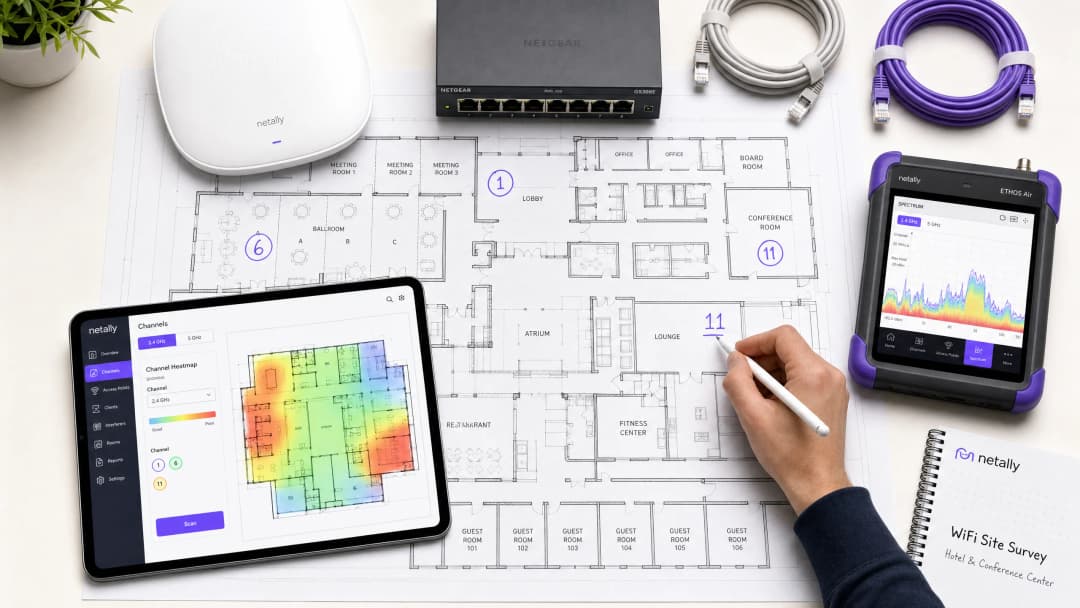
अतिशय गर्दीच्या कॉर्पोरेट किंवा व्यावसायिक परिसरांमध्ये - मग ते ५०० खोल्यांचे हॉटेल असो, बहुमजली रिटेल इस्टेट असो, किंवा सार्वजनिक क्षेत्रातील कॅम्पस असो - वायरलेस परफॉर्मन्स ही आता केवळ एक अतिरिक्त सुविधा राहिलेली नाही; ती अत्यंत महत्त्वाची ऑपरेशनल पायाभूत सुविधा आहे. तरीही, अनेक ठिकाणी कमी थ्रूपुट, उच्च रिट्राय रेट आणि वारंवार खंडित होणारी कनेक्टिव्हिटी यांसारख्या समस्या उद्भवतात, ज्याचे मूळ कारण एकाच गोष्टीमध्ये असते: चुकीचे चॅनेल नियोजन. क्लिष्ट RF परिसरांमध्ये केवळ डीफॉल्ट व्हेंडर कॉन्फिगरेशन किंवा सोप्या ऑटो-चॅनेल अल्गोरिदमवर अवलंबून राहिल्याने अपरिहार्यपणे को-चॅनेल इंटरफेअरेन्स आणि स्पेक्ट्रम कंजेशन (गर्दी) निर्माण होते.
हे तांत्रिक मार्गदर्शक तुमच्या सध्याच्या RF वातावरणाचे विश्लेषण करण्यासाठी आणि एक निश्चित चॅनेल योजना लागू करण्यासाठी व्हेंडर-न्यूट्रल, इंजिनिअरिंग-आधारित पद्धत प्रदान करते. आम्ही 2.4 GHz, 5 GHz आणि 6 GHz बँड्सच्या ऑपरेशनल फिजिक्सची तपासणी करू, स्पेक्ट्रम विश्लेषणासाठी संरचित दृष्टिकोन रेखाटू आणि इंटरफेअरेन्स कमी करण्यासाठी व्यावहारिक फ्रेमवर्क प्रदान करू. चॅनेल ऑप्टिमायझेशनला एक वेळचे काम न मानता एक निरंतर चालणारी प्रक्रिया मानल्यास, नेटवर्क टीम्स थ्रूपुटमध्ये मोजता येण्याजोग्या सुधारणा करू शकतात, सपोर्ट तिकिटांची संख्या कमी करू शकतात आणि अतिथींचे डिव्हाइसेस व इतर महत्त्वाच्या ऑपरेशनल इन्फ्रास्ट्रक्चरसाठी विश्वसनीय कनेक्टिव्हिटी सुनिश्चित करू शकतात.
तांत्रिक सखोल विश्लेषण: RF स्पेक्ट्रम समजून घेणे
चॅनेल वाटपाबाबत योग्य निर्णय घेण्यासाठी, नेटवर्क डिझायनर्सना 802.11 मानकांची मूलभूत रचना आणि विविध फ्रिक्वेन्सी बँड्स भौतिक वातावरणात कशा प्रकारे कार्य करतात हे समजून घेणे आवश्यक आहे.
2.4 GHz बँड: मर्यादित संसाधनांचे व्यवस्थापन
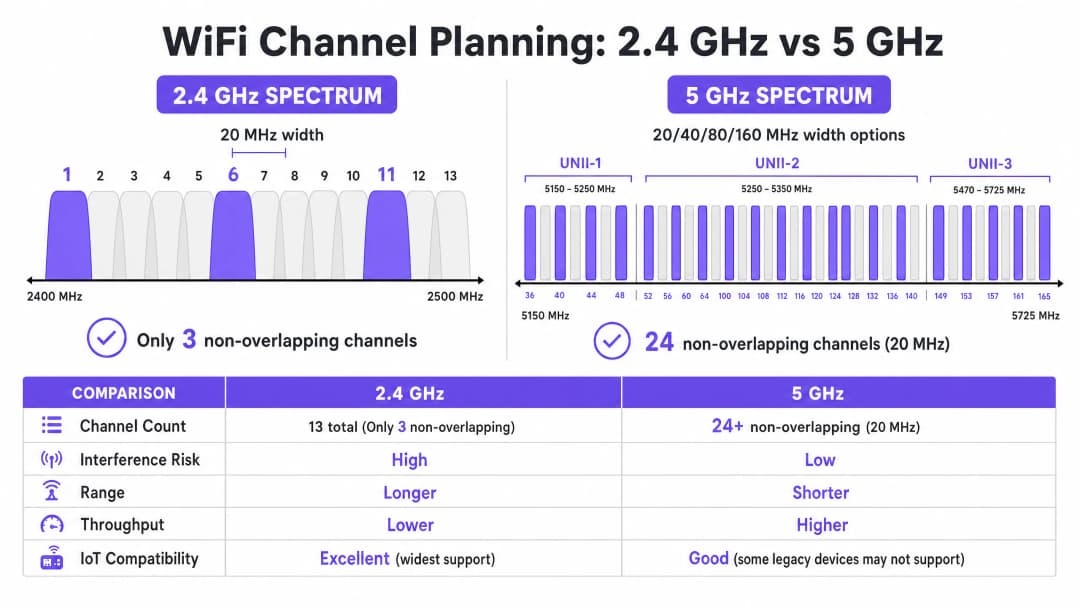
2.4 GHz बँड हा विनापरवाना स्पेक्ट्रमचा सर्वात व्यस्त भाग आहे. जरी हा बँड उत्कृष्ट प्रोपॅगेशन वैशिष्ट्ये प्रदान करत असला - ज्यामुळे सिग्नल्स उच्च फ्रिक्वेन्सीच्या तुलनेत भिंती आणि मजले अधिक प्रभावीपणे पार करू शकतात - तरीही याच्या चॅनेलची रचना अत्यंत मर्यादित आहे. बहुतेक नियामक क्षेत्रांमध्ये (युरोप आणि उत्तर अमेरिकेसह), हा बँड 20 MHz रुंदीचे चॅनेल्स प्रदान करतो परंतु त्यांच्यामध्ये केवळ 5 MHz चे अंतर असते.
या गणितानुसार केवळ तीन न ओव्हरलॅप होणारे चॅनेल्स उपलब्ध आहेत: 1, 6, आणि 11. या तिन्हींव्यतिरिक्त इतर कोणत्याही चॅनेलचा वापर करणारी सिस्टीम (उदा. चॅनेल्स 2, 3, किंवा 4) ॲडजेसंट-चॅनेल इंटरफेअरेन्स निर्माण करते. को-चॅनेल इंटरफेअरेन्सच्या विपरीत, जिथे डिव्हाइसेस CSMA/CA चा वापर करून एअरटाइमचे नियोजन करू शकतात, ॲडजेसंट-चॅनेल इंटरफेअरेन्स डेटा ट्रान्समिशन खराब करतो, ज्यामुळे रिट्राय रेट वाढतो आणि थ्रूपुटमध्ये गंभीर घट होते.
याव्यतिरिक्त, 2.4 GHz बँड हा इतर अनेक नॉन-WiFi डिव्हाइसेसद्वारे देखील वापरला जातो, ज्यामध्ये ब्लूटूथ डिव्हाइसेस, मायक्रोवेव्ह ओव्हन आणि जुने IoT सेन्सर्स समाविष्ट आहेत. या बँडचे ऑप्टिमायझेशन करताना, मुख्य उद्दिष्ट जास्तीत जास्त थ्रूपुट मिळवण्याऐवजी इंटरफेअरेन्स कमी करणे हे असते.
5 GHz बँड: क्षमता आणि क्लिष्टता
5 GHz बँड लक्षणीयरीत्या जास्त क्षमता प्रदान करतो, जो नियामक क्षेत्राच्या आधारावर 24 किंवा त्याहून अधिक नॉन-ओव्हरलॅपिंग 20 MHz चॅनेल्स प्रदान करतो. हा स्पेक्ट्रम Unlicensed National Information Infrastructure (UNII) सब-बँड्समध्ये विभागला गेला आहे:
- UNII-1 (चॅनेल्स 36-48): या चॅनेल्सना Dynamic Frequency Selection (DFS) ची आवश्यकता नसते आणि उच्च-घनतेच्या उपयोजनांसाठी हा सर्वात सुरक्षित प्रस्थान बिंदू आहे.
- UNII-2 (चॅनेल्स 52-144): या चॅनेल्सना DFS आवश्यक असते, ज्याचा अर्थ ऍक्सेस पॉईंट्सने रडार सिग्नल्सवर (जसे की हवामान किंवा लष्करी रडार) लक्ष ठेवले पाहिजे आणि ते आढळल्यास चॅनेल रिकामे केले पाहिजे. जरी DFS मुळे ऑपरेशन्समध्ये गुंतागुंत वाढत असली, तरी दाट वातावरणात आवश्यक चॅनेलचा पुन्हा वापर करण्यासाठी UNII-2 चा वापर करणे अत्यंत आवश्यक आहे.
- UNII-3 (चॅनेल्स 149-165): हे चॅनेल्स सामान्यतः नॉन-DFS असतात परंतु प्रदेशानुसार वेगवेगळ्या पॉवर निर्बंधांच्या अधीन असतात.
5 GHz बँडमध्ये, नेटवर्क आर्किटेक्ट्सनी चॅनेलची रुंदी आणि चॅनेलची उपलब्धता यामध्ये समतोल राखला पाहिजे. जरी 80 MHz चॅनेल्स (802.11ac आणि Wi-Fi 6 साठी डीफॉल्ट) वैयक्तिक क्लायंटसाठी उच्च पीक थ्रुपुट देतात, तरीही ते चार 20 MHz चॅनेल्स वापरतात, ज्यामुळे पुन्हा वापरण्यासाठी उपलब्ध असलेल्या नॉन-ओव्हरलॅपिंग चॅनेल्सची संख्या लक्षणीयरीत्या कमी होते. उच्च-घनतेच्या ठिकाणी, रुंद चॅनेल्समुळे बऱ्याचदा को-चॅनेल इंटरफेरन्स होतो, ज्यामुळे एकूण क्षमता कमी होते.
6 GHz ची नवीन सीमा (Wi-Fi 6E आणि Wi-Fi 7)
6 GHz बँडची ओळख ही दोन दशकांतील WiFi स्पेक्ट्रमचा सर्वात महत्त्वपूर्ण विस्तार दर्शवते, ज्यामध्ये 1200 MHz पर्यंतचा ग्रीनफील्ड स्पेक्ट्रम जोडला गेला आहे. हे 59 अतिरिक्त 20 MHz चॅनेल्स प्रदान करते, जे जुन्या उपकरणांच्या हस्तक्षेपापासून आणि DFS आवश्यकतांपासून पूर्णपणे मुक्त आहेत. हार्डवेअर अपग्रेड करणाऱ्या ठिकाणांसाठी, 6 GHz उच्च-घनतेच्या क्षेत्रांमध्ये 80 MHz किंवा 160 MHz चॅनेल्सच्या व्यावहारिक उपयोजनास अनुमती देते. तथापि, त्याच्या कमी तरंगलांबीचा अर्थ कमी रेंज आणि पेनिट्रेशन असा होतो, ज्यामुळे अधिक दाट ऍक्सेस पॉईंट्स लावणे आवश्यक ठरते.
तुमच्या विशिष्ट सेटअपबद्दल काही प्रश्न आहेत का?
आमची टीम ८०,००० हून अधिक वेन्यूजमधील वेन्यू ऑपरेटर्स, IT मॅनेजर्स आणि नेटवर्क इंजिनिअर्ससोबत काम करते. २० मिनिटांचा कॉल बुक करा आणि तुमच्यासारख्या इतरांनी ही समस्या कशी सोडवली हे आम्ही तुम्हाला दाखवू.
अंमलबजावणी मार्गदर्शक: चॅनेल ऑप्टिमायझेशन वर्कफ्लो
तुमच्या WiFi चॅनेल प्लॅनचे ऑप्टिमायझेशन करण्यासाठी मूलभूत मोजमापापासून ते इंजिनिअर केलेल्या डिझाईन आणि प्रमाणित उपयोजनापर्यंत पद्धतशीर दृष्टिकोनाची आवश्यकता असते.
पायरी 1: मूलभूत RF ऑडिट
कॉन्फिगरेशनमध्ये कोणतेही बदल करण्यापूर्वी, तुम्हाला RF वातावरणाची सद्यस्थिती समजून घेणे आवश्यक आहे. यासाठी केवळ स्मार्टफोन ॲप नव्हे, तर सर्वसमावेशक मोजमाप साधनांची आवश्यकता असते.
- पॅसिव्ह स्पेक्ट्रम विश्लेषण: नॉईज फ्लोअर मोजण्यासाठी आणि नॉन-WiFi हस्तक्षेपाचे स्रोत ओळखण्यासाठी समर्पित स्पेक्ट्रम विश्लेषक (उदा. Ekahau Sidekick, NetAlly AirCheck) वापरा. स्वच्छ वातावरणात सामान्यतः -95 dBm च्या आसपास नॉईज फ्लोअर दिसतो.
- शेजारील नेटवर्क सर्वेक्षण: सर्व दृश्यमान Basic Service Set Identifiers (BSSIDs), त्यांचे कार्यरत असणारे चॅनेल्स आणि Received Signal Strength Indicators (RSSI) ची यादी करा. रिटेल पार्क किंवा मल्टि-टेंनंट ऑफिस इमारतींसारख्या वातावरणात, बाह्य नेटवर्क्स हे अनियंत्रित हस्तक्षेपाचे मुख्य स्त्रोत असतात.
- क्लायंट परफॉर्मन्स मेट्रिक्स: केवळ RSSI ऐवजी Signal-to-Noise Ratio (SNR) चे विश्लेषण करा. 20 dB पेक्षा कमी SNR मुळे क्लायंट्सना कमी दर्जाची Modulation and Coding Scheme (MCS) इंडेक्स वापरणे भाग पडेल, ज्यामुळे थ्रुपुट कमी होतो. विश्वासार्ह कामगिरीसाठी 25 dB किंवा त्याहून अधिक SNR चे लक्ष्य ठेवा.
पायरी २: चॅनेल प्लॅन डिझाइन
बेसलाइन डेटासह सुसज्ज होऊन, एक निश्चित चॅनेल प्लॅन डिझाइन करा.
- २.४ GHz स्ट्रॅटेजी: चॅनेल्स १, ६ आणि ११ च्या वापराची काटेकोरपणे अंमलबजावणी करा. घनता अत्यंत जास्त असल्यास, विशिष्ट ऍक्सेस पॉइंट्सवर २.४ GHz रेडिओ निवडकपणे बंद करून "सॉल्ट अँड पेपर" डिझाइन तयार करा, ज्यामुळे जुन्या IoT डिव्हाइसेससाठी कव्हरेज राखतानाच को-चॅनेल हस्तक्षेप कमी होतो.
- ५ GHz स्ट्रॅटेजी: तुमच्या क्षेत्रात रडारची हालचाल कमी असल्यास DFS चॅनेल्ससह जास्तीत जास्त नॉन-ओव्हरलॅपिंग चॅनेल्सचा वापर करा.
- चॅनेलची रुंदी निवडणे: उच्च-घनता असलेल्या क्षेत्रांसाठी (उदा. कॉन्फरन्स रूम्स, स्टेडियम्स) २० MHz चॅनेल्स प्रमाणित करा. मध्यम-घनतेच्या क्षेत्रांमध्ये (उदा. हॉटेल रूम्स, ओपन-प्लॅन ऑफिसेस) ४० MHz चॅनेल्स वापरा. अतिशय कमी-घनता आणि उच्च-थ्रुपुट असलेल्या परिस्थितीशिवाय ८० MHz चॅनेल्स वापरणे टाळा.
- ट्रान्समिट पॉवर ट्यूनिंग: चॅनेल प्लॅनिंग आणि ट्रान्समिट पॉवर एकमेकांशी घट्ट जोडलेले आहेत. प्रत्येक ऍक्सेस पॉइंटचा सेल आकार कमी करण्यासाठी ट्रान्समिट पॉवर कमी करा, ज्यामुळे एकाच चॅनेलवरील APs मधील ओव्हरलॅप (आणि परिणामी हस्तक्षेप) कमी होईल. को-चॅनेल APs दरम्यान १५-२० dBm च्या सेपरेशनचे लक्ष्य ठेवा.

पायरी ३: टप्प्याटप्प्याने अंमलबजावणी आणि प्रमाणीकरण
संपूर्ण मालमत्तेवर एकाच वेळी किंवा कामाच्या वेळेत कधीही जागतिक चॅनेल बदल लागू करू नका.
- मेन्टेनन्स विंडोज: रेडिओ रिसेट्समुळे होणारा व्यत्यय कमी करण्यासाठी सर्वात कमी वापराच्या कालावधीत (सामान्यतः ०२:०० - ०५:००) बदलांचे नियोजन करा.
- झोनल डिप्लॉयमेंट: नवीन प्लॅन लॉजिकल झोनमध्ये (उदा. एका वेळी एक मजला किंवा एक विंग) लागू करा.
- बदलानंतरचे प्रमाणीकरण: नवीन प्लॅन लागू केल्यानंतर, बेसलाइन ऑडिटमध्ये वापरलेल्या त्याच साधनांचा वापर करून बदलांचे प्रमाणीकरण करा. को-चॅनेल हस्तक्षेप कमी झाला आहे आणि SNR उद्दिष्टे पूर्ण होत आहेत याची खात्री करा.
चॅनेल ऑप्टिमायझेशन स्ट्रॅटेजीजवरील आमचे १० मिनिटांचे तांत्रिक ब्रीफिंग ऐका:
सर्वोत्तम पद्धती आणि जोखीम कमी करणे
ऑटो-चॅनेल अल्गोरिदमचे धोके
बऱ्याच enterprise WLAN नियंत्रकांमध्ये स्वयंचलित Radio Resource Management (RRM) किंवा ऑटो-चॅनेल निवडण्याची सुविधा असते. लहान उपयोजनांसाठी हे सोयीचे असले, तरी उच्च घनतेच्या (high-density) वातावरणात हे अल्गोरिदम सहसा हानिकारक ठरतात. ते RF वातावरणाच्या जागतिक दृश्याऐवजी स्थानिक AP च्या दृष्टीकोनातून निर्णय घेतात, ज्यामुळे बऱ्याचदा सब-ऑप्टिमल चॅनेल वाटप होते आणि कामाच्या वेळेत अडथळा आणणारे, लागोपाठ चॅनेल बदल घडून येतात.
सर्वोत्तम पद्धती: गुंतागुंतीच्या ठिकाणांमध्ये, ऑटो-चॅनेल निवड अक्षम करा. कठोर साइट सर्वेक्षणावर आधारित मॅन्युअली इंजिनिअर केलेली, स्थिर (static) चॅनेल योजना लागू करा. नियंत्रकाची RRM वैशिष्ट्ये केवळ महत्त्वपूर्ण RF बदलांविषयी चेतावणी देण्यासाठी वापरा, स्वयंचलित दुरुस्तीसाठी नाही.
को-चॅनेल इंटरफेरियन्स (CCI) चे निराकरण करणे
दाट उपयोजनांमध्ये CCI हा कार्यक्षमता कमी करणारा प्राथमिक घटक आहे. हे कमी करण्याच्या तंत्रांच्या सखोल आकलनासाठी, Resolving Co-Channel Interference in Enterprise Deployments वरील आमचे सर्वसमावेशक मार्गदर्शक पहा.
सतत देखरेख ठेवण्याचे महत्त्व
RF वातावरण विकसित होत असताना - नवीन शेजारील नेटवर्क दिसणे, संरचनात्मक बदल होणे किंवा नवीन IoT उपकरणे तैनात करणे यांमुळे स्थिर चॅनेल योजना कालांतराने खराब होते. चॅनेल ऑप्टिमायझेशन हे एकदाच करून विसरून जाण्याचे काम नाही.
सर्वोत्तम पद्धती: विश्लेषण प्लॅटफॉर्मचा वापर करून सतत देखरेख लागू करा. Purple's WiFi Analytics क्लायंटची घनता, सेशनची गुणवत्ता आणि संपूर्ण ठिकाणच्या थ्रुपुट ट्रेंड्समध्ये आवश्यक दृश्यमानता प्रदान करते. चॅनेल योजनेला कधी पुनरावृत्तीची आवश्यकता आहे हे सक्रियपणे ओळखण्यासाठी SNR निकृष्टता किंवा वाढलेल्या रिट्राय दरांसाठी थ्रेशोल्ड अलर्ट सेट करा.
ROI आणि व्यावसायिक प्रभाव
तुमच्या WiFi चॅनेल योजनेला अनुकूल करण्यासाठी वेळ आणि साधनांमध्ये गुंतवणूक करण्यासाठी प्रयत्नांची आवश्यकता असते, परंतु गुंतवणुकीवरील परतावा (ROI) लक्षणीय आणि मोजता येण्याजोगा असतो.
- एकूण थ्रुपुटमध्ये वाढ: को-चॅनेल इंटरफेरियन्स कमी करून आणि चॅनेलची रुंदी ऑप्टिमाइझ करून, नवीन हार्डवेअर तैनात न करता ठिकाणे बऱ्याचदा एकूण नेटवर्क क्षमतेमध्ये २० - ४०% वाढ मिळवू शकतात.
- कमी झालेला सपोर्ट ओव्हरहेड: एक स्थिर RF वातावरण "मंद WiFi" किंवा मधूनमधून खंडित होणाऱ्या कनेक्शनशी संबंधित हेल्पडेस्क तिकिटे लक्षणीयरीत्या कमी करते, ज्यामुळे ऑपरेशनल सपोर्टचा खर्च कमी होतो.
- उत्कृष्ट वापरकर्ता अनुभव: Guest WiFi वर अवलंबून असलेल्या वातावरणासाठी, जसे की Hospitality किंवा Retail, विश्वसनीय कनेक्टिव्हिटीचा थेट संबंध उच्च ग्राहक समाधान गुणांशी आणि Captive Portal सह वाढलेल्या सहभागाशी असतो.
- ऑपरेशनल विश्वसनीयता: पॉइंट-ऑफ-सेल टर्मिनल्सपासून ते हँडहेल्ड इन्व्हेंटरी स्कॅनर्सपर्यंत, गंभीर व्यवसाय प्रणाली मजबूत वायरलेस कनेक्टिव्हिटीवर अवलंबून असतात. एक स्पष्ट चॅनेल योजना या प्रणाली कोणत्याही अडथळ्याशिवाय कार्य करत असल्याची खात्री करते, ज्यामुळे महसूल आणि ऑपरेशनल कार्यक्षमतेचे रक्षण होते. RF स्पेक्ट्रमकडे एक महत्त्वपूर्ण, व्यवस्थापन करण्यायोग्य संसाधन म्हणून पाहून, IT लीडर्स त्यांच्या वायरलेस इन्फ्रास्ट्रक्चरला त्रासाच्या स्रोताकडून एंटरप्राइझ ऑपरेशन्ससाठी एक विश्वासार्ह पायामध्ये रूपांतरित करू शकतात.
महत्वाच्या व्याख्या
Co-Channel Interference (CCI)
जेव्हा दोन किंवा अधिक ऍक्सेस पॉईंट्स एकमेकांच्या रेंजमध्ये एकाच फ्रिक्वेन्सी चॅनेलवर कार्यरत असतात, तेव्हा उद्भवणारा इंटरफेरियन्स, ज्यामुळे डिव्हाइसेसना एअरटाइम शेअर करण्यास आणि चॅनेल मोकळे होण्याची वाट पाहण्यास भाग पाडले जाते.
CCI हे हाय-डेन्सिटी डिप्लॉयमेंट्समध्ये थ्रूपुट कमी होण्याचे मुख्य कारण आहे, जेथे चॅनेलचा पुनर्वापर योग्य प्रकारे नियोजित नसतो.
Adjacent-Channel Interference (ACI)
ओव्हरलॅपिंग फ्रिक्वेन्सीमुळे होणारा इंटरफेरियन्स (उदा. २.४ GHz बँडमध्ये चॅनेल १ आणि ३ वापरणे), ज्यामुळे एअरटाइम शेअर होण्याऐवजी ट्रान्समिशन खराब होते.
ACI अत्यंत विनाशकारी आहे आणि नॉन-ओव्हरलॅपिंग चॅनेल असाइनमेंटचे काटेकोरपणे पालन करून ते टाळले पाहिजे.
Dynamic Frequency Selection (DFS)
5 GHz बँडमधील एक नियामक आवश्यकता जिथे ऍक्सेस पॉईंट्सनी रडार सिग्नल्सचे निरीक्षण केले पाहिजे आणि रडार आढळल्यास चॅनेल रिकामे केले पाहिजे.
जरी DFS चॅनेल्स (UNII-2) ऑपरेशनल गुंतागुंत वाढवत असले, तरी हाय-डेन्सिटी वातावरणात पुरेसा चॅनेल पुनर्वापर मिळवण्यासाठी ते आवश्यक आहेत.
Signal-to-Noise Ratio (SNR)
मिळालेली सिग्नल स्ट्रेंथ आणि बॅकग्राउंड नॉईज फ्लोर यांमधील डेसिबल्स (dB) मधील फरक.
केवळ RSSI च्या तुलनेत SNR हा क्लायंट परफॉर्मन्सचा अधिक अचूक अंदाज देणारा घटक आहे. जास्त SNR मुळे जलद मॉड्युलेशन रेट मिळण्यास मदत होते.
Modulation and Coding Scheme (MCS)
ट्रान्समिशनसाठी वापरल्या जाणाऱ्या मॉड्युलेशन प्रकार आणि कोडिंग रेटचे प्रतिनिधित्व करणारे इंडेक्स मूल्य, जे डेटा रेट निर्धारित करते.
उच्च SNR असलेले स्वच्छ RF वातावरण क्लायंट्सना उच्च MCS इंडेक्स मिळवण्यास मदत करते, ज्यामुळे जलद थ्रूपुट मिळते.
Carrier Sense Multiple Access with Collision Avoidance (CSMA/CA)
802.11 नेटवर्क्सद्वारे वापरला जाणारा प्रोटोकॉल जिथे डिव्हाइसेस कोलिजन टाळण्यासाठी ट्रान्समिट करण्यापूर्वी वायरलेस माध्यमाचा अंदाज घेतात.
CSMA/CA शेअर केलेल्या चॅनेल्सवर एअरटाइम व्यवस्थापित करते परंतु जास्त CCI असलेल्या वातावरणात यामुळे लक्षणीय ओव्हरहेड आणि कमी थ्रूपुट होते.
Noise Floor
वातावरणातील बॅकग्राउंड RF ऊर्जेचे मोजमाप, जे साधारणपणे dBm मध्ये दर्शविले जाते.
उच्च Noise Floor प्रभावी SNR कमी करतो, ज्यामुळे कार्यक्षमता खालावते. RF गोंधळाचे (noise) स्त्रोत शोधणे आणि ते कमी करणे हा चॅनेल ऑप्टिमायझेशनमधील एक महत्त्वाचा टप्पा आहे.
Received Signal Strength Indicator (RSSI)
प्राप्त झालेल्या रेडिओ सिग्नलमधील पॉवरचे मोजमाप.
मूलभूत कव्हरेज मॅपिंगसाठी उपयुक्त असले तरी, अचूक कार्यक्षमता विश्लेषणासाठी RSSI चे मूल्यमापन Noise Floor सोबत (SNR निर्धारित करण्यासाठी) केले पाहिजे.
सोडवलेली उदाहरणे
एक गर्दीच्या शहरी भागात असलेल्या ३०० खोल्यांच्या हॉटेलमध्ये संध्याकाळच्या गर्दीच्या वेळी अत्यंत खराब WiFi परफॉर्मन्सचा अनुभव येत आहे. सध्याच्या डिप्लॉयमेंटमध्ये 5 GHz बँडवर 80 MHz चॅनेल्सचा वापर केला जात आहे, आणि ऑटो-चॅनेल सिलेक्शन सुरू आहे. पाहुण्यांकडून वारंवार कनेक्शन तुटणे आणि स्लो स्ट्रीमिंग स्पीडच्या तक्रारी येत आहेत.
१. इंटरफेरियन्सचे मोजमाप करण्यासाठी गर्दीच्या वेळेत बेसलाईन स्पेक्ट्रम विश्लेषण करा. २. नेटवर्कमधील अडथळे आणणारे रेडिओ रिसेट टाळण्यासाठी WLAN कंट्रोलरवरील ऑटो-चॅनेल सिलेक्शन बंद करा. ३. 5 GHz रेडिओची चॅनेल विड्थ 80 MHz वरून 20 MHz वर रिकॉन्फिगर करा. यामुळे उपलब्ध नॉन-ओव्हरलॅपिंग चॅनेल्सची संख्या ६ वरून २४+ पर्यंत वाढते. ४. एक स्टॅटिक चॅनेल प्लॅन लागू करा, ज्यामुळे जवळचे ऍक्सेस पॉईंट्स वेगवेगळ्या चॅनेल्सवर कार्यरत राहतील आणि को-चॅनेल ऍक्सेस पॉईंट्स किमान १५ - २० dBm च्या सिग्नल ॲटेन्युएशनद्वारे वेगळे राहतील. ५. पूर्वी समस्या असलेल्या भागांमध्ये SNR आणि रिट्राय रेट मोजून नवीन कॉन्फिगरेशनची पडताळणी करा.
एक मोठे रिटेल वेअरहाऊस इन्व्हेंटरी मॅनेजमेंटसाठी २.४ GHz हँडहेल्ड स्कॅनर्सवर अवलंबून आहे. स्कॅनर्सचे कनेक्शन नेटवर्कवरून वारंवार तुटते, ज्यामुळे कर्मचाऱ्यांना डिव्हाइसेस रीबूट करावे लागतात. सध्या ऍक्सेस पॉईंट्स १, ४, ८ आणि ११ हे चॅनेल्स वापरण्यासाठी कॉन्फिगर केलेले आहेत.
१. २.४ GHz बँडमधील नॉन-WiFi इंटरफेरियन्सचे स्त्रोत (उदा. ब्लूटूथ बीकन्स, जुने सिक्युरिटी कॅमेरे) शोधण्यासाठी पॅसिव्ह RF स्कॅन करा. २. केवळ नॉन-ओव्हरलॅपिंग चॅनेल्स: १, ६ आणि ११ वापरण्यासाठी सर्व २.४ GHz रेडिओ रिकॉन्फिगर करा. ३. सेल ओव्हरलॅप कमी करण्यासाठी ट्रान्समिट पॉवर ॲडजस्ट करा, ज्यामुळे स्कॅनर्स लांबच्या, कमकुवत सिग्नलला धरून न राहता (स्टिकी क्लायंट्स) ऍक्सेस पॉईंट्स दरम्यान अखंडपणे रोम करू शकतील. ४. हँडहेल्ड स्कॅनर्सच्या रोमिंगच्या पद्धती आणि रिट्राय रेटचा मागोवा घेण्यासाठी मॉनिटरिंग लागू करा.
सराव प्रश्न
Q1. तुम्ही एका हाय-डेंसिटी कॉन्फरन्स सेंटरसाठी WiFi उपयोजन (deployment) डिझाइन करत आहात. हजारो एकाच वेळी कार्यरत असलेल्या क्लायंट डिव्हाइसेसना सपोर्ट करण्यासाठी या ठिकाणाला कमाल एकत्रित क्षमतेची आवश्यकता आहे. तुम्ही 5 GHz बँडसाठी कोणती चॅनेल विड्थ धोरण अवलंबले पाहिजे?
टीप: वैयक्तिक सर्वोच्च थ्रूपुट आणि पुन्हा वापरण्यासाठी उपलब्ध असलेल्या नॉन-ओव्हरलॅपिंग चॅनेल्सची संख्या यांच्यातील तडजोड विचारात घ्या.
नमुना उत्तर पहा
20 MHz चॅनेल्स प्रमाणित करा. 80 MHz चॅनेल्स एका वापरकर्त्यासाठी जास्त थ्रूपुट प्रदान करत असले तरी, ते उपलब्ध नॉन-ओव्हरलॅपिंग चॅनेल्सची संख्या मोठ्या प्रमाणात कमी करतात. हाय-डेंसिटी वातावरणात, 20 MHz चॅनेल्स वापरल्याने चॅनेलचा पुनर्वापर जास्तीत जास्त होतो, को-चॅनेल इंटरफेरन्स कमी होतो आणि कॉन्फरन्स सेंटरसाठी सर्वोच्च एकत्रित क्षमता मिळते.
Q2. रिटेल पार्कच्या साइट सर्वेक्षणादरम्यान, तुमच्या लक्षात आले की अनेक शेजारील व्यवसाय 2.4 GHz बँडमधील चॅनेल 4 वर त्यांचे ॲक्सेस पॉइंट्स चालवत आहेत. याला प्रतिसाद म्हणून तुम्ही तुमचे ॲक्सेस पॉइंट्स कसे कॉन्फिगर केले पाहिजेत?
टीप: लगतच्या-चॅनेलच्या हस्तक्षेपाच्या (adjacent-channel interference) तुलनेत सह-चॅनेल हस्तक्षेपाच्या (co-channel interference) प्रभावाचे मूल्यमापन करा.
नमुना उत्तर पहा
तुम्ही तुमचे ॲक्सेस पॉइंट्स चॅनेल 1, 6 किंवा 11 वापरण्यासाठी कॉन्फिगर केले पाहिजेत, विशेषतः हस्तक्षेप करणाऱ्या चॅनेल 4 पासून सर्वात लांब असलेला चॅनेल (बहुधा 11) निवडावा. चॅनेल 4 वर कार्य केल्याने गंभीर ॲडजेसेंट-चॅनेल इंटरफेरन्स होईल. अगदी चॅनेल 6 वर कार्य केल्याने देखील चॅनेल 4 वरील मजबूत सिग्नल्सचा काही प्रमाणात ओव्हरलॅप सहन करावा लागू शकतो. ॲडजेसेंट-चॅनेल इंटरफेरन्स निर्माण करण्यापेक्षा प्रमाणित चॅनेलवर (1, 6, 11) काही प्रमाणात को-चॅनेल इंटरफेरन्स स्वीकारणे केव्हाही चांगले.
Q3. एका रुग्णालयात नवीन स्टॅटिक चॅनेल प्लॅन तैनात केल्यानंतर, तुमच्या लक्षात आले की एका विशिष्ट वॉर्डमधील क्लायंट्सना मजबूत RSSI (-65 dBm) दाखवत असूनही धीमा वेग मिळत आहे. याचे सर्वात संभाव्य कारण काय आहे आणि तुम्ही याचा तपास कसा कराल?
टीप: RSSI केवळ सिग्नलची ताकद मोजते, सिग्नलची गुणवत्ता नाही. कोणता मेट्रिक प्रत्यक्ष वापरण्यायोग्य सिग्नल निर्धारित करतो?
नमुना उत्तर पहा
सर्वात संभाव्य कारण म्हणजे उच्च Noise Floor ज्यामुळे सिग्नल-टू-नॉइज रेशो (SNR) कमी झाला आहे. मजबूत RSSI असूनही, जर Noise Floor जास्त असेल (उदा. -75 dBm), तर परिणामी मिळणारा SNR (10 dB) हाय-स्पीड मॉड्युलेशनसाठी खूपच कमी असतो. तुम्ही त्या विशिष्ट वॉर्डमधील RF नॉइजचा स्त्रोत शोधण्यासाठी स्पेक्ट्रम ॲनालायझर वापरावा आणि तो कमी करावा.
या मालिकेमध्ये पुढे वाचा
उत्कृष्ट चॅनेल प्लॅनिंगसाठी RSSI आणि सिग्नल स्ट्रेंथ समजून घेणे
हे मार्गदर्शक उत्कृष्ट चॅनेल प्लॅनिंगसाठी RSSI, सिग्नल - टू - नॉईज रेशो (SNR) आणि RF प्रोपॅगेशन सिद्धांतांचा सखोल तांत्रिक अभ्यास प्रदान करते. हे IT मॅनेजर्स, नेटवर्क आर्किटेक्ट्स आणि व्हेन्यू ऑपरेशन्स डायरेक्टर्सना को - चॅनेल आणि ॲडजेसेंट चॅनेल इंटरफेरन्स कमी करण्यासाठी, AP प्लेसमेंट सुधारण्यासाठी आणि हॉस्पिटॅलिटी, रिटेल आणि सार्वजनिक क्षेत्रातील वातावरणात मोजता येण्याजोग्या व्यावसायिक प्रभावासाठी ॲनालिटिक्सचा लाभ घेण्यासाठी कृतीयोग्य धोरणे प्रदान करते.
WiFi 6 विरुद्ध WiFi 5: हे चॅनेल इंटरफेरन्स सोडवते का?
हे मार्गदर्शक WiFi 6 (802.11ax) हे OFDMA आणि BSS Coloring द्वारे हाय-डेन्सिटी एंटरप्राइझ वातावरणात चॅनेल इंटरफेरन्सचे निवारण कसे करते याचे तांत्रिक सखोल विश्लेषण प्रदान करते. हे IT व्यवस्थापक, network architects, आणि CTOs ना व्यावहारिक अंमलबजावणी धोरणे, हॉस्पिटॅलिटी आणि हेल्थकेअरमधील वास्तविक केस स्टडीज आणि ज्या ठिकाणी वायरलेस कामगिरी व्यवसायासाठी अत्यंत महत्त्वाची आहे अशा ठिकाणी इन्फ्रास्ट्रक्चर अपग्रेडच्या ROI चे मूल्यमापन करण्यासाठी एक फ्रेमवर्क प्रदान करते.
उच्च-घनता असलेल्या ठिकाणांसाठी सर्वोत्तम WiFi चॅनेल्स
स्टेडियम, क्रीडांगणे आणि मोठ्या सार्वजनिक ठिकाणांसारख्या उच्च-घनता असलेल्या वातावरणात WiFi चॅनेल्स निवडण्यासाठी आणि ऑप्टिमाइझ करण्यासाठी एक निश्चित तांत्रिक संदर्भ. यामध्ये RF फिजिक्स, 5 GHz आणि 6 GHz बँड्समधील चॅनेलचा पुनर्वापर करण्याच्या रणनीती आणि IT लीडर्ससाठी प्रत्यक्ष अंमलबजावणीचे मार्गदर्शन समाविष्ट आहे.
तुमच्या विशिष्ट सेटअपबद्दल काही प्रश्न आहेत का?
आमची टीम ८०,००० हून अधिक वेन्यूजमधील वेन्यू ऑपरेटर्स, IT मॅनेजर्स आणि नेटवर्क इंजिनिअर्ससोबत काम करते. २० मिनिटांचा कॉल बुक करा आणि तुमच्यासारख्या इतरांनी ही समस्या कशी सोडवली हे आम्ही तुम्हाला दाखवू.