
Cómo analizar y cambiar el canal de WiFi para obtener la máxima velocidad
Esta guía técnica de referencia capacita a los administradores de TI y arquitectos de redes con metodologías para analizar entornos de radiofrecuencia e implementar planes de canales de WiFi óptimos. Proporciona marcos prácticos para mitigar la interferencia de cocanal, maximizar el rendimiento y garantizar una conectividad sólida en despliegues corporativos de alta densidad.
Escuchar esta guía
Ver transcripción del podcast
Resumen ejecutivo
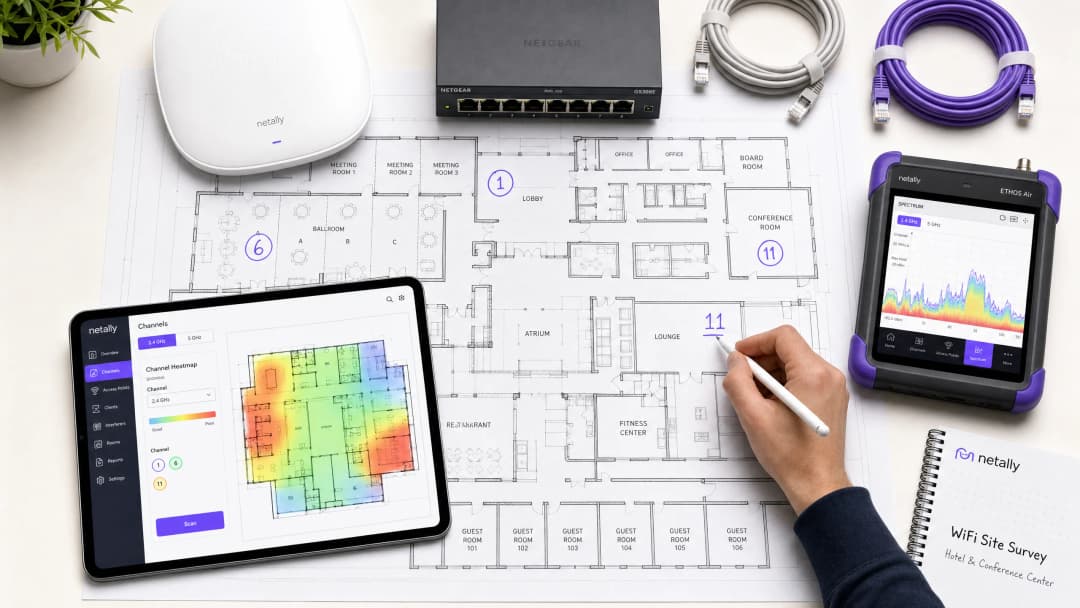
En entornos empresariales de alta densidad -ya sea un hotel de 500 habitaciones, un complejo comercial de varias plantas o un campus del sector público-, el rendimiento inalámbrico ya no es solo un servicio adicional; es una infraestructura operativa crítica. Sin embargo, muchas implementaciones sufren de bajo rendimiento, altas tasas de reintento y problemas de conectividad intermitentes, todo ello derivado de una única causa raíz subsanable: una planificación de canales deficiente. Depender de las configuraciones predeterminadas de los proveedores o de algoritmos sencillos de canal automático en entornos de RF complejos conduce inevitablemente a la interferencia de canal adyacente y a la congestión del espectro.
Esta guía técnica de referencia proporciona una metodología neutral respecto al proveedor y basada en la ingeniería para analizar su entorno de RF actual e implementar un plan de canales definitivo. Examinaremos la física operativa de las bandas de 2.4 GHz, 5 GHz y 6 GHz, describiremos un enfoque estructurado para el análisis del espectro y proporcionaremos marcos prácticos para mitigar las interferencias. Al tratar la optimización de canales como una disciplina operativa continua en lugar de una tarea de implementación única, los equipos de red pueden lograr mejoras medibles en el rendimiento, reducir el volumen de tickets de soporte y garantizar una conectividad fiable tanto para los dispositivos de los invitados como para la infraestructura operativa crítica.
Análisis técnico detallado: Comprensión del espectro de RF
Para tomar decisiones informadas sobre la asignación de canales, los arquitectos de red deben comprender los mecanismos subyacentes de los estándares 802.11 y cómo se comportan las diferentes bandas de frecuencia en el entorno físico.
La banda de 2.4 GHz: Gestión de la escasez
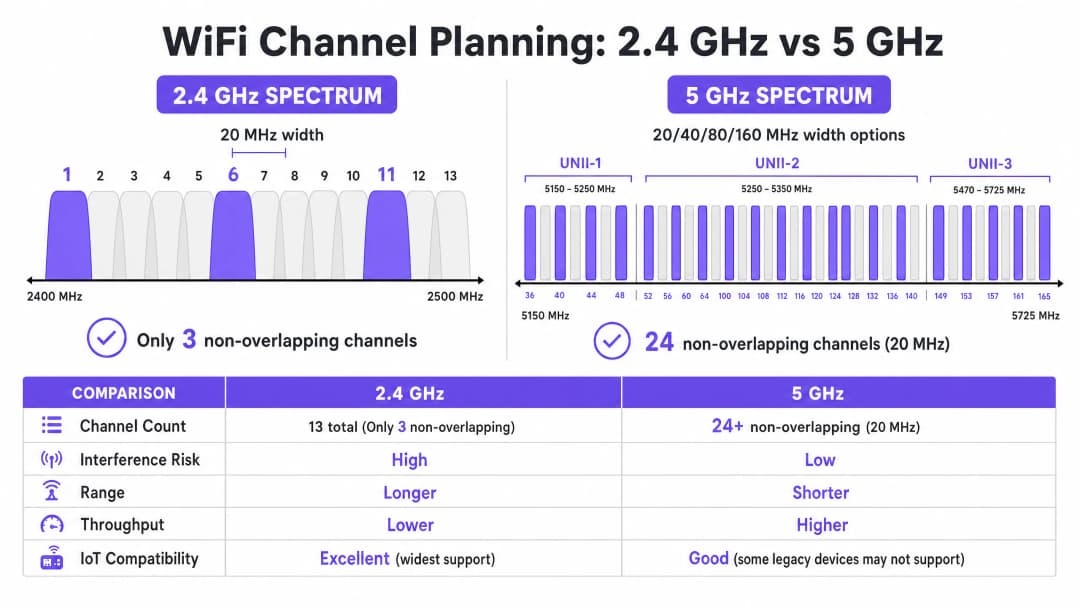
La banda de 2.4 GHz es la porción de espectro sin licencia más saturada. Aunque ofrece características de propagación superiores -lo que permite que las señales penetren en paredes y suelos de manera más eficaz que las frecuencias más altas-, la estructura de sus canales es fundamentalmente limitada. En la mayoría de los dominios regulatorios (incluyendo Europa y América del Norte), esta banda ofrece canales que tienen un ancho de 20 MHz pero que están espaciados a solo 5 MHz de distancia.
Esta matemática dicta que solo hay tres canales que no se superponen disponibles: 1, 6 y 11. Cualquier implementación que utilice canales fuera de este trío (por ejemplo, los canales 2, 3 o 4) introduce interferencia de canal adyacente. A diferencia de la interferencia de cocanal, donde los dispositivos pueden coordinar el tiempo de uso del espectro mediante CSMA/CA, la interferencia de canal adyacente corrompe las transmisiones, lo que resulta en altas tasas de reintento y una grave degradación del rendimiento.
Además, la banda de 2.4 GHz se comparte con numerosos elementos de interferencia ajenos al WiFi, incluidos dispositivos Bluetooth, hornos microondas y sensores IoT heredados. Al optimizar esta banda, el objetivo principal es la mitigación de interferencias en lugar de maximizar el rendimiento.
La banda de 5 GHz: Capacidad y complejidad
La banda de 5 GHz ofrece una capacidad significativamente mayor, proporcionando 24 o más canales de 20 MHz no superpuestos, según el dominio regulador. Este espectro se divide en subbandas de Infraestructura Nacional de Información No Licenciada (UNII):
- UNII-1 (canales 36-48): Estos canales no requieren Selección Dinámica de Frecuencia (DFS) y son el punto de partida más seguro para despliegues de alta densidad.
- UNII-2 (canales 52-144): Estos canales requieren DFS, lo que significa que los puntos de acceso deben monitorizar firmas de radar (como radares meteorológicos o militares) y abandonar el canal si se detectan. Aunque DFS añade complejidad operativa, el uso de UNII-2 es esencial para lograr la reutilización de canales necesaria en entornos densos.
- UNII-3 (canales 149-165): Estos canales normalmente no requieren DFS, pero están sujetos a diferentes restricciones de potencia según la región.
En la banda de 5 GHz, los arquitectos de red deben equilibrar el ancho de canal y la disponibilidad de canales. Aunque los canales de 80 MHz (los predeterminados para 802.11ac y Wi-Fi 6) ofrecen un mayor rendimiento máximo para clientes individuales, consumen cuatro canales de 20 MHz, lo que reduce significativamente el número de canales no superpuestos disponibles para su reutilización. En entornos de alta densidad, los canales más anchos suelen provocar interferencias de cocanal, lo que reduce la capacidad global.
La frontera de los 6 GHz (Wi-Fi 6E y Wi-Fi 7)
La introducción de la banda de 6 GHz representa la expansión más significativa del espectro WiFi en dos décadas, añadiendo hasta 1200 MHz de espectro totalmente nuevo. Proporciona 59 canales adicionales de 20 MHz, totalmente libres de interferencias de dispositivos heredados y de requisitos DFS. Para los centros que actualicen su hardware, los 6 GHz permiten el despliegue práctico de canales de 80 MHz o 160 MHz en zonas de alta densidad. Sin embargo, su longitud de onda más corta se traduce en un menor alcance y penetración, lo que requiere una colocación de puntos de acceso más densa.
¿Tiene preguntas sobre su configuración específica?
Nuestro equipo trabaja con operadores de recintos, responsables de TI e ingenieros de redes en 80 000 espacios. Reserve una llamada de 20 minutos y le mostraremos cómo lo han solucionado otros profesionales como usted.
Guía de implementación: Flujo de trabajo para la optimización de canales
Optimizar el plan de canales WiFi requiere un enfoque sistemático que va desde la medición inicial hasta el diseño de ingeniería y el despliegue validado.
Paso 1: Auditoría de radiofrecuencia (RF) inicial
Antes de realizar cualquier cambio de configuración, debe comprender el estado actual del entorno de RF. Esto requiere herramientas de medición completas, no solo una aplicación para smartphones.
- Análisis de espectro pasivo: Utilice un analizador de espectro dedicado (por ejemplo, Ekahau Sidekick, NetAlly AirCheck) para medir el ruido de fondo e identificar fuentes de interferencia que no sean WiFi. Un entorno limpio suele mostrar un ruido de fondo de alrededor de -95 dBm.
- Estudio de redes vecinas: Enumere todos los identificadores de conjuntos de servicios básicos (BSSID) visibles, sus canales de funcionamiento y los indicadores de fuerza de la señal recibida (RSSI). En entornos como parques comerciales o edificios de oficinas multiinquilino, las redes externas son la fuente principal de interferencias incontrolables.
- Métricas de rendimiento de clientes: Analice la relación señal/ruido (SNR) en lugar de solo el RSSI. Una SNR inferior a 20 dB obligará a los clientes a utilizar un índice de esquema de modulación y codificación (MCS) más bajo, lo que reducirá el rendimiento. Establezca como objetivo una SNR de 25 dB o superior para garantizar un rendimiento fiable.
Paso 2: Diseño del plan de canales
Con los datos de referencia en su poder, diseñe un plan de canales definitivo.
- Estrategia para 2.4 GHz: Imponga estrictamente el uso de los canales 1, 6 y 11. Si la densidad es extremadamente alta, desactive de forma selectiva las radios de 2.4 GHz en determinados puntos de acceso para crear un diseño alterno, reduciendo la interferencia de cocanal y manteniendo la cobertura para los dispositivos IoT heredados.
- Estrategia para 5 GHz: Utilice el número máximo de canales no superpuestos, incluidos los canales DFS si la actividad de radar en su zona es baja.
- Selección del ancho de canal: Estandarice en canales de 20 MHz para zonas de alta densidad (por ejemplo, salas de conferencias, estadios). Utilice canales de 40 MHz en zonas de densidad media (por ejemplo, habitaciones de hotel, oficinas diáfanas). Evite los canales de 80 MHz a menos que realice el despliegue en escenarios de muy baja densidad y alto rendimiento.
- Ajuste de la potencia de transmisión: La planificación de canales y la potencia de transmisión están estrechamente vinculadas. Reduzca la potencia de transmisión para encoger el tamaño de celda de cada punto de acceso, minimizando así la superposición (y, por tanto, la interferencia) entre AP en el mismo canal. Intente conseguir una separación de 15 a 20 dBm entre AP cocanal.

Paso 3: Despliegue progresivo y validación
Nunca aplique cambios de canal globales simultáneamente en toda la infraestructura ni durante el horario comercial.
- Ventanas de mantenimiento: Programe los cambios durante los períodos de menor utilización (normalmente de 02:00 a 05:00) para minimizar las interrupciones debidas a los reinicios de las radios.
- Despliegue por zonas: Implemente el nuevo plan en zonas lógicas (por ejemplo, una planta o un ala a la vez).
- Validación posterior al cambio: Tras aplicar el nuevo plan, valide los cambios utilizando las mismas herramientas empleadas en la auditoría de referencia. Asegúrese de que la interferencia de cocanal haya disminuido y de que se cumplan los objetivos de SNR.
Escuche nuestro informe técnico de 10 minutos sobre estrategias de optimización de canales:
Buenas prácticas y mitigación de riesgos
Los peligros de los algoritmos de canal automático
La mayoría de las controladoras WLAN empresariales cuentan con gestión automática de recursos de radio (RRM) o selección automática de canales. Aunque resultan prácticos para despliegues más pequeños, estos algoritmos suelen ser perjudiciales en entornos de alta densidad. Toman decisiones basadas en la perspectiva de un punto de acceso local en lugar de una visión global del entorno de radiofrecuencia, lo que suele provocar asignaciones de canales deficientes y cambios de canal disruptivos y en cascada durante el horario de actividad.
Práctica recomendada: En recintos complejos, desactive la selección automática de canales. Implemente un plan de canales estático y diseñado manualmente a partir de rigurosos estudios de cobertura. Utilice las funciones RRM de la controladora solo para alertar sobre cambios significativos de radiofrecuencia, no para realizar correcciones automatizadas.
Cómo abordar la interferencia de canal adyacente (CCI)
La CCI es el principal factor que merma el rendimiento en despliegues densos. Para comprender mejor las técnicas de mitigación, consulte nuestra guía exhaustiva sobre cómo Resolver la interferencia de canal adyacente en despliegues empresariales .
La importancia de la monitorización continua
Un plan de canales estático se degradará con el tiempo a medida que evolucione el entorno de radiofrecuencia: aparecen nuevas redes vecinas, se producen cambios estructurales o se despliegan nuevos dispositivos IoT. La optimización de canales no es una tarea de «configurar y olvidar».
Práctica recomendada: Implemente una monitorización continua utilizando una plataforma de análisis. Purple's WiFi Analytics proporciona una visibilidad esencial sobre la densidad de clientes, la calidad de las sesiones y las tendencias de rendimiento en todo el recinto. Configure alertas de umbral para la degradación de SNR o el aumento de las tasas de reintento para identificar de forma proactiva cuándo es necesario revisar el plan de canales.
Retorno de la inversión (ROI) e impacto empresarial
Invertir tiempo y herramientas en optimizar su plan de canales de WiFi requiere esfuerzo, pero el retorno de la inversión (ROI) es sustancial y medible.
- Mayor rendimiento agregado: Al minimizar la interferencia de canal adyacente y optimizar el ancho de banda del canal, los recintos a menudo pueden lograr un aumento del 20 al 40 % en la capacidad agregada de la red sin necesidad de desplegar nuevo hardware.
- Reducción de los costes de soporte: Un entorno de radiofrecuencia estable reduce significativamente los tickets de soporte técnico relacionados con un «WiFi lento» o desconexiones intermitentes, lo que disminuye los costes operativos de soporte.
- Mejora de la experiencia de usuario: Para entornos que dependen de Guest WiFi , como Hospitality o Retail , una conectividad fiable se correlaciona directamente con mayores puntuaciones de satisfacción del cliente y una mayor interacción con el Captive Portal.
- Fiabilidad operativa: Desde los terminales de punto de venta hasta los escáneres de inventario portátiles, los sistemas empresariales críticos dependen de una conectividad inalámbrica robusta. Un plan de canales limpio garantiza que estos sistemas funcionen sin interrupciones, protegiendo los ingresos y la eficiencia operativa.Al tratar el espectro de RF como un recurso crítico y gestionable, los líderes de TI pueden transformar su infraestructura inalámbrica de una fuente de frustración a una base fiable para las operaciones de la empresa.
Definiciones clave
Interferencia de cocanal (CCI)
Interferencia que se produce cuando dos o más puntos de acceso funcionan en el mismo canal de frecuencia dentro del alcance mutuo, lo que obliga a los dispositivos a compartir el tiempo de transmisión y a esperar a que el medio quede libre.
La CCI es la causa principal de la degradación del rendimiento en despliegues densos donde la reutilización de canales se ha planificado de manera deficiente.
Interferencia de canal adyacente (ACI)
Interferencia causada por frecuencias que se solapan (por ejemplo, al utilizar los canales 1 y 3 en la banda de 2.4 GHz), lo que corrompe las transmisiones en lugar de compartir el tiempo de transmisión.
La ACI es altamente destructiva y debe evitarse mediante la asignación estricta de canales no solapados.
Selección dinámica de frecuencias (DFS)
Un requisito regulatorio en la banda de 5 GHz según el cual los puntos de acceso deben monitorizar las señales de radar y abandonar el canal si se detectan.
Aunque los canales DFS (UNII-2) añaden complejidad operativa, son esenciales para lograr una reutilización de canales adecuada en entornos de alta densidad.
Relación señal/ruido (SNR)
La diferencia en decibelios (dB) entre la intensidad de la señal recibida y el nivel de ruido de fondo.
La SNR es un predictor más preciso del rendimiento del cliente que el RSSI por sí solo. Una SNR más alta permite tasas de modulación más rápidas.
Esquema de modulación y codificación (MCS)
Un valor de índice que representa la combinación de tipo de modulación y tasa de codificación utilizada para una transmisión, lo que determina la velocidad de datos.
Un entorno de RF limpio con una alta relación señal-ruido permite a los clientes negociar índices de MCS más altos, lo que se traduce en un rendimiento de datos más rápido.
Carrier Sense Multiple Access with Collision Avoidance (CSMA/CA)
El protocolo utilizado por las redes 802.11 donde los dispositivos escuchan el medio inalámbrico antes de transmitir para evitar colisiones.
CSMA/CA gestiona el tiempo de uso del canal de radio en canales compartidos, pero genera un consumo de recursos significativo y reduce el rendimiento de datos en entornos con altos niveles de interferencia de cocanal.
Suelo de ruido
La medida de la energía de RF de fondo en el entorno, expresada habitualmente en dBm.
Un suelo de ruido elevado reduce la relación señal-ruido efectiva, degradando el rendimiento. Identificar y mitigar las fuentes de ruido de RF es un paso crítico en la optimización de canales.
Received Signal Strength Indicator (RSSI)
Una medida de la potencia presente en una señal de radio recibida.
Aunque es útil para el mapeo básico de cobertura, el RSSI debe evaluarse junto con el suelo de ruido (para determinar la relación señal-ruido) para obtener un análisis de rendimiento preciso.
Ejemplos prácticos
Un hotel de 300 habitaciones en un entorno urbano denso experimenta un rendimiento deficiente de WiFi durante las horas puntas de la tarde. El despliegue actual utiliza canales de 80 MHz en la banda de 5 GHz y la selección automática de canales está habilitada. Los huéspedes informan de desconexiones frecuentes y velocidades de transmisión lentas.
- Realizar un análisis de espectro de referencia durante las horas puntas para cuantificar la interferencia.
- Deshabilitar la selección automática de canales en el controlador WLAN para evitar reinicios de radio disruptivos.
- Reconfigurar las radios de 5 GHz de anchos de canal de 80 MHz a 20 MHz. Esto aumenta el número de canales no solapados disponibles de 6 a más de 24.
- Implementar un plan de canales estáticos, garantizando que los puntos de acceso adyacentes funcionen en canales diferentes y que los puntos de acceso de cocanal estén separados por al menos 15 - 20 dBm de atenuación de señal.
- Validar la nueva configuración midiendo la relación señal/ruido (SNR) y las tasas de reintento en las zonas que antes daban problemas.
Un gran almacén de venta al por menor depende de escáneres portátiles de 2.4 GHz para la gestión de inventario. Los escáneres pierden con frecuencia la conexión a la red, lo que obliga al personal a reiniciar los dispositivos. Los puntos de acceso están configurados actualmente para utilizar los canales 1, 4, 8 y 11.
- Realizar un escaneo de radiofrecuencia pasivo para identificar fuentes de interferencia que no sean de WiFi en la banda de 2.4 GHz (por ejemplo, balizas Bluetooth, cámaras de seguridad heredadas).
- Reconfigurar todas las radios de 2.4 GHz para utilizar únicamente los canales no solapados: 1, 6 y 11.
- Ajustar la potencia de transmisión para minimizar el solapamiento de celdas, garantizando que los escáneres realicen roaming sin problemas entre los puntos de acceso sin quedarse conectados a señales lejanas y débiles (clientes adherentes).
- Implementar una monitorización para realizar el seguimiento del comportamiento de roaming y las tasas de reintento de los escáneres portátiles.
Preguntas de práctica
Q1. Está diseñando el despliegue de WiFi para un centro de conferencias de alta densidad. El recinto requiere la máxima capacidad agregada para admitir miles de dispositivos de cliente concurrentes. ¿Qué estrategia de ancho de canal debería adoptar para la banda de 5 GHz?
Sugerencia: Considere la relación de compromiso entre el rendimiento de datos pico individual y el número de canales no superpuestos disponibles para su reutilización.
Ver respuesta modelo
Estandarizar en canales de 20 MHz. Aunque los canales de 80 MHz ofrecen un mayor rendimiento de datos pico para un solo usuario, reducen drásticamente el número de canales no superpuestos disponibles. En un entorno de alta densidad, el uso de canales de 20 MHz maximiza la reutilización de canales, reduce la interferencia de cocanal y proporciona la mayor capacidad agregada para el recinto.
Q2. Durante un estudio de cobertura en un parque comercial, descubre que varios negocios vecinos operan sus puntos de acceso en el canal 4 en la banda de 2.4 GHz. ¿Cómo debería configurar sus puntos de acceso en respuesta?
Sugerencia: Evalúe el impacto de la interferencia de canal adyacente frente a la interferencia de cocanal.
Ver respuesta modelo
Debe configurar sus puntos de acceso para utilizar los canales 1, 6 u 11, seleccionando específicamente el canal (probablemente el 11) que esté más alejado del canal 4 interferente. Operar en el canal 4 causaría una grave interferencia de canal adyacente. Incluso operar en el canal 6 podría sufrir cierta superposición debido a señales fuertes en el canal 4. Es mejor aceptar cierta interferencia de cocanal en un canal estándar (1, 6, 11) que introducir interferencia de canal adyacente.
Q3. Tras desplegar un nuevo plan de canales estático en un hospital, observa que los clientes de un ala específica experimentan velocidades lentas, a pesar de registrar un RSSI fuerte (-65 dBm). ¿Cuál es la causa más probable y cómo lo investiga?
Sugerencia: El RSSI solo mide la intensidad de la señal, no su calidad. ¿Qué métrica determina la señal real utilizable?
Ver respuesta modelo
La causa más probable es un suelo de ruido elevado que da lugar a una baja relación señal-ruido. Incluso con un RSSI fuerte, si el suelo de ruido es alto (por ejemplo, -75 dBm), la relación señal-ruido resultante (10 dB) es demasiado baja para una modulación de alta velocidad. Debería utilizar un analizador de espectro para identificar la fuente de ruido de RF en esa ala específica y mitigarla.
Continúe leyendo esta serie
Comprensión de RSSI y la intensidad de la señal para una planificación óptima de canales
Esta guía proporciona un análisis técnico exhaustivo de RSSI, la relación señal/ruido (SNR) y los principios de propagación de RF para una planificación óptima de canales. Equipará a directores de TI, arquitectos de red y directores de operaciones de recintos con estrategias prácticas para mitigar la interferencia de cocanal y de canal adyacente, optimizar la ubicación de los AP y aprovechar la analítica para lograr un impacto empresarial medible en entornos de hostelería, retail y sector público.
20MHz vs 40MHz vs 80MHz: ¿Qué ancho de canal debería utilizar?
Esta guía proporciona una referencia técnica definitiva e independiente del proveedor para directores de TI, arquitectos de red y directores de operaciones de espacios sobre cómo seleccionar el ancho de canal WiFi correcto (20MHz, 40MHz u 80MHz) en despliegues empresariales en los sectores de hostelería, retail, eventos y sector público. Cubre los mecanismos subyacentes de IEEE 802.11, las compensaciones de capacidad en el mundo real y una guía de despliegue paso a paso para ayudar a los equipos a tomar la decisión correcta este trimestre. Comprender la selección del ancho de canal es una de las decisiones de mayor impacto en cualquier diseño de LAN inalámbrica, ya que afecta directamente al rendimiento, las interferencias, la capacidad de densidad de clientes y la fiabilidad de los servicios orientados a los huéspedes.
WiFi 6 vs WiFi 5: ¿resuelve la interferencia de canales?
Esta guía ofrece un análisis técnico profundo sobre cómo WiFi 6 (802.11ax) aborda la interferencia de canales en entornos empresariales de alta densidad mediante OFDMA y BSS Coloring. Proporciona a directores de TI, arquitectos de red y CTO estrategias de despliegue prácticas, casos de estudio reales de los sectores de hostelería y salud, y un marco para evaluar el ROI de las actualizaciones de infraestructura en espacios donde el rendimiento inalámbrico es crítico para el negocio.
¿Tiene preguntas sobre su configuración específica?
Nuestro equipo trabaja con operadores de recintos, responsables de TI e ingenieros de redes en 80 000 espacios. Reserve una llamada de 20 minutos y le mostraremos cómo lo han solucionado otros profesionales como usted.