
अधिकतम स्पीड के लिए अपने WiFi चैनल का विश्लेषण और बदलाव कैसे करें
यह आधिकारिक तकनीकी संदर्भ मार्गदर्शिका IT प्रबंधकों और नेटवर्क आर्किटेक्ट्स को RF वातावरण का विश्लेषण करने और इष्टतम WiFi चैनल योजनाओं को लागू करने की कार्यप्रणाली से लैस करती है। यह को-चैनल हस्तक्षेप को कम करने, थ्रूपुट को अधिकतम करने और उच्च-घनत्व वाले एंटरप्राइज़ डिप्लॉयमेंट में मजबूत कनेक्टिविटी सुनिश्चित करने के लिए व्यावहारिक रूपरेखा प्रदान करती है।
इस गाइड को सुनें
पॉडकास्ट ट्रांसक्रिप्ट देखें
हमारी मुख्य श्रृंखला का हिस्सा: Guest WiFi Guide →
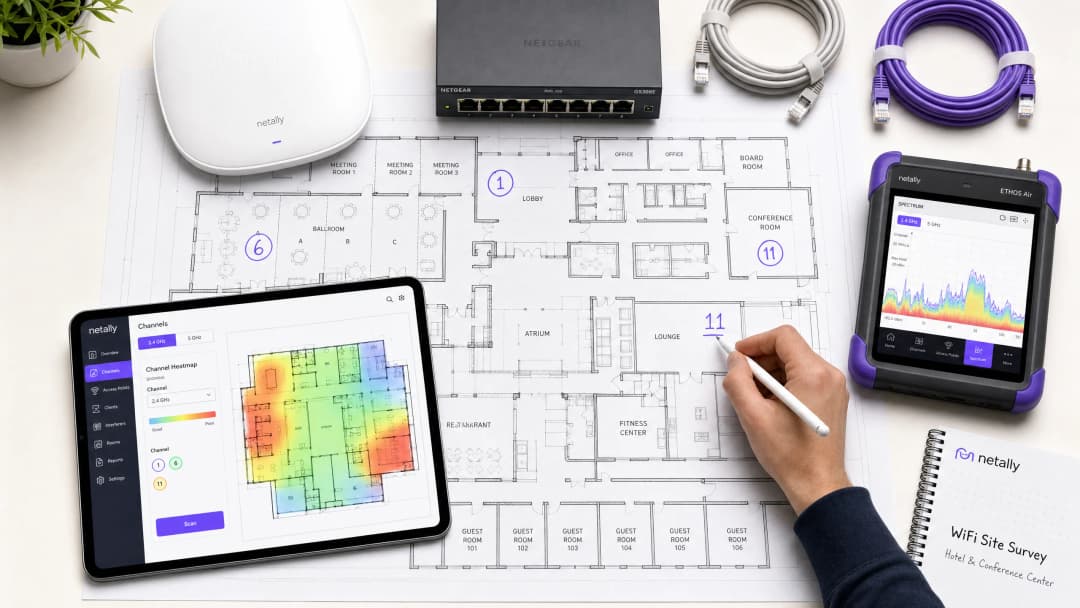
कार्यकारी सारांश
उच्च-घनत्व वाले एंटरप्राइज़ वातावरणों में—चाहे वह 500 कमरों का होटल हो, बहु-मंजिला रिटेल एस्टेट हो, या सार्वजनिक-क्षेत्र का परिसर हो—वायरलेस प्रदर्शन अब केवल एक अतिरिक्त सुविधा नहीं है; यह एक महत्वपूर्ण परिचालन बुनियादी ढांचा (operational infrastructure) है। फिर भी, कई डिप्लॉयमेंट कम थ्रूपुट, उच्च पुनः प्रयास दरों (retry rates) और रुक-रुक कर होने वाली कनेक्टिविटी समस्याओं से जूझते हैं, जो एक ही सुधारने योग्य मूल कारण से उत्पन्न होती हैं: सबऑप्टिमल (अनुपयुक्त) चैनल प्लानिंग। जटिल RF वातावरणों में डिफ़ॉल्ट वेंडर कॉन्फ़िगरेशन या सरल ऑटो-चैनल एल्गोरिदम पर भरोसा करने से अनिवार्य रूप से को-चैनल हस्तक्षेप (co-channel interference) और स्पेक्ट्रम कंजेशन होता है।
यह तकनीकी संदर्भ मार्गदर्शिका आपके वर्तमान RF वातावरण का विश्लेषण करने और एक निश्चित चैनल योजना को लागू करने के लिए वेंडर-न्यूट्रल, इंजीनियरिंग-आधारित कार्यप्रणाली प्रदान करती है। हम 2.4 GHz, 5 GHz और 6 GHz बैंड के परिचालन भौतिकी की जांच करेंगे, स्पेक्ट्रम विश्लेषण के लिए एक संरचित दृष्टिकोण की रूपरेखा तैयार करेंगे, और हस्तक्षेप को कम करने के लिए व्यावहारिक रूपरेखा प्रदान करेंगे। चैनल ऑप्टिमाइज़ेशन को एक बार के डिप्लॉयमेंट कार्य के बजाय एक निरंतर परिचालन अनुशासन मानकर, नेटवर्क टीमें थ्रूपुट में मापने योग्य सुधार कर सकती हैं, सपोर्ट टिकटों की संख्या को कम कर सकती हैं, और अतिथि उपकरणों और महत्वपूर्ण परिचालन बुनियादी ढांचे दोनों के लिए विश्वसनीय कनेक्टिविटी सुनिश्चित कर सकती हैं।
तकनीकी गहन विश्लेषण: RF स्पेक्ट्रम को समझना
चैनल आवंटन के बारे में सूचित निर्णय लेने के लिए, नेटवर्क आर्किटेक्ट्स को 802.11 मानकों के अंतर्निहित तंत्र और भौतिक वातावरण में विभिन्न फ्रीक्वेंसी बैंड कैसे व्यवहार करते हैं, इसे समझना चाहिए।
2.4 GHz बैंड: कमी का प्रबंधन
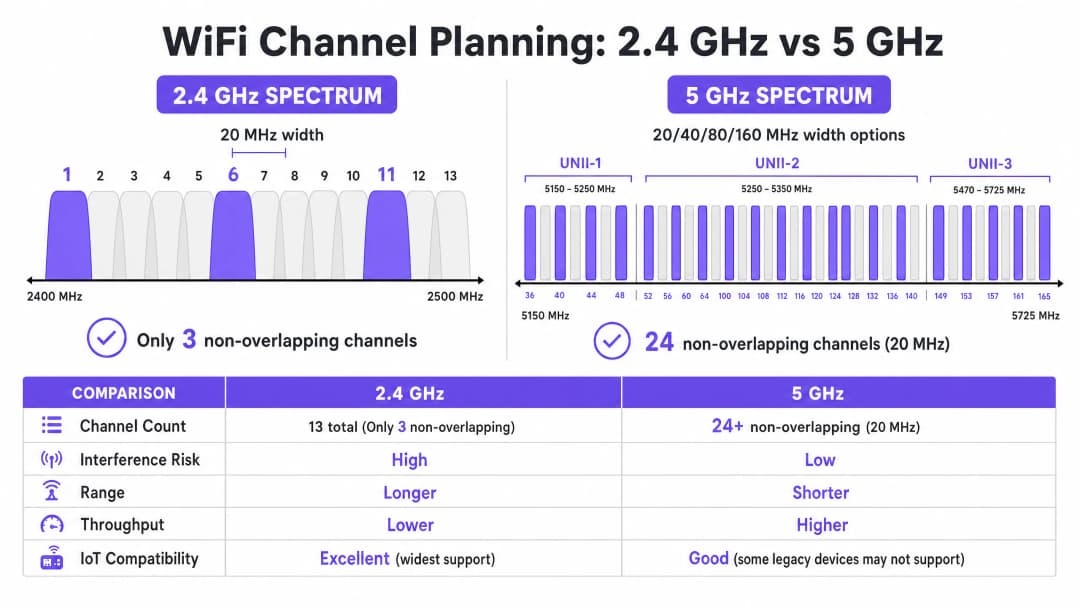
2.4 GHz बैंड बिना लाइसेंस वाले स्पेक्ट्रम का सबसे व्यस्त हिस्सा है। हालांकि यह बेहतर प्रसार विशेषताएं प्रदान करता है—जिससे सिग्नल उच्च फ्रीक्वेंसी की तुलना में दीवारों और फर्शों को अधिक प्रभावी ढंग से पार कर पाते हैं—इसकी चैनल संरचना मौलिक रूप से सीमित है। अधिकांश नियामक क्षेत्रों (यूरोप और उत्तरी अमेरिका सहित) में, यह बैंड ऐसे चैनल प्रदान करता है जो 20 MHz चौड़े हैं लेकिन केवल 5 MHz की दूरी पर हैं।
यह गणित यह तय करता है कि केवल तीन नॉन-ओवरलैपिंग चैनल उपलब्ध हैं: 1, 6, और 11। कोई भी डिप्लॉयमेंट जो इस तिकड़ी के बाहर के चैनलों (जैसे, चैनल 2, 3, या 4) का उपयोग करता है, वह एडजसेंट-चैनल हस्तक्षेप (adjacent-channel interference) को जन्म देता है। को-चैनल हस्तक्षेप के विपरीत, जहां उपकरण CSMA/CA का उपयोग करके एयरटाइम का समन्वय कर सकते हैं, एडजसेंट-चैनल हस्तक्षेप ट्रांसमिशन को दूषित करता है, जिससे उच्च पुनः प्रयास दरें (retry rates) और गंभीर थ्रूपुट गिरावट होती है।
इसके अलावा, 2.4 GHz बैंड को कई गैर-WiFi हस्तक्षेपकर्ताओं के साथ साझा किया जाता है, जिसमें Bluetooth डिवाइस, माइक्रोवेव ओवन और पुराने IoT सेंसर शामिल हैं। इस बैंड को ऑप्टिमाइज़ करते समय, प्राथमिक उद्देश्य अधिकतम थ्रूपुट के बजाय हस्तक्षेप को कम करना है।
5 GHz बैंड: क्षमता और जटिलता
5 GHz बैंड काफी अधिक क्षमता प्रदान करता है, जो नियामक क्षेत्र के आधार पर 24 या अधिक नॉन-ओवरलैपिंग 20 MHz चैनल प्रदान करता है। यह स्पेक्ट्रम Unlicensed National Information Infrastructure (UNII) सब-बैंड में विभाजित है:
- UNII-1 (चैनल 36-48): इन चैनलों को Dynamic Frequency Selection (DFS) की आवश्यकता नहीं होती है और ये उच्च-घनत्व वाले डिप्लॉयमेंट के लिए सबसे सुरक्षित शुरुआती बिंदु हैं।
- UNII-2 (चैनल 52-144): इन चैनलों के लिए DFS की आवश्यकता होती है, जिसका अर्थ है कि एक्सेस पॉइंट्स को रडार सिग्नेचर (जैसे मौसम या सैन्य रडार) की निगरानी करनी होगी और पता चलने पर चैनल खाली करना होगा। हालांकि DFS परिचालन जटिलता को बढ़ाता है, लेकिन घने वातावरण में आवश्यक चैनल पुन: उपयोग (channel reuse) प्राप्त करने के लिए UNII-2 का उपयोग करना आवश्यक है।
- UNII-3 (चैनल 149-165): ये चैनल आमतौर पर गैर-DFS होते हैं लेकिन क्षेत्र के आधार पर विभिन्न पावर प्रतिबंधों के अधीन होते हैं।
5 GHz बैंड में, नेटवर्क आर्किटेक्ट्स को चैनल की चौड़ाई और चैनल की उपलब्धता के बीच संतुलन बनाना होगा। हालांकि 80 MHz चैनल (802.11ac और Wi-Fi 6 के लिए डिफ़ॉल्ट) व्यक्तिगत क्लाइंट्स के लिए उच्च पीक थ्रूपुट प्रदान करते हैं, वे चार 20 MHz चैनलों की खपत करते हैं, जिससे पुन: उपयोग के लिए उपलब्ध नॉन-ओवरलैपिंग चैनलों की संख्या काफी कम हो जाती है। उच्च-घनत्व वाले स्थानों में, चौड़े चैनल अक्सर को-चैनल हस्तक्षेप का कारण बनते हैं, जिससे कुल क्षमता कम हो जाती है।
6 GHz फ्रंटियर (Wi-Fi 6E और Wi-Fi 7)
6 GHz बैंड की शुरुआत दो दशकों में WiFi स्पेक्ट्रम के सबसे महत्वपूर्ण विस्तार का प्रतिनिधित्व करती है, जिसमें 1200 MHz तक का ग्रीनफील्ड स्पेक्ट्रम जुड़ता है। यह 59 अतिरिक्त 20 MHz चैनल प्रदान करता है, जो पुराने डिवाइस के हस्तक्षेप और DFS आवश्यकताओं से पूरी तरह मुक्त हैं। हार्डवेयर अपग्रेड करने वाले स्थानों के लिए, 6 GHz उच्च-घनत्व वाले क्षेत्रों में 80 MHz या 160 MHz चैनलों के व्यावहारिक डिप्लॉयमेंट की अनुमति देता है। हालांकि, इसकी छोटी तरंग दैर्ध्य (wavelength) का अर्थ है कम रेंज और पैठ (penetration), जिसके लिए अधिक घने एक्सेस पॉइंट प्लेसमेंट की आवश्यकता होती है।
अपने विशिष्ट सेटअप को लेकर कोई सवाल हैं?
हमारी टीम 80,000 से अधिक वेन्यू में वेन्यू ऑपरेटरों, IT मैनेजरों और नेटवर्क इंजीनियरों के साथ काम करती है। 20 मिनट का कॉल बुक करें और हम आपको दिखाएंगे कि आपके जैसे अन्य लोगों ने इसे कैसे हल किया।
कार्यान्वयन मार्गदर्शिका: चैनल ऑप्टिमाइज़ेशन वर्कफ़्लो
अपने WiFi चैनल प्लान को ऑप्टिमाइज़ करने के लिए एक व्यवस्थित दृष्टिकोण की आवश्यकता होती, जो बेसलाइन माप से लेकर इंजीनियर डिज़ाइन और मान्य डिप्लॉयमेंट तक जाता है।
चरण 1: बेसलाइन RF ऑडिट
कोई भी कॉन्फ़िगरेशन परिवर्तन करने से पहले, आपको RF वातावरण की वर्तमान स्थिति को समझना होगा। इसके लिए व्यापक माप उपकरणों की आवश्यकता होती है, न कि केवल एक स्मार्टफोन ऐप की।
- पैसिव स्पेक्ट्रम विश्लेषण: नॉइज़ फ्लोर को मापने और गैर-WiFi हस्तक्षेप स्रोतों की पहचान करने के लिए एक समर्पित स्पेक्ट्रम विश्लेषक (जैसे, Ekahau Sidekick, NetAlly AirCheck) का उपयोग करें। एक साफ वातावरण आमतौर पर लगभग -95 dBm का नॉइज़ फ्लोर प्रदर्शित करता है।
- पड़ोसी नेटवर्क सर्वेक्षण: सभी दृश्यमान Basic Service Set Identifiers (BSSIDs), उनके ऑपरेटिंग चैनलों और Received Signal Strength Indicators (RSSI) को सूचीबद्ध करें। रिटेल पार्क या बहु-किराएदार कार्यालय भवनों जैसे वातावरणों में, बाहरी नेटवर्क बेकाबू हस्तक्षेप का एक प्राथमिक स्रोत होते हैं।
- क्लाइंट प्रदर्शन मेट्रिक्स: केवल RSSI के बजाय Signal-to-Noise Ratio (SNR) का विश्लेषण करें। 20 dB से नीचे का SNR क्लाइंट्स को कम Modulation and Coding Scheme (MCS) इंडेक्स का उपयोग करने के लिए मजबूर करेगा, जिससे थ्रूपुट कम हो जाएगा। विश्वसनीय प्रदर्शन के लिए 25 dB या उससे अधिक का SNR लक्षित करें।
चरण 2: चैनल प्लान डिज़ाइन
बेसलाइन डेटा से लैस होकर, एक निश्चित चैनल प्लान तैयार करें।
- 2.4 GHz रणनीति: चैनल 1, 6 और 11 के उपयोग को सख्ती से लागू करें। यदि घनत्व बहुत अधिक है, तो चुनिंदा एक्सेस पॉइंट्स पर 2.4 GHz रेडियो को अक्षम करें, जिससे पुराने IoT उपकरणों के लिए कवरेज बनाए रखते हुए को-चैनल हस्तक्षेप को कम करने के लिए एक "सॉल्ट एंड पेपर" डिज़ाइन तैयार हो सके।
- 5 GHz रणनीति: नॉन-ओवरलैपिंग चैनलों की अधिकतम संख्या का उपयोग करें, जिसमें DFS चैनल भी शामिल हैं यदि आपके क्षेत्र में रडार गतिविधि कम है।
- चैनल चौड़ाई का चयन: उच्च-घनत्व वाले क्षेत्रों (जैसे, सम्मेलन कक्ष, स्टेडियम) के लिए 20 MHz चैनलों को मानकीकृत करें। मध्यम-घनत्व वाले क्षेत्रों (जैसे, होटल के कमरे, ओपन-प्लान कार्यालय) में 40 MHz चैनलों का उपयोग करें। जब तक बहुत कम-घनत्व, उच्च-थ्रूपुट परिदृश्यों में डिप्लॉय न किया जा रहा हो, तब तक 80 MHz चैनलों से बचें।
- ट्रांसमिट पावर ट्यूनिंग: चैनल प्लानिंग और ट्रांसमिट पावर अटूट रूप से जुड़े हुए हैं। प्रत्येक एक्सेस पॉइंट के सेल आकार को सिकोड़ने के लिए ट्रांसमिट पावर को कम करें, जिससे एक ही चैनल पर APs के बीच ओवरलैप (और इस प्रकार हस्तक्षेप) कम से कम हो। को-चैनल APs के बीच 15-20 dBm के अलगाव का लक्ष्य रखें।

चरण 3: चरणबद्ध रोलआउट और सत्यापन
व्यावसायिक घंटों के दौरान या पूरे एस्टेट में एक साथ कभी भी वैश्विक चैनल परिवर्तन लागू न करें।
- रखरखाव विंडो (Maintenance Windows): रेडियो रीसेट से होने वाले व्यवधान को कम करने के लिए सबसे कम उपयोग की अवधि (आमतौर पर 02:00 - 05:00) के दौरान बदलावों को शेड्यूल करें।
- क्षेत्रीय डिप्लॉयमेंट (Zonal Deployment): तार्किक क्षेत्रों में नई योजना को रोल आउट करें (जैसे, एक समय में एक मंजिल या एक विंग)।
- परिवर्तन के बाद सत्यापन: नई योजना लागू करने के बाद, बेसलाइन ऑडिट में उपयोग किए गए समान उपकरणों का उपयोग करके परिवर्तनों को सत्यापित करें। सुनिश्चित करें कि को-चैनल हस्तक्षेप कम हो गया है और SNR लक्ष्यों को पूरा किया जा रहा है।
चैनल ऑप्टिमाइज़ेशन रणनीतियों पर हमारे 10 मिनट के तकनीकी ब्रीफिंग को सुनें:
सर्वोत्तम अभ्यास और जोखिम शमन
ऑटो-चैनल एल्गोरिदम के नुकसान
अधिकांश एंटरप्राइज़ WLAN कंट्रोलर में स्वचालित Radio Resource Management (RRM) या ऑटो-चैनल चयन की सुविधा होती है। हालांकि छोटे डिप्लॉयमेंट के लिए सुविधाजनक होने के बावजूद, ये एल्गोरिदम अक्सर उच्च-घनत्व वाले वातावरण में हानिकारक होते हैं। वे RF वातावरण के वैश्विक दृष्टिकोण के बजाय स्थानीय AP दृष्टिकोण के आधार पर निर्णय लेते हैं, जिससे अक्सर अनुपयुक्त चैनल असाइनमेंट होते हैं और परिचालन घंटों के दौरान विघटनकारी, क्रमिक चैनल परिवर्तन होते हैं।
सर्वोत्तम अभ्यास: जटिल स्थानों में, ऑटो-चैनल चयन को अक्षम करें। कठोर साइट सर्वेक्षणों के आधार पर मैन्युअल रूप से इंजीनियर, स्थिर (static) चैनल योजना लागू करें। कंट्रोलर की RRM सुविधाओं का उपयोग केवल महत्वपूर्ण RF परिवर्तनों पर अलर्ट करने के लिए करें, न कि स्वचालित सुधार के लिए।
को-चैनल हस्तक्षेप (CCI) को संबोधित करना
घने डिप्लॉयमेंट में CCI प्राथमिक प्रदर्शन नाशक है। शमन तकनीकों की गहरी समझ के लिए, Resolving Co-Channel Interference in Enterprise Deployments पर हमारी व्यापक मार्गदर्शिका देखें।
निरंतर निगरानी का महत्व
RF वातावरण के विकसित होने के साथ-साथ एक स्थिर चैनल योजना समय के साथ खराब हो जाएगी—नए पड़ोसी नेटवर्क दिखाई देते हैं, संरचनात्मक परिवर्तन होते हैं, या नए IoT डिवाइस डिप्लॉय किए जाते हैं। चैनल ऑप्टिमाइज़ेशन कोई "सेट एंड फॉरगेट" (सेट करके भूल जाने वाला) कार्य नहीं है।
सर्वोत्तम अभ्यास: एक एनालिटिक्स प्लेटफॉर्म का उपयोग करके निरंतर निगरानी लागू करें। Purple's WiFi Analytics क्लाइंट घनत्व, सत्र गुणवत्ता और स्थान-व्यापी थ्रूपुट प्रवृत्तियों में आवश्यक दृश्यता प्रदान करता है। SNR गिरावट या बढ़ी हुई पुनः प्रयास दरों के लिए थ्रेशोल्ड अलर्ट सेट करें ताकि सक्रिय रूप से पहचान की जा सके कि चैनल योजना में कब संशोधन की आवश्यकता है।
ROI और व्यावसायिक प्रभाव
अपने WiFi चैनल प्लान को ऑप्टिमाइज़ करने के लिए समय और उपकरणों में निवेश की आवश्यकता होती है, लेकिन निवेश पर रिटर्न (ROI) पर्याप्त और मापने योग्य है।
- बढ़ा हुआ कुल थ्रूपुट: को-चैनल हस्तक्षेप को कम करके और चैनल की चौड़ाई को ऑप्टिमाइज़ करके, स्थान अक्सर नए हार्डवेयर को डिप्लॉय किए बिना कुल नेटवर्क क्षमता में 20-40% की वृद्धि प्राप्त कर सकते हैं।
- कम सपोर्ट ओवरहेड: एक स्थिर RF वातावरण "धीमे WiFi" या रुक-रुक कर होने वाले डिस्कनेक्शन से संबंधित हेल्पडेस्क टिकटों को काफी कम कर देता है, जिससे परिचालन सहायता लागत कम हो जाती है।
- बेहतर उपयोगकर्ता अनुभव: Guest WiFi पर निर्भर वातावरणों के लिए, जैसे कि Hospitality या Retail, विश्वसनीय कनेक्टिविटी सीधे उच्च ग्राहक संतुष्टि स्कोर और कैप्टिव पोर्टल के साथ बढ़े हुए जुड़ाव से संबंधित है।
- परिचालन विश्वसनीयता: पॉइंट-ऑफ-सेल टर्मिनलों से लेकर हैंडहेल्ड इन्वेंट्री स्कैनर तक, महत्वपूर्ण व्यावसायिक प्रणालियाँ मजबूत वायरलेस कनेक्टिविटी पर निर्भर करती हैं। एक साफ चैनल योजना यह सुनिश्चित करती है कि ये प्रणालियाँ बिना किसी रुकावट के काम करें, जिससे राजस्व और परिचालन दक्षता की रक्षा होती है।
RF स्पेक्ट्रम को एक महत्वपूर्ण, प्रबंधनीय संसाधन मानकर, IT लीडर अपने वायरलेस बुनियादी ढांचे को निराशा के स्रोत से एंटरप्राइज़ संचालन के लिए एक विश्वसनीय आधार में बदल सकते हैं।
मुख्य परिभाषाएं
Co-Channel Interference (CCI)
हस्तक्षेप जो तब होता है जब दो या दो से अधिक एक्सेस पॉइंट एक-दूसरे की सीमा के भीतर एक ही फ्रीक्वेंसी चैनल पर काम करते हैं, जिससे उपकरणों को एयरटाइम साझा करने और माध्यम के साफ होने की प्रतीक्षा करने के लिए मजबूर होना पड़ता है।
घने डिप्लॉयमेंट में CCI थ्रूपुट में गिरावट का प्राथमिक कारण है जहां चैनल पुन: उपयोग की योजना खराब तरीके से बनाई गई है।
Adjacent-Channel Interference (ACI)
ओवरलैपिंग फ्रीक्वेंसी (जैसे, 2.4 GHz बैंड में चैनल 1 और 3 का उपयोग करना) के कारण होने वाला हस्तक्षेप, जो एयरटाइम साझा करने के बजाय ट्रांसमिशन को दूषित करता है।
ACI अत्यधिक विनाशकारी है और नॉन-ओवरलैपिंग चैनल असाइनमेंट का सख्ती से पालन करके इससे बचा जाना चाहिए।
Dynamic Frequency Selection (DFS)
5 GHz बैंड में एक नियामक आवश्यकता जहां एक्सेस पॉइंट्स को रडार सिग्नलों की निगरानी करनी चाहिए और पता चलने पर चैनल खाली करना चाहिए।
हालांकि DFS चैनल (UNII-2) परिचालन जटिलता बढ़ाते हैं, लेकिन उच्च-घनत्व वाले वातावरण में पर्याप्त चैनल पुन: उपयोग प्राप्त करने के लिए वे आवश्यक हैं।
Signal-to-Noise Ratio (SNR)
प्राप्त सिग्नल की ताकत और बैकग्राउंड नॉइज़ फ्लोर के बीच डेसिबल (dB) में अंतर।
SNR अकेले RSSI की तुलना में क्लाइंट प्रदर्शन का अधिक सटीक संकेतक है। उच्च SNR तेज मॉड्यूलेशन दरों की अनुमति देता है।
Modulation and Coding Scheme (MCS)
एक इंडेक्स मान जो ट्रांसमिशन के लिए उपयोग किए जाने वाले मॉड्यूलेशन प्रकार और कोडिंग दर के संयोजन का प्रतिनिधित्व करता है, जो डेटा दर को निर्धारित करता है।
उच्च SNR वाला एक साफ RF वातावरण क्लाइंट्स को उच्च MCS इंडेक्स पर बातचीत करने की अनुमति देता है, जिसके परिणामस्वरूप तेज थ्रूपुट मिलता है।
Carrier Sense Multiple Access with Collision Avoidance (CSMA/CA)
802.11 नेटवर्क द्वारा उपयोग किया जाने वाला प्रोटोकॉल जहां डिवाइस टकराव से बचने के लिए ट्रांसमिट करने से पहले वायरलेस माध्यम को सुनते हैं।
CSMA/CA साझा चैनलों पर एयरटाइम का प्रबंधन करता है लेकिन उच्च CCI वाले वातावरण में महत्वपूर्ण ओवरहेड और कम थ्रूपुट की ओर ले जाता है।
Noise Floor
वातावरण में बैकग्राउंड RF ऊर्जा का माप, जिसे आमतौर पर dBm में व्यक्त किया जाता है।
एक उच्च नॉइज़ फ्लोर प्रभावी SNR को कम करता है, जिससे प्रदर्शन खराब होता है। RF नॉइज़ के स्रोतों की पहचान करना और उन्हें कम करना चैनल ऑप्टिमाइज़ेशन में एक महत्वपूर्ण कदम है।
Received Signal Strength Indicator (RSSI)
प्राप्त रेडियो सिग्नल में मौजूद शक्ति का माप।
हालांकि बुनियादी कवरेज मैपिंग के लिए उपयोगी है, सटीक प्रदर्शन विश्लेषण के लिए नॉइज़ फ्लोर (SNR निर्धारित करने के लिए) के साथ RSSI का मूल्यांकन किया जाना चाहिए।
हल किए गए उदाहरण
एक घने शहरी वातावरण में स्थित 300 कमरों वाले होटल में शाम के व्यस्त घंटों के दौरान खराब WiFi प्रदर्शन का सामना करना पड़ रहा है। वर्तमान डिप्लॉयमेंट 5 GHz बैंड पर 80 MHz चैनलों का उपयोग करता है, और ऑटो-चैनल चयन सक्षम है। मेहमान बार-बार डिस्कनेक्ट होने और धीमी स्ट्रीमिंग स्पीड की रिपोर्ट करते हैं।
- हस्तक्षेप को मापने के लिए व्यस्त घंटों के दौरान बेसलाइन स्पेक्ट्रम विश्लेषण करें।
- विघटनकारी रेडियो रीसेट को रोकने के लिए WLAN कंट्रोलर पर ऑटो-चैनल चयन को अक्षम करें।
- 5 GHz रेडियो को 80 MHz से 20 MHz चैनल चौड़ाई में पुन: कॉन्फ़िगर करें। इससे उपलब्ध नॉन-ओवरलैपिंग चैनलों की संख्या 6 से बढ़कर 24+ हो जाती है।
- एक स्थिर चैनल योजना लागू करें, यह सुनिश्चित करते हुए कि आस-पास के एक्सेस पॉइंट अलग-अलग चैनलों पर काम करें और को-चैनल एक्सेस पॉइंट कम से कम 15-20 dBm सिग्नल एटेन्यूएशन (attenuation) से अलग हों।
- पहले से समस्याग्रस्त क्षेत्रों में SNR और पुनः प्रयास दरों को मापकर नए कॉन्फ़िगरेशन को सत्यापित करें।
एक बड़ा रिटेल वेयरहाउस इन्वेंट्री प्रबंधन के लिए 2.4 GHz हैंडहेल्ड स्कैनर पर निर्भर करता है। स्कैनर अक्सर नेटवर्क से अपना कनेक्शन खो देते हैं, जिससे कर्मचारियों को डिवाइस को रीबूट करना पड़ता है। एक्सेस पॉइंट्स को वर्तमान में चैनल 1, 4, 8 और 11 का उपयोग करने के लिए कॉन्फ़िगर किया गया है।
- 2.4 GHz बैंड में गैर-WiFi हस्तक्षेप के स्रोतों (जैसे, Bluetooth बीकन, पुराने सुरक्षा कैमरे) की पहचान करने के लिए एक पैसिव RF स्कैन करें।
- केवल नॉन-ओवरलैपिंग चैनलों: 1, 6, और 11 का उपयोग करने के लिए सभी 2.4 GHz रेडियो को पुन: कॉन्फ़िगर करें।
- सेल ओवरलैप को कम करने के लिए ट्रांसमिट पावर को समायोजित करें, यह सुनिश्चित करते हुए कि स्कैनर दूर के, कमजोर सिग्नलों से चिपके बिना (sticky clients) एक्सेस पॉइंट्स के बीच निर्बाध रूप से रोमिंग करें।
- हैंडहेल्ड स्कैनर के रोमिंग व्यवहार और पुनः प्रयास दरों को ट्रैक करने के लिए निगरानी लागू करें।
अभ्यास प्रश्न
Q1. आप एक उच्च-घनत्व वाले सम्मेलन केंद्र के लिए WiFi डिप्लॉयमेंट डिज़ाइन कर रहे हैं। हजारों समवर्ती क्लाइंट उपकरणों का समर्थन करने के लिए स्थान को अधिकतम कुल क्षमता की आवश्यकता है। आपको 5 GHz बैंड के लिए कौन सी चैनल चौड़ाई रणनीति अपनानी चाहिए?
संकेत: पुन: उपयोग के लिए उपलब्ध नॉन-ओवरलैपिंग चैनलों की संख्या और व्यक्तिगत पीक थ्रूपुट के बीच समझौते पर विचार करें।
मॉडल उत्तर देखें
20 MHz चैनलों पर मानकीकृत करें। हालांकि 80 MHz चैनल एकल उपयोगकर्ता के लिए उच्च पीक थ्रूपुट प्रदान करते हैं, वे उपलब्ध नॉन-ओवरलैपिंग चैनलों की संख्या को काफी कम कर देते हैं। उच्च-घनत्व वाले वातावरण में, 20 MHz चैनलों का उपयोग करने से चैनल का पुन: उपयोग अधिकतम होता है, को-चैनल हस्तक्षेप कम होता है, और स्थान के लिए उच्चतम कुल क्षमता मिलती है।
Q2. एक रिटेल पार्क के साइट सर्वेक्षण के दौरान, आप पाते हैं कि कई पड़ोसी व्यवसाय 2.4 GHz बैंड में चैनल 4 पर अपने एक्सेस पॉइंट संचालित कर रहे हैं। इसके जवाब में आपको अपने एक्सेस पॉइंट्स को कैसे कॉन्फ़िगर करना चाहिए?
संकेत: को-चैनल हस्तक्षेप बनाम एडजसेंट-चैनल हस्तक्षेप के प्रभाव का मूल्यांकन करें।
मॉडल उत्तर देखें
आपको अपने एक्सेस पॉइंट्स को चैनल 1, 6, या 11 का उपयोग करने के लिए कॉन्फ़िगर करना होगा, विशेष रूप से उस चैनल (संभवतः 11) का चयन करना होगा जो हस्तक्षेप करने वाले चैनल 4 से सबसे दूर है। चैनल 4 पर काम करने से गंभीर एडजसेंट-चैनल हस्तक्षेप होगा। यहाँ तक कि चैनल 6 पर काम करने से भी चैनल 4 पर मजबूत सिग्नलों से कुछ ओवरलैप हो सकता है। एडजसेंट-चैनल हस्तक्षेप शुरू करने की तुलना में एक मानक चैनल (1, 6, 11) पर कुछ को-चैनल हस्तक्षेप को स्वीकार करना बेहतर है।
Q3. एक अस्पताल में एक नई स्थिर चैनल योजना लागू करने के बाद, आप देखते हैं कि एक विशिष्ट वार्ड में क्लाइंट्स को मजबूत RSSI (-65 dBm) की रिपोर्ट करने के बावजूद धीमी गति का सामना करना पड़ रहा है। इसका सबसे संभावित कारण क्या है, और आप इसकी जांच कैसे करेंगे?
संकेत: RSSI केवल सिग्नल की ताकत को मापता है, सिग्नल की गुणवत्ता को नहीं। कौन सा मेट्रिक वास्तविक उपयोगी सिग्नल निर्धारित करता है?
मॉडल उत्तर देखें
सबसे संभावित कारण एक उच्च नॉइज़ फ्लोर है जिसके कारण कम Signal-to-Noise Ratio (SNR) होता है। मजबूत RSSI के साथ भी, यदि नॉइज़ फ्लोर उच्च है (जैसे, -75 dBm), तो परिणामी SNR (10 dB) उच्च गति मॉड्यूलेशन के लिए बहुत कम है। आपको उस विशिष्ट वार्ड में RF नॉइज़ के स्रोत की पहचान करने और उसे कम करने के लिए एक स्पेक्ट्रम विश्लेषक का उपयोग करना चाहिए।
इस श्रृंखला में आगे पढ़ें
सर्वोत्तम चैनल प्लानिंग के लिए RSSI और सिग्नल की ताकत को समझना
यह गाइड सर्वोत्तम चैनल प्लानिंग के लिए RSSI, सिग्नल-टू-नॉइज रेशियो (SNR), और RF प्रोपेगेशन सिद्धांतों की व्यापक तकनीकी जानकारी प्रदान करती है। यह IT प्रबंधकों, नेटवर्क आर्किटेक्ट्स और वेन्यू ऑपरेशंस डायरेक्टरों को को-चैनल और एडजसेंट चैनल इंटरफेरेंस को कम करने, AP प्लेसमेंट को अनुकूलित करने, और हॉस्पिटैलिटी, रिटेल एवं सार्वजनिक क्षेत्र के वातावरण में मापने योग्य व्यावसायिक प्रभाव के लिए एनालिटिक्स का लाभ उठाने की व्यावहारिक रणनीतियों से लैस करती है।
WiFi 6 बनाम WiFi 5: क्या यह चैनल इंटरफेरेंस को हल करता है?
यह गाइड एक तकनीकी डीप-डाइव प्रदान करती है कि कैसे WiFi 6 (802.11ax) OFDMA और BSS कलरिंग के माध्यम से हाई-डेंसिटी एंटरप्राइज़ वातावरण में चैनल इंटरफेरेंस को संबोधित करता है। यह IT प्रबंधकों, नेटवर्क आर्किटेक्ट्स और CTOs को कार्रवाई योग्य डिप्लॉयमेंट रणनीतियों, हॉस्पिटैलिटी और हेल्थकेयर से वास्तविक दुनिया के केस स्टडीज़, और उन स्थानों में इंफ्रास्ट्रक्चर अपग्रेड के ROI का मूल्यांकन करने के लिए एक रूपरेखा से लैस करता है जहां वायरलेस परफॉरमेंस व्यवसाय के लिए महत्वपूर्ण है।
उच्च घनत्व वाले स्थानों के लिए सर्वश्रेष्ठ WiFi चैनल
स्टेडियम, एरेनास और बड़े सार्वजनिक स्थलों जैसे उच्च-घनत्व वाले वातावरण में WiFi चैनलों के चयन और अनुकूलन के लिए एक निश्चित तकनीकी संदर्भ। इसमें RF भौतिकी, 5 GHz और 6 GHz बैंड में चैनल पुन: उपयोग रणनीतियों और IT लीडर्स के लिए व्यावहारिक परिनियोजन मार्गदर्शन शामिल है।
अपने विशिष्ट सेटअप को लेकर कोई सवाल हैं?
हमारी टीम 80,000 से अधिक वेन्यू में वेन्यू ऑपरेटरों, IT मैनेजरों और नेटवर्क इंजीनियरों के साथ काम करती है। 20 मिनट का कॉल बुक करें और हम आपको दिखाएंगे कि आपके जैसे अन्य लोगों ने इसे कैसे हल किया।