
Como Analisar e Alterar o Seu Canal de WiFi para a Máxima Velocidade
Este guia de referência técnica autoritário equipa gestores de TI e arquitetos de rede com as metodologias para analisar ambientes de RF e implementar planos de canais de WiFi ideais. Fornece estruturas acionáveis para mitigar a interferência de cocanal, maximizar o throughput e garantir uma conectividade robusta em implementações empresariais de alta densidade.
Ouça este guia
Ver transcrição do podcast
Resumo Executivo
Em ambientes empresariais de alta densidade - quer se trate de um hotel com 500 quartos, de um espaço de retalho com vários pisos ou de um campus do setor público - o desempenho sem fios já não é apenas uma comodidade adicional; é uma infraestrutura operacional crítica. No entanto, muitas implementações sofrem de baixo débito (throughput), taxas de retransmissão elevadas e problemas de conectividade intermitente, tudo derivado de uma única causa raiz retificável: um planeamento de canais abaixo do ideal. Confiar em configurações predefinidas do fabricante ou em algoritmos simples de canal automático em ambientes de RF complexos leva inevitavelmente à interferência de cocanal e à congestão do espetro.
Este guia de referência técnica fornece uma metodologia neutra em termos de fabricante e baseada em engenharia para analisar o seu ambiente de RF atual e implementar um plano de canais definitivo. Iremos examinar a física operacional das bandas de 2.4 GHz, 5 GHz e 6 GHz, delinear uma abordagem estruturada para a análise do espetro e fornecer estruturas práticas para mitigar a interferência. Ao tratar a otimização de canais como uma disciplina operacional contínua, em vez de uma tarefa de implementação única, as equipas de rede podem alcançar melhorias mensuráveis no débito, reduzir o volume de pedidos de suporte e garantir uma conectividade fiável tanto para dispositivos de convidados como para infraestruturas operacionais críticas.
Análise Técnica Detalhada: Compreender o Espetro de RF
Para tomar decisões informadas sobre a atribuição de canais, os arquitetos de rede devem compreender a mecânica subjacente às normas 802.11 e como as diferentes bandas de frequência se comportam no ambiente físico.
A Banda de 2.4 GHz: Gerir a Escassez
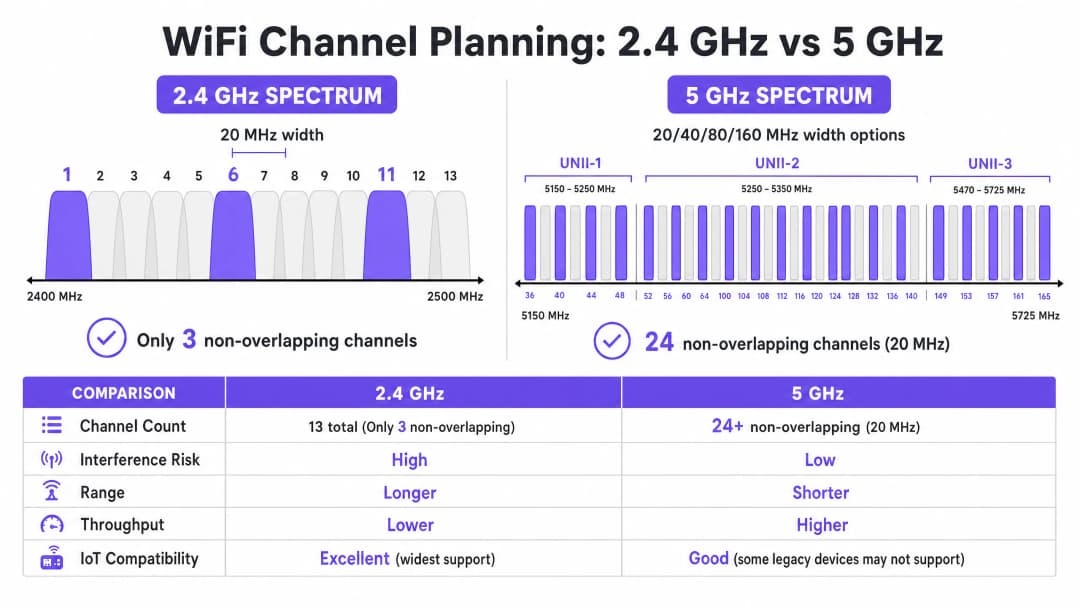
A banda de 2.4 GHz é a fatia mais movimentada do espetro não licenciado. Embora ofereça características de propagação superiores - permitindo que os sinais penetrem em paredes e pisos de forma mais eficaz do que as frequências mais elevadas - a sua estrutura de canais é fundamentalmente limitada. Na maioria dos domínios regulamentares (incluindo a Europa e a América do Norte), esta banda oferece canais com 20 MHz de largura, mas com apenas 5 MHz de espaçamento entre si.
Esta matemática dita que apenas estão disponíveis três canais sem sobreposição: 1, 6 e 11. Qualquer implementação que utilize canais fora deste trio (por exemplo, canais 2, 3 ou 4) introduz interferência de canal adjacente. Ao contrário da interferência de cocanal, onde os dispositivos podem coordenar o tempo de antena utilizando CSMA/CA, a interferência de canal adjacente corrompe as transmissões, resultando em taxas de retransmissão elevadas e numa degradação severa do débito.
Além disso, a banda de 2.4 GHz é partilhada com inúmeros interferentes que não são de WiFi, incluindo dispositivos Bluetooth, fornos de microondas e sensores IoT legados. Ao otimizar esta banda, o objetivo principal é a mitigação de interferências e não o débito máximo.
A Banda de 5 GHz: Capacidade e Complexidade
A banda de 5 GHz oferece uma capacidade significativamente maior, disponibilizando 24 ou mais canais de 20 MHz sem sobreposição, dependendo do domínio regulamentar. Este espetro está dividido em sub-bandas Unlicensed National Information Infrastructure (UNII):
- UNII-1 (Canais 36-48): Estes canais não requerem Seleção Dinâmica de Frequência (DFS) e são o ponto de partida mais seguro para implementações de alta densidade.
- UNII-2 (Canais 52-144): Estes canais requerem DFS, o que significa que os pontos de acesso devem monitorizar assinaturas de radar (como radares meteorológicos ou militares) e desocupar o canal se forem detetadas. Embora o DFS adicione complexidade operacional, a utilização de UNII-2 é essencial para obter a reutilização de canais necessária em ambientes densos.
- UNII-3 (Canais 149-165): Estes canais são tipicamente sem DFS, mas estão sujeitos a restrições de potência variáveis consoante a região.
Na banda de 5 GHz, os arquitetos de rede devem equilibrar a largura e a disponibilidade do canal. Embora os canais de 80 MHz (o padrão para 802.11ac e Wi-Fi 6) ofereçam um rendimento de pico mais elevado para clientes individuais, consomem quatro canais de 20 MHz, reduzindo drasticamente o número de canais sem sobreposição disponíveis para reutilização. Em locais de alta densidade, os canais mais largos causam frequentemente interferência no mesmo canal, reduzindo a capacidade geral.
A Fronteira dos 6 GHz (Wi-Fi 6E e Wi-Fi 7)
A introdução da banda de 6 GHz representa a expansão mais significativa do espetro WiFi em duas décadas, adicionando até 1200 MHz de espetro totalmente novo. Disponibiliza 59 canais adicionais de 20 MHz, totalmente livres de interferências de dispositivos antigos e de requisitos de DFS. Para locais que estão a atualizar hardware, os 6 GHz permitem a implementação prática de canais de 80 MHz ou 160 MHz em áreas de alta densidade. No entanto, o seu comprimento de onda mais curto significa um menor alcance e penetração, exigindo uma colocação de pontos de acesso mais densa.
Tem dúvidas sobre a sua configuração específica?
A nossa equipa trabalha com operadores de espaços, gestores de TI e engenheiros de rede em 80.000 espaços. Agende uma chamada de 20 minutos e mostraremos como outros profissionais na sua área o resolveram.
Guia de Implementação: Fluxo de Trabalho de Otimização de Canais
A otimização do seu plano de canais WiFi requer uma abordagem sistemática que vai desde a medição de referência até ao design de engenharia e à implementação validada.
Passo 1: Auditoria de RF de Referência
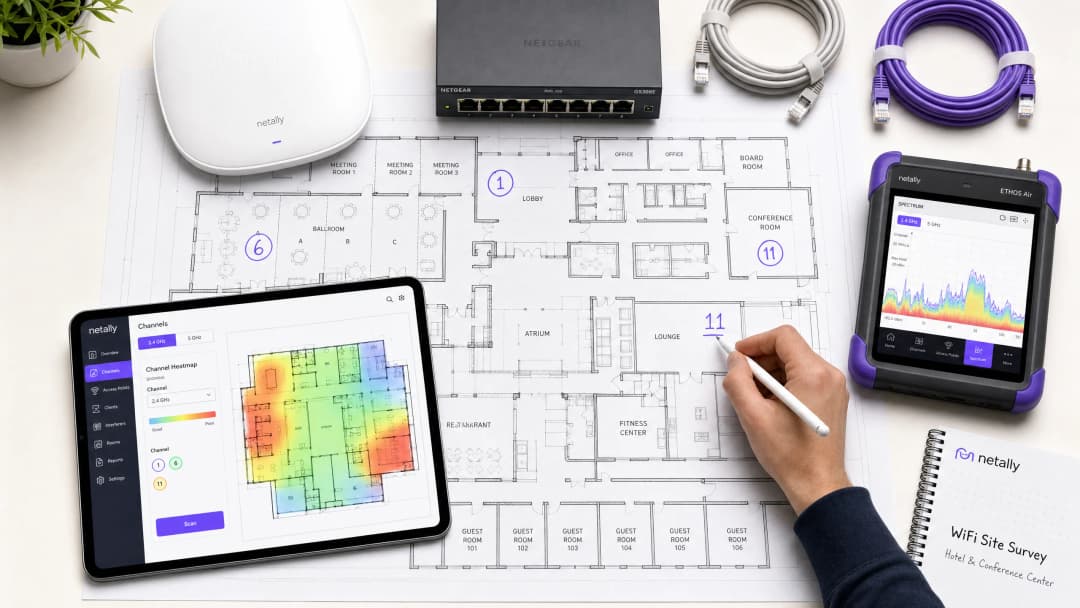
Antes de efetuar quaisquer alterações de configuração, deve compreender o estado atual do ambiente de RF. Isto requer ferramentas de medição abrangentes, e não apenas uma aplicação para smartphone.
- Análise de Espetro Passiva: Utilize um analisador de espetro dedicado (por exemplo, Ekahau Sidekick, NetAlly AirCheck) para medir o ruído de fundo e identificar fontes de interferência que não sejam de WiFi. Um ambiente limpo apresenta normalmente um ruído de fundo de cerca de -95 dBm.
- Levantamento de Redes Vizinhas: Liste todos os Basic Service Set Identifiers (BSSIDs) visíveis, os seus canais de operação e os Indicadores de Força do Sinal Recebido (RSSI). Em ambientes como parques comerciais ou edifícios de escritórios com vários inquilinos, as redes externas são uma fonte primária de interferência incontrolável.
- Métricas de Desempenho do Cliente: Analise a Relação Sinal - Ruído (SNR) em vez de apenas o RSSI. Um SNR abaixo de 20 dB forçará os clientes a utilizar um índice de Esquema de Modulação e Codificação (MCS) mais baixo, reduzindo a largura de banda. Defina como meta um SNR de 25 dB ou superior para um desempenho fiável.
Passo 2: Desenho do Plano de Canais
Equipado com os dados de referência, desenhe um plano de canais definitivo.
- Estratégia de 2.4 GHz: Imponha estritamente a utilização dos canais 1, 6 e 11. Se a densidade for extremamente elevada, desative seletivamente os rádios de 2.4 GHz em determinados pontos de acesso para criar um desenho alternado, reduzindo a interferência de cocanal e mantendo a cobertura para dispositivos IoT legados.
- Estratégia de 5 GHz: Utilize o número máximo de canais que não se sobrepõem, incluindo canais DFS se a atividade de radar for baixa na sua área.
- Seleção da Largura do Canal: Padronize canais de 20 MHz para áreas de alta densidade (ex.: salas de conferências, estádios). Utilize canais de 40 MHz em áreas de média densidade (ex.: quartos de hotel, escritórios em open-plan). Evite canais de 80 MHz, a menos que a implementação seja feita em cenários de densidade muito baixa e alta largura de banda.
- Ajuste da Potência de Transmissão: O planeamento de canais e a potência de transmissão estão intrinsecamente ligados. Reduza a potência de transmissão para encolher o tamanho da célula de cada ponto de acesso, minimizando assim a sobreposição (e consequentemente a interferência) entre APs no mesmo canal. Tente obter uma separação de 15 - 20 dBm entre APs de cocanal.

Passo 3: Implementação Faseada e Validação
Nunca aplique alterações de canais globais simultaneamente em toda a infraestrutura ou durante o horário de expediente.
- Janelas de Manutenção: Agende as alterações durante os períodos de menor utilização (normalmente das 02:00 às 05:00) para minimizar a interrupção causada pela reinicialização dos rádios.
- Implementação por Zonas: Implemente o novo plano em zonas lógicas (ex.: um piso ou uma ala de cada vez).
- Validação Pós-Alteração: Após aplicar o novo plano, valide as alterações utilizando as mesmas ferramentas que usou na auditoria de referência. Garanta que a interferência de cocanal diminuiu e que as metas de SNR estão a ser cumpridas.
Oiça o nosso briefing técnico de 10 minutos sobre estratégias de otimização de canais:
Melhores Práticas e Mitigação de Riscos
As Armadilhas dos Algoritmos de Canal Automático
A maioria dos controladores WLAN empresariais dispõe de Gestão Automática de Recursos de Rádio (RRM) ou de seleção automática de canais. Embora sejam convenientes para implementações mais pequenas, estes algoritmos são frequentemente prejudiciais em ambientes de alta densidade. Tomam decisões baseadas na perspetiva de um AP local e não numa visão global do ambiente de RF, o que leva frequentemente a atribuições de canais abaixo do ideal e a alterações de canais em cascata disruptivas durante o horário de funcionamento.
Melhor Prática: Em locais complexos, desative a seleção automática de canais. Implemente um plano de canais estático e estruturado manualmente, com base em vistorias rigorosas do local. Utilize os recursos de RRM do controlador apenas para alertar sobre alterações significativas de RF, e não para correção automatizada.
Resolução da Interferência de Canal Partilhado (CCI)
A CCI é o principal fator de degradação do desempenho em implementações densas. Para uma compreensão mais aprofundada das técnicas de mitigação, consulte o nosso guia completo sobre Resolução de Interferência de Canal Partilhado em Implementações Empresariais .
A Importância da Monitorização Contínua
Um plano de canais estático irá degradar-se ao longo do tempo à medida que o ambiente de RF evolui - novas redes vizinhas surgem, ocorrem alterações estruturais ou são implementados novos dispositivos IoT. A otimização de canais não é uma tarefa para fazer apenas uma vez.
Melhor Prática: Implemente uma monitorização contínua utilizando uma plataforma de analítica. O Purple's WiFi Analytics fornece visibilidade essencial sobre a densidade de clientes, a qualidade das sessões e as tendências de taxa de transferência em todo o local. Configure alertas de limite para degradação de SNR ou taxas de repetição acrescidas para identificar proativamente quando o plano de canais requer revisão.
Retorno do Investimento (ROI) e Impacto Comercial
Investir tempo e ferramentas na otimização do seu plano de canais de WiFi exige esforço, mas o retorno do investimento (ROI) é substancial e mensurável.
- Aumento da Taxa de Transferência Agregada: Ao minimizar a interferência de canal partilhado e otimizar a largura do canal, os locais conseguem frequentemente obter um aumento de 20-40% na capacidade agregada da rede sem implementar novo hardware.
- Redução dos Custos de Suporte: Um ambiente de RF estável reduz significativamente os pedidos de suporte técnico relacionados com "WiFi lento" ou ligações intermitentes, diminuindo os custos operacionais de suporte.
- Experiência de Utilizador Melhorada: Para ambientes que dependem de Guest WiFi , como a Hospitality ou o Retail , a conectividade fiável correlaciona-se diretamente com pontuações de satisfação do cliente mais elevadas e um maior envolvimento com o Captive Portal.
- Fiabilidade Operacional: Desde terminais de pontos de venda a leitores de inventário portáteis, os sistemas comerciais críticos dependem de uma conectividade sem fios robusta. Um plano de canais limpo garante que estes sistemas funcionem sem interrupções, protegendo as receitas e a eficiência operacional.Ao tratar o espetro de RF como um recurso crítico e gerível, os líderes de TI podem transformar a sua infraestrutura sem fios de uma fonte de frustração numa base fiável para as operações empresariais.
Definições Principais
Interferência de Cocanal (CCI)
Interferência que ocorre quando dois ou mais pontos de acesso operam no mesmo canal de frequência dentro do alcance um do outro, forçando os dispositivos a partilhar o tempo de antena e a esperar que o meio fique livre.
A CCI é a principal causa da degradação do throughput em implementações densas onde a reutilização de canais é mal planeada.
Interferência de Canal Adjacente (ACI)
Interferência causada por frequências sobrepostas (por exemplo, utilizar os canais 1 e 3 na banda de 2.4 GHz), que corrompe as transmissões em vez de partilhar o tempo de antena.
A ACI é altamente destrutiva e deve ser evitada aderindo estritamente a atribuições de canais não sobrepostos.
Dynamic Frequency Selection (DFS)
Um requisito regulamentar na banda de 5 GHz onde os pontos de acesso devem monitorizar a presença de sinais de radar e desocupar o canal se forem detetados.
Embora os canais DFS (UNII-2) adicionem complexidade operacional, são essenciais para alcançar uma reutilização de canais adequada em ambientes de alta densidade.
Relação Sinal-Ruído (SNR)
A diferença em decibéis (dB) entre a força do sinal recebido e o ruído de fundo (noise floor).
O SNR é um preditor mais preciso do desempenho do cliente do que o RSSI isolado. Um SNR mais elevado permite taxas de modulação mais rápidas.
Modulation and Coding Scheme (MCS)
Um valor de índice que representa a combinação do tipo de modulação e da taxa de codificação utilizada para uma transmissão, determinando a taxa de dados.
Um ambiente de RF limpo com SNR elevado permite que os clientes negociem índices MCS mais altos, resultando num rendimento de dados mais rápido.
Carrier Sense Multiple Access with Collision Avoidance (CSMA/CA)
O protocolo utilizado por redes 802.11 onde os dispositivos escutam o meio sem fios antes de transmitirem para evitar colisões.
O CSMA/CA gere o tempo de antena em canais partilhados, mas leva a uma sobrecarga significativa e à redução do rendimento de dados em ambientes com CCI elevada.
Noise Floor
A medição da energia de RF de fundo no ambiente, normalmente expressa em dBm.
Um Noise Floor elevado reduz o SNR efetivo, degradando o desempenho. Identificar e mitigar as fontes de ruído de RF é um passo crítico na otimização de canais.
Received Signal Strength Indicator (RSSI)
Uma medição da potência presente num sinal de rádio recebido.
Embora seja útil para o mapeamento básico de cobertura, o RSSI deve ser avaliado em conjunto com o Noise Floor (para determinar o SNR) para uma análise de desempenho precisa.
Exemplos Práticos
Um hotel de 300 quartos num ambiente urbano denso está a registar um fraco desempenho de WiFi durante as horas de ponta da noite. A implementação atual utiliza canais de 80 MHz na banda de 5 GHz e a seleção automática de canais está ativada. Os hóspedes relatam desligamentos frequentes e velocidades de streaming lentas.
- Realizar uma análise de espetro de referência durante as horas de ponta para quantificar a interferência.
- Desativar a seleção automática de canais no controlador WLAN para evitar reinicializações de rádio disruptivas.
- Reconfigurar os rádios de 5 GHz de larguras de canal de 80 MHz para 20 MHz. Isto aumenta o número de canais não sobrepostos disponíveis de 6 para mais de 24.
- Implementar um plano de canais estático, garantindo que os pontos de acesso adjacentes operam em canais diferentes e que os pontos de acesso de cocanal estão separados por pelo menos 15 - 20 dBm de atenuação de sinal.
- Validar a nova configuração medindo o SNR e as taxas de repetição em áreas anteriormente problemáticas.
Um grande armazém de retalho depende de leitores portáteis de 2.4 GHz para a gestão de inventário. Os leitores perdem frequentemente a ligação à rede, exigindo que a equipa reinicie os dispositivos. Os pontos de acesso estão atualmente configurados para utilizar os canais 1, 4, 8 e 11.
- Realizar uma varredura passiva de RF para identificar fontes de interferência que não sejam de WiFi na banda de 2.4 GHz (por exemplo, beacons Bluetooth, câmaras de segurança legadas).
- Reconfigurar todos os rádios de 2.4 GHz para utilizarem apenas os canais não sobrepostos: 1, 6 e 11.
- Ajustar a potência de transmissão para minimizar a sobreposição de células, garantindo que os leitores alternam (roaming) sem falhas entre pontos de acesso sem se agarrarem a sinais distantes e fracos (sticky clients).
- Implementar monitorização para rastrear o comportamento de roaming e as taxas de repetição dos leitores portáteis.
Perguntas de Prática
Q1. Está a projetar a implementação de WiFi para um centro de conferências de alta densidade. O local exige a capacidade máxima agregada para suportar milhares de dispositivos clientes concorrentes. Que estratégia de largura de canal deve adotar para a banda de 5 GHz?
Dica: Considere o compromisso entre o rendimento máximo individual e o número de canais não sobrepostos disponíveis para reutilização.
Ver resposta modelo
Padronizar em canais de 20 MHz. Embora os canais de 80 MHz proporcionem um rendimento de pico mais elevado para um único utilizador, reduzem drasticamente o número de canais não sobrepostos disponíveis. Num ambiente de alta densidade, a utilização de canais de 20 MHz maximiza a reutilização de canais, reduz a interferência de canal partilhado e fornece a capacidade agregada mais elevada para o local.
Q2. Durante um levantamento de local num parque comercial, descobre que várias empresas vizinhas estão a operar os seus pontos de acesso no canal 4 na banda de 2,4 GHz. Como deve configurar os seus pontos de acesso em resposta?
Dica: Avalie o impacto da interferência de canal adjacente face à interferência de canal partilhado.
Ver resposta modelo
Deve configurar os seus pontos de acesso para utilizar os canais 1, 6 ou 11, selecionando especificamente o canal (provavelmente o 11) que estiver mais afastado do canal 4 interferente. Operar no canal 4 causaria interferência grave de canal adjacente. Mesmo operar no canal 6 pode sofrer alguma sobreposição de sinais fortes no canal 4. É melhor aceitar alguma interferência de canal partilhado num canal padrão (1, 6, 11) do que introduzir interferência de canal adjacente.
Q3. Após implementar um novo plano de canais estáticos num hospital, nota que os clientes numa enfermaria específica estão a registar velocidades lentas, apesar de reportarem um RSSI forte (-65 dBm). Qual é a causa mais provável e como deve investigar?
Dica: O RSSI apenas mede a força do sinal, não a qualidade do sinal. Que métrica determina o sinal realmente utilizável?
Ver resposta modelo
A causa mais provável é um Noise Floor elevado que leva a um baixo Signal-to-Noise Ratio (SNR). Mesmo com um RSSI forte, se o Noise Floor for elevado (por exemplo, -75 dBm), o SNR resultante (10 dB) é demasiado baixo para modulação de alta velocidade. Deve utilizar um analisador de espetro para identificar a fonte de ruído de RF nessa enfermaria específica e mitigá-la.
Continue a ler esta série
Compreender o RSSI e a Força do Sinal para um Planeamento de Canais Ideal
Este guia fornece uma análise técnica aprofundada sobre RSSI, Relação Sinal-Ruído (SNR) e princípios de propagação de RF para um planeamento de canais ideal. Capacita gestores de TI, arquitetos de rede e diretores de operações de espaços com estratégias práticas para mitigar a Interferência de Co-Canal e Canal Adjacente, otimizar a implementação de APs e rentabilizar a análise de dados para um impacto de negócio mensurável nos setores da hotelaria, retalho e setor público.
20MHz vs 40MHz vs 80MHz: Que Largura de Canal Deve Utilizar?
Este guia fornece uma referência técnica definitiva e neutra em termos de fornecedor para gestores de TI, arquitetos de rede e diretores de operações de espaços sobre como selecionar a largura de canal WiFi correta — 20MHz, 40MHz ou 80MHz — em implementações empresariais nos setores da hotelaria, retalho, eventos e setor público. Abrange a mecânica subjacente do IEEE 802.11, os compromissos de capacidade no mundo real e orientações de implementação passo a passo para ajudar as equipas a tomar a decisão certa este trimestre. Compreender a seleção da largura de canal é uma das decisões de maior impacto em qualquer design de LAN sem fios, influenciando diretamente o débito, a interferência, o suporte de densidade de clientes e a fiabilidade dos serviços orientados para os visitantes.
WiFi 6 vs WiFi 5: Resolve a Interferência de Canais?
Este guia fornece uma análise técnica detalhada sobre como o WiFi 6 (802.11ax) aborda a interferência de canais em ambientes empresariais de alta densidade através de OFDMA e BSS Coloring. Equipas de gestão de TI, arquitetos de rede e CTOs encontrarão estratégias de implementação práticas, estudos de caso reais dos setores da hotelaria e saúde, e uma estrutura para avaliar o ROI de atualizações de infraestrutura em locais onde o desempenho sem fios é crítico para o negócio.
Tem dúvidas sobre a sua configuração específica?
A nossa equipa trabalha com operadores de espaços, gestores de TI e engenheiros de rede em 80.000 espaços. Agende uma chamada de 20 minutos e mostraremos como outros profissionais na sua área o resolveram.