
RadSec: TLS सह RADIUS ऑथेंटिकेशन ट्रॅफिक सुरक्षित करणे
हे सर्वसमावेशक मार्गदर्शक RadSec (TLS वरील RADIUS) एक्सप्लोर करते, जे आधुनिक क्लाउड आणि मल्टी-साइट डिप्लॉयमेंटसाठी नेटवर्क ऑथेंटिकेशन ट्रॅफिक कसे सुरक्षित करते हे तपशीलवार सांगते. हे नेटवर्क आर्किटेक्ट्सना लेगसी UDP RADIUS बदलण्यासाठी व्यावहारिक अंमलबजावणीच्या पायऱ्या, सर्टिफिकेट मॅनेजमेंट धोरणे आणि ट्रबलशूटिंग तंत्रे प्रदान करते.
हे मार्गदर्शक ऐका
पॉडकास्ट ट्रान्सक्रिप्ट पहा

कार्यकारी सारांश
अनेक दशकांपासून, UDP वरील RADIUS हे नेटवर्क ऑथेंटिकेशनचा पाया राहिले आहे, जे सुरक्षेसाठी खाजगी नेटवर्क आणि शेअर्ड सीक्रेट्सवर अवलंबून आहे. एंटरप्राइझ आर्किटेक्चर क्लाउड-नेटिव्ह इन्फ्रास्ट्रक्चर, वितरित Retail आणि Hospitality ठिकाणे आणि SD-WAN ओव्हरलेजकडे वळत असताना, धोक्याचे मॉडेल (थ्रेट मॉडेल) मूलभूतपणे बदलले आहे. RADIUS ट्रॅफिक आता वारंवार सार्वजनिक किंवा शेअर्ड नेटवर्क्सवरून प्रवास करते, ज्यामुळे ऑथेंटिकेशन डेटा इंटरसेप्शनसाठी (अडवला जाण्यासाठी) उघडा पडतो.
RFC 6614 मध्ये परिभाषित केलेले RadSec (TLS वरील RADIUS), RADIUS पॅकेट्सना म्युच्युअल ऑथेंटिकेटेड TLS टनेलमध्ये एन्कॅप्स्युलेट करून ही समस्या सोडवते. हे मार्गदर्शक नेटवर्क आर्किटेक्ट्स आणि सिक्युरिटी इंजिनिअर्ससाठी RadSec डिप्लॉय करण्याबाबत एक सर्वसमावेशक तांत्रिक संदर्भ प्रदान करते. आम्ही पारंपारिक RADIUS मधील आर्किटेक्चरल फरक, सर्टिफिकेट मॅनेजमेंट आवश्यकता, फायरवॉल कॉन्फिगरेशन्स आणि Purple च्या Guest WiFi आणि WiFi Analytics इन्फ्रास्ट्रक्चरसारख्या क्लाउड RADIUS प्लॅटफॉर्म्ससह इंटिग्रेट करण्यासाठी व्यावहारिक डिप्लॉयमेंट बाबी कव्हर करतो. RadSec चा अवलंब करून, संस्था मजबूत सुरक्षा सुनिश्चित करू शकतात, PCI DSS आणि GDPR सारख्या कठोर कंप्लायन्स आवश्यकता पूर्ण करू शकतात आणि मल्टी-साइट ऑथेंटिकेशन आर्किटेक्चर सोपे करू शकतात.
तांत्रिक सखोल माहिती (टेक्निकल डीप-डाइव्ह)
RADIUS ट्रान्सपोर्टची उत्क्रांती
रिमोट ऑथेंटिकेशन डायल-इन यूजर सर्व्हिस (RADIUS) प्रोटोकॉल, जो मूळतः RFC 2865 मध्ये परिभाषित केला गेला होता, तो नेटवर्किंगच्या वेगळ्या युगासाठी डिझाइन केला गेला होता. तो त्याच्या ट्रान्सपोर्ट लेयरसाठी UDP वापरतो (ऑथेंटिकेशनसाठी पोर्ट 1812, अकाउंटिंगसाठी 1813). पारंपारिक RADIUS मध्ये, पेलोड ट्रान्झिटमध्ये बहुतांशी अनएन्क्रिप्टेड असतो. नेटवर्क ॲक्सेस सर्व्हर (NAS) आणि RADIUS सर्व्हरमधील शेअर्ड सीक्रेट वापरून User-Password ॲट्रिब्युटचे ऑबफस्केशन (अस्पष्ट करणे) हे एकमेव संरक्षण यंत्रणा आहे.
जेव्हा NAS डिव्हाइसेस आणि RADIUS सर्व्हर्स एकाच फिजिकल LAN किंवा डेडिकेटेड MPLS सर्किट्सवर असायचे तेव्हा हे पुरेसे होते, परंतु आधुनिक आर्किटेक्चर या मॉडेलच्या पुढे गेले आहेत. The Core SD WAN Benefits for Modern Businesses वरील आमच्या चर्चेत शोधल्याप्रमाणे, वितरित एंटरप्रायजेस आता इंटर-साइट कनेक्टिव्हिटीसाठी इंटरनेट ट्रान्सपोर्टवर अवलंबून आहेत. सार्वजनिक इंटरनेटवर अनएन्क्रिप्टेड RADIUS ट्रॅफिक पाठवल्याने युझर क्रेडेंशियल्स, सेशन आयडेंटिफायर्स आणि नेटवर्क ॲक्सेस पॉलिसीज इंटरसेप्शन आणि छेडछाडीसाठी उघड्या पडतात.
RadSec: TLS वरील RADIUS (RFC 6614)
RadSec ट्रान्सपोर्ट लेयर बदलून या असुरक्षिततेचे निराकरण करते. UDP ऐवजी, RadSec TCP पोर्ट 2083 वापरते. कोणत्याही RADIUS पॅकेट्सची देवाणघेवाण होण्यापूर्वी, NAS आणि RADIUS सर्व्हर TLS (ट्रान्सपोर्ट लेयर सिक्युरिटी) कनेक्शन स्थापित करतात.
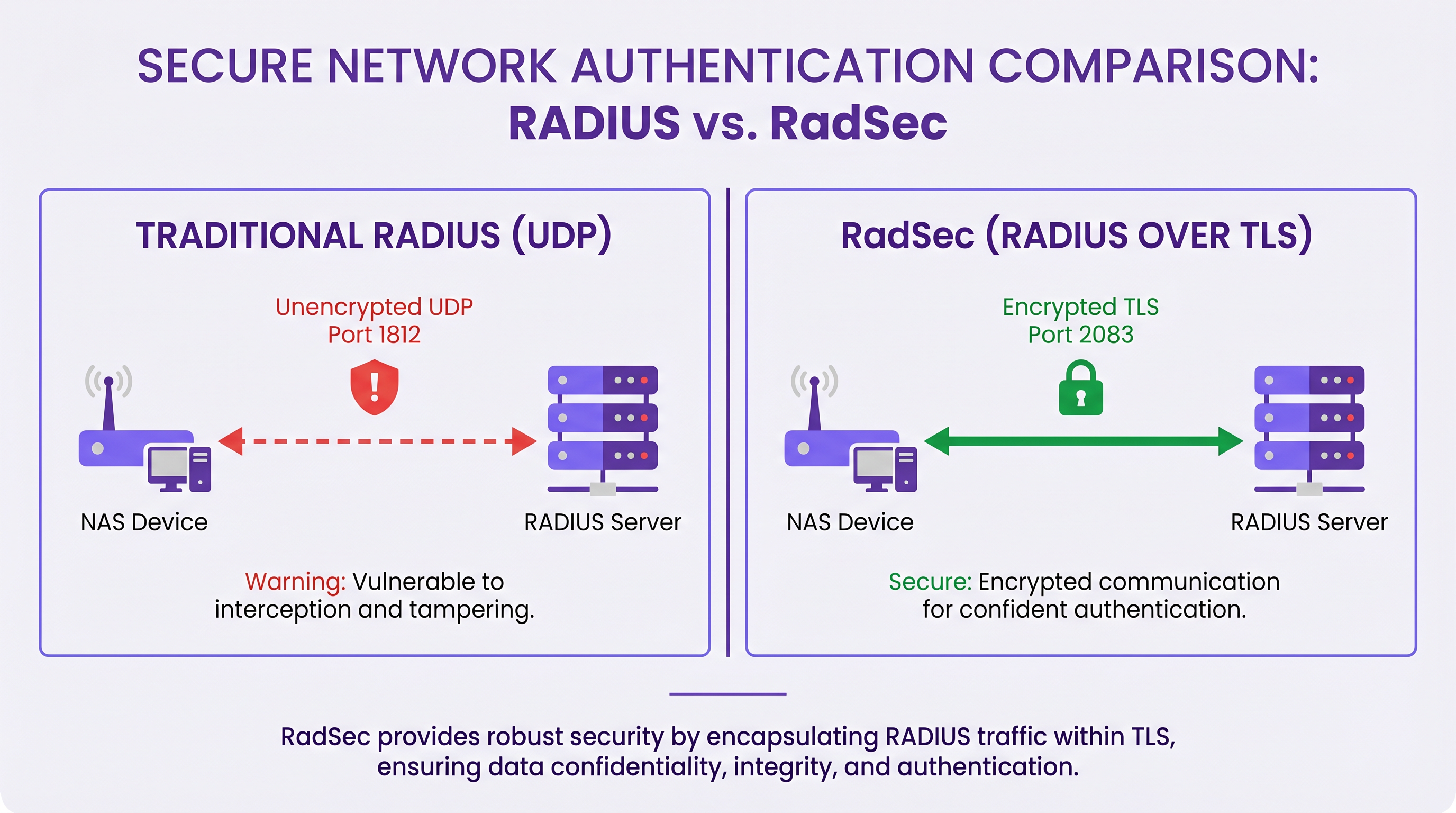
RadSec च्या मुख्य तांत्रिक वैशिष्ट्यांमध्ये हे समाविष्ट आहे:
- TCP ट्रान्सपोर्ट: RadSec विश्वसनीय, क्रमाने डिलिव्हरी प्रदान करते. हे UDP RADIUS मधील ॲप्लिकेशन-लेयर रिट्रान्समिशनची आवश्यकता दूर करते, ज्यामुळे हाय-लॅटेन्सी वातावरणात समस्या उद्भवू शकतात.
- पूर्ण पेलोड एन्क्रिप्शन: संपूर्ण RADIUS पॅकेट—हेडर्स आणि सर्व ॲट्रिब्युट्ससह—TLS टनेलमध्ये एन्क्रिप्ट केलेले असते.
- म्युच्युअल ऑथेंटिकेशन (mTLS): RADIUS सर्व्हर आणि NAS डिव्हाइस दोन्ही X.509 सर्टिफिकेट्स वापरून एकमेकांना ऑथेंटिकेट करतात. हे कमकुवत शेअर्ड सीक्रेट मॉडेलला मजबूत पब्लिक की इन्फ्रास्ट्रक्चर (PKI) ने बदलते.
- पर्सिस्टंट कनेक्शन्स: UDP RADIUS च्या विपरीत जे कनेक्शनलेस आहे, RadSec एक पर्सिस्टंट TCP कनेक्शन राखते. हे प्रत्येक ऑथेंटिकेशन विनंतीसाठी नवीन कनेक्शन स्थापित करण्याचा ओव्हरहेड कमी करते, जे व्यस्त ठिकाणांसाठी अत्यंत कार्यक्षम आहे.
टीप: RFC 7360 DTLS (डेटाग्राम TLS) वरील RADIUS परिभाषित करते, जे UDP वापरते. विशिष्ट हाय-थ्रूपुट परिस्थितींमध्ये उपयुक्त असले तरी, TCP वरील TLS हे एंटरप्राइझ क्लाउड RADIUS डिप्लॉयमेंटसाठी मानक राहते.
वितरित वातावरणातील आर्किटेक्चर
एका सामान्य मल्टी-साइट डिप्लॉयमेंटमध्ये—जसे की राष्ट्रीय Healthcare प्रदाता किंवा Transport हबची साखळी—RadSec आर्किटेक्चर लक्षणीयरीत्या सोपे करते.
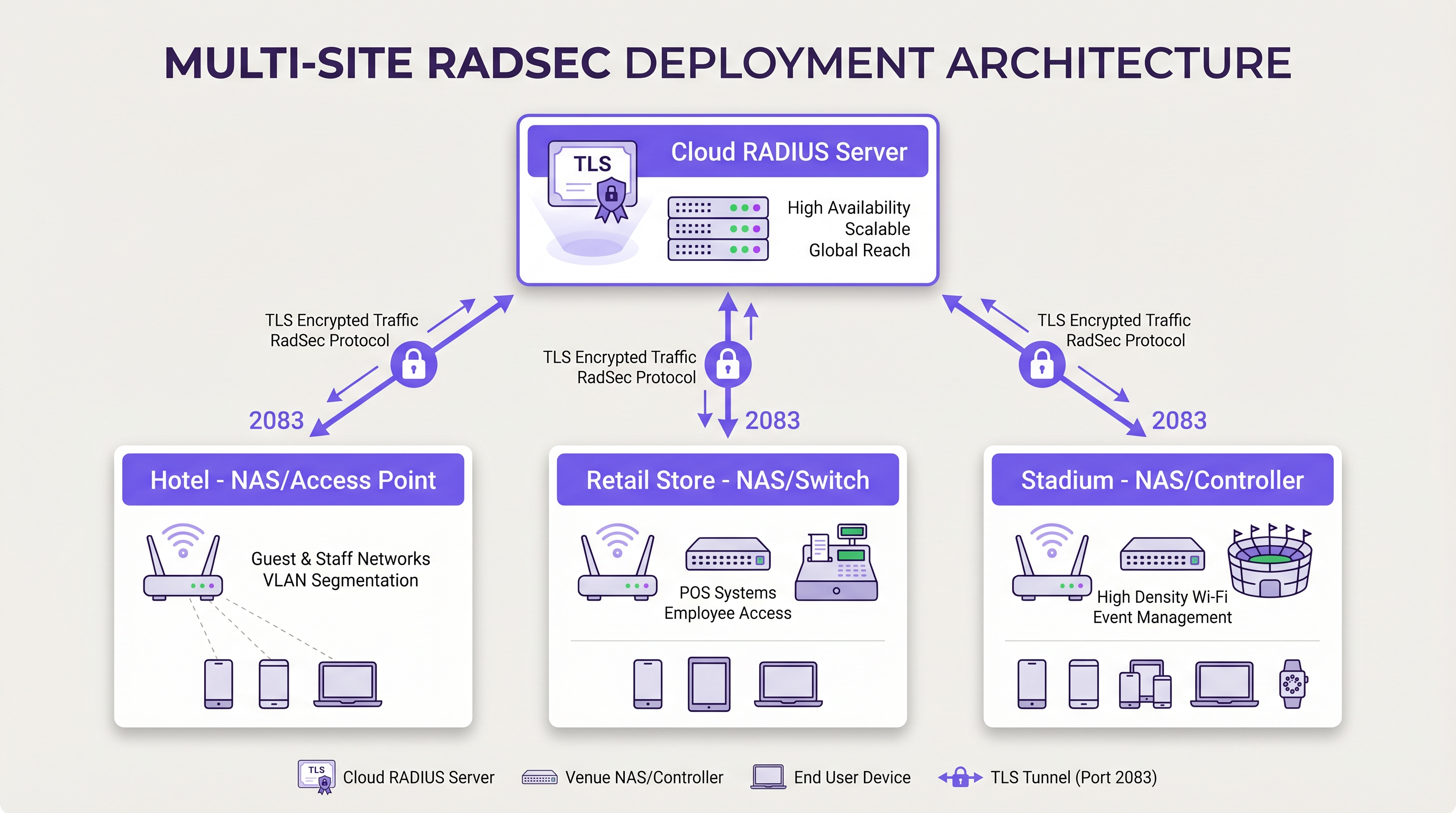
RADIUS ट्रॅफिकचे संरक्षण करण्यासाठी प्रत्येक ब्रँच लोकेशनवरून मध्यवर्ती डेटा सेंटरपर्यंत गुंतागुंतीचे IPsec VPN मेशेस तयार करण्याऐवजी, प्रत्येक NAS डिव्हाइस इंटरनेटवरून क्लाउड RADIUS प्रदात्याशी थेट RadSec TLS कनेक्शन स्थापित करते. हे एक ॲप्लिकेशन-लेयर सिक्युरिटी मॉडेल आहे जे नेटवर्क-लेयर VPNs पेक्षा डिप्लॉय करण्यासाठी अधिक स्वच्छ आणि ट्रबलशूट करण्यासाठी सोपे आहे.
अंमलबजावणी मार्गदर्शक (इम्प्लिमेंटेशन गाइड)
RadSec डिप्लॉय करण्यासाठी नेटवर्क इन्फ्रास्ट्रक्चर, सर्टिफिकेट ऑथॉरिटीज आणि फायरवॉल पॉलिसीज यांच्यात समन्वय आवश्यक आहे. यशस्वी डिप्लॉयमेंटसाठी या व्हेंडर-न्यूट्रल पायऱ्या फॉलो करा.
1. सर्टिफिकेट इन्फ्रास्ट्रक्चरची तयारी
RadSec mTLS वर अवलंबून आहे. तुम्हाला सर्व्हर आणि क्लायंट्स (NAS डिव्हाइसेस) दोघांसाठी सर्टिफिकेट्सची आवश्यकता आहे.
- सर्व्हर सर्टिफिकेट: तुमचा क्लाउड RADIUS प्रदाता (उदा., Purple) सार्वजनिक सर्टिफिकेट ऑथॉरिटी (CA) किंवा अंतर्गत CA द्वारे स्वाक्षरी केलेले सर्व्हर सर्टिफिकेट सादर करेल. सर्व्हर व्हॅलिडेट करण्यासाठी तुमच्या NAS डिव्हाइसेसच्या ट्रस्ट स्टोअरमध्ये रूट CA सर्टिफिकेट इन्स्टॉल केलेले असणे आवश्यक आहे.
- क्लायंट सर्टिफिकेट्स: RADIUS सर्व्हरला स्वतःची ओळख पटवून देण्यासाठी प्रत्येक NAS डिव्हाइसला क्लायंट सर्टिफिकेटची आवश्यकता असते. हे तुमच्या अंतर्गत PKI किंवा नेटवर्क मॅनेजमेंट सिस्टीमद्वारे जनरेट करा. ते किमान RSA 2048-बिट किंवा ECDSA P-256 कीज वापरत असल्याची खात्री करा.
2. फायरवॉल कॉन्फिगरेशन
RadSec ला तुमच्या NAS मॅनेजमेंट इंटरफेसेसमधून विशिष्ट इग्रेस (egress) नियमांची आवश्यकता असते:
- प्रोटोकॉल: TCP
- डेस्टिनेशन पोर्ट: 2083
- डेस्टिनेशन IP/FQDN: तुमच्या प्रायमरी आणि सेकंडरी क्लाउड RADIUS सर्व्हर्सचे पत्ते.
- स्टेटफुल इन्स्पेक्शन: फायरवॉल स्थापित TCP कनेक्शन्ससाठी रिटर्न ट्रॅफिकला अनुमती देत असल्याची खात्री करा.
- कीपअलाइव्ह्ज (Keepalives): सायलेंट कनेक्शन ड्रॉप्स टाळण्यासाठी फायरवॉल TCP टाइमआउट व्हॅल्यूज RadSec कीपअलाइव्ह इंटरव्हलपेक्षा (सामान्यतः 60 सेकंद) जास्त असण्यासाठी कॉन्फिगर करा.
3. NAS डिव्हाइस कॉन्फिगरेशन (जेनेरिक वर्कफ्लो)
विशिष्ट सिंटॅक्स व्हेंडरनुसार (Cisco, Aruba, Juniper, इ.) बदलत असला तरी, लॉजिकल कॉन्फिगरेशनच्या पायऱ्या सुसंगत आहेत:
- CA सर्टिफिकेट इम्पोर्ट करा: RADIUS सर्व्हरच्या सर्टिफिकेटवर स्वाक्षरी करणारे CA सर्टिफिकेट NAS ट्रस्ट स्टोअरमध्ये लोड करा.
- क्लायंट सर्टिफिकेट इम्पोर्ट करा: NAS डिव्हाइसचे क्लायंट सर्टिफिकेट आणि प्रायव्हेट की लोड करा.
- RADIUS सर्व्हर परिभाषित करा: RADIUS सर्व्हर IP/FQDN कॉन्फिगर करा.
- RadSec सक्षम करा: ट्रान्सपोर्ट प्रोटोकॉल म्हणून TLS निर्दिष्ट करा आणि पोर्ट 2083 वर सेट करा.
- सर्टिफिकेट्स बाइंड करा: इम्पोर्ट केलेली सर्टिफिकेट्स RadSec सर्व्हर कॉन्फिगरेशनशी जोडा.
- AAA प्रोफाइलवर लागू करा: संबंधित AAA ऑथेंटिकेशन आणि अकाउंटिंग ग्रुप्समध्ये RadSec सर्व्हर जोडा.
4. लेगसी डिव्हाइसेस हाताळणे (RadSec प्रॉक्सी)
सर्व NAS डिव्हाइसेस मूळतः RadSec ला सपोर्ट करत नाहीत. जुन्या स्विचेस किंवा कंझ्युमर-ग्रेड ॲक्सेस पॉइंट्ससाठी, RadSec प्रॉक्सी (जसे की radsecproxy) डिप्लॉय करा. प्रॉक्सी लोकल LAN वर बसते, लेगसी डिव्हाइसेसकडून पारंपारिक UDP RADIUS स्वीकारते आणि सुरक्षित RadSec TLS टनेलवरून क्लाउड RADIUS सर्व्हरकडे फॉरवर्ड करते.
सर्वोत्तम पद्धती (बेस्ट प्रॅक्टिसेस)
- सर्टिफिकेट लाइफसायकल मॅनेजमेंट: NAS डिव्हाइसेससाठी स्वयंचलित सर्टिफिकेट नूतनीकरण लागू करा. क्लायंट सर्टिफिकेट्सच्या मोठ्या प्रमाणावरील एक्सपायरीमुळे व्यापक नेटवर्क आउटेज होईल. सर्टिफिकेटच्या वैधतेचे निरीक्षण करा आणि एक्सपायरीच्या 90, 60 आणि 30 दिवस आधी अलर्ट करा.
- हाय अव्हेलेबिलिटी: नेहमी प्रायमरी आणि सेकंडरी RadSec सर्व्हर्स कॉन्फिगर करा. कारण TCP कनेक्शन स्थापनेला UDP पॅकेट ट्रान्समिशनपेक्षा जास्त वेळ लागतो, प्रायमरी कनेक्शन ड्रॉप झाल्यास सेकंडरी सर्व्हरवर त्वरित स्विच करण्यासाठी NAS वर अग्रेसिव्ह फेलओव्हर टायमर्स कॉन्फिगर करा.
- TCP कीपअलाइव्ह्ज: डेड कनेक्शन्स शोधण्यासाठी आणि फायरवॉलला आयडल सेशन्स ड्रॉप करण्यापासून रोखण्यासाठी NAS डिव्हाइसवर TCP कीपअलाइव्ह्ज सक्षम करा. 60-सेकंदांचा इंटरव्हल मानक आहे.
- कठोर सर्टिफिकेट व्हॅलिडेशन: कॉन्फिगर केलेल्या सर्व्हर होस्टनेमच्या विरुद्ध सब्जेक्ट अल्टरनेटिव्ह नेम (SAN) तपासण्यासह, सर्व्हर सर्टिफिकेट काटेकोरपणे व्हॅलिडेट करण्यासाठी NAS डिव्हाइसेस कॉन्फिगर केले असल्याची खात्री करा. प्रोडक्शनमध्ये सर्टिफिकेट व्हॅलिडेशन अक्षम करू नका.
- फ्युचर-प्रूफिंग: वायरलेस मानके विकसित होत असताना, जसे की आमच्या WiFi 6E vs WiFi 7: What Venues Need to Know मार्गदर्शकामध्ये चर्चा केली आहे, ऑथेंटिकेशन ट्रॅफिकचे प्रमाण वाढेल. RadSec चे पर्सिस्टंट TCP कनेक्शन्स ही घनता हाताळण्यासाठी UDP पेक्षा अधिक योग्य आहेत.
ट्रबलशूटिंग आणि रिस्क मिटिगेशन (धोका कमी करणे)
जेव्हा RadSec डिप्लॉयमेंट्स अयशस्वी होतात, तेव्हा समस्या क्वचितच RADIUS प्रोटोकॉलची असते; ती जवळजवळ नेहमीच TLS किंवा TCP शी संबंधित असते.
सामान्य फेल्युअर मोड्स
- TLS हँडशेक फेल्युअर्स (अज्ञात CA): NAS डिव्हाइस RADIUS सर्व्हरचे सर्टिफिकेट नाकारते कारण स्वाक्षरी करणारा CA NAS ट्रस्ट स्टोअरमध्ये नसतो.
- मिटिगेशन: सर्व्हरद्वारे वापरलेली अचूक CA चेन तपासा आणि रूट (आणि कोणतेही इंटरमीडिएट) CAs NAS वर इन्स्टॉल केलेले असल्याची खात्री करा.
- सायलेंट कनेक्शन ड्रॉप्स: RadSec कनेक्शन यशस्वीरित्या स्थापित होते, परंतु निष्क्रियतेच्या कालावधीनंतर ऑथेंटिकेशन विनंत्या टाइमआउट होतात. हे सहसा आयडल TCP कनेक्शन ड्रॉप करणारी स्टेटफुल फायरवॉल असते.
- मिटिगेशन: NAS वर TCP कीपअलाइव्ह्ज सक्षम करा आणि पोर्ट 2083 साठी फायरवॉल सेशन टाइमआउट सेटिंग्ज तपासा.
- क्लॉक स्क्यू (Clock Skew): TLS सर्टिफिकेट व्हॅलिडेशन अचूक सिस्टीम वेळेवर अवलंबून असते. जर NAS डिव्हाइसचे घड्याळ लक्षणीयरीत्या सिंकच्या बाहेर असेल, तर ते वैध सर्टिफिकेट्स कालबाह्य किंवा अद्याप वैध नसलेले म्हणून इव्हॅल्युएट करेल.
- मिटिगेशन: RadSec कनेक्शन्स सुरू करण्यापूर्वी सर्व NAS डिव्हाइसेस विश्वसनीय NTP सर्व्हर्ससह सिंक्रोनाइझ केलेले असल्याची खात्री करा.
ROI आणि व्यावसायिक प्रभाव
RadSec कडे संक्रमण केल्याने तांत्रिक सुरक्षा सुधारणांच्या पलीकडे मोजता येण्याजोगे व्यावसायिक मूल्य मिळते:
- कंप्लायन्स आणि जोखीम कमी करणे: RadSec ट्रान्झिटमधील ऑथेंटिकेशन डेटा एन्क्रिप्ट करते, जे थेट PCI DSS v4.0 आणि GDPR च्या आवश्यकता पूर्ण करते. हे क्रेडेंशियल इंटरसेप्शनशी संबंधित आर्थिक आणि प्रतिष्ठेचे धोके कमी करते.
- ऑपरेशनल कार्यक्षमता: गुंतागुंतीच्या, साइट-टू-साइट IPsec VPNs ला ॲप्लिकेशन-लेयर RadSec ने बदलल्याने नेटवर्क इंजिनिअरिंग ओव्हरहेड कमी होतो. शेकडो शाखांमधील VPN राउटिंग आणि IKE फेज निगोशिएशन्स डीबग करण्यापेक्षा क्लाउड प्रदात्याशी TLS कनेक्शन ट्रबलशूट करणे लक्षणीयरीत्या वेगवान आहे.
- क्लाउड रेडीनेस: RadSec हे क्लाउड-नेटिव्ह ऑथेंटिकेशनसाठी सक्षम करणारे तंत्रज्ञान आहे. याचा अवलंब करून, संस्था आधुनिक आयडेंटिटी प्रोव्हायडर्स आणि Purple सारख्या प्लॅटफॉर्म्ससह अखंडपणे इंटिग्रेट करू शकतात, ज्यामुळे ऑन-प्रिमाइस सर्व्हर फूटप्रिंट आणि परवाना खर्च कमी होतो.
महत्वाच्या व्याख्या
RadSec
एक प्रोटोकॉल जो ट्रान्सपोर्ट लेयर सिक्युरिटी (TLS) टनेलमध्ये RADIUS ऑथेंटिकेशन आणि अकाउंटिंग डेटा एन्कॅप्स्युलेट करतो.
लेगसी UDP RADIUS बदलून, अनट्रस्टेड नेटवर्क्सवर ऑथेंटिकेशन ट्रॅफिक सुरक्षित करण्यासाठी वापरले जाते.
mTLS (Mutual TLS)
एक ऑथेंटिकेशन प्रक्रिया जिथे क्लायंट (NAS) आणि सर्व्हर (RADIUS) दोघेही TLS हँडशेक दरम्यान एकमेकांचे X.509 सर्टिफिकेट्स पडताळून पाहतात.
दोन्ही एंडपॉइंट्स क्रिप्टोग्राफिकली व्हेरिफाय केले आहेत याची खात्री करून पारंपारिक RADIUS शेअर्ड सीक्रेट मॉडेलपेक्षा मजबूत सुरक्षा प्रदान करते.
NAS (Network Access Server)
डिव्हाइस जे युझर्सना नेटवर्क ॲक्सेस प्रदान करते आणि RADIUS क्लायंट म्हणून कार्य करते. आधुनिक नेटवर्क्समध्ये, हे सामान्यतः वायरलेस ॲक्सेस पॉइंट, स्विच किंवा वायरलेस LAN कंट्रोलर असते.
क्लाउड RADIUS सर्व्हरशी RadSec कनेक्शन सुरू करण्यासाठी NAS जबाबदार असते.
PKI (Public Key Infrastructure)
डिजिटल सर्टिफिकेट्स तयार करण्यासाठी, व्यवस्थापित करण्यासाठी, वितरित करण्यासाठी, वापरण्यासाठी, संचयित करण्यासाठी आणि रद्द करण्यासाठी आवश्यक असलेल्या भूमिका, धोरणे, हार्डवेअर, सॉफ्टवेअर आणि प्रक्रियांची फ्रेमवर्क.
मोठ्या इस्टेट्समध्ये RadSec डिप्लॉयमेंटसाठी आवश्यक असलेल्या सर्टिफिकेट्सचे व्यवस्थापन करण्यासाठी आवश्यक.
TCP Keepalive
एक यंत्रणा जी आयडल कनेक्शनवर रिकामे TCP पॅकेट्स पाठवते हे पडताळण्यासाठी की कनेक्शन अद्याप सक्रिय आहे आणि स्टेटफुल फायरवॉल्सना सेशन ड्रॉप करण्यापासून रोखण्यासाठी.
कमी ऑथेंटिकेशन ॲक्टिव्हिटीच्या काळात पर्सिस्टंट RadSec कनेक्शन्स राखण्यासाठी महत्त्वपूर्ण.
RadSec Proxy
एक सॉफ्टवेअर सर्व्हिस जी मध्यस्थ म्हणून कार्य करते, लेगसी डिव्हाइसेसकडून पारंपारिक UDP RADIUS ट्रॅफिक प्राप्त करते आणि सुरक्षित RadSec TLS कनेक्शनवरून फॉरवर्ड करते.
ज्या वातावरणात जुने नेटवर्क हार्डवेअर मूळतः RadSec ला सपोर्ट करत नाही तिथे दरी कमी करण्यासाठी वापरले जाते.
X.509 Certificate
एक डिजिटल सर्टिफिकेट जे व्यापकपणे स्वीकारलेले आंतरराष्ट्रीय X.509 PKI मानक वापरते हे पडताळण्यासाठी की पब्लिक की सर्टिफिकेटमध्ये समाविष्ट असलेल्या युझर, कॉम्प्युटर किंवा सर्व्हिस आयडेंटिटीची आहे.
ओळख प्रस्थापित करण्यासाठी आणि TLS टनेल एन्क्रिप्ट करण्यासाठी RadSec द्वारे वापरलेला क्रिप्टोग्राफिक पाया.
EAP (Extensible Authentication Protocol)
वायरलेस नेटवर्क्स आणि पॉइंट-टू-पॉइंट कनेक्शन्समध्ये वारंवार वापरली जाणारी ऑथेंटिकेशन फ्रेमवर्क.
EAP ट्रॅफिक (जसे की EAP-TLS किंवा PEAP) RADIUS पॅकेट्समध्ये एन्कॅप्स्युलेट केलेले असते, याचा अर्थ RadSec EAP एक्सचेंज सुरक्षितपणे ट्रान्सपोर्ट करते.
सोडवलेली उदाहरणे
500 लोकेशन्स असलेली एक राष्ट्रीय रिटेल साखळी ऑन-प्रिमाइस RADIUS सर्व्हर्सवरून Purple च्या क्लाउड RADIUS वर मायग्रेट करत आहे. विद्यमान आर्किटेक्चर MPLS आणि SD-WAN लिंक्सच्या मिश्रणावर UDP वर अनएन्क्रिप्टेड RADIUS वापरते. 450 लोकेशन्सवर आधुनिक Aruba ॲक्सेस पॉइंट्स आहेत, तर 50 लोकेशन्स लेगसी हार्डवेअर वापरतात जे RadSec ला सपोर्ट करत नाहीत. नेटवर्क आर्किटेक्टने नवीन ऑथेंटिकेशन ट्रान्सपोर्ट कसे डिझाइन करावे?
आर्किटेक्टने हायब्रिड RadSec डिप्लॉयमेंट लागू केले पाहिजे. आधुनिक Aruba APs असलेल्या 450 लोकेशन्ससाठी, थेट APs किंवा लोकल कंट्रोलर्सवर नेटिव्ह RadSec कॉन्फिगर करा. Aruba डिव्हाइसेसवर Purple च्या क्लाउड RADIUS चे रूट CA सर्टिफिकेट इन्स्टॉल करा आणि नेटवर्क मॅनेजमेंट प्लॅटफॉर्मद्वारे क्लायंट सर्टिफिकेट्स प्रोव्हिजन करा. TCP 2083 साठी इग्रेस फायरवॉल नियम कॉन्फिगर करा. 50 लेगसी लोकेशन्ससाठी, प्रत्येक साइटवर लाइटवेट RadSec प्रॉक्सी (उदा., radsecproxy चालवणारे एक छोटे Linux VM किंवा कंटेनर) डिप्लॉय करा. लेगसी APs लोकल प्रॉक्सीला स्टँडर्ड UDP RADIUS पाठवतील, जे नंतर Purple क्लाउडवरील TLS टनेलमध्ये ट्रॅफिक एन्कॅप्स्युलेट करेल.
एका मोठ्या कॉन्फरन्स सेंटरमध्ये RadSec डिप्लॉयमेंट दरम्यान, नेटवर्क टीमच्या लक्षात येते की NAS डिव्हाइसेस व्यस्त काळात युझर्सना यशस्वीरित्या ऑथेंटिकेट करतात, परंतु पहाटेच्या पहिल्या काही युझर्सना ऑथेंटिकेट करण्यात अपयशी ठरतात. पॅकेट कॅप्चर्स दर्शवतात की NAS RADIUS ट्रॅफिक पाठवण्याचा प्रयत्न करत आहे, परंतु फायरवॉलकडून TCP RST पॅकेट्स प्राप्त करत आहे.
ही समस्या फायरवॉलच्या अग्रेसिव्ह TCP सेशन टाइमआउटमुळे रात्रभर आयडल RadSec कनेक्शन ड्रॉप केल्यामुळे उद्भवते. नेटवर्क टीमने RadSec कनेक्शनसाठी NAS डिव्हाइसेसवर TCP कीपअलाइव्ह्ज कॉन्फिगर करणे आवश्यक आहे, इंटरव्हल 60 सेकंदांवर सेट करणे. याव्यतिरिक्त, त्यांनी TCP पोर्ट 2083 साठी फायरवॉलच्या स्टेटफुल इन्स्पेक्शन नियमांचे पुनरावलोकन केले पाहिजे आणि सेशन टाइमआउट कीपअलाइव्ह इंटरव्हलपेक्षा जास्त असल्याची खात्री केली पाहिजे.
सराव प्रश्न
Q1. तुम्ही 50 ब्रँच ऑफिसेसना Purple च्या क्लाउड RADIUS प्लॅटफॉर्मशी जोडणाऱ्या नवीन RadSec डिप्लॉयमेंटसाठी फायरवॉल पॉलिसी डिझाइन करत आहात. ब्रँच फायरवॉल्सवर कोणते विशिष्ट इग्रेस नियम कॉन्फिगर केले जाणे आवश्यक आहे?
टीप: प्रोटोकॉल आणि कनेक्शनचे स्टेटफुल स्वरूप दोन्ही विचारात घ्या.
नमुना उत्तर पहा
ब्रँच फायरवॉल्सनी NAS मॅनेजमेंट IP ॲड्रेसेसवरून उगम पावणाऱ्या आणि Purple क्लाउड RADIUS सर्व्हर्सच्या IP ॲड्रेसेस किंवा FQDNs कडे जाणाऱ्या पोर्ट 2083 वरील आउटबाउंड TCP ट्रॅफिकला अनुमती दिली पाहिजे. TCP स्टेटफुल असल्यामुळे, फायरवॉल स्थापित सेशन्ससाठी रिटर्न ट्रॅफिकला स्वयंचलितपणे अनुमती देईल. RadSec साठी UDP पोर्ट्स 1812 आणि 1813 आवश्यक नाहीत.
Q2. एक ज्युनियर इंजिनिअर रिपोर्ट करतो की नव्याने कॉन्फिगर केलेला स्विच क्लाउड RADIUS सर्व्हरसह RadSec कनेक्शन स्थापित करण्यात अयशस्वी होत आहे. स्विच लॉग्स दर्शवतात: `TLS handshake failed: unknown CA`. तुम्ही याचे निराकरण कसे करावे?
टीप: स्विच सर्व्हरद्वारे सादर केलेल्या सर्टिफिकेटवर मूळतः विश्वास ठेवत नाही.
नमुना उत्तर पहा
तुम्हाला क्लाउड RADIUS सर्व्हरचे सर्टिफिकेट जारी करणारी सर्टिफिकेट ऑथॉरिटी (CA) ओळखणे आवश्यक आहे. एकदा ओळखल्यानंतर, पब्लिक रूट CA सर्टिफिकेट (आणि कोणतीही इंटरमीडिएट CA सर्टिफिकेट्स) मिळवा आणि त्यांना स्विचच्या ट्रस्ट स्टोअरमध्ये इम्पोर्ट करा. हे स्विचला TLS हँडशेक दरम्यान सर्व्हरची ओळख क्रिप्टोग्राफिकली पडताळण्याची अनुमती देते.
Q3. तुमची संस्था अनिवार्य करते की सर्व नेटवर्क इन्फ्रास्ट्रक्चर WAN आउटेजमध्ये टिकून राहिले पाहिजे. क्लाउड RADIUS सर्व्हरचे इंटरनेट कनेक्शन अयशस्वी झाल्यास, RadSec कनेक्शनचे काय होते आणि NAS त्यानंतरच्या ऑथेंटिकेशन विनंत्या कशा हाताळते?
टीप: TCP कनेक्शन स्टेट्स आणि स्टँडर्ड RADIUS फेलओव्हर यंत्रणा विचारात घ्या.
नमुना उत्तर पहा
जेव्हा WAN अयशस्वी होते, तेव्हा पर्सिस्टंट TCP कनेक्शन शेवटी टाइम आउट होईल (किंवा लोकल इंटरफेस डाउन झाल्यास स्पष्टपणे रिसेट केले जाईल). NAS प्रायमरी RadSec सर्व्हरला अनरीचेबल म्हणून मार्क करेल. जर सेकंडरी RadSec सर्व्हर कॉन्फिगर केलेला असेल (उदा., वेगळ्या भौगोलिक प्रदेशात), तर NAS त्याच्याशी नवीन TLS कनेक्शन स्थापित करण्याचा प्रयत्न करेल. जर सर्व RADIUS सर्व्हर्स अनरीचेबल असतील, तर नवीन ऑथेंटिकेशन्स अयशस्वी होतील. तथापि, जे युझर्स आधीच ऑथेंटिकेटेड आणि कनेक्टेड आहेत ते सामान्यतः त्यांचे सेशन संपेपर्यंत किंवा ते रोम करेपर्यंत कनेक्टेड राहतील, कारण RADIUS केवळ प्रारंभिक ऑथेंटिकेशन आणि नियतकालिक री-ऑथेंटिकेशन टप्प्यांमध्ये गुंतलेले असते.
या मालिकेमध्ये पुढे वाचा
Wi-Fi सुरक्षेचे भविष्य: AI-आधारित NAC आणि थ्रेट डिटेक्शन
हे अधिकृत मार्गदर्शक जुन्या WPA2 कडून AI-आधारित नेटवर्क ॲक्सेस कंट्रोल (NAC) आणि थ्रेट डिटेक्शनकडे एंटरप्राइझ Wi-Fi सुरक्षेच्या उत्क्रांतीचा शोध घेते. IT लीडर्ससाठी डिझाइन केलेले, हे Purple च्या आयडेंटिटी-आधारित नेटवर्क्सचा वापर करून रिटेल, हॉस्पिटॅलिटी आणि स्टेडियम्ससारख्या हाय-डेन्सिटी वातावरणांना सुरक्षित करण्यासाठी कृतीयोग्य डिप्लॉयमेंट धोरणे प्रदान करते.
NAC आणि MPSK सह IoT डिव्हाइस सिक्युरिटी व्यवस्थापित करणे
हे तांत्रिक मार्गदर्शक एंटरप्राइझ ठिकाणे मल्टिपल प्री-शेअर्ड की (MPSK) आर्किटेक्चर आणि नेटवर्क ॲक्सेस कंट्रोल (NAC) वापरून हेडलेस IoT डिव्हाइसेस कसे सुरक्षित करू शकतात हे तपशीलवार सांगते. हे मायक्रो-सेगमेंटेशन साध्य करण्यासाठी, सिक्युरिटी ब्लास्ट रेडियस नियंत्रित करण्यासाठी आणि स्केलेबिलिटीशी तडजोड न करता कंप्लायन्स राखण्यासाठी कृती करण्यायोग्य अंमलबजावणीच्या पायऱ्या प्रदान करते.
RadSec: TLS वरील RADIUS मुळे WiFi प्रमाणीकरण सुरक्षा कशी सुधारते
हा अधिकृत तांत्रिक संदर्भ स्पष्ट करतो की RadSec (RFC 6614) पारंपारिक RADIUS ट्रॅफिकला TLS एन्क्रिप्शनमध्ये रॅप करून एंटरप्राइझ WiFi प्रमाणीकरण कसे सुरक्षित करते. IT व्यवस्थापक आणि नेटवर्क आर्किटेक्ट्ससाठी डिझाइन केलेले, हे कॉर्पोरेट आणि अतिथी नेटवर्कवर अनएन्क्रिप्टेड UDP RADIUS ट्रॅफिकचे धोके कमी करण्यासाठी आर्किटेक्चर, डिप्लॉयमेंट धोरणे आणि व्यावहारिक पायऱ्या कव्हर करते.