
RadSec: Asegurando el Tráfico de Autenticación RADIUS con TLS
Esta guía completa explora RadSec (RADIUS sobre TLS), detallando cómo asegura el tráfico de autenticación de red para implementaciones modernas en la nube y multisitio. Proporciona a los arquitectos de red pasos prácticos de implementación, estrategias de gestión de certificados y técnicas de resolución de problemas para reemplazar el RADIUS UDP heredado.
Escucha esta guía
Ver transcripción del podcast

Resumen Ejecutivo
Durante décadas, RADIUS sobre UDP ha sido la base de la autenticación de red, dependiendo de redes privadas y secretos compartidos para la seguridad. A medida que las arquitecturas empresariales se desplazan hacia infraestructuras nativas de la nube, ubicaciones distribuidas de Retail y Hospitality , y superposiciones SD-WAN, el modelo de amenaza ha cambiado fundamentalmente. El tráfico RADIUS ahora atraviesa con frecuencia redes públicas o compartidas, exponiendo los datos de autenticación a la interceptación.
RadSec (RADIUS over TLS), definido en RFC 6614, resuelve esto encapsulando los paquetes RADIUS dentro de un túnel TLS mutuamente autenticado. Esta guía proporciona una referencia técnica completa para arquitectos de red e ingenieros de seguridad sobre la implementación de RadSec. Cubrimos las diferencias arquitectónicas con el RADIUS tradicional, los requisitos de gestión de certificados, las configuraciones de firewall y las consideraciones prácticas de implementación para la integración con plataformas RADIUS en la nube como la infraestructura de Guest WiFi y WiFi Analytics de Purple. Al adoptar RadSec, las organizaciones pueden garantizar una seguridad robusta, cumplir con estrictos requisitos de cumplimiento como PCI DSS y GDPR, y simplificar las arquitecturas de autenticación multisitio.
Análisis Técnico Detallado
La Evolución del Transporte RADIUS
El protocolo Remote Authentication Dial-In User Service (RADIUS), definido originalmente en RFC 2865, fue diseñado para una era diferente de las redes. Utiliza UDP como su capa de transporte (puerto 1812 para autenticación, 1813 para contabilidad). En el RADIUS tradicional, la carga útil está en gran parte sin cifrar en tránsito. El único mecanismo de protección es la ofuscación del atributo User-Password utilizando un secreto compartido entre el Network Access Server (NAS) y el servidor RADIUS.
Si bien esto era suficiente cuando los dispositivos NAS y los servidores RADIUS residían en la misma LAN física o circuitos MPLS dedicados, las arquitecturas modernas han superado este modelo. Como se explora en nuestra discusión sobre Los Beneficios Clave de SD WAN para Empresas Modernas , las empresas distribuidas ahora dependen del transporte por internet para la conectividad entre sitios. Enviar tráfico RADIUS sin cifrar a través de internet público expone las credenciales de usuario, los identificadores de sesión y las políticas de acceso a la red a la interceptación y manipulación.
RadSec: RADIUS sobre TLS (RFC 6614)
RadSec aborda estas vulnerabilidades cambiando la capa de transporte. En lugar de UDP, RadSec utiliza el puerto TCP 2083. Antes de que se intercambie cualquier paquete RADIUS, el NAS y el servidor RADIUS establecen una conexión TLS (Transport Layer Security).
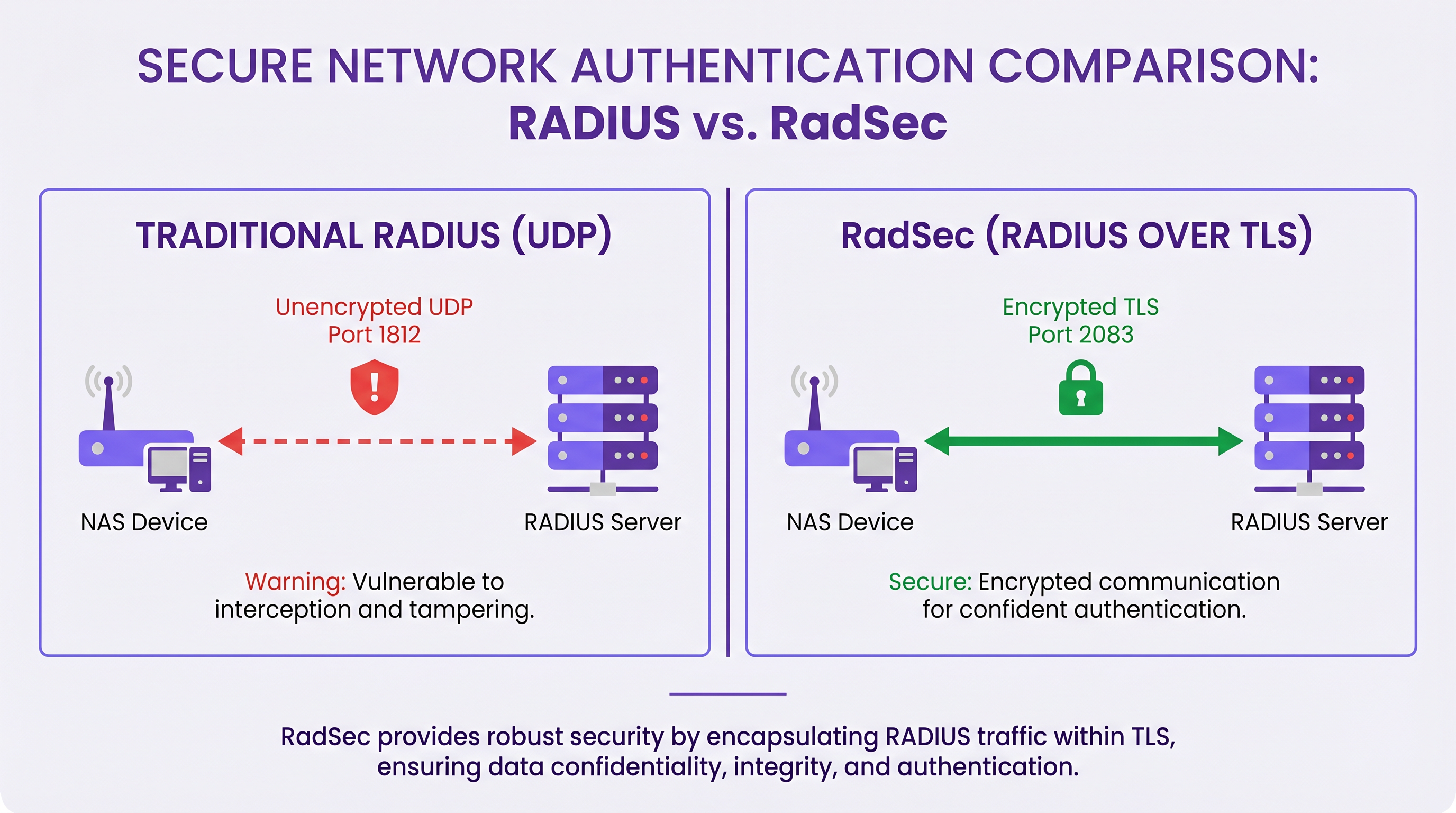
Las características técnicas principales de RadSec incluyen:
- Transporte TCP: RadSec proporciona una entrega fiable y ordenada. Esto elimina la necesidad de retransmisiones a nivel de aplicación inherentes al RADIUS UDP, que pueden causar problemas en entornos de alta latencia.
- Cifrado Completo de la Carga Útil: El paquete RADIUS completo —incluidos los encabezados y todos los atributos— se cifra dentro del túnel TLS.
- Autenticación Mutua (mTLS): Tanto el servidor RADIUS como el dispositivo NAS se autentican mutuamente utilizando certificados X.509. Esto reemplaza el modelo de secreto compartido débil con una robusta Infraestructura de Clave Pública (PKI).
- Conexiones Persistentes: A diferencia del RADIUS UDP, que no tiene conexión, RadSec mantiene una conexión TCP persistente. Esto reduce la sobrecarga de establecer una nueva conexión para cada solicitud de autenticación, lo cual es altamente eficiente para lugares concurridos.
Nota: RFC 7360 define RADIUS sobre DTLS (Datagram TLS), que utiliza UDP. Si bien es útil en escenarios específicos de alto rendimiento, TLS sobre TCP sigue siendo el estándar para las implementaciones de RADIUS en la nube empresarial.
Arquitectura en Entornos Distribuidos
En una implementación multisitio típica —como un proveedor nacional de Healthcare o una cadena de centros de Transport — RadSec simplifica significativamente la arquitectura.
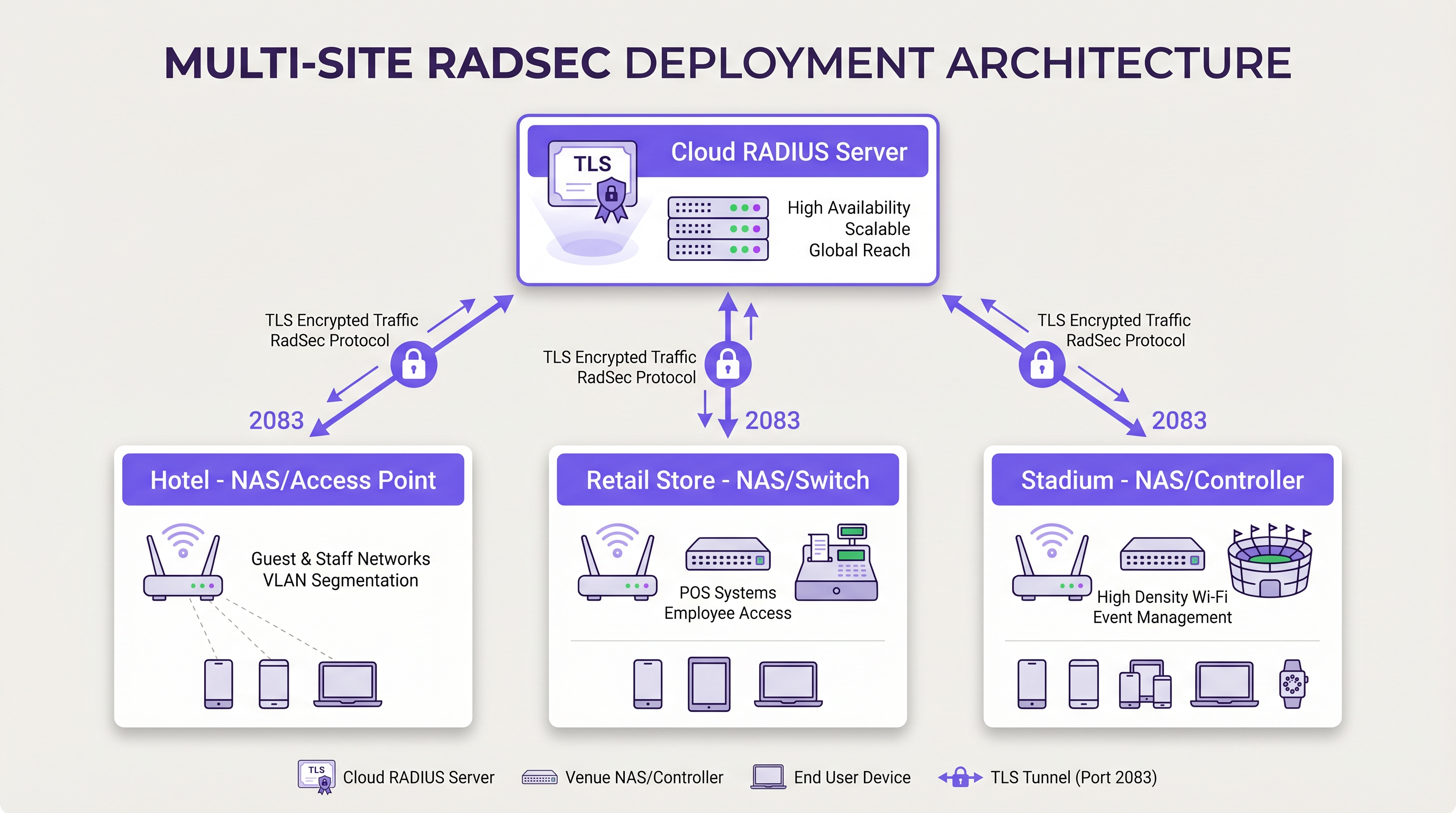
En lugar de construir complejas mallas VPN IPsec desde cada sucursal hasta un centro de datos central para proteger el tráfico RADIUS, cada dispositivo NAS establece una conexión TLS RadSec directa a través de internet con el proveedor de RADIUS en la nube. Este es un modelo de seguridad a nivel de aplicación que es más limpio de implementar y más fácil de solucionar que las VPN a nivel de red.
Guía de Implementación
La implementación de RadSec requiere coordinación entre la infraestructura de red, las autoridades de certificación y las políticas de firewall. Siga estos pasos neutrales al proveedor para una implementación exitosa.
1. Preparación de la Infraestructura de Certificados
RadSec se basa en mTLS. Necesita certificados tanto para el servidor como para los clientes (dispositivos NAS).
- Certificado de Servidor: Su proveedor de RADIUS en la nube (por ejemplo, Purple) presentará un certificado de servidor firmado por una Autoridad de Certificación (CA) pública o una CA interna. Sus dispositivos NAS deben tener el certificado raíz de la CA instalado en su almacén de confianza para validar el servidor.
- Certificados de Cliente: Cada dispositivo NAS necesita un certificado de cliente para identificarse ante el servidor RADIUS. Genérelos a través de su PKI interna o sistema de gestión de red. Asegúrese de que utilicen al menos claves RSA de 2048 bits o ECDSA P-256.
2. Configuración del Firewall
RadSec requiere reglas de egreso específicas de sus interfaces de gestión NAS:
- Protocolo*: TCP
- Puerto de Destino: 2083
- IP/FQDN de Destino: Las direcciones de sus servidores RADIUS en la nube primario y secundario.
- Inspección con Estado (Stateful Inspection): Asegúrese de que el firewall permita el tráfico de retorno para las conexiones TCP establecidas.
- Keepalives: Configure los valores de tiempo de espera de TCP del firewall para que sean más largos que el intervalo de keepalive de RadSec (típicamente 60 segundos) para evitar caídas de conexión silenciosas.
3. Configuración del Dispositivo NAS (Flujo de Trabajo Genérico)
Aunque la sintaxis específica varía según el proveedor (Cisco, Aruba, Juniper, etc.), los pasos de configuración lógicos son consistentes:
- Importar Certificado CA: Cargue el certificado CA que firmó el certificado del servidor RADIUS en el almacén de confianza del NAS.
- Importar Certificado de Cliente: Cargue el certificado de cliente y la clave privada del dispositivo NAS.
- Definir Servidor RADIUS: Configure la IP/FQDN del servidor RADIUS.
- Habilitar RadSec: Especifique TLS como protocolo de transporte y establezca el puerto en 2083.
- Vincular Certificados: Asocie los certificados importados con la configuración del servidor RadSec.
- Aplicar al Perfil AAA: Agregue el servidor RadSec a los grupos de autenticación y contabilidad AAA relevantes.
4. Manejo de Dispositivos Heredados (Proxy RadSec)
No todos los dispositivos NAS soportan RadSec de forma nativa. Para switches más antiguos o puntos de acceso de grado de consumidor, implemente un proxy RadSec (como radsecproxy). El proxy se ubica en la LAN local, acepta RADIUS UDP tradicional de dispositivos heredados y lo reenvía a través de un túnel TLS RadSec seguro al servidor RADIUS en la nube.
Mejores Prácticas
- Gestión del Ciclo de Vida de los Certificados: Implemente la renovación automática de certificados para dispositivos NAS. Una caducidad masiva de certificados de cliente causará una interrupción generalizada de la red. Monitoree la validez de los certificados y alerte con 90, 60 y 30 días antes de la caducidad.
- Alta Disponibilidad: Configure siempre servidores RadSec primarios y secundarios. Debido a que el establecimiento de la conexión TCP toma más tiempo que la transmisión de un paquete UDP, configure temporizadores de conmutación por error agresivos en el NAS para cambiar al servidor secundario rápidamente si la conexión principal se cae.
- Keepalives TCP: Habilite los keepalives TCP en el dispositivo NAS para detectar conexiones muertas y evitar que los firewalls cierren sesiones inactivas. Un intervalo de 60 segundos es estándar.
- Validación Estricta de Certificados: Asegúrese de que los dispositivos NAS estén configurados para validar estrictamente el certificado del servidor, incluyendo la verificación del Nombre Alternativo del Sujeto (SAN) contra el nombre de host del servidor configurado. No desactive la validación de certificados en producción.
- Preparación para el Futuro: A medida que evolucionan los estándares inalámbricos, como los discutidos en nuestra guía WiFi 6E vs WiFi 7: What Venues Need to Know , el volumen de tráfico de autenticación aumentará. Las conexiones TCP persistentes de RadSec son más adecuadas para manejar esta densidad que UDP.
Resolución de Problemas y Mitigación de Riesgos
Cuando las implementaciones de RadSec fallan, el problema rara vez es el protocolo RADIUS en sí; casi siempre está relacionado con TLS o TCP.
Modos de Falla Comunes
- Fallas en el Handshake TLS (CA Desconocida): El dispositivo NAS rechaza el certificado del servidor RADIUS porque la CA firmante no se encuentra en el almacén de confianza del NAS.
- Mitigación: Verifique la cadena de CA exacta utilizada por el servidor y asegúrese de que las CA raíz (y cualquier intermedia) estén instaladas en el NAS.
- Caídas de Conexión Silenciosas: La conexión RadSec se establece correctamente, pero las solicitudes de autenticación agotan el tiempo de espera después de un período de inactividad. Esto suele ser un firewall con estado que cierra la conexión TCP inactiva.
- Mitigación: Habilite los keepalives TCP en el NAS y verifique la configuración de tiempo de espera de sesión del firewall para el puerto 2083.
- Desviación del Reloj (Clock Skew): La validación de certificados TLS depende de la hora exacta del sistema. Si el reloj del dispositivo NAS está significativamente desincronizado, evaluará los certificados válidos como caducados o aún no válidos.
- Mitigación: Asegúrese de que todos los dispositivos NAS estén sincronizados con servidores NTP confiables antes de iniciar conexiones RadSec.
ROI e Impacto Comercial
La transición a RadSec proporciona un valor comercial medible más allá de las mejoras técnicas de seguridad:
- Cumplimiento y Reducción de Riesgos: RadSec cifra los datos de autenticación en tránsito, satisfaciendo directamente los requisitos de PCI DSS v4.0 y GDPR. Esto mitiga los riesgos financieros y de reputación asociados con la interceptación de credenciales.
- Eficiencia Operativa: Reemplazar VPNs IPsec complejas de sitio a sitio con RadSec a nivel de aplicación reduce la sobrecarga de ingeniería de red. La resolución de problemas de una conexión TLS a un proveedor de la nube es significativamente más rápida que la depuración de enrutamiento VPN y negociaciones de fase IKE en cientos de sucursales.
- Preparación para la Nube: RadSec es la tecnología habilitadora para la autenticación nativa de la nube. Al adoptarla, las organizaciones pueden integrarse sin problemas con proveedores de identidad modernos y plataformas como Purple, reduciendo la huella de servidores locales y los costos de licencia.
Definiciones clave
RadSec
A protocol that encapsulates RADIUS authentication and accounting data within a Transport Layer Security (TLS) tunnel.
Used to secure authentication traffic over untrusted networks, replacing legacy UDP RADIUS.
mTLS (Mutual TLS)
An authentication process where both the client (NAS) and the server (RADIUS) verify each other's X.509 certificates during the TLS handshake.
Provides stronger security than the traditional RADIUS shared secret model by ensuring both endpoints are cryptographically verified.
NAS (Network Access Server)
The device that provides network access to users and acts as a RADIUS client. In modern networks, this is typically a wireless access point, switch, or wireless LAN controller.
The NAS is responsible for initiating the RadSec connection to the cloud RADIUS server.
PKI (Public Key Infrastructure)
The framework of roles, policies, hardware, software, and procedures needed to create, manage, distribute, use, store, and revoke digital certificates.
Essential for managing the certificates required by RadSec deployments across large estates.
TCP Keepalive
A mechanism that sends empty TCP packets over an idle connection to verify the connection is still active and to prevent stateful firewalls from dropping the session.
Crucial for maintaining persistent RadSec connections during periods of low authentication activity.
RadSec Proxy
A software service that acts as an intermediary, receiving traditional UDP RADIUS traffic from legacy devices and forwarding it over a secure RadSec TLS connection.
Used to bridge the gap in environments where older network hardware does not natively support RadSec.
X.509 Certificate
A digital certificate that uses the widely accepted international X.509 PKI standard to verify that a public key belongs to the user, computer or service identity contained within the certificate.
The cryptographic foundation used by RadSec to establish identity and encrypt the TLS tunnel.
EAP (Extensible Authentication Protocol)
An authentication framework frequently used in wireless networks and point-to-point connections.
EAP traffic (like EAP-TLS or PEAP) is encapsulated within RADIUS packets, meaning RadSec securely transports the EAP exchange.
Ejemplos resueltos
A national retail chain with 500 locations is migrating from on-premise RADIUS servers to Purple's Cloud RADIUS. The existing architecture uses unencrypted RADIUS over UDP across a mix of MPLS and SD-WAN links. 450 locations have modern Aruba access points, while 50 locations use legacy hardware that does not support RadSec. How should the network architect design the new authentication transport?
The architect should implement a hybrid RadSec deployment. For the 450 locations with modern Aruba APs, configure native RadSec directly on the APs or local controllers. Install the root CA certificate of Purple's cloud RADIUS on the Aruba devices, and provision client certificates via the network management platform. Configure egress firewall rules for TCP 2083. For the 50 legacy locations, deploy a lightweight RadSec proxy (e.g., a small Linux VM or container running radsecproxy) at each site. The legacy APs will send standard UDP RADIUS to the local proxy, which will then encapsulate the traffic in a TLS tunnel to the Purple cloud.
During a RadSec deployment at a large conference centre, the network team observes that the NAS devices successfully authenticate users during busy periods, but fail to authenticate the first few users early in the morning. Packet captures show the NAS attempting to send RADIUS traffic, but receiving TCP RST packets from the firewall.
The issue is caused by the firewall's aggressive TCP session timeout dropping the idle RadSec connection overnight. The network team must configure TCP keepalives on the NAS devices for the RadSec connection, setting the interval to 60 seconds. Additionally, they should review the firewall's stateful inspection rules for TCP port 2083 and ensure the session timeout is greater than the keepalive interval.
Preguntas de práctica
Q1. You are designing the firewall policy for a new RadSec deployment connecting 50 branch offices to Purple's Cloud RADIUS platform. What specific egress rules must be configured on the branch firewalls?
Sugerencia: Consider both the protocol and the stateful nature of the connection.
Ver respuesta modelo
The branch firewalls must allow outbound TCP traffic on port 2083 originating from the NAS management IP addresses, destined for the IP addresses or FQDNs of the Purple Cloud RADIUS servers. Because TCP is stateful, the firewall will automatically allow the return traffic for established sessions. UDP ports 1812 and 1813 are not required for RadSec.
Q2. A junior engineer reports that a newly configured switch is failing to establish a RadSec connection with the cloud RADIUS server. The switch logs show: `TLS handshake failed: unknown CA`. How should you resolve this?
Sugerencia: The switch does not inherently trust the certificate presented by the server.
Ver respuesta modelo
You need to identify the Certificate Authority (CA) that issued the cloud RADIUS server's certificate. Once identified, obtain the public Root CA certificate (and any intermediate CA certificates) and import them into the switch's trust store. This allows the switch to cryptographically verify the server's identity during the TLS handshake.
Q3. Your organisation mandates that all network infrastructure must survive a WAN outage. If the internet connection to the cloud RADIUS server fails, what happens to the RadSec connection, and how does the NAS handle subsequent authentication requests?
Sugerencia: Consider TCP connection states and standard RADIUS failover mechanisms.
Ver respuesta modelo
When the WAN fails, the persistent TCP connection will eventually time out (or be explicitly reset if the local interface goes down). The NAS will mark the primary RadSec server as unreachable. If a secondary RadSec server is configured (e.g., in a different geographic region), the NAS will attempt to establish a new TLS connection to it. If all RADIUS servers are unreachable, new authentications will fail. However, users who are already authenticated and connected will typically remain connected until their session expires or they roam, as RADIUS is only involved during the initial authentication and periodic re-authentication phases.
Continúe leyendo esta serie
El Futuro de la Seguridad Wi-Fi: NAC Impulsado por IA y Detección de Amenazas
Esta guía autorizada explora la evolución de la seguridad Wi-Fi empresarial, desde el WPA2 heredado hasta el Control de Acceso a la Red (NAC) impulsado por IA y la detección de amenazas. Diseñada para líderes de TI, proporciona estrategias de implementación prácticas para asegurar entornos de alta densidad como comercios minoristas, hostelería y estadios utilizando las redes basadas en identidad de Purple.
Gestión de la seguridad de dispositivos IoT con NAC y MPSK
Esta guía técnica detalla cómo las empresas pueden proteger dispositivos IoT sin interfaz de usuario utilizando la arquitectura de Clave Precompartida Múltiple (MPSK) y el Control de Acceso a la Red (NAC). Proporciona pasos de implementación prácticos para lograr la microsegmentación, contener los radios de impacto de seguridad y mantener el cumplimiento sin sacrificar la escalabilidad.
RadSec: Cómo RADIUS sobre TLS mejora la seguridad de la autenticación WiFi
Esta referencia técnica autorizada explica cómo RadSec (RFC 6614) asegura la autenticación WiFi empresarial al encapsular el tráfico RADIUS tradicional en cifrado TLS. Diseñada para gerentes de TI y arquitectos de red, cubre la arquitectura, las estrategias de implementación y los pasos prácticos para mitigar los riesgos del tráfico RADIUS UDP sin cifrar en redes corporativas y de invitados.