
RadSec: Proteger o Tráfego de Autenticação RADIUS com TLS
Este guia abrangente explora o RadSec (RADIUS sobre TLS), detalhando como ele protege o tráfego de autenticação de rede para implementações modernas na cloud e em vários locais. Fornece aos arquitetos de rede passos práticos de implementação, estratégias de gestão de certificados e técnicas de resolução de problemas para substituir o RADIUS UDP legado.
Ouça este guia
Ver transcrição do podcast

Resumo Executivo
Durante décadas, o RADIUS sobre UDP tem sido a base da autenticação de rede, dependendo de redes privadas e segredos partilhados para segurança. À medida que as arquiteturas empresariais se movem para infraestruturas nativas da cloud, locais distribuídos de Retalho e Hotelaria , e sobreposições SD-WAN, o modelo de ameaça mudou fundamentalmente. O tráfego RADIUS agora atravessa frequentemente redes públicas ou partilhadas, expondo dados de autenticação à interceção.
O RadSec (RADIUS sobre TLS), definido no RFC 6614, resolve isto encapsulando pacotes RADIUS dentro de um túnel TLS mutuamente autenticado. Este guia fornece uma referência técnica abrangente para arquitetos de rede e engenheiros de segurança sobre a implementação do RadSec. Cobrimos as diferenças arquitetónicas do RADIUS tradicional, requisitos de gestão de certificados, configurações de firewall e considerações práticas de implementação para integração com plataformas RADIUS na cloud, como a infraestrutura de Guest WiFi e WiFi Analytics da Purple. Ao adotar o RadSec, as organizações podem garantir segurança robusta, cumprir requisitos de conformidade rigorosos como PCI DSS e GDPR, e simplificar arquiteturas de autenticação multi-site.
Análise Técnica Aprofundada
A Evolução do Transporte RADIUS
O protocolo Remote Authentication Dial-In User Service (RADIUS), originalmente definido no RFC 2865, foi concebido para uma era diferente de redes. Utiliza UDP como sua camada de transporte (porta 1812 para autenticação, 1813 para contabilidade). No RADIUS tradicional, a carga útil é em grande parte não encriptada em trânsito. O único mecanismo de proteção é a ofuscação do atributo User-Password usando um segredo partilhado entre o Network Access Server (NAS) e o servidor RADIUS.
Embora isto fosse suficiente quando os dispositivos NAS e os servidores RADIUS residiam na mesma LAN física ou em circuitos MPLS dedicados, as arquiteturas modernas superaram este modelo. Conforme explorado na nossa discussão sobre Os Principais Benefícios do SD WAN para Empresas Modernas , as empresas distribuídas agora dependem do transporte pela internet para conectividade inter-site. Enviar tráfego RADIUS não encriptado pela internet pública expõe credenciais de utilizador, identificadores de sessão e políticas de acesso à rede à interceção e adulteração.
RadSec: RADIUS sobre TLS (RFC 6614)
O RadSec aborda estas vulnerabilidades alterando a camada de transporte. Em vez de UDP, o RadSec utiliza a porta TCP 2083. Antes de quaisquer pacotes RADIUS serem trocados, o NAS e o servidor RADIUS estabelecem uma ligação TLS (Transport Layer Security).
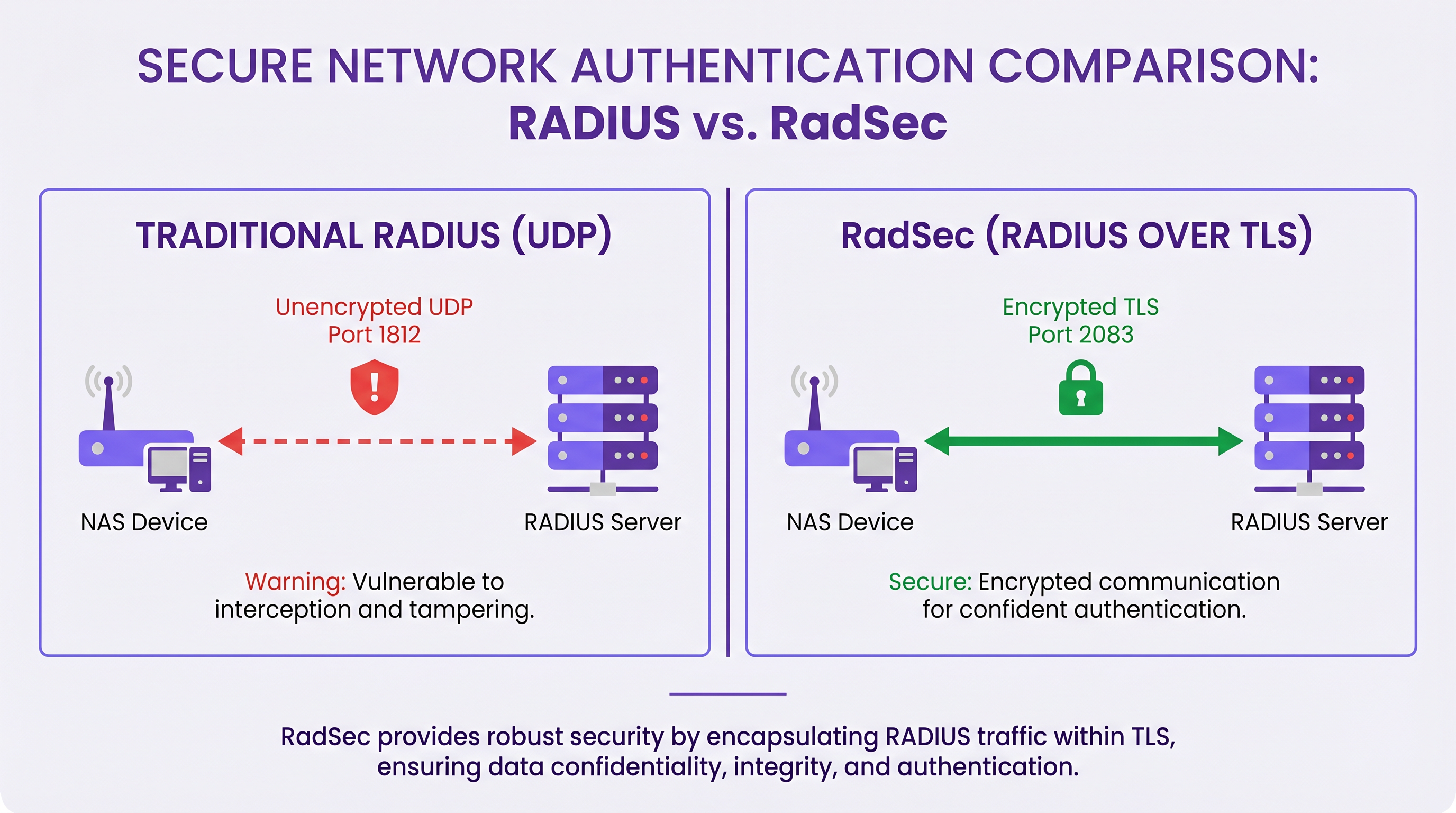
As principais características técnicas do RadSec incluem:
- Transporte TCP: O RadSec oferece entrega fiável e ordenada. Isto elimina a necessidade de retransmissões na camada de aplicação inerentes ao RADIUS UDP, que podem causar problemas em ambientes de alta latência.
- Encriptação Completa da Carga Útil: O pacote RADIUS completo — incluindo cabeçalhos e todos os atributos — é encriptado dentro do túnel TLS.
- Autenticação Mútua (mTLS): Tanto o servidor RADIUS quanto o dispositivo NAS autenticam-se mutuamente usando certificados X.509. Isto substitui o modelo fraco de segredo partilhado por uma robusta Infraestrutura de Chave Pública (PKI).
- Conexões Persistentes: Ao contrário do RADIUS UDP, que é sem conexão, o RadSec mantém uma conexão TCP persistente. Isto reduz a sobrecarga de estabelecer uma nova conexão para cada pedido de autenticação, o que é altamente eficiente para locais movimentados.
Nota: O RFC 7360 define RADIUS sobre DTLS (Datagram TLS), que utiliza UDP. Embora útil em cenários específicos de alto débito, o TLS sobre TCP permanece o padrão para implementações RADIUS na cloud empresarial.
Arquitetura em Ambientes Distribuídos
Numa implementação multi-site típica — como um fornecedor nacional de Saúde ou uma cadeia de centros de Transporte — o RadSec simplifica significativamente a arquitetura.
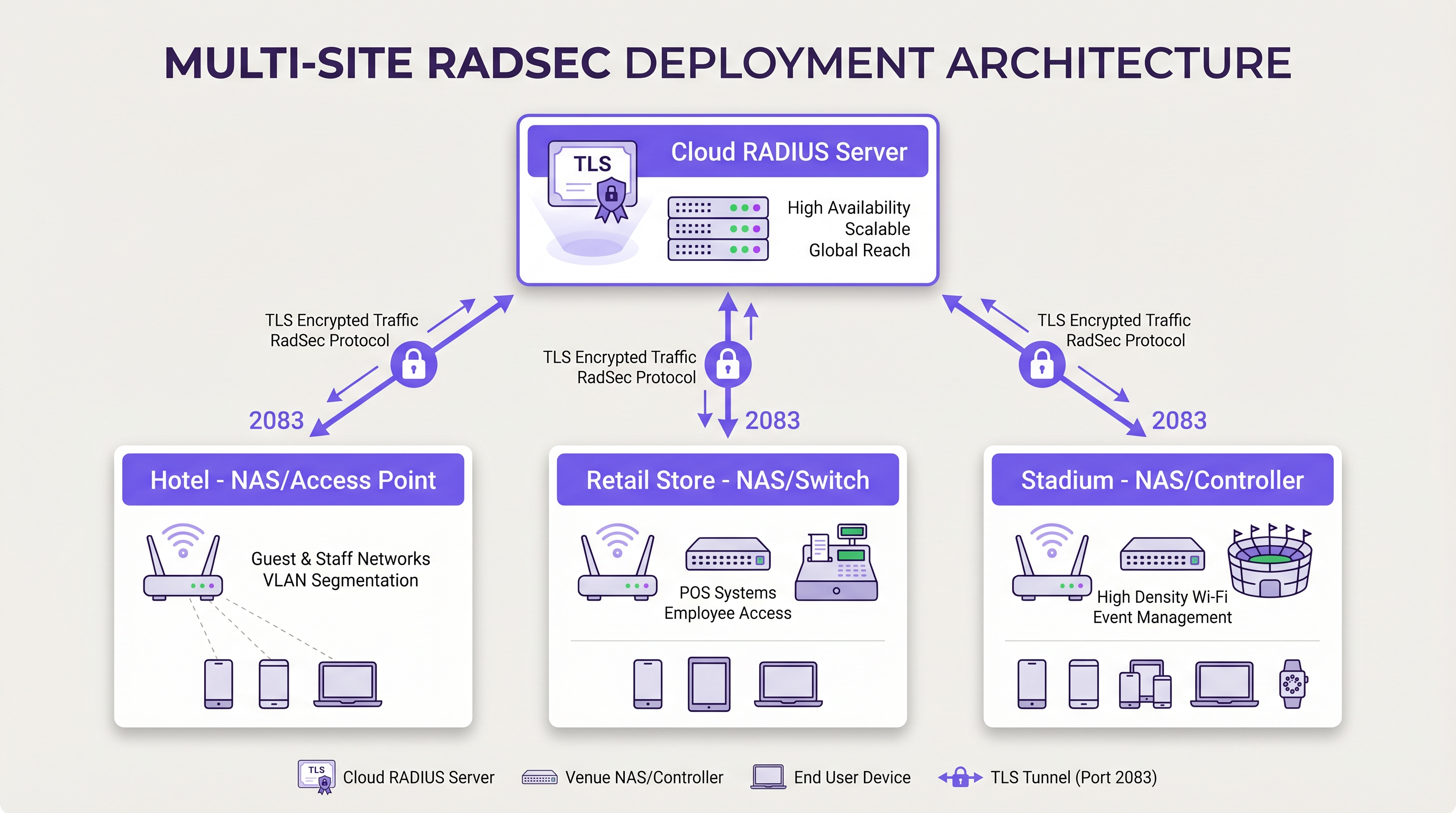
Em vez de construir malhas VPN IPsec complexas de cada filial de volta a um centro de dados central para proteger o tráfego RADIUS, cada dispositivo NAS estabelece uma conexão TLS RadSec direta pela internet com o fornecedor RADIUS na cloud. Este é um modelo de segurança na camada de aplicação que é mais limpo de implementar e mais fácil de resolver problemas do que as VPNs na camada de rede.
Guia de Implementação
A implementação do RadSec requer coordenação entre a infraestrutura de rede, autoridades de certificação e políticas de firewall. Siga estes passos neutros em relação ao fornecedor para uma implementação bem-sucedida.
1. Preparação da Infraestrutura de Certificados
O RadSec depende de mTLS. Precisa de certificados tanto para o servidor quanto para os clientes (dispositivos NAS).
- Certificado do Servidor: O seu fornecedor RADIUS na cloud (por exemplo, Purple) apresentará um certificado de servidor assinado por uma Autoridade de Certificação (CA) pública ou uma CA interna. Os seus dispositivos NAS devem ter o certificado raiz da CA instalado na sua loja de confiança para validar o servidor.
- Certificados de Cliente: Cada dispositivo NAS precisa de um certificado de cliente para se identificar ao servidor RADIUS. Gere-os através da sua PKI interna ou sistema de gestão de rede. Certifique-se de que utilizam chaves RSA de pelo menos 2048 bits ou ECDSA P-256.
2. Configuração da Firewall
O RadSec requer regras de saída específicas das suas interfaces de gestão NAS:
- Protocolo*: TCP
- Porta de Destino: 2083
- IP/FQDN de Destino: Os endereços dos seus servidores RADIUS primário e secundário na cloud.
- Inspeção Stateful: Certifique-se de que a firewall permite o tráfego de retorno para ligações TCP estabelecidas.
- Keepalives: Configure os valores de timeout TCP da firewall para serem mais longos do que o intervalo de keepalive do RadSec (tipicamente 60 segundos) para evitar quedas de ligação silenciosas.
3. Configuração do Dispositivo NAS (Fluxo de Trabalho Genérico)
Embora a sintaxe específica varie por fornecedor (Cisco, Aruba, Juniper, etc.), os passos de configuração lógicos são consistentes:
- Importar Certificado CA: Carregue o certificado CA que assinou o certificado do servidor RADIUS para o arquivo de confiança do NAS.
- Importar Certificado de Cliente: Carregue o certificado de cliente e a chave privada do dispositivo NAS.
- Definir Servidor RADIUS: Configure o IP/FQDN do servidor RADIUS.
- Ativar RadSec: Especifique TLS como o protocolo de transporte e defina a porta para 2083.
- Associar Certificados: Associe os certificados importados à configuração do servidor RadSec.
- Aplicar ao Perfil AAA: Adicione o servidor RadSec aos grupos de autenticação e contabilidade AAA relevantes.
4. Gestão de Dispositivos Legados (Proxy RadSec)
Nem todos os dispositivos NAS suportam RadSec nativamente. Para switches mais antigos ou pontos de acesso de nível de consumidor, implemente um proxy RadSec (como radsecproxy). O proxy reside na LAN local, aceita RADIUS UDP tradicional de dispositivos legados e encaminha-o através de um túnel TLS RadSec seguro para o servidor RADIUS na cloud.
Melhores Práticas
- Gestão do Ciclo de Vida dos Certificados: Implemente a renovação automática de certificados para dispositivos NAS. Uma expiração em massa de certificados de cliente causará uma interrupção generalizada da rede. Monitorize a validade dos certificados e alerte 90, 60 e 30 dias antes da expiração.
- Alta Disponibilidade: Configure sempre servidores RadSec primários e secundários. Como o estabelecimento de uma ligação TCP demora mais do que a transmissão de um pacote UDP, configure temporizadores de failover agressivos no NAS para mudar rapidamente para o servidor secundário se a ligação primária cair.
- TCP Keepalives: Ative os TCP keepalives no dispositivo NAS para detetar ligações inativas e evitar que as firewalls interrompam sessões ociosas. Um intervalo de 60 segundos é padrão.
- Validação Rigorosa de Certificados: Certifique-se de que os dispositivos NAS estão configurados para validar rigorosamente o certificado do servidor, incluindo a verificação do Subject Alternative Name (SAN) em relação ao hostname do servidor configurado. Não desative a validação de certificados em produção.
- Preparação para o Futuro: À medida que os padrões wireless evoluem, como os discutidos no nosso guia WiFi 6E vs WiFi 7: What Venues Need to Know , o volume de tráfego de autenticação aumentará. As ligações TCP persistentes do RadSec são mais adequadas para lidar com esta densidade do que o UDP.
Resolução de Problemas e Mitigação de Riscos
Quando as implementações RadSec falham, o problema raramente é o próprio protocolo RADIUS; quase sempre está relacionado com TLS ou TCP.
Modos de Falha Comuns
- Falhas no Handshake TLS (CA Desconhecida): O dispositivo NAS rejeita o certificado do servidor RADIUS porque a CA de assinatura não está no arquivo de confiança do NAS.
- Mitigação: Verifique a cadeia de CA exata usada pelo servidor e certifique-se de que as CAs raiz (e quaisquer intermédias) estão instaladas no NAS.
- Quedas de Ligação Silenciosas: A ligação RadSec é estabelecida com sucesso, mas os pedidos de autenticação expiram após um período de inatividade. Isto é geralmente uma firewall stateful a interromper a ligação TCP ociosa.
- Mitigação: Ative os TCP keepalives no NAS e verifique as configurações de timeout da sessão da firewall para a porta 2083.
- Desvio de Relógio: A validação de certificados TLS depende da hora exata do sistema. Se o relógio do dispositivo NAS estiver significativamente dessincronizado, ele avaliará certificados válidos como expirados ou ainda não válidos.
- Mitigação: Certifique-se de que todos os dispositivos NAS estão sincronizados com servidores NTP fiáveis antes de iniciar as ligações RadSec.
ROI e Impacto no Negócio
A transição para o RadSec proporciona um valor de negócio mensurável para além das melhorias técnicas de segurança:
- Conformidade e Redução de Riscos: O RadSec encripta os dados de autenticação em trânsito, satisfazendo diretamente os requisitos para PCI DSS v4.0 e GDPR. Isto mitiga os riscos financeiros e de reputação associados à interceção de credenciais.
- Eficiência Operacional: A substituição de VPNs IPsec complexas, de site-a-site, por RadSec de camada de aplicação reduz a sobrecarga de engenharia de rede. A resolução de problemas de uma ligação TLS a um fornecedor de cloud é significativamente mais rápida do que a depuração de encaminhamento VPN e negociações de fase IKE em centenas de filiais.
- Prontidão para a Cloud: O RadSec é a tecnologia facilitadora para a autenticação nativa da cloud. Ao adotá-lo, as organizações podem integrar-se perfeitamente com fornecedores de identidade modernos e plataformas como a Purple, reduzindo a pegada de servidores no local e os custos de licenciamento.
Definições Principais
RadSec
A protocol that encapsulates RADIUS authentication and accounting data within a Transport Layer Security (TLS) tunnel.
Used to secure authentication traffic over untrusted networks, replacing legacy UDP RADIUS.
mTLS (Mutual TLS)
An authentication process where both the client (NAS) and the server (RADIUS) verify each other's X.509 certificates during the TLS handshake.
Provides stronger security than the traditional RADIUS shared secret model by ensuring both endpoints are cryptographically verified.
NAS (Network Access Server)
The device that provides network access to users and acts as a RADIUS client. In modern networks, this is typically a wireless access point, switch, or wireless LAN controller.
The NAS is responsible for initiating the RadSec connection to the cloud RADIUS server.
PKI (Public Key Infrastructure)
The framework of roles, policies, hardware, software, and procedures needed to create, manage, distribute, use, store, and revoke digital certificates.
Essential for managing the certificates required by RadSec deployments across large estates.
TCP Keepalive
A mechanism that sends empty TCP packets over an idle connection to verify the connection is still active and to prevent stateful firewalls from dropping the session.
Crucial for maintaining persistent RadSec connections during periods of low authentication activity.
RadSec Proxy
A software service that acts as an intermediary, receiving traditional UDP RADIUS traffic from legacy devices and forwarding it over a secure RadSec TLS connection.
Used to bridge the gap in environments where older network hardware does not natively support RadSec.
X.509 Certificate
A digital certificate that uses the widely accepted international X.509 PKI standard to verify that a public key belongs to the user, computer or service identity contained within the certificate.
The cryptographic foundation used by RadSec to establish identity and encrypt the TLS tunnel.
EAP (Extensible Authentication Protocol)
An authentication framework frequently used in wireless networks and point-to-point connections.
EAP traffic (like EAP-TLS or PEAP) is encapsulated within RADIUS packets, meaning RadSec securely transports the EAP exchange.
Exemplos Práticos
A national retail chain with 500 locations is migrating from on-premise RADIUS servers to Purple's Cloud RADIUS. The existing architecture uses unencrypted RADIUS over UDP across a mix of MPLS and SD-WAN links. 450 locations have modern Aruba access points, while 50 locations use legacy hardware that does not support RadSec. How should the network architect design the new authentication transport?
The architect should implement a hybrid RadSec deployment. For the 450 locations with modern Aruba APs, configure native RadSec directly on the APs or local controllers. Install the root CA certificate of Purple's cloud RADIUS on the Aruba devices, and provision client certificates via the network management platform. Configure egress firewall rules for TCP 2083. For the 50 legacy locations, deploy a lightweight RadSec proxy (e.g., a small Linux VM or container running radsecproxy) at each site. The legacy APs will send standard UDP RADIUS to the local proxy, which will then encapsulate the traffic in a TLS tunnel to the Purple cloud.
During a RadSec deployment at a large conference centre, the network team observes that the NAS devices successfully authenticate users during busy periods, but fail to authenticate the first few users early in the morning. Packet captures show the NAS attempting to send RADIUS traffic, but receiving TCP RST packets from the firewall.
The issue is caused by the firewall's aggressive TCP session timeout dropping the idle RadSec connection overnight. The network team must configure TCP keepalives on the NAS devices for the RadSec connection, setting the interval to 60 seconds. Additionally, they should review the firewall's stateful inspection rules for TCP port 2083 and ensure the session timeout is greater than the keepalive interval.
Perguntas de Prática
Q1. You are designing the firewall policy for a new RadSec deployment connecting 50 branch offices to Purple's Cloud RADIUS platform. What specific egress rules must be configured on the branch firewalls?
Dica: Consider both the protocol and the stateful nature of the connection.
Ver resposta modelo
The branch firewalls must allow outbound TCP traffic on port 2083 originating from the NAS management IP addresses, destined for the IP addresses or FQDNs of the Purple Cloud RADIUS servers. Because TCP is stateful, the firewall will automatically allow the return traffic for established sessions. UDP ports 1812 and 1813 are not required for RadSec.
Q2. A junior engineer reports that a newly configured switch is failing to establish a RadSec connection with the cloud RADIUS server. The switch logs show: `TLS handshake failed: unknown CA`. How should you resolve this?
Dica: The switch does not inherently trust the certificate presented by the server.
Ver resposta modelo
You need to identify the Certificate Authority (CA) that issued the cloud RADIUS server's certificate. Once identified, obtain the public Root CA certificate (and any intermediate CA certificates) and import them into the switch's trust store. This allows the switch to cryptographically verify the server's identity during the TLS handshake.
Q3. Your organisation mandates that all network infrastructure must survive a WAN outage. If the internet connection to the cloud RADIUS server fails, what happens to the RadSec connection, and how does the NAS handle subsequent authentication requests?
Dica: Consider TCP connection states and standard RADIUS failover mechanisms.
Ver resposta modelo
When the WAN fails, the persistent TCP connection will eventually time out (or be explicitly reset if the local interface goes down). The NAS will mark the primary RadSec server as unreachable. If a secondary RadSec server is configured (e.g., in a different geographic region), the NAS will attempt to establish a new TLS connection to it. If all RADIUS servers are unreachable, new authentications will fail. However, users who are already authenticated and connected will typically remain connected until their session expires or they roam, as RADIUS is only involved during the initial authentication and periodic re-authentication phases.
Continue a ler esta série
Políticas de WiFi para Colaboradores no Retalho: Proteger as Redes Back-of-House
Este guia aborda os requisitos técnicos e de políticas críticos para proteger as redes WiFi back-of-house no retalho - desde a segmentação de VLAN e conformidade com o PCI DSS 4.0 até à gestão de BYOD de funcionários na loja. Oferece aos gestores de TI, arquitetos de rede e diretores de operações um plano prático e neutro em termos de fornecedor que podem implementar já este trimestre.
O Futuro da Segurança Wi-Fi: NAC Orientado por IA e Deteção de Ameaças
Este guia abrangente explora a evolução da segurança Wi-Fi empresarial, desde o WPA2 legado até ao Network Access Control (NAC) orientado por IA e deteção de ameaças. Concebido para líderes de TI, oferece estratégias de implementação acionáveis para proteger ambientes de alta densidade, como retalho, hotelaria e estádios, utilizando as redes baseadas em identidade da Purple.
Gerir a Segurança de Dispositivos IoT com NAC e MPSK
Este guia técnico detalha como os espaços empresariais podem proteger dispositivos IoT sem interface de utilizador (headless) utilizando a arquitetura Multiple Pre-Shared Key (MPSK) e o Network Access Control (NAC). Fornece passos de implementação acionáveis para alcançar a microssegmentação, conter os raios de explosão de segurança e manter a conformidade sem sacrificar a escalabilidade.